What's inside
- Where to Buy a Camera System That Never Phones Home
- Key Takeaways
- Quick Picks
- How Did We Choose Systems That Work With the Router Switched Off?
- What Actually Changes When a Camera System Has No Internet?
- How Do You Install a Local-Recording System Well?
- PoE, Analog, or Wireless-to-Its-Own-Recorder: Which Wiring Discipline Fits Your Building?
- How Do the Six Local Systems Compare Side by Side?
- How Much Archive Do You Actually Need, and How Do You Protect It?
- What Mistakes Do Buyers of Offline Systems Keep Making?
- Which Properties Suit Which System? Three Walked Examples
- Final Recommendation
- Frequently Asked Questions
- Related Guides
As an Amazon Associate I earn from qualifying purchases. This post may contain affiliate links at no extra cost to you.
gizmoverdict.com is reader-supported. When you buy through links on our site, we may earn an affiliate commission.
Where to Buy a Camera System That Never Phones Home
The best security cameras that do not need internet access solve a problem that has nothing to do with picture quality. Plenty of households have a gate at the end of a long drive, a barn with no router in it, a rental property between tenants, or a workshop where the broadband simply never arrived. Others have the internet and would rather their cameras never touch it, because a camera that records to a hard drive in the hallway cannot be reached from another continent, cannot be switched off by a distant server outage, and does not stop working the month a provider decides to change its terms. If either of those describes your situation, the six systems in this guide are built around the same honest architecture: cameras wired or paired to a recorder that sits in your building, footage stored on a hard drive you physically own, and a monitor or local screen as the primary way of watching.
That architecture has consequences worth understanding before any model names appear. A system that records locally will keep recording through an internet outage, a router failure, and a cancelled broadband contract, because none of those things are in its signal path. What it will not do, in most cases, is send a tidy phone alert the moment something moves, because alerts are a cloud habit. Some of these kits can optionally use an internet connection for remote viewing when one exists, but the word that matters is optionally: the recording, the detection, and the playback all happen on the box in your cupboard. This guide separates the fully wired kits, where cameras draw power and send video down the same cable, from the one wireless kit whose cameras talk to their own recorder over a private radio link rather than your home network. Both approaches keep the internet out of the loop. They differ in how much cable you are willing to run, and that trade shapes almost every recommendation below.
Key Takeaways
- Local recording is the whole point: every pick here stores footage on a hard drive inside an NVR or DVR in your building, so recording continues with the router unplugged, the broadband cancelled, or the property empty for months.
- Wired PoE kits are the most self-contained option — the two REOLINK systems and the Lorex recorder move video and power down one cable per camera, with no Wi-Fi involved at any point in the chain.
- Analog DVR kits from ZOSI and ANNKE reuse the older coaxial style of wiring, include hard drives of 500GB and 2TB respectively per their listings, and state no monthly fees in the ZOSI title outright.
- The Hiseeu kit is the exception that proves the rule: its cameras are wireless, but they pair with their own NVR and its 1TB drive rather than depending on your internet connection to record.
- Channel counts describe capacity, not cameras in the box: the kits here are 8-channel systems shipping with four cameras, so the recorder has room to grow before it needs replacing.
- Detection has moved on-device: person, vehicle, and even pet detection appear in these listing titles, which means the recorder itself does the thinking that cloud cameras usually rent out to a server. That is what makes event-based searching possible at a monitor in the hallway, with no account and no connection involved.
Quick Picks
| Pick | Badge | Why it earns its place |
|---|---|---|
| REOLINK RLK8-800D4 4K PoE Kit | The sharpest wired kit | Four 4K turret cameras and a 2TB drive in an 8-channel NVR, with person and vehicle detection handled by the recorder itself. |
| REOLINK RLK8-520D4 5MP PoE Kit | The balanced PoE choice | 5MP cameras that add pet detection to the person and vehicle alerts, trading a little resolution for longer retention on the same 2TB drive. |
| ZOSI 8CH 3K Lite DVR Kit | The straightforward DVR kit | Four 2MP analog cameras, a 500GB drive, and a listing that states no monthly fees in plain language. |
| ANNKE 8CH 3K DVR Kit | The colour-at-night DVR | 5MP analog cameras with colour night vision, smart dual light, built-in microphones, and a 2TB drive for long local archives. |
| Lorex N841 4K NVR System | The recorder-first system | An 8-channel 4K NVR with a 1TB drive and smart motion detection, built as the hub of an IP camera setup you expand on your own terms. |
| Hiseeu 3MP Wireless NVR Kit | The no-cable-runs kit | Four plug-in 3MP cameras that link wirelessly to their own 10-channel NVR and 1TB drive, sparing you the long cable runs entirely. |
How Did We Choose Systems That Work With the Router Switched Off?
The first test was architectural, and it eliminated most of the camera market. A pick had to record to local storage as its primary behaviour, not as a fallback mode buried in an app. That meant a recorder in the box or at the centre of the system, a hard drive doing the archiving, and detection that happens on the recorder or the camera rather than on a remote server. Cloud-first cameras with an SD card slot did not qualify, because their local recording is a side feature and their detection, playback, and setup usually still lean on an account and a connection.
The second test was completeness. A no-internet system has to work on the day it is installed, in a building where the only screen might be a monitor borrowed from a desk. We favoured kits that bundle cameras, recorder, and drive together, because a household without broadband is often a household that cannot casually order the one missing component and wait. Where a pick is centred on the recorder itself, as the Lorex is, that is stated plainly so you can budget for cameras as a separate decision.
The third test was honesty about the wireless exception. One kit here uses Wi-Fi, but it uses it the way a baby monitor does: a private link between cameras and their own recorder, not a dependency on your broadband. We kept it in the guide because running cable is the single biggest reason people abandon wired installs halfway, but it is labelled as the wireless option everywhere it appears, and the wired kits remain the recommendation for anyone who wants radio out of the picture entirely.
A fourth, quieter test ran underneath the others: could the system be understood from its own listing? Kits whose titles state their channel count, drive size, camera resolution, and detection categories plainly earned trust, because a buyer without internet at the property is often a buyer who cannot casually browse for clarification later. Where a listing leaves something unstated — the Hiseeu’s detection, for instance — the comparison table in this guide records the silence rather than filling it with a guess.
What Actually Changes When a Camera System Has No Internet?
The recording does not change at all, and that surprises people. A wired kit records around the clock to its hard drive whether or not a network cable ever touches the recorder, because continuous recording is the recorder’s native job. What changes is everything around the recording. There are no push notifications, because there is no path from your hallway cupboard to your phone. Playback happens at the recorder with a mouse and a monitor, or on a screen on the same premises. Firmware updates, if you want them, arrive the old way, on a USB stick. Timekeeping is the recorder’s own clock, set by hand and checked the way you would check a wall clock after a power cut.
Think through whether that trade fits your property before choosing hardware. For a farm building checked every morning, a gate camera reviewed after an incident, or a holiday property visited monthly, local playback is genuinely sufficient, and the privacy and reliability gains are real. For a house you live in and want live phone alerts from, a purely local system asks you to give up the alert-driven experience entirely, and no recorder setting brings it back. Several of these kits can use an internet connection for remote viewing if one is later installed, which makes them a reasonable bridge: local by necessity today, connected by choice tomorrow, with the archive never leaving the building either way.
There is a subtler change worth naming: responsibility moves in-house. A cloud camera’s failures are someone else’s outage notice; a local system’s failures are a full drive nobody checked, a clock that drifted, a camera view slowly colonised by a growing hedge. None of these is difficult, and the maintenance section later in this guide turns them into a five-minute monthly habit. But a buyer who wants security to be entirely someone else’s department should feel the weight of that difference now, at the reading stage, rather than during the first playback that matters.
Storage maths deserves a paragraph of its own, because without a cloud plan the hard drive is the entire memory of the system. Retention depends on resolution, camera count, and whether you record continuously or only on motion. A 2TB drive under four cameras recording continuously at high resolution holds days rather than months; motion-only recording stretches the same drive dramatically, which is why the on-recorder person and vehicle detection in these listings matters practically, not just as a feature bullet. When the drive fills, the recorder overwrites the oldest footage, so the honest question to settle at install time is how far back you might ever need to look, and to set recording modes to protect that window.
How Do You Install a Local-Recording System Well?
Start with the recorder’s home, because everything radiates from it. It needs mains power, ventilation, a monitor at least for setup, and a position that is not the first place a burglar would look — a locked cupboard or a loft hatch beats a shelf beside the television. From there, wired PoE kits run one network cable per camera back to the recorder or its switch, and the craft is in the runs: keep them inside walls, lofts, and conduit where you can, leave a little slack at each end, and test every cable with the camera attached before the ladder goes away. Analog DVR kits follow the same discipline over their coaxial-style runs, with separate attention to power supplies at the camera ends.
Camera placement rewards patience more than height. Mount high enough to deter casual tampering and to see over parked cars, but angle for faces and number plates at the points where people actually pass: the gate line, the door approach, the gap between buildings. Walk the property at night before final tightening, because a yard light or a reflective wall can ruin an otherwise good position, and a camera recording locally gives you no remote second chance to notice a bad angle from your phone — you check it at the monitor, walk out, adjust, and check again. That small ritual, done once, is the difference between footage that identifies someone and footage that merely confirms a shape went past.
Finish with the unglamorous settings that decide whether the archive is useful: set the recorder’s clock and check it, turn on the detection categories you care about, decide continuous versus motion recording per camera rather than globally, and label each channel in the recorder’s menu with a plain name like the yard or the lane. Then pull one clip from the drive and play it start to finish. A system you have never retrieved footage from is a hypothesis, not a security system, and the retrieval path is exactly the part a no-internet setup cannot rehearse for you later.
Choose the recorder’s screen with the same practicality. A small dedicated monitor that lives beside the recorder beats borrowing the household television, because the day you need footage quickly is the day someone else is watching a film on the big screen. Keep a mouse with the recorder, note the admin password somewhere physically secure rather than in a phone that may be the thing stolen, and write the install date on the recorder itself. Six months later, when a camera view has crept or a drive needs attention, those small artefacts of an organised install are what turn a frustrating afternoon into a ten-minute job. Offline systems ask a little more of their owners than cloud cameras do; they repay it by never asking permission from a server to show you your own yard.
PoE, Analog, or Wireless-to-Its-Own-Recorder: Which Wiring Discipline Fits Your Building?
Every system in this guide records locally, but the three wiring disciplines behave differently in real buildings, and choosing between them is the decision the rest of the purchase hangs on. Power over Ethernet, used by both REOLINK kits and by IP cameras hung off the Lorex recorder, sends video and power down a single network cable. That single fact reorganises an installation: a camera can live anywhere a cable can reach, including the far end of a barn or the top of a gate post, without an electrician adding a socket. Network cable is cheap, tolerant of long runs within its rated limits, and easy to terminate with basic tools. Its weakness is that the runs themselves are the work — through lofts, along walls, under eaves — and in a finished house that work is measured in evenings, not hours.
Analog DVR systems, the ZOSI and ANNKE kits here, carry video over coaxial-style cable in the tradition of decades of CCTV. The discipline’s great asset is the installed base: millions of buildings already have analog runs in their walls, and a DVR kit can often reuse them, turning a replacement into an afternoon rather than a project. Analog is also indifferent to network configuration entirely — there is nothing to address, assign, or misconfigure, which suits owners who want the recorder to be an appliance rather than a small computer. Its costs are the separate power arrangements at each camera and a ceiling on how the format evolves, though the 5MP ANNKE cameras in this guide show how far the old wiring can be pushed.
The Hiseeu’s approach — cameras paired wirelessly to their own recorder — removes the video cable and keeps the power cable. It is the only discipline here whose feasibility can be tested before purchase with any honesty: stand where the recorder will live, consider what stands between it and each camera position, and count the walls, floors, and metal surfaces the signal must cross. One internal wall is nothing; a foil-lined extension, a steel barn, and eighty metres of wet garden is a different proposition. The right mental model is that wireless trades installation labour for placement constraints, and whether that trade profits you depends entirely on the building. A compact brick house profits. A sprawling stone farmhouse with outbuildings usually does not, and its owner should read the PoE sections of this guide twice.
There is also a security texture to each discipline that rarely appears on packaging. A cut network cable and a cut coaxial cable are equally silent failures, but a wired camera cannot be interfered with from the street, while any radio link can in principle be jammed or crowded. Against that, a wired system’s recorder concentrates all footage in one box that must be physically protected, whereas the discipline matters less than the cupboard. None of this should frighten a household buyer; it should simply be weighed by anyone protecting something genuinely tempting, like a workshop full of tools or a yard full of machinery, where the ANNKE’s microphones and colour night vision, or the 4K REOLINK’s detail at the gate, may matter more than the wiring philosophy underneath them.

REOLINK RLK8-800D4 4K PoE Kit — The sharpest wired kit
This is the kit to beat for a property where cable runs are possible and picture detail matters. Four turret cameras record at 4K into an 8-channel NVR fitted with a 2TB hard drive, and each camera is powered over the same network cable that carries its video, so a camera at the far end of a barn needs one run, not a run plus a socket. Person and vehicle detection are named in the listing, and they happen at the recorder, which means the system can be set to mark and prioritise the events that matter without any server being consulted. For a rural property, a small business yard, or a house whose owner simply refuses cloud dependence, this is the most complete expression of the local idea in the guide.
The headroom is the other half of its appeal. Eight channels with four cameras fitted leaves four positions open, and on a property that grows — a second gate, a fuel store, a new outbuilding — the recorder absorbs the growth instead of being replaced. The 4K resolution earns its keep at exactly the distances wired properties tend to involve: a long drive, a wide yard, a plate at a gate. The honest cost is retention, because four 4K streams recording continuously will cycle a 2TB drive quickly, so plan on motion-based recording for the quieter angles from the start rather than discovering the overwrite window after an incident.
- Format: 8-channel NVR kit with four wired PoE turret cameras included
- Resolution: 4K / 8MP per the listing title
- Storage: 2TB hard drive fitted, recording locally around the clock
- Detection: person and vehicle detection, handled on the recorder
- Codec: H.265 named in the listing, which stretches drive retention
- Power: cameras powered over the network cable (PoE)
Strengths
- Highest stated resolution in this guide, suited to gates and long drives where detail at distance decides usefulness.
- Single-cable cameras make remote outbuildings practical, since no mains socket is needed at the camera position.
- Four spare channels mean the recorder survives the property’s next expansion instead of being swapped out.
Trade-offs
- Continuous 4K recording cycles the 2TB drive fast; motion recording is close to mandatory on quiet angles.
- Running four long cable runs is a real weekend of work, and rented properties may not permit it.
- Turret cameras are conspicuous, which deters some intruders but does not suit a façade where discretion matters.
Best for: a farm, yard, or detached house with long sight lines, where the recorder can live indoors and cables can be run once and forgotten.
Not suited for: a flat in a listed building where drilling cable routes through shared walls is not permitted.

REOLINK RLK8-520D4 5MP PoE Kit — The balanced PoE choice
The 5MP sibling trades the flagship’s resolution for a subtler advantage: its listing adds pet detection to the person and vehicle categories. On a smallholding or a house with animals, that distinction is not a gimmick. A system that can tell the recorder a dog crossed the yard lets you search and mark footage by the kind of event it was, and it reduces the hours of irrelevant motion that a purely movement-triggered archive accumulates. The rest of the formula matches its bigger brother: four wired PoE cameras, an 8-channel NVR that the listing describes as 4K-capable, and a 2TB drive doing all the remembering locally.
Retention is where this kit quietly wins the comparison shoppers rarely run. Lower-resolution streams take less space per hour, so the same 2TB drive reaches further back in time, and for many properties the extra days of archive are worth more than extra pixels on a gate that is only twenty metres away. The cameras remain single-cable PoE units, so installation effort is identical to the 4K kit — the decision between them is purely about the distances involved and how much archive depth you want. Choose this one when your longest view is a garden or a courtyard rather than a lane, and when the animals on the property are part of daily life rather than an occasional nuisance in the footage.
- Format: 8-channel NVR kit with four wired PoE cameras included
- Resolution: 5MP cameras per the listing title
- Storage: 2TB hard drive fitted for local recording
- Detection: person, pet, and vehicle detection named in the listing
- Recorder: described in the listing as a 4K 8-channel NVR
- Power: cameras powered over the network cable (PoE)
Strengths
- Pet detection is genuinely useful on properties with animals, separating livestock and dogs from intruders in the archive.
- Smaller streams mean the 2TB drive holds a longer window of history than the 4K kit’s drive does.
- Same one-cable installation and four spare channels as the flagship, so nothing about the wiring plan changes.
Trade-offs
- Less fine detail at long range, so a distant plate is more likely to stay unreadable.
- The recorder’s 4K capability is unused by the bundled cameras unless you add higher-resolution ones later.
- Still a full wired install, with the same ladder-and-drill commitment as any PoE kit.
Best for: a smallholding or family house with pets and moderate distances, where archive depth matters more than maximum detail.
Not suited for: a haulage yard needing plates read across forty metres of tarmac at night.

ZOSI 8CH 3K Lite DVR Kit — The straightforward DVR kit
ZOSI’s kit represents the analog branch of the family, and its listing makes the pitch in the plainest terms in this guide, including the words no monthly fees in the title itself. Four 2MP cameras connect to an 8-channel DVR with a 500GB hard drive, recording around the clock in the H.265+ format the title names. Analog wiring is the older discipline — video over coaxial-style cable with power arranged at the camera end — and it keeps a loyal following for a practical reason: it is simple, well understood by installers, and tolerant of long runs. The listing also names AI human and vehicle detection, so the DVR, like the NVRs above, does its own event sorting without outside help.
Judge this kit by the job it is sized for. The 500GB drive is the smallest archive here, and paired with four cameras it suits motion-based recording on a compact property — a house and garden, a small shop, a lock-up — rather than continuous recording across a sprawling site. The 2MP resolution reads faces and plates at doorway and driveway distances, not across fields. Within those honest limits it is a coherent, self-contained package: everything in one box, no account, no network dependency, and a recorder format that any local installer has handled for years. Buyers replacing an ageing analog system will also find the wiring philosophy familiar rather than a new craft to learn.
- Format: 8-channel DVR kit with four wired analog cameras included
- Resolution: 2MP cameras per the listing title
- Storage: 500GB hard drive fitted
- Detection: AI human and vehicle detection named in the listing
- Codec: H.265+ named in the listing, for longer retention per gigabyte
- Fees: listing states no monthly fees
Strengths
- The no-fees promise is printed in the listing itself, matching the whole point of a local system.
- Analog runs are forgiving and familiar, and existing coaxial wiring from an older system may be reusable.
- Human and vehicle detection on the DVR keeps motion archives searchable without any cloud account.
Trade-offs
- The 500GB drive is the tightest archive here, so continuous recording across all four cameras cycles it quickly.
- 2MP detail gives up at distance; this is a doors-and-driveways kit, not a perimeter kit.
- Analog cameras need power arranged at their positions, unlike single-cable PoE.
Best for: a compact house, shop, or lock-up garage where the cameras sit within ordinary driveway distances of the building.
Not suited for: a warehouse perimeter where the far fence line sits well beyond comfortable 2MP range.

ANNKE 8CH 3K DVR Kit — The colour-at-night DVR
ANNKE’s DVR kit pushes the analog format harder than the ZOSI does. Its four cameras are 5MP units — the listing gives their figure as 2960 by 1665 — with colour night vision, a smart dual light arrangement, built-in microphones, and an IP67 rating, all recording to an 8-channel DVR with a 2TB drive. Colour at night is the headline because it changes what footage can prove: the colour of a jacket or a car is often the detail that turns a recording from a timeline into an identification. The built-in microphones add a second channel of evidence at doors and gates, where voices and vehicle sounds carry information a silent picture cannot.
The 2TB drive matters more here than the spec sheet suggests, because 5MP analog streams are hungry and colour night recording tends to run through the hours when a property is most at risk. With four spare channels on the DVR, the kit also leaves the same growth room as the PoE systems. The installation remains analog discipline — video cable plus power at each camera — so it suits a property where that wiring already exists or where an installer is doing the runs. For a house whose previous system was analog and whose owner wants visibly better night evidence without rethinking the whole architecture, this is the natural step up, and it keeps every byte of footage inside the building while doing it.
- Format: 8-channel DVR kit with four wired analog cameras included
- Resolution: 5MP (2960 by 1665) cameras per the listing title
- Storage: 2TB hard drive fitted
- Night vision: colour night vision with smart dual light, per the listing
- Audio: built-in microphone on the cameras, per the listing
- Rating: IP67 stated in the listing title
Strengths
- Colour night footage captures clothing and vehicle colours that monochrome infrared throws away.
- Microphones add sound evidence at entrances, useful for disputes as much as for break-ins.
- The 2TB drive gives 5MP recording a workable archive window, with four channels still spare.
Trade-offs
- Colour night vision depends on its light arrangement, so pitch-black rural positions may not show its best side.
- Analog wiring still needs power at each camera, adding cabling the PoE kits avoid.
- Microphone recording carries legal and courtesy considerations with neighbours that silent cameras do not.
Best for: a house or small business upgrading from an older analog system, where night-time identification is the priority.
Not suited for: a remote barn with no ambient light at all and cameras expected to identify faces in total darkness.
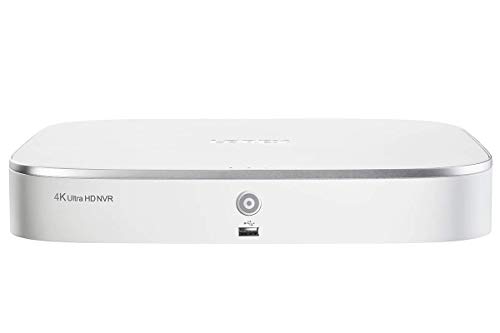
Lorex N841 4K NVR System — The recorder-first system
Read this listing carefully, because it is centred on the recorder: an 8-channel 4K NVR with a 1TB hard drive, smart motion detection, and voice control, presented as the hub of an IP camera system. That makes it a different kind of purchase from the four-camera kits around it. You are buying the brain first — a recorder from an established security brand, with capacity for eight IP cameras — and choosing cameras to hang off it as a separate decision. For someone building a local system gradually, or replacing a failed recorder while keeping existing compatible cameras, that is exactly the right shape of product, and its local-recording nature is not in question: the drive is in the box, and the archive stays on your shelf.
The discipline this pick demands is budgeting honesty. The total cost of a working system includes cameras, cable, and installation on top of the recorder, and the 1TB drive is the size to watch if you plan to run many cameras at 4K — retention shrinks as channels fill, and a drive upgrade may belong in the plan from the start. In return you get freedom the kits cannot offer: camera models chosen per position, a wide-angle unit at the yard, a sharper unit at the gate, all answering to one recorder. For a technically confident buyer building a no-internet system piece by piece, or a small business with an installer on call, that freedom is the point. For a first-time buyer wanting cameras recording by Sunday, one of the complete kits above is the straighter path.
- Format: 8-channel 4K NVR, the recorder at the centre of an IP system
- Storage: 1TB hard drive fitted
- Detection: smart motion detection named in the listing
- Control: voice control named in the listing
- Cameras: chosen separately to suit each position — verify the bundle contents on the listing before ordering
- Channels: eight, for a system built up over time
Strengths
- Recorder-first buying lets each camera position get the camera it actually needs, rather than four identical units.
- Eight channels and a 4K ceiling give a local system room to grow for years.
- An established security brand’s recorder suits buyers who value a supported, documented hub.
Trade-offs
- Cameras are a separate purchase decision, so the box alone does not watch anything on day one.
- The 1TB drive is modest for a full eight-camera 4K deployment and may need upgrading early.
- Building a system from components asks more knowledge than opening a complete kit.
Best for: a confident builder or small business assembling a local IP system in stages, or replacing a recorder while keeping cameras.
Not suited for: a first-time buyer who needs four cameras recording this weekend from a single box.
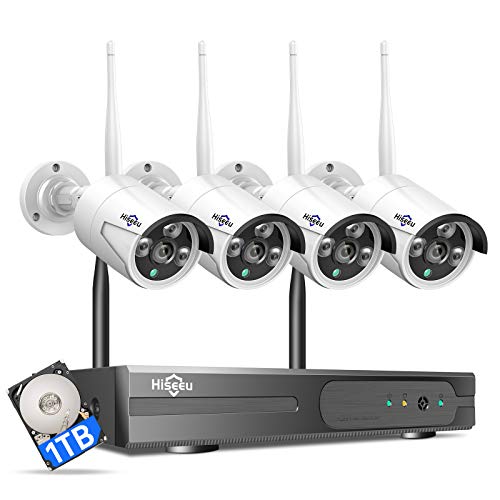
Hiseeu 3MP Wireless NVR Kit — The no-cable-runs kit
This kit answers the objection that stops most wired installs: the cables. Its four 3MP cameras are wired for power at their positions but send their video wirelessly to a dedicated NVR with a 1TB drive, and the listing describes that recorder as expandable to 10 channels and 4K-capable. The crucial point for this guide is what the wireless link is not: the cameras pair with their own recorder rather than depending on your broadband to function, so the system records locally around the clock with no internet service involved. The listing states no monthly fee, and the cameras carry an IP66 rating for outdoor positions.
Wireless video has physical rules that no brand escapes. The link between each camera and the recorder weakens through walls, metal cladding, and distance, so this kit suits compact properties where the recorder can sit reasonably central — a house, a smallholding’s core buildings, a workshop and its yard. Each camera still needs a power outlet within cable reach, which is the constraint buyers most often forget: wireless video is not wireless power. Within those limits, the appeal is enormous for rented buildings, listed façades, and anyone whose alternative to wireless is no system at all. Test each camera’s live view at the recorder from its intended position before drilling anything, and let the signal, not optimism, choose the final mounting points.
- Format: wireless camera kit with a dedicated NVR; cameras are plug-in powered
- Resolution: 3MP cameras per the listing title
- Storage: 1TB hard drive fitted, recording locally
- Recorder: expandable to 10 channels, described as 4K-capable in the listing
- Rating: IP66 stated for the cameras in the listing title
- Fees: listing states no monthly fee
Strengths
- No long video cable runs, which makes it viable in rented or protected buildings where wiring is forbidden.
- Recording is local to the NVR’s drive, so the system works with no internet service at the property.
- Ten-channel capacity leaves the most expansion room of any kit in this guide.
Trade-offs
- Wireless links fade through thick walls and metal buildings; placement is dictated by signal, not preference.
- Every camera still needs mains power nearby, which rules out truly remote positions.
- A busy radio environment can compete with the cameras’ link in ways wired systems never face.
Best for: a rented house or compact smallholding where cable runs are impractical but power outlets sit near the camera positions.
Not suited for: a steel-clad grain store two hundred metres from the recorder, where a wireless link has no honest chance.
How Do the Six Local Systems Compare Side by Side?
| Pick | Recorder | Cameras in box | Drive | Connection | Detection named in listing |
|---|---|---|---|---|---|
| REOLINK RLK8-800D4 | 8CH NVR | 4 turret, 4K | 2TB | Wired PoE | Person, vehicle |
| REOLINK RLK8-520D4 | 8CH NVR | 4 wired, 5MP | 2TB | Wired PoE | Person, pet, vehicle |
| ZOSI 8CH 3K Lite | 8CH DVR | 4 analog, 2MP | 500GB | Wired analog | Human, vehicle |
| ANNKE 8CH 3K | 8CH DVR | 4 analog, 5MP | 2TB | Wired analog | Human, vehicle |
| Lorex N841 | 8CH 4K NVR | Recorder-centred; cameras separate | 1TB | Wired IP | Smart motion |
| Hiseeu 3MP Kit | Expandable 10CH NVR | 4 wireless, 3MP | 1TB | Wireless to its own NVR | Not stated in the listing title — verify with the maker’s documentation |
Read the table as three decisions stacked together. The first is wiring: PoE for single-cable simplicity, analog for familiarity and reuse, wireless only where runs are impossible. The second is archive depth, where drive size and resolution pull in opposite directions — the two 2TB kits with the sharper cameras still need motion recording discipline, while the 5MP REOLINK quietly holds the longest practical history. The third is completeness: five of these are systems that record on the day they are installed, and the Lorex is a foundation to build on. None of the six needs an internet connection to do its core job, which is why they are here; the differences are about your building, your distances, and your patience for cable.
How Much Archive Do You Actually Need, and How Do You Protect It?
Work the retention question backwards from your life rather than forwards from a spec sheet. A household that is home every night reviews incidents within a day or two, and even a modest drive is an ocean. A property visited monthly — a holiday cottage, a let between tenants, a relative’s empty house — needs the archive to span the whole absence plus a margin, because the incident you care about may have happened the day after you left. That single difference can flip a recommendation: the ZOSI’s 500GB drive is perfectly rational for the lived-in house and quietly wrong for the empty one, while the 2TB kits earn their keep precisely in the unattended case. Set the recording mode to match the answer, per camera: continuous for the entrance that matters, motion-only for the quiet gable end, and detection categories switched on so the recorder’s event list, not your patience, does the searching.
Protecting the archive is the second half of the job, and offline systems concentrate the mind because there is no cloud copy to fall back on. The recorder’s physical safety comes first: out of sight, ventilated, and ideally in a locked or awkward space, since a stolen recorder takes the evidence with it. Power comes second — a brief outage merely pauses recording, but an unattended building with an unreliable supply deserves a battery backup sized to ride out the ordinary cuts. Third comes the habit nobody buys a camera for: a monthly five-minute check. Confirm the clock is right, confirm each camera’s view is unchanged and unobstructed, play back one recent clip from each channel, and glance at how far back the archive currently reaches. Spiders, shifted mounts, a failed drive, a camera knocked by a ladder — every one of these is invisible until the day you need the footage, and the monthly check is the only mechanism an offline system has for telling you. Connected cameras nag you through an app; local systems reward owners who build the nagging into their own routine.
One more protection is legal rather than technical. Cameras that overlook neighbours, a shared lane, or a public path carry responsibilities that vary by place, and the ANNKE’s microphones raise the stakes because recording sound is treated more strictly than recording pictures in many jurisdictions. Keep views tight to your own property where you can, be ready to explain the system to a neighbour before they have to ask, and remember that footage you may one day hand to police or an insurer is worth more when the system that made it was plainly reasonable. An offline archive is the most private form of camera security there is; keeping it proportionate is how it stays that way.
What Mistakes Do Buyers of Offline Systems Keep Making?
The commonest mistake is expecting phone alerts from a system bought specifically to avoid the internet. It sounds obvious written down, yet a steady stream of disappointed reviews comes from buyers who installed a local kit and then waited for notifications that no component in the box can send. Decide before ordering how you will actually use the footage: most offline owners check the recorder after an event, on a schedule, or when something looks disturbed — and that rhythm has to be acceptable, or a connected system belongs on the list instead.
The second mistake is undersizing the archive. Buyers compare drive sizes as if they were abstract numbers, then set every camera to record continuously at maximum resolution and discover the recorder overwrites last Tuesday before this Tuesday ends. Work backwards from the incident you fear: if you might return from two weeks away to find damage, the system must retain two weeks, and the levers are motion recording, detection-based marking, and honest resolution choices per camera. The third mistake is forgetting the recorder itself in the security plan — an unprotected recorder in an obvious place hands an intruder the evidence to take with them. Give it a discreet, ventilated, preferably locked home, and remember that a power cut stops any of these systems unless you add battery backup, a point worth weighing for remote buildings.
Finally, buyers of wireless kits mistake the word for freedom. The Hiseeu’s cameras still drink mains power, and their radio link still obeys walls and distance. Walk the positions first, check the live picture at the recorder, and only then commit to the drill.
Which Properties Suit Which System? Three Walked Examples
Consider a stone farmhouse with a yard, a lane entrance sixty metres from the door, and a barn beyond it. Distances rule this property: the gate camera must read a plate far away, the barn camera has no socket near its mounting point, and the whole site may sit empty on market days. The 4K REOLINK kit is the natural answer — PoE solves the barn’s power problem in the same cable that carries its picture, the resolution earns its keep at the lane, and the 2TB drive with motion recording on the quieter angles spans the empty days. The ANNKE would serve the yard well but its analog power arrangements complicate the barn, and the Hiseeu’s wireless link across that much stone and open wet ground is a gamble the property does not need to take.
Now a terraced house on a street with no off-road parking, where the cameras watch a front door, a small rear yard, and the stretch of pavement where the car sleeps. Every distance here is short, the recorder lives in a hall cupboard, and the owner is home nightly. This is the ZOSI’s home ground, or the 5MP REOLINK’s if the family dog spends its days crossing the yard and pet detection would keep the event list honest. The 500GB drive, cycled by motion recording, holds more history than this household will ever search, and money not spent on resolution buys the lockable cupboard and the battery backup that protect the archive itself. The Lorex recorder-first route would be over-engineering; there are exactly three positions and they are known today.
Finally, a rented cottage where the tenancy forbids drilling and the landlord’s consent covers cameras only if no cable runs appear. Power outlets exist near the door and the yard gate, the building is compact, and the tenant checks the property weekly. The Hiseeu kit is the only one of the six that fits the constraint, and it fits it well — provided the tenant does the signal walk first, recorder temporarily placed, each camera’s live view checked from its intended spot, before a single mount is screwed into a removable bracket. If one position fails the test, the honest fallbacks are a camera relocated a few metres or a conversation with the landlord about a single discreet run, not a hopeful install. Three properties, three different winners, and in each case the deciding factors were the building and the owner’s rhythm — never the headline resolution on the box.
Final Recommendation
For most properties that can accept cable, the REOLINK RLK8-800D4 is the recommendation: 4K detail where it matters, a 2TB archive, detection on the recorder, and channels to spare. If animals move through your footage daily, take the 5MP RLK8-520D4 and its pet detection and longer retention instead. Analog loyalists and upgraders should look at the ANNKE for its colour night vision and 2TB drive, with the ZOSI as the compact, plain-spoken option for smaller premises. Builders and recorder-replacers get their foundation from the Lorex N841, and anyone forbidden to run cable gets a genuine local system from the Hiseeu, provided its signal test passes. Every one of them keeps the archive in your building, under your hand, on a drive you own. A camera system that answers only to the house it watches is not a compromised version of security — for the places in this guide, it is the first version that was ever truly theirs.
Frequently Asked Questions
Can these systems really record with no internet at all?
Yes. Recording, detection, and playback all happen on the NVR or DVR and its hard drive. An internet connection, where a kit supports one, is an optional extra for remote viewing; unplugging the broadband changes nothing about the archive being written in the cupboard.
How will I watch footage without an app?
At the recorder, with a monitor and mouse, which is how these systems are designed to be used. Connect a screen for setup and keep one reachable for reviews. Playback by time and by detected event — person, vehicle, pet where supported — is handled by the recorder’s own menus.
What happens when the hard drive fills up?
The recorder overwrites the oldest footage and keeps recording. How far back the archive reaches depends on drive size, camera count, resolution, and whether you record continuously or on motion, which is why the guide treats retention as a setting to plan rather than a number to admire.
Do wireless cameras in the Hiseeu kit need my home Wi-Fi?
The kit’s cameras link wirelessly to their own NVR, which holds the 1TB drive and does the recording. They are plug-in powered, so each position needs a mains outlet, and the camera-to-recorder link is subject to walls and distance like any radio connection.
Can I add more cameras later?
The kits here are built for it: the REOLINK and analog systems are 8-channel recorders shipping with four cameras, the Hiseeu’s recorder expands to ten channels, and the Lorex is an 8-channel hub bought precisely so cameras can be added position by position.
Can I view the cameras on a television instead of a monitor?
Typically yes, since recorders of this kind are designed to output to a display over the same connections a television uses, and many owners dedicate an older TV to the recorder permanently. Check the listing and the maker’s documentation for the recorder’s video outputs before relying on a particular screen, and remember the screen only needs to live near the recorder, not near the cameras.
Is a local system more private than a cloud camera?
In the ways that matter day to day, yes. Footage is written to a drive in your building and nowhere else, there is no account holding copies, and nobody’s server outage or policy change can reach it. The privacy you still manage yourself is physical: who can walk up to the recorder, and where the cameras point.
Will a power cut erase my footage?
Footage already written to the hard drive stays written. Recording pauses while power is out and resumes when it returns, so for unattended or remote buildings, a battery backup for the recorder is worth considering as part of the install.
Related Guides
If your no-internet decision is really about ongoing costs rather than connectivity, our guide to security cameras that do not require a subscription compares local-storage cameras that keep fees at zero while still offering app viewing for connected homes. For vehicles rather than buildings, the dual dash cameras with parking mode roundup covers recorders that guard a parked car around the clock in much the same local spirit, and riders can look at the bike helmet cameras guide for recorded evidence that travels with you wherever the road goes.


