What's inside
- Where to buy
- Key Takeaways
- Quick Picks
- How did we sort the best 22–23 inch monitors into their true classes?
- Which monitors earn their place between 22 and 23 inches?
- How do the six compare on the things that matter?
- Should you choose the 21.5 inch class or the 23.8?
- How do you set up a monitor in this size range?
- What mistakes do buyers in this corridor make?
- Why has this size corridor become the second-monitor standard?
- How do panel types behave at this size in practice?
- What should laptop owners in particular look for?
- What do three real desks in this corridor look like?
- How accurate is colour in this corridor, honestly?
- What cables, hubs and arms complete a setup in this class?
- How does this corridor handle bright rooms and small rooms?
- Should you buy this class new, refurbished or ex-fleet?
- What will owning one of these feel like in year three?
- How do these screens behave left on all day?
- Final Recommendation
- Frequently Asked Questions
- Related Guides
As an Amazon Associate I earn from qualifying purchases. This post may contain affiliate links at no extra cost to you.
gizmoverdict.com is reader-supported. When you buy through links on our site, we may earn an affiliate commission.
Where to buy
The linked pick in this guide opens its Amazon listing, and the prose-only models are widely stocked by office and electronics retailers, so comparing the exact variant in front of you is straightforward. The best 22–23 inch monitors live in the most confusingly labelled corridor of the entire display market, and this introduction exists to clear the fog before a single model is named: a monitor sold as 22 inches almost always has a 21.5-inch viewable panel, a monitor sold as 23 inches may be 23.0 inches exactly or another rounding, and the panel at the top of this class measures 23.8 inches while frequently wearing a 24-inch badge in the shop. None of that is fraud. All of it must be translated before money moves.
So here is the translation, stated once and applied throughout. When this article says the 22-inch class, it means 21.5 inches of glass. When it says the 23-inch class, it means panels between 23.0 and 23.8 inches. The one linked pick below is a 23.8-inch panel that its maker files in a 24-series line, and it is included with its true diagonal printed everywhere it appears, because a buyer shopping for 23 inches is served by 23.8 inches of screen in a way that a buyer shopping for a true 24.0 would not be. Sizes in the Quick Picks table and the comparison table are viewable diagonals, never class names.
Why shop here at all, between the 20-inch class below and the mainstream 24-inch class above? Because this corridor is where full HD resolution becomes universal, where IPS panels take over from TN, and where prices stay gentle while picture quality steps up a clear league. It is the size of the second monitor in a dual setup, the student desk, the spare-room office, the kitchen counter and the first external screen for a laptop — and for each of those stations, the difference between a 21.5 and a 23.8 is the difference between adequate and comfortable. This guide separates the two sub-classes honestly and recommends within each.
Key Takeaways
- Marketing inches and glass inches diverge here: the 22-inch class is 21.5 inches viewable, and the top of the 23-inch class is a 23.8-inch panel often badged as a 24.
- Full HD is effectively standard across both sub-classes, which removes the resolution gamble that defines smaller monitors.
- The single linked pick, HP’s 24mh, measures 23.8 inches viewable and earns its place with height adjustment and built-in speakers.
- Panel choice splits the corridor: VA panels in the 21.5-inch class trade viewing angles for contrast, while IPS dominates the 23-inch class.
- Dual-monitor buyers should match two units of one model rather than mixing a 21.5 with a 23.8 and living with mismatched heights.
Quick Picks
| Pick | Badge | Why it earns its place |
|---|---|---|
| HP 24mh (23.8-inch viewable panel) | The adjustable all-rounder | A 23.8-inch IPS screen with height and tilt adjustment plus built-in speakers, rare ergonomic generosity at the top of this class. |
| Dell SE2222HX | The tidy 22-class desk screen | A 21.5-inch VA panel with slim bezels and a small stand, shaped for compact desks that still want full HD. |
| Samsung T35F 22 | The borderless look | A 22-class IPS design with three near-borderless sides, made for side-by-side pairs and tidy desks. |
| LG 22MR410 | The reader’s panel | A 21.5-inch class LG with reader-friendly modes and flicker-conscious backlighting for long document days. |
| ASUS VA229 series | The eye-care value | A 21.5-inch IPS screen from ASUS’s eye-care line, with low-blue-light modes and a VESA mount. |
| Lenovo L22e-30 | The near-edgeless pair candidate | A 21.5-inch VA monitor with very thin borders on three sides and a clean cable-managed stand. |
How did we sort the best 22–23 inch monitors into their true classes?
The method began with a ruler. Every candidate’s viewable diagonal was confirmed from the maker’s own specification, and models were then filed under their true size, not their shelf label. That single discipline rearranged the field: several celebrated “23-inch” recommendations elsewhere turned out to be 23.8-inch panels, and several “22-inch” bargains were 21.5 inches wearing a rounded name. Both facts are printed beside the picks they affect, because a guide that repeats the rounding is not guiding.
Within each sub-class, picks were chosen for distinct stations rather than stacked by specification. The 21.5-inch class splits into a tidy Dell, a borderless Samsung, a reading-focused LG, an eye-care ASUS and a pair-friendly Lenovo; the top of the class is represented by the HP, whose stand and speakers answer the complaints owners of smaller screens raise most often. Gaming speed was deliberately not a criterion — high-refresh small panels exist, but they belong to the gaming guides, and a 75Hz-class ceiling is honestly stated wherever it applies. Availability through ordinary retail decided the final cuts, since a recommendation that cannot be bought is trivia, not advice.
Which monitors earn their place between 22 and 23 inches?
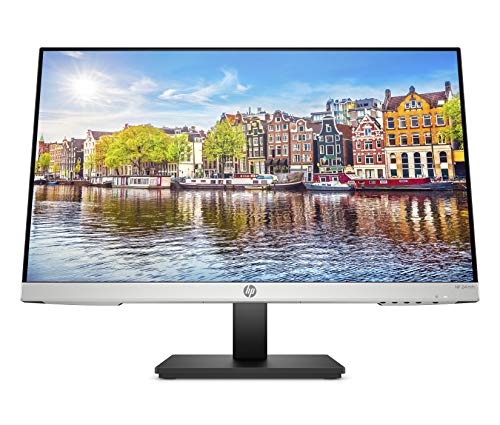
HP 24mh (23.8-inch viewable panel) — The adjustable all-rounder
Address the name first, because this guide’s credibility rides on it: HP sells this monitor in its 24-series, and the glass inside measures 23.8 inches diagonally. For a reader shopping the 23-inch class, that is not a bait-and-switch; it is the largest panel the class legitimately contains, giving slightly more room than a 23.0-inch screen inside a cabinet barely any wider. It appears here, labelled with its true size in every table and heading, and readers who need a panel of exactly 23.0 inches should treat the prose-only picks below as their shortlist instead.
What lifts the 24mh above the anonymous crowd of 23.8-inch office panels is everything around the glass. The stand adjusts for height as well as tilt — a feature this price corridor usually reserves for business-line models — so the screen meets your eyes instead of training your neck. The IPS panel holds its colours when you lean, stand or share the screen, the bezels are slim on three sides for pair setups, and a pair of built-in speakers handles calls and clips without a speaker bar colonising a small desk. DisplayPort and HDMI are both present alongside legacy VGA, so the same monitor can serve a new laptop today and an older desktop tomorrow. It is, in short, the pick for a buyer who wants one screen in this class and wants the fewest asterisks attached to it.
- Panel: 23.8-inch viewable IPS, anti-glare
- Resolution: 1920 x 1080 (full HD)
- Refresh: 75Hz class
- Inputs: HDMI, DisplayPort and VGA
- Stand and extras: height and tilt adjustment, built-in speakers, VESA mounting
Strengths
- Height adjustment transforms comfort compared with tilt-only rivals.
- IPS panel with slim bezels suits shared viewing and dual-screen pairs.
- Speakers and three input types make it a genuine one-box desk solution.
Trade-offs
- The panel is 23.8 inches, not the 24.0 its series name suggests.
- Refresh tops out in the 75Hz class, so keen gamers should look elsewhere.
- Speaker output is clear for calls but modest for music.
Best for: a main home-office screen in a compact room, or the anchor of a matched dual-monitor pair. Not suited for: competitive gaming, or a buyer who needs a panel of exactly 23.0 inches for a fixed enclosure.
Dell SE2222HX — The tidy 22-class desk screen
Dell’s SE line is the company’s answer to a simple brief: a dependable screen for a desk that also holds everything else. The SE2222HX answers it with a 21.5-inch VA panel — the true size behind its 22-inch class name — in a cabinet with narrow bezels and a stand whose footprint leaves room for a keyboard, a notebook and a mug to coexist. For the under-stairs desk, the student room and the spare-bedroom office, that footprint is not a detail; it is the product.
The VA panel choice deserves explanation, because at this size it is a deliberate trade rather than a cost cut. VA gives this Dell deeper contrast than similarly priced IPS screens, so text pages look inkier and video looks richer in a dim room, at the cost of some colour shift when viewed from well off to the side. A single user sitting in front of a 21.5-inch screen rarely strays into the angles where that shift matters, while the contrast is visible every minute. Add Dell’s ComfortView low-blue-light tuning and a tilt stand, and the SE2222HX becomes the default recommendation when someone asks for a small, sensible, full HD screen and means all three adjectives.
- Panel: 21.5-inch viewable VA, anti-glare
- Resolution: 1920 x 1080 (full HD)
- Refresh: 75Hz class
- Inputs: HDMI and VGA
- Stand: tilt adjustment, compact footprint
Strengths
- VA contrast flatters documents and evening video alike.
- Small stand footprint preserves scarce desk surface.
- Full HD at 21.5 inches renders text notably sharp.
Trade-offs
- Off-axis colour shift shows when the screen is shared widely.
- No height adjustment or built-in speakers.
- The 21.5-inch truth behind the 22-inch label must be accepted.
Best for: compact single-user desks, students and spare-room offices wanting full HD without bulk. Not suited for: a screen two or three people regularly view together from different seats.
Samsung T35F 22 — The borderless look
Samsung designed the T35F series around a visual idea: the picture should appear to float. In its 22-class form the panel is again 21.5 inches viewable, but the cabinet trims the top and side bezels to a few millimetres, so the screen reads as almost all image. That matters beyond vanity. Two of these side by side present a near-continuous canvas with a slim dark seam, and a single unit on a tidy desk looks like an object from this decade rather than the last one.
The panel underneath is IPS, which reverses the Dell’s trade: viewing angles stay honest across a wide arc, colours remain themselves when the screen is glanced at from a doorway or shared across a counter, and contrast settles for being merely good rather than deep. Samsung adds its eye-saver and game-adjacent picture modes, a tilt stand and the usual HDMI-plus-VGA pairing. For a reception area, a studio desk or any place where the monitor is part of the room’s appearance, the T35F is the 22-class pick that understands it is also furniture.
- Panel: 21.5-inch viewable IPS, borderless on three sides
- Resolution: 1920 x 1080 (full HD)
- Refresh: 75Hz class
- Inputs: HDMI and VGA
- Stand: tilt adjustment
Strengths
- Minimal bezels make pairs look near-seamless and desks look modern.
- IPS angles suit counters, shared desks and walk-by viewing.
- Picture modes cover both eye-comfort and casual entertainment.
Trade-offs
- Contrast cannot match the VA-equipped Dell or Lenovo here.
- Tilt-only stand, with no speakers on board.
- The glossy design shows dust and fingerprints more readily.
Best for: design-conscious desks, reception counters and dual-screen pairs where the seam matters. Not suited for: a dark-room viewer who prizes deep blacks above angle freedom.
LG 22MR410 — The reader’s panel
Some monitors are bought to be read from for eight hours a day, and LG’s small MR-series panel is tuned for exactly that servitude. The viewable diagonal is 21.5 inches in the 22-inch class, the panel is VA with full HD resolution, and the feature list is dominated by unglamorous mercy: a reader mode that warms and softens the image for documents, flicker-conscious backlight behaviour, and brightness that can be lowered into genuinely gentle territory for evening work. None of that photographs well. All of it decides whether a proofreader, a data-entry clerk or a thesis writer ends the day with a headache.
Around those comforts sits a conventional, well-made small monitor: HDMI and VGA inputs, a tilt stand, LG’s tidy on-screen controls, and a matte finish that behaves in bright rooms. Its refresh sits in the everyday class and its speakers, where fitted by region, are an afterthought — this is not an entertainment screen wearing a disguise. It is the pick for the buyer whose screen time is measured in documents per day, and whose purchasing criterion is how their eyes feel in month three.
- Panel: 21.5-inch viewable VA, matte finish
- Resolution: 1920 x 1080 (full HD)
- Refresh: everyday 75Hz class on common variants
- Inputs: HDMI and VGA (D-Sub)
- Extras: reader mode, flicker-conscious backlight
Strengths
- Reader mode and gentle brightness range serve long document sessions.
- VA contrast keeps text bold against the page.
- Simple, durable design from a maker with deep small-panel experience.
Trade-offs
- Feature set ignores entertainment and gaming entirely.
- Stand adjusts for tilt only.
- Variant naming varies by region, so confirm ports before ordering.
Best for: writers, proofreaders, administrators and students whose days are text from edge to edge. Not suited for: a household wanting one small screen to double as the film screen.
ASUS VA229 series — The eye-care value
ASUS’s VA229 line has been the quiet answer to “a small screen that will not hurt my eyes or my budget” for years, and its recipe remains sound: a 21.5-inch IPS panel at full HD, wrapped in the company’s eye-care programme of low-blue-light modes and flicker-free backlighting, with a VESA mount on the back for buyers who would rather hang the screen than stand it. The IPS choice separates it from the VA-based Dell and LG in this guide — colours stay put at wider angles, making it the better small screen for a family computer that different people use from slightly different chairs.
The series naming needs a careful eye at checkout, because ASUS has sold near-identical suffixes with different stands and port mixes over the line’s long life. The constants are the panel size, the resolution and the eye-care tuning; the variables are exactly the details that decide whether your cable fits and your wall bracket matches. Buy the constants confidently and verify the variables on the individual listing, and the VA229 rewards you with the most viewing-angle freedom available at this size for modest money.
- Panel: 21.5-inch viewable IPS, anti-glare
- Resolution: 1920 x 1080 (full HD)
- Refresh: everyday 75Hz class on common variants
- Inputs: HDMI and VGA typical; confirm the suffix’s exact mix
- Mounting: VESA pattern; eye-care low-blue-light modes
Strengths
- IPS angles make it the family-computer pick of the 22 class.
- Eye-care tuning is thorough rather than a menu afterthought.
- VESA mounting extends its life onto arms and walls.
Trade-offs
- Long model line means suffixes must be checked individually.
- Contrast is ordinary IPS fare, behind the VA picks.
- Stand ergonomics are basic across the series.
Best for: shared family computers, eye-comfort-led buyers and wall or arm mounting at small size. Not suited for: a buyer who cannot confirm the exact variant’s inputs before purchase.
Lenovo L22e-30 — The near-edgeless pair candidate
Lenovo’s L22e-30 approaches the 22-inch class from the dual-screen direction. Its 21.5-inch VA panel sits behind bezels that are thin on three sides — Lenovo calls the design near-edgeless — and its stand routes cables through itself, so a pair of these presents as one calm, wide instrument rather than two gadgets in a cable nest. For the home trader, the analyst with a chart screen and a work screen, or the writer with draft and reference side by side, that composure is the feature.
Individually it is a well-judged VA monitor: full HD, contrast that flatters documents and dashboards, an everyday refresh rate, HDMI and VGA inputs, and a tilt stand with the cable management already mentioned. Lenovo’s small-business build shows in the details — a stable base, a matte screen that tolerates office light, controls that stay out of the way. Buy one and it is a good compact screen; buy two and it becomes the most coherent small dual setup in this guide, which is why it closes the list.
- Panel: 21.5-inch viewable VA, near-edgeless on three sides
- Resolution: 1920 x 1080 (full HD)
- Refresh: 75Hz class
- Inputs: HDMI and VGA
- Stand: tilt, with integrated cable routing
Strengths
- Thin bezels and cable routing make matched pairs look intentional.
- VA contrast suits dashboards, charts and documents.
- Stable, businesslike build for daily repositioning.
Trade-offs
- VA angles narrow the shared-viewing envelope.
- No speakers and no height adjustment.
- Its pair virtues are wasted if only one is ever bought — though it holds up solo regardless.
Best for: dual-screen desks at a compact scale, home trading and analysis setups, tidy-office buyers. Not suited for: a single screen that must also serve as the room’s entertainment display.
How do the six compare on the things that matter?
| Pick | True viewable size | Resolution | Panel | Defining trait |
|---|---|---|---|---|
| HP 24mh | 23.8 inches | 1920 x 1080 | IPS | Height adjustment and speakers |
| Dell SE2222HX | 21.5 inches | 1920 x 1080 | VA | Compact footprint, deep contrast |
| Samsung T35F 22 | 21.5 inches | 1920 x 1080 | IPS | Borderless three-sided design |
| LG 22MR410 | 21.5 inches | 1920 x 1080 | VA | Reader mode and gentle backlight |
| ASUS VA229 series | 21.5 inches | 1920 x 1080 | IPS | Eye-care tuning, VESA mount |
| Lenovo L22e-30 | 21.5 inches | 1920 x 1080 | VA | Near-edgeless dual-screen candidate |
Read the table by sub-class and the pattern clarifies. The 21.5-inch five divide by panel and purpose — VA for contrast-led solo work, IPS for angles and sharing — while the lone 23.8-inch HP plays a different role altogether: it is the pick for buyers who discovered, tape measure in hand, that they had more room than the 22-inch shelf label implied. That is a legitimate discovery, and this guide would rather make it explicit than let a product name make it by accident.
Should you choose the 21.5 inch class or the 23.8?
Decide with the desk, not the diagonal. A 21.5-inch panel’s cabinet is typically around 49 to 50 centimetres wide; a 23.8-inch cabinet runs roughly 54 centimetres. In a fixed alcove, on a narrow desk or beside a second screen, those four centimetres decide whether the setup breathes. Working distance argues the other way: the larger panel’s extra area shows two windows more gracefully and lets text stay at full size rather than scaled, so a single-screen main desk with the room to spare should take the HP’s size every time.
The dual-screen calculation flips the answer again. Two 21.5-inch monitors span about a metre and keep both panels inside a natural head turn at a small desk; two 23.8-inch panels at the same desk push the outer edges into neck-turn territory. Many of the happiest setups in this corridor are therefore asymmetric on purpose: one 23.8-inch main screen with a 21.5-inch satellite for calls and reference. The picks above were chosen to mix exactly that way — the HP anchors, any of the five supports — with the caveat that mixed sizes mean mismatched pixel densities, so windows change apparent size as they cross. Owners who find that maddening should buy a matched pair of one model instead.
Resolution, mercifully, does not complicate the choice: both sub-classes are full HD, so sharpness per inch actually favours the smaller panels slightly. What the larger screen buys is room, not detail. Buy room when you need room, buy compactness when the desk demands it, and ignore any listing that blurs which of the two it is selling.
How do you set up a monitor in this size range?
Placement follows the same geometry as any desktop screen, adjusted for scale. The top of the panel should sit at or just below eye level — the HP’s height adjustment makes this a ten-second task, while the tilt-only picks may need a riser, a shelf or an arm to get there — and the screen should sit close enough that full HD text reads without leaning, usually a little nearer than you would park a 27-inch monitor. At this size, closeness is comfortable rather than overwhelming, and it quietly compensates for the smaller canvas.
Then give the operating system the correct facts. Confirm the output is set to 1920 by 1080 at the panel’s native rate, choose 100 percent scaling for the 23.8-inch HP and consider 125 percent on a 21.5-inch panel if interface text feels fine — the pixel density supports it gracefully. In the monitor’s own menu, pick the picture mode you will actually live in: a reading or low-blue-light mode for document work on the LG and ASUS, standard mode elsewhere, dynamic contrast off, and brightness matched to the room rather than to the shop the screen came from.
For a pair, finish with alignment. Match the two screens’ heights as closely as stands allow, angle each slightly toward your chair, set brightness and colour temperature to the same values on both, and arrange the logical layout in display settings to mirror the physical one. Ten minutes of this turns two small monitors into one workspace; skipping it leaves a seam your eyes trip over for years.
What mistakes do buyers in this corridor make?
The signature mistake is ordering by the badge: paying for a “24-inch” monitor and receiving 23.8 inches of glass — harmless — or ordering a “22-inch” for a 22-inch gap and finding a 21.5-inch panel in a 50-centimetre cabinet — occasionally not harmless at all, when the plan depended on the picture filling a kiosk frame or matching an existing screen exactly. The fix is the discipline this article opened with: shop by viewable diagonal and cabinet dimensions, both of which every maker here publishes.
The second mistake is mixing one new screen with one old screen of a different size and expecting symmetry. Different diagonals at the same resolution mean different pixel sizes, different physical heights and a horizon line that never lines up; a matched pair bought together ages evenly and aligns forever. The third is neglecting the stand question until the neck ache arrives. In a class where height adjustment is the exception — the HP being the honourable one — the price of a basic arm or riser belongs in the purchase budget from the start, not in a regretful second order.
Why has this size corridor become the second-monitor standard?
Walk through any office that added screens in the last decade and a pattern repeats: the main display grew to 24 or 27 inches, and beside it sits something from this corridor. The economics explain the geometry. A 21.5 or 23.8-inch full HD panel costs a fraction of a large high-resolution screen, asks almost nothing of the graphics hardware, and contributes exactly what a second display is for — persistent visibility of the things you check forty times a day. Email, chat, a calendar, a call window, a reference PDF: each sits in its own panel, never buried, never competing with the document in front of you.
The corridor’s panels also age gracefully into the role. A screen bought as a main display for a spare room in one year becomes the satellite when a bigger panel arrives, because its inputs are universal and its size fits anywhere. That second career is worth planning for at purchase: it is the practical argument for the VESA mounts on the ASUS and HP, for the Lenovo’s pair-friendly bezels even when buying one, and against any small monitor so cheaply made that its second owner would be a recycling bin. In this corridor more than any other, a monitor is a ten-year object passing through several jobs.
There is also a posture dividend nobody advertises. A satellite screen in this size range can sit lower and closer than a main display without dominating your field of view, which suits glanceable content; a call window at 21.5 inches feels like a person across a desk rather than a face on a cinema screen. Video-call fatigue is partly a size phenomenon, and several of the workers who swear by a smaller second screen are really swearing by that.
How do panel types behave at this size in practice?
Three of the six picks use VA panels and three use IPS, and the split is the most useful lens for choosing among them. VA’s deep contrast is a constant, all-day advantage for solo work: black text on white pages sits bolder, spreadsheets with shaded bands separate cleanly, and evening video looks cinematic in a way IPS at this price cannot reproduce. Its cost is paid in shared moments — a colleague leaning in from the side sees washed colours — and in fast motion, where VA’s pixel transitions are lazier, though at this corridor’s everyday refresh rates that laziness is more measured than felt.
IPS reverses the ledger. Colour and brightness hold steady across a wide viewing cone, which is why the IPS picks here are the counter screen, the family screen and the ergonomic flagship. The price is contrast: blacks render as very dark grey, most noticeable in a darkened room with a film’s night scenes. For the desks these monitors serve — lit rooms, documents, browsers, calls — that compromise is usually invisible, and buyers should not let a dark-room metric overrule a lit-room reality.
TN, the panel of the smaller class below, has effectively retired from this corridor, and its absence tells the story of the segment: once buyers reach 21.5 inches and full HD, they expect the picture to survive a lean and a glance from the side. Any listing in this size still built on TN should be read as old stock and priced accordingly.
What should laptop owners in particular look for?
A laptop pairing exposes the corridor’s one dated habit: almost nothing here offers USB-C display input or charges the computer, so the setup is a display cable plus the laptop’s own power lead, with a hub if the machine is port-poor. That is not a reason to skip the class — the screens are inexpensive enough that the hub still leaves the total far below a docking monitor — but it belongs in the budget and on the desk plan. HDMI is the connection to insist on; every pick in this guide has it, which cannot be said for the class below.
Scaling behaviour deserves a thought before purchase. A modern laptop panel is far denser than 1920 by 1080 at 21.5 or 23.8 inches, so text grows physically larger as a window crosses to the external screen. Most owners adapt in a day and many prefer the larger rendering; owners who split one document across both screens will find the mismatch distracting, and for them the cleanest arrangement is the laptop closed, the external panel as the sole display, keyboard and mouse in front. The HP, with its speakers removing one more peripheral from the desk, makes that closed-laptop arrangement the most complete in this guide.
Finally, travellers between desks — the hybrid worker with a screen at home and a screen at the office — should value sameness. Two units of the same model, one at each desk, mean identical height, identical colour and a laptop that remembers one arrangement. The corridor’s prices make that duplication realistic in a way larger monitors do not, and the Lenovo and Dell picks, built for fleet buyers, are stocked by exactly the channels that sell in pairs.
What do three real desks in this corridor look like?
Consider first the spare-room office of a hybrid worker: one desk, one laptop, a job split between documents and video calls. The HP 24mh anchors it, raised on its own height-adjustable stand to meet the eye line, the laptop closed beneath a riser to the left, its speakers carrying call audio so no headset is needed for the morning stand-up. The whole station cost less than a single premium docking monitor, and its one indulgence — the adjustable stand — is the one the worker notices every day. When a second screen is eventually wanted, the same model buys again and the pair matches perfectly.
Second, the student desk in a rented room: a 21.5-inch Dell SE2222HX on a desk barely a metre wide, a laptop to its right acting as the second screen rather than the first. Essays live on the Dell at full size; sources and chat live on the laptop. The VA panel’s contrast earns its keep at night when the room’s one lamp is behind the chair, and the small stand leaves space for the paper books that still anchor a degree. The student’s total outlay stayed modest because the corridor’s prices forgive a limited budget without punishing it with a bad panel.
Third, the home analyst’s pair: two Lenovo L22e-30 units on a shared arm, charts on the left panel, spreadsheet and mail on the right, cables vanished through the stands. At 21.5 inches each, the pair spans a comfortable metre; the same job done with two 27-inch screens would need a bigger desk in a bigger room. What the analyst gave up — the deep-dive screen estate of a large monitor — is recovered by the discipline of assigning each panel a permanent job, a discipline small screens enforce and large ones let you dodge. Three desks, three budgets, one corridor: that versatility, more than any specification, is why this size range sells in the volumes it does.
How accurate is colour in this corridor, honestly?
Set expectations by the segment’s purpose. These are sRGB-class panels tuned for office and general use: documents, photographs from a phone, web content and video all sit inside the colour space they cover, and the IPS picks hold that colour honestly across their viewing angles. A photographer culling a shoot will find them adequate for selection and hopeless for final grading — not because they are badly made, but because wide-gamut coverage, factory calibration reports and uniformity compensation live in professional lines at larger sizes, a fact this guide states rather than apologises for.
Within the corridor, small differences still matter. IPS panels deliver the most consistent colour across the screen and across units, which is why the Samsung and ASUS are the safer pair-matching choices for a visually sensitive buyer. VA panels can show slight brightness variation toward the corners when a single flat colour fills the screen — invisible in documents, faintly visible in a full-screen photograph. A basic calibration pass with the operating system’s built-in tool, plus matching brightness between two screens by eye against a white document, gets any of these picks to the ceiling of what their hardware can do; a hardware calibrator is money better spent on a larger, wider-gamut panel later.
One more honesty note: unit-to-unit variation exists at this price in every brand, so a pair bought together from the same batch will match more closely than two bought a year apart. Fleet channels understand this instinctively. Private buyers planning a pair should simply buy the pair.
What cables, hubs and arms complete a setup in this class?
The corridor’s monitors assume a desktop world: HDMI or DisplayPort in, a mains lead, nothing more. A desktop PC obliges with ports to spare. A modern thin laptop usually obliges through exactly one HDMI socket or none at all, which makes a small USB-C hub the corridor’s unofficial accessory — one hub on the desk, carrying display, power and peripherals, turns the laptop’s arrival into a single plug. Budget for that hub when the laptop is new and port-poor, and the combination still undercuts any monitor with docking built in.
Arms deserve a paragraph of their own because this class benefits from them disproportionately. A basic gas or spring arm costs little next to the monitor, frees the entire footprint the stand occupied, and gives tilt-only screens the height adjustment their makers withheld. Check two numbers before ordering: the VESA pattern on the monitor’s back — the ASUS, HP and most business-channel variants here carry one, but confirm on tilt-stand consumer variants — and the arm’s weight range, since a 21.5-inch panel is light enough to sit below the minimum of arms designed for large screens, which then refuse to sink to the set height. A dual arm for a matched pair completes the Lenovo and Samsung setups described earlier and turns a metre of desk into a genuinely wide workspace.
Cable length is the last mundane trap. Small desks invite short cables, and a one-metre HDMI lead stretched taut behind a monitor will slowly rotate a lightweight screen out of alignment — a complaint that presents as a faulty stand and is actually physics. Buy the next length up, coil the slack once, and let every cable hang with room to spare. The corridor rewards this sort of unglamorous care with years of unnoticed service.
How does this corridor handle bright rooms and small rooms?
Every pick here wears a matte, anti-glare finish, which suits the rooms these monitors actually inhabit: kitchens with downlights, offices with ceiling panels, spare rooms with a window in the wrong place. Matte coatings scatter reflections instead of mirroring them, so the cost is a whisper of sharpness compared with glossy glass and the benefit is a screen that stays readable at noon. Positioning still matters — a monitor backed against a window washes out whatever its coating — but the corridor asks less room-planning of its owners than larger, glossier entertainment screens do.
In small rooms the class’s modest depth is its own feature. A 21.5-inch monitor on its stand occupies roughly the depth of a dinner plate, leaving the desk’s front edge for the keyboard and the human. Wall-mounting the VESA-equipped picks returns even that, which is how a box room becomes an office: screen on the wall at eye height, a narrow desk beneath, and floor space left for the door to swing. No other monitor class makes a room this small feel this complete, and it is the everyday miracle the segment performs without ever advertising it.
Should you buy this class new, refurbished or ex-fleet?
No monitor class circulates through refurbishment channels like this one, because no class is bought by businesses in greater volume. Off-lease 21.5 and 23.8-inch panels arrive from offices that refreshed on a schedule rather than from failures, and the better refurbishers grade them by screen condition, include a stand and power supply, and warranty the result for a period that makes the gamble small. For a second screen, a workshop display or a child’s first monitor, that channel can halve the cost of the same glass.
The risks are specific and checkable. Backlight hours accumulate invisibly, so a heavily used unit may top out dimmer than a new one — acceptable for a satellite screen, less so for the main panel in a bright room. Stands get separated from screens in transit, so confirm in writing that one is included or price in an arm. And model suffixes multiply in the second-hand market, where a listing title may borrow the badge of a better-equipped variant; the viewable diagonal, the resolution and the input list are the three facts to pin down in the listing itself, exactly as with the smaller class below this one.
New purchase keeps its own clear advantages: a full warranty, a matched pair from one batch, and the current revisions of long-running lines. The corridor’s new prices are gentle enough that the refurbished route is an optimisation rather than a necessity, which is the healthiest possible relationship between the two markets. Whichever channel you use, keep the box until the panel has been seen in a dark room and a bright one; those two viewings reveal nearly everything a monitor can hide.
What will owning one of these feel like in year three?
Probably like nothing, and that is the compliment this class has earned. The screens in this corridor ask for no firmware attention, run cool, start instantly and present the same picture in year three as in week three, barring the slow backlight dimming common to all LED panels. Their stands either still adjust or never did; their ports either matched your computer or were adapted once and forgotten. Owners’ lasting impressions are ergonomic rather than electronic — the neck that stopped aching when the HP went up on its stand, the desk that stayed tidy because the Lenovo pair swallowed its own cables.
The likeliest reason to replace one is not failure but reassignment: the main screen grows, and the corridor panel slides sideways into satellite duty, then perhaps to another household member’s desk. Plan for that cascade and the purchase looks different — VESA mounts, standard inputs and a mainstream brand all raise the screen’s second-hand and second-job value. It is also why this guide weighted availability and mainstream channels so heavily in its choices: a monitor that a thousand offices bought is a monitor the world knows how to keep using, repair, mount, match and eventually pass on to the next desk that needs exactly its size.
How do these screens behave left on all day?
A corridor panel idling on a dashboard or a reception rota draws modest power, runs barely warm and asks nothing of the room’s cooling — one of the unglamorous reasons businesses standardised on the size. Owners leaving a screen on for long stretches should still set the operating system’s display sleep for genuine idle hours, because backlight life is measured in lit hours and a dashboard that sleeps overnight ages measurably slower than one that glows at an empty room. Static images held for months can also leave temporary image persistence on some panels; a screen saver or a rotating dashboard view is cheap insurance for the monitoring role.
Heat, or the lack of it, matters in the small rooms this class serves, and so does silence: none of these panels has a fan, none hums at ordinary brightness settings, and a pair of them in a quiet study adds nothing to the room’s sound at all, which owners of gaming monitors with active cooling will recognise as a luxury they did not know they were missing until the room went quiet again. A 21.5 or 23.8-inch LED panel adds a fraction of the warmth a large gaming monitor pumps into a box room, and in summer that difference is felt by the person, not the electricity meter. Combined with the modest appetite of the mini PCs and laptops that usually drive them, a corridor-based station is one of the coolest-running ways to put a real screen on a desk — a virtue that never appears on a specification sheet and is remembered every August.
Final Recommendation
If your tape measure and your workload both allow the top of the class, the HP 24mh — all 23.8 viewable inches of it — is the most complete single purchase here, because its stand and speakers retire the two commonest small-monitor complaints. In the 21.5-inch class, choose the Dell for solo contrast, the Samsung for looks and shared angles, the LG for marathon reading, the ASUS for eye care on a wall or arm, and the Lenovo when a matched pair is the plan. Measure in centimetres, buy by the true diagonal, match the panel type to the way the screen will actually be viewed, and this unglamorous corridor — neither the smallest nor the largest a desk can hold — will quietly become the most-used screen in the house, outlasting flashier purchases and asking almost nothing in return.
Frequently Asked Questions
Is a 22 inch monitor actually 21.5 inches?
Yes, in effectively every model on sale: 22 inches is the class name and 21.5 inches is the viewable diagonal, the same rounding convention used across the industry. The cabinet around that panel is roughly 49 to 50 centimetres wide, which is the figure to check against a fixed space or an existing screen you intend to match.
What is the difference between the 23 inch and 23.8 inch panels?
A true 23.0-inch panel is an older, now uncommon size; most current screens in this neighbourhood carry 23.8-inch panels, frequently badged as 24-inch models by their makers. The 23.8 gives slightly more area and is the size behind the linked HP pick in this guide, printed at its true measurement wherever it appears. Both are full HD in modern form, so the choice is about fit and availability rather than resolution.
Is full HD enough at 23.8 inches?
For the work this class does — documents, browsing, calls, spreadsheets, casual video — yes, comfortably, at a normal desk distance. Pixel density at 23.8 inches is lower than at 21.5, so the smaller panels actually render slightly finer text; the larger screen trades that fineness for room. Buyers wanting visibly sharper rendering at this desk footprint should look at 24-inch-class QHD models rather than expecting full HD to change.
Can these monitors be used for gaming?
For casual play, yes: full HD is undemanding, everyday refresh rates in the 75Hz class feel smooth, and consoles pair happily over HDMI. For competitive play, no — the corridor’s panels prioritise price and picture over the high refresh rates and fast response that gaming lines offer at the same sizes, and keen players should shop those lines instead. Console owners sit in the comfortable middle: a PlayStation or Xbox driving one of these over HDMI looks clean, runs at the rates these panels intend, and benefits from the IPS picks’ wide angles when a second player shares the sofa’s view.
Do I need speakers in a monitor this size?
Only you can answer, but the pattern of regret runs one way: buyers rarely miss speakers they have, and often resent the desk space a separate set consumes on a small desk. If your desk is tight and your audio needs are calls and clips, the HP’s built-in pair is a genuine argument. If a headset lives on your head all day, speakers are weightless either way. One practical test settles it for most households: count how many times last week you played sound aloud at the desk — a call taken off headset, a clip shown to someone beside you, a tutorial followed hands-free. If the answer is more than twice, built-in speakers will earn their place; if it is zero, spend the difference on the stand or arm instead and let a headset carry the sound.
Which is better for a second monitor, 21.5 or 23.8 inches?
It depends on what the second screen holds. Reference material, calls and chat sit happily on a 21.5-inch panel placed close, and the smaller cabinet leaves the main desk clearer. A second screen that shares real work — half the spreadsheet, the second document in a comparison — earns the 23.8-inch panel’s extra room. Many owners compromise asymmetrically: the larger panel as the main screen, the smaller as the satellite, which is precisely the arrangement the HP and any of the five 21.5-inch picks were chosen to form.
Are these monitors suitable for a child’s first computer desk?
They are close to ideal for it. The size fits a small desk and a small user, full HD keeps educational software crisp, the eye-care modes on the LG and ASUS picks are genuinely useful for homework hours, and the corridor’s prices survive the realities of equipment used by children. Choose a model with a stable stand over a fashionably minimal one, set the screen height for the chair actually used, and enable the low-blue-light mode for evening sessions.
Related Guides
Buyers who measured and found less room than expected should step down to best 20 inch monitors, while those who want this class’s ergonomics without the size ceiling can compare the fully fledged office class in best 24 inch monitors. For a screen chosen purely for a matched pair, best 23 inch monitors narrows the field to the larger sub-class alone.