Our Top Picks
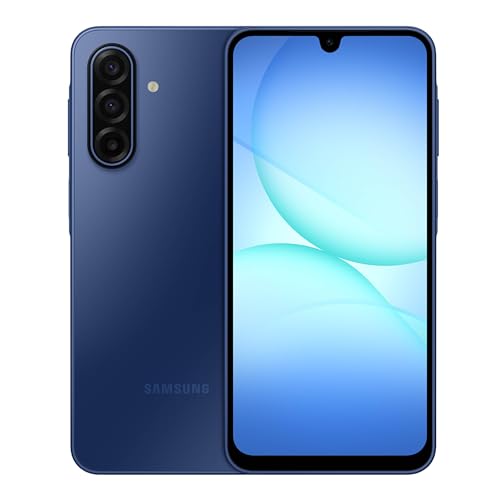
 Samsung Galaxy A16 4G LTE 128GB+4GB SM-A165F/DS Factory3.07 x 0.31 x 6.47 inches0.4 poundsCheck on Amazon

What's inside
- Start with the person, not the spec sheet
- How Android differs between brands, and why it matters
- Chipsets explained in terms of daily life
- Displays: brightness and comfort beat raw resolution
- Connectivity that decides whether a phone feels reliable
- The flagship tier: what the extra money actually buys
- The mid-range tier: where most people should shop
- The budget tier: honest phones for tight priorities
- Foldables and special shapes: when form itself is the feature
- Cameras in depth: what separates a good phone camera from a frustrating one
- Battery life and charging: the two halves of endurance
- Gaming, performance longevity and heat
- Buying checklist before you commit
- Durability, repair and the cost of accidents
- Android for work: security, management and separation
- Travellers, students and families: three specific briefs
- Resale, trade-in and passing a phone on
- Check prices on Amazon
- A short word on storage tiers and memory bundles
As an Amazon Associate I earn from qualifying purchases. This post may contain affiliate links at no extra cost to you.
Transparency note for readers of this roundup: some links on this page are affiliate links, and a purchase made through one of them may earn this site a small commission without changing what you pay. We mention products because of how they fit particular kinds of owners, never because a brand asked to be placed higher.
Choosing an Android phone used to mean picking the fastest processor you could afford and hoping the camera kept up. That shortcut no longer works, because the market has split into distinct personalities. One handset is built around computational photography and a clean interface, another around a stylus and a huge zoom range, another around two days of endurance for people who work outdoors, and another around a folding screen that turns a phone into a small tablet. Ranking them on a single ladder hides those differences, so this guide sorts the field by the job you actually need done.
Start by naming your non-negotiable. If you photograph children indoors, shutter speed and low-light processing matter more than a benchmark score. If you drive for work and hotspot all day, modem efficiency and battery capacity matter more than a thin chassis. If you keep a phone for five years, the length of the security update promise matters more than a launch-day feature you might try twice. Once that priority is clear, the shortlist shrinks quickly, and the remaining choice is usually about comfort, size and which software style you prefer living with every morning.
Every model discussed here is sold as a mainstream Android handset through ordinary retail or carrier channels, and we describe each one by segment rather than by a fixed price, because street pricing shifts with promotions and storage configurations. Where a family offers several variants, we talk about the family and flag which variant changes the experience in a meaningful way, such as extra memory, a larger display or an added telephoto lens. Check current pricing on the day you buy, and compare the unlocked version against carrier offers before deciding.
Start with the person, not the spec sheet
A parent, a field technician, a student and a mobile gamer can all say they want a good phone while meaning four unrelated things. The parent needs a camera that freezes motion without turning faces waxy, plus storage that survives years of video. The technician needs a bright screen readable in direct sun, gloves-friendly touch behaviour and a battery that tolerates cold mornings in a van. The student needs dependable performance on a tight budget, a headphone-friendly commute and software that will still feel current at graduation. The gamer needs sustained frame rates, effective cooling and shoulder-friendly weight for longer sessions.
That is why this guide avoids declaring one universal winner. Instead, each section pairs a type of owner with the hardware and software traits that serve them, then names the models that deliver those traits most convincingly. You can read only the section that matches your life and still make a sound decision, or read the whole piece to understand what you are giving up when you save money by stepping down a tier. Readers who already know their ceiling is modest should also browse our value-focused collection here: best affordable android phones.
There is also a quieter question underneath every purchase: how does this phone behave in year three? Screens stay bright for a long time, but batteries age, storage fills and apps grow heavier. A handset that feels merely adequate on day one often feels frustrating by the second summer, while a handset with headroom in memory and a healthy update runway tends to age gracefully. Buying slightly above your immediate need, within reason, is usually cheaper than replacing a struggling phone early.
How Android differs between brands, and why it matters
Android is a shared foundation, not a single experience. Google Pixel phones present the operating system in its leanest form, with features that arrive first on Pixel hardware and an interface that stays close to Google own design language. Samsung One UI layers far more customisation, a separate app ecosystem and deep integration with Galaxy watches, tablets and laptops. OnePlus OxygenOS emphasises speed, fluid animations and aggressive charging. Motorola keeps its interface comparatively light while adding gesture shortcuts that many owners genuinely use daily. Nothing OS, from the London-based brand Nothing, pursues a stripped-back monochrome aesthetic with its own notification philosophy.
None of those approaches is objectively correct. Pixel software suits people who want the phone to make decisions quietly, from call screening to photo enhancement, with minimal setup. One UI suits people who like to tune everything, run two copies of an app for work and personal accounts, or use desktop-style multitasking through DeX on an external monitor. OxygenOS suits people who notice animation smoothness and charge in short bursts. The honest test is to spend ten minutes with each interface in a shop if you can, because you will interact with that layer hundreds of times a day, long after the novelty of the hardware fades.
Update policy is the other half of the software story, and it has improved dramatically at the top of the market. Leading flagship families from Google and Samsung now promise many years of operating system upgrades alongside even longer security coverage, which changes the maths of ownership. Mid-range models typically receive a shorter but still respectable runway, while the cheapest handsets may only be covered for a couple of cycles. Before buying, confirm the promise for the exact model, not the brand in general, because promises vary within a single manufacturer range.
The bloatware question, answered plainly
Pre-installed apps remain part of Android life, especially on carrier-sold variants and on budget hardware where licensing deals subsidise the price. Most bundled apps can be uninstalled or disabled, yet a few system-level duplicates, such as two galleries or two app stores, tend to persist. If a tidy app drawer matters to you, Pixel and Motorola devices generally feel calmer out of the box, while Samsung owners usually spend a short setup session hiding or removing extras. None of this should decide a purchase alone, but it shapes the first week of ownership more than most reviews admit.
Chipsets explained in terms of daily life
Processor names dominate marketing, but what you feel is responsiveness under load and how long that responsiveness lasts. Current flagship silicon from Qualcomm Snapdragon line and Google Tensor line takes different routes to a similar destination. Snapdragon flagship chips tend to lead on raw graphics power and modem efficiency, which helps gaming and sustained hotspot use. Tensor chips prioritise machine-learning tasks, powering features such as on-device transcription, call assistance and advanced photo processing, sometimes at the cost of higher heat under prolonged heavy load.
Mid-range silicon has closed much of the gap for ordinary tasks. Scrolling, messaging, navigation, photography and video calls feel smooth on a well-tuned mid-range device, and the difference only becomes obvious when you edit long videos, play demanding games at high settings or juggle split-screen apps all day. Memory matters here too: generous RAM keeps apps alive in the background so returning to a maps session or a half-written email does not trigger a reload, while limited memory reveals itself as constant refreshing rather than outright slowness.
Storage deserves the same practical treatment. Built-in storage is fast and reliable, yet it fills faster than people expect once offline music, podcast downloads, game data and high-resolution video accumulate. Samsung Galaxy A-series models in several regions still offer microSD expansion, which suits owners who archive photos locally. Pixel and most flagship lines have dropped expansion entirely, pushing buyers toward larger built-in capacities or cloud libraries. Decide based on your habits, not optimism: if your current phone is nearly full, the next one needs more room, not the same amount with good intentions.
Displays: brightness and comfort beat raw resolution
Almost every phone in this guide uses an OLED panel, which means deep blacks, strong contrast and the ability to light only the pixels an always-on clock needs. Beyond that shared baseline, the differences that matter are peak brightness outdoors, how smoothly the refresh rate adapts to save power, and whether the panel uses LTPO technology to drop to very low rates when showing static content. A variable high refresh rate makes scrolling feel fluid without draining the battery at full speed all day.
Resolution is the specification people overvalue most. On a handset screen viewed at arm length, a sharp Full HD plus panel already looks crisp, and stepping up to a denser Quad HD panel mainly benefits people who read tiny text, inspect photos closely or use a large foldable display. Shoppers specifically hunting that extra density can compare specialist picks here: best 1440p android phones. For everyone else, brightness, colour accuracy and an effective anti-reflective coating will improve more real moments than extra pixels will.
Size is a comfort decision disguised as a specification. Compact flagships around the six-inch mark suit one-handed use on trains and in queues, and they disappear into a pocket in a way large models never do. Big-screen phones reward readers, spreadsheet reviewers and anyone whose eyes prefer larger text, but they demand two-handed operation and can fatigue a thumb during long typing sessions. Foldables complicate the choice in an interesting way, offering a pocketable exterior screen that opens into a workspace, at the cost of weight, thickness when closed and a crease you can feel under a fingertip.
Connectivity that decides whether a phone feels reliable
A phone can score brilliantly in reviews and still frustrate its owner if reception is weak at home or at work. Modern Android flagships support broad 5G coverage across low, mid and, in some markets, millimetre-wave bands, alongside Wi-Fi standards that keep home and office connections fast. What matters for you is the match between the handset variant and your carrier bands, especially if you travel or buy a model intended for another region. Grey-market imports sometimes lack a band your carrier leans on, and no software update can add missing radio hardware.
If coverage breadth is your headline concern, our dedicated connectivity roundup goes deeper than this overview can: best 5g android phones. Within this guide, every recommended family is sold in region-appropriate variants with the mainstream bands its market expects, but you should still verify the exact variant code against your carrier list before ordering, particularly for imported foldables and niche gaming handsets.
Beyond cellular radios, small connectivity details accumulate into convenience. Ultra-wideband support helps precision finding of trackers and keys. Thread and Matter readiness matter if you run a smart home. Dual SIM support, whether through two physical slots, an eSIM pairing or dual eSIM, is essential for travellers and for anyone separating work and personal numbers. Bluetooth codec support affects wireless headphone quality, with aptX and LDAC options appealing to listeners who own compatible earbuds. None of these features photographs well, yet each one can be the reason a phone still feels right two years later.
The flagship tier: what the extra money actually buys
Stepping into the flagship segment buys a bundle of refinements rather than a single headline feature. You get the fastest sustained performance, the most versatile camera hardware, the brightest displays, premium materials such as titanium or reinforced glass, faster wired and wireless charging, and the longest update commitments. You also get diminishing returns: the jump from a good mid-range phone to a flagship is smaller today than it was five years ago, which is precisely why choosing by need matters. Pay for the refinement you will notice weekly, not for a checklist you will admire once.
Samsung Galaxy S25 Ultra — for the owner who wants every tool in one body
The Galaxy S25 Ultra is the maximalist answer, built for people who genuinely use a stylus, a long zoom lens and a very large screen in the same week. The integrated S Pen remains unmatched among conventional phones, earning its keep for annotating documents, sketching ideas, signing forms on site visits and controlling the camera shutter from a distance. Handwriting recognition inside Samsung Notes converts scribbled meeting notes into searchable text with surprising reliability, which turns the pen from a novelty into a filing system.
Its camera array covers an unusually wide span of focal lengths, from ultrawide group shots in cramped rooms through to a periscope telephoto that makes distant signage, wildlife and stage performers genuinely photographable rather than merely visible. Consistency across those lenses is the less glamorous strength: exposure and colour stay coherent as you zoom, so a sequence from one afternoon looks like it came from one camera. Low-light video is steadier than on earlier generations, and the anti-reflective display coating helps framing outdoors where glare usually forces you to shade the screen with a hand.
Performance from its top-tier Snapdragon platform is emphatic, with headroom for video editing, split-screen multitasking and demanding games without the chassis becoming uncomfortable. Samsung DeX deserves a specific mention for office workers: connect the phone to a monitor and you get a windowed desktop environment that can genuinely cover a hotel-room work session. The trade-offs are physical and financial in segment terms. This is a broad, heavy handset, the flat slab design divides opinion, and buyers who never touch the pen are paying for hardware they will ignore. If that description fits you, a smaller flagship below will serve you better.
Google Pixel 9 Pro — for photography and software intelligence first
The Pixel 9 Pro takes the opposite philosophy: let computation do the heavy lifting and keep the interface calm. Its camera system is tuned for the photos most people actually take — faces in mixed light, food on a table, buildings on a walk — and it processes them with a recognisable look that favours balanced colour and strong dynamic range. Features such as Night Sight for dim interiors and astrophotography for clear rural skies remain reference points for the category, while tools that remove distractions from a scene or sharpen an older snapshot feel like practical magic rather than gimmicks when a family photo is at stake.
Google software intelligence runs deeper than the camera. Live transcription, call screening that filters spam before you answer, and on-device voice typing that handles punctuation gracefully all save small amounts of time every day, and those savings compound across a year of ownership. The Pixel also receives new Android versions and feature drops early, which suits enthusiasts who enjoy watching a phone gain abilities over time. Buyers can choose between a standard size and a larger XL variant sharing the same camera hardware, a fairness smaller-handed photographers appreciate.
The compromises are different in kind. Tensor performance trails the fastest Snapdragon rivals in sustained gaming, and the phone can warm noticeably during long 4K video sessions or intensive hotspot use. Charging speeds are leisurely beside OnePlus or Xiaomi rivals. Resale patterns and carrier availability also vary by market, so some buyers will find Samsung offers easier to obtain locally. None of that undermines the core proposition: if your phone is primarily a camera and a smart assistant, the Pixel 9 Pro is the most coherent expression of that idea on Android.
Samsung Galaxy S25 and S25 Plus — flagship balance without the maximalism
Many buyers want Samsung ecosystem, display quality and update longevity without carrying the Ultra size or paying for a stylus housing. The standard Galaxy S25 answers with a compact, light body that suits one-handed use, while the S25 Plus stretches the screen and battery for media-heavy owners. Both share the same flagship chipset family, the same bright OLED technology in their respective sizes and the same long support promise, so the choice between them is genuinely about ergonomics rather than capability tiers.
Camera hardware here is a step simpler than the Ultra, centred on a versatile main lens, a useful ultrawide and a modest telephoto that handles portraits and moderate zoom well. Portrait rendering benefits from Samsung processing that flatters skin tones, and the selfie camera autofocus keeps group shots sharp at arm length. What you give up is the extreme zoom reach and the pen; what you gain is a phone that feels effortless in a jacket pocket and less precious to handle without a case.
These models also make sense for households already invested in Galaxy watches or earbuds, where pairing, health data sharing and shared chargers simplify daily routines. Samsung trade-in programmes and carrier promotions frequently feature the standard flagship line prominently, which can soften the segment gap against mid-range rivals. If you are comparing Samsung own 5G-focused line-up in more depth, our Samsung-specific guide is a useful companion: best 5g samsung phones.
OnePlus 13 — for speed, charging and a lighter software touch
OnePlus built its reputation on velocity, and the OnePlus 13 continues that identity with flagship Snapdragon power, a fluid high-refresh display and charging that changes behaviour rather than merely topping a chart. A short plug-in during breakfast can add enough charge for a commute and a morning of use, which suits people whose days do not include a predictable desk hour. OxygenOS animations feel brisk, the alert slider remains a tactile pleasure for silencing the phone in a meeting, and the hardware design has matured into something that looks at home beside more famous badges.
Photography, tuned in partnership with Hasselblad, has become a genuine strength rather than an apology. Colour science leans natural, the telephoto handles portraits with pleasing separation, and low-light results hold detail without the watercolour smearing older OnePlus phones were criticised for. Battery capacity using silicon-carbon chemistry allows a large reserve inside a body that does not feel like a brick, and endurance in mixed use is among the better flagship results.
Where OnePlus asks for compromise is ecosystem depth and update runway. Its accessory range is thinner than Samsung or Google, local service networks vary by country, and its software support promise, while improved, sits a step behind the longest in the class. Water resistance ratings on recent models have strengthened, addressing a long-standing complaint. For buyers who prioritise pace and charging over brand infrastructure, those trade-offs are easy to accept; for buyers planning a six-year ownership run, they deserve a harder look.
The mid-range tier: where most people should shop
Mid-range Android phones have become the sensible centre of the market, because the features people use hourly — bright OLED screens, reliable main cameras, all-day batteries, fast enough processors — have filtered down, while the exotic extras have stayed at the top. Buying here is an exercise in spotting which flagship trait a manufacturer chose to keep and which one it quietly dropped. One model keeps wireless charging, another keeps a telephoto lens, another keeps an official water resistance rating, and rarely does one keep all three.
Google Pixel 9a — flagship camera thinking on a mid-range commitment
The Pixel 9a carries Google camera processing into a far more accessible segment, and that inheritance defines it. The main camera produces the same confident, balanced images as its pricier siblings in daylight and holds together impressively after dark, because the software pipeline does most of the work. Owners who photograph family, travel and food will rarely feel they bought the cheaper phone. The Tensor platform inside also brings the same voice typing, call screening and transcription talents, making the 9a feel smarter than its segment in daily conversation.
Google pairs that intelligence with a long update promise that embarrasses many flagships from only a few years ago, so the 9a is a rational choice for anyone intending to keep a phone through school or a long contract-free stretch. The flat design sits securely in the hand, the display is bright and fluid enough for comfortable reading, and battery endurance benefits from the efficient pairing of a modest screen size with a generous cell.
Savings appear in materials, charging speed and camera flexibility. There is no dedicated telephoto lens, so distant subjects rely on digital cropping from the main sensor, which is fine for social sharing and less fine for wildlife. The bezels are chunkier than flagship fashion, and wireless charging, where offered, is slow. None of those points undermines the recommendation for camera-first buyers watching their spending; they simply mark the boundary of the segment honestly.
Samsung Galaxy A56 — the all-rounder with ecosystem manners
The Galaxy A56 is built for buyers who want a phone that behaves like a smaller sibling of the flagships rather than a separate species. Its metal frame, slim profile and water resistance give it a grown-up feel, the display is bright with smooth scrolling, and Samsung promises a support runway that stretches well beyond the typical mid-range afterthought. For households already using Galaxy accessories, the familiarity of One UI and the shared settings language reduce friction to nearly zero.
Photography from the main camera is dependable across daylight, interiors and evenings out, with optical stabilisation helping video stay watchable while walking. The ultrawide and macro companions are useful supporting acts rather than stars, which is normal for the segment. Performance from the Exynos platform inside handles social apps, navigation, streaming and light gaming without drama, though competitive gamers will notice limits sooner than casual players during long sessions at high settings.
Charging is respectably quick by Samsung standards, the battery comfortably covers a full waking day, and microSD support in some variants will matter to owners who keep large offline libraries. If your priority is a balanced phone from a brand with service centres in most cities, the A56 is the low-stress answer, even if it rarely tops any single category chart.
Nothing Phone 3a — design character for buyers bored of black slabs
Nothing sells personality as a feature, and the Phone 3a backs the styling with substance. The transparent-look rear and the Glyph lighting interface, which signals calls and notifications through patterns of light when the phone lies face down, give owners a way to stay reachable without staring at a screen. Nothing OS is one of the lightest Android skins available, with a distinctive dot-matrix visual language that can be dialled back if you prefer a conventional look.
Under the styling sits a capable Snapdragon mid-range platform, a bright and fluid display, and a camera system whose periscope-style telephoto in the Pro variant brings portrait and moderate zoom work into a segment that usually crops digitally. Battery life is strong, charging is brisk, and the update promise is fair for the class. The brand retail footprint is smaller than Samsung or Google, so hands-on time before buying may require a trip to a larger electronics store, and accessory choice leans on Nothing own cases and earbuds.
Choose the 3a if you want your phone to feel like an object you selected rather than a commodity you accepted. Choose something else if you need the widest service network, the absolute longest update runway or a camera tuned for the most natural colour science. That clarity of purpose is exactly what a healthy mid-range should offer.
Motorola Edge family — clean software and big batteries in the middle
Motorola mid-range phones appeal to people who like Android close to its stock form, with thoughtful additions rather than a redesign. Chop twice to toggle the torch, twist the wrist to open the camera — those gestures sound like trivia until you use them daily and miss them on other phones. Edge models typically pair large, fast displays with generous batteries and clean call quality, and Motorola pricing in many markets undercuts better-known rivals for similar core hardware.
The compromises are update cadence and camera processing depth. Motorola support windows have improved but still trail Google and Samsung, and its photo processing, while pleasant in daylight, falls behind Pixel tuning in tricky mixed light. For buyers who replace phones every two or three years and value a calm interface plus strong endurance today, the trade can be entirely rational.
The budget tier: honest phones for tight priorities
Budget Android phones ask you to choose which single thing matters most, because at this level every inclusion displaces something else. One model protects a large battery and a big screen for streaming, another protects a clean software experience, another protects storage expansion and a headphone jack for wired listeners. The mistake is expecting flagship behaviour in miniature; the success is finding the handset whose protected feature matches your routine.
Samsung Galaxy A26 and A16 — longevity on a strict budget
Samsung entry Galaxy A models stand out less for excitement than for stewardship. Recent generations carry unusually long security update promises for their segment, respectable water resistance on some variants and displays that are brighter than budget buyers used to receive. Performance is tuned for messaging, browsing, banking, maps and video rather than gaming, and the cameras handle daylight documentation — receipts, school notices, family snapshots — without embarrassment.
For a first phone for a teenager, a dependable handset for a parent who mainly calls and messages, or a backup device for travel, that steadiness is the point. Slower charging and plastic construction are acceptable costs. What matters is that the phone remains patched, legible and predictable years after purchase, and Samsung distribution means a replacement case or a service visit is rarely a research project.
Motorola Moto G family — battery and simplicity for everyday carry
The Moto G line has served budget buyers for over a decade by concentrating on endurance, a near-stock interface and screens large enough for video and reading. Recent Moto G Power variants in particular are built around multi-day light use, which suits delivery riders, carers, festival-goers and anyone whose workday happens far from a socket. Call quality is a quiet strength, speakers are serviceable for podcasts in a kitchen, and the software avoids the advertising clutter that mars some rivals at this level.
Expect modest camera ambition, slower updates and displays that are a step behind OLED rivals on some variants. If your day is calls, messages, navigation and music, those limits stay invisible. If your day is photography, they will announce themselves quickly, and the Pixel 9a or Galaxy A56 above becomes the wiser stretch.
What to avoid at the very bottom of the market
Below the recognised budget lines sits a swamp of unbranded handsets with impressive-sounding memory figures and little else. Common traps include displays with poor touch response, cameras whose headline megapixel counts hide tiny sensors, software that will never receive a security update and batteries whose stated capacity fades within a year. A modest phone from a manufacturer with a published update policy and a local warranty is worth more than a paper specification miracle from a seller who may vanish by spring. If a deal on an unknown brand looks extraordinary, treat the missing support as part of the price.
Foldables and special shapes: when form itself is the feature
Folding phones have matured from fragile experiments into legitimate categories with distinct audiences. Book-style foldables such as the Samsung Galaxy Z Fold line and the Google Pixel Fold family open into a tablet-like canvas that transforms reading, document review, split-screen work and video calls. Watching a spreadsheet become legible without pinch-zooming, or running a chat beside a document during a commute, are experiences no slab phone can imitate at any price.
Flip-style foldables such as the Galaxy Z Flip line and Motorola Razr family pursue pocketability instead. They fold into a compact square, stand at an angle for hands-free video and selfies, and use their cover screens for glanceable notifications, timers and music controls. For people tired of large phones stretching every pocket, the flip format is a genuine lifestyle improvement rather than a novelty.
The costs are consistent across both shapes: higher prices in segment terms, greater weight or thickness than a comparable slab, inner screens that need gentler treatment, and battery life constrained by the space a hinge consumes. Durability ratings and hinge engineering have improved markedly, and manufacturer repair programmes are more established than they were, but a foldable still asks for an owner who values the form enough to accept the care it requires. Buy one because the shape solves your problem, not because it signals novelty.
Cameras in depth: what separates a good phone camera from a frustrating one
Megapixel counts are the least useful way to compare phone cameras. Sensor size, lens quality, stabilisation and processing decide outcomes, and processing philosophy decides taste. Pixel processing favours balanced, ready-to-share images with strong handling of difficult light. Samsung processing leans vivid and bright, flattering landscapes and social feeds. OnePlus with Hasselblad tuning aims for natural colour that photographers who edit later often prefer. Try sample images from each brand in the conditions you shoot most — school halls, restaurants, overcast walks — rather than trusting a sunny demonstration wall in a shop.
For moving subjects, especially children and pets indoors, the practical heroes are fast autofocus, a quick shutter with minimal lag and processing that preserves detail without smearing motion. For travel, an ultrawide lens that stays sharp at the edges and a telephoto that reaches across a square or a valley matter more than another digital zoom stage. For video creators, stabilisation quality, microphone behaviour in wind and the ability to record long clips without overheating decide whether a phone can replace a separate camera on a trip.
Selfie cameras deserve a sentence of honesty: most flagship and mid-range front cameras are good enough for calls and social posts, and differences show mainly in low light and in whether autofocus keeps a group shot sharp. If video calls are central to your work, test front-camera framing and microphone clarity in the shop, because those details affect how colleagues perceive you every single day.
Battery life and charging: the two halves of endurance
Battery life is a system, not a capacity figure. Chip efficiency, display technology, modem behaviour and software discipline all shape whether a phone finishes your day, and manufacturers quote capacity in milliamp hours without any of that context. In practice, recent flagships and large mid-range models comfortably cover a full waking day of mixed use, battery-focused models stretch into a second day for moderate users, and compact phones plus foldables ask heavier users to top up by evening.
Charging philosophy splits the market. Chinese brands including OnePlus and Xiaomi pursue very fast wired charging that refills a phone during a shower and a coffee. Samsung and Google charge more conservatively, arguing for battery longevity, while offering wireless charging and, on some models, reverse wireless charging for earbuds. If you travel constantly, fast wired charging changes habits; if you charge overnight on a pad, it barely matters. Either way, enable the battery protection setting that limits full charging if you plan to keep the phone for many years, because lithium cells age fastest when held at a full charge in heat.
Real-world drains surprise new owners. Weak cellular signal forces the modem to work harder, navigation with the screen at full brightness is among the heaviest loads a phone faces, and 5G hotspotting can empty a battery in an afternoon. A phone that feels average in the city may feel heroic on strong Wi-Fi and disappointing on a rural train, through no fault of its own. Judge endurance claims against your signal environment, not a laboratory.
Gaming, performance longevity and heat
Mobile gaming divides owners into casual players, for whom almost any recent phone runs puzzle, card and social games smoothly, and demanding players who run graphically heavy titles at high frame rates. The second group should shop the flagship chipset tier, prioritise models with vapour-chamber cooling and check whether a phone sustains performance after twenty minutes rather than peaking in a three-minute benchmark. High refresh displays help only when the game itself renders at those rates, so confirm title support for the games you actually play.
Dedicated gaming phones from lines such as ASUS ROG Phone and RedMagic add shoulder triggers, aggressive cooling accessories and software that maps controls, at the cost of camera finesse and everyday polish. They are excellent for the narrow audience that treats a phone as a console first. Everyone else is better served by a flagship whose performance is balanced against photography, battery discipline and software support.
Longevity thinking applies here too. A chipset that is merely sufficient today will struggle with heavier apps sooner, while flagship silicon bought now tends to feel competent far longer. Memory headroom works the same way: more RAM does not make a new phone feel faster in a shop, but it reduces reloads and keeps multitasking pleasant as apps grow. When two models sit in the same segment and one offers clearly more memory, that difference often decides which one you still enjoy in year four.
Buying checklist before you commit
Hold the phone, or a same-size dummy, before ordering if you can. Check one-handed reach to the top of the screen, the position of the fingerprint reader or the reliability of face unlock with your glasses on, and the weight with a case fitted, because a case adds grams you will feel by evening. Confirm the variant supports your carrier bands and SIM format, decide storage based on your current usage rather than hope, and read the exact update promise for that model on the manufacturer site.
Then compare the total ownership picture on the same day: unlocked price, carrier terms, trade-in value for your current handset and the cost of the case, charger or earbuds you will actually need. A phone that looks dearer can become the cheaper ownership once a trade-in and a longer support life are counted, while a cheap handset replaced early is rarely a bargain. Readers ready to think about timing and channels rather than models will find our companion advice useful in the deals guide published alongside this roundup on the same site.
Finally, plan the switch itself. Modern transfer tools move photos, messages and apps between Android phones smoothly, and moving from an iPhone is well supported by manufacturer migration apps, though some paid apps and message histories need manual attention. Back up before you begin, keep your old phone until the new one has survived a week of banking apps and two-factor sign-ins, and only then wipe and trade or gift the old device.
Durability, repair and the cost of accidents
Glass phones are beautiful and breakable, and the segment you choose changes the repair story as much as the purchase story. Flagships use tougher glass generations and metal frames, yet their large curved or flat panels and complex camera housings make a cracked screen an expensive workshop visit. Mid-range models with plastic frames often survive drops better and cost less to mend, while rugged phones built for construction and outdoor work add thick bumpers, sealed ports and screens designed to tolerate gloves, rain and dust at the expense of elegance and weight.
Water resistance ratings need careful reading. A high IP rating means a phone survived controlled laboratory immersion in clean water, not that it enjoys chlorinated pools, hot showers or the sea, and water damage is commonly excluded from warranty coverage regardless of the rating advertised. Treat resistance as insurance against rain, spills and a brief accidental dunk, rinse salt water off promptly if exposure happens, and never charge a wet port until it has dried fully.
Before buying, look up what a screen replacement and a battery replacement cost for that exact model in your country, and whether independent repairers can source genuine parts. Manufacturers have expanded self-repair and authorised parts programmes unevenly, and a phone that can receive an affordable battery swap in year three often outlives a theoretically superior rival whose repair quote approaches its resale value. A good case and a tempered glass protector remain the cheapest performance upgrade in the entire guide, because they protect every other feature at once.
Android for work: security, management and separation
For professional use, the questions shift from entertainment to control. Employers who manage devices care about timely security patches, support for work profiles that separate company data from personal photos, and compatibility with mobile device management platforms. Samsung Knox and Google Pixel hardware-backed security both have strong enterprise reputations, and many organisations publish approved device lists that should override any consumer roundup, including this one.
Freelancers and small business owners sit between those worlds. A work profile or dual app setup lets one handset carry two messaging identities without mixing contacts, while call recording rules, document scanning quality and reliable hotspot behaviour matter more than gaming scores. If your phone is also your office, prioritise the longest update runway you can afford, storage headroom for offline files, and a brand with a service centre near where you work, because downtime is the real cost of a failure.
Biometric convenience deserves a work-minded check too. Ultrasonic fingerprint readers on recent Samsung flagships work through light moisture and feel fast, optical readers on many rivals are equally quick in dry conditions, and face unlock varies from secure three-dimensional systems to simple camera checks that should not guard banking apps alone. Test your preferred unlock method with your real hands and habits, since you will perform it dozens of times on an ordinary working day.
Travellers, students and families: three specific briefs
Frequent travellers need a different checklist again: broad band support across continents, eSIM convenience for buying local data without swapping physical cards, strong offline maps behaviour and a camera that handles hotel lighting and night streets. Dual SIM flagships and Pixels with clean eSIM handling excel here, while very region-specific models deserve extra scrutiny before a long trip. A phone that sips power on a long flight in aeroplane mode and wakes with charge to spare for arrival logistics earns gratitude no benchmark can measure.
Students should weight durability, battery and value retention over prestige, because a phone at university gets dropped, lent, soaked at festivals and used as a hotspot for a laptop in libraries with temperamental Wi-Fi. A mid-range model with a long update promise protects coursework, banking and identity apps across a degree, and a repairable screen protects a limited budget. Storage matters more than expected once lecture recordings, offline playlists and shared photo albums accumulate across semesters.
Families buying for children or older relatives should think about supervision and simplicity rather than novelty. Android parental controls through Family Link allow app limits, location sharing and content filters, while easy mode interfaces on Samsung phones enlarge text and simplify the home screen for grandparents. A modest, well-supported handset with a loud speaker, clear display and a case with a grip will serve both ends of the family better than a fragile flagship handed down without a battery service.
Accessibility features worth testing in person
Modern Android includes a mature accessibility toolkit: screen readers, magnification, live captions for media and calls, hearing aid compatibility, voice access for hands-free control and customisable display sizes. The quality of speakers, haptic feedback and button placement interacts with those tools in ways a specification sheet cannot capture. Anyone who depends on accessibility features should spend real time with a handset in store, place a test call, and confirm that the specific aids they rely on work with the brand skin layered over Android, because small interface changes can help or hinder established routines.
Resale, trade-in and passing a phone on
Flagships from Samsung and Google hold value better than most Android rivals, which quietly lowers their true cost for owners who trade in every few years. Keeping the box, the original cable and proof of purchase helps, as does avoiding screen damage and keeping battery health respectable by not leaving the phone on a hot dashboard. Before trading or gifting, back up, sign out of accounts, remove the SIM and any memory card, perform a factory reset and confirm the device no longer appears in your account device list.
Handing a phone down inside a family is often the greenest and kindest option. A fresh battery where the design allows it, a new case and a patient hour of setup — enlarging text, pruning apps, enabling emergency contacts and medical information — can give a three-year-old flagship a second life that delights its new owner. That second life is another argument for buying a well-supported model in the first place: software care is a gift you pass on with the hardware.
Check prices on Amazon
Live listings for the shortlist in this guide are pulled from Amazon below, so prices and availability are always current at the moment you look.


A short word on storage tiers and memory bundles
Manufacturers often sell the same phone in several storage and memory combinations, and the cheapest listing is not always the wisest configuration. If you record a lot of video, edit photos on the device or keep large games installed, stepping up one storage tier usually costs less than the frustration of weekly deletion sessions or a year of juggling cloud uploads on a limited data plan. Conversely, office users who live in web apps and streaming services may never fill the base tier, and for them the saving is real money rather than a false economy.
Memory bundles follow a similar logic. The higher memory variant of a mid-range phone can feel smoother in heavy multitasking and may hold value slightly better, yet it will not transform gaming performance, because the graphics hardware stays the same. Read the variant table carefully when comparing retailers, since two listings with identical headlines sometimes describe different memory configurations, different regional band support or even a different charging standard inside the box. Matching the full variant code between listings is the dullest and most reliable habit in Android shopping.
Chargers and cables deserve the same unglamorous attention. Many recent phones ship without a power brick, some fast charging systems need the manufacturer own brick and cable to reach their advertised speed, and a drawer of old low-power chargers will still work, only slowly. Factor the accessory you genuinely need into the comparison, keep one reliable cable in the bag you actually carry, and your expensive new phone will never be defeated by the cheapest object in the chain.
One last practical habit separates satisfied owners from restless upgraders: live with a shortlist of two phones for a day before deciding. Read a long article on each display if a shop allows it, type a paragraph on each keyboard, take the same indoor photo on both cameras and carry each handset in your own pocket while you walk around the store. Those ordinary tests reveal more about fit than another evening of comparison videos, because they measure the phone against your hands, your eyes and your habits rather than against a stranger priorities.
Android rewards buyers who shop by need, because the platform refuses to be one thing: it is a camera, a console, a notebook, a work terminal and a pocketable tablet, depending on which handset you pick up — so choose the version of Android that matches the life you already live, and it will feel less like a purchase and more like a fit.


