What's inside
- Key Takeaways
- Quick Picks
- How Did We Choose These Office Televisions?
- Why Does an Office Need a Commercial Panel at All?
- What Does a Meeting Room Actually Ask of a Screen?
- How Do the Six Picks Compare at a Glance?
- How Should an Office Install and Configure These Screens?
- What Should IT Check Before Signing Off an Office Screen?
- How Do These Screens Handle Video Calls and Hybrid Meetings?
- What Changes When an Office Buys Ten Screens Instead of One?
- How Should an Office Think About Accessibility and Comfort Around Its Screens?
- What Is the Honest Total Cost of an Office Screen?
- How Do Lobby Screens and Meeting Screens Age Differently?
- What Content Belongs on an Office Screen, and What Does Not?
- How Should an Office Decide Between Samsung and LG Commercial Lines?
- How Does an Office Screen Earn Its Keep in Each Kind of Room?
- What Should Happen in the First Month After Installation?
- Why Do Offices Keep Underestimating the Sound Half of the Screen?
- What Does a Good Office Screen Do on Its Quietest Day?
- How Should an Office Handle Security and Privacy on Its Screens?
- When Should an Office Replace a Screen Rather Than Repair Its Habits?
- What Are the Most Common Office Television Mistakes?
- Final Recommendation
- Frequently Asked Questions
- Related Guides
As an Amazon Associate I earn from qualifying purchases. This post may contain affiliate links at no extra cost to you.
gizmoverdict.com is reader-supported. When you buy through links on our site, we may earn an affiliate commission.
Where to buy: Use the Amazon links below to reach each commercial listing, and read the warranty and duty language on the listing itself, because with business displays those two paragraphs are worth more than any picture specification.
The best tvs for offices are not living-room televisions that wandered into a workplace. They are commercial panels built for a working day that starts before the first meeting and ends after the last visitor leaves, for lobbies that show a welcome screen for ten hours straight, and for meeting rooms where a screen must accept a stranger’s laptop, display it without complaint, and then do it again for the next booking. Every pick in this guide is a business or commercial model from Samsung or LG, chosen because office duty punishes consumer televisions in specific, predictable ways: burn-in anxiety on static screens, warranties that exclude commercial use, controls any passer-by can fiddle with, and panels never designed to run all day.
Two rooms dominate office demand, and this guide serves both deliberately, because a screen specified for one and installed in the other disappoints twice, once at purchase and once every working day afterwards. The lobby screen is a sign that occasionally shows television; the meeting-room screen is a presentation tool that occasionally shows television. The picks divide across those jobs, from a 43-inch commercial lite model for a small practice’s reception area to 65-inch commercial panels for boardrooms and open-plan walls. Signage software gets a mention where a listing names it, but the deep content-management argument belongs to our companion guide to the best inexpensive tvs for digital signage; here, the subject is the office itself.
Key Takeaways
- Commercial panels earn their keep through duty ratings, business warranties and lockable controls, not through prettier pictures.
- Only one pick here states its duty cycle in its title, 16/7 on the Samsung QE55T, and this guide claims no duty figure a listing does not state.
- Brightness figures appear only where listings print them: 300 nits on the two Samsung QET-family models, 250 on the big BE65T-H.
- Lobby and meeting-room duty are different purchases sharing a category, and the size split, 43 to 65 inches, maps onto them.
- A consumer television in a lobby often voids its warranty and ages fast on static content; the commercial premium buys that risk away.
Quick Picks
| Pick | Badge | Why it earns its place |
|---|---|---|
| Samsung 50-Inch BEC-H Business TV | All-round office starter | A business television with signage ambitions and Alexa built in, sized for the average lobby or huddle room. |
| LG 65-Inch PK640S Commercial TV | Boardroom flagship | Sixty-five inches of commercial panel with webOS 25 and a built-in content system for polished spaces. |
| Samsung 43-Inch QET Commercial Display | Meeting-room workhorse | A true large-format display with an integrated player, 300-nit brightness and built-in speakers. |
| LG 43-Inch UR340C Commercial Lite TV | Small-office value | Commercial-lite construction and a TAA-compliant badge for practices, clinics and public-sector desks. |
| Samsung 65-Inch BE65T-H Pro TV | Big lobby presence | A pro television with a tuner and signage software at the size that fills a reception wall. |
| Samsung 55-Inch QE55T Commercial Display | Duty-cycle champion | Stated 16/7 operation and a three-year warranty make it the endurance pick of the six. |
How Did We Choose These Office Televisions?
We also weighed the two manufacturers’ paperwork habits across the whole lineup, because an office buyer inherits a documentation culture along with a panel: how plainly a brand states brightness, duty and warranty in its own titles predicts how plainly it will answer a facilities manager’s questions three years from now, in a support queue, about a screen that stopped waking up.
We required a commercial identity in the listing itself: a business series name, a commercial designation, a large-format-display label or signage intent stated by the manufacturer. That filter excludes the entire consumer catalogue, deliberately, because the office problems this guide solves are commercial problems. We then balanced the two office jobs, lobby presence against meeting-room utility, and the two ecosystems offices actually buy, Samsung’s business lines and LG’s commercial range, across sizes a facilities manager can match to real rooms.
Specification discipline in this category means repeating only what titles state. Where a listing prints a brightness figure, the review uses it; where it prints a duty cycle, the review uses it; where it prints neither, the review speaks in class terms about commercial construction rather than inventing numbers. That restraint matters commercially as much as editorially, because a buyer comparing a stated 300 nits against an unstated panel deserves to know which figure is documentation and which is atmosphere. Buyers equipping a classroom rather than an office will find the neighbouring use case in our best tvs for classroom guide, where the judging tilts toward teaching.
Why Does an Office Need a Commercial Panel at All?
There is a moment in many office refurbishments when someone gestures at the lobby wall and suggests saving money with a television from a warehouse club, and the suggestion always sounds reasonable in the meeting. It stops sounding reasonable in the fourteenth month, which is the statistical neighbourhood where lightly built panels, run daily on still images, begin to file their objections. This guide exists so that the fourteenth month is somebody else’s story.
Begin with hours. A home television lives a charmed life of evenings and weekends; a lobby display works the full business day, every business day, often showing a nearly static welcome screen. Static content is the stress consumer panels are least built to forgive, and commercial panels are engineered, cooled and warranted with that duty in mind. Add the warranty clause most buyers never read: consumer warranties commonly exclude commercial use, so the cheap television in the lobby may be uninsured by its own maker from the day it is switched on. The commercial premium is, in large part, an insurance premium, and offices that have replaced a dead consumer set at month fourteen understand its value precisely.
Control is the second argument. Offices need screens whose settings stay set: inputs locked to the signage source, volume capped, menus behind a manager’s control, so a curious visitor or a well-meaning colleague cannot reconfigure the lobby with the remote from a nearby sofa. Commercial lines build those locks in as standard thinking. The third argument is service: business models are sold with business warranties and parts pipelines, because a dark screen in a client-facing lobby is not an inconvenience, it is a message about the company, printed in black glass.
What Does a Meeting Room Actually Ask of a Screen?
Different things from a lobby, and the distinction should drive which pick lands where. A meeting-room display is judged in the first ninety seconds of every meeting: how fast it wakes, whether the previous user’s settings haunt the next presentation, and whether a guest laptop appears on screen without a call to IT. Size follows the room’s farthest chair rather than its wall; a 43-inch panel serves a huddle room honestly and looks lost in a boardroom, where the 65-inch picks earn their footprint. Built-in speakers, named on both Samsung QET-family listings, matter here because meeting audio is voices, and voices need clarity at low volume rather than cinema thunder.
Screen-sharing and casting belong to this room’s layer of the guide in class terms: modern commercial panels accept the common wireless casting routes offices use, and the practical advice is to test the exact path your team’s laptops take before the first client meeting depends on it. A lobby screen, by contrast, is judged across months: does the welcome loop still look crisp, does the panel shrug off the sun patch that crosses the reception desk each afternoon, and has anyone needed to touch it since installation. Two rooms, two examinations, one category name, which is why this guide refuses to crown a single winner for both.

Samsung 50-Inch BEC-H Business TV — All-round office starter
The BEC-H is Samsung’s business television in the most literal sense, a Crystal UHD 4K panel in the BEC-H series whose listing names digital signage and commercial use among its purposes while keeping one foot in television territory, HDR Pro, PurColor and 3D surround sound among its picture and audio features. Fifty inches is the size that disappears into the average office correctly: substantial on a lobby wall, comfortable in a mid-size meeting room, and undemanding to mount, power and replace. Alexa built in, also named in the listing, gives a reception team hands-light control of a screen that may sit beyond easy remote reach.
As a 2023 model it represents the established, understood end of Samsung’s business range, which offices often prefer to the newest thing: accessories, mounts and behaviour are known quantities. Its honest limitation is documentation; the listing does not state a duty cycle or a brightness figure, so buyers planning genuinely punishing schedules should compare the QE55T below, whose title does that paperwork. For the broad middle of office duty, welcome screens, meeting presentations and the occasional all-hands broadcast, the BEC-H is the balanced default this guide would hand a facilities manager first.
- Screen: 50 inches, Crystal UHD 4K
- Series: BEC-H business television, 2023 model
- Picture features: HDR Pro, PurColor, Contrast Enhancer as listed
- Extras: Alexa built in, signage and commercial use named
- Duty and brightness: not stated in the listing title
Strengths
- The most versatile size and series for a first commercial purchase.
- Signage intent and business construction in a television-shaped product staff already understand.
- Voice built in helps where the screen hangs beyond comfortable remote range.
Trade-offs
- No duty cycle or brightness figure in the title for hard-schedule comparisons.
- A 2023 model, so platform freshness trails the newest LG pick here.
- Fifty inches underserves genuinely large boardrooms.
Best for: general offices buying one dependable commercial screen for mixed lobby and meeting duty. Not suited for: buyers who need documented duty figures for a facilities specification.

LG 65-Inch PK640S Commercial TV — Boardroom flagship
LG’s PK640S arrives with the newest paperwork in this guide: a 65-inch UHD 4K commercial signage television running webOS 25, with HDR10 Pro and a built-in content management system named in its title, aimed explicitly at business, hospitality and office use. Sixty-five inches changes a room’s politics; presentations stop being something the far end squints at, video-call participants appear at conversational size, and the screen becomes the wall’s organising feature. The built-in CMS means the same panel can run the company’s welcome and announcement content between meetings without an external player, a tidiness IT departments appreciate.
webOS is the other half of its argument. LG’s platform is a known quantity in commercial deployments, and a current-generation version promises the longest software runway in this lineup. The honest cautions are scale and scope: a 65-inch commercial panel is a two-person installation with a mount rated for the job, and its signage talents overlap the dedicated signage guide’s territory, so offices buying purely for meeting rooms should confirm they are not paying for content machinery they will never switch on. Those buying a flagship for a flagship room will find this the most complete single purchase here.
- Screen: 65 inches, UHD 4K commercial panel
- Platform: webOS 25 smart display system
- Picture: HDR10 Pro named in the listing
- Content: built-in CMS, Wi-Fi connectivity
- Duty and brightness: not stated in the listing title
Strengths
- The largest, newest and most self-contained commercial package in the guide.
- Built-in content management removes an external player from the meeting room.
- Current webOS generation offers the longest software horizon here.
Trade-offs
- Size demands professional mounting and a room that justifies it.
- Signage depth may exceed a pure meeting room’s needs.
- No duty or brightness figure stated for specification-driven buyers.
Best for: boardrooms and client-facing spaces where the screen is part of the company’s presentation of itself. Not suited for: small offices or huddle rooms, where it would simply be furniture with a picture.

Samsung 43-Inch QET Commercial Display — Meeting-room workhorse
The QET is the pick that drops the word television’s ambiguity entirely: Samsung lists it as an LFD, a large-format display, with an integrated MagicInfo Lite player, a Crystal 4K processor, UHD resolution, an 8-millisecond response time, 300-nit brightness and built-in speakers, model LH43QETELGCXZA. That is a specification written for work, and at forty-three inches it lands exactly on the huddle-room and small-meeting-room brief. The integrated player means scheduled content, a team dashboard, a welcome screen for the next client, runs from the display itself, with no separate box to hide, power or replace.
Three hundred nits, stated plainly, suits interior office light honestly; this is not a shop-window panel and does not pretend to be. The Home UI named in the listing speaks to manageability, a display administrators can configure without spelunking. For offices, the QET’s charm is its completeness at modest scale: screen, player, speakers and commercial construction in one 43-inch unit that a two-person office can mount in an afternoon. Buyers needing the same formula larger should look at its 55-inch sibling below, which adds the duty and warranty paperwork.
- Screen: 43 inches, UHD resolution, Crystal 4K processor
- Brightness: 300 nits as stated in the listing title
- Player: integrated MagicInfo Lite for scheduled content
- Audio: built-in speakers
- Response: 8ms as stated in the listing title
Strengths
- A true commercial display with its content player already inside.
- Documented brightness lets facilities buyers compare honestly.
- Forty-three inches fits the meeting rooms most offices actually have.
Trade-offs
- Interior brightness class; a sun-flooded glass lobby will ask more.
- Too small for boardrooms or large training spaces.
- Lite player tier suits schedules and loops, not elaborate signage networks.
Best for: huddle rooms, small meeting rooms and offices wanting one tidy commercial unit. Not suited for: bright storefront-style lobbies or large presentation spaces.

LG 43-Inch UR340C Commercial Lite TV — Small-office value
LG’s UR340C carries the honest label Commercial Lite, and this guide respects the honesty: a 43-inch LED-LCD television with 4K UHDTV resolution, built for commercial environments at a gentler specification and, by implication, a gentler budget than full signage displays. Its distinguishing paperwork is TAA compliance, named in the listing, which matters to government offices, contractors and institutions whose procurement rules require it, and which instantly makes this the default pick for a public-sector reception area or clinic waiting room.
The navy blue finish named in the title is a small thing that offices notice: commercial equipment that does not shout its industrial nature suits professional interiors. What the listing does not state, duty cycle, brightness, a content system, this review does not invent; the UR340C’s case is commercial construction, the right size for small spaces, and compliance paperwork its rivals here do not offer. A small accountancy practice, a dental surgery or a branch office needing a dependable screen for appointments, queues and the occasional presentation will find its level of commercial exactly sufficient.
- Screen: 43 inches, LED-LCD 4K UHDTV
- Class: Commercial Lite television
- Compliance: TAA compliant as stated in the listing title
- Finish: navy blue as listed
- Duty and brightness: not stated in the listing title
Strengths
- TAA compliance opens public-sector and institutional doors others here cannot.
- Commercial-lite tier matches small-office duty without signage overkill.
- A finish chosen for professional rooms rather than warehouses.
Trade-offs
- The least documented specification in the guide.
- No integrated content player is named, so signage needs an external source.
- Forty-three inches caps it at small-room duty.
Best for: small professional offices, clinics and public-sector spaces with compliance requirements. Not suited for: buyers needing built-in signage playback or documented heavy-duty ratings.
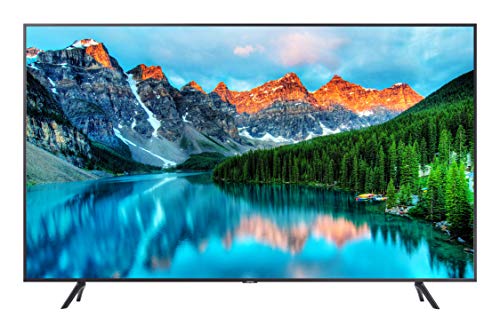
Samsung 65-Inch BE65T-H Pro TV — Big lobby presence
Samsung’s BE65T-H is a Pro TV, the tier of its business range aimed at premises that want commercial benefits in a television’s familiar clothing. The listing names easy digital signage software, 4K resolution, HDMI and USB connections, a TV tuner and speakers, with brightness stated at 250 nits. That tuner deserves emphasis in an office context: a reception area that can show broadcast news or a major national moment without any streaming arrangement has a resilience meeting-room screens do not need, and the signage software covers the other ninety percent of the day, when the wall belongs to the company.
At sixty-five inches this is a lobby instrument first. Two hundred fifty nits is an interior figure, honest for reception areas away from direct window glare, and buyers with sun-struck glass frontage should note the 300-nit models or reconsider placement. Against the LG flagship at the same size, the Samsung argues familiarity and the tuner; against the smaller picks, it argues presence. A headquarters reception, a hotel-style corporate lobby or a showroom wall is its natural home, where arriving clients read the screen as part of the building’s confidence.
- Screen: 65 inches, 4K resolution
- Brightness: 250 nits as stated in the listing title
- Features: digital signage software, TV tuner, speakers
- Connections: HDMI and USB named in the listing
- Class: Pro TV tier of Samsung’s business range
Strengths
- A tuner plus signage software covers broadcast events and company content alike.
- Sixty-five inches gives a lobby the presence smaller panels cannot.
- Pro TV familiarity lowers the training burden on office staff.
Trade-offs
- The lowest stated brightness here; placement away from glare is part of the deal.
- Lobby-first sizing is wasted on ordinary meeting rooms.
- Signage software is the easy tier, not a full network CMS.
Best for: receptions and showrooms wanting a big, versatile company screen. Not suited for: sun-drenched glass lobbies or small meeting rooms.

Samsung 55-Inch QE55T Commercial Display — Duty-cycle champion
The QE55T carries the paperwork the rest of this guide keeps wishing for: a 55-inch 4K UHD commercial signage display whose title states 300-nit brightness, 16/7 operation and a three-year warranty, model LH55QETELGCXGO. Sixteen hours a day, seven days a week is the honest rhythm of a business that opens early and closes late, and a manufacturer willing to print that duty and warranty it for three years is making a facilities manager’s favourite kind of promise, a contractual one. HDMI, USB and built-in speakers complete a specification with nothing decorative in it.
Fifty-five inches sits between the QET’s meeting-room scale and the 65-inch lobby flags, and that middle is where training rooms, operations centres and large offices live. The QE55T is the pick this guide would specify where the screen’s failure would be an operational event rather than an embarrassment: the wall that runs the day’s schedule, the floor that watches shared dashboards, the lobby of a business whose hours are long. Its premium over television-shaped picks buys documented endurance, and endurance, in commercial display, is the product.
- Screen: 55 inches, 4K UHD LED commercial display
- Brightness: 300 nits as stated in the listing title
- Duty: 16/7 operation as stated in the listing title
- Warranty: three years as stated in the listing title
- Connections and audio: HDMI, USB, built-in speakers
Strengths
- The only stated duty cycle in the guide, backed by a three-year warranty.
- Documented 300-nit brightness for honest facilities comparisons.
- A size that serves training rooms and operations walls as readily as lobbies.
Trade-offs
- Sixteen-seven is not twenty-four-seven; true round-the-clock sites must look beyond this lineup.
- Commercial-display pricing reflects the warranty it carries.
- No smart television platform story for offices wanting entertainment apps.
Best for: long-hours businesses and facilities buyers who specify by documented duty. Not suited for: casual office use where a business television’s lighter paperwork suffices.
How Do the Six Picks Compare at a Glance?
| Pick | Screen | Class | Stated brightness | Stated duty and warranty |
|---|---|---|---|---|
| Samsung 50-Inch BEC-H | 50-inch Crystal UHD 4K | Business TV | Not stated in title | Not stated in title |
| LG 65-Inch PK640S | 65-inch UHD 4K | Commercial signage TV | Not stated in title | Not stated in title |
| Samsung 43-Inch QET | 43-inch UHD | LFD with integrated player | 300 nits | Not stated in title |
| LG 43-Inch UR340C | 43-inch 4K LED-LCD | Commercial Lite TV | Not stated in title | TAA compliance stated |
| Samsung 65-Inch BE65T-H | 65-inch 4K | Pro TV | 250 nits | Not stated in title |
| Samsung 55-Inch QE55T | 55-inch 4K UHD | Commercial signage display | 300 nits | 16/7 operation, 3-year warranty |
The empty cells in that table are doing honest work. They show a buyer exactly which claims in this category are documented and which are vibes, and they explain the guide’s recurring advice: the more punishing the schedule, the more the documented models earn their premium. An office that cannot say how many hours its screen will run should first answer that question, because the table sorts itself the moment the answer exists.
How Should an Office Install and Configure These Screens?
Commission the mount before the screen arrives, rated for the panel’s weight, fixed to structure rather than plasterboard optimism, and positioned against the room’s real sightlines: in a lobby, perpendicular to the main sight path rather than flat behind the reception desk where only the receptionist enjoys it; in a meeting room, centred on the table’s long axis at a height that keeps the bottom edge clear of seated heads. Route power and signal before the panel goes up, because commercial screens earn their calm from never being touched afterwards, and set the locks at installation, input fixed, volume capped, settings menu guarded, while the installer is still in the room.
Power deserves a sentence in the installation plan too: a lobby panel on the same circuit as the cleaner’s hoist of equipment, or a meeting screen whose socket hides behind the credenza nobody may move, creates errands for years. Put the display on a known, reachable supply, note it in the facilities file, and confirm the scheduled sleep works from that supply, because a screen that cannot be reached cannot be reset, and a screen that cannot be reset will eventually need resetting during the most important meeting of the quarter.
Configuration continues with content discipline. A lobby screen needs a named owner inside the company, one person whose job includes the welcome loop’s accuracy, because an outdated message on a beautiful panel advertises neglect more loudly than no panel at all. Meeting-room screens need the opposite discipline, a reset ritual: default input restored, previous content cleared, so each meeting starts from the same known screen. Test the guest-laptop path with the laptops your visitors actually carry, and label the working cable; the five minutes this takes is the highest-value time in the entire installation.
What Should IT Check Before Signing Off an Office Screen?
Network behaviour comes first in a managed building: how the display joins Wi-Fi or wired networks, what it asks of the firewall, and whether its smart features can be trimmed to the company’s policy. The LG’s webOS and Samsung’s platforms each have administrative stories, and the time to read them is before the purchase order, not during the security review after installation. Second comes update policy, who approves platform updates and when they apply, since a lobby screen that reboots itself at nine on a Monday is a story the office will tell for years. Third, confirm the control locks actually prevent the interference the office fears, by testing them with the remote a visitor might find.
Finally, record the boring assets: serial numbers, warranty terms, the mount’s rating and the installer’s name, filed where the next facilities manager will look. Commercial displays are bought to be forgotten, and forgetting safely is an administrative achievement. Offices that also need screens to sell rather than inform, menu boards and retail walls, have crossed into the territory of our best inexpensive tvs for digital signage guide, where content systems lead the judging instead of following it.
How Do These Screens Handle Video Calls and Hybrid Meetings?
The hybrid meeting changed the office screen’s job description: half the audience is in the room and half is a grid of faces, and the display must serve both publics at once. Faces are the demanding content, not slides. Remote participants rendered small and dim at the far end of a boardroom table disengage, which is a size argument for the 65-inch picks in rooms where hybrid calls are the daily bread. Audio runs the other direction, the room’s voices reaching the remote guests, and while microphones belong to the conferencing kit rather than the display, the screen’s built-in speakers, named on the Samsung QET family and the BE65T-H, carry the incoming voices and must be judged on speech clarity at conversational volume.
Camera placement interacts with screen choice in ways installers learn once and buyers should learn before drilling. A camera mounted atop a large panel looks down at the room from a height that flatters nobody, while eye-level placement near a mid-size screen produces the conversational geometry remote guests prefer. None of this changes which panel is best in the abstract; it changes which panel is best in a room whose primary ritual is the hybrid call. Test the complete arrangement, screen, camera position and the team’s actual conferencing platform, with a colleague joining from another floor, before declaring the room finished. The meeting that discovers a problem should be internal, rehearsed and slightly comic, rather than external, billable and memorable.
What Changes When an Office Buys Ten Screens Instead of One?
Scale converts a purchase into a fleet, and fleets reward sameness. Ten identical panels mean one mount type, one remote, one settings file, one spare and one set of instructions taped inside the facilities cupboard; ten individually bargained bargains mean a museum. This is a quiet argument for the mainstream commercial lines in this guide, Samsung’s business range and LG’s commercial family, whose models persist across seasons and whose replacement path is a reorder rather than a research project. Rollout order matters too: install the lobby first, where the screen’s audience is largest and its content simplest, learn the platform’s behaviour there, and let meeting rooms follow once the facilities team owns the knowledge.
Fleet thinking also reframes the warranty paperwork. A three-year warranty on one screen is a comfort; across ten screens it is a maintenance strategy, staggering replacements and keeping a known spare ratio. The QE55T’s stated terms scale in exactly that way. Conversely, the cheapest consumer alternative scales its risks identically, ten warranties excluding commercial use instead of one. Procurement departments understand this arithmetic instinctively, which is why commercial displays are bought by the building rather than by the bargain.
How Should an Office Think About Accessibility and Comfort Around Its Screens?
A lobby screen communicates with everyone who enters, including visitors who read slowly, stand far back or see poorly, so content design is part of the hardware decision: type sized for the room’s real viewing distance, contrast that survives the lobby’s light, and messages that hold long enough to be read twice. The panel enables or limits those choices through its size and brightness class, which is why the stated figures in this guide matter beyond specification vanity. Meeting rooms add hearing to the list; speech through panel speakers should remain intelligible at the table’s far end without volume that bleeds into the corridor, a balance easier to hold in the 43 and 50-inch rooms than in a boardroom relying on a single panel’s speakers.
Glare is the comfort issue offices underestimate until the complaints arrive. A screen facing windows collects a daily hour when it shows the sky instead of the schedule, and the remedies are architectural as much as electronic: reposition, angle, shade, or schedule the demanding content outside the glare hour. Commercial panels’ matte-leaning business finishes help in class terms, but no finish repeals geometry. Walk the room at the sun’s worst hour before the mount is fixed, with the panel’s intended content in mind, and the office will avoid the most common and most avoidable disappointment in this entire category.
What Is the Honest Total Cost of an Office Screen?
The panel’s price is the first line of a longer invoice: the rated mount, the installation, the electrical and network work, the content’s creation, and the staff time of whoever owns the welcome loop all belong to the same purchase. Commercial models bend that arithmetic in the buyer’s favour over time, through warranties that hold in commercial use, duty ratings that match the schedule, and product lines that can be reordered when a second office opens. Consumer bargains bend it the other way, cheaply on day one and expensively at the first failure, the first voided claim, the first mismatched replacement.
Energy belongs in the ledger as a class consideration rather than a per-model claim, since these listings do not print consumption figures: a screen running the full business day consumes accordingly, and scheduled sleep outside office hours, a feature class commercial lines support, is both an energy saving and a panel-life kindness. The facilities habit of switching lobby content to a dark overnight screen or a full sleep schedule costs nothing to adopt and pays quietly for years. None of this arithmetic appears on a product page, which is precisely why a guide should do it: offices buy outcomes across years, not specifications across an afternoon.
How Do Lobby Screens and Meeting Screens Age Differently?
A lobby display ages in public. Its enemies are repetition and sunlight, the same welcome loop for months and the same afternoon sun patch, and its maintenance is mostly content maintenance: refresh the loop before the staff stop seeing it, because visitors never do. A meeting-room screen ages in private, through a thousand small interactions, cables flexed, inputs changed, settings explored by helpful presenters, and its maintenance is mostly configuration maintenance: the periodic restoration of the known-good setup. Recognising which ageing your screen will suffer tells you which features deserve the budget, content systems and documented duty for the lobby, lockable settings and forgiving connectivity for the meeting room.
Both rooms share one ageing accelerant, neglect of the remote. Commercial remotes disappear into the same dimension as consumer ones, and an office that has not planned for that loss, a stored spare, an app-based control path, a panel-side control scheme the facilities team understands, will one day run its lobby from a ladder. The discipline sounds comic until it is Tuesday and the chief executive is arriving at ten. Build the backup into the installation checklist and the comedy stays hypothetical.
What Content Belongs on an Office Screen, and What Does Not?
Lobby content succeeds when it respects the audience’s thirty seconds: who you are, what happens here, what a visitor should do next, rendered in type that survives the walk from door to desk. The failures are predictable, dense slides designed for a desk reader, internal jargon performed in public, and news channels left running because nobody chose anything, which outsources the company’s first impression to a broadcaster’s worst hour. Meeting-room content is private by contrast, and its rule is custody: screens that hold the previous meeting’s figures when the next client enters have failed at the one job discretion assigns them. The reset ritual described earlier exists for this reason.
There is a middle content class both rooms share, the all-hands moment, a company announcement, a national event, a final score the whole building cares about, and it is where the tuner in the BE65T-H and the streaming reach of the smart platforms justify themselves a few times a year, gloriously. An office screen that can gather a company around it on the day that matters has paid a dividend no specification sheet lists, and facilities managers who have witnessed it stop describing the lobby panel as a sign and start describing it as the building’s hearth.
How Should an Office Decide Between Samsung and LG Commercial Lines?
By installed base and administrative taste more than by panel, since both manufacturers’ commercial ranges are mature, warranted and widely serviced. A building already running Samsung business displays gains fleet sameness from staying, and the same logic holds for LG estates, where the PK640S’s current webOS generation gives an LG office its natural flagship. New estates should choose on the specifics in front of them: Samsung’s documented QET-family paperwork, brightness, duty and warranty stated in titles, against LG’s platform freshness and the UR340C’s compliance niche. Either flag planted in a lobby is defensible; what is not defensible is a building flying both at random because two departments shopped separately in the same quarter.
Support geography finishes the argument locally. Commercial displays are serviced through business channels whose quality varies by region and dealer, and a facilities manager’s one phone call to a peer in a neighbouring building, asking who actually answers when a panel fails, is worth a morning of specification comparison. Buy the line your city services well, document the purchase as this guide advises, and the Samsung-versus-LG question resolves into what it always was: a choice between two competent answers, made durable by the administration wrapped around it.
How Does an Office Screen Earn Its Keep in Each Kind of Room?
Walk a working building and read its screens like a diary. The accountancy practice’s UR340C-sized panel cycles appointment guidance and seasonal deadlines, content with a job description. The design studio’s 65-inch flagship shows the portfolio to waiting clients, a screen moonlighting as the firm’s best salesperson, silent and tireless. The logistics company’s operations wall, QE55T territory, holds the day’s board where the whole floor can argue with it. The clinic’s waiting-room display manages the queue’s emotions with calm information. Each of these screens would be a mediocre answer to another room’s question, which is the deepest reason this guide maps picks to rooms rather than ranking them on one ladder.
The training room deserves its own paragraph because it borrows from both families. It presents like a meeting room for hours at a stretch, then idles like a lobby between sessions, and its screen must survive the static agenda slide that a trainer leaves up through lunch. Documented duty and a tolerance for still images matter there more than in any other office room, and presenters need the same guest-laptop forgiveness as any meeting. If one room in the building justifies the QE55T’s paperwork on its own, it is this one, working double shifts of presentations and pauses while nobody thinks of it as signage at all.
What Should Happen in the First Month After Installation?
Week one belongs to observation: watch where visitors actually stand to read the lobby screen, notice which meeting opens with the cable hunt despite the labelled cable, and fix the two problems while they are still anecdotes. Week two belongs to content, replacing the placeholder welcome loop with the real one and setting the schedule that turns the panel off when the building sleeps. Week three belongs to the humans, a five-minute briefing for the staff who touch the screens, where the locks are, what the reset ritual is, whom to call, written down rather than remembered. Week four belongs to paperwork, filing warranties, serials and settings where the next person will find them.
That month converts a purchase into an institution. Offices that skip it do not notice immediately; they notice in month nine, when the lobby loop congratulates a departed employee, the meeting room’s input has wandered, and nobody alive knows the mount’s rating or the warranty’s end. The screens in this guide are built to run for years with almost no attention, and the first month’s small attentions are the price of all the following years’ none.
Why Do Offices Keep Underestimating the Sound Half of the Screen?
Because screens are bought from photographs, and photographs are silent. Yet the meeting room’s decisive moments are spoken: the remote client’s answer, the trainer’s aside, the figures read aloud from the dashboard. Built-in speakers, named on the QET, the QE55T and the BE65T-H listings, carry that burden in small and mid-size rooms adequately, since speech at conversational level is a modest demand. The failure mode arrives with room size and ceiling height, where a panel’s speakers, however competent, cannot fill a boardroom evenly, and the far end begins asking for repetitions that make the whole meeting feel remote even for the people in it.
The remedy is to scope sound during the same site survey that scopes size, listening from the farthest chair rather than admiring from the doorway. Where the room outgrows panel speakers, external audio becomes part of the installation, and the display decision stays a display decision. Offices that treat sound as an afterthought discover the oversight at the worst exchange rate, during a call that mattered, while offices that walked the room with their ears open rarely think about meeting audio again, which is, once more, the definition of infrastructure succeeding.
What Does a Good Office Screen Do on Its Quietest Day?
It shows the date correctly, welcomes a visitor who arrived early, holds a dashboard nobody is watching until somebody suddenly is, and consumes its scheduled hours without a single human errand. That unglamorous reliability is the actual product being bought in this category, and it reframes the comparison table: the question is never which panel is most exciting, but which panel’s documentation, locks, warranty and size make the quiet days most likely to stay quiet. Judged that way, every pick in this guide has a room where it is the most boring, dependable object in the building, and boring, in facilities management, is the highest available praise.
How Should an Office Handle Security and Privacy on Its Screens?
A networked display is a computer on the wall, and offices should govern it like one. Meeting-room screens see confidential material by design, so the reset ritual is partly a security control, clearing the previous session’s content and connections before strangers enter. Lobby screens are public by design, and their risk runs the other way, an unlocked settings menu or an unmanaged network connection inviting mischief in a space nobody watches continuously. The commercial locks these lines provide, and the platform administration the IT check earlier describes, exist to close both doors with the same key.
Camera and microphone peripherals, where a conferencing setup adds them, deserve the same deliberate treatment: know what is attached, know when it is live, and make the room’s occupants able to tell. None of this requires paranoia; it requires the same asset discipline the guide recommends for warranties and serials, extended to connections and content. An office that can answer, for every screen it owns, what the panel shows, what it hears, what it joins and who can change it, has understood its displays as infrastructure. An office that cannot answer those questions owns televisions, which is a different and more fragile thing.
When Should an Office Replace a Screen Rather Than Repair Its Habits?
Some office screen problems are administrative and some are genuinely the panel’s. A display that cannot hold a schedule, whose platform has aged past the company’s conferencing tools, or whose brightness has faded under years of lobby duty has finished its service however good the housekeeping around it remains. The honest signals are repetition and workaround: the same failure explained to a third visitor, the laptop that only connects through a colleague’s trick, the welcome loop nobody updates because the interface has become an expedition. At that point the fleet logic from earlier applies, replace within the line the building already runs where possible, and let the retired panel’s mount, paperwork and lessons transfer to its successor.
Replacement is also the moment to re-ask the room’s question, because rooms change faster than panels. The huddle room that became a hybrid studio wants the bigger screen; the lobby that gained a window wall wants the brighter class. Offices that treat replacement as a like-for-like errand miss the one free opportunity the cycle offers, to fit the screen to the room the company has become rather than the room it was when the first panel went up.
What Are the Most Common Office Television Mistakes?
The founding mistake is buying a consumer television on price and discovering the trilogy of consequences: a warranty that excludes the use it is in, a panel ageing under static content it was never built to show, and settings that wander because anyone with a universal remote can wander them. The second mistake is sizing by wall rather than by room, hanging a 43-inch panel in a boardroom because the wall had a 43-inch gap in the panelling. The third is the orphaned lobby screen, installed with pride and updated never, displaying a welcome message for a conference that ended in spring.
Fourth comes the meeting-room ambush, the first client presentation conducted through a screen nobody tested with a guest laptop, an input nobody can find and a remote with flat batteries. Fifth, offices forget sound: meeting audio through panel speakers is intelligible in a huddle room and lost in a boardroom, and the time to learn which room you have is before the all-hands call, not during it. Every one of these mistakes is a process failure wearing a hardware costume, which is good news, because processes are cheaper to fix than walls full of the wrong panels.
Final Recommendation
Specify the QE55T where documented endurance matters, the QET where a tidy meeting room wants its player built in, and the BEC-H as the general office default between those poles. Choose the LG flagship when the boardroom itself is a client-facing asset, the BE65T-H when a lobby needs size with a tuner’s resilience, and the UR340C when compliance paperwork or a small room rules the decision. Buy the panel whose documentation matches your schedule, lock it, give its content an owner, and the office screen will repay the company the way good infrastructure always does, by never being thought about again.
Frequently Asked Questions
Can we just use a regular television in our lobby?
You can, and many offices do, until the warranty question or the static-content question answers itself expensively. Consumer warranties commonly exclude commercial use, and lobby duty means long hours on unchanging welcome screens. The commercial models in this guide exist precisely to carry that duty with the manufacturer’s blessing, which is what the premium buys.
What does a 16/7 duty rating actually promise?
It states the operating rhythm the display is built and warranted for, sixteen hours a day, seven days a week, as printed in the QE55T’s listing. It is a specification to match against your real schedule: a business open twelve hours sits comfortably inside it, while a genuinely round-the-clock site needs a class above anything in this lineup and should shop by that stated requirement.
Which size belongs in a meeting room?
Match the screen to the farthest regular seat. Huddle rooms and small meeting rooms are honestly served by the 43-inch picks, mid-size rooms by the 50 and 55-inch models, and boardrooms by the 65-inch pair. Presentations fail at the back row first, so measure from the back row, not from the wall that happens to be free.
Do these displays need an external player for lobby content?
Some carry the player inside: the QET names an integrated MagicInfo Lite player, the LG flagship a built-in content system, and the BE65T-H includes signage software. Others expect content from a connected source. The practical question is how elaborate your schedule is; a welcome loop and announcements sit happily inside the built-in tiers.
Why does TAA compliance matter for an office television?
For public-sector bodies and the contractors who supply them, procurement rules can require TAA-compliant equipment, and a display without the designation cannot be bought regardless of merit. The LG UR340C states that compliance in its listing, which is why it is the automatic shortlist entry for government offices, clinics and institutional buyers working under those rules.
Who should own the office screens after installation?
One named person, with a deputy, and the arrangement written into the facilities record rather than resting in someone’s memory. Ownership means the content calendar, the settings’ integrity, the warranty file and the replacement judgement all have an address inside the company. Screens owned by everyone are maintained by no one, and the visible symptom, the stale lobby loop, usually appears within a quarter. The owner does not need to be technical; they need to be findable, which is why the role survives staff changes only when it is attached to a desk rather than to an enthusiast.
How important is brightness for an indoor office screen?
Important exactly where daylight enters. The stated figures in this guide, 250 and 300 nits on the Samsung models that print them, suit interior rooms and shaded lobbies. A screen facing a glass frontage in direct sun is a different brief, closer to retail signage, and placement, angling the panel away from the sun’s path, often solves more than specification shopping does.
Related Guides
For screens whose job is selling and informing in retail spaces, read the best inexpensive tvs for digital signage roundup, and for the teaching counterpart of the meeting room, see the best tvs for classroom guide.
Offices planning a statement wall instead of a screen can borrow the projection approach in our guide to the best projectors for mural art.
The outdoor counterpart to the lobby screen is covered in best tailgating tvs.


