What's inside
- Where to Buy and What This Guide Covers
- Key Takeaways
- Quick Picks: The Shortlist for 10 Megapixel Cameras
- How We Chose These Picks
- The Six Picks in Detail: Which 10 Megapixel Cameras Fit Which Job?
- Why Did Manufacturers Abandon Exactly 10 Megapixels?
- How Much Resolution Do Prints and Screens Actually Need?
- Side-by-Side Comparison
- How Do You Choose the Right 10 Megapixel Cameras?
- Setting Up and Getting Consistent Results
- What Are the Most Common Mistakes Buyers Make?
- Understanding CCD Character in the Classic Picks
- What a Modest File Size Buys You Over Years
- Field Notes: Small Practices That Decide Results
- Final Recommendation
- Frequently Asked Questions
- Related Guides
As an Amazon Associate I earn from qualifying purchases. This post may contain affiliate links at no extra cost to you.
gizmoverdict.com is reader-supported. When you buy through links on our site, we may earn an affiliate commission.
Where to Buy and What This Guide Covers
Search for the best 10 megapixels cameras today and you meet a market that quietly moved on: no major maker currently sells a new camera at exactly 10 megapixels, because the industry standardised on 16, 20 and 24 megapixels years ago. This guide refuses to pretend otherwise. The linked picks below are the closest honest alternatives you can buy new, each labelled with its real megapixel count, and two respected 10 megapixel classics are covered as prose-only used buys for readers who want the genuine article.
Why would anyone still want 10 megapixels? Because resolution was never the whole story. A 10 megapixel file prints beautifully at common sizes, edits quickly on modest computers, and fills storage slowly. Photographers who lived through the megapixel race also remember that the best 10 megapixel compacts had larger sensors and better lenses than the 16 megapixel models that replaced them. The sensible modern question is not how to find a new 10MP camera, since that product no longer exists, but which current camera preserves the simplicity and file discipline that made the class attractive.
Where to buy: the four linked cameras are sold through Amazon, and each product heading and Quick Picks entry below carries its link. The two Canon classics are discussed without links because used condition varies so much that a responsible guide should send you to inspect listings yourself, checking seller history, shutter condition and battery health before paying. Prices move constantly on all six, so compare on the day you buy rather than trusting any number printed in a guide.
Key Takeaways
- No new camera is sold today at exactly 10 megapixels; the linked picks are the closest current alternatives, labelled with true counts.
- The Kodak C1 at 13 megapixels is numerically nearest to the 10MP target among cameras you can buy new.
- Kodak’s FZ45 and FZ55 are 16 megapixel cameras, and this guide says so wherever they appear.
- Canon’s G11 and S90 are the real 10 megapixel articles, available only used and only worth buying after inspection.
- Ten megapixels prints cleanly at everyday sizes; sensor size and lens quality matter more than the count.
- The Camkory suits a child’s first camera, with digital zoom that should be used sparingly or not at all.
Quick Picks: The Shortlist for 10 Megapixel Cameras
| Pick | Badge | Why it earns its place |
|---|---|---|
| KODAK PIXPRO FZ45 | Closest honest budget buy | The nearest new budget compact to the old 10MP formula, with AA power anyone can feed. |
| KODAK PIXPRO C1 | Nearest to 10MP you can buy new | At 13MP it sits closest to the target count, and its flip screen suits solo shooters. |
| KODAK PIXPRO FZ55 | Best all-round simple compact | A 5x zoom and rechargeable battery make it the easiest daily-carry pick here. |
| Camkory Digital Camera FHD 1080P | Starter camera for kids and teens | A bundled starter camera that lets a child learn on hardware nobody fears dropping. |
| Canon PowerShot G11 | The classic 10MP answer, used only | The genuine 10MP enthusiast compact, worth hunting in verified used condition. |
| Canon PowerShot S90 | Pocketable 10MP classic, used only | A true 10MP pocket camera with a fast lens, for buyers happy to shop used carefully. |
How We Chose These Picks
The selection rule for this guide was honesty about numbers first and usefulness second. Every candidate was checked against its manufacturer’s stated resolution, and any camera whose listing inflated its megapixel count through interpolation was excluded or flagged. That rule removed several no-name compacts whose boxes promise huge numbers their sensors cannot deliver. What survived are cameras whose stated counts are real, whose makers are identifiable, and whose behaviour a buyer can predict from the specifications.
Within that honest pool, the picks split by the job they do. Two Kodak compacts cover simple family shooting, one with AA convenience and one with a rechargeable battery. The C1 covers the flip-screen, shoot-yourself niche at the closest resolution to the brief. The Camkory covers the children’s starter market, where rugged cheapness beats file quality. The two Canons cover the brief literally, at 10.0 megapixels, for readers willing to buy used with their eyes open.
Video was treated as a supporting feature rather than a headline, because this search is about stills resolution. All four new cameras record 1080p, which is adequate for family clips and school work, and none of them should be bought as a video-first tool. The used Canons predate modern video expectations entirely, and their sections say so plainly. A buyer who needs strong video should read our 1080p and vlogging guides instead of stretching any pick here beyond its design.
Finally, each pick was judged on what its files let you do afterwards. Ten to sixteen megapixels all print well at standard sizes and crop modestly. The differences that matter are lens reach, screen flexibility, battery system and low-light behaviour. The detailed reviews below therefore spend their words on those practical differences rather than repeating the megapixel figure in every paragraph, because once the count is honest and sufficient, it stops being the interesting part of the decision.
The Six Picks in Detail: Which 10 Megapixel Cameras Fit Which Job?

KODAK PIXPRO FZ45 — Closest honest budget buy
Start with the uncomfortable fact this whole guide is built around: the FZ45 is a 16 megapixel camera, not a 10 megapixel one, and Kodak says so on the box. It earns the top slot here because it is the nearest thing you can still buy new, cheaply and simply, to the experience a 10 megapixel compact used to give: a small body, a real optical zoom, a proper shutter button, and files that are big enough for prints and social sharing without filling a memory card in an afternoon. The 4x zoom starts at a genuinely useful 27mm wide angle, so group shots indoors do not force you against the opposite wall.
Power comes from AA batteries, which divides opinion and deserves a straight answer. For a camera that lives in a kitchen drawer and comes out for birthdays, school events and the occasional trip, AAs are a gift: no proprietary charger to lose, no flat lithium pack discovered the night before you need it, and spares cost almost nothing. The trade is speed and stamina. Shot-to-shot pace is leisurely, flash recycling makes you wait, and heavy zoom use drains a set faster than a lithium camera would. Shoot in good light, keep the flash for when it matters, and the FZ45 behaves exactly like the simple family camera it is meant to be.
Key specifications — FZ45:
- Sensor: 16 megapixels, CCD type, small compact sensor
- Lens: 4x optical zoom, 27mm wide-angle start
- Video: 1080p Full HD recording
- Power: AA batteries, no charger required
- Screen: Fixed rear LCD for framing and review
Strengths
- AA batteries can be replaced anywhere in minutes
- 27mm wide end fits indoor group shots without backing up
- Dead-simple controls suit a first dedicated camera
Trade-offs
- It is 16MP, so it does not literally match a 10MP brief
- AA power means slower flash recycle and shot pace
- Small sensor struggles once indoor light drops
Best for: families who want a cheap, repairable-feeling compact that anyone can pick up and use.
Not suited for: buyers who need fast burst shooting, strong low-light files, or an exact 10 megapixel sensor.

KODAK PIXPRO C1 — Nearest to 10MP you can buy new
At 13 megapixels, the PIXPRO C1 is numerically the closest camera in this guide to the 10 megapixel target, and that is precisely why it matters. Thirteen megapixels on a small compact sensor is a sensible place to stop: files stay modest, prints up to common enlargements look clean, and the camera never pretends to be a cropping machine. The lens is fixed at 26mm with no optical zoom, which sounds limiting until you accept what the C1 actually is: a pocketable, phone-like field of view in a dedicated body with a real grip, a real shutter button and a flip screen.
That 180-degree flip screen is the C1’s party trick and it changes who the camera suits. Turned forward, it makes the C1 a casual selfie and short-video camera for creators who want a separate device from their phone, or parents filming themselves with children who keep drifting out of frame. The fixed lens removes zoom decisions entirely, which speeds up shooting and removes one whole category of beginner mistakes. What you give up is reach: distant subjects stay distant, and digital zoom only enlarges pixels. Treat the C1 as a wide-angle snapshot camera and it is honest value; ask it to do a telephoto job and it will disappoint.
Key specifications — C1:
- Sensor: 13 megapixels, the closest current count to 10MP here
- Lens: 26mm fixed lens, no optical zoom
- Video: 1080p Full HD recording
- Screen: 2.8 inch screen flips 180 degrees for selfies
- Body: Slim compact body built for pockets and small bags
Strengths
- 13MP files stay small and print cleanly at normal sizes
- Flip screen genuinely helps selfies and solo video
- Fixed lens means zero zoom fuss and fast framing
Trade-offs
- No optical zoom at all, so reach is whatever your feet provide
- Fixed wide lens distorts faces placed near frame edges
- Not a low-light specialist despite the friendly design
Best for: casual creators and families who mostly shoot wide, close and in decent light.
Not suited for: anyone photographing sports, wildlife, concerts or distant stage action.
KODAK PIXPRO FZ55 — Best all-round simple compact
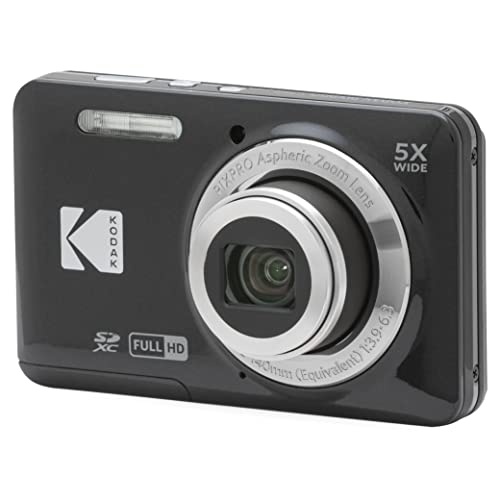
The FZ55 is the FZ45’s slightly more grown-up sibling: still 16 megapixels, still firmly in the inexpensive compact class, but with a 5x optical zoom starting at 28mm and a rechargeable battery instead of AAs. That combination makes it the easiest camera in this guide to recommend to someone who simply wants a small camera that is not a phone. The extra zoom step over the FZ45 sounds trivial on paper, yet in practice it is the difference between a head-and-shoulders portrait from across a table and a looser shot you later crop.
The rechargeable battery changes the ownership pattern. You charge it like a phone, carry it daily without a pocketful of AAs, and get more consistent performance across a long day of shooting. The cost is dependence on its charger and cable when you travel. Image quality follows the class: bright outdoor files look crisp and colourful, indoor files soften as sensitivity climbs, and the small sensor rewards photographers who move closer instead of zooming from the back of a room. As a modern stand-in for what a good 10 megapixel compact did in 2009, the FZ55 is arguably the most faithful: modest resolution, honest zoom, no drama.
Key specifications — FZ55:
- Sensor: 16 megapixels, small compact sensor
- Lens: 5x optical zoom starting at 28mm
- Video: 1080p Full HD recording
- Power: Rechargeable lithium battery, charged in camera
- Screen: 2.7 inch rear LCD
Strengths
- 5x zoom covers portraits better than the FZ45’s 4x
- Rechargeable battery suits daily carry without AA spares
- Compact body disappears into a jacket pocket
Trade-offs
- Still 16MP rather than the 10MP the search promises
- Charger dependence is a nuisance on long trips
- High-sensitivity indoor shots lose fine detail
Best for: everyday shooters who want one small rechargeable compact for trips and family life.
Not suited for: buyers who shoot mainly in dim halls or who need long telephoto reach.
Camkory Digital Camera FHD 1080P — Starter camera for kids and teens
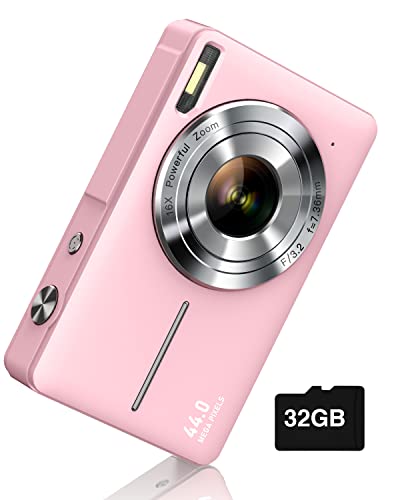
The Camkory occupies a different niche from the Kodaks: it is a starter camera aimed squarely at children, teenagers and absolute beginners, sold as a bundle with a memory card included so it works straight out of the box. Be clear-eyed about the headline numbers. The zoom figure quoted for this camera is digital, not optical, which means it crops and enlarges the middle of the frame rather than bringing a subject closer with glass. Used at its native wide setting, though, it produces perfectly serviceable snapshots and 1080p clips for school projects, family messaging and learning the basics of framing.
What the Camkory teaches well is process. A young photographer learns to charge a battery, insert a card, review shots, delete the failures and transfer files to a computer, all on hardware cheap enough that a drop is a lesson rather than a disaster. Anti-shake assistance helps beginners who jab the shutter button, and the simple menu avoids burying them in settings. Adults buying it as a serious travel camera will find the limits quickly: fine detail is modest, digital zoom mush is real, and low light is not its friend. Bought for the right person, at the right expectation level, it does its job.
Key specifications — Camkory:
- Video: Full HD 1080p recording for clips and class projects
- Zoom: Digital zoom only; optical reach is not part of the design
- Storage: Memory card included in the box, ready to shoot
- Power: Rechargeable battery, two supplied in the bundle listing
- Handling: Lightweight body with anti-shake assistance for beginners
Strengths
- Bundle includes a card, so a child can shoot immediately
- Cheap enough that beginners can learn without fear
- Simple operation teaches core camera habits
Trade-offs
- Digital zoom softens images fast when pushed
- Detail and low-light ability trail the Kodak compacts
- Build is light and plasticky, as the price suggests
Best for: children and teens getting a first camera of their own.
Not suited for: adult travellers who want files that hold up to cropping or large prints.
Canon PowerShot G11 — The classic 10MP answer, used only
If you want an actual 10 megapixel camera rather than a modern approximation, the Canon PowerShot G11 is the name that keeps coming up, and for good reason. Released when Canon deliberately stepped the G series back from a megapixel race it had been losing to physics, the G11 paired its 10 megapixel CCD with a larger-than-average compact sensor, a 28-140mm equivalent zoom, an optical viewfinder, a fully articulated screen and RAW capture. Photographers who used one remember the files fondly: at low sensitivity settings they are rich, sharp and unusually forgiving for a compact of that era.
Buying one today is a used-market exercise, and this guide links no seller because condition varies too much to endorse blindly. Check the lens for fungus and scratches, run the zoom through its full range listening for grit, confirm the screen hinge holds position, and budget for a replacement battery because original packs are old. Shutter buttons, control dials and flash all need testing before money changes hands. A good G11 still takes beautiful daylight photographs and teaches manual control better than most new budget cameras. A tired one is a repair bill. The camera is a classic; the purchase must be an inspection, not a leap of faith.
Key specifications — G11:
- Sensor: 10.0 megapixels exactly, CCD, larger compact-class sensor
- Lens: 5x optical zoom, 28-140mm equivalent range
- Files: JPEG plus RAW capture, unusual at this size and age
- Screen: Articulated rear screen plus an optical viewfinder
- Availability: Discontinued; used market only, condition varies widely
Strengths
- A genuine 10MP sensor with respected low-ISO file quality
- Manual controls and RAW support reward learning photographers
- Articulated screen and viewfinder give flexible framing
Trade-offs
- Only available used, with age-related faults a real risk
- Slow by current standards in focusing and shot pace
- Batteries and chargers are ageing stock, so budget spares
Best for: enthusiasts who specifically want the classic 10MP compact experience.
Not suited for: buyers who need a warranty, fast autofocus, or modern video.
Canon PowerShot S90 — Pocketable 10MP classic, used only
The PowerShot S90 answered a question the G11 could not: what if the 10 megapixel sensor and serious controls shrank into a body that genuinely fits a trouser pocket? Canon used a similar 10 megapixel CCD, added a bright f/2.0 lens at the wide end of its 28-105mm equivalent zoom, and put a control ring around the lens that photographers still praise. In dim restaurants and evening streets, that fast wide aperture let the S90 hold low sensitivity settings where rival compacts were already smearing detail, which is why this small camera developed an outsized reputation.
Like the G11, the S90 is a used purchase now, and its small size hides its age poorly in two places: the battery and the lens mechanism. Test the zoom extension for smooth travel, check that the control ring still registers cleanly, and inspect the rear screen for the delamination some ageing units show. Files are 10 megapixels with the same character as its bigger sibling: lovely in good light and at base sensitivity, grainy but honest as light falls. If your real goal is the feel and file size of the 10MP era in the smallest serious package Canon made, a verified S90 remains a satisfying answer.
Key specifications — S90:
- Sensor: 10.0 megapixels exactly, CCD compact sensor
- Lens: 3.8x optical zoom, 28-105mm equivalent, fast f/2.0 wide end
- Controls: Lens control ring plus full manual exposure options
- Files: JPEG plus RAW capture
- Availability: Discontinued; used market only, inspect before paying
Strengths
- True 10MP files from a genuinely pocketable body
- Bright f/2.0 wide aperture helps in restaurants and evenings
- Control ring makes exposure changes quick and tactile
Trade-offs
- Used-only purchase with ageing batteries and mechanisms
- Shorter zoom range than the G11 gives up reach
- No modern connectivity, video is standard definition era
Best for: pocket-camera fans who want real 10MP files and manual control.
Not suited for: anyone who needs HD video, Wi-Fi transfer, or a new-camera warranty.
Why Did Manufacturers Abandon Exactly 10 Megapixels?
The short answer is marketing arithmetic. Through the 2000s, megapixel count was the one specification every shopper understood, so makers raced upward whether or not small sensors benefited. Canon’s step back to 10 megapixels in the G11 was famous precisely because it broke ranks, pairing fewer, larger photosites with a better lens. The market followed briefly, then phone cameras reset expectations entirely: once phones advertised 12, 48 and 108 megapixels, a dedicated camera sold on a modest count became hard to explain on a shop shelf, whatever its technical merits.
Sensor production economics finished the job. Makers standardised on a small set of sensor designs shared across many models, and those designs settled at higher counts. Tooling a unique 10 megapixel sensor for a shrinking compact market made no financial sense. The result is today’s landscape: budget compacts at 13 to 20 megapixels, enthusiast cameras at 20 to 24 and beyond, and the exact 10 megapixel camera surviving only in the used market, where the G11 and S90 still trade at prices that reflect genuine respect.
How Much Resolution Do Prints and Screens Actually Need?
A 10 megapixel file measures roughly 3648 by 2736 pixels. Printed at 300 dots per inch, the standard for close-viewed quality, that covers about 12 by 9 inches. At the 200 dpi that looks perfectly sharp from normal viewing distance on larger prints, it stretches past 18 inches wide. Family albums, school projects, framed enlargements for a hallway: all sit comfortably inside what 10 megapixels delivers. The linked 13 and 16 megapixel cameras add cropping headroom rather than visible sharpness at these sizes, which is a real but modest benefit.
Screens are even less demanding. A 4K television displays about 8.3 megapixels, so a 10 megapixel photograph already exceeds what the most common large screen in the house can show pixel for pixel. Social platforms compress uploads far below that. Where extra resolution genuinely helps is cropping: reframing a loose shot, straightening a horizon, or extracting a portrait from a group photo. If you habitually shoot loose and crop hard, the 16 megapixel Kodaks earn their keep. If you compose carefully in camera, 10 megapixels was, and remains, enough.
Side-by-Side Comparison
| Camera | Resolution (honest count) | Lens | Video | Power |
|---|---|---|---|---|
| KODAK PIXPRO FZ45 | 16 megapixels | 4x optical, 27mm wide start | 1080p Full HD | AA batteries |
| KODAK PIXPRO C1 | 13 megapixels | 26mm fixed, no optical zoom | 1080p Full HD | Rechargeable battery |
| KODAK PIXPRO FZ55 | 16 megapixels | 5x optical, 28mm start | 1080p Full HD | Rechargeable battery |
| Camkory Digital Camera FHD 1080P | Bundle starter spec; treat zoom claims as digital | Digital zoom only | 1080p Full HD | Rechargeable, card included |
| Canon PowerShot G11 | 10.0 megapixels exactly | 5x optical, 28-140mm equivalent | Standard definition era video | Lithium pack, ageing stock |
| Canon PowerShot S90 | 10.0 megapixels exactly | 3.8x optical, 28-105mm equivalent, f/2.0 wide | Standard definition era video | Lithium pack, ageing stock |
Read the resolution column as the guide’s thesis in miniature: four modern cameras clustered between 13 and 16 megapixels, two classics at exactly 10. Nobody shopping honestly should feel short-changed by any figure there. The practical separation happens in the lens column. Optical zoom figures describe real glass doing real work; the Camkory’s digital figure describes cropping, and the table marks it as such so the comparison stays truthful.
Power divides the table by lifestyle rather than quality. AA and rechargeable systems each fail only when matched to the wrong owner, as the buying advice above explains. Video is the column where age shows hardest: the four new cameras record proper 1080p, while the Canons belong to an era when compact video was an afterthought. Readers who film as much as they photograph should weight that column heavily and lean toward the FZ55 or C1.
How Do You Choose the Right 10 Megapixel Cameras?
Start With the Print and Crop Test
Before choosing, name the largest print you realistically make and how hard you crop. Album prints and screen sharing forgive everything in this guide. Regular A4 enlargements still forgive all six picks. Habitual heavy cropping is the one behaviour that separates them: the 16 megapixel Kodaks keep roughly a third more data than a 10 megapixel file after the same crop, which shows as cleaner edges in print. Buy for the behaviour you actually have, not the behaviour you imagine adopting.
A practical test costs nothing. Take a favourite phone photograph, crop it to half its frame, and view the result at the size you would print. If the softness bothers you, resolution headroom matters to you and the higher-count picks deserve priority. If it looks fine, stop paying for pixels in your head and choose on lens, screen and battery instead. This five-minute check settles more arguments than any specification table.
Choose the Battery System You Will Actually Maintain
The FZ45’s AA batteries and the FZ55’s rechargeable pack represent two ownership philosophies. AA power suits cameras that sit idle for weeks: no self-discharged lithium pack, no charger hunt, just fresh cells from any shop. Rechargeable power suits daily carry: slimmer body, consistent performance, one cable habit. Neither is superior in the abstract. The failure mode is mismatch, the drawer camera whose pack is always flat, or the travel camera whose owner forgot the one proprietary charger it needs.
Whichever system you choose, buy the spare on day one. A second set of quality rechargeable AAs transforms the FZ45’s stamina and flash pace. A second battery or a small power bank transforms the FZ55’s travel reliability. The used Canons need this thinking most of all: their original batteries are a decade or more old, so a fresh third-party pack is not an accessory but part of the purchase price, and any used quote should be judged with that cost added.
Match the Lens to Your Distances
Zoom figures hide the real question, which is how far your subjects usually are. Across-a-room family shooting lives at the wide end, where the C1’s fixed 26mm and the FZ45’s 27mm start both excel. School stages, sports days and wildlife demand reach the compacts here mostly do not have: the G11’s 140mm equivalent is the longest honest optical reach in the guide, one more reason enthusiasts keep it. Digital zoom, headline feature of the Camkory, is cropping by another name and should be treated as an emergency tool.
Framing with your feet is the oldest photographic skill and the cheapest upgrade available to every pick here. Two steps closer improves a photograph more than two zoom steps from the back row: perspective flattens less, light on the subject usually improves, and the camera’s modest sensor works with more detail. Teach that habit to a child with the Camkory and you have taught the one lesson that transfers to every camera they will ever own.
Buying the Used Canons Without Regret
Used G11 and S90 listings range from cherished one-owner cameras to exhausted ex-rental workhorses wearing the same model name. Insist on clear photographs of the lens, screen and battery compartment, ask for a shot of the camera powered on, and prefer sellers who state shutter behaviour and include a working charger. Fungus inside a lens element, a zoom that grinds, a screen hinge that flops: each is a walk-away fault at this price level, because repair costs approach the camera’s whole value.
When the camera arrives, test methodically on day one while returns remain possible. Run the zoom end to end, fire the flash, shoot a plain wall to reveal sensor spots, record the articulated screen holding every angle, and charge the battery fully to time a shooting session. A camera that passes those checks will likely serve for years. One that fails any of them goes back immediately, however charming its listing photographs were. Classics reward careful buyers and punish hopeful ones.
Setting Up and Getting Consistent Results
Set the Camera Up for Honest Files
On any pick here, first set image quality to the highest JPEG setting and confirm the resolution reads at the sensor’s full count, since some cameras ship defaulted to a smaller size for card economy. Turn off any digital zoom option in the menu so the control cannot engage accidentally. Set the date correctly, because family archives become searchable by year only when the timestamps are right, and format the memory card in camera rather than on a computer.
Then take twenty test photographs around your home at different distances and light levels, and review them on the largest screen you own. You are learning your specific camera’s habits: how far you can push it indoors, when its flash helps, how its colours render skin. Twenty deliberate frames on day one teach more than two hundred holiday snapshots reviewed in disappointment afterwards.
Build a Simple Transfer and Backup Habit
None of the cameras in this guide should be your only copy of anything. Adopt the rule that cards are emptied weekly to a computer folder named by date, and that folder is copied to a second location monthly. The cameras make this easy in different ways: the Kodaks read as standard storage over USB or through a card reader, and the used Canons behave the same. Phones have trained people to expect automatic cloud backup; dedicated cameras demand a manual ritual, and the ritual is the price of the better lens.
For the Camkory bought for a child, make the weekly emptying a shared job. Reviewing the week’s photographs together, deleting failures without drama and choosing favourites to print teaches editing judgement early. It also means the card never fills mid-event, the most common beginner disaster and the easiest to prevent with five minutes of routine.
What Are the Most Common Mistakes Buyers Make?
Believing a listing’s inflated megapixel claim
The single most common trap in this market is the interpolated megapixel figure, where software upscaling is advertised as sensor resolution. A camera claiming enormous resolution at a bargain price is almost always a modest sensor with marketing arithmetic applied. The defence is simple: check the maker’s own specification page, and treat any count that cannot be found there as fiction. Every figure in this guide was stated plainly, including where a pick exceeds the brief, because a buyer misled on the headline spec has been misled on everything.
Paying new-camera money for a tired classic
G11 and S90 prices float on nostalgia, and clean examples justify strong money, but worn examples wear the same name. Fungus, grinding zooms and dead batteries turn a bargain into a project. Set a total budget that includes a fresh battery and charger, inspect against the checklist in this guide, and walk away from any seller who resists basic questions. Another clean example always exists; patience is the used buyer’s entire advantage.
Using digital zoom as a substitute for position
Digital zoom discards the edges of your photograph and enlarges what remains, which is why Camkory shots at full digital reach look soft and smeared. The same crop done later on a computer produces an identical result with the option to change your mind. Leave digital zoom off, shoot at native framing, move closer when you can, and crop afterwards when you cannot. Your future self, re-cropping differently for a print, will be grateful.
Ignoring the battery system until it fails you
Every camera here has a known power personality, and the failures are predictable: the drawer FZ45 with corroded forgotten AAs, the travelled FZ55 with its charger in another country, the classic Canon whose decade-old pack holds an hour. Spares bought on day one cost little; the missed school play costs more. Match the system to your habits when choosing, then spend the small money that makes the system reliable.
Judging a camera by its first indoor photographs
Small sensors all look ordinary in dim rooms, and many buyers return a camera that would have delighted them outdoors. Judge any pick here across a full week of your real life: daylight, shade, faces, distance, one evening event. That spread shows the camera’s true character and matches how it will actually be used. A verdict formed on one gloomy kitchen test says more about the kitchen than the camera.
Understanding CCD Character in the Classic Picks
The G11 and S90 use CCD sensors, a technology modern cameras abandoned for CMOS, and their files have a recognisable signature: strong colour at base sensitivity, abrupt highlight clipping when exposure strays, and grain that arrives early but looks organic rather than smeared. Photographers raised on modern processing sometimes find CCD files startlingly direct. Nothing is being smoothed on your behalf, which flatters good light and punishes sloppy exposure in equal measure.
Working with that character is a skill worth learning. Expose carefully for highlights, because clipped CCD highlights recover poorly. Keep sensitivity at its lowest settings whenever light allows, and use the fast S90 lens or the G11’s stabilisation to buy shutter speed instead of sensitivity. Photographers who adapt are rewarded with files that need almost no editing. Those who shoot on full automatic in dark rooms will conclude the cameras are overrated, and the cameras will not argue.
What a Modest File Size Buys You Over Years
Resolution discipline compounds. A family shooting 16 megapixel JPEGs fills storage roughly half again as fast as the same family at 10 megapixels, across thousands of frames and years of birthdays. Smaller archives back up faster, search faster, and survive on modest hardware. Grandparents’ computers, school laptops and ageing drives all handle the lighter files more gracefully, which quietly determines whether the archive gets maintained or abandoned.
There is also an editing dividend. Batch adjustments, exports and uploads all complete sooner, so the photographer actually does them. Many family archives die not from lost files but from unprocessed cards nobody faced opening. A camera whose output is quick to handle supports the habit that keeps photographs alive, and that habit is worth more than the theoretical detail in files nobody ever views.
Field Notes: Small Practices That Decide Results
Set the self-timer to two seconds for tripod and tabletop shots. On these small compacts, the pressure of a finger on the shutter button is enough to blur a frame at slower shutter speeds, and the short timer delay lets the camera settle completely before it exposes. It costs nothing, works on every pick in this guide including the used Canons, and quietly raises the sharpness of indoor family photographs taken without flash.
Turn the flash off deliberately in museums, aquariums and theatres, where it is either forbidden or useless beyond a few metres. The compacts here will otherwise fire it automatically, producing a bright foreground and a black background. Raising sensitivity one step and bracing the camera against a rail gives a dim but honest photograph of the actual scene, which is what you travelled to see in the first place.
Carry the camera in a small pouch rather than loose in a pocket or handbag. Extending lenses on budget compacts dislike lint, grit and keys, and a jammed lens mechanism is the most common death of this class. The pouch also keeps a spare card and, for the FZ45, a set of batteries travelling with the camera, so the kit is complete whenever an unplanned moment appears.
Photograph documents and whiteboards with the camera held square to the surface, using the wide end of the zoom. At 10 to 16 megapixels the resulting file is legible down to small print, which makes these compacts surprisingly useful for insurance records, school notices and rental inventories. Fill the frame, avoid flash reflections by angling slightly, and check the corners for focus before putting the original away.
Teach children the two-stage shutter press on the Camkory or FZ45: half press to focus, full press to take the picture. That single habit eliminates most of the blurry, missed-focus shots beginners produce, because the camera gets its moment to measure distance. Practise on the family pet for ten minutes and the lesson sticks for every camera the child will ever hold afterwards.
Use scene modes without embarrassment. The portrait, landscape and macro modes on the Kodak compacts exist because their automatic programs genuinely choose better settings for those subjects than the general program does. Macro mode in particular lets these small cameras focus startlingly close for flowers, insects and coins, a party trick the used Canons also perform well through their own close-focus settings.
Print a small contact sheet of favourite photographs every few months. A 10 megapixel file that looks ordinary on a phone screen often prints with more presence than expected, and seeing prints teaches composition faster than any tutorial. Families who print keep photographing; families who only accumulate files tend to stop opening them. The cameras in this guide were built for that printed family archive.
When buying the used Canons, ask the seller for a photograph of a plain white wall taken with the camera that week. Sensor dust and lens marks show clearly against an even bright field, and an honest seller will supply the shot without argument. A seller who refuses a thirty-second test is telling you something about the camera that no listing description will.
Keep one memory card per camera rather than swapping a single card between devices. Each camera formats and numbers files its own way, and mixing cards invites corrupted folders and overwritten filenames. Cards in this capacity class are inexpensive, and dedicating one to each camera removes a whole category of archive confusion for the price of a coffee.
For group photographs, place the camera at the group’s eye level and use the wide end from closer rather than the zoom from farther back. Wide lenses from a moderate distance keep faces natural and include the room’s context, while long lenses from across the room flatten the scene and invite camera shake. Every pick here rewards the closer position with sharper, warmer results.
Check the date and time settings after any battery change on the AA models. Removing cells can reset the clock on some compacts, and photographs stamped with the wrong year poison a family archive’s searchability. A ten-second check after each battery swap keeps birthdays in the right folders forever, a small ritual with a permanent payoff for whoever inherits the archive.
Shoot the same family scene at each sensitivity setting your camera offers, then view the results at full size. You will learn the exact point where your specific camera’s detail begins to dissolve, which is more useful than any review’s opinion. From then on you know when to add light, when to brace, and when the photograph is simply beyond the tool in your hand.
A neutral-density trick for bright days: when the compacts’ fastest shutter still overexposes at the beach or in snow, the exposure compensation control, usually marked with a plus-minus symbol, is the fix. Dial in a negative value for snow scenes the camera wants to render grey, and a positive value for backlit faces. This single control separates deliberate photographers from button-pressers on every camera in this guide.
Store the used Canons with a small silica gel packet in their case if your climate is humid. Fungus grows inside lens elements in damp storage and is effectively unrepairable at this value level. Dry storage, occasional use and daylight through the lens a few times a year keep the glass clear. Classics survive decades when their owners treat storage as part of ownership rather than an afterthought.
When a child graduates from the Camkory, hand them the FZ55 next rather than a phone. The progression teaches zoom discipline, battery care and file management on hardware that keeps photography a distinct activity. Families who treat cameras as a craft ladder, starter, compact, then perhaps a Canon from the 1080p guide, raise photographers. Families who skip to phones raise scrollers, and the difference shows in the archive.
Use the grid overlay if your camera offers one, and place horizons on the lower or upper third line rather than the middle. The compacts here all expose this simple compositional aid in their menus, and horizons are the most common flaw in family landscapes. A level, deliberately placed horizon transforms holiday photographs more reliably than any resolution figure printed on a box.
For pet photographs, get the camera down to the animal’s eye level and focus there. These small cameras focus quickly at wide angles in good light, and a pet portrait at its own level has a presence that the usual downward snapshot never achieves. The flip screen on the C1 makes ground-level framing comfortable rather than a yoga exercise.
Back up the memory card before formatting it, every time, and verify the copy opened. The single most common archive disaster with cameras of this class is the card formatted in haste at the start of a trip, taking the previous month with it. A two-minute verification habit, open three copied files at random, closes that risk completely for the rest of your photographic life.
Label used-camera batteries with their purchase month using a small sticker. Ageing lithium packs for the G11 and S90 vary enormously in remaining capacity, and rotating labelled packs reveals which ones still hold a useful charge. Retire packs that fade within an hour of mixed shooting; a failing battery corrupts files when it dies mid-write, a risk no photograph is worth.
When photographing through glass, at zoos and viewpoints, rest the lens hood area gently near the glass and shoot straight on to kill reflections. The wide lenses on these compacts focus close enough to make the technique work, and the resulting photographs look impossibly clear compared with angled shots full of ghost reflections. It is the oldest trick in compact photography and still the most effective.
One last discipline for the archive: file each month’s photographs under a folder named for the month, and resist subdividing further until the year ends. Over-organised archives discourage filing; under-organised ones discourage finding. A single monthly folder, honestly maintained, beats every elaborate scheme that collapses by March under its own administrative weight.
Final Recommendation
For most readers, the FZ55 is the recommendation: it preserves everything people actually liked about the classic compact era, simple operation, modest files, honest zoom, in a rechargeable body that fits modern habits. Choose the FZ45 instead when AA convenience matches a drawer-camera life, and the C1 when its flip screen and 13 megapixel restraint match how you shoot. The Camkory is the children’s pick and should be bought as exactly that.
The two Canons serve a different reader: the one who read the search literally and wants ten megapixels because ten megapixels, in a G11 or S90, meant a considered balance of sensor, lens and file size that the market no longer builds. That reader should buy slowly, inspect thoroughly and budget for batteries. The reward is a camera with a character modern budget models rarely attempt.
Ten megapixels turned out to be enough for almost everything family photography asks, and the industry’s refusal to sell it any more says nothing about its sufficiency and everything about how specifications are marketed.
Frequently Asked Questions
Can I still buy a brand-new camera with exactly 10 megapixels?
No current major manufacturer sells one. The resolution survives only in discontinued models traded used, principally respected compacts such as Canon’s G11 and S90. New budget cameras cluster at 13 megapixels and above. Anyone advertising a new 10 megapixel camera today is either clearing old stock, describing an industrial or toy product, or misstating the specification, so verify carefully before paying.
Is 10 megapixels enough for printing family photographs?
Yes, comfortably. A 10 megapixel file prints at high quality up to roughly 12 by 9 inches and remains sharp at larger sizes viewed from normal distances. Album prints, school enlargements and hallway frames all sit inside that envelope. Only very large wall prints viewed closely, or heavy cropping, reveal the ceiling, and the 13 and 16 megapixel picks in this guide raise that ceiling modestly.
Why does this guide recommend 16 megapixel cameras for a 10 megapixel search?
Because the alternative would be recommending products that do not exist. The guide states each camera’s true count wherever it appears, explains why the exact figure vanished from the market, and reserves literal 10 megapixel coverage for the two used classics that genuinely deliver it. A buyer deserves that honesty rather than a listing quietly relabelled to match their search words.
Are the Canon G11 and S90 risky purchases now?
They carry the normal risks of any electronic product over a decade old: tired batteries, worn lens mechanisms, and occasional internal faults that photographs cannot reveal. The risk is manageable with disciplined buying: verified sellers, specific questions, a day-one test routine and a total budget that includes fresh power. Bought that way, both cameras still deliver the file quality that built their reputations.
Should I use the Camkory’s digital zoom for my child’s school play?
Avoid it beyond the smallest nudge. Digital zoom enlarges the centre of the frame and visibly softens the result, which matters on a distant stage. A better plan is seating closer, shooting at native framing during the performance, and cropping the file afterwards on a computer if a tighter composition is needed. The crop is identical in effect and can be adjusted or undone.
Which pick suits a grandparent who wants zero fuss?
The FZ45, provided fresh batteries are kept in the same drawer. Its controls are the simplest here, its AA power needs no charger routine, and its wide lens forgives framing mistakes indoors. Pair it with a large-print note of the three steps, insert card, switch on, press the big button, and it becomes the camera most likely to actually be used at family gatherings.
Related Guides
Keep researching with these companion guides from our camera team: Best 1080p cameras for everyday stills and video Best 20 megapixel cameras compared honestly Best 20x optical zoom compact cameras.
Related guides
- Best Balancing Stabilizers for Mirrorless Cameras: Payload, Balancing and Native Vertical Shooting
- Best 1080p IP Cameras: PoE Domes, Turrets, Bullets and a PTZ That Earn Their Cable
- Best Basic Phones Camera Buyers Can Trust: Flip Phones and Simple Handsets That Still Take a Photograph
- Best Sony Full Frame Cameras for Astrophotography: Sensitivity vs Resolution


