What's inside
- Where to buy
- Key Takeaways
- Quick Picks
- How did we choose interfaces for real sessions?
- What actually happens between a microphone and your DAW?
- How many inputs do you genuinely need?
- Should your interface add character, or stay out of the way?
- Why is the room the seventh product in this guide?
- What changes when the same interface must also stream?
- Six front doors into recording, reviewed in turn
- Which microphone belongs in front of these interfaces?
- How do the six compare side by side?
- How should you run your first session on a new interface?
- What mistakes do first-time interface buyers keep making?
- Final Recommendation
- Frequently Asked Questions
- Related Guides
As an Amazon Associate I earn from qualifying purchases. This post may contain affiliate links at no extra cost to you.
gizmoverdict.com is reader-supported. When you buy through links on our site, we may earn an affiliate commission.
Where to buy
Here is the sentence this guide is built on, placed where it belongs: the best sound cards for studio recording are not cards anymore — they are USB audio interfaces, and every one of the six picks below is exactly that. The recording chain’s centre of gravity moved out of the computer case and into a desktop box holding microphone preamps, instrument inputs and monitor controls, and it is not moving back. Readers who arrived expecting a bracket and a slot should consider this a friendly ambush: the products that will actually record their voices and instruments are these six, and they are linked to live Amazon listings throughout.
What an interface buys a studio is a front door. Microphones plug into preamps with gain and phantom power, guitars and basses meet inputs designed for their high-impedance signals, headphones and monitors take their feeds from the same box that captured the performance, and the computer receives the whole exchange over one USB-C cable. Judge the six below on the quality of that front door: preamp character and cleanliness, input count against your ambitions, monitoring behaviour, and the software bundled to get a first session recorded rather than merely possible.
The cast divides into temperaments. Focusrite’s fourth-generation Scarletts bring automation and air; PreSonus offers the ecosystem route with its own DAW in the box; Universal Audio’s Volt line borrows the clothes of its legendary studio hardware. None of them is a wrong door — but they open onto different rooms, and the reviews below are written to help you hear the difference before you commit.
Key Takeaways
- For recording, the “sound card” is now a USB interface — preamps and instrument inputs live there, not in a PCIe slot.
- The Scarlett 2i2 4th Gen is the default recommendation: two preamps, Auto Gain, Clip Safe and a stated 120dB dynamic range.
- The Scarlett Solo trims the same fourth-generation recipe to one microphone input for voice-and-one-instrument creators.
- PreSonus’s Studio 24c bundles its Studio One DAW, making it the ecosystem-first route into recording.
- Universal Audio’s Volt 2 adds 610 tube-emulation flavour and MIDI; the Volt 176 goes further with a built-in 76-style compressor.
- Count your simultaneous inputs honestly — that number, not the badge, decides which of these you outgrow first.
Quick Picks
| Pick | Badge | Why it earns its place |
|---|---|---|
| Focusrite Scarlett 2i2 4th Gen | Best for most studios | Two mic preamps, two Hi-Z instrument inputs, automatic gain setting with clip protection, Air modes and a stated 120dB dynamic range. |
| Focusrite Scarlett Solo 4th Gen | Best for solo creators | One XLR preamp and one Hi-Z input carrying the same fourth-generation Air character for podcasters and singer-songwriters. |
| PreSonus AudioBox 96 | Best battle-tested workhorse | The 25th Anniversary edition of a famously road-worn two-input design that studios keep as the spare that never dies. |
| PreSonus Studio 24c | Best software bundle route | A 2×2 interface running to 192kHz with Studio One recording software included — the DAW decision made for you, kindly. |
| Universal Audio Volt 2 | Best vintage flavour, two inputs | A 2×2 USB-C interface with 610 tube preamp emulation and MIDI for musicians who like their tracks pre-warmed. |
| Universal Audio Volt 176 | Best one-channel character piece | A single-input interface whose built-in 76-style compressor prints studio manners onto vocals while you track them. |
How did we choose interfaces for real sessions?
By imagining the second session, not the unboxing. Any interface can record a careful first take in a quiet room; the questions that separate these six are about Tuesday in month four. Do the preamps stay clean when a soft singer needs most of their gain? Does the driver behave after an operating-system update the night before a deadline? Can the box monitor a performance without the singer hearing themselves late? Those behaviours, plus the input census, decided the rankings.
Specifications were admitted only from the listings themselves. Focusrite states its fourth generation’s 24-bit/192kHz conversion and 120dB dynamic range in its titles, and those figures are quoted as stated. Where a listing is quieter — the AudioBox 96’s anniversary title is almost ostentatiously brief — the review leans on the design’s documented role and ecosystem rather than inventing numbers to decorate a spec box.
Build and layout were given their quiet due. An interface lives within elbow range for years: its gain knobs will be turned thousands of times, its headphone socket will absorb the daily violence of plugs, and its controls will be operated by feel while the owner’s eyes are on a lyric sheet. Boxes that put the important knobs on top or within easy reach, that keep the headphone jack where a cable falls naturally, and that survive being repositioned by one hand mid-session accumulate small daily mercies that spec sheets cannot express. The reviews note these manners where they distinguish one pick from another.
Support horizons mattered as well, because an interface is a driver with a box attached. The makers in this guide — Focusrite, PreSonus, Universal Audio — all maintain their recording lines as living product families with software ecosystems around them, and that institutional commitment is part of what a buyer purchases. A first interface from a living family is a safer teacher than a orphaned bargain, however impressive the orphan’s launch specifications once were.
Bundled software was weighed as a real feature, because for a first studio it often is the feature. An interface that arrives with a DAW — the Studio 24c’s inclusion of Studio One is stated in its listing — collapses two purchases and two learning curves into one. Equally, creators were sorted by their relationship with processing: some want the interface to print character while tracking, which is the Volt 176’s whole argument, and some want everything clean for later decisions, which is the Scarlett philosophy. Neither is a flaw. Confusing them is.
What actually happens between a microphone and your DAW?
Follow one sung note. It leaves the microphone as a whisper of voltage, far too faint for any converter, and meets the preamp — the component that decides whether that whisper is amplified cleanly or decorated with hiss and hardness. Gain is applied, phantom power has already woken the condenser that captured the note, and the amplified signal reaches the converter, which samples it — at 24-bit/192kHz on the Scarlett listings — into numbers your DAW can keep. Every purchasing argument in this guide is, underneath, an argument about the quality and character of those two stages.
Instruments take a different door. A guitar’s pickup is a high-impedance source that sounds dull and strangled through an input designed for microphones or line level, which is why the Hi-Z instrument input exists and why its presence in a listing — both Scarletts state theirs plainly — matters to anyone who plugs in directly. Bassists, keyboard players feeding line outputs, and podcasters with a single microphone each need a different census of these doors, and the census is the first honest exercise in this article.
Then the note must come back. Monitoring — hearing yourself while you perform, through the interface rather than after a round trip through the computer — is where sessions are saved or soured. A singer monitoring late sings late. Interfaces handle this with direct monitoring paths and careful driver design, and while the listings do not print latency figures for us to quote, the architectures here are the mature, session-proven kind. Buyers with demanding live-processing habits should still verify round-trip behaviour for their specific setup, as with any interface.
How many inputs do you genuinely need?
Count simultaneous sources at your most ambitious realistic session, not your dream one. A podcaster records one voice at a time and is served completely by the Solo or the Volt 176. A singer-songwriter who performs guitar and voice together needs two — the 2i2, Studio 24c, AudioBox 96 and Volt 2 all live here. A duo, a drum kit with ambitions, or a synth rig that must be captured in one pass has already outgrown this entire guide’s input counts and should be shopping a larger interface class, honestly and without regret.
The trap is buying for the session you fantasise about instead of the fifty you will actually run. Extra inputs are not free: they cost money, desk space and the small daily friction of a bigger box. The counter-trap is buying exactly one input and discovering a collaborator. The two-input models dominate this guide because they sit at the genuine centre of home-studio gravity — room for a voice and an instrument, or two voices, without paying for a drum kit’s worth of silent preamps.
There is a subtler census hiding inside the first one: how many of those sources are microphones? Two microphone preamps and two line inputs are not the same studio as four preamps, however the total reads. Vocal duos, stereo microphone techniques and amplifier miking all consume preamps specifically, so count the XLR-shaped needs separately from the jack-shaped ones. The listings in this guide state their preamp counts plainly — one for the Solo and Volt 176, two for the rest — and that number, more than the total input count, predicts the day a growing studio starts shopping again.
Outputs deserve a glance too. All six feed monitors and headphones, which covers the home studio’s needs; streamers and hybrid creators should additionally think about how their DAW’s playback and their voice reach broadcast software — a workflow question your software chain answers, and one worth testing in the first week while returns are still painless.
Should your interface add character, or stay out of the way?
This is the guide’s real fork, and both roads are respectable. The transparent school — Focusrite’s fourth generation, with its Air modes offering a switchable presence lift rather than permanent colour — records what happened and leaves every decision reversible. It suits producers who mix as they go, beginners whose tastes are still forming, and anyone whose material varies too much for one flavour of warmth.
The character school argues that great records were made by committing. Universal Audio’s Volt line is its retail embassy: the Volt 2’s 610 tube emulation borrows the console flavour UA built its name on, and the Volt 176’s built-in 76-style compressor does to a vocal what studio engineers have done for decades — control its dynamics on the way in, so the performance arrives mix-ready and the singer hears confidence in their headphones. Printing character demands taste and a steady hand, because a compressed take cannot be un-compressed. It also produces, in practiced hands, the most immediately “finished” recordings in this guide.
A hybrid position deserves naming for the creators who live there: record clean, but monitor with confidence. Many producers track through a transparent interface while listening through gentle software compression and reverb that never reaches the recording — the singer hears the finished illusion, the DAW keeps the honest take. It is the character school’s pleasure with the transparent school’s safety net, and every interface in this guide supports the workflow, because the trick lives in the DAW’s monitoring path rather than the hardware. Beginners often believe they must choose a religion on day one; the hybrid path is permission to postpone the theology until their ears have evidence.
PreSonus splits the difference by selling the room around the recording instead: neutral hardware, and the character supplied by the Studio One ecosystem bundled with the Studio 24c. Choose your school by temperament, not by forum allegiance — the honest question is whether you make better decisions in the moment of performance or in the calm of the mix.
Why is the room the seventh product in this guide?
Because it will be heard on every recording you make, more clearly than the difference between any two interfaces here. A bare-walled bedroom adds its own reverb to a vocal — a short, boxy echo that no plug-in fully removes — while the same voice recorded in a treated corner, or even a makeshift one of duvets and a full wardrobe, arrives dry, close and professional. Beginners routinely blame the interface for the room’s signature, then upgrade the interface and faithfully re-record the room in higher resolution.
The encouraging news is that the room is the cheapest component to improve. Record away from walls rather than against them, put soft mass behind the singer rather than behind the microphone, and treat the first reflection points with whatever the household offers — bookshelves, curtains, a mattress on its day off. An hour of this domestic engineering improves a recording more than any single upgrade in this article, and it improves every future microphone and interface you will ever own.
Judge your interface in that treated corner, with the microphone you actually use, before letting any verdict harden. The differences that remain — preamp cleanliness at high gain, character modes, monitoring manners — are the interface’s true signature, and they are exactly the differences the reviews below were written to describe. Everything else was architecture.
What changes when the same interface must also stream?
A growing share of these boxes live a double life: studio interface by day, streaming source by night. The hybrid creator’s questions differ subtly from the recordist’s. The microphone must reach broadcast software cleanly alongside game or desktop audio; the headphone feed must carry both the performance and the programme; and the setup must survive being rebuilt live, in front of an audience, when something inevitably changes. Interfaces with simple, predictable routing — and drivers that present the microphone as a well-behaved system device — earn their keep in that second job.
Character processing changes value in the streaming light. The Volt 176’s printed compression, a commitment a recordist weighs carefully, is simply the broadcast sound a streamer wants every minute they are live — there is no mix later in which to add it. Similarly, a podcaster recording straight to a streaming platform’s cloud has no post-production safety net, and hardware that polishes on the way in stops being a luxury. Judge the six picks by the proportion of your work that is finished the moment it is performed; the higher that proportion, the more the character school in this guide deserves your vote.
The recordist’s virtues do not disappear in hybrid life — preamp cleanliness and honest monitoring matter on air exactly as on tape — but reliability moves to the top of the list. A stream cannot be re-run because a driver needed attention. Whichever interface you choose, give it a week of boring, successful sessions before you trust it in front of an audience, and keep the previous setup’s cables labelled in a drawer for the night it misbehaves.
Six front doors into recording, reviewed in turn

Focusrite Scarlett 2i2 4th Gen — Best for most studios
The fourth-generation 2i2 is what happens when the world’s default home-studio interface decides to fix its users’ two most common failures. Its listing states the recipe: two microphone preamps, two Hi-Z instrument inputs, 24-bit/192kHz conversion with a stated 120dB dynamic range — and then the headline features, Auto Gain and Clip Safe, which exist because Focusrite watched a generation of beginners ruin takes with timid levels and clipped choruses. The interface now sets sensible gain by listening to you perform, and guards the loudest moment from digital clipping. That is not a gimmick; it is session insurance aimed precisely at the takes that cannot be repeated.
The Air modes carry the line’s heritage forward — a presence lift in the spirit of Focusrite’s classic studio preamps, switchable per the listing’s description, there when a vocal needs to step forward and absent when it does not. Around those headlines, the 2i2 remains the balanced citizen it always was: two inputs that cover the singer-songwriter session whole, monitor and headphone paths that behave, and a USB-C connection that asks nothing exotic of the computer.
Who is it for, in the end? The producer whose sessions vary — voice today, guitar tomorrow, a friend’s keyboard next week — and who wants the interface to remove beginner failure modes while staying transparent enough for growing skills. The 2i2’s deepest virtue is that it postpones its own replacement: studios outgrow one input quickly, but a clean two-input box with this headroom remains useful as a main interface for years and as a trusted spare thereafter.
Its limits are the class’s limits. Two inputs are two inputs — the drum kit conversation belongs to a larger interface — and the character it offers is a seasoning, not the Volt line’s full vintage commitment. Buyers who know they want compression printed on the way in should read the Volt 176’s review with care. Everyone else can start here with the confidence of a very large crowd.
There is a community dividend, too, that specifications never mention. Owning the world’s most common studio interface means every tutorial, forum answer and troubleshooting thread on earth assumes your exact box in its screenshots. Beginners underestimate how much of learning to record is searching for help at midnight; the 2i2’s congregation is the largest teaching staff in home audio, and it never sleeps.
- Role: 2-in/2-out USB-C audio interface
- Preamps: two mic preamps with Air modes
- Instrument inputs: two Hi-Z, per the listing
- Conversion: 24-bit/192kHz, stated 120dB dynamic range
- Session aids: Auto Gain and Clip Safe
Strengths
- Auto Gain and Clip Safe retire the two commonest ruined takes.
- Two full preamps plus two Hi-Z inputs cover the classic home session.
- Headroom figures that keep quiet sources clean at high gain.
Trade-offs
- Two inputs remain a hard ceiling for ensembles and drum kits.
- Character is a light touch — vintage hunters should meet the Volts.
- Its very popularity means your studio will sound sensibly like everyone’s.
Best for: home studios that record voice and instrument in changing combinations. Not suited for: multi-musician tracking or heavy printed-character workflows.
Most readers can start at the 2i2’s Amazon listing and check its input panel against the session they ran most recently.

Focusrite Scarlett Solo 4th Gen — Best for solo creators
The Solo asks a disarmingly simple question: what if you only ever record one thing at a time? Its listing mirrors the 2i2’s fourth-generation recipe in miniature — one XLR mic preamp, one Hi-Z instrument input, 24-bit/192kHz conversion, the same stated 120dB dynamic range, Air modes, and compatibility across PC, Mac and iPad. For the podcaster, the streamer, the voice artist and the songwriter who tracks parts one at a time, that is not a cut-down interface. It is the correctly sized one.
Sizing correctly buys real things. The Solo’s single preamp carries the same fourth-generation character as its sibling’s pair, so a voice recorded on it does not sound like a compromise — it sounds like a Scarlett, with Air available when the material wants presence. The smaller box also travels: an iPad-compatible interface that fits a creator’s bag turns hotel rooms and borrowed sofas into adequate studios, and a remarkable amount of modern content is made in exactly those places.
The honest boundary is simultaneity. The guitarist who sings while playing — and wants both captured on separate tracks in one performance — needs the second preamp the 2i2 provides, because the Solo’s instrument input and microphone cannot build that session the same way. Solo buyers should therefore interrogate their habits rather than their hopes: if your recordings are genuinely one-source events, the Solo is the smartest money in this guide; if your signature thing is a live voice-and-guitar take, it is a false economy measured in retakes.
There is a discipline the Solo teaches that larger interfaces cannot: commitment to the take in front of you. Studios with endless inputs defer decisions; a one-input studio makes them, and many creators find their output improves under the constraint. The Solo is a small box with a philosophy, and its philosophy is focus.
Voice artists in particular should note the Solo’s manners with spoken word. A single preamp with generous clean gain flatters the close-miked, intimate delivery that auditions and narration demand, and the interface’s small footprint leaves the booth — often a closet wearing a job title — uncluttered. In a discipline where the performance is the product and the equipment must vanish, vanishing is a specification.
- Role: compact USB-C audio interface for single-source recording
- Inputs: one XLR mic preamp, one Hi-Z instrument input
- Conversion: 24-bit/192kHz, stated 120dB dynamic range
- Character: Air modes, per the listing
- Platforms: PC, Mac and iPad named in the listing
Strengths
- Full fourth-generation Scarlett quality concentrated on one channel.
- Travels easily, including iPad-based recording setups.
- The correctly priced answer for podcasters and voice creators.
Trade-offs
- Cannot capture voice and instrument as a two-preamp session.
- Collaborators queue — one source at a time is the law.
- Growing studios will replace it sooner than a 2i2.
Best for: podcasters, streamers, voice artists and one-at-a-time songwriters. Not suited for: live voice-plus-instrument tracking or duos.
Solo creators can compare the Solo’s listing on Amazon against their last five recording sessions — the input count will either fit or it will not.
PreSonus AudioBox 96 — Best battle-tested workhorse
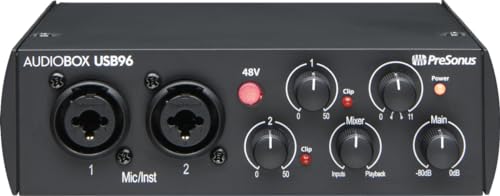
Some products earn their guide position through specifications, and some through survival. The AudioBox 96 — here in its 25th Anniversary edition, per the listing — is the survival kind: a two-input USB interface design that has spent years being thrown into gig bags, loaned to schools, bolted into project studios and generally treated the way working gear is treated. Its continued existence, celebrated with an anniversary model, is itself the review’s first paragraph of evidence.
PreSonus built its name on the unglamorous virtues: a metal-bodied box, combination inputs that accept microphones and instruments, and a relationship with the company’s Studio One software that made the AudioBox the front door of an ecosystem long before ecosystems were fashionable. For a buyer whose priority is a known quantity — an interface whose behaviour, quirks and community knowledge are all thoroughly documented by years of owners — that maturity is worth more than a spec-sheet skirmish.
Set beside the fourth-generation Scarletts, the honest framing is generational. The AudioBox design predates the automation era — no Auto Gain will rescue your levels, no Clip Safe will guard your chorus — and its listing declines to arm-wrestle on dynamic-range figures. What it offers instead is adequacy with a track record, which in a working studio is a genuine category of excellence: the spare interface that always works is the one that saves the session when the hero box is elsewhere.
Buy it as a first interface if its price and ecosystem appeal, and as a second interface without hesitation at all. Studios accumulate microphones, rooms and machines; a battle-tested two-input box that can be deployed anywhere, by anyone, without a tutorial, is infrastructure. The AudioBox 96 has been infrastructure for a quarter-century of PreSonus history, and the anniversary badge is earned.
Rentals and schools explain the AudioBox’s survival better than any advertisement. Equipment that must work for a stranger, today, without a manual, develops a reputation in the only currency that matters — it either comes back working or it stops being bought. A quarter-century of that selection pressure produced this box, and a home studio that values the same indifference to drama is reasoning soundly, not settling.
- Role: two-input USB audio interface, 25th Anniversary edition
- Inputs: combination mic/instrument inputs in the AudioBox tradition
- Ecosystem: PreSonus, with its Studio One heritage
- Character: mature, documented, workhorse design
- Best habitat: project studios, schools and spare-interface duty
Strengths
- A design proven by years of unkind real-world use.
- Combination inputs keep session setup simple for mixed sources.
- The ideal second interface — deployable anywhere, by anyone.
Trade-offs
- No gain automation or clip protection of the Scarlett 4th Gen kind.
- Its listing makes no conversion-figure claims to rival the newest rivals.
- Character seekers will find it deliberately plain.
Best for: workhorse duty, education settings and studios needing a trusted spare. Not suited for: buyers wanting the newest automation or printed vintage character.
Pragmatists can check the AudioBox 96’s Amazon page and weigh its track record against newer rivals’ feature lists.

PreSonus Studio 24c — Best software bundle route
The Studio 24c makes its argument in its own listing title: a 2×2 USB audio interface running to 192kHz, with Studio One DAW recording software included. That bundle is the product. A beginning studio’s hardest purchase is rarely the hardware — it is the dawning realisation that hardware, software, and the knowledge to join them are three separate expeditions. The 24c collapses the first two into one box and gives the third a head start, because PreSonus’s hardware and software were raised together and speak to each other without translation.
Studio One deserves its sentence as a DAW in its own right, not a pack-in. It is a full recording environment with a devoted professional following, and receiving it with the interface means the beginner’s first year is spent learning one coherent system — the same faders, the same plug-in philosophy, the same community answers — instead of comparison-shopping software while their song ideas evaporate. Ecosystem gravity is real, and here it works in the buyer’s favour.
The hardware itself occupies the sensible centre of this guide: two inputs for the classic home session, conversion to 192kHz for those who want the headroom, and PreSonus’s workmanlike build philosophy. Against the Scarlett 2i2 it trades automation headlines for software depth; against the AudioBox it is the more current expression of the same house. The choice between them is really a choice about which PreSonus virtue — survival or ecosystem — your studio needs more.
Creators who already own and love another DAW should discount the bundle accordingly and judge the 24c as hardware alone, where it remains respectable but loses its signature advantage. Everyone else — the genuinely new, the returning-after-years, the teacher equipping a room — should weigh the included Studio One as heavily as any preamp figure in this article, because software you actually learn beats software you merely own.
One more audience should recognise itself: the songwriter returning to recording after a decade away, whose old software knowledge is archaeology. For that reader the 24c’s bundle is not a beginner’s crutch but a clean re-entry — one current system to learn, with the interface and DAW guaranteed to be on speaking terms. Starting over is hard enough without refereeing a dispute between strangers.
- Role: 2×2 USB audio interface with bundled DAW
- Conversion: up to 192kHz, per the listing
- Software: Studio One recording software included
- Inputs: two, for voice-and-instrument sessions
- Ecosystem: PreSonus hardware-software integration
Strengths
- Studio One in the box removes the second purchase and second learning curve.
- Hardware and software designed by the same house, with matching habits.
- 192kHz conversion headroom for those who record at high rates.
Trade-offs
- The bundle’s value evaporates if you already live in another DAW.
- No Scarlett-style gain automation for beginners’ levels.
- Ecosystem comfort can become ecosystem lock-in over years.
Best for: new studios happy to adopt Studio One as home. Not suited for: committed users of rival DAWs or character-printing workflows.
New studios can read the Studio 24c’s listing on Amazon and price the included software against buying a DAW separately.
Universal Audio Volt 2 — Best vintage flavour, two inputs
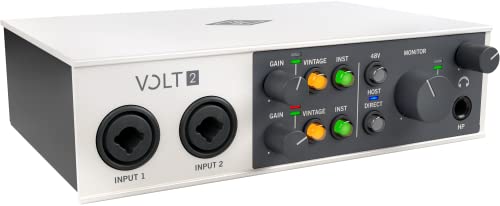
Universal Audio spent decades selling the sound of classic studios to professionals, and the Volt 2 is that inheritance translated for the home recordist: a 2×2 USB-C interface whose listing promises 610 tube preamp emulation, MIDI connections, and an intended audience of musicians, podcasters and streamers. The 610 reference is to UA’s own legendary tube console preamp, and the emulation is the product’s soul — a switchable warmth that lets a bedroom vocal arrive with some of the glow its owner hears in their head.
Two inputs keep the Volt 2 in the home studio’s centre of gravity: voice and guitar, two voices, a keyboard in stereo — the standard sessions all fit. The MIDI I/O, explicitly in the listing, is a differentiator worth pausing on, because this guide’s other two-input boxes leave legacy keyboards and controllers to fend for themselves. A producer with a beloved older synth or a MIDI controller without USB will find the Volt’s little round sockets quietly decisive.
Character is the purchase, so judge it as character. The tube mode is a flavour to be used with intent — glorious on a dry vocal or a direct bass, unnecessary on sources that arrive with their own colour — and the Volt rewards owners who treat it as an instrument rather than a default. With the mode off, the interface is a clean, modern two-input box; with it on, it is a opinionated one, and opinions are what UA sells at every price it occupies.
Against the Scarlett 2i2, the trade is philosophy: automation and transparency on one side, heritage flavour and MIDI on the other. Neither studio is wrong. The Volt 2 belongs to the recordist who hears finished records in their head while tracking and wants the interface leaning toward that sound from the first take.
Guitarists who record direct will find the Volt 2’s tube mode a sympathetic first listener. A direct guitar signal is famously austere — all attack and no air — and a touch of harmonic warmth at the preamp stage gives amp simulations something to work with, the way a real console channel once did. It will not replace a beloved amplifier, but it narrows the distance between the demo and the record.
- Role: 2×2 USB-C audio interface with vintage preamp mode
- Character: 610 tube emulation, per the listing
- Extras: MIDI I/O for legacy keyboards and controllers
- Audience named in listing: musicians, podcasters, streamers
- Inputs: two, covering the standard home session
Strengths
- Switchable tube character from the company that owns the reference.
- MIDI connections the rival two-input boxes omit.
- Clean modern interface underneath the vintage option.
Trade-offs
- No Auto Gain or Clip Safe — levels are your craft to learn.
- Tube flavour is a taste; transparent-school producers should compare first.
- Two inputs still cap ensemble ambitions.
Best for: musicians who track with a finished sound in mind and own MIDI gear. Not suited for: automation-seeking beginners or multi-source sessions.
Flavour seekers can look over the Volt 2’s Amazon listing and check the MIDI provision against the keyboards gathering dust in the corner.

Universal Audio Volt 176 — Best one-channel character piece
The Volt 176 is the most opinionated product in this guide, and its listing does not hide it: a USB interface built around a 76-style compressor with a vintage mic preamp and MIDI I/O, aimed at recording, podcasting and streaming. One input channel — and down that channel, UA has placed the two processes that defined the sound of recorded vocals for half a century: a characterful preamp and a fast, musical compressor that glues a performance together while it is being sung.
Compression on the way in is a professional’s commitment device. Set well, it catches the chorus’s surge without flattening the verse, lets the singer hear a polished, confident version of themselves in the headphones — which reliably produces a better performance — and delivers a track that sits in a mix with half the usual labour. Set badly, it prints a mistake no plug-in can remove. The 176 therefore selects its owner: a vocalist, podcaster or streamer experienced enough to set a compressor by ear, or determined to become so.
For podcasters and streamers the proposition sharpens further. Broadcast voices are compressed voices; it is the sound of radio, of narration, of every professional stream. A hardware 76-style stage in the interface gives a single-voice creator that finish before the software chain begins, with MIDI included for the musician-podcasters whose keyboards share the desk. One channel is not a limitation for these creators — it is the exact shape of their work.
Everyone else should admire the 176 and buy something else. Ensembles, voice-and-guitar performers and the compression-curious who are not ready to print decisions will be better served by the Volt 2’s two clean-ish inputs or the Scarletts’ automation. The 176 is a specialist instrument, and specialists are allowed — encouraged — to be wrong for most people.
Narrators and audiobook voices form the 176’s quietest constituency. Their work is measured in finished hours, their enemy is the edit, and a compressor that keeps every chapter at broadcast consistency while they perform is worth more than a rack of plug-ins applied afterwards. For a voice that earns its living one chapter at a time, this little box is not a toy version of a studio — it is the studio, distilled to the two processes that matter.
- Role: single-channel USB interface with built-in compressor
- Signature: 76-style compressor, per the listing
- Preamp: vintage-voiced mic preamp
- Extras: MIDI I/O
- Audience named in listing: recording, podcasting and streaming
Strengths
- Prints genuine studio compression while tracking — mix-ready vocals.
- Singers perform better hearing a polished headphone feed.
- The broadcaster’s finish, in hardware, for single-voice creators.
Trade-offs
- One input channel — duos and voice-plus-guitar need not apply.
- Printed compression cannot be undone in the mix.
- Demands compressor literacy, or the willingness to earn it.
Best for: vocalists, podcasters and streamers who record one voice at a time. Not suited for: ensembles, simultaneous multi-source sessions, or the commitment-shy.
Single-voice creators can examine the Volt 176 on Amazon and decide honestly whether they are ready to print compression.
Which microphone belongs in front of these interfaces?
The interface is half a recording; the microphone is the half with opinions. The pairing logic is simpler than the catalogues suggest. In a treated, quiet room, a condenser microphone rewards you with detail and air, and every interface here will feed it phantom power and amplify it honourably. In an untreated room — the box room, the kitchen-table studio — a dynamic microphone is usually the wiser first purchase, because it hears less of the room and more of the voice, and it asks the preamp for generous gain in return, which is where clean preamp headroom stops being a specification and becomes the sound of your podcast.
That trade explains several of this guide’s judgements. A creator recording speech in a lively room through a gain-hungry dynamic microphone is precisely the user who benefits from the Scarletts’ stated dynamic range and quiet gain. A singer in a treated corner can let character lead and choose the Volts for flavour, because the room is no longer shouting over the preamp’s subtleties. Buy the microphone for your room and your voice, then let the interface shortlist reorder itself around that decision — the correct sequence, performed in the wrong order by most first studios.
Instruments follow the same honesty. A guitar recorded direct through a Hi-Z input is a legitimate modern workflow, and the interfaces here all court it; a guitar recorded through a microphone in front of an amplifier is a different art that consumes a preamp and a quiet hour. Many home studios do both in the same week, which is the two-input layout’s deepest justification: one channel for the voice or the amplifier’s microphone, one for the direct signal, and the mix decides later which one was the keeper.
How do the six compare side by side?
| Pick | Inputs | Defining idea | Signature strength | Watch out for |
|---|---|---|---|---|
| Scarlett 2i2 4th Gen | 2 mic + 2 Hi-Z | Automation and headroom | Auto Gain, Clip Safe, Air | Two-input ceiling |
| Scarlett Solo 4th Gen | 1 mic + 1 Hi-Z | Focus, correctly sized | Full Scarlett quality, one channel | No simultaneous duo sessions |
| AudioBox 96 | 2 combo | Survival as a feature | Battle-tested workhorse design | No modern automation |
| Studio 24c | 2 | The ecosystem bundle | Studio One included | Value fades for rival-DAW users |
| Volt 2 | 2 | Vintage flavour, modern box | 610 tube mode plus MIDI | Levels are manual craft |
| Volt 176 | 1 | Commit while tracking | Its onboard 76-style compressor | Printed compression is forever |
How should you run your first session on a new interface?
Install the maker’s driver and control software before the microphone comes out, set the interface as the system and DAW device in both places, and choose one sample rate for the studio — the listings’ ceilings are headroom, not instructions, and consistency beats altitude. Then set gain like a professional: perform the loudest passage you intend to record, at performance energy, and set the level so that peak arrives with headroom to spare. The Scarletts’ Auto Gain exists to teach exactly this judgement; everyone else’s interface expects you to learn it, and the loudest-passage ritual is the lesson.
Monitor yourself the way the singer in you deserves. Use the interface’s direct monitoring if latency intrudes, keep headphone levels honest rather than heroic, and record a full test take — verse, chorus, the loud laugh between them — then listen back on monitors and headphones before the real session. Most first-session disasters are discovered in that playback by people wise enough to schedule it.
Finish by saving the session as a template: inputs named, gains noted, monitoring set. Studios run on templates the way kitchens run on mise en place, and the creator who spends ten minutes once will spend zero minutes at every future session’s start — which is where creative energy is most expensive to waste.
What mistakes do first-time interface buyers keep making?
Buying inputs for a fantasy band is the classic. The interface for the drummer you have not met costs more, sits larger and complicates every session you actually run alone. Buy for your real census, with one input of headroom for growth, and let the fantasy band fund its own upgrade when it exists.
Second is ignoring the microphone already owned. An interface cannot rescue a microphone that hates your room, and a condenser in an untreated box room will faithfully record the box. If the budget forces a choice, the interface in this guide at the sensible tier plus a microphone suited to your space beats a flagship interface feeding the wrong mic. Third, beginners record everything at maximum sample rate because the box allows it, filling drives and straining older computers for headroom their material cannot use — pick a rate, keep it, make music.
Fourth comes monitoring neglect: tracking through software with a delay the singer never mentions and always obeys, producing takes that feel oddly tired. And fifth, the quietest mistake — never learning gain staging because a feature or a friend set it once. Whatever interface you buy, learn where its clean gain ends. That knowledge outlives every product in this article.
Final Recommendation
Most readers should buy the Scarlett 2i2 4th Gen and start recording this weekend: its automation forgives beginner levels, its headroom respects growing skill, and its two inputs match the sessions home studios actually run. Solo creators with one voice and one story should save the difference and take the Solo’s focused version of the same quality. PreSonus splits its own vote — the AudioBox 96 for the workhorse-minded, the Studio 24c for anyone glad to adopt Studio One as home. And the character school gets the guide’s most romantic pair: the Volt 2 for flavour with flexibility, the Volt 176 for the single voice that wants a broadcast finish printed at birth. Whichever door you choose, choose it this week — an unrecorded song has a sound quality of exactly zero, and every interface here is better than the masterpiece still waiting for permission.
Frequently Asked Questions
Is a USB interface really a “sound card”?
Functionally, yes — it is the computer’s sound input and output system, upgraded for recording. The name changed because the shape changed: the preamps, converters and monitor controls that once squeezed onto an internal card now live in a desktop box connected by USB. When people say “sound card” about recording today, the interface is what they mean and what they should buy.
Do I still need an internal sound card for playback if I own an interface?
No. The interface becomes the computer’s audio device for playback as well as recording, feeding your monitors and headphones with the same conversion your tracks were captured through. That unity is part of the appeal — one box, one sound, no second-guessing which output a mix was judged on. Our PCIe guide covers cards for towers with specialised playback or legacy needs, which is a different errand.
What does 24-bit/192kHz actually get me?
Headroom and options. The 24-bit depth is the practically important half — it lets you record with conservative levels and still capture quiet detail cleanly. The 192kHz ceiling, stated on the Scarlett and Studio 24c listings, is available for those whose work demands it; most music is recorded happily at lower rates. Treat the figures as capacity, not as a quality ranking between these six.
Can these interfaces power any microphone?
They provide the preamps and phantom power that condenser microphones need and the gain that dynamic microphones ask for — that is the interface’s founding job. Extremely quiet sources into very insensitive microphones can test any preamp’s clean gain, which is one reason the Scarletts’ stated dynamic range matters. For the overwhelming majority of home-studio microphones, every interface here is sufficient.
Should a podcaster buy the Solo, the Volt 176, or the 2i2?
By ambition. The Solo is the clean, simple, correctly sized answer for one voice recorded plainly. The Volt 176 adds the broadcast finish of real compression for the voice that is the whole show. The 2i2 buys a second preamp for the co-host or guest the format may grow into. None is wrong; the podcast’s future shape decides.
How long before I outgrow a two-input interface?
Most home studios never do — the two-input shape matches the way songs are actually built at home, one or two sources at a time, layered. You will know the ceiling has arrived when sessions are repeatedly postponed for want of a third simultaneous input: a band that must be captured live, a drum kit that deserves its microphones, a collaborator whose parts cannot be overdubbed. Until that sentence is true of your diary rather than your imagination, a two-input interface is not a compromise but a fit.
What else does a first studio need beyond the interface?
A microphone suited to your room, a pair of headphones you trust, cables, and a DAW — which the Studio 24c bundles and the others accommodate through the software their makers provide or your own choice. Add treatment for the recording corner as the budget allows. The interface is the front door, but a house is furnished one honest piece at a time.
One closing discipline, offered by every engineer who ever saved a session: back up the first month’s recordings before you fall in love with them, and keep the interface’s firmware and driver current on your schedule, not the calendar’s. Studios are remembered for their music and forgotten for their housekeeping — right up until the day the housekeeping was the only thing standing between a finished record and a cautionary tale told at other studios’ dinners.
Related Guides
Producers who specifically need audio inside the tower should read Best PCI Sound Cards for Music Production, laptop-based recordists will find their portable options in Best Laptop Sound Cards, and pure listeners can compare playback-only gear in Best External Sound Cards.


