What's inside
- Where to buy
- Key Takeaways
- Quick Picks
- How did we choose these best 4000 lumen plus projectors?
- Why don’t 4,000 lumens from one brand equal 4,000 from another?
- Which rooms actually need this much light?
- Lamp or laser: which light source belongs in a bright room?
- How large an image can 4,000-plus lumens honestly feed?
- How loud is 4,000 lumens, and where should the audience sit?
- How does wireless casting change life in a shared bright room?
- What does this class cost to own across five years?
- Can a bright-room projector also be the family projector?
- How do the six compare side by side?
- What mistakes do bright-room projector buyers keep making?
- How should you install a bright-room projector so it stays bright?
- Final Recommendation
- Frequently Asked Questions
- Related Guides
As an Amazon Associate I earn from qualifying purchases. This post may contain affiliate links at no extra cost to you.
gizmoverdict.com is reader-supported. When you buy through links on our site, we may earn an affiliate commission.
Where to buy
All six projectors below are sold through Amazon in the United States, and each linked pick takes you to that model’s live listing, where you can check the current price before you decide. These are business-and-bright-room machines with deep retail distribution, so availability is rarely the drama it can be in niche home-theater categories — your work is choosing the right kind of brightness, not hunting for stock.
The search for the best 4000 lumen plus projectors starts with a confession: a lumen is not a lumen is not a lumen. Four thousand is the threshold where a projector stops negotiating with ambient light and starts overruling it — the brightness class of classrooms with the blinds open, boardrooms under full fluorescents, living rooms on bright afternoons and halls where nobody can find the light switch’s dimmer. But the six machines that cross this line do it with three different technologies and at least two different measuring sticks, and the gap between an honest 4,000 and a flattering one is the whole subject of this guide. Read the technology before the number, every time.
The cast divides cleanly. Epson fields three 3LCD machines — the EX3290 at exactly 4,000 lumens, the Pro EX9270 at 4,100, and the laser-driven Pro EX11000 at 4,600 — and on every one, the color brightness equals the white brightness by design. ViewSonic fields three DLP machines — the PA503HD at 4,000 lumens, the PX749-4K gaming projector at 4,000, and the LS740HD laser at a towering 5,500 — quoted in the ANSI tradition, where the number describes white output and color follows the color wheel’s arithmetic. Neither camp is cheating. They are answering different questions, and the sections below teach you to hear both.
Key Takeaways
- Four thousand lumens is the lights-on threshold: the class where projectors hold large images in classrooms, boardrooms and bright living rooms without asking anyone to draw a curtain.
- Never compare numbers across technologies raw — Epson’s 3LCD figures quote color brightness equal to white brightness, while DLP figures follow the ANSI white tradition, so saturated color is where the two scales diverge.
- The Epson Pro EX9270 is the balanced professional pick: 4,100 lumens, true 1080p, wireless with AirPlay and Miracast, and a 1.6x zoom that forgives real rooms.
- The ViewSonic LS740HD is the brightness ceiling here at 5,500 laser lumens, built for auditoriums, simulation and installations that cannot dim.
- Laser light sources — in the LS740HD and the Epson Pro EX11000 — trade the lamp era’s replacement errands for instant-on, maintenance-light ownership.
- Resolution still matters at this brightness: the PX749-4K brings 4K gaming at 4,000 lumens, while the WXGA EX3290 trades fine detail for the most affordable seat at the table.
Quick Picks
| Pick | Badge | Why it earns its place |
|---|---|---|
| Epson EX3290 | Most accessible 4,000 lumens | The doorway into true lights-on projection: 4,000 lumens of color and white brightness, two HDMI ports and a speaker voiced for working rooms. |
| Epson Pro EX9270 | Best all-round professional | Full 1080p at 4,100 lumens with wireless casting from phones and laptops, a 1.6x zoom and the polish of Epson’s Pro line for shared spaces. |
| ViewSonic PA503HD | Best DLP classroom value | Four thousand lumens of 1080p DLP with optical zoom, auto keystone and a 120Hz refresh, aimed at classrooms and businesses that present all day. |
| ViewSonic PX749-4K | Best for gaming at brightness | A 4K UHD gaming projector with 4,000 lumens, a 240Hz mode and a listed 4.2ms input lag — speed and light in the same box. |
| ViewSonic LS740HD | Brightest in this guide | Five thousand five hundred lumens of laser light at 1080p, with corner adjustment and 360-degree projection for auditoriums and simulators. |
| Epson Pro EX11000 | Best laser 3LCD | A 4,600-lumen laser engine behind 3LCD color, 1080p, Miracast and a 16W speaker — the set-and-forget flagship for serious shared rooms. |
How did we choose these best 4000 lumen plus projectors?
The entry ticket was the number itself, verified from manufacturer listing data rather than retailer copy: a pick had to claim at least 4,000 lumens from its maker, in whatever honest unit its technology uses. That filter alone excludes most of the home market, which is the point — this guide serves rooms where light is a given, not a variable. We then weighted what brightness cannot buy: resolution appropriate to the image sizes these machines serve, optics flexible enough for rooms that were never designed around a projector, connectivity that matches how people actually present now, and a light source whose ownership story fits the setting, lamp or laser.
We also insisted on technological honesty in our own presentation. Epson’s figures appear here as color and white brightness, ViewSonic’s as their listed lumens in the ANSI tradition, and we never silently convert one scale into the other, because the conversion is precisely the misunderstanding this category profits from. Where a listing gives a figure with a condition attached — the PX749-4K’s input lag belongs to its high-refresh gaming operation — the condition travels with the figure. Six machines survived, three per technology, and the symmetry is a convenience rather than a quota: these are simply the listings a bright-room buyer should be choosing between.
Why don’t 4,000 lumens from one brand equal 4,000 from another?
Begin with what a lumen measures: light output, conventionally assessed on a white image. A 3LCD projector creates white by combining three full-brightness color channels that are always on, so its color output is structurally identical to its white output — Epson can quote 4,000 lumens of color brightness and 4,000 of white on the EX3290 because the machine physically cannot do otherwise. A single-chip DLP creates its image sequentially, flashing colors in turn through a wheel that often includes a clear or white segment to lift the white figure; its ANSI lumens are real, but a saturated red or green is drawn only during that color’s slice of the cycle, so color brightness lands meaningfully below the headline number.
Neither number lies, but they answer different questions, and the questions matter differently by content. A spreadsheet is mostly white, so ANSI lumens predict its legibility honestly. A brand presentation, a biology diagram, a football match or a film is mostly color, and there the 3LCD machine’s equal figures describe what you will see while the DLP machine’s headline describes its best case. This is why cross-technology comparisons in this guide are always framed as tendencies rather than conversions: a 4,100-lumen 3LCD and a 4,000-lumen DLP will trade blows depending on what is on screen, and anyone who quotes you a tidy exchange rate between the scales is selling something.
The mature way to shop the class is to decide what your screen mostly shows. Text-and-slide rooms can buy ANSI lumens with confidence. Color-critical rooms — design reviews, video-heavy teaching, sport and film in lit spaces — should weight the 3LCD figures at face value and discount DLP headlines by experience. And every buyer should remember the variable both scales share: screen size divides whatever brightness you bought, so a 4,000-lumen machine at 100 inches out-punches a 5,500-lumen machine stretched across 200.
Which rooms actually need this much light?
Picture the rooms where the lights are not yours to command. The classroom where note-taking demands illumination and the lesson demands video. The boardroom with glass walls and a facilities department that owns the blinds. The church hall, the training center, the sports bar at noon, the living room of a family that watches football on bright Sundays and refuses to live in a cave for it. These are not edge cases; they are most of the rooms projectors work in, and they share one trait — ambient light arrives as a fixed condition, so the projector must arrive as the stronger force. That is the entire premise of the 4,000-lumen class.
Size is the second premise. Brightness per square foot is the figure your eyes actually grade, and the rooms above tend to seat their audiences far from the screen, which means big images, which means the lumens divide fast. A machine that is heroic at 90 inches can be merely adequate at 150, and this class exists to keep the 120-to-180-inch range honest under working light. When you shop it, start from the back row: measure the room, set the screen size the seating demands, and only then ask which brightness tier covers it. The LS740HD’s 5,500 lumens look excessive on a spec sheet and inevitable from the back of an auditorium.
The third premise is time. Bright rooms are usually shared rooms with schedules — lessons, meetings, services, screenings stacked through a day — and shared rooms punish fussy equipment. Instant-on light sources, forgiving zooms, auto keystone and wireless casting are not luxuries in this class; they are the difference between a projector the staff trusts and one they route around. Judge these six as working instruments first and picture machines second, because their owners will.
Lamp or laser: which light source belongs in a bright room?
The lamp was projection’s workhorse for decades: inexpensive, replaceable, and honest about its mortality. A lamp dims gradually across its life and eventually asks for a swap, an errand that is trivial for an owner-operator and a line item for an institution running a fleet. Two of this guide’s machines — the EX3290 and the Pro EX9270 class of Epson business projectors, and the PA503HD on the ViewSonic side — descend from that tradition, and in single-room ownership the tradition remains perfectly rational: the purchase stays accessible, and the lamp, when its years run out, restores the machine to youth for a modest errand.
Laser changes the ownership shape rather than the picture’s nature. A laser-phosphor engine — the LS740HD’s 5,500 lumens and the Pro EX11000’s 4,600 — lights instantly, holds its brightness with far less drift, asks for no lamp inventory, and tolerates orientations and duty cycles that lamps dislike, which is why the LS740HD can offer 360-degree projection for simulation and signage-flavored work. In ceiling-mounted, hard-to-reach, all-day installations, those traits stop being conveniences and become the specification. The trade is that the light source is the machine: when a laser engine eventually fades, you replace a projector, not a part.
Choose by access and hours. A projector you can reach, running a few hours a day, makes lamp economics easy to defend. A projector mounted above an auditorium, running from morning assembly to evening events, makes laser’s maintenance-light decade the only sane bid. Both of this guide’s lasers also serve a subtler master — consistency. In rooms where the same image must look the same in September and in May, a light source that barely drifts is a feature no spec sheet headline captures.
How large an image can 4,000-plus lumens honestly feed?
Do the division the spec sheets avoid. Brightness spreads across screen area, and area grows with the square of the diagonal, so stepping from a 100-inch image to a 150-inch one does not ask half again as much of the projector — it asks well over twice as much. In a fully lit room, the 4,000-lumen machines here are in their honest prime between roughly 100 and 140 inches; the 4,600-lumen EX11000 stretches that comfort somewhat, and the 5,500-lumen LS740HD owns the 150-to-200-inch conversation in working light. In dimmed rooms every one of those ceilings rises, which is why the same machines moonlight so happily as enormous home screens after hours.
Screen material quietly joins the calculation. A matte white surface returns your lumens democratically to a wide audience; a gray, ambient-light-rejecting surface trades some brightness for perceived contrast in lit rooms, often a winning trade at this class’s sizes; a high-gain surface concentrates light toward the center seats, which suits a lecture’s geometry and punishes a wide seminar’s edges. None of these choices rescues an undersized projector, but each can move a borderline room into competence. Buy the lumens first, tune with the surface second, and never let a salesperson reverse that order.
There is also a floor below the ceiling: too much brightness is a real condition. In a small, dark room, 4,000 lumens at 84 inches can glare, flattening the very contrast you bought the darkness for, and several of these machines offer lower-output modes for exactly that double life. The bright-room projector that will also serve movie nights should be auditioned in both costumes — full blaze for the afternoon, tamed mode for the evening — and the Epson Pro models in particular wear the second costume gracefully.

Epson EX3290 — Most accessible 4,000 lumens
Every brightness class needs a doorway, and the EX3290 is this one’s: the least complicated route to a genuine 4,000 lumens, delivered by a 3-chip 3LCD engine that quotes the figure identically for color and for white. That equality is its quiet superpower in the rooms it serves. A pie chart’s red slice, a map’s green shading, a product photo’s brand colors — all arrive at the same authority as the white slide behind them, in a lit classroom or office, at sizes that make the back row a participant rather than an audience of squinters.
The specification around the engine is a working kit, deliberately unglamorous. WXGA widescreen resolution matches the presentation world’s documents and laptop habits; two HDMI ports let a room’s fixed computer and a visitor’s laptop coexist without cable archaeology; the built-in speaker is tuned to make speech carry, which is the sound a working room actually needs. Nothing here chases the home-theater buyer, and that focus is a virtue — every design decision spends itself on the lit-room mission.
Home users cross-shopping it should hold two truths together. Its brightness makes it a surprisingly capable giant-screen machine for bright family rooms and garden evenings, where its lumens forgive what its resolution cannot refine. But WXGA at cinema sizes shows its pixel structure to anyone seated close, and there is no smart platform inside. As a tool for lit rooms it is close to unbeatable at its position; as a dual-purpose machine it asks you to value light over finesse, which — in the rooms this guide is about — is usually the correct valuation.
- Light engine: 3-chip 3LCD
- Brightness: 4,000 lumens color and white
- Resolution: WXGA widescreen
- Inputs and audio: 2 HDMI ports, built-in speaker
- Intended rooms: lit classrooms, offices, halls, bright family rooms
Strengths
- True 4,000-lumen color honesty — saturated content keeps its punch in lit rooms.
- Dual HDMI suits shared rooms with fixed and visiting sources.
- The simplest ownership story in the class: plug in, present, repeat.
Trade-offs
- WXGA resolution caps fine detail at cinema sizes.
- No built-in streaming or wireless casting.
- Fan and styling are work-first, living-room second.
Best for: schools, small businesses and bright-room hosts who need maximum honest light for minimum fuss. Not suited for: dark-room film purists, who should spend on resolution instead. If your room refuses to darken, check the EX3290’s current price on Amazon and end the squinting.

Epson Pro EX9270 — Best all-round professional
The Pro EX9270 is what the class looks like when it puts on its good suit. The headline is 4,100 lumens of color and white brightness from a 3LCD engine, but the machine’s real argument is completeness: native 1080p resolution so text and video both stay crisp at working sizes, wireless projection with AirPlay and Miracast so phones and laptops present without a cable ceremony, two HDMI ports for the room’s permanent residents, and a 1.6x zoom — the widest placement forgiveness in this guide — so the projector fits the room instead of the room being rearranged around the projector.
That zoom deserves its own sentence, because shared rooms are geometry problems. A 1.6x range means the same machine can sit on a credenza in one office and a ceiling mount in another and fill the same screen, which is why facilities people develop loyalty to specifications like it. Pair the optics with 1080p and 4,100 honest lumens and you have the rare business projector that a film looks respectable on after hours — not a theater instrument, but a machine whose picture never embarrasses its owner in either costume.
Its asks are modest. It is a lamp-era professional in a guide that also contains lasers, so long-horizon, high-hour installations should weigh the EX11000’s light source against this one’s flexibility. And its talents are tuned for rooms with people working in them, not for black-level worship. Within its brief — the professional all-rounder for rooms that present all day and occasionally entertain all evening — it is the most complete answer here.
- Light engine: 3-chip 3LCD
- Brightness: 4,100 lumens color and white
- Resolution: Full HD 1080p
- Wireless: AirPlay and Miracast streaming from phone or laptop
- Optics and inputs: 1.6x zoom, 2 HDMI ports, built-in speaker
Strengths
- The complete professional spec: brightness, 1080p, casting and zoom in one machine.
- Widest placement flexibility in the guide thanks to the 1.6x zoom.
- 3LCD color honesty for brand-sensitive presentations and video.
Trade-offs
- Lamp-based light in a guide with two lasers — weigh hours and access.
- Business tuning: excellent picture, not a dedicated theater’s.
- Wireless casting quality still depends on the room’s network.
Best for: offices, schools and shared professional rooms that present daily and entertain occasionally. Not suited for: unreachable ceiling installs running all-day schedules — that is laser work. Professionals can see the Pro EX9270’s live Amazon price and spec it against the room’s tape measure.

ViewSonic PA503HD — Best DLP classroom value
ViewSonic’s PA line is the quiet infrastructure of American classrooms, and the PA503HD shows why: 4,000 lumens of DLP brightness, native 1080p so the day’s text stays knife-clean, optical zoom and auto keystone to civilize imperfect installations, a 120Hz refresh that keeps motion — a scrolling spreadsheet, a lab video, a lunchtime match — composed, and inputs that assume the room’s ecosystem already exists. Its listing names its habitats without blushing: classroom, business, presentation, large screens.
As a DLP machine its brightness speaks the ANSI dialect, and in its native content that dialect is fluent. Slides, documents and video calls are white-dominant workloads where the PA503HD’s 4,000 lumens land at full force, and its DLP sharpness gives small fonts the edge definition that shared rooms live or die by. Color-saturated material asks the usual DLP discount, which teachers of art and design should note and everyone else can safely ignore — the machine’s constituency is legibility at scale, and it serves that constituency superbly.
Ownership is the other half of its reputation. This is a line built for institutions that buy in quantity and support in bulk: ceiling-mount manners, ceiling-mount patience, and a design that treats a school year as a light workout. Home buyers borrowing it for brightness should expect a presenter’s voice and fan, not a cinephile’s — but for a bright multipurpose room that shows sport and streams video at serious sizes, its value logic is very hard to argue with.
- Light engine: DLP
- Brightness: 4,000 lumens
- Resolution: 1080p Full HD
- Optics and setup: optical zoom, auto keystone, ceiling-mount ready
- Refresh and inputs: 120Hz, HDMI and USB
Strengths
- Textbook classroom spec: bright, sharp 1080p, forgiving installation.
- DLP crispness flatters text and data at large sizes.
- Institutional build and manners for all-day, all-year duty.
Trade-offs
- ANSI-dialect brightness — saturated color lands below the headline.
- Presenter’s tuning and voice, not a home theater’s.
- Rainbow-effect sensitivity is a DLP consideration for some viewers.
Best for: classrooms, training rooms and businesses presenting bright all day. Not suited for: color-critical review rooms — take a 3LCD Pro instead. Educators can check the PA503HD’s Amazon price and count the seats it will serve.

ViewSonic PX749-4K — Best for gaming at brightness
The PX749-4K asks a question no other pick here attempts: what if the bright-room projector also played games properly? Its listing assembles the unlikely coalition — 4K UHD resolution, 4,000 lumens, a 240Hz refresh ceiling, a 4.2ms input lag figure from its high-refresh gaming mode, HDR support aimed at Xbox, dual HDMI, USB-C, optical zoom and keystone correction in both axes. In a class of presentation instruments, it is the one machine that treats the living room’s fastest hobby as a first-class citizen.
The brightness is what makes the gaming credible outside a cave. Fast play usually happens in social rooms with lights up and friends over, exactly the conditions that humiliate theater projectors; 4,000 lumens keep a 120-inch image vivid through them, and the pixel-shifted 4K presentation — this class of DLP renders its UHD image by rapid pixel shifting, a real and visibly fine result that is not a native 4K imager — keeps interfaces and worlds detailed. The lag figure deserves its condition attached: figures like 4.2ms belong to the high-refresh 1080p mode, which is the mode competitive players actually use, while 4K play runs at console refresh rates with their own, still-respectable responsiveness.
Presenters should not overlook it either: the same machine that games at night carries a bright 4K-capable picture into a lit meeting room by day, with USB-C welcoming modern laptops. Its color tuning serves vividness over reference neutrality, and DLP’s rainbow caveat applies to sensitive viewers. But as the single-box answer for a bright room that works and plays at full size, it stands alone in this guide.
- Light engine: DLP, 4K UHD (pixel-shifted)
- Brightness: 4,000 lumens
- Gaming: 240Hz refresh ceiling, 4.2ms input lag in high-refresh mode
- Inputs: dual HDMI, USB-C
- Screen size per listing: up to 300 inches
Strengths
- Brightness plus genuine gaming speed — a combination this class rarely offers.
- 4K-class detail for films and interfaces in lit rooms.
- USB-C and dual HDMI cover consoles, PCs and laptops without adapters.
Trade-offs
- Pixel-shifted UHD rather than a native 4K imager.
- The headline lag figure belongs to high-refresh mode, not 4K play.
- Vivid tuning over reference color; DLP rainbow caveat applies.
Best for: bright living rooms that game, stream and occasionally present at large sizes. Not suited for: dark-theater purists chasing black depth. Players can look at the PX749-4K’s current Amazon price and start planning the wall.

ViewSonic LS740HD — Brightest in this guide
Some rooms do not have a brightness problem that 4,000 lumens can solve, and the LS740HD is built for them. Its listing leads with 5,500 lumens of laser light at Full HD, then keeps going in a direction no other pick here faces: optical zoom, keystone and corner adjustment for imperfect geometry, 360-degree projection for installations that point where they please, and named habitats that include auditoriums and golf simulation alongside classrooms. This is the step-up machine of the guide — the one you buy when the room is big, the ceiling is high, the schedule is long and the lights are staying on.
Laser is the enabling decision. Five thousand five hundred lumens from a lamp would be a maintenance regime; from a laser-phosphor engine it is a utility — instant on, slow to fade, indifferent to orientation, and free of the lamp-swap calendar that governs high-brightness ownership. Golf simulation, one of its listed callings, explains the design perfectly: a bright, huge, always-ready image in a lit commercial bay, running all day, every day, with nobody’s job description including projector care. Auditoriums and houses of worship read the same specification and nod.
Resolution is the deliberate trade: 1080p at these sizes and distances is a rational allocation, since the audiences for 180-inch images sit where pixel structure dissolves and brightness is the entire ballgame. Home buyers should admire it from a distance — in a normal living room its output is a flood in search of a riverbed. Institutions with the room to justify it will find the guide’s ceiling exactly where ViewSonic left it.
- Light engine: DLP laser
- Brightness: 5,500 lumens
- Resolution: 1080p Full HD
- Installation: optical zoom, keystone, corner adjustment, 360-degree projection
- Intended rooms: auditoriums, large classrooms, golf simulation, halls
Strengths
- The guide’s brightness ceiling, delivered by a maintenance-light laser.
- Installation geometry tools for real, imperfect big rooms.
- Built for all-day duty in commercial and institutional settings.
Trade-offs
- 1080p only — its budget went to lumens, correctly for its rooms.
- Far more projector than a normal living room can use.
- Laser means the engine is the machine when its long life ends.
Best for: auditoriums, sim bays, large venues and any room that defeats 4,000 lumens. Not suited for: ordinary home rooms. Venue buyers can check the LS740HD’s live price on Amazon and measure their back row against it.
Epson Pro EX11000 — Best laser 3LCD
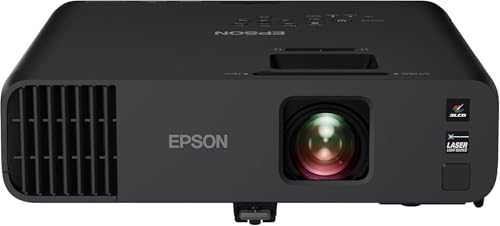
The Pro EX11000 is where this guide’s two storylines merge: a laser light source behind a 3LCD engine, so its 4,600 lumens arrive with color brightness equal to white, and stay there year after year with laser steadiness. Around that engine Epson builds the flagship version of its bright-room brief — Full HD 1080p, wireless with Miracast, two HDMI ports, USB power for a streaming stick or a presenter’s accessory, and a 16W built-in speaker that is a genuine room-filling voice rather than a courtesy. It is the machine for the shared room that has stopped experimenting.
Consider what the specification removes from an owner’s life. No lamp calendar, because laser. No color-brightness asterisk on saturated content, because 3LCD. No external speaker errand for speech and video, because 16 watts done properly. No cable ritual for the visitor with a laptop, because Miracast and dual HDMI divide the labor. What remains is the projector as appliance, in the best sense — installed, trusted, and forgotten until the image is needed, which in a serious training room or council chamber might be three times a day.
Its honest limits are scope, not quality. It is a 1080p machine in a guide containing a 4K gamer, and its talents are institutional rather than theatrical; a dedicated dark cinema should spend elsewhere. It also asks the laser question — the engine is the product’s life — though at laser lifetimes that question belongs to a decade-hence budget meeting. For the bright, color-critical, always-on shared room, this is the guide’s summit.
- Light engine: 3-chip 3LCD laser
- Brightness: 4,600 lumens color and white
- Resolution: Full HD 1080p
- Wireless and inputs: Miracast, 2 HDMI ports, USB power
- Audio: built-in 16W speaker
Strengths
- Laser steadiness plus 3LCD color honesty — both storylines at once.
- A real 16W speaker that retires the external-audio errand for most rooms.
- Set-and-forget ownership for high-use shared spaces.
Trade-offs
- 1080p in a guide that also offers 4K — know which your room rewards.
- Institutional tuning and price position, not a theater toy.
- Laser end-of-life means a new projector, eventually.
Best for: training centers, council rooms, schools and bright color-critical spaces that present daily. Not suited for: small dark home theaters. Room owners ready to stop thinking about projectors can see the Pro EX11000’s Amazon price and be done.
How loud is 4,000 lumens, and where should the audience sit?
Brightness is cooled by fans, and fans are heard in proportion to the heat they move, so the honest acoustics of this class run louder than a home theater’s hush and quieter than the rooms they serve. A classroom has thirty bodies, a ventilation system and a teacher’s voice; a boardroom has its own HVAC chorus; an auditorium has distance itself as insulation. In those soundscapes the working fan of an EX9270 or a PA503HD is not a flaw to apologize for but a noise floor the room already owns. The calculation changes only when a bright machine moonlights in a quiet living room, where placement — behind the seating, never beside it — and the tamer evening modes recover most of the calm.
Mounting height is the other half of the acoustic story, and it cuts in the owner’s favor. These projectors are usually ceiling-mounted or shelved high, which puts the fan above head height and the exhaust where nobody’s ears live. Heat rises to meet the machine rather than the audience, and a projector working in its designed orientation simply disappears from the room’s attention. Table placement in the middle of a seminar is the worst case — close ears, blocked vents, a cable forest — and the zoom ranges on the Pro models exist partly so that the machine can live at the room’s edge instead, where it belongs.
There is a maintenance echo here too: a fan works harder as filters clog, so the projector that grows louder across a school year is usually reporting a cleaning that did not happen. Treat rising noise as a dashboard light. The bright-room machines in this guide are built to run at a steady, ignorable murmur for years, and the ones that do not are almost always telling you about dust, not about defects.
How does wireless casting change life in a shared bright room?
The Pro EX9270’s AirPlay and Miracast support and the Pro EX11000’s Miracast look like convenience features on a spec sheet. In a working room they are closer to a philosophy: the presenter is whoever is holding the idea, not whoever is holding the cable. A student casts a phone’s camera view of an experiment; a visitor presents from the laptop they actually know; a panel of three contributors takes the screen in turn without a single pass-the-HDMI ritual. Meetings start when they are scheduled to start, which is a brightness-independent miracle no lumen figure can buy.
The honest engineering caveats travel with the miracle. Casting quality rides on the room’s wireless network, and a congested or ancient access point will make a fine projector look guilty for the network’s sins — institutions should treat the access point as part of the projection system and budget it the same respect. Video casting adds a breath of latency that slideshows forgive and games do not, which is why every machine here keeps its HDMI ports: wireless for people, cables for players and for the one presentation a year that cannot be allowed to stutter. The EX9270’s pairing of both — dual HDMI and dual casting ecosystems — is the professional pattern, and it is why that model anchors this guide’s recommendations for shared rooms.
Security deserves its plain sentence: a castable projector in a shared space should live on the managed network, with its discovery settings reviewed by whoever owns that network, so that the screen accepts the presenters it should and only them. Set up once, by the right person, this takes minutes. Skipped, it becomes the story a school tells at conferences. The technology is ready for the room; the room’s setup simply has to be ready for the technology.
What does this class cost to own across five years?
The purchase price is the loud number; the ownership ledger is the true one, and bright-room machines write distinctive ledgers. Lamp-era models convert some of their accessibility into future errands: a lamp per machine per era of heavy use, filters cleaned on schedule, and the staff minutes to do both. None of it is ruinous — that is precisely the lamp’s enduring case — but across a fleet of twenty classrooms the errands compound into a real workload, and the honest comparison prices them rather than waving at them. The lasers invert the ledger: more commitment at purchase, then a near-empty page — no lamps to stock, no brightness drift to schedule around, no ladder-and-lamp afternoon per room per few years.
Energy writes a quieter line. Brighter machines draw more power, and at institutional hours the difference between a lamp running at full blaze and an efficient laser settles into utility bills that finance departments notice across a fleet and homeowners never will. Duty cycle is the multiplier that decides which ledger matters: the same projector is cheap to own at four hours a day and a different animal at fourteen. Golf-simulation bays and digital-signage-flavored installs live at the far end of that scale, which is why the LS740HD’s laser is not a luxury in its habitat but the entire business case.
The final ownership line is downtime, the cost nobody invoices and everybody pays. A shared room whose projector fails mid-lesson or mid-meeting spends human time at a rate that dwarfs any lamp. Reliability in this class is therefore an economic feature: mature platforms, institutional build, and light sources without moving wear parts are worth money that a spec sheet cannot itemize. Buy the machine your room’s schedule can trust, keep its filters clean and its vents breathing, and the five-year ledger of any pick in this guide will read the way infrastructure should — boringly.
Can a bright-room projector also be the family projector?
Increasingly, yes — and the question matters because most households cannot justify two projectors, and many should not try. The bright machine’s home case rests on how families actually watch: sport on weekend afternoons, games with friends in a lit room, films on summer evenings that begin before the light has finished leaving. In every one of those real scenarios, the theater projector’s black-level artistry is theoretical and the bright machine’s lumens are decisive. The PX749-4K was practically designed as this argument’s exhibit — 4K-class gaming and film at 4,000 lumens — and the Pro EX9270 makes the same case in a professional accent, its 1080p polish and casting suiting a family room’s chaos as readily as a boardroom’s.
The dual life does ask for two small disciplines. First, learn the machine’s picture modes as a pair: the vivid, full-output setting for daylight work, and the tamer, color-settled setting for evening film, because a projector left in presentation mode will make cinema look like a very large spreadsheet. Second, mind the seating distance in the dark: brightness that is heroic at 130 inches in a lit room can glare at 90 inches in a black one, and a lower-output evening mode or a slightly smaller image restores the balance. Both disciplines are five-minute educations, not ongoing chores.
Where the dual life genuinely fails is the dedicated theater: a room built around darkness, controlled seating and film as a sacrament deserves a machine designed for nothing else, and this class’s talents — brightness, punch, working manners — are spent there on an audience that cannot use them. The dividing line is not budget but honesty about the room. If your projector will live where your life happens, lights and all, the bright class is not the compromise choice. It is the correct one, and the theater can be a later, second love.
How do the six compare side by side?
| Model | Brightness as listed | Technology | Resolution | Light source |
|---|---|---|---|---|
| Epson EX3290 | 4,000 color / 4,000 white | 3LCD | WXGA | Lamp class |
| Epson Pro EX9270 | 4,100 color / 4,100 white | 3LCD | 1080p | Lamp class |
| ViewSonic PA503HD | 4,000 lumens | DLP | 1080p | Lamp class |
| ViewSonic PX749-4K | 4,000 lumens | DLP | 4K UHD (pixel-shift) | Lamp class |
| ViewSonic LS740HD | 5,500 lumens | DLP | 1080p | Laser |
| Epson Pro EX11000 | 4,600 color / 4,600 white | 3LCD | 1080p | Laser |
The table’s honest reading is that three contests run in parallel: technology, where 3LCD sells color certainty and DLP sells sharp value; light source, where laser sells a decade of not thinking about it; and purpose, where the PX749-4K’s gaming brief and the LS740HD’s venue brief barely overlap despite sharing a brand. Decide which contest your room is actually holding, and the table narrows itself.
What mistakes do bright-room projector buyers keep making?
The founding mistake is comparing the two brightness dialects as one number and declaring a winner — the error this guide opened with, and still the most expensive one in the class. Its cousin is ignoring screen size in the arithmetic: a buyer who stretches a 4,000-lumen machine across 200 inches in a lit hall has not bought a bright projector, they have bought a dim one with a proud spec sheet. Third comes the installation fantasy — assuming the projector can sit wherever the shelf happens to be. Zoom ranges, lens shift and keystone all have limits, and the room’s geometry should be measured against the chosen model’s optics before the order, not discovered after it.
Fourth, buyers undervalue the light source’s calendar. A lamp machine in an unreachable mount above a hall is a maintenance appointment generator; a laser in a portable’s life is money spent on a virtue it never uses. Match the source to the access. Fifth, they forget sound and sources in rooms that live on both — the EX11000’s 16W speaker and the EX9270’s casting exist because bright shared rooms fail socially more often than optically. Finally, they buy the class’s ceiling for a room that needed its floor: 5,500 lumens in a modest classroom is glare with a warranty. The right brightness is the one your back row can read by, and not a lumen more theatrical than that.
How should you install a bright-room projector so it stays bright?
Start at the screen and work backwards. Fix the image size from the back row’s reading distance, choose the surface — matte white for wide seating, a gray ambient-light-rejecting material where side light is vicious — and only then place the projector where its zoom range centers comfortably, because a lens at the middle of its range is brighter and sharper than one straining at either end. Square the machine physically before touching keystone, and treat corner adjustment as the last resort it is, not a placement strategy.
Then defend the brightness you bought. Keep the light path’s filters clean on the schedule the manual sets, because dust is a slow dimmer no mode can outrun. Give the vents their clearance in the mount, since heat management is brightness management over a machine’s life. Set the picture mode for the room’s real light — the punchy presentation modes exist for lit work, and the tamer modes will be there for evening film — and if the room’s network will carry casting, test AirPlay or Miracast with the actual laptops your people bring, on an ordinary Tuesday, before the important Thursday. A bright installation is a system; commission it like one.
Final Recommendation
Let the room cast the deciding vote. For the classic lit classroom or office at the class’s doorway, the EX3290’s honest 4,000 lumens are the value the whole category is measured against. For the professional room that wants completeness — 1080p, casting, zoom, polish — the Pro EX9270 is the all-rounder to beat. DLP loyalists presenting all day should take the PA503HD’s institutional value; gamers in bright rooms have exactly one candidate, the PX749-4K; venues that defeat ordinary brightness belong to the LS740HD; and the bright, color-critical, always-on room deserves the Pro EX11000’s laser 3LCD summit. Whichever name wins, the victory condition is the same — a picture nobody in the room has to squint at, in the light the room actually has. Measure the room before you measure the market, keep the two brightness dialects straight, and the machine you choose will still be earning its wall long after the spec-sheet arguments are forgotten.
Frequently Asked Questions
Is 4,000 lumens enough for a room with windows?
For most such rooms, yes — provided the screen size respects the light and the screen does not sit in a shaft of direct sun. Ordinary window light, even generous window light, is a condition these machines were engineered around; a sunbeam striking the screen itself is a different physical problem, one that blinds and curtains solve better than any projector at any brightness this side of a cinema installation. At 100 to 140 inches with ordinary daylight managed by blinds, the machines here hold bright, legible images. Direct sun striking the screen defeats any projector this side of venue class, and very large images in glass-heavy rooms are the LS740HD’s 5,500-lumen argument. Size the image to the room’s worst hour, not its best.
Why does Epson quote two brightness numbers while ViewSonic quotes one?
Because the technologies differ in what needs saying. A 3LCD engine produces color and white at equal brightness, so Epson publishes both figures to prove the equality. A single-chip DLP’s listed lumens follow the ANSI white-brightness tradition, with color output lower by design. Neither is dishonest; they are different dialects, and this guide refuses to pretend a raw number translates between them.
Should I choose lamp or laser for a classroom projector?
Decide by access and hours. A reachable projector running school hours does beautifully on the lamp-era models here, with a lamp swap as a rare, modest errand. A projector mounted high, running all day across many rooms’ schedules, argues for laser — the LS740HD or Pro EX11000 — where the light source stops being a calendar item entirely. Fleet buyers should also weigh consistency: laser brightness drifts far less across a school year.
Can a 4,000-lumen projector work for home movies?
Happily, with one adjustment: use its tamer picture modes and, if the room is small and dark, a lower-output setting, because full brightness at short range can glare. The Pro EX9270 and PX749-4K are the most natural double agents here — the first for its complete, polished picture, the second for 4K gaming and film in rooms that never fully darken. Bright-room machines make superb big-screen home projectors for households whose viewing happens with life going on around it.
What does input lag mean on the PX749-4K?
Input lag is the delay between your controller’s action and the image’s response, and the PX749-4K’s listed 4.2ms figure belongs to its high-refresh gaming operation at 1080p-class resolutions — the mode fast players choose. At 4K console refresh rates the delay is higher, as it is on every projector, while remaining entirely playable for mainstream gaming. Always read a lag figure with its mode attached; a number without a mode is marketing.
Do I need a special screen for a bright-room projector?
Not to begin with — a smooth white wall will show you what your lumens can do, and many bright-room installations run on painted surfaces for years. A screen earns its money in two specific battles: flatness, because a wall’s waves and texture tax sharpness at large sizes, and ambient-light management, because gray ambient-light-rejecting materials sacrifice a little brightness to win back perceived contrast where side light is the enemy. Buy the projector first, live with the wall for a month, and let the room tell you which battle is actually yours.
Is more brightness always better?
No — brightness is a match, not a score. Too little for the room and size, and the image washes out; too much for a small dark room, and you get glare, lifted blacks and a fan working harder than the evening deserves. The class in this guide spans 4,000 to 5,500 lumens because rooms span classrooms to auditoriums. The correct figure is the one that makes your back row comfortable at your screen size in your light — a sentence with three variables, which is why honest guides keep asking about your room.
How big a screen should I pair with 4,000 lumens?
In lit rooms, plan around 100 to 140 inches for the 4,000-lumen machines, somewhat more for the 4,600-lumen EX11000, and 150 inches upward for the 5,500-lumen LS740HD. In dimmed rooms all of those ceilings rise substantially. The governing rule is the back row: if the farthest viewer can read the smallest text you show, the size is right; if not, shrink the image before you shop for more lumens.
Related Guides
When 5,500 lumens still is not enough, the venue class awaits in our best 7000 lumens projectors roundup, where installation machines take over. Readers furnishing a smaller, darker room should compare notes with our best 5000 lumen projectors coverage for the class just below this one. And if the bright machine must also be a cinema, the best 4k hdr projectors guide picks up where brightness stops being the whole story. Travelling presenters should downsize through the best 3 lcd portable projectors.


