What's inside
- Key Takeaways
- Quick Picks: The Best 120Hz Gaming Laptops at a Glance
- How We Chose These Picks
- Why Does Refresh Rate Matter More Than Almost Any Other Gaming Specification?
- The Six 120Hz-and-Above Gaming Laptops, Reviewed in Detail
- How Do the Best 120Hz Gaming Laptops Compare Side by Side?
- Which Games Actually Use 144, 165 or 240 Hertz?
- How Do You Get the Most from a High-Refresh Gaming Laptop?
- What Are the Most Common Mistakes When Buying a 120Hz Gaming Laptop?
- What About Heat, Noise and Battery — the Gaming Laptop Confessions?
- How Do These Laptops Grow into a Desk Setup?
- Can You Upgrade These Machines Later?
- How Should Competitive Players Configure Settings for High Refresh?
- What Separates a Good First Gaming Laptop from a Regretted One?
- How Long Will a Machine from This Class Stay Competitive?
- What Should You Check in the First Week of Owning One?
- Why Do Creators Keep Buying Gaming Laptops They Never Game On?
- Should You Wait for Sales or Buy the Configuration You Need Now?
- What Does a Sensible Gaming-Laptop Budget Actually Consist Of?
- How Do You Choose Between the Two Lenovo Machines in This Guide?
- Final Recommendation
- Frequently Asked Questions
- Related Guides
As an Amazon Associate I earn from qualifying purchases. This post may contain affiliate links at no extra cost to you.
gizmoverdict.com is reader-supported. When you buy through links on our site, we may earn an affiliate commission.
Where to buy: every gaming laptop below links to its Amazon listing, where you can check price on Amazon, confirm the exact refresh rate, GPU and memory in the title, and verify the configuration before ordering — gaming listings reward careful reading like no other category.
The best 120hz gaming laptops begin with a framing this guide will defend throughout: 120Hz is the floor of serious gaming displays, not the ceiling. Search for 120Hz and the market answers mostly in 144Hz, 165Hz and 240Hz panels, because panel manufacturing long ago standardised on those tiers and the jump from 120 to 144 costs manufacturers little. So this guide is honestly titled “120Hz and above”: every linked pick meets or exceeds 120Hz according to its listing title, from the one machine here that sits exactly on the line — Alienware’s 16 Aurora at a stated 120Hz — to Lenovo’s Legion 5 at a stated 240Hz. A reader who understands that ladder will read the whole category more shrewdly, including the listings this guide rejected.
Why does the floor matter at all? Because the step from a 60Hz panel to anything at 120Hz or beyond is the single most felt upgrade in gaming hardware: motion clarifies, aiming smooths, and the display stops being the bottleneck between your hands and the game. The steps beyond — 144 to 165 to 240 — are real but diminishing, and they only pay when the graphics card can feed them frames. That pairing, panel ambition matched to GPU honesty, is the axis of every review below: an RTX 5050 laptop with a 165Hz screen is a fine machine for esports titles at high frame rates and a fantasy for AAA games at native resolution, and this guide says so per pick rather than letting refresh numbers do the talking alone.
The six picks map the modern mid-range of gaming laptops. ASUS’s ROG Strix G16 and Lenovo’s LOQ bring RTX 5050 and 5060 power under 165Hz panels; MSI’s Katana is the 144Hz value traditionalist; HP’s Omen 16 Slim pairs an RTX 5070 with a slim chassis; the Alienware Aurora is the 120Hz anchor with a sharp WQXGA screen; and the Legion 5 is the ceiling, a 240Hz, RTX 5060, 32GB machine for players who want the panel to outrun everything they play. None of them is a desktop replacement flagship, and all of them will make a 60Hz owner feel the difference in the first minute.
Key Takeaways
- 120Hz is this class’s floor: five of six picks exceed it at 144Hz, 165Hz or 240Hz per their listing titles, and the guide frames the class as 120Hz and above.
- The Alienware 16 Aurora is the true 120Hz pick — a WQXGA 120Hz panel with an RTX 5050 — and the anchor proving the floor itself is worth buying.
- Lenovo’s Legion 5 is the ceiling: a 16-inch WQXGA 240Hz display, RTX 5060, Core Ultra 9 and 32GB of RAM.
- ASUS’s Strix G16 pairs its 165Hz panel with an RTX 5050, a combination aimed squarely at high-frame-rate esports play.
- HP’s Omen 16 Slim carries the strongest GPU here, an RTX 5070, behind a 144Hz WUXGA panel in a slim design.
- Refresh rate only pays when the GPU feeds it: match the panel to the games you play, not to the largest number in a title.
Quick Picks: The Best 120Hz Gaming Laptops at a Glance
| Pick | Badge | Why it made the cut |
|---|---|---|
| Lenovo Legion 5 (240Hz) | Best Overall | The complete package: WQXGA 240Hz, RTX 5060, Ultra 9 power and 32GB of memory for players who want headroom everywhere. |
| HP Omen 16 Slim | Strongest GPU | An RTX 5070 and 32GB of RAM in a slim 16-inch design with a 144Hz WUXGA screen. |
| ASUS ROG Strix G16 (2025) | Best Esports Pick | A 165Hz FHD+ panel and RTX 5050 tuned for the high frame rates competitive titles reward. |
| Lenovo LOQ (2026) | Best Value 165Hz | RTX 5060 power behind a 15.3-inch 165Hz WUXGA screen in Lenovo’s value gaming line. |
| Alienware 16 Aurora | The True 120Hz Pick | A sharp WQXGA panel at exactly 120Hz with RTX 5050 graphics and Wi-Fi 7 — the floor, done properly. |
| MSI Katana 15.6 | Best Traditional Value | A 144Hz panel, i7-14650HX and RTX 5050 in MSI’s long-running value gaming formula. |
How We Chose These Picks
The entry ticket was non-negotiable and verifiable: a refresh rate of 120Hz or higher stated in the listing title itself. Not inferred from the model line, not borrowed from a sibling configuration — stated. Gaming listings are notorious for families that span 60Hz to 240Hz under one product name, and a guide that assumed refresh by badge would eventually recommend a 60Hz machine to a reader who searched for 120Hz. Every pick below can be checked by its own title, and readers should apply the same discipline to any listing they meet elsewhere.
With the floor enforced, we balanced the machines as systems. A high-refresh panel behind a GPU that cannot feed it is decoration, so each review pairs the stated refresh with the stated graphics card and judges the marriage for the games it suits. Memory and storage were read as gaming specifications, not office ones: 16GB is the working minimum across this list, 32GB the comfortable tier, and the 512GB drive in the MSI is flagged as the one figure a large game library will outgrow. Processor tiers were distinguished honestly too — the HX-class chips in the ASUS, MSI and Legion are desktop-flavoured muscle, while the H-class parts in the HP and Alienware serve slimmer designs.
Finally, we kept the class’s price logic qualitative. These are mid-range gaming laptops, above the entry tier and below the flagship desktop-replacements, and the reviews position them against each other by role — esports, all-round, slim, value, ceiling — rather than by invented price gaps. The reader’s budget will move; the roles will not.
Why Does Refresh Rate Matter More Than Almost Any Other Gaming Specification?
Because it governs what your eyes are allowed to see. A 60Hz panel shows a new image sixty times a second; a 120Hz panel doubles that, and 240Hz doubles it again. In motion — a pan across a landscape, a flick toward a target, a racing line through a corner — those extra images are the difference between a smear and a scene. Players describe the first move to high refresh as the moment games stopped feeling like video and started feeling like windows, and the description survives the cliché because it is accurate. Crucially, the benefit is not reserved for professionals: reaction-critical moments exist in every genre, and even slow games feel more fluid when the world updates twice as often under your hands.
The honest caveats are two. First, the GPU must produce the frames the panel can show; a 240Hz screen displaying a game running at 70 frames per second is a 70-frame experience with headroom, which is why this guide pairs every panel with its GPU’s realistic territory. Second, the returns diminish: 60 to 120 is a transformation, 120 to 165 is a pleasure, 165 to 240 is a refinement most players feel mainly in the fastest competitive titles. That ladder is why the class is framed as 120Hz and above rather than as a race to the largest number — the floor is where the revolution happened, and everything above it is tuning.
There is also a desktop-life dividend that gaming guides underplay: a 120Hz-or-better panel makes ordinary computing feel smoother too. Scrolling, window movement and cursor tracking all inherit the panel’s pace, so these machines feel responsive in the hours between games — a small, daily pleasure that owners notice long after the novelty of the games themselves has settled.
The Six 120Hz-and-Above Gaming Laptops, Reviewed in Detail

Lenovo Legion 5 (16″ WQXGA 240Hz) — Best Overall
The Legion 5 tops this guide because it refuses to make its owner choose which specification to compromise. The listing specifies a 16-inch WQXGA display at 240Hz, an Intel Core Ultra 9 275HX processor, an NVIDIA GeForce RTX 5060 with 8GB of GDDR7, 32GB of DDR5 memory and a 1TB NVMe SSD. Read that as a system: the panel is the fastest here, the memory is the joint-largest, the processor is HX-class desktop-flavoured muscle, and the RTX 5060 is a GPU with the legs to feed high frame rates in competitive titles and strong settings in AAA games at the panel’s WQXGA resolution with modern upscaling doing its share. Nothing in the specification is a bottleneck wearing a costume.
The 240Hz figure deserves its honest framing from the guide’s introduction: it is headroom, and glorious headroom at that. In esports titles the Legion can chase frame rates that make the panel sing; in heavier games the same panel simply never limits what the GPU produces, and its WQXGA sharpness serves strategy, simulation and everyday work beautifully. Legion’s design language suits the brief — a serious machine that reads as professional hardware rather than a light show, at home in a dorm, an office after hours or a tournament bag.
Who should step past it? Buyers whose games are modest and whose budgets are real will find the LOQ below delivering most of the experience for a value line’s commitment, and buyers who prize thinness should examine the Omen Slim. But as the complete expression of this class — 120Hz’s promise multiplied by four, with the system to honour it — the Legion 5 is the machine the other five are measured against, and it wears that position without a single specification to apologise for.
- Display: 16-inch WQXGA, 240Hz
- Processor: Intel Core Ultra 9 275HX
- Graphics: NVIDIA GeForce RTX 5060, 8GB GDDR7
- Memory and storage: 32GB DDR5, 1TB NVMe SSD
Strengths
- The fastest panel in the guide, backed by a system that can feed it.
- 32GB of memory removes multitasking from the list of worries.
- HX-class processor gives sustained muscle for games and creation alike.
Trade-offs
- 240Hz is headroom many players’ libraries will only sometimes use.
- Performance hardware means a substantial machine to carry daily.
- Value-focused buyers get most of the experience from the LOQ below.
Best for: players wanting one high-refresh machine with no weak specification. Not suited for: buyers prioritising thinness or the lowest commitment.

HP Omen 16 Slim — Strongest GPU
The Omen 16 Slim makes a specific, sophisticated argument: that the strongest graphics card in this guide belongs in its slimmest serious chassis. The listing specifies an RTX 5070 — a tier above every other GPU here — with an Intel Core Ultra 9 285H processor, 32GB of RAM, a 1TB SSD and a 16-inch WUXGA IPS panel at 144Hz, with 4-zone RGB backlighting. That GPU changes the machine’s centre of gravity: where the RTX 5050 picks are esports-first machines that visit AAA games respectfully, the Omen’s 5070 plays AAA games as a native, at the panel’s WUXGA resolution, with the 144Hz ceiling available for the competitive titles that can reach it.
The Slim designation is the engineering story. Gaming laptops earn their power with cooling, and cooling usually earns bulk; a slim gaming design is a negotiation between the two, conducted in vapour chambers and fan curves. The Ultra 9 285H is an H-class chip chosen for that negotiation — strong, efficient, and kinder to a thin chassis than an HX part would be. Buyers should understand the trade in principle: slim gaming machines prioritise the balance of power and portability, and this one strikes that balance with the best GPU in the guide, which tells you where HP chose to spend its thermal budget.
As a purchase, the Omen Slim suits the player whose laptop travels — to friends, to campus, between home and office — and who refuses to let travel demote their games. The 32GB of memory and terabyte of storage match the Legion’s working set, so the choice between them is philosophical: the Legion maximises panel and processor muscle in a fuller chassis; the Omen maximises graphics power per millimetre. Neither philosophy is wrong, and this guide’s ceiling has room for both.
- Display: 16-inch WUXGA IPS, 144Hz
- Processor: Intel Core Ultra 9 285H
- Graphics: NVIDIA GeForce RTX 5070 GDDR7
- Memory and storage: 32GB RAM, 1TB SSD; 4-zone RGB backlit keyboard
Strengths
- RTX 5070 is the strongest graphics card in this guide.
- Slim design carries that power into bags other gaming laptops strain.
- 32GB and 1TB match the guide’s best working set.
Trade-offs
- 144Hz panel is outpaced on paper by the 165Hz and 240Hz picks.
- Slim gaming designs always negotiate harder with heat than thick ones.
- Its premium GPU is wasted on purely esports libraries.
Best for: travelling players who want AAA-grade graphics in a slim machine. Not suited for: buyers chasing the highest refresh numbers above all.

ASUS ROG Strix G16 (2025) — Best Esports Pick
The Strix G16 is the machine in this guide most precisely aimed at a known target. The listing specifies a 16-inch FHD+ 16:10 display at 165Hz with a 3ms response, an NVIDIA GeForce RTX 5050, an Intel Core i7-14650HX processor and 16GB of DDR5 with a 1TB Gen 4 SSD. Every element of that specification is an esports decision. FHD+ resolution is the frame-rate-friendly choice — the RTX 5050 can drive competitive titles at very high frame rates at this resolution, which is exactly what the 165Hz panel exists to display. The 16:10 aspect adds vertical room that strategy and productivity quietly appreciate. The HX processor brings sustained muscle that keeps minimum frame rates — the ones that decide gunfights — from sagging in busy scenes.
ROG’s gaming pedigree shows in the positioning: this is a machine from the line that competitive players already trust, in the 2025 generation, with the design language to match. What it is not is an AAA-maximiser: the RTX 5050 is the entry tier of its generation, and at resolutions above FHD+ or in the heaviest ray-traced titles, settings must be chosen with judgement and upscaling used as intended. The review makes no apology for that, because the machine’s intended library — the competitive catalogue, played seriously — will run on it beautifully, and that library is the most-played in the world.
Choose the Strix if your gaming life is ranked queues, scrims and the pursuit of smoother aim; choose elsewhere in this guide if your life is cinematic single-player at maximum settings. There is also a crossover note for students and creators: the same HX processor and fast panel that serve esports serve coursework and editing timelines well, and the Strix’s 1TB of storage is the generous figure among the 5050 machines here. As a focused instrument, it is the guide’s most coherent specification — nothing included that its target player did not ask for.
- Display: 16-inch FHD+ 16:10, 165Hz / 3ms
- Processor: Intel Core i7-14650HX
- Graphics: NVIDIA GeForce RTX 5050
- Memory and storage: 16GB DDR5, 1TB Gen 4 SSD
Strengths
- Panel and GPU are perfectly matched for high-frame-rate esports.
- HX processor protects minimum frame rates in busy scenes.
- 1TB of storage is generous among the RTX 5050 picks.
Trade-offs
- RTX 5050 asks for judged settings in heavy AAA titles.
- FHD+ resolution is a frame-rate choice, not a sharpness showcase.
- 16GB of memory is the class standard rather than a luxury.
Best for: competitive and esports players who live at high frame rates. Not suited for: players demanding maximum settings in cinematic AAA games.

Lenovo LOQ (2026) — Best Value 165Hz
The LOQ is Lenovo’s value gaming line, and this 2026 configuration shows how far value has travelled: the listing specifies an NVIDIA GeForce RTX 5060, a 15.3-inch WUXGA IPS display at 165Hz, an AMD Ryzen 7 250 processor, 16GB of memory and 1TB of storage. Pause on the GPU: a current-generation RTX 5060 — the same tier as the flagship Legion above — in the value line, behind a 165Hz panel that gives it something to do. A few generations ago, value gaming meant last year’s graphics and a 120Hz ceiling; this machine is the evidence that the floor of the whole market has risen to meet this guide’s title.
The 15.3-inch WUXGA size is a thoughtful middle: sharper than the FHD+ esports formula, more portable than the 16-inch machines, and well matched to the 5060’s abilities in a mixture of competitive and AAA play. The Ryzen 7 250 brings AMD’s balanced efficiency to the line, and the full terabyte of storage — not the 512GB that value lines so often impose — means a real game library fits without the uninstall shuffle. LOQ’s design has matured into something understated enough for a classroom or an office, which matters to the student-gamer who is this machine’s natural owner.
Where does value show? In the places this guide reads carefully: 16GB of memory rather than 32GB, a panel that is excellent rather than flagship, a chassis built to a price rather than to a design award. None of those is a failure; they are the honest trades that put an RTX 5060 within a value budget. For the buyer whose alternative was an entry-tier machine from a lesser line, the LOQ is the guide’s smart-money recommendation — the pick that spends where games are actually decided.
- Display: 15.3-inch WUXGA IPS, 165Hz
- Processor: AMD Ryzen 7 250
- Graphics: NVIDIA GeForce RTX 5060
- Memory and storage: 16GB RAM, 1TB storage
Strengths
- RTX 5060 in a value line is this guide’s best GPU-per-commitment story.
- 165Hz WUXGA panel gives the GPU a proper stage.
- A full terabyte avoids the value tier’s usual storage trap.
Trade-offs
- 16GB of memory rather than the 32GB of the premium picks.
- Value-line chassis and finish will not win design awards.
- Buyers wanting a 16-inch canvas should look at the Legion or Omen.
Best for: students and value hunters wanting current-generation gaming power. Not suited for: buyers seeking flagship build and 32GB of memory.

Alienware 16 Aurora — The True 120Hz Pick
Every guide in this class needs its anchor, and the Alienware 16 Aurora is this one’s: the listing specifies a WQXGA display at exactly 120Hz, an RTX 5050, an Intel Core 7 240H processor, 16GB of DDR5, a 1TB SSD and Wi-Fi 7. That 120Hz figure is not a shortfall to apologise for — it is the keyword’s own number, delivered with a sharpness twist: WQXGA resolution means this panel packs more pixels than the FHD+ esports machines, trading some frame-rate headroom for a crisper image in games, work and media alike. For the player whose library mixes competitive titles with strategy, simulation and cinematic games — and whose desk life matters too — that trade is arguably the most balanced in the guide.
Alienware’s contribution is the chassis and the ecosystem: a design language with genuine presence, a build intended to be kept, and the support infrastructure of Dell behind it. The Core 7 240H is an H-class processor suited to the Aurora’s all-round brief rather than an HX brute, and Wi-Fi 7 is a forward-looking inclusion that will matter more each year of the machine’s life as routers catch up. The RTX 5050 sets the same honest expectations as in the Strix — superb for esports and mainstream titles, judged settings for the heaviest AAA — with the WQXGA panel asking slightly more of it than an FHD+ screen would, a balance the buyer should choose with their library in mind.
Position it plainly: if your heart is set on the highest refresh numbers, the Legion and the 165Hz picks are your machines. If you want the 120Hz experience itself — the transformation from 60Hz, fully delivered — in the sharpest panel at that tier, with a premium chassis around it, the Aurora is the pick that proves the floor of this class is not a compromise at all. It is the point of the class.
- Display: 16-inch WQXGA, 120Hz
- Processor: Intel Core 7 240H
- Graphics: NVIDIA GeForce RTX 5050
- Memory and storage: 16GB DDR5, 1TB SSD; Wi-Fi 7
Strengths
- WQXGA sharpness at 120Hz suits mixed gaming and desk life.
- Alienware build and Dell support suit a keep-it-for-years purchase.
- Wi-Fi 7 future-proofs the machine’s wireless life.
Trade-offs
- Exactly 120Hz will not satisfy refresh-rate maximalists.
- WQXGA resolution asks more of the RTX 5050 than FHD+ panels do.
- Premium brand positioning rarely wins a pure value contest.
Best for: mixed-library players wanting sharp, balanced 120Hz gaming. Not suited for: esports specialists chasing 240Hz headroom.
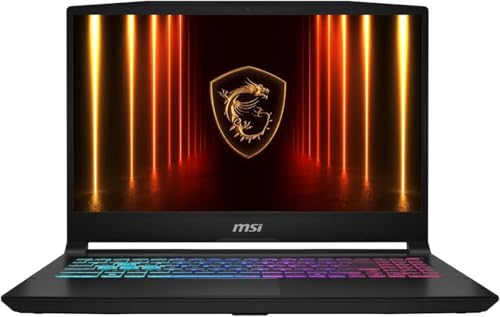
MSI Katana 15.6 — Best Traditional Value
The Katana is MSI’s long-running value formula, and this configuration states it cleanly: a 15.6-inch display at 144Hz, an Intel Core i7-14650HX, an NVIDIA GeForce RTX 5050, 16GB of DDR5 and a 512GB SSD, in black. The 144Hz panel is the market’s most proven high-refresh tier — the step the industry standardised on — and paired with an HX-class processor it gives this machine a particular character: the CPU muscle of a bigger rig, the panel of the classic gaming sweet spot, and a GPU aimed at the esports and mainstream catalogue. Players whose libraries predate the current AAA cycle, or who play competitive titles religiously, will find the balance shrewd.
The Katana line’s virtues have always been specification-per-commitment and a design that prioritises cooling and function over slimness theatre. A 15.6-inch chassis has room to breathe in a way slim machines envy, and owners who keep their laptops for years tend to value exactly that unglamorous competence. MSI’s gaming software and the line’s upgrade-friendly reputation in the community — check the specific model’s service manual culture before assuming — complete a picture of a machine bought by people who read specifications closely.
Its honest deficit is printed in the listing: 512GB of storage is the smallest figure in this guide, and modern game libraries are measured in hundreds of gigabytes per handful of titles. Budget for an external drive or plan a curated library. The RTX 5050 carries the same expectations as its siblings here. Within those two acknowledgements, the Katana is the traditionalist’s pick: the classic 144Hz gaming laptop formula, executed by the company that helped define it, for buyers who trust proven shapes over new silhouettes.
- Display: 15.6-inch, 144Hz
- Processor: Intel Core i7-14650HX
- Graphics: NVIDIA GeForce RTX 5050
- Memory and storage: 16GB DDR5, 512GB SSD
Strengths
- HX-class processor muscle in a value-tier machine.
- 144Hz is the proven, well-matched refresh tier for the GPU.
- Traditional gaming chassis prioritises cooling over thinness.
Trade-offs
- 512GB of storage is the tightest in this guide for game libraries.
- Design is functional rather than sleek beside the slim picks.
- RTX 5050 shares the tier’s judged-settings expectations in AAA games.
Best for: traditionalists and esports players wanting proven value hardware. Not suited for: buyers with huge game libraries and no external storage plan.
How Do the Best 120Hz Gaming Laptops Compare Side by Side?
| Model | Display | GPU | Processor | RAM / Storage |
|---|---|---|---|---|
| Lenovo Legion 5 | 16″ WQXGA 240Hz | RTX 5060 | Core Ultra 9 275HX | 32GB / 1TB |
| HP Omen 16 Slim | 16″ WUXGA 144Hz | RTX 5070 | Core Ultra 9 285H | 32GB / 1TB |
| ASUS ROG Strix G16 | 16″ FHD+ 165Hz | RTX 5050 | i7-14650HX | 16GB / 1TB |
| Lenovo LOQ | 15.3″ WUXGA 165Hz | RTX 5060 | Ryzen 7 250 | 16GB / 1TB |
| Alienware 16 Aurora | 16″ WQXGA 120Hz | RTX 5050 | Core 7 240H | 16GB / 1TB |
| MSI Katana 15.6 | 15.6″ 144Hz | RTX 5050 | i7-14650HX | 16GB / 512GB |
Three ladders run through the table. Refresh climbs from the Aurora’s honest 120Hz through 144 and 165 to the Legion’s 240. Graphics climb from the three RTX 5050 machines through the 5060 pair to the Omen’s lone 5070. Memory splits the field into 16GB workers and 32GB luxuries. The art of choosing is deciding which ladder your games actually climb: esports players ascend the refresh ladder, AAA players the graphics ladder, and heavy multitaskers the memory ladder — and no machine here tops all three, which is what makes the choice a real one.
Which Games Actually Use 144, 165 or 240 Hertz?
Competitive titles are the natural citizens of high refresh: fast shooters, battle royales, racing games and sports titles are engineered to run at very high frame rates on modest graphics settings, precisely because their players demand it, and on the RTX 5050 machines here they will fill a 144 or 165Hz panel with room to spare. MOBAs and strategy games benefit in smoothness if less dramatically. The RTX 5060 and 5070 picks extend the high-refresh territory into heavier competitive and hybrid titles, especially with modern upscaling enabled, which renders internally at a lower resolution and reconstructs a sharp image at a fraction of the cost.
Cinematic AAA games live at the other pole: on any GPU in this guide, the heaviest titles at native resolution will run at frame rates where a 120Hz panel is already sufficient headroom, and the extra tiers buy future-proofing and esports performance rather than present-tense spectacle. That is not a disappointment; it is the correct mental model of the whole class. Buy the panel for your fastest games, the GPU for your heaviest games, and let the two specifications meet in the middle of your actual library.
How Do You Get the Most from a High-Refresh Gaming Laptop?
Begin in the settings most owners never open: confirm the display is actually running at its full refresh rate in the operating system’s display settings, because a high-refresh panel left at 60Hz by a default or a dock is this category’s saddest own goal. In games, prefer the performance modes and upscaling options the developers provide; they exist precisely to convert GPU effort into frames the panel can show. Keep the machine’s vents unobstructed and its underside breathing — a gaming laptop on a bed is a gaming laptop being slowly persuaded to throttle — and use a stand or a desk as the default habitat.
Then manage the library like the storage is real, because it is: even the terabyte machines fill with modern titles faster than intuition suggests, and the Katana’s 512GB fills fastest of all. An external SSD for the overflow library is the standard owner’s accessory. Finally, play plugged in for serious sessions; gaming laptops ration their power on battery by design, and the full refresh experience assumes the wall is helping. None of this is exotic — it is the ordinary craft of owning the category, and it separates the players who feel the 120Hz difference daily from those still wondering what the fuss was about.
What Are the Most Common Mistakes When Buying a 120Hz Gaming Laptop?
Chasing the refresh number while ignoring the GPU is the signature error: a 240Hz panel behind an entry GPU is a promise the system cannot keep in most games, which is why this guide pairs the figures in every review. The mirror mistake is buying GPU muscle behind a slow panel — less common in this class, where the floor is enforced, but common in the wider market, where a powerful machine on a 60Hz screen wastes its own talent. Third, buyers assume the model’s badge guarantees the panel: gaming families span many refresh tiers under one name, so verify the rate in the specific listing’s title, as this guide did.
Fourth, storage optimism: choosing 512GB for a library of modern AAA titles and meeting the uninstall screen within a month. Fifth, expecting desktop-class silence and battery life from a gaming laptop — these machines are portable desktops in spirit, happiest plugged in, audible under load, and honest about it. Buyers who accept those terms join the category’s large population of satisfied owners; buyers who shop for a gaming laptop that behaves like an ultrabook are shopping for a machine that physics has not yet permitted.
What About Heat, Noise and Battery — the Gaming Laptop Confessions?
Every machine in this guide makes the same three confessions, and a trustworthy review prints them. Under full gaming load, these laptops get warm and their fans become audible; that is not a defect but the sound of physics being negotiated, and the differences between models are of degree and tone rather than of kind. Slim designs like the Omen negotiate hardest, full-size chassis like the Katana and Legion have more air to work with, and a headset — which most gaming sessions involve anyway — retires the question for most players. On a desk with clear vents, all six will sustain their performance; on a duvet, all six will protect themselves by slowing down, and they will be right to do so.
Battery is the third confession: a gaming laptop’s battery is a bridge, not a destination. It carries the machine between desks, through a lecture, across a power cut — and for light work it lasts respectably — but serious gaming drains it quickly and at reduced performance, because these systems are designed around wall power. Buyers who internalise that from the start are never disappointed; the machine that games brilliantly at a desk and works portably between desks is exactly the machine these listings describe. The player who needs hours of untethered gaming is shopping for a different device category and a different physics.
How Do These Laptops Grow into a Desk Setup?
Beautifully, and this is the ownership pattern the category quietly serves best. A high-refresh laptop docked to a large monitor, a mechanical keyboard and a mouse becomes the household’s gaming and work station, while remaining a complete computer the moment it is unplugged. The internal panel then serves as a second screen — chat, guides, streams, system monitors — a role its high refresh makes oddly luxurious. Players building toward that setup should check each listing’s port selection for the display connections their monitor wants, and should treat a powered USB-C hub as part of the desk budget rather than an afterthought.
The desk pattern also reframes the portability question. A machine that travels between two docks — home and dorm, home and office — needs only to survive the bag, not to be carried all day, and that relaxes the weight argument against the fuller chassis here. Conversely, the daily-carry student should weigh the Omen Slim and the LOQ with fresh respect. Same six machines, different correct answers, decided by the route between desks rather than by any specification.
Can You Upgrade These Machines Later?
Gaming laptops are the most upgrade-friendly thin computers left, but the honest answer varies by model and must be checked per machine rather than assumed from the category. Storage is the most commonly expandable element — many gaming designs carry a second SSD slot or a replaceable drive — and it is the upgrade this class most often needs, as the Katana’s 512GB owners will testify. Memory upgradability varies more: some designs socket their RAM, others solder it, and the 32GB configurations of the Legion and Omen exist partly for buyers who never want to ask the question. Before buying any pick here with an upgrade plan in mind, read the specific model’s documentation for slot counts and memory type; a plan based on the category’s reputation rather than the model’s facts is how owners end up with a screwdriver, a sealed chassis and a lesson.
What cannot be upgraded is the heart of the purchase: the GPU and the panel are married to the machine for life. That permanence is the deepest argument for the guide’s pairing discipline — choose the graphics tier and the refresh tier you will still respect in three years, because those two decisions are the ones that cannot be revised, while storage and even memory often can.
How Should Competitive Players Configure Settings for High Refresh?
The craft is consistent across titles: protect frame rate first and beauty second, because at 165Hz a stable high frame rate is the beauty. Lower the settings that cost the most frames for the least visible gain — shadows and volumetrics are the usual suspects — keep textures as high as memory comfortably allows, and use the upscaling quality modes modern GPUs provide, which were designed for exactly this exchange. Cap frame rates a few frames below the panel’s maximum where a game offers the option, a small refinement that keeps frame pacing smooth. And play one session at your old settings before changing anything: the contrast teaches your hands what the new settings bought, which no settings guide can do for you.
Input deserves the same attention as output. A high-refresh panel shortens the visible delay between your hand and the world, and it pairs naturally with a mouse polled fast and a wired connection where it counts. None of this requires professional ambition; it requires only the recognition that a 120Hz-and-above machine is a system, and that its panel — the specification this whole guide is named for — delivers its gift only when the settings around it stop standing in the way.
What Separates a Good First Gaming Laptop from a Regretted One?
Expectation management, almost entirely. The satisfied first-time owner bought a machine whose GPU tier matched their library, whose panel matched their fastest games, and whose size matched their desk and bag — and then discovered, delightedly, that modern gaming laptops are also superb everyday computers. The regretted purchase is usually a mismatch wearing a good specification: the AAA dreamer on an esports build, the daily carrier on a desktop-replacement chassis, the library hoarder on 512GB. Every review in this guide was written to surface those mismatches before money moves, because at gaming-laptop prices the cost of a mismatch is measured in years of low-grade irritation rather than in a quick exchange.
If you are buying your first, let the LOQ and the Aurora reassure you: the middle of this class is not a compromise zone but its centre of intelligence, where current-generation graphics meet panels they can genuinely feed. Buy there with confidence, or buy upward with a named reason — a heavier library, a faster panel you will feed, a slimmer chassis you will carry — and the machine will feel chosen rather than settled for.
How Long Will a Machine from This Class Stay Competitive?
Longer than the upgrade cycle suggests, because the class’s centre has stabilised around genuinely capable parts. An RTX 5060 or 5070 machine with 32GB of memory — the Legion and Omen configurations — has the headroom to absorb several years of new releases with settings adjusted gracefully rather than desperately. The RTX 5050 machines will age by library: their esports territory barely ages at all, since competitive titles are deliberately engineered for modest hardware, while their AAA territory will ask for more judgement with each passing year. Panel longevity is the quiet winner everywhere: a 144Hz or 165Hz screen bought today will still be a fast screen when the GPU behind it is considered mid-range, which is one more reason the floor of this class was set where it was.
The owner’s habits extend or shorten that span more than any specification. Keeping storage breathing room, letting the machine’s cooling work unobstructed, and resisting the folklore of disabling updates all protect the experience; a gaming laptop’s decline is usually a story of heat, dust and clutter rather than of silicon. Buy the tier your library needs, maintain it like the performance machine it is, and a laptop from this guide should still be earning its desk space when its replacement is being researched out of desire rather than necessity.
What Should You Check in the First Week of Owning One?
Verify the machine against its listing while returns are still effortless, because gaming configurations are the most frequently confused in all of retail. Confirm the refresh rate in the display settings and set it to the panel’s full figure. Confirm the GPU the system reports matches the title’s promise, and the memory and storage likewise. Run your most demanding game and your most played competitive title, and listen to the machine under load — fan noise is expected, but rattles, whines that pierce and heat that throttles within minutes are information to act on now rather than folklore to live with. Check every port with something real, pair the Wi-Fi in the room where you actually play, and register the warranty while the receipt is still findable.
Then do the enjoyable part properly: spend one full session in your favourite game with no settings agenda at all. The first hour on a high-refresh panel is the moment this entire category justifies itself, and it should be experienced as a player rather than as an inspector. The inspections protect the purchase; the session is the purchase.
Why Do Creators Keep Buying Gaming Laptops They Never Game On?
Because this class is secretly the value end of the performance laptop market. The same HX processors, fast panels, generous memory and strong graphics that serve games serve video timelines, 3D previews, code compilation and data work — and gaming lines are built in volumes that keep their pricing honest against workstation badges. A creator choosing from this guide should read the reviews with their own axis substituted: the Legion’s 240Hz WQXGA panel is a superb editing screen, the Omen’s RTX 5070 accelerates renders as happily as frame rates, and the Strix’s HX chip chews through exports. The honest trade-offs travel too — fan noise in a quiet studio, chassis styling in a client meeting, battery life on location — but the migration of creators into gaming hardware is one of the saner arbitrage stories in computing, and this class is where it happens.
Should You Wait for Sales or Buy the Configuration You Need Now?
Gaming laptops live on a promotional calendar — the class discounts rhythmically around the year’s big retail moments and whenever a successor generation is announced — so a flexible buyer can often capture a higher tier for a lower tier’s commitment by timing the purchase. The discipline is to decide the configuration first and let the calendar decide the week: a player who knows they need an RTX 5060 and 1TB can hunt that specification across this guide’s Legion and LOQ listings and take the first honest offer, rather than being upsold by a discount on a machine that was never right. The reverse discipline matters equally: a sale on the wrong panel or the wrong GPU is not a saving but a subsidised mismatch, and the years of ownership that follow will not care what the discount was.
What Does a Sensible Gaming-Laptop Budget Actually Consist Of?
The machine, and then the entourage the machine quietly requires. A headset or good headphones, because gaming audio is half the experience and laptop speakers are the class’s weakest component across every brand. A mouse worthy of the panel, since a high-refresh display fed by a bargain mouse is a sports car on economy tyres. Possibly an external drive as the library grows, and a bag that fits a gaming chassis rather than resenting it. None of these need to arrive on day one, and the wise buyer sequences them — machine first, mouse and headset with it, the rest as the library and the lifestyle nominate them. What matters is entering the category with the entourage in view, so that the laptop’s price is understood as the foundation of a setup rather than the whole of it. Players who budget that way end up with balanced rigs; players who spend everything on the machine game for months through tinny speakers with a trackpad, which is a waste of a beautiful panel.
How Do You Choose Between the Two Lenovo Machines in This Guide?
Lenovo fields both the guide’s ceiling and its smart-money pick, and the choice between the Legion 5 and the LOQ is the cleanest illustration of what money buys in this class. The GPU tier is shared — both carry the RTX 5060 — so the difference is everything around it: the Legion’s 240Hz WQXGA panel against the LOQ’s 165Hz WUXGA, 32GB of memory against 16GB, an HX-class Ultra 9 against a Ryzen 7, a 16-inch flagship chassis against a 15.3-inch value design. A player whose library is competitive-first and whose multitasking is modest will struggle to spend the Legion’s premium in any way they can feel weekly. A player who streams, creates, keeps everything open and wants the panel to outlast two GPU generations of games will feel every part of it. Neither buyer is wrong; they are simply shopping for different years of their gaming life, and Lenovo, to its credit, sells honestly to both.
Final Recommendation
Take the Legion 5 if you want the class’s complete statement — the fastest panel, a strong GPU and memory to spare. Take the Omen 16 Slim if graphics power in a travelling chassis matters most, the Strix G16 if your life is competitive queues at FHD+, and the LOQ if you want current-generation power at a value line’s commitment. Take the Alienware Aurora if 120Hz itself, delivered sharply and handsomely, is your honest requirement — it is the pick that honours the keyword most literally. And take the Katana if the classic 144Hz formula at a traditional value is your kind of wisdom. Whichever you choose, verify the refresh rate in the listing, pair it mentally with your fastest games, and prepare to find 60Hz unwatchable within a week — everyone does.
Frequently Asked Questions
Is 120Hz enough, or should I insist on 144Hz or more?
120Hz delivers the transformation from 60Hz in full, and for mixed libraries it is genuinely sufficient. Competitive players will feel 144Hz and 165Hz as worthwhile refinements, and 240Hz as headroom for the fastest titles and future GPUs. Buy the tier your games and budget agree on; none of the picks here will leave you feeling the panel is slow. If you are upgrading from a 60Hz machine, expect the first week to recalibrate your expectations permanently — returning to 60Hz afterward, even on a borrowed laptop, feels like watching through a fence.
Can an RTX 5050 actually use a 165Hz display?
In esports and competitive titles at FHD+, absolutely — those games are built to run at very high frame rates, and the Strix’s pairing is designed for exactly that. In heavy AAA titles the same GPU will run below the panel’s ceiling, where the screen simply waits gracefully. The panel is headroom, not a guarantee, and headroom has a second use owners discover quickly: it makes the everyday desktop feel as fast as the games, because Windows itself renders at the panel’s full rate.
What is the difference between FHD+, WUXGA and WQXGA?
They are resolution tiers: FHD+ and WUXGA sit around 1920 pixels wide in taller 16:10 shapes, while WQXGA steps up to roughly 2560 wide for a sharper image. Sharper panels cost GPU effort to feed, which is why the esports pick uses FHD+ and the mixed-use picks use the higher tiers. In daily terms, the taller 16:10 shapes also return vertical space that 16:9 panels surrendered years ago, which documents, code and strategy interfaces all spend gratefully.
Do I need 32GB of RAM for gaming?
Games themselves are well served by 16GB, which is why most of this guide carries it. The 32GB in the Legion and Omen pays when gaming shares the machine with streaming, creation, dozens of browser tabs or future titles’ growing appetites — a comfort and longevity purchase rather than a present-tense requirement. Streamers in particular should treat the larger figure as close to essential, since broadcasting software, the game and the chat ecosystem all draw on the same pool simultaneously.
Are gaming laptops usable for school or office work?
Emphatically yes — the processors here are strong, the screens are fast and pleasant, and the keyboards are built for long sessions. The trade-offs are weight, fan noise under load and battery life measured for plugged-in lives. The LOQ and Aurora are the most classroom-discreet designs in this guide. Students should also budget the bag honestly: a gaming laptop plus its power brick is a serious daily load, and the backpack guides elsewhere in this batch exist because that load deserves a carrier designed for it.
Why do some listings in this class not state a refresh rate?
Because gaming model families often span several panels, and some listings are written loosely. Treat an unstated refresh rate as an unknown, not as a promise: this guide admitted only listings whose titles state 120Hz or higher, and you should hold any listing you shop to the same standard. If a seller cannot confirm the panel in writing before purchase, the correct response is to buy one of the machines whose listings can.
Related Guides
Players comparing panel sizes and classes should continue with our guide to the best 1440p laptops, where several of these machines’ sharper siblings compete, and with the best 16 10 laptops for the aspect ratio most of this class has adopted. If your gaming is part of a wider performance brief, the best workstation laptops shows where gaming hardware’s professional cousins take the same ideas. Big gaming laptops travel badly without the right bag, and the best 17.3 inch laptop backpacks cover the largest mainstream fit class. The largest screens of all are gathered in the best 18 inch laptops.


