What's inside
- Key Takeaways
- Quick Picks
- How Did We Handle a Category Where the Headline Technology Is Disappearing?
- Best MLC PCI E SSDs and Their Successors in Detail: The Six Picks Examined Closely
- MLC, TLC and QLC: What Do the Cell Types Actually Change?
- How Do You Decide Between Hunting MLC and Buying a Successor?
- Why Did Manufacturers Abandon MLC If It Was Better?
- How Can You Verify a Drive Is Really MLC Before Paying?
- Who Should Still Hunt MLC, and Who Should Stop Apologising for TLC?
- How Does a Cache Actually Work, and Why Does It End?
- What Happens to This Category in the Next Few Years?
- How to Read a Listing in This Category Like a Skeptic
- How Do These Six MLC PCIe SSDs Differ in Endurance, Controller and Value?
- Which Mistakes Do Buyers Make in This Disappearing Category?
- Final Recommendation
- Frequently Asked Questions
- Related Guides
As an Amazon Associate I earn from qualifying purchases. This post may contain affiliate links at no extra cost to you.
gizmoverdict.com is reader-supported. When you buy through links on our site, we may earn an affiliate commission.
Where to buy: the six drives below are Amazon listings linked from the Quick Picks table. The two genuine MLC models are older stock, so availability and capacity options change often; if a listing shows only third-party sellers, read the seller history carefully before ordering a drive this specialised.
Honesty first, because the best mlc pci e ssds is a search with a catch: true MLC — two bits stored in every NAND cell — has effectively vanished from the consumer market. Only two drives in this roundup, Samsung’s 970 PRO in 1TB and 512GB, use genuine 2-bit MLC V-NAND. The other four picks — the 980 PRO, the 990 PRO, the WD Black SN850X and the Sabrent Rocket 4 Plus — are premium TLC drives, three bits per cell, included openly as the practical replacement class: high-endurance TLC with strong controllers and generous write ratings that now do the job MLC used to own. Nothing in this article will call a TLC drive MLC, and each spec box states its NAND type plainly.
Why did MLC inspire such loyalty? Storing two bits per cell instead of three or four leaves wider margins between the voltage states the controller must distinguish, which historically meant faster sustained writes, longer cell life and calmer behaviour as the drive filled. The 970 PRO became the reference point for that character, powering editing rigs and database machines that wrote hard all day. The industry’s economics moved on — TLC got cheaper, controllers got smarter, and error correction improved enough that the gap narrowed for most workloads — but narrowed is not identical, and the sections below keep the distinction visible rather than nostalgic.
So this guide does two jobs. It honours the real thing, for the shrinking group of machines and habits where genuine MLC still matters, and it maps the honest successors, judging each TLC flagship by the qualities MLC loyalists actually care about: sustained write pace, endurance rating, and steadiness near full. Read the labels as carefully as we wrote them.
Key Takeaways
- Only the two Samsung 970 PRO picks here use true 2-bit MLC V-NAND; the other four are premium TLC, labelled as such throughout.
- MLC left the consumer market because TLC became far cheaper while controllers and error correction closed most of the gap.
- The 970 PRO remains the reference for sustained-write steadiness, but it is PCIe 3.0 and increasingly scarce.
- Modern flagship TLC ratings for endurance now rival or exceed older MLC figures at the same capacity.
- For most new builds, a top-tier TLC drive is the rational buy; for specific write-all-day roles, the genuine MLC pair still argues its case.
- Every spec box in this article names the NAND type exactly, so no pick borrows MLC credit it has not earned.
Quick Picks
| Pick | Badge | Why it made the list |
|---|---|---|
| Samsung 970 PRO 1TB | True MLC flagship | The genuine article: Samsung 2-bit MLC V-NAND on PCIe 3.0, still the sustained-write reference in this category. |
| Samsung 970 PRO 512GB | True MLC, smaller size | The same genuine 2-bit MLC V-NAND in a 512GB stick, suiting a dedicated scratch or boot role rather than bulk storage. |
| Samsung 980 PRO 1TB | TLC successor, PCIe 4.0 | Samsung’s first PCIe 4.0 flagship on TLC V-NAND — openly not MLC, and the drive that began the succession. |
| Samsung 990 PRO 1TB | TLC successor, refined flagship | Samsung’s current PCIe 4.0 flagship on TLC, with the strongest all-round manners of the successor class. |
| WD Black SN850X 1TB | TLC successor, gaming muscle | WD’s gaming flagship on TLC NAND, with up to 7,300 MB/s reads in the listing and endurance that suits heavy everyday writing. |
| Sabrent Rocket 4 Plus 1TB | TLC successor, enthusiast pick | Sabrent’s PCIe 4.0 flagship on TLC NAND, long favoured by builders for strong sustained behaviour and cloning support. |
How Did We Handle a Category Where the Headline Technology Is Disappearing?
We began by verifying NAND type model by model, because the market is full of loose language — drives described as MLC in forum posts that are nothing of the kind, and listings that hide the cell type entirely. Samsung’s documentation for the 970 PRO line identifies its 2-bit MLC V-NAND plainly, which is why those two picks carry the genuine label here. For the four successors, we recorded TLC just as plainly in every spec box and comparison cell, and judged them on endurance and sustained behaviour instead of letting them coast on the article’s title.
Endurance figures were compared at equal capacity wherever possible, since a terabytes-written rating scales with size and comparing a 2TB drive’s figure against a 512GB drive’s misleads. We also weighed sustained-write testing from the drives’ long public record: MLC’s historical advantage shows up after the cache empties, so a successor worth recommending had to hold respectable pace deep into a long transfer, not just sprint through a benchmark.
Availability counted too, in both directions. The 970 PRO pair are older products whose listings persist while stock thins, so we flag the scarcity rather than pretending they are current production equals of the 990 PRO. A recommendation you cannot actually buy is a history lesson, and this article aims to be a buying guide first — with the history included because, in this one category, the history is the point.
Best MLC PCI E SSDs and Their Successors in Detail: The Six Picks Examined Closely
The genuine MLC pair comes first, in the order a purist would rank them, followed by the four TLC successors from Samsung, WD and Sabrent. Each pick’s NAND type appears in its spec box in plain words.

Samsung 970 PRO 1TB — True MLC flagship
The 1TB 970 PRO is the drive this category exists because of. Its V-NAND stores two bits per cell — real MLC, as Samsung’s own documentation describes the line — and that architecture delivers the trait owners still talk about years later: write pace that barely sags when a transfer runs long, because the cells themselves are fast rather than a cache pretending to be. Paired with Samsung’s Phoenix-era controller and a DRAM cache, it built its reputation in video ingest stations, software build machines and database boxes that wrote relentlessly, and its endurance rating at this capacity reflected that professional intent.
Choosing it today is a deliberate trade. You accept PCIe 3.0 pace in a PCIe 5.0 world, a model whose production has long ended, and listings that require a careful eye on the seller. In exchange you get the specific, increasingly rare thing the search promised: genuine MLC behaviour, with its calm thermals, its indifference to being kept busy, and a health curve that declines with unusual grace. For a write-heavy role in a machine with a PCIe 3.0 slot and years of service ahead, that exchange can still make complete sense — which is more than nostalgia, it is fit for purpose.
A word about where the 1TB 970 PRO sits in a modern parts list: it is no longer the drive you build a new flagship around, and pretending otherwise would insult the reader. Its correct modern role is narrower and more honourable — the known-quantity professional drive for a machine whose work is writing, whose slot is PCIe 3.0, and whose owner values the specific calm of cells that never need a cache to feel fast. In that seat it has no current-production rival, because no manufacturer will tool up an MLC line for a market this small. Scarcity, in other words, is not a marketing pose here; it is the arithmetic of a technology whose era has ended, being bought by the people whose workloads still speak its language.
- Capacity: 1TB in this listing, model MZ-V7P1T0BW
- NAND type: Samsung V-NAND, 2-bit MLC — the genuine article
- Interface: M.2 NVMe over PCIe 3.0 x4
- Cache: DRAM cache with Samsung controller
- Status note: older production; check seller and stock carefully
Strengths
- True MLC sustained-write steadiness that caches cannot imitate
- Endurance intent aimed at professional write workloads
- Samsung firmware and Magician support across its long life
Trade-offs
- PCIe 3.0 ceiling leaves modern slots underfed
- Scarce stock makes pricing and sellers inconsistent
- No benefit for read-mostly gaming or office duty over cheaper drives
Best for: write-all-day roles in PCIe 3.0 machines where genuine MLC behaviour is the requirement
Not suited for: a new PCIe 4.0 or 5.0 build chasing maximum transfer speed

Samsung 970 PRO 512GB — True MLC, smaller size
The 512GB 970 PRO carries the same 2-bit MLC V-NAND as its larger sibling into a size that reframes its best use. Half a terabyte is cramped for a modern game library, but as a dedicated scratch drive — the disk an editor points render caches at, a developer aims build output at, a photographer uses as the working shelf before finished files move to an archive — the capacity stops being a limitation and the MLC character becomes the whole story. Cells that tolerate heavy cycling, writes that stay level when the cache is exhausted, and a controller from the line that defined this category: that is a scratch drive’s job description written in hardware.
Its endurance rating is naturally lower than the 1TB model’s, because ratings scale with capacity, yet the workload fit remains excellent since scratch duty concentrates writes on a drive built to absorb them. The same cautions apply as with the larger pick: PCIe 3.0 pace, ended production, listings worth a careful read. Buy it as a specialist tool rather than a general upgrade and it rewards the precision; buy it as a sole drive for a modern machine and the capacity will argue with you within a year.
The 512GB model’s pricing behaviour tells its own story about the category. As capacities fell out of fashion, the smaller PRO occasionally sells for figures that make it the cheapest genuine MLC available anywhere, which suits its scratch-drive destiny perfectly: a specialist tool does not need to be large, it needs to be right. Owners should still inspect the health of any unit bought from marketplace sellers, favour listings that show the drive’s reported health, and budget the savings against a thorough first-week test of sustained writes. Pass that test and the drive settles into the most punishing small job in the machine with the least complaint of any component you own — which is, in the end, the entire MLC legend in one sentence.
- Capacity: 512GB in this listing, M.2 form factor
- NAND type: Samsung V-NAND, 2-bit MLC — the genuine article
- Interface: PCI-Express 3.0 x4 NVMe, per the listing title
- Cache: DRAM cache with Samsung controller
- Role fit: dedicated scratch, cache or boot duty
Strengths
- Genuine MLC endurance character in a focused size
- Sustained writes hold up under scratch-drive punishment
- Same firmware lineage and software support as the 1TB model
Trade-offs
- 512GB is small for a machine’s only drive
- Lower total endurance rating than the 1TB sibling
- Same ageing-stock buying cautions as the larger model
Best for: a dedicated scratch or cache role that writes hard every day
Not suited for: sole-drive duty in a machine with a growing library

Samsung 980 PRO 1TB — TLC successor, PCIe 4.0
The 980 PRO is where Samsung itself announced the changing of the guard: the PRO badge moved from MLC to TLC, and the company bet that a faster interface, a sharper controller and strong endurance ratings would carry the line’s professional reputation across the transition. Largely, the bet paid off. Its TLC V-NAND — three bits per cell, stated here without varnish — delivers sequential pace the 970 PRO cannot approach on a PCIe 4.0 slot, and its write endurance at 1TB stands comparison with the older MLC drive it replaced, which would have been unthinkable for TLC a generation earlier.
Where the succession shows its seams is the classic MLC stronghold: very long writes that outlast the cache settle at a lower plateau than the 970 PRO’s native pace, because that plateau is TLC writing as TLC. For the overwhelming majority of real workloads — editing timelines, loading games, compiling code, moving project folders — the cache never empties in anger and the 980 PRO simply feels faster everywhere. It earns its place in this article as the honest bridge: the first successor, still widely available, and good enough that most MLC loyalists who try it stop mourning within a week.
The 980 PRO’s maturity is now an asset in itself. Its firmware has been through the public mill — early teething stories were found, fixed and documented years ago — so the drive bought today embodies the corrected version of itself, with none of the launch-era uncertainty that attends any new flagship. Owners pairing it with a PlayStation or a compact build should note the heatsink variants and slot clearances as usual, and laptop owners will appreciate that its efficiency, while not the 990’s equal, remains respectable. It is the successor for the cautious: proven in the millions, fast enough to saturate its interface, and priced by the market as yesterday’s flagship, which is often the smartest seat in the whole catalogue.
- Capacity: 1TB in this listing, model MZ-V8P1T0BW
- NAND type: Samsung V-NAND TLC, 3-bit — not MLC
- Interface: PCIe 4.0 NVMe M.2
- Cache: DRAM cache with Samsung controller
- Software: Samsung Magician health and firmware support
Strengths
- PCIe 4.0 pace far beyond the MLC pair’s interface
- Endurance rating at this size rivals the older flagship
- Broad availability and mature firmware by now
Trade-offs
- TLC, plainly — sustained writes settle below true MLC pace
- Runs warm under long transfers without a heatsink
- Newer 990 PRO outclasses it for a modest step up
Best for: a PCIe 4.0 machine wanting PRO-line manners without hunting old stock
Not suited for: a purist specification that names MLC as a hard requirement
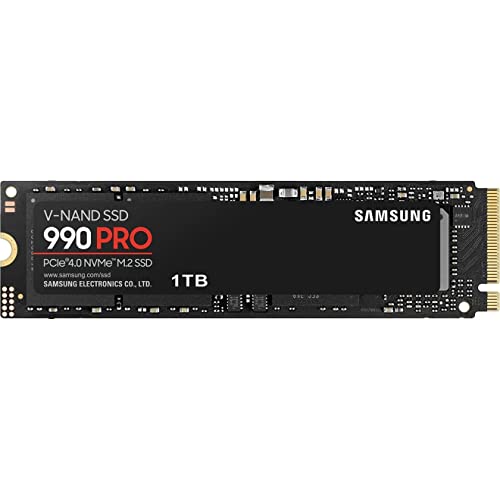
Samsung 990 PRO 1TB — TLC successor, refined flagship
If the 980 PRO began the succession, the 990 PRO is the successor grown confident. Its TLC V-NAND is again three bits per cell — the label in this article does not bend — but everything around the cells improved: efficiency climbs, the controller wastes less of the interface, and the drive holds its composure through the mixed workloads that make up real professional days. The listing’s headline of up to 7,450 MB/s describes a drive that saturates PCIe 4.0, yet the figure MLC loyalists should study is the endurance rating, which at this capacity keeps faith with the PRO line’s work-first heritage.
Day to day, the 990 PRO is the pick that makes the MLC conversation feel academic for most desks. Timelines scrub instantly, game worlds stream without hitching, and large copies finish before the cache question even becomes relevant. Under a genuinely endless write — restoring a huge archive, ingesting a day of footage — its TLC plateau sits below the 970 PRO’s native stride, and we will keep saying so, because that is the honest residue of the MLC advantage. Everything else about ownership, from Magician’s health reporting to firmware maturity, is flagship-grade and current.
Efficiency is the 990 PRO’s under-sung virtue for the MLC-minded, because it reframes what the succession actually traded. The older MLC flagship spent its power budget on cell margins; the 990 spends its on a controller that finishes work faster and returns to idle sooner, which in bursty professional workloads can mean less total energy and less heat per finished job. Only the sustained river exposes the architectural difference, and this article has been careful to fence that claim precisely. Buyers cross-shopping the Samsung pair should also weigh Magician’s cloning tool, which makes the 990 the easiest landing for an owner migrating from — fittingly enough — an ageing 970 PRO, carrying the old drive’s duties into the new era in a single afternoon.
- Capacity: 1TB in this listing, model MZ-V9P1T0B/AM
- NAND type: Samsung V-NAND TLC, 3-bit — not MLC
- Interface: PCIe 4.0 M.2 2280, up to 7,450 MB/s per the listing title
- Cache: DRAM cache with Samsung controller
- Software: Samsung Magician monitoring and cloning
Strengths
- Saturates PCIe 4.0 while keeping PRO-line endurance manners
- Excellent efficiency for laptops and compact builds
- Current production with active firmware support
Trade-offs
- TLC plateau on endless writes still trails genuine MLC
- Needs heatsink consideration in tight chassis
- Premium pricing over gaming-focused rivals
Best for: a current flagship build that wants the PRO badge’s discipline
Not suited for: a specification sheet that literally requires 2-bit cells

WD Black SN850X 1TB — TLC successor, gaming muscle
Western Digital’s SN850X approaches the succession from the gaming side and arrives at a similar destination: premium TLC — three bits per cell, as its spec box here states — driven by a controller tuned for low latency and sustained enthusiasm. The listing quotes up to 7,300 MB/s reads and 6,300 MB/s writes, and while those are peak figures, the drive’s reputation rests on how little drama accompanies ordinary abuse: huge game installs, capture recording, mod libraries churning with updates. Its endurance rating at this capacity sits comfortably in flagship territory, which is the number that matters for this article’s purposes.
Against the Samsung successors, the SN850X trades a little polish for a little punch and often a friendlier price, and WD’s Dashboard keeps health and firmware visible in plain language. In the MLC frame, it demonstrates how far the replacement class has come: a gaming-branded TLC drive now carries write credentials that embarrass early consumer SSDs of every cell type. It will not satisfy a specification demanding 2-bit NAND, and nothing here pretends otherwise — but for a PCIe 4.0 machine whose owner arrived via an MLC search and stays for endurance, it is a thoroughly rational landing spot.
The SN850X rewards a moment’s attention to its two personalities. In benchmarks it is a sprinter, but its sustained behaviour — the trait this category cares about — is steadier than its gaming livery suggests, holding respectable pace through installs and captures that would expose a lesser drive’s cache strategy. WD’s Game Mode software toggle and Dashboard monitoring give the owner levers the Samsung pair answers with Magician, and the practical difference between the ecosystems is taste rather than capability. For a workstation that games after hours, or a gaming rig that renders during them, the SN850X is the pick that refuses to make the owner choose a tribe — while remaining, we note for the record and the spec box, a TLC drive through and through.
- Capacity: 1TB in this listing, model WDS100T2X0E
- NAND type: TLC, 3-bit — not MLC
- Interface: M.2 2280 NVMe over PCIe 4.0
- Speeds in listing: up to 7,300 MB/s reads and 6,300 MB/s writes
- Software: WD Dashboard health and firmware utility
Strengths
- Flagship TLC pace with a latency tune gamers feel
- Endurance rating comfortably in the serious class
- Often undercuts the Samsung flagships on price
Trade-offs
- TLC sustained plateau, like every successor here
- Heatsink versions and bare versions require a careful listing read
- Gaming branding oversells what office duty will ever use
Best for: a gaming and creation rig wanting flagship endurance without flagship pricing
Not suited for: a compliance-style specification that names MLC outright

Sabrent Rocket 4 Plus 1TB — TLC successor, enthusiast pick
Sabrent built its name by courting the builders who read spec sheets, and the Rocket 4 Plus reflects that courtship: a PCIe 4.0 flagship whose TLC NAND — three bits per cell, labelled plainly here as everywhere in this article — is paired with a controller combination that earned praise for holding pace through long transfers better than many rivals of its generation. For readers arriving from the MLC world, that sustained behaviour is the relevant credential, more than the peak figures printed on the box. Sabrent also bundles cloning software access, a small thing that looms large on upgrade day.
Ownership suits the hands-on: firmware and support flow through a smaller company than Samsung or WD, which historically has meant responsive tools and a community that documents everything. The Rocket 4 Plus has been through revisions across its production life, so the careful buyer checks the current listing’s details rather than relying on a review from its launch year — advice that applies to every drive here and doubly to enthusiast brands. Judged on what lands in the machine today, it remains a credible successor-class pick with an endurance story fit for heavy daily writing.
Sabrent’s ownership story includes one more practical grace: the company publishes its firmware tools and cloning access openly, courting exactly the self-reliant builder who reads an article like this one to its final paragraph. That openness cuts both ways — the owner is expected to check for the current revision and firmware rather than being shielded from such knowledge — but for the audience that wants MLC-era honesty about what is inside the drive, a maker that documents its hardware and courts scrutiny is philosophically on-side. Pair the Rocket 4 Plus with a decent heatsink, verify its details on arrival, and it will do the successor’s job with an enthusiast’s transparency about how the job is done.
- Capacity: 1TB in this listing, model SB-RKT4P-1TB
- NAND type: TLC, 3-bit — not MLC
- Interface: NVMe 4.0 over PCIe Gen4, M.2 form factor
- Software: Sabrent cloning utility access and firmware tools
- Note: production revisions exist; verify the current listing details
Strengths
- Sustained-transfer manners that respect the MLC tradition
- Cloning support eases the upgrade it will usually perform
- Enthusiast community documents quirks thoroughly
Trade-offs
- TLC, like the rest of the successor class
- Smaller support organisation than Samsung or WD
- Revisions across its life make old reviews unreliable guides
Best for: hands-on builders who value sustained pace and tinker-friendly support
Not suited for: set-and-forget office fleets that want the biggest vendor’s hotline
MLC, TLC and QLC: What Do the Cell Types Actually Change?
A NAND cell stores data as charge levels, and the cell types differ in how many levels must be distinguished. MLC reads two bits from four levels, TLC reads three bits from eight, and QLC squeezes four bits from sixteen. Fewer levels mean wider safety margins, which historically bought MLC its trio of advantages: the cell tolerates more write cycles before wearing, writes complete faster because the charge can be placed less delicately, and reads stay reliable with simpler error correction. Those margins are physics, not marketing, which is why the 970 PRO’s character cannot be fully replicated by a cache.
What changed is everything around the cell. Modern controllers wield error correction that would have seemed extravagant a decade ago, wear-levelling spreads writes with great sophistication, and generous over-provisioning hides tired cells from view. The result is that a flagship TLC drive’s rated endurance now matches or beats the MLC figures of its era at equal capacity, even though each individual TLC cell endures fewer cycles — the system compensates for the component. This is why the successors in this article are honest recommendations rather than consolation prizes.
The remaining MLC stronghold is narrow and specific: sustained native writes. Every TLC drive writes quickly into a cache region, then settles to its cells’ native pace for the remainder of a huge transfer, and that native pace is a fraction of the MLC equivalent. Workloads that live beyond the cache — continuous ingest, giant restores, certain database patterns — still feel the difference. Workloads that never leave the cache, which is most of computing, never will. Knowing which side of that line your machine lives on is the entire buying skill in this category.
One more label deserves suspicion: drives marketed with phrases like ‘MLC mode’ or ‘premium NAND’ without a stated bit count. If a maker will not print the number of bits per cell in its documentation, assume three or four and judge the drive on its endurance rating instead. The rating, unlike the adjectives, is a number the warranty stands behind, and comparing ratings at equal capacity is the most honest shortcut available to any buyer in this disappearing category.
How Do You Decide Between Hunting MLC and Buying a Successor?
Write down the machine’s actual writing life for one honest week. Count the gigabytes written on the heaviest day — editing exports, builds, captures, restores — and note whether any single transfer runs longer than a few minutes at full pace. If the heavy days are heavy in total but bursty in shape, a successor’s cache will hide its TLC nature completely and the faster interface will win every day. If the work is one long river of writes, the MLC pair’s native steadiness is a real feature and the hunt is justified.
Check the slot before the sentiment. A PCIe 3.0 motherboard cannot feed a PCIe 4.0 flagship beyond 3.0 pace, which neutralises the successors’ headline advantage and strengthens the 970 PRO’s case in older professional machines. Conversely, a new board with a 4.0 or 5.0 slot wastes its potential on a 3.0 drive, and in that chassis the successors stop being a compromise and become simply correct. The motherboard, more than the forum arguments, usually settles this question.
Finally, price the whole decision including scarcity. A genuine 970 PRO from a reputable seller, at a fair figure, for a defined write-heavy role, is a rational purchase. The same drive at a collector’s premium, from an unknown seller, for a gaming machine, is a story you tell yourself. Set the budget by the workload’s needs, keep the backup plan identical either way, and let the NAND label be one factor — the one this article refuses to fudge — among several honest ones.
Why Did Manufacturers Abandon MLC If It Was Better?
Follow the cost per bit and the mystery dissolves. A wafer of NAND costs roughly the same to produce whether its cells store two bits or three; the three-bit version simply yields half again as much sellable capacity from the same silicon. Multiply that across an industry shipping exabytes, and TLC’s economic gravity becomes irresistible — the same factory output serves far more customers, at prices that opened the SSD market to everyone. MLC did not lose an argument about quality; it lost an argument about arithmetic, in a market that votes with wallets for capacity per coin.
The technology also genuinely improved around the weaker cell. Error correction that once would have been reserved for enterprise gear became standard, controllers learned to read tired cells with multiple voltage probes and recover data that early TLC would have lost, and generous spare area let drives retire worn blocks invisibly for years. Each advance narrowed the practical gap until, for the great majority of workloads, the remaining difference lived only in sustained-write behaviour and in ratings that flagship TLC had learned to match. The industry did not merely accept a worse product; it engineered the worse component into an equivalent system.
What remains is a niche too small for production lines and too real to mock: workloads that write continuously, owners who keep drives a decade, and professionals who simply prefer the older physics. The market’s answer to that niche is the second-hand and remaining-stock trade in drives like the 970 PRO, plus flagship TLC whose ratings honour the niche’s concerns. This article’s structure — two genuine picks, four honest successors — is not a compromise we settled for; it is an accurate map of the territory as it actually exists.
How Can You Verify a Drive Is Really MLC Before Paying?
Trust documents, not adjectives. The manufacturer’s own datasheet or product brief for the exact model number will state the NAND type in its specifications table, as Samsung’s materials do for the 970 PRO line, and that statement is the only evidence worth money. A retailer listing, a marketplace description or a forum post calling a drive MLC carries no weight — those texts are copied, inherited and occasionally invented, and in a category with scarcity premiums, the incentive to inherit a flattering error is real.
Model numbers are the second lock on the door. Manufacturers encode generations in them, and a drive whose model code belongs to a known TLC line does not become MLC because a seller typed the word. Cross-check the code against the maker’s support page, confirm the capacity was actually sold in the MLC line — the 970 PRO’s sizes are a matter of record — and treat any mismatch as a stop sign rather than a puzzle. Genuine sellers of specialist hardware expect these questions and answer them with screenshots of the drive’s own reporting.
After purchase, verify again with the drive’s own telemetry. Health utilities report the model and firmware the hardware claims, and a mismatch with the listing is grounds for an immediate return while the window is open. Run the sustained-write workload the drive was bought for during that same window, because a genuine 970 PRO announces itself in exactly that test — pace that stays level long after a cache would have surrendered. In this category, the drive itself is the final document, and it cannot be coached.
Who Should Still Hunt MLC, and Who Should Stop Apologising for TLC?
The MLC hunter’s profile is specific enough to describe in one breath: a machine with a PCIe 3.0 slot, a workload that writes continuously rather than in bursts, an owner who keeps hardware for the better part of a decade, and a willingness to verify sellers and health figures like a professional. Video ingest stations that record all day, build servers whose output trees churn constantly, and database boxes with relentless logging all fit, and for them the 970 PRO’s native pace and cell margins are not nostalgia but the correct engineering answer, bought while the remaining stock still allows it.
Everyone else should stop apologising for TLC, because the apology is out of date. The creator editing from a fast flagship, the gamer whose writes are installs and patches, the developer whose builds burst and idle — these workloads live inside the cache and the rating, where the successors equal or exceed the old flagship in every measurable way that reaches their hands. Buying TLC for such work is not settling; it is reading the workload honestly, which is the same discipline that sends the first group hunting MLC. The label matters, and this article has guarded it fiercely — but the workload matters more.
There is a third group worth naming: the owner of an ageing 970 PRO wondering whether to pre-emptively replace it. Read its health percentage and relax in proportion. A PRO at ninety percent health has years of its designed life ahead, and its natural successor — cloned over on a calm afternoon when the health eventually dictates — will be whatever flagship then holds the PRO badge. The MLC era ends drive by drive, on evidence, not on anniversaries.
How Does a Cache Actually Work, and Why Does It End?
Modern TLC drives write at two speeds because they cheat, honourably and by design. A portion of the NAND is operated in a fast single-bit mode, receiving incoming data at high pace, and the controller later folds that data into its permanent three-bit form during idle moments. While a transfer fits inside that fast region, the drive feels like something far more expensive; when a long transfer overflows it, the controller must write new data at native TLC pace while simultaneously folding the backlog, and the pace settles to the honest figure the MLC faithful have always pointed at. Cache sizes vary, shrink as the drive fills, and are rarely printed on the box — which is why sustained behaviour must be judged from a model’s long public record rather than its listing.
MLC drives play a smaller version of the same game, which is precisely their advantage: the native pace beneath the cache is so much higher that the landing, when it comes, is gentle. The 970 PRO’s reputation was built in that landing zone. Understanding this reframes the whole category argument from a religious war into a sizing question — how large are your transfers, how full is your drive, how often do the two combine — and sizing questions have answers that can be measured on your own machine in an afternoon, which is a far better basis for a purchase than anyone’s allegiance, including this article’s.
It also explains why keeping a drive partly empty is doubly wise for TLC owners. A fuller drive offers the controller less room to stage its fast region, so the cache shrinks exactly as the owner’s largest transfers — the ones moving into that nearly full drive — grow. The MLC pair suffer the same physics in miniature. Whatever you buy from this list, leave it breathing room, and you have quietly purchased a larger cache and a longer life with the same money.
What Happens to This Category in the Next Few Years?
The honest forecast is a slow fade, not a cliff. Remaining 970 PRO stock will thin, prices for verified units will firm, and the second-hand market will professionalise around health-verified sales as the remaining purchasers are increasingly the ones who know exactly what they are purchasing and why. Manufacturers will not revive consumer MLC production — the economics that ended it have only strengthened — but flagship TLC endurance will keep creeping upward, absorbing more of the niche’s practical needs with each generation, as it has already absorbed most of them.
The idea of MLC will survive the product. Its lesson — that cell margins are real, that sustained behaviour is the truth beneath benchmarks, that ratings should be read before speeds — has permanently improved how serious buyers judge every drive, including the TLC flagships that replaced it. In that sense the successors in this article are MLC’s legacy as much as its rivals: drives engineered, and marketed, to an audience the PRO line taught to ask harder questions.
For the buyer deciding today, the forecast changes little. If your workload needs the genuine article, buy it soon and verify it thoroughly, because the window is a closing one. If it does not, buy the successor that fits your slot and your rating needs, and spend the difference on the backup drive that every storage philosophy, in every era, agrees on. Either way, you will have bought with your eyes open — which, in a category built on a disappearing label, is the whole achievement.
How to Read a Listing in This Category Like a Skeptic
Begin with the model number and nothing else. Type it into the manufacturer’s own support site and read the specifications the maker publishes for that exact code, because the maker’s table is the only text in the entire transaction written by someone who can be held to it. Note the NAND type, the interface and the capacities the line was actually sold in; any listing that contradicts those three facts — an impossible capacity, a wrong interface, a cell type the maker never claimed — is disqualified on the spot, whatever its price or its photographs suggest.
Interrogate the seller next, in proportion to the premium. A genuine specialist selling a 970 PRO expects questions about health percentage, total writes and firmware, and answers them with screenshots from the drive’s own reporting. Evasion on those points is information: the seller either does not have the drive they describe or does not want its condition examined, and in a category with scarcity value both possibilities end the conversation. The patient buyer loses a listing occasionally; the impatient one loses money and a weekend.
On arrival, verify before the return window becomes a memory. Confirm the reported model and capacity, read the health figures, run the sustained-write workload the drive was bought for, and watch both pace and temperature. A genuine MLC drive passes that examination with the calm this article has described at length; anything else goes back while going back is still a formality. Verification is not distrust of a particular seller — it is the standard procedure for a category where the label is the value.
Keep the evidence with the drive: the listing, the health screenshot, the receipt, filed where the workstation’s other records live. If the drive is ever resold, that file is what separates your listing from the folklore — and the next skeptic, reading it, will recognise the procedure with approval. Categories like this one run on exactly that chain of documented honesty, one careful owner at a time.
How Do These Six MLC PCIe SSDs Differ in Endurance, Controller and Value?
| Pick | Form and interface | Standout trait | Watch out for |
|---|---|---|---|
| Samsung 970 PRO 1TB | M.2 NVMe PCIe 3.0, 1TB | TRUE MLC 2-bit V-NAND | Older, scarcer, slower interface |
| Samsung 970 PRO 512GB | M.2 NVMe PCIe 3.0, 512GB | TRUE MLC 2-bit V-NAND | Small size, specialist role |
| Samsung 980 PRO 1TB | M.2 NVMe PCIe 4.0, 1TB | TLC successor with strong rating | Long writes settle at TLC pace |
| Samsung 990 PRO 1TB | M.2 NVMe PCIe 4.0, 1TB | TLC flagship, best successor manners | Not MLC, whatever the badge |
| WD Black SN850X 1TB | M.2 NVMe PCIe 4.0, 1TB | TLC gaming flagship, strong rating | TLC plateau under endless writes |
| Sabrent Rocket 4 Plus 1TB | M.2 NVMe PCIe 4.0, 1TB | TLC with strong sustained manners | Check current revision details |
The table keeps the single most important column honest: NAND type. Read across it and the article’s whole argument is visible at a glance — two genuine MLC drives on an older interface, four TLC successors on a faster one, and no relabelling anywhere.
Which Mistakes Do Buyers Make in This Disappearing Category?
The commonest error is believing a listing that whispers MLC without proving it. Third-party sellers inherit old descriptions, confuse cache modes with cell types, and occasionally repeat forum folklore as fact. Verify the NAND type against the manufacturer’s own documentation for the exact model number, as we did for the 970 PRO pair, and walk away from any drive whose maker will not state the bits per cell in writing.
Overpaying for scarcity runs second. The 970 PRO’s genuine virtues do not scale with its collector pricing, and a successor at half the money will serve most workloads better through its faster interface alone. Set a ceiling before hunting, and let the drive go when the auction passes it — another listing, or a wiser purchase, will come along.
The third mistake is buying MLC for a workload that never writes. A gaming library, an office boot drive and a media player gain nothing from 2-bit cells except a story, while paying in interface speed and capacity for the privilege. Match the technology to the work: MLC for the river of writes, successors for everything else, and no embarrassment in either direction.
Final Recommendation
For the purist with a PCIe 3.0 machine and a river of daily writes, the 1TB 970 PRO remains what it always was — the genuine MLC flagship — and its 512GB sibling is the scratch-drive specialist of the pair. Everyone else should buy the succession with a clear conscience: the 990 PRO for flagship manners, the SN850X for gaming muscle at a friendlier figure, the Rocket 4 Plus for sustained-pace enthusiasm, and the 980 PRO as the proven bridge between the eras.
MLC earned its legend honestly, cell by cell, in machines that wrote hard and lasted — and the most respectful way to buy in its name today is to insist on the same honesty from every label, including ours.
Frequently Asked Questions
Are any true MLC SSDs still made for consumers?
Effectively no, which is why this roundup contains only the two 970 PRO models as genuine MLC and labels the rest as TLC successors. Samsung’s PRO line itself moved to TLC with the 980 PRO, and other makers made the same transition earlier. Remaining 970 PRO listings are existing stock, so availability and seller quality deserve extra care, and prices can drift upward as the stock thins.
Is TLC really as durable as MLC now?
At the level of the finished drive, flagship TLC endurance ratings match or exceed the MLC figures of their era at equal capacity, because controllers, error correction and spare area compensate for each cell enduring fewer cycles. At the level of the individual cell, MLC still tolerates more writes. Both statements are true, and which one matters depends on whether your workload stresses the rating or the raw sustained behaviour.
Why does sustained write speed differ between MLC and TLC?
TLC drives write quickly into a cache area, then slow to the native pace of cells that must place eight charge levels precisely. MLC cells, placing four levels, write natively much faster, so the older drives hold their pace through transfers that exhaust a successor’s cache. Short and medium transfers never reveal the difference, which is why most owners never encounter it.
Should I buy a used 970 PRO if new stock disappears?
Only with the health data in hand. A drive’s remaining life can be read from its SMART health percentage, and a lightly used 970 PRO can be a sound specialist purchase, while a former cache drive near its rating is not. Ask for the health figure, favour sellers who publish it, and remember that warranty support on an old model may be limited regardless of condition.
Does PCIe generation matter more than NAND type?
For most workloads, yes. The jump from PCIe 3.0 to 4.0 doubles the interface ceiling, and everyday computing feels that difference far more often than it feels cell architecture. NAND type dominates only in the sustained-write corner. That is why this article recommends successors for new builds and reserves the genuine MLC pair for the specific machines and habits where their one remaining advantage is the one that counts.
What does 2-bit, 3-bit and 4-bit actually mean in the shop?
It is the count of data bits stored in each memory cell: two for MLC, three for TLC, four for QLC. Fewer bits per cell means the cell’s charge states are easier to distinguish, which historically bought endurance and native write speed, while more bits per cell means cheaper capacity. When a listing will not state the number, the endurance rating is the figure to compare instead, since it is the one the warranty stands behind — and any seller who claims MLC for a model the maker documents as TLC should be avoided entirely.
Can I mix an MLC drive and a TLC drive in one machine?
Yes, and it is one of the smartest layouts this category offers. Put the operating system and the relentless writers — scratch, caches, build output, logs — on the genuine MLC drive, where its native pace and cell margins are spent exactly where they matter, and let a capacious TLC successor hold the games, media and archives whose access pattern is mostly reading. Each technology then does the work it is honest at, the expensive MLC capacity is bought only in the size the churn requires, and the TLC drive’s rating is consumed slowly by a workload that barely writes. Owners of a healthy 970 PRO adding a modern flagship are not betraying either drive; they are promoting each to the job it was born for, which is the most MLC-spirited decision available in a TLC world.
Related Guides
Continue with these related storage guides: best nvme ssds for workstations best ssds for video editing best high endurance ssds


