What's inside
- Key Takeaways
- Quick Picks: The Best Detachable Laptops at a Glance
- How We Chose These Picks
- What Actually Makes a Detachable Different from a Convertible?
- The Six Detachable Laptops, Reviewed in Detail
- How Do the Best Detachable Laptops Compare Side by Side?
- What Should You Check Before Buying a Detachable?
- How Do You Get Real Work Done on a Tablet-First Machine?
- What Are the Most Common Mistakes When Buying a Detachable Laptop?
- How Much Does the Keyboard-and-Pen Ecosystem Really Matter?
- Which Detachable Suits Which Kind of Working Day?
- How Long Will a Detachable Stay Useful Before It Feels Old?
- What Does a Sensible First Week with a New Detachable Look Like?
- How Do Detachables Handle Travel, Security and Shared Spaces?
- What About Docks, Monitors and the Desk You Already Own?
- Should You Wait for the Next Generation Instead of Buying Now?
- Final Recommendation
- Frequently Asked Questions
- Related Guides
As an Amazon Associate I earn from qualifying purchases. This post may contain affiliate links at no extra cost to you.
gizmoverdict.com is reader-supported. When you buy through links on our site, we may earn an affiliate commission.
Where to buy: each detachable below links to its Amazon listing, where you can check price on Amazon, confirm exactly what sits in the box, and — critically for this category — see whether the keyboard and pen are included or sold as separate line items before you commit.
The best detachable laptops ask you to accept a bargain that ordinary laptops never propose: the computer is a tablet first, and everything that makes it feel like a laptop — the keyboard, the trackpad, sometimes the pen — arrives as an accessory with its own price tag. That bargain can be wonderful. A detachable is the lightest way to carry a full desktop operating system, the easiest machine to hand around a meeting table, and the only laptop format that genuinely becomes a reading slate when the keyboard comes off. It can also be a trap for anyone who budgets for the tablet alone and discovers at checkout that the typing half of the product costs extra.
So this guide is organised around honesty about the whole purchase, not the headline device. Every review below states plainly what the listing does and does not bundle, because a detachable bought without its keyboard is not a cheaper laptop — it is half a laptop. The six picks split into two clear families. At the top sit three Windows machines built around Qualcomm Snapdragon silicon: two configurations of Microsoft’s Surface Pro (2026) and ASUS’s ProArt PZ13, a creator-leaning detachable with an AMOLED screen. Below them sit three Lenovo Chromebooks from the Duet line, which trade raw power for prices and simplicity that make them natural second machines, student devices and travel companions.
One more distinction matters before the picks. A detachable is not a convertible. Convertibles fold; their keyboards stay attached and rotate behind the screen. Detachables separate completely, which is why they are lighter in tablet mode and why their keyboards can be left in a hotel room when all you need is a screen. If you already know you will type eight hours a day and never once remove the keyboard, a conventional laptop will serve you better and usually cost less for the same processor. The detachable earns its premium in the hours when the keyboard is off.
Key Takeaways
- The Surface Pro (2026) with 512GB of storage is the flagship pick: Snapdragon X2 Plus power, 16GB of RAM and enough local space that you will not be managing files within the first month.
- The 256GB Surface Pro (2026) is the same machine in a leaner configuration — the right buy when your work lives in cloud storage and the price gap matters more than headroom.
- Budget for the keyboard and pen separately on the Surface Pro and ProArt PZ13; the listings centre on the tablet, and the typing kit is an accessory purchase, not a guaranteed inclusion.
- The ASUS ProArt PZ13 pairs a 2.8K AMOLED touchscreen with 1TB of storage, making it the detachable aimed at photographers and illustrators rather than meeting rooms.
- Lenovo’s three Duet Chromebooks are the value half of this guide, and the larger Duet models have historically bundled their keyboards — still, verify the box contents on the listing every time.
- Every machine here runs on ARM-based processors, so check that your essential Windows applications have native ARM builds or acceptable emulation before choosing a Snapdragon detachable.
Quick Picks: The Best Detachable Laptops at a Glance
| Pick | Badge | Why it made the cut |
|---|---|---|
| Microsoft Surface Pro (2026), 512GB | Best Overall Detachable | The complete flagship: Snapdragon X2 Plus, 16GB RAM and 512GB of storage in the format’s defining 13-inch tablet. |
| Microsoft Surface Pro (2026), 256GB | Best for Cloud-First Buyers | The same Surface Pro experience with half the storage, suited to people whose documents never leave OneDrive or Google Drive. |
| ASUS ProArt PZ13 | Best for Creators | A 2.8K AMOLED touchscreen and 1TB of storage give travelling artists a detachable that can hold a real photo library. |
| Lenovo IdeaPad Duet 5 Chromebook | Best Chromebook Detachable Screen | Its 13.3-inch OLED FHD panel is the most enjoyable display in the Duet family for film, reading and casual sketching. |
| Lenovo Chromebook Duet (2025) | Best Compact All-Rounder | The 10.95-inch WUXGA 2025 refresh with MediaTek Kompanio 838 covers school, travel and sofa browsing in one small slate. |
| Lenovo Duet 11 Chromebook | Best Value with Keyboard Included | An 11-inch 2K touchscreen sold with its keyboard in the box, doubling the 2025 Duet’s storage at 128GB. |
How We Chose These Picks
We built this shortlist from listings whose specifications could be verified directly from the product titles on Amazon, and we deliberately refused to pad it. The detachable category is small, and a guide that invents depth helps nobody. Six machines earned places: three Windows detachables that compete on performance and displays, and three ChromeOS detachables that compete on price, simplicity and battery-friendly efficiency. Each one had to offer a genuinely detachable keyboard design — not a convertible hinge wearing a costume — and each had to represent a distinct reason to buy, so that no two picks are the same purchase wearing different badges.
Three judgements shaped the final order. First, total cost of ownership: a detachable whose keyboard and pen are separate purchases is a more expensive machine than its listing suggests, and the reviews price that reality in words even though this guide never prints product prices. Second, processor honesty: the Windows picks all run Snapdragon chips, which are superb for battery life and everyday responsiveness but require a moment’s thought about older Windows software, printer drivers and niche professional tools. Third, display quality, because a detachable spends half its life as a pure screen — reading, presenting, watching, drawing — and a mediocre panel undermines the entire reason the format exists.
We also weighed what each machine is like to live with at a desk, on a train tray and on a lap. Detachables balance on kickstands rather than rigid hinges, so their centre of gravity, their footprint on small tables and the angle range of the stand all matter in ways that never arise with a clamshell. Those judgements are qualitative because they depend on your furniture and your commute, but they are the difference between a detachable that delights and one that gets left at home.
What Actually Makes a Detachable Different from a Convertible?
Pick up a convertible and the keyboard is always there, folded behind the screen in tablet mode, adding thickness and weight to every page you read. Pick up a detachable and the keyboard can stay in your bag. That single mechanical fact cascades through the whole ownership experience. Tablet mode is thinner and lighter. The screen can be propped on a kickstand at angles a hinge cannot reach, which matters when you are showing a client a design across a café table. And when the keyboard eventually wears out or a key dies, you replace an accessory rather than servicing the computer itself.
The costs of the design are equally real. A kickstand needs depth behind the screen, so a detachable on a cramped airline tray or balanced on your knees is a negotiation rather than a given; experienced owners learn to type with the stand on a book or a lap desk. The keyboard, detached, is one more thing to forget, and its wireless or pogo-pin connection is one more thing to keep clean. None of this disqualifies the format — millions of Surface owners type happily every day — but it means the detachable rewards people whose work genuinely splits between desk typing and screen-only sessions, and mildly punishes people whose work is one long typing session after another.
There is also a longevity angle worth naming. Because the expensive half of a detachable is the tablet, and the wear-prone half is the keyboard, the format ages gracefully: a tired keyboard cover is a modest accessory purchase in year three, not a repair bill. Conversely, the battery lives in the tablet and cannot be swapped, so the machine’s working life is ultimately set by a cell you cannot replace — one more reason the efficient Snapdragon and MediaTek chips in this guide matter, since gentle power draw slows the cycle count that ages a battery.
The Six Detachable Laptops, Reviewed in Detail

Microsoft Surface Pro (2026), 512GB — Best Overall Detachable
The Surface Pro is the machine that invented this category’s modern form, and the 2026 edition in its 512GB configuration is the one to buy if a detachable is going to be your main computer. The listing specifies a Snapdragon X2 Plus processor, a 13-inch touchscreen, 16GB of RAM and 512GB of SSD storage. That memory and storage pairing is the important part: 16GB keeps a browser full of tabs, a video call and a couple of documents moving without the stutters that define under-specified tablets, and 512GB means your photo library, your offline files and a sensible stack of applications coexist without weekly housekeeping.
In daily use this is the detachable that disappears into a workday. The kickstand props the screen for typing, sketching or presenting; the tablet alone is a comfortable reading and annotation device; and the Snapdragon platform sips power in the way that Intel-based Surfaces of earlier generations never managed, so the machine spends more of its life untethered. Windows on ARM has matured to the point where the mainstream catalogue — browsers, Office, the major creative suites, communication tools — runs natively or emulates transparently, though the honest caveat in the section above applies: verify any specialist software before you buy.
Now the cost conversation this guide promised. The Surface Pro’s keyboard cover and pen are the classic hidden expense of the line: they are frequently sold separately from the tablet, and the listing for this configuration centres on the tablet itself. Treat the true purchase as tablet plus typing kit, and if a pen matters to your work — annotation, sketching, handwritten notes — add that too. Budgeted honestly, the Surface Pro is a premium machine; budgeted naively, it is a surprise. Neither changes how good it is, but only one of those buyers feels well served.
- Display: 13-inch touchscreen
- Processor: Snapdragon X2 Plus
- Memory and storage: 16GB RAM, 512GB SSD
- Format: detachable tablet with kickstand; keyboard and pen typically separate purchases
Strengths
- Flagship configuration with storage headroom that suits a main computer rather than a companion device.
- Snapdragon efficiency makes untethered working realistic instead of aspirational.
- The most mature detachable ecosystem of keyboards, pens and docks in this guide.
Trade-offs
- Keyboard and pen costs sit outside the headline purchase and must be budgeted deliberately.
- Kickstand typing on a lap or a narrow tray table is workable rather than graceful.
- ARM-based Windows still asks you to check specialist or legacy software before committing.
Best for: professionals who want one machine that is a laptop at the desk and a tablet everywhere else. Not suited for: buyers who need guaranteed compatibility with older x86-only Windows tools.

Microsoft Surface Pro (2026), 256GB — Best for Cloud-First Buyers
This is the same 2026 Surface Pro — 13-inch touchscreen, Snapdragon X2 Plus processor, 16GB of RAM — with its storage halved to 256GB, and the entire review is really a referendum on how you handle files. If your documents live in OneDrive, your photos sync to the cloud, your music streams and your applications are the mainstream set, 256GB is not a compromise at all; it is simply the absence of space you would never have filled. The machine feels identical in the hand and on the desk, because in every respect that touches daily speed, it is identical.
The discipline required is real, though. A 256GB drive fills quietly: a couple of large application suites, an offline media folder for a long trip, a few months of locally cached cloud files, and suddenly Windows is asking you to make choices. Owners who thrive with this configuration treat local storage as a working set rather than an archive. Owners who suffer with it are the ones who discover, mid-project, that the archive was on the drive all along. Be honest about which person you are, because the difference between these two Surface configurations is not performance — it is temperament.
One buying note specific to this pair of listings: Microsoft sells Surface Pro in closely related Snapdragon configurations, and marketplace titles can be truncated or inconsistent about the exact chip tier. Before ordering either configuration, read the full listing title and specification table and confirm the processor name, the storage figure and whether any keyboard bundle is included. That thirty-second check is the difference between the machine you researched and a near-namesake. The hidden-cost warning from the flagship review applies here with equal force — the keyboard and pen are separate purchases unless a specific bundle listing says otherwise.
- Display: 13-inch touchscreen
- Processor: Snapdragon X2 Plus
- Memory and storage: 16GB RAM, 256GB SSD
- Format: detachable tablet with kickstand; keyboard and pen typically separate purchases
Strengths
- Full Surface Pro performance and display in the leaner, simpler configuration.
- 16GB of RAM keeps multitasking smooth despite the smaller drive.
- Pairs naturally with cloud storage habits most office workers already have.
Trade-offs
- 256GB demands active file housekeeping from anyone with a growing local library.
- The same accessory costs apply, narrowing the real saving over the 512GB model.
- Large offline media collections for travel will not fit comfortably alongside work files.
Best for: cloud-first workers who want the flagship detachable without paying for unused storage. Not suited for: anyone who keeps a large local photo, video or game library.

ASUS ProArt PZ13 — Best for Creators
ASUS built the ProArt PZ13 for the person the Surface Pro only partly serves: the photographer, illustrator or designer whose detachable is a portfolio, a sketchbook and a field-review screen before it is a typing machine. The specification tells that story clearly. The 13.3-inch touchscreen is a 2.8K AMOLED panel — the sharpest, richest display in this guide — the processor is a Snapdragon X Plus with a 45 TOPS neural engine by the listing, memory is 16GB, and storage runs to a full 1TB, four times the smaller Surface configuration. A terabyte matters enormously to this audience: RAW photo libraries, layered illustration files and video proxies are exactly the cargo that makes 256GB machines miserable.
The AMOLED panel deserves its own paragraph because it changes what the machine is for. Deep blacks and saturated, accurate-looking colour make the PZ13 a credible screen for reviewing work with a client or checking a shot on location, and the high resolution keeps fine linework crisp when you zoom into a drawing. For pen work, confirm the stylus situation on the listing before ordering: creator detachables live or die by their pen, and whether one is bundled or sold separately varies by listing and region. As with the Surface machines, treat keyboard and pen as separate budget lines until the listing proves otherwise.
Performance expectations should be set by the Snapdragon X Plus platform: excellent for illustration applications, photo editing, note-taking and the general run of creative support work, with the same ARM caveat about specialist Windows software. Studios running niche plug-ins or legacy colour-management tools should verify compatibility. For the mainstream creative toolkit, though, the PZ13 is the detachable that treats the screen — the thing a creator actually looks at all day — as the headline feature rather than a checkbox.
- Display: 13.3-inch 2.8K AMOLED touchscreen
- Processor: Snapdragon X Plus (45 TOPS NPU per listing)
- Memory and storage: 16GB RAM, 1TB SSD
- Format: detachable 2-in-1 aimed at creators; verify pen and keyboard inclusion on the listing
Strengths
- The 2.8K AMOLED screen is the standout display of this entire guide.
- 1TB of storage swallows real creative libraries without external drives.
- ProArt positioning brings a creator-first design rather than a business tablet with a pen afterthought.
Trade-offs
- Pen and keyboard inclusion must be verified; assume separate until the listing confirms.
- Snapdragon platform requires the same legacy-software check as the Surface picks.
- Its talents are wasted on buyers who only type, browse and join calls.
Best for: travelling photographers and illustrators who review and sketch on the same screen. Not suited for: buyers whose creative tools are unverified on Windows for ARM.
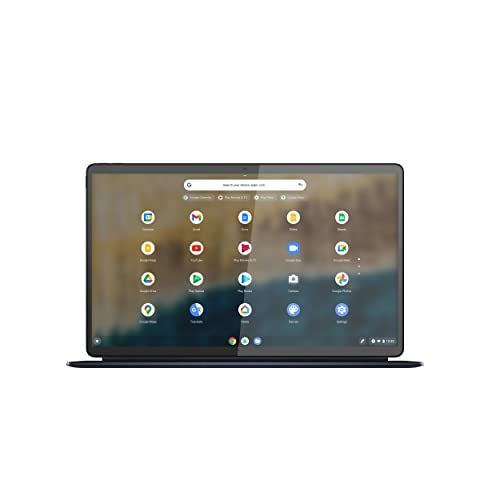
Lenovo IdeaPad Duet 5 Chromebook — Best Chromebook Detachable Screen
The IdeaPad Duet 5 Chromebook is the machine that proves a detachable does not have to be expensive to be delightful, and its argument is a screen. The listing specifies a 13.3-inch OLED FHD touch display — an OLED panel, with its perfect blacks and vivid colour, on a Chromebook built around a Snapdragon SC7180 processor, 4GB of RAM and 64GB of storage. Films look genuinely cinematic on it, ebooks and articles are easy on the eyes, and the 13.3-inch size is large enough to work on without the squinting that smaller Duets invite.
Set expectations by the silicon, and this machine will never disappoint you. The SC7180 and 4GB of memory are built for ChromeOS’s natural diet: browser tabs in reasonable numbers, Google Workspace documents, streamed media, Android apps and light photo fiddling. They are not built for dozens of heavy tabs plus a video call plus a spreadsheet marathon, and they make no pretence otherwise. ChromeOS itself is the other half of the appeal — instant updates, minimal maintenance, fast wake, and an operating system a non-technical owner can run for years without a single evening lost to housekeeping.
The Duet line’s traditional generosity is worth checking on this listing: Lenovo has commonly sold Duets with the keyboard in the box, which transforms the value calculation against the Surface machines above, where the keyboard is a separate line item. Verify the box contents on the listing before ordering, because bundles change. If the keyboard is included as expected, the Duet 5 becomes the simplest recommendation in this guide for a student, a family second computer or a media-first traveller: one purchase, complete machine, beautiful screen.
- Display: 13.3-inch OLED FHD touchscreen
- Processor: Qualcomm Snapdragon SC7180
- Memory and storage: 4GB RAM, 64GB storage
- Format: ChromeOS detachable; check listing for keyboard inclusion
Strengths
- OLED display quality that shames screens on far more expensive machines.
- ChromeOS simplicity: fast, secure and nearly maintenance-free for years.
- Generous 13.3-inch canvas for reading, media and light documents.
Trade-offs
- 4GB of RAM caps heavy multitasking; this is a focused, few-tabs-at-a-time machine.
- 64GB of storage assumes a cloud-centred life, which ChromeOS makes easy but not optional.
- No path to full Windows desktop applications — web and Android apps only.
Best for: media lovers, students and families wanting a beautiful, simple detachable. Not suited for: power users who multitask across demanding applications all day.

Lenovo Chromebook Duet (2025) — Best Compact All-Rounder
The 2025 Chromebook Duet shrinks the formula to 10.95 inches and updates the internals: a WUXGA IPS touch display, a MediaTek Kompanio 838 processor, 4GB of memory and 64GB of storage, running ChromeOS. WUXGA resolution on a screen this size is a quietly excellent specification — text stays sharp at reading distance, web pages render with desktop-like clarity, and the whole device remains small enough to hold one-handed like a paperback. This is the detachable as a true companion: the machine that lives in a tote bag, comes out on trains, and handles the day’s reading, mail and documents without ceremony.
The Kompanio 838 is a modern efficiency chip, and its partnership with ChromeOS defines the experience: quick wake, cool and silent running, and the kind of battery-friendly behaviour that makes a small device feel dependable rather than fragile. The 4GB of memory sets the same ceiling as the Duet 5 — this is a machine for a handful of tabs and one task in focus — but the smaller Duet leans into that identity rather than apologising for it. Nobody buys a 10.95-inch detachable to run a command centre; they buy it because everything they actually do fits, and everything that fits feels effortless.
As a student’s machine it makes a strong case: ChromeOS is the operating system schools already manage, the detachable form survives backpack life, and the tablet mode suits the reading-heavy reality of coursework. For adults it is the archetypal second computer — the one for the kitchen counter, the sofa and the carry-on — provided its owner confirms the keyboard arrangement on the listing, since Duet bundles have varied. Check what is in the box, and if a pen is on your wishlist, confirm compatibility there too rather than assuming.
- Display: 10.95-inch WUXGA IPS touchscreen
- Processor: MediaTek Kompanio 838
- Memory and storage: 4GB RAM, 64GB storage
- Format: compact ChromeOS detachable; verify keyboard inclusion on the listing
Strengths
- Sharp WUXGA resolution in the most portable body in this guide.
- Modern Kompanio silicon keeps ChromeOS feeling quick and cool.
- Natural fit for students and as a household second machine.
Trade-offs
- The 10.95-inch screen crowds split-screen work and long typing sessions.
- 4GB of RAM and 64GB of storage set firm limits on ambition.
- Accessory inclusion varies by listing, so the box contents need a deliberate check.
Best for: travellers, students and second-computer buyers who prize size and simplicity. Not suited for: anyone wanting a single machine for full-time desk work.

Lenovo Duet 11 Chromebook — Best Value with Keyboard Included
The Duet 11 Chromebook makes the most complete out-of-the-box proposition in this guide: an 11-inch 2K LCD touchscreen, a MediaTek Kompanio 838 processor, 4GB of RAM, 128GB of eMMC storage — and, stated right in the listing title, a keyboard included. That last phrase is doing heavy lifting. Every Windows detachable above asks you to fund the typing half separately; this Lenovo arrives as a whole computer in one box, which is why it anchors the value end of the guide despite sharing its processor with the smaller 2025 Duet.
The 128GB of storage also deserves emphasis, because it doubles what the other Duets offer and changes how the machine feels month after month. ChromeOS is cloud-centred, but offline media for a flight, a healthy set of Android apps and a downloads folder you do not have to groom weekly all draw on local space, and 128GB absorbs that without complaint. The 2K resolution on an 11-inch panel keeps text crisp, and the Luna Gray finish gives the little machine a grown-up look that suits a work bag as well as a school one.
Temperament-wise, the Duet 11 is the pragmatic choice: not the sharpest screen here (that is the Duet 5’s OLED), not the smallest body (that is the 2025 Duet), but the most complete package for a buyer who wants to order once and start working. Its ceiling is the family’s ceiling — 4GB of RAM means focused work, not sprawling multitasking — yet within that ceiling it asks the fewest follow-up purchases of any pick in this guide. For a first detachable, or a household machine bought with a firm total budget, that completeness is the feature.
- Display: 11-inch 2K LCD touchscreen
- Processor: MediaTek Kompanio 838
- Memory and storage: 4GB RAM, 128GB eMMC
- Format: ChromeOS detachable sold with keyboard included per listing title
Strengths
- Keyboard in the box removes the category’s classic hidden cost entirely.
- 128GB of storage is double its Duet siblings and eases daily life noticeably.
- Crisp 2K panel at a size that balances portability and working room.
Trade-offs
- LCD panel cannot match the Duet 5’s OLED for contrast and film nights.
- 4GB of RAM still caps the machine at focused, light multitasking.
- eMMC storage is slower than the SSDs in the Windows picks above.
Best for: first-time detachable buyers who want one complete purchase at a value price. Not suited for: display connoisseurs or anyone needing Windows applications.
How Do the Best Detachable Laptops Compare Side by Side?
| Model | Display | Processor | RAM / Storage | Keyboard situation |
|---|---|---|---|---|
| Surface Pro (2026) 512GB | 13″ touch | Snapdragon X2 Plus | 16GB / 512GB | Typically sold separately |
| Surface Pro (2026) 256GB | 13″ touch | Snapdragon X2 Plus | 16GB / 256GB | Typically sold separately |
| ASUS ProArt PZ13 | 13.3″ 2.8K AMOLED touch | Snapdragon X Plus | 16GB / 1TB | Verify on listing |
| Lenovo IdeaPad Duet 5 | 13.3″ OLED FHD touch | Snapdragon SC7180 | 4GB / 64GB | Check listing; often bundled |
| Lenovo Chromebook Duet (2025) | 10.95″ WUXGA IPS touch | MediaTek Kompanio 838 | 4GB / 64GB | Verify on listing |
| Lenovo Duet 11 | 11″ 2K LCD touch | MediaTek Kompanio 838 | 4GB / 128GB eMMC | Included per listing title |
Read the table as two leagues rather than one ranking. The Windows trio compete on how much computer you can carry: all carry 16GB of RAM, and they separate on display ambition and storage, from the PZ13’s AMOLED and terabyte down to the 256GB Surface. The Chromebook trio compete on how little friction a computer can have: identical modest memory across all three, separated by screen quality, screen size and whether the keyboard is in the box. Choosing a league first — real Windows work or ChromeOS simplicity — makes the choice inside it almost self-evident.
What Should You Check Before Buying a Detachable?
Start with the box. Open the listing, find the contents list, and write down whether the keyboard and pen are included; if they are not, price them before you compare machines, because a detachable compared without its keyboard is a fiction. Next, check your software against the processor. Snapdragon Windows machines run the mainstream catalogue beautifully, but a single essential legacy application can veto the whole platform, and the time to discover that is before purchase, not after. Chromebook buyers should perform the mirror-image check: list the tasks you do weekly and confirm each one has a web or Android answer.
Then think physically. Where will you type? A detachable on a desk or a kitchen table is a joy; on your knees in a departure lounge it is a skill. If your life is mostly desks, proceed happily. If your life is mostly laps, trains and sofas, consider whether a convertible’s rigid hinge would serve you better, or budget for a lap desk and honest expectations. Finally, look at storage as a five-year decision: none of these machines invites internal upgrades, so the drive you buy is the drive you keep, and the 256GB-versus-512GB question deserves the sober thought the reviews above gave it.
How Do You Get Real Work Done on a Tablet-First Machine?
Owners who love their detachables tend to build small rituals around the format’s strengths. The kickstand makes a superb second screen beside a desktop monitor, propped at reading angle for reference material or chat while the main display holds the work. Tablet mode with a pen turns PDF review into something closer to paper: sign, annotate, mark up and send, without printing anything. And the detached screen on a stand at eye level, paired with the keyboard below, gives a posture that many laptop owners only achieve with a pile of books.
There are honest workarounds for the format’s weaknesses, too. A compact USB-C hub turns any of the Windows picks into a desk machine driving a monitor, keyboard and mouse, which is how many Surface owners run their home offices. Cloud storage settings deserve ten minutes of attention on day one: choose which folders live locally and which stream on demand, and a modest drive stops feeling modest. For Chromebook owners, installing the Android apps you actually use — rather than the whole phone’s worth — keeps a 4GB machine feeling brisk for years.
What Are the Most Common Mistakes When Buying a Detachable Laptop?
The champion mistake is budgeting for the tablet alone. Buyers compare a bare Surface Pro against a complete clamshell laptop, congratulate themselves on the saving, and then pay it back — with interest in the form of irritation — on a keyboard and pen they never planned for. The second mistake is assuming a detachable types like a laptop everywhere: the kickstand’s footprint surprises people on small tables and soft surfaces, and the discovery is much cheaper in a review than in a return window.
Third, buyers skip the software check. Windows on ARM and ChromeOS are both excellent platforms and both have edges; a detachable bought for one incompatible essential application is an expensive lesson in reading specification pages. Fourth, storage optimism: choosing the smallest drive because the cloud exists, then discovering that your working life generates local files faster than your housekeeping removes them. And fifth, forgetting that the pen is a separate ecosystem — if handwriting or drawing matters to you, confirm the exact pen model a machine supports before the machine arrives, not after.
How Much Does the Keyboard-and-Pen Ecosystem Really Matter?
It matters more than any single specification in this guide, because the accessory ecosystem is where a detachable’s daily character is decided. A keyboard cover is not a generic slab of keys: its key travel, its trackpad size and its rigidity determine whether eight hours of typing feels like work on a real laptop or work on a compromise. The Surface line’s long history means its keyboard covers have been refined across many generations, and it also means a second-hand and third-party market exists around them. The Duet keyboards, by contrast, are simpler affairs designed around ChromeOS’s lighter demands — perfectly serviceable for documents and mail, less convincing for a novelist’s daily word count.
Pens divide the field even more sharply. On the Windows machines, an active pen turns the tablet into a genuine annotation and sketching surface: marking up contracts, diagramming in meetings, taking handwritten notes that the operating system can search. On the Chromebooks, pen support varies by model and the pen itself is usually another separate purchase, so a buyer dreaming of handwritten study notes must verify stylus compatibility model by model rather than assuming the category provides it. The honest summary is that every detachable in this guide can be a typing machine with the right keyboard, but only some of them can be a writing machine, and the difference lives entirely in accessories that the headline listing may not include.
There is a budgeting rhythm worth adopting: price the tablet, then price the keyboard, then price the pen, then price a simple USB-C hub for desk work, and only then compare totals against a conventional laptop. Buyers who run that arithmetic calmly often find the detachable still wins on versatility — four devices’ worth of roles in one bag slot. Buyers who skip the arithmetic are the ones writing angry reviews about a keyboard that was never promised to them. The machines are honest; the listings require reading.
Which Detachable Suits Which Kind of Working Day?
Consider the consultant’s day: trains, client offices, presentation screens, documents reviewed in transit. That day belongs to the Surface Pro, because Windows runs the corporate catalogue, the kickstand turns any borrowed desk into a workstation, and the tablet mode makes reviewing a deck in a taxi effortless. The 512GB configuration suits consultants whose client files live locally under confidentiality rules; the 256GB configuration suits those whose firms keep everything in managed cloud storage. Either way, the machine’s value is measured in rooms it can work in, and it works in all of them.
Consider the photographer’s field day: shooting on location, reviewing images with a client over coffee, culling a card in the evening. That day belongs to the ProArt PZ13, because its AMOLED screen shows the work as it deserves to be seen and its terabyte swallows a trip’s worth of files without an external drive dangling from the port. The detachable form matters here in a specific way — a tablet is simply a better object to pass across a table than a laptop, and passing work across tables is half of a photographer’s client life.
Consider the student’s term: lectures, library sessions, essays, streamed everything. That term belongs to the Duets, and the choice among them is a personality test. The Duet 5’s OLED rewards the student whose laptop doubles as the dorm television. The 2025 Duet rewards the one who carries the machine everywhere and reads constantly. The Duet 11 rewards the one who wants to spend once and think about the purchase never again. None of them will run engineering software or a development stack, and pretending otherwise helps nobody — but for the essay-and-reading reality of most degrees, they are not the cheap option. They are the right-sized one.
Finally, consider the household’s shared machine: homework at the kitchen table, recipes propped on the counter, video calls with grandparents, a parent’s evening browsing. A Duet again, most likely the 11 for its complete box — because shared machines die by friction, and a computer that needs no maintenance, no antivirus rituals and no accessory hunt is a computer the whole household actually uses. The detachable form even helps here: a propped tablet showing a recipe, hands-free, is the kitchen device dedicated tablets used to be.
How Long Will a Detachable Stay Useful Before It Feels Old?
Longevity in this category is decided by three clocks, and only one of them is the processor. The first clock is software support: ChromeOS devices receive updates on a published schedule that stretches many years from a model’s launch, and the Duets here are recent enough to sit comfortably inside that window, while Windows machines are supported as long as Microsoft supports the platform — effectively the machine’s whole working life. The second clock is the battery, sealed inside every tablet in this guide. Batteries age by charge cycles, and the efficient processors throughout this shortlist are a genuine longevity feature, because a machine that sips power completes fewer cycles per year of work and therefore keeps its untethered usefulness longer.
The third clock is the one buyers forget: physical wear concentrates in the keyboard. Hinges do not exist here, screens are protected by the cover when closed, and the tablet half leads a sheltered life — but keys shine, trackpads wear and fabric finishes scuff. On a clamshell, that wear is damage to the computer. On a detachable, it is a worn accessory, replaceable in minutes. Owners who keep a Surface or a Duet for five or six years commonly refresh the keyboard once along the way and report that the machine feels new again, which is a trick no conventional laptop can perform.
Memory is the fixed quantity to judge hardest at purchase, because it never grows. The Windows picks’ 16GB is the comfortable present and a reasonable future for office and creative work. The Chromebooks’ 4GB is honest for ChromeOS today and will remain honest for the light duties those machines are bought for — but nobody should buy a 4GB machine hoping to grow into heavier work. Buy the memory your next three years need, accept the battery as a slow countdown that gentle chips delay, and a detachable will serve longer than its size suggests.
What Does a Sensible First Week with a New Detachable Look Like?
Day one is for the unglamorous essentials: run every system update before installing anything, set up cloud sync deliberately rather than by default, and — on the Windows machines — install your critical applications and open real files in them, so any ARM compatibility question surfaces while the return window is wide open. Chromebook owners should spend the same hour adding the handful of Android apps they genuinely use and pinning the web apps that structure their day. This is also the moment to check the box contents against the listing one final time, while any discrepancy is still easy to resolve.
The rest of the first week is about learning the format’s physical grammar. Find the kickstand angles that suit your desk and your lap. Learn where the machine balances on your usual tables, and whether a small lap desk earns its place in your bag. If you bought a pen, spend twenty minutes setting its buttons and palm rejection to your taste rather than living with defaults. Owners who invest that first week report that the detachable stops feeling like an experiment around day five; owners who skip it sometimes never quite bond with a machine that was only ever asking for a fair introduction.
How Do Detachables Handle Travel, Security and Shared Spaces?
Travel is where this format quietly outclasses everything else in a bag. A detachable goes through airport security as a tablet, works in an economy seat where a 15-inch clamshell cannot open, and presents from a kickstand on a hotel desk without a single cable. The Chromebook picks add a travel virtue of their own: a machine that holds almost nothing locally, signs in with a Google account and can be powerwashed back to factory freshness in minutes is the machine you least fear losing. The Windows picks answer with biometric sign-in and full disk encryption as platform defaults, so a stolen Surface is a hardware loss rather than a data breach — provided the owner actually enabled the sign-in options during setup, which is a five-minute task too many people postpone forever.
Shared spaces raise a different question: how does a detachable behave when it is not yours alone? In a meeting, the detached screen passed hand to hand is a better collaboration object than any laptop, because it carries no keyboard to guard and no hinge to snap. In a classroom, the Duets’ ChromeOS management means a school can administer a fleet as easily as a single unit. At home, the kickstand turns any of these machines into a small shared display for a recipe, a video call or a child’s homework help. The format’s supposed fragility — all that separating and standing — turns out, in practice, to be a kind of social flexibility that rigid laptops simply do not offer, and for many owners it becomes the reason the next machine they buy is a detachable too.
One practical travel note closes the subject: carry the keyboard even on days you expect only to read. Plans change mid-journey with metronomic reliability, the email that needs a real reply always arrives in the departure lounge, and the keyboard weighs little enough that leaving it behind saves almost nothing. Experienced detachable owners treat the two halves as one object that occasionally separates, not as two objects that occasionally meet.
What About Docks, Monitors and the Desk You Already Own?
A detachable does not ask you to abandon your desk; it asks for one hub. Every Windows pick here can drive an external monitor, a full-size keyboard and a mouse through a single USB-C connection, which means the home office you built around a laptop keeps working unchanged — you simply gain a tablet when you unplug. This is the ownership pattern that converts sceptics: desk workers who dock in the morning, carry a slate to meetings, and dock again in the afternoon stop describing the machine as a tablet with a keyboard and start describing it as the only computer they need. Chromebook owners can dock too, within ChromeOS’s simpler multi-display habits, though the Duets are more often carried than docked, and their modest processors are happiest driving their own screens.
Choose the hub with the same honesty as the machine: count your monitor’s input, your wired peripherals and your charging needs before ordering, and prefer a hub that passes enough power to charge the tablet while it works. A detachable that returns from every meeting to a single cable and a full battery is a detachable that never gives its owner a reason to miss a clamshell.
Should You Wait for the Next Generation Instead of Buying Now?
Detachables improve on a steadier cadence than gaming laptops, and the honest answer is that the current machines in this guide sit at a comfortable point in their platforms’ lives: the Snapdragon Windows generation has had time for its software catalogue to mature, and the Duet Chromebooks are recent designs rather than clearance stock. Waiting buys you the next chip’s efficiency gains, which are real but incremental, and costs you every month of work the machine would have done meanwhile. The sensible trigger for waiting is a specific announced feature you genuinely need — a display technology, a port, a pen system — not the general suspicion that something better is coming. Something better is always coming; the detachable you buy today, chosen in the right league with its keyboard honestly budgeted, will still be doing its job when it arrives.
Final Recommendation
If a detachable will be your main computer, buy the 512GB Surface Pro (2026) and budget its keyboard and pen in the same breath; it is the most complete expression of the format, with the headroom to stay that way for years. Cloud-first buyers can take the 256GB configuration with a clear conscience and a little file discipline. Creators should look hard at the ProArt PZ13, whose AMOLED screen and terabyte of storage answer needs the Surfaces do not target. And if your computing is honestly web-shaped — documents, mail, media, study — the Duet family delivers the detachable experience with the least money and the least maintenance, with the Duet 11 the most complete single purchase of the three. Choose the league first, the machine second, and count the keyboard in the price from the very first minute, and a detachable will reward you every time the keyboard comes off and the screen keeps working.
Frequently Asked Questions
Is a detachable laptop as powerful as a regular laptop?
The Windows picks here carry modern Snapdragon processors and 16GB of RAM, which handle everyday professional work — documents, browsers, calls, photo editing — at full speed. The differences appear at the edges: sustained heavy workloads like long video renders favour larger laptops with bigger cooling systems, and some specialist Windows software still needs checking on ARM. The Chromebook picks are deliberately light-duty machines for web-centred work.
Do detachable laptops come with the keyboard included?
It depends on the brand, and the difference is one of this category’s defining traps. Lenovo’s Duet 11 states its keyboard is included in the listing title, and Duets have commonly bundled keyboards, while Surface Pro keyboards and pens are typically separate purchases. Always read the box-contents section of the specific listing you are ordering from, because bundles vary.
Can a detachable replace my desktop as well?
For many people, yes, with a USB-C hub or dock: connect a monitor, keyboard and mouse at your desk, and detach to a tablet when you leave it. The Windows picks here have the memory and storage for that dual life, and the arrangement has a side benefit owners rarely anticipate — the detached tablet becomes a genuinely useful second screen for notes and reference material even while it is docked and charging. Gamers, heavy video editors and users of specialised desktop hardware are the exceptions who should keep a conventional machine.
Are Snapdragon Windows laptops compatible with my programs?
Most mainstream applications now run natively on Windows for ARM or work through built-in emulation, including the major browsers, office suites and creative tools. The risk concentrates in older specialist software, some printer and device drivers, and certain VPN or security tools. Check the support pages of any program you cannot live without before buying.
Which detachable is best for students?
The Lenovo Duet family is the natural student answer: ChromeOS matches what most schools already use, the machines are simple to maintain, and the Duet 11’s included keyboard and 128GB of storage make it a complete purchase. Students in programs requiring specific Windows software should instead look at the 256GB Surface Pro configuration.
How long do detachable laptop batteries realistically last?
Expect a genuine working day of mixed light use from the efficient Snapdragon and MediaTek machines here, with the usual caveats: screen brightness, video calls and heavy multitasking shorten any laptop’s day, while reading and document work extend it. Manufacturer figures are measured under gentle laboratory conditions, so treat them as ceilings rather than promises. A sensible habit extends real-world endurance further than any setting: let the machine’s own battery reporting teach you your personal pattern during the first fortnight, because a detachable used mostly for reading and annotation can outlast its owner’s working day by hours, while the same machine running back-to-back video calls will want its charger by late afternoon.
Related Guides
Detachables are one branch of the two-in-one family tree. If the folding form suits your typing life better, read about the best 2 and 1 laptops for the hinge-based alternatives, and if pen work is the heart of your purchase, our guide to the best laptops for drawing goes deeper on stylus machines. Buyers comparing screen sizes across the whole laptop market should also see the best 13 inch laptops, where the clamshell rivals of these detachables make their case.


