What's inside
- Key Takeaways
- Quick Picks
- Why Did 43-Inch Televisions Abandon 1080p?
- When Does Native 1080p Still Matter More Than a 4K Panel?
- The Six, Sorted by What They Actually Are
- What Should Signage and CCTV Buyers Do Now That 43-Inch HD Is Gone?
- Which Errors Follow Shoppers Home From This Search?
- How Does Upscaling Actually Work, and When Can You See It Working?
- Designing a Signage Setup Around the Sizes That Still Exist
- What Does a CCTV Grid Look Like on Each Kind of Panel?
- Legacy Consoles, Old Players and Other 1080p-Era Sources
- Hotels, Rentals and Waiting Rooms: The Quiet Majority of Small Televisions
- What Should You Do With the 43-Inch HD Set You Already Own?
- How to Measure Whether Your Room Wants 40 Native or 43 Upscaled
- What About Sound, Subtitles and Accessibility at These Sizes?
- A Buyer’s Walkthrough: Four Households, Four Different Answers
- What Will This Class Look Like in a Few Years?
- How to Check a Listing Before You Trust Its Resolution Claim
- Setting Up Either Kind of Set for Its Best First Evening
- Power, Heat and Duty: Running a Small Set All Day
- What a Week With Each Kind of Set Feels Like
- Final Recommendation
- Frequently Asked Questions
- Related Guides
As an Amazon Associate I earn from qualifying purchases. This post may contain affiliate links at no extra cost to you.
gizmoverdict.com is reader-supported. When you buy through links on our site, we may earn an affiliate commission.
Anyone shopping for the best 43 1080p tvs deserves the catalogue’s current truth before the recommendations begin: at 43 inches, 1080p has effectively left the building. Walk the current ranges of Samsung, LG, Sony, TCL and Hisense and the 43-inch shelf is a 4K shelf, row after row, because panel production consolidated around 4K at this size years ago. Genuine Full HD televisions survive one shelf down, at 40 and 32 inches, where a handful of honest models remain. A guide that lists six “43-inch 1080p” televisions as though nothing had changed is describing a market that no longer exists, usually by quietly relabelling 4K sets or resurrecting discontinued stock.
So this page is arranged around the real choice. Two picks are true 1080p televisions at 40 inches, labelled 40 inches everywhere, for buyers whose requirement is genuinely Full HD — a signage feed, a CCTV monitor, a legacy source, a hard size limit. Four picks are current 43-inch televisions, each labelled 4K in its heading and described as 4K in its text, because for most readers the practical answer to “a television around 43 inches” today is one of these, and a 4K set displays a 1080p source perfectly well. One exclusion deserves naming: a TCL 43-inch model sold as renewed stock surfaces in searches for this class, and we have left it out deliberately, because a refurbished listing is not a current product and does not belong in a guide to what you can buy new with a warranty.
Key Takeaways
- New 43-inch televisions are 4K now; native 1080p at exactly 43 inches has essentially disappeared from current ranges.
- True Full HD survives at 40 inches, where Samsung and Hisense still sell honest 1080p sets.
- A 4K television shows 1080p sources natively well — the resolution you feed it matters more than the panel’s ceiling.
- Signage, CCTV and kiosk buyers who need pure 1080p behaviour should shop the 32 to 40-inch class deliberately.
- Renewed and refurbished listings are excluded here; every pick is a current model with a normal warranty.
- For general viewing at 43 inches, the 4K picks are the sensible purchase even if your sources are all HD.
Quick Picks
| Pick | Badge | Why it is here |
|---|---|---|
| Samsung 40 F6000 | True 1080p, 40 inches | A current Full HD set from a major maker, for buyers who mean 1080p literally. |
| Hisense 40 A4 | True 1080p, Roku inside | Full HD with the simplest interface in the class and a friendly ownership story. |
| Sony 43 Bravia 3 | 43 inches, 4K — not 1080p | The processing-led 43-inch option for viewers stepping up from an old HD set. |
| TCL 43 Q6 | 43 inches, 4K — not 1080p | QLED colour and Google TV at the value end of the current 43-inch shelf. |
| LG 43 UT75 | 43 inches, 4K — not 1080p | webOS familiarity in a straightforward LED set for mixed rooms. |
| Samsung 43 U8000 | 43 inches, 4K — not 1080p | Samsung’s Crystal UHD line at 43 inches for Tizen households. |
Why Did 43-Inch Televisions Abandon 1080p?
The economics of glass decided it. Panel factories cut large mother sheets into television sizes, and the global industry standardised its 43-inch output on 4K resolution as volumes grew; a separate 1080p production run at the same size became a niche the factories no longer wanted to serve. Television makers followed the supply. At the same time, the price gap between a 1080p and a 4K panel at this size shrank until keeping the lower resolution saved almost nothing, while costing a marketing line every rival could print. The result is the shelf you see today: 1080p retreated to the sizes where it still saves real money — 40 inches and below, plus specialist and portable sets — and 43 inches became the ground floor of 4K.
There is a viewing argument that softened the transition. At 43 inches and ordinary distances, most people cannot distinguish a well-upscaled HD picture from a native one on the same 4K panel, and broadcast television — the most common 1080p-era source — often looks cleaner through a modern 4K set’s processing than it did on the native HD sets it replaced. The people genuinely inconvenienced by the change are not film watchers but system builders: signage operators whose players output 1080p to a fixed layout, CCTV installers whose recorders present a grid composed for Full HD, and anyone whose wall, mount or enclosure was specified around a 43-inch HD panel that has now failed. This guide keeps those readers in view; they are the reason the two true-HD picks lead it.
When Does Native 1080p Still Matter More Than a 4K Panel?
It matters when a system, not a person, is doing the watching. A digital signage player designed for a 1920×1080 canvas will render its layout pixel-perfect on a native panel and slightly softened through a 4K set’s scaling, however good that scaling is. A CCTV recorder’s multi-camera grid is composed for Full HD; on a 4K television the grid is upscaled, legible but not exact. A legacy console or an industrial source that outputs only 1080p and behaves oddly with 4K handshake modes is another case. In each, the requirement is fidelity to a fixed signal, and the native panel wins by definition.
It also matters at the tape measure. The surviving Full HD sets are 40-inch models, and some enclosures, caravans and cabinets accept 40 and refuse 43 outright. And it matters for simplicity in commercial settings: a native HD television paired with an HD source removes a layer of scaling settings from a system that a rotating staff must operate. For everyone else — which is most people reading a buying guide — the honest advice runs the other way: buy the 43-inch 4K set, feed it whatever you have, and let its processor do the job it was built for.

Samsung 40 F6000 — true Full HD at 40 inches, from Samsung’s current range
Lead with the genuine article: a current Samsung television whose panel is natively 1920×1080, in a 40-inch size that fits the enclosures and rooms the 43-inch class has grown out of. The F6000 runs Tizen with Samsung’s free channel service and gaming hub, so a signage-adjacent spare room or a bedroom gets the full modern platform on an HD panel. Its picture is clean and vivid in the Samsung manner, calming down in a movie preset, and its upscaling duties are light because most sources match its panel directly — broadcast HD arrives at home here, with no translation layer between the signal and the screen.
For the system uses this guide keeps mentioning, the F6000’s virtues are practical: predictable behaviour with HD sources, an established service network if a commercial installation needs support, and a brand whose parts and remotes remain findable for years. Its speakers are thin, as small Samsungs tend to be, and its app store is narrower than Google’s, but neither flaw touches the jobs this set is bought for. Labelled at its true size and resolution everywhere on this page, it is the first television a strict-1080p buyer should examine.
- Size and resolution: 40 inches (labelled), native Full HD 1920×1080 LED
- Platform: Samsung Tizen with free channels and gaming hub
- Useful extras: SmartThings control, clean handling of HD broadcast sources
- Connections: HDMI including eARC, a USB socket, optical audio and Bluetooth pairing
Strengths
- Genuine native 1080p from a current, supported range
- Major-brand service network behind a small set
- Modern platform features despite the HD panel
Trade-offs
- Three inches smaller than the searched size
- Thin speakers; a small bar helps in larger rooms
- No 4K headroom if your sources upgrade later
Best for: strict Full HD requirements, Samsung households, supported commercial installs.
Not suited for: viewers who actually want 43 inches and 4K and arrived by an old search phrase.
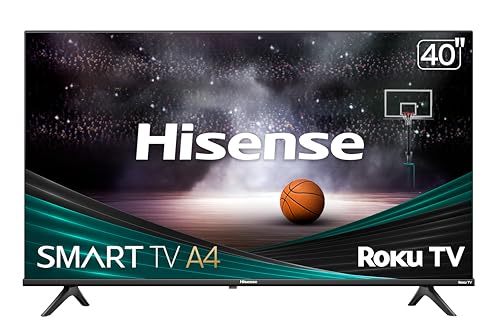
Hisense 40 A4 — true Full HD at 40 inches, with Roku’s calm
The second genuine HD set takes the opposite software path: Hisense’s A4 pairs a native Full HD 40-inch panel with Roku, which makes it the easiest true-1080p television on this page to hand to a guest, a grandparent or a rotating cast of staff. The grid interface does not move, search stays neutral, and the set does the bedroom and kitchen jobs — antenna news, a streamed series, a radio app in the morning — without a single menu expedition. Hisense builds this class in volume, and the A4’s ownership story reflects it: straightforward setup, sensible remote, no surprises.
Picture quality is honest Full HD LED: adequate brightness for ordinary rooms, colours that behave, and none of the processing heroics the 4K picks below will describe. That is the correct allocation of effort for the set’s purpose. Where the Samsung F6000 argues brand infrastructure, the A4 argues interface mercy, and for a spare room or a holiday let the argument is strong. It is 40 inches, it is 1080p, it is current — the three facts this search actually needs, in a market that has made them oddly rare together.
- Size and resolution: 40 inches (labelled), native Full HD 1920×1080 LED
- Platform: Roku’s grid interface, voice remote included, app control on top
- Useful extras: private listening through the Roku app, AirPlay support
- Connections: HDMI with eARC, USB, optical audio out
Strengths
- The simplest operation of any true-HD set here
- Neutral search and a grid that never rearranges itself
- Current model with a normal warranty, not renewed stock
Trade-offs
- Picture ambition is modest, matched to its class
- Smaller than the 43 inches in the search phrase
- Brightness suits ordinary rooms rather than sunlit ones
Best for: guest rooms, rentals, kitchens and anyone who values Roku’s calm at true HD.
Not suited for: film enthusiasts, whose needs point at the 4K bench below.

Sony 43 Bravia 3 — 43 inches and 4K, stated plainly
From here down, every pick is a 43-inch 4K television, and this heading says so because the guide’s promise is that no reader will mistake one for a 1080p set. The Bravia 3 earns its place as the processing-led option: feed it the HD broadcasts and streams that a 1080p shopper actually owns, and Sony’s upscaling presents them with a cleanliness that frequently surprises owners of the native HD sets it replaces. Colour restraint, composed motion and respect for film grading are the Sony signatures, and they survive the resolution change intact.
Google TV supplies profiles, casting and the app depth, and the set pairs gracefully with a PlayStation. For the general viewer whose “43-inch 1080p” search really meant “a good television around this size for my HD-era sources,” this is arguably the most satisfying answer on the page — the sources stay the same, the picture improves, and the 4K headroom waits quietly for the day a 4K service or console arrives. What it is not is a 1080p television, and a signage builder with a fixed HD canvas should pass it by for the two sets above.
- Size and resolution: 43 inches, 4K — not 1080p, labelled in every mention
- Platform: Google TV, casting built in from Android phones
- Useful extras: Sony’s upscaling of HD sources, PlayStation-friendly behaviour
- Connections: eARC-capable HDMI, USB, an optical output and Bluetooth
Strengths
- Makes HD sources look their best through processing
- Accurate colour and composed motion for sport and film
- 4K headroom for future sources at no daily cost
Trade-offs
- Not a native 1080p panel; fixed-canvas systems should look above
- Google TV’s promoted rows will not please minimalists
- Speaker bass is modest without a bar
Best for: general viewers upgrading from an old 43-inch HD set.
Not suited for: signage or CCTV systems composed for a native Full HD canvas.

TCL 43 Q6 — 43 inches and 4K, with QLED colour for value hunters
TCL’s Q6 is the value engine of the 43-inch 4K shelf: a quantum-dot colour layer, Google TV, and a price posture that has made it the default first 4K set in many small flats. Fed with HD material, it upscales competently; fed with the 4K streams every major service now offers, it shows why the market moved — colour volume and fine detail that no new 1080p set at any size can be bought to match, because the category no longer builds them. Chromecast built in keeps Android households casting without extra hardware.
Its compromises are processing polish on weak broadcasts and brightness aimed at ordinary rooms. Neither matters much to the streaming-first households it serves. It appears here, labelled 4K in its heading and throughout, as the practical answer for a reader whose search was written in the vocabulary of five years ago but whose viewing — apps, streams, a console — is entirely current.
- Size and resolution: 43 inches, 4K QLED — not 1080p
- Platform: Google TV with a voice remote and casting from Android
- Useful extras: household profiles, strong colour on streamed films
- Connections: HDMI (eARC among them), USB, optical audio and Bluetooth
Strengths
- Colour and detail beyond anything the old HD class offered
- Google TV’s app depth at a value position
- Handles the HD-to-4K mixed diet of real households smoothly
Trade-offs
- Not native 1080p; fixed-canvas builders should choose the 40-inch pair
- Weak broadcast sources reveal its processing tier
- Brightness is for ordinary rooms, not glass-walled ones
Best for: streaming-first small flats and first-time 4K buyers at 43 inches.
Not suited for: pixel-perfect 1080p signage layouts.

LG 43 UT75 — 43 inches and 4K, webOS on a straight LED panel
LG’s UT75 is the familiar-interface option among the 4K four: webOS, the pointer-friendly remote philosophy, and a plain LED panel that asks nothing of its owner. Households with a larger LG will find every menu where they left it. The set’s picture is dependable mid-market 4K, its upscaling of HD sources is tidy, and its manner with guests and children is foolproof. It is the least dramatic television on this page and, for a rental property or a family room where the set must simply serve everyone, possibly the wisest.
Again, the label: 43 inches, 4K, not a 1080p set. A reader building a native-HD system should not be here; a reader replacing a worn 43-inch HD television with the current equivalent — which is what “equivalent” means now — should be. LG’s app ecosystem covers the major services, voice control is supported, and a console connects for casual play without fuss.
- Size and resolution: 43 inches, 4K LED — not 1080p
- Platform: LG webOS with major streaming apps
- Useful extras: interface consistency with larger LG sets, voice remote support
- Connections: eARC over HDMI, plus USB, an optical output and Bluetooth pairing
Strengths
- Familiar, tidy software for LG households
- Dependable all-round picture with clean HD upscaling
- No panel-care or content restrictions of any kind
Trade-offs
- Not a native Full HD panel, by design of the whole market
- Mid-market brightness and contrast
- Gaming features suit casual play only
Best for: LG households and mixed rooms replacing an old 43-inch HD set.
Not suited for: native-1080p system builders, who have two picks at the top of this page.

Samsung 43 U8000 — 43 inches and 4K, Crystal UHD for Tizen homes
Samsung’s U8000 closes the 4K bench with the combination Tizen households expect: the Crystal UHD panel line, Samsung’s colour-forward picture character, the free channel service and the gaming hub, in the current 43-inch form. For a viewer whose old 43-inch HD Samsung has finally faded, this is its direct descendant — same interface family, same remote logic, two resolution generations on. HD sources upscale tidily, streamed 4K looks properly vivid once a movie preset tames the default, and SmartThings folds the set into a Samsung phone household’s routines.
The labelling discipline holds to the last pick: this is a 4K television at 43 inches, recommended to viewers, not to fixed-canvas systems. Its sound benefits from a bar in larger rooms, and its app store is a touch narrower than Google TV’s. Within its brief — the mainstream Samsung at this size — it is complete, current and honestly described, which is more than the search phrase that led here could promise on its own.
- Size and resolution: 43 inches, 4K Crystal UHD — not 1080p
- Platform: Samsung Tizen with Gaming Hub and free channels
- Useful extras: SmartThings integration, vivid colour character
- Connections: HDMI including eARC, a USB socket, optical audio and Bluetooth pairing
Strengths
- The natural successor for owners of older Samsung HD sets
- Strong streamed-picture colour after a preset change
- Full modern platform with cloud gaming built in
Trade-offs
- 4K panel; not a native-HD solution
- Default picture mode oversaturates until adjusted
- Speakers are slim-set standard without a bar’s help
Best for: Samsung households replacing a 43-inch HD television with its modern heir.
Not suited for: installations built around a native 1920×1080 canvas.
The Six, Sorted by What They Actually Are
| Model | Size | Native resolution | Buy it if |
|---|---|---|---|
| Samsung F6000 | 40 inches | 1080p | You need true Full HD with brand support |
| Hisense A4 | 40 inches | 1080p | You need true Full HD with Roku simplicity |
| Sony Bravia 3 | 43 inches | 4K | You want HD sources upscaled beautifully |
| TCL Q6 | 43 inches | 4K | You want colour and value for streaming |
| LG UT75 | 43 inches | 4K | You want webOS familiarity |
| Samsung U8000 | 43 inches | 4K | You want the current Samsung at this size |
Two rows are the answer to the search as written. Four rows are the answer to the need underneath it. The table refuses to blur them, and so should any listing you buy from.
What Should Signage and CCTV Buyers Do Now That 43-Inch HD Is Gone?
Plan around the 40-inch class, or redesign the canvas. A 40-inch native HD set like the two linked at the top of this guide preserves an existing 1920×1080 layout exactly, and its slightly smaller image is rarely a problem at the distances signage and camera grids are read from. Where a failed 43-inch HD panel must be replaced inside a fixed enclosure, measure before ordering anything, because the enclosure — not the catalogue — now decides. Alternatively, treat the failure as the moment to move the system to 4K: modern signage players and recorders increasingly output it, camera counts per screen keep rising, and a 4K grid shows four HD camera feeds at full resolution in a way no HD panel can. The expensive option is pretending the old specification still exists and buying renewed stock of unknown history to sustain it; this guide excluded exactly such a listing on purpose.
Which Errors Follow Shoppers Home From This Search?
The first is trusting a headline that says 1080p above a specification table that says 3840×2160 — the two cannot both be true, and the table is the one that ships. The second is buying renewed or refurbished stock believing it is a current model, without noticing the word in the listing’s title. The third is assuming a 4K set will somehow degrade an HD source; in practice the upscaling in any of the four 4K picks equals or betters the native presentation for ordinary viewing. The fourth is the mirror error: assuming upscaling makes a 4K set suitable for a pixel-fixed signage canvas, where “nearly exact” and “exact” are different products. Know which side of that line your use sits on, and the rest of the purchase is ordinary.
How Does Upscaling Actually Work, and When Can You See It Working?
A 4K panel has four times as many pixels as the HD signal arriving at it, so for every pixel the source provides, the television must invent three more. Crude invention blurs; good invention studies edges, textures and motion and guesses in the direction the image was already heading. Modern processors do this with years of training on real footage, and the places it shows are the places HD was always weakest: diagonal lines that used to stair-step now run smooth, grass and crowd texture hold together instead of shimmering, and faces keep their modelling at distances where an old HD set turned them waxy. The places it cannot help are equally specific: a genuinely soft source stays soft, because there is no detail to recover, and a pixel-fixed graphic — the signage canvas again — gains nothing, because its perfection was positional rather than visual.
Distance governs how much of this you perceive. Beyond about six feet at 43 inches, a good upscaled HD picture and a native 4K picture of the same programme are effectively indistinguishable to most viewers, which is why the death of the 43-inch HD set caused so little mourning among viewers and so much among system builders. Sit at desk distance and the calculus changes: text from a computer reveals every scaling decision, and a native canvas — whether a 40-inch HD television or a proper monitor — earns its place back. The technology did not make resolution irrelevant; it made resolution irrelevant at sofa distance, which is where televisions live and where desks do not.
Designing a Signage Setup Around the Sizes That Still Exist
If you operate screens for a shop, a clinic waiting room, a gym or a takeaway counter, the new size map asks for one design adjustment and rewards it. Compose your canvas at 1920×1080 as before — every player and template you own already speaks it — and mount the 40-inch native sets where the old 43-inch HD screens hung. At the reading distances involved, three inches of diagonal costs nothing in legibility for prices, schedules and notices; what it buys is exact rendering and a current, warrantied product instead of a refurbished gamble. Check the set’s behaviour on power restoration before committing to a fleet: a commercial screen should return to its input and its content after an outage without a remote, and both true-HD picks here can be configured to behave predictably, though the setting lives in different menus on each.
Brightness and duty cycle are the other commercial variables. A window-facing menu board fights daylight all day, and neither domestic pick is a high-brightness commercial panel; place them away from direct sun or accept a commercial display’s different price class for that one position. For interior walls, domestic sets run all-day schedules happily provided ventilation is respected and the panel is not sealed into an unvented enclosure. Keep one spare remote per site, label it, and photograph the settings of the master installation; the second installation then takes minutes, and a replacement in three years — whatever size the market offers then — inherits a documented baseline instead of a mystery.
What Does a CCTV Grid Look Like on Each Kind of Panel?
Work the arithmetic of a common case. A sixteen-camera recorder outputs a 4×4 grid inside a 1920×1080 frame, so each camera occupies 480×270 pixels of the composed image. On a native HD panel, that composition is displayed exactly as the recorder built it: every camera feed downscaled once, by the recorder, and shown pixel for pixel. On a 4K panel, the recorder’s composed frame is upscaled whole, so each feed passes through two transformations and arrives slightly softened — still legible, still useful for awareness monitoring, but a step removed from exact. For identification-grade viewing, operators typically pull one camera to full screen, and there the 4K set with a modern recorder that can output a 4K single-feed view actually wins. The panel choice therefore follows the working pattern: grids watched all day favour native HD at 40 inches; single-feed investigation favours a 4K recorder and screen designed together.
Night behaviour matters in control rooms. A grid watched in a dim room benefits from a panel whose blacks stay controlled at low brightness, and from a remote whose backlight or simple layout can be operated without looking. Both 40-inch picks keep their interfaces simple enough for night staff, and the Hisense’s Roku grid in particular can be taught to a new operator in one shift. Whatever the panel, set the recorder’s output to match it deliberately rather than leaving an auto mode to renegotiate the handshake at every power cycle — most “the screen sometimes goes black” complaints in small control rooms are handshake negotiations, not failures.
Legacy Consoles, Old Players and Other 1080p-Era Sources
A generation of hardware speaks only HD: older consoles, Blu-ray players, cable boxes, the karaoke machine, the presentation laptop that refuses to die. All of it connects to every set in this guide and displays correctly, because HDMI’s negotiation handles the match. The differences are in polish. On the native sets, the signal maps directly and game mode latency is as low as these panels go. On the 4K sets, the processor upscales — beautifully for film-based content, with a small latency cost that game mode exists to remove. Owners of large legacy libraries sometimes ask whether they should hunt a native set to honour them; the answer is that a Blu-ray collection looks magnificent upscaled through the Sony, and the native sets earn their keep through systems and spaces, not through nostalgia.
One legacy trap deserves naming: some older devices output copy-protected or oddly timed signals that newer televisions handle strictly. If a beloved source shows a black screen on a new set, try another HDMI port, a shorter cable, and the set’s compatibility or legacy HDMI mode before concluding incompatibility. The reverse trap also exists — a new set’s enhanced HDMI mode can confuse an old source — and the same menu resolves it. These are five-minute fixes that feel like disasters at midnight, which is why they are written here rather than left to be discovered then.
Hotels, Rentals and Waiting Rooms: The Quiet Majority of Small Televisions
A large share of the televisions bought at this size never meet a film critic’s evening; they meet a hotel guest at midnight, a tenant who did not choose them, a patient watching the ceiling-adjacent screen of a waiting room. For those duties the buying criteria reshuffle completely. Interface simplicity outranks picture processing, because the user has no manual and no patience. A physical remote that survives being dropped, sat on and disinfected outranks a voice remote. The set’s behaviour after a power cut — returning to a sensible channel or input unassisted — outranks its app store. And a current model with a warranty outranks a refurbished bargain by the whole cost of one engineer’s visit.
Judged by those criteria, the native HD pair divide the work naturally. The Hisense A4’s Roku grid is the interface a stranger operates most successfully, and its private-listening app is an unexpected kindness in shared accommodation. The Samsung F6000 suits properties already standardised on Samsung, where one maintenance routine covers every room. The 4K four enter this world when the property markets itself on quality — a boutique rental whose guests stream their own services will use the TCL’s or Sony’s platform depth — but the honest default for commercial small screens remains simple, native and current, and the market’s abandonment of 43-inch HD does not prevent it; it merely moves it three inches down the wall.
What Should You Do With the 43-Inch HD Set You Already Own?
If the panel still shows an even, bright picture, nothing in this guide is a reason to replace it. A discontinued size is not a defect. Feed it well — a current streaming device restores any apps its platform has lost — and it will serve until its backlight, not its resolution, retires it. When that day comes, this page’s fork is the decision you will face, and it is worth knowing in advance which side your room belongs to, so the replacement is bought in a day rather than researched in a panic while a dark screen hangs on the wall.
Disposal deserves its sentence: a dead television is electronic waste in most jurisdictions, with retailer take-back or municipal collection as the correct route, and a working one is a donation a community space will accept gladly. The 43-inch HD generation served a decade of bedrooms honourably; sending its survivors to landfill while they still light up is the only genuinely wrong ending available to them.
How to Measure Whether Your Room Wants 40 Native or 43 Upscaled
Two measurements settle most cases. The first is physical: the width of the furniture or enclosure against the stand spans, which may end the debate immediately in favour of the 40-inch pair. The second is the viewing distance multiplied by your content. Mostly streamed and broadcast viewing from five feet or more belongs to either camp, so choose by platform and price. Desk-distance or system-canvas use belongs to the native camp. A household that cannot decide should weight the tie by replacement reality: the 4K sets will be replaceable-like-for-like for years, while the native HD class is itself slowly shrinking, so a buyer who expects to standardise several rooms over time may prefer to begin the 4K standard now, one room at a time.
There is also the household’s second television effect to consider. A 43-inch 4K set bought today becomes, in five years, the hand-me-down that upgrades a bedroom still running an elderly HD set, while the native 40-inch sets bought today become the permanent fixtures of their specific niches. Neither trajectory is better; they are different kinds of permanence, and naming which one you are buying removes the faint dissatisfaction that follows a purchase made on an unexamined assumption.
What About Sound, Subtitles and Accessibility at These Sizes?
Every set in this guide carries the modern accessibility baseline: customisable subtitles, audio description passthrough, voice guidance on the platforms that offer it, and Bluetooth or app-based private listening on most. For the commercial and care settings where small televisions work hardest, subtitle legibility deserves a direct test, because a 1080p panel renders large subtitle text perfectly well while small subtitle text at distance is where the 4K panels’ crispness quietly earns its keep. Sound follows the pattern established across this guide: adequate speakers for speech in small rooms, eARC on everything for the bar that larger or noisier rooms will want, and headphone routes for the night hours. None of these features appears in the search phrase, and all of them will be used more often than the resolution that did.
A Buyer’s Walkthrough: Four Households, Four Different Answers
Consider a café replacing the menu screen that failed on a Friday. The layout is a finished design at 1920×1080, the player is a small box that has run for years, and the wall bracket sits inside a wooden frame built for the old set’s neighbourhood of sizes. This household buys the Hisense A4 or the Samsung F6000, mounts it inside the frame’s tolerance, sets the power-recovery behaviour, and reopens on Monday with the menu pixel-identical. The 4K bench, however good, would have cost them a redesign and a softening of every price line they printed.
Consider a couple whose 43-inch HD television from a decade ago has gone dim in one corner. They watch broadcast sport, two streaming services and a shelf of Blu-rays, from a sofa seven feet away. This household buys from the 4K bench — the Sony if they care about the sport’s grass and the films’ shadows, the TCL if the budget has other plans — and discovers within a week that their old sources look better than they did, which is the opposite of what the search phrase led them to fear.
Consider a landlord furnishing four flats in one purchase. The televisions must be identical, current, warrantied, and operable by tenants who will never read a manual. This household weighs the A4’s Roku grid against the F6000’s brand network, buys four of one of them, photographs one correct setup, and replicates it. Resolution never enters the meeting; the words used are “simple,” “replaceable” and “no call-outs,” and the native HD class exists precisely to answer them.
Consider, finally, a security installer speccing a small monitoring room for a warehouse. Sixteen cameras, one recorder, a grid watched in shifts around the clock. The installer does the grid arithmetic from this guide, chooses the native panel for the composed view, adds a second larger 4K screen for single-camera investigation, and writes the handshake settings into the handover document. Four households, four correct answers, and only one of them is the television the search phrase literally described — which is the whole lesson of this category in the present decade.
What Will This Class Look Like in a Few Years?
The direction of travel is visible: the native HD shelf will keep thinning toward specialist, portable and very small sets, while 43 inches settles permanently as 4K’s ground floor and begins acquiring the features now arriving from above — better dimming, higher refresh, improved coatings — at prices that fall each cycle. A buyer today should therefore treat a native HD purchase as a deliberate, possibly final, standardisation on a known specification, the way one buys the last of a good tool, and treat a 4K purchase as joining the main road, where replacements and companions will remain available longest. Both are respectable strategies. The only strategy the market no longer offers is assuming the old shelf will restock itself.
How to Check a Listing Before You Trust Its Resolution Claim
Give any candidate listing sixty seconds of structured scepticism. First, find the specifications table — not the headline, not the bullet points, the table — and read the native resolution line; 1920×1080 and 3840×2160 are the only two answers this category gives, and everything else is commentary. Second, read the condition line with fresh eyes: new, renewed, refurbished and open-box are four different products wearing one photograph. Third, find the dimension diagram and compare the stand span with your furniture or enclosure, because at the boundary between 40 and 43 inches the feet decide more purchases than the panels do. Fourth, confirm the platform and the model year from the maker’s own page if anything smells vague. A listing that survives those four checks can be trusted with the fifth, which is your money.
Sellers blur this category for understandable reasons: “43-inch 1080p” is a phrase people still type, and a listing that echoes it collects clicks whether or not the product matches. Your defence is the habit above, applied without exception, and it generalises beyond televisions to every category where a popular specification has quietly ceased to exist — which, in consumer electronics, is more categories than any of us would prefer.
Setting Up Either Kind of Set for Its Best First Evening
On a native HD set, setup is mercifully short: connect the sources, select the picture preset that matches the room — movie for dim, standard for bright — disable the motion smoothing for film and enable game mode on the console’s input. Because the panel and the likely sources agree in resolution, there are no scaling decisions to make, and the set reaches its best within ten minutes. On a 4K set, add two steps: confirm each source’s output resolution is set to automatic or its highest sensible option rather than locked low by an old configuration, and visit the upscaling or clarity settings once, choosing the balanced position rather than the maximum, since over-sharpening an HD broadcast draws halos around exactly the edges you were hoping to clean.
Both kinds reward the same finishing touches: rename the inputs after the devices, run the antenna scan with the aerial near a window, arrange the platform’s home screen while the household is present to vote, and write the final settings down. A television correctly configured on its first evening tends to stay that way for years, because nobody wants to be the person who made it worse; a television left on its shipping settings tends to stay that way too, for the same reason, at a lower level of happiness.
Power, Heat and Duty: Running a Small Set All Day
Commercial and care settings run televisions for twelve to eighteen hours daily, a duty cycle domestic design tolerates provided two basics are respected. Ventilation first: the vents along the top and rear edges must breathe, and an enclosure that looks tidy while sealing them will shorten the panel’s life more surely than the hours themselves. Brightness second: a screen run at maximum backlight around the clock ages faster than one set to the level the room actually needs, and in most interior spaces that level is well below the ceiling. Both native picks and all four 4K sets will serve long days under those conditions; what none of them is, is a sealed outdoor or high-brightness commercial display, and a sun-blasted shop window remains a different product category with a different price, whatever the diagonal.
Standby and scheduling features earn their keep here too. Timers that wake the set to its signage input before opening and sleep it after closing remove the human link that fails on busy mornings. Keep the firmware updated during a scheduled quiet hour rather than letting an update announce itself to a room full of customers, and keep a note of the settings beside the till. Small disciplines, but a screen that simply works every morning is built out of exactly such disciplines and nothing more glamorous.
What a Week With Each Kind of Set Feels Like
Live with the native 40-inch sets for a week and the sensation is absence: no scaling artefacts to notice, no resolution decisions to revisit, an interface that opens where you left it and a picture that matches the broadcast exactly. The week runs on antenna news, a streamed serial, a games console of the previous generation, and nothing in it asks the television a question it cannot answer natively. Owners describe such sets with the vocabulary of appliances — it works, it is quick, the remote makes sense — and that vocabulary is praise of a high order for a second room or a working screen.
Live with a 43-inch 4K set for the same week and the sensation is surplus: the streamed film on Friday carries detail the old set never showed, the programme guide’s text is crisp at distances where HD guides blurred, and the console’s newer titles arrive in their intended resolution. The week’s only friction is conceptual, and it belongs to the first day — the moment of accepting that the replacement for a 1080p television is not one. By the second weekend the acceptance is complete, because the sources never cared about the label; only the search phrase did, and search phrases do not watch television.
Final Recommendation
If your requirement is native 1080p — a fixed canvas, a recorder grid, a hard 40-inch space — buy one of the two true HD sets: the Samsung F6000 where brand support matters, the Hisense A4 where interface simplicity does. If your requirement is a good television around 43 inches for sources that happen to be HD, buy 4K and stop worrying: the Sony Bravia 3 for processing, the TCL Q6 for colour and value, the LG UT75 for webOS, the Samsung U8000 for Tizen loyalty. The 43-inch 1080p television belongs to the market’s past, and the most useful thing a guide can do is say so in the open, then show you the two honest doors that remain — smaller and exact, or current and upscaling — and let your actual use, not an outdated phrase, choose between them.
Frequently Asked Questions
Can I still buy a new 43-inch 1080p TV?
Essentially no, not from the major makers’ current ranges. The 43-inch shelf is 4K. Native Full HD continues at 40 inches and below, which is why this guide’s true-1080p picks are 40-inch models, labelled as such.
Will a 4K TV make my 1080p sources look worse?
No. Modern upscaling presents HD sources cleanly, often better than ageing native HD sets did. The exception is a pixel-fixed layout — signage canvases and recorder grids — where exact native rendering matters more than viewing quality.
Why was the TCL 43-inch renewed model excluded?
Because renewed stock is not a current product: its condition varies by unit, its warranty differs, and its availability is erratic. A buying guide for new televisions should not present refurbished listings as though they were range models.
What size should a CCTV monitor be now?
For an existing Full HD recorder, a 40-inch native HD set preserves the grid exactly. For a new installation, consider designing around a 43-inch 4K set, which can show multiple HD camera feeds at full resolution each.
Is 1080p enough for a 40-inch TV in a bedroom?
Yes. At bedroom distances a native Full HD picture looks clean for broadcast and streaming, and both 40-inch picks here are current models with modern platforms, not leftover stock.
Does a native HD set use less power than a 4K set at this size?
The difference is small and should not steer the purchase. A 4K panel has more pixels to drive, but modern backlights and processors are efficient, and at 40 to 43 inches both kinds draw modest power beside the room’s lighting or heating. In an all-day commercial installation the totals are worth a glance at the specification sheet; in a home, the choice between native and upscaled should be made on canvas, size and platform grounds, where the real differences live.
Which of the six should a small hotel buy in quantity?
Standardise on one of the native HD pair — the Hisense A4 where guest-proof operation leads, the Samsung F6000 where an existing Samsung maintenance routine does — and document one master setup to replicate across rooms. Uniformity, warranty coverage and a remote any guest can operate will save more money over five years than any per-unit saving on mixed or refurbished stock, and the front desk will field fewer midnight calls about a television nobody can unmute.
Do I need new cables when moving from a 43-inch HD set to 4K?
For ordinary viewing distances and sources, the HDMI cables already behind your old set will almost certainly carry the new one, including its 4K signals at the refresh rates broadcast and streaming use. Replace a cable only if it is damaged, excessively long for its quality, or produces dropouts in practice. Spending on premium cabling for a three-foot run behind a 43-inch television is the one purchase in this whole category with no picture to show for it.
Are refurbished 43-inch HD TVs ever a sensible buy?
Occasionally, for a technically confident buyer replacing an identical failed unit inside a fixed system, where matching the old specification exactly saves a redesign and the refurbished set’s warranty, however short, is understood and priced in. For general viewing they make little sense: a new 4K set costs comparably, carries a full warranty, and will be supported longer. The dividing line is whether you are maintaining a system or furnishing a room.
What happens to a 1080p games console on a 4K television?
It plays exactly as intended, with the television upscaling its output to fill the panel. Enable the set’s game mode on that input to keep input lag low, since the upscaling path otherwise adds processing a player can feel in fast titles. Story-driven and party games will never reveal the arrangement; competitive players chasing the lowest latency may prefer the native sets, where no scaling stands between the console and the screen at all.
Should a bedroom TV be native HD or 4K at this size?
Either serves a bedroom well, and the deciding factors are distance and habit rather than resolution. A native 40-inch set watched from a bed, mostly broadcast and streamed series, will never show its ceiling. A 43-inch 4K set earns its place if the same room also hosts a current console, 4K streaming, or closer seating such as a desk chair. Buy for the room’s second use, not its first, because the first is satisfied by everything on this page.
How can I tell if a listing is really 1080p?
Find the specification table and look for 1920×1080 as the native resolution. If it reads 3840×2160, the set is 4K regardless of what the headline claims, and phrases like “1080p compatible” mean it accepts the signal, not that the panel is HD.
Related Guides
Two neighbours of this guide: our guide to 40-inch smart TVs across all platforms, compare the best 43-inch 4K televisions currently on sale, or learn how upscaling works when HD sources meet 4K panels.
Related guides
- Best Doorbell Cameras No Subscription: Local Storage Picks, and the Ring/Blink Truth
- Best 4K HDR Projectors: Tone Mapping, Color and the Rooms They Deserve
- Best TVs for Viewing Sports: Motion, Daylight Brightness and Broadcast Upscaling
- Best 1080p IP Cameras: PoE Domes, Turrets, Bullets and a PTZ That Earn Their Cable


