What's inside
- Where to buy
- Key Takeaways
- Quick Picks
- How We Chose These Picks
- Android TV, Google TV, Fire TV, Roku: What the Names Actually Mean in 2026
- What Android TV Shoppers Actually Use the Platform For
- The Six Sets, Platform by Platform
- Head-to-Head: Platform Truth in One Table
- Setting Up Google TV at This Size: Accounts, Apps and Casting
- Where Did Sony and the Other Android Brands Go at 32 Inches?
- Daily Life With Each Platform: The Differences You Actually Feel
- The App Long Tail: What Each Store Really Carries
- Voice Control in Small Rooms: Assistant, Alexa and Roku Voice
- Broadcast Television on a Google TV Set
- Profiles, Children and Privacy on Connected Small TVs
- Storage, Speed and How These Sets Age
- Peripherals That Pair With a Small Google TV Set
- Troubleshooting the Complaints Google TV Owners Actually Report
- What Mistakes Do Android TV Shoppers Make at This Size?
- Dorms, Rentals and Second Homes: Where Platform Choice Gets Complicated
- Final Recommendation
- Frequently Asked Questions
- Related Guides
As an Amazon Associate I earn from qualifying purchases. This post may contain affiliate links at no extra cost to you.
gizmoverdict.com is reader-supported. When you buy through links on our site, we may earn an affiliate commission.
Where to buy
Anyone searching for the best 32 android tvs deserves a straight answer before a shopping list: at 32 inches, true Android TV — and its successor skin, Google TV — is a thin shelf. In the entire verified pool for this guide, exactly one 32-inch set runs Google’s platform: TCL’s S3. Sony, the brand most associated with Android TV in larger sizes, sells no 32-inch model in the current pool at all. Hisense’s 32-inch A4, which many shoppers assume is an Android set because Hisense uses Google TV elsewhere, is in fact a Fire TV model. This guide therefore does something more useful than padding a list with mislabelled sets: it gives the one genuine Google TV pick its full due, adds its 40-inch Google TV sibling for buyers who can stretch, includes the one set with Chromecast built in as the casting bridge, and then presents the strongest Roku and Fire TV alternatives with their platforms printed plainly — because knowing what you are not getting is the whole point of this search.
Why is the shelf so thin? Platform economics. At 32 inches, televisions sell at prices where the licence, certification and support costs of Google TV weigh heavily, and brands have sorted themselves: TCL kept a Google TV model at this size, Roku and Amazon’s platforms took most of the rest of the shelf through their own hardware and licensing deals, and premium brands largely abandoned the diagonal. The result is not a conspiracy against Android fans; it is a small market where only one manufacturer decided the Google faithful at 32 inches were worth serving. That makes the choice unusually clear-cut, and also makes honest labelling unusually important, because a shopper who buys a Fire TV set believing it runs Android TV will spend years annoyed at a perfectly good television.
Read the platform line in every heading below as the headline fact. Screen size, resolution and brand all matter, but in this guide the operating system is the product: it decides which voice assistant answers, which phone casts without fuss, which app store you live in, and whether the set sideloads the Android apps that brought you here. If Google TV is non-negotiable, your shortlist is the first two picks and the decision is about size. If it is a preference rather than a requirement, the rival picks are strong televisions that will teach you their own habits within a week.
One more clarification belongs at the front, because it shapes everything after it. Some shoppers arrive at this search carrying an Android streaming box or stick they already own, and wonder whether the television’s platform matters at all if the box will do the smart work. It matters less, certainly — a good external streamer turns any of these panels into a screen for that box’s interface — but the television’s own platform still governs the tuner experience, the input switching, the remote that rules the volume, and the day the box is borrowed by another room. Buy the panel whose native behaviour you can live with, and let the box be a bonus rather than a life-support machine.
Key Takeaways
- Only one 32-inch set in the verified pool runs Google TV: the TCL 32-inch S3. That is the whole of the true shortlist at this size.
- Hisense’s 32-inch A4 runs Fire TV, not Android TV, despite Hisense selling Google TV models in other sizes and ranges.
- Sony offers no 32-inch Android TV in the current pool; its Android and Google TV sets start at larger diagonals.
- TCL’s 40-inch S3 Google TV is the nearest same-platform step up, labelled at its true 40 inches throughout.
- Vizio’s 32-inch D-Series carries Chromecast built in, the closest casting experience to Google TV without the platform itself.
- Roku and Fire TV picks are included as honest alternatives, with their own platforms named in every heading.
Quick Picks
| Pick | Badge | Why it earns its place |
|---|---|---|
| TCL 32-Inch S3 Google TV | The only true 32-inch Google TV here | Full 1080p, Google Assistant, Chromecast built in — the genuine article for the Android TV shopper. |
| TCL 40-Inch S3 Google TV | 40 inch — same platform, more screen | The identical Google TV experience on a larger 1080p panel for rooms that can take it. |
| Vizio 32-Inch D-Series | Chromecast built in — the bridge pick | SmartCast with Chromecast and AirPlay: Android phones cast natively even though the OS is not Google’s. |
| Roku 32-Inch Select | Roku platform — named plainly | The calmest interface at this size, for buyers whose Android loyalty turns out to be negotiable. |
| Insignia 32-Inch F40 Fire TV | Fire TV platform — named plainly | 1080p and Alexa: the Amazon-ecosystem answer at 32 inches. |
| Hisense 32-Inch A4 Fire TV | Fire TV — the commonly mislabelled one | A good 1080p set included precisely to correct the assumption that it runs Android TV. It does not. |
How We Chose These Picks
The first filter was platform truth. Each candidate’s operating system was verified from the pool records and the manufacturer’s own description, not from retailer headlines, because retailer headlines are where “Android TV” gets attached to anything with apps. Sets were then sorted into three honest classes: genuinely Google TV, Chromecast-equipped but not Google TV, and rival-platform alternatives. No set was promoted into a class it does not belong to, and the classes are labelled in the headings so a skimming reader cannot walk away with the wrong impression.
The second filter was completeness of the Android experience where it exists. Google TV is not merely Android with a television skin; the features Android TV shoppers actually cite are Google Assistant on the remote, Chromecast built in, the Play Store’s television catalogue, and continuity with Google accounts and smart-home devices. The TCL picks were checked against that list, because a set can carry a Google badge and still skimp on the microphone remote or casting behaviour that motivated the search in the first place.
Third, the alternatives had to earn their place as televisions, not as cautionary tales. The Roku and Fire TV picks are here because they are the strongest 32-inch sets on their platforms in the pool — full 1080p panels, current software, sane remotes — and because many shoppers who type “Android TV” discover, on reading what the platforms actually do, that their loyalty was to a feature (casting, an app, a voice assistant) that another platform also supplies. The guide’s job is to make that discovery before the purchase, with eyes open, rather than after it, with a returns label.
Android TV, Google TV, Fire TV, Roku: What the Names Actually Mean in 2026
The vocabulary needs one careful pass, because the search term itself is ageing. “Android TV” was Google’s television platform name; “Google TV” began as the newer interface layered over Android TV and has become the name Google leads with, while the underlying system remains Android. A current Google TV set is, for every practical purpose, the modern Android TV: same Play Store lineage, same Assistant, same Chromecast. When this guide says the TCL S3 is the true heir of the search, that is the relationship it means — not a loophole, but the platform’s own evolution, and the set will run the Android television apps the shopper has in mind.
Fire TV is Amazon’s fork: it descends from Android code but lives in Amazon’s store, answers to Alexa, and does not offer the Play Store or Chromecast. That fork is why Hisense’s A4 causes so much confusion — the hardware brand is platform-agnostic, fitting Google TV to some ranges and Fire TV to others, and a shopper who met Hisense through a Google TV model reasonably assumes the badge follows the brand. It follows the model, never the brand. Roku is not Android at all: it is Roku’s own system, with its own store and its own casting rules, and its honesty is its charm — it never pretends to be anything else. Vizio’s SmartCast sits between the stools, a proprietary system whose saving grace for this guide is genuine Chromecast built in, licensed from Google, so Android phones treat it as a casting target exactly as they would a Google TV set.
The practical consequences sort into four questions. Which voice assistant do you talk to? Which phone do you cast from? Is there a specific Android app — a media player, a VPN, a regional service — that you intend to install? And do you sideload anything, ever? A “yes” to the last two settles the matter for Google TV and against everything else in this guide. A “no” to both opens the door to the rivals, which is why the guide keeps them in view rather than dismissing them.
What Android TV Shoppers Actually Use the Platform For
Talk to people who insist on Android-based televisions and the same four uses surface. First, casting: a phone full of photos, a laptop tab, a child’s tablet video — Chromecast turns the television into a target without cables or codes, and households organised around Android phones feel its absence daily. Second, the app long tail: Android’s television catalogue includes the media players, file managers, retro game front-ends and regional apps that curated stores sometimes lack, and the technically inclined genuinely install them. Third, Google Assistant routines — the television as part of the home’s voice fabric, dimming lights and answering questions from the remote’s microphone. Fourth, continuity: watchlists, recommendations and purchases that follow a Google account from phone to television and back.
Measured against those four uses, the picks divide cleanly. The two TCL Google TV sets deliver all four. The Vizio delivers the first completely and the fourth partially, through casting rather than accounts. The Roku and Fire TV sets deliver their own ecosystems’ versions of the third use — Alexa and Roku voice are competent assistants — and their own casting standards, which Android phones support unevenly. A shopper whose list matches the first paragraph should stop deliberating and buy the TCL in the size that fits; a shopper who recognises none of those uses in their own habits was probably searching “Android TV” because a friend recommended it, and owes the rivals a fair hearing.
The Six Sets, Platform by Platform

TCL 32-Inch S3 Google TV — the one true Google TV at 32 inches
Here is the entire genuine shortlist at this size, and it is a good television rather than a token one. TCL’s 32-inch S3 runs Google TV on a full 1080p panel, with Google Assistant on the voice remote and Chromecast built in — the complete checklist that defines the platform for the people who search for it. The Play Store’s television catalogue is present, Android apps install as Android users expect, and the home screen builds its recommendations from the household’s Google account and subscriptions. If the search term brought you here with intent, this set is the intent, fulfilled at exactly 32 inches.
The hardware around the platform is sensibly matched to the size: a direct-LED 1080p panel that stays sharp at bedroom distances, a cabinet light enough for any dresser or small mount, and a tuner for antenna households. TCL’s long production run with this model also means the software is a known quantity — updated, documented, and free of the surprises that attend first-year platforms. Scarcity cuts both ways, though: with no rival Google TV set at 32 inches in the pool, there is no competition to discipline its price or push its specification, and buyers should simply accept that the platform monopoly at this size is the market as it is.
- Screen: 32-inch class, 1920×1080 full HD
- Platform: Google TV — the genuine platform for this search
- Casting: Chromecast built in
- Voice: Google Assistant via the remote
Strengths
- The only verified 32-inch Google TV in the pool
- Full Play Store television catalogue and sideloading path
- 1080p panel, not the 720p some small sets hide
Trade-offs
- No same-size Google TV rival to compete with it
- Google TV’s sponsored rows occupy part of the home screen
- Speakers are speech-clear rather than cinematic
Best for: the committed Android and Google household that wants the real platform at 32 inches. Not suited for: a buyer who mainly wants the simplest possible interface and does not use Google services.
TCL 40-Inch S3 Google TV — 40 inches, the same platform grown
When the only 32-inch answer is a single model, the natural question is whether the same platform breathes easier one size up — and it does. TCL’s 40-inch S3 Google TV is the 32’s sibling in everything but glass: same Google TV, same Assistant remote, same Chromecast, on a 1080p panel eight inches larger. For a small living room rather than a bedroom, that extra diagonal converts the set from a personal screen into a shared one, and the platform experience does not change at all, which is precisely the comfort a Google household is buying.
It is labelled 40 inches everywhere in this guide because honesty about size is the guide’s founding rule, and eight inches is far too large a difference to blur. Measure the wall: this set needs roughly thirty-six inches of width and a stand surface to match. If the room takes it, the 40 is arguably the better purchase of the two TCLs — the platform monopoly matters less when the screen can anchor a room, and the price step between small sizes is usually gentler than the size step feels. If the room does not take it, the 32 loses nothing but presence.
- Screen: 40-inch class, 1920×1080 full HD
- Platform: Google TV with Assistant voice remote
- Casting: Chromecast built in
- Fit: a small living room’s width, not a bedroom alcove’s
Strengths
- Identical Google TV experience on a room-anchoring screen
- Keeps 1080p sharpness at small-living-room distances
- One ecosystem across phone, voice and television
Trade-offs
- Eight inches over the searched size — measure honestly
- Still 1080p, where 43-inch rivals begin offering 4K
- Same sponsored home-screen rows as the 32
Best for: Google households whose “32-inch” room turns out to be a small living room. Not suited for: a measured alcove or cabinet built for a 32-inch set.

Vizio 32-Inch D-Series — Chromecast built in, Google TV not included
Vizio’s D-Series is the most interesting almost-answer in this guide. Its SmartCast system is Vizio’s own, not Google TV — the heading says so, and the distinction matters for apps and accounts. But Vizio licensed the feature Android users reach for most: Chromecast is built in, genuinely, so an Android phone casts to this television exactly as it casts to the TCL, and Apple households get AirPlay in the same box. For the large group of “Android TV” searchers whose real requirement is “my phone must throw things at the TV,” this set quietly satisfies the requirement while the purists are still reading spec sheets.
The panel is full 1080p, the set is a long-running, well-understood model, and SmartCast’s app selection covers the major streaming services without pretending to be the Play Store. Where it cannot follow the TCL is depth: no sideloading, no Android app long tail, no Google account continuity, and a home screen that answers to Vizio’s priorities. Buy it as a casting television with a good panel and it will please; buy it believing it is an Android TV and it will disappoint in ways that are entirely the buyer’s briefing, not the television’s fault.
- Screen: 32-inch class, 1920×1080 full HD
- Platform: Vizio SmartCast — not Google TV
- Casting: Chromecast built in, plus Apple AirPlay
- Apps: major services via SmartCast; no Play Store
Strengths
- Real Chromecast for Android phones, AirPlay for Apple ones
- Full 1080p panel at the searched size
- Covers the casting-first buyer’s actual requirement
Trade-offs
- Not an Android TV: no Play Store, no sideloading
- SmartCast interface is plainer than Google TV’s
- No Google Assistant built into the experience
Best for: casting-first households with mixed phones, at exactly 32 inches. Not suited for: the Android tinkerer whose app list runs past the major streaming services.
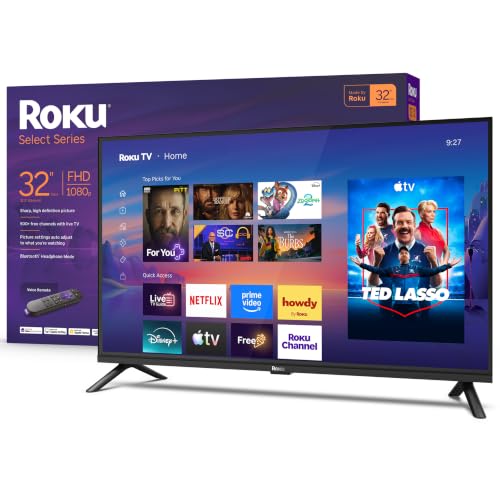
Roku 32-Inch Select — a Roku, and proud of it
Roku’s own 32-inch set enters this guide with its platform in the heading and no apology attached. It does not run Android, does not cast like a Chromecast, and does not want to: Roku TV is a self-contained system whose home screen is a grid of apps, whose search spans services even-handedly, and whose entire design philosophy is that a television should be operable by anyone who picks up the remote. For the searcher whose “Android TV” request really meant “a smart TV that works,” this is frequently the set that ends the deliberation — especially for rooms used by guests, children or grandparents.
The panel is 1080p, the voice remote handles search across apps, and Roku’s channel store is deep in the regional and niche services that small-room televisions often need. Android phones can still share content through supported apps and the Roku app’s features, though never with Chromecast’s one-tap universality. Judge it as what it is — the calmest 32-inch television in this guide — rather than as a failed Android set, and its value is obvious. Judge it as an Android TV and you have misread a heading this guide wrote in plain sight.
- Screen: 32-inch class, 1920×1080 full HD
- Platform: Roku TV — not Android-based
- Voice: Roku voice remote with cross-app search
- Extras: private listening through the Roku app
Strengths
- The least confusing interface of any set here
- Deep app catalogue, including niche services
- Prompt, uniform updates from Roku itself
Trade-offs
- No Chromecast; Android casting is app-dependent
- No Play Store or Android app compatibility
- A promotional rail sits on the home screen
Best for: mixed households and guest rooms where simplicity outranks ecosystem. Not suited for: a committed Google household that casts and sideloads daily.

Insignia 32-Inch F40 Fire TV — Amazon’s platform, full HD
The F40 is the Fire TV representative at this size, chosen over its own sibling for one specification: where the F20 line is 720p, the F40 is a full 1080p set, and at 32 inches that is the difference between a panel that respects the size and one that rents it. Fire TV itself is Amazon’s world — Alexa on the remote, a home screen that merchandises Amazon’s storefront and channels, and an app store that covers the mainstream thoroughly while remaining Amazon’s curated garden rather than Android’s open field. Households with Echo speakers and Prime accounts will feel at home within minutes; the guide’s duty is only to ensure nobody moves in by accident.
Fire TV’s live-guide integration suits the small-room stations this set will occupy: antenna channels and streaming rows share a surface, and Alexa voice control from the sofa or the kitchen counter is genuinely convenient when hands are full. Casting from Android phones is the platform’s weak joint — it leans on Miracast and app-level support rather than Chromecast — so a casting-first household should look back at the Vizio or forward to the TCL. As an Alexa room’s television, though, the F40 is the complete and correctly labelled article.
- Screen: 32-inch class, 1920×1080 full HD
- Platform: Fire TV — Amazon’s system, not Android TV
- Voice: Alexa via the remote and Echo speakers
- Live TV: antenna channels folded into the Fire TV guide
Strengths
- Proper 1080p panel on the Fire TV platform
- Alexa control suits Echo-equipped rooms
- Unified guide for broadcast and streaming
Trade-offs
- Home screen promotes Amazon content persistently
- Android casting is limited and app-dependent
- No Play Store; Amazon’s app store only
Best for: Alexa households wanting full HD at 32 inches with open eyes. Not suited for: Chromecast households or Play Store loyalists.

Hisense 32-Inch A4 Fire TV — the set everyone assumes is Android
This pick exists to correct a specific, widespread misunderstanding, and it is included as a television in its own right as well. Hisense builds excellent Google TV sets in other ranges, so shoppers reasonably walk up to the 32-inch A4 expecting Android — and the A4 is a Fire TV model. The heading, the badge and this paragraph all say so, because the single most common disappointment in this corner of the market is a Hisense bought on brand reputation and unboxed into Amazon’s interface. If you take one sentence from this guide to a retailer’s page, take that one.
Judged as a Fire TV, the A4 is a respectable 1080p set with a slim-bezel design, DTS Virtual:X sound processing that widens its small speakers’ presentation, and Alexa on the remote. Hisense’s panel quality at this tier is a genuine reason to prefer it over the Insignia for an Alexa room — colours and uniformity are the brand’s home turf. But no panel virtue converts it into the Android TV it is not, and this guide will not let a good television be sold under a false platform. Buy it for Fire TV, or buy the TCL for Google TV; the unforgivable purchase is the one made in confusion between them.
- Screen: 32-inch class, 1920×1080 full HD
- Platform: Fire TV — despite the Hisense badge, not Android TV
- Sound: DTS Virtual:X processing
- Voice: Alexa voice remote
Strengths
- Hisense panel quality at the small-size tier
- Full 1080p with tidy, slim-bezel design
- Sound processing that flatters small speakers
Trade-offs
- Fire TV, full stop — no Google services or Play Store
- The brand’s Google TV reputation invites the very confusion this section exists to prevent
- Amazon’s home-screen merchandising applies
Best for: an Alexa household that values Hisense’s panel craft at 32 inches. Not suited for: the Android TV seeker — that reader’s set is the TCL, above.
Head-to-Head: Platform Truth in One Table
| Pick | Platform | Size / panel | Casting from Android | App store |
|---|---|---|---|---|
| TCL S3 32 | Google TV | 32 inch, 1080p | Chromecast built in | Google Play |
| TCL S3 40 | Google TV | 40 inch, 1080p | Chromecast built in | Google Play |
| Vizio D-Series | SmartCast | 32 inch, 1080p | Chromecast built in | SmartCast selection |
| Roku Select 32 | Roku TV | 32 inch, 1080p | App-dependent | Roku Channel Store |
| Insignia F40 | Fire TV | 32 inch, 1080p | Limited / Miracast | Amazon Appstore |
| Hisense A4 | Fire TV | 32 inch, 1080p | Limited / Miracast | Amazon Appstore |
The table compresses the guide’s argument into one screen: only the first two rows are the platform named in the search, the third row borrows its most-used feature, and the last three rows are good televisions wearing their own colours. Notice that panel quality never varies across the table — every set is 1080p — which is why platform, not picture, is the decision here. A buyer who chooses by this table will never be surprised by their own television, and surprise, in this category, is always the unpleasant kind.
Setting Up Google TV at This Size: Accounts, Apps and Casting
Setup on the TCL picks rewards five deliberate minutes. Sign in with the Google account the household actually uses for YouTube and purchases, not a spare — recommendations, watchlists and rented films all hang off that choice, and changing it later means rebuilding profiles. During first-run, decline the optional content services you do not subscribe to; Google TV’s home screen is at its best when its rows draw from a short, honest list of sources. Install the handful of Android television apps that motivated the purchase while the Play Store is open in front of you, and pin them to the favourites row before the interface fills with suggestions.
Casting deserves a test on day one, not on the evening of the first family slideshow. Cast a photo from the phone, a browser tab from a laptop, and a video from a child’s tablet; each uses a slightly different path, and discovering a network quirk during setup — usually the television and phone sitting on different Wi-Fi bands — is painless compared with discovering it in front of an audience. If the router splits 2.4 and 5 GHz into separate networks, put the television on the same one as the phones, or enable the router’s band-bridging option. Finally, set the sleep timer and the screen-saver behaviour, because small-room sets are the ones left running overnight, and Google TV’s ambient mode, while pretty, is not free in power or panel hours.
Where Did Sony and the Other Android Brands Go at 32 Inches?
The absence of Sony from this guide surprises shoppers most, so it deserves a direct account. Sony’s television strategy concentrates on larger, premium panels where its processing and its Google TV partnership can be sold at margins that justify them; the 32-inch tier, with its thin prices and bedroom destinations, sits below that strategy’s floor. The same logic thinned out other Android-loyal brands at this size. What remains is a division of labour the market arrived at without asking anyone: TCL serves the Google faithful at small sizes, Roku and Amazon serve the platform-agnostic majority, and premium Android TV begins where the living-room sizes begin. A shopper determined to own a Sony Android experience at small scale is really shopping for a larger television or a different room — the product they picture is not manufactured, and no amount of searching will conjure it.
This is also why “thin shelf” honesty matters more than a padded list. A guide that filled six slots with Fire TV and Roku sets under an Android headline would be manufacturing the very confusion that fills review sections with one-star anger at televisions that never claimed to be what their buyers assumed. The pool is the pool: one genuine 32-inch Google TV, its bigger sibling, one Chromecast bridge, and three rivals wearing their own names. Anything longer would be fiction.
Daily Life With Each Platform: The Differences You Actually Feel
Specifications flatten platforms into feature lists, but living with them is a matter of small frictions repeated nightly. Google TV’s home screen is a recommendation engine first: rows of suggested programmes lead, your apps sit within reach, and the experience improves as the household’s Google data feeds it — while never quite letting you forget the storefront. Roku’s screen is a filing cabinet: nothing is suggested until you ask, nothing moves unless you moved it, and the cost of that calm is that discovery happens elsewhere. Fire TV sits between, but tilted toward Amazon’s shelves: the rows are lively, the merchandising relentless, the integration with a Prime account genuinely slick. SmartCast is the plainest of the four, a launcher with good casting grafted on — which, for households that live in their phones, is less a limitation than it sounds.
Updates tell a second story. Roku updates its sets uniformly and conservatively; features arrive slowly and break rarely. Google TV evolves faster, with interface experiments that occasionally rearrange furniture you liked. Fire TV follows Amazon’s retail calendar, and its home screen has historically gained shopping surfaces over time. None of these is a scandal; all are temperaments. The Android shopper choosing the TCL is choosing the fastest-moving platform in the guide, with the richest account integration as compensation. The shopper who finds that sentence tiring has just learned something important about themselves, and the Roku section is waiting above.
Remotes, finally, are the interface you touch. The TCL’s Google remote centres on the Assistant button and a directional pad; Roku’s is the minimalism champion, with app shortcut buttons that may or may not match your services; Fire TV’s remote is Alexa-first. In a dark bedroom, these shapes matter more than any processor. Households with small children or butter-fingered cooks should also note that replacement remotes for Roku and TCL sets are cheap and plentiful — a mundane virtue that belongs in any honest platform comparison.
The App Long Tail: What Each Store Really Carries
Mainstream streaming is a solved problem on every platform in this guide — the big subscription services, the free ad-supported channels and the broadcasters’ apps are all present, and a household whose viewing stops there will never feel a store’s edges. The edges appear with the long tail. Media-player enthusiasts who run a home server will find their preferred clients most at home on Google TV. Retro gaming front-ends and alternative launchers exist only in Android’s world. Certain regional and diaspora services publish for Roku early because of its North American installed base, while others treat Fire TV as their second platform after Android. Vizio’s SmartCast covers the mainstream and leans on casting for everything else — a phone with the app becomes the store the television lacks.
The honest method is embarrassingly simple: before buying, write down the five apps the television must run, and check each one against the specific platform — not the brand, not the family, the platform — on the store’s own website. Five minutes of that diligence prevents the classic small-TV tragedy, the set that does everything except the one thing it was bought for. Android TV shoppers should perform the check too, on the TCL: the Play Store’s television catalogue is broad, but a phone-only app is a phone-only app, and casting remains the bridge for those.
Voice Control in Small Rooms: Assistant, Alexa and Roku Voice
Small televisions are disproportionately voice-controlled, because they live where hands are busy or remotes go missing — kitchens, workshops, children’s rooms, beds at midnight. Google Assistant on the TCL remotes does the platform’s deepest trick: it searches across the household’s services with account awareness, controls Google-compatible lights and plugs, and answers general questions with the household’s own context. In a Google Home household the television stops being an appliance and becomes a room terminal, which is either the future arriving or an intrusion, depending on the household’s temperament — but it is a capability only the two TCL picks in this guide possess.
Alexa on the Fire TV picks matches it trick for trick inside Amazon’s world, and in homes already speaking to Echo speakers the Insignia and Hisense will feel more native than any Google set could. Roku’s voice search is narrower — it finds programmes and opens apps rather than running a smart home — and for many rooms that narrower scope is a feature: the television finds the film, and the light switch remains a light switch. The platform decision, stated this way, is really a decision about which voice already runs the house. Android TV’s advantage is not that its assistant is universally better; it is that for Google households it is the same assistant, with the same routines, on the bedroom wall.
Broadcast Television on a Google TV Set
Antenna viewing is the quiet half of small-TV life, and Google TV handles it with a live guide that blends over-the-air channels with streaming sources once the tuner scan is done. The practical setup mirrors any set in this batch: position the indoor antenna, run the channel scan from the settings menu, then rescan after any move, because digital reception is positional. Google TV’s contribution is organisational — favourite channels surface alongside app rows, so the morning news habit does not require remembering which input or app the news lives in this year.
The rival platforms each have their own broadcast manners. Fire TV’s live tab is comparably integrated, Roku keeps antenna television as a first-class tile with its own guide, and SmartCast treats the tuner more plainly. None of this should decide the platform for a streaming-first household, but for the many small rooms where broadcast is half the viewing — kitchens at breakfast, bedrooms at bedtime — the guide surfaces deserve a thought before purchase. And a housekeeping note that applies to every pick: after the first scan, check the channel list against a transmitter prediction for your postcode, because a missed multiplex usually means the antenna, not the television, needs to move six inches.
Profiles, Children and Privacy on Connected Small TVs
A 32-inch set often lands in a child’s room or a shared space, and platforms differ in how gracefully they handle audiences. Google TV supports individual profiles including child profiles with content boundaries and bedtimes, tied to the family’s Google accounts — a genuine advantage for the Android household, and one more continuity the rivals cannot replicate in kind. Fire TV offers child profiles inside Amazon’s family system; Roku leans on channel-level PINs and its kids’ section. Any of them beats the free-for-all of a shared adult profile, and the setup belongs in the first evening, not after the first incident.
Privacy settings deserve the same first-evening attention on every platform. Voice remotes listen when their button is pressed, not continuously, but viewing-data collection for recommendations and advertising is a settings page most owners never visit. Google TV, Fire TV and Roku all expose controls for ad personalisation and data sharing; turning the dials to your household’s comfort takes minutes and persists. A guide about platform honesty should say plainly that the platform is part of the price: the set is inexpensive partly because the ecosystem expects a relationship. Choose the relationship knowingly, set its terms once, and the small television goes back to being furniture that shows programmes.
Storage, Speed and How These Sets Age
Small televisions carry small computers. Storage on sets at this tier is measured in single-digit gigabytes shared with the system, and the platforms age differently under that constraint. Google TV rewards housekeeping: uninstall the trial apps, let the system manage its cache, and the TCL stays responsive; fill it with sideloaded experiments and it will remind you, in pauses, of your choices. Roku’s uniformity is its longevity strategy — a restrained system that asks little of the hardware and therefore asks it successfully for years. Fire TV’s aging depends on Amazon’s storefront ambitions, which historically grow rather than shrink.
Panel aging is platform-independent: backlights dim slowly, and a bedroom set used three hours a night will outlast several generations of streaming fashion. The realistic lifespan question for any pick here is software support, and on that measure all six picks are current models on living platforms — the precise opposite of the orphaned “Android” boxes and abandoned smart systems that taught shoppers to ask this guide’s question in the first place. Buy the platform whose company still cares about the size, keep the storage lean, and a 32-inch set will serve until the room itself changes purpose.
Peripherals That Pair With a Small Google TV Set
The Android ecosystem’s depth shows up in the accessories drawer. Bluetooth game controllers pair with the TCL picks for the Play Store’s television games and for cloud gaming apps, turning a bedroom set into a casual games machine without a console. Wireless keyboards with trackpads — the media-centre veteran’s tool — make sideloading, file management and browser-adjacent tasks civilised. A USB stick can hold the media library a household NAS cannot be bothered to serve. None of these peripherals is necessary; all of them are the kind of option that simply does not exist in the same form on the rival platforms, and for the technically inclined buyer they are the platform’s real, unglamorous substance.
Sound peripherals matter more universally. Every pick in this guide can hand audio to a soundbar, and the Google TV sets add Chromecast-audio-style grouping possibilities inside Google’s speaker world. Keep the chain simple: television to soundbar over the ARC-capable HDMI port, everything else into the television, and let the set’s remote govern volume. Small rooms punish complicated audio chains with lip-sync drift and remote juggling; the single-cable arrangement is the one that survives contact with family life.
Troubleshooting the Complaints Google TV Owners Actually Report
Three complaints recur in owner discussions of small Google TV sets, and all three have boring, effective fixes. Sluggish home screens after a year usually trace to storage pressure: remove the trial apps, clear the largest caches, and restart the set from settings rather than the wall. Wi-Fi drops in bedrooms are almost always band or distance problems — the 5 GHz band that is fast beside the router is fragile through two walls, and the 2.4 GHz band, slower and steadier, serves a streaming television perfectly well. Casting failures, as this guide has already noted, are network-topology failures wearing a disguise: same network, same band family, problem gone.
The fourth complaint is philosophical rather than technical: the home screen changed after an update. Google iterates on its television interface in public, and rows move. Households that hate this should pin their essential apps to the favourites row, which survives rearrangements, and accept the rest as weather. Households that cannot accept it as weather have discovered a genuine platform preference — and now know, for their next and larger television, exactly which rival’s temperament suits them. Knowledge like that, learned on an inexpensive 32-inch set, is worth more than the set itself.
What Mistakes Do Android TV Shoppers Make at This Size?
The governing mistake is buying the brand instead of the platform — the Hisense A4’s whole section exists because of it — and its cousin is buying the headline instead of the specification, since retailer titles still sprinkle “Android” over any set with apps. Read the operating-system line in the manufacturer’s specifications, every time. A second mistake is assuming Google TV guarantees a premium panel: the TCL’s 1080p screen is correct for 32 inches, but shoppers migrating from a large Android TV sometimes expect the small set to feel like a shrunken flagship, and it will not — it is a good bedroom television with the right software, which is a different and perfectly honourable thing.
Third, people overbuy size to chase platform. If the room is a bedroom, the 40-inch TCL is not “more Android TV”; it is the same software on glass that may not fit the dresser. Fourth, casting gets blamed on televisions when the fault is the network — split Wi-Fi bands and guest networks strand more Chromecast sessions than any panel defect. Fifth, sideloaders forget that small sets have modest storage: install the media player and the file manager, certainly, but a 32-inch bedroom television is not the place for a library of experimental apps, and keeping the system lean keeps it responsive for years.
Dorms, Rentals and Second Homes: Where Platform Choice Gets Complicated
Three destinations complicate the platform question in ways worth a paragraph each. The dorm room first: campus networks frequently isolate devices or demand browser sign-ins that televisions handle badly, and a Google TV set may find its casting blocked by the network’s design rather than any fault of its own. Students should test the institution’s guidance for smart TVs before buying; where the network is hostile, the television becomes an antenna set and an HDMI screen for a laptop, and platform matters hardly at all — in which case the Roku’s simplicity or the TCL’s price of entry can decide without philosophy. Where the network is friendly, the student’s Android phone makes the TCL the natural roommate.
Rentals invert the logic: the television must serve strangers. A landlord furnishing a holiday let with a Google TV set signed into a personal account has made an error no platform can fix; the correct arrangement is a guest-friendly setup, and Roku’s guest mode tradition makes it the professional’s choice for that trade. Second homes split the difference — the household’s own accounts travel there, so platform continuity with the main house wins, and a Google household’s cottage set should be the TCL so that watchlists, rentals and routines simply continue. The pattern across all three: ask who will hold the remote and whose account the television serves, and the platform answers itself.
Final Recommendation
If Google TV is the requirement — the apps, the casting, the Assistant, the account — the decision is already made, and it is a good one: the TCL 32-inch S3 for rooms measured at this size, the TCL 40-inch S3 where the wall honestly allows more. Do not let the absence of rivals read as a weakness of the pick; it is a fact about the market, and the set itself is a complete, current, 1080p Google TV. If your requirement softens on inspection into “casting matters most,” the Vizio earns a serious look. If it softens further into “a smart TV that behaves,” Roku and Fire TV will serve you well under their own flags. The only wrong purchase in this guide is the confused one — and after six headings that name every platform in plain type, confusion is the one thing nobody here gets to plead.
One last word for the shopper who arrived wanting a Sony, a Philips or some other remembered Android badge at this size and feels the market has failed them personally. It has, in a small way — but the consolation is real: the platform you actually want, with its store, its assistant and its casting, is sitting in the first pick of this guide on a perfectly good 1080p panel, at the size you asked for, from the brand that bothered to serve the niche. Loyalty to a platform is rational. Loyalty to a badge, when the platform has moved house, is how good money ends up on a Fire TV in an Android home.
Frequently Asked Questions
Is Google TV the same thing as Android TV?
For a buyer, effectively yes. Google TV is the current name and interface for Google’s Android-based television platform: the Play Store catalogue, Google Assistant and Chromecast all carry over. A Google TV set runs the Android television apps that Android TV shoppers are looking for.
Does Hisense make a 32-inch Android TV?
Not in the current verified pool. Hisense’s 32-inch A4 is a Fire TV model, even though Hisense sells Google TV televisions in other sizes and ranges. The platform follows the model, not the brand — check the operating-system line before buying any Hisense at this size.
Why is there no Sony 32-inch Android TV in this guide?
Because Sony does not offer one in the current pool. Sony’s Android and Google TV range concentrates on larger, premium sizes; at 32 inches the brand is simply absent, and this guide will not substitute another brand’s set under Sony’s name or platform.
Can I install any Android app on the TCL Google TV sets?
You can install apps from the Google Play television catalogue, and Google TV permits sideloading for users who know their way around it — that openness is a core reason Android shoppers choose the platform. Phone apps not designed for television may install but navigate poorly with a remote.
My Android phone will not cast to the new TV. What is wrong?
Most often, the network: the phone and television are on different Wi-Fi bands or one is on a guest network. Put both on the same network and retry. If the set is a Fire TV or Roku model, native Chromecast is not supported at all — that is a platform limit, not a fault. A related trap catches Vizio owners in reverse: the D-Series does have Chromecast built in, but the television must be set up and connected through SmartCast first, and the cast target name can be renamed in settings to something the household recognises — worth doing before the first family slideshow, when three identically named devices in the casting list will otherwise cause a small domestic incident.
Is 1080p enough for a 32-inch Google TV?
Yes. At 32 inches and normal bedroom or kitchen distances, a 1080p panel looks sharp, and no 4K panel is offered at this size in the pool by any platform. The step to 4K in Google’s ecosystem begins at larger diagonals. Shoppers tempted to wait for a 4K 32-inch Android TV should know that the industry’s panel economics point the other way: resolution jumps have historically arrived at sizes where the extra pixels can be seen and charged for, and at 32 inches, across a bedroom, they largely cannot be seen. The 1080p TCL is not a placeholder for a sharper set that is coming; it is the settled specification of the size, and buying it now loses nothing to a hypothetical future model.
Related Guides
Compare the wider field in our guide to the best 32-inch TVs overall, weigh the rival in our roundup of 32-inch Roku TVs, or read how the vanishing 30-inch size reshaped small-TV shopping.
Related guides
- Best 4K HDR Projectors: Tone Mapping, Color and the Rooms They Deserve
- Best TVs for Viewing Sports: Motion, Daylight Brightness and Broadcast Upscaling
- Best Barn Cameras: 4G LTE, Long-Range Wi-Fi and Hub Systems Compared
- Best 1080p IP Cameras: PoE Domes, Turrets, Bullets and a PTZ That Earn Their Cable


