What's inside
- Key Takeaways
- Quick Picks
- How Did We Map the Territory Around a Missing Size?
- Which Real Televisions Stand Closest to 28 Inches?
- Why Is the Honest Answer for 28 Inches Usually a Monitor?
- How Do the Options Around 28 Inches Compare?
- How Do You Build the Monitor-Plus-Stick Setup Well?
- When Should You Insist on a Real Television Instead?
- What Goes Wrong for 28-Inch Shoppers?
- Final Recommendation
- Why Did 28 Inches Become a Monitor Standard?
- What About Students and Dorm Rooms?
- Can a Console Live on the 28-Inch Monitor Setup?
- What Should Home Workers Know About the 28-Inch Answer?
- Why Do Hospitality Listings Keep Appearing in This Search?
- How Do You Decide in Ten Minutes?
- What Does This Search Teach About Shopping for Screens Generally?
- What If Your Room Is a Rental You Cannot Modify?
- What About a Small Projector as the 28-Inch Substitute?
- Frequently Asked Questions
- Related Guides
As an Amazon Associate I earn from qualifying purchases. This post may contain affiliate links at no extra cost to you.
gizmoverdict.com is reader-supported. When you buy through links on our site, we may earn an affiliate commission.
This guide about the best 28 inch TVs will save you time by answering in its first paragraph the way the market itself answers: there is no mainstream 28-inch television to buy. The size belongs to monitors now. Twenty-eight inches is a standard, thriving dimension in the monitor aisle — most famously as the home of affordable 4K desktop displays — while in the television aisle it is a gap, bracketed by 24-inch sets below and 32-inch sets above, with no verified current model from any major maker in between. A shopper who understands that single fact can skip a hundred misleading listings; a shopper who does not will meet discontinued pages, mislabelled neighbours, and hospitality-channel hardware wearing a consumer costume.
What follows is therefore a guide to the real decision. The six picks are the nearest honest televisions, each labelled with its true size: five verified 24-inch sets spanning every platform and the one Full HD vehicle specialist, and one verified 32-inch set with a 1080p panel as the upper neighbour. Woven through them is the prose answer this guide believes most 28-inch hunters actually need in 2026: a 28-inch 4K monitor plus a streaming stick, a combination this article recommends openly, explains fully, and deliberately does not attach shopping links to — because monitor selection belongs to your desk and your computer, and because a guide’s credibility is worth more than a category error. Read the picks if a television is truly what the room wants; read the monitor sections if the room has been asking for a screen and merely used the word TV.
Key Takeaways
- Twenty-eight inches is monitor territory in 2026: the size thrives there, especially in 4K, and is absent from current television lines.
- The nearest real televisions are 24 inches below and 32 inches above the gap, and every pick here carries its true size in plain sight.
- For desk-based viewing, a 28-inch 4K monitor with a streaming stick is usually the correct purchase — sharper than any small television, at a competitive total cost.
- What the monitor route surrenders is the television’s furniture: a tuner, a unified remote, and speakers worth using, each replaceable at a price.
- Among actual televisions, the Sylvox 24-inch is the only verified Full HD panel at the small end; the 32-inch Roku adds 1080p from above.
- Any listing selling a brand-new mainstream 28-inch TV should be verified against the maker’s own catalogue before money moves.
Quick Picks
| Pick | Badge | Why it earns its place |
|---|---|---|
| Roku 24-inch Select | Nearest Television, Easiest Life | Four inches under target and the calmest interface in the small class — the default TV answer when the space runs small. |
| Insignia 24-inch F20 Fire TV | Amazon’s Small-Shelf Stand-In | Fire TV and Alexa in the closest size down, for households whose other rooms already speak Amazon. |
| Vizio 24-inch V-Series | Casting for the Guest Corner | SmartCast lets visitors drive the screen from their own phones — the spare-room pattern a 28-inch set would have served. |
| Westinghouse 24-inch Non-Smart TV | No Platform, No Fuss | A tuner and inputs and nothing to sign into: the utility pick for rentals, workshops, and antenna rooms. |
| Sylvox 24-inch 12V Smart RV TV | Sharpest True Television Here | Native 1080p and 12-volt power — the television pick when seats are close or the room has wheels. |
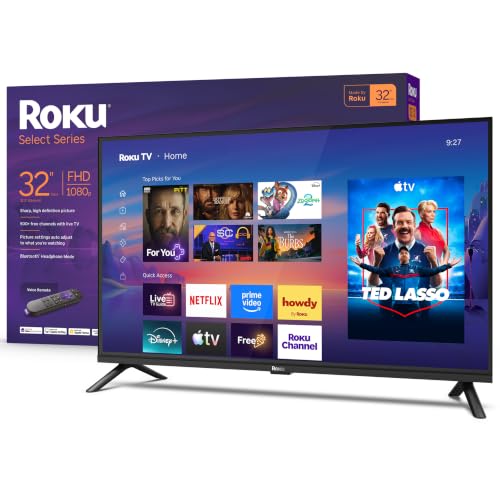
| Roku 32-inch Select | Labelled Step-Up: Full HD From Above | Thirty-two inches and 1080p, honestly flagged — the upper neighbour for rooms that can open up a little. |
How Did We Map the Territory Around a Missing Size?
The verification behind this series checks current, confirmable listings size by size. At 28 inches, that process returned the same verdict the pool research for this batch recorded: no mainstream television in the size from the makers whose products a consumer guide can responsibly recommend — while the neighbouring sizes returned real, supportable products in both directions. Rather than manufacturing a ranking from sediment, this guide reports the map as it is: a monitor size wearing a television keyword, with genuine televisions standing at each border.
The picks were chosen to make the border crossings useful. Stepping down, the five 24-inch sets were selected to cover the whole decision space of small televisions — platform temperament, smart versus non-smart, household versus vehicle — so that a shopper squeezed below the target still makes a complete choice. Stepping up, the single 32-inch representative was chosen for its 1080p panel as well as its size, because a shopper stretching upward deserves the resolution dividend the stretch can pay. The monitor answer, meanwhile, is argued in prose with its costs itemized, because the guide’s judgement is that it wins the largest share of these searches — and a judgement that important should be explained, not merchandised.
A word on the 28-inch screens that do exist outside the mainstream: hospitality and industrial channels still produce television-format displays in uncommon sizes for hotels and signage contracts. They are excluded here on consumer grounds — availability, warranty, support, and retail return paths that an ordinary household cannot rely on — and their existence does not change the map for anyone shopping for a home.
Which Real Televisions Stand Closest to 28 Inches?

Roku 24-inch Select — Nearest Television, Easiest Life
Begin the border tour below the gap, with the television this guide would hand to the widest range of 28-inch orphans whose spaces run small. The Roku Select is a 24-inch set — four inches under the target, a real difference the text will not minimize — and its case is the case of the small television perfected as an appliance: an interface a first-time user understands in a minute, neutral search across the household’s services, private listening through its app for shared bedrooms, and a 720p panel that behaves exactly as small-room distances require. In kitchens, guest rooms, and parents’ bedrooms, it is not a compromise awaiting a better product; it is the product, at the size the industry actually supports.
Its limits relative to your search are equally plain. Four inches is four inches, and if the room’s seating sits far or the cabinet was built generously, the step down will feel like one. Its resolution trails both the monitor route and the 32-inch pick. But notice the exchange rate: in return for the inches, you receive a current, warranted, platform-supported television that guests can operate and children cannot confuse — the ownership virtues that made you want a television rather than a screen in the first place. For television-shaped jobs in smallish rooms, that trade settles the question.
- Screen: 24-inch LED, 720p HD — four inches under the target size
- Platform: Roku OS with app-based private listening
- Best room: kitchens, guest rooms, family bedrooms
- Power: mains only
- Character: the appliance pick — maximum ease per inch
Strengths
- The least confusing television experience available near this size.
- Private listening gives bedrooms a feature no monitor route matches simply.
- A living product with living support, unlike any 28-inch listing.
Trade-offs
- Noticeably smaller than the target where rooms and seating allow more.
- 720p panel — soft for text and close viewing.
- No vehicle power for mobile installations.
Best for: television-shaped jobs in rooms that run small. Not suited for: desks, close seating, or generous cabinets.

Insignia 24-inch F20 Fire TV — Amazon’s Small-Shelf Stand-In
The Insignia shares the Roku’s rung — a verified 24-inch television — and argues from the other platform capital. Fire TV’s presence in a small room means Alexa voice control with occupied hands, an app library anchored by Amazon’s services, and perfect continuity for the many households whose main screen already runs the same system. If your 28-inch search began in an Amazon household’s kitchen, this is the stand-in that will feel least like a stand-in: the same home-screen logic, the same remote habits, the same voice commands, simply at the size the market currently sells.
The familiar Fire TV compromises travel with it — a promotional home screen, a software appetite that asks more of modest hardware than Roku’s does — and the panel is the small class’s standard 720p. Neither fact changes the pick’s role in this guide: it is the nearest living television for a specific, enormous household tribe, offered at a labelled size, from a current line, with support that will outlast the off-brand 28-inch listings competing for your click. Availability with a known character beats a phantom with a perfect diagonal, every time this guide is asked.
- Screen: 24-inch LED, 720p HD — four inches under the target size
- Platform: Fire TV with Alexa voice remote
- Best room: Amazon households’ kitchens and bedrooms
- Power: mains only
- Character: continuity pick for an existing ecosystem
Strengths
- One interface across the household for Fire TV families.
- Voice control suits kitchens and dark rooms genuinely well.
- Current and supported where the target size is neither.
Trade-offs
- Promotional home screen divides households.
- 720p resolution, with desk-distance softness.
- Four inches under target — measure the room’s verdict first.
Best for: Amazon-committed households stepping down in size. Not suited for: viewers who want the sharpest small screen or the plainest menus.

Vizio 24-inch V-Series — Casting for the Guest Corner
The Vizio’s candidacy rests on a room rather than a specification: the guest corner, the spare bedroom, the holiday let — the places a 28-inch television would most plausibly have been bought for, and the places where its SmartCast philosophy outperforms every rival’s. Visitors cast from their own phones, carrying their own subscriptions and passwords, and the television remains a neutral screen that never asks a host to share an account or a guest to learn an interface. At 24 inches it is the closest living set to that brief, and its phone-led model has the side effect of ageing gracefully, since the intelligence lives in devices replaced every few years.
Households that want the television itself to be the computer will find SmartCast’s native side the least central platform in this guide, and the 720p panel follows the class. But judge the pick against its room: a screen that serves whoever stands before it, with whatever phone they carry, without a single credential changing hands. In the economy of hosting, that is a premium feature priced like a budget one, and it survives the size gap intact.
- Screen: 24-inch LED, 720p HD — four inches under the target size
- Platform: SmartCast, casting-led
- Best room: spare rooms, rentals, holiday lets
- Power: mains only
- Character: the host’s pick — guests bring everything
Strengths
- Guest-proof by design: no shared accounts, no taught interfaces.
- Phone-led control sidesteps slow small-TV menus.
- A current, warrantied product in a ghost size’s neighbourhood.
Trade-offs
- Least self-contained platform here for remote-first viewers.
- 720p panel, as the class dictates.
- Casting leans on the home Wi-Fi’s good behaviour.
Best for: hosts and landlords equipping visitor spaces. Not suited for: viewers who want the television to do everything itself.

Westinghouse 24-inch Non-Smart TV — No Platform, No Fuss
Some 28-inch searches are not really about size or smartness; they are about a screen that turns on and shows the thing. The Westinghouse is the living answer to that search at the nearest size down: a 24-inch television with a tuner, inputs, and a complete absence of platform — no account creation at setup, no app grid, no update interrupting the news. Connect an antenna, a cable box, a console, or a stick of your own choosing, and it performs that single duty indefinitely. For workshops, rentals, waiting areas, and antenna households, its emptiness is not a missing feature but the feature itself.
It also plays a strategic role in this guide’s larger argument. A non-smart television plus a stick you select is the television-format cousin of the monitor-plus-stick answer this article recommends for desks: in both, the screen is durable furniture and the intelligence is a replaceable accessory. Buyers who grasp that pattern stop fearing platform ageing entirely. The Westinghouse’s panel is HD-class and its streaming is bring-your-own, and within those stated limits it may be the most future-proof object in this entire roundup.
- Screen: 24-inch HD LED — four inches under the target size
- Platform: none, by design
- Best room: workshops, rentals, antenna households
- Power: mains only
- Character: the durable screen in a screen-plus-stick system
Strengths
- Setup in minutes, with no accounts or updates ever after.
- Accepts any stick or box, keeping the platform your permanent choice.
- Nothing inside to be abandoned by a streaming service.
Trade-offs
- Streaming requires hardware you supply separately.
- HD-class panel rather than Full HD.
- No app-based listening or voice features of its own.
Best for: utility rooms and simplicity-first buyers below the gap. Not suited for: households wanting built-in apps from day one.

Sylvox 24-inch 12V Smart RV TV — Sharpest True Television Here
If the step down must happen, the Sylvox is how it happens without surrendering sharpness. This specialist 24-inch set — built for recreational vehicles, boats, and trucks — carries a native 1080p panel, the only Full HD screen among the verified small televisions in this series, because its audience sits a metre away in cabins and dinettes where 720p cannot hide. Its smart platform is built in, and its power supply speaks 12 volts, drawing from a vehicle’s electrical system rather than a wall socket. For the 28-inch hunter whose destination is mobile or close-seated, it is less a compromise than a redirection to the correct specialist.
The standing cautions apply: a specialist brand’s software polish trails the big platforms’, and the price sits above the mainstream small class, buying panel and power hardware a kitchen may never use. But weigh what it proves about the map this guide draws. Sharpness at small sizes survived only where a niche defended it — in vehicle televisions and in monitors — and a shopper whose real requirement is a crisp near-28-inch picture is standing, whether they know it or not, at the border between those two refuges. The Sylvox is the television-side refuge, and for caravans it has no rival in this article.
- Screen: 24-inch, native 1080p Full HD — the small end’s only one here
- Platform: built-in smart system
- Power: 12V DC vehicle power, mains via adapter
- Best room: caravans, boats, trucks, close seating
- Maker: Sylvox vehicle-television specialist
Strengths
- Genuine Full HD at a size where mainstream televisions offer none.
- Vehicle power opens installs no other pick can attempt.
- Close viewing — the monitor route’s home turf — handled by a real TV.
Trade-offs
- Premium over the mainstream class for its specialisms.
- Platform maturity trails Roku and Fire TV.
- Advantages fade at across-room distances.
Best for: mobile and close-range buyers who insist on a television. Not suited for: mainstream rooms where 720p already looks clean.
Roku 32-inch Select — Labelled Step-Up: Full HD From Above
The upper border of the gap holds the guide’s most comfortable television answer, labelled with its true size as promised: a 32-inch Roku Select, four inches over target, carrying two upgrades the small class cannot offer together — a screen that fills a bedroom’s or small living room’s field of view, and a 1080p Full HD panel that keeps the picture crisp as the size grows. Roku’s calm interface completes a package that asks nothing of its owners: no platform drama, no resolution apology, no size fiction. If the furniture permits the step up, this is the pick that ends the search with the least residue of compromise.
Its condition is purely physical. Thirty-two inches needs roughly seventy-three centimetres of width and a room whose seating sits far enough back to enjoy it, and in a caravan nook or a fitted cabinet those centimetres simply do not exist — in which case this pick is a signpost, not a candidate, and the five below the gap are your category. Measure first, as this series never tires of advising, and let the room cast the deciding vote between a smaller television that fits and a larger one that fits better than the ghost you came hunting.
- Screen: 32-inch, 1080p Full HD — four inches over the target, labelled as such
- Platform: Roku OS with app-based private listening
- Best room: bedrooms and small living rooms with flexible space
- Power: mains only
- Character: the comfortable answer, when centimetres allow
Strengths
- Full HD resolution removes the small class’s central compromise.
- Roku’s interface keeps ownership effortless at the larger size.
- Room-filling presence the 24-inch picks cannot match.
Trade-offs
- Physically excluded from tight cabinets, counters, and vehicles.
- Still a television’s 1080p — the 4K monitor route is sharper for desks.
- No 12-volt option for mobile use.
Best for: flexible-space rooms ready to step over the gap. Not suited for: any installation with a hard size ceiling.
Why Is the Honest Answer for 28 Inches Usually a Monitor?
Because the monitor industry adopted the size the television industry abandoned, and then spent a decade making it excellent. Twenty-eight inches became a standard 4K desktop format: large enough for a spacious desk picture, small enough that 4K resolution renders text with print-like crispness, and produced in volumes that keep prices honest. A 28-inch 4K monitor in 2026 is not an exotic object; it is a commodity with ergonomic stands, modern inputs, and panels sharper than any television in this article — including the 1080p picks — by a factor that close seating makes obvious. Add a streaming stick to one of its HDMI inputs and it streams everything the smart televisions stream. That combination is why this guide, whose business is televisions, recommends a monitor to the majority of this search’s audience: the desk-based 28-inch job is a monitor job now, and pretending otherwise would serve the guide’s links rather than its readers.
Now the costs, itemized as promised, because the monitor answer is a trade and not a miracle. There is no tuner, so antenna television requires a separate tuner box or does not happen. There is no television remote culture: the stick’s remote runs streaming, but power, volume, and input switching live on the monitor’s buttons or a computer’s controls, and the single-remote lounge is gone. Speakers on monitors range from weak to absent, so a small soundbar or powered speakers join most real setups. Sleep timers and channel surfing, those small television courtesies, must be improvised. Total the stick and the audio honestly and the monitor route costs roughly what a television would — its victory is sharpness and desk-worthiness, not cheapness. For a bedroom across the room, buy a television from the picks above. For a desk, a dorm, a studio corner where the screen works all day, the monitor is not the alternative answer; it is the answer, and the television keyword was simply the wrong door into the right room.
How Do the Options Around 28 Inches Compare?
| Option | True size | Resolution | Tuner / remote | Role |
|---|---|---|---|---|
| Roku Select TV | 24-inch | 720p | Yes / yes | Easiest step-down |
| Insignia F20 TV | 24-inch | 720p | Yes / yes | Amazon step-down |
| Vizio V-Series TV | 24-inch | 720p | Yes / yes | Guest-room step-down |
| Westinghouse TV | 24-inch | HD class | Yes / yes | Utility step-down |
| Sylvox 12V TV | 24-inch | 1080p | Yes / yes | Sharp, mobile step-down |
| Roku Select TV | 32-inch | 1080p | Yes / yes | Labelled step-up |
| Monitor + stick (prose) | 28-inch | 4K typical | No / partial | The desk answer |
Read the last row against the six above it and the article’s thesis stands in one glance: the only true 28-inch screen in the comparison is not a television, and it wins on resolution while forfeiting the tuner and the remote culture that define one. Every buying decision in this category is a choice about which column of that table your room cannot live without. Rooms that need the television columns have their picks; rooms that need the resolution row have their answer; rooms that need both should look at the Sylvox or the 32-inch Roku and accept the size the market actually sells.
How Do You Build the Monitor-Plus-Stick Setup Well?
Choose the monitor for the desk first and the streaming second. A 28-inch 4K panel is the format’s standard; confirm it carries at least two HDMI inputs — one for the computer, one for the stick — and a stand that adjusts in height and tilt, because a screen you sit at for hours must meet your posture rather than the reverse. If the monitor will also serve a console, check its HDMI specification against the console’s output so the pairing does not strand features. Speakers, if the model includes them, should be treated as a pleasant contingency rather than a plan; budget the small soundbar or powered speakers from the start and the setup will sound like a system rather than an apology.
The stick decision is a platform decision, made by the same logic as the smart-television guides in this series: Roku for calm, Fire TV for Amazon households, either for everyone else. Plug it into its own input, power it from a wall adapter rather than a monitor USB port that may sleep when the screen does, and set the monitor’s input behaviour so the stick is one button away. Accept the two-remote reality or tame it with the stick remote’s power and volume controls where the pairing supports them. What emerges is not a television and should not be judged as one — it is a desk screen that streams superbly in the evening, which is precisely the job description the 28-inch search usually carries.
When Should You Insist on a Real Television Instead?
When the room’s centre of gravity is a bed, a sofa, or a kitchen stool rather than a chair at a desk. Across-room viewing erases the monitor’s sharpness advantage — at two metres, a 1080p television and a 4K monitor deliver their pictures to eyes that cannot separate them — while the television’s virtues compound nightly: one remote, a tuner for broadcast, a sleep timer, speakers that fill the modest brief, and an interface a guest can drive. Antenna households should not hesitate at all; the tuner is not an accessory to replicate but the product itself. And households buying for someone else — parents, tenants, children — should weight the television’s comprehensibility over the monitor’s specifications every time, because the best screen for another person is the one that never generates a support call.
Vehicles settle the question from the other direction: no monitor offers 12-volt-native, travel-hardened television service, so the caravan and boat world belongs to the Sylvox and its kind. The monitor answer, for all its correctness at desks, is a mains-powered, furniture-bound answer, and a guide that recommended it for a boat would be committing the same category error as a listing that calls a monitor a TV. Match the tool to the territory — that sentence, applied consistently, is this entire article.
What Goes Wrong for 28-Inch Shoppers?
The headline error is buying the keyword: a marketplace listing titled with the size, fulfilled with a neighbour, an antique, or a hospitality unit without consumer support. The defences are the ones this series teaches everywhere — verify the model on the maker’s current site, read the variant selector rather than the title, and treat a too-perfect result in a dead size as a claim awaiting proof. The second error is subtler: buying a 24-inch television for a desk and discovering, too late, that its 720p panel makes a workday miserable, when the monitor answer was the search’s real destination from the start. Diagnose the job before the product — desk or lounge, antenna or apps, vehicle or wall — and the size takes care of itself.
The third error is buying the monitor for a lounge and spending a year reassembling televisionhood from accessories: a tuner box here, a speaker there, a universal remote programmed on a Sunday. Each addition works; together they cost the television’s price and deliver a hobby instead of an appliance. This guide’s structure is the prophylactic — televisions for television rooms, monitors for desks, and no shame in either direction.
Final Recommendation
Decide by territory and the missing size stops mattering. At a desk, in a dorm, in a studio corner, take the prose answer this guide has argued openly: a 28-inch 4K monitor and a streaming stick, with a small speaker budgeted honestly, and enjoy the sharpest screen in this article. In a television room with flexible space, take the labelled 32-inch Roku and its Full HD calm. In a tight television room, take the 24-inch pick that matches your platform and your people — Roku for ease, Insignia for Amazon, Vizio for guests, Westinghouse for peace from platforms entirely. And on the road or the water, take the Sylvox and its travelling sharpness. The 28-inch television is a door that no longer opens; every room behind it, it turns out, has another door — and most of them are better than the original.
Why Did 28 Inches Become a Monitor Standard?
The migration has a technical heart: pixel density. A desktop screen is viewed from roughly an arm’s length, where the eye resolves far finer detail than it can across a room, so monitor sizes are chosen to deliver comfortable density at common resolutions. Twenty-eight inches at 4K lands in a sweet spot — text renders with the crispness of print while the panel remains affordable to manufacture at scale — and the format gathered an ecosystem: stands, arms, reviews, and corporate purchasing standards all standardized around it. Television sizes obey the opposite geometry, optimized for metres rather than centimetres, and their ladder simply never needed a rung where the monitor ladder placed its favourite.
Once a size becomes a standard anywhere, it becomes cheap everywhere in that category, which is why the 28-inch 4K monitor is such formidable competition for a hypothetical 28-inch television: even if a television maker revived the size tomorrow, it would launch against a decade of monitor scale economics, at 1080p if the small-TV pattern held, into a market whose close viewers had already left. Categories are ecosystems, not just products. The 28-inch television did not lose a fair fight against other televisions; it lost its habitat, and the monitors are what grew in the clearing.
What About Students and Dorm Rooms?
The dorm is where the two answers collide most honestly, because a student’s screen must be a workstation by day, a cinema by night, and a social object on weekends, all inside a room measured in single metres. The monitor route serves the workstation supremacy well: documents and code at 4K, a laptop’s second screen, then a stick for films and a console input for games. The television route serves the social pattern better: friends on a bed watching a match need a remote, a tuner or an app grid everyone can drive, and speakers that reach the far pillow. Neither answer is wrong; the deciding question is which hours dominate. A student whose screen is 80 percent study should buy the monitor and borrow the common room’s television for the big match; a student whose room is the group’s living room should buy the television and study at the library like generations before them.
Budget arithmetic favours whichever screen replaces two purchases. If a laptop already exists and a monitor would be bought regardless, the stick’s small addition converts it into the entertainment screen and the television budget evaporates. If no monitor is needed — coursework happens on paper, tablets, or lab machines — the television is the single-purpose bargain. Run your own timetable through that arithmetic rather than copying a roommate’s, because dorm advice, like dorm furniture, fits the student it was measured for and no one else.
Can a Console Live on the 28-Inch Monitor Setup?
Comfortably, with eyes open about the trade. Consoles connect to monitors over HDMI as readily as to televisions, and at desk distance a 28-inch 4K screen flatters games enormously — this is, after all, a standard gaming-monitor size. What the monitor route gives up is the television’s gaming furniture: the large-room presence, the effortless couch multiplayer geometry, and television speakers. What it gains is the desk player’s intimacy and, on gaming-oriented monitors, high-refresh specifications beyond any television in this article — though those belong to the monitor guides’ territory, and this article will not borrow their numbers to decorate a television roundup. The hybrid household pattern is common and sensible: console at the desk monitor for solo play, television in the living room for everything shared, and no product forced to be both.
What Should Home Workers Know About the 28-Inch Answer?
The home office is the monitor route’s strongest constituency, and its requirements refine the purchase. Video calls dominate the modern desk, and a 28-inch 4K screen earns its place in them indirectly: documents, decks, and faces all stay legible in a grid, and the evening’s streaming inherits a panel chosen for eight-hour days. Ergonomics outrank specifications here — a stand that lifts the screen’s centre to eye level, a tilt that kills the window’s reflection, and a desk deep enough that 28 inches sits at a comfortable focal distance rather than looming. Buyers assembling this setup should also plan the cable geography once, properly: computer, stick, speaker, and power, routed so the desk’s working surface stays clear, because a dual-life screen with a rat’s nest beneath it satisfies neither of its lives.
One hybrid deserves a specific warning. Workers sometimes propose the reverse arrangement — a television as the desk monitor — and at the sizes near this search it fails for the reasons this series documents: a 24 or 32-inch television’s 720p or 1080p panel renders a workday of text at a softness that taxes eyes, and televisions lack the stands and the pixel density the desk demands. The traffic between categories flows one way. Monitors moonlight as televisions gracefully, with a stick’s help; televisions moonlight as monitors poorly, at any size this article covers. Let that asymmetry settle any household debate the search has started.
Why Do Hospitality Listings Keep Appearing in This Search?
Because hotels buy televisions by the thousand in sizes chosen for their rooms rather than for retail ladders, and the secondary market — refurbishers, liquidators, marketplace sellers — eventually washes that stock toward consumers, where it surfaces under exactly the orphan sizes retail abandoned. A hospitality set is not a scam in itself; it is a product built to a different brief: locked-down menus, limited smart features designed for a hotel’s systems, warranties that run to institutions rather than households, and support channels that do not answer consumers. Bought knowingly, cheaply, for a workshop or a rental, one can serve. Bought unknowingly, at a consumer price, by a household expecting a living-room television, it disappoints in ways its listing never mentioned.
The tells are learnable: model numbers that do not appear on the maker’s consumer site, references to hotel modes or institutional features in the specifications, sellers specializing in bulk or refurbished stock, and prices that only make sense as liquidation. This guide excludes the entire channel from its picks, not because every unit is poor but because a consumer recommendation must be a product a consumer can verify, return, and get help with — the same standard that emptied the 28-inch shelf in the first place. Standards that only apply when convenient are not standards, and this article would rather hand you a monitor in prose than a television it cannot stand behind.
How Do You Decide in Ten Minutes?
Answer three questions and the decision makes itself. Where will the screen be watched from — a chair at a desk, or a bed, sofa, or stool across a room? Desk points to the monitor; across points to a television. What must it show on its hardest day — documents and interfaces, or channels and programmes? Documents point to the monitor; channels point to a television with a tuner. And what size does the furniture truly permit — under the gap, over it, or exactly the desk-standard 28? Under points to the 24-inch picks, over to the 32-inch Roku, and exactly-28 points, once more, to the monitor aisle where that number is a living standard rather than a ghost.
Households split by those answers — a desk worker married to a channel surfer, a student split between essays and match days — should notice that the market happily sells both answers, and that the combined cost of a 24-inch television and a modest 28-inch monitor is often less than the premium once charged for a single exotic screen. The orphan size’s real legacy may be this liberation: freed from matching one diagonal, a household can put the right kind of screen in each place, television where televisioning happens, monitor where monitoring happens, and never conduct the category argument again.
What Does This Search Teach About Shopping for Screens Generally?
That categories are maps, not territories, and the wise shopper navigates by the job. A size is a means of delivering an experience at a distance; a category is a bundle of furniture — tuners, remotes, stands, speakers — assembled around a typical room. When a search term stops matching any living bundle, as 28-inch television has, the productive move is to unbundle the need: sharpness here, a tuner there, a remote culture somewhere else, and then rebundle from living products, even when the rebundle crosses an aisle. The households that furnish screens happily are the ones that learned this once and applied it everywhere — to the caravan that needed a specialist, the desk that needed a monitor, the guest room that needed a casting screen — while the unhappy ones are still refreshing a search results page for a product the industry finished making years ago.
There is no shame in having typed the search; the entire internet’s sediment conspires to suggest the product exists. The shame, if any, would belong to a guide that met that search with six invented televisions and a confident ranking. This one has tried to be the other kind: a map of a gap, drawn honestly, with every neighbouring road labelled and the best road — for most readers, the monitor road — recommended in plain prose at the cost of the guide’s own links. Keep the map. The next orphan size you meet, in whatever category, will look familiar now, and you will know exactly which questions dissolve it.
One last practical kindness for readers replacing a much-loved old set in this size range, whatever its diagonal: photograph the back of the outgoing television before it moves — its inputs, its mount pattern, its cable arrangement — and keep the photograph with the new screen’s receipt. Installations are forgotten in a year and cursed in the third, when a stick, a speaker, or a console arrives and nobody remembers which port the antenna used. The orphan sizes teach humility about products; a labelled photograph teaches the household about itself, and both lessons outlast any particular screen.
What If Your Room Is a Rental You Cannot Modify?
Renters face the size question with tied hands: no wall mounting without permission, no cabinet alterations, furniture that arrived with the lease. The answers in this guide bend accordingly. A 24-inch television on its own stand asks nothing of a landlord and leaves no trace; the monitor route similarly lives entirely on a desk the tenant already owns. The step-up to 32 inches, where the room allows it, also stands on furniture without fixings. What renters should avoid is the project purchase — the orphan-size set that needs a bracket, a trim panel, and a negotiation — because a screen that cannot be installed without permission is not a bargain at any diagonal. Portability is the renter’s specification, and every pick in this article, monitor included, can be carried out of the property in one trip by one person, which is more than the ghost sizes ever promised anyone.
Bring the tape measure to the decision one final time, because this category above all others is decided by furniture rather than by features. The household that measures honestly will land on one of this article’s answers within the hour — a monitor glowing at a desk, a calm 24-inch set in a fitted nook, a 32-inch screen presiding over a small room — and will forget the missing size entirely by the weekend. The household that shops by keyword alone may still be reading listings at Christmas. Be the first household; the screens are ready when you are.
What About a Small Projector as the 28-Inch Substitute?
Occasionally a shopper in a dead size asks whether a small projector dissolves the problem by making size adjustable, and for a particular kind of room it nearly does: a darkened bedroom wall, a caravan’s blank panel, a rental where nothing may be fixed. A projector can paint a picture in the high twenties of inches and far beyond, from a device that packs away entirely. Its costs are the familiar ones — it needs darkness to look its best, its fan and its throw distance impose their own furniture rules, and its built-in speakers continue the small-device tradition this series has documented at length. Treat it as a third territory beside televisions and monitors, legitimate for rooms that are dark and flexible, and no more a television than the monitor is. The map in this article has room for it precisely because the map was drawn by jobs rather than by keywords: a dark room with a blank wall is a job, and the projector is one of its honest answers.
And spare a thought, at the end of the search, for the screen you already own. A working television in a neighbouring size, a monitor already on the desk, a laptop that could take a stick for a term — the correct 28-inch purchase is sometimes the one postponed until a real need ripens, and every guide in this series would rather lose that sale to honesty than win it with a ghost. When the need does ripen, the map above will be waiting, unchanged: televisions at their living sizes, monitors at theirs, and your room’s own honest measurements presiding, as they always should have, over both choices alike, tonight and always.
Measure once, argue never: that is the whole method, and it fits, with room to spare, on the case of the tape measure you are about to pick up and use.
Frequently Asked Questions
Does any major brand sell a 28-inch TV in 2026?
Not as a mainstream consumer model that this guide could verify. The major makers’ small-television lines run 24 inches and then 32, while 28 inches flourishes one aisle over as a standard monitor size, particularly for 4K desktop displays. Hospitality and industrial channels still produce television-format screens in uncommon sizes for contract buyers, but those are not retail products with consumer support. Any ordinary listing claiming a new brand-name 28-inch television deserves verification against the manufacturer’s own current catalogue.
Is a 28-inch 4K monitor overkill for streaming?
For streaming alone across a room, its resolution is more than the content needs — but the monitor is rarely bought for streaming alone. At desk distance, 4K at 28 inches transforms text, documents, and interfaces, and the streaming stick simply inherits that sharpness in the evening. Judged purely as a television substitute for a sofa, a 32-inch 1080p set is the more rational purchase; judged as the screen of a working desk that also plays, the 4K monitor is not overkill but the point.
What do I lose by using a monitor instead of a TV?
Four things, all listed plainly in this guide: the tuner, so no antenna television without an extra box; the unified remote experience, replaced by the stick’s remote plus the monitor’s own controls; television-grade speakers, which on monitors are weak or absent; and television courtesies such as sleep timers and channel surfing. Each loss has a workaround at a price, and households should price the bundle before choosing — the monitor route wins on sharpness and desk ergonomics, not on being a cheaper television.
Can I watch broadcast TV on the monitor setup?
Yes, with an additional component: an external tuner box that receives the antenna signal and feeds the monitor through HDMI, or a network tuner that streams broadcast channels to the stick’s apps. Both routes work and both add a box, a remote consideration, and a setup step — which is why this guide steers antenna-first households toward an actual television, where the tuner is built in, the guide data is integrated, and channel surfing remains the one-button pleasure it has always been.
What is the closest real TV to 28 inches for a bedroom?
It depends on the bedroom’s geometry, and this guide’s picks divide exactly on it. If the dresser or wall sits within about two metres of the bed and space is flexible, the labelled 32-inch Roku Select is the closest complete answer, with Full HD and private listening for shared rooms. If the space is fitted or the viewing is close, the 24-inch Roku offers the same calm in the smaller body. Measure the room, then choose — the inches follow the furniture, not the search term.
Is 28 inches a good size for a kitchen television?
It would be, if it existed — the kitchen is precisely the room whose counters and viewing distances suit the high twenties. In its absence, kitchens divide by their real constraints: fitted cabinets and under-counter mounts take the 24-inch picks, where the Roku’s calm and the Insignia’s voice control divide the platform vote, while open counters with seating beyond two metres take the 32-inch step-up and enjoy it. The monitor route rarely suits a kitchen, whose splashes, steam, and remote-first habits are a television’s native weather. Mourn the size briefly, then measure the cabinet — kitchens, more than any room, are ruled by their joinery.
Will television makers ever bring 28 inches back?
Nothing in the current market suggests it. The size’s jobs have been durably absorbed — desks by monitors at exactly 28 inches, small rooms by 24 and 32-inch televisions — and a revival would need a new room type or a new use to justify a panel line. If one ever appears, it will arrive as a headline from a major maker with consumer support behind it, easily verified by the checks this guide teaches. Until then, treat the size as settled monitor territory and shop accordingly; the neighbours are good, the monitor is excellent, and the ghost is not worth another season of anyone’s search history.
How wide is a 28-inch screen, for measuring my space?
A 28-inch diagonal in the common 16:9 shape works out to roughly 62 centimetres wide and 35 tall for the panel itself, with a monitor’s bezels and stand adding a little around it — which is why the size slots so naturally between the 24-inch televisions at about 56 centimetres wide and the 32-inch class at about 73. If your furniture’s opening sits near 62 centimetres, that is the market’s quiet way of telling you the space was designed in the monitor era, whatever the previous occupant used it for, and the desk answer in this guide will fit it as if measured — because, in a sense, it was.
Should I buy a 28-inch monitor with a built-in TV tuner if I find one?
Such hybrids surface occasionally, mostly from regional brands, and they should be judged as monitors with a bonus rather than as televisions with a pedigree: check the monitor’s core virtues first — panel, inputs, stand, warranty — and treat any tuner as a welcome extra whose software support may age faster than the screen. If the tuner is the feature you truly need, a television from this guide’s picks plus its built-in platform will serve that need with far less improvisation. Hybrids serve buyers who understand exactly which compromise they are purchasing; everyone else is better served by a pure product from a living category.
Related Guides
Continue with our guide to the best 26-inch TV alternatives, compare the living small sizes in the best 24-inch LED TVs, or go bigger with the best 32-inch TVs for bedrooms.


