What's inside
- Key Takeaways
- Quick Picks
- How We Chose These Picks
- Why Has Serious TV Gaming Moved Up to 4K and 120Hz?
- What Do ALLM and Game Mode Actually Switch Off?
- How Do You Set Up a 1080p TV for Console Play?
- What Does Gaming on a 32-Inch 1080p Screen Actually Feel Like?
- Which Consoles and PCs Pair Sensibly With This Class of TV?
- How Long Will a Cheap 1080p Gaming TV Stay Useful?
- Comparing the Six Panels on Gaming Grounds
- What About Sound in a Small Gaming Room?
- Which Buying Mistakes Ruin a Cheap Gaming TV?
- Final Recommendation
- Frequently Asked Questions
- Related Guides
As an Amazon Associate I earn from qualifying purchases. This post may contain affiliate links at no extra cost to you.
gizmoverdict.com is reader-supported. When you buy through links on our site, we may earn an affiliate commission.
Where to buy: Each television named in this guide links directly to its Amazon listing, so you can check the current panel size, tuner and port count against the exact model discussed before spending anything. Console bundles and soundbar pairings sometimes appear on those pages; the recommendations here concern the television alone.
Nobody shopping for the best 1080 gaming TVs in 2026 is shopping for the sharpest picture money can buy, and this guide will not pretend otherwise. A 1080p gaming television is a deliberate compromise: a smaller screen, a lower price, and a panel that asks very little of the console or PC feeding it. In exchange for giving up 4K resolution and high-refresh gaming, you get a set that a PlayStation, an Xbox, a Switch or a modest gaming PC can drive at its native resolution without upscaling compromises, usually in a size that fits a desk, a dorm room or the spare bedroom where a second console actually lives.
The honest headline belongs up front. Serious television gaming has moved on to 4K panels with 120Hz refresh, HDMI 2.1 bandwidth and variable refresh rate, and no set in this roundup offers any of that. What these six televisions offer instead is the part of gaming performance that still matters at this level: a game mode that strips out picture processing, automatic low-latency switching on the consoles that support it, and input lag low enough that a fighting game or a rhythm title does not feel like it is being played through wet cement. Judge them as second screens and small-room gaming sets, and several of them are genuinely good. Judge them as main living-room gaming displays, and every one will disappoint.
That framing shapes the whole guide. The picks are ranked for gaming duty specifically, not for movie nights or sports, although most double as perfectly decent everyday televisions. Where a set’s gaming credentials are thin, the review says so. Where a cheap set surprises, that gets said too.
Key Takeaways
- Every set here is a 60Hz 1080p panel, so frame-rate headroom comes from the console, never from the television.
- Game mode matters more than brand at this level, because it is the switch that removes the processing behind most input lag.
- ALLM lets a modern console flip the television into its low-latency state automatically, saving a menu dive before every session.
- A 32-inch 1080p screen hides its resolution well at sofa distance and looks soft only when you sit at desk range.
- Buy one of these as a second gaming screen or a small-room set, and keep expectations about 4K and 120Hz for a different purchase.
Quick Picks
| Pick | Badge | Why it earns its place |
|---|---|---|
| TCL 32 S3 | Gaming-first pick | The only set in this group whose marketing leads with a game accelerator feature, and it runs Google TV on top. |
| Roku 32 Select | Simplest to live with | Roku’s uncluttered interface and a fresh 2026 panel make it the easiest second-room gaming screen to hand to anyone. |
| Samsung 32 F6000 | Brand-name polish | Samsung’s picture processing and Tizen platform give this small set a more finished feel than its price suggests. |
| Vizio 32 D-Series | Bare-bones value | A long-running Full HD line that concentrates on the panel and keeps the smart layer deliberately plain. |
| Insignia 32 F40 | Fire TV gaming corner | Amazon’s platform brings Luna cloud gaming and Alexa voice control to a straightforward 1080p panel. |
| Hisense 32 A4 | Budget Fire TV alternative | Hisense’s entry FHD set matches the Insignia on platform while undercutting most of the shelf on price. |
How We Chose These Picks
The shortlist began with a hard filter: a native 1920 by 1080 panel. That sounds obvious for a guide with 1080 in the title, yet the small-television shelf is crowded with 32-inch sets that quietly ship a 720p panel under an HD label, and a gaming screen that upscales everything a console sends it defeats the purpose of the exercise. Every pick below renders the full 1080p signal a console outputs in its performance modes, pixel for pixel, with no scaling step in between.
From there, gaming-specific behaviour decided the order. We looked for a dedicated game mode that bypasses motion smoothing and noise reduction, because those features are the main source of the mushy, delayed feeling that ruins cheap televisions for gaming. Automatic low latency mode mattered next: a console that can tell the television to switch itself saves the owner from digging through picture menus every time they sit down to play. Port count mattered more than usual in this class, because a second gaming screen often hosts two consoles and a streaming stick at once, and a two-HDMI set fills up fast.
Platform came last, and deliberately so. A gaming television spends most of its life showing an HDMI input, not its home screen, so the smart system only needed to be stable, quick to wake and easy to ignore. Readers who care deeply about the interface itself will find that comparison handled in depth in the smart-television guide in this same batch; here it is a tiebreaker, not the main event.
One more honesty note on method: manufacturers in this price class rarely publish measured input-lag figures, and this guide does not invent any. Lag is discussed by class and by behaviour — game mode on versus off, processing engaged versus bypassed — rather than by fabricated millisecond scores attached to individual models.
Availability played a quiet role as well. Small televisions churn quickly at retail, with house-brand models appearing and vanishing between seasons, so preference went to sets from lines with a track record of staying on sale and staying supported: TCL’s S series, Roku’s own Select range, Samsung’s F-series, Vizio’s D-Series, and the current Insignia and Hisense Fire TV models. A recommendation you can still buy in six months is worth more than a theoretically perfect set that has already been replaced on the shelf. Where two sets were otherwise equal, the one whose manufacturer publishes clear specifications — panel resolution stated outright, ports enumerated — ranked higher, because a buyer checking our work should be able to verify every claim in this guide from the listing itself.

TCL 32 S3 — Gaming-first pick
TCL is the one brand on this shelf that talks to gamers directly, and the S3 carries that conversation into the smallest size the company sells. Its Game Accelerator feature is the headline: TCL’s name for the low-latency path that trims the panel’s response behaviour for console play. On a 60Hz 1080p set there is no variable refresh or high-frame-rate mode hiding underneath, so the accelerator’s job is narrower than on TCL’s big gaming models — it is about getting the picture the console rendered onto the screen with as little television-side interference as possible, and that is exactly the job that matters here.
In practice the S3 suits the desk-and-console pairing better than any rival in this group. Google TV gives it a proper app store for the streaming services a gaming room accumulates, Chromecast is built in for throwing a video from a phone, and the panel’s 1080p resolution matches the output a Switch or a base-model console produces without any scaling. Picture quality is honest midrange work: colours are lively out of the box, black levels are what you expect from a small direct-lit LCD, and nobody will mistake a night scene here for an OLED. For gaming, that trade is fine. Bright, readable and responsive beats cinematic when the game is a platformer at midnight.
The compromises are the class compromises. Two or three HDMI ports fill quickly once a second console and a capture device arrive, the speakers are thin in the way all small televisions are thin, and the 60Hz ceiling is absolute — a PS5 or Xbox Series X will run its 120Hz performance modes straight into a wall. Buy the S3 knowing it is a specialist second screen, and it rewards you; buy it as a future-proof main display, and it cannot be one.
Day-to-day ownership is pleasant in the ways that matter for a games room. The remote carries a microphone for Google Assistant, so launching a streaming app between sessions takes a voice command rather than a scroll through rows of tiles. Sleep timers, per-input naming and a proper settings search all exist, small mercies that budget televisions frequently omit. TCL also pushes software updates to the S3 line, which keeps the app catalogue current longer than the abandonware pattern common at this price.
- Panel: 32-inch, 1920 × 1080, 60Hz
- Platform: Google TV with Chromecast built in
- Gaming features: Game Accelerator low-latency mode
- Audio: built-in stereo speakers, headphone output
- Mounting: VESA-compatible for desk arms and wall brackets
Strengths
- The clearest gaming intent in this class, with a named low-latency feature rather than a buried menu toggle.
- Google TV brings the full Play Store catalogue, which no other platform in this group quite matches for breadth.
- Native 1080p suits Switch and last-generation consoles exactly, with no upscaling softness.
Trade-offs
- The 60Hz panel caps every modern console’s high-frame-rate modes from the first day.
- Google TV’s home screen pushes recommendations harder than some owners of a games-room screen will want.
- Sound is serviceable for dialogue and menus, and a small soundbar transforms it more than any setting does.
Best for: a desk or dorm setup where one screen serves a console first and streaming second.
Not suited for: a main living-room console station where 4K performance modes are the point of the purchase.
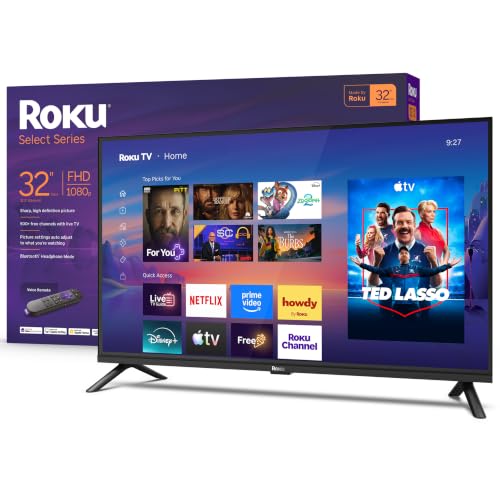
Roku 32 Select — Simplest to live with
Roku builds televisions for people who do not want to think about televisions, and the 32 Select carries that philosophy into gaming rooms unchanged. The panel is a current-generation 1080p design, the interface is the familiar grid of apps with an HDMI input treated as just another tile, and the whole set wakes, switches and settles faster than most budget rivals. For a second console in a guest room or a teenager’s bedroom, that absence of friction is a real feature: anyone can pick up the remote and be playing in seconds.
Gaming behaviour is plainer than the TCL’s. Roku’s sets include a game mode within the picture settings for each input, and once it is switched on for the console’s port it stays remembered for that port, which is the behaviour you actually want. There is no gaming branding and no accelerator badge, just the processing switched off and the panel left to display what arrives. Input response in that state belongs to the same low-lag class as the rest of this group; out of that state, with Roku’s default picture processing running, it does not, so the one-time setup matters.
The Select’s limitations are about ambition rather than quality. Roku’s platform offers no cloud-gaming app store of its own, the voice remote is simple rather than full-featured, and the panel’s brightness suits a bedroom or a shaded desk corner better than a sunlit family room. None of that dents its role here. As the set a second console lives on, it asks the least of its owner, and that is why it sits second in this ranking rather than lower.
Roku’s free mobile app quietly does a lot of work in a gaming household. It turns any phone into a remote with a keyboard, which makes signing into streaming services on the console’s off-days painless, and its headphone mode routes the television’s audio to earbuds with the picture staying on the big screen. Parents also get a proper set of content controls and a guest mode that signs visitors out automatically, features that suit a screen living in a shared or rented space.
- Panel: 32-inch, 1920 × 1080, 60Hz
- Platform: Roku TV with voice remote
- Gaming features: per-input game mode, remembered per port
- Audio: built-in stereo speakers, private listening via the Roku app
- Extras: works with Alexa, Google Assistant and HomeKit voice control
Strengths
- The least intimidating interface in the group, ideal for a shared or guest-room console.
- Per-input picture memory means the game mode setup happens once, not every session.
- Private listening through a phone solves late-night gaming without waking the house.
Trade-offs
- No gaming-specific branding or extras; the low-latency path is there, but you must find and enable it.
- Brightness is modest, so a bright room washes out darker game scenes.
- Roku’s platform carries advertising on the home screen that cannot be fully removed.
Best for: households where the second gaming screen gets used by everyone, not just its owner.
Not suited for: players who want a television that advertises and automates its gaming setup for them.

Samsung 32 F6000 — Brand-name polish
Samsung’s smallest current FHD set borrows its manners from the company’s big televisions. The F6000 runs Tizen, carries Samsung’s picture processing in a restrained form, and feels a half-step more finished than the budget brands in menus, remote and fit. For gaming, the relevant inheritance is Samsung’s long-standing game mode, which the company has refined across its whole range: engaging it strips the processing chain down to the essentials, and on a panel this simple the result is a responsive, clean path for a console signal.
The F6000 also benefits from Samsung TV Plus and the Gaming Hub ambitions of the wider platform, although at 32 inches the honest use is simpler: a console on one input, streaming apps on the home screen, and a picture that flatters both. Colour handling is this set’s quiet advantage. Samsung tunes its small panels with more care than the class average, and games with strong art direction — the painted look of a good indie title, the saturated courts of an arcade sports game — come across with more confidence here than on the cheaper sets ranked below it.
What you do not get is Samsung’s actual gaming hardware. There is no 120Hz panel, no HDMI 2.1, no FreeSync, none of the features that make the company’s larger sets famous among console players. Tizen also shows advertising and content rows that some owners find busier than Roku’s grid. The F6000 is the polished all-rounder of this group, bought for finish and picture rather than for any gaming headline.
Owners already inside Samsung’s ecosystem will feel the integration most. The set appears in the SmartThings app alongside the household’s other devices, a Galaxy phone can hand content to it with a tap, and the same Samsung account carries preferences across. None of this changes how a game plays, but it shortens the distance between sitting down and playing, which is the currency a second screen trades in.
- Panel: 32-inch, 1920 × 1080, 60Hz
- Platform: Samsung Tizen with Samsung TV Plus
- Gaming features: dedicated game mode in picture settings
- Audio: built-in stereo speakers, Bluetooth audio support
- Design: slim bezel, feet or VESA wall mounting
Strengths
- The most assured colour tuning in this group, which colourful games wear particularly well.
- Samsung’s game mode is a mature, predictable low-latency path rather than an afterthought.
- Build and remote feel a grade above the budget-brand sets ranked below it.
Trade-offs
- None of Samsung’s headline gaming technology reaches this size; the badge buys polish, not performance features.
- Tizen’s home screen is busier and more promotional than Roku’s.
- It typically costs more than the Hisense and Insignia while matching their resolution and its 60Hz ceiling.
Best for: a buyer after a small gaming screen that feels like a proper Samsung, not a compromise appliance.
Not suited for: anyone expecting the gaming features of Samsung’s larger QLED sets to trickle down to 32 inches.

Vizio 32 D-Series — Bare-bones value
Vizio’s D-Series has been the default answer to “a decent small Full HD television” for years, and the 32-inch version earns its place in a gaming guide by subtraction. The smart layer is plain, the picture menu is short, and there is very little processing between the console and the panel to begin with. A set that does less to the signal tends to delay it less, and the D-Series in its game picture mode is a straightforward, responsive screen for a console that mostly needs to be left alone.
The everyday experience is equally unadorned. SmartCast carries the main streaming apps and supports casting from a phone, the remote is a simple slab, and the television starts on the last input if you set it that way, which gaming owners should. Picture quality is the honest middle of this class: contrast is respectable in a dim room, viewing angles narrow quickly from the side, and HDR signals are accepted and tone-mapped rather than truly displayed. Games, which are mostly bright and viewed head-on, suit it better than films do.
Age is the caveat. The D-Series design has been on sale a long while, the interface feels a generation behind Roku and Google TV, and Vizio’s app catalogue is the thinnest here. None of that matters to a console doing its own streaming through its own apps, which is precisely the gaming-room scenario. Treat the D-Series as a panel with a tuner and a couple of inputs, and it is a sensible, inexpensive one.
One practical strength deserves a line of its own: the optical audio output. A second-hand soundbar or an older AV receiver without HDMI ARC still connects cleanly, and in a small room that single cable lifts game audio further than any picture setting on this list. Vizio also keeps a proper antenna tuner and a simple channel guide, so the set moonlights as a broadcast television for sports days without extra boxes.
- Panel: 32-inch, 1920 × 1080, 60Hz
- Platform: Vizio SmartCast with Chromecast and AirPlay support
- Gaming features: game picture mode with processing reduced
- Audio: built-in stereo speakers, optical audio output
- Extras: voice remote, works with major voice assistants
Strengths
- A short processing chain gives game mode very little to undo, and the result feels direct.
- Starts on the last-used input, which suits a set that exists mainly for one console.
- Frequently among the cheapest ways into a genuine 1080p panel from an established brand.
Trade-offs
- The SmartCast interface and app selection trail every other platform in this guide.
- Viewing angles narrow fast, so a wide sofa arrangement sees a washed-out picture.
- The design’s age shows in menu speed and in the remote’s minimalism.
Best for: a single-console corner where the television is a panel first and a smart device a distant second.
Not suited for: a household that expects the television itself to carry the full streaming burden.

Insignia 32 F40 — Fire TV gaming corner
Insignia is Best Buy’s house brand, and the F40’s reason to exist in a gaming guide is Amazon’s Luna. Fire TV carries the Luna cloud-gaming app, which means this television can play streamed games with a paired controller and no console attached at all — a genuinely different proposition from every other pick here. For a spare room, a holiday let or a kid’s first gaming setup, a set that games by itself, streams everything else, and still accepts a console over HDMI covers more bases than its price suggests.
With a physical console connected, the F40 behaves like the rest of the class: a 1080p 60Hz panel, a game picture setting that trims processing, and response that belongs to the same low-lag bracket as its rivals once that setting is engaged. Fire TV’s interface is quick on current hardware and the Alexa voice remote handles input switching and app launching by voice, which younger players take to immediately. The panel itself is unremarkable in the literal sense — adequate brightness, adequate colour, nothing to write home about in either direction.
Two cautions belong here. Fire TV’s home screen is the most advertising-forward interface in this group, and Luna’s best experience depends on a strong home internet connection and a subscription tier for much of its catalogue. Neither flaw is hidden, and neither stops the F40 being the most versatile cheap gaming screen in the roundup. It is the pick for the room where the console has not been bought yet, or never will be.
Households already running Alexa gear will get extra mileage here. An Echo in the same room can switch the F40 on, change inputs and launch Luna hands-free, and the television can act as the display for a doorbell camera feed between games. Those tricks are garnish rather than substance, yet they are garnish the other five picks cannot serve, and in a smart-home household they tip a close buying decision.
- Panel: 32-inch, 1920 × 1080, 60Hz
- Platform: Amazon Fire TV with Alexa voice remote
- Gaming features: game picture mode; Luna cloud gaming app built in
- Audio: built-in stereo speakers, Bluetooth for headphones and controllers
- Extras: pairs with Echo speakers for hands-free control
Strengths
- Luna support makes it the only pick that can game with no console in the room.
- Bluetooth controller and headphone pairing is handled inside the familiar Fire TV menus.
- Voice input switching suits younger players and shared family rooms.
Trade-offs
- Fire TV’s promotional home screen is the busiest in this group.
- Cloud gaming quality rises and falls with your broadband, not with the television.
- Panel brightness and contrast are ordinary even by this class’s standards.
Best for: a spare room or a child’s room where cloud gaming plus an optional console covers everything.
Not suited for: an owner who wants the television’s own interface to stay quiet and advertisement-free.

Hisense 32 A4 — Budget Fire TV alternative
The A4 is Hisense’s entry ticket to Full HD, and its presence here is a price argument with a gaming footnote. It runs the same Fire TV platform as the Insignia F40, on a 1080p panel of the same size, and it regularly sells for less than almost everything else in this guide. A game mode sits in its picture settings, the platform brings the same app catalogue and the same Luna access, and for a buyer whose budget is the whole decision, the A4 delivers the complete checklist at the lowest typical cost.
Played side by side with the Insignia, differences are matters of tuning rather than capability. Hisense’s colour defaults lean cooler, the remote is a standard Fire TV design, and the feet and bezel plastics feel built to the price. In game mode the panel responds in the same class as its rivals; outside it, the default picture processing adds the usual delay, so the same one-time setup advice applies. Motion handling on fast sports content is the weakest in this group, which matters for watching matches on the same screen more than for playing games on it.
Rank it last here not because it fails any gaming test, but because the sets above it each add something — a gaming feature, a calmer interface, better tuning, a longer track record — while the A4’s addition is the saving itself. For a student room, a workshop or a rental property where a console needs a screen and the budget is fixed, that saving is a perfectly respectable reason to buy, and the A4 is the honest way to take it.
There is also a disposability argument in the A4’s favour that the more expensive picks cannot make. At its price, a student can buy it for a first flat, a parent can put it in a playroom without anxiety, and a landlord can furnish a rental with a screen that genuinely plays games. When a television costs this little and still clears the 1080p bar, the risk calculus changes: the question stops being whether it is the best and becomes whether anything at the price does the job at all, and the A4 does.
- Panel: 32-inch, 1920 × 1080, 60Hz
- Platform: Amazon Fire TV with voice remote
- Gaming features: game picture mode; Luna cloud gaming via Fire TV
- Audio: built-in stereo speakers, headphone output
- Extras: screen mirroring from phones and tablets
Strengths
- The full Fire TV and 1080p checklist at the lowest typical price in this guide.
- Same cloud-gaming access as the Insignia for rooms without a console.
- Light and simple enough to move between rooms as needs change.
Trade-offs
- Sports motion and default colour tuning are the least polished here.
- Fire TV advertising comes with the platform, exactly as on the Insignia.
- Nothing about the set rewards spending time in its menus; it is an appliance, not a hobby.
Best for: the tightest budgets that still refuse to drop to a 720p panel.
Not suited for: a buyer who will also watch a lot of fast sport on the same screen.
Why Has Serious TV Gaming Moved Up to 4K and 120Hz?
Because the consoles did. The current PlayStation and Xbox generations render their flagship titles at up to 4K and offer performance modes targeting 120 frames per second, and the televisions built to show those modes pair a 4K panel with a 120Hz refresh rate, HDMI 2.1 ports with the bandwidth to carry the signal, and variable refresh rate to smooth the frames a game cannot hold steady. That stack is what reviewers mean by a gaming TV in 2026, and it starts at sizes and prices far above anything in this guide.
Understanding what is missing clarifies what remains. A 1080p set cannot show a 4K image’s fine detail, cannot display more than 60 frames per second no matter what the console sends, and cannot vary its refresh to match a fluctuating game. What it can still do — and what actually decides whether a game feels responsive at this level — is present each frame promptly. Input lag at 60Hz on a modern budget panel in game mode sits in the same low bracket that players happily used for the entire previous console generation. The previous generation, remember, was played overwhelmingly on 1080p televisions, and its fighting games, shooters and rhythm titles were not unplayable. They were the standard.
So the sensible way to read this category is generational. These sets serve the consoles of the last generation, the Switch family, retro and indie play on any machine, and the second-room duty that a flagship television is wasted on. The moment a PS5 or Series X becomes the main machine in the main room, the upgrade path leads out of this guide entirely — and every pick here is cheap enough that reaching that moment later does not sting.
What Do ALLM and Game Mode Actually Switch Off?
Game mode is a bundle of subtractions. A television’s normal picture path runs the incoming signal through noise reduction, motion interpolation that invents frames between real ones, edge enhancement, dynamic contrast and colour processing. Each stage takes time, and time in the picture path is time between your thumb moving and the character responding. Game mode bypasses nearly all of it, trading a slightly rawer picture for a much shorter path. On the sets in this guide the toggle lives in the picture settings for each HDMI input, and switching it on is the single most valuable minute a new owner can spend.
ALLM — auto low latency mode — is the automation of that toggle. A console that supports it announces itself over HDMI, and a television that supports it flips into its low-latency state without being asked, then flips back for a film. In this price class ALLM support is inconsistent: some sets listen for the signal, others simply remember a per-input game mode, and the practical difference is small once the initial setup is done. What matters is that one of the two mechanisms exists and is used. A television left in its vivid showroom mode will feel sluggish with any console, and the fault will be the setting, not the panel.
Audio deserves one sentence in this section, because it hides lag too. Sound sent through a television to a soundbar can drift behind the picture; game mode on most sets trims the video delay until the two roughly meet, and using the console’s own audio delay settings or a direct connection settles the rest.
How Do You Set Up a 1080p TV for Console Play?
Start before the console is even connected: open the television’s picture settings for the HDMI port you intend to use and find the game mode, sometimes labelled game picture or low-latency mode, and switch it on. While in the menus, turn off motion smoothing under whatever marketing name it carries, set the picture mode away from vivid, and disable any eco or ambient-light feature that pumps brightness up and down mid-game. On the Fire TV and Google TV sets, also visit the display settings and confirm the input is not being overscanned or cropped.
Then set the console to match the panel rather than fight it. Output resolution should be 1080p, not 4K: sending a 4K signal forces the television to downscale, adding a processing step and softening the image, while a native 1080p signal arrives ready to display. Refresh output should be 60Hz. HDR can stay on for the consoles that offer it at this resolution — these sets accept the signal — but owners who find the picture washed out on a budget panel lose little by switching it off, because none of these screens has the brightness to do HDR justice.
Finish with the physical layer, which is unglamorous and decisive. Use the cable that came with the console, plug it directly into the television rather than through a cheap switcher while you test, and sit at a distance where 32 inches of 1080p resolves cleanly — roughly a metre and a half or more for sofa play, accepting some softness at desk distance. Play a title you know well for ten minutes. If movement feels immediate and text is legible, the setup is right, and it will stay right until someone changes a setting.
What Does Gaming on a 32-Inch 1080p Screen Actually Feel Like?
Expectations set the experience, so it is worth describing plainly. At a typical second-room distance — the end of a bed, across a small study, from a desk chair pulled back a little — a 32-inch 1080p picture looks clean and complete. Games are rendered by the console at the same resolution the panel shows, edges are stable, and interface text at normal game sizes is perfectly readable. The image does not shimmer with upscaling artefacts, because no upscaling is happening, and that one-to-one honesty is something a cheap 4K set fed a 1080p signal cannot always claim.
Move closer and the arithmetic turns. At monitor distance, under a metre, individual pixels become discernible in fine text and in the thin lines of a strategy game’s interface. Shooters and platformers, which deal in large shapes and constant motion, hide this almost entirely; a grand-strategy map or a dense RPG menu does not. This is why the same television can be an excellent console screen and a mediocre PC screen simultaneously, and why this batch carries a separate guide for the monitor question rather than folding the verdict in here.
Brightness and contrast set the mood more than resolution does at this size. These are modest LCD panels; a dark horror title in a bright room will look greyer than its designers intended, while the same game at night, with the room lights low, looks entirely respectable. A bias light behind the set or a lamp off to the side does more for perceived contrast than any menu setting. Sound follows the same pattern: perfectly clear for dialogue and effects at small-room volume, thin when a game’s score asks for weight, and transformed by even an inexpensive soundbar.
None of this is apology. It is the description of a class of product that does one job — give a console a prompt, clean, correctly-sized picture — at a price that leaves room in the budget for the games themselves.
Which Consoles and PCs Pair Sensibly With This Class of TV?
The Nintendo Switch and its successor generation in 1080p output modes sit at the top of the pairing list, because their docked ceiling is the panel’s native resolution. Last-generation PlayStation and Xbox machines follow closely: they were designed in the 1080p era, their performance modes target exactly this output, and on these screens they look as their designers expected. Retro consoles through a decent HDMI adapter, and mini consoles of every flavour, are equally at home.
Current-generation machines work, with the caveat repeated throughout this guide: choose the console’s 1080p output, accept 60 frames per second as the ceiling, and do not expect the television to add anything. A gaming PC is the most flexible partner of all, because it can be told precisely what to send. Set the game to 1920 by 1080, cap the frame rate at 60, and a modest graphics card that would struggle at 4K suddenly has enormous headroom to raise detail settings instead. For an older PC kept alive for indie and back-catalogue play, a television like these is a kinder display than a 4K monitor it cannot feed.
The pairing to avoid is the one marketing encourages: a flagship console bought for its 120Hz modes, connected to a television that cannot show them, in the main room, as the household’s primary screen. Everything in that sentence fights everything else. Keep the flagship with a flagship display, and let these six do the job they were priced for.
How Long Will a Cheap 1080p Gaming TV Stay Useful?
Longer than the spec sheet suggests, because its job does not expire. A second-room screen’s duties — a Switch, a last-generation console, a streaming catalogue, a child’s first setup — do not become obsolete when the main room upgrades. Televisions in this class routinely serve a decade in descending roles: games room, bedroom, kitchen wall, workshop. The panel technology is mature, there is little inside to fail dramatically, and the smart platform is the only part with a real shelf life, since app support eventually thins.
Even that failure is gentle. When a platform ages, a current streaming stick in a spare HDMI port restores the entire smart side for very little money, and the panel underneath is unchanged. This is worth weighing against a more expensive small set: the premium for a fancier platform buys years of native app support, but the stick workaround caps how much that premium can ever be worth.
The genuine expiry date is a change in the household’s gaming, not in the television. The day a current-generation console becomes the main machine and its owner starts caring about 120Hz modes, the main room needs a different display — and the 1080p set simply moves to the second room it was always destined for. Bought with that journey in mind, none of the six picks here is a dead end. Bought as a pretend flagship, each one is. The difference is entirely in the buying, which is why this guide has repeated the point from its first paragraph to this one.
Comparing the Six Panels on Gaming Grounds
| Television | Panel | Platform | Gaming angle | Watch out for |
|---|---|---|---|---|
| TCL 32 S3 | 32″ 1080p 60Hz | Google TV | Named Game Accelerator low-latency feature | Google TV’s promotional home rows |
| Roku 32 Select | 32″ 1080p 60Hz | Roku TV | Per-input game mode that stays remembered | Modest brightness for bright rooms |
| Samsung 32 F6000 | 32″ 1080p 60Hz | Tizen | Mature Samsung game mode, best colour tuning | No flagship gaming features at this size |
| Vizio 32 D-Series | 32″ 1080p 60Hz | SmartCast | Short processing chain, starts on last input | Thinnest app catalogue of the six |
| Insignia 32 F40 | 32″ 1080p 60Hz | Fire TV | Luna cloud gaming with no console attached | Busiest advertising on the home screen |
| Hisense 32 A4 | 32″ 1080p 60Hz | Fire TV | Full checklist at the lowest typical price | Weakest sports motion of the group |
What About Sound in a Small Gaming Room?
Every television in this guide makes the same compromise in the same place: speakers small enough to fit a slim 32-inch cabinet cannot move much air, and game audio notices. Dialogue in cut-scenes stays clear, effects read correctly, and anything relying on bass — an engine note, an explosion, a score swelling — arrives thinned. At desk and bedroom distances this is tolerable for casual play and genuinely limiting for atmospheric titles, where sound design carries half the tension.
The fixes scale with the room. Headphones are the first and best answer for a solo setup: several picks route audio to Bluetooth headphones directly, the Roku adds phone-based private listening, and every console controller offers a headphone jack that bypasses the television entirely. A compact soundbar is the second answer for a shared room, connecting by HDMI ARC or optical on the sets that provide it, and it transforms the experience out of proportion to its cost because the starting point is so modest. What rarely helps is chasing the television’s own audio settings; an equaliser cannot manufacture bass the cabinet cannot produce, though dropping any surround-effect processing usually cleans up dialogue.
Multiplayer households should also think about the room, not just the equipment. A second gaming screen earns its keep partly by moving noise out of the main living space, and a set played through headphones at midnight in a spare room disturbs nobody. Judge the audio side of these picks by how easily they hand sound off to something better, and on that measure the Bluetooth-equipped Fire TV and Google TV sets and the optically-equipped Vizio all pass comfortably.
Which Buying Mistakes Ruin a Cheap Gaming TV?
Accepting a 720p panel by accident ruins more small gaming setups than any other error. The boxes shout HD, the price looks like a bargain, and the panel underneath renders barely more than half the pixels the console outputs. Every pick in this guide is native 1080p precisely because the mistake is so common at 32 inches; check the specification line, not the badge, on anything else you consider.
Leaving game mode off is the quiet second failure. Owners blame the television, the console and the controller in turn, when the actual culprit is a picture mode stacking processing onto every frame. It costs one minute in a settings menu to fix, and the fix transforms a set that felt broken into one that feels responsive.
Overbuying size for the room is the third. A 32-inch screen at desk distance already fills the view; stepping up to a larger cheap panel spreads the same 1080p pixels thinner and makes text and HUD elements cruder, not grander. At 1080p, smaller is sharper, and for gaming that trade runs in your favour.
Finally, buying one of these as a main display for a current-generation console, expecting its 120Hz performance modes to appear, guarantees disappointment that no setting can cure. The sets are honest second screens. Ask them to be that, and they succeed; ask them to be flagships, and the fault lies in the asking.
Final Recommendation
For most buyers the TCL 32 S3 is the pick to start from: it is the only set here designed with gaming language on the box, its low-latency feature is real, and Google TV keeps the streaming side effortless. The Roku 32 Select is the better answer when the screen will be shared with people who never want to see a settings menu, and the Samsung F6000 suits the buyer who values picture polish over gaming extras. The Vizio, Insignia and Hisense divide the budget end between them by platform taste — SmartCast minimalism, Fire TV with Luna, or the lowest price on the shelf.
Whichever you choose, spend the first minute in the picture settings and the rest of the evening playing; a small 1080p screen set up properly gives a console a responsive home, and the money saved against a flagship gaming TV buys a great many games to play on it.
One last calibration for the undecided: if the screen will sit in a bedroom, a study or a child’s room and serve a Switch, a last-generation console or a modest PC, stop deliberating and take the TCL or the Roku, because the differences below that level are matters of taste. If the screen is secretly intended for the main room and a current-generation console, close this guide and budget for a 4K 120Hz set instead, because no amount of satisfaction with a bargain survives a flagship console running at half its ability. The picks here reward the buyer who knows which of those two purchases they are making.
Frequently Asked Questions
Can a PS5 or Xbox Series X work properly on a 1080p TV?
Yes, within limits. Both consoles output a clean 1080p signal and play every game on these sets; what you give up is the 4K presentation and the 120Hz performance modes, which need a 120Hz panel to exist at all. For a second room or a younger player’s setup, the trade is often worth it.
Is 1080p enough for a Nintendo Switch?
It is the ideal match. The Switch outputs up to 1080p when docked, so a native 1080p panel shows exactly what the console renders with no scaling in either direction. Several picks in this guide make their strongest case as Switch screens.
How much input lag do these TVs have?
Manufacturers in this class seldom publish verified figures, so this guide describes behaviour rather than inventing numbers. In game mode, modern budget panels of this type sit in the low bracket players used happily for a whole console generation; out of game mode, processing can multiply the delay several times over, which is why the setting matters more than the model.
Do I need HDMI 2.1 for gaming at 1080p?
No. HDMI 2.1 matters for 4K at 120Hz and for the full variable-refresh feature set. A 1080p signal at 60Hz travels comfortably over the HDMI versions these sets carry, and the cable supplied with the console is sufficient.
Will a 32-inch 1080p TV look blurry?
At sofa distance, no; games render cleanly and text stays legible. At close desk distance you will see the pixel structure if you look for it, particularly in fine text. Players who sit very close and read a lot of small interface text should read the monitor-focused guide in this batch before deciding.
Is a 1080p gaming TV a sensible buy in 2026, or a false economy?
Sensible, provided the role is the one this guide describes. The false economy would be paying for resolution and refresh the room cannot use, or buying a large cheap 4K panel whose upscaling and motion handling are worse than a good small 1080p set’s native display. For second rooms and last-generation or handheld-docked gaming, the money saved here is real and the experience sacrificed is small.
Can these TVs game without a console at all?
The two Fire TV picks can, through Amazon’s Luna cloud-gaming app with a paired controller and a suitable subscription. The experience depends on your broadband connection far more than on the television, and it complements rather than replaces a console for most players.
Related Guides
Players weighing the same panels for other jobs should look at our roundup of 1080p 32-inch TVs for small rooms, and anyone tempted to put one of these screens on a desk will want the guide to using a 1080p TV as a PC monitor before committing. The lag question on its own is treated in full in our low-input-lag 1080p TV guide.



[…] reading for the big-screen project: best 10 non smart tvs and the offline workaround, best tvs for bright rooms, and best home theater projectors for dedicated […]