What's inside
- Key Takeaways
- Quick Picks: Built Gaming PCs at a Glance
- How Did We Choose These Six Prebuilt PCs?
- Why Does the Graphics Card’s Generation Matter So Much?
- What Should You Check About the Power Supply and Case?
- DDR4 or DDR5: Does the Memory Generation Change Your Decision?
- How Much Do Cooling and Noise Matter in a Prebuilt?
- Which of These PCs Matches Your Monitor?
- The Six Built PCs, Reviewed in Detail
- How Do the Six Compare Side by Side?
- What Is the Old-Graphics-Card Trap, and How Do You Avoid It?
- How Do You Set Up and Check a Prebuilt on Its First Day?
- What Mistakes Do Prebuilt PC Buyers Make Most Often?
- How Upgradeable Is a Prebuilt, Really?
- How Does a Prebuilt Fit a Household With Several Players?
- What If the Machine Arrives With a Problem?
- How Do You Keep a Prebuilt Healthy Across the Years?
- Can These PCs Stream and Record While You Play?
- What Settings Should You Expect in Today’s Demanding Games?
- What About Heat, Power Draw and a Small Room?
- Should You Consider a Second-Hand Prebuilt Instead?
- How Quickly Will You Fill the Storage, Honestly?
- How Many Processor Cores Does Gaming Actually Use?
- What Does a Good Builder Do That You Cannot See in Photographs?
- What Should Parents Know Before Buying a Prebuilt for a Teenager?
- Which Ports, Wireless and Small Print Should You Verify?
- Final Recommendation
- Frequently Asked Questions
- Related Guides
As an Amazon Associate I earn from qualifying purchases. This post may contain affiliate links at no extra cost to you.
gizmoverdict.com is reader-supported. When you buy through links on our site, we may earn an affiliate commission.
Where to buy: each system below links to its Amazon listing, where you should confirm the exact configuration in the box on the day you order, because prebuilt line-ups swap components between batches; use the listing to check price on Amazon rather than relying on any figure quoted in a forum or video.
Searching for the best built pc usually means you have decided, wisely or wearily, that someone else should assemble the machine. A prebuilt gaming PC trades the hobbyist’s fun and fine control for a single box, a single warranty and a power button that simply works on the first evening. That trade can be excellent value or a quiet trap, and the difference lives in details the marketing photographs never show: the power supply’s quality, the age of the graphics card inside the shiny case, the spare slots waiting for your future upgrades, and whether the builder answers the phone when something rattles.
The six systems in this guide were chosen to span the honest range of the prebuilt market, from an entry tower that plays today’s games at sensible settings to a machine with a current-generation graphics card and enough memory and storage to skip upgrades for years. Every pick names its processor, graphics card, memory and storage plainly, because in this category the specification is the product. Read the buying-guide sections as carefully as the reviews: prebuilt shopping rewards sceptics, and the traps section may save you more money than any single recommendation here.
Key Takeaways
- The graphics card’s generation matters more than its badge size: a newer mid-range card outplays and outlasts an elderly flagship in a fresh-looking case.
- A named, adequately rated power supply is the best single predictor of a prebuilt that ages gracefully.
- Sixteen gigabytes of memory is the working minimum for gaming today; thirty-two buys comfort for streaming, editing and tomorrow’s titles.
- Upgrade room, spare memory slots, a free drive bay and standard-sized parts, decides whether this PC is a platform or a dead end.
- One warranty covering the whole machine is the prebuilt’s core advantage, so favour builders whose support reputation you can verify.
Quick Picks: Built Gaming PCs at a Glance
| Pick | Badge | Why it made the cut |
|---|---|---|
| Skytech Gaming PC Desktop, Intel i5 14400F, RTX 5060 | Best balanced specification | A current graphics card paired with a 750W Gold power supply and fast DDR5 memory, the checklist this guide teaches, ticked in one box. |
| MSI Codex Z2 Gaming Desktop, AMD R7-8700F, RTX 5070 | Step-up performance pick | An RTX 5070, 32GB of memory and 2TB of storage from a major manufacturer, for players skipping the upgrade ladder entirely. |
| iBUYPOWER Scale Gaming PC Desktop, Intel Core i5 14400F, RTX 4060 | Mainstream sweet spot | A proven builder’s sensible tower: modern Intel processor, RTX 4060 and DDR5, aimed squarely at high-refresh 1080p play. |
| ZOTAC MEK Gaming PC Desktop, Ryzen 5 5500, RTX 5060 | Current GPU, older platform | A new-generation graphics card on a mature DDR4 platform, with a 650W Gold supply, for buyers prioritising the GPU above all. |
| Olialia Gaming PC Prebuilt, RTX 3060 Ti, Ryzen 5 5500 | Previous-generation value | The still-capable RTX 3060 Ti in a panoramic case, for players whose games reward the older card’s raw pace. |
| ZYNEEX Prebuilt Gaming Desktop PC, Ryzen 5 5500, RTX 3050 6GB | Entry point | The gentlest specification here, a starter tower for esports and lighter gaming with honest limits. |
How Did We Choose These Six Prebuilt PCs?
Our first filter was component honesty. Each system had to name a specific processor, a specific graphics card, a memory amount and a storage capacity that we could state back to you without squinting at footnotes. Machines advertised with a range of possible parts, or with the graphics described only as high-performance in adjectives, were excluded regardless of their photographs. The second filter was generational sanity: the graphics card, the component that decides gaming life, had to be from a generation that still receives full driver attention and still makes sense against today’s games.
Power supplies were the third filter, and the one that eliminated the most candidates. We looked for stated wattage and, where the listing offers it, an efficiency certification and a recognisable standard. A prebuilt is a promise that someone engineered the whole, and the power supply is where corner-cutting hides, because it never appears in a screenshot. Fourth came the upgrade audit: memory slots, storage expansion and case room, judged by whether an owner could plausibly add memory or a drive in year two without replacing the machine’s bones.
Finally, we balanced the six across the market’s real tiers rather than crowning six near-identical mid-towers. A first-PC buyer, a 1080p competitor, a 1440p enthusiast and a parent equipping a teenager do not need the same machine, and a guide that only serves one of them fails the rest. Where a pick carries a clear compromise, an older platform under a new card, a smaller drive, an entry graphics tier, the review says so in plain words beside the praise.
Why Does the Graphics Card’s Generation Matter So Much?
A graphics card ages on three clocks at once. Its raw speed is fixed at birth. Its feature support, the upscaling and frame-generation technologies that now define how games look and run, advances by generation and rarely travels backwards. And its driver support, the monthly optimisation that keeps new releases running well, eventually winds down for old silicon. A card two generations behind can still be a fine purchase at the right tier, and one pick below makes exactly that case. A card four or more generations behind, wearing a new case and new lighting, is a different proposition: you are buying yesterday’s performance with tomorrow’s money and a short runway of support.
This is why the guide keeps naming generations beside model numbers. The RTX 4060 and the RTX 5060 family in these picks belong to the current conversation, with modern upscaling and efficiency. The RTX 3060 Ti remains capable because its raw pace was generous for its class. The RTX 3050 is the entry rung of its generation and is priced and judged as such. Learn to ask of any prebuilt, anywhere: which generation is this card from, and how long will games and drivers keep treating it as current? That single question defeats most of the traps in this market.
What Should You Check About the Power Supply and Case?
Ask three things of a power supply: how many watts, what efficiency certification, and whether it is a standard unit you could replace. Wattage must cover the graphics card’s appetite with headroom for spikes and future upgrades. A Gold efficiency rating signals a tier of component quality that tends to correlate with longevity. Standard sizing matters because a proprietary supply turns a simple future failure into a builder-only repair. Two picks in this guide state Gold-rated supplies with clear wattage, and we count that transparency as a feature in itself.
The case deserves the same adult scrutiny beneath the lighting. Front or mesh airflow paths matter more than glass area, because a starved graphics card throttles itself quietly and your frame rates pay the bill. Check the photographs for intake fans with somewhere to draw air from, room behind the graphics card for longer future cards, and cable management that does not strangle the intake. A panoramic glass tower can look magnificent on a desk and still cook its contents if the front is sealed; the picks below were chosen with their airflow stories in mind as far as listings allow us to judge.
DDR4 or DDR5: Does the Memory Generation Change Your Decision?
The two memory standards in this guide mark the market’s generational border. DDR5 systems, the Skytech, MSI and iBUYPOWER here, sit on platforms with years of runway: faster memory, current processors and successors still to come. DDR4 systems, the ZOTAC, Olialia and ZYNEEX, sit on mature platforms whose virtues are price and proven stability, and whose ceiling is known and near. In today’s games the practical frame-rate gap between the two, all else equal, is modest. The strategic gap is larger, because a DDR5 owner can upgrade in steps while a DDR4 owner’s next big step replaces the platform’s heart.
Neither answer is foolish. A buyer with a defined two-to-three-year gaming plan and a tight budget extracts full value from DDR4 and never pays for runway they will not use. A buyer purchasing a family machine for a teenager who will grow into heavier games, streaming and perhaps editing should weight the DDR5 runway heavily, because teenagers’ ambitions expand faster than hardware budgets do. The mistake is not choosing either standard; it is choosing one while imagining you chose the other, which is why every review in this guide names the memory standard in its first lines rather than burying it in a footnote.
How Much Do Cooling and Noise Matter in a Prebuilt?
A prebuilt’s acoustic character is decided by decisions you cannot easily change later: the case’s airflow design, the cooler’s size and the fan curves the builder set. Under load, a well-cooled machine settles into a steady, low whoosh that disappears beneath game audio. A starved machine cycles its fans up and down, throttles its graphics card in long sessions and slowly teaches its owner to dread summer. When you read listings, look for mesh or vented intake areas, multiple fans with an obvious airflow path, and a tower cooler or liquid system proportionate to the processor. Glass on every side with fans pressed against it is a photograph, not a cooling solution.
Placement at home finishes the job the builder started. A tower needs clearance behind and above for exhaust, and it will always run hotter inside a closed cabinet than its specification assumed. Players in shared rooms should also weigh noise honestly: the difference between the quietest and loudest systems here is the difference between a machine a partner tolerates at midnight and one that negotiates bedtime on its own. If your desk shares a wall with a sleeping child, treat cooling as a headline feature, not a footnote.
Which of These PCs Matches Your Monitor?
Pair the machine to the screen you own or genuinely intend to buy next, because the pairing decides whether money becomes pictures or heat. A standard 1080p screen at 60Hz is satisfied by every system in this guide, including the entry ZYNEEX, and overspending above it buys nothing the display can show. A high-refresh 1080p screen, the competitive standard, is the natural home of the iBUYPOWER Scale and the Skytech, whose cards can feed its frame rate in the titles that matter. A 1440p high-refresh screen is where the MSI Codex Z2 stops being a luxury and becomes the correct tool, with the RTX 5060 systems serving it respectably in many games with upscaling’s help.
Ultrawide and 4K screens deserve a warning of their own: none of these six is a no-compromise 4K machine, and buyers with those displays should either accept upscaling and tuned settings or shop a tier above this guide. Naming that boundary is part of honest guidance. A prebuilt bought for the screen you actually have will delight you for years; one bought for an imagined screen will spend its life being blamed for a mismatch decided at checkout.
The Six Built PCs, Reviewed in Detail

Skytech Gaming PC Desktop, Intel i5 14400F, RTX 5060 — Best balanced specification
Skytech’s Archangel 5 configuration reads like the answer sheet to this guide’s own checklist. An Intel Core i5-14400F, a processor with performance and efficiency cores that handles gaming and background tasks without drama, pairs with an RTX 5060 from the current generation. Memory is 16GB of DDR5 at a brisk 6000 speed, storage is a 1TB NVMe drive, and underneath it all sits a 750W Gold power supply, which is more wattage and more certification than this specification strictly needs today, and exactly what you want for the graphics upgrade of 2028.
The balance is the story. Nothing here is a bottleneck wearing a costume: the processor feeds the card, the card suits high-refresh 1080p and capable 1440p, the memory speed flatters the platform, and the supply leaves the door open. Wi-Fi 5 rather than a newer standard is the one dated note, a small thing for most desks and worth knowing if your router lives far away. For a buyer who wants one machine, bought once, that respects every rule in this guide, the Skytech is the easiest recommendation of the six.
- Processor: Intel Core i5-14400F
- Graphics: NVIDIA GeForce RTX 5060
- Memory: 16GB DDR5 6000
- Storage: 1TB NVMe SSD
- Power supply: 750W Gold; Windows 11; Wi-Fi 5
Strengths
- A current-generation graphics card with a power supply that invites future upgrades.
- Fast DDR5 memory and a modern Intel processor keep the platform feeling fresh.
- Specification transparency: every major component is named and checkable.
Trade-offs
- Sixteen gigabytes of memory is the working standard, not a luxury, for heavy multitasking.
- Wi-Fi 5 lags the newer standards some rival towers include.
- Serious video editors will want more storage sooner than gamers will.
Best for: buyers wanting one balanced, upgrade-friendly tower for 1080p and 1440p play. Not suited for: creators needing 32GB of memory and multi-terabyte storage from day one.

MSI Codex Z2 Gaming Desktop, AMD R7-8700F, RTX 5070 — Step-up performance pick
The Codex Z2 is the machine in this guide for the buyer who has priced the upgrade ladder and decided to skip it. MSI pairs an AMD Ryzen 7 8700F with an RTX 5070, then removes the two most common prebuilt apologies by fitting 32GB of DDR5 memory and a 2TB solid-state drive as standard. That combination targets high-refresh 1440p gaming with genuine authority, and it gives streamers and hobbyist editors the memory headroom that 16GB machines make them ration.
MSI’s presence matters beyond the badge. A global manufacturer brings documented support, standard parts and a warranty operation with a postal address, comforts that smaller assemblers cannot always match. The Ryzen 7 8700F is a gaming-focused chip whose integrated graphics are absent, which is no loss beside a discrete card of this class. Nothing in this specification needs apologising for, and its honest cost is that it asks the most commitment of any pick here. If your games and your screen justify it, this is the tower you buy once and describe as yours for years.
- Processor: AMD Ryzen 7 8700F
- Graphics: NVIDIA GeForce RTX 5070
- Memory: 32GB DDR5
- Storage: 2TB SSD
- Platform: Windows 11 Home, USB Type-C, VR-ready
Strengths
- The strongest graphics and memory specification in this guide, with storage to match.
- A major manufacturer’s support and documentation behind the whole machine.
- Built for 1440p high-refresh play without immediate upgrade homework.
Trade-offs
- The highest commitment in the line-up, wasted on a 1080p screen and light games.
- The processor lacks integrated graphics, so the discrete card is the only display path.
- Its capability invites equally serious spending on monitor and peripherals.
Best for: 1440p players, streamers and buyers purchasing a long-term platform in one step. Not suited for: casual esports players on basic monitors, who would never use its headroom.

iBUYPOWER Scale Gaming PC Desktop, Intel Core i5 14400F, RTX 4060 — Mainstream sweet spot
iBUYPOWER has been assembling gaming PCs long enough to have a reputation worth checking, and the Scale is its mainstream argument: the same Intel Core i5-14400F as the Skytech, an RTX 4060 from the previous-but-current generation, 16GB of DDR5 memory with RGB lighting, and a 1TB NVMe drive, under Windows 11. As a specification it is the centre of the modern market, and for high-refresh 1080p gaming, the most popular resolution on earth, it is not a compromise at all.
The RTX 4060’s efficiency is the quiet hero here, delivering its performance at modest power and heat, which makes the whole machine easier to cool and kinder to a bedroom’s acoustics. Buyers should still perform the guide’s standard checks on arrival: confirm the memory runs in dual channel and at its rated speed, and note the power supply’s rating for future planning, since this listing speaks less loudly about it than Skytech’s does. Judged as the sensible default from a known builder, the Scale earns its place and its badge.
- Processor: Intel Core i5-14400F
- Graphics: NVIDIA GeForce RTX 4060 8GB
- Memory: 16GB DDR5 RGB 5200MHz
- Storage: 1TB NVMe SSD
- Platform: Windows 11
Strengths
- A balanced, modern specification from one of the category’s established builders.
- The RTX 4060’s efficiency keeps heat and noise low for its performance.
- Ideal match for the high-refresh 1080p monitors most players own.
Trade-offs
- Memory runs at a more modest speed than the fastest DDR5 kits here.
- Power supply details are less prominent, so verify them on the listing.
- 1440p players will lean on upscaling sooner than RTX 5070 owners.
Best for: mainstream gamers wanting a known builder and a modern, efficient tower. Not suited for: buyers chasing maximum 1440p settings or 32GB of memory out of the box.
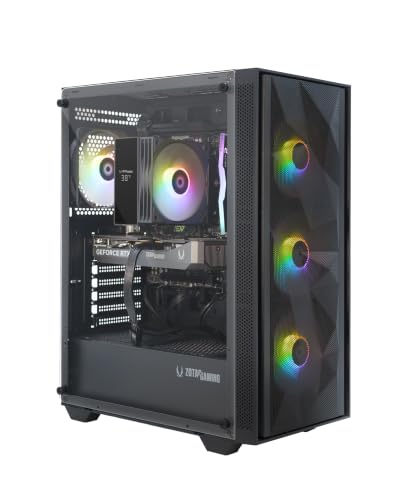
ZOTAC MEK Gaming PC Desktop, Ryzen 5 5500, RTX 5060 — Current GPU, older platform
ZOTAC’s MEK makes an interesting wager: put the newest graphics card in the room, an RTX 5060 with GDDR7 memory, on the mature and affordable Ryzen 5 5500 platform with DDR4 memory, and back it with a 650W 80+ Gold power supply and Wi-Fi 6E. For pure gaming at 1080p and into 1440p, where the graphics card does the heavy lifting, that wager largely pays. The card is current, the supply is certified, and the wireless is the newest in this guide.
The platform’s age is the honest price. DDR4 memory and the 5500’s architecture cap the machine’s ceiling in processor-heavy games and productivity, and the upgrade path narrows sooner than on the DDR5 systems here: a future processor jump means a new platform, not a drop-in chip. Buyers should therefore read this as a graphics-first machine for a defined gaming life, not as the foundation of a decade of upgrades. Within that reading it is a smart, transparent specification from a maker whose graphics heritage is long.
- Processor: AMD Ryzen 5 5500
- Graphics: NVIDIA GeForce RTX 5060 8GB, GDDR7
- Memory: 16GB DDR4
- Storage: 1TB NVMe SSD
- Power supply: 650W 80+ Gold; Wi-Fi 6E; Windows 11 Home
Strengths
- A current-generation graphics card where gaming performance is decided.
- Gold-rated power supply and the guide’s best wireless standard.
- ZOTAC’s graphics-card pedigree behind the system’s core component.
Trade-offs
- The DDR4 platform limits processor upgrade paths compared with DDR5 rivals.
- CPU-heavy games and heavy multitasking will find its ceiling first.
- Sixteen gigabytes is adequate today and merely adequate tomorrow.
Best for: GPU-first gamers wanting current graphics on a mature, affordable platform. Not suited for: buyers planning a long chain of processor and memory upgrades.

Olialia Gaming PC Prebuilt, RTX 3060 Ti, AMD Ryzen 5 5500 — Previous-generation value
The Olialia tower is this guide’s case for the capable previous generation. Its RTX 3060 Ti was the sweetheart of its era for a reason: raw pace that still handles 1080p brilliantly and 1440p respectably, in a panoramic RGB case with a Ryzen 5 5500, 16GB of memory, a 512GB drive and a 600W power supply. For a player whose library leans on slightly older or well-optimised games, that card remains a genuinely enjoyable engine, and the saving against current-generation towers is the entire argument.
Read the limits with equal clarity. The 512GB drive fills quickly in the era of hundred-gigabyte installs, so budget mentally for a second drive. The card’s generation means older upscaling support and a shorter remaining runway of driver attention than the RTX 50-series picks. And Olialia is a smaller name than MSI or iBUYPOWER, so interrogate the warranty terms on the listing with extra care. As a value play for the right library, though, this is the pick that respects a tight budget without insulting it.
- Processor: AMD Ryzen 5 5500
- Graphics: NVIDIA GeForce RTX 3060 Ti
- Memory: 16GB RAM
- Storage: 512GB SSD
- Power supply: 600W; Wi-Fi 6; Windows 11; panoramic RGB tower
Strengths
- The RTX 3060 Ti still delivers joyful 1080p performance per the tier it occupies.
- A showpiece panoramic case for players who want the desk theatre.
- Sensible supporting specification with no single glaring bottleneck.
Trade-offs
- Storage is the smallest here and will need expanding soonest.
- An older graphics generation with a shorter support runway ahead.
- A smaller builder name, so warranty terms deserve close reading.
Best for: value-focused players with established libraries at 1080p. Not suited for: buyers wanting the longest possible support life from a new purchase.

ZYNEEX Prebuilt Gaming Desktop PC, AMD Ryzen 5 5500, GeForce RTX 3050 6GB — Entry point
Every category needs its honest floor, and the ZYNEEX tower is this guide’s. A Ryzen 5 5500, an RTX 3050 in its 6GB form, 16GB of DDR4 memory and a 1TB NVMe drive, with ARGB air cooling and Wi-Fi, aimed at the esports and lighter-gaming audience: the free-to-play giants, older titles, indie games and the school-night catalogue. For those games it is a real gaming PC, not a toy, and its 1TB of storage is more generous than the Olialia’s above it.
The RTX 3050’s position must be stated plainly: it is the entry rung of its generation, suited to 1080p at modest settings, and it will not grow into tomorrow’s demanding releases. Buyers should also examine the listing’s power supply and warranty details carefully, since smaller assemblers vary. What the ZYNEEX offers a first-time buyer is a complete, working starting point whose limits are known in advance, and many gaming lives have begun happily on exactly such a machine before an upgrade, often of the graphics card alone, extended the story.
- Processor: AMD Ryzen 5 5500
- Graphics: NVIDIA GeForce RTX 3050 6GB
- Memory: 16GB DDR4 3200MHz
- Storage: 1TB NVMe SSD
- Cooling and extras: ARGB air cooling, Wi-Fi, tower case
Strengths
- A complete starter specification with generous storage for the tier.
- Sixteen gigabytes of memory keeps everyday multitasking comfortable.
- Well matched to esports, indie and older games at 1080p.
Trade-offs
- The entry-level graphics card caps settings in demanding modern games.
- Power supply specifics need verifying on the listing before ordering.
- The DDR4 platform’s upgrade ceiling arrives sooner than DDR5 systems’.
Best for: first-PC buyers, younger players and esports-focused households. Not suited for: players wanting high settings in the newest releases at 1440p.
How Do the Six Compare Side by Side?
| PC | Graphics card | Memory and storage | Character |
|---|---|---|---|
| Skytech Archangel 5 build | RTX 5060 | 16GB DDR5, 1TB | Balanced and upgrade-ready |
| MSI Codex Z2 | RTX 5070 | 32GB DDR5, 2TB | The step-up powerhouse |
| iBUYPOWER Scale | RTX 4060 | 16GB DDR5, 1TB | The mainstream default |
| ZOTAC MEK | RTX 5060 | 16GB DDR4, 1TB | New card, mature platform |
| Olialia prebuilt | RTX 3060 Ti | 16GB, 512GB | Previous-generation value |
| ZYNEEX prebuilt | RTX 3050 6GB | 16GB DDR4, 1TB | The honest entry point |
The table’s lesson is that graphics generation and platform age move independently. Two machines share a processor yet belong to different leagues; one machine pairs the newest card with the oldest memory standard. Decide which axis your games stress, and the ranking rearranges itself around your answer.
What Is the Old-Graphics-Card Trap, and How Do You Avoid It?
Now the warning this entire category needs. Some prebuilt towers on the wider market pair a brand-new case, fresh lighting and confident gaming language with a graphics card from many generations ago, silicon that was mid-range when some of today’s players were in primary school. The photographs look current because the case is current. The performance is not, and neither is the remaining driver support, the feature set for modern upscaling, or the efficiency. These machines are often priced close enough to honest entry systems to steal their buyers, and the theft is legal, which is precisely why a guide must name the pattern in principle and teach the defence.
The defence is a three-question ritual that works on any listing anywhere. First: what is the exact graphics card model, and which generation does it belong to? If the listing will not say plainly, walk away. Second: does that generation still receive current driver support and modern upscaling features? A quick search of the card’s name alongside the current year answers it. Third: what power supply is fitted, by wattage and certification? Sellers of honest machines answer all three questions proudly, as the six picks in this guide do. Sellers of dressed-up old stock answer with adjectives. Buy the specifications, never the adjectives.
How Do You Set Up and Check a Prebuilt on Its First Day?
Unbox like an auditor. Photograph the packaging before opening, check the case interior for shipping protection that must be removed, and confirm that cables, antennas and any included peripherals are present. On first power, enter the system information and verify the machine you received is the machine you ordered: processor name, memory amount, graphics card and drive capacity, all readable in a minute. Then open the memory settings or a monitoring tool and confirm the memory runs at its rated speed and in dual channel where applicable, since prebuilts occasionally ship with safe default settings that leave performance on the table.
Update deliberately. Let Windows settle, install the current graphics driver from the card maker rather than relying on whatever shipped, and remove the trial software that prebuilts accumulate. Run one demanding game or benchmark you know well and listen: a healthy machine is a low whoosh, while rattles, grinding or a fan that screams at idle are day-one warranty conversations, not character. Register the warranty while the receipt is still on the desk, and keep the box until the return window closes. An hour of this diligence protects years of play.
What Mistakes Do Prebuilt PC Buyers Make Most Often?
Judging by the case is the original sin, and the trap section above explains its cost. The second mistake is buying for the games you played three years ago at the settings you imagine, rather than the releases you actually await. Third, buyers fixate on the processor’s core count while ignoring the graphics card’s generation, when gaming value flows in exactly the opposite direction. Fourth, they forget the monitor: a 1440p powerhouse feeding a tired 1080p screen is money converted into heat, while a modest tower on a good high-refresh display delights daily.
Fifth, many owners never check what arrived against what was ordered, and discover a slower memory configuration or a smaller drive months later when remedies are awkward. Sixth, buyers treat the warranty as paperwork rather than as the product’s second half, failing to register it or to learn what it covers before the first strange noise. Every one of these mistakes is avoidable in an evening of reading, which is the cheapest performance upgrade in this entire category.
How Upgradeable Is a Prebuilt, Really?
It depends on choices the builder made before you arrived, which is why this guide kept asking about slots and standards. The friendly upgrades, in rough order of ease, are storage, memory, and then the graphics card, provided the power supply has headroom and the case has length. The DDR5 systems here offer the longest runway, because their platform still has processors and memory generations ahead of it. The DDR4 systems can accept more memory and storage happily, yet their next processor step is a platform change, and honest buyers price that in from the start.
Before buying any prebuilt, picture its second birthday. Which single upgrade would you most plausibly want then: a second drive, double the memory, or a newer graphics card? Check that the machine in front of you permits that exact upgrade, in slots, watts and centimetres. A prebuilt that passes its owner’s second-birthday test is a platform. One that fails it is a sealed appliance, and should be bought, if at all, at appliance expectations.
How Does a Prebuilt Fit a Household With Several Players?
One strong tower in a shared space changes a household’s arithmetic. It becomes the homework machine in the afternoon, the family media centre in the evening and the gaming rig after both, and a prebuilt’s single warranty covers all those lives without argument. Separate user accounts keep libraries and saves apart, and the mainstream picks here handle that rotation without breaking a sweat. If two players regularly want the machine at once, that is not a specification problem but a scheduling one, and it is usually solved more cheaply by a second, humbler machine for the lighter player than by doubling the main tower’s power. Buy the shared machine for its busiest realistic hour, not its quietest, and it will serve every role you hand it.
What If the Machine Arrives With a Problem?
Stay inside the process and document everything. Photograph faults, note error messages exactly, and contact the builder’s support before opening panels beyond what the manual invites, since the warranty you paid for is the fastest route to a working machine. Most early faults in prebuilts are infant-mortality issues, a drive or stick of memory that was always going to fail, and reputable builders treat their replacement as routine rather than as an accusation. If a seller resists a clear day-one fault, the retailer return window is your second door, which is why this guide keeps advising you to keep the box and buy through listings with sane returns. A problem handled in week one is an anecdote; the same problem discovered in month three is a saga.
How Do You Keep a Prebuilt Healthy Across the Years?
Dust is the slow enemy, and it arrives on a schedule set by your room rather than your habits. Every few months, power down, unplug, and clear the intake filters and fans with short bursts of air, holding fan blades still while you do. Keep the tower off carpet where possible, and let it breathe rather than sealing it in furniture. Software hygiene matters in parallel: one graphics driver source, a tidy startup list, and storage kept below the choke point will preserve the first-day feeling far longer than any tune-up ritual performed in a panic at year three.
Listen to the machine the way you would listen to a car you depend on. A new rattle, a fan that changes pitch, a drive that clicks: each is a sentence in a language worth learning early, while the warranty still translates for free. Owners who treat the first strange sound as information rather than ambience are the ones whose five-year-old prebuilts still run like the brochure promised.
Can These PCs Stream and Record While You Play?
Yes, with the modern graphics cards here doing the heavy lifting through their built-in video encoders, which capture and compress gameplay with only a small cost to frame rates. The mainstream and step-up systems will stream a 1080p broadcast comfortably while playing, and the MSI’s extra memory and storage make it the natural choice for a creator who also keeps local recordings. The entry ZYNEEX can record and stream lighter games, though demanding titles will force a choice between broadcast smoothness and in-game settings. If streaming is a serious ambition rather than a weekend experiment, treat the 32GB machine as your starting point and the others as capable understudies.
Two habits help every system here. Record to a different drive than the game runs from when you can, and test your broadcast settings in a private session before an audience discovers your microphone was muted for an hour. The hardware in this guide will not be the reason a stream fails; settings and rehearsal decide that, as they always have.
What Settings Should You Expect in Today’s Demanding Games?
Without inventing benchmark numbers, the honest shape of the ladder looks like this. The entry RTX 3050 system plays esports and lighter titles at 1080p happily and asks for modest settings in the newest blockbusters. The RTX 3060 Ti and RTX 4060 systems own 1080p, high settings in most games, with upscaling extending them into 1440p. The RTX 5060 systems repeat that story a generation newer, with better efficiency and feature support. The RTX 5070 system is the 1440p high-settings machine of the group, with headroom to spare at 1080p. Upscaling technology blurs these borders helpfully in supported games, which is one more reason the card’s generation, and therefore its upscaling generation, kept appearing throughout this guide.
What About Heat, Power Draw and a Small Room?
A gaming PC is also a small electric heater, and the more powerful the specification, the more faithfully it warms its room during a long session. In a large or ventilated space this is trivia; in a small bedroom in summer it can decide whether the machine is loved or resented. The efficient mid-range picks here, built around the RTX 4060 and 5060, sip comparatively gently and suit shared or compact rooms. The step-up systems reward you with performance and invoice you in warmth. None of this should veto a purchase, but a buyer choosing for a box room should weight efficiency as a genuine feature and give the tower an open, airy position from day one.
Power draw also argues for the certified supplies this guide keeps praising. An efficient supply wastes less electricity as heat inside the case, runs its fan less and treats the household circuit kindly when the machine, monitor and everything else share one wall of sockets. Plug the tower into a surge-protected strip rather than a bare wall socket; it is the cheapest insurance in this entire article.
Should You Consider a Second-Hand Prebuilt Instead?
The used market tempts with specifications that look a tier above this guide at similar money, and sometimes the temptation is honest: a careful previous owner, a recent machine, a verifiable receipt. More often the risks rhyme with the traps already described, an ageing graphics card, an unknown power supply, no warranty, and a storage drive with unknown health. If you shop used, apply the three-question ritual with extra rigour, insist on seeing the machine run a demanding game, and price in the absence of warranty as a real cost. For most readers of a buying guide, the six new systems here, with their support and return windows, remain the calmer path, and calm has value in a purchase meant to deliver fun.
How Quickly Will You Fill the Storage, Honestly?
Modern game installs are measured in tens of gigabytes each, with flagship titles regularly claiming a hundred or more, and an operating system, a few launchers and a capture folder take their share before the first game lands. On a 512GB machine like the Olialia, a realistic library is three to five large games in rotation, which suits a focused player and frustrates a hoarder. A 1TB drive, the guide’s most common size, holds a comfortable working library with room for the next season. The MSI’s 2TB is the fit-and-forget option, the first specification in this guide that genuinely removes storage from your thoughts.
The good news is that storage is the easiest upgrade in any of these towers, provided a spare slot or bay exists, which is why the upgrade audit in our selection process asked about it by name. Buyers of the smaller drives should simply plan the addition as a known future errand rather than a crisis, and everyone should keep the operating system’s drive comfortably below full, since solid-state drives slow as they choke. Your future self, downloading a release-day title at midnight, will be grateful for every gigabyte of foresight.
How Many Processor Cores Does Gaming Actually Use?
Fewer than marketing implies, and more than it used to. Most games lean on a handful of fast cores, which is why the six and eight-core-class processors throughout this guide are well judged for play, and why core count alone should never outrank the graphics card in your decision. Where extra cores earn their keep is everything around the game: streaming software, voice chat, a browser of guides, recording and the background life of a modern PC. The Intel hybrid designs here divide that labour between performance and efficiency cores, while the Ryzen chips spread it evenly; both philosophies work, and the practical difference in a gaming evening is small.
The trap to avoid is the inverse of the graphics trap: a prebuilt boasting a many-core processor paired with a weak or ancient graphics card, sold to buyers who assume cores are the machine’s rank. For gaming they are not. Read every specification in the order this guide does: graphics generation first, power supply second, memory third, processor fourth, and the photographs last of all.
What Does a Good Builder Do That You Cannot See in Photographs?
Competent assembly is invisible, which is why it is undervalued. Cables are routed so they neither block airflow nor rest against fan blades. Memory sticks sit in the correct slots for dual-channel operation. The protective film is off the cooler’s contact plate, the shipping brace supports the graphics card, and the firmware arrives with sane settings rather than whatever the test bench left behind. None of this photographs well, and all of it separates the established names in this guide from a hurried assembler with a screwdriver and a dream.
You can audit some of it on arrival with the checks described earlier, and you can infer the rest from how a builder handles documentation: a real manual, a support page that resolves to actual humans, and warranty terms written in sentences a person can parse. When two machines tie on specification, choose the builder whose invisible work you trust more. Over a five-year ownership, that trust is worth more than a slightly faster memory kit.
What Should Parents Know Before Buying a Prebuilt for a Teenager?
A prebuilt is often the right first gaming PC for a young person precisely because it arrives whole, warranted and supportable by someone other than the household’s most technical member at midnight. Choose for the games actually played in your house, which in most homes means the esports and creative titles that the entry and mainstream picks here run beautifully, rather than for a theoretical future in maximum-settings blockbusters. Favour the DDR5 mainstream systems if the machine must last through several school years of growing ambitions, and treat the warranty registration as a family task completed on day one, with the receipt filed where an adult can find it.
Two practical notes from hard experience. First, agree the desk before the tower arrives: these are full-size cases that need airflow and a stable surface, not a carpeted corner. Second, let the young owner perform the arrival checks in this guide alongside you. Verifying components, updating drivers and registering a warranty are the first lessons of PC ownership, and a prebuilt teaches them more gently than a bare parts list ever could.
Which Ports, Wireless and Small Print Should You Verify?
The unglamorous checklist decides daily happiness. Count the USB ports against your life: headset, keyboard, mouse, controller, external drive and the phone cable that always appears. Note whether a USB Type-C port exists for modern peripherals, whether the front panel’s ports suit a desk’s reach, and whether Wi-Fi is included at a standard your router can exploit, since two picks here differ by generations on exactly that line. Bluetooth, where present, serves controllers and headsets; where absent, a small adapter solves it later. None of these details sells a machine in a photograph, and all of them are felt weekly.
Small print matters in the same quiet way. Confirm which Windows edition ships, whether a keyboard and mouse are included or must be budgeted, and what the return window covers if the machine arrives with a fault. Prebuilt listings sometimes photograph a family of configurations under one page, so select the exact variant deliberately and screenshot your order summary. Five minutes of this pedantry is the difference between the machine you researched and a close relative of it arriving at your door.
Final Recommendation
For most buyers, the Skytech’s balance of current graphics, certified power and modern platform makes it the built PC we would send a friend to buy, with the iBUYPOWER Scale as the equally sensible mainstream alternative from a long-established name. Players with a 1440p screen and a long horizon should stretch to the MSI Codex Z2 and skip years of incremental upgrades. The ZOTAC MEK serves graphics-first buyers, the Olialia serves value hunters with the right library, and the ZYNEEX serves beginners honestly.
Whichever tower you choose, run the three-question ritual on its listing one final time before ordering, verify every component on arrival day, and register the warranty before the first game installs. Take one photograph of the interior before you close the side panel for the first time, too; a year later, when you are planning that first drive or memory upgrade, the picture of how the builder routed everything will be worth more than any diagram you could find online. A prebuilt bought with that much clarity is not a shortcut around knowledge; it is knowledge, applied at the only moment it has to be, and the years of uncomplicated play that follow are the dividend.
Frequently Asked Questions
Is a prebuilt PC worse value than building my own?
Not automatically. Builders buy components at scale and include a whole-system warranty and support, which narrows or erases the gap in many configurations. Building wins on fine control and upgrade purity; prebuilt wins on time, risk and having one throat to choke when something fails. Choose by which currency you have more of.
How much memory does a gaming PC actually need now?
Sixteen gigabytes remains the working standard for gaming alone, and every pick here meets it. Thirty-two gigabytes, as in the MSI, buys comfort for streaming, editing, heavy multitasking and the direction games are travelling. Below sixteen, modern titles begin to suffer in ways no graphics card can fix.
Can I upgrade the graphics card in one of these later?
Usually, provided three conditions hold: the power supply has wattage and connectors to spare, the case fits the new card’s length, and the processor will not hold it back. The Skytech’s 750W Gold supply is the guide’s clearest example of a machine bought with that future in mind.
What should I check in the warranty before buying?
Duration, whether parts and labour are both covered, who pays shipping for repairs, and whether opening the case to add a drive or memory affects coverage. A whole-system warranty is the prebuilt’s reason to exist, so its terms deserve the same scrutiny as the specification.
How long should a built gaming PC last before it feels old?
Bought at the right tier for your screen, four to six years of happy service is a fair expectation, with a storage addition likely along the way and a graphics upgrade possible in the systems with power headroom. Machines bought at the entry tier for today’s light games may feel their limits sooner if your tastes move to demanding releases, which is a change in you as much as in the hardware.
Should I remove the trial software that prebuilts include?
Most of it, yes. Extra antivirus trials, duplicate media players and promotional utilities consume updates, notifications and a little performance, and your machine will feel cleaner without them. Uninstall one batch at a time and keep anything you do not recognise that belongs to the motherboard or graphics utilities until you have confirmed what it does, since a small number of those tools control fans and lighting you will want.
Is it normal for a new prebuilt to be loud on its first day?
Briefly, yes: first boots often run fans hard while updates and indexing work in the background. Loudness that persists at idle after setup, or grinding and rattling at any point, is not normal and deserves a support call inside the return window rather than hopeful patience.
Do these PCs arrive ready to play?
Essentially, yes: Windows is installed and the machine should reach the desktop on first power. Budget an hour for updates, the current graphics driver, your game platforms and the arrival checks described in this guide, and the first evening is still mostly play.
Related Guides
Keep researching the rest of the desk, and keep your order summary and warranty paperwork together in one folder from the day the tower arrives, with our companions: our guide to computers that game and edit video in equal measure, our gaming laptop roundup for players who need portability and our graphics card guide for planning your first upgrade.



[…] productive, deadline-meeting, game-winning routine for years to come, with our companions: our guide to prebuilt gaming PCs and how to judge them, our graphics card roundup for upgrade planning and our gaming laptop picks for creators who must […]