What's inside
- Key Takeaways
- Quick Picks: Ten-Dollar-Class Gaming Mice at a Glance
- How Did We Choose Mice in a Class Full of Clones?
- What Do You Honestly Give Up at This Price?
- The Six Budget Gaming Mice, Reviewed in Detail
- How Can You Spot a Bad Listing in This Class Before Ordering?
- What Should Parents and Gift Buyers Know?
- How Do the Six Compare Side by Side?
- How Do You Get the Most From a Very Cheap Gaming Mouse?
- Which Games Actually Suit This Class of Mouse?
- What Mistakes Do Buyers Make in the Ten-Dollar Class?
- What About Small Hands, Young Players and Left-Handers in This Class?
- Can One of These Mice Double for School and Work?
- Why Does Sensitivity Confuse Beginners, and What Should You Actually Set?
- How Should You Care for a Mouse That Cannot Be Repaired?
- When Should You Upgrade From a Mouse Like These?
- How Do These Mice Handle the Games Students Play Most?
- Why Do So Many of These Mice Look Alike?
- What Happens When a Budget Mouse Becomes a Player’s First Teacher?
- Should You Buy One as a Spare Even If You Own a Better Mouse?
- What Does a Year of Ownership Actually Look Like?
- How Does This Class Fit a Whole Gaming Setup on a Tight Budget?
- Final Recommendation
- Frequently Asked Questions
- Related Guides
As an Amazon Associate I earn from qualifying purchases. This post may contain affiliate links at no extra cost to you.
gizmoverdict.com is reader-supported. When you buy through links on our site, we may earn an affiliate commission.
Where to buy: the six mice below each link to an Amazon listing where you can confirm the current variant, cable length and included extras; in this price class especially, use the listing to check price on Amazon on the day, because budget stock rotates quickly.
Let us be straightforward about what a search for the best gaming mouse for 10 dollars can and cannot deliver. At this end of the market you are choosing among basic wired mice with ordinary sensors, simple switches and lighting that does much of the talking. None of them will track like an esports mouse, none will survive a decade of ranked play, and none should be bought by a competitive player as a main instrument. What they can do, genuinely, is give a student, a young player or a light gamer a mouse that feels like gaming gear rather than office surplus: shaped for a hand at play, with a few extra buttons, adjustable sensitivity and enough responsiveness for casual shooters, builders, MOBAs and the long tail of older games that most of us actually revisit.
This guide treats that bargain honestly. Each pick below is described with its limits attached, because a ten-dollar mouse bought with clear eyes can be a satisfying purchase, while the same mouse bought on inflated promises becomes e-waste with RGB. Two of the six come from Redragon, the one budget brand in this class with a real name, real software and a reputation to protect. The other four are generic designs sold under rotating labels, chosen because their particular mix of shape, buttons and lighting serves a recognisable kind of buyer. Buy the one whose compromises match your life, and buy it from a listing you could return to without a quarrel if the individual unit disappoints.
Key Takeaways
- At the ten-dollar mark every mouse here is wired, and that is a virtue: the money goes into the shell and sensor instead of a battery and radio.
- Sensors in this class are ordinary, so expect honest tracking at modest sensitivities rather than flawless performance during violent flicks.
- Redragon’s two entries are the safest buys because the brand maintains real software and consistent model quality across batches.
- Lighting is the cheapest feature to add, which is why these mice glow so enthusiastically; judge the shape and buttons, not the light show.
- Plan on this being a first mouse, a spare or a travel mouse, and it will delight you; demand a tournament career from it and it cannot comply.
Quick Picks: Ten-Dollar-Class Gaming Mice at a Glance
| Pick | Badge | Why it made the cut |
|---|---|---|
| Redragon M602 Wired RGB Gaming Mouse | Safest buy in the class | A named brand with proper remapping software, nine programmable buttons and a shape that suits most hands. |
| Redragon M612 Wired RGB Optical Gaming Mouse | Newer Redragon design | Higher sensitivity ceiling, macro support through real software and an ergonomic shell for longer casual sessions. |
| BENGOO Gaming Mouse Wired with RGB Backlit | Familiar budget favourite | A long-running generic design with six buttons and simple plug-and-play manners for a first gaming setup. |
| VersionTECH. Wired Gaming Mouse | Light-show pick | Seven-colour lighting and an easygoing ergonomic shape for younger players who want the full glowing-desk effect. |
| LeadsaiL Gaming Mouse Wired RGB | Button count on a budget | Eight programmable buttons, the most in this line-up, for casual MMO and MOBA players binding extra actions. |
| RGB Light Up Wired Gaming Mouse for Computer | Quiet-click option | Softer, quieter clicks for shared rooms, dorms and late-night sessions where every click carries. |
How Did We Choose Mice in a Class Full of Clones?
The bottom of the mouse market is a hall of mirrors: the same few factory shells appear under dozens of brand names, sometimes in the same week. Our first job was separating products with an accountable maker from pure label exercises. Redragon anchors the list because it publishes software, keeps model numbers stable and has sold these designs long enough for their failure modes to be public knowledge. For the generic picks we favoured designs with long sales histories of their own, since a shell that has survived years of budget buyers has at least passed the market’s roughest durability test.
The second filter was feature honesty. At this level, adjustable sensitivity steps, a braided-feeling or at least untangled-prone cable, and buttons that can be reassigned matter more than any headline. We also looked for shapes that a teenager or adult could hold in more than one grip, because a first gaming mouse often serves a whole household. Software claims were treated with suspicion: where a listing promised professional suites, we describe the reality in the review, which is usually a small utility for sensitivity, lighting and basic macros, or none at all beyond the operating system’s own settings.
Finally, we applied the classroom test. Imagine this mouse in a school bag, a dorm drawer or the family PC corner, used by someone whose alternative was a worn office mouse. Would it feel like an upgrade every day for a school year? The six below pass that test. Many rivals did not, usually because their shells were shaped as marketing sculptures rather than tools, with edges and wings that look fast in photographs and ache by the second hour.
What Do You Honestly Give Up at This Price?
The sensor comes first in the confession. These are entry-level optical units that track reliably at the modest sensitivities most casual players use, and begin to show their limits when you whip the mouse across the pad at low sensitivity the way competitive shooter players do. Fast spins can lose the plot, and very high sensitivity settings amplify jitter rather than skill. For the games this class serves, slower-paced shooters, strategy, builders, racing with a wheel substitute and older titles, the tracking is adequate in the true sense of the word: it suffices, without delighting.
Switches come second. The main buttons in this class use simple mechanical units with modest rated lifespans, and they feel it: a slightly hollow, springy click that is perfectly serviceable and noticeably less crisp than the switches in mice costing several times more. Expect a good one to serve a few school years of daily play, not a decade. Cables are fixed and cannot be replaced when they fray, feet are thin, and coatings are basic plastic that will polish smooth where your palm rests. None of this is scandalous at the price; all of it should be known before you buy.
Comfort has a time dimension in this class too. Several budget shells feel fine for twenty minutes and reveal a sharp seam, a narrow waist or an awkwardly placed ridge by the second hour. That is why the reviews below keep returning to session length, and why a mouse that suits quick homework-and-a-game evenings may not suit a weekend campaign. If your sessions run long, favour the fuller Redragon shapes; if your play comes in short, bright bursts, any shell here will treat you kindly. Hands also grow, in the case of younger players, literally during the mouse’s service life, so a shape that fits in September may pinch by spring, through no fault of its own.
Software is the third compromise, and the widest gap in the class. Redragon provides genuine utilities for its mice, with remapping and macro recording that actually work. The generic picks range from tiny downloadable tools to nothing at all, meaning sensitivity changes happen on a hardware button and lighting cycles through its preset patterns whether you love them or not. If you dream of per-game profiles, look upmarket. If you want to plug in and play, this class was designed by people who agree with you.
The Six Budget Gaming Mice, Reviewed in Detail

Redragon M602 Wired RGB Gaming Mouse — Safest buy in the class
If a nervous buyer forced us to pick exactly one mouse from this entire guide, the M602 is the one we would hand over. Redragon has sold this design for years, and the Griffin, as it is also known, carries the marks of a product a real company maintains: nine programmable buttons, sensitivity adjustable up to 7,200 DPI, and proper downloadable software for remapping keys and recording macros. The shell is a comfortable right-handed shape with textured sides, sized for the medium hands of the students and casual players who form its natural audience.
Owners who keep this mouse for years tend to describe the same small satisfactions: the wheel still notches cleanly, the side buttons never wandered, and the software profile they set once simply persisted. There is also a thriving second life for retired M602s as the mouse attached to a spare PC, a media centre or a relative’s upgraded hand-me-down, because a known, working wired mouse is a permanently useful object in any house with more than one screen.
In daily use it simply behaves. The sensor tracks steadily at the settings casual games need, the clicks are firm enough to feel deliberate, and the lighting glows through the shell in the cheerful way this class demands. Its limits are the class limits: fast low-sensitivity spins in a shooter will expose the sensor, and the switches will not outlive a flagship’s. But nothing about the M602 feels like a trick, and that alone separates it from most of its price neighbours. For a first gaming mouse that a parent can buy without a research project, this is the answer.
- Connection: wired USB, fixed cable
- Sensitivity: adjustable up to 7,200 DPI
- Buttons: nine programmable, with Redragon software support
- Lighting: RGB backlighting with effects
- Shell: right-handed ergonomic, medium size
Strengths
- A genuine brand behind the product, with working software and stable quality.
- Nine programmable buttons give casual MMO players real binding room.
- The shape suits a wide range of hand sizes without sharp edges.
Trade-offs
- The sensor shows its class during very fast, wide flicks in shooters.
- Switch lifespan is ordinary; plan on school years, not decades.
- The fixed cable cannot be swapped when it eventually frays.
Best for: first-time gaming mouse buyers, students and anyone wanting the lowest-risk purchase in this bracket. Not suited for: competitive shooter players or buyers wanting wireless freedom.

Redragon M612 Wired RGB Optical Gaming Mouse — Newer Redragon design
The M612 Predator is Redragon’s more recent take on the same assignment, with a sensitivity ceiling of 8,000 DPI, remapping software with macro support, and an ergonomic shell that leans a little more sculpted than the M602. On paper the two Redragons are siblings, and in the hand they feel like it: same dependable sensor behaviour at casual settings, same honest clicks, same cheerful lighting. The M612’s shape fills the palm a touch more, which players with larger hands or a relaxed grip tend to prefer during longer sessions.
Choosing between the two Redragons is mostly about shape preference and which listing looks healthier on the day you buy, since budget stock comes and goes. Both give you the class’s best software story, letting you rebind buttons and store macros through a real utility instead of button-press rituals. Treat the headline sensitivity as headroom you will never use; set a modest stage, turn off any pointer acceleration in your system, and the M612 will play far above the reputation of its price class in the games it was built for.
- Connection: wired USB, fixed cable
- Sensitivity: up to 8,000 DPI, adjustable in stages
- Buttons: remappable, with macro support in Redragon software
- Lighting: RGB backlighting
- Shell: right-handed ergonomic, slightly fuller than the M602
Strengths
- Real software for remapping and macros, rare and valuable in this class.
- A fuller ergonomic shell that larger hands can rest into.
- Consistent build from a brand that answers for its products.
Trade-offs
- Tracking remains entry-class under violent low-sensitivity movement.
- The sculpted shape is right-handed only, with no left-hand option.
- Lighting effects are plentiful but customisation stays basic.
Best for: casual players with medium-to-large hands who want software control without leaving the bracket. Not suited for: left-handers or esports aspirants needing flawless spin-out-proof tracking.

BENGOO Gaming Mouse Wired with RGB Backlit — Familiar budget favourite
The BENGOO wired mouse is one of those generic designs that has quietly sold for years, and its survival tells you the shape works. Six programmable buttons, four sensitivity stages reaching 3,600 DPI, and an ergonomic body with breathing RGB light: the formula is simple, and for a first mouse or a family PC it is enough. It asks nothing of its owner beyond a free USB port, which is precisely the relationship many buyers in this class want with their hardware.
Set expectations where they belong. The sensitivity ceiling is the lowest among our named-brand-free picks, which matters not at all for the strategy, building and casual action games it will mostly play, and matters a great deal if its owner graduates to competitive shooters, at which point a graduation present of a better mouse is the correct response. Programmability here means basic reassignment where software is offered at all; many owners will never install anything and will lose nothing by it. As a starter mouse for a younger player, its sturdiness and simplicity are the point.
- Connection: wired USB, plug and play
- Sensitivity: four stages, up to 3,600 DPI
- Buttons: six programmable
- Lighting: RGB backlight with breathing effect
- Shell: right-handed ergonomic
Strengths
- A proven, comfortable shape with a long sales history behind it.
- True plug-and-play manners suit shared family computers.
- Six buttons cover the essentials for casual play without confusion.
Trade-offs
- The 3,600 DPI ceiling and basic sensor cap its ambitions early.
- Software support is minimal compared with the Redragon picks.
- Build materials feel plainly budget under close inspection.
Best for: younger players, family PCs and anyone upgrading from a bundled office mouse. Not suited for: fast-paced competitive gaming or players who love configuring profiles.
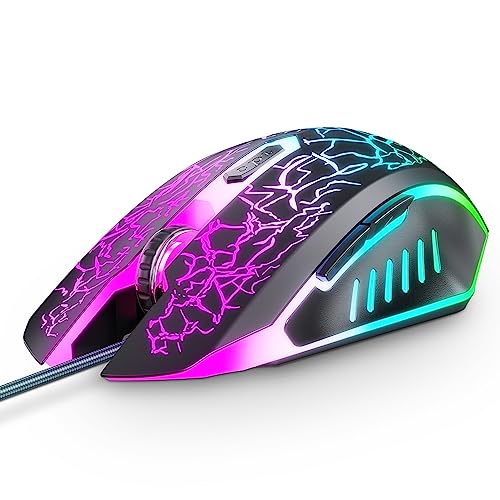
VersionTECH. Wired Gaming Mouse — Light-show pick
VersionTECH’s wired mouse leans into the pageantry of the class: seven changing LED colours wash through the shell, the shape is a relaxed ergonomic curve, and six programmable buttons with four adjustable sensitivity stages handle the gaming side of the bargain. For a younger player setting up a first desk, the theatre is not a frivolous extra; it is half the joy of the purchase, and this mouse delivers it reliably while remaining a competent pointing device underneath.
The substance is standard for the bracket, which we mean as description rather than insult. Tracking is steady at casual sensitivities, clicks are serviceable, and the whole thing runs happily with no software at all, cycling its lights by button press. What it will not do is grow with an ambitious player: the sensor, switches and fixed cable are all starter-grade components chosen to hit the class price. Buy it as the glowing first chapter of someone’s gaming story and it will play its part beautifully.
- Connection: wired USB
- Sensitivity: four adjustable stages
- Buttons: six programmable
- Lighting: seven-colour LED cycle
- Shell: right-handed ergonomic, relaxed curve
Strengths
- The most theatrical lighting in this guide, with no software needed.
- A gentle ergonomic shape that smaller hands find welcoming.
- Simple hardware-button control suits owners who never install utilities.
Trade-offs
- Sensor and switch grades are firmly entry-level.
- No meaningful software customisation for profiles or macros.
- The light cannot be fully tamed for a dark, serious desk setup.
Best for: younger players and gift buyers who want maximum glow with honest basic performance. Not suited for: competitive players or minimalists who want lights-off hardware.
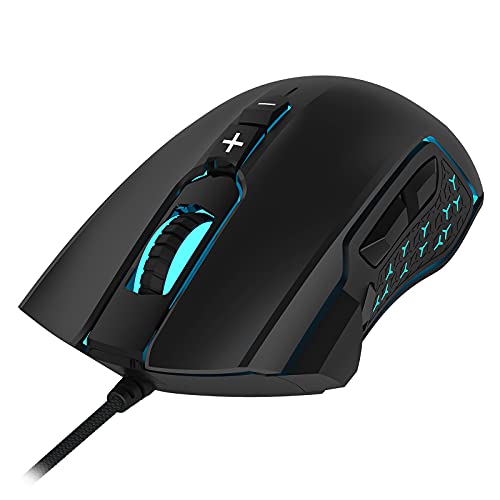
LeadsaiL Gaming Mouse Wired RGB — Button count on a budget
LeadsaiL’s entry sells one idea above all: buttons. Eight programmable inputs on an ergonomic wired shell, with sensitivity reaching 7,200 DPI and a six-colour backlight, aimed at the casual MMO, MOBA and strategy players for whom extra bindings are worth more than sensor pedigree. In those games the pitch lands. An extra pair of reachable actions, bound to items or abilities, genuinely changes how a session flows, and this is the cheapest seat in this guide from which to discover whether you are a buttons person.
The compromises ride along visibly. The sensor is a generic unit that behaves at moderate speeds and protests at extremes, the software story is thin compared with Redragon’s, and the shell’s ergonomics are drawn for right hands only. Durability expectations should follow the class script: treat it kindly and it will serve a good stretch of casual play; treat it as a tournament tool and it will file its resignation early. For the player it targets, though, the arithmetic of eight buttons at this level is hard to argue with.
- Connection: wired USB
- Sensitivity: up to 7,200 DPI
- Buttons: eight programmable
- Lighting: six-colour RGB backlight
- Shell: right-handed ergonomic
Strengths
- Eight buttons open binding layouts the six-button mice cannot offer.
- A sensitivity range wide enough for both strategy and casual action play.
- The ergonomic shell stays comfortable through long, slower sessions.
Trade-offs
- Generic sensor behaviour under fast flicks, as with most of this class.
- Software support is basic; expect essentials, not ecosystems.
- Right-handed shape only, with a fixed, non-replaceable cable.
Best for: casual MMO, MOBA and strategy players who bind many actions. Not suited for: shooter specialists or left-handed players.

RGB Light Up Wired Gaming Mouse for Computer — Quiet-click option
The quiet one of the group. This generic wired mouse pairs its seven-colour backlight with softer, quieter main clicks, sensitivity adjustable through four stages up to 3,200 DPI, and a straightforward ergonomic shell. That muted click is a real feature in the places budget mice actually live: dorm rooms with sleeping roommates, bedrooms separated from the living room by one thin wall, and late-night sessions where a sharp click-clatter travels further than any game sound through headphones.
Everything else follows the class pattern honestly. The sensor is a basic unit for everyday and light gaming movement, the build is light plastic, and there is no software ecosystem waiting to be explored. Its durability pitch rests on simplicity: fewer claims, fewer disappointments. If your buying question is less about performance ceilings and more about peace in a shared home, this is the pick that understood the assignment, and it still glows like a gaming mouse should when the lights go down.
- Connection: wired USB
- Sensitivity: four stages, up to 3,200 DPI
- Clicks: softened, quieter main buttons
- Lighting: seven-colour backlight
- Shell: ergonomic, light plastic build
Strengths
- Quieter clicks respect roommates, family and thin walls.
- Simple plug-and-play operation with lighting controlled on the mouse.
- A sensible spare or travel mouse that nobody will mourn if borrowed.
Trade-offs
- The lowest sensitivity ceiling here limits fast-paced ambitions.
- No brand software, no profiles, no macro support to speak of.
- Light plastic construction feels exactly as budget as it is.
Best for: dorm rooms, shared homes and late-night casual players. Not suited for: competitive gaming or buyers wanting deep customisation.
How Can You Spot a Bad Listing in This Class Before Ordering?
Budget listings reward a suspicious reader. Start with the photographs: if every image is a render glowing in a dark room and none shows the mouse beside a hand or a keyboard, the seller is selling light, not hardware. Check whether the listing states a sensitivity range, a button count and a cable length in plain text; listings that hide those basics behind adjectives usually hide disappointing basics. Read the most critical recent reviews rather than the average, and look for repeated complaints about the same failure, a wheel that dies in a month or a cable that splits at the shell, because patterns in cheap products are destiny in a way single complaints are not.
Brand behaviour is the next tell. A seller who maintains one storefront, consistent model names and downloadable software is making promises it can be held to. A seller whose name is a fresh scramble of capital letters, selling forty unrelated products launched last month, is making none. That distinction, more than any single specification, is why this guide leans on Redragon for its safest picks and treats the generics as trait purchases: buy the generic for its glow, its buttons or its quiet click, enjoy it for what it is, and keep your expectations filed under the price you paid.
Finally, check the return route before you need it. Budget mice are the definition of a purchase where an easy return matters more than a small saving, because unit-to-unit variation is the tax this class pays for its prices. Order from the listing, keep the packaging for a fortnight, and test the wheel and every button on day one rather than discovering a dead side key during the match that finally needed it.
What Should Parents and Gift Buyers Know?
A gaming mouse is one of the safest technology gifts in this bracket, because it works with the computer the household already owns and asks for no subscriptions, accounts or parental configuration marathons. Choose by the child’s hand and habits rather than by the box art. A younger child will love the VersionTECH’s colour cycle and forgive its basic sensor everything; a teenager edging toward competitive games deserves a Redragon, whose software and tracking will not embarrass them in front of friends. If the mouse is for a shared family computer, the BENGOO’s plug-and-play simplicity avoids the profile and driver conversations entirely.
Set the mouse up together if you can. Five shared minutes turning off pointer acceleration, picking a sensitivity and binding one side button to something useful teaches a young player that hardware responds to care, and it prevents the most common budget-mouse disappointment, which is not the hardware at all but a wild factory sensitivity setting that makes every game feel broken. Wrap the pad suggestion into the gift if the desk currently offers only bare wood or a glossy surface; the pad will quietly double the mouse’s competence.
How Do the Six Compare Side by Side?
| Mouse | Maker accountability | Buttons | Character |
|---|---|---|---|
| Redragon M602 | Named brand, real software | 9 | The safe default |
| Redragon M612 | Named brand, real software | Remappable set | The fuller-shaped sibling |
| BENGOO wired | Generic, long-running design | 6 | The simple starter |
| VersionTECH wired | Generic | 6 | The light show |
| LeadsaiL wired | Generic | 8 | The binding bargain |
| RGB light-up wired | Generic | Standard set | The quiet neighbour |
Two questions sort this table faster than any specification. Do you want a company standing behind the mouse, with software to match? Then your shortlist is the two Redragons. Or do you want one specific trait, buttons, glow or quiet clicks, as cheaply as possible? Then the generics divide neatly by that trait, and each serves its niche without pretending to be more.
How Do You Get the Most From a Very Cheap Gaming Mouse?
Setup choices matter more here than on a flagship, because you are compensating for ordinary hardware with good habits. Start with your operating system’s pointer settings: turn off acceleration or enhance-pointer-precision options so movement stays predictable, then choose one sensitivity stage on the mouse and live with it for a week. Casual players often set these mice far too sensitive, chasing the big number on the box, and then blame the sensor for aim that was really just an unusable setting. A modest sensitivity on a large surface is the cheapest accuracy upgrade in gaming, and it costs nothing.
Give the mouse a decent surface. A plain cloth pad, even an inexpensive one, gives these basic sensors a consistent texture to read, while a glossy desk or glass top will defeat them entirely. Keep the cable slack and untangled so it does not tug during play, and wipe the sensor lens monthly with a dry cloth, since budget mice in real homes collect dust and biscuit crumbs at heroic rates. Finally, store the spare-mouse mindset: if this mouse serves a school year of happy play and then becomes the travel spare when a better one arrives, it has fully earned its place in the house.
Which Games Actually Suit This Class of Mouse?
More than the marketing of expensive mice would have you believe. Building and sandbox games place no strain on a sensor at all. Strategy and MOBA titles ask for accuracy at moderate speeds, well inside these mice’s abilities, and their extra buttons earn their keep there. Story-driven action games, platformers, racing titles played with keys or a pad, and the enormous back catalogue of older shooters all play happily. The honest frontier is the modern competitive shooter played seriously, where rapid low-sensitivity flicks expose basic sensors and where opponents’ hardware genuinely outclasses this class. A casual evening in such a game is still fun; a ranked climb is where we would steer you upmarket.
There is also a social tier worth naming: the family or dorm tournament, where everyone plays on similar humble hardware and the playing field is gloriously level. In that arena the ten-dollar mouse is not a compromise at all. It is the standard equipment, and the player who practised most, not the one who spent most, takes the evening.
What Mistakes Do Buyers Make in the Ten-Dollar Class?
The first is believing the light. These mice glow like premium products because LEDs are cheap, and buyers routinely mistake illumination for performance. The second is believing the sensitivity number, which in this class is a ceiling measured generously and a setting no human should use. Third, buyers skip the brand question entirely and pick whichever clone is cheapest that day, forfeiting the software and consistency that the Redragon picks provide for the same money. Fourth, they demand wireless at this level elsewhere in the market, ending with radios and batteries so poor that a cable would have been a blessing; every pick in this guide is wired for good reason.
Fifth, and most human, is the expectation error in both directions. Some buyers expect a toy and are pleasantly surprised by a competent tool. Others expect a flagship in disguise and feel cheated by an honest budget product. Read the trade-offs in each review above, buy the mouse whose limits you can live with at the speed you actually play, and this class will treat you fairly.
What About Small Hands, Young Players and Left-Handers in This Class?
Small hands fare better in this class than you might fear, because budget shells are rarely enormous. The BENGOO and VersionTECH shapes suit younger and smaller hands comfortably, and their light builds ask little of small muscles during long creative-game sessions. Parents should watch for the stretch test: if a child’s index finger barely reaches the main button’s sweet spot, the shell is too long, and the child will develop a splayed grip that a smaller mouse would have prevented. Most of these mice will be outgrown in hand size before they wear out in switches, which is the natural order of things and another reason the bracket makes sense for the young.
Left-handed players face the class’s bluntest limit: all six picks wear right-handed ergonomic shells, because truly symmetrical designs with mirrored buttons cost more to make than this bracket allows. A left-handed casual player can still use any of them in the right hand, as many do, or browse our ambidextrous guide for the honest alternatives when the budget stretches. We flag this rather than papering over it, because a left-handed child given a sculpted right-handed mouse as a gaming gift deserves at least a household conversation about which hand they actually play with.
Can One of These Mice Double for School and Work?
Easily, and in many homes that double duty is the entire point. Every pick here types, browses and edits documents as competently as the office mouse it replaces, with the side buttons happily reassigned, where software allows, to back, forward or copy duties. The lighting is the only office liability, and it is a small one: most of these mice let you cycle to a single colour or a breathing pattern with a button press, and a mouse glowing gently at a homework desk bothers nobody. For a student whose laptop bag is the real desk, the wired design is even a security feature of sorts, since there is no receiver to lose in a library and no battery to die before a deadline.
Durability in transit is the fair question. These shells are light plastic and will not love being crushed under textbooks, so a small pouch or a dedicated laptop-bag pocket is a worthwhile habit. Given that minimal courtesy, a budget mouse can commute for a school year and come home each evening to game, which is a workload many premium mice never face.
Why Does Sensitivity Confuse Beginners, and What Should You Actually Set?
Sensitivity marketing trains beginners to equate a bigger number with a better mouse, and the habit ruins more first setups than any hardware flaw. The number on these boxes is the highest setting available, not a recommendation; playing at it makes the cursor teleport at a touch and turns careful aiming into weather. Real control lives at the low end of the range, where a full arm movement produces a deliberate turn and small corrections stay small. Pick the second-lowest stage on any mouse in this guide, play for several days, and adjust only if turning feels like wading. Your scores will deliver the verdict.
The related setting hiding in your operating system deserves the same attention. Pointer acceleration makes the cursor travel further when you move faster, which sounds helpful and destroys consistency, because the same hand movement lands in different places depending on its speed. Every aiming skill you build depends on one movement always meaning one distance. Turn acceleration off, keep the system pointer speed at its neutral middle, and let the mouse’s own stages do the tuning. Beginners who make these two changes often report that their cheap mouse suddenly feels twice as expensive, and they are not imagining it.
How Should You Care for a Mouse That Cannot Be Repaired?
Nothing in this class is designed to be opened, so care is prevention. The cable is the lifeline: never wrap it tightly around the mouse for storage, never let it pinch under a monitor stand, and give it a gentle loop of slack where it leaves the shell, because that junction is where budget cables die. Keep the mouse out of the blast radius of drinks, and if a spill happens, unplug first and let it dry fully before judging it. A dry cloth over the shell weekly and a puff of air at the sensor keep tracking honest, and a pad that gets washed occasionally stops feeding the mouse a diet of dust.
When a switch finally begins to misbehave, resist the internet’s solvent rituals; at this level the honest options are warranty, return window or replacement, and your time is worth more than a rescue attempt on a mouse in this bracket. This disposability is the class’s genuine moral cost, and we will not pretend otherwise. It is also why the named-brand picks matter: a company with a warranty process and consistent batches wastes less of your money and less of the planet’s patience than an anonymous clone lottery.
When Should You Upgrade From a Mouse Like These?
Upgrade when your games outgrow the sensor, which you will feel as missed fast shots you know your hand made correctly. Upgrade when a switch begins to miss or double-fire, since repair is not economical at this level. Upgrade when your bindings outnumber the buttons, or when a title you love deserves a wheel or a shape these shells cannot offer. Until one of those moments arrives, resist the drip of small dissatisfactions that marketing cultivates; a working budget mouse plus a shelf of games is a better gaming life than a flagship mouse plus an empty library.
How Do These Mice Handle the Games Students Play Most?
Think about the actual catalogue of a school-night gamer. Creative building games reward buttons for inventory and forgive any sensor. Social deduction and party titles barely use the mouse at all. The big free shooters are the stress test, and here honesty demands a split verdict: at the sensitivity most casual players choose, with the mouse moving in short, quick corrections, even these basic sensors keep up and the games feel fine. The failures appear in one specific motion, the long, fast, low-sensitivity sweep across the whole pad, where entry sensors can lose the surface and the view stutters. Players who learn on these mice naturally adopt a higher-sensitivity, wrist-led style that sidesteps the weakness entirely, and many keep that style happily for years.
Racing and sports titles played with mouse steering, older role-playing games with click-to-move, and point-and-click adventures all sit comfortably inside this class’s competence, as does the entire emulation and retro scene, where the games were designed around hardware far cruder than anything in this guide. The ten-dollar mouse is only truly out of its depth in one arena, and it is an arena most of its owners visit as spectators rather than competitors.
Why Do So Many of These Mice Look Alike?
Because, underneath the labels, many of them are cousins. A handful of factories produce shells and circuit boards that smaller brands then finish with their own colours, lighting patterns and packaging. This is not inherently a scandal; shared platforms are how the price exists at all, and a proven shared shell beats an original bad one. It does mean your real choice among the generics is about the finishing details, the button layout, the lighting behaviour, the click volume and the seller standing behind the listing, rather than about deep engineering differences that are not there. Redragon sits slightly apart from this pattern, designing and supporting its own models at scale, which is why its two mice read as products while several rivals read as variations.
For the buyer, the practical consequence is liberating. Stop hunting for the one magical clone that secretly contains flagship parts; it does not exist. Choose the trait you care about, buy from a listing with a sane return route, and spend the saved research hours playing. In this class, decisiveness is worth more than optimisation.
What Happens When a Budget Mouse Becomes a Player’s First Teacher?
There is an underappreciated virtue in learning on ordinary equipment. A young player whose mouse has a modest sensor learns to aim with positioning and patience rather than relying on hardware forgiveness, the same way a learner driver in a modest car learns smoothness that a powerful car would mask. Coaches in school esports clubs, who equip whole rooms at this level, report that the students’ fundamentals, crosshair placement, movement discipline and communication, develop identically on budget mice; the hardware only becomes the story when a player reaches regional competition, by which time the club, a sponsor or a birthday usually intervenes.
Parents can use that arc wisely. Start with a pick from this guide, watch whether the hobby sticks for a season, and let the upgrade be earned and therefore appreciated. A teenager who has gamed happily for a year on a Redragon understands exactly what a better sensor and lighter shell will give them, and will choose their upgrade with a connoisseur’s eye. A flagship bought on day one teaches none of that, and risks becoming expensive furniture in a drawer by half-term.
Should You Buy One as a Spare Even If You Own a Better Mouse?
There is a grown-up case for exactly that. A wired budget mouse in the drawer is insurance against the evening your flagship’s battery dies mid-session, your wireless receiver vanishes into a sofa, or a visiting nephew wants to join on the spare laptop. It needs no charging, no pairing and no software, and it asks for no anxiety when borrowed, spilled near or packed for a trip. Several of the picks here, the quiet light-up model especially, make better travel mice than the flagships they understudy for, because losing one is an anecdote rather than a financial event. Households that game in more than one room will find a second, humble mouse ends more arguments than any other purchase in this guide.
What Does a Year of Ownership Actually Look Like?
Month one is delight: the glow, the shape, the first bound side button. By month three the lighting has become furniture and the mouse is judged purely as a tool, which is when the Redragon owners quietly appreciate their software and the generic owners discover whether their shell’s edges suit a long session. Around month six, in a busy household, the cable shows its first kink memory and the feet have polished to a faster glide that many players actually prefer. By month twelve a well-treated pick here is a familiar, slightly shiny companion with every button’s personality known to its owner’s fingers.
That arc is worth stating because it reframes the purchase. You are not buying a failed flagship; you are renting a year or two of perfectly serviceable play for the price of a pizza, with the option to promote the mouse to travel duty when its successor arrives. Judged on that honest contract, the best of this class are not cheap mice at all. They are correctly priced ones.
How Does This Class Fit a Whole Gaming Setup on a Tight Budget?
Zoom out from the mouse and the budgeting logic of this guide becomes clearer. A young player’s first setup needs a machine that runs the games, a screen, sound, a keyboard, a mouse and a surface, and every pound or dollar overspent on one item is taken from another. The mouse is the correct place to economise first, because the gap between a competent budget mouse and a flagship is smaller, in lived experience, than the gap between a decent pad and a bare desk, or between headphones you can wear for two hours and a headset that hurts by the second match. Buy the mouse from this list, protect it with a pad, and let the savings flow to the parts of the setup whose quality you will feel every minute. When money loosens later, the mouse is also the easiest component to upgrade without disturbing anything else, which makes it the natural first chapter and the natural first revision of any growing setup.
Final Recommendation
Buy the Redragon M602 if you want one safe answer, or the M612 if your hands are larger and you like its fuller shape; both bring a real brand and real software to a class that usually offers neither. Choose the LeadsaiL if bindings matter most, the VersionTECH if a young player’s joy in the glow matters most, the BENGOO for simple family duty, and the quiet light-up model if your walls are thin and your nights are late.
Keep the box and the receipt for the first fortnight, test every button and the wheel on the first evening, and let the mouse prove itself in the games and the rooms it was actually bought for, because a budget mouse judged fairly, in its real life rather than against a flagship’s highlight reel, usually earns a warmer verdict than its price led anyone to expect. A ten-dollar gaming mouse will not make anyone an esports story, and this guide has not pretended otherwise at any point. What it can do is put a shaped, glowing, button-carrying tool into the hands of a student counting coins or a kid opening a birthday box, and let the games themselves supply the magic, which, on the right evening with the right friends, they reliably do.
Frequently Asked Questions
Can a mouse in this class really play shooters?
Casually, yes. It will handle slower-paced and older shooters and the story modes of modern ones without complaint. Serious competitive play at low sensitivity is where basic sensors lose tracking during fast flicks, and that is the honest boundary of the class.
Why are all six of these mice wired?
Because at this budget a cable is the reliable choice. Money spent on a cheap radio and battery is money taken from the sensor and shell, and bargain wireless mice tend to stutter, sleep awkwardly or die young. Wired keeps every cent working for the parts you touch.
Is the lighting just decoration?
Mostly, and there is no shame in enjoying it. Lighting does not improve tracking or clicks. It does make a first setup feel like a gaming desk rather than homework, which for many buyers in this class is a legitimate part of the purchase.
How long should I expect one of these mice to last?
With ordinary care, a school year or two of daily casual play is a fair expectation, and the Redragon picks may stretch beyond that. Switches and cables are the usual failure points. Treat it as a starter or spare from day one and its lifespan will feel generous.
My budget mouse feels too sensitive in games. What should I change first?
Lower the stage on the mouse itself before touching any in-game slider, then confirm pointer acceleration is off in your system settings. Most budget mice ship on a middle or high stage that flatters the box numbers and sabotages aim. One stage down, plus a week of patience while your hand recalibrates, fixes the great majority of too-twitchy complaints without spending anything.
Does a budget mouse work on a laptop as well as a desktop?
Yes, identically, since a wired USB mouse makes no distinction between the two. Laptop players should mind the cable length on small desks and may prefer the compact-feeling BENGOO or VersionTECH shapes beside a notebook. The mouse will also out-perform the trackpad for every game in this guide’s scope, which is usually the real reason for the purchase.
Are these mice safe for a child’s first computer?
Yes. They are ordinary USB peripherals with no accounts, no subscriptions and no software that must be installed. A parent can set the lighting and sensitivity once, or simply plug the mouse in and let it work. The main supervision a young player needs concerns the games, not the mouse.
What is the single best upgrade after buying one?
A large, plain mouse pad. It improves the tracking of these basic sensors more than any setting can, gives your arm room for lower, steadier sensitivity, and will still be serving you when you eventually upgrade the mouse itself.
Related Guides
When the budget grows, or when a player in the house starts asking the questions this class cannot answer, these companions chart the way up: our full guide to the best gaming mice at every level, our ambidextrous mouse roundup for either-handed players and our guide to mice that work both wired and wireless.
Related guides
- Best Enterprise SATA SSDs: Endurance Classes, Power-Loss Protection and Fleet Sense
- Best Color Product Label Printers: Six Desktop Machines for Short-Run Product Labels
- Best Printers for Dental Practices
- Best 1440p 165Hz Monitors: One Native 165Hz Pick, Three 180Hz Upgrades, an Overclock Headline and a 160Hz Ultrawide



[…] Players building out a full symmetrical setup may also enjoy our companion reading: our guide to lightweight esports mice, our roundup of wireless gaming mice and our advice on choosing a mouse pad for large sweeping aim. […]