What's inside
- Key Takeaways
- Quick Picks
- How Did We Choose These Six Cards?
- What Can a Card in This Class Actually Play?
- Why Does Memory Type Matter More Than Memory Size Here?
- How Do In-Game Settings Change the Picture?
- How Does the Rest of Your PC Change the Answer?
- Which Card Fits Your Machine and Your Games?
- How Do You Install a Card Like This Without Drama?
- Should You Consider the Used Market Instead?
- What Is Daily Life With One of These Cards Like?
- How Should You Test the Card During Its First Week?
- What Mistakes Do Buyers in This Class Keep Making?
- When Is Saving Up the Smarter Move?
- Final Recommendation
- Frequently Asked Questions
- Related Guides
As an Amazon Associate I earn from qualifying purchases. This post may contain affiliate links at no extra cost to you.
gizmoverdict.com is reader-supported. When you buy through links on our site, we may earn an affiliate commission.
Where to buy: each card below links to its Amazon listing, which is where you confirm the memory type, the port layout and whether the low-profile bracket is in the box before you spend anything. At this end of the market the listing page matters more than the box art, because two cards with nearly identical names can hide very different memory underneath.
Searching for the best 100 dollar graphics cards means accepting a bargain with reality before you accept one with a seller. A hundred-dollar budget, treated as a rough neighbourhood rather than a promise about any single card, does not buy modern gaming in the way a mid-range card delivers it. What it buys is one of three honest things: a display card that wakes up an old office PC and runs several monitors, a light esports card that handles older and less demanding games at 1080p on low settings, or a gamble on silicon with a past life. This guide separates those three jobs cleanly, because the most common disappointment in this class comes from buying one job while expecting another.
Start with the esports reality. Titles built for enormous player counts on modest hardware — the long-running competitive shooters, the big MOBAs, older racing games, indie games of every stripe — were designed to run on machines far weaker than a modern gaming PC. A GDDR5 version of the GeForce GT 1030 or a Radeon RX 550 can drive those games at 1920 by 1080 with settings lowered, and for a player whose library leans that way, a card in this class is not a compromise so much as a correct-sized tool. The trap is generalising from those games to everything else. A recent open-world release with dense geometry and heavy lighting will reduce any card here to a slideshow at native resolution, and no amount of settings-tweaking fully rescues it, because the memory bandwidth simply is not there.
The second honest job is pure display output. Millions of perfectly good desktop PCs ship with integrated graphics that support one or two screens, or with a single ageing port that no longer matches a modern monitor. A GT 730 or a low-profile GT 1030 turns such a machine into a calm multi-monitor workstation for documents, browsers, spreadsheets and video. Judged as gaming hardware those cards fail; judged as display plumbing they are exactly right, and this guide scores them on the job they can actually do.
There is also a quiet fourth job worth naming: keeping a good PC alive after its original graphics card dies. Not every purchase in this class is an upgrade; many are rescues, where the goal is simply to return a machine to service without rebuilding it. Rescue buyers should weight reliability and fit above every gaming consideration, which is why the slot-powered, low-profile cards dominate this guide’s recommendations even for readers who never intend to play anything more demanding than a browser game.
The third job is the gamble. The Radeon RX 580 listings sold as new today are, in almost every case, built around chips that spent years in cryptocurrency mining rigs before being cleaned, re-pasted and soldered onto fresh boards. Some of those cards run for years; some fail in months. We include one below with that warning attached in plain language, because pretending the silicon is factory-fresh would be the least honest sentence in this article.
Key Takeaways
- A hundred-dollar-class card is an esports and display tool first; modern big-budget games at native 1080p sit outside what this silicon can honestly promise.
- Memory type decides more than memory size here — a 2GB GDDR5 card will outrun a 4GB DDR3 card in games despite the smaller number on the box.
- GT 1030 listings split into GDDR5 and DDR4 versions that share a name and little else, so read the memory line on the listing before anything else.
- Fresh-looking RX 580 cards are assembled around ex-mining chips as a rule; treat them as refurbished hardware with a shorter expected life.
- Low-profile brackets, slot-powered designs and single-slot coolers matter enormously in this class because the typical host PC is a cramped prebuilt.
- The used market is a genuine rival to every card here, provided you buy with a return window and test the card hard inside it.
Quick Picks
| Pick | Badge | Why it earns its place |
|---|---|---|
| ASUS GeForce GT 1030 2GB GDDR5 | Best straightforward buy | The GDDR5 memory this class needs, a low-profile bracket in the box and a single quiet fan, from the most established name on this page. |
| maxsun GeForce GT 1030 2GB GDDR5 | Best small-case alternative | An ITX-sized GDDR5 card with DVI and HDMI for tight cases where the ASUS board will not fit. |
| MAXSUN Radeon RX 550 4GB GDDR5 | Best memory headroom | Four gigabytes on a wider 128-bit bus plus a DisplayPort output, giving older games more texture room than the 1030s allow. |
| QTHREE GeForce GT 730 4GB | Best pure display card | Two HDMI ports, DisplayPort and VGA in a low-profile card — buy it to light up monitors, never to play modern games. |
| MOUGOL Radeon RX 580 8GB GDDR5 | Fastest here, with a caveat | Genuinely stronger gaming silicon than anything else in this guide, sold with an ex-mining past you should price into the decision. |
| ASRock Intel Arc A380 Challenger ITX 6GB OC | The stretch pick | A modern architecture with 6GB of GDDR6 and strong video encoding that reaches past this tier — worth stretching for if the budget bends. |
How Did We Choose These Six Cards?
We began by dividing the class by job rather than by brand. A display-only card, a light-gaming card and a refurbished-chip performance card are answers to different questions, and a guide that ranks them on one ladder misleads everyone. So the six picks below cover the realistic spread: two GDDR5 GT 1030s from different makers, a 4GB RX 550 for buyers who need texture headroom, a GT 730 included openly as display plumbing, one RX 580 wearing its history on its sleeve, and one Intel Arc card that points at what a modest stretch buys.
Every specification quoted in this article comes from the listing of the card itself: memory type and capacity, bus width, port selection, cooler layout and physical format. Where a listing is vague, we say what can be verified from the card’s known design rather than repeating marketing adjectives. You will find no laboratory frame-rate claims here, because performance in this class swings wildly with the game, the settings and the age of the rest of the PC; we describe capability by class and by workload, which is the level of precision the hardware justifies.
Availability shaped the list too. This corner of the market churns constantly — small assemblers appear, sell through a batch of boards and vanish — so we favoured cards whose listings show stable supply and identifiable makers, on the theory that a warranty is only as real as the company behind it next year. That bias is why established names anchor the gaming picks even where a no-name board matches them on paper.
One filter removed several tempting listings. Cards whose memory type could not be confirmed as GDDR5 in the gaming roles were demoted or excluded, because a DDR3 or DDR4 card wearing a gaming label is the single most common way buyers in this class waste money. The GT 730 below survives that filter only because we label it honestly: it is here to run monitors, and its review says so in the first paragraph.
What Can a Card in This Class Actually Play?
The honest answer sorts games into three piles. The first pile — competitive and older titles designed for huge audiences on modest machines — plays well: think of the enduring esports shooters and arena games, strategy titles, and the enormous back catalogue of games from a decade ago, most of which run at 1080p with settings somewhere between low and medium on a GDDR5 GT 1030 or RX 550. For many households, especially those reviving a PC for a younger player, that pile is the entire library, and a card here serves them properly.
The second pile is the negotiation pile: games from the middle of the last console generation and lighter modern releases. These run, but they ask for compromises — resolution scaling below native, shadows and effects cut back, textures matched to the memory fitted. A 4GB card negotiates better than a 2GB card here, not because the chip is faster but because texture swapping stutters less. Buyers with libraries in this pile should weight memory capacity heavily and treat the RX 550 or the RX 580 as their realistic starting points.
The third pile is the refusal pile, and naming it plainly is a service: recent big-budget releases built for current consoles assume several times the memory bandwidth and shader throughput of anything in this guide except, partially, the RX 580. On a GT 1030 they may technically launch. Launching is not playing. If your target game lives in this pile, the correct purchase is not a cleverer hundred-dollar card; it is a saved-up budget, a console, or a careful used-market buy of the kind described later in this guide.
Why Does Memory Type Matter More Than Memory Size Here?
Because at this level the bottleneck is rarely how much the card can store; it is how fast the card can move data to its own processor. GDDR5 memory on these small GPUs delivers several times the bandwidth of the DDR3 or DDR4 system-style memory fitted to the cheapest variants. Games stream textures and geometry constantly, and a starved memory bus throttles the chip no matter how large the pool behind it. That is why the 2GB GDDR5 cards in this guide will generally outplay a 4GB DDR3 card in the same game, and why the 4GB figure printed largest on bargain boxes is often the least informative number on the page.
The practical skill is reading a listing like a sceptic. Find the memory line and look for the letters GDDR5; if the listing says DDR3, DDR4 or just “DDR” without the G, you are looking at the slow variant regardless of the capacity beside it. Check the bus width too where it is published: 128-bit designs such as the RX 550 below move data more freely than the 64-bit designs that dominate the bottom of the market. These two lines of text predict real-world behaviour better than any clock speed a seller chooses to headline.
How Do In-Game Settings Change the Picture?
Owners of cards in this class become connoisseurs of the settings menu, and a few principles repay learning. Resolution is the master dial: dropping from 1080p to 900p or 720p reduces the pixels the card must shade by a third or more, and on smaller monitors the visual cost is gentler than the numbers suggest. Many modern games also offer resolution scaling, which renders the scene smaller while keeping menus and interfaces crisp — the single most useful invention for budget hardware of the last decade.
After resolution, spend your cuts wisely. Shadow quality and volumetric effects usually cost the most performance for the least visible gain at this level, while texture quality is governed mainly by memory capacity — which is why the 2GB cards should keep textures modest even when other settings rise, and why the RX 550 and RX 580 breathe easier. Anti-aliasing choices matter too: lighter methods keep edges acceptable without the heavy multisampling that small GPUs cannot afford. A sensible routine is to set resolution first, textures to match your card’s memory, shadows low, and then raise individual options one at a time until the game feels right.
Frame-rate targets deserve honesty as well. A locked, even thirty frames per second feels better than a rate that swings between fifty and twenty, because consistency is what the eye reads as smoothness. Most games and driver panels let you cap the frame rate; on this hardware, capping is not surrender but tuning. Players of slower genres — strategy, simulation, story adventures — will find that trade delightful, while competitive players should aim their settings at the highest stable rate their card can hold in their specific title.
How Does the Rest of Your PC Change the Answer?
A graphics card never works alone, and in this class the surrounding machine matters more than usual because the typical host is old. The processor in a decade-old office desktop can hold back even a GT 1030 in busy esports scenes, where frame rates are high and the CPU must prepare each frame quickly. That is not a reason to skip the upgrade — the card still transforms a machine that previously could not play at all — but it explains why two PCs with the same card can feel different, and why chasing the RX 580 for a truly ancient dual-core machine wastes the card’s strength.
System memory plays a quieter role. A PC with very little RAM will swap to storage during games, and no graphics card can hide that stutter. If your donor machine carries a single small memory stick, the cheapest meaningful upgrade path often pairs the card with a second stick, letting the processor breathe in dual-channel mode. Storage matters at the margins too: games loading from a spinning hard drive hitch in ways that look like graphics problems but are not. Diagnose honestly before blaming the new card for an old machine’s other limits.
The monitor you already own should steer the choice as well. A 1080p screen is the natural partner for every pick here; pairing one of these cards with a high-resolution or very high-refresh display asks it to fill far more pixels than its design allows, and the result flatters neither. Conversely, a household still running a 1600 by 900 or 720p monitor will find these cards noticeably stronger than the 1080p discussion suggests, because fewer pixels is the single kindest setting change there is. Match the card to the screen on the desk today, not the screen in a future wish list.
Physical and electrical fit close the loop. Slim prebuilts from the big office brands often use proprietary power supplies with no spare connectors and cases that accept only low-profile cards — which is exactly why four of our six picks are compact or low-profile designs. Tower cases from the gaming side of the world swallow anything here, but their owners are also the readers most likely to be tempted by the RX 580, and they should verify the PSU’s rating plate rather than its marketing wattage before ordering.
Which Card Fits Your Machine and Your Games?

ASUS GeForce GT 1030 2GB GDDR5 — Best straightforward buy
If a friend asked which card in this class to buy without drama, this is the one we would name first. ASUS fits the GT 1030 with the correct memory — 2GB of GDDR5 — and that single decision puts it ahead of the many same-named cards crippled by slower DDR4. It draws all its power from the PCIe slot, so it drops into elderly prebuilt desktops whose power supplies have no spare connectors and no wattage to spare, and the included low-profile bracket means it fits the slim office towers that dominate the second-hand PC market.
Expectations should be set by the workload it was born for. Esports titles and older games at 1080p on low settings are its home ground; video playback, desktop work across two monitors and light photo editing feel completely unstrained. The single fan keeps it quiet under the modest loads it will ever see, and HDMI plus DVI-D covers the monitor pairings most older desks actually have — one modern screen and one veteran panel that refuses to retire.
Ownership tends to be uneventful in the best way. The card asks for no power cable, no case surgery and no ongoing attention; driver updates arrive on the mature schedule appropriate to its generation, and the fan’s modest workload means it is rarely the first component to age. In family PCs we would expect this to be the component still quietly working when the rest of the machine is replaced around it, at which point it typically migrates into whatever elderly desktop next needs a screen or two driven properly.
- GPU: NVIDIA GeForce GT 1030
- Memory: 2GB GDDR5
- Interface: PCIe 3.0, slot-powered
- Outputs: HDMI, DVI-D
- Format: low-profile bracket included, single-fan cooler
Strengths
- The GDDR5 memory that separates a usable light-gaming card from a display-only one
- Slot power only, so almost any ageing desktop can host it without a PSU upgrade
- ASUS build and support behind a card class where anonymous sellers are the norm
Trade-offs
- Two gigabytes of memory caps texture settings in anything beyond light games
- No DisplayPort, which limits high-refresh and daisy-chain monitor options
- The 64-bit memory bus keeps it firmly in the low-settings lane at 1080p
Best for: reviving an old office PC for esports, older games and twin-monitor desk work. Not suited for: anyone whose library centres on recent big releases, or who needs three or more displays.

maxsun GeForce GT 1030 2GB GDDR5 — Best small-case alternative
Maxsun builds its GT 1030 for the machines other cards physically cannot enter. The board follows an ITX-friendly compact layout and ships low-profile ready, aimed at small-form-factor desktops and home-theatre PCs where the gap between the slot and the case wall is measured in millimetres. Like the ASUS above it carries the important specification — 2GB of GDDR5 on the 64-bit bus — so the gaming ceiling is the same: esports and older titles at modest settings, handled without complaint.
The port selection tells you the intended audience. HDMI serves the television or modern monitor, while DVI keeps faith with the older panels that fill spare rooms and workshops. In an HTPC role the card is entirely silent in practice, since video playback barely warms it, and DirectX 12 support keeps current media software happy. Buyers choosing between this and the ASUS should decide on fit and on which brand’s warranty process they trust more, because the silicon underneath is twins.
One practical note separates happy owners from frustrated ones: check which bracket arrives fitted and whether the low-profile alternative is in the box before the PC comes apart on the table. Maxsun’s packaging varies by listing batch, and a five-minute listing check beats discovering a full-height bracket against a slim case at midnight. Beyond that ritual, the card’s life is unremarkable — cool, quiet, and well matched to the undemanding machines it was designed to serve.
- GPU: NVIDIA GeForce GT 1030
- Memory: 2GB GDDR5, 64-bit
- Interface: PCIe 3.0
- Outputs: HDMI, DVI
- Format: ITX-sized, low-profile ready
Strengths
- Compact board suits ITX and slim cases that reject standard-height cards
- Correct GDDR5 memory, unlike the DDR4 variants that flood this price band
- Equally at home as an HTPC card thanks to modest heat and noise
Trade-offs
- Smaller brand, so support depends heavily on the seller’s goodwill
- Same 2GB ceiling and 64-bit bus as every GT 1030 — no extra headroom
- Port count stops at two displays
Best for: small-form-factor and home-theatre builds needing a real step up from integrated graphics. Not suited for: buyers who want a large vendor’s warranty network behind the purchase.

MAXSUN Radeon RX 550 4GB GDDR5 — Best memory headroom
The RX 550 answers the GT 1030’s biggest weakness directly: it doubles the memory to 4GB and widens the bus to 128 bits, so textures have both more room and a broader road to travel. In practice that shows up less as higher average frame rates and more as smoother ones in the middle pile of games — the stutter that comes from a 2GB card swapping textures eases noticeably. For a buyer whose library is full of slightly older, texture-heavy games, this is the more comfortable card to live with.
Its output set is the most complete of the three light-gaming picks: DisplayPort joins HDMI and dual-link DVI-D, which makes the RX 550 the natural choice for a desk mixing a modern high-refresh monitor with older screens. The ITX format keeps case compatibility wide, and AMD’s driver support for this generation remains functional for everyday and light-gaming use. It will not transform a PC into a modern gaming rig, but within this budget it is the pick that ages the most gracefully.
It also earns a word for flexibility at the desk. Three display outputs on a card of this size means a growing setup — a main monitor today, a secondhand side screen next year — does not force a replacement, and the DisplayPort connection keeps a future high-refresh 1080p panel on the table as an option. Owners stepping up from integrated graphics notice the change most in the messy middle of games: crowded scenes and texture-heavy areas where the extra memory stops the hitching that smaller cards cannot avoid.
- GPU: AMD Radeon RX 550
- Memory: 4GB GDDR5, 128-bit
- Interface: PCIe x16 3.0
- Outputs: DisplayPort, HDMI, DVI-D dual link
- Format: ITX board, single fan
Strengths
- 4GB of memory on a 128-bit bus reduces texture-swap stutter in older games
- DisplayPort included, which neither GT 1030 above can offer
- Compact ITX sizing keeps it compatible with small cases
Trade-offs
- Raw shader power is still firmly entry-level; settings stay low in newer games
- Maxsun’s support footprint is thinner than the big board partners
- Draws more power than a GT 1030, worth checking against very weak PSUs
Best for: players of older and texture-heavy games who want the smoothest experience this budget allows. Not suited for: shoppers expecting current releases to run at native resolution.

QTHREE GeForce GT 730 4GB — Best pure display card
Let us be completely direct, because this card’s listings rarely are: the GT 730 is not a gaming card in any modern sense, and its 4GB of DDR3 memory does not change that. Its memory is slow, its processor is generations old, and current games are beyond it. What it does superbly is display plumbing. Two HDMI ports, a DisplayPort and a VGA connector on a low-profile board let it resurrect almost any old desktop into a multi-screen workstation, including pairing with legacy projectors and panels that only speak VGA.
Judged on that job, the specification makes sense. The low-profile format with small-form-factor intent fits the slim office machines that most need extra outputs, slot power keeps installation to a single step, and the modest cooler has almost nothing to cool. Offices, reception desks, workshop PCs, trading-style spreadsheet walls and home servers with a screen attached are its natural habitat. Buy it for monitors and it will never disappoint you; buy it for games and it will do nothing else.
There is one more audience that should hear about this card: anyone maintaining a small fleet of ageing machines — a school lab, a charity office, a family business with a row of till and admin PCs. A single card model that lights up almost any monitor combination, installs without power-supply worries and costs little turns a shelf of mismatched display problems into one solved problem repeated. Standardising on a humble card like this is unglamorous IT, and it is also how real-world fleets stay running on small budgets.
- GPU: NVIDIA GeForce GT 730
- Memory: 4GB DDR3, 64-bit
- Interface: PCIe x8, low-profile
- Outputs: 2x HDMI, DisplayPort, VGA
- Role: multi-display output for older desktops
Strengths
- Four outputs including VGA — the widest legacy monitor support in this guide
- Low-profile, slot-powered design installs in minutes in slim office PCs
- Completely adequate for desktop, browser, office and video duties
Trade-offs
- DDR3 memory and an elderly GPU rule out modern gaming entirely
- The 4GB figure flatters it; capacity cannot compensate for bandwidth
- Driver support for this generation is in its legacy phase
Best for: adding several monitors to an old desktop for work, signage or media. Not suited for: gaming of any recent vintage — choose a GDDR5 card above instead.
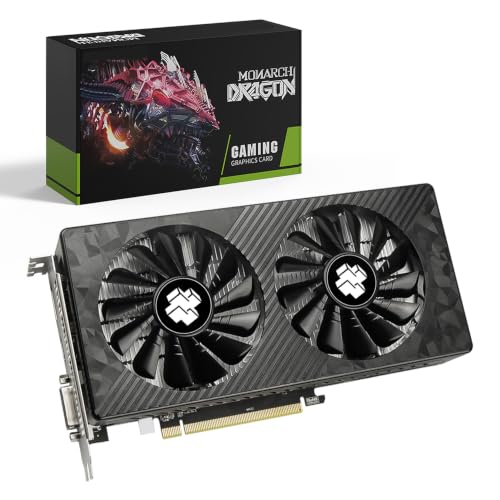
MOUGOL Radeon RX 580 8GB GDDR5 — Fastest here, with a caveat
On raw capability this card laps the field: 8GB of GDDR5 on a 256-bit bus behind 2048 stream processors is proper 1080p gaming hardware, the kind that runs the middle pile of games at respectable settings and even shakes hands with the refusal pile at low. That is precisely why it needs the longest warning in this guide. The RX 580 chips inside cards sold as new today overwhelmingly began life in mining rigs, running flat-out for years before being harvested, cleaned and mounted on new boards by small assemblers. The card in the box is new; the silicon at its heart usually is not.
None of that makes it an automatic avoid — it makes it a priced risk. A mined chip that was well cooled can serve for years, and the dual-fan cooler and triple outputs (HDMI, DisplayPort and DVI) on this MOUGOL board are sensibly chosen. But the buyer should purchase through a channel with a painless return route, stress-test the card immediately, watch temperatures under load, and accept that longevity is a lottery the other picks do not ask you to enter. You also need a power supply with the connector and wattage this class of card expects, which many donor PCs lack.
The sensible ownership ritual is short and non-negotiable. On arrival, inspect the board for corrosion or a bent bracket, fit it, and run the most demanding game you own for an extended session while watching temperatures and listening for fan rattle. Then play normally for the whole return window rather than shelving the PC, because a harvested chip that is going to fail usually objects early and loudly. Cards that clear that probation tend to settle into ordinary service — the gamble is front-loaded, and wise buyers keep it that way.
- GPU: AMD Radeon RX 580, 2048 stream processors
- Memory: 8GB GDDR5, 256-bit
- Interface: PCIe x16 3.0, auxiliary power required
- Outputs: HDMI, DisplayPort, DVI
- Cooling: dual fan
Strengths
- By far the strongest gaming performance available anywhere near this budget
- 8GB of memory keeps texture settings honest in a wide range of games
- Three outputs and a dual-fan cooler suit a proper desktop build
Trade-offs
- The GPU chip is, in practice, refurbished ex-mining silicon — lifespan varies
- Needs a real power supply with an auxiliary connector, ruling out weak prebuilts
- Small-assembler provenance means warranty handling is seller-dependent
Best for: budget builders who understand the refurbished-chip bargain and want maximum frames per unit of money. Not suited for: a child’s first PC or any machine that must simply work for years untouched.

ASRock Intel Arc A380 Challenger ITX 6GB OC — The stretch pick
Everything else in this guide is old architecture wearing fair prices; the Arc A380 is a genuinely modern design that happens to visit this neighbourhood. Its 6GB of GDDR6 memory, PCIe 4.0 interface and current-generation media engine put it in a different conversation — particularly for anyone who records or streams, since Intel’s video encoding hardware is the strongest in this entire roundup by a wide margin. ASRock’s Challenger ITX version packages it as a single-fan compact card with a factory overclock to 2250MHz and a silent mode that stops the fan under light loads.
Why call it a stretch? Because it typically asks a little more than the strict budget this guide is built around, and because Intel’s graphics drivers, while vastly improved since launch, still show their youth in a handful of older titles. For a new or recent PC with Resizable BAR enabled — a setting this card genuinely needs to perform as intended — it is the only pick here that feels like the beginning of a modern build rather than the rescue of an old one. DisplayPort 2.0 and HDMI 2.0b outputs underline that forward-looking character.
Creators on a budget should linger on this pick a moment longer. The A380’s media engine handles recording and streaming duties that would strain the host processor on any other card in this guide, and its transcoding speed makes it a quiet favourite for home media servers that convert video for phones and tablets. A card bought for light gaming that also accelerates the household’s video chores is doing two jobs for one slot — an argument none of the veteran architectures here can match.
- GPU: Intel Arc A380, factory overclocked to 2250MHz
- Memory: 6GB GDDR6, 96-bit
- Interface: PCIe 4.0
- Outputs: DisplayPort 2.0, HDMI 2.0b
- Format: ITX, single fan, 0dB silent mode under light load
Strengths
- Modern architecture with 6GB of fast GDDR6 — a class above the other picks
- Outstanding media encoding for recording, streaming and transcoding
- Compact ITX board with a fan-stop mode for silent desktop use
Trade-offs
- Sits at or beyond the top of this guide’s budget neighbourhood
- Needs Resizable BAR enabled and a reasonably modern platform to shine
- Driver maturity in a few older games still trails the veteran architectures
Best for: buyers who can stretch slightly and want a card that belongs to the current era. Not suited for: very old donor PCs whose boards lack modern firmware features.
How Do You Install a Card Like This Without Drama?
Begin before the box arrives: open your PC’s specifications and confirm three things. First, that a PCIe x16 slot is free — in old prebuilts it sometimes hides under a forgotten card. Second, that the power supply can feed your chosen pick; the GT 1030s and GT 730 sip from the slot, while the RX 580 needs an auxiliary connector and real wattage behind it. Third, measure the physical space, especially in slim cases, and confirm whether you need the low-profile bracket fitted from the start.
The swap itself is gentle work. Shut the machine down, switch the PSU off, ground yourself on the case, remove the old card or slot cover, and seat the new card until the latch clicks. Fit the bracket your case requires, move the monitor cable to the new card — the most common cause of a “dead” upgrade is a display cable still plugged into the motherboard — then boot and install current drivers from the GPU maker’s site rather than any disc in the box. Finish by opening two or three of your actual games or your full monitor set and confirming the machine behaves under its real workload, not just on the desktop.
Should You Consider the Used Market Instead?
Honestly, yes — with discipline. A genuine used GTX 1060 or an original-owner RX 580 from the second-hand market usually outplays every new card in this guide, because you are buying hardware that was built for a higher class. The risks are equally real: mining history, tired fans, and sellers who vanish. The discipline that makes it work is simple. Buy only where a return window exists, prefer listings showing the actual card rather than stock photos, ask directly about mining use, and the day the card arrives, run it hard — a long gaming session while watching temperatures — so any fault surfaces inside the return period. Treated that way, the used route is the honourable mention of this entire guide; treated casually, it is how budgets evaporate.
Two used-market habits separate the successes from the stories. First, favour sellers who show the card running — a photo of a benchmark screen with the card visible, or a short video — over sellers offering only glamour shots of a cleaned board. Second, treat the first evening as an inspection, not a celebration: check the fans for wobble, look for dust baked into the heatsink fins that cleaning missed, and confirm the outputs all work. A card that passes an honest first evening and a hard first week has told you most of what ownership will feel like.
What Is Daily Life With One of These Cards Like?
Noise is the pleasant surprise of the class. Cards that sip power barely trouble their fans, and several picks here are effectively silent during desktop work, browsing and video — the workload that fills most of a revived PC’s day. The Arc A380 formalises this with a fan-stop mode, but in practice the GT 1030s are close behind, their small fans turning slowly under light loads. The RX 580 is the audible exception: its dual fans have real heat to move during games, and in a quiet room you will hear the machine working, which most owners accept as the sound of the bargain functioning.
Heat follows the same pattern. Slot-powered cards add so little warmth to a case that ventilation is a non-issue, even in the cramped prebuilts they usually inhabit. The RX 580 again asks for more respect: give it a case with at least a basic intake and exhaust path, clear the dust from filters that may not have been touched in years, and check temperatures during your first long session. A card built around a harvested mining chip deserves that early scrutiny; a healthy one settles at stable temperatures and stays there, while a tired one announces itself quickly enough to use the return window.
Drivers are the long-tail consideration nobody mentions at purchase. NVIDIA and AMD both maintain support for these generations in a mature, slower-moving state — security and compatibility updates rather than game-day optimisations — which suits hardware whose gaming diet is older titles anyway. Intel’s Arc drivers move fastest, still gaining performance in older games with successive releases, which is one more reason the A380 suits a buyer who enjoys tinkering. Whichever you choose, install drivers from the chip maker’s own site, skip the bundled disc, and update once at installation rather than chasing every release thereafter.
There is also a resale-and-reuse angle worth a thought. A GT 1030 bought today to revive a desktop often ends its career in a media PC or a relative’s machine, because display duty never stops being useful. The card you buy for a child’s esports habit this year may drive a kitchen monitor in five years. That second life is part of the value in this class, and it favours the well-made slot-powered cards over the gambles: the RX 580’s uncertain lifespan is precisely the trait that refuses to promise a second act.
How Should You Test the Card During Its First Week?
Every card in this guide deserves a probation week, and the RX 580 demands one. Day one is for breadth: confirm every output works with the cables you actually own, run each monitor at its native resolution, and play short sessions of several different games rather than one long session of a favourite, because varied loads expose varied faults. Note the temperatures the card settles at and whether the fans sound smooth or gritty; both are data points you will want if a return becomes necessary.
Midweek, add duration. A two-hour session in the most demanding title the card can plausibly run is the closest a home user gets to a laboratory stress test, and it is where tired harvested chips and dried-out thermal paste confess. Watch for the classic symptoms — flickering artifacts, driver resets, a screen that blacks out and returns — and treat any of them as a verdict rather than a quirk. New old-stock and refurbished hardware does not improve with optimism.
Close the week with the boring checks that protect the future: save the receipt and serial number somewhere findable, register nothing you do not need to, and keep the box until the return window shuts. If the card has passed breadth, duration and ordinary desk duty without a murmur, the probability curve bends strongly in your favour, and you can stop thinking about the purchase — which, for hardware at this price, is the highest praise available.
| Card | Memory | Outputs | Power | Honest role |
|---|---|---|---|---|
| ASUS GT 1030 GDDR5 | 2GB GDDR5 | HDMI, DVI-D | Slot only | Light gaming plus desk work |
| maxsun GT 1030 GDDR5 | 2GB GDDR5, 64-bit | HDMI, DVI | Slot only | Small-case light gaming, HTPC |
| MAXSUN RX 550 | 4GB GDDR5, 128-bit | DP, HDMI, DVI-D | Slot only | Older games with texture room |
| QTHREE GT 730 | 4GB DDR3, 64-bit | 2x HDMI, DP, VGA | Slot only | Multi-monitor display duty |
| MOUGOL RX 580 | 8GB GDDR5, 256-bit | HDMI, DP, DVI | Auxiliary connector | Real 1080p gaming, refurbished chip |
| ASRock Arc A380 | 6GB GDDR6, 96-bit | DP 2.0, HDMI 2.0b | Slot only | Modern stretch pick, media work |
What Mistakes Do Buyers in This Class Keep Making?
The expensive mistake is shopping by the biggest number on the box. Four gigabytes of DDR3 sounds like more than two of GDDR5, and sellers of slow cards rely on that instinct; in games the GDDR5 card wins because bandwidth, not capacity, is the binding constraint at this level. The second mistake is its cousin: buying a DDR4 GT 1030 that shares its name with the GDDR5 model, then blaming the PC when games crawl. The memory line on the listing is a ten-second check that prevents both errors.
A quieter mistake is ignoring the monitor cable drawer. Several picks here lean on DVI and HDMI rather than DisplayPort, and a buyer whose only cable is a DisplayPort lead — or whose monitor is DisplayPort-only — discovers the mismatch after the card is seated. Adapters between these standards exist and mostly work at 1080p, but the time to learn your monitor’s inputs is before ordering, not during installation. Photograph the back of your screen while you shop; it settles questions that spec sheets phrase confusingly.
Power supplies cause the next wave of regret. A slim office PC with a small proprietary PSU cannot feed an RX 580 no matter how well the card benchmarks, and adapters are not a safe substitute for wattage. Measure the case, too — a full-height card and a low-profile tower will never meet in the middle. Finally, beware the listing that promises a famous flagship model at a fraction of its plausible worth; counterfeit cards flashed with false identities remain a cottage industry at this end of the market, and a price that refutes economics is the tell.
When Is Saving Up the Smarter Move?
Sometimes the correct answer to a budget question is patience, and this guide would be dishonest if it never said so. If your target is a specific recent game — the one your friends play every weekend, the one a child has circled on a calendar — and it sits in the refusal pile, then a card here buys frustration at a fair price. The gap between this class and the next is the largest single step in the graphics market: one tier up brings modern architectures, more memory and driver teams actively optimising for current releases. A reader who can wait and gather that difference should.
The maths changes when the need is immediate and the library is old. A PC that cannot be used at all today gains nothing from a theoretical better purchase in six months, and the esports-and-classics diet that most casual players actually eat is served properly by the GDDR5 picks above. There is also the staged path: buy the honest card now, enjoy the machine, and let the card migrate to display duty when a bigger upgrade eventually lands. Because these small cards remain useful as multi-monitor hardware long after their gaming days, the staged path wastes less than it first appears.
One more situation deserves a direct word: the dead-card emergency. When an existing graphics card fails and the PC is a family’s only computer, the GT 1030’s combination of slot power, universal fit and immediate availability makes it the fire extinguisher of this market. Nobody writes odes to a fire extinguisher, but the household whose homework, work calls and photo library return the same evening understands the value precisely. In that scenario, agonising over tiers is a luxury; fit, memory type and a trustworthy seller are the whole decision.
Final Recommendation
For the typical reader — an older desktop, a library of esports and older games, a second monitor to feed — the ASUS GT 1030 GDDR5 is the calm centre of this guide: correct memory, slot power, a trusted maker. If your games are older and texture-heavier, step sideways to the RX 550’s extra memory. Choose the GT 730 only when monitors, not games, are the mission, and approach the RX 580 as the refurbished-hardware bargain it is. Stretch to the Arc A380 if your PC is modern and your budget bends, because it is the sole card here with a future tense. Whatever you pick, let the job choose the card, and a modest budget will feel surprisingly well spent. One last piece of housekeeping applies to every route in this guide: keep the listing page, the receipt and the box until the card has survived its probation week, because in a market built from small assemblers and harvested silicon, paperwork is the difference between a warranty and a story. Buy the job, test the card, keep the proof — that is the whole method.
Frequently Asked Questions
Can a card in this class run modern games at all?
It depends on the meaning of modern. Esports titles, indie games and the back catalogue run genuinely well on the GDDR5 picks. Recent big-budget releases are a different matter: most will launch on the stronger cards here only with resolution scaling and low settings, and some will remain unpleasant regardless. The RX 580 — with its refurbished-chip caveat — is the exception that handles a broad 1080p library at modest settings.
Is 4GB of DDR3 better than 2GB of GDDR5 for gaming?
No, and the comparison is this class’s favourite trap. Games at this level are limited by memory bandwidth, and GDDR5 delivers several times the bandwidth of DDR3. The smaller GDDR5 card will generally deliver smoother play; capacity only becomes the binding constraint in the narrow band of games the RX 550’s 4GB of GDDR5 addresses.
Do I need a new power supply for one of these cards?
For the GT 1030s, the RX 550, the GT 730 and the Arc A380 as listed here, power comes from the PCIe slot, so the modest PSU in a typical prebuilt is sufficient. The RX 580 is the exception: it requires an auxiliary power connector and a PSU with real headroom, which rules out many slim office machines.
Will these cards fit a slim office PC?
Mostly yes, and that is by design. The ASUS GT 1030 includes a low-profile bracket, the maxsun GT 1030 and the QTHREE GT 730 are built low-profile from the start, and the Arc A380 Challenger is an ITX board. Measure your case anyway, and confirm bracket inclusion on the listing of the exact card you order.
Are the new RX 580 cards really built from mining chips?
In practice, yes — that is the honest description of this market segment. The boards and coolers are new, but the GPU dies are harvested from cards that mined cryptocurrency, then tested and resold by small assemblers. Many run fine for years; the risk profile is simply different from factory-fresh silicon, so buy with a return window and stress-test immediately.
My PC has integrated graphics already — is a card like this pointless?
Not necessarily, but compare honestly. Very recent integrated graphics in modern processors can match or beat the slowest cards in this guide, and in that case your money is better saved. The case for a discrete card is strongest with older integrated graphics — the kind bundled with ageing office desktops — where even a GT 1030 is a dramatic step up, and whenever you need outputs the motherboard does not provide, since extra monitors alone justify a display card.
Should I enable anything special for the Intel Arc A380?
Yes: Resizable BAR, a firmware setting on most modern motherboards, materially affects Arc performance and should be switched on. Keep drivers current as well, because Intel’s driver team has been improving older-game performance steadily, and a card bought today behaves better than the same card did at launch.
Related Guides
Once a budget card has revived your PC, the natural next steps are the rest of the value build. Our roundup of the best 200 dollar graphics cards shows what the next tier buys when you are ready to step up, the guide to the best 1080p graphics cards maps the class those cards grow into, and if your sights are set specifically on NVIDIA’s smallest gaming chip, the best 1030 graphics cards compares every variant of it in one place.
Related guides
- Best Direct Thermal Printers: Shipping-Label Machines and Professional Label Systems
- Best 4K UHD HDR HDMI Extenders: 4K60, Long-Run and 4K120 Kits Compared
- Best 25–35 Inch Monitors With Lowest Display Lag: An Honest Ranking Without Invented Numbers
- Best Enterprise SATA SSDs: Endurance Classes, Power-Loss Protection and Fleet Sense


