What's inside
- Where to buy
- Key Takeaways
- Quick Picks
- How did we choose these tv monitors?
- What turns a monitor into a television, exactly?
- How do the six screens compare?
- How far away will you sit? A sizing guide that respects the room
- How do you set up a monitor as a TV in an evening?
- What mistakes do TV monitor buyers make?
- How do panel types change an evening’s viewing?
- What should renters and small-flat dwellers plan differently?
- How do you share one screen between work and a household?
- How do you keep evening viewing easy on the eyes?
- How long will a TV monitor setup stay current?
- Why does the kitchen keep asking for its own screen?
- Twenty-four or twenty-seven inches: how do you actually decide?
- How do you watch late without waking the house?
- Final Recommendation
- Frequently Asked Questions
- Related Guides
As an Amazon Associate I earn from qualifying purchases. This post may contain affiliate links at no extra cost to you.
gizmoverdict.com is reader-supported. When you buy through links on our site, we may earn an affiliate commission.
Where to buy
Clicking any name in this guide opens that screen’s Amazon page, where two details deserve your attention before anything else, because they decide a TV monitor purchase and are the easiest to get wrong: the exact inputs fitted to that model, and whether its speakers are genuinely built in or merely rumoured by a marketplace headline. General electronics retailers stock the BenQ, HP and Samsung names in this guide, and seeing a 27-inch panel beside a 24-inch one in person settles the size question faster than any measurement we can print. One piece of honesty before the list begins: this guide covers six monitors, not ten. The best 10 tv monitors is the search that brought you here, and we would rather answer it with six machines that genuinely earn a place — grouped by the job you are hiring them for — than pad the page with four near-duplicates of the same panel wearing different badges. What follows is the shortlist a friend in the trade would give you, with the reasons attached.
The idea behind a TV monitor is simple: one screen that works at a desk all day and entertains from a sofa all evening. Bedrooms, dorm rooms, studio flats, kitchens and spare rooms are its natural habitat — anywhere a second full television is too much furniture and a bare monitor with no sound is too little. The breed divides into three kinds. There are ordinary monitors with decent built-in speakers that happily show a streaming stick’s output; there are larger, faster panels borrowed from gaming that make films and sport look dramatic; and there are dedicated smart monitors with a television’s operating system and remote control built in, which we discuss in the buying sections because they suit some rooms perfectly, even though the six linked picks below concentrate on the monitor-first machines most readers are comparing.
What separates a good TV monitor from a monitor merely plugged into a streaming stick is the unglamorous list: speakers you can actually follow dialogue through, a stand or mount that angles the screen at a bed or sofa rather than a desk chair, enough brightness and contrast for a lit room, and inputs that do not demand an adapter ceremony every time the games console visits. Size matters differently here, too — a screen watched from two metres away obeys different arithmetic than one watched from sixty centimetres — and the sections below take those differences pick by pick.
Key Takeaways
- The HP 27h is the easiest all-round answer, with a big IPS screen and dual speakers sized for a bedroom.
- BenQ’s GW2490 brings the newest panel of the desk-sized picks, with a 100Hz refresh that flatters sport and scrolling alike.
- The BenQ GW2480 remains the dependable compact choice for kitchens, dorms and spare desks.
- HP’s 24mh adds the ergonomic stand the others lack, for rooms where the screen must serve two heights of viewer.
- Samsung’s Odyssey G3 27 is the dramatic option, a fast gaming panel that makes evening viewing feel cinematic.
- The LG 34-inch UltraWide is the cinema-first outlier, a curved screen that turns a desk into a screening room.
Quick Picks
| Pick | Badge | Why it earns its place |
|---|---|---|
| HP 27h 27in | Best Overall | A roomy IPS panel with proper dual speakers and height adjustment, happy at a desk or across a bedroom. |
| BenQ GW2490 24in 100Hz | Best Desk-Sized Pick | The freshest panel here, with 100Hz smoothness, eye-care features and speakers in a slim-bezel frame. |
| BenQ GW2480 24in IPS | Best Compact Value | The proven all-rounder: IPS clarity, built-in speakers and every legacy input a spare room accumulates. |
| HP 24mh 23.8in IPS | Best Ergonomics | Height and tilt adjustment plus speakers, for screens shared between a desk chair and a bed. |
| Samsung Odyssey G3 27in (G30D) | Best for Sport and Gaming Nights | A 180Hz panel with an adjustable stand that makes fast action look composed rather than smeared. |
| LG 34BP65C-B 34in UltraWide | Best for Film Lovers | A curved 21:9 screen that fills your vision with cinema and still splits into two work windows by day. |
How did we choose these tv monitors?
We began with the evening test, because that is where monitor-as-TV experiments usually die. A screen can be a superb desk display and a miserable television: its speakers are an afterthought, its viewing angles collapse from a bed, its blacks turn grey in a dark room. So every pick here had to clear three bars — sound built in and intelligible at programme volume, a panel whose picture holds together off-axis, and a size and stand suited to being watched from farther than a desk chair. Gaming monitors that treat speakers as a rounding error did not make the cut, however fast their panels were.
Daytime credentials mattered next, because a TV monitor that is a poor monitor is just a small television with delusions. All six picks are honest full HD or better IPS-class or quality panels with the inputs a desk requires, and several bring eye-care features — low blue light modes, flicker-free backlights, brightness that adapts to the room — that matter in both lives: the spreadsheet at noon and the film at nine. Refresh rate was treated as a bonus rather than a requirement; smoothness flatters sport and games, but no one has ever abandoned a drama because it refreshed at the standard rate.
Finally we spread the six across the rooms these screens actually serve: the compact desk in a dorm, the family spare room, the bedroom where a 27-inch screen is the evening’s hearth, and the film lover’s desk that becomes a cinema after dark. A ranking that crowned one winner for all of those rooms would be lying in four of them, so each pick below is presented with its room, its viewer and its compromises stated first.
What turns a monitor into a television, exactly?
Feed it a picture and the transformation is nearly complete, because modern viewing arrives through devices a monitor already understands: a streaming stick in the HDMI port, a console, a laptop, a TV box. The monitor does not need a tuner in the streaming era, any more than it needs a disc drive. What it needs is the television’s supporting cast. Sound, first and above all, since a startling share of monitors ship silent and expect you to solve audio yourself. A way to control volume and inputs from where you sit, which in practice means the streaming device’s remote handling volume over HDMI-CEC where supported, or a small soundbar joining the setup. And a picture mode that flatters film rather than spreadsheets — most of these panels offer exactly that among their presets.
The dedicated smart monitor deserves its sentence here: makers including Samsung build monitors with a full streaming platform and a television-style remote inside, no stick required. They are the most literal answer to “TV monitor” and suit buyers who want the fewest possible boxes. Their trade is that you marry the maker’s software and its update habits, whereas a plain monitor plus a replaceable stick lets you upgrade the brains for the price of a pizza in three years’ time. This guide’s linked picks follow the second philosophy; the smart route is named so you can choose it knowingly rather than discover it afterwards.
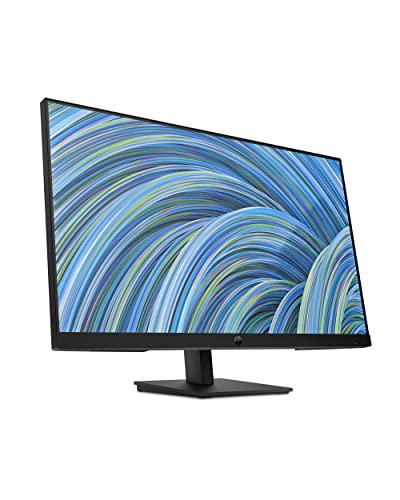
HP 27h 27in — Best Overall
The 27h is the screen this guide would put in the most rooms, because 27 inches at full HD is the size where the double life balances: large enough that a film watched from a bed fills the view pleasantly, fine enough at a desk that text stays crisp across a working day. The IPS panel keeps its colours honest from the angles a room actually contains — the desk chair, the bed, the floor cushion of a visiting grandchild — and the 75Hz refresh takes a small but real edge off motion in sport and games compared with the standard rate. HP fits dual built-in speakers of more substance than the class average, so dialogue survives without an immediate soundbar purchase, which is the hidden cost that sinks many TV monitor projects.
The stand deserves its mention: height adjustment across a useful range plus tilt means the screen can point at a raised bed in the evening and a desk chair in the morning without a pile of books performing the office of furniture. The three-sided micro-edge bezel gives it the tidy look of a small television rather than office equipment, which matters in a bedroom in a way it never does in a study. As a monitor it is entirely respectable — this is an office-grade panel with an entertainment streak, not a gaming screen moonlighting — and that is precisely the temperament most TV monitor buyers are shopping for.
Limits are gentle ones. Full HD spread over 27 inches is comfortable from television distances and merely adequate at close desk range for the pixel-peepers; the panel’s brightness suits ordinary rooms rather than sun-drenched conservatories; and there is no remote, as with every pick here, so volume rides on your streaming device’s controls. None of these dents the verdict: as one screen for a room that works by day and relaxes by night, the 27h is the most complete answer in this guide.
- Panel: 27-inch IPS, full HD
- Refresh: 75Hz for smoother motion
- Speakers: dual built-in speakers
- Stand: height and tilt adjustment
- Design: three-sided micro-edge bezel
Strengths
- Size suits both desk work and across-room viewing
- Speakers with enough body for dialogue-led programmes
- Stand adjusts to beds and chairs without improvisation
Trade-offs
- Full HD at 27 inches is softer at close desk range
- No remote control, as with all monitor-first picks
- Brightness is for ordinary rooms, not sun traps
Best for: Bedrooms and studio flats wanting one screen for work and evenings. Not suited for: Buyers wanting a true smart TV interface built in.

BenQ GW2490 24in 100Hz — Best Desk-Sized Pick
The GW2490 is what BenQ’s long-running home-office line looks like after a refresh, and the headline is a number its predecessors did not offer: 100Hz. On a desk that means scrolling and window movement with a smoothness you feel in your shoulders; across a room it means sport and action scenes rendered with less of the judder that standard panels show. The 24-inch full HD IPS panel keeps the pixel density comfortable at desk distance — crisper, in fact, than the 27-inch picks — and BenQ’s eye-care suite, the company’s home ground, includes the low blue light and adaptive brightness features that make a screen pleasant across a long day and a long film alike.
Built-in speakers are present, the bezels are thin enough that the screen reads as picture rather than equipment, and the input set covers the streaming stick, the laptop and the console without a switch box. VESA mounting is supported, which opens the neatest TV monitor trick of all: a wall arm in a bedroom or kitchen, swung to the desk for work and to the bed for the evening, a piece of furniture choreography the fixed-stand picks cannot match. For the dorm room, the first flat, the box room that earns its keep twice a day, this is the most current compact answer in the guide.
Its compromises are the compact class’s own: 24 inches is a personal screen, generous for one viewer and intimate for two, and its speakers — clear at desk distance — will not fill a large room at film volume. Buy it as the best version of a small TV monitor rather than a small version of a big one, and it will not disappoint you.
- Panel: 24-inch IPS, full HD
- Refresh: 100Hz, the smoothest desk-sized pick
- Speakers: built in, with BenQ eye-care suite
- Mounting: VESA support for wall arms
- Inputs: dual HDMI and DisplayPort on the listing
Strengths
- 100Hz motion flatters sport, games and scrolling
- Crisp pixel density at desk distance
- Wall-mount option suits bedrooms and kitchens
Trade-offs
- 24 inches is a one-viewer screen at TV distances
- Speakers are desk-scale, not room-filling
- Stand offers tilt rather than full height adjustment
Best for: Dorms, first flats and compact desks that become cinemas at night. Not suited for: Family viewing across a large living room.

BenQ GW2480 24in IPS — Best Compact Value
The GW2480 has been the sensible person’s monitor for so long that its presence here needs no novelty to justify it. Its 24-inch IPS panel does the two things a TV monitor must: it looks the same from a bed as from a chair, thanks to those wide viewing angles, and its built-in speakers mean a streaming stick turns it into a working television the minute it is plugged in. BenQ’s eye-care technology — a brightness sensor that adapts the panel to the room, low blue light modes, a flicker-free backlight — was designed for office workers and turns out to be exactly what an evening viewer wants too, because a screen that dims itself as the room darkens is a screen that understands both of its jobs.
Its input selection is the most forgiving in this guide: alongside HDMI and DisplayPort sits a VGA port, the museum entrance through which older laptops, spare PCs and retro equipment still arrive. In a spare room — the natural habitat of this monitor — that forgiveness is not nostalgia but utility, because spare rooms are where the household’s older machines go to be useful. The design is discreet to the point of invisibility, with cable management in the stand and bezels that were slim before slim was a selling point.
The refresh rate is the standard one, so fast sport is rendered competently rather than silkily, and the panel’s brightness belongs to ordinary rooms. Neither matters to its actual owners, who are buying reliability, sound and angles at a gentle price. The GW2480 is the guide’s recommendation for the kitchen counter, the guest room and the grandparent’s desk: rooms where a screen should simply work, every time, for whoever sits down in front of it.
- Panel: 24-inch (23.8) IPS, full HD
- Speakers: built in
- Eye care: adaptive brightness sensor, low blue light
- Inputs: HDMI, DisplayPort and legacy VGA
- Design: slim bezel with cable-managed stand
Strengths
- Proven reliability across years of production
- Adaptive brightness serves day and evening alike
- Legacy input rescues older household machines
Trade-offs
- Standard refresh rate for fast-moving sport
- Modest brightness in very bright rooms
- Tilt-only stand
Best for: Kitchens, guest rooms and spare desks needing a dependable second screen. Not suited for: Competitive gamers or bright, glass-walled rooms.
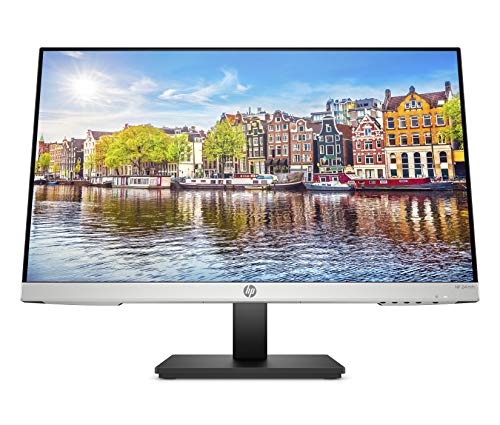
HP 24mh 23.8in IPS — Best Ergonomics
The 24mh’s argument is a stand. Most monitors in this class tilt and nothing more, which quietly assumes the viewer always sits at the same height — an assumption a TV monitor cannot afford, because its audience migrates between a desk chair, a bed and occasionally the floor. HP’s 23.8-inch IPS panel rides on a stand that lifts and tilts across a genuinely useful range, so the screen aims at its viewer rather than at the middle distance, and that single virtue reorganises a room: the same corner can hold a homework desk at four o’clock and a film seat at eight, with the screen re-aimed in seconds and no books, boxes or apologies involved.
The rest of the specification is the dependable HP formula: full HD resolution at a size where it stays crisp, built-in speakers so the streaming stick completes the television, and HDMI plus DisplayPort for the desk side of its life. Its bezels are slim on three sides, its manner is office-tidy, and its IPS angles keep the picture honest for the second viewer on the bed’s far side. It is, deliberately, the least theatrical pick in this guide — and for shared rooms, student houses and anywhere a screen serves several masters, that dependability is the entire point.
Refresh is the standard rate and the panel is a size for one or two viewers rather than a crowd, so sports fans and film societies should read on to the Samsung and the LG. Everyone else should recognise the 24mh as the ergonomic grown-up of the compact class: the monitor that fits the room instead of demanding the room fit it.
- Panel: 23.8-inch IPS, full HD
- Stand: height and tilt adjustment
- Speakers: built in
- Inputs: HDMI and DisplayPort
- Mounting: VESA compatible
Strengths
- Stand range suits chairs, beds and shared rooms
- Crisp density at desk distance
- Speakers complete the television without extras
Trade-offs
- Standard refresh rate only
- Screen size is personal, not communal
- Design is office-plain for style-led rooms
Best for: Shared rooms where one screen serves different seats and heights. Not suited for: Group viewing or fast-action enthusiasts.

Samsung Odyssey G3 27in (G30D) — Best for Sport and Gaming Nights
The Odyssey G3 approaches the TV monitor idea from the opposite end: it is a gaming screen that discovers, in the evening, that everything making it good at games makes it good at spectacle. Its 27-inch panel refreshes at 180Hz, so a fast break, a racing line or a camera pan crosses the screen as motion rather than as a sequence of suggestions, and its contrast-rich panel gives night scenes and stadium floodlights a depth the IPS office picks cannot match. Samsung adds the gamer’s furniture — a black equaliser that lifts shadow detail, a virtual aim point — which film viewers will ignore and sports fans will quietly love for the same shadow-lifting reason.
The stand adjusts properly, height included, so the screen can be aimed at a sofa with the same ease as a chair, and FreeSync support means the console or PC feeding it stays tear-free when the action peaks. What the G3 does not bring is the television’s voice: this is a gaming monitor, and its sound provision is the class’s weak point, so budget for the soundbar or speakers that its picture deserves — a pairing this guide recommends openly rather than letting you discover a silent blockbuster. With sound solved externally, the G3 is the most exciting screen in this guide after dark.
By day it is a perfectly serviceable work monitor, though its talents are priced for motion rather than for text, and its gaming aesthetic — stand, accents, menus — announces itself in a study in a way the BenQ and HP picks politely do not. Buy it when the evenings are the point: the match, the race, the game, the film with the chase in it. That is a legitimate definition of a TV monitor, and the G3 serves it better than anything else here.
- Panel: 27-inch, full HD, high-contrast type
- Refresh: 180Hz with AMD FreeSync
- Response: 1ms class for fast action
- Stand: height-adjustable
- Features: black equaliser, eye saver mode
Strengths
- Motion handling that flatters sport and games
- Contrast gives films and night scenes real depth
- Stand aims at sofas as happily as at chairs
Trade-offs
- Sound needs an external solution to match the picture
- Gaming styling is loud for a bedroom
- Text crispness is good, not class-leading
Best for: Sports fans and gamers whose evenings are the main event. Not suited for: Buyers wanting speakers built in and nothing else to purchase.

LG 34BP65C-B 34in UltraWide — Best for Film Lovers
Cinema’s shape is not the television’s shape, and the LG UltraWide is the one screen in this guide built in cinema’s proportions. Its 34-inch curved 21:9 panel takes films shot for the wide screen and shows them full-bleed, without the letterbox bars that shrink a 27-inch picture into a ribbon, and the gentle curve wraps the edges of a race track or a landscape into your peripheral vision in a way flat screens describe but cannot demonstrate. The resolution is QHD across that width, HDR10 support gives highlights their drama, and the 160Hz refresh with FreeSync Premium means the same screen that screens films all weekend can game at a serious level on Sunday night.
By day, the width becomes two monitors without the seam: documents, timelines and spreadsheets spread across a canvas that makes the dual-screen desk look like a compromise from a poorer decade. That double life is the UltraWide’s honest pitch — not a television replacement for a family, but a personal cinema that earns its desk space during working hours. It is a large, deliberate object, and a small room will organise itself around it whether you planned that or not.
The cautions are proportionate. Broadcast television and most streaming series are made in the narrower shape, so ordinary programmes sit in the middle of this panel with dark pillars at the sides — the reverse of the letterbox problem — and the screen’s sound and stand are supporting acts rather than headlines. Film lovers will call these the correct compromises. Everyone else should measure their desk, count their films, and let the arithmetic decide.
- Panel: 34-inch curved UltraWide, QHD 21:9
- Refresh: 160Hz with AMD FreeSync Premium
- HDR: HDR10 support
- Use: cinema-proportioned films, wide work canvas
- Response: fast, gaming-capable
Strengths
- Films fill the screen as directors framed them
- One canvas replaces a dual-monitor desk
- Refresh and HDR serve games and spectacle alike
Trade-offs
- Ordinary TV shows pillarbox in the centre
- Demands a deep desk and a committed owner
- Speakers are not the headline act
Best for: Film devotees and wide-screen workers with the desk to hold it. Not suited for: Small rooms or mainly broadcast-television viewing.
How do the six screens compare?
| Pick | Size and panel | Refresh | Character |
|---|---|---|---|
| HP 27h 27in | 27-inch IPS | 75Hz | The balanced all-rounder for a bedroom desk |
| BenQ GW2490 24in 100Hz | 24-inch IPS | 100Hz | The freshest compact, wall-mount ready |
| BenQ GW2480 24in IPS | 24-inch IPS | Standard | The proven value pick with legacy inputs |
| HP 24mh 23.8in IPS | 23.8-inch IPS | Standard | The ergonomic stand for shared rooms |
| Samsung Odyssey G3 27in (G30D) | 27-inch high-contrast | 180Hz | The motion and contrast specialist |
| LG 34BP65C-B 34in UltraWide | 34-inch curved QHD | 160Hz | The cinema-proportioned statement screen |
How far away will you sit? A sizing guide that respects the room
Desk logic fails at television distances, so use the room’s arithmetic instead. A 24-inch screen serves one viewer at bed-or-desk range — call it the length of a bed or less — and feels like a personal television, which for a dorm or a kitchen is exactly right. At 27 inches the same arrangement gains presence: two people can share a film without negotiating, and the screen holds its own against a room’s other furniture. The 34-inch UltraWide plays by different rules because its width is cinema width; it rewards the single devoted seat at desk distance rather than a sofa across the room, and buyers imagining family viewing should notice that its height is closer to a 27-inch screen’s than its diagonal suggests.
Resolution interacts with distance kindly. Full HD, which pixel-counters dismiss at a desk, composes itself at two metres into a perfectly convincing television picture, because the eye stops resolving individual pixels long before it stops appreciating contrast, colour and motion. This is why the guide’s full HD picks are honest recommendations rather than apologies — and why the money saved against a 4K panel is better spent on the soundbar, the wall arm or the better stand, the components a room actually notices.
How do you set up a monitor as a TV in an evening?
The recipe has four steps and one optional flourish. First, feed it: a streaming stick or box into an HDMI port, set to output the panel’s native resolution, with the monitor’s picture mode switched from its office preset to its movie or standard mode, which warms the colour and deepens the contrast for faces and films. Second, solve sound honestly: if the built-in speakers carry dialogue clearly at your seat, stop there; if not, a compact soundbar under the screen transforms the setup more than any other single purchase, connecting by HDMI where the monitor supports ARC-style passthrough from the stick, or by the headphone output that most of these panels provide. Third, aim the screen — tilt and height toward the actual seat, not the room’s centre — and fourth, tame the light: a lamp behind or beside the screen rests the eyes and makes the picture look richer than a brighter panel would in a bare room.
The flourish is the wall arm, for rooms where the desk and the bed disagree about direction. A VESA arm, which most picks here accept, lets one screen serve two posts with a swing, and it returns the desk surface to the desk. Add a small power strip with everything on one switch and the room gains a ritual: lights low, screen swung, one click — the cinema behaviour that makes a monitor feel like a television rather than a computer awaiting instructions.
What mistakes do TV monitor buyers make?
The expensive mistake is assuming sound. Shoppers read a monitor’s specification for its panel and forget to ask whether it can make a noise at all, then discover the omission during the first film. Every pick in this guide was screened for that trap — speakers built in, or, in the Samsung’s case, the need for external sound stated in its section rather than buried. The second mistake is buying desk size for a sofa’s distance, or sofa size for a desk’s: the sizing section above exists because returns departments are full of both errors, each made by people who measured the wall and not the viewing distance.
The third mistake is ignoring the stand until the screen is on it. A tilt-only stand under a screen watched from a bed produces the classic cricked-neck geometry that owners solve with books and resent for years; height adjustment or a VESA arm is a small line item against a long ownership. The fourth is expecting a tuner: in the streaming era these screens are displays for sticks, boxes and consoles, and a household that genuinely watches broadcast through an aerial should buy a television, or add a tuner box knowingly, rather than discover the difference on delivery day.
How do panel types change an evening’s viewing?
Most of this guide’s picks use IPS panels, and their evening virtue is sociability: the picture holds its colour and contrast across a wide cone, so the person at the desk, the person on the bed and the person who lost the seating negotiation all watch the same film. Their known weakness appears in the dark, where blacks render as a deep grey rather than true black, and a letterboxed film in a dark room shows its bars faintly glowing. For the mixed-use rooms these screens serve — lights rarely fully out, viewers rarely on axis alone — that trade is correctly chosen, and it is why IPS owns this category.
The Samsung G3 represents the other tradition: a high-contrast VA-class panel whose blacks genuinely darken, whose night scenes carry depth the IPS picks envy, and whose viewing cone is narrower, so the sweet seat is real and the edge seats compromise. Neither tradition is the correct one; they are optimised for different evenings. The household that watches together from scattered furniture should buy angles; the viewer who watches alone, centred, in the dark, should buy contrast — and should notice that this guide contains both, labelled, rather than a pretence that one panel serves every room.
Brightness and matte finish complete the picture in the literal sense. A matte screen in a lamp-lit room kills the reflections that turn a glossy panel into a mirror of the ceiling light, which is why these office-bred monitors often outperform a cheap television in a real bedroom despite humbler specifications. Judge a TV monitor in conditions resembling your room — lit, furnished, viewed from your seat — and the specifications sort themselves into the order this guide has used.
What should renters and small-flat dwellers plan differently?
The TV monitor is the renter’s natural screen, because it dodges every landlord-shaped obstacle: no wall-mounted television to negotiate, no furniture-sized object to move between flats, no second screen eating the room that is simultaneously bedroom, office and cinema. Planning differs in emphasis. Portability becomes a specification — the 24-inch picks move in one hand and a tote bag of cables — and the stand matters more than the wall arm, since many tenancies forbid the screws an arm prefers. A screen that serves at a desk in this flat and on a kitchen counter in the next is worth more to a renter than a marginal improvement in any panel statistic.
Small flats also change the sound answer. Thin walls and close neighbours argue for the headphone option every setup should include — most of these monitors offer a headphone output, and a streaming stick paired with wireless earbuds gives private cinema at midnight without a diplomatic incident. The same logic favours screens whose brightness adapts to the room, because a small flat’s evening light is lamplight, and a panel that dims itself gracefully, as the BenQ picks do, is a better neighbour to tired eyes than one locked at office glare. Buy the screen for the flat you have and the flat you will plausibly have next, and the TV monitor becomes the piece of technology that moves house most gracefully in your entire inventory.
How do you share one screen between work and a household?
The households that succeed with a shared TV monitor agree on three small treaties. The first is input discipline: the work laptop lives on one input, the streaming stick on another, and nobody’s setup requires unplugging anybody else’s — a treaty the multi-input panels in this guide were chosen to honour. The second is a settings truce: one picture mode for work, one for evenings, named and left alone, so the screen’s personality changes by a single remembered button rather than by weekly re-calibration wars. The third is scheduling honesty — the screen is a shared resource like a bathroom, and the family that says so plainly, with the big match and the homework deadline both respected in the diary, keeps the peace that the technology cannot keep for it.
Physically, a shared screen earns a slightly larger size than a personal one, because compromise in a household is measured in viewing distance, and the 27-inch HP exists in this guide largely for that arithmetic. It also earns a stand that re-aims without tools, since the screen’s viewers rotate more often than its location does. None of this requires a bigger budget so much as a clearer-eyed one: the shared screen is bought once, against a list of everyone’s non-negotiables, and the picks above were ranked with that meeting in mind.
How do you keep evening viewing easy on the eyes?
A screen watched in a dim room at office brightness is a small act of self-harm repeated nightly, and the TV monitor’s office heritage turns out to contain the cure. The low blue light modes fitted across the BenQ and HP picks were designed for workers, but their evening effect is the one that matters here: warmer colour and reduced harshness as the room darkens, so a film’s night scenes look like night rather than like a torch. BenQ’s adaptive brightness goes further and simply follows the room, dimming as lamps go off. Use these features rather than merely owning them — set the evening picture mode once, with brightness matched to the lamplight you actually watch by, and the screen stops competing with the room and starts belonging to it.
Position finishes the job. A screen slightly below eye level at your seat, far enough that your eyes rest rather than converge, with a soft light somewhere in the room that is not the screen itself — a lamp behind the panel is the classic arrangement — produces the relaxed viewing that televisions in dark showrooms pretend requires a larger panel. The viewers who report that a modest monitor feels cinematic are almost always reporting good light and good geometry, and both are free with every pick in this guide.
How long will a TV monitor setup stay current?
Longer than a television’s, if it is built the way this guide builds it, because the parts that date fastest have been made replaceable. Panels age slowly — an IPS screen’s colour and brightness serve a decade of evenings without drama — while streaming platforms, apps and codecs churn every few years. In a smart television, that churn happens inside an expensive sealed object whose maker eventually stops updating it. In this guide’s arrangement, the churn lives in a stick that costs little and swaps in minutes, so the screen you buy today can wear three generations of streaming brains across its life and feel current in all of them. That, more than any specification, is the TV monitor’s economic argument, and it is why the plain-monitor-plus-stick philosophy runs through these picks.
The desk side ages just as gracefully. DisplayPort and HDMI standards on these panels cover the laptops of today and the plausible laptops of the next several years, the stands and VESA mounts transfer to whatever desk comes next, and the speakers — the component with the least technology in it — will sound the same in year eight as in week one. Buy the panel for the decade, the stick for the season, and the sound for the room, and the setup’s total cost spreads itself so thinly across its life that the initial comparison with a cheap television stops being close.
Why does the kitchen keep asking for its own screen?
Because the kitchen is where recipes are videos now, where the news plays during breakfast and where a screen that can be wiped clean and viewed standing earns a permanence no one planned. The compact picks in this guide — the GW2480 above all, with its adaptive brightness and forgiving inputs — fit the kitchen’s peculiar demands: viewed from standing height and odd angles while hands are occupied, heard over a kettle, which is where modest speakers meet their one honest limit and a small Bluetooth speaker on a shelf becomes the kitchen setup’s standard second half. Wall-mounting under a cabinet, which the VESA-ready picks allow, returns the counter to cooking and puts the screen at the eye height of a person holding a knife rather than a person holding a mouse.
The caution is environmental rather than electronic. Steam, grease and flour are a screen’s slow enemies, so a kitchen monitor lives away from the hob’s plume, gets wiped with the same regularity as the worktop, and is chosen — as the picks here are — without the glossy finishes that show every fingerprint of a cook mid-recipe. Chosen and placed with that much sense, a kitchen TV monitor becomes the room’s radio, recipe book and morning news in one object, and households that install one rarely return to cooking in silence.
Twenty-four or twenty-seven inches: how do you actually decide?
Measure the distance, then interrogate the audience. A single viewer at a desk or a bed’s length is honestly served by 24 inches, and gains the crisper picture and the smaller furniture footprint as a dividend. The moment a second viewer becomes regular — a partner, a child, a flatmate with opinions about the football — the 27-inch class stops being an indulgence and becomes the peace treaty, because screen-sharing failures are social before they are optical. The third question is the room’s other furniture: a 27-inch screen in a small bedroom is a presence that organises the wall it sits on, while a 24-inch screen can still pretend to be an object among objects.
Budget follows the same logic in reverse. The step from the 24-inch picks to the 27-inch HP is smaller than the step to a soundbar, and for a solo viewer the soundbar-first order buys more evening per pound; for two viewers the size-first order does. There is no universal ranking hiding in this guide — there is a sequence of questions, and the six picks are what the answers look like when they are asked in the right order.
How do you watch late without waking the house?
Every TV monitor setup should include a private listening plan, because the hours when a bedroom screen earns its keep are often the hours when its sound is least welcome elsewhere in the home. The simplest route runs through the streaming device: most modern sticks and boxes pair with Bluetooth earbuds or headphones directly, giving the night viewer full volume and the sleeping household full silence, with the picture’s speakers never involved. The wired route through the monitor’s headphone output is older, cheaper and immune to pairing moods, and a long cable plus comfortable headphones has carried more late-night films than any wireless standard yet invented.
Two habits complete the night setup. The first is the sleep timer, which streaming devices and many monitors both offer and which exists precisely for the viewer who will not see the end of the film; a screen that turns itself off is a screen that does not light the room at 3 a.m. The second is brightness discipline after dark — the evening picture mode, set once and used nightly — because a monitor at office brightness in a dark bedroom is not merely hard on the viewer’s eyes but is a lantern through a doorway for everyone else. Plan these two details and the TV monitor becomes the most considerate appliance in the house: entertainment that knows the hour.
Final Recommendation
Start with the room, and the answer usually names itself. The bedroom or studio flat that wants one graceful screen should take the HP 27h; the compact desk should take the BenQ GW2490, with the GW2480 as its proven, gentler-priced sibling and the HP 24mh wherever a stand must serve two heights. The viewer whose evenings are sport and spectacle should take the Samsung Odyssey G3 and pair it with sound worthy of its picture, and the film lover with a deep desk should take the LG UltraWide and never think about letterbox bars again. Six screens, six rooms — and the discipline of matching them is the whole content of this guide.
Set the chosen screen up with the evening ritual in mind — aimed at the seat, lit kindly, sounding clear — and a monitor stops being a television substitute and becomes what these rooms actually wanted all along: one good screen, living both of its lives well. If a final doubt remains, let it be settled by the furniture rather than the specifications: put the tape measure where the screen will live, sit where you will actually sit, and read this paragraph at that distance. The size that feels generous rather than theatrical from that exact seat is your size, and one of the six above is wearing it.
Frequently Asked Questions
Can I watch broadcast TV on a monitor?
Not through an aerial on its own, because monitors carry no tuner. A streaming stick, a cable or satellite box, a console or a separate tuner box all feed a monitor happily over HDMI, and in practice most households’ viewing already arrives by one of those routes. If aerial broadcast is your main diet, a television is the simpler purchase. It is also worth knowing that many streaming services now carry the major broadcast channels live, so a household whose aerial viewing is really the evening news and the big national occasions may find the stick covers it entirely — check your own essential channels against the services you already pay for before buying any extra hardware at all.
Do I need a soundbar with a TV monitor?
Only if the room and the content demand it, and the honest test is a single evening: watch a dialogue-heavy programme at your normal volume from your normal seat, and if you find yourself leaning forward or rewinding speeches, the room has filed its request and a soundbar will answer it. The BenQ and HP picks carry speakers that handle dialogue and ordinary programmes at bedroom distances without help. Films, sport in a larger room and the Samsung G3 — whose picture outclasses its sound provision — all gain from a compact soundbar, which is the highest-value accessory in this entire category.
Is full HD enough for watching films?
At television distances, yes, comfortably. The eye resolves detail by distance, and from a bed or sofa a good full HD panel with honest contrast looks convincingly sharp; the QHD UltraWide earns its place through cinema proportions rather than necessity. Money past full HD buys more joy when spent on sound, mounting and size. The exception is the viewer who also works at the screen all day at close range, where the finer pitch of a higher-resolution panel pays its rent in text clarity hour after hour; that buyer is really shopping for a work monitor that entertains, and should weight resolution accordingly rather than expecting a film to reveal the difference from across the room.
How do I control volume from the sofa?
Most streaming sticks’ remotes can control a connected display’s volume where the HDMI link supports it, and a soundbar usually brings its own remote or learns the stick’s. Set this up on installation day rather than discovering it mid-film: the setting usually lives in the streaming device’s remote menu, takes two minutes, and converts the whole arrangement from computer-with-a-picture into something the household can operate half asleep. Where neither applies, the monitor’s own controls sit a short walk away — a small indignity that wall-arm and soundbar setups are usually bought to retire.
What about a dedicated smart monitor instead?
Smart monitors build the streaming platform and a TV-style remote into the screen, which is the tidiest possible setup and a fair choice for a single-purpose room. Their compromise is software longevity: a plain monitor outlives several generations of replaceable sticks, while a smart monitor’s apps age with its maker’s update policy. Choose tidiness or upgradability, knowingly. A household that replaces its screens rarely and values a remote on the coffee table above all else will be happier with the smart route; a household that keeps furniture for a decade should let the replaceable stick carry the software risk, exactly as this guide’s picks assume.
Will a games console work well on these?
Yes — consoles speak HDMI fluently, and the faster panels here, the GW2490, the Odyssey G3 and the UltraWide, flatter games with their refresh rates and response. Set the console to the panel’s native resolution, use the monitor’s game mode where offered, and remember the sound plan, because consoles assume a television’s speakers are listening. One practical note for shared rooms: a console’s standby glow and a monitor’s input auto-switching can conspire to hijack the screen mid-film when someone wakes the console from another room, so households running both should assign the console its own input, disable auto-switching if the panel allows it, and treat that small treaty as part of the installation rather than an argument to have later.
Related Guides
Completing the room around the screen? These guides take the same room-first approach: best 1080p isp monitors covers desk displays with IPS panels for colour-true work, best 1080p 21 inch monitors explores the compact end of the monitor world, and best monitors for work and play widens the field for desks that game after hours.