What's inside
- Key Takeaways
- Quick Picks
- How Did We Weigh Frame Rates Against Everything Else?
- What Do Frame Rates Actually Feel Like in Playback?
- How Do the Six Compare at a Glance?
- Why Does Light Matter More Than Frame Rate?
- What Mistakes Spoil Most Beginners’ Slow-Motion Clips?
- How Do You Plan a Slow-Motion Shoot That Actually Works?
- How Do You Edit Slow Motion Without Ruining It?
- Which Camera Suits Which Subject, Subject by Subject?
- What About Batteries, Cards, and Heat on a Slow-Motion Day?
- Can Slow Motion Make You Better at the Sport Itself?
- Why Do Science Experiments and Kids Belong in This Guide?
- When Is Slow Motion Simply the Wrong Tool?
- How Does Slow Motion Play on Social Platforms and Phones?
- What Should Renewed and Budget Buyers Check Twice?
- A Beginner’s First Afternoon With a High-Speed Camera
- What Will the Next Generation Probably Change?
- One Honest Paragraph About Diminishing Returns
- What About Tripods, Mounts, and Keeping the Camera Steady?
- Final Recommendation
- Frequently Asked Questions
- Related Guides
As an Amazon Associate I earn from qualifying purchases. This post may contain affiliate links at no extra cost to you.
gizmoverdict.com is reader-supported. When you buy through links on our site, we may earn an affiliate commission.
Where to buy: five picks below link to their Amazon listings, and the iPhone entry is prose-only because no verified listing was available for it. Shoppers searching for the best affordable slow motion cameras need one truth before any model names: slow motion is bought with light and resolution, and every camera here pays that price differently. Frame rates that sound astronomical — near a thousand frames per second — exist only at sharply reduced resolution on consumer hardware, while the rates you can actually use at full quality cluster far lower. A guide that hides that trade is selling you a number, not a camera.
So this roundup sorts its picks by honest capability. Two Sony compacts offer genuine high-frame-rate bursts for scientific curiosity and explosive moments, at resolutions suited to small screens. Two action cameras deliver robust, waterproof slow motion at rates like one-hundred-twenty and two-hundred-forty frames per second with far better image quality. One budget action camera caps out at sixty frames per second in 4K and belongs here only as a mild slow-down option for tighter budgets — it will be described as exactly that, nothing more. And a prose-only phone reminds everyone that the best slow-motion camera is sometimes already in a pocket.
What will you actually film? Skateboard tricks, dogs shaking off lake water, a pitcher’s delivery, a toddler’s first jump into a pool — each subject needs a different amount of slowing. Doubling time at sixty frames per second played back at thirty already transforms casual footage. Extreme rates near a thousand serve balloons bursting and glass shattering, moments over in a blink. Match the tool to the moment before matching it to a marketing claim, and the right pick usually announces itself.
Key Takeaways
- Extreme frame rates on the Sony compacts come with steep resolution drops, suiting short bursts and small-screen viewing.
- Action cameras from GoPro and DJI trade peak frame rate for waterproofing, stabilization, and far better everyday image quality.
- The LIT Hero tops out at 4K60, making it a gentle slow-down choice rather than a high-speed specialist of any kind.
- Bright light is non-negotiable: high frame rates devour light, and dim venues punish every camera in this lineup.
- The prose-only iPhone shoots clean 1080p at two-hundred-forty frames per second, a benchmark dedicated cameras must justify beating.
Quick Picks
| Pick | Badge | Why it earns a slot |
|---|---|---|
| Sony RX100 VII (Renewed) | True high-frame-rate bursts | Its high-frame-rate mode approaches a thousand frames per second in short bursts at reduced resolution for explosive moments. |
| GoPro HERO13 Black | Action slow-motion flagship | Waterproof toughness and two-hundred-forty-frame capture at strong resolutions cover sport without babysitting the hardware. |
| DJI Osmo Action 4 | Low-light slow-motion value | A larger sensor keeps 4K one-hundred-twenty footage cleaner at dusk than most action rivals manage. |
| Sony ZV-1 | Creator-friendly high speed | It pairs similar high-frame-rate bursts with a flip screen and microphone input for narrated experiments. |
| GoPro LIT Hero | Gentle slow-down on a budget | Sixty frames per second halves playback speed for casual clips, with a built-in light for dim corners. |
| Apple iPhone 16 Pro | Pocket benchmark, prose-only | Its 1080p two-hundred-forty mode is so convenient that dedicated cameras must earn their extra cost honestly. |
How Did We Weigh Frame Rates Against Everything Else?
Frame rate alone decided nothing. We weighed the resolution surviving at each rate, because a thousand frames of mush lose to two-hundred-forty frames of clarity for most subjects anyone films twice. Burst limits mattered too: some high-speed modes record only a few seconds before a long processing pause, which suits a water balloon and ruins a sporting rally. A camera that cannot repeat its trick quickly is a demonstration, not a tool.
Practical physics came next. High frame rates demand short shutter times, which demand abundant light or high sensitivity, which brings noise. Cameras with larger sensors and honest processing survive that spiral better. Stabilization also changes category: action cameras smooth the violent motion of the sports they record, while the compacts assume a steadier hand or a tripod. Audio, often ignored, records at normal speed or not at all in extreme modes, so silent slow motion is the default expectation unless a pick says otherwise.
Finally, we priced the whole workflow. Slow motion multiplies file sizes and editing time; an afternoon of two-hundred-forty-frame clips becomes an evening of storage management. Cameras earning places here keep that workflow tolerable with sensible file handling and apps that do not fight their owners. The result is a lineup spanning genuine high-speed curiosity, rugged sport documentation, and one honest budget compromise, with no pick pretending to be what it is not.
What Do Frame Rates Actually Feel Like in Playback?
Numbers become intuitive once translated into time. Record at sixty and play at thirty, and the world moves at half speed: a dive gains grace, a stumble gains comedy. Record at one-hundred-twenty for thirty-frame playback and motion quarters, revealing the mechanics of a golf swing or a dog’s gait in ways the eye never catches live. At two-hundred-forty, water droplets separate into individual travelers and a pitcher’s arm unwinds like machinery in a documentary.
Beyond that, near a thousand frames per second, you enter the physics-lab realm where a bursting balloon’s rubber retracts visibly and a dropped egg’s collapse becomes sculpture. Consumer cameras visit that realm briefly and at low resolution, which is fine — the subjects there are spectacle, not portraiture. The mistake is expecting that realm at full resolution for family-video prices. Physics charges for photons, and no firmware update repeals the invoice. Choose the realm your subjects actually inhabit, and every camera below will feel more capable than its specifications suggested.

Sony RX100 VII (Renewed) — True high-frame-rate bursts
The RX100 VII remains the compact camera that slow-motion enthusiasts name first, because its high-frame-rate mode reaches roughly nine-hundred-sixty frames per second — territory no action camera in this guide attempts. The honesty clause arrives immediately: that mode records at significantly reduced resolution, in bursts of only a few seconds, followed by a processing pause while the camera writes its prize. Within those constraints, what it captures is genuinely magical. A hummingbird’s wings resolve into strokes. A match flares in stages. Water poured from a height separates into sculpture.
Outside the extreme mode, this is simply a superb premium compact: a one-inch stacked sensor, a versatile zoom, fast autofocus with eye tracking, and one-hundred-twenty-frame options at far better quality for ordinary slow work. The renewed listing here trims the entry cost of a camera that was never cheap, with the usual refurbished caveats — inspect the lens mechanism, confirm the return window, and test the high-frame-rate mode specifically during it, since that mode is presumably why you came.
Handling asks for patience. Menus bury the high-speed settings, the burst workflow rewards rehearsal, and bright light is mandatory: at such frame rates the shutter drinks light greedily, so outdoor midday or strong artificial lighting separates success from noisy disappointment. Battery life also shrinks when the sensor runs at full tilt. None of this diminishes the camera’s unique position. If your slow-motion ambitions involve the very fast and the very brief — science demonstrations, product shots of splashes, a pitcher’s release studied frame by frame — nothing else in this roundup enters its territory at all.
- Sensor: one-inch stacked CMOS in a premium compact body, renewed listing
- High-speed character: high-frame-rate bursts approaching 960fps at reduced resolution
- Everyday strength: fast autofocus, quality zoom, strong 120fps-class options
- Workflow note: short bursts plus processing pauses demand rehearsed timing
Strengths
- Extreme frame rates capture events invisible to every other pick here.
- One-inch sensor quality keeps normal-speed and moderate slow footage beautiful.
- Autofocus speed suits wildlife and sport beyond the slow-motion brief.
Trade-offs
- Peak rates slash resolution, restricting results to smaller displays.
- Burst length and write pauses frustrate continuous-action coverage.
- Renewed status and premium positioning keep it a deliberate purchase.
Best for: experimenters and analysts filming very brief, very fast events in bright light. Not suited for: anyone wanting long, waterproof, high-resolution slow-motion coverage of whole games.

GoPro HERO13 Black — Action slow-motion flagship
Where the Sony is a laboratory instrument, the HERO13 is a crash helmet with a lens. Its slow-motion headline — two-hundred-forty frames per second at resolutions that remain genuinely useful — pairs with waterproofing, violent-shake stabilization, and a body designed to be mounted on helmets, handlebars, surfboards, and the occasional very patient dog. For sport as it is actually played, outdoors and at speed, this combination outranks a higher frame rate locked inside a fragile compact.
Stabilization deserves top billing in any slow-motion discussion, because slowing footage also slows its shakes into nauseating swells. GoPro’s smoothing keeps a mountain-bike descent watchable at quarter speed, which is the difference between a clip shared proudly and one deleted at the trailhead. The ecosystem deepens the value: mounts for every vehicle and limb, lens mods for specialty views, and an app pipeline that pulls highlights to a phone before the chairlift reaches the top.
Compromises follow the action-camera formula. The fixed wide view distorts close subjects, the tiny screen is a framing aid rather than a monitor, and long sessions generate heat and battery anxiety that shorter slow-motion bursts conveniently avoid. Audio from a waterproofed body at speed is mostly wind’s autobiography unless you add protection or an external solution. Yet as a slow-motion tool for skiers, riders, surfers, and anyone whose subjects refuse to stay dry or still, the HERO13 is the most complete answer in this guide, and its frame rates arrive without the resolution apology the extreme modes require.
- Form: waterproof action camera, 5.3K60 headline video, 27MP stills
- Slow-motion character: 240fps-class capture at usable resolutions
- Stabilization: advanced electronic smoothing suited to mounted sport filming
- Ecosystem note: broad mount and lens-mod compatibility from the listing family
Strengths
- Slow footage stays smooth under shocks that would ruin unstabilized cameras.
- Waterproof toughness invites angles and environments compacts cannot risk.
- Mount ecosystem places the camera anywhere a sport actually happens.
Trade-offs
- Wide fixed view is wrong for distant subjects and formal portraits alike.
- Heat and battery limits appear during long maximum-quality sessions.
- Onboard audio struggles in wind without additional accessories.
Best for: athletes and adventurers slowing down their own sports in any weather. Not suited for: tripod-based analysis work or anyone needing zoom reach.

DJI Osmo Action 4 — Low-light slow-motion value
The Action 4’s slow-motion proposition is 4K at one-hundred-twenty frames per second, and its distinguishing asset is the sensor behind that specification. At a one-over-one-point-three-inch size, it gathers meaningfully more light than typical action cameras, and slow motion is a genre perpetually starved of light. Evening skate sessions, indoor climbing gyms, and autumn rides ending at dusk all expose that advantage: where rivals smear noise across shadow detail, the DJI keeps footage cleaner and colors steadier.
DJI’s stabilization and color science give its clips a composed, slightly cinematic temperament, and the magnetic mounting system makes repositioning between a chest strap and a tripod a two-second gesture rather than a thumbscrew ordeal. Ten-bit color options reward creators who grade their footage, letting slowed sunsets hold gradation instead of banding into stripes. Front and rear screens serve solo creators filming themselves attempting the trick they intend to slow down, a workflow more common than manufacturers once assumed.
Its ceiling is the honest limitation: one-hundred-twenty frames is where the quality slow motion stops, half the GoPro’s peak rate, so the fastest subjects — a bat’s contact with a ball, a sprinter’s blocks — will not stretch as far. The accessory ecosystem, while growing, trails GoPro’s decade of mounts. Buyers choosing between them should weigh when they film as much as what: daylight maximalists may prefer the GoPro’s higher rate, while anyone whose sport happens under gym lights or evening skies will extract more beauty per frame from the DJI’s sensor. In slow motion, light is currency, and this camera is comparatively rich.
- Sensor: 1/1.3-inch class sensor, larger than typical action-camera hardware
- Slow-motion character: 4K at 120fps with ten-bit color options
- Form: waterproof action camera in the Standard Combo configuration
- Mounting note: quick-release magnetic system for fast repositioning
Strengths
- Cleaner dusk and indoor slow footage than smaller-sensor action rivals.
- Ten-bit color gives editors real latitude with slowed highlights and skies.
- Dual screens and magnetic mounts streamline solo creator workflows.
Trade-offs
- Peak frame rate stops at half the HERO13’s headline figure.
- Accessory universe remains smaller than GoPro’s long-established range.
- Extreme events needing near-thousand-frame analysis are beyond its design.
Best for: evening and indoor athletes who slow motion at 120fps and grade their clips. Not suited for: frame-rate maximalists chasing the fastest possible capture.
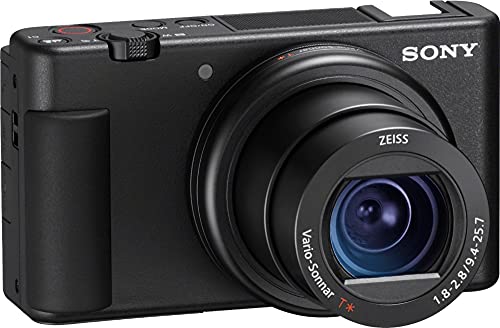
Sony ZV-1 — Creator-friendly high speed
The ZV-1 was designed for people who film themselves talking, which makes its presence in a slow-motion guide seem odd until you discover it shares the Sony high-frame-rate party trick: bursts approaching a thousand frames per second at reduced resolution, inherited from its RX100 cousins. For creators, that combination is uniquely appealing. The same camera that records a product review at a desk in the morning can slow a coffee pour, a makeup brush flick, or a skateboard ollie to near-stillness in the afternoon, with a flip screen to frame it and a microphone input to narrate over the result.
Creator-first design shows in the details surrounding the sensor. The lens is bright, flattering skin at desk distances; the autofocus tracks eyes and products with a reliability vloggers built channels upon; and the built-in microphone with its windscreen handles voice better than action cameras manage. Slow-motion clips from the ZV-1 therefore tend to live inside edited videos — as cutaways, demonstrations, and texture — rather than as standalone sport coverage, and judged in that habitat the camera is superb.
Its limits mirror the RX100’s: the extreme mode is brief, soft, and thirsty for light, and the body offers no weather sealing, modest battery stamina, and a zoom range tuned for arm’s-length work. Overheating can interrupt long normal-speed sessions, though slow-motion bursts are short by nature. Buyers choosing between the two Sonys should ask where their camera lives: the RX100 VII is the photographer’s compact that does high speed, while the ZV-1 is the video creator’s tool that does high speed — a distinction of emphasis that decides real-world satisfaction more than any shared specification.
- Sensor: one-inch class sensor in a vlogging-oriented compact body
- High-speed character: high-frame-rate bursts near 960–1000fps at reduced resolution
- Creator kit: flip screen, microphone input, strong eye autofocus
- Handling note: unsealed body, desk-and-daylight temperament
Strengths
- Extreme slow motion joins a genuinely excellent creator camera in one body.
- Flip screen and mic input suit narrated experiments and demonstrations.
- Bright lens flatters the desk-distance subjects creators film most.
Trade-offs
- Weather sealing is absent, ruling out the action cameras’ rough habitats.
- Extreme mode shares the burst, softness, and light-hunger limits of its class.
- Battery endurance trails the action picks during long shooting days.
Best for: video creators wanting high-speed cutaways from their everyday camera. Not suited for: mounted sport coverage or wet, dusty filming environments.

GoPro LIT Hero — Gentle slow-down on a budget
Let the framing be exact, because this camera is the one most likely to be oversold by a careless headline: the LIT Hero’s video ceiling is 4K at sixty frames per second. It has no high-frame-rate mode, no hidden high-speed menu, and no business being described as a high-speed camera. What sixty frames per second does provide, played back at thirty or twenty-four, is a gentle halving of time — enough to smooth a child’s jump off a dock, add grace to a dance move, or steady the feel of a walking tour. For many casual shooters, that mild slow-down is honestly all they ever use.
Judged as the lightweight, inexpensive GoPro it actually is, the package charms. A built-in light — the feature its name advertises — rescues dim indoor clips and evening campsite moments that other budget action cameras render as murk. The body is compact and waterproof, stabilization handles everyday motion, and the whole thing costs a fraction of its HERO13 sibling while sharing the family mounting language. As a first action camera that happens to slow the world a little, it makes complete sense.
The danger is only expectation mismatch. A buyer dreaming of analyzing a golf swing’s micro-mechanics or stretching a pitch across ten seconds will be stranded by the sixty-frame ceiling, and no setting will save them. Read this entry as the guide’s honesty anchor: if your slow-motion ambitions are mild and your budget is strict, the LIT Hero serves you well today. If your ambitions are real, save toward the Action 4 or HERO13 rather than asking this cheerful little camera to perform a specialty it never claimed on its own specification sheet.
- Video ceiling: 4K at 60fps; slow-down limited to half-speed-style playback
- Distinguishing feature: built-in light for dim scenes, unusual at this tier
- Form: lightweight waterproof action camera with stabilization
- Positioning note: budget all-rounder, explicitly not a high-speed specialist
Strengths
- Integrated light transforms evening and indoor clips rivals leave murky.
- Half-speed playback covers the casual slow-down most owners actually post.
- Featherweight waterproof body travels anywhere without protective anxiety.
Trade-offs
- Sixty-frame ceiling cannot stretch fast action into analytical slow motion.
- Photo and video specifications sit well below the flagship sibling’s.
- Serious slow-motion buyers will outgrow it within a single project.
Best for: casual creators wanting mild slow-down plus a light, at the lowest cost here. Not suited for: sports analysis or anyone whose subject moves genuinely fast.
Apple iPhone 16 Pro — Pocket benchmark, prose-only
Every dedicated slow-motion camera must now answer an impertinent question: why not just use the phone? The iPhone 16 Pro records slow motion at one-hundred-twenty frames per second in high resolution and two-hundred-forty frames per second at 1080p, with stabilization, instant editing, and sharing that no standalone camera matches. It carries no link here because our verified pool held no listing for it, but its gravitational pull shapes the whole category, so omitting it would be its own kind of dishonesty.
For spontaneous moments — a heron taking flight on a morning walk, a child’s cannonball at a hotel pool — the phone wins by presence alone, and its footage quality at two-hundred-forty is clean enough to embarrass older dedicated gear. Computational polish steadies exposure as subjects cross between sun and shade, and the ability to adjust playback speed after recording, choosing exactly which seconds slow down, is an editing luxury purpose-built cameras rarely offer.
The dedicated picks justify themselves at the edges: the Sonys reach frame rates the phone cannot, the action cameras survive mounts, water, and impacts a phone should never meet, and the DJI’s sensor drinks more light. Battery separation matters too on long filming days. But if your slow-motion life consists of occasional delightful clips rather than a discipline, the honest recommendation is to master the phone you own first — then buy a dedicated camera only for the specific capability your filming has proven it needs, not the one an advertisement suggested it might.
- Slow-motion character: 1080p at 240fps, plus higher-resolution 120fps capture
- Availability: prose-only benchmark; no verified listing in our pool
- Workflow edge: in-phone speed ramping, editing, and instant sharing
- Limits: fragility, heat on long sessions, no extreme frame-rate mode
Strengths
- Convenience and polish make slow motion a two-tap, everyday habit.
- Post-capture speed adjustment rescues clips framed imperfectly in the moment.
- Footage quality at 240fps satisfies most social and family purposes.
Trade-offs
- No path to the near-thousand-frame territory the Sony compacts occupy.
- Glass-slab fragility forbids the mounts and abuse action cameras invite.
- Storage and battery are shared with everything else your life runs on.
Best for: everyone whose slow-motion needs are occasional, spontaneous, and social. Not suited for: specialists needing extreme rates, rugged mounts, or all-day filming.
How Do the Six Compare at a Glance?
| Camera | Slow-motion identity | Principal caution |
|---|---|---|
| Sony RX100 VII (Renewed) | Near-960fps bursts for explosive instants | Reduced resolution and short burst windows |
| GoPro HERO13 Black | 240fps sport coverage, waterproof and stabilized | Wide fixed view, heat on long sessions |
| DJI Osmo Action 4 | 4K120 with superior low-light cleanliness | Peak rate below the GoPro flagship’s |
| Sony ZV-1 | Creator camera with near-1000fps burst trick | Unsealed body, burst limits, light hunger |
| GoPro LIT Hero | 4K60 for gentle half-speed moments only | No high-frame-rate capability whatsoever |
| iPhone 16 Pro | 1080p240 convenience benchmark, prose-only | Fragile, shared battery, no extreme mode |
Notice how the ranking reshuffles depending on a single question: how fast is your subject, really? A bursting balloon crowns the Sonys. A downhill run crowns the GoPro. A dusk skate session crowns the DJI. A birthday splash crowns whichever camera is present, which is usually the phone. Slow motion is not one capability but a spectrum, and this guide’s order simply walks that spectrum from the extreme toward the everyday, pricing honesty at every step.
Why Does Light Matter More Than Frame Rate?
Every frame needs its own exposure, so doubling the frame rate halves the light each frame can gather at a given shutter behavior. At extreme rates the camera is effectively photographing in near-darkness even at noon, compensating with sensitivity that brings noise and with apertures already wide open. This is why high-speed demonstrations online always seem to happen under blazing sun or studio lamps: the creators are not showing off locations, they are feeding their sensors.
Plan your own shoots around that physics. Schedule the skate session for bright morning rather than golden dusk if you intend to use the highest rates, or drop to a moderate rate and keep the dusk mood with cleaner footage. Add light deliberately for indoor experiments — a cheap LED panel transforms the Sony compacts’ high-frame-rate results from grainy rumor to usable clip. And expose carefully: slow-motion footage tolerates highlight clipping poorly, because the eye lingers on every flaw when time stretches.
What Mistakes Spoil Most Beginners’ Slow-Motion Clips?
Choosing the maximum rate for every subject leads the list. A walking tour at two-hundred-forty frames per second becomes an interminable, storage-devouring trudge; reserve extreme rates for extreme events. Second is forgetting that audio rarely slows with the picture — plan music or narration over high-speed clips instead of expecting usable sound. Third is shooting handheld at long zoom equivalents, where tiny shakes become slow, seasick swells once stabilized poorly or not at all.
Framing too tightly causes quieter grief, because slowed subjects travel further across the frame than intuition predicts; leave headroom for the skateboard to land in. Storage neglect follows: a single enthusiastic afternoon at high rates can fill a card mid-session, so format cards beforehand and carry a spare. Finally, many beginners never rehearse burst timing on the Sonys, then miss the balloon entirely while menus mock them. Practice the sequence on unimportant subjects until it is muscle memory, and the important subject will meet a prepared camera.
How Do You Plan a Slow-Motion Shoot That Actually Works?
Scout the light first and the location second. Decide your playback rate before recording — a clip destined for quarter-speed social posting wants different capture settings than one destined for frame-by-frame coaching analysis. Shoot a five-second test at your chosen rate and review it on the largest screen available, because camera displays forgive noise that a television will prosecute. Only then bring the subject, the dog, or the water balloons into position.
Direct the action like a tiny film set. Mark where the trick should happen so it crosses your best light, agree on a countdown for burst modes with their unforgiving windows, and shoot each attempt twice when the subject allows it — slow motion’s cruelty is that the perfect take and the missed focus are indistinguishable until playback. Between attempts, check battery and card space with the discipline of a pilot’s checklist. End by recording a few seconds at normal speed too; future you, editing, will bless present you for the context and the usable audio.
How Do You Edit Slow Motion Without Ruining It?
The edit begins with a decision about time. Uniform slow playback suits analysis and single-gesture clips, but most storytelling benefits from speed ramping: normal speed as the skater approaches, a plunge into slow motion at the trick’s apex, then release back to real time as they roll away. Every editor from phone apps upward supports that ramp now, and the phone pick in this guide performs it natively. Learn the ramp and your clips stop looking like demonstrations and start looking like films.
Respect the frame rate’s floor while editing. Slowing a sixty-frame clip below its captured rate forces software to invent frames, and invented frames smear fast edges into ghosts. Optical-flow interpolation has improved remarkably, yet it still fails around splashing water, spinning wheels, and anything with fine repeating detail — precisely slow motion’s favorite subjects. The professional habit is capturing faster than the final effect requires, then choosing the playback rate the footage can honestly sustain. Buy capture headroom, in other words, not editing promises.
Sound design separates memorable clips from muted curiosities. Since high-speed audio is unusable, editors lay in music, ambient recordings made separately at normal speed, or deliberately exaggerated effects — a deepened splash, a slowed crowd gasp — that tell the ear what the eye is experiencing. Even a simple whoosh timed to the ramp’s entry transforms perception. Finally, keep slow clips short. The technique is a spice; a three-minute video containing twenty seconds of well-placed slow motion will outperform three minutes of uniform syrup in every audience metric that matters, including the only one that should: people watching to the end.
Which Camera Suits Which Subject, Subject by Subject?
Ball sports divide by intent. A coach breaking down a pitcher’s mechanics wants the Sony bursts or the GoPro’s two-hundred-forty, tripod-mounted and rehearsed. A parent wanting a beautiful memory of a daughter’s first goal wants the phone’s convenience or the DJI’s clean evening quality, because the moment’s emotion outranks its biomechanics. Neither buyer is wrong; they are simply purchasing different artifacts from the same Saturday.
Water is slow motion’s most generous subject and its most demanding. Droplets, splashes, and diving entries reward the highest rates and punish weak light mercilessly, since every droplet is a tiny highlight waiting to clip. Shoot water at midday with the Sonys for spectacle, or at one-hundred-twenty with the action cameras for waterproof intimacy from inside the splash zone — a perspective no compact can risk. Surfers and swimmers should default to the rugged pair and accept their rate ceilings as the price of survival.
Animals reward frame rate in proportion to their speed. A cat’s pounce reads beautifully at one-hundred-twenty. A hummingbird demands the Sony extreme modes and forgives their softness because the subject is the motion itself. Dogs occupy the happy middle, where the GoPro on a harness mount produces slow-motion joy of a quality that regularly outperforms the day’s human footage. Match the rate to the animal’s fastest gesture, not its average behavior, and leave resolution expectations where the physics put them.
What About Batteries, Cards, and Heat on a Slow-Motion Day?
High frame rates are the hungriest workload a small camera knows. Sensors read at maximum tempo, processors encode relentlessly, and screens stay lit while you review the miracle you just captured. Action cameras that promise an hour of normal filming may give you far less at peak rates, and compacts shrink further still. Carry double the batteries your normal habit suggests, and treat a USB power bank as standard kit for stationary burst work with the Sonys.
Cards must keep pace literally: slow-motion files at high bitrates expose slow memory instantly, producing dropped frames or halted recordings that masquerade as camera faults. Buy cards rated for the camera’s maximum sustained write speed, from reputable sellers, because counterfeit cards fail exactly under this workload. Format them in-camera on the morning of the shoot rather than deleting files piecemeal, which keeps the file system honest under stress.
Heat is the third tax. Compact bodies recording at their ceilings grow warm, and thermal protection will end sessions that batteries would have survived, especially in summer sun. Shade the camera between takes, remove it from waterproof housings when the water is not actually involved, and schedule burst subjects early before the day and the device both overheat. None of this is glamorous, and all of it decides whether the decisive attempt — usually the last one, when the subject finally performs — gets recorded at all.
Can Slow Motion Make You Better at the Sport Itself?
Coaches have used slowed footage since film cost real money, because the body lies about what it did and the camera does not. A golfer certain his hips lead the swing watches them trail it at quarter speed. A young pitcher’s arm path, a sprinter’s first three steps, a climber’s weight shift on a crux move — all become discussable facts instead of feelings. The cameras in this guide are not laboratory instruments, yet at one-hundred-twenty frames and above they resolve technique honestly enough for amateur improvement, which is where most sporting lives are lived.
Use that power kindly and systematically. Film from the same angle across sessions so changes are comparable, keep the camera fixed rather than panning, and review with the athlete immediately while the body’s memory of the attempt is fresh. One correction per session, verified by the next clip, compounds faster than a folder of unreviewed footage. Parents should hear the gentle warning inside this section: analysis is a tool the young athlete should own, not a surveillance regime, and the clips remembered fondly in adulthood will be the joyful ones, not the corrected ones.
Why Do Science Experiments and Kids Belong in This Guide?
Because the Sony compacts’ extreme modes turn a kitchen into a physics theater. A balloon’s burst, a droplet’s crown-shaped splash in milk, a domino cascade’s acceleration, the exact instant a soap bubble surrenders — children who watch these at near a thousand frames per second ask questions no textbook prompts. Schools and curious households extract educational value from these cameras that justifies their price in a way pure entertainment accounting misses, and the bursts’ short length suits young attention spans perfectly.
Set expectations for young experimenters honestly: the soft, small image is the nature of the trick, timing takes practice, and the best results demand the brightest light you can arrange, ideally a sunny window or a cheap LED panel. Build the ritual — predict, film, watch, explain — and the camera becomes an instrument of curiosity rather than another screen. That may be the most durable recommendation in this entire guide, outlasting every specification it contains.
When Is Slow Motion Simply the Wrong Tool?
Often enough that restraint deserves its own section. Dialogue dies in slow motion; so does comedy that depends on timing, music performance whose rhythm is the content, and any moment whose power is its brevity — a surprise proposal’s reaction should arrive at life’s speed. Wildlife behavior sequences frequently play better near real time with slight slow-down only at the strike or leap. Knowing when not to slow the world is the mark of a mature editor, and every camera here also shoots excellent normal-speed footage, a fact their owners should exploit without guilt.
There is also a storage-and-sanity argument. A family holiday filmed entirely at high frame rates becomes an editing debt nobody pays, and unedited footage might as well not exist. Shoot the day normally, reserve slow motion for its three most kinetic minutes, and the resulting film will actually get made. Technique serves memory, never the reverse — a principle worth taping above the desk where these cameras’ cards get emptied.
How Does Slow Motion Play on Social Platforms and Phones?
Most slow-motion footage now lives its life on vertical phone screens, and that destination reshapes capture decisions. Fine detail that justifies a high-resolution mode on a television evaporates on a six-inch display, while the soft extreme-rate bursts from the Sonys look perfectly at home there. Conversely, platform compression punishes noisy footage brutally, so the DJI’s clean dusk files survive the upload pipeline with more dignity than a grainier rival’s higher frame rate might. Judge test clips after a trial upload, not before, if social sharing is your footage’s true home.
Frame your capture for the crop you will eventually make. Action cameras’ wide views forgive vertical cropping generously, letting a horizontal master yield a vertical cut without amputating the subject. The compacts demand more foresight: leave space at the frame’s sides when the final edit is destined for a phone-shaped world. Creators who shoot both ways from the same session — one wide master, one dedicated vertical take — consistently produce the strongest feeds, and the discipline costs only a second battery’s worth of planning.
What Should Renewed and Budget Buyers Check Twice?
Two picks here carry financial fine print worth a slow read. The RX100 VII listing is renewed, and its high-frame-rate mode is precisely the feature a careless refurbishment might leave impaired, so test that mode on day one, in bright light, against a genuinely fast subject like a dripping tap filmed close. Confirm the burst records, writes, and plays back smoothly before the return window closes. The same diligence applies to its zoom mechanism and sensor cleanliness, since a premium compact’s complexity is its renewed risk.
Budget buyers eyeing the LIT Hero should perform the opposite check: verify that their ambitions, not the camera, are what is limited. Film a friend jumping, slow the playback, and ask whether that gentle halving satisfies the projects actually in your head. If yes, you have found the segment’s honest bargain. If the result feels like a trailer for a capability you truly want, return it unopened-by-regret and save toward the Action 4, whose one-hundred-twenty frames transform the experience categorically. Money spent twice on the wrong tier is the only genuinely unaffordable outcome in this guide.
A Beginner’s First Afternoon With a High-Speed Camera
Start with water, the most forgiving spectacular subject. Fill a glass, position the camera close and safe from splashes, aim the brightest light you own at the scene, and drop ice cubes from a height while the burst mode runs. Review immediately and adjust one variable at a time — distance, light, rate — until cause and effect become intuitive. Then graduate to a dripping tap’s rhythm, a shaken wet dog if one volunteers, and a friend’s clapping hands, whose speed surprises everyone the first time they watch them slowed to a crawl.
End the afternoon by filming one subject at every rate your camera offers and watching the sequence in order. Nothing else teaches the resolution-for-speed exchange as honestly as your own footage making the trade in front of you. You will leave with a personal map of your camera’s territory — which rates are tools, which are toys, and which subjects deserve which — and that map is worth more than any review, including this one, because it is drawn in your light, on your subjects, by your hand.
What Will the Next Generation Probably Change?
Computational assistance is creeping toward this category from the phone world: smarter interpolation, subject tracking that predicts burst timing, and sensors that read faster without shrinking resolution as brutally. Expect the resolution penalty at extreme rates to soften gradually and the phone benchmark to keep rising, squeezing dedicated cameras toward their defensible edges — ruggedness, optics, sustained capture, and rates no phone attempts. None of that futureproofing should delay a purchase whose subjects are happening now. A child’s season, a dog’s athletic prime, and a parent’s visit all run on schedules indifferent to product cycles, and the best slow-motion camera remains the one present when the moment accelerates past ordinary sight.
If anything, buy with the upgrade path in mind: mounts, cards, lights, and tripods purchased for today’s action camera will serve tomorrow’s, and the editing skills built on any pick here transfer completely. The camera body is the most perishable part of the system and, paradoxically, the least important to agonize over. Choose for your current subjects, master the tool, and let the future announce itself when it actually ships.
One Honest Paragraph About Diminishing Returns
Beyond two-hundred-forty frames per second, each doubling of rate serves a narrower audience: analysts of contact instants, science communicators, and the gloriously curious. There is no shame in belonging to that audience — this guide’s top pick exists for you — but there is waste in paying its taxes accidentally. Most households’ slow-motion joy lives between sixty and two-hundred-forty frames, in bright afternoons and wet dogs and first dives. Spend there first, master the light and the edit, and let a proven appetite, rather than a specification sheet, tell you when to climb higher.
What About Tripods, Mounts, and Keeping the Camera Steady?
Slow motion forgives camera shake less than any other genre, because viewers study each frame long enough to notice drift that real-time footage hides. A modest tripod transforms the compacts’ burst modes from hopeful to surgical, letting you pre-frame the exact patch of space where the balloon will burst. Action cameras substitute electronic stabilization for stillness, which suits their moving habitats, yet even they produce their finest slow footage from a fixed mount when the subject supplies the motion. Invest in steadiness before investing in rate; the hierarchy surprises beginners and satisfies veterans.
Final Recommendation
Match the purchase to the physics of your favorite moments. Experimenters chasing bursting, splashing, and shattering instants should choose between the Sony pair — the RX100 VII for a photographer’s compact, the ZV-1 for a creator’s desk — and budget for bright light to feed them. Athletes should take the HERO13 for maximum rate with ruggedness, or the Action 4 when their sport lives in gyms and evenings. The LIT Hero earns money only from buyers who heard its limits clearly and still smiled. And everyone should interrogate their phone first. Slow motion rewards honesty about what you will film, so buy the camera your real weekends describe — then go stretch a second into ten and watch the ordinary world confess how beautiful it has been all along.
Frequently Asked Questions
Why does the resolution fall at very high frame rates?
Sensor readout and processing bandwidth are finite, so capturing near a thousand frames each second forces the camera to read a smaller portion of the sensor or fewer pixels per frame. The result is real high-speed motion at modest detail. It suits short spectacle clips and analysis, which is why the guide states the trade beside every extreme claim rather than in footnotes.
Why do my slow-motion clips look grainy?
Almost always, light is the culprit. High frame rates force short exposures, the camera compensates with sensitivity, and sensitivity brings noise that daylight demos never showed. Add light, lower the rate one step, or move the shoot earlier in the day, and the grain retreats dramatically. Noise reduction in editing helps at the margins but cannot invent photons the sensor never received.
Is 120fps enough for sports analysis?
For most coaching purposes, yes. At quarter-speed playback, swings, strides, and throws separate into readable phases, and the DJI delivers that rate at full 4K quality. Frame-by-frame specialists studying ball contact or a sprinter’s start may want the GoPro’s 240fps or a Sony burst, accepting their respective costs in resolution or ruggedness.
Which pick handles a rainy match day best?
The two waterproof action cameras, by design. The HERO13 brings the higher frame rate for stretching a striker’s volley, while the Action 4 counters with cleaner files as the light fails late in the second half. The compacts and the phone should stay under cover on such a day, however tempting their specifications look from the dry warmth of a product page.
Can the LIT Hero do slow motion at all?
Only the gentle kind. Its 60fps capture played back at 30fps yields half-speed footage, which flatters dives, dances, and walking clips. It has no high-frame-rate mode, so fast subjects will not stretch into analytical slow motion no matter which settings you choose. Buy it as a budget action camera with a light, not as a high-speed tool.
Do slow-motion modes record sound?
Generally not usefully. Extreme high-frame-rate modes on the compacts record without meaningful audio, and slowed footage from any camera stretches sound into uselessness. Plan to score clips with music, narration recorded separately, or the natural sound from a companion normal-speed take, which is standard practice in edited slow-motion work. Some creators record a separate audio track on a phone placed near the action, then blend a shortened, pitch-kept slice of it under the slowed pictures for a surprisingly convincing sense of presence.
Does slow motion work indoors?
Yes, within light’s limits. Moderate rates like sixty and one-hundred-twenty manage under bright household or gym lighting, especially with the DJI’s larger sensor drinking deeper. Extreme burst modes struggle indoors unless you add deliberate lighting, because their tiny exposure windows starve the sensor. A single LED panel aimed at the subject changes indoor results more than any menu setting, which is why experimenters budget for light alongside the camera.
Should I film at the highest rate and decide later?
Rarely. Maximum rates cost resolution, storage, battery, and often audio, while most subjects peak in beauty at moderate slow-down. Decide the story first: analysis wants rate, mood wants restraint, and spectacle wants the extreme modes in short doses. Filming everything at the ceiling is the slow-motion equivalent of seasoning every dish with the hottest sauce in the cupboard.
How much storage does slow motion consume?
Far more than intuition suggests, because high frame rates multiply the data captured for every real second, even though playback stretches it. An afternoon of enthusiastic 240fps filming can fill cards that would hold a weekend of normal video. Carry spare cards, offload during breaks, and delete failed attempts in-camera while the session’s memory is fresh. Budget storage as a genuine running cost of the genre, alongside batteries, rather than discovering it mid-shoot.
Related Guides
Before you leave, a practical dare: this weekend, film one ordinary event — a kettle’s steam, a staircase descent, a pet’s greeting at the door — at the highest rate your current device allows, and watch it twice. If you lean toward the screen, a dedicated camera from this guide will earn its shelf space. If you shrug, your phone has already answered the question, and your money belongs in light, mounts, or simply more weekends worth filming. Action shooters comparing the two rugged picks head-to-head should see our flagship action camera shootout, creators curious about the ZV-1’s everyday video can read the compact vlogging camera roundup, and anyone bitten by the high-speed bug may enjoy our introduction to filming water, fire, and other fast subjects for project ideas beyond this guide.



[…] the field with our specialist guides to the best affordable indoor cameras and the best affordable outdoor security cameras, or scale up with the best affordable home […]