What's inside
- Key Takeaways
- Quick Picks
- How Did We Choose Extenders for AT&T Fiber Homes?
- What Actually Happens When an Extender Meets a Fiber Gateway?
- Which AT&T Gateway Do You Have, and Does It Change the Answer?
- Extender, Second Gateway Radio, or Whole New Mesh — Which Problem Do You Actually Have?
- How Do the Six Compare Side by Side?
- Where Should You Put an Extender in an AT&T Fiber Home?
- How Do You Set Up an Extender with an AT&T Gateway, Step by Step?
- What Mistakes Do AT&T Fiber Customers Keep Making with Extenders?
- Final Recommendation
- Frequently Asked Questions
- Related Guides
As an Amazon Associate I earn from qualifying purchases. This post may contain affiliate links at no extra cost to you.
gizmoverdict.com is reader-supported. When you buy through links on our site, we may earn an affiliate commission.
Where to buy: Each of the six extenders below comes from this site’s verified product pool and links to its own Amazon listing. Check the listing for the exact hardware revision before ordering, because extender model names often span several revisions with different radios inside.
The best wireless extenders that work with att fiber share a secret that the marketing around them works hard to obscure: compatibility with AT&T Fiber is not a special feature. AT&T’s fiber service arrives at a gateway the company supplies, that gateway broadcasts ordinary Wi-Fi, and any competent range extender — which is simply a device that listens to a Wi-Fi network and rebroadcasts it — will work with that Wi-Fi regardless of whose logo is on the box. There is no certification program under which TP-Link or NETGEAR extenders are approved for AT&T’s network, and any listing implying otherwise is decorating a universal truth to look like a credential.
There is exactly one exception to that rule in this roundup, and it leads the list. The Airties Air 4921 is the extender AT&T itself issued to its fiber customers, built to pair with the company’s gateways as part of its own managed Wi-Fi offering. That makes the honest question for AT&T Fiber households not “which extenders are compatible?” — they all are — but “which approach fits my home: the carrier’s own matched unit, or an independent extender I own and control?” The six picks below are organised around that question, with one ISP-issued unit and five independent repeaters spanning three wireless generations.
A second piece of honesty belongs up front. An extender repeats the gateway’s Wi-Fi; it does not touch the fiber. Your gigabit or multi-gig fiber plan delivers its speed to the gateway, and everything after that is local wireless physics — distance, walls, and the halving effect that repeating imposes when a single radio must listen and talk in turn. An extender is the right tool for a dead bedroom or a fading home office. It is not a tool for making a distant room as fast as a cable plugged into the gateway, and this guide will keep pointing at the exits — mesh systems and wired access points — where an extender is the wrong tool entirely.
Key Takeaways
- Compatibility is universal: every standard extender works with an AT&T Fiber gateway because extenders repeat Wi-Fi, and AT&T’s gateway broadcasts ordinary Wi-Fi — no ISP certification exists for third-party extenders.
- The Airties Air 4921 is the one genuine exception to “any brand works the same”: it is the unit AT&T itself issued for its fiber service, designed to integrate with the gateway rather than merely repeat it.
- An extender cannot add fiber speed; it redistributes the gateway’s Wi-Fi and typically trades some throughput for reach, so placement halfway to the dead zone matters more than model choice.
- WiFi 7 extenders like the NETGEAR EXS27 future-proof the local hop, but the link back to an older AT&T gateway still runs at the gateway’s generation — the chain moves at its oldest link.
- If the dead zone matters daily — a work-from-home office, a gaming den — a wired access point or a true mesh kit will beat every extender on this page.
Quick Picks
| Pick | Badge | Why it is here |
|---|---|---|
| AT&T Airties Air 4921 Smart Wi-Fi Extender | The carrier’s own unit | The extender AT&T itself issued for its fiber customers, built to pair with AT&T gateways as one managed network. |
| TP-Link AC1900 WiFi Range Extender RE550 | Best proven independent pick | A mature AC1900-class repeater with the capacity to serve a busy household’s far rooms without drama. |
| TP-Link AX3000 WiFi 6 Dual-Band Range Extender | Best WiFi 6 value lane | AX3000 WiFi 6 repeating with an editor’s-choice pedigree in its listing title, for homes whose gateway and devices have moved to WiFi 6. |
| NETGEAR Nighthawk WiFi Extender EAX15 | Best mesh-style NETGEAR | A Nighthawk extender rated in its title for up to 1,500 sq ft at 1.8 Gbps class, aimed at seamless single-name coverage. |
| NETGEAR Nighthawk WiFi 7 Extender EXS27 | Most future-proof | A WiFi 7 extender with a 5 Gbps class figure in its title — the longest-lived local radio in this roundup. |
| ASUS RP-AX58 AX3000 WiFi 6 Range Extender | Best for ASUS households | An AX3000 extender that doubles as an AiMesh node, so ASUS router owners can grow into a mesh instead of replacing gear. |
How Did We Choose Extenders for AT&T Fiber Homes?
The first decision was to refuse the premise that “works with AT&T Fiber” is a filter at all. Since every standard extender repeats whatever Wi-Fi it hears, screening for compatibility would have been screening for nothing. Instead the pool was screened for the qualities that actually separate outcomes in a fiber home: wireless class matched to the gateway generations AT&T has deployed, the ability to keep one network name so devices roam without clinging, and a setup path a non-specialist can finish.
The second decision was to include the Airties unit and to describe it accurately. It is easy to find this model described online as though it were a generic extender; it is not. It is carrier-issued hardware, and its value proposition — deep pairing with AT&T’s gateway and management — is inseparable from that origin. Buyers considering it second-hand should understand they are buying into AT&T’s ecosystem on AT&T’s terms, which for many fiber customers is precisely the appeal.
Third, we spread the list across generations on purpose: one AC1900 veteran, three WiFi 6 units, one WiFi 7 flagship. AT&T has shipped several gateway generations, and the right extender for a home depends on which gateway sits in the closet and which devices live in the dead zone. A WiFi 6 extender behind an older gateway is not wasted — the local hop still improves — but a WiFi 7 extender behind that same gateway cannot conjure WiFi 7 end to end, and the entries below say so where it matters.
Finally, a note on the figures quoted. Coverage areas and class speeds in these listings are manufacturers’ ideal-condition numbers. The EAX15 and EXS27 titles both claim up to 1,500 square feet; treat that as a statement about open-plan optimism, not a promise for a house of brick and plaster. This guide prints such figures only as the listings state them, and argues from architecture and generation instead.
What Actually Happens When an Extender Meets a Fiber Gateway?
Picture the traffic. Your device in the dead bedroom talks to the extender; the extender talks to the AT&T gateway; the gateway talks to the fiber. The middle conversation is the extender’s whole existence, and it happens on the same airtime as the first one unless the extender has a dedicated path back. That is the mechanical reason repeating costs throughput: a single-band conversation relayed is a conversation held twice. Dual-band extenders soften this by splitting duties across bands, and mesh-style extenders manage the hand-off gracefully, but none of them repeal the arithmetic.
The practical consequence for a fiber household is a two-tier home. Near the gateway, devices enjoy something close to the plan’s character. Beyond the extender, they enjoy the extender’s character: perfectly good for streaming, calls, browsing and smart-home traffic, noticeably less heroic for moving huge files or chasing the lowest possible latency. Most households discover this trade is entirely acceptable for the rooms extenders serve — spare rooms, kitchens, garages, patios — and unacceptable for the one room where someone works or competes. That room deserves a cable or a mesh node with a wired feed, and no extender purchase should be asked to pretend otherwise.
Latency deserves its own honest paragraph, because fiber customers are often latency customers. Fiber’s gift is not only bandwidth but responsiveness, and every wireless relay spends a little of that gift. For video calls, streaming and ordinary work, the spend is invisible. For competitive gaming or any pastime measured in milliseconds, the far room behind an extender is a measurably worse seat than the same room on a wire — not unplayable, but handicapped. Gamers reading this guide should hear that plainly: an extender can bring the game to the room, but only a cable or a properly fed access point brings the room to the game.
There is also a naming decision hiding inside every extender setup. Run the extender under the same network name as the gateway and devices will roam, sometimes clumsily, sticking to a weak signal longer than they should. Run it under a second name and you gain manual control at the cost of manual switching. Mesh-style extenders and the Airties unit exist largely to make the first option behave properly, coordinating the hand-off instead of leaving it to each device’s stubbornness. For most AT&T homes, that coordination — not raw class speed — is the upgrade they actually feel.
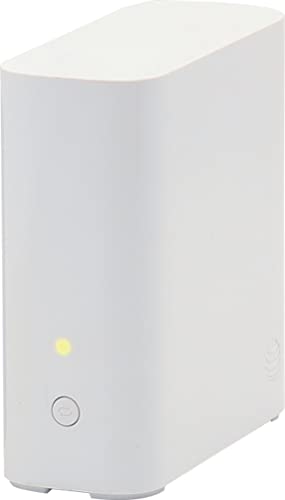
AT&T Airties Air 4921 Smart Wi-Fi Extender — The carrier’s own unit
The Air 4921 occupies a category of one in this roundup: it is the smart Wi-Fi extender AT&T itself supplied to its fiber customers, an Airties-built unit rated in its title at 1600Mbps class, dual band, with a 3×3 radio arrangement. Where every other pick is an independent repeater that happens to work with AT&T’s gateway, this one was designed to work as part of AT&T’s gateway — extending the carrier’s managed Wi-Fi as a coordinated system rather than as a foreign relay the gateway tolerates.
That origin cuts in two directions, and buyers should feel both edges before purchasing. In its favour: pairing with a compatible AT&T gateway is the smoothest setup story on this page, the network presents as one, and the unit’s behaviour is the behaviour AT&T intended its customers to have, which matters if you ever want the carrier’s support to own a coverage problem. Against it: the unit’s identity is bound to AT&T’s ecosystem and management approach, its wireless class belongs to an earlier generation than the WiFi 6 and WiFi 7 picks below, and a second-hand market purchase carries the usual carrier-hardware caveats about provenance and intended deployment.
Who is it right for? The AT&T Fiber customer who wants the carrier’s own answer, distrusts third-party tinkering, and would rather the whole home network be one throat to choke — AT&T’s. That is a legitimate preference and this unit serves it directly. The customer who plans to leave AT&T, or who wants an extender that will follow them to any future provider, should look at the five independent picks below, every one of which is provider-agnostic by design.
A word about how these units typically enter a home, because it shapes expectations. Many Air 4921s in circulation arrived through AT&T’s own channels as part of its whole-home Wi-Fi offering, which means the second-hand market holds units with varied histories — some barely used, some retired from years of service, some entangled with a previous household’s account arrangements. None of that makes the model a bad purchase; it makes the listing worth reading with the care you would give any carrier-hardware purchase, checking what exactly is being sold and in what condition, rather than assuming a retail-box experience.
- Origin: extender issued by AT&T for its fiber service, built by Airties
- Class figure in title: 1600Mbps
- Bands: dual band, per the listing title
- Radio arrangement in title: 3×3
- Use with non-AT&T gateways: Not stated in the listing title — verify with AT&T documentation
Strengths
- Designed to pair with AT&T gateways as one managed network rather than repeat as an outsider
- The only pick whose AT&T fit is a matter of design rather than universal extender compatibility
- Carrier-issued behaviour keeps AT&T support able to own coverage problems end to end
Trade-offs
- Wireless class is an earlier generation than the WiFi 6 and WiFi 7 independents below
- Value is bound to staying inside AT&T’s ecosystem and management model
- Second-hand units carry carrier-hardware provenance questions a retail extender does not
Best for: an AT&T Fiber household that wants the carrier’s own matched extender and one managed network under AT&T’s umbrella. Not suited for: switching carriers next year strands this unit — the unit’s whole value is its AT&T pairing, and the independent picks travel better.

TP-Link AC1900 WiFi Range Extender RE550 — Best proven independent pick
The RE550 is the roundup’s seasoned campaigner: an AC1900-class dual-band repeater from TP-Link’s long-running range extender line, old enough to have its behaviour thoroughly understood and new enough in class to serve a fiber home’s far rooms without apology. AC1900 was the flagship class of its generation, and the rooms an extender serves — the bedroom that drops calls, the office over the garage — rarely ask for more than a healthy slice of it.
With an AT&T gateway, the RE550 does what every honest repeater does: it hears the gateway’s network, joins it, and rebroadcasts it where the gateway alone could not reach. There is no AT&T-specific machinery inside, and this guide regards that as a feature. The unit is provider-agnostic, so it survives a change of ISP, a move to a new house, or a hand-me-down to a relative on a different network entirely — a flexibility the carrier unit above deliberately trades away.
The generation question deserves a straight answer. If your AT&T gateway and your devices are WiFi 6 or newer, the RE550’s older radios become the slowest conversationalist in the chain for the devices behind it. For streaming, browsing, calls and smart-home duty, that ceiling sits well above the work. For a back bedroom turned into a serious workstation, the WiFi 6 picks below are the better spend. The RE550’s case rests on maturity and sufficiency: a known quantity, doing a defined job, at the sensible end of the range.
There is a household this pick suits with particular precision: the one whose fiber installation is a few years old, whose gateway is of the same vintage as the RE550’s class, and whose complaint is a single mutinous room. In that house, matching an AC1900 repeater to an AC-era gateway is not settling — it is symmetry. Every link in the chain speaks the same generation, nothing is bottlenecked by an extender bought too cheaply, and nothing is wasted on an extender bought too grandly. Networking gear rewards that kind of proportionality more often than it rewards ambition.
- Mode: dual-band WiFi range extender (repeater)
- Wireless class: AC1900, per the listing title
- Brand line: TP-Link range extenders
- AT&T-specific certification: none exists for third-party extenders — compatibility is by standard Wi-Fi repeating
- Ethernet port provision: Not stated in the listing title — verify with TP-Link documentation
Strengths
- Mature, well-understood model from a long-running extender line
- AC1900 class is ample for the streaming-and-calls workload of far rooms
- Fully provider-agnostic — it outlives any change of ISP or address
Trade-offs
- Previous-generation radios cap the local hop for WiFi 6 devices behind it
- No mesh coordination with the AT&T gateway of the kind the Airties unit offers
- Port and setup specifics need a documentation check, as the title is silent on them
Best for: a fiber home with a defined dead zone and ordinary workloads, wanting a proven repeater that stays useful beyond any single provider. Not suited for: a WiFi 6 household building a serious workstation in the far room — the AX3000 picks carry that ceiling higher.

TP-Link AX3000 WiFi 6 Dual-Band Range Extender — Best WiFi 6 value lane
This AX3000 unit is where the roundup steps into the current mainstream: WiFi 6 repeating at the AX3000 class, carrying a PCMag Editor’s Choice mention in its listing title — a third-party editorial credential this guide reports as printed rather than endorses independently. For the large population of AT&T homes whose gateway and devices have both arrived at WiFi 6, this is the natural centre of the list, the pick where generation, capacity and position in the range balance.
WiFi 6’s gifts to an extender are mostly about crowds and composure. The standard was built to keep many simultaneous devices orderly, and a family home’s far end is precisely a crowd scene: phones, a television, a console, laptops, and the slow drip of smart-home chatter. An AX3000 repeater holds that scene together better than the AC generation could, and its link back to a WiFi 6 gateway speaks the same modern language in both directions.
Positioning discipline still governs the outcome. AX3000 is a combined class figure across both bands under ideal conditions; placed in the dead zone itself, this extender will repeat a whisper at great modern efficiency. Placed halfway, where the gateway’s signal is still healthy, it delivers the experience its class promises. Buyers upgrading from an older repeater often blame the old unit for what was actually a siting error — and then repeat the error with the new one. The setup section below exists to break that cycle.
Buyers cross-shopping this unit against the NETGEAR EAX15 below are really choosing between the two big ecosystems’ house styles rather than between specifications, since the classes are comparable. TP-Link’s extender line tends toward the utilitarian — deep settings, plain presentation — while NETGEAR’s Nighthawk line polishes the experience. Neither temperament changes the physics of the hallway where the unit will live. Choose the ecosystem your household already speaks, site the unit properly, and the far rooms will not know the difference.
- Mode: dual-band WiFi range extender (repeater)
- Wireless class: AX3000 WiFi 6, per the listing title
- Editorial mention in title: PCMag Editor’s Choice
- AT&T-specific certification: none exists for third-party extenders — compatibility is by standard Wi-Fi repeating
- Ethernet port provision: Not stated in the listing title — verify with TP-Link documentation
Strengths
- WiFi 6 generation matches current AT&T gateways and devices end to end
- AX3000 class gives the far rooms genuine headroom for crowded evenings
- Editorial recognition in its title signals a vetted, mainstream model
Trade-offs
- Still a repeater — the relay arithmetic costs throughput no class figure escapes
- No carrier-style managed pairing with the AT&T gateway
- Delivers its class only when sited where the gateway signal is still strong
Best for: a WiFi 6 AT&T household wanting the current-generation repeater at the balanced point of the range. Not suited for: a home whose dead zone is a latency-critical gaming or trading desk — that room needs wire, not a better repeater.

NETGEAR Nighthawk WiFi Extender EAX15 — Best mesh-style NETGEAR
The EAX15 brings NETGEAR’s Nighthawk extender line to the list with title figures of up to 1,500 square feet and a 1.8 Gbps class. Its pitch to an AT&T household is the mesh-style experience from a single unit: one network name, devices handed along rather than stranded, and NETGEAR’s extender polish applied to the far half of the house. For buyers who find TP-Link’s line plain and want the other big name’s take on the same job, this is the direct alternative to the AX3000 pick above.
The coverage figure deserves the guide’s standing translation. “Up to 1,500 sq ft” is measured in conditions friendly to the claim; in a house with masonry, foil-backed insulation or a metal-clad garage between gateway and target, expect the useful figure to shrink, sometimes dramatically. That is not a defect of this unit — it is the physics every extender obeys — but it does mean the EAX15 should be bought for a defined gap in a defined house, not as a blanket promise sprayed over a floor plan it has never seen.
Within those honest bounds, the EAX15’s appeal is composure. Nighthawk extenders are built to feel like infrastructure rather than an accessory: set up once, named once, and forgotten, which is the highest compliment home networking gear can earn. Paired with an AT&T gateway it remains an independent repeater — no special AT&T relationship exists or is needed — and like the RE550 it will happily serve a different provider’s router in a future home.
One scenario flatters this pick especially: the long, single-storey house — the ranch floor plan — where the gateway sits at one end because that is where the fiber enters, and the bedrooms string out along a corridor away from it. A single well-sited repeater at the corridor’s midpoint is the textbook cure for that geometry, and a unit with this one’s coverage ambitions and single-name behaviour fits the textbook neatly. Multi-storey houses with the gateway marooned in a basement are a harder geometry, and there the honest recommendation tilts toward mesh before it tilts toward any single extender, this one included.
- Mode: WiFi extender (repeater), Nighthawk line
- Coverage figure in title: up to 1,500 sq ft
- Class figure in title: 1.8 Gbps
- AT&T-specific certification: none exists for third-party extenders — compatibility is by standard Wi-Fi repeating
- Wireless generation: Not stated in the listing title — verify with NETGEAR documentation
Strengths
- Mesh-style single-name experience from NETGEAR’s polished Nighthawk line
- Title coverage and class figures suit a mid-size home’s far half
- Provider-agnostic repeater that survives any future change of ISP
Trade-offs
- Coverage claim is an ideal-condition figure that real walls will reduce
- Wireless generation is not stated in the title, so generational matching needs verification
- Repeater architecture still halves into the far rooms compared with a wired feed
Best for: a mid-size AT&T home wanting NETGEAR’s single-name extender experience for a defined coverage gap. Not suited for: a large or masonry-heavy house whose dead zones are plural — that floor plan wants a mesh kit, not one strong repeater.
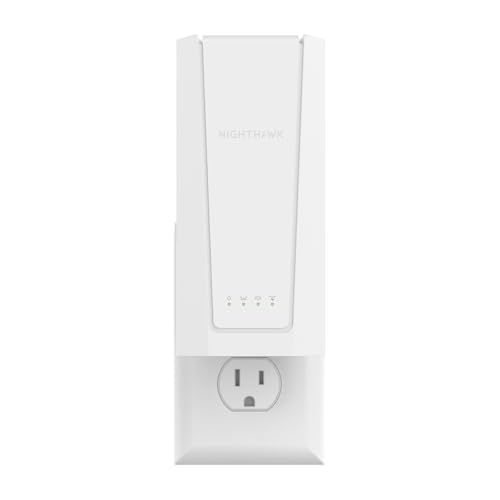
NETGEAR Nighthawk WiFi 7 Extender EXS27 — Most future-proof
The EXS27 is the roundup’s forward bet: a WiFi 7 Nighthawk extender with title figures of up to 1,500 square feet and a 5 Gbps class. WiFi 7 is the newest consumer wireless generation, and buying it today in an extender is a decision about the next several years — the gateway generations and device fleets that will arrive during this unit’s working life — more than about this afternoon’s speeds.
Honesty about the present tense matters here. Bolted onto a current AT&T gateway, the EXS27’s link home runs at the gateway’s generation, not its own; the chain moves at its oldest link, and no extender can promote the gateway. What the WiFi 7 radio does buy immediately is the most capable local hop in this list for the newest devices, plus a unit that will not be the bottleneck when the gateway is eventually swapped for a WiFi 7 successor. Buyers should purchase it with that timeline in mind rather than expecting a transformation on day one.
There is also a simpler, less fashionable reason this pick earns its slot: headroom is a form of reliability. An extender loafing at a fraction of its capacity behaves more serenely than one straining at its ceiling, and the far rooms of a busy house generate exactly the bursty, many-device load where headroom shows. If the budget stretches and the household’s device count keeps climbing, the EXS27 is the pick least likely to be re-bought in two years.
It is fair to ask whether the same money spent on a mid-range mesh kit would serve better than this flagship extender, and the answer is genuinely house-dependent. A mesh kit rebuilds the network; this unit reinforces an existing one that is mostly working. Households whose gateway placement is good, whose complaint is one fading wing, and whose appetite for re-configuring every device in the home is low will get more joy from reinforcing. Households starting from a bad foundation should not let a premium extender talk them out of rebuilding — a flagship repeater on a broken layout is still a broken layout, merely with excellent radios.
- Mode: WiFi 7 extender (repeater), Nighthawk line
- Coverage figure in title: up to 1,500 sq ft
- Class figure in title: 5 Gbps
- AT&T-specific certification: none exists for third-party extenders — compatibility is by standard Wi-Fi repeating
- Backhaul arrangement: Not stated in the listing title — verify with NETGEAR documentation
Strengths
- WiFi 7 radio is the longest-lived local hop in this roundup
- Generous class headroom keeps the far rooms composed under bursty family load
- Ready to stop being the bottleneck the day a WiFi 7 gateway arrives
Trade-offs
- Its link to a current gateway runs at the gateway’s older generation
- The future-proofing premium buys little for a household about to choose mesh instead
- Day-one transformation over a WiFi 6 extender is modest, not dramatic
Best for: a growing AT&T household buying once for the next several years of gateways and devices. Not suited for: expecting WiFi 7 speeds end to end today behind an older gateway — the gateway sets that ceiling, not this unit.

ASUS RP-AX58 AX3000 WiFi 6 Range Extender — Best for ASUS households
The RP-AX58 closes the list with the cleverest second life in the roundup. As sold, it is an AX3000 WiFi 6 range extender in the same class as the TP-Link pick above, and it will repeat an AT&T gateway’s network as happily as any unit here. But its title carries a second identity — AiMesh extender — meaning that in a home with a compatible ASUS router, this same hardware stops being a repeater and becomes a true mesh node. That dual identity makes it the strategic pick for anyone whose networking future might run through ASUS.
For today’s AT&T household, judge it as an extender, and it judges well: current-generation radios, a healthy class figure, and ASUS’s generally competent setup experience. The AiMesh dimension only activates with ASUS routing gear in the house, so it should be valued as an option, not as a present feature — an option that costs the buyer nothing to hold and could save the unit from the drawer of obsolete repeaters if the home later standardises on ASUS.
One caution mirrors the Deco lesson from other guides in this series: ecosystem options are only worth paying attention to if the ecosystem is plausibly in your future. A household firmly in NETGEAR’s or TP-Link’s orbit gains nothing from AiMesh compatibility and should choose between those picks on their extender merits alone. But for the ASUS-curious, or the home already running one ASUS router in a study, the RP-AX58 is the rare extender purchase that can grow up into a mesh.
There is a subtler benefit to the dual-identity design that only shows up in households that tinker. An extender is normally a terminal purchase — it does its one job until it is replaced. The RP-AX58 can change jobs mid-life: repeater behind the AT&T gateway this year, mesh node behind an ASUS router next year, then perhaps a repeater again in a child’s first apartment. Hardware that can be re-roled tends to stay in service longer and out of landfill longer, and in a category full of disposable wall-warts, that adaptability is a genuinely distinguishing trait rather than a spec-sheet ornament.
- Mode: WiFi 6 range extender; AiMesh node with compatible ASUS routers
- Wireless class: AX3000 dual-band WiFi 6 (802.11ax), per the listing title
- AT&T-specific certification: none exists for third-party extenders — compatibility is by standard Wi-Fi repeating
- Ethernet port provision: Not stated in the listing title — verify with ASUS documentation
- Mesh use requires: compatible ASUS AiMesh router — verify model list with ASUS documentation
Strengths
- Dual identity: repeater today, genuine mesh node in an ASUS AiMesh home
- AX3000 WiFi 6 class matches the current gateway and device mainstream
- An extender purchase with a credible upgrade path instead of a dead end
Trade-offs
- AiMesh value is zero in a home that will never run an ASUS router
- Behind an AT&T gateway it is a repeater, with the usual relay cost
- Port specifics sit outside the title and need verification before a wired-device plan
Best for: an AT&T household with ASUS gear in its present or plausible future, wanting an extender that can become a mesh node. Not suited for: a committed NETGEAR or TP-Link household — the AiMesh option that justifies this pick will never be exercised there.
Which AT&T Gateway Do You Have, and Does It Change the Answer?
AT&T has put several gateway generations into fiber homes over the years, and the extender conversation changes modestly with each. Older gateways speak older Wi-Fi; the current generation speaks WiFi 6. The extender you choose should be read against that installed base. Behind an older gateway, a WiFi 6 extender’s radios are partly on holiday — the local hop improves, the link home does not — while behind a WiFi 6 gateway, the same extender runs at full conversational parity. This is why the roundup deliberately spans generations: the correct purchase for a 2019 gateway household and a 2025 gateway household are different products at different prices, and a guide that ignored the gateway would steer one of those households wrong.
There is a temptation, on learning the gateway is the ceiling, to ask AT&T for a newer one before buying anything. Sometimes that is the right first move — a gateway swap can lift the whole house, extenders included, and it costs a phone call rather than a purchase. But it does nothing for the geometry of the house. A WiFi 6 gateway in the same closet behind the same chimney breast leaves the same bedroom dead. Extenders exist to solve geometry; gateways exist to terminate fiber. Confusing the two budgets is how households end up with a faster network that still does not reach the desk.
One more gateway reality deserves print: the gateway’s Wi-Fi can be left on, bridged, or replaced by your own router, and extender behaviour differs subtly in each arrangement. This guide assumes the common case — the AT&T gateway broadcasting, the extender repeating — because that is the arrangement the keyword’s readers overwhelmingly live with. Households running their own router behind the gateway should read every pick here as repeating their router’s network instead; the compatibility logic is identical, because it was never about AT&T in the first place.
Extender, Second Gateway Radio, or Whole New Mesh — Which Problem Do You Actually Have?
It helps to name the three distinct complaints that all arrive at this keyword wearing the same clothes. The first is a hole: one room, one corner, one patio where a healthy network simply does not reach. Holes are extender problems, and they are the cheapest problems in home networking. The second complaint is a crowd: the network reaches everywhere but sags when the whole household is active. Crowds are capacity problems, and an extender treats them only at the margins — the picks with modern radios and headroom help the far rooms endure the evening peak, but the centre of a crowd problem lives at the gateway and in the plan, not at the edge.
The third complaint is a house: sprawling, multi-storey, built of signal-hostile materials, where the network’s map looks like an archipelago. Houses are architecture problems. The honest tools are a mesh system with several nodes or wired access points on a cable backbone, and the tell-tale sign you own this problem is that you have already bought an extender once and are reading this guide with a sense of déjà vu. This guide sells extenders where extenders work and names the exit where they do not, because the most expensive extender is the one bought to avoid a mesh purchase that happens three months later anyway.
How Do the Six Compare Side by Side?
| Pick | Relationship to AT&T | Class / generation | Title coverage figure | Choose it when |
|---|---|---|---|---|
| Airties Air 4921 | Issued by AT&T | 1600Mbps class, dual band | Not stated in title | You want the carrier’s own managed unit |
| TP-Link RE550 | Independent repeater | AC1900 | Not stated in title | You want a proven, provider-agnostic fix |
| TP-Link AX3000 | Independent repeater | WiFi 6 AX3000 | Not stated in title | Your gateway and devices are WiFi 6 |
| NETGEAR EAX15 | Independent repeater | 1.8 Gbps class | Up to 1,500 sq ft | You prefer NETGEAR’s single-name polish |
| NETGEAR EXS27 | Independent repeater | WiFi 7, 5 Gbps class | Up to 1,500 sq ft | You are buying for the next gateway too |
| ASUS RP-AX58 | Independent repeater | WiFi 6 AX3000 | Not stated in title | An AiMesh future is plausible |
The table’s first column of substance — relationship to AT&T — is the real decision. One pick is the carrier’s; five are free citizens. Everything else is generation and taste, and the differences among the five independents will matter less to your daily experience than where you plug whichever one you choose.
Where Should You Put an Extender in an AT&T Fiber Home?
Start by finding the true edge of the gateway’s competence, not the edge of its visibility. Walk away from the gateway with a phone running a video call or a large download, and note where quality — not indicated bars — begins to fray. The extender belongs a few steps back toward the gateway from that point, in a spot where the gateway’s signal is still strong and boring. An extender installed inside the dead zone has nothing worth repeating; it will faithfully amplify a bad connection into a widely available bad connection.
Height and openness beat proximity to the target room. A hallway outlet at standing height, with an unobstructed path back toward the gateway, outperforms a hidden socket behind the target room’s sofa almost every time. Avoid the classic traps: inside a metal media cabinet, beside a microwave or a large aquarium, or in the basement directly under the gateway where floor structures eat the signal. Give the unit air, give it line of sight where the house allows, and then test from the actual chair, desk or bed the purchase was made for.
Finish with the naming decision made deliberately. If your extender supports a single-name, mesh-style mode with your gateway, use it and then walk the house watching a call survive the journey between rooms. If you run a second network name, accept the manual switching as the price of control, and name it something honest that future-you will understand at midnight. Either way, test on the worst evening — everyone home, everything streaming — because that is the network you actually live on.
How Do You Set Up an Extender with an AT&T Gateway, Step by Step?
Begin before any unboxing: stand in the problem room and confirm the problem is coverage. If a laptop works well in that room when the gateway’s network is strong there at some hours, you may have a congestion story rather than a coverage story, and the fix differs. Assuming the room is genuinely out of reach, walk toward the gateway and find the last place where a video call stays clean for a full minute. Mark that outlet in your mind — it is the extender’s future home, give or take a few steps of experimentation.
Setup itself follows the same rhythm for every independent pick on this page. Plug the extender in near the gateway for its first configuration, so the two devices enjoy perfect conditions while they are introduced. Connect through the maker’s app or the unit’s setup page, select the AT&T gateway’s network, and supply its password. If the extender offers a single-name or mesh-style mode, enable it now rather than retrofitting it later. The Airties unit’s introduction to a compatible AT&T gateway follows the carrier’s own pairing path instead, which is precisely the convenience its buyers are paying for.
Then comes the step most households skip and later regret: relocation with verification. Move the unit to the marked outlet, let it settle, and test from the problem room with the actual workload — the call, the stream, the game — not with a signal-strength readout. If the result disappoints, move the extender one outlet closer to the gateway and test again; the sweet spot is found by iteration, not by hope. Finish by walking the boundary between gateway and extender coverage with a call in progress, confirming the hand-off behaves, and only then declare the installation done.
What Mistakes Do AT&T Fiber Customers Keep Making with Extenders?
The first is shopping for certification that does not exist. Listings and listings-adjacent content sometimes imply that particular extenders are approved for particular ISPs; for consumer Wi-Fi repeating there is no such approval, and paying a premium for the implication is paying for ink. The genuine carrier-matched product is the Airties unit, and it is identifiable by being AT&T’s own — not by a badge on a third-party box.
The second is expecting the extender to deliver the plan. A gigabit fiber plan and a distant bedroom are connected by physics, not by the subscription, and the extender’s relay will deliver a fraction of the gateway’s local performance. Households that internalise this are happy with extenders; households that speed-test the far room against the plan’s headline number conclude wrongly that the extender is broken, when the architecture is simply doing what architecture does.
A fourth mistake is quieter: burying the extender. The unit gets plugged in behind the television, inside the media cabinet, under the desk — anywhere its owner does not have to look at it — and each hiding place taxes the signal it exists to rescue. Extenders are radios before they are furniture. Give the chosen unit a visible, ventilated, reasonably elevated socket, and accept the small aesthetic cost as part of the purchase price; a hidden extender that underperforms is not a bargain at any figure.
The third is solving a house-sized problem with a room-sized tool, one extender at a time, until the home is a patchwork of relays repeating relays. If two extenders are not curing the house, the house is asking for a mesh system or wired access points. Recognising that moment early is the cheapest networking wisdom there is — and it is why this guide keeps naming the exits instead of pretending the list in front of you is the answer to every floor plan.
Final Recommendation
A last consideration for households on the fence between one extender and two: resist the daisy-chain. A second extender repeating the first extender’s already-relayed signal compounds every cost this guide has described — the throughput arithmetic, the latency spend, the hand-off confusion — and the result is a far room that is technically covered and practically miserable. If the map of your home seems to demand a second relay, that demand is the mesh system’s cue. One extender, well sited, is a tool; two in a chain are a symptom.
Decide first whether you want AT&T’s answer or your own. AT&T’s answer is the Airties Air 4921, and for customers who value the carrier owning the whole network, it is the correct and only pick of its kind. Your own answer divides by generation: the TP-Link AX3000 for the WiFi 6 mainstream, the RE550 where proven sufficiency beats novelty, the EAX15 for NETGEAR loyalists, the EXS27 for buyers purchasing against the next gateway as well as this one, and the RP-AX58 where an ASUS future beckons. Whichever name lands in the hallway, site it where the gateway is still strong — because in the end, an extender’s loyalty is to the signal it can hear, and it will repeat your placement decision, good or bad, to every device in the far half of the house.
Frequently Asked Questions
Do I need an extender approved by AT&T for my fiber service?
No such approval exists for third-party extenders. Extenders work by repeating Wi-Fi, and AT&T’s gateways broadcast standard Wi-Fi, so any reputable extender is compatible by design. The one product with a genuine AT&T relationship is the Airties Air 4921, which AT&T itself issued to fiber customers. Buy third-party extenders on their wireless merits, not on implied carrier endorsements.
Will an extender give my back bedroom the full speed of my fiber plan?
Almost certainly not, and no extender honestly can. Repeating relays your traffic through an extra wireless hop, which costs throughput, and distance and walls tax it further. Expect the far room to become genuinely good for streaming, calls and everyday work — which is the real goal — rather than a mirror of a laptop plugged into the gateway. Rooms that truly need plan-level speed need a cable or a wired access point.
Should the extender use the same network name as my AT&T gateway?
For most households, yes, especially with mesh-style extenders that coordinate hand-off, because one name means devices move around the house without your intervention. The trade-off is that some devices cling to a weakening signal instead of switching. If your household contains one notorious dead-zone desk and everything else is fine, a separate name you join deliberately at that desk can actually behave better. Test the single-name arrangement first; it is the configuration these products are designed around.
Is a WiFi 7 extender pointless behind my current AT&T gateway?
Not pointless, but its benefits are partly deferred. The link back to the gateway runs at the gateway’s generation today, so the EXS27 cannot deliver WiFi 7 end to end until a WiFi 7 gateway arrives. What you get now is the strongest local hop in this roundup and generous headroom; what you get later is an extender that does not need replacing when the gateway is upgraded. Buy it as a multi-year decision, not a day-one transformation.
One extender or a mesh system — where is the line?
One defined dead zone in an otherwise healthy house is extender territory, and everything on this page serves it. A second useful test is the walking test: if a video call survives a stroll through most of the house and dies in one specific room, buy an extender; if it dies in three rooms and flickers in a fourth, buy the mesh. Multiple dead zones, a large or awkward floor plan, or a work-from-home room that must never falter all point past extenders to a mesh kit or wired access points. A useful tell: if you are reading this guide for the second time because the first extender only moved the problem, the line has already been crossed.
Where exactly should the extender sit relative to the gateway and the dead room?
Roughly halfway by signal, which is rarely halfway by floor plan. The extender needs a strong, clean copy of the gateway’s network to work with, so it belongs at the last point where that network is still healthy — often a hallway or landing — rather than inside the dead room it serves. From there it rebroadcasts into the weak area. If in doubt, err toward the gateway: an extender slightly too close wastes a little reach, while one slightly too far wastes the entire purchase.
Can I use one of these extenders if I later leave AT&T?
Five of the six can come with you — the TP-Link, NETGEAR and ASUS units are provider-agnostic repeaters that will work behind any router. The Airties Air 4921 is the exception in spirit: its value is its pairing with AT&T’s gateways and managed Wi-Fi, so its usefulness after a provider change is not stated in its listing and should be verified with AT&T documentation before counting on it.
Related Guides
Households weighing the bigger step should read mesh Wi-Fi systems versus range extenders before spending twice, and anyone whose gateway placement is negotiable will profit from where to place your router for whole-home coverage. For the far-room workstation problem specifically, see how to get wired-grade Wi-Fi to a home office.


