What's inside
- Where to buy
- Key Takeaways
- Quick Picks
- How Did We Decide Which Cameras Could Claim a Place Here?
- Why Does Windows Hello Insist on Infrared, Anyway?
- How Do You Enroll Your Face So Sign-In Works First Time, Every Time?
- Does Resolution Matter at All in a Sign-In Camera?
- How Do the Six Compare on Login, Lens and Privacy?
- How Do a Sliding Shutter, a Loose Cover and an Electronic Shutter Really Differ?
- What Changes When Several People Share One Hello Camera?
- Why Does Face Sign-In Fail Some Mornings, and How Do You Fix It?
- What Mistakes Do People Make When Buying a Face-Login Camera?
- Final Recommendation
- Frequently Asked Questions
- Related Guides
As an Amazon Associate I earn from qualifying purchases. This post may contain affiliate links at no extra cost to you.
gizmoverdict.com is reader-supported. When you buy through links on our site, we may earn an affiliate commission.
Where to buy
All six cameras below are sold through Amazon in the US, and each one is there because its listing speaks the language this guide is about: signing in to Windows with your face. Read the listing once for the camera and once for the login, because those are two separate purchases wearing one box — a fine video camera that lacks the right infrared hardware will never unlock your PC, no matter how sharp its picture looks on a call.
The best windows hello facial recognition webcams solve a small daily friction that grows teeth over time. A password typed forty times a day is forty chances to mistype it, to be watched typing it, or to give up and shorten it into something guessable. Windows Hello replaces that ritual with a glance: sit down, the infrared sensor maps your face in three dimensions, and the desktop is open before your hand reaches the mouse. It feels like a convenience. Underneath, it is a security upgrade, because a face map checked by depth-sensing hardware is far harder to fool with a photograph than a PIN is to shoulder-surf in an open office.
That infrared requirement is the line this entire guide is drawn along. Ordinary webcams, however expensive, see in visible light only, and Windows refuses to enroll them for face sign-in. A Hello-capable camera carries an IR emitter and sensor beside the colour lens, and only listings that say so — or that name Windows Hello log-on directly — earned a place here. All six picks below clear that bar in their listing titles, though they clear it at different heights: two are 1080p office cameras, one is a 2K model, one reaches 4K, and they split between physical privacy shutters and electronic ones. The sections ahead separate the login hardware from the video hardware so you can judge both.
Key Takeaways
- Facial sign-in is an infrared feature, not a resolution feature — every pick here names Windows Hello or IR facial recognition in its listing, which is the only claim that counts.
- The MOERTEK 2K is the pick whose title says the quiet part loudest: infrared Windows Hello facial recognition, a privacy cover and noise-cancelling microphones in one mid-sized package.
- NexiGo’s HelloCam Ultra is the step-up for people who also present on camera all day, pairing Hello sign-in with a 4K sensor and a 1080p 60fps mode.
- Lenovo’s Performance FHD is the corporate-desk answer: USB-C, dual microphones, a 95-degree lens and a sliding shutter that closes with a fingertip.
- The TOALLIN 1080P states its IR facial recognition plainly and keeps the rest of the design simple — wide angle, microphone, privacy cover.
- Lenovo’s 510 FHD adds a 360-degree rotating, tilting mount to the Hello brief, useful on shared or awkwardly placed monitors.
Quick Picks
| Pick | Badge | Why it is here |
|---|---|---|
| Lenovo Performance FHD Webcam | Best for the Office Desk | USB-C connection, Hello log-on and a sliding shutter in a camera shaped for all-day work. |
| NexiGo HelloCam | Best Electronic Privacy | An automatic electronic shutter that closes the lens without anything to slide or lose. |
| MOERTEK 2K HD Webcam | Best Stated IR Hardware | Infrared Hello recognition named outright in the title, at 2K resolution. |
| NexiGo HelloCam Ultra | Best 4K Step-Up | Hello sign-in plus a 4K sensor and 60fps mode for presenters and streamers. |
| TOALLIN 1080P Webcam | Best Straightforward Pick | IR face login and a wide-angle view with no feature list to decode. |
| Lenovo 510 FHD Webcam | Best Flexible Mount | Hello support on a body that rotates a full circle and tilts to meet odd desk layouts. |
How Did We Decide Which Cameras Could Claim a Place Here?
The first filter was absolute, and it removed most of the webcam market: the listing title had to name Windows Hello, Hello face login, or infrared facial recognition. That is not pedantry. It is the difference between a camera that unlocks a PC and one that merely sits above the login screen while you type. Marketing language about “face detection” or “AI framing” describes the camera finding your face inside the picture; it says nothing about the infrared depth check Hello performs, and we treated any listing that blurred that distinction as a listing for a different guide.
Past the gate, we weighed the camera half of each device. Resolution matters once you are on calls, but it is not the whole picture: field of view decides whether a home-office background overwhelms you, microphone arrangements decide whether the far end hears the room or hears you, and the privacy mechanism decides whether “off” is a physical fact or a software promise. We also noted connection type, because a USB-C camera and a USB-A camera ask different things of a modern laptop’s shrinking port selection.
We also kept a place for the desk itself in the judging. A sign-in camera is touched by its setup every day: the port it occupies, the perch it sits on, the hand that closes it at night. Two of these six rotate or slide in ways that suit particular desks better than others, and the reviews name those desks rather than pretending one shape fits all furniture. A camera that fits the room will still be there, working, in three years; a technically superior camera that fights the furniture tends to migrate to a drawer by spring.
Finally, we read for honesty of emphasis. A Hello camera is bought first for the half-second at the login screen and judged daily for the hours after it. Picks that led with their login hardware and still specified their video hardware properly ranked above picks that buried one or the other, and the reviews below keep the two judgements separate so a strong camera with a merely adequate microphone — or the reverse — is described as exactly that.
Why Does Windows Hello Insist on Infrared, Anyway?
Because visible light lies too easily. A colour camera sees a flat pattern of brightness, and a good photograph or a phone screen held up to the lens presents nearly the same pattern as a living face. Hello’s defence is depth: the infrared emitter floods your face with light the eye cannot see, the IR sensor reads the return, and the system builds a three-dimensional map that a printed page cannot reproduce. That is also why Hello works in a dark room at midnight and in a bright one at noon — it brings its own illumination, tuned to the sensor rather than to your comfort.
The practical consequence is that “supports Windows Hello” is a hardware statement, not a software one. No driver update will teach an ordinary webcam to sense depth in infrared, which is why the second-hand market and the budget shelves are full of excellent cameras that will never appear in this guide. When a listing is vague — when it promises facial recognition without naming Hello or IR — the safe reading is that the recognition on offer is the camera software spotting a face in the frame, a framing convenience rather than a credential.
There is a second, quieter consequence worth knowing before you buy: enrolling your face is done once, in Windows settings, and the camera you enroll with becomes part of your sign-in routine. If you dock a laptop at two desks, you may want the same capability at both, or you will find yourself typing a PIN at the desk with the ordinary camera and glancing at the one with the IR camera — a small absurdity that argues for matching the camera to the desk where you start your day.
One more distinction is worth carrying into the reviews. Hello certification and Hello compatibility are spoken of interchangeably in listings, but the operative question for a shopper is simpler than the vocabulary: does Windows accept this camera at the enrollment screen? Every pick in this guide names Hello in its listing title, which is the manufacturer’s own claim that it will. If a camera ever arrives and the enrollment option does not appear, that is not a settings puzzle to solve over a weekend — it is a mismatch between the listing and the hardware, and it should be treated as grounds for a prompt return while the window is wide open. Buy the claim in writing, test it on day one, and the feature will take care of itself thereafter.
How Do You Enroll Your Face So Sign-In Works First Time, Every Time?
Enrollment is a five-minute job that decides whether the next five years of sign-ins feel magical or flaky, so it deserves more care than the setup wizard’s cheerful pace suggests. Sit in your real chair, at your real distance from the screen, with the room lit the way it is lit when you normally start work. The camera will ask you to centre your face and move slightly; treat that as it photographing the working version of you, not a portrait version. If your desk faces a window and your mornings are backlit, enroll in that backlight rather than turning on every lamp to flatter the process — the system should learn the conditions it will actually be tested under.
Then use the feature most owners never find: the improve-recognition pass in the Windows sign-in settings. Run it again wearing your glasses if you sometimes wear them, again without, again with your hair tied back or your cap on if those are regular states. Each pass teaches the system another legitimate version of your face, and the cumulative effect is the difference between a camera that recognises you in February’s gloom and one that asks for the PIN whenever the weather changes. People who wear prescription glasses with heavy frames benefit most; the frames alter the visible outline, and giving the system both outlines removes a whole category of morning failures.
Placement completes the setup. The IR sensor needs an unobstructed line to your face at roughly the angle you will approach from, which sounds obvious until the camera ends up perched so high it studies the top of your head, or so far to the side that your profile is the first thing it sees. Monitor-top centre remains the natural home for a sign-in camera. If the monitor is large and high, tilt the camera down a few degrees rather than raising your chin for it each morning — a small indignity that, repeated twice a day, teaches people to hate a feature they should love. Test the sign-in ten times across one day before declaring victory; consistency across light changes is the true pass mark.
Does Resolution Matter at All in a Sign-In Camera?
For the sign-in itself, almost none. The infrared system works from its depth map, and a 1080p camera’s IR check is not meaningfully weaker than a 4K camera’s — Hello either trusts the hardware class or it does not. Resolution enters the decision through the other twenty-three hours and fifty-nine minutes of the camera’s life, which it spends as a video device on calls, recordings and streams. That is the honest way to read this guide’s spread from 1080p to 4K: the login is a pass-fail gate all six clear, and everything above 1080p is payment toward the call picture, the cropping headroom and the presenter features layered on top.
Field of view pulls in the opposite direction from resolution. The two 95-degree Lenovos frame a wide slice of room — generous for a small huddle, wasteful for a solo desk against a wall, where much of the frame is bookshelf and the face occupies a modest centre. A narrower lens would put more pixels on the person, which is what the far end of a call actually looks at. Digital zoom, offered by both Lenovos and in nine steps by the HelloCam Ultra, is the compromise: start wide for flexibility, crop in for formality, and accept that the crop spends resolution — which is why pairing digital zoom with a 2K or 4K sensor, as the MOERTEK and the Ultra do in their different ways, is more than a spec-sheet coincidence.
Frame rate is the third leg, and only the Ultra raises it: 1080p at sixty frames per second. For seated meetings it is a luxury; for anyone who teaches, demonstrates or presents standing, the smoother motion reads as production quality to an audience that cannot name why. None of this changes the login. It changes whether the camera you bought for the login also earns its monitor-top place for everything after — and a camera that only logs you in, on a desk where calls run all day, is a camera that will eventually be replaced by one that does both.

Lenovo Performance FHD Webcam — Best for the Office Desk
Lenovo built this camera for the desk that already has a ThinkPad docked on it, and the listing reads like a facilities checklist: 1080p video, log-on with Windows Hello, dual microphones, a 95-degree lens, 4X digital zoom, a sliding privacy shutter, and a USB-C connection. Start with the login, since that is why it is in this guide. The title promises Hello log-on outright. What it does not state is the word infrared — the mechanism is implied by the Hello claim rather than named — so the spec box below records that honestly, and anyone whose employer’s security policy names IR hardware explicitly should confirm the sensor arrangement on the listing before ordering.
As a camera, its numbers suit the meeting-heavy day. The 95-degree lens is wide enough to take in a small meeting room’s near end or a home office with a bookshelf backdrop, and the 4X digital zoom exists to crop that width back down when you want a tighter, more formal frame — remembering that digital zoom spends resolution to buy framing, so it is a tool for occasional tightening rather than a default. Dual microphones give the far end a fuller voice pickup than a single capsule manages, and USB-C means the cable matches the port a current laptop actually offers, with no adapter living permanently in the setup.
The sliding shutter is the detail that will be touched most. It is a physical cover drawn across the lens by a fingertip, which settles the privacy question mechanically: a covered lens passes no picture regardless of software state, indicator lights or meeting-app behaviour. For a camera that also holds your face credential, that physical certainty pairs well with the sign-in role. Before you order, it is worth a moment to check the current price on Amazon, since this model drifts in and out of promotion with the rest of Lenovo’s accessory line.
- Video: FHD 1080p
- Sign-in: log-on with Windows Hello, per listing title
- Infrared sensor: Not stated in the listing title — verify the IR arrangement on the listing if your policy names it
- Lens: 95-degree field of view, 4X digital zoom
- Audio: dual microphones
- Privacy: sliding physical shutter
- Connection: USB-C
Strengths
- Hello log-on, wide lens and dual microphones cover the whole workday brief in one device.
- The sliding shutter gives a mechanical off state that software cannot override.
- USB-C connection suits current laptops without an adapter in the chain.
Trade-offs
- The listing title asserts Hello without naming the infrared hardware behind it.
- 1080p is the ceiling — presenters wanting 2K or 4K headroom should look further down this page.
- The wide 95-degree view can show more of a cluttered room than some will want.
Best for: a docked work laptop on a tidy desk, where the morning routine is sit down, glance, begin. Not suited for: a shared family PC in a busy kitchen, where several faces compete and a PIN pad serves everyone more simply.
NexiGo HelloCam — Best Electronic Privacy
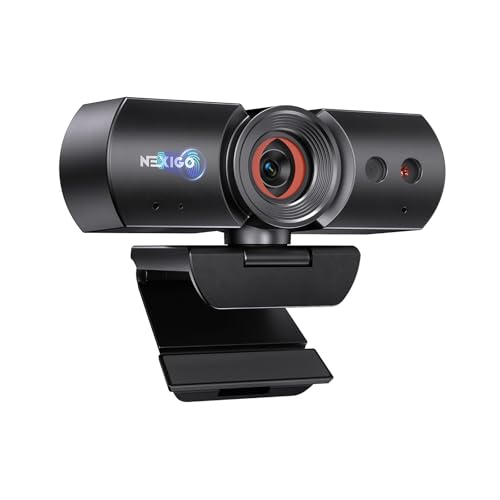
NexiGo’s HelloCam approaches the privacy question from the opposite direction to Lenovo’s slider: its shutter is electronic and automatic. The listing promises true privacy through an automatic electronic shutter, which in practice means the camera closes itself when it is not in use rather than waiting for a hand to remember. For the disciplined, a slider is foolproof; for the rest of humanity, a shutter that operates itself removes the most common failure mode, which is simply forgetting. The HelloCam is a 1080p camera with Windows Hello named in its title, a built-in microphone, and a facial enhancement feature listed among its capabilities.
That facial enhancement deserves a plain reading. It is processing — the camera adjusting its rendering of your face for the call — and it belongs to the video half of the device, not the login half. Your Hello enrollment uses the infrared check, untouched by any beautifying filter, and the two should never be confused when reading any listing in this category. As a call camera, 1080p with a microphone on board covers the standard meeting day, and the HelloCam’s pitch is that it covers it without asking you to develop shutter habits.
One honest gap: like the Lenovo above, the title claims Windows Hello without spelling out an infrared sensor, so the spec box marks the IR detail as unstated rather than assumed. The Hello claim itself is the credential that matters for sign-in, and it is stated plainly. If the automatic shutter is the feature that speaks to you, take a look at today’s price on Amazon before deciding, as NexiGo’s line is discounted often enough that patience is regularly rewarded.
- Video: 1080p HD
- Sign-in: Windows Hello, per listing title
- Infrared sensor: Not stated in the listing title — verify on the listing if you need the sensor type named
- Privacy: automatic electronic shutter
- Audio: built-in microphone
- Extras: facial enhancement processing for calls
Strengths
- The self-operating shutter protects privacy on the days its owner forgets everything else.
- Hello sign-in and 1080p video cover both halves of the brief without extras to manage.
- Electronic closing means no tiny slider to fumble with at the end of a long call.
Trade-offs
- An electronic shutter asks for trust in the mechanism where a physical cover asks for none.
- 1080p only, with no higher-resolution mode for cropping or presenting.
- The title leaves the infrared hardware unnamed, as the spec box notes.
Best for: a home worker whose camera lives on the monitor all week and whose privacy routine needs to run itself. Not suited for: a workplace with a written policy requiring a physical lens cover — a slider model from this same list fits that rule better.

MOERTEK 2K HD Webcam — Best Stated IR Hardware
The MOERTEK listing is the most explicit in this guide, and in a category full of implied claims that explicitness is worth rewarding. Its title names the full mechanism — infrared Windows Hello facial recognition — alongside 2K HD video, a privacy cover, and noise-cancelling microphones. Nothing needs to be inferred. The infrared hardware that Hello depends on is stated in so many words, which makes this the easiest pick to defend in front of an IT policy, a security-conscious employer, or your own caution.
The 2K resolution earns its place on the call half of the ledger. At 2K, the sensor holds more detail than a 1080p call will transmit, and that surplus is useful twice over: digital cropping and pan adjustments inside the frame stop looking threadbare, and the picture that does go out at 1080p is downsampled from a richer source, which generally reads as a cleaner image on the far end. Noise-cancelling microphones aim at the home office’s usual soundtrack — the keyboard, the household moving around beyond the door — and try to keep the meeting focused on the voice in front of the camera.
Privacy here is handled by a cover, the classic separate piece that fits over the lens. It is fully physical, like Lenovo’s slider, but it is a distinct object, and distinct objects on desks have a way of wandering; the routine matters more than the mechanism. Taken whole, this is the pick for anyone who read the honesty notes at the top of this guide and nodded: the claim is stated, the resolution is a step up, and the rest of the specification refuses to hide. It is sensible to glance at the price on Amazon today rather than assume where this mid-list model sits, because its positioning against the 1080p pair shifts with sales cycles.
- Video: 2K HD
- Sign-in: infrared Windows Hello facial recognition, stated in the listing title
- Audio: noise-cancelling microphones
- Privacy: physical privacy cover
- Stated uses in listing: conferencing, live streaming, online learning
Strengths
- The infrared basis of its Hello support is written out in the title, not left to implication.
- 2K capture leaves headroom for cropping while still feeding a clean 1080p call.
- Noise-cancelling microphones suit homes where the office door is more of a suggestion.
Trade-offs
- The separate privacy cover can be misplaced in a way a built-in slider cannot.
- 2K is a middle step — those wanting full 4K should continue to the HelloCam Ultra below.
- A lesser-known brand means a smaller pool of long-term owner experience to consult.
Best for: a security-minded home worker who wants the IR claim in writing and a sharper picture than 1080p gives. Not suited for: a desk where small loose accessories vanish weekly — the cover will be the first casualty, and a shutter model survives that household better.
NexiGo HelloCam Ultra — Best 4K Step-Up
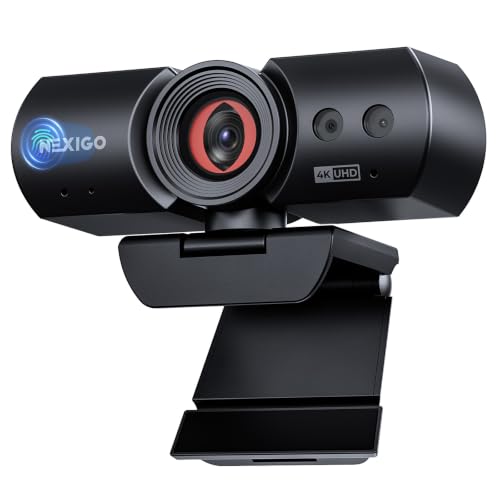
The HelloCam Ultra is what happens when the sign-in camera is also asked to be the presentation camera. Its listing pairs Windows Hello facial recognition with a 4K sensor, an automatic electronic shutter, a 1080p mode running at 60 frames per second, a 9-step digital zoom and stereo microphones. Read that as two devices sharing a body: in the morning it is your key, and for the rest of the day it is the sharpest eye in this guide. Anyone whose calendar mixes a password-free start with webinars, recorded demos or streamed sessions will feel the logic immediately.
The resolution story needs its usual honest footnote. The 4K capture is real headroom — room to crop, to reframe, to feed a 1080p call from a downsampled source — while the 1080p 60fps mode is arguably the more useful setting for live work, since motion at sixty frames reads as markedly more natural when you gesture, demonstrate a product or move around a whiteboard. The 9-step digital zoom is a framing ladder rather than a quality feature; each step spends some of that 4K surplus, which is precisely what the surplus is for. Stereo microphones widen the voice pickup for anyone who moves while presenting rather than sitting centred and still.
Privacy follows the smaller HelloCam’s philosophy: an automatic electronic shutter that closes the camera down without relying on memory or habit. The IR question gets the same honest treatment as the other NexiGo — Hello facial recognition is claimed in the title, the infrared sensor is not separately named, and the spec box says so. For presenters, the sensible move is to view the Amazon price for this one alongside the standard HelloCam, because the gap between them narrows and widens with promotions, and the right moment makes the step up considerably easier to justify.
- Video: 4K, plus 1080p at 60fps
- Sign-in: Windows Hello facial recognition, per listing title
- Infrared sensor: Not stated in the listing title — verify on the listing if the sensor type must be documented
- Zoom: 9-step digital zoom
- Audio: stereo microphones
- Privacy: automatic electronic shutter
Strengths
- The only pick here that pairs Hello sign-in with a 4K sensor and a 60fps mode.
- Digital zoom steps have genuine resolution behind them instead of interpolating mush.
- The self-closing electronic shutter keeps the privacy routine automatic.
Trade-offs
- Its abilities are wasted on a purely meetings-and-email desk, where the 1080p picks suffice.
- 4K over a weak connection still leaves as 1080p or less — the headroom helps framing, not bandwidth.
- The infrared hardware is implied by the Hello claim rather than named in the title.
Best for: a presenter, trainer or streamer whose camera works as hard after login as it does at it. Not suited for: a quiet back-office terminal used for email and documents, where its sensor would spend its life underused.

TOALLIN 1080P Webcam — Best Straightforward Pick
TOALLIN’s listing wastes no words, and neither will this review’s opening: 1080p video, Windows Hello face login, IR facial recognition, a microphone, a wide-angle view and a privacy cover, over USB. The infrared claim is stated outright — “IR Facial Recognition” sits in the title in plain capitals — which puts this unassuming camera in the same honesty class as the MOERTEK for anyone checking the mechanism rather than the marketing. What you will not find is a long tail of secondary features, and for a certain kind of desk that restraint is the entire appeal.
Consider who that desk belongs to. It is the second workstation, the family study PC, the spare-room setup where a camera is needed for calls and for the convenience of face login, and where nobody intends to stream, present to hundreds, or fine-tune a picture. The wide-angle view covers a seated user with room to spare; the built-in microphone handles the standard call; the privacy cover closes the lens when the day ends. Every element of the brief is present and none is gold-plated.
The limits follow from the same simplicity. There is no resolution above 1080p to crop from, no noise-cancelling claim for the microphone, and no electronic shutter — the cover is a manual routine, like the MOERTEK’s. Judged against its own intention, though, the TOALLIN is coherent: the one advanced feature it carries is the one this guide exists for, stated without decoration. Anyone pricing a second Hello camera for another desk in the house will find it natural to see what Amazon is asking for it today, since straightforward models like this one are exactly where marketplace pricing moves most.
- Video: 1080p
- Sign-in: Windows Hello face login with IR facial recognition, stated in the listing title
- View: wide-angle lens
- Audio: built-in microphone
- Privacy: privacy cover included
- Connection: USB
Strengths
- The IR basis of its face login is printed in the title, beyond interpretation.
- A short, complete specification — nothing to configure, nothing superfluous to pay for.
- The wide-angle frame suits a single seated user without adjustment rituals.
Trade-offs
- No noise-cancelling claim for the microphone, so busy rooms will be heard as they are.
- 1080p is both the floor and the ceiling of its video.
- The manual cover depends on the user remembering it, every time.
Best for: a second desk, a study PC, or a first step into face sign-in without a flagship’s price of entry. Not suited for: open-plan noise or presentation work, where its plain microphone and fixed resolution will be felt within the first week.

Lenovo 510 FHD Webcam — Best Flexible Mount
The second Lenovo in this guide earns its place on geometry. The 510 FHD is a 1080p camera with a 95-degree wide-angle lens, 4X digital zoom, dual microphones and Windows Hello in its title — and a mount that rotates a full 360 degrees with pan and tilt movement. That rotation matters more than it sounds. Monitors sit at odd heights, desks face walls at angles, laptops dock to the side of external screens; a camera that can be swung and tilted into the correct line of sight from an imperfect perch solves the framing problem physically instead of asking software to crop a badly aimed picture.
On the login half of the brief, the title closes with the words that matter — Windows Hello — placing it inside this guide’s gate. As with its Performance sibling, the infrared wording is not spelled out in the title, and the spec box records the omission rather than papering over it. The video half mirrors the sibling too: the same wide lens philosophy, the same digital zoom for tightening the frame, the same dual-microphone arrangement for clearer voice pickup in ordinary rooms.
Where the two Lenovos part company is the shutter question and the mount. The Performance model leads with its sliding privacy shutter and USB-C; the 510 leads with its rotating, tilting body. A buyer choosing between them is really choosing which daily annoyance they would rather eliminate — the privacy gesture or the framing fiddle. For the corner desk, the standing desk with its shifting heights, or the monitor that is not quite where the chair is, the 510’s answer is the persuasive one. It is worth comparing its Amazon listing price directly against the Performance model on the day you buy, because the two Lenovo cameras frequently trade places as the cheaper option.
- Video: 1080p HD
- Sign-in: Windows Hello, per listing title
- Infrared sensor: Not stated in the listing title — verify on the listing before relying on a named sensor type
- Lens: 95-degree wide angle, 4X digital zoom
- Mount: 360-degree rotation with pan and tilt adjustment
- Audio: dual microphones
Strengths
- The rotating, tilting mount fixes framing at the source on awkward desks.
- Hello support and dual microphones keep both halves of the brief intact.
- The wide lens plus digital zoom gives framing range from a fixed perch.
Trade-offs
- No privacy shutter or cover is named in the title — check the listing for its privacy arrangement.
- Resolution stops at 1080p, like most of this guide.
- A movable mount invites casual knocks to undo careful aiming in busy households.
Best for: corner desks, standing desks and side-docked laptops where the camera cannot sit square to its subject. Not suited for: a policy-bound office desk that requires a named physical shutter — the Performance FHD above answers that rule directly.
How Do the Six Compare on Login, Lens and Privacy?
| Pick | Video | Hello claim in title | Privacy | Audio |
|---|---|---|---|---|
| Lenovo Performance FHD | 1080p | Log-on with Windows Hello | Sliding shutter | Dual microphones |
| NexiGo HelloCam | 1080p | Windows Hello | Automatic electronic shutter | Built-in microphone |
| MOERTEK 2K | 2K | Infrared Windows Hello, stated | Privacy cover | Noise-cancelling microphones |
| NexiGo HelloCam Ultra | 4K / 1080p 60fps | Windows Hello facial recognition | Automatic electronic shutter | Stereo microphones |
| TOALLIN 1080P | 1080p | IR facial recognition, stated | Privacy cover | Built-in microphone |
| Lenovo 510 FHD | 1080p | Windows Hello | Not stated in the listing title | Dual microphones |
Read the middle column as the guide in miniature. Every pick clears the Hello gate, but the MOERTEK and the TOALLIN state the infrared mechanism in words, while the two Lenovos and the two NexiGos state the Hello capability and leave the sensor unnamed. Neither style prevents the camera from signing you in — the Hello claim is the operative one — yet anyone documenting their setup for an employer’s security review will find the explicit pair easier to file. The privacy column splits three ways: a slider, two automatic electronic shutters, two covers, and one listing that does not say, which is its own kind of answer.
How Do a Sliding Shutter, a Loose Cover and an Electronic Shutter Really Differ?
All three exist to answer the same unease — a lens on your desk, pointed at you, attached to a network — but they distribute trust differently, and the difference decides which one you will still be using faithfully in month six. The sliding shutter, as on Lenovo’s Performance FHD, is a mechanism built into the camera’s face: a thumb-push moves a physical plate across the lens. It cannot be lost, it adds one second to the end of a call, and its state can be verified from across the room by eye. Its weakness is purely human — it only works on the days it is used.
The loose cover, supplied with the MOERTEK and the TOALLIN, is the same physical certainty in a separable form. It clips or rests over the lens and comes away entirely when the camera works. Owners who park the cover on the monitor bezel or the desk beside the keyboard build a reliable ritual; owners who let it drift into the drawer of small lost things end up with an uncovered camera and a vague intention. Neither outcome is the cover’s fault, but the design’s dependence on a free-floating object is a genuine property of it, worth weighing honestly if your desk tends toward entropy.
The electronic shutter, NexiGo’s approach on both its Hello cameras, removes the human from the loop. The camera closes itself when idle and opens when called, which converts privacy from a habit into a default. The trade is epistemic: you are trusting the mechanism and its firmware to do what the indicator claims, where a plate of plastic asks for no trust at all. Many people reasonably prefer the automatic version precisely because their own habits are the weakest link they know. Choose by identifying your actual failure mode — forgetfulness argues electronic, distrust argues physical, tidiness argues the built-in slider over the loose cover — and the right mechanism selects itself.
What Changes When Several People Share One Hello Camera?
Windows Hello is personal in a way a password never was: each Windows account on the machine enrolls its own face, and the camera at the login screen works out which account is sitting in front of it. A household PC can therefore carry a parent’s face on one account and a teenager’s on another, each unlocking only its own desktop, files and browser profile. Set up that way, the shared study computer becomes several private computers that happen to share a screen — one of the strongest unadvertised arguments for a Hello camera in a family home, and a cleaner arrangement than the single shared password written on a sticky note that it usually replaces.
The limits are practical rather than technical. Identical twins can confuse depth-based face systems, and young children’s faces change fast enough that re-enrollment becomes a recurring chore; in both cases the PIN remains the reliable path and the face is a convenience layered on top. There is also a courtesy dimension in shared spaces: a camera that wakes and watches for a face whenever the machine stirs can feel different to a partner or housemate who uses the same desk with a password by preference. The privacy mechanisms in this guide — sliders, covers, automatic shutters — are the diplomatic answer, letting the camera be physically closed for anyone who would rather not be greeted by a lens.
In workplaces the calculus inverts: the shared hot-desk is where face login shines least, because roaming profiles and hot-desking mean your enrollment lives on one machine while you sit at another. Hello cameras belong to assigned desks and personal laptops. If your working life is a different desk each day, the honest advice is to save the money, keep a strong PIN, and let the fixed-desk colleagues enjoy their half-second head start each morning.
Why Does Face Sign-In Fail Some Mornings, and How Do You Fix It?
When a Hello camera that worked yesterday refuses you today, the cause is almost never the camera dying in the night. Work through the failures in the order they actually occur. First, light: a low sun through a side window can flood one half of your face and leave the other in shade, and while the infrared system is robust, extreme visible-light contrast sometimes accompanies a seating position that has drifted — you are perched on the desk’s edge rather than in your chair. Sit properly before concluding anything is broken; a surprising share of failures are posture wearing a technical costume.
Second, change: a new haircut, a beard grown or removed, a healing injury, significant weight change. The depth map tolerates a great deal, but it is matching geometry, and geometry is what those changes alter. The fix is the improve-recognition pass, or a fresh enrollment if the change is permanent — thirty seconds in settings rather than a month of PIN fallback and grumbling. Third, obstruction and state: a privacy cover left on, a slider half-closed, a camera still claimed by a meeting app that did not release it. The Windows sign-in screen will usually say the camera could not start; believe it, and check the physical state of the lens before touching a single software setting.
Fourth, the unglamorous layer: drivers and docks. A camera that signs you in flawlessly when plugged directly into a laptop may stutter through a cheap hub or a dock whose firmware rearranges its USB devices on wake. If failures cluster around docking and undocking, move the camera to a different port or a direct connection for a week and watch the pattern. And if the machine is employer-managed, remember that a policy update can disable biometrics centrally overnight — the one failure in this list that no amount of home troubleshooting will reverse, and the one your IT desk can confirm in a single message.
What Mistakes Do People Make When Buying a Face-Login Camera?
The classic error is buying a well-reviewed ordinary webcam and discovering at the enrollment screen that Windows wants infrared hardware it does not have. Reviews praise picture quality, low-light behaviour and microphones; none of that is the login feature. The enrollment prompt is where the mistake surfaces, weeks after the return window has become a memory. The defence is the discipline this guide opened with: the words Windows Hello, face login or infrared facial recognition must appear in the listing, or the camera belongs to a different purchase.
A second mistake is enrolling in bad conditions and blaming the camera. Hello learns your face under the light and angle of the enrollment moment; enroll slouched in the dark at midnight and the morning version of you, upright in daylight, may fail the check often enough to sour the whole feature. Enroll seated as you normally sit, in the room’s normal light, and use the “improve recognition” option in settings with glasses on and off if you wear them variably. Most “unreliable” Hello cameras are unreliable enrollments wearing a hardware disguise.
Third, people forget the fallback. Face login should sit alongside a PIN, not instead of one, because cameras get unplugged, drivers get updated and faces get covered by masks, scarves and the occasional bandage. Set the PIN, keep it memorable, and let the glance be the daily path rather than the only path. And a fourth, quieter error: assuming the Hello camera improves call quality by association. It does not. The login sensor and the video sensor are separate systems, which is why this guide judged them separately in every review.
Final Recommendation
Start from the claim, then choose the camera. If the infrared mechanism must be documented — for an employer, for your own peace of mind — the MOERTEK 2K and the TOALLIN state it outright, at 2K and 1080p respectively, and either will sign you in with its hardware described in plain words. If the Hello claim suffices and the working day is the priority, Lenovo’s Performance FHD is the office-shaped answer, while its 510 sibling suits the desk that cannot offer a camera a square perch. NexiGo’s pair split on ambition: the HelloCam keeps the routine automatic and simple, and the Ultra turns the same sign-in trick into a 4K presentation tool.
Whichever you choose, enroll carefully, keep a PIN behind the glance, and match the privacy mechanism to your actual habits rather than your intended ones. A face-login camera earns its keep in the first half-second of every session, thousands of times a year — and the right one disappears so completely into that routine that, within a month, typing a password at a strange computer will feel like being asked to crank-start a car.
Frequently Asked Questions
Can any good webcam be set up for Windows Hello face sign-in?
No, and this is the misunderstanding the whole category trips over. Hello face sign-in requires an infrared sensor that maps depth, which ordinary webcams — including excellent, expensive ones — do not carry. If the listing does not name Windows Hello, face login or infrared facial recognition, assume the camera cannot enroll you, whatever its picture quality or face-detection framing features claim.
Does face login still work in a dark room or with glasses on?
Generally yes to both, because the infrared system brings its own illumination and reads depth rather than surface appearance. Glasses are handled well when you enroll with them and run the improve-recognition pass without them, or the reverse, so the system learns both versions of your face. Very dark tinted lenses and face coverings are the exceptions that will send you to the PIN.
Is signing in with a face actually safer than a strong password?
It is safer against the common attacks: there is nothing to watch being typed, nothing to reuse across sites, and the depth check defeats photographs and screens. The data behind it stays on your device rather than travelling to a server. Its real-world strength also depends on the fallback — a face guarding a four-digit PIN everyone knows is a strong door on a weak frame, so set a PIN you would be content to defend on its own.
What happens if the camera is unplugged or stops working?
Windows falls back to the other sign-in options you have configured — PIN, password or a security key — so a dead camera locks you out of nothing except the convenience itself. This is worth setting up deliberately on day one: enroll the face, confirm the PIN works, and only then enjoy the glance as the default path.
Will one of these cameras improve how I look on ordinary video calls?
Only through its ordinary video half, which is why the reviews separated the two. The HelloCam Ultra’s 4K sensor and the MOERTEK’s 2K capture will visibly out-perform a basic 1080p camera; the sign-in hardware itself contributes nothing to the call picture. Buy the login for the login, and let the resolution, lens and microphones argue the rest of the case.
My laptop already has a camera — can it be upgraded to Hello with software?
No. The missing piece is hardware — the infrared emitter and sensor — and no application, driver or Windows setting can synthesise a depth map from a colour image to the standard Hello requires. An external camera from this guide is the upgrade path, and on a docked laptop it usually becomes the better call camera too, simply because it sits on the external monitor at eye level rather than down in the laptop’s hinge looking up.
Does a Hello camera work with a desktop PC that has no camera at all?
Yes — desktops are arguably the natural home for one, since they ship with no camera and their monitors offer the steadiest perch. Plug the camera in, open the sign-in settings, and enroll. Just confirm the desktop runs a Windows edition with Hello enabled and that no workplace policy disables biometric sign-in, because an employer’s group policy can switch the whole feature off regardless of hardware.
Related Guides
Face sign-in is one corner of the wider camera shelf. If your desk also needs a camera that follows you around the room, our guide to motorised pan-and-tilt models covers that machinery, the dual-OS crowd can browse monitor-mounted webcams for Windows and Linux, anyone whose meetings live or die by voice should read the microphone-quality webcams from Microsoft and Logitech, and streamers starting out can compare the best Twitch streaming webcams before spending on lights and capture gear.


