What's inside
- Where to buy
- Key Takeaways
- Quick Picks
- How did we choose phones for a specification that no longer exists?
- The picks in detail: best 10mp camera phones and their modern heirs
- Why did megapixels stop mattering so much?
- What should a simple camera phone still do well?
- How do you take better photos with a modest phone camera?
- Renewed and older phones: what should you check in the first week?
- Which of these phones suits which kind of buyer?
- How did the ten-megapixel era actually end?
- What do modern budget sensors do with all those megapixels?
- How do you set up a simple camera phone for someone else?
- What about video on phones of this class?
- How long do the phones in this guide remain sensible purchases?
- What did the old compact cameras do that phones still imitate?
- How do you print and share photos from a simple phone?
- What should you do when a simple phone starts to struggle?
- How do you choose between the two veterans and the four modern phones?
- What does a simple camera phone teach a new photographer?
- One last check before you order any of these six
- Comparison table
- What mistakes do buyers make when shopping by megapixels?
- Final Recommendation
- Frequently Asked Questions
- Related Guides
As an Amazon Associate I earn from qualifying purchases. This post may contain affiliate links at no extra cost to you.
gizmoverdict.com is reader-supported. When you buy through links on our site, we may earn an affiliate commission.
Where to buy
Every phone shortlisted here is sold through Amazon, many of them as renewed units that have been inspected and graded, so read the condition notes and the storage line before you buy. Camera hardware ages gracefully compared with batteries, which is why a renewed phone can be a sensible camera purchase — but only if you check what the grade actually promises.
Let us be straight about the best 10mp camera phones before recommending anything: a main camera with exactly ten megapixels belongs to a vanished era of phone design. Around a decade ago that figure was a flagship specification; today even the humblest new handsets carry main sensors of fifty megapixels or more, and the remaining phones that genuinely sit near ten megapixels are elderly models whose batteries, software support and network compatibility have all expired as practical concerns. Recommending one of those antiques as a daily phone in 2026 would be nostalgia dressed up as advice.
So this guide answers the question underneath the search. Most people typing that phrase want one of two things: a simple phone whose camera is merely good enough, without the complexity and cost of a flagship camera system, or a phone for a child, parent or backup role where honest everyday photos matter and nothing more is required. The six picks below serve exactly that brief. Their cameras range from the twelve-megapixel generation that succeeded the 10MP era to modern budget sensors, and each phone earns its place by being straightforward to live with, not by winning a specification contest nobody asked it to enter.
Key Takeaways
- No current phone worth buying has a main camera of exactly ten megapixels — that specification retired years ago, and the honest modern equivalent is a simple twelve-to-fifty-megapixel camera.
- The Pixel 4a is the closest living relative of the 10MP era: one lens, one button, and processing that still embarrasses newer budget phones.
- Samsung’s Galaxy S10e pairs a proven twelve-megapixel main camera with a compact body that modern phones have abandoned.
- The Pixel 7a and 8a show how far computational photography has travelled, producing flagship-flavoured photos from mid-priced hardware.
- For a first phone or a grandparent’s phone, the Galaxy A25 and Moto G 2025 trade ultimate sharpness for simplicity, size and battery endurance.
- Whatever you choose, judge sample photos and shutter behaviour, not the megapixel figure on the box.
Quick Picks
| Pick | Badge | Why it is here |
|---|---|---|
| Google Pixel 4a | Closest to the Classic Brief | A single twelve-megapixel camera, no lens anxiety, and Google’s processing at its most elegant — the purest expression of the point-and-shoot phone. |
| Samsung Galaxy S10e | Compact Classic With Two Lenses | Samsung’s small flagship from the twelve-megapixel generation adds an ultrawide lens and proper water resistance that the Pixel lacks. |
| Google Pixel 7a | Modern Processing, Sensible Size | A 64-megapixel sensor behind Google’s mature processing delivers photos that embarrass phones costing far more, in a body that stays manageable. |
| Google Pixel 8a | Longest-Lived Simple Camera | Seven years of updates, a brighter screen and Google’s friendliest camera software make it the set-and-forget recommendation of this list. |
| Samsung Galaxy A25 | Big Screen, Easy Going | A large bright display, a stabilised 50-megapixel main camera and Samsung’s familiar software make it the relaxed choice for media-loving buyers. |
| Motorola Moto G 2025 | Unfussy Everyday Value | Motorola’s clean software, a big battery and a capable 50-megapixel camera make it the least confusing phone a non-technical buyer can own. |
How did we choose phones for a specification that no longer exists?
We began by asking what a buyer chasing this keyword actually needs, and the answer shaped every filter. The camera had to be trustworthy in the situations simple phones face: family gatherings under warm indoor light, school plays from the eighth row, documents photographed straight enough for a form, and the occasional landscape on a day trip. We favoured phones whose camera app opens fast and whose default mode — not a buried expert mode — produces the good photo, because the audience for these handsets will never open a settings menu voluntarily.
The rest of the phone had to respect the same simplicity brief. Each pick needed a screen readable outdoors, a battery that survives a day of light use, and software that either still receives security updates or is honest about having stopped. Several listings here are renewed units of older models, so we weighted the practical checks a buyer should run — battery health on arrival, charger in the box, return window — as heavily as the camera itself. A cheap phone that photographs beautifully but dies by lunchtime is not a bargain; it is a chore wearing a bargain’s clothes.
The picks in detail: best 10mp camera phones and their modern heirs

Google Pixel 4a — Closest to the Classic Brief
The Pixel 4a is the phone this keyword is secretly looking for. It arrived at the tail of the era when a single modest sensor was still a flagship strategy, and Google poured everything into making that one camera trustworthy: press the shutter and the photo simply looks right, with skin tones handled kindly and indoor light failing to turn faces orange. There is no ultrawide to fumble into, no macro mode producing watercolour smears, just a main camera and a portrait mode that behaves itself. For buyers overwhelmed by modern camera apps with their carousel of modes, that restraint is not a limitation — it is the entire appeal.
The rest of the handset supports the simplicity. It is small and light in a way modern phones have forgotten, the OLED screen is pleasant, and 128GB of storage swallows years of family photos. Honesty requires the caveats to be stated plainly: this is an older phone sold renewed, its software update window has closed, and its battery was never huge when new. Bought knowingly — as a camera-forward phone for light duties, a child’s first handset on a home network, or a travel spare — it remains a little masterpiece. Bought as a five-year main phone, it would disappoint, and no camera charm excuses pretending otherwise.
- Main camera: single 12.2MP with optical stabilisation
- Display: 5.8-inch OLED, compact body
- Storage: 128GB internal
- Extras: rear fingerprint reader, headphone jack
- Software: Android era complete; updates finished
- Listing note: renewed unit — check battery and grade
Strengths
- One-button photography that rarely produces a bad frame
- Small, light body that suits smaller hands
- Headphone jack and fingerprint reader included
Trade-offs
- Security updates have ended, so banking use needs thought
- Battery capacity was modest even when new
- No water resistance rating to rely on
Best for: buyers who want the simplest trustworthy camera phone for light duties, gifts for technophobes, or a household spare.
Not suited for: anyone needing a main phone with years of security support ahead of it.

Samsung Galaxy S10e — Compact Classic With Two Lenses
If the Pixel 4a represents one philosophy — a single lens perfected — the Galaxy S10e represents the other great answer of its generation: a capable twelve-megapixel main camera plus an ultrawide for the group photos and landscapes where stepping backwards is impossible. In a church hall or at a viewpoint, that second lens earns its place weekly. The main camera itself was drawn from Samsung’s flagship line, with a variable aperture trick that helped in dim rooms, and its photos retain the bright, cheerful colour that many people simply prefer to Google’s more sober rendering.
The S10e also refuses to feel like a compromise phone in the hand. The flat 5.8-inch screen is easy to reach across, the side-mounted fingerprint reader doubles as the power button, and the body carries genuine water resistance that none of the budget picks here can claim. Wireless charging and a headphone jack round out a feature list modern manufacturers have spent years deleting. Like the Pixel, it is an older model whose update story is finished, and renewed examples vary in battery health. As a compact camera phone for everyday life on a sensible budget, though, it remains startlingly complete.
- Main camera: 12MP with variable aperture, plus ultrawide
- Display: 5.8-inch AMOLED, flat screen
- Storage: 128GB, microSD expansion supported
- Build: IP68 water resistance, glass body
- Extras: headphone jack, wireless charging
- Fingerprint: side-mounted in power button
Strengths
- Ultrawide lens handles groups and landscapes easily
- Water resistance rare among phones at this level
- Compact flat-screen design suits one-handed use
Trade-offs
- Software support has ended on this generation
- Renewed batteries vary — test promptly on arrival
- Small battery by modern standards
Best for: buyers wanting a genuinely pocketable phone whose camera covers both portraits and wide scenes.
Not suited for: anyone who keeps phones for many years and needs ongoing security patches.
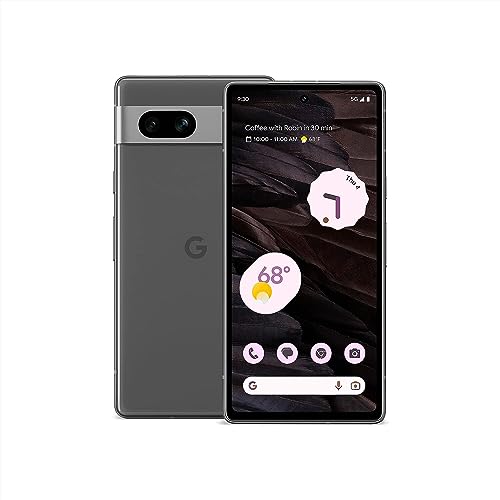
Google Pixel 7a — Modern Processing, Sensible Size
The Pixel 7a demonstrates what actually replaced the megapixel race: computation. Its 64-megapixel sensor sounds like a different universe from ten megapixels, yet the important difference is not the count but what the phone does with the data — merging frames to rescue shadow detail, sharpening a moving child’s face, and balancing a sunset so the sky and the people both survive. In blind comparisons, photos from this class of Pixel routinely trade wins with flagships, and for the simple-phone buyer the practical translation is confidence: the default mode is the right mode, almost always.
Around the camera sits a complete modern phone. The 6.1-inch OLED screen runs at a smooth 90Hz, wireless charging appears at a price where it has no right to, and face unlock joins the fingerprint reader. Google’s update commitment for this generation stretches years beyond the older picks here, which changes the ownership maths entirely — this is a phone you can hand to a parent knowing it will stay patched. The renewed listings keep the price gentle. If the brief is a camera phone that is simple because it is smart rather than because it is old, the 7a is where this guide’s centre of gravity sits.
- Main camera: 64MP with optical stabilisation, plus ultrawide
- Display: 6.1-inch OLED, 90Hz
- Storage: 128GB internal
- Extras: wireless charging, face and fingerprint unlock
- Software: long update runway for its generation
- Build: IP67 water resistance
Strengths
- Computational photography rivals far pricier phones
- Update support stretches years ahead
- Wireless charging and water resistance included
Trade-offs
- Charging speed is leisurely by modern standards
- Tensor chip warms up during long video sessions
- No storage expansion slot
Best for: parents, grandparents and anyone wanting flagship-flavoured photos with years of support remaining.
Not suited for: buyers who need a headphone jack or expandable storage.

Google Pixel 8a — Longest-Lived Simple Camera
The Pixel 8a refines the 7a formula in the directions that matter for a long, quiet ownership. The screen is brighter and smoother at 120Hz, which reads as general pleasantness rather than a specification — photos look vivid when you review them in sunlight, and scrolling through a gallery feels fluid. The camera hardware is familiar, but the software around it grew cleverer, with editing tools that can tidy a photobomber out of a group shot and audio tools that clean wind noise from a birthday video. For family photographers, those rescues are worth more than another lens.
The decisive advantage is time. Google committed this generation to seven years of operating system and security updates, a promise that transforms the renewed listings into unusually safe purchases: a phone bought at a gentle price today remains a patched, banking-safe phone for years. The Tensor G3 keeps everyday work brisk, the body shrugs off rain with proper water resistance, and the size stays friendly for one-handed shooting. Charging remains unhurried and the bezels are chunkier than flagship fashion dictates, but as the simple camera phone you buy once and stop thinking about, the 8a has no serious rival here.
- Main camera: 64MP stabilised, plus 13MP ultrawide
- Display: 6.1-inch OLED, 120Hz, brighter panel
- Memory and storage: 8GB RAM, 128GB
- Software: seven years of updates promised
- Extras: wireless charging, IP67 resistance
- Unlock: fingerprint and face recognition
Strengths
- Longest update commitment in this guide
- Bright, smooth screen for reviewing photos outdoors
- Editing tools rescue imperfect family photos
Trade-offs
- Charging speeds trail Samsung and Motorola rivals
- Design and bezels look plain beside flagships
- No telephoto lens for distant subjects
Best for: buyers who keep a phone for many years and want the camera handled for them throughout.
Not suited for: photographers who zoom often or charge in a hurry.

Samsung Galaxy A25 — Big Screen, Easy Going
The Galaxy A25 approaches the simple-camera brief from the opposite end to the little Pixel 4a: instead of small and clever, it is large and easy-going. The 6.5-inch screen runs at 120Hz and gets bright enough for garden reading, which matters because a camera phone’s screen is where its photos actually live. The 50-megapixel main camera carries optical stabilisation — a feature budget phones often skip — and it shows in evening shots, where the A25 keeps street scenes and restaurant tables steadier than its price suggests. Samsung’s colour science leans vivid, which flatters holiday photos straight out of the camera.
Ownership is where the A25 quietly wins arguments. Samsung’s update policy for the A series stretches to several years of security patches, the battery is a full-size 5,000mAh unit that treats a day of light use as a warm-up, and a microSD slot plus headphone jack keep the accessories you already own relevant. The Exynos processor is tuned for efficiency rather than thrills, and keen gamers will find its limits, but for calls, photos, video and social apps it never feels like the cheap option. As a first smartphone or a dependable family handset, it is the list’s most relaxed recommendation.
- Main camera: 50MP with optical stabilisation
- Display: 6.5-inch Super AMOLED, 120Hz
- Battery: 5,000mAh with fast charging
- Storage: 128GB plus microSD expansion
- Extras: headphone jack, side fingerprint reader
- Software: multi-year Samsung security support
Strengths
- Stabilised camera performs above its class at dusk
- Large, bright, smooth screen for photo review
- Expandable storage and a headphone jack survive
Trade-offs
- Processor is efficient rather than powerful
- Plastic build feels less premium than the Pixel pair
- Ultrawide and macro cameras are modest performers
Best for: first-time smartphone owners and families wanting a big screen, long battery and a camera that copes after dark.
Not suited for: mobile gamers or buyers wanting the smallest possible handset.

Motorola Moto G 2025 — Unfussy Everyday Value
Motorola understands something the rest of the industry keeps forgetting: for a great many buyers, the best phone software is the software they never notice. The Moto G 2025 runs a near-stock version of Android with a handful of genuinely useful gestures — chop twice for the torch, twist for the camera — and almost none of the duplicate apps and advertising nudges that clutter rival budget phones. Its 50-megapixel main camera opens quickly from that twist gesture, focuses willingly, and produces clean, natural photos in daylight, with a night mode that handles a lit street respectably.
The hardware brief is equally sensible. A 6.7-inch screen gives photos and video room to breathe, the 5,000mAh battery stretches light use across two days, and storage expands by microSD for the family archivist. The renewed listings make an already inexpensive phone gentler still. Compromises exist and should be named: 4GB of memory means heavy multitaskers will watch apps reload, the secondary macro camera is a spec-sheet tenant rather than a tool, and Motorola’s update timeline is shorter than Google’s or Samsung’s. For a straightforward camera phone that a non-technical owner can run without a family helpdesk, those are acceptable trades, honestly labelled.
- Main camera: 50MP with phase-detect autofocus
- Display: 6.7-inch LCD, 120Hz
- Battery: 5,000mAh, two-day light use
- Storage: 128GB plus microSD expansion
- Software: near-stock Android, gesture shortcuts
- Extras: headphone jack, side fingerprint reader
Strengths
- Clean software with almost no bloatware
- Camera launches instantly with a wrist twist
- Battery endurance suits forgetful chargers
Trade-offs
- 4GB of RAM limits heavy multitasking
- Update commitment is shorter than rivals here
- Macro camera adds little real value
Best for: non-technical owners who want a phone that photographs well and explains itself never.
Not suited for: power users juggling many apps or expecting many years of major updates.
Why did megapixels stop mattering so much?
A megapixel is simply a million pixels, and beyond a fairly modest count, more of them stops translating into better photographs. What governs a phone photo’s quality is the size of each pixel’s light-gathering area, the quality of the lens in front of the sensor, the steadiness of optical stabilisation, and — above all in modern phones — the software that merges multiple frames into one image. A ten-megapixel sensor from 2014 and a modern fifty-megapixel sensor differ less in their headline number than in everything surrounding it: today’s sensor reads out faster, focuses with data from across the frame, and feeds a processor that can rescue scenes a photographer of the earlier era would have deleted on the spot.
Modern high-resolution sensors also cheat in a useful direction. Most default to pixel binning, combining groups of small pixels into larger virtual ones, so a 50-megapixel camera usually produces a twelve-megapixel photo with better low-light behaviour than a native twelve-megapixel sensor could manage. That is why the output files of the phones in this guide cluster around the very resolution the keyword asks about, even though their sensors advertise far larger numbers. The industry did not abandon the ten-to-twelve-megapixel photo; it kept the photo and rebuilt everything behind it.
What should a simple camera phone still do well?
Simplicity is a feature only when the fundamentals survive it. The first fundamental is speed: a camera that takes three seconds to open misses the toddler’s expression that justified buying it. Every pick here launches its camera quickly and focuses without hunting in ordinary light. The second is honesty in default mode — exposure that protects faces, colour that does not turn grass radioactive, and a night mode that engages automatically rather than hiding behind a menu the owner will never find.
Beyond the camera, a simple phone must still be a good phone. Battery endurance matters more to this audience than to any other, because these handsets often belong to people who charge reactively rather than ritually. A screen readable in daylight, call audio that copes with a noisy kitchen, and storage that does not demand monthly housekeeping all belong on the checklist. And because simple phones are frequently gifts, the giver’s checklist matters too: set up the home screen, enlarge the text, pin the camera and the family contacts, and the phone becomes a pleasure instead of a project.
How do you take better photos with a modest phone camera?
The single most valuable habit costs nothing: clean the lens. Phone cameras live in pockets and handbags, and a fingerprint film across the glass is responsible for more hazy, disappointing photos than any sensor limitation. A two-second wipe on a shirt transforms evening shots especially, where smearing turns every light into a comet. The second habit is tapping the subject on screen before shooting, which tells the phone where to focus and what brightness to protect — one tap fixes most washed-out faces against bright windows.
Light deserves the third habit. Modest sensors reward anyone who turns their subject toward a window, steps into shade on a harsh noon, or simply waits for the cloud that softens a portrait. Use the grid overlay to keep horizons level, hold the phone with both hands and elbows tucked for night shots, and take two frames of any group so one survives the inevitable blinker. None of this requires a better phone; it requires thirty seconds of attention, and it lifts the results from every pick in this guide more than an upgrade would.
Renewed and older phones: what should you check in the first week?
Several picks here are older models sold renewed, and a sensible routine protects the purchase. On day one, charge the phone fully, then use it normally and watch the battery’s behaviour; a healthy unit should roughly match its when-new endurance for light duties, while a phone that sheds charge during standby has a tired battery worth reporting inside the return window. Photograph a white wall and a dark room to check the camera for spots or focusing faults, make a test call on your own SIM, and confirm the fingerprint reader enrols and unlocks reliably.
Software deserves equal attention. Check which Android version the phone runs and whether any updates are waiting, and be realistic about the models whose support has ended: they remain fine for calls, photos and messaging, but a phone that no longer receives security patches should not become the vault for a family’s banking and password resets. Used within those honest limits — and priced accordingly — a renewed older phone is one of the most sustainable purchases in consumer electronics, keeping good camera hardware in service years after its first owner moved on.
Which of these phones suits which kind of buyer?
Match the phone to the person, not to the specification table. For a grandparent who photographs grandchildren and little else, the Pixel 8a’s long support and forgiving camera remove the most worry, while the Moto G 2025’s clean software and huge battery suit anyone who finds modern phones cluttered. The Galaxy A25 serves the buyer who reads and watches on the phone as much as they photograph with it, its big bright screen doing quiet double duty.
The two older compacts serve a different, very real niche. The Pixel 4a is the camera-lover’s minimal tool — one lens, no fuss, beautiful output — and the S10e adds water resistance and an ultrawide for buyers who travel with their phone. Both ask you to accept finished software support in exchange for size and character that new phones no longer offer. None of these choices is the ten-megapixel phone of memory, because that phone’s job has been inherited by better tools; choosing among its heirs by temperament, rather than by a number, is the whole lesson of this guide.
How did the ten-megapixel era actually end?
It ended in stages, and remembering them explains the modern market. First, flagship phones pushed past ten megapixels into the teens while discovering that resolution alone produced large, noisy files rather than better photographs. Then the industry pivoted: sensor sizes grew, pixels grew with them, and the flagship standard settled around twelve megapixels for years — not because more was impossible, but because twelve large pixels beat twenty small ones in the dark. The ten-megapixel figure itself was left behind in the mid-range, where it lingered on budget models before those too jumped to the high-megapixel, pixel-binning designs that dominate now.
The final blow was software. Once phones began merging multiple frames into every photograph, the sensor’s raw count mattered less than the processor’s judgement, and a camera’s quality became something a maker could improve with an update. A ten-megapixel phone from the old era cannot receive that improvement; its camera is frozen at the competence of its launch year. That, more than any specification, is why this guide steers buyers toward the era’s heirs rather than its survivors: the photographs people want are now made substantially in software, and software has a lifespan.
There is a fondness worth honouring in the search, though. The ten-megapixel era was when phone cameras became genuinely good — when the phone in a pocket first embarrassed the compact camera in a drawer. Buyers who remember it are often really remembering the moment photography became effortless. The good news is that the effortlessness survived and multiplied; it simply lives now in phones whose boxes advertise different numbers, several of which are waiting in the picks above.
What do modern budget sensors do with all those megapixels?
Mostly, they share them. The fifty-megapixel sensors in the Galaxy A25 and Moto G 2025 spend their ordinary lives producing twelve-megapixel photographs, combining blocks of pixels so each output pixel gathers the light of several physical ones. The benefit concentrates exactly where simple phones used to fail: indoors, at dusk, at the school play. The resulting files are also a civilised size for storage and sharing, which matters on phones that may serve owners who never think about file management at all.
The full resolution remains available as a special mode, and it has one honest use: cropping. A fifty-megapixel frame lets you zoom into a detail — the sign at the viewpoint, the face at the back of the group — and still keep a usable photograph. In poor light that mode should be avoided, because unbinned pixels are small and noisy, but on a bright day it quietly substitutes for the zoom lens these phones do not carry. Understanding that one trick makes a budget camera feel a class cleverer.
What the big numbers do not do is rescue a bad lens or lazy processing, which is why this guide ranks phones by their photographs rather than their sensors. The Pixel pair demonstrate the point from the other direction: modest-sounding hardware, exceptional output. When you shop this class, treat the megapixel figure as the least informative number on the box, and spend your attention on stabilisation, sample galleries and the maker’s processing reputation instead.
How do you set up a simple camera phone for someone else?
Many phones in this class are bought by one person for another — a parent, a grandparent, a child — and thirty minutes of setup decides whether the gift delights or bewilders. Begin with the camera itself: pin it to the home screen’s dock, open it once and dismiss every first-run prompt on the owner’s behalf, and set the photo backup running so the pictures protect themselves without asking. Choose the default shooting mode and leave it there; the kindest thing a setup can do is ensure the owner never meets a settings menu at a birthday party.
Continue with the human details. Enlarge the text until it is read without glasses being fetched, load the family contacts with photographs attached so incoming calls announce themselves with faces, and place the torch and the magnifier where fumbling fingers can find them. Record a voice note from the owner to themselves — a grandchild’s message works wonders — so the phone arrives carrying a person, not just a setup wizard’s choices.
Finish by rehearsing the three journeys the owner will actually take: answering a call, taking and sending a photo, and charging the phone at night. Walk each one together once, slowly, and write the charging routine on a card that lives by the bed. A simple phone set up this way is not a lesser phone; it is a phone whose complexity has been prepaid by someone who loves its owner, which is the entire tradition this category exists to serve.
What about video on phones of this class?
Video is where modest phones have quietly become excellent. Every pick in this guide records at least full HD with electronic stabilisation, and the modern pair — the Pixel 7a and 8a — add the processing polish that makes handheld clips look intentional rather than accidental. For the duties these phones actually perform — a child’s song recorded from a school hall seat, a birthday candle moment, a dog doing something unrepeatable — the limiting factor is rarely the camera. It is the operator: the panning too fast, the filming against a bright window, the thumb drifting over the microphone.
A few habits lift modest video enormously. Hold the phone horizontally for anything destined for a television or a family group that watches on one, and keep it vertical only for the platforms that demand it. Start recording a breath before the moment and stop a breath after, because trimming is easy and resurrection is impossible. At concerts and school plays, resist digital zoom entirely; the wide, steady, honest shot ages better than the shaky close-up, and the sound — captured from your seat, crowd and all — is usually what makes the clip worth keeping.
Storage deserves one sentence of planning: video is the hungriest thing a simple phone stores, and a term of school performances can fill a small drive unnoticed. The backup switched on during setup is the whole solution, provided someone checks once a season that it is still running. Do that, and these unassuming phones become the family archive’s most reliable contributor.
How long do the phones in this guide remain sensible purchases?
The honest answer divides the list in two. The modern picks — Pixel 7a, Pixel 8a, Galaxy A25 and Moto G 2025 — are sensible for years, with the Pixels carrying update promises that stretch furthest and the Samsung close behind. Bought today, they will run tomorrow’s apps, hold a family’s photographs and remain safe for banking and messaging through a long and useful life. The Moto asks only that its owner accept a shorter runway in exchange for its calm software and gentle price.
The two veterans, the Pixel 4a and Galaxy S10e, should be bought with a shorter horizon in mind: a year or two of light duty, in roles where their software age does not matter. A spare phone, a child’s supervised handset, a camera for a grandparent whose banking happens elsewhere — in those roles their remaining life is well spent, and their cameras will be loved every week of it. The mistake is not buying them; it is buying them for the wrong job and blaming the phone.
That distinction — matching a phone’s remaining life to the job’s demands — is the mature way to shop this entire category. Specification nostalgia brought you here, but the phones above were chosen so that each has a job it can still do beautifully. Choose the job first, and the phone chooses itself.
What did the old compact cameras do that phones still imitate?
The ten-megapixel search often arrives carrying a memory of the compact cameras that specification belonged to, and it is worth naming what those cameras did well, because phones inherited their jobs unevenly. A compact offered a real zoom lens that reached across a zoo enclosure, physical controls your fingers learned, and a battery that could be swapped in seconds from a pocket. Phones defeated them on the strength of always being present, instantly shareable and computationally clever — but the zoom surrender is real, and it is why distant subjects remain the honest weakness of every pick in this guide.
Buyers mourning a compact should therefore shop the picks by their relationship to distance. None of these phones zooms optically beyond the S10e’s ultrawide versatility in the other direction; their reach is a crop and a prayer. If your photography lives at distance — birds, stages, sports across a field — the correct purchase is not any phone in this guide but a modern compact or bridge camera beside a simple phone. If your photography lives at arm’s length and across the table, the phone won that argument a decade ago, and the picks above are its current champions.
How do you print and share photos from a simple phone?
A photograph that never leaves the phone is a diary entry, and simple phones earn their keep when their pictures escape gracefully. Sharing begins with the backup already switched on in setup: the major photo services turn a phone’s gallery into an album any relative can open from a link, which solves the ancient problem of the grandparent who cannot receive attachments. Teach the owner the share button in the gallery — one icon, one habit — and the phone becomes a camera that develops its own film and posts it to the family.
Printing rewards a little more intention. The twelve-megapixel-class files these phones produce print beautifully at the sizes families actually frame, and the online printing services will take an order directly from the gallery app. For the photograph that matters — the one destined for a wall — choose the frame without a thumb in it, resist the filters, and order it larger than feels safe; prints forgive resolution and punish hesitation. A simple phone, a shared album and one large print a year is a complete photographic life, and it costs less than the camera that once promised the same.
What should you do when a simple phone starts to struggle?
Modest phones announce their struggles politely before they fail: an app that opens slowly, a camera that hesitates, a battery that ends the day apologising. The first response is housekeeping, not shopping. Clear the storage audit’s worst offenders, restart the phone properly rather than in its sleep, and let any pending updates install overnight on the charger. A surprising share of struggling phones are simply full phones, and the cure costs an evening rather than a purchase.
If the struggle survives housekeeping, divide it honestly. A tired battery in an otherwise willing phone — the commonest case with this guide’s renewed veterans — is a defined problem with a defined remedy where parts exist. Software that has stopped receiving support is a different verdict: the phone should retire to the light duties this guide describes, where its camera remains an asset and its age stops mattering. Knowing which struggle you face turns a frustration into a decision, and the phones here were chosen so that either decision is a dignified one.
How do you choose between the two veterans and the four modern phones?
The decision looks like a specification comparison and behaves like a question about time. The veterans — the Pixel 4a and the Galaxy S10e — offer quality that has already happened: cameras and bodies from a flagship era, available now for modest money, with their futures behind them. The modern four offer quality that is still arriving: updates that will improve their cameras, batteries that begin their lives with you, and support windows measured in years. A buyer choosing between the groups is really choosing whether this purchase is about the next eighteen months or the next five years, and both answers are respectable when they are chosen deliberately.
Deliberation has a practical shape. Ask what the phone will hold: if the answer includes banking, health records and the keys to a family’s accounts, the modern group’s living software support is not a preference but a requirement, and the Pixel 8a’s long promise settles the matter. Ask who will hold it: a careful adult in a light role can enjoy the veterans’ charms for years, while a phone destined for a child’s pocket or a worker’s van should be the one whose battery and support are young. Ask finally what failure would mean — a missed photograph, an inconvenience, or a genuine problem — and let the stakes, not the savings, cast the deciding vote.
There is no shame in either direction, and this guide has deliberately kept both doors open. The shame, if the word belongs anywhere, is in buying blind: the veteran purchased as a five-year main phone, or the modern phone purchased for a drawer where its long support will expire unused. The ten-megapixel era taught its owners to value a camera that simply worked. Its heirs, old and new alike, honour that lesson in different currencies — and the informed buyer is the one who knows which currency they are spending.
What does a simple camera phone teach a new photographer?
Something the flagship era keeps forgetting: that photography is a way of paying attention before it is a technology. A simple phone, with one honest lens and no bag of modes to hide inside, returns its owner to the fundamentals the great photographers never escaped — get closer, find the light, wait for the expression, take the picture. The constraint is a teacher. Owners of the Pixel 4a in particular describe a small revelation: with nothing to adjust, they started seeing photographs everywhere, in market queues and bus windows and the light across a kitchen table, because the phone asked nothing of them except to look.
That lesson compounds across a family’s life. The grandparent with the Moto G discovers that the camera rewards the person who is present at the moment, not the person with the longest lens. The child with the supervised handset learns framing before they learn specifications, which is the correct order and the reverse of how the industry teaches. Even the photos that fail teach cheaply on a simple phone, because the next attempt is always one tap away and the archive forgives everything.
So if this guide has a sentiment to end its analysis on, it is that the modest camera phone is not a diminished version of the real thing. It is the real thing, distilled — a lens, a button, and an invitation to notice the world — and the ten-megapixel ancestors whose name brought you here would recognise it instantly as family.
One last check before you order any of these six
Before ordering, match the listing in front of you against the job you named for the phone. Confirm the storage figure and the exact model variant, since simple phones often hide several beneath one name. For the renewed veterans, confirm the condition grade and the return window, and plan the first-week battery and camera checks while returning is still painless. For the modern phones, confirm the carrier compatibility of any international variant. None of this takes long, and all of it is cheaper than the alternative — because a simple phone bought carefully becomes invisible in its owner’s life, doing its one job beautifully for years, and that invisibility is the true prize this category offers.
Comparison table
| Pick | Badge | Standout trait | Main compromise |
|---|---|---|---|
| Google Pixel 4a | Closest to the Classic Brief | Single-lens purity with superb processing | Ended software support and modest battery |
| Samsung Galaxy S10e | Compact Classic With Two Lenses | Ultrawide plus water resistance in a small body | Ageing battery and finished updates |
| Google Pixel 7a | Modern Processing, Sensible Size | Flagship-style processing with long support | Slow charging and a warm-running chip |
| Google Pixel 8a | Longest-Lived Simple Camera | Seven-year support with a friendly camera | Slow charging, no zoom lens |
| Samsung Galaxy A25 | Big Screen, Easy Going | Stabilised camera with a big 120Hz screen | Modest processor and secondary lenses |
| Motorola Moto G 2025 | Unfussy Everyday Value | Bloat-free software and a huge battery | Limited RAM and shorter updates |
What mistakes do buyers make when shopping by megapixels?
The founding mistake is treating the megapixel count as a quality score. It never was one: it measures the size of the image file, not the quality of the light captured. A modern twelve-megapixel output from a large sensor with good processing will out-photograph a cheap high-megapixel sensor in almost every real scene, especially indoors and after dark.
A second mistake is buying a genuinely old ten-megapixel-era phone for daily use because the listing was cheap. Those handsets now struggle with current apps, lack modern network bands, carry exhausted batteries and receive no security patches. The savings evaporate the first time the phone fails at a payment, a map or a message that matters.
Third, buyers overlook the camera app itself. A simple phone lives or dies by its default mode and its launch speed; a handset with impressive hardware and a cluttered, slow camera app will produce worse family photos than a modest phone that opens instantly and exposes faces correctly. If you can, handle the phone or watch real sample galleries rather than studying specification tables.
Finally, people forget that photos need somewhere to live. A camera phone bought for a relative should come with backup switched on and storage headroom planned, or the first year of grandchildren photos ends in a full-storage warning and a stressful afternoon. Ten minutes of setup by the giver saves the receiver a genuine loss.
Final Recommendation
Start from the buyer’s temperament. The Pixel 8a is the safest long-term answer, the Pixel 7a its slightly older value twin, and the Galaxy A25 and Moto G 2025 the relaxed big-screen options for people who want size and battery more than cleverness. The Pixel 4a and Galaxy S10e remain the character picks — compact, single-minded phones for buyers who knowingly trade software longevity for size and simplicity.
The ten-megapixel camera phone deserves its fond place in history, but its real legacy is the lesson it taught the industry: a photograph is made by light, glass and judgement, not by a number on a box — so choose the phone whose photos you like and whose company you enjoy, and let the megapixels look after themselves.
Frequently Asked Questions
Does any new phone still have a 10MP main camera?
Essentially no. Even entry-level phones now use main sensors of fifty megapixels or more, usually binning down to roughly twelve-megapixel photos. Phones with a true ten-megapixel main camera are older models, and while some remain charming as second devices, their batteries and software support make them poor choices as a main phone today.
Are more megapixels always better for photo quality?
No. Sensor size, lens quality, stabilisation and processing matter far more once resolution passes the level needed for sharing and modest printing. Very high megapixel counts mainly help when cropping into a scene or printing large, and they can even hurt low-light performance on small sensors with tiny pixels.
Which pick is best for a parent or grandparent?
The Pixel 8a is the easiest recommendation: its camera handles scenes automatically, its screen is bright, and its seven-year update commitment keeps it safe for years. The Moto G 2025 is a fine alternative if a bigger screen and longer battery matter more than the longest support window.
Is it safe to buy a renewed older phone like the Pixel 4a?
It can be, for the right duties. Buy from a listing with a clear condition grade and return window, test the battery and camera in the first week, and treat the phone as a light-duty device. Because its security updates have ended, avoid making it your primary banking and password-reset phone.
What megapixel count do I need for printing photos?
Far fewer than marketing implies. A twelve-megapixel photo prints beautifully at common sizes such as 6×4 and 7×5 inches and holds up well at A4 for typical viewing distances. Composition, focus and light decide whether a print looks good long before resolution becomes the limiting factor.
Why do 50MP phones produce 12MP photos?
They use pixel binning, merging a block of small pixels into one larger virtual pixel. The combined pixel gathers more light, which improves low-light photos and dynamic range, while the resulting file size stays sensible. You can usually enable full-resolution mode manually, but for everyday photography the binned output is normally the better photograph.
If a single photograph could settle the whole question, it would be the indoor family picture taken without thought or preparation, because that is the photograph these phones exist for. Judge every candidate in this guide by that frame — who protected the faces, who kept the colours honest, who was ready in time — and the rankings arrange themselves without a single specification being consulted, which is exactly how the ten-megapixel generation, at its best, taught us photography worked.
Related Guides
For neighbouring questions, browse our guides to mid-range camera value, five-gigabit camera flagships and affordable camera phones: best affordable camera mid range phones best 5g camera phones best affordable phones with good camera
Related guides
- Best Basic Phones Camera Buyers Can Trust: Flip Phones and Simple Handsets That Still Take a Photograph
- Best 3 Camera Cell Phones: Six Triple Systems Where Every Lens Earns Its Place
- Best Bargain Smart Phones With Camera: Real Photographs Without the Flagship Bill
- Best Affordable Phones With Good Camera: Six Budget Phones That Actually Photograph Well