What's inside
- Key Takeaways
- Quick Picks
- How Did We Judge Steadiness From a Title?
- Six Standing Desks, Weighed for Wobble
- How Do the Six Compare on Stated Structure?
- What Is Your Half of the Anti-Wobble Bargain?
- How Do You Test a Standing Desk in Its First Week?
- What Mistakes Make Steady Desks Wobble?
- Why Does Height Punish a Weak Frame?
- How Should Sitting and Standing Share One Desk’s Day?
- What Keeps a Standing Desk Steady in Year Three?
- How Do Monitors, Arms and Speakers Change the Equation?
- What Should Renters and Carpeted Rooms Do Differently?
- How Does Desk Depth Change the Standing Experience?
- What Does a Steady Desk Do for the Work Itself?
- How Do You Read a Standing Desk Listing Like an Engineer?
- What About Two People Sharing One Standing Desk?
- When Is a Little Movement Acceptable?
- How Should You Arrange the Room Around a Standing Desk?
- Final Recommendation
- Frequently Asked Questions
- Related Guides
As an Amazon Associate I earn from qualifying purchases. This post may contain affiliate links at no extra cost to you.
gizmoverdict.com is reader-supported. When you buy through links on our site, we may earn an affiliate commission.
Where to buy: Each desk below links to a listing checked for this guide. Every stability claim in these reviews is tied to a detail printed in the listing title — a motor count, a leg count, a stage count or a tabletop thickness — and where a title offers no such detail, the review says so instead of promising steadiness it cannot evidence.
Wobble is the complaint that ends standing desk honeymoons. The desk feels fine in the showroom video, fine at sitting height, and then at full standing extension the monitor sways when you type, the coffee trembles when you lean, and the whole purchase starts to feel like a boat. Shoppers searching for the best stand up desks that will not wobble are really asking a physics question: what, in a desk’s construction, keeps a raised surface steady when the columns are at their longest and the leverage against them is at its worst?
The honest answer is that steadiness is built from a short list of structural ideas, and this guide reads every pick through them. Dual motors drive both columns together so the frame rises level and resists racking. Three-stage columns overlap more at full extension than two-stage ones, and overlap is stiffness. Four legs widen the footprint’s grip on the floor. A thick, rigid tabletop stops the surface itself from flexing between its supports. The six titles below state these details unevenly: two FlexiSpot E6 models claim dual motors and three stages outright, the 4-leg FlexiSpot claims its legs and dual motor, and the DeskShow claims a one-inch top. The Vari and the UPLIFT titles claim none of their stability hardware, and their reviews hold them to that silence — respected brands, unproven on this page’s evidence, verify before you buy.
One more truth before the picks: no desk defeats a bad floor, a thick carpet or a monitor arm mounted like a flagpole. Steadiness is a system of frame, floor and load, and the buying guide sections after the reviews deal with your half of that system. But the frame is the half you are paying for, so the frame is where we start.
Key Takeaways
- Stability at standing height comes from structure: dual motors, three-stage columns, four legs and rigid tops are the claims that matter.
- Two FlexiSpot E6 titles state dual motor and 3-stage together, the strongest paper case in this guide.
- The 4-leg FlexiSpot attacks wobble with footprint, pairing four legs with a dual motor at 71 by 32 inches.
- The DeskShow’s stated defence is its one-inch thick tabletop; its title names no motor or leg details.
- The Vari and UPLIFT titles state no stability hardware at all, so their steadiness must be verified beyond the title.
- Your floor, your load balance and your monitor mount decide the last share of wobble on any desk.
Quick Picks
| Pick | Badge | Why it is here |
|---|---|---|
| FlexiSpot E6 Bamboo 3-Stage Dual Motor Standing Desk | Dual motor, three stages | Bamboo top on a 3-stage dual motor frame at 55 by 28, the fullest stability brief in its title. |
| FLEXISPOT E6 MAX Bamboo Standing Desk | MAX variant, same recipe | Dual motor and 3-stage again at 55 by 28 in bamboo, the E6 formula in its MAX form. |
| FLEXISPOT 4-Leg Standing Desk, 71×32 | Four-leg footprint | Four legs and a dual motor under a 71 by 32 surface, the widest stance in this guide, in black. |
| Vari Classic Electric Standing Desk, 60×30 | Verify the frame | A 60 by 30 electric desk in reclaimed wood and slate tones whose title states no motor or leg details. |
| UPLIFT V3 Laminate Electric Standing Desk | Verify the frame | A laminate electric desk with a keypad, from a standing-desk specialist, with hardware unstated in its title. |
| DeskShow Electric Standing Desk, 60×28 | One-inch top | A black 60 by 28 electric desk whose stated strength is a tabletop one inch thick. |
How Did We Judge Steadiness From a Title?
By refusing to judge it from anything else. Wobble resistance leaves evidence in a specification: how many motors drive the lift, how many stages the columns telescope through, how many legs meet the floor, how thick the top is. This guide’s shortlist required a desk to be an electric standing desk in its title, and then ranked the six by how much of that structural evidence the title itself provides. It is a deliberately strict method, and it produces an unfashionable result — two famous names sit in the verify-first seats — but a shopper burned by a swaying desk does not need fashion. They need claims they can check.
The method has a second benefit: it teaches you what to ask of any desk, including ones not listed here. If a listing cannot tell you its motor count and column stages, the manufacturer is asking you to buy steadiness on faith. Sometimes the faith is rewarded; the guide simply declines to spend your money on it unexamined. Where titles are silent, the reviews below point you to the exact questions to put to the listing and the maker before ordering.
Six Standing Desks, Weighed for Wobble

FlexiSpot E6 Bamboo 3-Stage Dual Motor Electric Standing Desk 55 x 28 — Dual motor, three stages
The E6’s title reads like the answer key to this guide’s question. Dual motor: both lifting columns are driven, synchronised, so the frame rises level and resists the racking twist that a single motor’s crossbar can allow. Three-stage: the columns telescope in three sections, which means more overlap between sections at full height, and overlap is where a raised column gets its stiffness. Put those two claims together and you have the strongest structural brief any title here makes, on a 55 by 28 surface in bamboo.
Bamboo earns its paragraph. A bamboo top is dense and rigid for its weight, and rigidity in the top matters because the top is the bridge between the two columns: a flexing bridge lets the columns move independently, while a stiff one ties them into a single structure. Bamboo also suits the standing desk’s double life in a home — warm to look at, kind to a room that is not an office all day. At 55 inches the E6 suits one generous workstation: a monitor or two on stands, a laptop, and the day’s papers, without the sprawl that invites uneven loading.
Loading is where the owner’s half of the bargain begins. A dual motor frame kept honest still sways if one end carries a tower, a printer and a stack of drives while the other carries a mug. Spread the heavy items, keep the tower’s weight low or off the top entirely, and the E6’s structure gets to do its work. The title does not state a weight capacity, so confirm the listing’s figure against your equipment’s total before ordering — a desk’s steadiness and its capacity are cousins, and both deserve a number you have read rather than assumed.
For the wobble-worried buyer, this is the guide’s benchmark: the desk whose steadiness you can argue from its own title, feature by named feature. If your room and budget fit a 55-inch bamboo top, the argument ends here more often than not.
- Listed size: 55 x 28 inches
- Motors: dual motor, per the listing title
- Columns: 3-stage, per the listing title
- Top material named in title: Bamboo
- Weight capacity: Not stated in the listing title — verify with FlexiSpot documentation
Strengths
- Dual motor plus 3-stage columns is the complete anti-wobble recipe, stated outright.
- Bamboo top adds rigidity across the frame and warmth to the room.
- 55-inch span suits a full single workstation without encouraging sprawl.
Trade-offs
- Capacity figure must be confirmed on the listing before loading it heavily.
- Bamboo is one look; it will not match every room’s scheme.
- Two monitors plus a tower will fill 55 inches completely.
Best for: a standing worker whose priority is steadiness argued from structure, on a bamboo top.
Not suited for: a three-monitor command centre that needs a wider top than 55 inches.
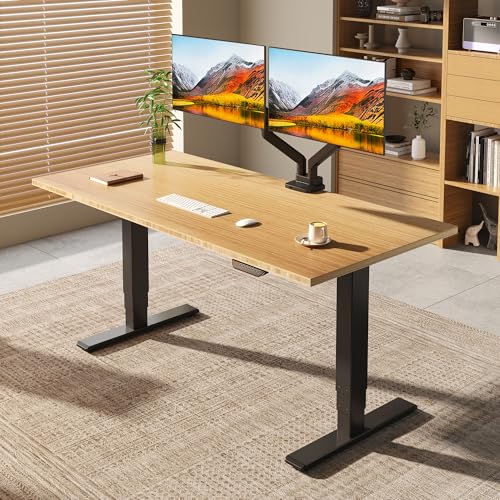
FLEXISPOT E6 MAX 55″ x 28″ Bamboo Standing Desk, Dual Motor 3-Stage — MAX variant, same recipe
The E6 MAX keeps the recipe and changes the seasoning. Same 55 by 28 bamboo format, same dual motor, same 3-stage lift, with MAX in the name to mark it as the line’s fuller-featured form. Since the title repeats the structural claims word for word, everything said about the E6’s steadiness applies here with equal force: synchronised dual drive against racking, three stages of overlap against sway at height, a rigid bamboo bridge tying the columns together.
Why list both? Because buyers meet them as separate listings and deserve to know the steadiness case is identical, so the choice between them can be made on the things that actually differ — the details of controls, finish and configuration that live on the listings rather than in the titles. A guide that pretended a vast difference would be inventing; a guide that omitted one would leave a common comparison unmade. The wobble question, at least, is a tie.
That tie is itself useful information. It tells you the E6 formula is FlexiSpot’s considered answer to the stability problem at this size, repeated across variants rather than experimented with. If you are cross-shopping the two, spend your comparison time on the listing details that affect your daily life — how the desk is controlled, what the frame’s colour and the top’s edge look like up close, and the capacity figure — and let the structure, identical and stated, stop worrying you.
Ownership advice mirrors the E6’s: balance the load, keep heavy gear low or offboard, and let the three stages work at their full overlap. At standing height, type a paragraph before you judge any new desk; the first hour’s impressions at full extension are the honest ones, and this frame is built to pass exactly that test.
- Listed size: 55 x 28 inches
- Motors: dual motor, per the listing title
- Columns: 3-stage, per the listing title
- Top material named in title: Bamboo
- Weight capacity: Not stated in the listing title — verify with FLEXISPOT documentation
Strengths
- The E6’s full stability recipe repeated in the MAX variant.
- Bamboo rigidity ties the dual-motor frame into one structure.
- Lets the E6 comparison be settled on features rather than steadiness.
Trade-offs
- Title gives no capacity figure; verify before heavy loading.
- Same 55-inch ceiling on sprawl as its sibling.
- Differences from the standard E6 must be researched on the listings.
Best for: a buyer choosing within the E6 family who wants the MAX form without re-litigating steadiness.
Not suited for: a workstation whose equipment list already overflows a 55-inch top.

FLEXISPOT 4-Leg Standing Desk, 71″x32″, Dual Motor Electric, Black — Four-leg footprint
Every other desk in this guide stands on two columns and asks their engineering to defeat leverage. The 4-leg FlexiSpot changes the geometry itself: four legs under a 71 by 32 top, with a dual motor driving the lift. A four-legged stance widens the base in both directions, and wobble is, at root, a base problem — the narrower the footprint relative to the height and load, the more any force at the top becomes sway. Give the desk four contact points spread under a big top and the same typing force meets a structure that shrugs.
The size deserves emphasis: 71 by 32 is the largest surface here, a genuine two-monitor-plus-laptop, documents-spread, tower-on-top-if-you-must expanse. Large tops usually argue against steadiness, because they invite load and leverage; here the four legs answer the argument in advance. This is the desk for the heavy workstation that made lesser standing desks tremble — multiple screens, substantial speakers, the works — provided the total load respects the capacity figure, which the title does not state and the listing must provide.
Four legs bring one honest cost: they occupy the floor. Under-desk storage, a rolling cabinet, a dog’s favourite sleeping spot — all negotiate with two extra legs, and knee space at the centre, while generous on a 71-inch span, is framed by structure at both ends. Tall users who sit cross-legged or stretch sideways should picture their habits against that frame. The black finish keeps the big apparatus visually disciplined.
Judged purely on the anti-wobble brief, this is the maximal answer in the guide: dual motor synchronisation plus a four-point stance plus the overlap of its columns, under the largest top. If your equipment list is long and your patience for sway is short, the 4-leg is where the argument ends.
Picture the workstation this desk is really for. Two large monitors on stands at the back edge, a laptop open beside them, speakers flanking the screens, a stack of drives and the day’s documents in play — a setup whose combined presence would set a lesser frame trembling every time its owner reached for the phone. On four legs, that reach becomes a non-event. The desk also suits the shared standing station: two colleagues standing side by side at a 71-inch top to review a plan, leaning in the middle where two-column desks are at their most eloquent. If your work has that collaborative, equipment-heavy shape, the floor space the legs claim is not a cost but the purchase itself.
- Listed size: 71 x 32 inches
- Legs: 4-leg design, per the listing title
- Motors: dual motor, per the listing title
- Colour named in title: Black
- Weight capacity: Not stated in the listing title — verify with FLEXISPOT documentation
Strengths
- Four legs widen the base in both directions, attacking wobble geometrically.
- Dual motor keeps the big frame rising level.
- Largest top here suits multi-monitor, heavy-equipment stations.
Trade-offs
- Four legs claim floor space that cabinets and sprawling sitters may want.
- Capacity still needs confirming against a heavy equipment list.
- Its scale needs a room planned around it.
Best for: a heavy, multi-screen workstation that has made two-leg desks sway before.
Not suited for: a small room where four legs and 71 inches would crowd out the chair’s roaming room.
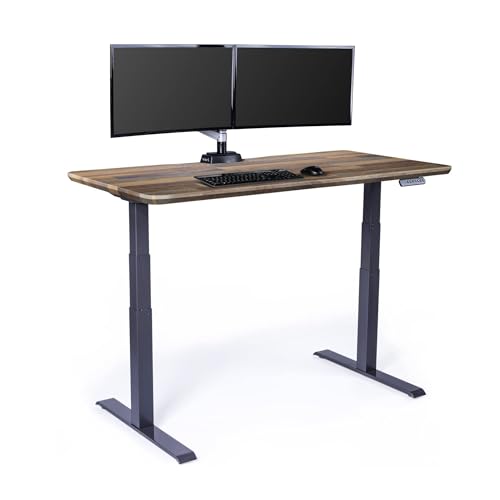
Vari Classic Electric Standing Desk, 60×30, Reclaimed Wood/Slate — Verify the frame
Vari built its reputation on standing desks, and the Classic’s title spends its words on size and style instead: 60 by 30, reclaimed wood with slate, electric. What it does not spend a single word on is the machinery this guide exists to interrogate — no motor count, no column stages, no leg arrangement, no capacity. Under this guide’s rules, that silence is reported, not filled. The Vari may be a steady desk; its maker’s name suggests the question is worth asking. But steadiness claimed by reputation is not steadiness evidenced, and a buyer whose whole brief is will-not-wobble should obtain the frame’s details from the listing or Vari before paying for them.
What the title does establish is appealing on its own terms. Sixty by thirty is a generous single workstation, deeper than the 28-inch tops elsewhere here, and depth is an underrated comfort: monitors sit further from the eyes, forearms rest fully, documents fit in front of the keyboard. The reclaimed wood and slate pairing gives the desk a composed, architectural look that suits a home office meant to be seen. If style and depth lead your brief and wobble is a secondary worry, the Vari’s case is coherent.
The verification list for this pick is therefore precise. Ask the listing for the motor configuration, the column stages, and the rated capacity; ask how the frame behaves at full extension under a typical load. Vari’s own documentation answers such questions for its lines, and a seller unable to answer them has told you something. Armed with those answers, judge the Classic against the E6’s stated recipe on equal terms.
Until then, its place in this guide is the respectable one of the known unknown: a well-born desk whose anti-wobble credentials live outside its title. Buyers who do the homework may end up delighted; buyers who skip it are purchasing a hope this guide cannot endorse.
There is a fair counterpoint to record. Vari sells heavily into offices that deploy standing desks by the hundred, an environment where a wobbling product would generate returns at a scale no brand enjoys. That commercial reality is a soft signal in the Classic’s favour — softer than a specification, harder than a slogan. This guide’s method counts it as context, not evidence, and the distinction is worth keeping: buy the Vari, if you buy it, because its documented frame satisfies you and its deep, handsome top suits your room, not because a stranger on the internet reasoned that it probably does not wobble.
- Listed size: 60 x 30 inches
- Type: electric standing desk
- Finish named in title: Reclaimed Wood / Slate
- Motor configuration: Not stated in the listing title — verify with Vari documentation
- Column stages: Not stated in the listing title — verify with Vari documentation
Strengths
- Thirty-inch depth gives monitors and forearms genuine room.
- Reclaimed wood and slate styling suits a design-conscious office.
- A standing-desk specialist’s name stands behind the product.
Trade-offs
- No stability hardware is evidenced anywhere in the title.
- Capacity and column details require research before purchase.
- Style-led title means the wobble brief starts from zero evidence.
Best for: a style-led buyer who will verify motor and column details before committing.
Not suited for: orders that need steadiness guaranteed by stated structure at the moment of purchase.

UPLIFT V3 Laminate Electric Standing Desks, Adjustable Desk with Keypad — Verify the frame
UPLIFT is another name that standing-desk shoppers meet early and respect, and the V3’s title, like the Vari’s, chooses its words elsewhere: laminate, electric, adjustable, with keypad. The keypad at least tells you the desk’s height is controlled deliberately rather than by crank or guesswork. Everything this guide cares about — motors, stages, legs, capacity — goes unstated, and so the same discipline applies: the UPLIFT’s steadiness is a question to be answered from the maker’s documentation, not a conclusion to be borrowed from the brand’s reputation.
Laminate as a top material deserves a fair word. A good laminate top is flat, hard-wearing and consistent, and it shrugs off the coffee rings and pen marks of daily work without ceremony. For a desk that will be worked hard rather than admired, laminate is a rational surface, and UPLIFT’s V3 generation badge signals a mature, iterated product rather than a first attempt. Buyers whose offices are workshops as much as studies will find the brief sympathetic.
The keypad detail opens the one ergonomic conversation the title supports: presets and precise adjustment matter to steadiness indirectly, because a desk that returns exactly to your heights discourages the half-raised compromises where wobble lives. Whether this keypad offers memory presets is, again, a listing question. Add it to the verification list alongside motor count, column stages and capacity, and put the whole list to the listing before ordering.
Position in the guide: the second verify-first seat, beside the Vari, for the same reason. UPLIFT’s documentation is thorough in the wider world, and a buyer who consults it may find a frame that rivals the stated recipes above. This page simply refuses to grade homework it has not seen.
- Type: electric standing desk, V3
- Top material named in title: Laminate
- Controls: keypad, per the listing title
- Motor configuration: Not stated in the listing title — verify with UPLIFT documentation
- Column stages: Not stated in the listing title — verify with UPLIFT documentation
Strengths
- Laminate top is hard-wearing and easy to live with daily.
- Keypad control supports precise, repeatable heights.
- A specialist maker’s iterated V3 generation.
Trade-offs
- Stability hardware entirely unstated in the title.
- Size is not given in the title either; the listing must supply it.
- Preset memory, if needed, must be confirmed before purchase.
Best for: a hard-working office buyer who will read the maker’s frame documentation before ordering.
Not suited for: wobble-traumatised orders that want the structural evidence in the title itself.

DeskShow Black 60×28 In Electric Standing Desk, 1 Inch Thick Tabletop — One-inch top
The DeskShow makes one structural claim and makes it plainly: a tabletop one inch thick, on a black 60 by 28 electric standing desk. Thickness in the top is a real anti-wobble property, though a partial one. The top is the frame’s bridge; a thin, flexible top lets two columns behave like strangers, while a stiff, inch-thick slab ties them together and kills the drum-like flex that users feel as tremor through the keyboard. If your previous desk’s sin was a boingy surface rather than swaying legs, this title is speaking directly to you.
Partial is the operative word, though. The title names no motor count and no column stages, so the lift’s own contribution to steadiness is unproven on this page’s evidence. A rigid top on an under-specified frame is a good hat on an unknown head. The verification questions are the guide’s standard ones — motors, stages, capacity — and they matter more here precisely because the top’s claim is genuine: it would be a shame to pair a properly stiff surface with columns that sway at full extension.
At 60 by 28 in black, the desk’s format is the mainstream single workstation: two monitors on stands, a laptop to the side, room for the day’s paperwork. Black keeps the apparatus visually quiet. For a buyer whose budget points here and whose homework confirms a sensible frame beneath the thick top, the DeskShow becomes a coherent package — the top’s rigidity doing daily work while the frame, once verified, holds the height.
Until that verification, treat it as the guide treats the Vari and the UPLIFT: promising in the particular, unproven in the whole. The difference is that the DeskShow’s promise is structural and stated, which is more than a style claim, and less than a recipe.
- Listed size: 60 x 28 inches
- Tabletop: 1 inch thick, per the listing title
- Colour named in title: Black
- Motor configuration: Not stated in the listing title — verify with DeskShow documentation
- Column stages: Not stated in the listing title — verify with DeskShow documentation
Strengths
- One-inch top is a genuine, stated rigidity claim.
- Mainstream 60-inch format suits a full single workstation.
- Black finish keeps a standing apparatus visually calm.
Trade-offs
- Motor and stage details are unstated, leaving the lift unproven.
- Capacity must be confirmed before loading the thick top heavily.
- A stiff top cannot compensate for columns that sway at height.
Best for: a buyer whose last desk flexed at the surface and who will verify the frame beneath this one.
Not suited for: orders placed without researching motor and stage details first.
How Do the Six Compare on Stated Structure?
| Desk | Motors in title | Stages in title | Legs in title | Top claim in title |
|---|---|---|---|---|
| FlexiSpot E6 Bamboo | Dual | 3-stage | Standard frame | Bamboo |
| FLEXISPOT E6 MAX | Dual | 3-stage | Standard frame | Bamboo |
| FLEXISPOT 4-Leg | Dual | Not stated | 4 legs | 71×32 size |
| Vari Classic | Not stated | Not stated | Not stated | Reclaimed wood / slate |
| UPLIFT V3 | Not stated | Not stated | Not stated | Laminate |
| DeskShow | Not stated | Not stated | Not stated | 1 inch thick |
The table is this guide’s whole argument in one view. Three desks state the machinery of steadiness; three state surfaces and styles and leave the machinery to your research. That is not a verdict on the second group’s quality — it is a map of where the evidence lives. A buyer who does the verification homework may promote any of the second group with a clear conscience. A buyer who will not should buy from the first group and sleep soundly.
What Is Your Half of the Anti-Wobble Bargain?
Start at the floor. A standing desk on deep carpet is a desk on a mattress; the pile compresses unevenly and every column stands in its own small valley. Hard floors are steadiest, low-pile carpet is workable, and if your room offers neither, a firm mat or board under the desk is a legitimate part of the installation, not an eccentricity. Check the floor’s level too — an old house’s charming slope becomes, at standing height, a permanent lean that no motor can argue with, only adjustable feet can forgive.
Then balance the load. Weigh your setup honestly in your head: monitors are light, towers are not, printers are worse, and a stack of reference books is a silent anchor wherever it lands. Spread heavy items across the top’s width, favour positions over the columns, and consider whether the tower truly needs to ride the desk at all — a floor stand or a low shelf removes the single heaviest, tallest load from the moving surface. Finally, mount monitors on their stands before reaching for an arm; an arm raises the screen’s centre of mass and gives sway a lever, and on a desk bought specifically to not wobble, that lever should be added knowingly, with the clamp over a column, or not at all.
How Do You Test a Standing Desk in Its First Week?
Test at your real working height, with your real equipment, doing your real work. The showroom test — empty desk, palm pressed on a corner — measures almost nothing. Instead: raise the desk to your standing height, type a full page at your normal speed, lean on the desk as you would while thinking, and make a drink and set it down mid-task. Watch the monitor’s corners, not the desk; the screen is the seismograph you actually live with. A small, damped movement that dies instantly is structure breathing, and it is worth remembering that even a fixed, non-adjustable desk moves by that much under a determined lean; the standing desk is being asked to match a standard its stationary cousins are never tested against. Fairness to the furniture is part of judging it well. A sway that builds, or a tremor that persists while you type, is the desk telling you its limits while returns are still easy.
Run the same test at sitting height and at any height in between that you actually use, because some frames have a resonant middle height where they are least happy. If a particular height sings, you can simply live above or below it — but you can only make that bargain if you found it during the first week, not the first winter.
What Mistakes Make Steady Desks Wobble?
The classic is the tower on the top at one end, turning a balanced frame into a diving board. Next comes the monitor arm clamped mid-span, levering every keystroke into the screen. Third is the cable bundle hanging off the back like an anchor, pulling and swinging with every height change; route cables with slack in a tray and the desk stops towing its own tail, a small mercy that pays again every time the desk changes height in a hurry, because a cable run with planned slack never snatches at a monitor or drags a charger off the back edge mid-rise. Fourth is assembling on carpet, tightening everything, and never re-checking the feet once the pile settles.
The fifth mistake is quieter: buying for sitting steadiness. Almost any electric desk feels solid at chair height, because the columns are mostly closed and the leverage is small. Wobble is a standing-height disease. Judge every claim, including the ones in this guide, at full extension, loaded, mid-typing — the only conditions under which the promise will actually be kept or broken.
Why Does Height Punish a Weak Frame?
A lifting column is a lever problem wearing furniture’s clothes. At sitting height the columns are mostly nested, the desk’s centre of mass is low, and forces from typing meet a short, stiff structure. Raise the desk a foot and a half and every term worsens at once: the nested overlap shrinks, the load rises away from the base, and the same typing force now acts at the end of a much longer lever. This is why two desks that feel identical in a showroom at chair height can behave like different species at standing height, and why this guide weighs stage counts and motor arrangements — the specifications that govern the extended state — more heavily than any claim about the desk at rest.
Tall users live furthest out on that lever, which is why they report wobble that shorter colleagues never meet. If you are tall, the three-stage claim matters to you doubly: more stages reaching your height with more overlap in reserve. If you are shorter, your working height sits in the frame’s comfortable middle, and a wider range of desks will feel steady to you — a fact worth knowing before you pay a premium for insurance your height may never claim on.
How Should Sitting and Standing Share One Desk’s Day?
The healthiest standing practice is alternation, not endurance: sit for the deep-focus work, stand for calls, reading and the post-lunch hour, and let the desk’s memory of your heights make the switching thoughtless. That rhythm has a steadiness implication. A desk raised and lowered a dozen times a day wears its mechanism honestly and reveals its character quickly — the wobble you will live with announces itself in week one, at the heights you actually use, which is precisely when this guide’s first-week test should be run.
Set your two heights by your elbows, not by numbers on a display: forearms level, shoulders dropped, screen top near eye level in both postures. A desk that wobbles only at a height you never use is, for you, a desk that does not wobble; a desk steady everywhere except your exact standing height is a lemon wearing a good suit. Judge personally, at your measurements, and let other people’s reviews — including this one — serve as maps rather than verdicts.
What Keeps a Standing Desk Steady in Year Three?
Frames loosen the way bicycles do: gradually, at the joints, in response to a thousand small movements. The maintenance is correspondingly small. Every few months, check the frame’s bolts for the quarter-turn of slack that use introduces, confirm the feet still sit flat after the carpet has settled, and re-level if the floor or the pile has shifted. Keep the columns’ paths free of the cable that migrated behind the desk in month two. None of this needs a technician; it needs a calendar note and ten unhurried minutes.
Load discipline is the other half of longevity. A desk chronically loaded near its capacity lives its whole life at the edge of its manners, swaying sooner and ageing faster. This is the practical reason to confirm capacity before buying and to leave headroom beneath it: the desk you load to two-thirds will feel, in year three, much like the desk you tested in week one, and that consistency is the real product a wobble-averse buyer is purchasing.
How Do Monitors, Arms and Speakers Change the Equation?
What sits on the desk decides how the frame’s steadiness is spent. Two monitors on their own stands distribute their weight low and wide, the friendliest arrangement a frame can ask for. Replace the stands with a dual arm on a single clamp and the same screens become a sail on a mast: every tremor in the desk is amplified at the screen’s height, and every nudge at the keyboard arrives at the display magnified. If an arm is non-negotiable — for the desk space it frees, the posture it allows — clamp it over a column where the structure is strongest, and accept that you have spent some of the steadiness you bought. The 4-leg’s geometry forgives this spending most readily; the two-column desks ask for more care.
Speakers are the sleeper load. A pair of bookshelf speakers on the top adds height, weight at the edges and a vibration source of their own at volume. Isolation pads beneath them protect both the sound and the desk’s composure. Laptops, by contrast, are model citizens: low, light and usually docked at one side. Arrange the top from heaviest and lowest at the edges-over-columns inward to lightest at the centre, and any frame in this guide will show you its best behaviour.
What Should Renters and Carpeted Rooms Do Differently?
Renters face the standing desk’s floor problem without the right to solve it permanently. The portable answers are good ones: a large, firm mat under the desk zone converts carpet pile into a platform; shims and adjustable feet handle the sloping Victorian floor without marking it; and a desk whose steadiness is structural, like the E6 pair, matters more when the floor cannot be improved. Photograph the floor before installation if deposits matter to you — a heavy four-leg desk on carpet leaves its autobiography in the pile for a while.
Carpet also hides a slow change: pile compresses under feet over the first fortnight, and a desk levelled on delivery day can be a few millimetres adrift by the month’s end. Re-check the feet at two weeks and the question answers itself. None of this is a reason to deny yourself a standing desk in a rented, carpeted room; it is a reason to buy structure first and treat the floor as a solvable installation detail.
How Does Desk Depth Change the Standing Experience?
Depth is the dimension shoppers underrate because width photographs better. The tops here run 28 to 32 inches deep, and those few inches govern where the monitors can sit relative to your eyes and where your forearms rest while typing. At standing height, a deeper top also moves the screen’s sway further from your face, which makes a given amount of movement feel smaller — perception is part of the wobble experience, and the Vari’s 30 inches and the 4-leg’s 32 buy calm partly by geometry of the eye. Shallow tops push monitors closer and make every tremor a near-field event.
Depth interacts with the room, too. A 32-inch top in a small room eats the standing zone’s floor, pushing your feet and the chair’s parking place into negotiation. Measure depth against the room’s circulation, not just the wall. The right depth is the most your room offers after your feet, your chair and your doorway have taken their shares — and a desk steady in a room you can move in beats a steadier desk in a room you cannot.
What Does a Steady Desk Do for the Work Itself?
It is worth ending the analysis where the complaint began: with the work. A swaying monitor is not a cosmetic flaw; it is a tax on reading, levied thousands of times a day, as your eyes chase a moving target through paragraphs and spreadsheets. Video calls inherit the tremor and broadcast it as unprofessional restlessness. Even writing changes character when the surface answers every keystroke with a nod. The buyers searching this guide’s keyword are not fussing over furniture — they are trying to remove a small, constant friction from the centre of their working lives.
That is why the structural pedantry of the last several sections matters. Dual motors, three stages, four legs, an inch of top: these are not specifications to collect but frictions to abolish, each one buying back a little of the stillness that good work quietly requires. Choose the desk whose stillness is argued rather than asserted, set it up with the care its structure deserves, and the standing desk finally becomes what the brochures promised — a surface that disappears beneath the day.
How Do You Read a Standing Desk Listing Like an Engineer?
Four numbers and phrases do most of the work. Motor count first: dual means each column is driven, the precondition for level, rack-resistant lifting. Stage count second: three stages signal overlap in reserve at full height. Capacity third: a figure comfortably above your equipment’s total weight, because steadiness and capacity fade together as the limit approaches. Fourth, the frame’s own description of its feet and crossbar: wide feet and a connecting structure are the unglamorous vocabulary of a desk that intends to stay still.
Read what the listing avoids with the same attention. A page that discusses colours for paragraphs and machinery not at all has told you its priorities, which may still suit a style-led buyer but should never be mistaken for a stability case. The listings behind this guide’s titles vary in exactly this way, and the habit of reading for the machinery — here, and for every desk you ever buy — is the portable skill this whole article exists to teach.
What About Two People Sharing One Standing Desk?
Households increasingly share a single standing station between two workers on alternating days, and steadiness has a social dimension there: two heights, two loads, two sets of habits. Memory presets stop being a luxury and become the peace treaty, returning the desk to each person’s heights without negotiation. The larger tops — the 4-leg’s 71 inches above all — absorb two people’s equipment geographies without a daily clear-out, while a 55-inch desk asks the second user to dock, work and vanish tidily.
Agree the load rules once: whose tower rides, whose lives below, what may never be left at the other person’s end. A shared standing desk wobbles socially before it wobbles physically, and the households that settle the geography early find the frame’s steadiness is the least of their concerns — which is, in the end, the state every desk in this guide is trying to reach.
When Is a Little Movement Acceptable?
Perfect stillness is not a physical property of any desk that moves, and chasing it leads buyers to return good furniture. The honest standard is damped, brief movement: a nudge produces a small sway that dies within a moment and never builds while you type. At that level, the desk disappears from attention, which is the actual goal — nobody in this guide’s audience wants to think about their desk at all. Movement becomes a defect when it persists, resonates at typing rhythm, or shows in the monitor during ordinary work.
Judge by the screen and the drink, the two seismographs of daily life, and by whether you have stopped noticing the desk at all by the end of the first week. If the screen’s corners stay readable through a page of typing and the coffee’s surface stays unruffled by anything short of a deliberate knock, the desk is steady by the only definition that survives contact with a working day. Hold the desks you test to that standard — no stricter, no looser — and the choice among this guide’s structurally stated picks becomes a matter of size, surface and taste, exactly as it should be.
How Should You Arrange the Room Around a Standing Desk?
A standing desk changes the room’s traffic. You will stand where you once sat, pace during calls where the chair once parked, and need a floor area that tolerates both. Give the standing zone a clear arc behind the desk, keep the chair’s parking place out of the doorway’s swing, and put the things you reach for while standing — the notebook shelf, the water bottle’s home, the phone’s charging point — at standing reach rather than seated reach. Rooms arranged for the seated worker and merely tolerated by the standing one are why some desks feel wrong for reasons their owners blame on wobble.
Light follows posture as well. A lamp placed for a seated eye line can glare at a standing one, and a window behind the monitor at sitting height may sit squarely in the standing view. Walk the room at your standing height before the desk arrives, lamp and window will tell you where the desk truly belongs — and a desk placed by that rehearsal starts its life steady in every sense that matters.
Final Recommendation
Buy the FlexiSpot E6 or its MAX sibling when you want steadiness you can point to: dual motor, three stages, a rigid bamboo top, each named in the title. Buy the 4-leg FlexiSpot when your workstation is heavy and wide and has humbled two-leg frames before. Consider the DeskShow if a flexing top was your old desk’s sin, and the Vari or UPLIFT if their styles lead your brief — in both cases only after the maker’s documentation answers the motor and stage questions this guide has listed. Whatever arrives, set it on a firm floor, balance its load, and test it standing, typing, coffee in hand; a desk that stays calm through that ordinary morning has earned the only verdict that matters, yours — and it will go on earning it quietly, at every height, on every ordinary morning that follows, which is all that anyone ever meant by a desk that will not wobble.
Frequently Asked Questions
Does a dual motor really reduce wobble?
It addresses one of wobble’s causes: with both columns driven in sync, the frame rises level and resists the racking twist that can loosen a single-motor design’s composure. It is not the whole answer — column stages, legs and the top all contribute — which is why the E6 models’ combination of dual motor and 3-stage columns is this guide’s benchmark.
Why do three-stage columns matter at standing height?
Telescoping columns are stiffest where their sections overlap. A three-stage design keeps more overlap at full extension than a two-stage one reaching the same height, and overlap is what resists sway when you lean or type. The claim matters most to tall users who raise their desks highest.
Are four legs always steadier than two?
A four-leg stance widens the base in both directions, which directly resists the rocking that leverage creates, and the FlexiSpot 4-leg pairs that stance with a dual motor. The trade is floor space and a more framed knee area. A well-built two-column desk can still be very steady; four legs simply start the argument from stronger geometry.
Can a thick tabletop stop wobble on its own?
It stops one kind: surface flex. The DeskShow’s one-inch top ties its columns together and kills the drum-like tremor of a thin top. It cannot fix columns that sway at height, which is why this guide asks for the motor and stage details beneath that top before endorsing the whole desk.
My desk wobbles only at its highest setting. Is that normal?
It is the most common pattern there is, because leverage and reduced column overlap both peak at full extension, and because many owners only discover their true working height — the one their elbows actually choose — weeks after the desk arrives, sometimes higher than the height they tested on delivery day. If your working height is below the maximum, live at your height and judge the desk there. If you are tall and must use the top of the range, favour three-stage designs like the E6 models, whose overlap at your height is their whole point.
Why do the Vari and UPLIFT rank as verify-first here?
Because their titles state no stability hardware — no motor count, no stages, no legs, no capacity. Both makers are standing-desk specialists whose documentation may answer every question well. This guide grades the evidence in front of it, and on titles alone, the evidence for those two lives elsewhere.
Related Guides
Complete the setup with our guides to music production desks for compact studios, L shaped desks for two people, and computer desks for home work spaces.


