What's inside
- Key Takeaways
- Quick Picks
- How Did These Six Earn Their Places?
- What Actually Decides a Mobile Router’s Speed in the US?
- Which SIM Arrangement Suits Your Kind of Travel?
- The Best Mobile Wi-Fi Routers for US Travellers and Fixed Sites, Reviewed in Turn
- How Do the Six Divide Between Moving and Staying?
- How Do You Set Up a Mobile Router for a Trip or a Site?
- What Mistakes Catch Mobile Internet Buyers?
- How Do Power and Daily Handling Differ Between the Two Families?
- What Should RV, Boat and Seasonal Households Plan Differently?
- How Should You Read a Coverage Map Before Trusting It?
- Final Recommendation
- Frequently Asked Questions
- Related Guides
As an Amazon Associate I earn from qualifying purchases. This post may contain affiliate links at no extra cost to you.
gizmoverdict.com is reader-supported. When you buy through links on our site, we may earn an affiliate commission.
Where to buy: Each hotspot and router below is linked from the Quick Picks table and from its own review section, so the listing can be checked directly before ordering; this guide lists no prices and no star ratings, and it treats data plans as what they are — a separate purchase from the carrier, never part of the hardware.
The best mobile wi fi routers us shoppers can buy share one defining trait: they make their own internet. Instead of waiting for a cable, a fibre line or a campground network, they connect to a cellular network and rebroadcast it as a private Wi-Fi network for your devices. That single difference reorganises everything about how they should be judged. The questions that matter are which cellular generation the hardware speaks, how the SIM question is answered — physical card, eSIM, or a carrier named in the title — how strong the Wi-Fi it creates is, and whether the device is built to travel in a pocket or to sit plugged in at a cabin, a site office or a rural kitchen table.
Two ground rules govern every review below. First, no hotspot includes its connectivity: each device needs its own data plan and, where the design calls for it, its own SIM, bought from a carrier under that carrier’s terms. A SIM card is not a pick in this guide, and neither is a plan; they are the fuel, and the reviews judge only the engines. Second, carrier and band claims come strictly from the listing titles. One pick names AT&T in its title. One names eSIM. The rest name their cellular generation and their SIM arrangement and leave the carrier question to the buyer’s own coverage map, and this guide will not decorate them with carrier logos the titles never claimed. In the United States, where coverage varies by county as much as by carrier, that discipline is not pedantry — it is the difference between a hotspot that works at your lake house and one that becomes an expensive paperweight with excellent Wi-Fi.
The six picks divide into two families that look similar in photographs and behave differently in life. Three NETGEAR Nighthawks — the M7 Pro, the M7 and the M6 — are true mobile hotspots: pocketable, battery-minded machines built to move with their owner through airports, job sites and road trips. The GL.iNet Mudi is a travel router with cellular built in, designed for people who rebuild a trusted private network in hotel rooms and rentals. The Dionlink and the Hitron D60 are cellular routers in the stay-put sense: SIM-fed boxes that give a fixed location — a cabin, a food truck, a site cabin, a rural home — an internet connection where wired service is absent, too slow, or not worth the contract. Choosing between the families is the first and most consequential decision in this guide, and it is a decision about your geography, not about specifications.
Key Takeaways
- Every pick needs its own data plan; the hardware and the connectivity are separate purchases, and no SIM or plan is a pick here.
- Carrier claims follow the titles: the M7 Pro names AT&T, the M7 names eSIM, and the other four leave carrier choice to your coverage map.
- Three Nighthawks are pocket hotspots for people who move; the Dionlink and Hitron D60 are SIM-fed routers for places that stay put.
- The GL.iNet Mudi is the traveller’s router first and a 4G modem second — a private network that happens to feed on cellular.
- Wi-Fi 7 in the two M7 models serves your devices locally; it cannot make a weak cellular signal stronger.
- Check coverage at the actual address or route before buying any cellular hardware — the map decides more than the model does.
Quick Picks
| Pick | Badge | Why it earns its place |
|---|---|---|
| NETGEAR Nighthawk M7 Pro | Flagship hotspot | A 5G mmWave hotspot with Wi-Fi 7 and up to 8 Gbps in its title, naming AT&T — the fastest cellular brief in this guide. |
| NETGEAR Nighthawk M7 | eSIM traveller | A 5G hotspot with eSIM and Wi-Fi 7 at up to 3.6 Gbps, built for moving between networks without swapping cards. |
| NETGEAR Nighthawk M6 | SIM-slot staple | A 5G hotspot with a physical SIM card slot, the established Nighthawk formula for one carrier, one plan, no fuss. |
| GL.iNet GL-E750V2 Mudi | Travel router hybrid | A 4G LTE portable travel router with a SIM slot, for rebuilding a private, configurable network anywhere. |
| Dionlink Dual Band 4G LTE Router | Fixed-site value | A dual-band 4G LTE router with a SIM slot, aimed at cabins, trucks and sites where the router stays and the internet is cellular. |
| Hitron D60 | 5G fixed cellular | A 5G cellular router with a SIM slot, bringing the newer generation to a fixed location without a cable. |
How Did These Six Earn Their Places?
The selection began with the cellular question, because a mobile router that cannot join the network in front of it is not a router at all. Candidates had to state their cellular generation in the title — 5G or 4G LTE — and their SIM arrangement, whether that is a physical slot, an eSIM, or a carrier relationship printed in the title itself. Devices that hid the cellular half of their identity behind vague language fell away. What survived is a list where the fundamental contract of each product can be read in its own name, which is exactly what a buyer comparing coverage maps at midnight needs.
The second pass sorted by lifestyle rather than by speed. The three Nighthawks cover the moving life at three levels of ambition, from the mmWave flagship down to the established M6. The Mudi covers the travelling professional’s different need — not raw cellular speed but a familiar, private, configurable network that follows them from room to room. The Dionlink and Hitron cover the fixed life, where the device is installed once and expected to behave like infrastructure. A list built any other way — ranked by a single speed figure, for instance — would have hidden the only distinction most buyers actually live with, which is whether the box travels or stays.
The final pass was the title audit applied throughout this programme: carrier names, band claims and SIM types appear in these reviews only where the titles print them, and the spec boxes say so when a title is silent. American buyers are unusually exposed on this point, because a hotspot bought for one carrier’s network may be useless across town on another’s, and a review that blurs that line with borrowed logos does real financial harm. The audit is the guide’s promise that its enthusiasms stop where the evidence does.
What Actually Decides a Mobile Router’s Speed in the US?
Not the number in the title — or rather, not only that number. A mobile router’s real speed is the smaller of two quantities: what the cellular network delivers to the device at that place and moment, and what the device’s Wi-Fi delivers onward to your laptop. The titles in this guide advertise the ceilings of those quantities — 8 Gbps for the M7 Pro, 3.6 Gbps for the M7 — and ceilings are honest as far as they go, but a basement in a concrete building, a valley between towers, or a stadium crowd at full roar will all negotiate the actual figure downward. This is why experienced mobile internet users talk about position the way sailors talk about weather: the hotspot by the window, on the dashboard, up the stairs, is a different product from the same hotspot in a bag under a metal desk.
Cellular generation sets the terms of that negotiation. 5G, especially where mmWave or strong mid-band service exists, offers the high ceilings and low latency that make a hotspot feel like infrastructure. 4G LTE, the generation of the Mudi and the Dionlink, offers something arguably as valuable in the American interior: reach. LTE towers cover the rural map in a way 5G is still filling in, and a 4G device that holds a steady, modest connection at a farmhouse or a highway motel outperforms a 5G device hunting for a signal it cannot keep. The reviews below therefore refuse to rank 4G below 5G in any simple way. They ask instead where the device will live, and let the map answer.
The Wi-Fi generation is the second half of the bargain, and it is purely local. Wi-Fi 7 in the M7 models means the link between hotspot and laptop is fast, modern and good with several devices at once — valuable when a family shares one hotspot in a rental, or a small crew shares one on a site. It does not reach back and improve the cellular side. Think of the hotspot as a translator between two networks, and judge each side separately: the cellular side by generation, SIM and coverage; the Wi-Fi side by the standard in the title and the number of devices it must serve.
Which SIM Arrangement Suits Your Kind of Travel?
The physical SIM slot, carried by the M6, the Mudi, the Dionlink and the Hitron, is the oldest arrangement and still the most flexible in one specific way: the card is a physical object that can move. A household can keep a data SIM for the cabin router, lend it to the travel router for a road trip, or swap a prepaid card bought for a particular region — all without accounts, apps or activation calls. The slot is also the arrangement carriers understand best, which matters when a plan must be explained to a support line. Its weakness is friction: every change is a tray, a pin and a fingernail, and the card you need is always in the other device.
eSIM, named in the M7’s title, removes the object and replaces it with provisioning: plans are downloaded, switched and stacked in software. For the traveller who crosses networks often — the consultant landing in a new state weekly, the RV household choosing the stronger carrier at each long stop — that fluidity is the feature, worth more than any speed figure. Its questions are administrative rather than physical: which carriers and plans the device’s eSIM supports is a matter for NETGEAR’s documentation and the carrier’s terms, and this guide flags it as exactly that rather than guessing. The M7 Pro’s named AT&T relationship is the third arrangement: the least flexible, the simplest to start, a known pairing of hardware and network that suits the owner whose coverage question is already answered by those three letters.
None of the three is the correct answer in general, and the guide’s structure — one pick for each arrangement among the travellers — is deliberate. What matters is recognising that the SIM decision outlives the hardware decision: plans, carriers and habits attach to the arrangement, and switching arrangements later usually means switching devices. Choose the arrangement that matches how you actually move, then choose the model inside it.
The Best Mobile Wi-Fi Routers for US Travellers and Fixed Sites, Reviewed in Turn

NETGEAR Nighthawk M7 Pro — Flagship hotspot
The M7 Pro’s title is the most ambitious sentence in this guide: 5G mmWave, Wi-Fi 7, up to 8 Gbps, and AT&T named outright. Take the elements in order. mmWave is the highest-capacity flavour of 5G, the kind deployed in dense urban areas, stadiums and transport hubs, where it delivers extraordinary speeds across short distances; a hotspot that speaks it is equipped for the places where crowds gather and networks strain. Wi-Fi 7 on the local side means the devices gathered around it — a family’s laptops and tablets in a hotel suite, a production crew’s gear at an event — share that firehose through the newest, most efficient local standard. And the named carrier removes the first guessing game entirely: this is an AT&T device, bought for AT&T’s network and AT&T’s map.
The review’s duty is to attach the conditions. mmWave’s brilliance is localised; outside its zones the hotspot lives on the rest of AT&T’s 5G and LTE footprint, where it remains a premium device but not a miraculous one. The owner this suits is therefore specific: based in, or constantly travelling through, the dense places where the flagship technologies overlap, with devices new enough to use Wi-Fi 7, and with a workflow — live production, large-file field work, a family of power users in temporary housing — that genuinely drinks bandwidth. For that owner, the M7 Pro is not an extravagance but the only class of tool that matches the job. For the owner whose map is rural highways, the same money buys coverage anxiety in a beautiful shell, and the picks below exist for them.
- Cellular: 5G with mmWave, per the listing title
- Carrier named in title: AT&T
- Local Wi-Fi: Wi-Fi 7, up to 8 Gbps class, per the listing title
- Plan requirement: a separate data plan is required; no plan is included as a pick here
Strengths
- mmWave support equips it for the highest-capacity 5G zones in American cities and venues.
- Wi-Fi 7 gives a crowd of modern devices an equally modern local network to share.
- The carrier is named in the title, so the coverage question can be settled before purchase.
Trade-offs
- mmWave coverage is concentrated in dense areas, so rural owners rarely meet its best self.
- The named-carrier arrangement is the least flexible if your travels favour another network.
- Its ceiling figures assume conditions that only the best-served locations provide.
Best for: an AT&T customer living a work and family life spent across cities, venues and other mmWave-served ground, with Wi-Fi 7 devices to feed. Not suited for: a rural household living on a map drawn in LTE coverage, where the Mudi or Dionlink answers the real question at a saner scale.

NETGEAR Nighthawk M7 — eSIM traveller
The M7 trades its Pro sibling’s mmWave headline for the traveller’s favourite word: eSIM, printed in the title beside 5G and Wi-Fi 7, with a ceiling of up to 3.6 Gbps. That ceiling is lower and, for most journeys, irrelevant — the binding constraint on the road is rarely the hotspot’s maximum. What the eSIM changes is the ritual of arrival. Instead of hunting a carrier store, swapping trays on a tray-table or rationing a single plan across a long trip, the M7’s owner provisions connectivity in software, choosing plans as the itinerary demands. For the consultant, the travel clinician, the couple spending a season in an RV and choosing the stronger signal at each stop, that is the difference between a tool and a companion.
The honest questions are administrative, and the review will not pretend otherwise. Which carriers and which plans the eSIM supports, and on what terms, lives in NETGEAR’s documentation and the carriers’ own pages — the title establishes the capability, not the catalogue. An owner whose life depends on one specific plan should confirm that plan’s welcome before ordering, the way a buyer of the M7 Pro confirms a coverage map. What can be said from the title alone is already substantial: current-generation cellular, current-generation local Wi-Fi, and a SIM strategy built for movement. In a category where the friction is usually paperwork, the M7 is the pick that made paperwork its headline feature, and frequent travellers will understand why that outranks a bigger number.
- Cellular: 5G, per the listing title
- SIM arrangement: eSIM, stated in the listing title
- Local Wi-Fi: Wi-Fi 7, up to 3.6 Gbps class, per the listing title
- Supported eSIM plans and carriers: Not stated in the listing title — verify with NETGEAR documentation
Strengths
- eSIM provisioning removes card-swapping from the travel routine entirely.
- Wi-Fi 7 local networking serves a family’s or a small crew’s devices with modern efficiency.
- 5G cellular keeps the wide-area side in the current generation for years of travel.
Trade-offs
- The specific plans its eSIM accepts must be confirmed in documentation before relying on one.
- No mmWave is claimed in the title, so the densest venues get less of its best work.
- Owners loyal to one physical SIM lose the card-moving flexibility the M6 keeps.
Best for: a frequent traveller seeking to provision and switch data plans in software as routes and carriers change. Not suited for: a household organised around one long-standing physical SIM, which the M6 below was built to hold.

NETGEAR Nighthawk M6 — SIM-slot staple
The M6 is the pick with the least explaining to do, and that is its charm. Its title offers 5G, a SIM card slot, and the words mobile hotspot and router — the classic formula, executed by the line that defined the category. One physical data SIM, on the carrier of your choosing, in a device built to be carried: the M6 is for an owner with a connectivity life already settled — a known carrier, a known plan, a known set of places — and a wish for hardware equally settled. There is a maturity to that proposition that newer flagships cannot claim, the confidence of a design whose job description has not changed because the job has not changed.
Its natural habitats are the glovebox, the work bag and the site trailer. It is the hotspot a family buys before the road trip and forgets to think about for five summers; the backup connection a small business keeps in a drawer against the day the office line fails; the remote worker’s insurance policy in a rented house whose wired internet belongs to a landlord. The title does not claim Wi-Fi 7 or mmWave, and the review does not miss them: the M6’s buyers are purchasing certainty, and certainty is measured in connections held, not standards collected. If your map and your plan are already decided, this is the shortest path in the guide from reading to working.
- Cellular: 5G, per the listing title
- SIM arrangement: physical SIM card slot, stated in the listing title
- Form: mobile hotspot and router, per the listing title
- Wi-Fi generation: Not stated in the listing title — verify with NETGEAR documentation
Strengths
- The physical SIM slot keeps carrier choice open and card-swapping simple.
- A settled, proven formula that asks its owner to learn almost nothing new.
- Equally at home as a daily travel hotspot or a drawer-kept backup connection.
Trade-offs
- No Wi-Fi 7 is claimed in the title, so its local networking is a generation behind the M7 pair.
- No eSIM, so plan changes mean physical card changes.
- Buyers in mmWave-served cities leave the fastest 5G flavour to the M7 Pro.
Best for: an owner with a chosen carrier and plan, seeking a proven 5G hotspot built around one physical SIM. Not suited for: a traveller switching networks constantly, with provisioning handled entirely in software.

GL.iNet GL-E750V2 Mudi — Travel router hybrid
The Mudi comes from a different philosophy, and its title tells you so: a 4G LTE portable travel router with a SIM card slot. Travel router first, modem second. GL.iNet’s machines are loved by people who treat every hotel room, rental and conference network as untrusted territory to be rebuilt into a private one — your own network name, your own settings, your devices already knowing the way in — and the Mudi extends that philosophy to places where there is no network to rebuild from, by feeding on cellular instead. The result is a small box that makes connectivity boring in the best way: arrive, power it, and the network your phone, laptop and tablet expect is simply there, whether the feed is a venue’s Wi-Fi or its own LTE connection.
The 4G LTE ceiling deserves its honest paragraph. The Mudi will not win a speed contest against any 5G pick in this guide, and in a strong 5G city it is not trying to. Its arena is the long tail of American geography where LTE is the network that exists — the highway corridor, the small town, the rural rental — and where a steady connection that supports calls, documents and an evening stream beats a faster technology’s empty promise. It is also the pick most aligned with privacy-minded travel, since the travel-router half of its identity exists to keep your devices behind your own network rather than exposed on shared infrastructure. Judge it as the tortoise of this guide: deliberate, configurable, and finished far more often than the hares expect.
- Cellular: 4G LTE, per the listing title
- SIM arrangement: SIM card slot, stated in the listing title
- Form: portable travel router, per the listing title
- 5G support: Not stated in the listing title — verify with GL.iNet documentation
Strengths
- A genuine travel router, so your private network and settings travel with the connection.
- LTE’s reach serves rural routes and small towns where 5G remains a rumour.
- Configurability suits privacy-conscious travellers who rebuild networks room by room.
Trade-offs
- 4G LTE ceilings sit far below the 5G picks when strong 5G is available.
- Its depth of settings rewards the technical and can idle the indifferent.
- Households settled on one simple carrier pairing may find its flexibility surplus.
Best for: a travelling professional seeking one private, configurable network that feeds on LTE wherever the road leads. Not suited for: a bandwidth-hungry crew in strong 5G territory, which should take the Nighthawks’ ceilings seriously.

Dionlink Dual Band 4G LTE Router — Fixed-site value
The Dionlink’s title is admirably plain — dual band, 4G LTE, SIM card slot — and the plainness is the positioning. This is a router for a place, not a journey: the cabin that wired internet never reached, the food truck whose card reader and cameras need a network, the site cabin, the workshop at the bottom of the property, the rural kitchen table where the phone signal is strong and the cable company’s promises are not. In those settings the router is installed once, aimed at the best signal the building offers, and expected to behave like the infrastructure it replaces — dual-band Wi-Fi for the devices on site, cellular for the world outside, no daily ceremony.
Its 4G LTE heart is the right size for most fixed-site duties, because fixed sites rarely need flagship bandwidth; they need the connection to be there at 6 a.m. for the card reader, the camera upload and the weather check, every day, without a human driving out to reboot the internet. The Dionlink’s unknowns are the honest kind — the title names no carrier, no Wi-Fi generation beyond dual band, no ceiling figures — so the spec box keeps those questions pointed at the maker’s documentation, and the buyer should bring a coverage check for the site’s exact address to the decision. Within those terms, it is the guide’s straightforward answer to a straightforward problem: a building, a signal, and a household or business that wants the two introduced.
- Cellular: 4G LTE, per the listing title
- SIM arrangement: SIM card slot, stated in the listing title
- Local Wi-Fi: dual band, per the listing title
- Carrier named in title: none — carrier choice rests on the site’s coverage
Strengths
- Built for fixed sites, where it installs once and behaves like infrastructure.
- Dual-band Wi-Fi covers a cabin’s or small site’s device mix without complexity.
- The physical SIM slot leaves the carrier decision to the site’s actual coverage.
Trade-offs
- 4G LTE only, so sites within strong 5G reach may prefer the Hitron below.
- It is not a pocket device; travelling owners should look at the hotspots above.
- The title’s brevity leaves specification questions for the maker’s documentation.
Best for: a cabin, truck or site seeking a permanent cellular connection on the carrier that covers its address. Not suited for: a traveller in motion, better served by the battery-minded hotspot family instead.
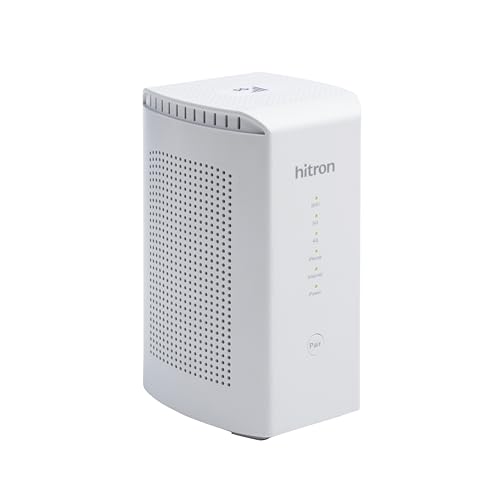
Hitron D60 — 5G fixed cellular
The Hitron D60 takes the Dionlink’s fixed-site idea and moves it a generation forward: its title states a 5G cellular router built around a SIM card slot. Hitron is a name from the infrastructure side of the industry — the company builds equipment that service providers deploy — and that heritage fits the role this device plays. It is not competing for a place in a jacket pocket. It is the box a household or small business installs where the wired network ends: the rural home office that needs current-generation speeds for calls and cloud work, the retail pop-up that cannot wait for an installation appointment, the property where 5G has arrived and cable has not.
The review’s cautions mirror its siblings’. The title names no carrier and no local Wi-Fi standard, so both questions route to Hitron’s documentation and to a coverage check at the installation address — in that order, because a 5G router on a 4G-only map is a 4G router with ambitions. Where 5G genuinely reaches the site, the D60’s proposition is the strongest version of the fixed-cellular idea in this guide: infrastructure-grade intent, current-generation cellular, and a SIM slot that keeps the carrier honest and replaceable. Where it does not reach, the Dionlink’s LTE steadiness is the wiser spend. The map decides between them, and this guide is content to let it.
- Cellular: 5G, per the listing title
- SIM arrangement: SIM card slot, stated in the listing title
- Form: cellular router for fixed installation, per the listing title
- Local Wi-Fi standard: Not stated in the listing title — verify with Hitron documentation
Strengths
- 5G cellular brings current-generation wide-area speed to a fixed location.
- An infrastructure maker’s design intent suits always-on, installed duty.
- The SIM slot keeps carrier choice open to whichever network covers the site.
Trade-offs
- Its value collapses to LTE-class reality where 5G has not actually arrived.
- Not a travel device; the pocket role belongs to the Nighthawk family.
- Key local-network details sit in documentation rather than in the title.
Best for: a fixed home office or small site with real 5G coverage and no wired option worth waiting for. Not suited for: an owner in motion, or a site where the coverage map is still an LTE map.
How Do the Six Divide Between Moving and Staying?
| Device | Cellular | SIM arrangement | Built for |
|---|---|---|---|
| NETGEAR Nighthawk M7 Pro | 5G mmWave | AT&T named in title | Moving — flagship pace |
| NETGEAR Nighthawk M7 | 5G | eSIM | Moving — plan switching |
| NETGEAR Nighthawk M6 | 5G | Physical SIM slot | Moving — settled carrier |
| GL.iNet Mudi | 4G LTE | Physical SIM slot | Moving — private network |
| Dionlink LTE Router | 4G LTE | Physical SIM slot | Staying — cabins and sites |
| Hitron D60 | 5G | Physical SIM slot | Staying — fixed 5G |
The table’s last column is the one to shop by. Every other column — generation, SIM, standard — rearranges itself once the moving-versus-staying question is answered, because a traveller and a cabin ask opposite things of the same technologies. The traveller wants the connection to survive motion, airports and improvisation. The cabin wants it to survive neglect. Choose the column first, and the row usually chooses itself.
How Do You Set Up a Mobile Router for a Trip or a Site?
Begin a week early, not the night before. Activate the plan and SIM — or provision the eSIM — while you still have home internet to troubleshoot with, because activation problems are much funnier at a kitchen table than at a trailhead. Insert the card or download the plan, power the device, and confirm it joins the cellular network at home first; a hotspot that has never connected anywhere will not debut gracefully two hundred miles away. Then set your own network name and password, connect every device that will travel, and let them all prove they remember it.
Placement is the second setup, and it happens on arrival. Cellular signal is a substance with geography: it pools by windows, thins in basements, and dies inside metal structures. Walk the site or the room with the device in hand, watching its signal readout the way you would watch a compass, and install it where the signal lives — high, near glass, away from the metal box of a vehicle body or an appliance wall. For fixed routers this is a one-time survey worth an hour; for travellers it becomes a habit as automatic as checking the weather. Tethered devices then gather around the hotspot’s Wi-Fi, which has its own smaller geography, and the two maps together decide the experience far more than any figure in a title.
Finish with the data discipline that mobile internet uniquely demands. Know your plan’s terms — its high-speed allowance, its throttling behaviour, its hotspot rules — because a mobile router serving a household of devices can drink a monthly allowance in a weekend of streamed video. Set the big devices to treat the network as metered where the operating system allows it, schedule updates and cloud backups for wired nights, and keep the streaming quality honest on small screens. None of this is the hardware’s fault or the hardware’s job; it is the household economics of carrying your internet with you, and the owners who thrive with these devices are the ones who learn the economics early.
What Mistakes Catch Mobile Internet Buyers?
The costliest mistake is buying the hardware before the map. A flagship hotspot on the wrong carrier, or at an address the chosen network barely touches, is a failure no specification can rescue — check coverage at the exact places the device will live, and treat indoor reality as weaker than any map’s outdoor promise. The second mistake is forgetting the plan: owners price the device, then meet the monthly data cost as a surprise, or discover at a campsite that the plan in the drawer was never activated. Hardware and plan are one purchase wearing two receipts, and this guide separates them only to keep the reviews honest.
Third is expecting Wi-Fi generations to fix cellular problems — a Wi-Fi 7 hotspot on a one-bar signal produces a beautifully modern local network connected to almost nothing. Fourth is the reverse snobbery: dismissing 4G LTE picks as obsolete in a country where LTE is still the network that covers the distances, and where steadiness beats ceiling for most real tasks. Fifth is leaving the hotspot buried — in a bag, a glovebox, a metal cabinet — and blaming the carrier for physics. And sixth is travelling without a rehearsal: the first connection attempt should happen at home, with time and coffee, never at the moment the work call begins.
How Do Power and Daily Handling Differ Between the Two Families?
The pocket hotspots live on a daily rhythm the fixed routers never meet. They are charged, carried, consulted and occasionally forgotten in bags, and their owners develop the same relationship with them as with a phone: a glance at the battery, a cable in every vehicle, a small anxiety reserved for the red zone on a long day. That rhythm shapes which hotspot suits which traveller. A device that spends its life moving between a dashboard, a site office and a hotel desk wants to sip power politely and wake fast; a device that spends travel days plugged into a vehicle or a rental’s outlet can afford to be hungrier and stronger. The titles in this guide do not print battery figures, so this review makes no claims in that currency — the makers’ documentation is the place for capacities and runtimes — but the handling difference between the families is real even without numbers: hotspots are appliances you carry, and their power story is part of the purchase.
The fixed routers live on the opposite rhythm: install, power, forget. A Dionlink at a cabin or a Hitron at a rural office draws from the wall and is judged the way a fridge is judged, by whether anyone has had to think about it this month. That difference is why the two families should never be ranked on one scale. A traveller comparing the M7 against the D60 on cellular generation alone is comparing a companion against a fixture, and the correct question — will this device be carried or installed? — was already answered by their life before they opened this guide. The families also fail differently, which is worth knowing in advance: a hotspot’s bad day is a dead battery or a forgotten cable, recoverable in an hour; a fixed router’s bad day is a plan lapse or a storm-shifted installation, recoverable in a phone call or a ladder climb. Choose the failure mode your household is better at forgiving.
One handling habit serves both families, and it is the cheapest insurance in mobile internet: a rehearsed fallback. The hotspot owner keeps the phone’s own hotspot feature understood and ready, because phones and dedicated devices rarely fail on the same day. The fixed-site owner keeps the router’s settings documented — plan details, carrier contacts, where the unit is installed and how it is powered — because the person who installed it is never the person standing in the cabin when it stops. Mobile internet rewards the prepared out of all proportion to the preparation, since the moments it matters are exactly the moments when improvisation is hardest.
What Should RV, Boat and Seasonal Households Plan Differently?
The moving home is this category’s most demanding customer, because it combines both families’ problems: it travels like a hotspot and lives like a fixed site. An RV household parks for weeks at a time in places chosen for beauty rather than coverage, works and streams from the same table where it eats, and crosses coverage boundaries the way other households cross rooms. For that life, the guide’s advice is to think in layers. A strong primary device — the M7 for its eSIM flexibility across regions, or the M6 for a household loyal to one carrier’s map — carries the ordinary weeks. The Mudi earns a place beside it in many rigs as the network’s permanent identity: the private Wi-Fi name every device in the vehicle knows, fed by whatever connection the week provides, so the television and the laptops never learn a new network from Kansas to Oregon.
Seasonal households — the lake house opened in May, the hunting cabin, the winter rental — face the plan question in its sharpest form, because a connection that sleeps half the year should not bill like one that works all of it. The SIM arrangement decides how gracefully that works: a physical card in a Dionlink or a Hitron can be paused, swapped or replaced as seasons and carriers change, while an eSIM device rearranges its connectivity in software from the driveway. Either way, the seasonal ritual belongs on the same checklist as the pipes and the shutters: activate before arrival, test on arrival, and document the shutdown so next season’s opening is a ceremony rather than an investigation.
Boats add one flourish of their own: the marina is a metal-and-water environment where signals arrive in reflections, and the hotspot’s position on the boat can matter more than its model. The households thriving with mobile internet afloat treat the device itself like an antenna with a battery — mounted high, kept dry, given a view of the sky and the shore — and they keep expectations calibrated to the anchorage’s distance from the towers that serve the coast. None of this requires different hardware from this guide’s six. It requires the same hardware, installed with the respect that a two-radio device deserves.
How Should You Read a Coverage Map Before Trusting It?
A coverage map is a promise drawn by an optimist, and the skill of reading one is the skill of discounting it correctly. Maps are modelled outdoors, at height, in clear air; your hotspot will live indoors, at table height, behind glass that may be coated, walls that may be foil-backed, and terrain the model smoothed away. The working rule is to demote every claim by one grade: the address shown as strong should be expected to behave as adequate, the address shown as adequate as marginal, and the address shown as marginal as a research project. That single habit prevents more bad purchases in this category than every specification in this guide combined, because it moves the buyer’s attention from the device’s ceiling to the location’s floor — and mobile internet is lived at the floor.
Better evidence exists for the places that matter most. A phone already on the candidate carrier, held where the router will sit, tells more truth in thirty seconds than an hour with a map: run the ordinary tasks, at the ordinary hours, and watch whether the connection behaves like infrastructure or like weather. Neighbours, marina offices, campground hosts and site managers are the other great source — the people already living on that map have opinions about it that no carrier publishes. And for a fixed installation, remember that the survey is allowed to change the plan: a site where one carrier fades and another stands strong is not a problem to be solved with a more expensive router, but a fact to be honoured with the right SIM, which is precisely why four of this guide’s six picks keep the carrier question open in a physical slot.
The last reading skill is temporal. Coverage is not a fixed property of a place; it breathes with seasons, foliage, crowds and the carrier’s own building programme. The beach town that streams beautifully in April negotiates in August. The rural route that failed two summers ago may have gained a tower since. Mobile internet therefore rewards the household re-asking the map question occasionally rather than treating an old answer as permanent — and it rewards, above all, the humility of testing before committing, because in this category the return window is a feature too, and using it after a honest home test is not failure but method.
Keep the evidence you gather. A note on the phone — carrier, address, where the device sat, what the evening test felt like — becomes next season’s starting point and next purchase’s shortlist, and it converts the vague memory that the signal was better at the other cabin into something a decision can stand on. Mobile internet households accumulate this local knowledge the way sailors accumulate harbour notes, and it is worth more than any single upgrade, because every future device in this guide’s category will be judged against the same unchanging geography. The map belongs to the carrier; the notes belong to you, and the notes are usually right.
One final test deserves a place in those notes, because it is the one travellers forget until it fails: the crowded-hour test. A connection that sails at dawn can crawl when a venue fills, a campground returns from the day’s outings, or a town’s single tower inherits everyone’s evening at once. If the device will work for a living — calls that cannot drop, uploads that cannot wait — judge it at the hour it will actually be judged by life, and let a quiet Tuesday morning flatter it no more than it should. The hotspots and routers in this guide all have evenings they would rather forget; the buyer’s job is to make sure those evenings belong to somebody else’s itinerary. Write the crowded-hour result down beside the dawn result, with the date and the weather if the site is rural, because patterns in those notes — the Friday sag, the storm-day fade — are the closest thing mobile internet has to a timetable, and a household learning its connection’s timetable stops being surprised by it, and schedules the heavy uploads, the long calls and the children’s streaming around the hours the notes have already mapped for them, which turns a temperamental connection into a predictable household utility.
Final Recommendation
Answer the geography question and the rest of this guide reads like a short story. If your life moves through cities and venues on AT&T’s map with modern devices in hand, the M7 Pro is the flagship the category has been promising. If your life moves everywhere and your plans change with it, the M7’s eSIM is the feature that will still feel clever in three years. If your carrier and plan are settled and you want the proven instrument, take the M6. If what you truly want is your own private network rebuilt in every room the road offers, the Mudi is the connoisseur’s answer. And if the device is destined to stay — at the cabin, the truck, the rural desk — let the site’s coverage choose between the Dionlink’s LTE steadiness and the Hitron’s 5G ambition. Buy the map first, the plan second and the hardware third, and mobile internet stops being a gamble and becomes what these six devices promise: your network, at your address, wherever your address happens to be this week.
Frequently Asked Questions
Does any of these devices include a data plan?
No. Every pick is hardware only, and each needs its own data plan from a carrier — with a physical SIM where the design has a slot, or an eSIM provisioning where the M7 offers it. Budget the plan as part of the purchase from the start, and activate it at home before the first trip or installation day.
Can I move my SIM between these devices?
Where the devices share the physical SIM arrangement, the card itself can move — that is the slot’s enduring virtue — subject to the plan’s own terms about hotspots and device changes. The M7’s eSIM world works differently, with plans provisioned in software, and the M7 Pro’s named AT&T pairing should be checked against the plan you intend to use.
Is 5G always better than the 4G LTE picks?
Where strong 5G exists, its ceilings and responsiveness are genuinely higher. Across much of the rural and highway map, LTE is the network that is actually present, and a steady LTE connection serves calls, documents and streaming better than an absent 5G signal. The Dionlink and the Mudi are in this guide because geography, not generation, is most buyers’ binding constraint.
What does Wi-Fi 7 on a hotspot improve?
The local half of the connection: the link between the hotspot and your laptops, phones and tablets. It is faster, more efficient with several devices, and more modern in every local respect. It does not strengthen the cellular signal the hotspot receives — that side is decided by generation, carrier and where the device sits in the room.
Can a mobile router replace home broadband?
At a fixed site with strong coverage and a suitable plan, the Dionlink and Hitron D60 are chosen for exactly that duty. The honest limits are the plan’s data terms and the household’s appetite: heavy streaming homes can strain allowances that a wired line would never count. For light-to-moderate households beyond the cable map, cellular is often the best internet available at any price.
Why does placement matter so much for these devices?
Because they live on two radios at once, and both obey geography. The cellular side wants height, glass and distance from metal; the Wi-Fi side wants centrality among your devices. A hotspot moved from a bag to a windowsill can change its real performance more than an upgrade would — which is why the setup section treats placement as a survey, not an afterthought.
Related Guides
Keep exploring with our guides to travel routers for hotels and rentals, routers for rural internet and dual-WAN routers with cellular failover.


