What's inside
- Key Takeaways
- Quick Picks
- How Did We Choose These LG Phones?
- Which LG Phones Are Still Worth Considering?
- How Do the Six LG Picks Compare Side by Side?
- What Should You Check Before Buying a Discontinued LG Phone?
- How Do You Set Up an Older LG Phone Sensibly?
- Which Mistakes Do Shoppers Make With Leftover LG Stock?
- What Is It Actually Like to Use a Stylus Phone Day to Day?
- How Should Prepaid Buyers Read These Listings Without Getting Burned?
- What Should You Expect From Cameras, Screens and Batteries of This Era?
- How Long Can a Phone From a Discontinued Line Stay Useful?
- Which Pick Fits Which Kind of Line in Real Life?
- How Do You Move Contacts, Photos and Messages Onto an Older Phone?
- What Accessories Still Make Sense for a Phone of This Age?
- How Do You Judge a Seller of Discontinued Stock?
- What Happens to Phones Like These When Networks Change?
- What Is the Sensible Way to Retire One of These Phones Afterwards?
- Final Recommendation
- Frequently Asked Questions
- Related Guides
As an Amazon Associate I earn from qualifying purchases. This post may contain affiliate links at no extra cost to you.
gizmoverdict.com is reader-supported. When you buy through links on our site, we may earn an affiliate commission.
Where to buy: every handset below links to its Amazon listing from the Quick Picks table and again from its detailed section, so you can read the seller’s own description before deciding. Stock in this corner of the market changes week to week, and the listing page — not this guide — is the place to confirm what is actually in the box.
Start with the fact that shapes everything else in this roundup: LG left the smartphone business in 2021. Searching for the best lg smartphones under two hundred twenty five dollars today does not lead to a current product line with fresh launches and years of software support ahead of it. It leads to remaining stock, prepaid carrier inventory and older flagships that sellers still hold. That is not automatically a bad purchase. It does change what a sensible purchase looks like, because the value now sits in honest hardware at clearance-level positioning rather than in longevity, updates or resale strength.
Read these six picks as a clearance shelf, not a catalogue. The LG G8 ThinQ was a genuine flagship with a bright OLED panel and a capable processor, and it still outclasses the prepaid handsets beside it on raw hardware. The Stylo models trade that power for a built-in stylus and big screens. The Phoenix pair are small, simple AT&T prepaid phones from an era when 16GB of storage was a normal specification. Each listing states its network position in its title — unlocked, AT&T Prepaid, TracFone carrier-locked or Boost Mobile carrier-locked — and that single detail matters more than any other line in the description, because a locked phone bought for the wrong network is a paperweight with a nice screen.
One more ground rule before the picks themselves. This guide treats the price band in the keyword as a qualitative segment — the low-cost end of the market where these leftover LG models sit — rather than as a promise attached to any individual handset. Prices on ageing stock drift with seller and condition, so no figure is printed against a pick here. Judge each phone on its hardware, its lock status and its remaining usefulness, and let the listing carry the number.
Our Top Picks
Key Takeaways
- LG exited the smartphone market in 2021, so every model here is leftover stock, a prepaid carrier variant or an older flagship rather than a current release.
- Lock status is the first thing to verify: this set mixes unlocked handsets with AT&T Prepaid, TracFone-locked and Boost Mobile-locked units.
- The LG G8 ThinQ carries the strongest hardware of the six, with 128GB of storage, 6GB of RAM and a 6.1-inch display.
- Stylo models are the big-screen, stylus-equipped options; the Phoenix models are compact, basic prepaid phones with 16GB of storage.
- No pick here should be bought expecting Android version upgrades or a long security-update runway.
- The price band in the keyword describes a market segment, not a guaranteed figure for any single listing.
Quick Picks
| Pick | Badge | Why it earns its place |
|---|---|---|
| LG Stylo 6 Unlocked | Widest carrier fit | An unlocked stylus phone whose title names Verizon, AT&T, T-Mobile and several prepaid brands, giving it the broadest network reach of the six. |
| LG Phoenix 4 | Basic AT&T prepaid | A small 4G LTE handset built for AT&T Prepaid, suited to light calling and messaging on that network only. |
| LG Phoenix 5 | Newer prepaid entry | The later Phoenix generation for AT&T Prepaid, with a 5.7-inch screen and a slightly fresher take on the same simple formula. |
| LG G8 ThinQ | Former flagship | Flagship-era hardware — 128GB storage, 6GB RAM, 6.1-inch screen — in an AT&T and T-Mobile unlocked GSM listing. |
| TracFone LG Stylo 4 | TracFone stylus option | A carrier-locked Stylo sold with a SIM card included, aimed squarely at TracFone prepaid service. |
| LG Stylo 3 | Boost Mobile legacy | An older stylus model locked to Boost Mobile, included for completeness for readers already on that network. |
How Did We Choose These LG Phones?
The selection problem here is unusual. There is no current LG range to rank, so the shortlist had to be built from what the market still legitimately sells: listings with clear titles that state the model, the storage, the screen size where given, and — critically — the network position. Any listing that hid its lock status or blurred which carrier a phone was built for was set aside, because on leftover stock the lock is the specification that decides whether the phone works at all.
Coverage across the surviving LG families came next. The Stylo line appears three times because it dominated LG’s low-cost US presence and because its stylus still gives it a distinct job. The Phoenix line represents the AT&T prepaid shelf. The G8 ThinQ represents the flagship back-catalogue, the place where leftover money buys the most hardware. Between them, the six cover the realistic ways a reader might still end up holding an LG phone in this segment.
Honesty about age acted as the final filter. These are Android phones from the late 2010s and the turn of the decade. Their processors, cameras and batteries are judged against that era and against the modest jobs — calls, texts, light browsing, a second line, a child’s first handset, a glovebox spare — where they can still serve. Nothing in this guide pretends a Phoenix 4 competes with a modern budget phone on software support. Where a pick’s title is silent about a detail, the spec box below says so plainly rather than filling the gap with a guess.
Which LG Phones Are Still Worth Considering?

LG Stylo 6 Unlocked Smartphone — Widest carrier fit
The Stylo 6 is the most flexible phone in this roundup, and the title explains why: it is sold unlocked with universal compatibility naming Verizon, AT&T, T-Mobile, Sprint, Boost, Cricket and Metro. In a set where half the listings are tied to a single carrier’s prepaid shelf, that breadth is the headline feature. A household line that might move between networks, or a spare handset kept for whichever SIM is active, is far better served by this model than by a locked unit bought cheaply and regretted later.
The hardware follows the Stylo formula: a large screen, 4GB of RAM and 64GB of storage, and the built-in stylus that gives the line its name. That stylus remains a genuinely pleasant way to jot a shopping list, mark up a screenshot or navigate with gloves and cold fingers. Performance belongs to its era — everyday apps run, heavy multitasking does not sparkle — and the white finish shows pocket wear honestly. As a straightforward, network-agnostic LG in this segment, though, nothing else here matches its combination of screen, storage and freedom.
- Network position: Unlocked, with universal compatibility stated in the listing title
- Memory and storage: 4GB RAM, 64GB storage
- Distinguishing feature: Built-in stylus
- Finish: White
- Manufacture note: Made for US by LG, per the listing title
- Software support outlook: Not stated in the listing title — verify with LG documentation
Strengths
- Unlocked status removes the carrier gamble that hangs over the rest of this list.
- The stylus still earns its keep for notes, lists and precise tapping.
- 64GB of storage doubles what the prepaid picks below offer.
Trade-offs
- Processing power is modest by current standards, so demanding games are out of its depth.
- As discontinued stock, long-term software updates should not be expected.
- The large body will feel bulky in a small pocket or a child’s hand.
Best for: a flexible spare or second line that may move between US carriers.
Not suited for: a primary phone expected to stay current for several years.

LG Phoenix 4 Smartphone — Basic AT&T prepaid
The Phoenix 4 is the simplest object in this guide: a compact 4G LTE handset built for AT&T Prepaid, running Android 7.1 with 16GB of storage. Nothing about it reaches beyond that description, and the review should not pretend otherwise. It is a phone for calls, texts and the occasional map lookup, sold into a prepaid ecosystem where the plan, not the handset, is the product.
Its age shows in the software version named in the title. Android 7.1 was already mature when this phone sold new, and many current apps either refuse to install on it or run in reduced form. That limits the Phoenix 4 to a narrow set of jobs: an AT&T Prepaid line for a light user, an emergency handset in a drawer, a first phone with deliberately limited capability. Within those jobs it is coherent and cheap to keep. Outside them, it frustrates quickly, and the unlocked Stylo 6 above is the better destination for the same money-minded reader.
- Network position: AT&T Prepaid
- Connectivity: 4G LTE
- Operating system: Android 7.1, per the listing title
- Storage: 16GB
- Finish: Black
- Display size: Not stated in the listing title — verify with LG documentation
Strengths
- Straightforward fit for an existing AT&T Prepaid line.
- Compact, undemanding hardware suits calls-and-texts duty.
- No stylus, no gimmicks — very little to learn or to break.
Trade-offs
- Android 7.1 shuts the door on many modern apps.
- 16GB fills quickly once photos and updates accumulate.
- Locked to one carrier’s prepaid service by design.
Best for: a minimal AT&T Prepaid line for calls and texts.
Not suited for: app-heavy daily use or any network besides AT&T Prepaid.

LG Phoenix 5 LM-K300AM — Newer prepaid entry
The Phoenix 5 is the later word in the same sentence the Phoenix 4 started. It keeps the AT&T Prepaid brief and the 16GB of storage, pairs that storage with 2GB of RAM, and stretches the screen to 5.7 inches. That larger display is the practical upgrade: text sits bigger, maps read more easily, and the phone feels less like a shrunken relic than its predecessor does in the hand.
Temper expectations accordingly. Two gigabytes of RAM is a tight ceiling, and the phone’s rhythm is one app at a time, patiently. It suits a prepaid user whose day is calls, messages, email checks and light browsing, and it suits that user better than the Phoenix 4 does thanks to the screen. The silver finish is a small mercy too, hiding scuffs more gracefully than gloss black. Like every AT&T Prepaid listing here, it only makes sense inside that ecosystem — the lock is the deal, stated plainly in the title.
- Network position: AT&T Prepaid
- Display: 5.7 inches
- Memory and storage: 2GB RAM, 16GB storage
- Model code: LM-K300AM
- Finish: Silver
- Operating system version: Not stated in the listing title — verify with LG documentation
Strengths
- The 5.7-inch screen is noticeably kinder for reading than the older Phoenix.
- A later-generation prepaid design than the Phoenix 4 beside it.
- Simple hardware with little to configure for a light user.
Trade-offs
- 2GB of RAM enforces a slow, single-app pace.
- Storage stays at 16GB despite the newer generation.
- AT&T Prepaid lock rules it out for other networks.
Best for: an AT&T Prepaid user who wants a slightly larger, later basic phone.
Not suited for: multitasking, media libraries or travel across carriers.

LG G8 ThinQ LMG820TM — Former flagship
Everything changes with the G8 ThinQ. This was LG’s flagship: 128GB of storage, 6GB of RAM and a 6.1-inch display in a listing described as AT&T and T-Mobile unlocked. Note the qualifier in the title — GSM only. That wording fits the AT&T and T-Mobile world of its era and should steer Verizon-minded readers toward the Stylo 6 instead. For a GSM user, though, this is by some distance the most capable hardware in the roundup.
The gap shows everywhere. Apps open with flagship briskness rather than prepaid patience, the screen is sharper and brighter than anything else here, and 128GB swallows photo libraries that would choke the 16GB picks. The honest cautions are about time, not talent: the battery inside an ageing flagship has lived a life, software support has ended, and the phone’s resale value will keep sliding. Bought with open eyes as a strong, inexpensive GSM handset for the near term, the G8 remains the connoisseur’s pick of this clearance shelf — the one model here that still feels like a reward rather than a compromise.
- Network position: AT&T, T-Mobile unlocked; GSM only, per the listing title
- Display: 6.1 inches
- Memory and storage: 6GB RAM, 128GB storage
- Connectivity: 4G LTE
- Model code: LMG820TM
- Finish: Aurora Black
Strengths
- Flagship hardware that dwarfs the prepaid picks on speed, screen and storage.
- 128GB removes the storage anxiety that shadows the 16GB models.
- Unlocked for the two big GSM networks of its era.
Trade-offs
- GSM-only wording excludes CDMA-era network expectations.
- An ageing flagship battery may not match its original endurance.
- No update runway remains, despite the premium hardware.
Best for: a GSM-network user wanting the strongest leftover LG hardware.
Not suited for: long-term primary use built around current software support.

TracFone LG Stylo 4 — TracFone stylus option
The Stylo 4 listing is the most explicit in this guide about what it is: a TracFone carrier-locked prepaid smartphone, SIM card included, 16GB of storage, CDMA wording in the title. That candour is welcome. TracFone’s prepaid model — small balances, long expiry windows, a line kept alive cheaply — has a real audience, and for that audience a stylus-equipped handset with the SIM already in the box is a tidy proposition.
Judge it strictly inside that fence. The lock means the phone belongs to TracFone’s ecosystem; the 16GB means storage discipline from day one; the Stylo hardware means a big screen and a pen for notes and forms. As a dedicated TracFone device — a line for a relative, a low-traffic second number, a phone that lives in a work bag — it hangs together well. As anything else, it is the wrong purchase, and the listing’s own title says so more honestly than most.
- Network position: TracFone carrier-locked; SIM card included
- Storage: 16GB
- Network wording: CDMA, per the listing title
- Distinguishing feature: Built-in stylus
- Finish: Black
- RAM: Not stated in the listing title — verify with LG documentation
Strengths
- SIM included, so the TracFone setup starts the moment the box opens.
- Stylus and large screen at prepaid positioning.
- Lock status declared openly in the title — no surprises after purchase.
Trade-offs
- Carrier lock confines it to TracFone service entirely.
- 16GB demands strict storage habits.
- CDMA-era positioning narrows its remaining network future.
Best for: a committed TracFone prepaid line wanting a stylus handset.
Not suited for: any other carrier, or resale into a different ecosystem.
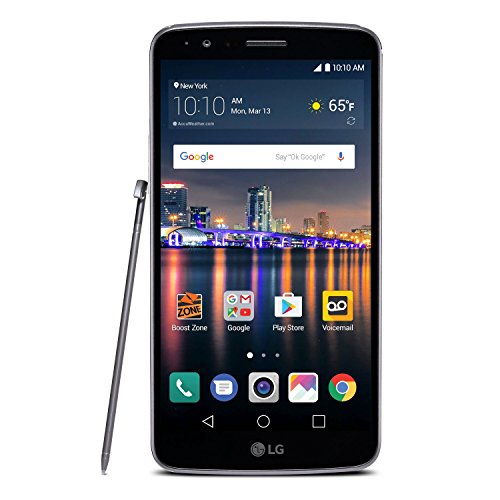
LG Stylo 3 (LGLS777ABB) — Boost Mobile legacy
The Stylo 3 is the oldest phone in this roundup, a prepaid model locked to Boost Mobile, and it is included with a clear conscience only because some readers still hold Boost lines and ageing Stylo handsets that need like-for-like replacement. Its title is terse — model code, prepaid, carrier locked, Boost Mobile — and the review will match that terseness with candour: this is legacy hardware for a legacy situation.
The stylus concept was already the selling point here, and the big-screen note-taking role is the one job the phone can still perform without embarrassment. Everything else — app compatibility, camera expectations, battery freshness after years in the supply chain — should be assumed to be limited. Treat the Stylo 3 as a continuity purchase: the same ecosystem, the same habits, minimal change. A reader free to choose any phone in this guide should choose almost any other one, and the Stylo 6 in particular shows how far the same idea travelled in a few generations.
- Network position: Prepaid, carrier locked to Boost Mobile
- Model code: LGLS777ABB
- Distinguishing feature: Built-in stylus
- Storage: Not stated in the listing title — verify with LG documentation
- Display size: Not stated in the listing title — verify with LG documentation
- Operating system version: Not stated in the listing title — verify with LG documentation
Strengths
- Like-for-like replacement path for an existing Boost Mobile Stylo user.
- Stylus input survives as a genuinely useful note-taking tool.
- Familiar interface for a long-time LG prepaid owner.
Trade-offs
- The oldest hardware here, with the narrowest remaining app support.
- Boost Mobile lock leaves no network flexibility at all.
- Title omits key specifications, so verification before buying is essential.
Best for: replacing a failing Boost Mobile Stylo with minimal disruption.
Not suited for: a fresh start, a different carrier or modern app use.
How Do the Six LG Picks Compare Side by Side?
| Pick | Network position | Storage | Screen | Defining trait |
|---|---|---|---|---|
| LG Stylo 6 | Unlocked, universal compatibility | 64GB | Not stated in title | Stylus plus carrier freedom |
| LG Phoenix 4 | AT&T Prepaid | 16GB | Not stated in title | Basic 4G LTE prepaid handset |
| LG Phoenix 5 | AT&T Prepaid | 16GB | 5.7-inch | Later Phoenix generation |
| LG G8 ThinQ | AT&T, T-Mobile unlocked, GSM only | 128GB | 6.1-inch | Flagship hardware |
| TracFone LG Stylo 4 | TracFone locked, SIM included | 16GB | Not stated in title | Stylus on TracFone prepaid |
| LG Stylo 3 | Boost Mobile locked | Not stated in title | Not stated in title | Legacy stylus replacement |
What Should You Check Before Buying a Discontinued LG Phone?
Network first, always. Write down the carrier the phone will actually serve, then match it against the lock wording in the title word for word. Unlocked with universal compatibility, AT&T Prepaid, TracFone-locked and Boost-locked are four different products wearing similar boxes. Carrier lineups and network technologies have also shifted since these phones were made, so a quick check of the carrier’s current device-compatibility page is worth five minutes before money moves.
Storage second. The spread in this guide runs from 16GB to 128GB, and that gap decides daily happiness more than any processor detail. Sixteen gigabytes holds the system, a handful of apps and a modest photo roll; it suits a disciplined light user and punishes everyone else. If the phone will carry music, offline maps or a grandchild’s photo stream, the 64GB Stylo 6 or the 128GB G8 ThinQ are the only comfortable answers here.
Software expectations third. These handsets run the Android versions of their era, and LG’s exit from the market closed the update story. Banking and work apps with strict version requirements may refuse older systems, so a phone destined for anything sensitive should be checked against the app’s stated minimum version. For calls, texts, photos and light browsing, the older software remains serviceable — set the expectation correctly and the hardware can still deliver.
Finally, condition and battery. Leftover stock varies: some units sat sealed, others circulated as display or return inventory. Read the listing’s condition wording carefully, favour sellers who describe battery health plainly, and plan on a phone that may want a charge more often than a fresh modern handset. A cheap case and a spare charging cable are sensible companions for any pick in this guide.
How Do You Set Up an Older LG Phone Sensibly?
Begin before the SIM goes in. Charge the phone fully, connect to Wi-Fi, and let it sit through its first round of system prompts and app updates; older handsets often queue a surprising amount of housekeeping on first boot. Then sign in, restore only the essentials — contacts, messages, photos — and resist the urge to clone an entire old phone across, because 16GB models in particular will choke on a full migration.
Next, prune. Remove or disable preloaded apps that will never be opened, set photos to back up over Wi-Fi only, and move any large media to a computer rather than the handset. On the stylus models, spend two minutes learning the pen’s memo shortcut; it is the feature that justifies the Stylo name and the one most owners never discover. On prepaid picks, register the carrier account and set a balance reminder in the calendar, since a lapsed prepaid line is the most common way these phones fall silent.
Finish with security basics suited to older software: a screen lock, Find My Device switched on where supported, and a deliberate decision about which accounts belong on the phone at all. A spare or light-duty handset does not need the full set of banking and work logins, and keeping sensitive accounts off ageing software is a reasonable, calm precaution rather than a hardship.
One last setup habit pays for itself within a month: label the phone. A strip of tape inside the case carrying the line’s number and the carrier’s name saves real confusion in households running several similar black rectangles, and it turns a lost-and-found moment at a café into a phone call instead of a write-off. Small administrations like this are what separate a spare phone that is genuinely ready from one that merely exists. While the label is being written, add the carrier’s support number to the contacts as well, because the moment a prepaid line misbehaves is precisely the moment nobody can remember where that number lives.
Which Mistakes Do Shoppers Make With Leftover LG Stock?
The classic error is buying the lock, not the phone. A TracFone-locked Stylo 4 is a bargain inside TracFone and a dead end everywhere else, and its title says so. Read the network line twice. The second error is assuming the brand’s exit changed nothing: LG’s departure ended updates, narrowed parts availability and froze the software story, so these phones should be bought as finished products, complete and final, not as platforms that will grow.
A third mistake is chasing the segment’s headline instead of the hardware. The price band in the keyword is a neighbourhood, not a valuation — the G8 ThinQ and the Phoenix 4 sit in it for entirely different reasons, and the right choice depends on the job, not the shelf label. Fourth, shoppers forget the battery’s biography. Ageing cells in old stock may hold less charge than the original specification promised, and a phone bought for all-day reliability should be tested across a full day early, while returns are still simple.
Last, do not buy a legacy handset as a long-term primary phone for a heavy user. These picks shine as second lines, prepaid fits, stylus note-takers and gentle first phones. Asked to be something else, even the admirable G8 will eventually disappoint.
What Is It Actually Like to Use a Stylus Phone Day to Day?
Three of the six picks carry the Stylo name, so the pen deserves its own examination. LG’s stylus is a passive, spring-loaded stick that slides from a silo in the phone’s frame — no battery, no pairing, nothing to charge or lose a connection with. Pull it out and the phone wakes with a memo surface ready. That immediacy is the whole charm. A measurement called out across a workshop, a licence plate spotted in a car park, a signature line on a delivery form: the pen turns each into a two-second task instead of a hunt through an app drawer.
The pen also changes how the phone feels for readers whose hands do not love touchscreens. Cold fingers, work gloves with the fingertips cut, long nails, tremor — all of these make fingertip typing a negotiation, and a slim stylus restores precision without settings menus. Selecting small text links, cropping a screenshot tightly, tapping the correct cell in a spreadsheet: tasks that feel fiddly by finger become calm by pen. It is not a drawing instrument in the professional sense, and palm rejection and pressure sensitivity belong to a different class of device, but for notes and navigation the Stylo trick remains useful long after the phones themselves have aged.
There are habits to build. The pen is small and the silo is its only home; a stylus left on a dashboard is a stylus lost. Replacement pens exist, but matching the exact model matters. Owners also learn to keep the silo clean, because grit carried into the slot can scratch the pen’s tip over time. None of this is burdensome. It is simply the small print of a feature that, on balance, still justifies the Stylo line’s existence on a clearance shelf years after launch.
How Should Prepaid Buyers Read These Listings Without Getting Burned?
Four of the six picks are prepaid products, and prepaid listings reward a particular kind of reading. Start with the carrier name, because it is the contract: AT&T Prepaid, TracFone and Boost Mobile each run their own plans, refill cards and activation rules, and a handset built for one cannot be casually carried to another. The title of each listing here states its allegiance plainly, which is exactly what a careful shopper wants to see.
Next, separate the handset from the service. Buying the phone buys no airtime beyond whatever the listing explicitly includes; the Stylo 4’s included SIM card is a convenience, not a plan. Budget mentally for the first refill, the activation steps and the refill rhythm that follows. TracFone’s model rewards low, steady usage with long service windows. AT&T Prepaid behaves more like a monthly plan with autopay habits. Boost sits in its own tradition of prepaid value. The right handset is the one whose carrier’s rhythm matches the household’s actual calling pattern.
Then check the human details. Who will use the line, and how reachable must they be? A prepaid phone for a teenager, a grandparent or a work crew succeeds when the refill routine is understood by the person holding it, not just the person paying for it. Write the refill date on a kitchen calendar. Keep the account PIN somewhere findable. These unglamorous steps decide whether a prepaid LG serves for years or falls silent in a drawer within a season.
What Should You Expect From Cameras, Screens and Batteries of This Era?
Set the calendar correctly and the hardware reads fairly. Screens on the flagship G8 ThinQ were excellent by the standards of their day and remain pleasant now — bright, sharp, well coloured. The prepaid and stylus models use simpler panels that are perfectly readable for text, maps and video, with viewing angles and sunlight performance a step behind the flagship. None of the six should be judged against a modern mid-range display in a side-by-side test; judged as tools for their stated jobs, the screens are adequate to good.
Cameras follow the same hierarchy. The G8 ThinQ photographs like a former flagship, which is to say capably in daylight and respectably indoors. The Stylo and Phoenix cameras document rather than dazzle: a whiteboard after a meeting, a shelf label in a shop, a grandchild across a table. Expect to help them with light and stillness. Expect also that ageing phones benefit from a simple routine — tap to focus, brace against a doorframe, wipe the lens, which on a pocket-carried phone is always filmed with lint.
Batteries carry the largest uncertainty, because time acts on cells whether a phone was used or shelved. A leftover unit may deliver a comfortable day of light use or may want a mid-afternoon top-up, and the listing alone rarely settles the question. The practical response is to test during the return window: charge fully, use the phone normally for two days, and watch the pattern. Carrying a small power bank is a normal companion habit for phones of this vintage, not an admission of failure.
How Long Can a Phone From a Discontinued Line Stay Useful?
Usefulness ends at different moments for different jobs, and naming the job extends the phone’s honest life. As a calling and texting device on a compatible network, any of these six can serve until the carrier’s network changes make the hardware obsolete. As a Wi-Fi device — a kitchen screen for recipes and timers, a bedside radio and alarm, a child’s offline media player loaded at home — the phone can serve for years beyond its network life, because Wi-Fi duty asks nothing of the carrier at all.
The limits arrive first in software. Apps raise their minimum versions over time, and one morning a favourite app will decline to update. That is the moment to freeze the phone’s role around the apps that still run, rather than fighting the tide. Security-sensitive duties should migrate away earliest: a phone that no longer receives patches is a poor home for banking credentials, however well its screen still glows. Demote gracefully — primary to spare, spare to Wi-Fi duty, Wi-Fi duty to the drawer of last resort — and a discontinued LG can return value at every step of the ladder.
There is also a quiet environmental argument for this shelf. Every leftover handset that finds a real job is a phone manufactured, shipped and sold whose materials get fully used, rather than a device pulped with its working life unspent. Buying old stock is not nostalgia. Done with the checks in this guide — lock matched, storage sized, expectations set — it is simply thrift with its eyes open.
Which Pick Fits Which Kind of Line in Real Life?
Consider the grandparent line first, because it is the most common reason these phones get bought. The requirement is reachability: a handset that rings loudly, holds a charge through a day of mostly waiting, and can be operated without a manual. The Phoenix 5 fits an AT&T Prepaid version of that job, its 5.7-inch screen giving contacts and messages room to breathe. The Stylo 6 fits the same job on almost any network, and its stylus quietly helps fingers that find small on-screen keys uncooperative. Either way, the setup work matters more than the model badge: large text switched on, three favourite contacts pinned to the home screen, and the volume set before the phone changes hands.
Now consider the teenager’s first smartphone, where the calculus inverts. The parent wants communication without a flagship’s fragility or cost, and an older LG delivers exactly that bargain. A Stylo 6 gives a young user a big screen for schoolwork and video, enough storage for a modest app collection, and a pen that turns homework screenshots into annotated study notes. If it is dropped, cracked or lost — the statistical destiny of first phones — the loss stings far less than a current model’s would. The G8 ThinQ tempts here too, since its camera and speed feel modern, but its glass flagship build is the least forgiving of the six in a school bag.
The work-crew line is a third pattern. A foreman’s spare, a delivery driver’s backup, a site phone that lives in a truck cab: these handsets need network reliability and disposability in equal measure. The unlocked Stylo 6 again earns its place, because a spare that accepts whichever SIM the day provides is worth more than a marginally stronger phone welded to one carrier. Pair it with a rugged case and a vehicle charger and the kit is complete. The TracFone Stylo 4 plays the same role inside TracFone’s ecosystem, where its included SIM and stylus make it a self-contained site phone for notes and photographs of completed work.
Finally, the quietest pattern: the drawer phone. Every household accumulates a need for a handset that exists purely for emergencies — the power cut, the lost primary phone, the visiting relative from abroad who needs a local number for a fortnight. Drawer phones should be unlocked, because emergencies do not consult carrier preferences, and they should be charged and checked a few times a year. On those criteria the Stylo 6 is the natural keeper of this set, with the G8 ThinQ as the more powerful GSM alternative. The locked prepaid picks cannot play this role honestly, which is precisely why their titles declare the lock so plainly.
How Do You Move Contacts, Photos and Messages Onto an Older Phone?
Migration onto ageing hardware goes smoothly when it is done in the right order. Start with the account, not the cable. Sign the Google account into the new-old phone first and let contacts, calendar and email synchronise over Wi-Fi while the phone sits on its charger. This background method beats cable transfers for most people, because it asks nothing of ports, drivers or file formats, and it quietly repairs itself if the connection drops halfway through a large address book.
Photos deserve a decision before they deserve a transfer. A 16GB Phoenix or Stylo 4 cannot swallow a decade of camera rolls, and attempting it produces a half-copied library and a phone that complains about storage from its first morning. Choose an album’s worth of favourites for the handset itself, keep the full archive on a computer or in cloud storage, and let the phone carry pictures the way a wallet carries them — a few, chosen, close at hand. The 64GB Stylo 6 and 128GB G8 relax this discipline considerably, which is one more reason storage sits so high in this guide’s judgements.
Messages are the item most likely to disappoint, so expectations should be set early. Text history does not always travel cleanly between phones of different eras, and some threads will simply start fresh. For most light-duty lines that loss is cosmetic. Where a thread genuinely matters — a landlord’s confirmations, a family arrangement — screenshot it or forward the essentials to email before switching, rather than discovering the gap afterwards. Two-factor codes also need a thought: if the old phone receives the household’s authentication texts, update the number’s role in account settings during the same sitting, not weeks later when a login is already failing.
Finish the migration with a week of parallel running. Keep the old handset alive beside the new one, check both each evening, and only retire the old phone once a full week passes without it catching a call, a code or a message the new phone missed. This unglamorous overlap is the difference between a switch that feels seamless and one that quietly drops something important into the gap between two devices.
What Accessories Still Make Sense for a Phone of This Age?
A case is the first accessory and, for glass-backed flagships like the G8 ThinQ, close to obligatory. Cases for discontinued models linger in the same clearance channels as the phones themselves, so availability is rarely the problem; matching the exact model is. A Stylo 6 case will not fit a Stylo 4 despite the family resemblance, and a Phoenix 5 case fits nothing else in this guide. Read the case listing’s model line as carefully as the phone’s own title, and prefer a design with a raised lip around the screen, because a face-down drop onto concrete is the accident these phones are statistically most likely to meet.
Charging gear comes second. Older handsets reward a spare cable in the car and a spare at the bedside, because their batteries ask for top-ups more often than a fresh phone’s does and because a cable forgotten at a relative’s house should not become a crisis. A modest power bank extends any of these phones through a long day of travel or a power cut, and it will outlive the phone itself, serving whatever handset comes next. Avoid exotic fast-charging promises aimed at modern devices; the phones here charge at their own era’s pace, and a plain, well-made cable serves them best.
Storage help comes third for the models that accept it. Where a handset offers a memory card slot, a modest card transforms a 16GB phone’s manners, giving photos and downloaded media somewhere to live that is not the cramped internal store. Confirm the slot exists for the specific model before buying the card, and format the card in the phone itself on first use. Screen protectors, finally, are cheap insurance bought in multipacks for exactly these ageing models — the third protector in the packet usually outlasts the phone, and that is fine.
How Do You Judge a Seller of Discontinued Stock?
The seller matters as much as the model when the product line no longer exists. Look first for specificity in the listing: a seller who states the model code, the carrier position, the storage and the condition in plain language is describing a real unit on a real shelf. Vague listings that lean on stock photographs and superlatives are describing a hope. The titles used throughout this guide were chosen partly because they state their facts — lock, storage, network — without decoration, and that plainness is the pattern to favour wherever you shop.
Condition language deserves a slow read. Sealed old stock, open-box returns and refurbished units are three different purchases wearing similar prices, and each carries a different battery expectation. A refurbished phone with a tested battery may serve better than a sealed unit whose cell sat discharged for years; a sealed unit may carry a fresher exterior than either. Neither is automatically superior — what matters is that the listing says which one it is, and that the return terms cover the first fortnight, when battery behaviour and network fit reveal themselves.
Finally, judge the seller by what happens after the sale. A responsive seller who answers a lock-status question before purchase will usually handle a problem after it. Keep the order details, photograph the phone’s model screen on arrival, and test the SIM fit and charging on day one rather than day twenty. These small acts of diligence convert the clearance shelf from a gamble into what it should be: a straightforward way to put honest, ageing hardware back to work.
What Happens to Phones Like These When Networks Change?
Network history shadows every handset in this guide. The industry has already retired older network generations once in these phones’ lifetimes, and the lesson from that transition is written into several titles here: wording like CDMA and GSM only describes the world the phone was built for, not necessarily the world it will meet when a SIM goes in. Carriers maintain device checkers precisely because compatibility now turns on finer details than the logo on the box, and five minutes with the carrier’s own checker is the cheapest insurance in this entire purchase.
The practical reading is calm rather than alarmist. The unlocked Stylo 6, with its universal compatibility wording across Verizon, AT&T, T-Mobile and the prepaid brands, was built to straddle the widest range of networks and remains the most adaptable unit here. The G8 ThinQ’s GSM-only wording draws a clear boundary that AT&T and T-Mobile users can plan around confidently. The locked prepaid phones depend entirely on their own carrier’s continuing support for the model, which is one more reason they should be bought for a defined, near-term job rather than as open-ended primary handsets.
Wi-Fi, once again, is the safety net under all of it. A phone that eventually loses its network welcome does not lose its usefulness at home, where it can still run timers, music, video calls over Wi-Fi and smart-home controls for years. Buying with that fallback in mind — knowing the phone’s second career before its first one ends — turns a network change from a write-off into a planned demotion, and it is the mindset that makes this whole clearance shelf rational.
What Is the Sensible Way to Retire One of These Phones Afterwards?
Even a clearance phone deserves a planned ending. When one of these handsets finally leaves service, sign out of every account on it, remove the SIM and any memory card, and run the factory reset from settings rather than simply deleting files from the surface. Then decide its next chapter with the same honesty used to buy it: a working unit can become the household’s Wi-Fi remote and timer, a donation to a relative whose needs are lighter still, or a trade-in and recycling drop where carriers and manufacturers run collection schemes. What it should not become is an unlabelled object in a drawer holding a live account and a dying battery. A phone bought thoughtfully, used fully and retired deliberately has justified every part of its long, second-hand life.
Final Recommendation
For most readers, the LG Stylo 6 is the safest shape of this purchase: unlocked, comparatively roomy, and still genuinely pleasant for notes and lists. GSM users who want the most hardware should take the G8 ThinQ and accept its finished software story. The Phoenix 5 serves AT&T Prepaid better than the Phoenix 4, the Stylo 4 belongs to TracFone households already inside that fence, and the Stylo 3 is a continuity buy for Boost loyalists. Choose the lock that matches your line, and the rest of the decision makes itself — these are yesterday’s phones, honestly priced by the market’s memory, still capable of honest work.
Frequently Asked Questions
Is LG still making smartphones?
No. LG closed its smartphone business in 2021, which is why this guide covers leftover stock, prepaid variants and older flagships rather than new releases. Support, updates and parts all reflect that exit, so each pick should be judged as a finished product.
Can a carrier-locked pick here be used on another network?
Plan on no. The TracFone Stylo 4 and Boost Mobile Stylo 3 are sold locked to those services, and the Phoenix models are built for AT&T Prepaid. Unlocking policies belong to the carriers, vary by account history, and should never be assumed at purchase time.
Which pick has the most storage?
The LG G8 ThinQ, with 128GB stated in its title — eight times the 16GB of the Phoenix pair and the TracFone Stylo 4. The Stylo 6 sits in the middle at 64GB, which is the practical minimum for a photo-taking daily user.
Will these phones keep receiving Android updates?
They should not be bought with that expectation. LG’s exit ended the update pipeline for its handsets, and the versions named or implied by these listings are the versions to plan around. For calls, texts and light apps that is workable; for strict app requirements, check minimum versions first.
What does GSM only mean on the G8 ThinQ listing?
It signals the phone is intended for GSM-family networks — the title names AT&T and T-Mobile — rather than CDMA-era networks. Match it to a GSM carrier’s SIM and confirm current compatibility on the carrier’s own checker before ordering.
Does the stylus need charging or pairing?
No. The Stylo models use a simple passive pen stored in a silo in the phone’s frame. It has no battery and no wireless connection, so it works the moment it is pulled out and never needs setup. The trade-off is that it offers none of the pressure sensitivity of powered pens on premium tablets — it is a note-taking and navigation tool, and a good one.
Should a leftover LG be a child’s first phone?
It can be a sensible one, with the expectations set out in this guide. The Stylo 6 offers a large screen, workable storage and network flexibility at clearance positioning, so a loss or a cracked screen is a lesson rather than a disaster. Parents should still check which apps the child needs against the phone’s Android era, set up the account controls before handing it over, and accept that the handset’s software story is finished.
Are any of these phones sold with a SIM card?
One listing says so directly: the TracFone LG Stylo 4 includes a SIM card, per its title. For the other five, assume the SIM comes from your carrier or prepaid account unless the listing page states otherwise.
Related Guides
Readers weighing leftover flagships against current budget hardware may also find our coverage of rugged phones built for demanding jobs useful, alongside the guide to simple smartphones chosen for older users and the roundup of prepaid handsets tied to a single carrier.
Related guides
- Best Balancing Stabilizers for Mirrorless Cameras: Payload, Balancing and Native Vertical Shooting
- Best Canon Point and Shoot Digital Cameras: PowerShot Picks From Pocket Compacts to Travel Zooms
- Best Basic Phones Camera Buyers Can Trust: Flip Phones and Simple Handsets That Still Take a Photograph
- Best Sony Full Frame Cameras for Astrophotography: Sensitivity vs Resolution


