Our Top Picks


What's inside
- The Wear OS platform and its versions
- Chipsets and everyday performance
- Google Assistant, voice, and everyday intelligence
- The Play Store on your wrist and the app ecosystem
- Battery life and charging realities
- LTE, Bluetooth, and choosing a connectivity tier
- Health sensors and fitness depth
- The main ranges: Pixel, Galaxy, and fashion led lines
- Displays, cases, and wearability
- Compatibility with Android phones in practice
- Privacy, security, and family considerations
- Choosing by owner profile
- Setup, migration, and long term care
- Value, pricing tiers without the numbers, and timing
- Troubleshooting the frustrations owners actually meet
- Accessibility and everyday usability details
- Final perspective for Wear OS buyers
- Music, podcasts, and media on the wrist
- Smart home and connected life integrations
- Durability, repairs, and environmental notes
- Check prices on Amazon
- A short desk based shortlisting method
As an Amazon Associate I earn from qualifying purchases. This post may contain affiliate links at no extra cost to you.
A Wear OS smartwatch is best understood as a small Android computer shaped for the wrist, and that identity explains both its appeal and its compromises. It runs a genuine application platform with a proper store, speaks fluently to Google services, handles notifications with unusual sophistication, and asks in return for regular charging and a tolerance for variation between brands. Two watches carrying the same operating system name can feel entirely different in speed, endurance, and health capability, because each maker layers its own chipset choices, sensors, and design priorities over the shared foundation.
This guide compares the category through published specifications, platform documentation, and the practical questions buyers actually face: which chipset generation a model carries, which version of the operating system it runs and can expect to receive, whether a cellular variant suits an independent lifestyle, and how its health sensors compare with rivals. The aim is a clear map of a crowded field, organised by decisions rather than by marketing tiers, so a reader can shortlist confidently without decoding a dozen near identical product pages.
Compatibility frames everything that follows. Wear OS belongs to the Android phone world, with the richest experience reserved for owners of recent Android handsets, and some flagship models tying particular health features to a single phone brand. Buyers should therefore begin with the phone already in their pocket, not with the watch they admire in isolation, because pairing rules, application availability, and even electrocardiogram access can shift depending on that relationship.
The Wear OS platform and its versions
Wear OS began life under an earlier name and has passed through several architectural generations, each tightening the bond between watch and phone while loosening the dependence that once made early models feel sluggish away from a handset. Modern versions emphasise standalone capability, faster application launching, and a tile based interface that surfaces information in swipeable cards. A watch running a recent release benefits from years of refinement in notification handling, voice interaction, and power management that older software simply cannot replicate through updates to individual applications.
Version numbers matter in this category more than buyers might expect, because they govern which applications install, which watch faces support current complications, and which security patches protect a device that carries messages, payment credentials, and location history. When comparing two otherwise similar models, the one with a newer platform release and a stated update commitment usually represents the safer multi year purchase, even if its hardware appears marginally less glamorous in photographs or in a showroom cabinet.
Update policy varies sharply by manufacturer. Some brands publish explicit timelines for platform upgrades and security maintenance, while others leave owners inferring support from past behaviour. A careful buyer reads those commitments before ordering, checks how previous generations from the same maker were treated, and treats vague promises accordingly. Software longevity determines whether a watch bought today still runs the banking, transit, and messaging applications its owner will want three years from now.
The interface itself rewards a short learning period. Tiles arrange glanceable summaries in a horizontal sequence, the application drawer gathers fuller tools, and a rotating crown or bezel on many models scrolls lists without obscuring the screen beneath a fingertip. Voice input handles replies and reminders gracefully, while a compact keyboard and handwriting options cover quieter environments. Owners who invest an evening in arranging tiles and complications around their own routines usually find the platform considerably more personal than its default layout suggests.
Chipsets and everyday performance
The processor inside a Wear OS watch governs far more than application launch speed. It shapes how fluidly maps pan, how quickly a voice request is recognised, how smoothly a watch face animates, and how efficiently the device sips power during an idle afternoon. Recent flagship silicon built on efficient manufacturing processes has narrowed the historic gap between this platform and its most polished rival, delivering responsiveness that earlier generations of owners would scarcely recognise from their first encounters with the category.
Co processors deserve attention alongside headline chips. Many modern designs delegate always on display duties, sensor collection, and background health sampling to a frugal secondary processor, waking the main silicon only when genuine work arrives. This division explains why two watches with similar headline specifications can post very different endurance figures, and why spec sheet comparisons that ignore architecture mislead. Published reviews of battery behaviour, read alongside manufacturer architecture notes, give a fuller picture than either source manages alone.
Memory and storage complete the performance story. Generous working memory keeps several applications resident so switching feels instant, while ample storage holds offline music, downloaded maps, podcast episodes, and a healthy library of watch faces. Buyers who plan to leave their phone behind on runs should weight storage heavily, because a watch that cannot carry a playlist or a route offline surrenders much of the independence that justifies choosing a full smart platform over a simpler fitness band.
Thermal behaviour is the quiet constraint behind every specification. A compact sealed case cannot shed heat like a phone, so sustained navigation, cellular calls, and bright displays in summer sun all push a chipset toward throttling. In ordinary mixed use this rarely intrudes, yet hikers relying on continuous mapping and runners streaming music over a cellular link should expect endurance and speed to dip together under combined loads, and should choose larger cased models with bigger batteries when such use is routine rather than occasional.
Google Assistant, voice, and everyday intelligence
Voice assistance sits near the centre of the Wear OS proposition. Raising a wrist to set a timer, dictate a reply, check a calendar, or control a compatible home device feels natural in kitchens, workshops, and pavements where a phone sits buried in a bag. Recognition quality depends on microphone design, network availability, and the language support of the account in use, and results remain most reliable for short, well structured requests rather than rambling multi part questions posed in a noisy street.
The assistant generation installed on a watch influences what it can do offline and how conversational its answers feel. Newer implementations handle follow up questions with better context, summarise information more gracefully, and integrate with messaging and productivity applications more deeply. Buyers for whom voice is a primary interaction method should confirm which assistant experience a specific model ships with and whether an upgrade path exists, because this single detail can separate two watches that look identical across every other row of a comparison table.
Smart replies and notification actions form the quieter half of everyday intelligence. Wear OS reads incoming messages and proposes contextual responses, allows full dictated or typed replies for many services, and supports actions such as archiving mail, confirming deliveries, or checking in for journeys directly from the wrist. For professionals whose days fill with small administrative nudges, clearing them without reaching for a phone preserves focus in meetings and on trains in a way that accumulates into a genuinely calmer working rhythm.
Payments extend that convenience into shops and transit gates. Contactless payment support on the wrist turns a morning coffee or a barrier tap into a two second gesture, provided the owner bank and region participate in the relevant scheme. Checking that participation in advance avoids disappointment, because payment availability depends on financial partners rather than on the watch hardware alone, and travellers should likewise confirm acceptance patterns at a destination instead of assuming a familiar logo guarantees a working tap.
The Play Store on your wrist and the app ecosystem
A defining strength of this platform is its application store, which brings thousands of watch specific programs within reach of a few taps. Navigation, music streaming, podcast players, transit planners, smart home controls, note capture, and specialised tools for everything from golf distances to tide times all exist in watch native forms. That breadth means the device can grow into new hobbies and jobs without replacement, a flexibility simpler closed platforms rarely match across a long ownership span.
Application quality varies, and curation habits help. Well maintained watch applications respect the small screen, load quickly, work gracefully when the phone is absent, and synchronise state without drama when it returns. Before committing to a model for a particular purpose, such as carrying a boarding pass or following a training plan, a buyer should confirm that the specific service they depend on publishes a watch version and that recent user feedback describes it as maintained rather than abandoned.
Watch faces form an ecosystem of their own, ranging from restrained analogue designs to dense information boards carrying weather, calendar, battery, and activity complications simultaneously. Face marketplaces and independent designer communities give owners unusual freedom to match a device to a suit, a uniform, or a trail kit. That freedom carries a small cost in discernment, because poorly optimised faces can drain battery or clutter the glanceable clarity that makes a smartwatch pleasant, and rotating through new faces weekly is best treated as recreation rather than routine.
Readers arriving from a broader shortlist may appreciate the perspective in best android smartwatches for ios, which examines the cross platform questions that arise when a household mixes phone brands, since pairing limitations shape the Wear OS decision earlier than any other factor. Understanding those boundaries first prevents the classic mistake of falling for a watch whose finest features quietly require a phone the buyer does not own and does not intend to buy.
Battery life and charging realities
Endurance remains the platform defining compromise, and honesty about it serves buyers better than optimism. Most current models comfortably cover a full waking day with notifications, some exercise tracking, and moderate screen use, while larger cases and efficient chipsets stretch toward a second day for restrained owners. Sleep tracking consumes the night hours that simpler watches spend idle, so many owners adopt a charging ritual during a morning shower or an evening desk hour rather than seeking a single weekly session.
Usage patterns swing results dramatically. A day built on cellular streaming, continuous satellite tracking, and a bright always on display can halve the endurance of a quiet day spent mostly reading notifications. Manufacturer figures describe defined scenarios that rarely match an individual routine, so the practical question is whether a model covers your longest plausible day with margin, and whether its fast charging can rescue a forgotten morning with a brief top up before departure.
Charging hardware differs between brands in ways that affect travel. Magnetic pucks, pin based docks, and proprietary cables each pack differently, and spare charger availability matters to anyone who works between two locations. Some models accept a measure of standardisation through shared charging standards, while others demand their exact bundled accessory. A buyer who travels frequently should price a spare charger into the initial decision and keep it permanently in a travel kit, rather than discovering its absence in a hotel room late at night.
Battery care across years follows familiar lithium principles. Heat is the enemy, deep discharge is best avoided as a habit, and software features that cap charging or learn a morning routine can slow ageing meaningfully. Because few Wear OS watches offer inexpensive battery replacement, choosing a model whose endurance starts with comfortable margin also protects the later years, when a cell that once ended the day with room to spare may finish closer to empty yet still serve a full schedule.
LTE, Bluetooth, and choosing a connectivity tier
Connectivity is the fork in the road for most buyers. Bluetooth and wireless networking models depend on a nearby phone for calls, messages, and data away from known networks, and they cost less to buy and to run while offering slightly better endurance. Cellular variants carry their own network connection, allowing a run, a school pickup, or a trip to a corner shop without a phone, at the price of a carrier plan, a modest endurance penalty, and a higher initial outlay.
The independence of a cellular model appeals strongly to runners, parents who want reachable children on suitable devices, and professionals who welcome reachable hours without a handset in a pocket. Its limitations deserve equal clarity: carrier support must match the watch and the region, number sharing arrangements vary, and roaming behaviour abroad can surprise owners who assumed a phone plan terms apply identically. Reading the carrier fine print before ordering prevents the most common disappointments in this tier.
Wireless only models suit the majority whose phones travel with them everywhere, and the savings can be redirected toward a larger case, a premium material, or a spare strap. Emergency calling, location sharing, and music streaming all function perfectly through the phone link in that pattern. The honest dividing line is behavioural rather than technical: buyers who regularly and deliberately leave the phone behind will use cellular weekly, while everyone else may pay monthly for an independence they exercise twice a year.
For households comparing several Android friendly options at once, best affordable round android smartwatches offers a helpful view of the value end of the round faced segment, where connectivity is usually wireless only and the emphasis falls on design and essentials. Placing that perspective beside flagship cellular models clarifies how much of a premium price buys capability, how much buys materials, and how much buys the simple reassurance of a well known name on the case back.
Health sensors and fitness depth
Health hardware has converged across the premium segment, with optical heart rate sensing, blood oxygen estimation, skin temperature trends, electrocardiogram capability on many models, and sleep staging now widely available. The differences that remain lie in sensor accuracy under motion, the quality of the companion health application, and how thoughtfully insights are presented. A platform that translates signals into calm, interpretable trends earns more trust than one that floods its owner with scores demanding daily emotional negotiation.
Electrocardiogram and irregular rhythm notifications carry regulatory approvals that differ by country and sometimes by paired phone brand, so a feature printed on a box may remain inactive in a particular region or pairing. Buyers motivated specifically by heart health features should verify activation conditions for their exact combination before ordering. Similarly, blood oxygen readings from a wrist remain wellness estimates influenced by fit, temperature, and stillness, valuable for patterns across weeks rather than verdicts on any single night.
Fitness tracking covers the expected spectrum of running, cycling, swimming, strength work, and dozens of niche profiles, with satellite positioning on nearly every serious model and multi system reception on flagships for cleaner tracks under trees and towers. Automatic workout detection rescues forgotten starts, while structured training platforms integrate through applications for owners following a plan. Swimmers should confirm water resistance depth and whether touchscreen behaviour in the pool is managed by a lock mode, because specifications and usability diverge quickly once water enters the picture.
The companion application question deserves its own emphasis. Some makers route health data through their own polished platforms with coaching and long term trend analysis, while others rely on a general fitness service shared across many device types. Data export, privacy controls, and subscription boundaries differ accordingly, and owners who value owning their history should inspect export tools during the first week, not during a future migration when a new watch from a different family is already waiting in its box.
The main ranges: Pixel, Galaxy, and fashion led lines
Google own Pixel watches express the platform in its most integrated form, pairing clean software with a health ecosystem inherited from a well known fitness brand. Their rounded, pebble like design favours comfort and understatement, their application experience stays close to the platform reference vision, and their feature set occasionally reserves its finest tricks for pairing with the maker own phones. Buyers who value software coherence and a gentle design language tend to place these models at the top of a first shortlist.
Samsung Galaxy watches bring the deepest hardware catalogue in the family, with multiple sizes, rotating bezel traditions on selected generations, extensive health research features, and strong displays. Their companion software is rich and occasionally duplicates services also present from the platform owner, which some owners enjoy as choice and others read as clutter. Certain advanced health functions are reserved for pairing within the same phone family, a condition that rewards existing owners of those handsets and requires verification from everyone else.
Fossil style fashion lines historically translated the platform into watch first aesthetics, with cases and straps designed to sit naturally beside conventional timepieces, multiple sub brands sharing underlying technology, and an emphasis on style rotations over sensor leadership. Availability and support horizons for such lines deserve particular checking at purchase time, because fashion collections turn over faster than flagship technology ranges, and a beautiful watch with a short update runway may age less gracefully than its materials suggest it should.
Other makers occupy valuable niches between these poles: outdoor leaning models with larger batteries and rugged cases, minimalist designs for smaller wrists, and value focused releases that deliver the essential platform experience without premium materials. The breadth is a genuine strength of an open ecosystem. A buyer who defines their priorities first, whether endurance, elegance, health depth, or price restraint, will usually find a model shaped closely around them rather than needing to accept a single manufacturer vision of what a watch should be.
Shoppers weighing these ranges against the wider Android field may also consult best activity smartwatches for the training centred view and best all around smartwatches for the balanced everyday perspective, since Wear OS models compete in both conversations and the right frame depends on whether workouts or general smart features dominate a particular owner week.
Displays, cases, and wearability
Emissive displays dominate this platform, delivering vivid colour, true blacks that blend into dark watch faces, and brightness sufficient for summer pavements. Always on modes have grown more efficient, dimming intelligently and simplifying face designs when idle, although owners seeking maximum endurance still disable them. Screen size interacts with case diameter and bezel width, so two watches with identical case measurements can present noticeably different amounts of readable information, a detail worth checking in person whenever a retailer display allows.
Case materials span aluminium, stainless steel, and titanium, with finishes from polished dress formality to matte sport restraint. Weight differences that look trivial in a table become obvious during sleep tracking or a long run, and lug design decides whether a case sits centred on a narrow wrist or slides toward the hand. Glass quality matters for a device that meets door frames and gym equipment regularly, and premium crystal options justify themselves quickly for owners whose work involves physical environments.
Straps transform both comfort and character, and the platform broad support for standard fittings on many models opens an enormous accessory world. Silicone for training, woven fabric for hot days, leather for evenings, and metal bracelets for formal settings can all serve the same watch across a week. Proprietary fittings on some flagship designs narrow that freedom in exchange for a seamless look, and buyers who enjoy strap rotation should check the fitting system before assuming their existing collection will transfer across.
Controls complete the wearability picture. Rotating crowns, programmable buttons, and on some models a rotating bezel each offer navigation that keeps fingers off the glass, which matters with gloves, rain, or sunscreen in play. Haptic quality is an underrated differentiator, because a crisp, quiet vibration alerts discreetly in a cinema or meeting, while a buzzy motor announces itself to a whole table. These tactile details rarely headline a product page, yet they shape daily affection for a device more than a marginal processor advantage ever will.
Compatibility with Android phones in practice
Pairing a Wear OS watch with an Android phone is generally straightforward through the maker companion application, yet the details reward a methodical setup. Accounts must align, permissions for notifications and health data need deliberate granting, and battery optimisation settings on some handsets can interfere with background synchronisation until adjusted. Owners who work through those settings once, calmly, during an evening at home tend to enjoy stable behaviour for months, while rushed setups in a shop doorway generate the intermittent faults that colour many frustrated owner accounts.
Cross brand pairing works broadly across the Android world, with the notable exceptions already mentioned where a watch maker reserves selected health features for its own handsets. Messaging support is comprehensive for mainstream services, call handling is reliable through the phone link or a cellular plan, and media controls behave consistently across music and podcast applications. Owners of older phones should confirm minimum system requirements, because a watch from the current generation may decline to pair with a handset running an operating system several years behind the present release.
Switching phones later is painless when data lives in cloud accounts rather than only on a handset, and most health and platform services now honour that expectation. A factory reset of the watch during migration remains a common step, so owners should confirm that health history, watch faces, and application purchases are account bound before beginning. That small verification turns a phone upgrade from a weekend project into a routine half hour, and it is worth performing even when no upgrade is imminent, simply as an audit of where personal data actually resides.
Privacy, security, and family considerations
A device carrying messages, payment tools, health records, and location history deserves deliberate security habits. A wrist detection lock that secures the watch when removed, a sensible unlock pattern, and prompt installation of security updates form the baseline. Owners should review which applications can read notifications, because that permission is effectively access to the private content of a day, and should prune it to services with a genuine need rather than granting it reflexively during setup wizards.
Health data sensitivity deserves parallel care. Location tagged workouts reveal home addresses and routines, sleep records reveal household rhythms, and sharing defaults in fitness applications occasionally favour community visibility over discretion. Setting activities to private by default, sharing selectively with training partners or family, and reviewing connected third party services annually keeps the convenience of connected health without surrendering more personal geography than an owner consciously intends to publish.
Families considering Wear OS for older children or elderly relatives should examine supervision tools, contact controls, and location features with the same care as the hardware. The platform general purpose design offers flexibility that dedicated family devices sometimes restrict, which can suit a confident teenager well, while a younger child may be better served by a purpose built design with tighter boundaries. Matching the device to the person, rather than to a household brand habit, produces the calmest outcomes for everyone involved.
Choosing by owner profile
Busy professionals and commuters
For professionals, the platform earns its place through triage. A glance at the wrist separates a message demanding action from a dozen that can wait, a calendar tile previews the next meeting while a train is still moving, and a dictated reply sent from a platform edge keeps a project alive without a laptop. Models with refined haptics, elegant cases, and dependable voice handling serve this life best, and a cellular variant can untether a lunch hour or a school run from the gravitational pull of a handset.
Commuters add transit applications, offline music for underground stretches, and payment readiness at barriers to the priority list. Storage capacity and headphone pairing stability matter more here than exotic health sensors, and a compact case that slips under a shirt cuff without argument suits the daily uniform. Buyers in this group should also value quick charging, because the natural charging moment in a commuter routine is often a brief desk interval between meetings rather than a leisurely overnight session beside the bed.
Runners, gym regulars, and outdoor trainers
Training focused owners should interrogate satellite behaviour, heart rate responsiveness during intervals, and the export routes into the analysis platforms they already use. A watch that records beautifully but strands data inside a closed application frustrates anyone with an existing training history elsewhere. Button driven lap marking, readable split screens in bright light, and straps that stay secure on a sweating wrist all outrank decorative features for this group, and larger batteries reward those whose long sessions fall on weekends far from home.
Music independence often decides satisfaction for runners in this category. Downloading playlists and podcasts for phone free sessions works well across mainstream services, yet each service watch application has its own download limits and quirks, worth confirming for the exact combination a runner intends. Headphone pairing should be rehearsed at home before a first race morning, because wireless accessories, event crowds, and unfamiliar routines combine poorly with a start line countdown echoing across a park.
Style led buyers and smaller wrists
Owners who choose with their eyes first are well served by this platform breadth, provided they apply the same software discipline as any other buyer. A beautiful case with an ageing chipset and no update commitment will feel old long before its finish fades, while a slightly plainer model with current internals stays useful for years. Smaller wrists deserve genuine options rather than scaled down afterthoughts, and the best compact models preserve sensor quality and display clarity while trimming only dimensions and battery volume.
Gift buyers should apply an extra layer of care, because a Wear OS watch given to an iPhone owner, or to someone whose Android handset belongs to a rival ecosystem with feature reservations, can disappoint despite generous intent. Confirming the recipient phone, wrist size preference, and charging tolerance in advance preserves the pleasure of the gift. A watch is worn against the skin all day, and few presents are more personal in their daily physical presence than one that succeeds or fails at that intimacy.
Setup, migration, and long term care
A calm first setup pays dividends for the entire ownership period. Arrange tiles in the order of a real day, morning weather and calendar first, activity and music within easy reach, and rarely used novelties at the far end where they belong. Choose one primary watch face that presents time, date, next event, and battery without clutter, and resist the temptation to load every complication simply because space exists. Restraint at setup is what makes a glance informative rather than merely busy.
Notification pruning deserves a dedicated half hour. Permit messages, calls, calendar, deliveries, and travel alerts to reach the wrist, and silence promotional categories at the source rather than enduring them daily. Most owners discover that a watch configured this way vibrates a fraction as often as its default state, and that each vibration therefore regains meaning. Family and close colleagues can be allowed through quiet hours, preserving genuine reachability while the night remains undisturbed by retail enthusiasm.
Migration between watches within the platform has grown gentler as accounts absorb more settings, yet a new device still benefits from a deliberate review rather than a blind restoration. Health permissions, payment cards, and downloaded media each require conscious reauthorisation for sound security reasons, and working through them methodically confirms that nothing essential is missing before the old watch is traded, gifted, or placed in a drawer as a forgotten backup with a slowly ageing battery inside.
Physical care is uncomplicated but real. Rinse sweat and sunscreen away after hard training, dry woven straps fully before wearing them again, and inspect the charging contacts whenever a session seems slower than usual. Software care mirrors it: install updates during calm weeks rather than before travel, restart the watch occasionally if behaviour grows eccentric, and review application permissions seasonally. A device maintained on both fronts typically serves three or four years gracefully, which is a respectable span for a small computer worn through every weather a life contains.
Value, pricing tiers without the numbers, and timing
The category sorts itself into recognisable tiers even without naming figures. Entry models deliver the core platform, competent notifications, basic health tracking, and modest endurance in polymer or aluminium cases. Mid range models add stronger chipsets, better displays, fuller sensor suites, and materials that survive daily wear more gracefully. Flagships layer cellular options, premium metals, advanced health approvals, and the longest update commitments over that foundation, and their value depends entirely on whether an owner will actually use those upper layers weekly.
Timing a purchase around platform cycles can improve value meaningfully. New generations typically arrive on an annual rhythm for major ranges, and a model bought just after a successor appears may offer most of the experience at a reduced tier, provided its remaining update runway still covers the intended ownership span. Conversely, buying the newest generation early suits owners who keep devices longest, because its software support clock starts latest. Either strategy is rational; drifting into a purchase without considering the cycle is the only genuinely wasteful approach.
Total cost thinking should include the quiet extras: a cellular plan where chosen, a spare charger for travel, a second strap for training, and any health platform subscription attached to advanced insights on a particular range. None of these invalidate a purchase, yet together they can shift the honest comparison between two models that appeared closely matched on headline terms. Buyers who list those extras in advance choose with open eyes and rarely experience the drip of small surprises that sours an otherwise sound decision.
Troubleshooting the frustrations owners actually meet
Most Wear OS complaints trace back to a small set of causes that an owner can address without professional help. Battery drain that appears suddenly usually follows a new application, a new watch face, or an update settling into its indexing work, and a day of patience plus a review of recent installs resolves the majority of cases. Drain that persists deserves a look at cellular signal hunting in weak coverage areas, because a watch straining for a distant mast can consume its reserve with impressive determination while appearing to do nothing at all.
Notification gaps usually live on the phone side of the partnership. Aggressive battery management in some handset software quietly suspends the companion application, after which messages arrive late or not at all until the phone wakes. Exempting the companion application from such optimisation, confirming notification access remains granted, and keeping both devices updated in step restores the reliability the platform is known for. Owners who change phones should expect to revisit these settings, because permissions rarely migrate as completely as photographs and contacts do.
Pairing with wireless headphones, gym equipment, and car systems occasionally produces conflicts that patience and order can solve. Connecting accessories one at a time, confirming each behaves before adding the next, and removing stale pairings from forgotten devices keeps the wireless environment tidy. A watch asked to juggle a phone, headphones, and a heart rate strap simultaneously is performing genuine orchestration, and giving it a clean stage makes that performance considerably more dependable during the sessions that matter most.
Accessibility and everyday usability details
Accessibility features on the platform have matured steadily, with magnification gestures, text scaling, colour correction options, and screen reader support widening the audience for a wrist device. Voice control itself functions as an accessibility tool for owners whose hands are occupied, painful, or simply full, and the ability to answer a message or start a timer without touching a screen carries practical dignity far beyond convenience marketing. Buyers shopping for a relative should explore these settings together rather than assuming defaults will serve.
One handed operation deserves thought for parents carrying children, cooks mid recipe, cyclists at lights, and anyone whose other hand is committed when information arrives. Crown scrolling, wrist gestures on supported models, and voice replies combine into a genuinely usable one handed system once configured, and rehearsing those gestures at home beats discovering them at a supermarket checkout. Manufacturers describe these features unevenly, so hands on time in a store, or a careful reading of the accessibility documentation, is time well spent.
Readability outdoors completes the usability picture. Bold watch faces with high contrast complications remain legible at arm length in direct sun, while delicate thin lined designs that photograph beautifully can vanish under the same light. Owners who spend their days outside should choose faces for the pavement rather than the product page, and should set brightness behaviour deliberately instead of accepting a default tuned for indoor showrooms and battery marketing in equal measure.
- Begin with your phone, because pairing rules and reserved features follow it.
- Favour current chipsets and a stated update commitment for multi year ownership.
- Choose cellular only when leaving the phone behind is a weekly habit.
- Confirm health feature activation for your exact region and phone pairing.
- Plan a daily charging ritual instead of hoping endurance will stretch itself.
- Check strap fittings and case size on your own wrist before committing.
Final perspective for Wear OS buyers
Wear OS rewards buyers who choose it for what it genuinely is: the most open, application rich smartwatch platform in the Android world, with all the flexibility and all the charging discipline that openness implies. Its finest current models are fast, attractive, and deeply capable, its assistant and notification handling remain class strengths, and its range of designs covers wrists and tastes that a single maker ecosystem cannot. Entered with clear expectations, it delivers a daily companion that adapts to new jobs, new hobbies, and new phones with unusual grace.
The buyers who struggle with this category are usually those who expected it to behave like a fitness band with a colour screen, measuring it by weeks of endurance it never promised, or those who ignored a pairing reservation and discovered a missing health feature after the return window closed. Both disappointments are avoidable with the checks in this guide, none of which require technical expertise beyond reading a specification carefully and asking whether a feature activates for your particular combination of watch, phone, and region.
Choose the model whose chipset is current, whose update runway is stated, whose size your wrist welcomes at midnight as warmly as at noon, and whose connectivity tier matches the life you actually lead rather than an adventurous fiction, and the platform will repay that honesty every single day it spends on your wrist.
Music, podcasts, and media on the wrist
Media handling is where a Wear OS watch most clearly behaves like the small computer it is. Streaming services publish watch native applications that browse libraries, control playback, and download selections for offline listening, while podcast tools synchronise episode progress with the phone so a walk and a drive can share one queue without confusion. Owners who commute through signal dead zones learn to value those downloads quickly, because a watch that prepared itself overnight never leaves its wearer in silence beneath a city.
Speaker quality divides the range more than product pages admit. Flagship models can carry a short call or a voice reply audibly in a quiet room, while slimmer designs treat the speaker as a notification accessory rather than a communication tool. Anyone expecting to take occasional calls on the wrist, in a kitchen or a garden, should weigh this detail seriously, and should equally remember that public speakerphone conversations from a wrist remain a social choice that fellow passengers may not share enthusiasm for.
Storage planning ties media back to hardware in a practical way. A library of downloaded playlists, several podcast series, a map region for a holiday, and a growing collection of watch faces all draw on the same pool, and owners of smaller storage models learn to curate rather than accumulate. Checking remaining space seasonally, removing stale downloads, and keeping the watch application list honest all contribute to the responsiveness that makes the platform pleasant, in the same way a tidy phone home screen quietly improves a morning.
Smart home and connected life integrations
For households with connected lighting, heating, locks, or cameras, the wrist becomes a remarkably natural control point. Turning down a thermostat from bed, confirming a door locked after leaving, or dimming lights from a sofa all take seconds through watch applications and voice commands, and the convenience compounds across hundreds of small moments each year. Compatibility follows the home platform a household already uses, so buyers should map their existing devices against watch support before assuming a particular model will inherit control of the whole house.
Routines elevate that control from novelty to infrastructure. A single spoken phrase can lower lights, set a morning alarm, and read the first calendar entry aloud while coffee brews, and a bedtime routine can reverse the pattern with equal calm. Setting such routines up thoughtfully, with names the whole household remembers, turns the watch into shared domestic equipment rather than a personal gadget, and family members often adopt the phrases faster than the person who configured them expected.
Car and travel integrations extend the same logic outward. Boarding passes stored on the wrist, hotel key features on supported properties, transit cards for supported cities, and navigation prompts that tap the wrist before a turning all reduce the number of times a phone must be excavated in a crowd. Each integration depends on regional and partner support, which returns to the recurring discipline of this guide: verify the specific services you personally use, in the places you personally travel, rather than trusting a general promise of connected convenience.
Durability, repairs, and environmental notes
A watch worn daily meets gym equipment, door frames, luggage, and weather, so durability specifications deserve the same scrutiny as chipsets. Water resistance suitable for swimming differs meaningfully from splash protection, sapphire or hardened glass resists the scratches that accumulate into a tired looking screen, and case coatings vary in how gracefully they wear at the edges. Owners in physical trades should favour rugged designs without embarrassment, because a cracked screen costs more than any aesthetic compromise a tougher case demands.
Repair pathways are thinner in this category than in the phone world, which makes warranty terms and accidental damage cover worth reading before purchase rather than after a fall. Screen replacement economics can approach the value of an ageing watch, and that arithmetic argues for buying protection where a lifestyle involves genuine risk, or for choosing a model whose replacement cost the household can absorb calmly. Keeping the receipt, registering the warranty, and photographing the serial details during setup are small acts that future you will appreciate enormously.
Environmental considerations are entering purchase decisions for this category as makers publish recycled material content, offer trade in routes, and design packaging with less waste. A watch kept in service for four years through battery conscious habits and a replaceable strap almost always represents the gentler footprint, whatever its materials, because longevity outranks marginal manufacturing differences. Passing a retired but working watch to a family member extends that logic further, provided accounts are wiped properly and the recipient phone pairing is compatible with its remaining software runway.
Check prices on Amazon
Live listings for the shortlist in this guide are pulled from Amazon below, so prices and availability are always current at the moment you look.


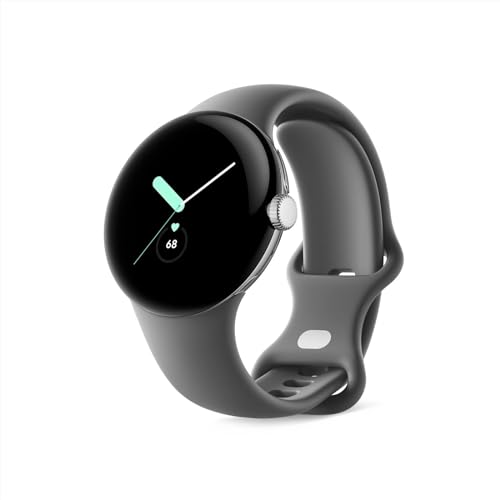
Google Pixel Watch 3 (45mm) Latest Model - Matte Black Aluminum Case - Obsidian Band - Wi-Fi (Renewed)

A short desk based shortlisting method
Buyers overwhelmed by parallel ranges can reduce the field in one sitting with a fixed sequence of questions applied without exceptions. Which phones will this watch pair with during its life, and does any health feature you care about stay reserved inside one phone family. Which chipset generation does it carry, and what update runway has its maker stated in writing. Does its battery cover your longest ordinary day, with your actual habits, rather than a stranger gentler routine described in a footnote.
Continue the sequence with connectivity and comfort. Will you leave your phone behind often enough, every single week, to justify a cellular plan and its endurance cost. Does the case size suit your wrist at the end of a long day, under a cuff, and through a night of sleep tracking. Can its strap system accept the materials your work and training demand, or does a proprietary fitting quietly narrow your choices to a single catalogue you have not yet browsed.
Finish with the ecosystem audit that protects the future. Open the application store listings for the five services you depend on most and confirm each maintains a watch version with recent signs of life. Read the health platform export options as if you were leaving it tomorrow, because one day you will. Check the spare charger situation for your travel pattern, and note the warranty route you would actually use. A model that survives all three rounds of questions has earned its place on a wrist, and a model eliminated early has saved its buyer a season of low grade dissatisfaction that no firmware update was ever going to cure.
That method also travels well beyond this category, because it replaces the seduction of a launch event with the arithmetic of ordinary days. Watches live or die by Tuesdays: by the commute, the meeting, the workout squeezed between obligations, and the charger reached for without thinking. A device chosen against that honest backdrop tends to disappear into a routine in the best possible way, present when needed, silent when not, and still earning its place long after the novelty of a new screen has faded into the background of a busy life.
One last habit separates satisfied long term owners from perpetual upgraders: reviewing the watch against your life once a year, on a fixed date, with the same questions used at purchase time. Has the phone changed, and with it any feature reservations. Has training grown, shrunk, or moved indoors. Has the battery begun ending ordinary days uncomfortably close to empty, suggesting either a settings review or honest succession planning. That annual half hour keeps the device aligned with the person wearing it, and it converts replacement from a reactive scramble after a failure into a calm decision made while the old watch still works, still holds trade value, and can still be passed along to someone whose needs it matches better than it now matches yours.
That same annual review is a natural moment to refresh the small things that keep a watch feeling new: a strap replaced before it frays, a fresh face chosen for the season, a tile order adjusted to a changed job, and a charger relocated to wherever mornings now begin. Devices rarely become unsatisfying all at once; they drift out of alignment with a life that kept moving, and small deliberate corrections, made once a year, restore the fit between the technology on a wrist and the person who relies on it daily.
When readers follow links from this guide and complete a purchase, this site may receive a small commission that helps fund its ongoing coverage, without changing the amount paid by the reader; our research weighs manufacturer specifications, platform documentation, and long term support policies, and that commercial relationship never promotes a model whose chipset, update runway, or pairing conditions we would hesitate to recommend to family.
Pick the Wear OS watch that fits your phone, your wrist, and your charging rhythm, and it will quietly become the most consulted screen you own.