Our Top Picks


What's inside
- What a PS4 Controller Phone Clip Actually Does
- Mechanical Clips and Clamps Versus a Magnetic MagSafe Mount
- 1. BRHE Phone Clip for PS4 Controller — Adjustable Mount, Bracket and Stand in One Name
- 2. Mcbazel Phone Mount Clip for PS4 Controller — A Straightforward DualShock 4 Holder
- 3. ADZ PS4 Controller Phone Mount — The Smart Clip That Names Remote Play Directly
- 4. NBCP Magnetic Phone Mount for PS4 DualShock 4 — The MagSafe Alternative
- 5. Nyko Smart Clip for PlayStation DualShock 4 — The Established Brand Option
- 6. Mobile Phone Gaming Clip — The Universal Multi-Controller Option, Not a Dedicated PS4 Clip
- Balance, Screen Angle, and Playing With a Large Phone
- Using a Clip With Remote Play and Cloud Gaming
- Cases, Ports, Buttons, and the DualShock 4 Light Bar
- How to Choose Among These Six
- Frequently Asked Questions
- Check prices on Amazon
- Conclusion: Pick the Attachment Style That Fits Your Life
As an Amazon Associate I earn from qualifying purchases. This post may contain affiliate links at no extra cost to you.
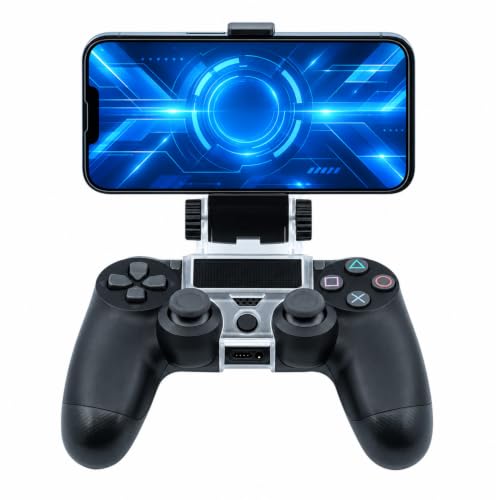
A phone clip for a PS4 controller solves a simple problem in a surprisingly elegant way. It attaches your smartphone above a DualShock 4 so the screen and the controller move as one unit, with your thumbs on the sticks and buttons and your eyes only a short glance away from the display. That arrangement is the foundation of PS4 Remote Play on a phone, and it is also a practical layout for cloud gaming services, retro-style mobile games that support a controller, and any Android or iPhone title where a gamepad feels more precise than a touchscreen. Without a clip, most people end up propping the phone against a mug, a book, or a monitor stand, and then reaching awkwardly whenever the phone slides. With a clip, the whole setup travels from sofa to desk to bed without a separate stand.
This guide compares six specific options that take different approaches to the same job. Five are presented as clips or mounts for the DualShock 4 itself, while one is a universal, multi-controller design that also lists PS4 support among several other platforms. Five rely on a mechanical gripping idea in the broad sense described by words such as clip, clamp, mount, bracket, and holder in their names. One, the NBCP model, is magnetic and MagSafe compatible, which changes how the phone attaches, how quickly it can be removed, and which phones it suits best. Those differences matter more than they might first appear, because a phone is not a light accessory. It carries most of the weight in this setup, it sits above your hands, and its size, case, and balance will shape how comfortable a session feels after twenty minutes, not just after twenty seconds.
We researched these six models by comparing what each listing title actually states about compatibility and mounting style, and by placing that information in the wider context of how phone clips are generally used with a DualShock 4. That distinction is important. Where a title says a clip is compatible with iPhone and Android, we say so. Where a title names Remote Play, MagSafe, or particular phone families such as Samsung Galaxy and Google Pixel, we highlight that. We do not assign dimensions, weight limits, materials, or adjustment ranges to a model unless that information is in its title, because small accessories are often sold under similar names and guessing would mislead you. Instead, the buying advice in this guide focuses on questions you can check for yourself: your phone system, your case, the controllers you own, and the way you plan to play.
What a PS4 Controller Phone Clip Actually Does
At its most basic, a controller phone clip has two jobs. It must hold on to the controller without interfering with normal play, and it must hold the phone where you can see the screen clearly while your hands stay in their natural grip. Everything else — how it opens, how it balances, and how quickly you can remove the phone to answer a message — follows from those two jobs.
The DualShock 4 makes this an interesting challenge. It is a familiar, widely owned controller with a distinctive shape, a touchpad on the front, and a light bar. A clip designed specifically for it can be shaped around that form, which is why dedicated DualShock 4 clips are the starting point for PS4 owners. A universal clip, by contrast, must work across controllers with different widths and contours, so it trades some tailored fit for flexibility.
Position matters as much as grip. Most players want the phone above the controller, angled back slightly toward their face, and centred so the weight does not pull to one side. If the screen sits too flat, reflections and neck angle become a problem. If it leans too far forward, the assembly can feel as though it wants to tip out of your hands. Hold your phone above your controller for a minute and you will feel why a small change in angle changes the strain on your wrists. A clip also changes what session is realistic: Remote Play in another room, a cloud game over home Wi-Fi, or a mobile game on a train all become more plausible when you no longer need a table or a separate stand.
Mechanical Clips and Clamps Versus a Magnetic MagSafe Mount
The biggest dividing line among these six is not brand. It is attachment method. Five models describe themselves with mechanical language — clip, clamp, mount, bracket, or holder — while the NBCP describes itself as a magnetic, MagSafe compatible mount. Those are fundamentally different experiences, and neither is automatically better.
How mechanical clips and clamps approach the job
A mechanical design generally grips in two places: one part secures the accessory to the controller, and another grips the edges of the phone. The exact mechanism varies across the wider market, so confirm details on the product page for the model you choose. The general appeal is clear. A physical grip does not depend on magnets in the phone, it can work across iPhone and Android as several titles here state, and it gives visual confirmation that the phone is held. For players who move around or hand the controller to someone else, that can be reassuring.
Mechanical grips bring trade-offs too. Anything that grips a phone’s edges must coexist with a case, side buttons, and sometimes a charging cable. A thick case can change how a grip sits, and a grip over a volume or power button can be annoying. Attaching and removing the phone usually takes two hands and a few seconds longer than a magnetic snap. None of that disqualifies a clamp; it simply means you should picture your own phone, in its own case, when you compare designs.
How the magnetic approach differs
A magnetic mount aims for speed and simplicity. Instead of opening a grip, placing the phone, and closing it again, a MagSafe compatible design is intended to let a compatible iPhone align and attach magnetically. That makes short sessions more appealing, avoids edge pressure, and can sidestep some case-button conflicts — although a case that is not MagSafe compatible can weaken or block a magnetic connection in general, so check that point if you use one.
The limits are just as clear. The NBCP title frames the product around iPhone and MagSafe, not the broad iPhone-and-Android wording used by several mechanical models. Android owners should not assume the same experience. Magnetic holding strength in general also depends on alignment, case choice, and movement, so a magnetic mount suits a seated, relatively still session particularly well. In this guide we present the NBCP as a genuinely different option for the right iPhone user, not a replacement for every clamp.
If you are building a broader setup around the same controller, audio deserves the same practical thinking. A clip solves the screen, but a headset solves chat and late-night volume. Our related guide behind best 50 dollar gaming headsets can help you pair a phone-and-controller setup with sound that does not disturb the whole room.
1. BRHE Phone Clip for PS4 Controller — Adjustable Mount, Bracket and Stand in One Name
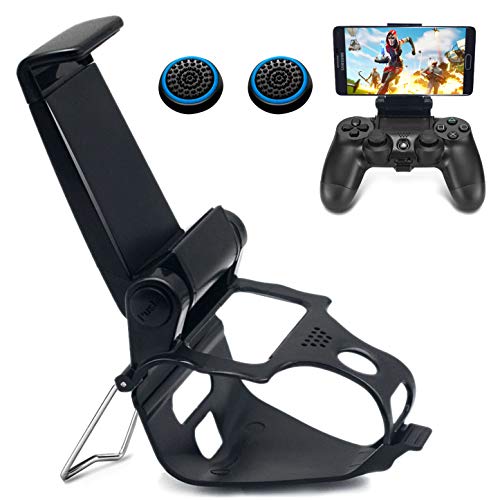
The BRHE Phone Clip for PS4 Controller describes itself as a mobile gaming mount, bracket, holder, adjustable stand, and clamp, compatible with iPhone, iOS, and Android. That long list of words is useful because it tells you the design intent in the title itself: this is a dedicated PS4 controller accessory that aims to be adjustable, and it is aimed at both major phone platforms rather than at one phone family.
For a PS4 owner who switches between an iPhone and an Android phone, or who shares a controller with someone who uses the other system, that dual compatibility is the headline. You do not need to buy into a phone-specific magnetic system to use it, at least according to the compatibility stated in its title. The word adjustable also matters in general terms. Adjustment is what lets a player change screen angle for a sofa, a desk chair, or a bed, and what helps different phone sizes sit in a more balanced position. We are not assigning a specific angle range or adjustment mechanism to this model, because its title does not state one. The practical check before buying is to look at the current product images and description and confirm how its adjustment works and whether that movement suits the way you sit.
- Stated compatibility: PS4 controller, iPhone and iOS, and Android.
- Stated style: Phone clip, mount, bracket, holder, adjustable stand, and clamp.
- Best suited to: Players who want a dedicated DualShock 4 clip with cross-platform phone wording.
- Check before buying: How the adjustment works, how it grips your phone in its case, and whether a charging cable can be used comfortably in your preferred position.
There are also everyday questions that apply to this model just as they apply to every mechanical clip in this guide. Will the phone grip overlap your phone’s side buttons? Will a thick or textured case sit securely? Does the controller-side attachment leave the touchpad easy to reach? Those answers depend on your phone and case combination, so treat the title-level compatibility as the starting point and the current product details as the final check. If those checks line up, the BRHE is a clear, purpose-built entry in this category: no multi-controller claims, no magnetic requirement, just a PS4 controller clip for iPhone and Android gaming.
2. Mcbazel Phone Mount Clip for PS4 Controller — A Straightforward DualShock 4 Holder
The Mcbazel Phone Mount Clip for PS4 Controller is described as a smart phone holder compatible with the PS4 DualShock 4 controller and with iPhone and Android. Like the BRHE, it keeps its promise narrow and clear. It is for the DualShock 4, it holds a smartphone, and its stated phone compatibility covers both iPhone and Android.
That narrowness can be a strength. Accessories that try to fit everything sometimes fit nothing perfectly, while a holder framed around one controller can focus on that controller’s shape. We cannot confirm materials, dimensions, or a specific gripping mechanism from the title alone, and we will not invent them. What we can say is that the Mcbazel belongs firmly in the dedicated DualShock 4 group in this guide, alongside the BRHE and the ADZ, and apart from both the magnetic NBCP and the universal multi-controller model covered later.
Mcbazel is a name many console accessory shoppers will recognise from browsing controller and gaming accessories in general, but brand familiarity should not replace the basic checks. Compare the current listing photographs with your own setup. Picture the phone you actually use, not a smaller phone you owned two years ago. Modern phones are tall and relatively heavy, and a holder that looked balanced with a compact phone can feel different with a large display model. Think about where you play most often, too. A holder used mainly at a desk, where you sit upright and still, places different demands on angle and balance than a holder used on a sofa, where you lean back and the screen needs to tilt toward you.
- Stated compatibility: PS4 DualShock 4 controller, iPhone, and Android smartphones.
- Stated style: Phone mount clip and smartphone holder.
- Best suited to: DualShock 4 owners who want a dedicated holder without a magnetic requirement or multi-controller compromise.
- Check before buying: Current fit guidance for your phone size and case, and how the holder positions the screen for your usual seating.
The Mcbazel also raises a useful comparison point for the whole category. When two dedicated clips both state iPhone and Android compatibility, the decision usually comes down to details that only the current product pages can confirm: the shape of the grip, the way the accessory folds or stores, the angle movement on offer, and how owners with phones similar to yours describe the fit. Use the titles to build your shortlist, then use those current details to choose between shortlisted models. On title evidence alone, the Mcbazel earns its place here as a clean, single-controller option for players who know the DualShock 4 is the controller they will keep using.
Sound is worth a thought alongside a holder like this, especially for cloud games with voice chat. If you are comparing options beyond entry-level audio, the selection covered in best 7 1 gaming headsets sits at the more immersive end of the same desk-and-sofa setup conversation.
3. ADZ PS4 Controller Phone Mount — The Smart Clip That Names Remote Play Directly
The ADZ PS4 Controller Phone Mount calls itself a Smart Clip for the DualShock 4 controller, compatible with iPhone, Android, and PS4 Remote Play. That final phrase sets it apart in this group. Other models in this guide are obviously relevant to Remote Play because they hold a phone over a PS4 controller, but the ADZ title says Remote Play out loud, which signals the use case its makers most want you to picture.
Remote Play changes the value of a clip more than almost any other feature. Streaming your PS4 to a phone means the phone becomes your television for that session. If the phone is balanced on a table, you are tied to that table. If the phone is clipped to the controller, you can play in another room, in a garden chair, or in bed while someone else uses the main screen. The controller and display move together, and the experience feels much closer to a handheld console. A clip aimed at that scenario does not need to do anything exotic. It needs to hold the phone steadily, keep the screen at a readable angle, and get out of the way of the game.
The ADZ title also confirms the two phone systems most buyers need: iPhone and Android. That matters because Remote Play itself is used across both platforms, and a household may not share one phone system. As with the other mechanical models here, confirm the current listing for fit with your specific phone and case, and check how the clip attaches around the controller if you use any other controller accessory at the same time.
- Stated compatibility: DualShock 4 controller, iPhone, Android, and PS4 Remote Play.
- Stated style: Phone mount and Smart Clip.
- Best suited to: Players whose main reason for buying is Remote Play away from the television.
- Check before buying: Fit for your phone and case, and whether your home network gives you a stable Remote Play session in the room where you plan to play.
4. NBCP Magnetic Phone Mount for PS4 DualShock 4 — The MagSafe Alternative
The NBCP Magnetic Phone Mount for the PS4 DualShock 4 Controller is the outlier in this guide, and deliberately so. It is described as a controller phone holder and a MagSafe compatible mobile gaming clip for iPhone. Where the other dedicated models grip, this one attaches magnetically. That single difference changes who should buy it, how setup feels, and what can go wrong if you choose it for the wrong phone.
Start with the appeal. A magnetic connection is fast. There is no grip to open, no edges to align, and no pressure on the sides of the phone. For an iPhone user with MagSafe compatibility, attaching the phone can become a one-motion habit, and removing it is just as simple. Short sessions benefit most from that speed. If you often play for fifteen minutes while waiting for dinner, or you frequently pause to use the phone for something else, a magnetic mount removes the small friction that can make a mechanical clip feel like a chore. It can also be a neat option if you dislike the look of a clamp framing your screen.
Now consider the boundaries, because they are real. The title centres on iPhone and MagSafe. It does not make the broad Android claim that several other titles in this guide make. If your phone is Android, if your iPhone setup does not use MagSafe, or if your favourite case is not MagSafe compatible, this is probably not your model, however elegant the idea sounds. Magnetic alignment also matters during play. A seated player on a sofa is a very different case from a player who moves the controller energetically or plays lying down with the controller tilted. In general, magnetic accessories reward a calm, seated style and a compatible case, and they punish assumptions. Check the current listing carefully for exactly which iPhone models and case types it supports.
- Stated compatibility: PS4 DualShock 4 controller and iPhone, with MagSafe compatibility.
- Stated style: Magnetic phone mount, controller phone holder, and mobile gaming clip.
- Best suited to: MagSafe iPhone users who value fast attach and release for short, seated sessions.
- Check before buying: MagSafe compatibility of both your phone and your case, and whether your playing style keeps the controller relatively steady.
5. Nyko Smart Clip for PlayStation DualShock 4 — The Established Brand Option
The Nyko Smart Clip is described as a PlayStation DualShock 4 controller clip-on mount for Android phones, all Samsung Galaxy phones, and any Google Pixel. Two things stand out in that title. The first is the name Nyko, a long-established brand in console accessories. The second is the phone framing, which is Android-centred and unusually specific: it names Samsung Galaxy phones and Google Pixel phones rather than making a general iPhone claim.
That specificity should guide who considers it. If you play with an Android phone, and especially if that phone is a Samsung Galaxy or a Google Pixel, the Nyko title speaks directly to you. If you use an iPhone, this title does not state iPhone compatibility, so do not assume it. That may sound like a limitation, and for a mixed household it is, but for an Android-only player it can be reassuring to see their phone families named rather than covered by a vague promise.
- Stated compatibility: PlayStation DualShock 4 controller, Android phones, Samsung Galaxy phones, and Google Pixel phones.
- Stated style: Smart Clip and clip-on mount.
- Best suited to: Android players, particularly Galaxy and Pixel owners, who prefer an established accessories brand.
- Check before buying: The exact current version and fit guidance, especially if your Galaxy or Pixel is a large model in a thick case.
If your Android setup doubles as a PC gaming station when the phone goes back in your pocket, the headsets discussed in best affordable gaming headsets pc are a relevant next step for the same budget-conscious, multi-device way of playing.
6. Mobile Phone Gaming Clip — The Universal Multi-Controller Option, Not a Dedicated PS4 Clip
The final model in this guide needs the clearest label of all. This Mobile Phone Gaming Clip is described as a controller phone mount support holder clamp for PS4, Xbox Series, Xbox One, Samsung Galaxy S8, iOS, and Android. In other words, it is a universal, multi-controller design. It is not specialised for the DualShock 4 in the way the BRHE, Mcbazel, ADZ, NBCP, and Nyko models are presented. We include it because that universality is a genuine benefit for the right household, but we present it as a different kind of choice, not as a sixth dedicated PS4 clip.
The benefit is obvious. If you own a DualShock 4 and an Xbox controller, or if different people in your home game on different systems, one universal holder that lists support across those controllers can be more useful than buying a separate dedicated clip for each pad. It can also suit a player who expects to change controllers soon and does not want an accessory tied to a single controller shape. The title’s phone wording is broad as well, covering iOS and Android and naming the Samsung Galaxy S8 as an example from its era.
The trade-off follows directly from the benefit. A holder that must accommodate different controllers cannot be shaped as exclusively around the DualShock 4 as a dedicated model can. Fit, balance, and the position of the phone may involve more compromise, and you should read the current listing with that in mind. Check how it is stated to attach to each controller you own, not just the PS4 controller. Check phone fit for your current phone rather than relying on an older named model in the title. A universal product lives or dies by the range it truly covers in practice, and only current details can confirm that range.
- Stated compatibility: PS4, Xbox Series, and Xbox One controllers, with iOS and Android phones and the Samsung Galaxy S8 named in the title.
- Stated style: Mobile phone gaming clip, controller phone mount, support holder, and clamp.
- Best suited to: Multi-controller households that value one flexible holder over a DualShock 4-specific fit.
- Check before buying: Current attachment and phone-fit guidance for every controller and phone you plan to use with it.
Balance, Screen Angle, and Playing With a Large Phone
Whatever clip you choose, physics will have its say. A modern smartphone is a dense slab of glass and battery, and mounting it above a controller moves the combined centre of gravity up and forward. The larger the phone, the more your wrists notice. This is general guidance for the category, not a claim about any single model’s capacity, and your first session with any clip should be over a sofa or bed rather than a hard floor.
Angle is your main tool for comfort. A screen tilted slightly toward your face lets you keep your wrists neutral and your neck at a kinder angle. A screen too upright forces you to raise the controller; one that reclines too far can feel as though it is pulling the controller toward you. Small adjustments matter, which is why adjustable wording in a title, where present, is worth noting, and why you should confirm the adjustment method on the current listing. Let the controller rest in your fingers rather than gripping tightly to compensate, take breaks, and remember that a rugged case adds mass exactly where the clip can least use it. Before each session, check over a soft surface that the phone is seated as intended, and avoid walking around while playing with it mounted.
Using a Clip With Remote Play and Cloud Gaming
Remote Play is the classic use case, and the ADZ title names it directly, but cloud gaming has widened the appeal of every model here. In both cases the game is rendered elsewhere — on your PS4 or on a remote server — and streamed to the phone, while your inputs travel back. The clip holds the display where your hands already are; your network does the rest.
For a good streamed session, sit within reasonable range of your router where possible, prefer stable home Wi-Fi, and keep the phone charged or plan a charging break, because streaming and a bright screen draw power quickly. Whether a charging cable can stay connected comfortably depends on the phone’s port position, the clip’s grip position, and the cable itself, so check that combination for your chosen model rather than assuming it. Latency sensitivity also varies by game: story adventures, turn-based games, and relaxed driving can feel excellent streamed to a clipped phone, while highly competitive, reaction-critical play is less forgiving of any network delay, no matter how good the mount is.
Players building a complete portable setup often think about audio last, which is a mistake for streamed games with dialogue and directional cues. If higher-end sound is part of your plan, the models explored in best audiophile gaming headsets show what the top of that category aims for, even if you ultimately choose something simpler for phone play.
Cases, Ports, Buttons, and the DualShock 4 Light Bar
A phone case is the most common reason a clip that should fit does not feel right. Cases change thickness, edge shape, and grip texture and, for magnetic mounts, the connection between phone and mount. A slim case may sit in a mechanical grip almost like a bare phone; a thick rugged or wallet case may sit shallower, shift the balance, or keep a grip from closing as intended. That does not mean you must remove your case to play, but it does mean your case is part of the decision. Look specifically for case guidance on the current listing.
Side buttons deserve the same check. A grip that lands on a volume or power button can change volume mid-game or leave the phone resting on a button rather than a flat edge. On the phone side, think about the charging port; on the controller side, think about access to the touchpad, sticks, buttons, charging port, and visibility of the light bar. We are not assigning port or light-bar clearance claims to individual models whose titles do not state them. Before a long session, attach everything and confirm you can reach the controls you use most and charge what needs charging. Five minutes of checking at a desk beats discovering a blocked port halfway through a game.
How to Choose Among These Six
Start with your phone system and case
If you use a MagSafe iPhone with a MagSafe compatible case and love fast setup, start with the NBCP. If you use Android, look first at the dedicated models that state Android compatibility — the BRHE, the Mcbazel, and the ADZ — and at the Nyko if your phone is a Samsung Galaxy or Google Pixel. If your household mixes iPhone and Android, models whose titles state both systems are the clearest starting point. If your case is thick or non-standard, let case fit, confirmed on the current listing, overrule every other preference.
Then decide dedicated versus universal
If the DualShock 4 is your only controller for this kind of play, a dedicated model is the natural choice. If you regularly switch between a DualShock 4 and Xbox controllers, the universal Mobile Phone Gaming Clip earns consideration despite its compromises. Be honest about how often you truly switch: flexibility you never use is not a benefit, and specialisation you use daily usually is.
Match the clip to your main use case
For Remote Play first and foremost, the ADZ frames itself directly around that scenario. For an adjustable design, the BRHE title emphasises adjustment. For a straightforward holder, the Mcbazel keeps its promise simple. For brand familiarity on Android, the Nyko stands out. For speed with a compatible iPhone, the NBCP is in a class of its own here. For multi-controller homes, the universal model is the only breadth-first option. None is a universal winner; each answers a slightly different question.
- Does my chosen clip’s title actually state my phone system — iPhone, Android, Galaxy, Pixel, or MagSafe?
- Will I keep my case on, and does the current listing give case guidance that covers it?
- Do I only need DualShock 4 support, or do I genuinely need Xbox support as well?
- Where will I play most — desk, sofa, bed, or travel — and does that favour a physical grip or magnetic attach-and-release?
- Is my home Wi-Fi strong in the room where I plan to use Remote Play or cloud gaming?
Frequently Asked Questions
Do I need a clip to use PS4 Remote Play on my phone?
No. Remote Play can work with on-screen controls or a phone propped up separately. A clip simply makes it much more comfortable by uniting screen and controller, so hands and eyes stay in one place.
Will any of these clips work with a PS5 controller?
Do not assume so. Every dedicated model here is framed around the PS4 DualShock 4, and the universal model lists PS4 and Xbox controllers, not the PS5 controller. Controller shapes differ, so check stated compatibility exactly.
Is a magnetic mount secure enough?
Its hold depends on correct MagSafe alignment and a compatible case, and it suits seated, relatively steady play. If you are unsure about compatibility, choose a mechanical model whose title states your phone system, or confirm the details on the current NBCP listing first.
Can I play with my phone case on?
Often, yes, but it depends on the case and clip. Slim cases are easiest for mechanical grips and, if MagSafe compatible, for a magnetic connection. Thick, rugged, wallet, or textured cases need a specific check against the current listing. Never force a grip closed if the phone does not sit properly.
Which option is best for a large phone?
No title here states size or weight limits, so we cannot declare a winner for large phones. Prioritise a model whose current listing explicitly covers your phone’s size, pay attention to balance and angle adjustment, and start with short sessions over a soft surface.
Why include a universal clip in a PS4 guide?
Because some readers do not live in a single-controller household. The universal model lists PS4 support, so it belongs in the conversation, but it is a multi-controller compromise rather than a dedicated DualShock 4 design.
Check prices on Amazon
Live listings for the shortlist in this guide are pulled from Amazon below, so prices and availability are always current at the moment you look.

Conclusion: Pick the Attachment Style That Fits Your Life
A phone clip is a small purchase that can change where and how often you play. The best choice among these six starts with honesty about your phone, your controllers, and your habits. MagSafe iPhone users who play in short, seated bursts should look closely at the magnetic NBCP. Android users, especially Samsung Galaxy and Google Pixel owners, should give the Nyko serious attention alongside the BRHE, Mcbazel, and ADZ models that state Android compatibility. Remote Play devotees will notice that the ADZ names their use case directly, players who want adjustment emphasised will notice the BRHE, and players who want the simplest dedicated holder story will notice the Mcbazel. Households split between PS4 and Xbox should consider the universal clip for exactly what it is — flexible first, specialised second.
Whichever model you choose, do the unglamorous checks before your first long session: confirm case fit, button clearance, charging access, and screen angle, start over a soft surface, and make sure your Wi-Fi can support the streamed game you have in mind. Get those right, and a DualShock 4 with a phone clipped above it becomes one of the most flexible setups you can build from hardware you may already own — no new console, no separate handheld, just your controller, your phone, and a well-chosen clip holding them together.
Affiliate disclosure: This article contains affiliate links to products on Amazon. As an Amazon Associate we earn from qualifying purchases, at no additional cost to you. Prices and stock availability on Amazon can change at any time and may differ from the moment you read this guide, so please check the current listing before you buy. Our research for this guide compared the compatibility and mounting styles stated for each product and considered how these accessories are generally used; inclusion in this guide is not a guarantee that a particular clip will fit every phone, case, or controller variation.