What's inside
- Key Takeaways
- Quick Picks
- How Did We Judge Scanners for Collection Work?
- Capture Size First: What Do A3 and A2 Actually Mean for a Collection?
- Why Does Curve-Flattening Matter More Than Raw Megapixels?
- What Does the OCR Layer Turn a Photograph Into?
- And the Objects Themselves? The Second Route, in Prose
- Why Does the Software Half Decide Whether the Project Finishes?
- The Six Overhead Scanners, Reviewed for Collection Work
- How Should a Museum Actually Run an Inventory Capture Session?
- What Does Safe Handling Look Like at the Scanning Desk?
- How Do the Six Scanners Divide the Work?
- What Goes Wrong in Museum Digitisation Projects?
- Final Recommendation
- Frequently Asked Questions
- Related Guides
As an Amazon Associate I earn from qualifying purchases. This post may contain affiliate links at no extra cost to you.
gizmoverdict.com is reader-supported. When you buy through links on our site, we may earn an affiliate commission.
Where to buy: the six overhead scanners below are sold through Amazon, and the listing page is where you verify the software bundle and operating-system support on the day you order, because scanner software revisions change faster than scanner hardware does.
Ask a registrar what the best cameras to inventory museums are and the answer surprises people who arrived expecting tripods and lenses: the workhorse of collection inventory is not a camera you hold but one that looks down. Bound volumes, accession ledgers, donor files, maps, textiles laid flat, the paper trail of every object in the building — that material is captured from above, page after page, by overhead book scanners and document cameras whose entire design serves flat things that must not be forced flat. This guide therefore leads with the overhead route, judged on the three figures their listings actually state: capture size, megapixels and the curve-flattening technology that lets a bound book keep its spine while surrendering its text.
The second route deserves its sentence early so nobody reads the shortlist wrong. Three-dimensional objects — ceramics, instruments, costume on a stand — still belong to interchangeable-lens cameras on tripods, with controlled lighting and a colour target in the first frame; that is object photography, a different discipline with different equipment, and it is discussed in this guide’s prose only, because none of the verified listings in this pool pretends to do it. What follows is the flat-capture shortlist: six overhead machines that turn a museum’s paper memory into searchable, backed-up, shareable digital records.
Key Takeaways
- Every pick here captures from above. The class divides by capture size first: A3 machines for ledgers and standard volumes, A2/A3 machines for maps, posters and oversize bound material.
- Megapixels range from a stated 24MP on three picks to the CZUR ET MAX’s stated 38MP and the VIISAN S48 Duo’s dual 48MP arrangement — figures that matter most when a page must be cropped to a single inscription.
- Curve-flattening is the technology that defines the class: laser-guided on the ET MAX, third-generation auto-flatten on the ET24 Pro, AI-powered on the Aura Pro, and named on both VIISAN models and the Shine Ultra Pro.
- OCR breadth is stated in languages, not promises — 180+ languages on both CZUR ET models, multi-language support on the VIISAN Large Format, and OCR with text-to-speech on the S48 Duo.
- Portability is the quiet divide: the Aura Pro folds, the Shine Ultra Pro is built portable with adjustable height, and the rest are desk fixtures for a dedicated digitisation corner.
Quick Picks
| Pick | Badge | Why it made the cut |
|---|---|---|
| CZUR ET MAX (38MP) | Flagship overhead | A stated 38MP sensor, laser curve-flattening and A3 capture with HDMI output for a museum’s main digitisation desk. |
| CZUR ET24 Pro (24MP) | Proven workhorse | Third-generation auto-flatten and deskew at 24MP, the balanced specification for a steady stream of bound volumes. |
| CZUR Aura Pro | Folds away | A foldable, portable scanner capturing A3 and A4, for collections whose digitisation desk is also somebody’s office. |
| VIISAN S48 Duo (A2/A3) | Oversize specialist | A2/A3 capture from a dual 48MP arrangement at a stated 600 DPI, built for maps, posters and archiving programmes. |
| VIISAN Large Format (26MP) | Big pages, careful hands | A2/A3 capture at 26MP with auto-flatten and fingerprint removal, aimed at large-format material that arrives handled and fragile. |
| CZUR Shine Ultra Pro (24MP) | Travelling scanner | A portable 24MP document camera with adjustable height and a stated maximum of 440 DPI, for loans, outreach and off-site stores. |
How Did We Judge Scanners for Collection Work?
By the workflow they join, not by the photograph on the box. A museum inventory session is a production line with conservation rules: the object arrives, is identified against the accession register, is captured — page, spread or sheet — and leaves unharmed, while the file it leaves behind carries the accession number as its name and enters a catalogue that will outlive everyone in the room. Equipment earns its place in that line by removing friction without adding risk, so the first test applied to every listing here was capture size against the real formats of museum paper: A4 files and letters, A3 ledgers and bound volumes, A2 maps and posters that defeat smaller machines entirely.
The second test was what happens to a bound page. Forcing a volume flat for a conventional scanner is a conservation injury, so the overhead class exists — and within it, the flattening technology is the signature feature. A scanner that photographs a curved spread and mathematically flattens it, corrects the deskew of a page laid down in haste and hands over readable text has solved the class’s central problem. All six listings name some form of that technology, and the reviews below weigh how each states it: laser-measured curves, third-generation algorithms, AI assistance, or the plainer auto-flatten claim.
The third test was the text layer. An inventory photograph you cannot search is a picture of a page; an OCR-processed capture is a record. Language breadth matters to real collections, whose paperwork arrives in the languages of donors, makers and former empires — hence the weight given here to the stated 180-plus languages on the CZUR ET models and the multi-language claims elsewhere. Resolution came last in our ordering, deliberately: megapixels decide how far a capture can be cropped and still read, which matters enormously for inscriptions and seals, but a smaller file of the right size, flattened properly, beats a giant curved one every working day.
Capture Size First: What Do A3 and A2 Actually Mean for a Collection?
Paper sizes are the least glamorous specification in this guide and the one that eliminates the most purchases. A4 is the letter and the file page. A3 — twice A4 — is the accession ledger, the bound minute book, the standard art volume opened to a spread, the framed print’s documentation sheet. A2 — twice A3 again — is the map drawer, the exhibition poster, the architect’s plan of the building itself, the broadsheet newspaper a local-history collection holds by the hundred. A scanner captures a spread in one pass only if its stated capture size covers the open object, and no software update enlarges a capture bed after purchase.
So the honest first question of this guide is not which scanner is best but which drawer of the collection is largest. A museum whose bound holdings stop at standard volumes lives entirely inside A3, and four of these six picks serve it. A museum with maps, posters or oversize ledgers must start at the A2/A3 pair — the two VIISAN models — because everything else in the list asks those objects to be captured in tiles and stitched, a workflow that multiplies handling of exactly the material that can least afford it.
There is a subtler size question underneath: thickness. Overhead scanners photograph from a stand, so a deep-bound volume’s gutter sits closer to the lens than its fore-edge, and the flattening software earns its keep correcting that geometry. Capture size tells you the page fits; flattening tells you the words at the gutter survive. Buy for both, in that order, and measure your largest regularly handled object — not the largest you own, but the largest you will scan this year — before the shortlist below is allowed to tempt you.
Why Does Curve-Flattening Matter More Than Raw Megapixels?
Because a museum page is rarely flat and must never be made flat by force. A bound volume opened on a cradle presents two curved surfaces meeting at a gutter, and a photograph of that spread, uncorrected, carries bent lines, shaded valleys near the spine and characters that swell and shrink across the page — text a human can read with effort and OCR reads as gibberish. Curve-flattening is the computational answer: the scanner models the page’s three-dimensional shape, then re-projects the image as if the sheet had been flat all along. The listings here state the idea in several dialects — laser curve-flattening on the ET MAX, which measures the curve with light; third-generation auto-flatten and deskew on the ET24 Pro; AI-powered flattening on the Aura Pro; auto-flatten named plainly on both VIISANs and the Shine Ultra Pro.
The reason to rank it above megapixels is that resolution multiplies whatever geometry it is given. Thirty-eight megapixels of a curved page is a very detailed curved page. Twenty-four megapixels of a properly flattened one is a document — searchable, printable, citable. When a capture will be cropped hard, to isolate a maker’s mark or a marginal note, resolution takes its revenge and the bigger sensors earn their place; the ET MAX and the dual-camera S48 Duo exist for those moments. But the everyday currency of inventory work is the whole page, legible and flat, and that is flattening’s gift rather than resolution’s.
Deskew is the quiet sibling in the same family. Pages are laid down by human hands at human speed, and a two-degree rotation that a reader forgives will defeat a catalogue’s text search just as surely as curvature does. Listings that pair flattening with deskew — the ET24 Pro, the Aura Pro and the Shine Ultra Pro among them — are describing the full correction a production line needs, and their pairing is worth more in a working week than a megapixel headline. Judge the class by corrected pages per hour that a cataloguer accepts without complaint; that number, measured in your own first session, is the only benchmark that will ever matter to your collection.
What Does the OCR Layer Turn a Photograph Into?
A record. Without optical character recognition, a scanned ledger page is an image that a future researcher must open and read with eyes; with it, the page’s words join the catalogue’s searchable text, and the question “which donor letters mention the harbour?” becomes a query instead of a sabbatical. For inventory specifically, OCR is what lets a capture verify itself — the accession number read from the object’s own label, checked against the register, flagged when the two disagree. That self-checking quality is why the language counts in these titles deserve attention rather than eye-rolling: 180-plus stated languages on the ET MAX and ET24 Pro is a claim about the breadth of real collections, whose paperwork refuses to stay in one tongue.
The S48 Duo adds a feature none of the others state: text-to-speech alongside its OCR. In an archiving context that pairing serves accessibility — collection text that can be listened to by researchers and visitors who cannot read a screen comfortably — and it hints at the educational brief in the same title, which names distance education beside archiving. The VIISAN Large Format answers a different textual problem with its stated fingerprint removal: pages that arrive bearing the literal marks of their handling can be cleaned digitally, so the record shows the document rather than its last reader’s afternoon.
There is a further, quieter dividend once the text layer exists at scale: the collection starts answering questions nobody thought to ask it. Donor names recur across decades of correspondence; a maker’s workshop appears in invoices, labels and a single photograph’s caption; the building’s own history assembles itself out of minute books. None of that research value is available from images alone, however beautiful, because nobody can read ten thousand pages on the chance of a connection. Searchable text is what turns an inventory from a compliance exercise — objects counted, boxes ticked — into the working memory of the institution, and it is the strongest argument for choosing a scanner by its OCR credentials as seriously as by its optics.
None of this makes OCR infallible, and a museum workflow should budget for its error rate honestly. Handwriting defeats most engines, faded ink argues with all of them, and the correct professional posture is to treat the text layer as a finding aid layered over the image, never as a replacement for it. The image is the evidence; the OCR is the index. Scanners that produce both in one pass — which is the entire premise of this shortlist — halve the labour of building a searchable inventory, and the half they save is the half that determines whether the project finishes.
And the Objects Themselves? The Second Route, in Prose
Everything above serves the flat record, and the premise stated at the top of this guide now deserves its full paragraph: the three-dimensional collection — the pot, the microscope, the wedding dress, the outboard motor — is photographed, not scanned, and the equipment for it is an interchangeable-lens camera on a tripod in front of a background, lit by two controlled lights, with a colour reference card and a scale bar in the establishing frame. No listing in this pool claims that job, so no pick below pretends to it; the route is described here in prose because a museum planning its inventory deserves the whole map, including the half that arrives without product links.
The workflow differs in every particular. Where the overhead line prizes pace, object photography prizes repeatability: the same camera position, the same lighting geometry and the same background, so that a hundred objects photographed across a month read as one photographer’s single session and condition changes between years can be spotted by eye. Each object earns multiple frames — front, back, base, maker’s mark, damage — where a ledger page earns one spread. The skills are a photographer’s, not an operator’s, which is why many museums staff the two routes with different people and schedule them in different rooms.
What the routes share is the discipline underneath: accession numbers as filenames, a capture log, backups before the day ends, and a catalogue waiting to receive the files. A museum that builds those habits on the overhead line will find them transfer intact when the object-photography programme begins — and a museum deciding where to spend first should usually start with the flat record, because it is larger, more fragile in aggregate, and the part of the memory that a flood, a fire or a mis-shelved decade can erase without anyone noticing until the knowledge is gone.
Why Does the Software Half Decide Whether the Project Finishes?
An overhead scanner is a camera married to a software pipeline, and in a long inventory project the pipeline is the partner you live with. The hardware questions — capture size, sensor, flattening — are settled at purchase and rarely thought of again. The software questions arrive every day: how pages are batched, how the accession number is attached, which file formats the captures leave in, whether the OCR text layer travels with the image or lives in a sidecar file, and how the whole output walks into the museum’s catalogue system without a weekend of manual renaming standing between them.
This is why the operating-system lines in these titles carry more weight than they appear to. A scanner whose software supports the institution’s actual computers — Windows in the office, a Mac in the education room, Linux on the server the volunteers maintain — is a scanner that can be deployed where the work is; one that supports only part of the fleet becomes a reason the project queues at a single desk. The CZUR ET models’ three-system support and the more common two-system support elsewhere in the list are therefore workflow facts, not box decoration, and they should be checked against the museum’s real machines before any other specification is debated.
File discipline deserves the same advance attention. Decide, before the first session, the master format the archive will keep, the derivative the catalogue will display, and the folder grammar both will live in — then set the scanner’s software to produce that shape by default, so correctness is the path of least resistance for a tired operator at the end of a long afternoon. Projects rarely fail at the scanning; they fail at the ten-thousandth file that nobody can find, name or open. The machines in this guide all capture competently. The software habits you build around the chosen one decide whether competence becomes a collection memory or a hard drive of good intentions.
The Six Overhead Scanners, Reviewed for Collection Work

CZUR ET MAX (38MP) — Flagship overhead
The ET MAX is the machine a museum buys when the digitisation desk becomes permanent. Its title leads with the strongest resolution in this guide — a stated 38MP document camera — and pairs it with the most explicit flattening claim: laser curve-flattening, in which the curve of an open spread is measured rather than guessed, feeding the correction that decides whether gutter text survives. Capture reaches A3, OCR spans a stated 180-plus languages, output includes HDMI alongside a high-speed USB connection, and the operating-system list runs Windows, macOS and Linux — a breadth that matters in institutions whose IT is a patchwork of eras.
The HDMI output deserves its paragraph, because it changes the social shape of the work. A scanner that can show its live view on a wall screen turns inventory into a teachable, auditable activity: a volunteer team watches the same spread the operator sees, a conservator can object before a fragile volume is repositioned, and a school group can watch a century-old ledger open without crowding the desk. Resolution, meanwhile, is the research reserve — 38MP is what lets a cataloguer crop to a single ex libris inscription or a pencilled shelfmark and still hand the archive a legible file. Its listing on Amazon carries the current software and accessory details for the model.
- Sensor stated: 38MP document camera
- Flattening stated: laser curve-flatten
- Capture stated: A3
- OCR stated: 180+ languages
- Connections stated: USB high speed, HDMI output
- Systems stated: Windows, macOS, Linux
Strengths
- The highest stated resolution here gives crops of inscriptions and seals room to stay legible.
- Laser-measured flattening attacks gutter distortion at its geometric source.
- HDMI output makes the capture view shareable for training, supervision and demonstration.
Trade-offs
- A3 is its ceiling — A2 maps and posters must go to the large-format picks instead.
- It is a desk fixture; nothing in the title suggests it travels between stores or sites.
- Its capability assumes a permanent workstation and computer to do it justice.
Best for: a museum establishing a main digitisation desk for bound volumes and document backlogs. Not suited for: oversize A2 material, which its stated A3 capture cannot take in a single pass. Confirm the ET MAX’s current bundle on Amazon before specifying the desk around it.
CZUR ET24 Pro (24MP) — Proven workhorse
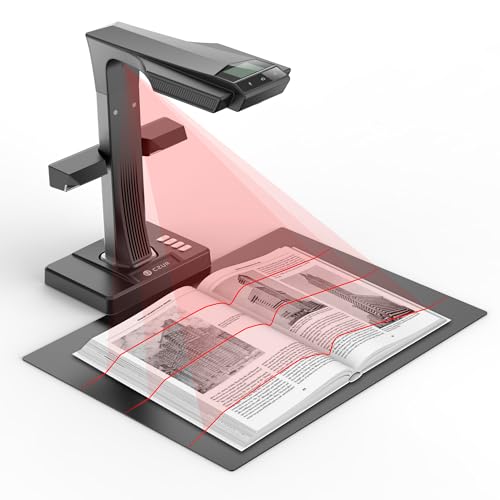
If the ET MAX is the flagship, the ET24 Pro is the fleet standard — the model whose specification reads like a summary of what the class learned across three generations. Its title’s signature phrase is “3rd Gen Auto-Flatten & Deskew Tech,” and the generational claim is the point: flattening is software-defined progress, and a third-generation algorithm has met more curved spines, more cockled paper and more hasty page placement than a first attempt ever will. Around that core sit a stated 24MP sensor, A3 capture, OCR in a stated 180-plus languages, HDMI support and the same three operating systems as its larger sibling.
Twenty-four megapixels is the considered middle of this guide — enough to crop a page region for a catalogue thumbnail or a condition detail, honest about not being a research-cropping instrument. For the great middle of museum paperwork — ledgers, files, bound minutes, the documentation folders that multiply in every store — the ET24 Pro’s balance is the rational purchase, and its deskew pairing means pages laid down at production speed come back square. Museums choosing between the two CZUR ET models are really choosing how often they expect to crop hard; the Amazon listing for the ET24 Pro sets out its present software revision and included accessories.
- Sensor stated: 24MP document camera
- Flattening stated: 3rd generation auto-flatten and deskew
- Capture stated: A3
- OCR stated: 180+ languages
- Connections stated: HDMI supported
- Systems stated: Windows, macOS, Linux
Strengths
- Third-generation flattening and deskew is the most mature correction claim in the guide.
- 24MP covers whole-page inventory and moderate cropping without file-size excess.
- Three-system support fits institutions with mixed and ageing computer fleets.
Trade-offs
- Hard cropping to small inscriptions will exhaust its resolution sooner than the 38MP flagship’s.
- A3 capture excludes the map drawer and poster store from single-pass work.
- Like its sibling, it is built for a fixed desk rather than a travelling kit.
Best for: the steady, high-volume middle of a collection — bound volumes and document files at A3 and below. Not suited for: a digitisation programme centred on oversize material, where its A3 ceiling decides against it on day one. Check the ET24 Pro listing on Amazon for the software version it currently ships with.

CZUR Aura Pro — Folds away
The Aura Pro’s title contains the two words that reorganise a small museum’s working week: foldable and portable. Most collections do not have a digitisation room; they have a corner of an office that is also the volunteer coordinator’s desk, the education team’s packing table and the place where the kettle lives. A scanner that folds down when the inventory session ends — and stands up again in moments when a new acquisition lands — fits that reality in a way fixed flagships cannot. Its stated capture covers A3 and A4, its auto-flatten and deskew are described as AI-powered, and its compatibility list runs to Windows and macOS.
Honesty about its title’s silences is required here, because the Aura Pro’s listing states neither a megapixel figure nor an OCR language count, and this guide will not lend it numbers from its siblings. What can be said from the title is the design intent: AI-assisted correction in a folding frame aimed at people whose scanning is episodic rather than industrial. For a small museum inventorying a room of ledgers across a winter of Tuesday afternoons, that intent matches the workload precisely — the machine disappears between sessions, which is a feature no specification table captures. The Aura Pro’s Amazon page is where its current capture resolution and software details should be confirmed before purchase.
- Capture stated: A3 and A4
- Flattening stated: auto-flatten and deskew, AI-powered
- Form stated: foldable and portable
- Systems stated: Windows and macOS
- Sensor resolution: not stated in the listing title — verify with the maker’s documentation
- OCR breadth: not stated in the listing title — verify with the maker’s documentation
Strengths
- A folding frame returns the desk to its other jobs between inventory sessions.
- AI-powered flattening and deskew keep correction quality in a portable body.
- A3 capture covers ledgers and spreads despite the travel-ready design.
Trade-offs
- Its title states no resolution figure, so cropping headroom cannot be judged from the listing.
- No Linux support is stated, narrowing its fit for some institutional IT setups.
- A portable frame invites gentler handling discipline than a bolted-down desk unit.
Best for: small museums and shared workspaces where the scanner must fold away between sessions. Not suited for: a high-throughput production line, where a folding portable is out of its intended duty. Look at the Aura Pro on Amazon to confirm the resolution and software facts its title leaves open.

VIISAN S48 Duo (A2/A3) — Oversize specialist
The S48 Duo exists for the objects the rest of this guide cannot swallow. Its title states capture at A2 and A3 — the map, the poster, the architect’s plan, the broadsheet — from a dual 48MP arrangement, at a stated 600 DPI, with OCR and text-to-speech, aimed at archiving and distance education. The dual-camera design is the architectural answer to a physical problem: covering a very large sheet evenly, in focus and in light, from a single viewpoint gets harder as the sheet grows, and two sensors divide the labour. For a museum whose backlog is a map drawer rather than a bookcase, this is the only conversation in the shortlist that starts at the right size.
The stated 600 DPI deserves translation, because it is the figure conservators and archivists actually budget in: resolution per inch across a very large original is what determines whether a captured survey mark, a printer’s imprint in a poster’s corner or the fine hatching of an engraved map survives digitisation. Paired with text-to-speech, the S48 Duo also speaks to the public side of a collection — large-format material is disproportionately display material, and captures that can be read aloud serve the visitors for whom the original is behind glass. VIISAN’s listing gives the current capture dimensions and software particulars, which large-format buyers should read to the last line.
- Capture stated: A2 and A3 large format
- Sensors stated: dual 48MP
- Resolution stated: 600 DPI
- Text tools stated: OCR and text-to-speech
- Aimed at: archiving and distance education, per the listing
- Flattening technology: not stated in the listing title — verify with the maker’s documentation
Strengths
- A2 capture takes maps and posters in one pass that A3 machines must tile or refuse.
- Dual 48MP sensors divide a very large sheet into manageable, even coverage.
- Text-to-speech extends captures toward accessible display and education use.
Trade-offs
- Its title names no flattening technology, so bound-volume curve correction is unconfirmed.
- Large-format hardware claims a large, permanent footprint on the desk or stand.
- For purely A4/A3 paperwork it is capacity bought beyond the collection’s need.
Best for: collections whose backlog is oversize — maps, plans, posters and broadsheets. Not suited for: a programme of bound volumes, where its title gives no flattening assurance for curved spines. Read the S48 Duo’s full capture specification on Amazon against your largest sheet before committing.

VIISAN Large Format (26MP) — Big pages, careful hands
The second VIISAN takes the same A2/A3 territory as its sibling and equips it for material in worse condition. Its title states a 26MP USB document camera with auto-flatten, multi-language OCR — and one feature no other listing here names: fingerprint removal technology. Anyone who has handled a much-consulted map or a working drawing knows what that phrase is for. Decades of fingers leave their evidence on exactly the sheets a museum most needs to capture, and a scanner that can suppress those marks digitally produces a record of the document rather than of its handling history.
Set beside the S48 Duo, the choice between the VIISANs is a choice of emphasis: dual 48MP sensors and a stated DPI figure with text-to-speech on one side; a single stated 26MP sensor, named auto-flatten and the fingerprint tool on the other. The auto-flatten point matters for large bound atlases and albums, the oversize material that is also curved material, and it makes this model the more plausible of the pair for a mixed large-format backlog. Its compatibility is stated for Windows and macOS. The listing on Amazon confirms the capture area measurements, which are the first thing to check against a specific atlas or plan chest.
- Capture stated: A2 and A3
- Sensor stated: 26MP USB document camera
- Flattening stated: auto-flatten
- Cleaning stated: fingerprint removal technology
- OCR stated: multi-language
- Systems stated: Windows and macOS
Strengths
- Fingerprint removal answers the real condition of much-handled large sheets.
- Named auto-flatten makes it the pair’s better candidate for bound atlases and albums.
- A2/A3 capture covers the oversize store in single passes.
Trade-offs
- 26MP across an A2 sheet leaves less cropping reserve than the dual-48MP sibling.
- No DPI figure is stated in the title, so fine-detail capture needs documentary confirmation.
- No Linux compatibility is stated for institutions standardised on it.
Best for: large-format material that arrives worn, handled and occasionally bound — atlases, albums, working plans. Not suited for: fine-detail research capture of huge sheets, where its sibling’s stated DPI and dual sensors argue louder. Verify the VIISAN Large Format’s capture area on Amazon with your largest object’s dimensions in hand.
CZUR Shine Ultra Pro (24MP) — Travelling scanner
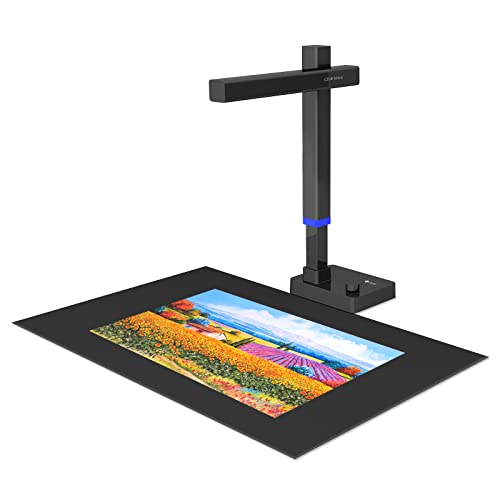
The Shine Ultra Pro is the itinerant of the group: a portable 24MP document scanner, built as a USB document camera with adjustable height, a stated maximum of 440 DPI, A3 capture and auto-flatten with deskew, for Windows and macOS. Adjustable height is the specification that reveals its working method — the camera rises or settles to frame the object in front of it, which makes it as comfortable over a store’s shelf of accession files as over a borrowed desk in a partner institution. Museum work is full of material that cannot come to the scanner: stores that cannot be emptied, loans documented in situ, outreach sessions in schools and village halls. This is the pick built to go to the objects.
Its 440 DPI stated maximum sits honestly below the S48 Duo’s 600, and the trade is the classic one — portability spends specification to buy presence. For inventory purposes, where the deliverable is a legible, searchable record tied to an accession number rather than a publication-grade facsimile, that exchange is usually correct; the finest scanner in the county is worth nothing to the store across town it never visits. The Shine Ultra Pro’s Amazon listing states its current folded dimensions and weight class, the two facts a travelling workflow should check first.
- Sensor stated: portable 24MP document scanner
- Resolution stated: maximum 440 DPI
- Capture stated: A3 large format
- Stand stated: adjustable height, USB document camera
- Flattening stated: auto-flatten and deskew
- Systems stated: Windows and macOS
Strengths
- Portability plus adjustable height takes inventory capture to stores and partner sites.
- A3 capture in a travelling frame covers ledgers and spreads away from base.
- Auto-flatten and deskew travel with it, so field captures stay catalogue-ready.
Trade-offs
- Its stated 440 DPI ceiling trails the desk-bound S48 Duo for fine-detail work.
- A3 is the limit — A2 material still needs a large-format machine at base.
- A portable stand depends on the surface it is given; wobbly tables tax its captures.
Best for: inventory work that travels — off-site stores, loans documented in place, outreach digitisation. Not suited for: a fixed, high-volume production desk, where a permanent flagship’s stability serves better. See the Shine Ultra Pro’s travel dimensions on Amazon before building the field kit around it.
How Should a Museum Actually Run an Inventory Capture Session?
Begin with the register, not the scanner. A session’s unit of work is a run of consecutive accession numbers, pulled in shelf order, because inventory is fundamentally an audit: object, record and shelf must agree, and the capture session is where disagreements surface. Work through the run at a pace the flattest member of the team can sustain — the scanner is never the bottleneck; handling is. Each object is opened once, captured once and closed once, and any object that cannot be opened safely is flagged for a conservator rather than coaxed, because no deadline in the history of digitisation has been worth a broken spine.
Naming is the discipline that saves the archive. Files should leave the scanner already carrying their accession numbers, typed or read from the object’s label, never as a camera’s sequential numbering awaiting a renaming evening that grows less likely with every folder. Capture the object’s label or number slip in the first frame of its set, and the set can re-identify itself forever, whatever happens to its filenames later. Back the session up before anyone goes home — the day’s captures exist in two places by close of work, or the day is not finished.
Staffing deserves a plan of its own, because inventory sessions are usually run by a mixture of staff and volunteers whose confidence varies more than their goodwill. Pair the new with the practised for the first sessions, keep a one-page handling sheet at the desk rather than a manual in a drawer, and rotate the tiring jobs — the lifting of atlases, the reading of faded shelfmarks — before fatigue starts making decisions. A scanner’s throughput figures assume a fresh operator; a project’s real pace is set by the fourth hour of the second week, and planning to that pace is the difference between a schedule the team trusts and one they quietly stop believing.
Quality control belongs inside the session, not after it. A second pair of eyes — or the same eyes, an hour later — sampling every twentieth capture for flatness, legibility and correct numbering catches the systematic errors: the deskew that drifted, the volume whose gutter shadow crept back, the shelfmark misread at 4 p.m. Errors caught inside the run cost a re-scan while the object is still on the desk. Errors caught next month cost a retrieval, a re-handle and a small piece of the team’s faith in the whole enterprise.
What Does Safe Handling Look Like at the Scanning Desk?
The overhead design already removes the worst handling sin of the flatbed era — the pressed spine — but a capture session still moves every object at least twice, and movement is where collections get hurt. The desk discipline is unglamorous and absolute: clean, dry hands or the gloves the material’s type demands, one object on the desk at a time, a clear landing zone either side of the scanner so nothing is ever balanced on a pile, and a strict rule that food, drink and pens live in another room. The scanner’s stand defines a stage; everything outside that stage is choreography, and choreography is what keeps a thousand-object run incident-free.
Bound volumes want a cradle or a support wedge that holds the book at the angle its spine can afford, which is rarely the full flat spread a catalogue photograph implies. Overhead capture tolerates that angle precisely because flattening is computational: the page can rest at a conservator’s angle and still be delivered square. Oversize sheets want the opposite ceremony — carried flat on a board by two people for anything beyond comfortable single-person span, never rolled tighter, never folded “just for a moment” to fit a doorway. The A2 picks in this guide will meet material whose journey to the desk is riskier than its capture, and the session plan should say so.
Finally, the desk needs an exit rule for the objects that surprise you: the volume whose spine cracks audibly at forty degrees, the photograph fused to its neighbour, the letter with a seal hanging by a thread. Those objects leave the line immediately, are logged as flagged, and wait for a conservator’s decision rather than an operator’s optimism. A digitisation programme earns its institution’s trust not by the volume it captures but by the absence of a damage story — and the absence is manufactured, session by session, by rules exactly this dull.
How Do the Six Scanners Divide the Work?
| Pick | Capture size | Stated resolution | Flattening as titled | Defining extra |
|---|---|---|---|---|
| CZUR ET MAX | A3 | 38MP | Laser curve-flatten | HDMI output |
| CZUR ET24 Pro | A3 | 24MP | 3rd-gen auto-flatten & deskew | 180+ language OCR |
| CZUR Aura Pro | A3 & A4 | Not stated in title | AI auto-flatten & deskew | Foldable, portable |
| VIISAN S48 Duo | A2/A3 | Dual 48MP, 600 DPI | Not stated in title | Text-to-speech |
| VIISAN Large Format | A2/A3 | 26MP | Auto-flatten | Fingerprint removal |
| CZUR Shine Ultra Pro | A3 | 24MP, max 440 DPI | Auto-flatten & deskew | Portable, adjustable height |
What Goes Wrong in Museum Digitisation Projects?
Buying the scanner before measuring the shelves is the preliminary error that enables several later ones. Capture sizes, stand heights and desk footprints are all physical facts that should meet the collection’s physical facts — the deepest ledger, the widest atlas, the store’s actual doorway — before money moves, because a machine that cannot meet the material turns every session into an improvisation, and improvisation around fragile objects is how both objects and schedules get damaged.
Starting with the treasures is the beloved error. A project that opens with the collection’s most fragile, most valuable volumes learns its workflow on the material least able to forgive learning, and burns its careful handling budget before the routine thousands are touched. Start with the sturdy middle of the backlog, build the pace and the naming discipline there, and let the treasures arrive when the team is already good.
Scanning without a destination is the quieter failure. Captures that are not bound for a catalogue — with accession numbers as names, metadata agreed in advance and a backup that somebody owns — accumulate as beautiful, useless folders. The scanner is the cheap half of digitisation; the record-keeping around it is the project. Decide the destination first, and let it dictate the session’s habits from day one.
The third mistake is treating three-dimensional objects as an afterthought this equipment can absorb. It cannot, and the premise of this guide bears repeating at the point of purchase: overhead scanners inventory the flat record of the collection superbly, while the objects themselves still need a camera, a tripod, lights and a photographer’s patience. Budget the two routes separately, and neither will be asked to fail at the other’s job.
Final Recommendation
One practical word on sequencing the purchase itself: if the budget will stretch to only one machine this year, buy for the backlog that is largest and most at risk, not for the exhibition that is loudest. Paper records decay quietly and are consulted constantly; they repay digitisation every week the catalogue is searched. The oversize and object programmes can follow in later funding rounds with the workflow habits already built, whereas a collection that starts with its rarest material spends its learning curve where mistakes cost most.
Let the collection’s largest routine object make the first cut, then let its condition make the second. Standard bound holdings belong on the CZUR line — the ET24 Pro for the steady middle of the work, the ET MAX where cropping depth and a shared HDMI view justify the flagship, the Aura Pro where the desk must fold away, and the Shine Ultra Pro where the work travels to the objects. Oversize holdings belong to the VIISAN pair, split by whether stated DPI and dual sensors or auto-flatten and fingerprint removal describe your material better. Whichever machine arrives, judge it in its first week by corrected, searchable pages per hour that your cataloguer accepts without complaint — because a museum’s memory is only as good as the records its future staff can find, and the right scanner is the one still quietly enlarging that memory long after the project’s launch photographs have faded.
Frequently Asked Questions
Why not simply photograph collection objects with a regular camera?
For three-dimensional objects, that is exactly what you should do — with a tripod, controlled light and a colour reference. The overhead scanners in this guide exist for the flat record: bound volumes that must not be forced open, ledgers, files and maps, where curve-flattening and OCR turn a photograph into a searchable document. The two routes complement each other; neither replaces the other.
What capture size does a typical museum actually need?
A3 covers the great majority of bound volumes, ledgers and document files, which is why four of the six picks live there. A2 becomes necessary the moment maps, plans, posters or broadsheets enter the regular workflow rather than the occasional exception — measure the largest object you will scan this year, not the largest you own, and buy to that line.
Is more megapixels always better for inventory scanning?
No. Whole-page legibility depends more on flattening and even capture than on sensor size, and oversized files slow every later step of cataloguing. Resolution earns its keep when captures will be cropped — to an inscription, a seal, a shelfmark — which is a real but occasional need. Match the sensor to how often your researchers crop, not to the largest number on the shelf.
Can these scanners handle fragile or tightly bound volumes?
Overhead capture is the gentlest machine route available, because the volume rests open at its natural angle and is never pressed. Curve-flattening exists precisely for spines that cannot open flat. That said, “gentlest machine” is not “safe for everything”: volumes with cracked spines, flaking media or tight bindings belong in front of a conservator first, and a scanner session should have a flag-and-set-aside rule rather than a determination to finish the shelf.
What should the file-naming rule be for inventory captures?
The accession number, applied at the moment of capture, with the object’s number slip photographed in the first frame of each set as insurance against every later accident of filing, copying or migration between systems. Sequential camera filenames renamed later, in batches, by whoever has time, are where digitisation projects quietly lose objects; a capture that carries its identity from birth can survive any later reorganisation of folders, drives, catalogues or custodians.
How long does it take to inventory a collection this way?
Longer than the optimistic estimate and shorter than the fearful one. Once the line is running — register pulled, naming rule set, handling choreography learned — a steady operator moves through routine bound volumes and files at a pace measured in objects per hour rather than objects per day, with fragile and oversize material deliberately slower. The variables that actually govern the calendar are handling time, flag-and-set-aside rates and quality-control sampling, not the scanner’s capture speed, which is why pilot sessions on a hundred ordinary objects predict a project’s duration better than any specification in this guide.
Do volunteers need specialist training to run an inventory scanner?
They need specific training rather than specialist training: an hour on handling rules, the naming discipline and the flag-and-set-aside procedure, followed by supervised sessions until the habits set. The scanners in this guide are deliberately operator-friendly — the skill in an inventory project lives in the material handling and the record-keeping around the machine, and both are teachable in an afternoon to anyone who already respects the objects. What cannot be taught in an afternoon is the judgement to stop when an object resists, so the exit rule for fragile items should be the first thing learned, the last thing questioned, and the one rule nobody is ever praised for breaking, however urgent the deadline feels.
Related Guides
Overhead capture is one half of a museum’s imaging work. Teams documenting objects and galleries for publication will find the best filmmaking cameras under 1500 guide useful for its honest route-by-route treatment of video bodies, while educators recording handling sessions and talks can borrow from the best cameras to create podcasts roundup of long-form recording setups. For smaller-scale document work outside the museum store, the best document cameras for home use guide covers the domestic end of the same technology, and departments equipping a school or archive classroom can cross-check the best homeschool printers scanners selection for the print side of the desk.
Related guides
- Best Balancing Stabilizers for Mirrorless Cameras: Payload, Balancing and Native Vertical Shooting
- Best Canon Point and Shoot Digital Cameras: PowerShot Picks From Pocket Compacts to Travel Zooms
- Best 1080p IP Cameras: PoE Domes, Turrets, Bullets and a PTZ That Earn Their Cable
- Best Basic Phones Camera Buyers Can Trust: Flip Phones and Simple Handsets That Still Take a Photograph


