Our Top Picks



What's inside
- What tethering actually involves, beyond the cable
- The three categories in this guide, stated plainly
- How to choose: the checks that actually decide compatibility
- The eight cables, reviewed one by one
- Tethering practice: habits that make any of these cables work better
- Check prices on Amazon
- Which cable fits which Sony shooter
As an Amazon Associate I earn from qualifying purchases. This post may contain affiliate links at no extra cost to you.
Tethering a Sony camera sounds simple until you stand in a studio with the wrong cable in your hand. The idea itself is straightforward: instead of saving every frame to a memory card and reviewing it later on a small rear screen, the camera sends each image down a cable to a computer as you shoot, so the photograph appears on a large monitor within moments. Clients can approve a frame while the subject is still in position. A stylist can spot a creased collar or a stray hair that would never be visible on a three-inch display. You can check focus at full magnification before the moment passes, rather than discovering softness hours later when the set has been struck. That is the entire promise of a tether cable, and it is why this one accessory sits at the centre of so much commercial, product, portrait, and still-life photography.
The complication is that “a cable for a Sony camera” is not one thing. Sony has sold cameras across several connector generations, and the eight products in this guide span three genuinely different categories that should never be blurred together. The first category is the modern USB-C tethering cable, built for current bodies such as the A7 IV, A7R IV, A7C, FX3, and FX30, where tethering is a designed-in studio workflow. The second category is the general-purpose USB-C tether cable from established cable makers, which carries no Sony branding in its own title at all and works with Sony bodies for the simplest of reasons: USB-C is a standard connector, and a well-made USB-C data cable does not care which badge is engraved on the camera it plugs into. The third category is the legacy cable, built for older Sony bodies from the a6000 era and earlier Cyber-shot models, which use a smaller, older connector and were never designed as professional tethering tools in the first place. Keeping those three categories separate is the honest backbone of this guide, and every product below is labelled with the category it actually belongs to.
Our research method for this guide was deliberately narrow. We checked each product against its own published title, and we only attribute a speed, a length, a feature, or a compatibility claim to a cable when that cable’s own title states it. Where a title gives a transfer figure, we report exactly that figure for exactly that model. Where a title gives no speed at all, we say so rather than filling the gap with an assumption. That discipline matters in this category more than most, because tether cables look nearly identical in photographs while differing enormously in length, connector angle, transfer rating, and intended camera generation. A cable that is perfect for one Sony body can be physically unable to plug into another, and no amount of careful shopping language changes the shape of a port.
What tethering actually involves, beyond the cable
A tether cable is one link in a chain, and it helps to understand the whole chain before choosing the link. At one end sits the camera, which must support sending images to a computer over its USB connection. In the middle sits the cable, whose job is to carry that data reliably across the distance between your shooting position and your computer, without dropping the connection when someone brushes past it. At the far end sits tethering software on the computer, which receives the files, displays them, and often lets you adjust camera settings or trigger the shutter from the keyboard. When photographers say a tethered setup is unreliable, the fault can sit in any of the three links, which is why experienced studio shooters think about the cable, the port, and the software as one system rather than three separate purchases.
The practical benefits explain why photographers accept the extra setup. Reviewing on a large screen changes what you notice: focus errors, closed eyes, awkward hands, reflections in product packaging, and dust on a sensor all become visible while there is still time to fix them. Files land on the computer immediately, which means a backup exists from the first frame rather than from the end-of-day card copy. For portrait and fashion work, the client can see images as they are made, which settles arguments about expression and styling in seconds. For product work, the photographer can compose against the actual crop the layout needs. None of these benefits require exotic equipment. They require a compatible camera, suitable software, and a cable that matches the port on the body and reaches the desk without strain.
If you are still at the stage of choosing the camera itself rather than the cable, our guide to best autofocus mirrorless cameras covers the mirrorless bodies whose focusing systems make this kind of connected, review-as-you-shoot workflow so effective in the first place. This guide assumes the body is already chosen and the question on the table is narrower: which cable, of which type, at which length, connects that body to your computer without drama.
The three categories in this guide, stated plainly
Category one: modern USB-C tethering cables for current Sony bodies
Four of the eight products here were designed specifically for the current generation. They are USB-C cables whose titles name modern Sony bodies directly: the A7 IV, A7R IV, the A7 III family, the A7C, the ZV-E10, and the FX3 and FX30 cinema bodies, alongside comparable cameras from other brands. These are the cables to consider if your Sony body has a USB-C port and tethering is part of your regular workflow. Within the category there is real variety: lengths from 10 feet to 25 feet, straight and right-angle connectors, copper and fiber optic construction, and stated transfer ratings of 5Gbps, 10Gbps, and 20Gbps depending on the model. The differences between them are the substance of the individual sections below.
Category two: general-purpose USB-C tether cables
Two products here, the TetherPro Optima from Tether Tools and the YAMCOWL 16ft cable, do not name Sony in their titles at all, and this guide will not pretend otherwise. They are USB-C tether and transfer cables built to the USB standard, and their relevance to a Sony owner is compatibility through that standard: if your Sony body tethers over USB-C, a standards-based USB-C tether cable is a legitimate option, and in the Tether Tools case you are looking at one of the most established names in studio tethering. What you do not get from these titles is a Sony-specific compatibility list, so the checking burden sits with you: confirm your body’s port and tethering support first, which you should be doing with every cable in this guide anyway.
Category three: the legacy cable for older Sony bodies
One product here belongs to an earlier era entirely. It is a replacement USB transfer cable for Sony bodies such as the a6000, a6300, a6400, a6500, a5100, and a5000, plus older A-mount and Cyber-shot models named in its title. Those cameras use a smaller connector than USB-C, so none of the seven modern cables in this guide can plug into them, and this legacy cable cannot plug into a modern USB-C body. It is presented in this guide for what it honestly is: an inexpensive way to connect an older Sony camera to a computer for file transfer, not a professional tethering cable, and not a substitute for the studio cables above it. Readers shooting with current full-frame bodies will find their options in the first two categories, and our coverage of best full frame mirrorless digital cameras looks at that body class in its own right for anyone weighing an upgrade path away from the older generation.
How to choose: the checks that actually decide compatibility
Check the port on your camera body first
Every other decision in this guide is downstream of one physical fact: the shape of the port on your camera. Current Sony bodies in the A7 IV generation use USB-C. The a6000-era bodies use a smaller legacy connector. The two are not interchangeable, and the check takes ten seconds: look at the port under the flap on the side of your body, or look up your exact model before ordering.
Decide your working distance before your speed tier
Length is the specification photographers most often underbuy. A 10-foot cable sounds generous on a product page and feels very different when the computer sits on a desk, the camera sits on a tripod, and the cable must droop safely rather than run in a straight, trip-hazard line between them. Think about the actual geometry of your space: camera position, computer position, the slack needed so the cable hangs in a gentle curve instead of pulling sideways on the camera port, and enough spare length that you can move the tripod without unplugging anything. The set in this guide runs from 10 feet at the shortest to 25 feet at the longest, and the 25-foot options achieve that reach with fiber optic construction, a point covered in its own section below. Buy for the room you shoot in, with slack to spare, because a cable under constant tension is a cable working against its own connectors.
Read transfer ratings model by model
The stated ratings in this set are 5Gbps on the COOYA cable, 10Gbps on the two fiber optic cables, the TetherPro Optima, and the YAMCOWL cable, and 20Gbps on the red braided 10ft cable. One product in the modern category, the 15ft professional cable, states no speed figure in its title, and neither does the legacy cable. Treat those numbers as what they are: the rating each maker publishes for that specific model, useful for comparing the models against each other, and not a promise we can extend to models whose titles stay silent. What matters most is that the number you rely on comes from the title of the cable you are actually buying.
Straight or right-angle at the camera end
Several cables in this set use a right-angle connector at one end, and the reasoning is mechanical rather than cosmetic. A straight plug points its cable directly out from the body, where it can snag, lever against the port when the camera moves, and fight for space with tripod plates and cages. A right-angle plug turns the cable run along the body, keeping the loop tidier and reducing the leverage a tug applies to the port. If you shoot handheld while tethered, or your camera lives in a crowded cage, the angled designs below deserve a close look. On an undisturbed tripod in a controlled space, a straight connector is perfectly serviceable.
Plan for the tug you cannot prevent
Sooner or later, someone catches a tether cable: a foot, a chair leg, an assistant moving a light. The best defence is layered. Route the cable so it does not cross walkways where you can avoid it. Leave a service loop of slack at the camera rather than a taut line. And where the equipment offers it, use a positive locking method at the camera end: the COOYA cable in this set includes a cable lock clamp in its title for exactly this purpose, and strain-relief accessories and jerk-stopper style devices exist across the tethering world for the same reason. A disconnected cable costs you a pause. A cable that yanks a camera off a tripod costs considerably more, and the few minutes spent on cable management at setup are the cheapest insurance in the studio.
The eight cables, reviewed one by one
1. 15ft Professional Tethering Cable USB-C: the broad-compatibility opener
The first cable in the set is a 15-foot professional tethering cable with USB-C connection, and its defining feature is the breadth of its published compatibility list. For Sony shooters, the title names the Alpha A7 IV, the A7R IV, the A7, A7S, and A7R III, the ZV-E10, and the FX3 and FX30 cinema bodies. That list covers a wide span of the modern Sony line, from stills flagships through the compact vlogging-oriented ZV-E10 to the video-focused FX series, which makes this cable a sensible starting point for a photographer whose bag holds more than one Sony body, or whose studio hosts guest cameras. Fifteen feet is a middle-ground length: enough for a tripod-to-desk run in a typical studio corner with slack left over, without the excess cable of the 25-foot options to coil and manage.
The same title also lists bodies from Nikon, Canon, Fujifilm, and Lumix, which tells you something useful about who this cable is for. It is a cross-brand studio cable, the kind a working photographer buys when the camera on the tripod changes from job to job and the cable in the case needs to serve all of them. Notably, the compatibility list reaches into medium format territory with the Fujifilm GFX 100, a reminder that USB-C tethering spans format classes; photographers curious about that end of the market will find our guide to best medium format cameras a useful companion read. For a Sony-only shooter, the cross-brand list is neither a benefit nor a drawback in itself. What matters is that your specific body appears in it, and for the A7 IV and A7R IV generation, it does.
One point of honesty: this model’s title states no transfer speed figure, and we will not assign it one. If a published Gbps rating decides your purchase, the rated models below state theirs openly. If your priority is named compatibility with your exact body and a practical 15-foot reach, this cable makes its case on those terms.
2. COOYA Camera Tethering Cable: right angle, 5Gbps, and a cable lock clamp
The COOYA entry is a USB-C to USB-C tethering cable with a 90-degree right-angle connector, a length of 16.4 feet, and a stated 5Gbps rating covering both fast transfer and charging between camera and computer. Its title names the Sony A7 III and A7 IV and the A7C on the Sony side, alongside Canon bodies, which places it squarely in the current-generation category: these are USB-C bodies with designed-in tethering, and this cable was built for them. At 16.4 feet it is slightly longer than the 15-foot models in this set, a small difference that can matter when a desk sits just beyond a shorter cable’s comfortable reach.
The feature that separates the COOYA from every other cable here is named plainly in its title: a cable lock clamp. This addresses the tug problem discussed above at the most vulnerable point, the connection at the camera. A clamp that secures the cable near the port means an accidental pull loads the clamp and the cable rather than levering directly against the camera’s USB-C socket. For photographers who work around clients, children, pets at home studios, or any set where people move freely, that is a genuinely practical inclusion rather than a decorative one, and it reflects an understanding of how tethered sessions actually fail in the real world: rarely through electronics, often through feet.
The right-angle connector reinforces the same philosophy: with the clamp, the design keeps the cable turning away from the body and secured once it gets there, suiting handheld tethered work and crowded rigs where a straight plug would stick out into harm’s way. The stated rating is 5Gbps, the most modest figure among the rated cables here, presented as published. On compatibility, length, angle, and strain protection taken together, the COOYA is the most set-safety-conscious design in this set, and for many working studios that will outweigh a higher headline speed.
3. 20Gbps USB-C to C Camera Data Transfer Cable: the short, fast, red one
The third cable takes the opposite design brief from the long-reach models: 10 feet (3 metres) of cable, a stated 20Gbps rating that is the highest figure published anywhere in this set, a straight-to-right connector arrangement, high-visibility red nylon braided construction, and nickel-plated connectors. Its title addresses Sony, Canon, Nikon, and Fuji DSLR and mirrorless cameras, and also names iPad, SSD, and MacBook Air and Pro among its uses, which marks it as a fast general data cable that includes camera tethering among its roles rather than a tether-only tool. For a Sony shooter whose computer lives close to the shooting position, that dual identity can be an advantage: the same cable that tethers the camera can serve fast drive and tablet duties on other days.
Every element of the design points at a compact, fast, close-range setup. Ten feet is the shortest length in this guide, and it suits a desk-side studio arrangement, a product table with the computer on the same bench, or a location kit where the laptop sits within a step of the tripod. The right-angle end keeps the camera connection tidy in those close quarters, the braided jacket in bright red is easy to spot against studio floors and inside a cable bag, and visibility is a real safety feature in miniature: a cable people can see is a cable people step over rather than through. The 20Gbps figure is the maker’s stated rating for this model, and we report it exactly as that, without extending it to any other cable in this guide.
The honest trade-off is reach. If your computer position is fixed across the room, 10 feet will not get there with the slack a safe setup needs, and the 15, 16, and 25-foot options below exist for that geometry. If your setup is compact, though, excess length is its own nuisance, coiling on the floor and inviting the very snags a tether user is trying to avoid. Judged on its own brief, this is the speed-led, short-run option in the set, and Sony shooters with a bench-style workflow are its natural audience.
4. Fiber Optic USB C Tethering Cable 25FT: the long-run specialist
Distance changes the engineering problem, and the fourth cable answers it with fiber optic construction. This is a 25-foot USB-C tethering cable with a right-angle connector, a stated 10Gbps rating, PD 60W charging support as published in its title, and a German SiliconLine chip, with the maker claiming zero latency and zero data loss in its own wording. Its title names Sony, Nikon, and Canon among its camera uses, and also mentions VR and computer applications, reflecting the fact that long, reliable USB-C runs are wanted well beyond photography. Twenty-five feet is the joint-longest reach in this guide, aimed at larger studios, stage and event setups, and any arrangement where the computer must live well away from the camera position.
Why fiber at this length? As a matter of general industry practice, long copper USB runs become increasingly difficult to keep fast and reliable as distance grows, which is why the long cables in this set turn to optical construction: carrying the signal as light sidesteps much of the electrical degradation that distance imposes on a metal conductor. We state that as background to explain the category, not as a measured claim about this individual product. What the title itself promises is high visibility, which matters even more at 25 feet than at 10, because a long cable crosses more floor and more people’s paths, and a cable that announces itself visually is part of a safe routing plan.
The PD 60W figure deserves a careful read. It is a power delivery rating published in the title, relevant to charging and powering devices over the same connection, and it is specific to this model and the DavVision below; no other cable in this set publishes a wattage figure, so none will be given one here. For the Sony tethering reader, the headline facts are reach, the right-angle camera end, the stated 10Gbps rating, and optical construction.
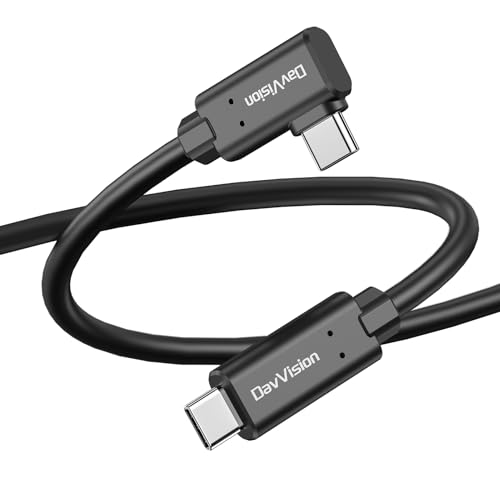
5. DavVision Long Tether Cable 25FT: fiber, slim and soft
The second 25-foot fiber optic option comes from DavVision, and its title overlaps with the previous model on the headline numbers while differing in emphasis. It is a USB-C fiber optic tether cable with a right-angle connector, published at 10Gbps with PD 60W, claiming zero data loss between camera and computer in the maker’s wording, and naming Canon, Sony, and Nikon as its camera brands. Where it distinguishes itself is in the physical description: ultra slim and soft. That phrasing points at cable handling, the quality you notice every time you coil, route, and reposition a long cable during a working day.
A slim, soft 25-foot cable behaves differently on set from a stiff one. It drapes rather than springing, lies flatter where it crosses the floor, coils into a bag without fighting back, and places less sideways load on the camera connector when the run hangs from a tripod. For photographers who tether in clients’ homes or temporary setups assembled and struck the same day, handling is not a luxury detail; it is the difference between a cable that gets routed carefully because it cooperates and one that gets routed hastily because it does not.
On the published numbers, this model matches the other fiber option figure for figure: 25 feet, 10Gbps, PD 60W, zero data loss as the maker phrases it. We report those as this model’s own title claims and extend them no further. The choice between the two long fiber cables in this guide therefore comes down to the emphases their titles actually state: the previous model highlights its chipset and high-visibility presentation, while the DavVision highlights slim, soft handling. Both are aimed at the Sony shooter whose sessions genuinely need the longest reach on offer here, and both should be judged, as every cable in this guide should, against the port and tethering support of the specific body in your hand.
6. TetherPro Optima 10Gbps: the studio standard, honestly framed
The TetherPro Optima requires the most careful framing in this guide, and it gets it. Its title does not name Sony, or any camera brand. It is a Tether Tools cable: USB-C, 15 feet (4.6 metres), straight to right-angle, in high-visibility orange, built on USB 10Gbps Gen 2 with a stated 10Gbps transfer rate, TetherBoost signal technology, and a claim of immediate camera recognition. Tether Tools is one of the established specialist names in tethered photography, and the TetherPro line is the kind of cable that lives permanently in commercial studios. Its presence in a guide for Sony owners rests on a simple, truthful basis: modern Sony bodies tether over USB-C, and this is a USB-C tether cable built for exactly that job by a company that specialises in it.
That framing cuts both ways. You are not getting a Sony-specific compatibility list from this title, so confirming your body’s USB-C tethering support sits with you, as it should with every purchase in this category. In return, you get a purpose-built tethering product rather than a general data cable: the published features aim at the camera-to-computer session, from the signal technology in the title to the immediate camera recognition claim, which speaks to the moment every tether user knows, plugging in and waiting to see whether the software finds the camera. The high-visibility orange follows the same safety logic as the red and bright cables elsewhere in this set.
Fifteen feet places it in the middle of this guide’s length range, level with the first cable and close to the COOYA and YAMCOWL, which makes it the natural comparison point for a Sony shooter deciding between a camera-brand-listed cable and a studio-standard one at the same working distance. Neither framing is inherently better. A named compatibility list offers reassurance about your exact body. A specialist tether cable offers a design brief aimed entirely at tethering. Our research treats both as legitimate, and this guide’s job is to make sure you know which of the two you are buying, and why.
7. YAMCOWL 16ft USB C Camera Transfer Cable: the straightforward long copper option
The YAMCOWL cable is the second general-purpose USB-C entry in the set, and like the TetherPro, its title names no camera brand, so it is presented here on the same honest basis: a USB-C camera transfer cable, compatible with USB-C Sony bodies through the standard itself. Its published specifications are a 16-foot length, USB 3.2 Gen 2 with a stated 10Gbps data transfer rate, a live view cord role named in the title, and a thickened copper core. Sixteen feet is a useful length in this company, a step beyond the 15-foot models for desks that sit slightly further from the tripod, and the live view mention speaks directly to a core tethering habit: composing and checking on the computer screen rather than the camera’s own display.
The thickened copper core is the construction detail the title highlights. In general terms, in a conventional copper cable the conductor is the path the signal travels, and makers who emphasise core construction are speaking to signal integrity and durability over the run. We offer that as background to the phrase rather than a measured finding about this unit. What the title alone supports is a 10Gbps-rated, 16-foot USB-C transfer cable that explicitly includes live view work among its intended uses.
Set against the rest of the guide, the YAMCOWL occupies the uncomplicated middle: longer than the 15-foot pair, rated at the same 10Gbps as the fiber pair and the TetherPro, without the fiber construction of the 25-foot models or the brand-listed compatibility of the Sony-naming cables. For a Sony owner who has confirmed USB-C tethering on their body and wants a long, rated, general-purpose cable, it is a legitimate candidate.
8. Camera USB Cable for Sony Alpha a6000-era bodies: the legacy option, kept in its lane
The final product is the oldest soul in this guide, and it is important to be exact about what it is. This is a camera USB cable for Sony Alpha a6000, a6300, a6400, a6500, a5100, and a5000 bodies, for the A77II, A7IIK, and A99II, and for Cyber-shot models including the DSC-HX200V, DSC-HX400, and DSC-RX10, described in its own title as a PC computer interface replacement transfer wire. Those bodies predate USB-C on Sony cameras and use a smaller legacy connector, which is why a cable like this exists at all: when the original cable that came with an older camera is lost or damaged, this is the replacement that reconnects that camera to a computer.
What it is not must be stated just as clearly. This is not a professional tethering cable, and this guide does not present it as one. The older bodies it serves were not designed around the live, client-facing studio tethering workflow that defines the modern category, the title makes no speed claim and none will be invented for it, and its length is not stated in the title either. Its honest role is file transfer and computer connection for a generation of Sony cameras that enormous numbers of photographers still own and use. An a6000 that still takes pictures deserves a working way to get those pictures onto a computer, and that is the job this cable does.
There is also a wider point for anyone mixing generations. If your bag holds both an older a6000-era body and a modern A7-series body, you need cables from two different categories in this guide, because no single cable here can physically serve both port types. Buying the legacy cable for the legacy body and a USB-C cable for the modern body is not duplication; it is the correct kit. Not every frame needs a studio chain, a point worth remembering in a category that also includes instant photography, where our look at best wide instant cameras covers cameras built around the opposite philosophy of seeing the picture immediately, in print rather than on a monitor.
Tethering practice: habits that make any of these cables work better
Whichever cable you choose, a handful of neutral, widely shared practices decide whether tethered sessions feel effortless or fragile. Begin every session by confirming the connection chain in order: camera recognised by the computer, tethering software showing the body, and a frame or two fired before the real work starts, so any problem surfaces while it is still free to fix. Set the camera’s USB connection behaviour in its menus as your body’s manual directs for computer control and transfer, since modern bodies offer several USB modes and the correct one for tethering is a deliberate choice, not always the default. Keep the memory card question in mind as well: many workflows record to the computer, the card, or both depending on software and camera settings, and knowing which your setup does is basic session hygiene.
Cable management deserves the same deliberateness as camera settings. Route the run away from walkways, tape or cover crossings you cannot avoid, leave a hanging loop of slack near the camera so movement does not translate into port strain, and use a clamp or strain-relief method at the camera end where your equipment provides one, as the COOYA in this set does with its included cable lock clamp. Keep the computer close enough that your chosen length runs with slack rather than tension, and if it cannot be, treat that as the argument for the 25-foot fiber models rather than as a problem to stretch a shorter cable across. Photographers who shoot tethered all day also tend to keep the cable’s path consistent from session to session, because a familiar routing is a routing nobody trips over while thinking about something else.
Finally, think about the session from the computer’s side. Tethered files arrive continuously, so decide in advance which folder receives them, how they are named, and where the backup happens, rather than improvising once hundreds of frames have landed. Large screens invite immediate review, which is the point, but they also invite endless review; many studio photographers shoot a sequence and then check, rather than inspecting every frame, so the session keeps its momentum. None of this depends on which of the eight cables you buy. It is the shared craft around the cable.
Check prices on Amazon
Live listings for the shortlist in this guide are pulled from Amazon below, so prices and availability are always current at the moment you look.


Which cable fits which Sony shooter
For the A7 IV or A7R IV owner who wants their body named in the title and a practical studio reach, the 15-foot professional cable opens the guide for a reason: its compatibility list is the widest here. For the A7 III, A7 IV, or A7C shooter who works around moving people and wants physical security at the port, the COOYA pairs its 5Gbps rating and 16.4-foot reach with the only included cable lock clamp in the set. For the compact, desk-side setup where the computer is close and speed heads the priority list, the 10-foot red braided cable publishes the highest rating in the guide at 20Gbps. For large spaces and fixed computer positions, the two 25-foot fiber optic cables are the only candidates at their length, divided by their stated emphases on chipset and visibility on one side and slim, soft handling on the other.
For the photographer who prefers a specialist tethering brand and is comfortable confirming USB-C compatibility on the body side, the TetherPro Optima brings Tether Tools’ studio-focused design at 15 feet and a stated 10Gbps. For a similar buyer who wants a little more length and a straightforward rated copper cable with live view work in its stated brief, the YAMCOWL offers 16 feet at a stated 10Gbps. And for the owner of an a6000-era or older Cyber-shot body who simply needs that camera connected to a computer again, the legacy cable is the only product in this guide that fits the port, chosen for transfer duty with clear eyes about what it is and is not.
The through-line of this guide is that there is no single best cable here in the abstract, only a best match between a port, a distance, a stated rating, and a way of working. The honest answer the research supports is a decision tree, and you now have every branch of it: confirm your port, measure your room, read the rating on the exact model you are considering, plan for the inevitable tug, and let the category boundaries do the rest. Do that, and the cable you choose will disappear into the session, which is the highest compliment a tether cable can earn.
Disclosure: This guide was prepared from our research into the published titles and stated specifications of the eight cables listed above, and connector type, camera compatibility, and tethering support should be confirmed for your exact camera body before purchase. In plain terms about how this page is supported: when readers buy through links on this page, we may receive a commission at no additional cost to them. As an Amazon Associate we earn from qualifying purchases. That relationship never changes which specifications we report, and every figure in this article is drawn from the product titles themselves or from general industry practice described as such.
Related guides
- Best Barn Cameras: 4G LTE, Long-Range Wi-Fi and Hub Systems Compared
- Best 400 FPS High Speed Cameras: The Honest Truth About Burst Slow Motion
- Best Airbnb Security Cameras: Compliant Outdoor Cameras and Noise Sensors for Hosts
- Best 1080p IP Cameras: PoE Domes, Turrets, Bullets and a PTZ That Earn Their Cable


