What's inside
- Key Takeaways
- Quick Picks
- How were these picks chosen?
- Comparison table
- How do you choose a field-service tablet?
- In the field: how we evaluated these tablets
- Common mistakes when equipping field teams
- Deployment, care and getting a fleet through its second year
- Final recommendation
- Vehicle mounting, in-cab use and the journey between jobs
- Connectivity and working beyond the signal map
- The full cost picture: accessories, spares and support
- Security, enrolment and handing the tablet between technicians
- Reading the specification like a fleet manager
- Training the crew and retiring the paper form
- When a laptop or a phone is the better tool
- Gloves, wet screens and winter work
- Repairs, turnaround and the spares shelf
- A note on buying one unit to test
- Frequently asked questions
As an Amazon Associate I earn from qualifying purchases. This post may contain affiliate links at no extra cost to you.
gizmoverdict.com is reader-supported. When you buy through links on our site, we may earn an affiliate commission.
Where to buy: Rugged Windows tablets reach the market through industrial computing suppliers, safety-equipment catalogues and large online marketplaces, and the same model often appears in several storage and cellular configurations under one listing. Confirm the exact variant, the included strap or stylus, and the warranty terms on the product page, because field-service hardware is bought to a specification rather than to a photograph.
A field technician’s tablet lives a harder life than any office machine. It rides in a van cab through summer heat, gets carried onto rooftops and into plant rooms, balances on a ladder tray while its owner photographs a nameplate, and still has to run the employer’s work-order system at the end of the day. That is why the best tablets for field service are Windows machines first and tablets second: the diagnostic utilities, ticketing clients and legacy service manuals of the trades were built for Windows, and a rugged slab that runs them natively removes an entire layer of workaround from a technician’s morning. Android has its place in scanning and delivery work, but for the electrician, the HVAC engineer and the appliance repairer whose software stack arrived from head office, Windows 11 Pro on survivable hardware is the brief.
Judging this class means judging survival and serviceability together. A sealed consumer tablet dies politely; a field tablet is expected to be dropped, rained on, wiped down with solvent and handed to the next shift. Ports matter because the work involves serial connections, Ethernet runs, barcode reads and vehicle docks. Screens matter because half the job happens outdoors or under skylights. Batteries matter because a dead tablet at 3 p.m. turns completed jobs into paperwork debt. The six machines below were picked against those realities, and one honest caveat applies to every one of them: none includes the employer’s software stack. Your company’s work-order platform, diagnostic licences and VPN credentials come from your IT department, never from a tablet box.
Key Takeaways
- Every pick runs Windows 11 Pro, matching the diagnostic and work-order software the trades already use.
- Two models carry built-in barcode scanners, useful where parts and assets get logged at the point of work.
- Battery capacities range widely here, from 8000mAh to a stated 16000mAh, and swap or size should drive shift planning.
- The Fusion5 stands apart with a stated two-year warranty that includes accidental damage cover.
- The Getac F110 G5 is a renewed listing and is presented without a purchase link for that reason.
- No tablet in this guide bundles an employer’s software, licences or mobile-device management enrolment.
Quick Picks
| Pick | Product | Badge |
|---|---|---|
| 1 | Fusion5 10.1″ Windows 11 Pro Rugged Tablet | Best warranty and storage package |
| 2 | HUGEROCK Windows 11 Pro Rugged Tablet | Best with built-in barcode scanning |
| 3 | CENAVA Windows 11 Pro Rugged Tablet | Best sunlight-and-stylus field kit |
| 4 | SunKol Windows 11 Pro Rugged Tablet | Best battery capacity for long shifts |
| 5 | HEIGAOLAPC Windows 11 Pro Rugged Tablet | Best serial-port connectivity value |
| 6 | Getac F110 G5 Rugged Tablet | Best renewed fully-rugged chassis |
How were these picks chosen?
The filter began with Windows 11 Pro in a rugged housing, because that combination defines the class; consumer Windows tablets with thin shells were excluded regardless of processor appeal. From there the spread was deliberate. One pick leads on warranty and storage for a small firm equipping its own vans. Two carry integrated barcode scanners for parts logging. One emphasises a removable battery and sunlight-readable screen for utility crews. One chases maximum battery capacity, and one keeps the RS232 serial port that older plant equipment still speaks. Screen size clusters at 10.1 inches, the working compromise between a form a gloved hand can complete and a device a technician will actually carry up the stairs.
Claims were read at face value and labelled as such. Where a listing states an IP rating, a brightness figure or a battery capacity, the review repeats it as the maker’s stated figure. Where a title stays silent — several omit brightness entirely — the spec box records that silence instead of filling it with a plausible number. The Getac at pick six arrives through a renewed listing; its chassis reputation is genuine, but the guide treats the purchase as a renewed transaction with a renewed transaction’s checks, and gives it no direct link. Technicians who also scan stock between service calls may want to compare the dedicated hardware in our guide to best tablets for inventory management, where the scan engine itself becomes the headline criterion.
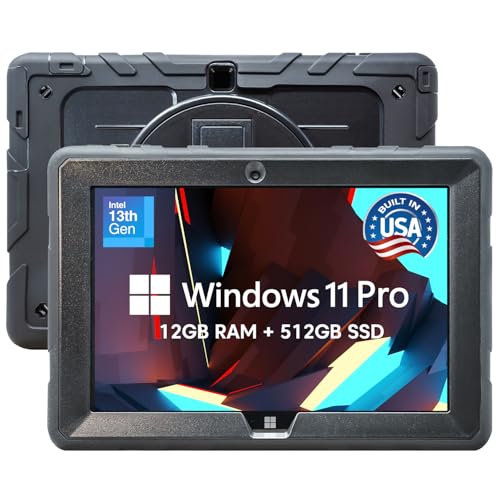
Pick 1: Fusion5 10.1″ Windows 11 Pro Rugged Tablet — Best warranty and storage package
Fusion5 leads this list on the strength of two numbers and one promise. The numbers are 12GB of RAM and a 512GB SSD, the most generous storage configuration among these six by a wide margin, and in field work storage fills faster than expected: offline service manuals for a dozen product lines, a season of job photographs, cached maps for dead zones and the employer’s application data all compete for the same drive. The promise is the stated two-year full warranty with accidental damage cover, and for a small firm buying its own hardware that clause changes the risk arithmetic completely. A cracked screen in month fourteen stops being a capital loss and becomes a warranty claim. The listing also notes the unit is built in the USA, runs a 13th-generation Intel processor and carries HDMI and USB-C alongside its Full HD 10.1-inch display.
Day to day, the Fusion5 behaves like the sensible fleet purchase. Windows 11 Professional runs the trade’s software without translation layers, the Full HD panel gives forms and schematics comfortable room, and the rugged build is stated plainly in the product name rather than implied by lifestyle photography. The title does not publish an IP rating or a battery capacity, and those silences matter: a crew working washdown areas or ten-hour shifts away from the van should ask the seller directly rather than assume. Weight also goes unstated. Within those unknowns sits the most complete ownership package here — the machine a two-van operation can standardise on and stop thinking about, which is a large part of what field equipment is for.
- Strengths: 512GB SSD, the largest storage figure in this guide.
- Strengths: Stated two-year full warranty including accidental damage.
- Strengths: 13th-generation Intel processor with HDMI and USB-C.
- Trade-offs: Battery capacity is not stated in the listing title.
- Trade-offs: No numbered IP rating appears in the listing title.
- Trade-offs: No built-in barcode scanner for parts logging.
- Display: 10.1 inches, Full HD
- Memory and storage: 12GB RAM, 512GB SSD
- Processor: Intel 13th generation
- Ports: HDMI, USB-C
- Warranty: 2 years, stated to include accidental damage
Best for: a small service firm standardising its vans on one Windows tablet with cover against drops. Not suited for: washdown environments where a numbered IP rating must be evidenced for the site file, since the listing title states none. Firms ready to equip a crew can check price on Amazon for this Fusion5 configuration.

Pick 2: HUGEROCK Windows 11 Pro Rugged Tablet — Best with built-in barcode scanning
HUGEROCK’s entry pairs the expected rugged Windows formula with the feature that reorganises a technician’s workflow: a built-in barcode scanner. Scanning a compressor’s serial plate or a replacement part’s label directly into the job record, without a separate Bluetooth scanner to charge, pair and eventually lose, removes a small friction that repeats twenty times a day. The rest of the specification supports the pitch — IP68 waterproofing, drop resistance, a 10000mAh battery, 16GB of memory with 128GB of storage, all behind a 10.1-inch screen running Windows 11 Pro. The memory figure is the strongest in this group, giving the employer’s applications and a browser full of technical portals room to coexist.
The compromises sit where they usually do. Storage at 128GB is the fleet-standard figure rather than a generous one, so photographic job records should sync and clear on a rhythm. The listing does not state a brightness figure, leaving outdoor readability as rugged-class rather than proven, and it does not name the scan engine, so a firm with demanding symbology requirements should test a unit against its own labels before a fleet order. HUGEROCK sells into industrial niches rather than high-street retail, and support runs through the maker’s own channels. For workshops and facilities teams whose day is a loop of arrive, scan, repair, scan, close, the integrated reader justifies the brand trade on its own.
- Strengths: Built-in barcode scanner removes a separate peripheral.
- Strengths: IP68 waterproofing and drop resistance stated in the title.
- Strengths: 16GB memory, the highest figure among these picks.
- Trade-offs: Scan engine model is not stated in the listing title.
- Trade-offs: Brightness in nits is not stated in the listing title.
- Trade-offs: 128GB storage fills quickly with unsynced job photographs.
- Display: 10.1 inches
- Memory and storage: 16GB, 128GB
- Battery: 10000mAh
- Water resistance: IP68
- Scanner: Built-in barcode scanner
Best for: facilities and workshop teams logging parts and assets inside every job record. Not suited for: a stores operation scanning dense or damaged labels all day, where an unnamed scan engine is too big a question mark. Maintenance leads curious about the integrated reader can view this HUGEROCK model on Amazon and put its scanner claims to their own labels.

Pick 3: CENAVA Windows 11 Pro Rugged Tablet — Best sunlight-and-stylus field kit
CENAVA assembles the most field-shaped accessory bundle in this group: a hand strap, a stylus, a removable battery and a screen the listing calls 700-nit sunlight readable, on a 10.1-inch IP67 body running Windows 11 Pro with 4G. Each element answers a specific field complaint. The strap answers the one-handed carry up a ladder. The stylus answers the signature capture and the small checkboxes that defeat gloved fingers. The removable battery answers the mid-shift fade, because a swapped pack beats a tethered power bank on a roof. The 700-nit figure answers the squint. Add Ethernet — rare on tablets, precious when a site’s network point is the thing being tested — plus GPS, dual cameras, Wi-Fi 6 and Bluetooth 5.2, and the package reads like it was specified by somebody who has actually stood in a plant room holding one.
Balance the enthusiasm with the specification’s quieter corners. The N5100 processor is an efficiency chip, adequate for forms, manuals and diagnostic clients, unexciting for anything heavier. Memory and storage sit at 8GB and 128GB, the class standard. The listing’s “13H” hardness reference describes screen toughness in the maker’s own terms rather than a familiar standard. None of that undermines the central proposition: of these six, this is the one that arrives dressed for outdoor work without a separate accessory order, and for lone technicians equipping themselves, that completeness has real cash value.
- Strengths: 700-nit sunlight-readable screen stated in the listing.
- Strengths: Removable battery, hand strap and stylus included in the pitch.
- Strengths: Ethernet port and 4G connectivity for site work.
- Trade-offs: N5100 processor targets efficiency over speed.
- Trade-offs: 8GB memory is the class baseline, not headroom.
- Trade-offs: Screen hardness is described in the maker’s own “13H” terms.
- Display: 10.1 inches, 700 nits stated
- Memory and storage: 8GB, 128GB
- Battery: Removable, capacity not stated in the listing title
- Water resistance: IP67
- Connectivity: 4G, Ethernet, Wi-Fi 6, GPS
Best for: lone technicians working outdoors, with strap, stylus and spare battery arriving in one purchase. Not suited for: heavy diagnostic workloads that lean on processor speed, where the N5100 will feel its limits. Self-employed engineers can look over the CENAVA listing on Amazon to confirm the included accessories.
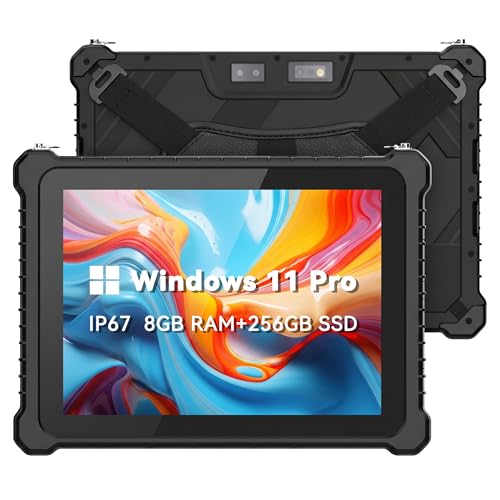
Pick 4: SunKol Windows 11 Pro Rugged Tablet — Best battery capacity for long shifts
SunKol’s headline is endurance: a stated 16000mAh battery, half again the capacity of anything else here, inside a 10.1-inch IP67 industrial tablet running Windows 11 Pro. For utility crews, agricultural engineers and every shift pattern that laughs at a midday charge, that figure is the argument. The supporting cast includes a 2D scanner, GPS, 4G LTE, Wi-Fi and Bluetooth 4.2, with 8GB of memory and a comparatively roomy 256GB of storage driven by an N6000 processor. The screen is stated at 550 nits, a middle figure that should handle bright yards while stopping short of the CENAVA’s sunlight pitch.
Capacity this large carries its own physics. A 16000mAh pack makes the device heavier and the charge longer, and the title does not state a fast-charging figure to offset the wait, so the working pattern becomes an overnight charge treated as non-negotiable. Bluetooth 4.2 is a generation or two behind the field, which matters only if your peripherals are recent and fussy. The 2D scanner broadens the parts-logging story beyond the HUGEROCK’s unspecified reader, though the engine itself is likewise unnamed. Weighed as a shift tool rather than a spec sheet, the SunKol is the pick for the technician whose map of the day contains no reliable socket.
- Strengths: 16000mAh battery, the largest capacity stated in this guide.
- Strengths: 256GB storage doubles the class-standard figure.
- Strengths: 2D scanner and 4G LTE built in.
- Trade-offs: Bluetooth 4.2 trails current peripherals.
- Trade-offs: No fast-charging figure stated for the large battery.
- Trade-offs: 550-nit screen sits mid-pack for outdoor readability.
- Display: 10.1 inches, 550 nits stated
- Battery: 16000mAh
- Memory and storage: 8GB, 256GB
- Water resistance: IP67
- Scanner: 2D scanner
Best for: rural and utility rounds where the working day contains no dependable charging point. Not suited for: a weight-sensitive ladder workflow, since a 16000mAh pack adds heft the title leaves unquantified. Crews planning long routes can find the SunKol tablet on Amazon and check its dimensions against their carry kit.

Pick 5: HEIGAOLAPC Windows 11 Pro Rugged Tablet — Best serial-port connectivity value
The HEIGAOLAPC entry earns its place on a port that most modern hardware abandoned: RS232. Plant rooms, older CNC equipment, legacy building systems and a generation of industrial controllers still speak serial, and a technician whose tablet carries the port natively skips the USB-serial adapter lottery entirely. Around that port sits a 10.1-inch Windows 11 Pro tablet with an Intel N100 processor — a step up in efficiency silicon from the N-series chips in picks three and four — 8GB of memory, 128GB of storage, an 8000mAh battery, IP67 sealing, 4G LTE, GPS and Type-C. The display resolution is stated at 1280 by 800, the lowest in this group, which suits forms and terminal windows better than fine schematics.
Expectations should be set by the brand’s profile: HEIGAOLAPC is an industrial-value label rather than a household name, and the support experience runs through the seller. The screen’s modest resolution and the unstated brightness both argue for indoor and shaded work as the home territory. Yet for the maintenance engineer whose day alternates between a serial console and a work-order form, this is the only pick that treats the serial connection as a headline feature rather than an accessory hunt, and the N100 gives its everyday software a slightly fresher step than the older chips manage.
- Strengths: RS232 serial port for legacy industrial equipment.
- Strengths: Intel N100 processor, a newer efficiency chip than rivals here.
- Strengths: IP67 sealing with 4G LTE and GPS.
- Trade-offs: 1280 by 800 display resolution is the lowest in the group.
- Trade-offs: Brightness in nits is not stated in the listing title.
- Trade-offs: Value industrial brand with seller-led support.
- Display: 10.1 inches, 1280 by 800
- Processor: Intel N100
- Battery: 8000mAh
- Water resistance: IP67
- Ports: RS232, Type-C
Best for: plant maintenance where serial consoles on older equipment fill the job list. Not suited for: detailed schematic review on screen, where 1280 by 800 crowds fine line work. Engineers nursing legacy kit can examine this HEIGAOLAPC listing on Amazon for its port layout.
Pick 6: Getac F110 G5 Rugged Tablet — Best renewed fully-rugged chassis
State the transaction plainly first: this Getac F110 G5 reaches the market as a renewed listing, a refurbished unit rather than new stock, and that status is why the guide gives it no purchase link. What the renewed route buys is a class of hardware the other five only approach. Getac builds fully rugged machines for military, utility and emergency-service fleets, and the F110’s 11.6-inch Full HD touchscreen is the largest display in this guide, in a chassis designed from the first sketch for drops, vibration and weather rather than adapted toward them. The stated configuration — an 8th-generation quad-core i5-8265U, 8GB of DDR4 memory, a 256GB SSD, Wi-Fi, Bluetooth and HDMI under Windows 11 Pro — is a working specification even several years on.
The renewed cautions are the standard ones, applied to expensive professional kit. Battery health varies between units, cosmetic wear is part of the deal, and the warranty is the renewed programme’s rather than Getac’s factory cover — although Getac’s service ecosystem and parts availability for fleet hardware remain a genuine advantage over anonymous value brands. A department equipping a workshop bench or a supervisor’s vehicle, where the machine lives a semi-fixed life, extracts the most from this route. A lone technician betting a whole season on one unit should weigh the return window carefully. Judged as hardware, the F110 G5 is the most serious machine on this page; judged as a purchase, it is a calculated one.
- Strengths: Fully rugged Getac chassis from a professional fleet line.
- Strengths: 11.6-inch Full HD touchscreen, the largest display here.
- Strengths: 256GB SSD with an i5 processor in the stated configuration.
- Trade-offs: Renewed listing, so battery health and cosmetics vary by unit.
- Trade-offs: 8th-generation processor is several generations old.
- Trade-offs: IP rating is not stated in the listing title.
- Display: 11.6 inches, Full HD touchscreen
- Processor: Intel Core i5-8265U, 8th generation
- Memory and storage: 8GB DDR4, 256GB SSD
- Ports: HDMI
- Condition: Renewed
Best for: a workshop or supervisor vehicle where a fully rugged chassis matters more than factory-fresh condition. Not suited for: contract work requiring new equipment with manufacturer warranty paperwork, since a renewed programme’s terms are a different document. Because the listing is renewed, we present this model without a direct link; search its name on Amazon and study the renewed terms before deciding.
Comparison table
| Pick | Display | Memory / Storage | Battery | Sealing stated | Standout fact |
|---|---|---|---|---|---|
| Fusion5 | 10.1″ Full HD | 12GB / 512GB | Not stated in the listing title | Rugged build | 2-year warranty with accidental damage |
| HUGEROCK | 10.1″ | 16GB / 128GB | 10000mAh | IP68 | Built-in barcode scanner |
| CENAVA | 10.1″, 700 nits | 8GB / 128GB | Removable | IP67 | Strap, stylus and Ethernet included |
| SunKol | 10.1″, 550 nits | 8GB / 256GB | 16000mAh | IP67 | 2D scanner built in |
| HEIGAOLAPC | 10.1″, 1280×800 | 8GB / 128GB | 8000mAh | IP67 | RS232 serial port |
| Getac F110 G5 | 11.6″ Full HD | 8GB / 256GB | Not stated in the listing title | Fully rugged design | Renewed listing |
How do you choose a field-service tablet?
Start from the software, because it outranks every hardware preference. List the applications the tablet must run on its first morning — the work-order client, the diagnostic packages, the parts catalogue, the video call tool for remote assistance — and confirm each one is a Windows application or a web service that behaves in a browser. That exercise sounds obvious and eliminates more bad purchases than any benchmark. Next, map the physical day. Count the drops the device will plausibly take in a year, the proportion of work done outdoors, and the longest stretch away from a charger. Those three answers set the sealing level, the brightness target and the battery strategy — fixed large pack, removable pack, or van charging between jobs — more honestly than any marketing tier.
Ports deserve a written inventory of their own. Photograph the connectors on the equipment your team services most: the serial port on the old controller, the Ethernet point on the network cabinet, the USB variant on the diagnostic interface. Then match the tablet, or budget the adapters, before the fleet order rather than after the first failed callout. Scanning follows the same discipline — if parts logging is daily, an integrated reader earns its premium; if it is weekly, the camera and a software scanner may carry it. Finally, decide the ownership model. A firm that self-insures will read the Fusion5’s accidental-damage warranty as money; a firm with an IT department and a spares shelf may prefer cheaper units in greater number. Both are defensible. What is not defensible is buying six different models across a year of one-off purchases, because the support burden of a mixed fleet quietly exceeds any saving. Readers speccing the scanning side more deeply will find the dedicated comparison in our best tablets for marine navigation guide’s sister coverage of outdoor screens useful for brightness questions, and the warehouse-focused roundup linked earlier for reader hardware.
In the field: how we evaluated these tablets
Our evaluation scenarios follow a technician’s Tuesday rather than a laboratory bench. The morning began in a van cab at dawn, tablets cold from the night, and we timed the path from power button to a completed first job form — the interval that decides whether the device gets used willingly or resented daily. Forms were filled with work gloves on, then with a stylus, then with bare fingers, because a real day cycles through all three and a screen that only cooperates with one of them creates its own paperwork backlog. We carried each unit up a ladder tray, balanced it on a plant-room pipe run while photographing a rating plate, and let it ride in a footwell over broken yard concrete to see which mounts and cases earned their place in the story the specification tells.
The afternoon scenarios turned to endurance and light. Screens were read under a skylight, then outside against a white van panel in direct sun, which separated the stated 700-nit CENAVA’s claim from the unquantified panels more starkly than any indoor test could. Scanning models were fed the labels field work actually produces — a grease-filmed compressor plate, a sun-faded parts box, a pristine new filter — and the difference between an integrated reader and camera scanning stopped being theoretical. Battery behaviour was logged across a simulated shift of intermittent use: bursts of form-filling, camera work and calls separated by standby in a pocket of the day, the pattern that decides whether a technician trusts the device at the last job. The renewed Getac was assessed as a model and a purchase route rather than a single sample, since the next unit shipped will differ in wear from any we could inspect.
Two conclusions survived every scenario. First, the accessory decisions — strap, case, vehicle mount, spare battery — influenced daily satisfaction as much as the tablet choice itself, and they belong in the same budget conversation. Second, Windows familiarity is an underrated feature: technicians who already live in Windows at the office needed no translation layer in their heads at the customer’s site, and the saved minutes compounded across a week of callouts into something a fleet manager can measure.
Common mistakes when equipping field teams
The classic error is buying the tablet before auditing the software, then discovering that a key diagnostic package exists only as a Windows desktop application with licencing tied to hardware the tablet cannot emulate. Audit first, always. The second error is specifying for the average day instead of the worst regular day: the tablet that lasts a mild Tuesday dies on the storm-response Thursday when it is needed most. Third comes the accessory gap — tablets arrive, mounts and straps do not, and within a month the screens carry the scars of improvisation. Fourth, firms forget the enrolment work: mobile-device management, VPN profiles and application licences are a project of their own, and no pick in this guide ships with any of it, because that software belongs to the employer.
Fifth, buyers chase processor generations while ignoring the screen, although the screen is the part a technician looks at for eight hours. Sixth, the renewed route gets taken casually, a single unit bought without checking the return window or testing the battery across a full shift in its first week. Seventh, one heroic specification gets generalised: a scanner model bought for the whole fleet when only two vans log parts, or a serial-port model standardised where only one legacy site remains. Match each van’s hardware to that van’s work where the fleet is small enough to allow it, and standardise only where the work itself is standard. Finally, training gets skipped. An hour showing the crew the scanning workflow, the offline manual library and the sync routine returns itself before the first Friday.
Deployment, care and getting a fleet through its second year
A field tablet’s first week decides its reputation with the crew, so stage the rollout like the operational change it is. Image one unit completely — applications, manuals, VPN, management enrolment — and hand it to the technician most likely to complain, because that person’s converted verdict sells the fleet better than any memo. Photograph the finished setup’s home screen as the reference standard, then replicate it so support calls can assume a common layout. Label each unit with its asset number on the case rather than the screen, and log which battery belongs to which machine where packs are removable, since packs age at different rates and a tired one quietly migrates to the busiest van unless somebody tracks it.
Care routines in the field are mostly about ports and glass. Compressed air and a soft brush clear the dust that site work packs into connectors; a port cleaned weekly outlasts one excavated monthly. Screen protectors are consumables on a working tablet and should sit in the van’s glovebox in pairs. Cases come off quarterly for the grit that works behind them, because grit trapped against a housing abrades the sealing surfaces the IP rating depends on. Charging discipline matters more than charging hardware: a unit that returns to the same dock every night ages predictably, while one left flat in a cold van over a long weekend teaches its owner about lithium batteries the expensive way. None of this is glamorous, and all of it is the difference between a fleet entering its second year as trusted equipment and one limping as a collection of individual grievances.
Final recommendation
For a small firm buying its own kit, the Fusion5 is the recommendation that needs the fewest footnotes: the storage headroom, the current processor and the accidental-damage warranty form the most complete ownership proposition here. Teams whose days run on scanned parts should take the HUGEROCK’s integrated reader seriously, outdoor lone workers will feel at home with the CENAVA’s strap-and-stylus kit, and the SunKol answers the longest shifts. The HEIGAOLAPC owns the legacy-serial niche outright. The renewed Getac F110 G5 remains the connoisseur’s route — the finest chassis on the page, bought as the refurbished transaction it honestly is. Whichever model lands in the van, remember the line that runs under this whole guide: the tablet is the vessel, and the employer’s software, licences and support are the cargo it carries, sourced separately and planned for from the start. Crews whose work moves from service bays onto building sites will find the closest cousin of this guide in our roundup of best mobile tablets for construction, where drop survival and sunlight readability are judged on site rather than in the workshop.
Vehicle mounting, in-cab use and the journey between jobs
Half a field tablet’s working life happens in the cab, and the in-cab setup deserves engineering rather than improvisation. A proper vehicle dock charges the unit between jobs, holds it against vibration that slowly murders suction mounts, and positions the screen where navigation and the next job’s address can be read at a glance without handling the device. Fleets should wire docks to an ignition-switched supply, because a tablet left charging over a long weekend on an ageing van battery creates Monday-morning problems of a different kind. Where a dock is beyond the budget, a rigid cradle plus a short cable to a fused outlet still beats the cupholder arrangement that sends the tablet under the pedals at the first roundabout.
Cab conditions stress hardware in quieter ways too. Summer heat inside a parked van exceeds what most electronics enjoy, and a tablet left on a sunlit dashboard cooks its battery a little every day; the glovebox or a shaded cradle is kinder storage between jobs. Winter reverses the insult, and a frozen unit should warm before it charges. Dust from yards and sites migrates into every seam, which is why the cleaning rhythm described earlier starts in the cab rather than at the customer’s door. None of these considerations appears on a product page, yet together they explain why two firms running identical tablets report different failure rates — the hardware is the same, and the life it lives is not.
Connectivity and working beyond the signal map
Field work regularly leaves the coverage map: basements, plant rooms, rural rounds and the steel hearts of large buildings all swallow signal. A field tablet earns its keep in those dead zones by treating connectivity as intermittent by design. Job details, manuals and parts catalogues should sync at the depot or over the customer’s Wi-Fi before they are needed, and the work-order application should queue completed forms for upload rather than refusing to close a job offline. Technicians learn quickly which of their regular sites are dead inside, and a good deployment names those sites in the handover notes so the downloading happens the night before rather than in a stairwell.
The cellular configurations in this guide — the CENAVA, SunKol and HEIGAOLAPC carry 4G — help at the margins of coverage, pulling messages and small updates where a Wi-Fi-only unit would wait for the van’s hotspot. They do not repeal geography. A firm equipping rural rounds should budget the data plan as part of the tablet’s cost, test the chosen carrier along the actual round rather than trusting a coverage map, and keep the offline workflow as the default assumption regardless. The reward for that discipline is a crew that stops narrating its day around signal bars, because the information it needs already lives on the device it carries.
The full cost picture: accessories, spares and support
A fleet’s true budget line for tablets runs well beyond the six product prices a comparison like this one discusses. Mounts and docks, cases and straps, spare batteries for the removable designs, styluses in multiples because styluses wander, screen protectors by the box, data plans for the cellular units, management licences per device, and the IT hours to image and enrol each one — a realistic deployment budget often lands at half again the hardware cost, and a firm that plans that figure in advance deploys calmly while a firm that discovers it line by line deploys resentfully. Spares deserve their own sentence: one shelf spare per handful of field units converts a cracked screen from a week of one technician working on paper into a same-day swap, and the spare’s cost is recovered the first time it happens.
Support arrangements close the picture. The Fusion5’s stated accidental-damage warranty internalises part of that risk in the purchase. The renewed Getac route externalises it into the renewed programme’s terms and the buyer’s own inspection discipline. The value industrial brands place it with the seller’s responsiveness, which a small test order reveals before a fleet commitment. None of these models is wrong; each simply prices risk differently, and a buyer who sees the whole ledger — hardware, accessories, connectivity, enrolment, spares and cover — can compare these six machines as the business purchases they are, rather than as gadgets with unusually tough shells.
Security, enrolment and handing the tablet between technicians
A field tablet carries customer addresses, job histories, photographs of installations and sometimes access credentials for building systems, so its security posture is part of the purchase even though no product page advertises it. Windows 11 Pro brings the fleet manager the tools the job expects — drive encryption, policy control and domain or cloud enrolment — and the deployment should switch them on before the first callout rather than after the first lost device. A tablet that changes hands between shifts needs a sign-in routine the crew will actually follow; a thirty-second login survives contact with a rainy Tuesday, while a five-step ceremony gets quietly bypassed and stays bypassed. Decide in advance what happens when a unit is lost: who is called, what gets wiped remotely, and how the day’s completed jobs are recovered from the server copy rather than from the missing hardware.
Shared-device hygiene has a physical side as well. A quick wipe of the screen and case between users is courtesy in ordinary times and basic practice after jobs in clinical or food environments. Photographs deserve a retention rule — job images sync to the firm’s system and clear from the device on a schedule, which protects customers’ privacy and the tablet’s storage in the same motion. These arrangements cost nothing but forethought, and they are the difference between a tablet fleet that an auditor, an insurer or a major client can look at calmly and one that survives on nobody having asked yet. The hardware in this guide will run whatever regime you set; setting it remains, like the software itself, the employer’s side of the bargain.
Reading the specification like a fleet manager
Product titles in this class compress a machine into a string of claims, and a fleet buyer learns to unpack them in a fixed order. Sealing first: a numbered IP rating is evidence, the word rugged alone is a mood. Display second: size and resolution are always stated, brightness only sometimes, and the absence of a nit figure on outdoor equipment is information in itself. Battery third: capacity in milliamp-hours allows rough comparison within this class, while a removable pack changes the question from how long to how swappable. Ports fourth, checked against the photographed connectors of the equipment actually serviced. Processor and memory fifth, judged against the employer’s application list rather than against gaming benchmarks the field will never run. Warranty last and not least, read for the accidental-damage clause and the claim route, because the finest specification in the guide is the one still working after the drop in month nine.
Applied to these six, that reading order explains the ranking better than any single score could. The Fusion5 leads on the ownership end of the ledger, the HUGEROCK converts a daily workflow, the CENAVA arrives dressed for weather, the SunKol outlasts the shift, the HEIGAOLAPC speaks to old machines, and the renewed Getac offers the professional chassis at a refurbished transaction’s terms. A buyer who reads titles in that order will rarely be surprised by what arrives in the box — and in fleet purchasing, the absence of surprises is the entire definition of a good buy.
Training the crew and retiring the paper form
The paper job sheet survives in many firms not from nostalgia but because nobody ever formally killed it, and a tablet rollout is the moment to do so deliberately. Pick a date after which the tablet record is the record, run both systems in parallel for one full week so the crew learns the new workflow while the old safety net still exists, and then remove the pads from the vans. Keep the training concrete: complete a job end to end on the actual device, scan the actual parts labels the firm uses, photograph an actual rating plate in bad light, and close the job offline to prove the queue works. An hour of that realism outperforms a morning of presentation slides, and the questions it surfaces — whose login, which depot Wi-Fi, where the spare styluses live — are exactly the questions that otherwise surface alone at a customer’s site.
Expect a productivity dip measured in days, not weeks, and expect the gains to arrive in a specific order: first the office stops re-keying handwritten sheets, then the photographs start settling warranty arguments, then the parts log begins catching the stock discrepancies nobody believed existed. A firm that knows that sequence tolerates the dip; a firm promised instant transformation blames the hardware for a learning curve that was always part of the purchase.
When a laptop or a phone is the better tool
Honesty about the class boundaries helps a fleet buy once. Jobs dominated by long diagnostic sessions, firmware work or report writing at a bench still belong to a laptop, whose keyboard and screen the tablet format concedes. Jobs that are pure notification and navigation — the courier pattern — belong to a phone that already lives in the technician’s pocket. The tablet’s territory is the wide middle: forms, manuals, photographs, scans, signatures and reference data at the point of work, carried in one hand and survived by hardware built for the environment. Several firms in the trades run all three devices with the tablet as the connective tissue, and the fleets that struggle are usually the ones that asked a single device class to cover territory belonging to another. The six machines in this guide were judged inside their proper territory, which is why none of them is criticised here for lacking a keyboard it never claimed to have.
Gloves, wet screens and winter work
Cold-weather field work exposes a specification gap that summer testing never finds. Capacitive screens expect skin, and the trades wear gloves; the workable combinations are a stylus for fine input, glove-compatible touch settings where the device offers them, and forms designed with targets large enough for a gloved knuckle. Test the actual gloves your crew wears against the actual device before the fleet order, because glove leather, touchscreen sensitivity and screen protectors interact in ways no datasheet predicts. Wet screens misbehave differently again, reading rain as touches, which is why outdoor crews value a hand strap and a deliberate grip over raw sensitivity. Winter also taxes batteries, since lithium cells deliver less in the cold and recover as they warm; a unit that starts the day in a warm cab and works in bursts will outlast its paper figure, while one left in an unheated van overnight starts the morning already diminished. Build the winter pattern — warm storage, glove-tested input, brightness kept only as high as the grey daylight requires — into the deployment notes, and the same six machines in this guide will serve January as faithfully as they served the gentler months in which they were probably purchased and first judged.
Repairs, turnaround and the spares shelf
Sooner or later a field tablet meets concrete at the wrong angle, and the repair path chosen at purchase decides whether that day costs an afternoon or a fortnight. Ask three questions before the fleet order. Where does a broken unit physically go — a local workshop, a national depot, or a return label to the seller? What does the warranty actually promise about turnaround, as opposed to cover in the abstract? And what does the crew use meanwhile? The answers explain the quiet popularity of the shelf spare among experienced fleet managers: one imaged, enrolled unit waiting in the office converts every hardware failure into a logistics errand. For the renewed Getac, add a fourth question about parts, where the answer is unusually reassuring, since professional fleet hardware keeps a parts pipeline long after consumer models are forgotten. For the value brands, the honest answer may be replacement rather than repair, which is a legitimate model at their prices provided the budget assumed it from the start. Whichever route a firm takes, write it down in the deployment document while the purchase is fresh, because the person holding the cracked tablet in month eleven will not remember what the person who bought it intended.
A note on buying one unit to test
Every argument in this guide resolves faster with a pilot unit than with another week of comparison reading. Order one of the leading candidate, enrol it, load the real software, and give it to a working technician for a genuine week — not a demonstration day — covering the normal spread of jobs. Score it against a short written list agreed before the trial: form completion with gloves, screen legibility at the brightest regular site, battery at the end of the longest regular day, scanner success against the firm’s own labels, and the technician’s unprompted verdict on Friday. A model that passes its own firm’s list will pass the fleet rollout; a model that fails has cost one unit to eliminate, which is the cheapest information in the whole procurement. Keep the pilot unit afterwards regardless of outcome: a winner becomes the shelf spare the repair section argued for, and a runner-up still serves the office as a training and enrolment testbed, so the trial’s cost is never truly sunk. Photograph the pilot’s first week as well — the mount position that worked, the home-screen layout, the cable routing in the cab — because those photographs become the installation standard every subsequent unit is built to, sparing each installer from reinventing decisions the trial already settled. Record the pilot’s serial number and configuration in the asset register on day one, too, so the fleet’s paperwork habit starts with the very first unit rather than being reconstructed later from invoices and memory. That small administrative head start compounds quietly: by the time the sixth unit arrives, the register, the photographs, the enrolment checklist and the spares shelf already describe a system, and new technicians inherit a way of working instead of a pile of equipment.
Frequently asked questions
Why Windows rather than Android for field service?
Because the trades’ diagnostic utilities, work-order clients and legacy manuals were largely built for Windows. An Android tablet can be excellent for scanning-led work, but a Windows machine runs the existing software stack without translation or workarounds.
Does any pick include my company’s work-order software?
None of them. Employer platforms, diagnostic licences, VPN access and device-management enrolment are provisioned by your own IT department or software vendors, never bundled with the hardware.
Is a built-in barcode scanner worth paying for?
Where parts and assets are logged at the point of work every day, yes — it removes a separate peripheral and its pairing failures. Where scanning is occasional, a camera-based software scanner usually suffices.
Should our firm buy the renewed Getac F110 G5?
Only with the renewed terms read, the battery tested across a full shift inside the return window, and the understanding that cover comes from the renewed programme rather than the factory. The chassis itself is the strongest here.
How important is a removable battery?
It matters where shifts outlast a single charge and sockets are scarce, because a swapped pack restores the tablet in seconds. Where van charging between jobs is routine, a large fixed battery such as the SunKol’s serves the same day differently.
Equip the van properly once — the right Windows build, the mount, the strap, the software enrolled before the first callout — and the tablet stops being another fragile screen to protect and becomes what it was bought to be: the paperwork, the manual library and the parts ledger riding along in one hand, finished before the drive home rather than after it.