What's inside
- Key Takeaways
- Quick Picks
- How Did We Choose These Picks?
- Why Did the 5.1 Computer Speaker Category Shrink to One Name?
- How Do the Six Options Stack Up Against Each Other?
- How Should You Connect a PC to a 5.1 System Without Losing Channels?
- Where Should Five Speakers and a Subwoofer Actually Go Around a Desk?
- What Mistakes Ruin Most 5.1 Desk Setups?
- What Should You Check on Your PC Before Spending Anything?
- How Do You Balance Five Channels Once Everything Is Plugged In?
- Which Games and Films Actually Reward a 5.1 Desk Setup?
- How Long Will a 5.1 Desk Setup Last, and What Breaks First?
- Final Recommendation
- Frequently Asked Questions
- Related Guides
As an Amazon Associate I earn from qualifying purchases. This post may contain affiliate links at no extra cost to you.
gizmoverdict.com is reader-supported. When you buy through links on our site, we may earn an affiliate commission.
Where to buy: The linked systems below are sold through Amazon, where stock and delivery options are shown before checkout. Two of the six picks are not computer speakers in the plug-and-play sense at all — they are home theater packages that only reach a PC through a receiver — and this guide labels them that way rather than letting the search term do quiet dishonest work.
Let us say the unfashionable thing first, because it decides everything else in this guide: if you go shopping for the best 5.1 computer speakers in a modern store, you are shopping in a category that has essentially contracted to a single famous name. The powered 5.1 PC speaker system — five satellites, a subwoofer with the amplifiers inside, a control pod, cables for your sound card — was a thriving class in the era of discrete sound cards and DVD drives. That era ended. Motherboards absorbed the audio, laptops absorbed the buyers, and the market’s energy moved to soundbars, powered stereo pairs, and headsets. What remains standing, still manufactured and still selling after all these years, is the Logitech Z906. Around it, this guide assembles the honest alternatives: two passive home theater packages that can serve a PC extremely well provided you accept a receiver or amplifier into the signal chain, one discontinued-era home-theater-in-a-box from Samsung that still circulates and still works as a living-room system a PC can feed, and two prose-only routes — the desk soundbar and virtual surround — that many desk setups should honestly choose instead.
Why would anyone still want discrete 5.1 at a desk in the age of excellent headsets? Because speakers do things headsets cannot. They let positional audio exist in the room, shared with anyone else in it; they keep your ears unpressured through long sessions; they make a desk double as a small cinema for films watched from a chair or a bed behind it; and in competitive games, a well-placed surround field gives directional cues with a naturalness that some players simply read faster than virtualized headphone audio. Those are real benefits. They are just benefits that now require deliberate shopping, because the shelf no longer comes to you. This guide is written for the deliberate shopper: every pick is graded on how it connects to a PC, what decodes the surround signal, where the amplifiers live, and what the setup will demand of your desk, your wiring patience, and your operating system’s audio settings. It is also written against a temptation the shrunken category creates: because choice is scarce, sellers dress adjacent products in this search’s vocabulary. A stereo set with a wide mode is not 5.1. A passive package is not a computer speaker system until a receiver joins it. A 2015 box is not modern because its logo is current. The labels in this guide are the shopping.
Key Takeaways
- The powered 5.1 PC speaker category has effectively narrowed to one living product, the Logitech Z906 — everything else here reaches a PC by a different route.
- Passive packages from Monoprice and Energy Take sound excellent from a PC, but only through a receiver or amplifier; the PC alone cannot power or decode for them.
- Connection method decides your surround quality: six-channel analog or HDMI carries discrete 5.1, while a plain optical link from a PC often delivers only stereo unless the source encodes Dolby Digital in real time.
- Samsung’s HT-J4500 is a 2015 home-theater-in-a-box with a Blu-ray player at its heart — a living-room system a PC can feed, not a desk system, and it should be bought with its age understood.
- For small desks, a good soundbar or a virtual-surround setup honestly beats a cramped 5.1 layout whose rear speakers end up on the same shelf as the fronts.
Quick Picks
| Pick | Badge | Why it is here |
|---|---|---|
| Logitech Z906 5.1 Surround Sound Speaker System | The category survivor | The only self-powered 5.1 system still in regular production that was designed from the start to plug straight into a PC. |
| Monoprice Premium 5.1 Channel Home Theater System | Value via receiver | A matched passive package that turns a PC into a small home theater when a receiver or amp handles power and decoding. |
| Energy Take Classic 5.1 Speaker System | Refined via receiver | A long-admired compact passive package with unusually polished sound for its size — again, strictly a receiver-driven option. |
| Samsung HT-J4500 5.1 Channel 3D Blu-Ray Home Theater System (2015 Model) | The HTIB time capsule | A 2015 all-in-one whose Blu-ray player is the hub; works as a living-room system that a PC or console can feed through its inputs. |
| Desk soundbar route (prose-only) | Small-desk realism | A single bar under the monitor plus a compact sub gives wide, clear sound where five satellites simply do not fit. |
| Virtual surround route (prose-only) | Zero-footprint option | Software spatial audio through good stereo speakers or headphones delivers the surround impression with no rear speakers at all. |
How Did We Choose These Picks?
We began with a census rather than a ranking: which 5.1 systems can a PC actually drive today, through connections a modern computer genuinely offers? That question eliminated most of the historical category — systems built around proprietary sound-card bundles, discontinued control pods, and inputs no current machine provides. What survived had to meet three tests. First, a workable signal path: analog 5.1 inputs, optical or coaxial digital with real decoding, HDMI, or a receiver standing honestly in the middle. Second, availability as a real, current listing rather than a collector’s listing at a collector’s markup — with one deliberate exception, the Samsung, included because it still circulates widely and buyers keep asking about it, and labeled with its model year so nobody mistakes it for current production. Third, a reason to exist beside the Z906: either better sound through the receiver route, a lower entry cost, or a form factor that solves the desk-space problem the category ignores.
We also weighed the unglamorous ownership details that decide whether a 5.1 desk setup survives its first month: cable lengths for rear channels, whether the subwoofer can live under a desk without rattling it into sympathy, how volume control works when the PC is not the only source, and whether the system plays nicely with a monitor’s sleep states and a motherboard’s habit of reassigning audio outputs after driver updates. Specs were used conservatively throughout — where a figure is commonly published and stable, it informs the text; where listings disagree with each other, the guide speaks qualitatively rather than printing a number it cannot stand behind.
Why Did the 5.1 Computer Speaker Category Shrink to One Name?
Understanding the shrinkage helps you shop what remains. Three forces did the work. Sound cards died as a mainstream accessory once motherboard audio became good enough for most ears, and with them died the six-channel analog outputs that powered 5.1 PC systems assumed. Laptops and all-in-ones replaced tower desktops at most desks, and a machine with one headphone jack cannot feed five satellites and a sub without an external decoder in between. And gaming culture moved its positional-audio budget into headsets, which isolate the player, carry a microphone, and work identically in a dorm, a bedroom, and an apartment with thin walls. Speaker makers followed the money. The result is not that 5.1 at a desk stopped being good — it is that the industry stopped building for it, leaving one veteran powered system and a ring of adjacent products from the home theater world that can be adapted, with eyes open, to PC duty.
That context also explains this guide’s structure. A roundup pretending six equivalent powered PC systems exist would be fiction. Instead you get the one true powered system, the receiver-driven packages that outperform it sonically for those willing to build the chain, a labeled legacy HTIB, and the two modern substitutes. Judge each against your desk and your patience, not against an imaginary shelf of equals.
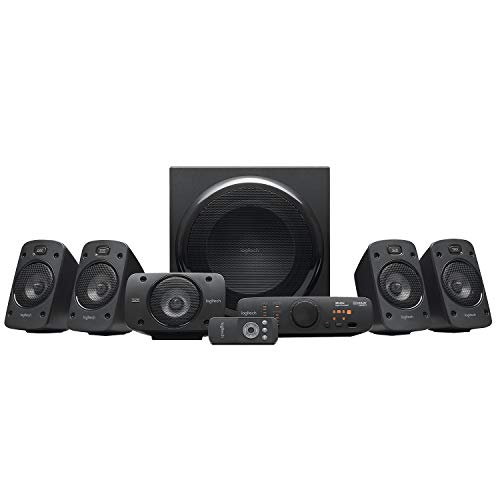
Logitech Z906 5.1 Surround Sound Speaker System — The category survivor
The Z906’s longevity is not nostalgia; it is the residue of a design that got the fundamentals right and a market that never produced its replacement. Five satellites, a side-firing subwoofer enclosure that also houses the amplification, a desktop control console with an infrared remote, and decoding for Dolby Digital and DTS built in. It is THX certified, rated by its maker at 500 watts RMS total with the subwoofer carrying the largest share, and it accepts a genuinely useful spread of inputs: six-channel analog for a sound card or motherboard with the right jacks, two optical inputs, a coaxial input, and stereo analog for simpler sources. For a PC owner, that input list is the product — whatever your machine can output, the Z906 can probably accept, and for the digital inputs it decodes the surround formats that films and many games provide.
At a desk, the experience is defined by placement freedom within cable limits. The satellites are compact enough for monitor-side duty and wall mounting behind the listening position, the subwoofer tucks under a desk and produces the kind of tactile low end that makes game explosions physical, and the control console puts volume and input selection at fingertip range — a small mercy that PC owners, whose alternative is alt-tabbing to a volume slider, appreciate daily. Sound character favors cinema and games: effects are placed decisively, dialogue is clear at moderate volumes, and the bass is generous to a fault, best tamed a few notches below its default enthusiasm for music.
The compromises are the compromises of its era. There is no HDMI, so a modern console or streaming stick joins through optical from the TV or the source, and there is no support for the newer object-based formats — irrelevant for most PC content, but worth knowing. The satellites’ fixed cables and the console’s wired tether impose some desk geography. And the system is a closed world: when one part eventually fails, you replace the system, not the part. None of this has stopped it being the correct default recommendation for powered 5.1 at a PC for over a decade, because nothing else has shown up to take the job.
- Configuration: Self-powered 5.1 — amplifiers and decoders in the subwoofer/console system
- Decoding: Dolby Digital and DTS built in
- Inputs: Six-channel analog, two optical, coaxial, stereo analog
- Control: Desktop console plus infrared remote
- PC fit: Designed for direct connection to a computer — no receiver needed
Strengths
- The only current powered 5.1 system that treats the PC as its home turf.
- Input generosity means it survives motherboard and source changes.
- Subwoofer impact gives games and films a physicality stereo desks lack.
Trade-offs
- No HDMI input, which modern sources increasingly assume.
- Bass tuning leans theatrical; music purists will dial it back.
- A sealed ecosystem — no component-level upgrades or repairs.
Best for: PC gamers and film watchers who want true powered 5.1 with the least possible fuss. Not suited for: Anyone building a component system they intend to upgrade piece by piece.

Monoprice Premium 5.1 Channel Home Theater System — Value via receiver
Read the label on this pick twice: the Monoprice Premium 5.1 is a passive home theater package. Its five speakers need an amplifier, and its connection to a PC runs through a receiver or a multichannel amp — the PC feeds the receiver over HDMI or optical, the receiver decodes and amplifies, and the Monoprice speakers do the sounding. Sold that way, honestly, it is one of the best-value routes to surround at a desk-adjacent setup or a small media room, because the package concentrates its cost on drivers and enclosures while the electronics you supply can be as modest as a secondhand entry-level receiver. The speakers themselves are rated by their maker in the 100-watt handling class with a 200-watt powered subwoofer — the sub, importantly, is self-amplified, so the receiver’s channels only carry the five satellites.
What does the receiver route buy over the Z906? Separation of concerns and a future. The receiver brings proper bass management, room correction in most modern models, HDMI switching for a console and a streaming device alongside the PC, and the freedom to replace any single element later. Sonically, the Monoprice set plays the matched-package game well: identical voicing across the five channels keeps a game’s ambient field coherent as you turn, and the powered sub fills the low end that satellites of this size cannot attempt. In a bedroom or small living room arranged around a PC-fed screen, this combination is a small home theater that happens to have a computer as its favorite source.
The costs are equally real. A receiver is a large, warm box that needs shelf space and ventilation — plan the furniture before the purchase. Total system cost, receiver included, passes the Z906’s, sometimes by a wide margin if the receiver is bought new. And the wiring is home theater wiring: five runs of speaker cable, with the rears crossing the room. Buyers who want those things get a better, more flexible system than any powered box offers. Buyers who do not should scroll back up to the Logitech and feel no shame.
- Configuration: Passive 5.1 package — five speakers plus powered subwoofer
- Amplification: Not included — a receiver or multichannel amp is required
- PC connection: PC feeds the receiver via HDMI or optical; receiver drives the speakers
- Subwoofer: Self-powered, so the receiver only drives the five satellites
- Label check: A home theater package adapted to PC use — not a plug-and-play PC speaker set
Strengths
- Receiver-grade decoding, bass management, and HDMI switching join your PC setup.
- Matched voicing across channels keeps game and film soundfields coherent.
- Every component can be upgraded or replaced independently later.
Trade-offs
- Receiver is a mandatory second purchase — in money, space, and heat.
- Full home theater wiring, including rear runs across the room.
- Oversized solution for a small desk in a shared room.
Best for: PC owners building a small media room who accept a receiver as the hub. Not suited for: Anyone wanting to plug speakers into a PC and be done by dinner.

Energy Take Classic 5.1 Speaker System — Refined via receiver
The Energy Take Classic carries the same label warning as the Monoprice — passive speakers, receiver required, PC connection through that receiver — and earns its separate place on refinement rather than value. This little package has been praised for years for sounding more composed than its size and class suggest: the satellites and center share a design that keeps dialogue natural, the system integrates with its 200-watt powered subwoofer at a crossover that avoids the boomy handoff lesser packages suffer, and the gloss enclosures look like small hi-fi rather than PC peripherals. In a setup where the PC feeds a receiver that also serves a television — the increasingly common one-screen room — the Take Classic is the package that makes films sound grown-up without making the room look like a showroom.
At PC distances its virtues sharpen. Nearfield listening exposes sloppy speaker design mercilessly, and the Take Classic’s satellites hold together at two or three feet: imaging stays put, voices stay centered and human, and the subwoofer, placed with a little care, underpins rather than advertises itself. Gamers who play story-driven titles — where a whispered line matters as much as an explosion — tend to prefer this balance to the Z906’s theatrical tilt, provided the receiver between PC and speakers is up to the decoding.
Age is the caveat to manage. The Take Classic design has been in the market a long time, and while that means proven reliability and a deep pool of owner knowledge, it also means you should buy from a listing you trust and inspect the goods on arrival, as with any long-running model whose production history spans years. It also means no modern concessions: no wireless anything, no app, no HDMI — those live in the receiver you choose, which is precisely the division of labor this pick asks you to embrace.
- Configuration: Passive 5.1 package — four satellites, center channel, powered subwoofer
- Amplification: Not included — receiver required, and it handles all decoding
- PC connection: Through the receiver over HDMI or optical
- Subwoofer: Powered, rated by its maker in the 200-watt class
- Label check: A home theater package for PC-via-receiver use — not powered PC speakers
Strengths
- Dialogue and midrange composure a cut above its size class.
- Nearfield manners suit desk-distance listening unusually well.
- Subwoofer integration avoids the one-note boom of cheap packages.
Trade-offs
- Receiver dependency, with all the cost and space that implies.
- A long-running design — buy from a trustworthy listing and inspect on arrival.
- No modern wireless or smart features anywhere in the package.
Best for: Film-first PC setups where a receiver already exists or is planned. Not suited for: Minimalist desks or buyers who count a receiver as clutter rather than infrastructure.

Samsung HT-J4500 5.1 Channel 3D Blu-Ray Home Theater System (2015 Model) — The HTIB time capsule
Everything about this pick needs its year attached: the HT-J4500 is a 2015 home-theater-in-a-box, a category that put a Blu-ray player, the amplifiers, and the decoding in one main unit and surrounded it with five small speakers and a passive subwoofer. Samsung rates the system at 500 watts in the generous arithmetic HTIB makers favored. Its relevance to a PC buyer is specific and limited: as a living-room system, it can accept audio from a PC or TV through its inputs and deliver genuine 5.1 from discs and digital sources, which makes surviving units and old stock a workable budget route for a couch setup that a PC feeds. As a desk system, it makes little sense — the main unit is a full-size disc player, the speaker wiring assumes a room, and the whole design predates the streaming-first habits of current PCs.
Why include it at all? Because it keeps appearing in searches and marketplaces, and buyers deserve a straight account rather than silence. The straight account: the category is discontinued, the smart features of a 2015 player belong to another internet era and should be treated as decoration, and the value case rests entirely on price and condition. A clean unit at a genuinely low price, bought for disc playback and simple 5.1 in a secondary room, can be a rational purchase. The same unit priced near modern equipment is a trap wearing a familiar logo.
Set against the Z906, the Samsung inverts the priorities: it is room-first and PC-second, disc-first and streaming-second. Set against the passive packages, it asks for no receiver but offers no upgrade path either — the speakers are tied to the main unit’s amplification and connectors, so the system lives and dies as a set. If your PC is one source among several in a living room and a Blu-ray library still matters in your house, it can serve. If your PC is the sun everything orbits, the picks above it on this page are built for you and this one is not.
- Configuration: Home-theater-in-a-box — Blu-ray player/amplifier main unit, five speakers, passive subwoofer
- Model year: 2015 — discontinued category; smart features are of their era
- PC role: A living-room system a PC can feed, not a desk speaker set
- Amplification: Built into the main unit; speakers are system-bound
- Label check: Buy on price and condition only, with its age fully understood
Strengths
- Complete 5.1 with disc playback in a single purchase, no receiver needed.
- Simple living-room setup that a PC or TV can feed with surround audio.
- Can be good value when priced honestly for its age and condition.
Trade-offs
- A 2015 design — streaming features and apps belong to another era.
- No upgrade path; the system works as a set or not at all.
- Wrong shape entirely for a desk.
Best for: A secondary living room with a disc collection and a PC as one source among several. Not suited for: Desk setups, streaming-first households, or anyone paying modern money for it.
The Desk Soundbar Route — Small-desk realism (prose-only)
Measure your desk before romanticizing five satellites. A typical desk gives you perhaps a meter and a half of width, much of it already claimed by a monitor, and rear speakers require somewhere behind you that is not a bed, a door swing, or a roommate’s territory. When the geometry fails, the soundbar is not a surrender — it is the correct engineering answer to the room you have. A compact bar under the monitor, ideally with a small wireless or wired subwoofer under the desk, delivers a front soundstage wider than the bar itself through angled drivers, dialogue clarity that two budget satellites rarely match, and a single cable to the PC or monitor. This pick is prose-only because the right bar depends on your monitor’s outputs and desk width, and this site’s soundbar guides cover the linked specifics; the point here is the route’s legitimacy.
What you give up is true rear envelopment: no bar places a sound genuinely behind you without rear speakers, and virtualization modes approximate the effect with varying conviction. What you gain, beyond fit, is daily livability — one remote behavior to learn, no cable runs, automatic harmony with the TV-style sources a desk increasingly hosts, and a setup that survives a room rearrangement in minutes. For the many PC owners whose “5.1” ambition really means “movies and games should sound big and clear at my desk,” the bar quietly satisfies the actual desire.
Choose with two checks. First, connection: a bar that accepts your PC’s or monitor’s best output — HDMI where available, optical or USB audio otherwise — without forcing the stereo-only traps described later in this guide. Second, a real subwoofer or genuinely capable bass drivers, because a bar alone cannot move the air that game soundtracks assume. Meet both, and the desk route stops being the compromise and becomes the recommendation.
- Configuration: Single bar, optional compact subwoofer — no rear speakers
- PC connection: HDMI, optical, or USB depending on model — verify before buying
- Surround honesty: Wide front stage with virtualization; nothing truly plays behind you
- Space demand: The width of your monitor and a corner under the desk
- Coverage: Prose-only here; linked models live in this site’s soundbar guides
Strengths
- Fits the desks that five satellites physically cannot.
- One cable, one control scheme, minutes to install or rearrange.
- Dialogue clarity typically beats bargain satellite pairs.
Trade-offs
- No genuine rear-channel envelopment, whatever the mode names promise.
- Bass depends entirely on the subwoofer option chosen.
- Soundstage width is processing-assisted, not physical.
Best for: Small desks, shared rooms, and anyone whose surround ambition is really about scale and clarity. Not suited for: Players who want true rear positional cues in competitive games.
The Virtual Surround Route — Zero-footprint option (prose-only)
The most modern answer to this search uses no surround speakers whatsoever. Virtual surround processing — built into Windows as spatial sound options, offered by sound-card and motherboard software, and refined in gaming headsets — takes a multichannel mix and renders it for two channels so that your ears perceive direction, including behind. Paired with a good powered stereo pair or a quality headset you already own, it costs nothing in furniture, wiring, or floor space, and in a bedroom at midnight it is the only surround your household will permit. This pick is prose-only because it is software and settings rather than a product to link.
Honesty about its limits matters as much as enthusiasm. Virtualization quality varies sharply by implementation and by listener — the psychoacoustics depend on ear shape, and some listeners get a convincing sphere while others get a wide, vague stage with a hole at the back. It also lives or dies by configuration: the game must output multichannel, the operating system must be set to the matching speaker configuration, and the processing layer must be the only one active, because double-processing — game, OS, and headset software all virtualizing at once — collapses the image into soup. Set up carefully, it is startlingly good for the price of free; set up carelessly, it is worse than plain stereo.
Our practical advice: try this route first if you already own decent stereo speakers or a headset, because the experiment costs an evening of settings rather than money. If the effect convinces your ears, you have your answer and the rest of this page becomes a catalog of unnecessary furniture. If it does not — and for shared-room viewing it cannot, since processing for one pair of ears serves exactly one listener — the powered hardware above is waiting, and you will buy it knowing precisely which limitation you are paying to remove.
- Configuration: Software spatial processing over stereo speakers or a headset
- Cost: Typically free with the operating system or existing audio software
- Surround honesty: A perceived soundfield for one listener — convincing for some ears, vague for others
- Setup demand: Careful configuration; exactly one processing layer active
- Coverage: Prose-only — a settings route, not a purchasable product
Strengths
- No speakers, wires, or furniture required at all.
- Silent to everyone else in the home when used with a headset.
- Costs nothing to test with gear already on your desk.
Trade-offs
- Serves exactly one listener; useless for shared viewing.
- Effect quality depends on the listener’s own hearing geometry.
- Misconfiguration easily makes it worse than plain stereo.
Best for: Solo players in bedrooms and shared housing, and as a free first experiment. Not suited for: Anyone watching or playing with other people in the room.
How Do the Six Options Stack Up Against Each Other?
| Pick | Needs a receiver? | True discrete 5.1? | PC connection | Best setting |
|---|---|---|---|---|
| Logitech Z906 | No — self-powered | Yes | Analog 5.1, optical, coaxial direct to PC | Desk or small room |
| Monoprice Premium 5.1 | Yes — passive package | Yes, via receiver | PC to receiver over HDMI/optical | Small media room |
| Energy Take Classic 5.1 | Yes — passive package | Yes, via receiver | PC to receiver over HDMI/optical | One-screen living room |
| Samsung HT-J4500 (2015) | No — amp in Blu-ray unit | Yes | PC/TV as one input among several | Secondary living room |
| Desk soundbar route | No | No — virtualized width | HDMI, optical, or USB | Small desks |
| Virtual surround route | No | No — perceived field | Software only | Solo listening |
The table’s middle column is the one to shop by. Only four routes deliver discrete 5.1, and they divide cleanly into “powered and finished” (Z906, Samsung) and “passive and expandable” (Monoprice, Energy). The two prose-only routes trade the discrete field for space and simplicity — a trade that is wrong for some desks and obviously right for others. Notice also what the table does not contain: a second powered, PC-native system standing beside the Z906 as an equal. Its absence is the category’s true state, and any guide that fills the row with a discontinued model at a scalper’s markup, or with a stereo set wearing surround language, is decorating rather than informing. We would rather show you the gap and the honest ways around it.
How Should You Connect a PC to a 5.1 System Without Losing Channels?
More 5.1 PC setups fail at the cable than at the speaker, so learn the three paths and their traps. Path one is six-channel analog: three stereo cables carrying front, rear, center, and subwoofer signals from a sound card or a motherboard that still offers the full jack set. It is simple, uncompressed, and increasingly rare — check your rear panel before assuming it exists. Path two is HDMI into a receiver or a decoding system, which carries multichannel PCM cleanly and is the modern default for the receiver-driven picks; on the PC side it usually means using a graphics card’s HDMI output as an audio device and telling the operating system it is a 5.1 configuration. Path three is optical or coaxial digital, which carries either two-channel PCM or a compressed Dolby Digital/DTS bitstream — and here sits the classic trap: most PC content is not pre-encoded, so a game will emerge as stereo unless something in the chain encodes it in real time. Owners who plug in an optical cable, hear only the front speakers, and blame the speakers are meeting this trap; the fix is analog, HDMI, or an encoder in the software stack, not new hardware.
Whatever the path, finish in software. Set the operating system’s speaker configuration to 5.1, run its per-channel test tones and confirm each sound lands in the right physical speaker, then set each game and player to output surround rather than stereo. Disable any second spatial-processing layer while using real speakers — virtualization over physical surround is the double-processing error described in the virtual route pick, and it smears exactly the placement you bought five speakers to achieve.
Where Should Five Speakers and a Subwoofer Actually Go Around a Desk?
Desk surround obeys the same geometry as room surround, compressed. Front left and right flank the monitor at ear height, angled inward toward your chair, roughly as far apart as you sit from them. The center sits directly under or over the screen, as close to ear height as the monitor allows, because game dialogue and film voices anchor there. Surrounds are where desk setups cheat: they belong slightly behind and to the sides of your head, on stands, shelves, or wall mounts — not beside the fronts on the desk, which produces a wide stereo with extra speakers rather than surround. If behind-you placement is genuinely impossible, that impossibility is information: it means the soundbar or virtual route will serve you better than a deformed 5.1.
The subwoofer lives under the desk for most owners, and mostly behaves there, but two cautions apply. A sub firing into a desk’s modesty panel or a hollow desk structure will excite rattles that read as distortion; a few centimeters of repositioning, or isolation feet, usually cures it. And your own legs are part of the acoustic environment — a sub aimed at your shins feels more powerful than it measures, which is fun until it unbalances film mixes at night. Set sub level with a film scene containing both dialogue and effects, at your real listening volume, and resist the demo-mode urge to let the bass announce itself in scenes where it has no business.
What Mistakes Ruin Most 5.1 Desk Setups?
Sixth is forgetting that the PC reassigns audio devices — after updates and GPU driver installs, check that the 5.1 device is still the default and still configured as 5.1, because a silent fallback to a stereo monitor output has ended more surround setups than any hardware failure. Seventh is a placement error specific to desks: standing the center channel vertically beside the monitor because it fits, which turns a speaker voiced for horizontal duty into a lopsided source and drags dialogue off the screen; if the center cannot sit horizontally at the screen, a phantom center from well-matched front speakers is the lesser evil. Eighth, and most human, is buying for the room you intend to have next year — the bigger desk, the dedicated office — and deforming the layout to fit the room you actually have tonight; audio bought for an imaginary room serves neither.
What Should You Check on Your PC Before Spending Anything?
Thirty minutes of inspection prevents the most common returns in this category. Start at the back panel: count the analog audio jacks. A full six-channel set — typically green, black, and orange or their labeled equivalents — means the Z906’s analog path is open to you today. A lone green jack means your machine speaks stereo analog, and surround will have to travel digitally or not at all. Next, inventory the digital exits: an optical output on the motherboard, HDMI from the graphics card, or USB as the universal fallback. HDMI is the most capable of the three for receiver routes; optical carries the stereo trap for games; USB needs a system or interface that accepts audio that way, which the powered picks here generally do not — check before assuming.
Then open your operating system’s sound settings and look at what configurations your current output device actually offers. If 5.1 does not appear as an option for the device you intend to use, it will not appear by wishing after the speakers arrive; the fix is a different output path — a sound card, an HDMI device, or a receiver — and it is cheaper to learn that now. Laptop owners should be especially careful: many laptops offer exactly one analog jack and HDMI, which makes the receiver route or a decoding system with HDMI/optical from a dock the realistic paths, and the classic six-cable analog connection simply unavailable. Finally, look at your desk and the wall behind your chair with a tape measure in hand. Rear speaker placement is a furniture question before it is an audio question, and the honest measurement has redirected more buyers to the soundbar route than any review ever written.
How Do You Balance Five Channels Once Everything Is Plugged In?
Uncalibrated surround is a rumor of surround. The procedure is simple and repays its twenty minutes every session afterward. Begin with the operating system or receiver test tones: each channel should announce itself from the correct physical speaker at roughly equal loudness from your chair. If you use a receiver, its auto-calibration with a microphone at your seated ear position does most of this well; with the powered Z906, walk the levels manually from the console, using the same test material. Set the center channel by dialogue, not by tone — play a conversation-heavy scene at your normal volume and adjust until voices are intelligible without reaching for the remote during action peaks. Set the surrounds by ambience: rain, crowd noise, a game’s environmental bed should envelop without any single effect shouting its location, unless the mix intends a shout.
The subwoofer deserves its own paragraph because desk setups mistreat it in a specific way: the listener sits in the nearfield of everything, including the sub under the desk, so its level that seems balanced during a bass-heavy demo becomes a constant presence during ordinary content. Calibrate it with mixed material — dialogue plus score plus effects — and aim for the setting where you notice its absence when muted more than its presence when active. Check polarity and crossover if your system exposes them: a sub out of phase with the satellites carves a hole exactly where explosions keep their punch, and a crossover set far above the satellites’ ability leaves a gap, while one set too low makes male voices migrate into the floor. None of this requires instruments beyond your ears, a familiar film, and the discipline to stop adjusting once it sounds like a place rather than a system.
One last calibration is temporal. After a week of use, revisit every level once. New owners almost universally set surrounds and sub too hot, drunk on the novelty of hearing them; the week-later pass, made with familiar content and rested ears, is where a demo becomes a system you will live with for years. Write the final settings down. Audio devices get reset by updates more often than any of us would like, and the note turns a frustrating evening of rediscovery into two minutes of restoration.
Which Games and Films Actually Reward a 5.1 Desk Setup?
Not all content justifies the furniture, and knowing which does helps you judge a finished setup fairly. Competitive shooters are the strongest gaming case: discrete rear channels put footsteps and reloads behind you with a stability that even good virtualization approximates rather than equals, and players who compete seriously are the group most likely to call the wiring worth it. Open-world and horror titles reward the system differently — ambience becomes architectural, weather surrounds rather than plays, and a sound designed to be behind you in a corridor lands with a physical startle that stereo cannot produce. Racing games sit in between: engine and tire information is mostly frontal, but traffic and impacts gain real placement. Strategy, puzzle, and most indie catalogs, by contrast, are mixed for stereo and gain little; a 5.1 rig playing them is furniture admiring itself.
Films divide similarly. Modern action and science fiction are mixed with aggressive surround use and justify every channel; dramas place ambience subtly and mostly ask your system for a superb center channel; older catalog titles often carry stereo or modest surround mixes that a receiver will upmix pleasantly but not transform. Streaming services complicate the picture with per-title and per-tier format differences, so the receiver or console display — which reports what is actually being decoded — is the only trustworthy program guide. The evaluation rule follows: judge your new system on two or three titles known to use the format fully, kept as reference material, and let the rest of your library simply sound as good as it sounds. Owners who skip this discipline routinely return good systems for failing tests the content never set.
How Long Will a 5.1 Desk Setup Last, and What Breaks First?
Speakers are among the longest-lived electronics you can buy, which changes the buying calculus in this category’s favor. Passive packages like the Monoprice and Energy have no firmware, no apps, and no servers; cared for, they will outlive several PCs, and their only consumables are foam surrounds and capacitors on timescales measured in decades. The powered Z906 concentrates its risk in its electronics — the amplifier and console — yet its long production run means parts knowledge and owner documentation are deep, and its failure modes are at least well-mapped by a large installed base. The Samsung HTIB carries the opposite profile: a 2015 disc mechanism and era-bound smart features age on schedule regardless of care, which is another reason its price must respect its year.
The practical longevity advice is boring and effective, and it starts before the first power-on, with ventilation, dust, and surge protection treated as part of the purchase rather than as housekeeping to consider later on, once something has already failed. Keep powered systems ventilated and out of the dust bunnies’ capital under the desk; a subwoofer enclosure that doubles as an amplifier needs its air. Use a surge protector, because the cheapest insurance in the setup protects the least replaceable parts. Label both ends of every cable when you install, while you still remember which run is the left surround. And keep the receiver route’s quiet advantage in mind: in a component chain, the piece that ages fastest — the decoder with its formats and ports — is also the piece that can be replaced alone, leaving speakers and sub untouched. That replaceability, more than any single sonic trait, is why component systems stay in service for decades while all-in-one boxes retire whole.
Budget honesty belongs in this guide too, because the routes differ less in sticker than in total. The Z906’s price is nearly the whole story — cables and stands at most. The passive packages invert that: the speakers are the smaller half of the bill once a receiver, wire, and stands are counted, and a buyer comparing package prices against the Z906’s price is comparing a part against a whole. The Samsung’s economics depend entirely on the individual unit’s price and condition. The soundbar route totals close to its sticker, and the virtual route totals zero until it fails your ears. None of these totals makes a route wrong; each simply needs to be the number you planned around, rather than the number that ambushes you at the second checkout.
Final Recommendation
For the classic ask — real 5.1, powered, plugged straight into a PC — the Z906 remains the answer it has been for years, and its survival is the market’s verdict as much as ours. If your PC anchors a room rather than a desk, the receiver-driven packages are the better machines: the Monoprice for value, the Energy for polish, both honestly labeled as receiver-dependent. The Samsung is a priced-accordingly option for a secondary room with discs to play. And if your desk or your household vetoes five speakers, take the soundbar or the virtual route without treating them as defeat. The worst outcome in this category is not choosing the modest option; it is paying for a layout your room cannot hold and your cables cannot feed — so measure the desk, check the PC’s outputs, and let the room, not the search term, cast the deciding vote.
Frequently Asked Questions
Can I plug passive 5.1 speakers directly into my PC?
No. Passive speakers need an amplifier, and a PC’s audio outputs are line-level signals with no power to drive them. A receiver or multichannel amplifier must sit between the PC and any passive package, which is why this guide labels the Monoprice and Energy picks as receiver-driven routes.
Why does my 5.1 system only play stereo from games over optical?
Optical carries either two-channel PCM or a pre-encoded Dolby Digital/DTS bitstream. Games generate audio in real time and usually do not encode it, so the link falls back to stereo. Six-channel analog, HDMI to a receiver, or a real-time encoder in the audio chain solves it.
Is the Logitech Z906 still worth buying?
For powered, plug-and-play 5.1 at a PC, yes — it remains the only current system designed exactly for that job, with decoding and inputs that cover most machines. Buyers who want HDMI, newer formats, or component upgrades should look at the receiver routes instead.
Where do the rear speakers go if my desk faces a wall?
On stands, shelves, or mounts behind your chair, slightly to the sides and above ear level. If the room offers nowhere behind you, a 5.1 layout cannot form properly, and a soundbar or virtual surround will honestly sound better than rears stranded on the desk.
Does the Samsung HT-J4500 work with a modern PC?
As a living-room system fed by a PC or TV input, yes, within its 2015 limits. Its streaming features are of their era, its speakers are bound to its main unit, and it is the wrong shape for a desk — buy it only at a price that respects its age.
Do I need a sound card for 5.1 computer speakers?
Only for one specific path: six-channel analog output on a motherboard that lacks the full jack set. If your machine offers HDMI to a receiver, or you use a powered system with digital decoding fed by content that is already encoded, a sound card adds little. Modern external DACs and interfaces are stereo devices and do not change this — surround needs either the analog jack set, an HDMI path, or a decoder in the speaker system itself.
Is virtual surround as good as real 5.1 speakers?
For one listener with a well-matched implementation, it can be surprisingly convincing, and it costs nothing to test. It cannot serve a room, its quality varies by listener, and physical speakers remain the reliable reference — which is why this guide treats it as a legitimate route, not a replacement.
Related Guides
Still arranging the desk? Continue with our guides to the best 5.1 speakers overall, 5.1 home theater speakers without a receiver, and the best 5.1 Atmos speakers and what the label really means. Buyers who would rather drive passive speakers from their own amplifier should read the best small bookshelf speakers.


