What's inside
- Key Takeaways
- Quick Picks
- How Did We Shortlist These Smart Sets?
- Which Smart Platform Survives Best on a Small, Slow Television?
- How Do the Six Smart Picks Compare?
- Why Do Small Smart Televisions Feel Slow, and What Can You Do About It?
- How Should You Set Up the Smart Side for a Household, Not Just a Viewer?
- Where Do Buyers of Small Smart TVs Most Often Go Wrong?
- Final Recommendation
- What Do the Three Platforms Actually Feel Like Across a Week of Viewing?
- How Much Does Voice Control Really Change a Small Television?
- What Network Does a Small Smart Television Actually Need?
- How Do Updates, Accounts, and Ads Shape Life With These Sets?
- Which Apps and Services Can You Actually Expect at This Size?
- When Should You Skip Smart Entirely at 24 Inches?
- How Do You Keep a Small Smart TV Fast for as Long as Possible?
- What Changes When the Small Smart TV Belongs to a Child or a Teenager?
- What Should You Do When the Platform Finally Wears Out Its Welcome?
- Does a Small Smart Television Belong in a Smart Home?
- Frequently Asked Questions
- Related Guides
As an Amazon Associate I earn from qualifying purchases. This post may contain affiliate links at no extra cost to you.
gizmoverdict.com is reader-supported. When you buy through links on our site, we may earn an affiliate commission.
Anyone shopping the best 24 inch smart TVs should know the two truths that govern this little category before comparing a single model. First, the screens are close cousins: at this size, nearly every panel is a 720p LED, so the picture argument ends quickly. Second, the smart part is where these televisions genuinely diverge — and where they quietly struggle. A 24-inch smart television runs its streaming platform on the cheapest processor its maker could justify, because the entire product is engineered around a low shelf price. Apps open a beat slower than they do on a premium set, menus hesitate when the software grows heavier, and a television that feels lively in its first year may feel patient by its third. None of that makes these sets bad purchases. It makes the platform you choose, and the escape hatch you keep in reserve, the real subject of this guide.
So the six picks below are organized by software temperament and honesty about limits. Four are true 24-inch smart televisions covering the Fire TV, Roku, and SmartCast ecosystems plus a 12-volt Full HD specialist. Two are clearly labelled 32-inch step-ups, included because a striking number of shoppers who search at 24 inches discover, tape measure in hand, that 32 inches fits after all — and at 32 inches the smart experience improves noticeably. Every pick is a current, verified listing; where a model steps outside the headline size, the text says so in plain language rather than hoping you will not notice.
Key Takeaways
- At 24 inches you are choosing a streaming platform first and a television second, because the panels are near-identical 720p LED screens.
- Small smart televisions use cost-tier processors, so expect gentle loading times now and slower menus as apps grow heavier over the years.
- Roku’s interface asks the least of its hardware, which is one reason it ages gracefully in this class.
- An HDMI port is your insurance policy: any of these sets can be re-smartened later with an inexpensive stick when the built-in platform tires.
- The Sylvox is the odd one out in the best way — a 24-inch smart set with a native 1080p panel and 12-volt power for vehicles.
- If the furniture allows 32 inches, the two labelled step-ups deliver a visibly calmer smart experience for similar money.
Quick Picks
| Pick | Badge | Why it earns its place |
|---|---|---|
| Roku 24-inch Select | Lightest Load on Weak Hardware | Roku’s featherweight interface squeezes the most grace out of a budget processor, and its grid never buries the apps under promotions. |
| Insignia 24-inch F20 Fire TV | Alexa Households Start Here | Fire TV brings Amazon’s voice control and app library to the small room, happiest where Prime Video already anchors viewing. |
| Vizio 24-inch V-Series | Let Your Phone Do the Thinking | SmartCast offloads the heavy lifting to your handset, dodging the sluggish built-in menus that age worst in this class. |
| Sylvox 24-inch 12V Smart RV TV | Smart, Sharp, and Mobile | The only 24-inch smart set here with a 1080p panel, built for caravans and boats where screens sit close and power is 12 volts. |
| Insignia 32-inch F20 Fire TV | Labelled Step-Up: Roomier Fire TV | Eight inches larger than the headline size, honestly flagged, for buyers whose counter or dresser turns out to have space after all. |
| Roku 32-inch Select | Labelled Step-Up: 1080p Roku | The 32-inch Roku adds Full HD resolution to the same calm interface, for rooms where 24 inches would have felt like a postage stamp. |
How Did We Shortlist These Smart Sets?
Verification came first: each model below is a live listing in the stated size, checked against the pool of confirmed products for this site, with its platform and resolution taken from the listing rather than from marketing summaries. That process produced an uncomfortable finding worth stating in a guide about smart televisions — the 24-inch smart category contains essentially three mainstream platforms and one specialist. Several famous television brands sell nothing smart at this size at all. Rather than pad the list with unverifiable names, this guide covers the real category completely and adds two clearly labelled neighbours for the large group of shoppers whose rooms turn out bigger than their first estimate.
Platform behaviour shaped the ranking more than any specification. We weighed how much work each interface asks of a modest processor: Roku’s static grid and modest animations at one extreme, Fire TV’s image-rich, promotion-heavy home screen at the other, and SmartCast’s phone-offload strategy sidestepping the contest entirely. We also weighed what happens in year three, because a smart television purchase is really two purchases — the panel, which will last, and the software experience, which will not last as long — and a fair guide prices both.
Finally, we kept the rooms in view. These sets land in kitchens, bedrooms, dorms, caravans, and guest rooms, where the operator is often cooking, half asleep, visiting, or twelve years old. A platform that requires patience or expertise fails those rooms even if its app store is enormous. Every pick below can be driven by a first-time user within a minute of picking up the remote, and the differences that remain — voice control, casting, app emphasis — are the differences this guide exists to explain.
Which Smart Platform Survives Best on a Small, Slow Television?

Roku 24-inch Select — Lightest Load on Weak Hardware
There is a engineering elegance to Roku’s presence in this class that has nothing to do with features. Roku’s interface is deliberately plain: a static grid of tiles, short menus, modest artwork. On a flagship television that plainness looks austere. On a 24-inch set whose processor was chosen by an accountant, it is the reason the television still answers the remote promptly in its third year while flashier rivals have begun to hesitate. Roku also wrote its software to run across an enormous range of modest hardware, including its own inexpensive sticks, so the platform’s appetite is calibrated for exactly this tier of machine. The Select is Roku’s own hardware, which removes the finger-pointing between television maker and platform owner when an update arrives.
Day to day, the experience is the calmest in this guide. Search treats the major services even-handedly, the home screen shows your apps rather than a storefront’s priorities, and the mobile app provides a keyboard and phone-based listening for bedroom use. The panel is a 720p LED, matching the class, and at kitchen or bedside distances the picture is entirely adequate for the streaming these rooms consume. What you give up versus Fire TV is deep voice-assistant integration and Amazon’s content gravity; what you gain is a television that explains itself to any human who picks up its remote, including the ones who will never read a manual.
- Screen: 24-inch LED, 720p HD
- Platform: Roku OS on Roku’s own Select hardware
- Control: simple remote, Roku app with keyboard and private listening
- Best room: any room operated by more than one generation
- Power: mains only
Strengths
- Featherweight interface stays responsive on budget silicon longer than richer rivals.
- Neutral search and an uncluttered grid respect the viewer’s own subscriptions.
- First-party hardware means platform updates arrive without a middleman.
Trade-offs
- The interface’s plainness is real: no cinematic home screen, minimal discovery flair.
- 720p panel, like nearly the whole class, softens text and fine detail up close.
- Voice control exists but is less ambitious than Alexa’s household ecosystem.
Best for: mixed-service households and anyone buying for parents, guests, or children. Not suited for: viewers who want their television woven into a voice-assistant smart home.

Insignia 24-inch F20 Fire TV — Alexa Households Start Here
The Insignia F20 is the small-screen outpost of Amazon’s television empire, and its proposition is continuity. If the living room runs a Fire TV device, this kitchen or bedroom set speaks the same language: the same home screen logic, the same Alexa voice remote habits, the same Prime Video front and centre. Household members carry their knowledge from room to room, which is worth more in daily life than any specification on the box. Fire TV’s app library is comprehensive, its voice search is genuinely useful when your hands are occupied or the lights are off, and the platform integrates Amazon’s live and free ad-supported channels into a guide that casual viewers often enjoy more than an app grid.
The compromises are the mirror image of the Roku’s. Fire TV’s home screen is a richer, heavier piece of software — more artwork, more rows, more promotion — running on the same tier of modest processor as everything else in this class, so it asks more of the hardware and will show its age sooner. The promotion itself divides opinion: households that love Amazon’s suggestions call it discovery; households that do not call it advertising in a product they already bought. The panel is the class-standard 720p LED, fine across a room and soft at a desk. Buy this set because your household already lives in Amazon’s world, and it will feel like the small room simply joined the rest of the house.
- Screen: 24-inch LED, 720p HD
- Platform: Fire TV with Alexa voice remote
- Control: voice-first remote, Amazon account integration
- Best room: kitchens and bedrooms in Fire TV households
- Power: mains only
Strengths
- Perfect continuity for homes already standardized on Fire TV sticks and cubes.
- Voice search and control are the most developed in this roundup.
- Amazon’s free and live channel integration gives casual viewers plenty to watch without subscriptions.
Trade-offs
- The heaviest home screen here runs on modest hardware, so long-term smoothness is the weakest bet of the group.
- Amazon content is promoted persistently, which some households find wearing.
- 720p resolution, unchanged from the class norm.
Best for: Amazon-committed households that want the small room to behave like the big one. Not suited for: buyers who dislike storefront-style home screens.

Vizio 24-inch V-Series — Let Your Phone Do the Thinking
Vizio’s SmartCast answers the weak-processor problem by declining to fight it. Instead of asking the television’s modest chip to run a heavy interface beautifully, SmartCast leans on casting: you browse in the apps on your phone — a device with a far stronger processor, a keyboard, and your accounts already signed in — and the television receives the stream. The built-in side of the platform exists and works, but the design centre of gravity sits in your pocket. For viewers whose watching already starts on a handset, this is not a workaround; it is the most modern interaction model in the roundup, and it ages the best because the phone gets replaced on a two-year cycle while the television stays on the wall.
The trade is equally clear. Viewers who want to sit down, press one button, and browse with a remote will find SmartCast’s television-side experience the least central of the three platforms, and households that share one screen across people with different phones must pass the casting role around. The panel follows the class pattern — 24-inch LED at 720p — and Vizio’s picture adjustments give bright kitchens a bit more to work with than average. Choose the Vizio if your household casts reflexively; choose Roku or Fire TV if the television must be a self-contained appliance that never asks anyone for their phone.
- Screen: 24-inch LED, 720p HD
- Platform: SmartCast with deep casting and mirroring support
- Control: phone-led, with a standard remote included
- Best room: guest rooms and phone-first households
- Power: mains only
Strengths
- Casting routes around the weak-processor problem instead of suffering it.
- Guests stream from their own accounts without signing into your television.
- The experience improves every time you upgrade your phone, at no extra cost.
Trade-offs
- Remote-first viewers get the least self-contained interface of the three platforms.
- Casting depends on your home Wi-Fi behaving, like all wireless conveniences.
- The panel remains 720p, with the usual close-range softness.
Best for: phone-first viewers and hosts who entertain streaming guests. Not suited for: viewers determined to keep the phone in a drawer until the credits roll.

Sylvox 24-inch 12V Smart RV TV — Smart, Sharp, and Mobile
Every other pick in this guide accepts the class bargain — smart features on a 720p panel — and the Sylvox refuses it. Built by a specialist maker for recreational vehicles, boats, and trucks, this 24-inch smart television carries a native 1080p panel, because its audience watches from a dinette bench or a bunk barely a metre away, where the mainstream class’s resolution genuinely falls short. Its smart platform streams at the campsite or the marina, and its 12-volt power supply plugs into the vehicle’s electrical system rather than demanding shore power or an inverter. It is, in short, the pick for buyers whose small television leads a mobile life.
In a house, its talents translate to one specific job: the close-range screen. A studio flat, a desk-adjacent setup, a van conversion parked in the driveway most of the year — anywhere the viewer sits near the glass, the Sylvox’s Full HD panel is visibly crisper than everything else at this size. The costs are a higher price than the mainstream sets and a specialist brand whose app ecosystem and update cadence are less proven than the big platforms’. Weigh it as you would any specialist tool: overpriced for a job it will never do, fairly priced for the one job only it can do.
- Screen: 24-inch, native 1080p Full HD — unique among the true 24-inch picks
- Platform: built-in smart system
- Power: 12V DC for vehicles, mains via adapter at home
- Best room: caravan, boat, truck, or close-seating flat
- Maker: Sylvox, a vehicle-television specialist
Strengths
- Full HD sharpness at the exact size where rivals offer none.
- 12-volt power opens vehicles, boats, and off-grid installations entirely.
- Smart features included, so no stick dangles in a moving vehicle.
Trade-offs
- Priced above the mainstream class, reflecting panel and power hardware.
- Platform polish and long-term app support trail Roku and Amazon.
- Across a large room its resolution advantage simply cannot be seen.
Best for: vehicle owners and close-range viewers who need real sharpness at 24 inches. Not suited for: a distant bedroom wall where 720p looks identical.

Insignia 32-inch F20 Fire TV — Labelled Step-Up: Roomier Fire TV
This pick is not a 24-inch television, and it is here under a flag rather than a disguise. A large share of shoppers who measure for 24 inches discover the dresser, counter run, or caravan nook actually accepts 32 — and the moment size is negotiable, the Insignia’s own 32-inch F20 becomes the natural Fire TV choice: the same platform and voice remote as its smaller sibling, on a screen that fills a bedroom’s field of view far more comfortably. It remains a 720p set, which at 32 inches is a more noticeable compromise than at 24, so this step-up suits viewers who prioritize platform and size over resolution — casual bedroom and kitchen viewing across a room, where the bigger picture matters more than pixel density.
Why include a bigger, equally 720p set in a smart roundup? Because the smart experience itself improves with the household’s comfort: the remote is the same, the interface is the same, but everything is easier to read from bed or across a kitchen, and small text in menus stops being a squinting exercise for older eyes. If your space truly caps at 24 inches, ignore this pick without a second thought — the guide’s first four picks are your category. If the tape measure surprised you, this is the Fire TV way to spend the extra space.
- Screen: 32-inch LED, 720p HD — larger than the headline size, labelled as such
- Platform: Fire TV with Alexa voice remote
- Control: voice remote, Amazon account integration
- Best room: bedrooms and kitchens with more space than expected
- Power: mains only
Strengths
- Same familiar Fire TV experience on a screen that suits across-room viewing.
- Menu text and subtitles are far easier to read at distance than on the 24-inch set.
- Keeps the purchase inside one ecosystem if the household already uses Fire TV.
Trade-offs
- It is not a 24-inch television; tight spaces should stay with the picks above.
- 720p at 32 inches is softer per inch than the same resolution at 24.
- Fire TV’s promotional home screen comes along unchanged.
Best for: shoppers whose measured space outgrew the 24-inch plan and who want Fire TV. Not suited for: genuinely tight counters, cabinets, or caravan nooks.
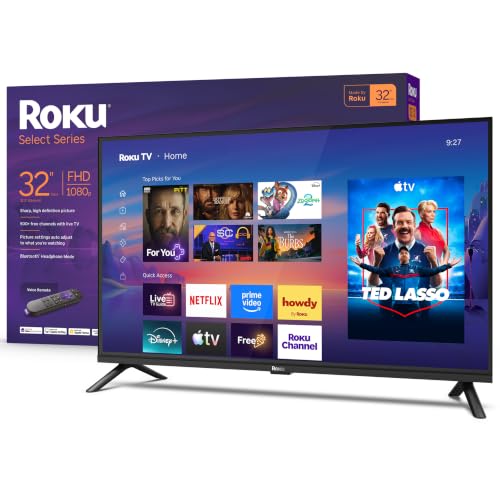
Roku 32-inch Select — Labelled Step-Up: 1080p Roku
The second labelled step-up makes the strongest technical case in this guide for remeasuring your furniture. Roku’s 32-inch Select keeps everything that recommends the 24-inch model — the calm grid, the neutral search, the featherweight demands on modest hardware — and adds the one upgrade the smaller set cannot offer: a 1080p Full HD panel. At 32 inches that resolution is the difference between a screen that merely shows streaming and one that shows it crisply from a bed or a sofa, and it future-proofs the purchase for the day the set migrates to a desk or a child’s room where viewers sit closer.
As with its Insignia counterpart, the honesty label matters: this is a 32-inch television in a 24-inch guide, present because the rooms so often allow it, not because the sizes are interchangeable. If 24 inches is a hard constraint — a cabinet opening, an under-counter mount, a caravan locker — this pick is a pleasant irrelevance. If it is a soft estimate made before measuring, the Roku 32 is arguably the best single purchase in the entire article: the gentlest platform in the class, on the panel the class’s smaller sets cannot match, in the size most second rooms actually want.
- Screen: 32-inch, 1080p Full HD — larger than the headline size, labelled as such
- Platform: Roku OS
- Control: simple remote plus Roku app keyboard and listening
- Best room: bedrooms and small living rooms with flexible space
- Power: mains only
Strengths
- Full HD resolution removes the class’s central compromise in one step.
- Roku’s light interface keeps the modest hardware feeling responsive.
- The size suits across-room seating better than any true 24-inch set can.
Trade-offs
- Eight inches too wide for genuinely constrained installs — measure first.
- No vehicle power option, unlike the Sylvox.
- Roku’s interface remains deliberately plain beside Fire TV’s richer presentation.
Best for: flexible-space buyers who want the calmest platform on a sharper, larger panel. Not suited for: fixed 24-inch openings of any kind.
How Do the Six Smart Picks Compare?
| Pick | Size | Resolution | Platform | Defining trait |
|---|---|---|---|---|
| Roku 24 Select | 24-inch | 720p | Roku OS | Lightest software load |
| Insignia 24 F20 | 24-inch | 720p | Fire TV | Alexa continuity |
| Vizio 24 V-Series | 24-inch | 720p | SmartCast | Phone-led casting |
| Sylvox 24 12V | 24-inch | 1080p | Built-in smart | Vehicle-ready sharpness |
| Insignia 32 F20 | 32-inch (step-up) | 720p | Fire TV | Bigger Amazon screen |
| Roku 32 Select | 32-inch (step-up) | 1080p | Roku OS | Sharpest calm option |
The table’s lesson is that platform and panel vary independently in this class, and a wise buyer chooses them separately. Decide the software temperament your household will enjoy — Roku’s restraint, Fire TV’s voice-driven abundance, SmartCast’s phone delegation, or the Sylvox’s specialist independence — then check whether the panel attached to that temperament fits your distance and your furniture. Reversing the order, and falling for a screen first, is how households end up with a sharp picture controlled by an interface they quietly resent.
Why Do Small Smart Televisions Feel Slow, and What Can You Do About It?
The slowness is structural, not a defect in your particular set. A smart television’s price is dominated by its panel, so the processor, memory, and storage are specified to a budget that would embarrass a five-year-old phone — yet the software they must run is written for a market led by premium sets. Manufacturers rarely publish these internal specifications for small televisions, which is itself a clue: where a specification would impress, it gets printed. The result is a class of devices that launch apps politely rather than instantly, animate menus frugally, and feel the weight of every platform update that adds features designed for stronger hardware.
Three habits keep the experience pleasant. First, install only the services you actually watch in that room; every additional app is another background process, another update, another tile slowing the grid. Second, restart the television properly once in a while — a full power-off at the wall, not the standby button — because weeks of standby sleep accumulate the same cruft as a phone that never reboots. Third, keep the set’s software updated while updates are offered, since performance fixes for budget hardware are a real and recurring category of patch. And when, years from now, the platform finally feels tired, remember the escape hatch: a current streaming stick in the HDMI port restores a fast, modern interface while the panel — the part you actually paid for — keeps working. A small smart television bought with that plan in mind never really becomes obsolete; only its cheapest component gets swapped.
How Should You Set Up the Smart Side for a Household, Not Just a Viewer?
Decide whose account the television lives under before you sign into anything. In a family kitchen, a shared household account keeps purchases, watchlists, and parental controls in one place; in a guest room, signing in with your personal account lends strangers your recommendations and, worse, your purchase history. Guest rooms and rentals are better served by the casting model or by a house account created for the purpose. Set up parental controls at the same sitting, while the motivation is fresh, if children will use the set unsupervised — every platform here offers them, and every parent intends to configure them later.
Then simplify ruthlessly. Pin the three or four services the room actually uses to the front of the interface and let the rest fall behind. Turn off autoplay previews if the platform allows it and the room is a bedroom, where a home screen that starts shouting trailers at midnight is a genuine nuisance. Connect the set to the Wi-Fi band with the clearest path rather than the theoretically fastest one; a small television streams modest bitrates and values a stable signal over a headline speed it will never use. Finally, label the remote with the room it belongs to if your household owns several — the smallest, pettiest, most daily annoyance of multi-television homes is the migration of remotes, and a strip of tape prevents it entirely.
Where Do Buyers of Small Smart TVs Most Often Go Wrong?
Judging the platform by the demo. A television in a shop or in its first week runs a fresh, empty version of its software; the same set two years later carries your accounts, your apps, and two years of platform updates on the same modest chip. Reviews that praise a budget set’s speed on day one are describing the best it will ever feel. Weight longevity evidence — the platform’s footprint, the maker’s update record, the existence of an HDMI escape hatch — over first impressions, including the first impressions in this guide.
Paying for the wrong kind of more. In this class, money spent chasing a longer app list or a flashier home screen buys little, because the major platforms all carry the major services. Money spent on the right axes — a sharper panel where distance demands it, 12-volt power where a vehicle demands it, a bigger screen where furniture allows it — buys something visible every day. Let your room, not the feature checklist, allocate the budget.
Forgetting the network. A smart television is a network appliance that happens to show pictures, and a set installed in the room furthest from the router will buffer its way into disrepute no matter which pick you choose. Before blaming any platform, test the signal where the television will live; a mesh node or a powerline adapter in that room improves every pick in this guide more than switching between them would.
Final Recommendation
For a true 24-inch smart television, start with the Roku Select if the set will be operated by many hands, the Insignia F20 if your household already speaks Alexa, and the Vizio if your phone is already the remote for everything else in your life. Take the Sylvox when the screen must be sharp up close or run on vehicle power. And if the tape measure grants you 32 inches, the Roku step-up is the single easiest recommendation in this article, with the larger Insignia waiting for Fire TV loyalists. Whichever you choose, keep an HDMI port free and a stick in mind for the future — the calmest way to own a small smart television is to know its smartest part can be replaced for the price of a pizza night.
What Do the Three Platforms Actually Feel Like Across a Week of Viewing?
Monday morning, kitchen, news with coffee. The Roku wakes to the same grid it showed on Sunday — your tiles, in your order, nothing rearranged overnight to promote a premiere. The Fire TV wakes to a living billboard: new rows, featured programmes, a hero banner for something Amazon would like you to sample, with your apps one row down. Neither behaviour is broken; they are different theories of what a home screen is for. Roku treats it as a hallway. Fire TV treats it as a shop window that also contains a hallway. SmartCast, on the Vizio, treats the question as your phone’s problem and presents the television as a well-behaved destination waiting for instructions.
Midweek, the differences move to search. Ask each platform for a film that lives on a service you subscribe to and all three find it. Ask for something scattered — a series whose seasons live in different places — and Roku’s even-handed results page earns its reputation, listing options without an obvious favourite. Fire TV’s search is superb inside Amazon’s gravity and merely good outside it, and its voice search is the best of the three by a distance that matters when your hands are covered in dinner. SmartCast’s search happens in each app on your phone, which is either wonderfully direct or annoyingly fragmented depending on how you already use your handset.
By the weekend the pattern has settled into the only verdict that matters: the best platform is the one whose theory matches your household’s habits, because the hardware underneath all three is too similar to rescue a mismatch. Households feel platform friction daily and panel limitations rarely, which is why this guide spends its words on software temperament. If you take one analytical idea from this article, take that ratio with you to every television purchase, at every size, from now on.
How Much Does Voice Control Really Change a Small Television?
More than the specification sheet suggests, and unevenly across rooms. In a kitchen, voice search is transformative in a small, specific way: it removes the remote from the chain of things your hands must touch while cooking. Asking for a programme, pausing with a word, checking a timer on the same assistant — these are the moments Fire TV’s Alexa integration stops being a bullet point. In a bedroom, voice control’s value collapses after lights-out, when speaking commands at a sleeping partner’s head is worse than any button, and the quiet virtues — a simple remote, phone-based listening, a sleep timer — take over. Roku’s voice features sit between the two: competent search by voice without the full smart-home ambitions.
Voice also carries the class’s one genuine privacy conversation. A voice remote listens when you press its button on these platforms, which is a contained arrangement, but the accounts behind them learn what the household watches and asks. Buyers who find that trade unacceptable are not stuck: the casting model keeps accounts on your phone rather than the television, and a non-smart television with a separate stick confines the platform to a replaceable accessory. This guide takes no side in that argument; it simply notes that at 24 inches, unusually, you can still choose how much smart you invite in, and that choice deserves to be made deliberately rather than by default.
What Network Does a Small Smart Television Actually Need?
Less than you fear, delivered more reliably than you might expect. Standard-definition and 720p streaming — the native diet of most picks here — asks for only a few megabits per second, a fraction of what even a modest broadband line supplies. The failures households blame on televisions are usually failures of signal geography: the kitchen or spare bedroom sits behind two walls and a chimney breast from the router, in the weakest corner of the house’s coverage. Every platform in this guide suffers identically in a dead zone, and every one recovers identically when the signal improves, which is why network fixes outrank platform switches as a remedy for buffering.
Practical steps, in order of effort: move the router a metre before buying anything, because small shifts in antenna geography change room-level coverage surprisingly. Prefer the less crowded band at the television’s location rather than the band with the bigger number, since a small set values stability over peak speed. If the room remains weak, a single mesh node or a powerline adapter with a short cable to the set converts the television from a wireless supplicant into a wired citizen, and wired small televisions are famously boring in the best way — they simply work, every evening, while the household argues about whose video call is consuming the airwaves.
How Do Updates, Accounts, and Ads Shape Life With These Sets?
A smart television is a subscription you did not know you took out — not in money, but in maintenance. Platforms update themselves, occasionally improving the interface, occasionally rearranging it the night before your parents visit. Accounts accumulate: the television’s platform account, each streaming service, sometimes the manufacturer’s own registration layered on top. Ads, in some form, fund the low hardware prices across this entire category, appearing as promoted rows and featured banners rather than interruptions to programmes themselves. None of this is sinister, and much of it is the honest price of a connected screen at a small-screen price, but a buyer who understands the arrangement on day one enjoys the set more than a buyer who discovers it by surprise.
You retain more control than the setup screens suggest. Automatic updates can usually be scheduled rather than suffered. Promotional rows can sometimes be reduced in settings, and where they cannot, choosing the platform whose promotions bother you least — Roku’s restraint versus Fire TV’s abundance — is a legitimate deciding factor, not a petty one. Accounts can be household accounts rather than personal ones, insulating your recommendations and purchase history. And the nuclear option remains available forever: disconnect the television from Wi-Fi, feed it from a stick or an antenna, and demote the smart platform to a menu you never open. A small television is one of the last connected devices where the owner still plainly outranks the platform, and the picks in this guide all preserve that hierarchy.
Which Apps and Services Can You Actually Expect at This Size?
The reassuring headline is that app availability is not a small-television problem. Roku, Fire TV, and SmartCast’s ecosystem all carry the major global streaming services, the big free ad-supported channels, and the standard run of news, sport, and children’s apps, because those services build for platforms rather than for screen sizes. Where gaps appear, they appear at the edges: a regional service that built for one platform and not another, a niche app whose developer abandoned a platform’s store, a casting-only route for a service without a native app. Households subscribed to something regional or specialised should check that one service against the platform before buying, since a single missing app outweighs every other difference in this guide for the household that watches it nightly.
Free television deserves a specific mention at this size, because small rooms are where free ad-supported channels thrive — background news, classic series, cooking and travel channels that ask nothing but attention. Fire TV and Roku both integrate these into guide-style interfaces that recreate something close to old-fashioned channel surfing, which suits kitchens and workshops better than deliberate, search-driven viewing. A 24-inch smart television running free channels over Wi-Fi, or broadcast channels over an antenna through its tuner, can be a complete entertainment appliance with a subscription count of zero, and for spare rooms and rentals that is often the entire requirement.
When Should You Skip Smart Entirely at 24 Inches?
More often than the market admits. If the screen’s job is a single input — a cable box in a rental, a console in a teenager’s room, an antenna in a workshop, a loop of menus in a small business — the smart platform adds cost, setup time, and a home screen nobody will ever use. If the viewer is determinedly non-technical and a family member will supply content by casting or by pre-loading a stick, the television’s own software is again dead weight. And if the set will live somewhere without Wi-Fi — a cabin beyond the router’s reach, a vehicle that roams beyond coverage — its smart features are decoration, and the money belongs in the panel and the power supply instead, which is precisely the Sylvox’s allocation.
The market makes this choice harder than it should be, because non-smart televisions have nearly vanished from mainstream lines at this size; the previous guide in this series covers the one mainstream survivor. The practical middle path, used by many households, is to buy the smart set whose platform you like least badly, ignore its software from day one, and run everything through your own stick or box. You lose nothing but a little money, the panel and tuner are identical, and the option to use the built-in platform remains if a future roommate wants it. Smart, at 24 inches, is best treated as a feature to select consciously — never as the definition of the television itself.
How Do You Keep a Small Smart TV Fast for as Long as Possible?
Treat the television like the small computer it is. Keep the installed app count close to the watched app count, because unused apps still update, still index, and still occupy the modest storage these sets carry. Clear caches from the settings menu if the platform exposes the option and an app begins to stutter, since streaming apps accumulate temporary data that budget storage handles poorly. Restart fully — power removed for half a minute — whenever the interface feels freshly sluggish, rather than living with a hesitation that a reboot would have cleared. And leave a healthy margin of free storage where the set reports it; devices with nearly full storage slow down in ways that look like hardware failure and are nothing of the kind.
Placement helps the silicon too, in a way few buyers consider. These televisions vent heat through slots that kitchens coat in grease film and bedrooms bury against walls. A small set that runs hot throttles its little processor sooner, so leave the vents their breathing room, wipe them down when you dust the room, and avoid sealing a smart television into an unventilated cabinet no matter how tidy the result looks. Heat is the silent tax on every compact electronic device, and the cheapest performance upgrade available to any pick in this guide is simply cooler air.
What Changes When the Small Smart TV Belongs to a Child or a Teenager?
The platform calculus shifts toward control. All three mainstream platforms here offer parental controls, but they differ in how gracefully a parent can lock purchases, filter content by rating, and set viewing schedules — and those differences, invisible in a showroom, become the product in a child’s bedroom. Set the controls before the television’s first evening, because retrofitting rules onto a screen a child already considers theirs starts an argument that installing them silently never does. Consider, too, whose account the set uses: a family account with purchase approval beats a parent’s personal account in every scenario that involves a curious twelve-year-old and a remote with a microphone.
The panel questions change as well. A teenager’s 24-inch set is likely to host a console, which argues for checking that the television offers a low-latency game mode and enough HDMI ports for the household’s ambitions, while a younger child’s set mostly needs to survive — a stable stand, a wall mount out of climbing range, and a platform whose home screen will not surface inappropriate promotions. In dorm rooms, finally, the small smart television becomes a social appliance: casting for friends, sports on a shared screen, a second display for a laptop during deadline week. The Roku and Vizio picks absorb that chaos most gracefully, one through simplicity, the other through everybody’s phone being a valid remote.
What Should You Do When the Platform Finally Wears Out Its Welcome?
Every smart television in this guide will reach a year when its built-in software feels like a burden: an app withdrawn, a menu that lags, a home screen rearranged once too often. That moment is a maintenance event, not a replacement event, and it helps to rehearse the response in advance. Buy a current streaming stick or small box from whichever platform you currently favour, plug it into a free HDMI port, set the television to power up on that input if it offers the option, and hand the household the new remote. The television becomes what the Westinghouse-style sets always were — a panel, a tuner, and speakers — and the replaceable accessory carries the software burden from then on, upgradable in minutes whenever it ages in its turn.
Two details make the transition painless rather than merely possible. First, choose the stick’s platform freely rather than matching the television’s: households routinely migrate from a television’s Fire TV to a stick’s Roku, or the reverse, as tastes change, and the panel does not care. Second, disable or ignore the built-in platform’s network presence afterward if you prefer a quieter device — some sets allow the smart features to be skipped or the Wi-Fi disconnected while external inputs keep working. The deeper lesson generalizes beyond this size class: a television’s value lives in its panel and its ports, and the buyer who internalizes that buys calmly at every size, immune to the anxiety the smart era tries to sell alongside the screen.
Does a Small Smart Television Belong in a Smart Home?
It can, modestly. Fire TV sets answer to Alexa routines, so a kitchen screen can join a morning routine that reads the weather and starts the news, and Roku sets cooperate with the major voice assistants for basic power and playback commands from elsewhere in the house. For most households this integration is a garnish rather than a meal — pleasant when the television is the nearest speaker, irrelevant the rest of the day. Buyers building a deliberate smart home should weight the Insignia’s Alexa depth accordingly; buyers merely replacing a bedroom screen should not let home-automation bullet points outrank the interface questions that will decide their satisfaction every single evening.
There is one smart-home scenario where these small sets genuinely shine: the glanceable display. A 24-inch screen in a kitchen or hallway, running a news channel, a photo slideshow through its platform, or a security camera feed from the household’s ecosystem, uses the television as ambient infrastructure rather than entertainment. The low price and modest panel that limit these sets as cinema screens barely matter for glanceable duty, and their always-connected nature becomes the point. If that is the job you are hiring for, choose by ecosystem compatibility with your cameras and assistants first, and let every other criterion in this guide step aside.
A closing word on expectations, because this category rewards realistic ones: a 24-inch smart television is an appliance for the rooms where life happens between the main events — breakfasts, bedtimes, guest stays, workshop afternoons. Judged as an appliance, the picks above are genuinely good at their jobs, and the platform that matches your household will disappear into the routine within a week, which is the highest compliment a small television can earn.
And if the household cannot agree on a platform — a common standoff — remember that the disagreement is cheaper to settle than it feels: buy the television whose panel, size, and price fit the room, run the contested software through a stick, and let the loosing platform’s remote live in a drawer. Panels outlast preferences, remotes outlast arguments, and this size class, more than any other in the television market, rewards the buyer who keeps that order straight from the very first evening onward.
Frequently Asked Questions
Will a 24-inch smart TV get slower over time?
Almost certainly, yes — gradually, and for structural reasons. The processors in this class are modest, while streaming apps and home screens grow heavier each year, so a set that feels brisk when new will feel more deliberate later. Lightweight platforms such as Roku’s age most gracefully, casting-based sets offload the problem to your phone, and any of these televisions can be refreshed years later with a current streaming stick that takes over the smart duties entirely.
Do I need a separate streaming stick with a smart TV?
Not on day one — every television in this guide streams the major services by itself. A stick becomes useful later, when the built-in platform slows or loses an app you want, or immediately if you prefer a different platform’s interface to the one built in. Think of the stick not as a duplicate purchase but as the television’s future upgrade path, available whenever you decide the software needs renewing.
Which platform is best for an elderly parent?
Roku, in most cases, and the reason is the home screen: a plain grid of large tiles, consistent behaviour, and search that does not steer toward purchases. The Roku 24-inch Select in this guide is the pick we would hand to a parent with the fewest follow-up questions expected. Fire TV’s voice remote helps some users enormously, though, so if your parent already talks to Alexa happily, the Insignia keeps the household on one familiar system.
Is the Sylvox’s smart system as good as Roku or Fire TV?
It covers the streaming essentials, and for its intended life — caravans, boats, trucks, close-range rooms — that is the right priority order, because its advantages are hardware ones no platform can imitate: a 1080p panel and 12-volt power. Its app ecosystem and update polish are less proven than the big two platforms’, so a household buying purely for software refinement should choose Roku or Fire TV and accept the 720p panel that comes with them.
Why does this guide include 32-inch televisions in a 24-inch roundup?
Because the two sizes share shoppers. A large fraction of people who set out to buy 24 inches discover their space accepts 32, and at that point the honest service is to show the two most relevant step-ups — clearly labelled, with their compromises stated — rather than to pretend the discovery never happens. If your space is genuinely fixed at 24 inches, the first four picks are the whole story and the step-ups cost you nothing but a paragraph.
Can I use a 24-inch smart TV without an internet connection?
Yes, within limits that are worth understanding before you rely on them. The tuner works without any network, so an antenna delivers broadcast television on every pick here, and HDMI inputs work for boxes, consoles, and disc players exactly as they would on a non-smart set. What disappears is everything the word smart describes: the apps, the voice services, the casting, the updates. Some platforms also nag periodically about reconnecting. A household planning a permanently offline small television should consider whether a non-smart set serves the same room with less friction — but as an occasional offline screen, at a cabin or during an outage, any pick in this guide copes fine.
Related Guides
Read next: the best 24-inch LED TVs compared on panels and rooms, browse our favourite small smart TVs for kitchens and bedrooms, or check the best streaming sticks to refresh an ageing television. See also 1080p 60fps webcams.



[…] screens fill the rest of this series: start with our roundup of the best 32-inch televisions, compare the vehicle-ready options in the best 12-volt TVs for RVs and boats, or step up a size […]