What's inside
- Key Takeaways
- Quick Picks
- How Did We Decide What Counts as Affordable?
- What Actually Goes Wrong With Onboard Audio?
- Comparison Table
- How Do You Test Your Onboard Audio Before Spending Anything?
- What Mistakes Do Budget Sound Card Buyers Make?
- How Should a First Card Be Installed and Configured?
- What Does the Second-Hand Market Teach About Value?
- How Do You Keep an Affordable Setup Affordable Over Time?
- How Do Gaming, Work and Media Rank the Same Cards Differently?
- Which Listeners Gain the Most From an Entry Card?
- Final Recommendation
- Frequently Asked Questions
- Related Guides
As an Amazon Associate I earn from qualifying purchases. This post may contain affiliate links at no extra cost to you.
gizmoverdict.com is reader-supported. When you buy through links on our site, we may earn an affiliate commission.
Where to buy: Of the six entries below, five link to cards confirmed in this site’s verified pool, and the sixth is deliberately a prose-only entry for the option too many guides pretend does not exist — buying nothing, because your motherboard may already be good enough. The best affordable internal computer sound cards are not the cheapest cards on a shelf; they are the cards whose price buys a named, audible improvement over the audio already soldered to your board, and this guide grades them on exactly that exchange.
Start with the uncomfortable baseline. Motherboard audio in recent years has improved beyond recognition: competent codecs, isolated board traces, decent capacitors and headphone outputs that no longer disgrace themselves. A buyer with a recent mid-range board, easy-to-drive headphones and no hiss may gain almost nothing from an entry sound card, and any guide that hides that fact is selling cards, not advice. The prose-only entry in this roundup exists to make that case in full, because knowing when not to spend is half of what “affordable” means.
The other half is knowing when the card genuinely wins. Onboard audio still fails in recognisable ways: a faint whine that tracks mouse movement or GPU load, a headphone output too weak for anything beyond portable earbuds, no discrete multichannel outputs for a speaker set, no optical encoding for a receiver, and a microphone input that makes its owner sound like a radio broadcast from a distant war. Against any of those named problems, even the gentlest card in this list is not a luxury — it is the fix, priced accordingly.
So this roundup is organised as a ladder with honest labels. The first rungs buy silence and competence. The middle buys real multichannel outputs. The top two entries are marked plainly as stretch picks — cards that cost more than “affordable” strictly means, included because a buyer whose budget can stretch once often saves money by not buying twice. Prices are not printed here, by design; tiers are described so you can judge the ladder against your own wallet.
Key Takeaways
- Affordable means an audible, nameable improvement over your current onboard audio — not the lowest sticker in the store.
- Recent motherboards are good enough for many listeners; one entry here argues the case for buying nothing.
- Hiss that follows GPU load, weak headphone drive and missing speaker outputs are the three problems a card actually fixes.
- The Audigy FX V2 is the classic first rung; the Audigy Fx Pro is its current-generation successor.
- Two picks are labelled stretch options for buyers who would rather climb once than climb twice.
- Never buy a sound card to fix a bad headset — the chain improves at its weakest link, in order.
Quick Picks
| Pick | Badge | Why it is here |
|---|---|---|
| Creative Sound Blaster Audigy FX V2 | Best First Card | The current generation of the line that defined the affordable step up from motherboard audio. |
| Creative Sound Blaster Audigy Fx Pro | Best Current-Generation Entry | The Pro rung of the Audigy Fx family, with hi-res positioning for a new build. |
| ASUS Xonar SE | Best Affordable Multichannel | A true 5.1-channel card with published fidelity figures, for a first real speaker array. |
| Creative Sound Blaster Z SE | Best Stretch Pick | Discrete 5.1, virtual 7.1 and optical encoding in one mature card that ends the upgrade ladder for most people. |
| Creative Sound BlasterX AE-5 Plus | Best Premium Stretch | Flagship-class conversion and amplification for the buyer who knows the entry tier would be a detour. |
| Your Current Motherboard Audio (prose-only) | Best Price of All — Free | If it is quiet, strong enough and has the outputs you use, the most affordable sound card is the one you already own. |
How Did We Decide What Counts as Affordable?
We defined the word by outcome rather than by a number. A card is affordable in the sense that matters if its cost is smaller than the cost of the problem it removes — the headset returned because it sounded broken when the board was at fault, the speaker set exiled to a cupboard for want of outputs, the years of faint whine endured through every quiet game scene. By that accounting the entry cards here are cheap and a flagship can occasionally be the economical choice, which is why two stretch picks survived the cut with their labels attached.
We also required each card to beat a specific onboard weakness in a way a buyer can verify at home. Silence under GPU load, headphone volume with headroom to spare, a channel test that walks six speakers, an optical feed a receiver recognises as surround — these are checkable outcomes, and a card that cannot promise at least one of them against your current setup does not belong in an affordability guide, whatever its price.
Production currency mattered too. An affordable card is often a first card, bought by someone who will need setup guidance written for the system they run today. Current-generation entries and mature platforms with living driver support both qualify; orphaned bargains with abandoned software do not, because a cheap card that fights its owner monthly is the most expensive kind there is.
Finally, we kept the free option in the list and gave it a full entry. A guide confident in its paid recommendations can afford to describe the conditions under which none of them should be bought, and those conditions describe a large minority of modern PCs.
We also graded the honesty of each card’s own paperwork. In a tier where buyers are least equipped to decode marketing, a listing that states its channels, its class and its generation plainly — as the pool entries for these picks do — is worth real money, because it lets a first-time buyer match the card to a diagnosed problem without an interpreter. Cards whose claims dissolved under reading were excluded however low their prices sat, on the principle that a cheap misunderstanding is still a misunderstanding.
What Actually Goes Wrong With Onboard Audio?
The classic failure is interference. A motherboard is an electrically violent neighbourhood — voltage regulators switching, a graphics card surging with every frame — and the analogue audio traces live in it. Better boards isolate and shield, but on lesser or older boards the result reaches the headphone as a faint whine that rises with GPU load, a buzz under mouse movement, or a hum that changes when a drive spins. It is quiet enough to ignore in a loud game and maddening in a quiet one, and no software setting removes it, because it enters after the digital signal becomes analogue.
The second failure is strength. Many onboard headphone outputs are specified for portable earbuds and little else; connect a high-impedance studio headphone or a low-sensitivity planar and the result is thin, quiet and dynamically flat, which owners often misdiagnose as the headphone’s fault. The third failure is absence: no discrete multichannel analogue outputs, no real-time surround encoding for optical, sometimes no front-panel header worth using. A speaker set or receiver plan dies on those absences regardless of how clean the stereo output is.
Notice what is not on the list: resolution and sample rates. Onboard codecs decode everything a game or film sends them, and the audible gap between a board and a card lives in noise, power and connectivity — the unglamorous trio that this entire guide keeps returning to, because it is where the money audibly goes.
Age redraws the map, too. A board that was quiet in its first year can grow noisy as capacitors age and a more powerful graphics card moves in next door; a board that was adequate for the earbuds of five years ago strains against the headphones its owner has since grown into. This is why the prose-only verdict in this guide is written in pencil. The correct answer for a given PC is a measurement with a date on it, and the three tests are cheap enough to repeat whenever the system changes around the audio.

Creative Sound Blaster Audigy FX V2 — Best First Card
The Audigy FX V2 is the current generation of the family that has onboarded more PC owners than any other, and its listing states its identity without decoration: the Sound Blaster Audigy FX V2 sound card. In an affordability guide its role is foundational — it is the card you buy when the motherboard has failed one of the named tests: the whine is there, the headphone output is weak, the microphone sounds like a tin can in a tunnel. Against those failures, a dedicated card’s first gift is not brilliance but silence, the removal of a noise that had been taxing every listening session.
That silence changes more than comfort. Positional cues in games, the quiet end of a film’s dynamic range, the intelligibility of a soft-spoken call — all of them live near the noise floor, and lowering the floor raises them all at once. Owners upgrading from a noisy board consistently describe the FX V2’s effect as the games getting clearer rather than louder, which is exactly what a first card should do. Creative’s software adds the processing ecosystem on top, modestly at this tier, and gives the owner profiles and controls to grow into.
The ceiling is honest and should be planned around. Demanding headphones will find its amplification adequate rather than generous, elaborate speaker or receiver plans belong further up this list, and a listener who catches the fidelity bug will outgrow it. None of that diminishes its position as the correct first rung: priced as an experiment, built by the family that invented the category’s entry point, and good enough that the experiment usually ends in a kept card rather than a return.
It is also the card most likely to be bought twice by the same extended family — once for the machine that whines, and then, after a demonstration, for the sibling machine whose owner had assumed the whine was simply what computers sound like. Entry cards spread by audition rather than by specification, and the FX V2’s audition is a strong one: plug in, load the quiet scene, and let the silence make the argument.
- Form factor: Internal sound card
- Line: Current generation of the Audigy Fx family (per listing)
- Role: First step up from motherboard audio
- Processing: Creative software ecosystem support
- Orientation: Noisy boards, weak outputs, first experiments
Strengths
- Removes the classic onboard failures at the gentlest tier here.
- A quiet background improves games, films and calls simultaneously.
- Two decades of family troubleshooting lore behind every setting.
Trade-offs
- Amplification is adequate for mainstream headsets, not hungry headphones.
- No headline multichannel or encoding story for bigger rigs.
- Keen listeners will treat it as a first rung, not a destination.
Best for: A first card against a named onboard problem, in an older or budget build. Not suited for: A finished high-end rig, where it would be the ceiling on everything else.

Creative Sound Blaster Audigy Fx Pro — Best Current-Generation Entry
The Fx Pro is what the entry rung looks like in the current catalogue: its listing presents a hi-res PCIe sound card, the Pro generation of the Audigy Fx family — explicitly the newer model, not the original Audigy Fx that no longer lists cleanly. For a buyer assembling a new PC, that currency is the argument. A new build deserves components from live production lines, with setup documentation and drivers written against the operating system the build will actually run, and the Fx Pro is the affordable card that offers that peace of mind.
The hi-res positioning lifts it above the bare-minimum tier in the way that matters for longevity: general playback quality with headroom, so the card does not become the bottleneck the day a better headset arrives. Within Creative’s ecosystem it also serves as the natural starting profile — an owner who later climbs to the Z SE or an AE card carries their software familiarity with them, which softens every future upgrade in a way spec sheets never mention.
Choose between the two Audigy entries by the machine, not by anxiety. An older PC being rescued from a noisy board is perfectly served by the FX V2; a new build intended to serve for years is the Fx Pro’s natural home. What neither card promises is flagship conversion or serious headphone amplification, and buyers who already know they need those should read the stretch picks below without guilt — affordability includes not buying the same improvement twice.
There is a small psychological dividend to the current model, too. A first card is often a first component of any kind, and the buyer who installs a living product — with a current manual, current software and a support page that still answers — learns that upgrading a PC is a calm, reversible craft. That confidence is part of what an entry card sells, and it compounds across every component the owner will ever fit afterwards.
- Form factor: Internal PCIe sound card
- Line: Pro generation of the Audigy Fx family (per listing)
- Playback class: Hi-res (per listing)
- Role: Current entry card for new builds
- Orientation: Modern systems, growing setups
Strengths
- The current-generation answer at the entry tier.
- Hi-res headroom keeps it relevant as headsets improve.
- Ecosystem familiarity compounds across future upgrades.
Trade-offs
- Still an entry card in amplification and processing refinement.
- Its surround documentation is less explicit than the Z SE’s.
- Costs more than the FX V2 for currency some buyers do not need.
Best for: New builds that want the affordable tier without buying yesterday’s model. Not suited for: The tightest rescue budgets, where the FX V2 does the essential job.
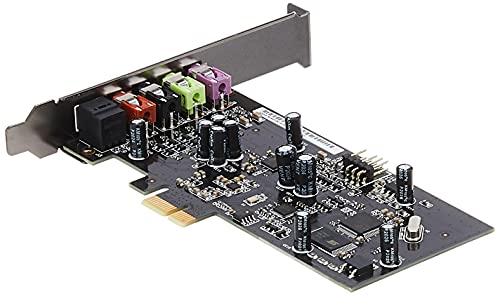
ASUS Xonar SE — Best Affordable Multichannel
Affordability changes meaning when speakers enter the story, and the Xonar SE is where this guide’s meaning shifts. Its listing describes a 5.1-channel PCIe gaming sound card with 192kHz/24-bit hi-res audio and a 116dB signal-to-noise ratio — figures that would not embarrass cards well above its tier — and the 5.1 is discrete, six genuine feeds for a satellite set. For a buyer whose named problem is “my board cannot drive my speakers”, this is the cheapest honest solution in the roundup.
The budget logic is compelling because of where the rest of the money goes. A surround desk spends most of its purse on speakers, stands and cable, and a card that delivers proper multichannel output at a gentle price leaves that purse intact for the components the room can actually hear. In the setup itself the Xonar SE behaves with the calm of a specialist: dialogue anchored by the centre channel, effects travelling a coherent front stage, surrounds contributing atmosphere at their proper, modest level.
Its trade-offs are the familiar ones for its tier and brand. Headphone listeners get competence rather than the Creative cards’ processing polish or amplifier ambition, and there is no desk module or lighting theatre to manage — which many owners will count as a virtue. As the multichannel anchor of an affordable system, it asks only that you actually own, or genuinely plan, the speakers it exists to feed.
Second-hand speaker sets pair with this card particularly well, and the pairing is how many excellent surround desks actually come into being: a used satellite system tested channel by channel, a Xonar SE to feed it honestly, and the savings spent on placement and a decent chair. The system’s total cost stays in affordable territory while its performance leaves it, which is the entire philosophy of this guide expressed as a shopping list.
- Form factor: Internal PCIe sound card
- Channels: 5.1 discrete (per listing)
- Playback: 192kHz/24-bit hi-res (per listing)
- Signal-to-noise: 116dB (per listing)
- Orientation: First real speaker arrays
Strengths
- Genuine multichannel output at a speaker-friendly price.
- Published fidelity figures punch above its tier.
- No decorative extras inflating the cost.
Trade-offs
- Headphone experience is serviceable, not a headline.
- Worthless to a buyer without speakers to feed.
- Software ecosystem is plainer than Creative’s gaming suite.
Best for: The first discrete 5.1 desk, budgeted as a system rather than a card. Not suited for: Headphone-only listeners, who should stay with the Audigy rungs or stretch.

Creative Sound Blaster Z SE — Best Stretch Pick
The Z SE wears its label openly in this guide: a stretch. It costs more than the entry rungs, and the reason it survives an affordability audit is that it tends to end the conversation. Its listing states discrete 5.1 surround for speakers, virtual 7.1 for headphones, 24-bit/192kHz playback with a 116dB signal-to-noise ratio, and Dolby Digital Live with DTS encoding for optical duty. A buyer whose plans touch any two of those four capabilities will likely buy this card eventually; buying it first is the cheaper biography.
That is the entire economics of the stretch pick. The entry cards are excellent at their jobs, but their jobs are narrow, and a household whose audio ambitions are still growing can climb past them within a year — at which point the first card’s cost becomes tuition. The Z SE’s versatility is tuition insurance: speakers today, headphones tonight, a receiver next year, all served by one mature platform whose behaviour and settings are documented by an army of prior owners.
The stretch has limits, and they are worth stating in an honest guide. If your needs are genuinely narrow — a noisy board, one headset, no speaker plans — the Z SE’s extra capabilities are shelfware and the Audigy rungs are the correct, cheaper answer. Stretch picks reward accurate self-knowledge about the next two years of your desk; they punish optimism bought on a whim.
The two-year test is the practical tool here. Write down the audio purchases you are genuinely likely to make in the next twenty-four months — the speaker set in the sales you keep watching, the receiver the television will eventually demand, the better headphones already shortlisted. If two or more of them appear on that honest list, the Z SE’s versatility stops being shelfware and becomes a schedule, and the stretch justifies itself in your own handwriting rather than in a reviewer’s enthusiasm.
- Form factor: Internal PCI-e sound card and DAC
- Speaker output: Discrete 5.1 surround (per listing)
- Headphone mode: Virtual 7.1 surround (per listing)
- Playback: 24-bit/192kHz, 116dB SNR (per listing)
- Encoding: Dolby Digital Live and DTS (per listing)
Strengths
- Covers speakers, headphones and receivers in one purchase.
- Mature platform with deeply documented settings.
- Ends the upgrade ladder for most real households.
Trade-offs
- Above the strict entry budget by design.
- Narrow-needs buyers pay for capabilities that stay unused.
- Converter refinement still sits below the AE flagships.
Best for: A growing setup whose owner can name two of its capabilities they will use within two years. Not suited for: A single-problem rescue, where the Audigy cards fix it for less.
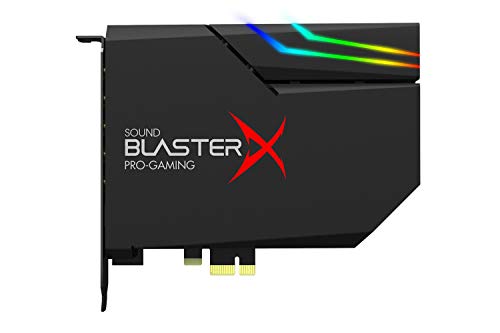
Creative Sound BlasterX AE-5 Plus — Best Premium Stretch
The AE-5 Plus is this guide’s second labelled stretch, and the label matters more here, because its tier is unambiguously premium: a SABRE32-class hi-res 32-bit/384kHz DAC, a 122dB signal-to-noise ratio, the discrete Xamp headphone amplifier, and Dolby Digital plus DTS support, per its listing. It appears in an affordability guide for one specific reader — the one who already owns headphones good enough to expose an entry card, and who would experience the Audigy rungs as a brief, disappointing layover on the way to this.
For that reader the maths invert. Buying the entry card first does not save money; it spends it twice, once on the layover and once on the destination. The AE-5 Plus bought directly is the affordable version of that reader’s story, and its quality is not subtle in their setup: quiet scenes go silent, demanding headphones receive the drive they were designed for, and the whole catalogue of games and music is re-heard at the resolution the transducers always promised.
Everyone else should close this entry and return to the ladder’s lower rungs without a flicker of inadequacy. Through a mainstream gaming headset, the AE-5 Plus and the FX V2 are separated by far less than their tiers suggest, because the headset, not the card, becomes the ceiling. Premium stretch picks are precision instruments for a diagnosed need — magnificent when the diagnosis is right, and pure ornament when it is not.
One more reader belongs in this entry: the returning listener, the person who owned good headphones years ago, let the hobby lapse, and is rebuilding a desk around a pair of serious cans rediscovered in a drawer. For that reader the entry tier is not a starting point but a bottleneck they can identify in advance, and the AE-5 Plus is less an extravagance than a homecoming. Affordability, properly understood, is the price of the correct tool — and correctness is a property of the whole chain, never of the card alone.
- Form factor: Internal PCIe sound card and DAC
- Playback class: Hi-res 32-bit/384kHz, SABRE32-class DAC (per listing)
- Signal-to-noise: 122dB (per listing)
- Headphone stage: Xamp discrete dual-amplifier design
- Encoding: Dolby Digital and DTS support (per listing)
Strengths
- Flagship-class conversion and amplification, bought once.
- Reveals the full value of already-owned high-end headphones.
- Serves speakers and receivers honourably alongside its headphone fame.
Trade-offs
- Premium tier pricing inside an affordability guide — knowingly.
- Inaudible advantages through ordinary headsets.
- Lighting and suite add setup time a rescue buyer does not need.
Best for: The owner of demanding headphones who would otherwise buy the ladder twice. Not suited for: Mainstream headsets or any buyer whose problem is simply hiss.
Your Current Motherboard Audio — Best Price of All (Prose-Only)
This entry has no link, no marker with an ASIN and nothing to sell, because for a large minority of readers it is the correct recommendation. Keep your motherboard audio if it passes three tests. First, the silence test: with headphones on, no game running and volume at a normal listening level, the background should be background — no whine that follows the mouse, no buzz that swells when a game loads. Second, the strength test: your usual headphones should reach a satisfying volume with obvious headroom left, sounding full rather than strained at the top of the range. Third, the furniture test: the outputs on the board should match the life you actually lead — stereo or a headset today, with no speaker array or receiver waiting in a plan.
A board that passes all three is not a compromise; it is a competent audio device that happens to be free, and replacing it with an entry card buys a difference you will struggle to hear in a blind test. The money an affordability guide exists to protect is better spent where your chain is actually weakest — very often the headphones themselves, whose upgrade transforms every source you own, the board included.
Fail any one test, though, and the calculus flips instantly, because each failure names its remedy. Interference points to a dedicated card’s isolated conversion. Weak drive points to a real amplifier stage. Missing outputs point to the multichannel and encoding picks above. The prose-only entry and the five linked cards are therefore not rivals; they are a decision tree, and this guide’s whole purpose is to walk you down the branch your own ears and furniture dictate.
Revisit the tests annually, because boards age and households change. A new graphics card can introduce the interference an old one never made; a new pair of headphones can expose a strength limit that earbuds hid; a television upgrade can create the receiver plan that rewrites the furniture test entirely. The free option is not a verdict delivered once but a standing invitation to check, and the owners who check are the ones whose eventual card purchase — whenever it comes — is greeted as a solution rather than a gamble.
- Form factor: Already inside your PC
- Cost: Nothing — it arrived with the motherboard
- Silence test: No whine tracking GPU or mouse activity
- Strength test: Comfortable volume with headroom on your headphones
- Furniture test: Outputs match the speakers and receivers you truly use
Strengths
- Costs nothing and is already installed, configured and working.
- Recent implementations are genuinely competent for stereo listening.
- Frees the entire budget for the chain’s real weakest link.
Trade-offs
- Fails audibly on noisy or older boards, with no software cure.
- Headphone drive is often the first casualty of cost engineering.
- Multichannel and encoding options are limited or absent.
Best for: A recent, quiet board with easy headphones and a stereo life. Not suited for: Anyone who just failed one of the three tests — your remedy is ranked above.
Comparison Table
| Pick | What the money buys | Headphone drive | Choose it if… |
|---|---|---|---|
| Audigy FX V2 | Silence and competence over a failing board | Mainstream headsets | One named onboard problem needs fixing cheaply. |
| Audigy Fx Pro | The same step, in current-generation form | Mainstream headsets, more headroom | You are building new and buying for years. |
| ASUS Xonar SE | Discrete 5.1 outputs for a first array | Serviceable | Speakers are the point of the purchase. |
| Sound Blaster Z SE | Stretch: every output strategy in one card | Good gaming output | Your two-year plan uses two of its talents. |
| Sound BlasterX AE-5 Plus | Stretch: flagship conversion and amplification | Xamp discrete amp | Your headphones already outclass entry cards. |
| Motherboard audio | Nothing — and sometimes that is correct | Varies by board | It passes the silence, strength and furniture tests. |
How Do You Test Your Onboard Audio Before Spending Anything?
Run the three tests from the prose-only entry properly, because each takes minutes and together they are worth more than any review. For the silence test, choose the quietest hour your house offers, plug your most sensitive headphones directly into the board’s rear output, raise the volume to your normal listening level with nothing playing, and then make the PC work — move windows, load a game menu, scroll a dense page. Interference that follows those actions is electrical and permanent; its absence is equally informative.
For the strength test, play a recording you know intimately — ideally something dynamic, with quiet passages and loud arrivals — and note where the volume control sits when the loud parts satisfy you. If the control is near its maximum and the sound still feels thin or strained, the amplifier is the ceiling and a card with a real headphone stage is a legitimate purchase rather than an indulgence. For the furniture test, simply write down every audio device you connected in the last month and every one you genuinely intend to connect in the next year; the gap between the board’s outputs and that list is your shopping brief, in your own handwriting.
Record the results before reading any further reviews, including the rest of this one. A buyer armed with three test outcomes shops the ladder above in about ninety seconds, because each pick announces which failure it remedies. A buyer without them shops by anxiety, and anxiety is the most expensive counsellor in consumer electronics.
Test with the headphones you actually use, not the best pair you can borrow. A borrowed flagship will convict a decent board and acquit a poor card, because it changes two variables at once. The point of the exercise is a verdict on your chain as it stands — the chain whose weakest link you are deciding whether to fund — and borrowed transducers describe somebody else’s chain entirely.
What Mistakes Do Budget Sound Card Buyers Make?
The first is buying against a problem the card cannot fix. A headset with damaged drivers, a microphone that is simply poor, a room that echoes — a sound card polishes the signal, and a polished bad signal remains bad. Diagnose the link before funding it. The second mistake is the opposite: enduring a genuinely noisy board for years while upgrading everything around it, because the whine has become familiar. Familiarity is not inaudibility, and owners who finally replace a hissing board routinely describe the change as the largest single improvement their system ever received for the smallest money.
Third comes tier confusion in both directions — the flagship bought to drive earbuds, whose advantages have nowhere to appear, and the entry card bought to drive a demanding planar headphone, whose owner then blames the headphone. Fourth is forgetting the slot: a thick graphics card can occupy the space a sound card needs, a fact best discovered with the case open before the order, not after it. Fifth is chasing sample-rate numbers, which describe a converter’s ceiling and almost nothing about the noise, power and outputs where affordable cards earn their keep.
The last mistake is skipping the free test. Every buyer in this category owns a diagnostic instrument — their current board — and the three tests above convert guesswork into a brief. The most affordable sound card purchase is the one that was necessary, correctly tiered, and verified against a named problem; the most expensive is the one bought on a hunch to fix a headset.
A related trap deserves naming because it is so common in this tier: the duplicate purchase across a household. Two PCs with the same noisy-board problem do not need two experiments — they need one card, tested in both machines across a weekend, and then a confident second order of the verified remedy. Affordable buying is a method before it is a price, and the method scales from a single desk to a whole family’s worth of ageing computers.
How Should a First Card Be Installed and Configured?
Installation is a ten-minute job that rewards slowness. Power the machine fully down, seat the card in a PCIe slot with clearance from the graphics card’s heat where the board allows a choice, and connect the front-panel audio lead to the card rather than the motherboard if you use front jacks — a step whose omission explains a large share of “my front panel went quiet” mysteries. On first boot, install the card’s current software from the manufacturer, set the new card as the default playback and recording device, and disable the onboard device in the system settings if both remain visible, so applications stop choosing for you.
Configuration then follows the same discipline as the buying: one change at a time, judged against familiar material. Set the headphone gain range appropriate to your headphones if the software offers it, configure the channel layout to match your actual speakers — stereo owners should declare stereo, not a hopeful surround — and leave enhancements off until plain playback is understood. Play the recording you used for the strength test and compare honestly. A correctly chosen card announces itself in that comparison within a minute, in the quiet places first.
Keep the motherboard’s audio as your fallback knowledge rather than a rival: note how to re-enable it, because the day a driver misbehaves before an important call, the board you almost replaced becomes the backup that saves the evening. Affordable systems are resilient systems, and resilience is a feature money usually cannot buy after the fact.
One configuration habit separates satisfied owners from frustrated ones in the first week: resist the enhancement stack. New card software arrives glittering with wideners, bass boosts, voice morphs and environmental effects, and enabling several at once guarantees a smeared, fatiguing result that the card then gets blamed for. Run the card plain for the first week — clean conversion, correct layout, sensible gain — and add a single processing feature at a time only if a specific material asks for it. The plain week is also your reference recording: without it, no later judgement about any feature has a baseline to stand on.
What Does the Second-Hand Market Teach About Value?
Sound cards are among the safest second-hand components in a PC — no moving parts, slow-moving standards, and failure modes that announce themselves immediately as silence or noise rather than lurking as intermittent faults. A used entry card from a known family, tested in the seller’s machine or bought with a return window, can be the most affordable route of all to a diagnosed fix. The cautions are the usual ones, sharpened: confirm the bracket fits your case, confirm the model is the current generation rather than a similarly named ancestor, and budget your patience for a driver download rather than a disc.
The hand-me-down direction matters just as much. An affordable card bought new today becomes, in three years, the free upgrade that rescues a parent’s PC or a child’s first build, and that second life belongs in the original purchase maths. Components with honourable retirements are cheaper than components without them, even at identical prices, which is one more reason this guide favours living product families over orphaned bargains at every rung.
The same logic governs the gift economy of old cards. A retired Audigy in a drawer is worth more installed in a relative’s whining PC than sold for a token sum, and households that circulate components this way extract three lifetimes from purchases the market priced for one. When you eventually stretch to a Z SE or an AE card, the entry card it replaces is not waste; it is next season’s rescue, already paid for.
How Do You Keep an Affordable Setup Affordable Over Time?
By refusing the drip-feed of sideways upgrades. The expensive pattern in budget audio is not the flagship purchase; it is the sequence of small, almost-right purchases — a card for the hiss, another for the headphones the first could not drive, a third for the speakers neither could feed — whose total quietly exceeds the stretch pick that would have served from the start. The defence is the discipline this guide has repeated: diagnose the chain, project two years of honest plans, and buy the rung that matches the projection rather than the rung that matches the week’s anxiety.
The second defence is maintenance, which costs nothing. Keep the software current, note your working settings somewhere survivable, re-run the channel and silence tests after major system changes, and clean the case’s dust before it becomes the thermal excuse for a replacement nothing needed. Affordable systems stay affordable in the care of owners who treat configuration as an asset — because it is one, denominated in evenings not spent troubleshooting.
There is a final, unfashionable economy: learn to hear what you own before replacing it. A fortnight of attentive listening to a new card — or to a board newly acquitted by the tests — teaches your ears the system’s actual character, and most upgrade urges dissolve under that attention into a short list of specific, fundable complaints. The owners with the most satisfying budget systems are rarely the ones who bought the most; they are the ones who can describe, precisely, what each component in the chain is for.
How Do Gaming, Work and Media Rank the Same Cards Differently?
A card does not have one value; it has one per use, and an affordable purchase is the one whose strengths overlap your busiest hours. The gamer’s hierarchy puts positional processing and headphone drive first, because cues and clarity under load are the product. The remote worker’s hierarchy is nearly the reverse: microphone cleanliness and long-session comfort at the top, processing a distraction, and the entry cards’ quiet competence suddenly looks like the entire requirement list. The media household ranks outputs first of all — multichannel feeds, encoding, painless switching — because its PC is furniture as much as computer.
Most real desks are all three households in rotation, which is why the ladder in this guide is organised by capability rather than by tribe. Read your own week honestly — count the hours, not the aspirations — and the correct rung usually identifies itself. The gaming-heavy reader lands on the Audigy line or a stretch; the work-heavy reader discovers the entry tier is not a compromise at all; the media-heavy reader starts at the Xonar SE and measures everything else against its outputs. Same catalogue, three correct answers, and the affordability of each is certified by the hours it will actually serve.
Which Listeners Gain the Most From an Entry Card?
Three profiles recur. The night-shift player in a shared house, whose entire hobby happens through headphones at low volume, gains disproportionately from a quiet noise floor, because low listening levels put the programme material close to the interference the board was adding. The remote worker whose calls doubled as an audio audit gains from the cleaner microphone path and the headphone headroom that makes long meetings physically less tiring. And the returning film watcher, rebuilding a media PC around a television, gains from the outputs — the multichannel feeds and encoding that turn a spare computer into the room’s entertainment heart for the price of a modest card.
Notice what unites them: none of the three is chasing fidelity as an abstract good. Each has a recurring, nameable friction that a specific card removes, and each will therefore still be using the card, satisfied, years later. Affordability is downstream of that fit. The listeners who gain least are the ones shopping for a generalised improvement in “sound quality” — a fog no product can be the answer to, at any tier, in any catalogue.
A fourth profile deserves an honourable mention: the student or first-renter assembling a capable desk from mixed new and inherited parts. For that builder, the entry card is often the component that makes the inherited speakers and the ageing PC behave like a system rather than a pile, and its cost should be judged against the alternative — replacing the pile. Judged that way, the first rung of this ladder is frequently the highest-value component in the entire build.
Final Recommendation
Everything in this guide reduces to a single habit: measure before you spend, and spend against the measurement. The sound card market survives on generalised anxiety about “sound quality”, and anxiety is a terrible shopper — it buys flagships for earbuds and entry cards for planars, and it never once runs the three free tests that would have settled the question. You now own the tests, the ladder and the labels, including the two stretch labels we attached to our own recommendations rather than hiding them.
Let the tests decide. If your board failed on silence or strength and your life is headsets and calls, start at the Audigy FX V2 — or the Fx Pro if the machine is new and meant to last. If speakers are the story, the Xonar SE buys real channels at the kindest tier, while the Z SE is the stretch that ends the ladder for growing setups, and the AE-5 Plus is the premium stretch reserved for headphones that have already outgrown everything cheaper. And if your board passed all three tests, keep your money with a clear conscience and spend it where your chain is genuinely weakest. The most affordable sound card in this entire guide might be the one already inside your PC — and the second most affordable is the one you only had to buy once.
Frequently Asked Questions
Are cheap sound cards better than modern onboard audio?
Against a good recent board, often not audibly — which is why this guide includes the free option as a full pick. Against an older, noisy or weakly amplified board, yes, decisively: the improvement is silence and drive, and both are obvious within a minute of familiar listening. The three tests in this guide tell you which board you own.
Age is the tiebreaker when the tests are ambiguous: a board from a recent platform with a named, shielded audio section deserves the benefit of the doubt, while a board old enough to have a spinning hard drive as its neighbour has usually earned its replacement.
What is the first thing a sound card improves?
The noise floor. Owners notice the missing whine and hiss before they notice anything about fidelity, because interference taxes every quiet moment. After that come headphone volume with headroom and, on the multichannel picks, outputs the board never had.
There is a social dimension to that first improvement, too: the card owner’s voice on calls loses the hiss and hum that colleagues had politely stopped mentioning, and more than one buyer has reported that the microphone side of the upgrade, which they never shopped for, became the one they would not surrender.
Should I buy a card or better headphones first?
Whichever link is failing. If the board hisses through every headphone you own, the card is first. If the board is quiet and strong but the headset is poor, the headphones are first and the card can wait — possibly forever. The chain rule has no exceptions, only diagnoses.
When both are failing — a noisy board and a tired headset is a common inheritance — fix the board first if budget forces a sequence, because a new headset plugged into interference will sound broken and be returned, while a quiet card makes even the old headset honest enough to judge.
Do these cards fit small cases?
Internal PCIe cards need a free slot with clearance, and low-profile brackets are common in the entry tiers this guide covers, but the only reliable check is your own case and graphics card. Measure before ordering; the slot question has ended more sound card plans than any specification ever written.
While the case is open, note the front-panel header’s location as well — routing that small lead to the card is what keeps your front jacks alive after the upgrade, and it is far easier to plan with the side panel off than to discover its absence during the first call.
Will an affordable card help my microphone?
Usually, yes. A dedicated card’s input is typically cleaner and better gained than a crowded motherboard’s, and voices gain intelligibility when the hiss beneath them disappears. It will not rescue a genuinely poor microphone, but it stops taxing a decent one.
Position matters as much as circuitry here: a microphone moved six inches closer to your mouth gains more clarity than any card can add, so exhaust the free geometry before crediting or blaming the electronics.
Is a USB DAC a better affordable answer than an internal card?
Sometimes. An external DAC moves conversion outside the case entirely, travels to laptops, and suits a listener whose only problem is headphone fidelity. An internal card wins when you need multichannel speaker outputs, optical encoding, a tidy desk without another box, or the processing ecosystems in this guide. The categories overlap at the headphone and diverge at the furniture, so let your outputs decide, as ever.
How long will an entry card remain useful?
Years, if it was bought against a real need. Audio standards move slowly, PCIe slots persist, and a quiet, competent card in a second machine or a family PC has an honourable second career. Cards bought on hunches expire with the hunch; cards bought against diagnoses tend to be handed down, not thrown out.
The exception is the machine itself retiring: a card cannot follow you to a laptop, and a household going portable should spend its audio money on external devices instead. Check the shape of your next computer before assuming this one is forever.
Related Guides
Compare the wider field in our guide to 3D sound cards for positional gaming, our roundup of 5.1 sound cards for PC, and our honest explainer on 7.1 sound cards.


