Our Top Picks
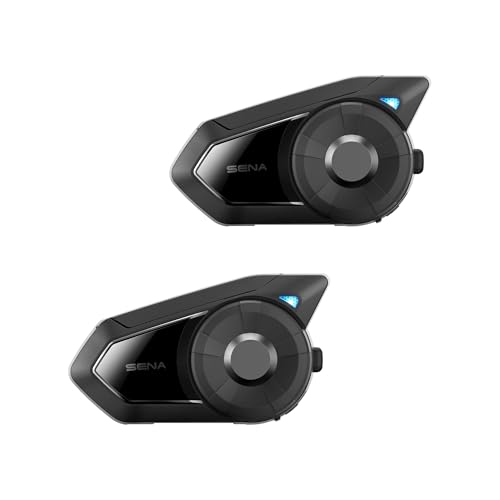
 Sena 30K Motorcycle Bluetooth Headset Mesh Communication SystemSingle Pack with HD Speakers0.8 poundsCheck on Amazon


What's inside
- What the Sena 30K speaker system is built around
- Why highway speed changes everything
- Driver size, thickness, and ear pocket fit across helmets
- The Sena HD speaker upgrade path in detail
- Third party and alternative speakers: promise and caveats
- Positioning and foam covers: the free upgrade
- Wiring and connector compatibility with the 30K clamp kit
- Firmware and audio settings that shape speaker output
- Volume headroom, distortion, and what clean loudness requires
- Installation: fitting upgrade speakers step by step
- Troubleshooting common 30K speaker problems
- Mistakes to avoid when upgrading
- Buying criteria, in the order that matters
- How the main options compare for a 30K owner
- Check prices on Amazon
- Verdict
As an Amazon Associate I earn from qualifying purchases. This post may contain affiliate links at no extra cost to you.
The speakers inside a motorcycle helmet live a hard life. They sit millimetres from your ears, yet they must compete with wind rush, engine tone, tyre roar, and the loose acoustic space of a helmet that was never built as a listening room. Owners of the Sena 30K know the pattern well. At town speed the intercom sounds clear and music feels full enough. Out on a highway, voices thin out, bass vanishes, and turning the volume up brings harshness sooner than it brings clarity. A speaker upgrade promises to fix that, and sometimes it does, but only when the new drivers fit the helmet, suit the 30K clamp, and are positioned with real care.
This guide works through the choice using published specifications and manufacturer documents as the evidence base. It covers the stock 30K speakers and the Sena HD speaker upgrade path, driver size around 40 mm, thickness and ear pocket fit across helmet brands, clarity for intercom and music against wind noise, volume headroom and distortion, foam covers and positioning, how the leads and plugs match the clamp fitted to your helmet, and the firmware and audio settings that change what any speaker can deliver. It also covers the caveats, because not every third party speaker fits every shell, and a driver that is excellent on a bench can be miserable inside the wrong helmet.
The order matters. Fit comes before sound, because a speaker pressed against your ear or tilted away from it will undo every advantage its driver might have. Compatibility comes next, because the 30K system expects a specific connection at the clamp. Settings come after hardware, because audio boost and equaliser presets can help a good installation and can also push a poor one into distortion. If you work in that order, you will know whether you need new speakers at all, or whether moving the ones you own by a few millimetres solves the problem for free.
What the Sena 30K speaker system is built around
The Sena 30K is a helmet communication system built around a clamp kit that mounts to the side of the helmet, a main unit that clicks onto that clamp, microphones for intercom and voice commands, and a pair of speakers that live inside the helmet on hook and loop pads. The speakers connect to the clamp by a lead and plug, so the helmet side wiring stays in place when you remove the main unit for charging or move it between helmets with additional clamp kits. That architecture shapes every upgrade decision. You are not choosing loose drivers in the abstract. You are choosing drivers that must plug into that clamp, sit in that helmet, and work with that unit’s amplifier and settings.
Published Sena material for the 30K describes speakers with a driver diameter around 40 mm. That size reflects a compromise that helmet audio has settled on for years. A driver much larger will not fit the ear pockets most helmet makers mould into their liners. A driver much smaller struggles to move enough air at low frequencies in an open, leaky space beside the ear. Around 40 mm gives enough diaphragm area for speech warmth and some music body, while still fitting the recesses in a wide range of full face, modular, and open face helmets.
Thickness matters as much as diameter, and it gets less attention than it deserves. Stock 30K speakers are slim, in the region of several millimetres deep, so they can sit inside a shallow ear pocket without pressing on the ear. Thicker upgrade drivers add magnet and voice coil structure that can improve sensitivity and low frequency output, but every extra millimetre moves the face of the speaker closer to your ear. In a deep pocket that is fine. In a shallow pocket it creates pressure, hot spots on a long ride, and trouble getting the helmet on and off without shifting the speaker.
The Sena HD speaker path is the maker’s own answer to owners who want more from the same system. Sena documents describe HD speakers as an upgrade for compatible Sena units, with a larger effective driver design, improved clarity, and revised foam and housing shaping intended to sit more comfortably and direct sound more accurately toward the ear. The important point for a 30K owner is that the HD path was designed for this ecosystem: the plug, the impedance expectations, and the physical format all assume a Sena clamp and a typical helmet ear pocket. That design intent lowers fit and wiring risk compared with a generic driver adapted from another purpose.
Impedance and sensitivity decide how loud a speaker plays for a given output from the 30K amplifier. Helmet speakers are small loads driven by a small amplifier running from a small battery, so efficiency matters more than raw power handling. A more sensitive driver reaches a given loudness with less amplifier effort, leaving headroom before distortion and drawing less from the battery. Published sensitivity figures are not always stated in a directly comparable way across brands, which is why maker documents for the specific 30K pairing carry more weight than a bare number copied from a listing for a driver meant for another device.
Why highway speed changes everything
Wind noise is the opponent, and it is not a polite one. As speed rises, turbulence around the helmet shell, visor edges, vents, and the gap at the neck roll produces broad band noise that concentrates in the low and mid frequencies, exactly where speech warmth and music body live. The ear receives that noise and the speaker output together, and the brain must separate voice from roar. When the roar rises, a speaker that sounded balanced at rest can seem thin and distant, not because its output changed, but because the masking noise swallowed its lower half.
This masking explains why pursuing loudness alone disappoints. Raising volume raises the whole signal, including the parts already easy to hear, and it pushes the small driver and amplifier toward distortion. Distorted speech is harder to understand than clean speech at a lower level, because the harmonics added by clipping fill the gaps the brain uses to separate syllables. Riders often report that a clearer speaker at moderate volume beats a louder speaker at maximum on a long highway stretch. That report matches the acoustics. Clarity, positioning, and headroom work together, and loudness by itself is only one third of the answer.
Helmet choice and fit change the noise floor before any speaker plays a note. A well sealed visor, a chin curtain, and a snug neck roll can lower wind entry noticeably. Ear pockets that hold the speaker close to the ear without touching it improve the ratio of speaker sound to wind sound. Some riders use earplugs designed for motorcycling, which cut wind noise more than speech frequencies, and find that speaker clarity improves because the masking roar drops while the voice stays intelligible. Any speaker judgement made in a quiet garage should be treated as provisional until the same setup has been heard at real road speed in your own helmet.
Music and intercom place different demands on the same driver. Intercom speech lives mainly in the midrange, where the ear is sensitive and where a modest driver can perform well if it is clean and well placed. Music asks for low frequency body and high frequency detail at the same time, in a leaky space, against a loud background. A speaker upgrade usually shows its largest honest gain in speech clarity and in midrange presence for music, with bass improving in fullness at moderate speed rather than turning a helmet into a sealed headphone. Expecting headphone bass at highway speed leads to disappointment and to volume levels that risk hearing damage.
Hearing safety belongs in any discussion of volume headroom. If you need maximum volume for long stretches to follow speech, the setup is telling you something: the speakers sit too far from your ears, the helmet admits too much wind, or the drivers lack sensitivity for the job. Fixing the cause is better than enduring the level. Published guidance on noise exposure is clear that sustained high levels harm hearing, and helmet audio should be judged partly by how comfortably it works at sane levels, not only by how loud it can be driven.
Driver size, thickness, and ear pocket fit across helmets
Helmet ear pockets vary more than product photos suggest. Shoei, Arai, HJC, AGV, Schuberth, Nolan, Bell, and other makers mould their comfort liners and ear recesses differently, and the same brand changes shapes between models and shell sizes. Some pockets are round and deep, with a firm recess that accepts a 40 mm speaker and a thick foam cover with room to spare. Others are oval, shallow, or partly covered by a strap anchor or a liner edge that intrudes into the space. A speaker diameter that drops into one helmet may ride on a liner seam in another, tilting the driver and leaking sound away from the ear.
Measure before you buy. Remove the cheek pads or lift the liner as your helmet manual directs, and measure the pocket width, height, and depth with a soft tape or calipers used gently. Compare those figures with the diameter and thickness in the speaker maker documents. Allow room for the foam cover and for the hook and loop pad, both of which add thickness. Allow room for the lead to exit the pocket without a sharp bend against a hard edge. A fit that works only when the lead is pinched will fail later, usually as intermittent sound on rough roads.
Shell size complicates the picture. Many helmet models use shared shells across head sizes, with different liner thicknesses making up the difference. A smaller head size in the same shell may have thicker cheek pads and less spare room at the ear, even though the pocket moulding is identical. Two riders with the same helmet model in different sizes can therefore have opposite experiences with the same upgrade speaker. Reports from other owners are useful leads, but your own liner and your own ears are the final authority.
Modular helmets add moving parts. The chin bar pivot, the sun visor mechanism, and the strap routing can all narrow the useful space or place hard structure near the ear. Open face helmets leave more room but admit more wind, changing what the speaker must achieve. Adventure helmets with peaks and larger vent systems sit between those poles. None of this makes an upgrade impossible. It means the fit check must be done in the actual helmet, with the liner in its riding position, rather than assumed from a diameter figure alone.
Comfort is a safety feature, not a luxury. A speaker that presses on the outer ear creates a hot spot within an hour, and a rider distracted by ear pain is a rider paying less attention to the road. Pressure can also break the seal of earplugs or push them out of position. When you trial fit an upgrade, wear the helmet for a full half hour indoors, move your jaw, turn your head, and put the helmet on and take it off several times. Ears fold during that process, and a speaker edge placed where an ear folds will announce itself quickly.
For readers who split attention between riding and other outdoor pursuits, the fit discipline here resembles the sizing care needed with wrist gear discussed in best activity smartwatches, where a few millimetres decide whether a device disappears in use or annoys all day. Helmet speakers are even less forgiving, because you cannot adjust them at a traffic light without removing gloves and often the helmet itself.
The Sena HD speaker upgrade path in detail
Sena positions its HD speakers as the premium option for riders who want stronger clarity and fuller sound from compatible units, and the 30K sits within that compatibility story in Sena documents. The upgrade approach keeps the rest of the system unchanged. You keep the clamp, the main unit, the microphone arrangement, and the app and firmware environment. Only the speakers and their foam covers change. That narrow scope is a virtue for diagnosis: if sound improves, the speakers and their placement caused it, and if a problem appears, you know where to look.
The physical design of the HD speakers reflects lessons from the stock units. A shaped housing helps the driver sit flat in the pocket and aim at the ear canal rather than at the liner wall. Foam covers soften contact and tame a little harshness. The lead and plug follow Sena practice for the clamp connection, so the upgrade does not ask you to splice wires or adapt connectors, both of which add failure points inside a helmet that flexes every time you put it on. Maker documents should still be checked for your exact clamp version, because Sena has revised clamps and speaker plugs across product generations, and visual similarity is not proof of compatibility.
Sound claims for HD speakers centre on clarity and bass response. Read those claims in the context of the space. A better driver in a leaky helmet pocket will not produce sealed headphone lows, but it can produce a warmer voice, a less strained midrange, and music that holds together at a volume where the stock drivers begin to sound thin. The gain is most believable where it is most specific: speech intelligibility, reduced need for maximum volume, and cleaner output at the levels riders actually use on a commute or a touring day.
Firmware support ties into the HD story. Sena has used firmware and app settings to shape audio output for different speaker types, and the 30K audio settings include options that change bass, balance, and boost behaviour. After fitting HD speakers, check the Sena app and the device settings for any speaker related option, and confirm the firmware is current according to Sena published release notes. Running new hardware on very old firmware can leave a setting mismatch that no amount of repositioning will fix.
Cost in effort, rather than money, is low on this path. The speakers swap on their pads, the lead routes along the same path, and the whole job can be reversed if the result does not suit your ears or your helmet. That reversibility makes the HD path a sensible first upgrade for many 30K owners, before considering third party drivers that may need adaptation and may fit one helmet well while fitting another poorly.
Third party and alternative speakers: promise and caveats
A lively market of third party helmet speakers exists, from generic 40 mm drivers sold for helmet use to specialist brands that build high output drivers specifically for motorcycle communicators. Some of these drivers are larger in magnet structure, claim higher sensitivity, and use connectors or adapters meant to suit popular communicator clamps. The promise is real in principle: a more efficient driver with a stronger motor can play cleaner at a given level and give the amplifier an easier job. The caveats are equally real, and they cluster around fit, connector match, impedance, and honest specification.
Connector compatibility is the first gate. The 30K clamp expects a specific speaker plug and wiring arrangement. A third party speaker with a similar looking plug may differ in pin assignment, plug length, or latch shape. Forcing a near fit can damage the clamp socket, which is a far more expensive part than the speaker. Maker documents and clear compatibility statements naming the 30K specifically carry weight here. A listing that says a plug fits most communicators, without naming the model or showing the connector clearly, asks you to gamble with your clamp.
Impedance is the second gate. A driver with much lower impedance than the stock speakers can draw more current from the small amplifier and may sound louder at first while pushing the amplifier toward distortion or protection behaviour. A driver with much higher impedance may sound quiet and leave you at maximum volume with no headroom. Published impedance for stock and HD speakers gives the reference range. A third party driver whose documents state an impedance close to that range, and whose sensitivity is stated with a method, is a more credible candidate than one sold on diameter and adjectives alone.
Fit is the third gate, already covered in general terms, but third party drivers raise the stakes because many are thicker than stock. Some specialist drivers are notably deep, with large magnets that need a deep pocket or a spacer strategy. In a helmet with shallow pockets, that depth can make the set unusable no matter how good the driver is. Ask for full dimensions, including the thickest point and the shape of the back, and compare them with your measured pocket before ordering. A round driver in an oval pocket, a flat back against a curved recess, and a lead exiting at the wrong angle are all small mismatches that become daily irritations.
Warranty and support form the fourth gate. Sena support can reasonably decline to troubleshoot a system fitted with unknown drivers, and a helmet maker will not advise on modifying liner fit around a speaker that presses on the ear. None of that forbids experimentation by an informed owner. It does mean the experiment should be reversible, documented with photos of the original layout, and judged honestly. Keep the stock speakers. If the experiment disappoints, returning to a known good baseline is worth more than pride.
Riders comparing audio gear across categories will recognise the pattern from home and portable audio, where a speaker covered in best 2 1 bluetooth speakers succeeds or fails on room fit as much as driver quality. Helmet audio compresses that truth into a space the size of a coin. The best driver for your 30K is the best driver that fits your helmet, matches your clamp, and plays cleanly at the level your roads demand.
Positioning and foam covers: the free upgrade
Before spending anything, position the speakers you own correctly. The target is simple to state and fiddly to achieve: the centre of the speaker should align with your ear canal, at the closest distance that does not touch the ear, facing the ear rather than tilted toward the liner. Ears sit at different heights relative to the pocket moulding in different helmets, and many factory or first time installations place the speaker where the pocket is, not where the ear is. Those two locations can differ by a centimetre, and a centimetre at this scale is the difference between muffled and clear.
Use the hook and loop pads as an adjustment system, not just as glue. Sena kits include pads that let you move the speaker within the pocket and add spacing. Fit the helmet, mark where your ear canal sits relative to the pocket by feel, remove the helmet, and place the speaker centre on that mark. If the pocket is deep, add a spacer pad behind the speaker to bring it closer. If the speaker touches your ear, remove spacing or choose a thinner cover. Small moves, checked one at a time, teach you more than a full refit done in a hurry.
Foam covers do three jobs. They protect the driver from dust and liner fibres, they soften the contact if the speaker sits close, and they slightly shape the high frequency response by absorbing a little of the sharpest energy. A torn or compressed cover changes sound and comfort, and covers are cheap wear items compared with drivers. Fit the cover smoothly, without folds that create a ridge against the ear. If a new speaker set includes covers of different thickness, treat the choice as part of the fit process rather than an afterthought.
Check both sides independently. Heads and helmets are not perfectly symmetrical, and the left speaker may need a different spacer stack from the right. A voice that seems to lean to one side in intercom, or music with an image pulled off centre, often traces to one speaker sitting farther from its ear or tilted on a liner seam. Play a mono source, or use an intercom test with a parked bike and a friend, and adjust the weaker side until the image centres. That symmetry check takes minutes and fixes complaints that owners often blame on electronics.
Lead routing affects position over time. A lead with tension will creep the speaker off its mark as the liner flexes. Route the lead with a gentle service loop, secure it under the liner edges as the helmet design allows, and keep it clear of the strap and any liner fasteners that move when you remove pads for washing. After any liner removal, assume the speakers have moved until you have checked them. Building that check into your cleaning routine keeps the sound you tuned from drifting away unnoticed.
Wiring and connector compatibility with the 30K clamp kit
The clamp kit is the electrical home of the speaker set. Its socket, its internal wiring to the main unit contacts, and its microphone connections form a system that Sena documents as a whole. Speaker leads plug into the clamp, and the main unit draws audio through the clamp interface. Corrosion, bent contacts, or a plug not fully seated can mimic a failed speaker with crackle, one sided sound, or volume that changes when the unit moves on the helmet. Before condemning a driver, seat the main unit firmly, inspect the clamp contacts for dirt, and confirm the speaker plug is fully home.
Different Sena generations use different speaker connections, and the wider market adds more variants. A speaker set made for another Sena model, or for a different brand of communicator, cannot be assumed to suit the 30K clamp even if the driver diameter matches. Compare plug photographs in maker documents, count contacts if the documents state them, and look for an explicit compatibility line naming the 30K or its clamp. When in doubt, the conservative answer is to choose the speaker set whose maker names your exact system.
Do not splice helmet speaker leads unless you fully understand the wiring and accept the risk. A splice inside a helmet faces flexing, sweat, and temperature swings, and a failed joint can short an amplifier output. Adapter leads exist for some combinations, but each adapter adds length, bulk, and a joint that must live somewhere inside the liner. The cleanest upgrades use a native plug. That preference is not snobbery. It is joint count and strain, the same reliability logic that governs any small audio wiring that gets handled daily.
Microphone placement interacts with speaker judgement more than riders expect. A microphone positioned too far from the mouth sends a weak, noisy voice to your riding partners, and their replies may then be judged harshly because the conversation as a whole feels strained. The 30K clamp kits support boom and wired microphone options for different helmet types. Follow the Sena manual for your helmet style, position the boom microphone close to the mouth with the correct side facing you as marked, and judge speaker clarity on a received signal that was well captured at the other end.
Firmware and audio settings that shape speaker output
Hardware sets the ceiling, but settings decide how close you get to it. The 30K exposes audio options through its configuration and through the Sena app, and Sena documents describe features such as audio boost, equaliser style presets in the app environment, volume related behaviours, and intercom and music mixing behaviours that change what reaches the speakers. Exact menu names vary with firmware and app version, so treat this section as a map of what to look for in the current Sena documents for your unit, not as a frozen menu transcript.
Audio boost raises overall output level. Used with a sensitive, well fitted speaker, a modest boost can give you the headroom to hear speech over wind without living at the very top of the volume control. Used carelessly with a speaker already near its limits, boost simply reaches distortion sooner. Change boost on its own, ride the same familiar road, and judge speech clarity at your normal speed. If clarity falls while loudness rises, the driver or amplifier has run out of clean headroom, and the answer lies in fit or sensitivity, not in more boost.
Equaliser presets reshape balance. A preset that lifts the midrange can help speech cut through wind masking, while a preset that lifts bass may warm music at town speed and muddy it at highway speed as wind noise adds its own low energy. There is no universal best preset, because helmets, ears, and bikes differ. Choose by content: set for intercom first if riding communication is your main job, since a missed message matters more than a slightly thin guitar. Then check music on the same setting and accept the compromise knowingly.
Keep firmware current through the Sena update route described in maker documents, using a computer connection as directed, and read the release notes for audio related changes. Firmware updates in communicators have historically adjusted volume behaviour, intercom mixing, and compatibility with accessories. An update is not a speaker upgrade, but running current firmware removes a variable when you judge new speakers. Update one unit at a time in a riding group if you can, so a problem after an update has a comparison point.
Phone and source settings matter too. The phone media volume, the music app output options, and any phone equaliser all sit before the 30K in the chain. A phone set to a low media volume forces the 30K amplifier to work at the top of its range, with hiss and distortion as the price. Set the phone media volume high without clipping, control riding volume at the 30K, and disable a phone equaliser preset that fights the Sena preset. Two equalisers stacked by accident create tonal shapes nobody chose.
Intercom mode choices affect perceived speaker quality. The 30K supports traditional Bluetooth intercom and Mesh intercom, and the audio character of a connection can vary with distance, terrain, and the other rider’s microphone setup. A speaker judged on a poor Mesh link at the edge of range may be blamed for dropouts and compression artefacts that belong to the link, not the driver. Judge new speakers on a strong, close link and on phone music from a local file, where the source is stable, before drawing conclusions on a group ride.
Volume headroom, distortion, and what clean loudness requires
Headroom means the difference between the level you use and the level where the system begins to distort audibly. A setup with generous headroom sounds relaxed. Voices keep their edges, music keeps its separation, and a sudden loud passage does not turn gritty. A setup with no headroom sounds strained even when it is loud, and riders tire of it over a long day without always knowing why. Speaker sensitivity, amplifier effort, fit distance, and wind noise all feed headroom, which is why an upgrade that improves any one of them can feel larger than its specification suggests.
Distance is the cheapest headroom you own. Sound level falls as distance grows, and at the tiny distances inside a helmet, a few millimetres closer can be worth more than a modest sensitivity gain in a catalogue. That is why spacer pads and careful centring appear so often in this guide. A thicker, more powerful driver fitted farther from the ear because its housing forced a compromise can lose to a slimmer driver placed exactly right. Judge the installed result, not the loose part.
Distortion has flavours worth learning. A gritty edge on voices at high volume suggests clipping somewhere in the chain: phone, 30K amplifier, or driver overload. A fuzzy thickness on bass heavy music suggests the small driver reaching its excursion limits in a leaky space, a physical limit that equaliser bass lift will worsen. A crackle that changes when you move your head suggests a connection or lead problem, not a level problem at all. Naming the flavour points to the fix and prevents the reflex of simply turning things up or down at random.
Battery life interacts with volume in a way touring riders notice. Driving speakers hard draws more current, and a unit working at its maximum for hours will not match the endurance it shows at moderate level. A sensitive speaker that reaches your needed loudness earlier in the range can therefore extend a riding day in practical terms, even though speaker choice is rarely sold on endurance. On a multi day tour with limited charging chances, that quiet efficiency matters.
For group riders, consistency across the group helps everyone. If one rider runs a very insensitive setup at maximum while others run comfortably in mid range, intercom levels between units can feel uneven and adjustments multiply at every stop. Groups that standardise on similar speaker setups, whether stock, HD, or a shared third party choice that fits their helmets, spend less time managing audio and more time riding. The social side of audio gear is real, and it belongs in a buying decision for a communication system.
Installation: fitting upgrade speakers step by step
Start with the helmet on a clean, soft surface, with the Sena manual for your clamp kit open and the new speaker documents beside it. Photograph the existing speaker positions, lead routing, and pad stacks before you remove anything. Remove the cheek pads and liner sections exactly as the helmet maker directs, since liner fasteners differ and forcing them breaks small plastic parts that are annoying to replace. Lay the removed parts in order so reassembly is a reversal, not a puzzle.
Remove the old speakers from their pads, disconnect the speaker plug from the clamp, and note the plug orientation. Compare the new plug with the old one side by side. Diameter, thickness, lead exit angle, and plug shape should all match the documents and the old set closely enough that no force is needed anywhere. If a plug needs force, stop. Force at a small connector is how sockets get damaged, and a damaged clamp socket turns a speaker swap into a clamp replacement.
Dry fit the new speakers in the pockets without committing the pads. Check depth with the foam covers fitted. Don the helmet and confirm there is no hard pressure on either ear, that removing it again does not drag a speaker across your ear, and that the speaker face sits close without touching. Adjust spacer pads now, while nothing is fixed. Mark the chosen position lightly if the liner material allows a removable marker, or photograph it with a reference point visible.
Fix the pads, mount the speakers, and route the lead along the photographed path, keeping the service loop gentle and the lead clear of strap anchors and liner fasteners. Refit the liner and cheek pads, confirming no lead is trapped at a fastener. Connect the main unit, power the system on, and run the parked checks: phone music from a local file, a mono check for centring, an intercom check if a second unit is available, and volume steps from low to your expected riding level, listening for crackle as you turn your head and flex the helmet gently.
Then ride a familiar route at gradually higher speeds, with a planned stop where you can adjust safely. Never adjust speakers while riding. At the stop, note whether voices stayed clear, whether one side felt weaker, and whether any pressure point developed. One adjustment cycle after a real ride is normal. Two or three cycles to reach a centred, comfortable, clear result is also normal, and it is still cheaper in patience than returning a good speaker that was simply placed a few millimetres off its mark.
Troubleshooting common 30K speaker problems
One side quiet or silent
Check the speaker plug seating at the clamp first, then swap attention to the pad position in case the quiet speaker has slid behind a liner edge. Inspect the lead for pinch damage where it leaves the pocket. If the problem follows a head movement, suspect the lead or plug rather than the driver. A driver that fails usually stays failed in every position, while a connection fault comes and goes with flexing.
Both sides harsh at high volume
Lower the phone or source to a clean level if it was overdriving, check whether audio boost and two equalisers are stacked, and confirm the speakers are centred on your ears. Harshness that remains at moderate volume on a strong source suggests the drivers are being asked for more than they can give in that helmet, which points back to sensitivity, fit distance, or wind noise overwhelming the system.
Music full at rest, thin on the road
That pattern is usually masking, not failure. Improve the wind side of the equation with visor sealing, chin curtain, and neck fit, confirm the speakers sit as close as comfort allows, and favour a midrange forward setting for road use. Judging a helmet speaker only in a quiet room sets an expectation the road will always break.
Intercom clear, music poor
Speech needs less bandwidth than music, so a setup can pass intercom and disappoint on songs. Check the phone media volume and app output settings, try a local file rather than a low quality stream, and review equaliser choices. If music remains poor while speech is clean and levels are sane, the driver low frequency limits in a leaky pocket are the likely ceiling, and an HD or higher sensitivity driver may lift it modestly.
Crackle over bumps
Look for a lead trapped against a hard edge, a plug not fully seated, or a speaker moving on a worn pad. Replace tired hook and loop pads rather than adding adhesive improvisations that later damage liners. Rough road faults are mechanical until proven otherwise.
Mistakes to avoid when upgrading
The first mistake is buying on diameter alone. A 40 mm label says nothing about thickness, sensitivity, impedance, plug match, or housing shape, and each of those can decide the result. The second mistake is fitting both speakers, riding once at town speed, and declaring success before a highway stretch has applied real masking noise. The third is discarding the stock speakers and pads, which removes your baseline and your fallback in one careless tidy up.
Another common error is stacking every loudness feature at once: phone at maximum with its own boost, app equaliser lifted, Sena boost on, and volume at the top. Stacked gain reaches distortion by several routes at once and makes diagnosis impossible. Change one setting at a time, as with any audio chain. A related error is judging a new speaker on a group ride with a weak link, a badly placed partner microphone, and a route through hills that stress the connection. Control the test conditions first, then enjoy the group ride.
Ignoring ear comfort over a full ride is a mistake with a slow fuse. A fit that feels merely snug in the kitchen can become pain at hour two, and pain will make you remove the helmet speakers or stop using the system, which wastes the whole upgrade. Respect the half hour indoor wear check, and respect it again after any spacer change. Comfort and clarity usually rise together, because a speaker that sits right for the ear canal also sits right against the outer ear.
Finally, do not modify the helmet shell or crush its protective liner to make room for a speaker. Helmet makers design the energy managing liner as part of the safety system. Speakers must live in the comfort liner space provided for them. If a driver cannot fit without pressing into protective material or altering shell structure, that driver does not fit that helmet, full stop. Choose a slimmer option or stay with the Sena path designed for the space.
Riders who also shop for travel and outdoor electronics will see a familiar lesson in best adventure fit smartwatches, where the published specification only becomes meaningful once the device meets the body it must fit. A helmet speaker is body fit equipment in exactly that sense, with the added demand that it must perform inside a noisy, moving, weather exposed space.
Buying criteria, in the order that matters
Documented compatibility with the 30K clamp
Look first for an explicit statement, in maker documents, that the speaker set suits the Sena 30K and its clamp kit. That single line removes the largest risks: plug damage, wiring mismatch, and support dead ends. The Sena HD path carries that clarity by design. A third party set must earn the same confidence with clear naming, clear connector photographs, and stated electrical figures.
Full dimensions, not diameter alone
Diameter, thickness, housing shape, and lead exit all belong in the documents you check against your measured ear pocket. If thickness is missing from a listing, ask or walk away, because thickness is the figure most likely to make a set unwearable in a shallow pocket. Include the foam cover and pad stack in your mental measurement, since the installed depth is what your ear experiences.
Sensitivity and impedance near the stock reference
A credible upgrade explains how it plays louder or cleaner without demanding more than the small amplifier can give. Sensitivity stated with a method, and impedance close to the stock reference range, are the marks of that credibility. Extraordinary loudness claims with no figures, no method, and no impedance should be read as advertising, not engineering.
Comfort features you can verify
Shaped housings, quality foam covers, and sensible pad options are verifiable in photographs and documents. Claims about revolutionary sound are not. Weight the verifiable features heavily in this category, because the installed experience is dominated by them. A speaker you forget you are wearing, which still delivers a centred voice at highway speed, is the actual product you are buying.
How the main options compare for a 30K owner
The stock speakers remain the baseline and, for many riders, a sufficient one. If your riding is mostly urban, your helmet is quiet, and your stock set is well positioned, the honest answer may be to keep them, replace worn covers, and spend your attention on fit and settings. A baseline that works is not a failure to upgrade. It is a system in balance, and disturbing it for a marginal gain has a cost in time and comfort risk.
The Sena HD speakers are the natural step for the owner who wants more clarity and warmth without leaving the documented ecosystem. The fit format, plug, and support story all assume your system. The gain to expect is cleaner speech, fuller music at moderate levels, and less reliance on maximum volume, provided your helmet pockets accept the HD dimensions comfortably. Check those dimensions as carefully as you would for any other set, because even a maker’s own upgrade must fit the specific helmet you own.
Specialist third party drivers suit the experienced owner with a deep pocket helmet, a clear understanding of impedance and sensitivity, and a willingness to verify plug compatibility in documents before ordering. Their ceiling can be high in the right helmet. Their floor, in the wrong helmet or on the wrong clamp assumption, is an uncomfortable ride and a set in a drawer. The spread between ceiling and floor is wider than on the Sena path, and your decision should price that spread honestly.
Generic low cost 40 mm drivers are best treated as replacement parts rather than upgrades. They can restore sound when a stock driver has failed and an exact replacement is hard to source, but their documents rarely support a claim of better clarity or headroom. If you choose one, judge it as a repair, keep expectations modest, and keep the working stock driver from the other side as a spare.
Portable audio comparisons offer a useful sense of scale here, since the sets in best 200 dollar bluetooth speakers operate in rooms where placement is flexible and wind is absent. Helmet speakers enjoy neither advantage, so their buying logic must start with the space and the connection, and only then move to the driver. Reversing that order is the root of most disappointed purchases in this niche.
Season and clothing change the result more than most owners expect. A summer helmet vented fully for airflow admits a different noise profile from the same helmet in winter with vents closed, a balaclava under the liner, and a thicker neck roll in place. A speaker set judged in one season may need a small position or setting change in the other, not because anything failed, but because the space around the ear and the noise entering it both shifted. Revisit the centring check and the pad stack when the season turns, and note the summer and winter settings separately if they differ, so each change of weather starts from a known good arrangement rather than from guesswork.
Check prices on Amazon
Live listings for the shortlist in this guide are pulled from Amazon below, so prices and availability are always current at the moment you look.

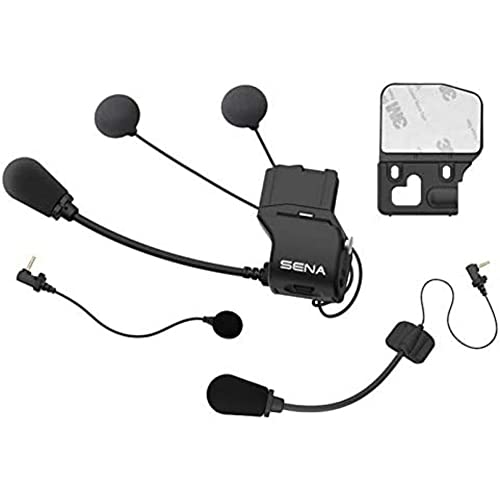
Sena 30K Motorcycle Bluetooth Headset Mesh Communication System, Black, Single Pack with HD Speakers


Verdict
For most Sena 30K owners, the sensible path runs in stages. First, reposition the stock speakers, refresh their foam covers, balance the pad stacks, and set phone, app, and 30K audio options with one change at a time. Many clarity complaints end there, at no cost in parts. Second, if speech still strains at highway speed or music still thins beyond what settings can repair, move to the Sena HD speaker path, checking dimensions against your helmet and firmware against current Sena documents. Third, consider specialist third party drivers only when their documents prove clamp compatibility, impedance, sensitivity, and full dimensions, and only when your ear pockets have room to spare.
Judge every stage on the road, in your helmet, at your speeds. A speaker set earns its place by delivering a centred, clear voice without ear pressure over a full ride, and by playing music that holds together without living at maximum volume. Anything less is a specification sheet looking for a problem it cannot solve in your shell.
Keep the stock set, keep your photographs of the original layout, and keep notes on the settings that worked. Helmet audio rewards owners who treat it as a small system of fit, wiring, settings, and driver, in that order, rather than as a single purchase that must carry the whole result.
Disclosure: The views in this guide rest on published specifications and manufacturer documents, not on hands-on use of the speakers discussed. Where this site links to a retailer and you buy through such a link, the retailer may pay a commission to this site, at no extra cost to you. Makers revise documents and firmware over time, so confirm the current specification sheet and compatibility notes for your exact clamp and helmet before you order any set.
Fit the right speakers well, and the next highway mile turns into a place where a friend’s voice arrives as if they were riding quietly beside you.