Our Top Picks




What's inside
- What universal fit actually means
- Driver configurations and what they change
- Nozzles, tips and the bore that shapes treble
- Seal, bass and how to read isolation figures
- Shell ergonomics: materials, angle and size
- Connectors, cables and balanced terminations
- Impedance, sensitivity and matching a source
- Tuning targets for stage, studio and the commute
- What arrives in the box, and what actually matters
- Care, cleaning and the usual failure points
- Check prices on Amazon
- A buying checklist keyed to ears, source and setting
As an Amazon Associate I earn from qualifying purchases. This post may contain affiliate links at no extra cost to you.
A universal-fit in-ear monitor is a small earphone built around a fixed nozzle and a set of interchangeable ear tips, designed to seal inside many different ear canals without a personal mould. That single design decision shapes everything else in this guide: the drivers that can fit inside a shared shell, the tips that decide whether the seal holds, the cables that route over the ear, and the way you should match impedance and sensitivity to the phone, dongle or player in your pocket. Read the sections in order if you are buying your first pair, or jump to the checklist at the end if you already know your ear size and source device and simply want to narrow a shortlist.
This page contains affiliate links. If you buy through a qualifying purchase link, the site may earn a commission at no extra cost to you, which helps fund guides like this one. No manufacturer contributed to, paid for, or reviewed this guide before publication, and no brand was given the chance to approve its conclusions. Our research draws on published specification sheets, connector documentation and measurement methodology references rather than on any claim that a pair was worn on stage by the writer.
What universal fit actually means
Universal fit means the manufacturer casts or machines one shell shape, finishes it with a nozzle of a fixed diameter and angle, and relies on soft tips to bridge the gap between that rigid nozzle and your individual ear canal. You choose a tip size, compress or roll it if it is foam, insert the shell, and let the tip expand or flex to form a seal. There is no ear impression, no audiologist visit, and no shell poured to match the folds of one person’s ear. The boundary matters because a custom-moulded monitor is built from an impression of a single ear and cannot sensibly be shared, resold or tried by a friend, while a universal model can be passed around a band, a household or a studio as long as each listener fits fresh tips.
That shareability is the first practical advantage. A drummer, a guitarist and a vocalist can each keep a personal set of tips and use the same model of universal monitor, which simplifies spares for a touring act and makes it realistic for a small venue or house of worship to keep a pool of monitors for rotating performers. A commuter benefits in a different way: if a tip tears or a cable fails, a replacement can be ordered as a standard part rather than sending a personal shell back for repair. A first-time buyer benefits most of all, because the cost of finding out that in-ear monitoring does not suit you is limited to one returnable product instead of a non-returnable moulded build.
The limits are just as concrete. A universal shell must be small enough for smaller ears and shallow enough not to press on sensitive parts of the canal, so designers work inside a compromise envelope. Listeners with very narrow, very sharply bent or unusually straight canals may find that no supplied tip seals evenly on both sides, and an uneven seal is not a minor flaw: it changes bass level, isolation and channel balance all at once. Long sessions expose the compromise too, because a moulded shell spreads contact pressure across a large custom surface, while a universal shell concentrates contact on the tip and on a few points where the shell body rests against the outer ear.
Most universal models ask the cable to leave the shell upward and loop over the ear rather than hanging straight down. That routing is not decoration. It moves the weight of the cable off the shell, reduces the tugging that breaks a seal, and keeps the shell seated when you move. A minority of designs hang straight down like ordinary earbuds, which can be quicker to insert but usually gives up some stability and isolation discipline. When a product page shows the cable worn down, treat it as a lifestyle earphone first and a monitor second, and check the remaining specifications with that priority in mind.
Finally, universal fit is a system, not a shell alone. The nozzle diameter limits which third-party tips you can fit, the tip bore changes the treble you hear, the shell angle decides whether the body sits flush or protrudes, and the connector decides whether a damaged cable is a minor replacement or the end of the product. The sections that follow take that system apart piece by piece, because choosing well is mostly a matter of matching those pieces to your ears, your source and your listening environment rather than pursuing the longest feature list.
best affordable android phones with headphone jack
Driver configurations and what they change
The driver is the small transducer that turns the electrical signal into sound inside the shell. Universal monitors use four broad architectures, and each one trades size, complexity and tuning behaviour differently. None of them is automatically superior. A well-executed single-driver design can sound more coherent than a crowded multi-driver shell, while a well-executed hybrid can do things with bass texture and treble extension that a single small driver struggles to match. What the configuration tells you reliably is where the designer’s problems were, what the shell had to accommodate, and which price class the product is competing in.
A single dynamic driver uses a diaphragm driven by a voice coil in a magnetic gap, much like a loudspeaker reduced to a diameter commonly between about 6mm and 14mm in this product class. Dynamic drivers move a relatively large volume of air, which suits bass reproduction, and they cover the full frequency range with one source, which avoids crossover complexity entirely. Their challenges sit at the top of the range, where a diaphragm large enough for strong low frequencies can struggle to stay controlled at the highest treble, and in distortion behaviour at high volume. Diaphragm materials vary widely in manufacturer documentation, including polymer films, metal-coated diaphragms and composite constructions, and the material name alone predicts very little without the full design around it.
Balanced-armature drivers work differently. A tiny reed sits balanced inside a magnetic field and moves a diaphragm through a drive pin, and the whole assembly is sealed in a small metal can with a sound outlet. Armatures are compact and efficient, which is why designers stack them: one for bass, one for midrange, one or more for treble, each fed only the band it handles best through an electronic or acoustic crossover. Counts in universal monitors range from a single armature up to eight or more per side. More armatures allow finer division of labour and can keep each unit inside its comfortable range, but every added unit adds crossover parts, tubing or sound bores, quality-control burden and cost, and a high count by itself guarantees nothing about the result.
Hybrid layouts combine the two approaches, most often one dynamic driver for low frequencies plus one or more armatures for midrange and treble. The logic is straightforward: let the dynamic driver do the air-moving work it is good at, and let the armatures handle the detail and speed in the upper ranges. The engineering difficulty moves to the crossover point, where the two driver types must hand over to each other without a dip, a peak or a phase oddity that smears the sound. Some hybrids add a dedicated armature for the highest treble, sometimes described in documentation as an ultra-high or super-tweeter unit. When you compare hybrids, the crossover description and the number of sound bores in the nozzle are more informative than the raw driver total printed in large type.
Planar magnetic in-ear models use a flat diaphragm with a conductive trace, suspended between magnet arrays, driven across its whole surface rather than from a central coil. In full-size headphones the technology is well established; inside a universal shell it demands a comparatively large, usually squarish driver, often around 14mm across in published specifications, and shells tend to grow accordingly. Planar drivers are typically less sensitive than armature-based designs and can ask more of a small source, a point that connects directly to the impedance and sensitivity section below. Their appeal lies in low-distortion behaviour and even diaphragm motion, and their cost reflects the difficulty of building the driver small without giving up yield.
Price classes follow complexity more than sound quality. Single dynamic designs dominate the entry class because one driver and no crossover keep parts and assembly simple. Armature counts and hybrid complexity push a model into mid and upper classes as parts, matching and inspection multiply. Planar and electrostatic-assisted models sit in upper classes largely because of manufacturing yield. Reading a price class as a map of construction cost, rather than as a promise about how a model will sound to you, is the single most useful habit you can bring to comparison shopping in this category.
Nozzles, tips and the bore that shapes treble
If the driver is the engine, the tip is the tyre: the only part that actually touches the road. Every universal monitor ends in a nozzle, a short tube projecting from the shell, and the tip stretches over that nozzle and makes the seal in your canal. Nozzle diameters in this class cluster roughly between 4mm and 6mm, with many models near the middle of that span, and the exact figure decides which replacement tips will physically fit. A tip made for a narrow nozzle may not stretch safely over a wide one, and a tip bored for a wide nozzle can sit loose on a narrow one and come off in your ear. Before buying any third-party tip, find the nozzle diameter in the specification or measure the nozzle with calipers at its widest retaining ridge.
Many nozzles carry a small lip or ridge near the end that the tip’s inner core grips, and some add a wax guard, either a fine mesh set into the nozzle or a filter built into the tip itself. A few manufacturers use threaded or bayonet-style tip mounts, but the stretch-fit nozzle remains the overwhelming standard. Note the nozzle length as well as its width: a long nozzle places the tip deeper in the canal, which can improve isolation and stability, while a short nozzle suits listeners who dislike deep insertion. Neither is universally better, and the difference of a few millimetres is plainly felt within the first minute of wear.
The tip’s own bore, the hole the sound travels through on its way out, is acoustically active. A wide bore tends to preserve treble energy and can sound more open, while a narrow bore tends to soften the highest frequencies and can shift emphasis toward the upper midrange. This is why the same monitor can sound noticeably different with two tips of identical size and material that differ only in bore diameter, and why experienced listeners keep a small library of tips rather than treating them as disposable packing material. When a review or a fellow listener describes a model as bright or relaxed, part of what they are describing may be the tip fitted that day.
Silicone tips are the default in nearly every box. They are durable, washable, quick to insert and consistent from one fitting to the next, and they come in single-flange, double-flange and triple-flange forms that reach progressively deeper. Their weakness is seal reliability in canals that are oval or irregular, because silicone springs back to its moulded shape rather than adapting to yours. Memory foam tips answer that weakness: you compress the foam, insert the tip, and the foam expands slowly to fill the canal’s actual cross-section, which usually gives the strongest seal and the highest isolation of any tip type. The trade-offs are lifespan, hygiene and convenience. Foam degrades with earwax and moisture, needs replacing far more often than silicone, takes a few seconds to fit each time, and can dull treble slightly because of its narrow, longer bore and absorbent surface.
Hybrid tips try to split the difference, typically a silicone outer with a foam core, or a foam body with a smooth washable coating. They adapt better than plain silicone, survive longer than raw foam, and cost more than either. There are also tips in softer medical-grade silicone that flex more readily, and tips with slightly tacky surfaces that resist slipping during exercise. What matters for buying is not the marketing name but three measurable properties: the core diameter that must match your nozzle, the outer diameter in millimetres for each size, and the insertion depth the shape implies.
Tip sizes in the box deserve a careful look before purchase, because they decide whether the product fits you at all. A generous package includes three or four sizes in at least two materials, with outer diameters spanning roughly from under 10mm for the smallest to around 14mm or more for the largest, and some brands add extra-small and extra-large sizes or mixed packs for listeners whose left and right canals differ, which is common and nothing to worry about. If your history with earbuds says you are between sizes, prioritise models whose makers sell replacement tips individually in the in-between size, rather than assuming the middle size in the box will settle in with use. It usually does not; an almost-seal stays an almost-seal.
Fit technique matters as much as tip choice. Pulling the top of the ear up and back straightens the canal for most adults, opening your jaw slightly changes the canal shape, and a gentle quarter-turn as you seat the shell often settles the nozzle at its intended angle. Foam tips should be rolled thin, inserted promptly, and held in place while they expand. If one side consistently needs a different size from the other, use different sizes; symmetry of the box contents matters far less than symmetry of the seal, which is what your hearing actually compares.
Seal, bass and how to read isolation figures
Almost everything a listener praises or blames in an in-ear monitor traces back to the seal. When a tip seals the canal completely, the driver works into a small closed volume, and low frequencies are reproduced at their intended level. Break that seal even slightly, with a tip one size too small or a jaw movement that opens a leak path, and bass falls away first and fastest, because low-frequency energy escapes through the leak while midrange and treble are far less affected. A monitor described as thin or bass-light by one listener and full-sounding by another is very often the same monitor with two different seals, which is why tip rolling is a diagnostic step, not an enthusiast hobby.
Insertion depth is the second half of the equation. A deeper fit moves the sound outlet closer to the eardrum, reduces the residual canal volume, and pushes the canal’s natural resonance higher in frequency, which changes the treble balance the designer intended to varying degrees depending on how the model was tuned and measured. A shallower fit leaves more volume, often sounds more relaxed, and usually isolates less. Manufacturers tune and publish measurements at a reference insertion depth, and your ears will not match it exactly, so small differences between the published curve and your experience are expected rather than evidence that either is wrong.
Isolation figures are where marketing and measurement most often part company. Isolation is expressed in decibels of attenuation, and a single headline number hides the fact that attenuation varies enormously with frequency: a sealed in-ear monitor may reduce low-frequency rumble by a relatively modest amount while cutting midrange and high-frequency noise by 25dB, 30dB or more. Passive isolation also depends on the fit achieved on the measurement fixture or the human subjects, the tip material used, and the insertion depth chosen. Two brands quoting different headline numbers may have measured different tips on different fixtures at different depths, so the figures are not directly comparable even when both are honestly reported.
Read isolation claims in this order. First, look for a frequency-dependent statement, such as attenuation quoted at a specific frequency or a range described across the spectrum, rather than a single maximum. Second, check which tip the figure was achieved with; foam tips at full depth will flatter any design. Third, compare the claim against the physical design: a sealed shell with no vent and a deep foam fit can plausibly reach the higher figures in print, while a vented shell with shallow silicone tips cannot, whatever the box says. Fourth, remember that isolation is not the same as the absence of distraction. A monitor that cuts 30dB of midrange noise still passes low-frequency vibration through your body and through the cable, which is why a train carriage never goes fully silent.
For stage use, isolation has a safety dimension as well as a musical one. The point of an in-ear system on stage is to replace a loud wedge monitor with a controlled mix at a lower level at the eardrum, and that only works if stage noise leaking past the seal does not force the listener to turn the mix up to compete. A poor seal therefore does double damage: it thins the bass of the mix and raises the level the listener chooses. Singers should pay particular attention to how the seal behaves with an open jaw, and drummers to whether stick impact and head movement shift the shells over the length of a set.
Shell ergonomics: materials, angle and size
The shell is the part you wear, and its ergonomics decide whether a technically excellent monitor is also a tolerable one after an hour. Most universal shells are made from one of three families of material. Cast or printed resin dominates the mid and upper classes because it can be formed into complex, ear-following shapes with smooth internal chambers for multiple drivers and sound tubes. Aluminium and other metals appear in smaller, usually single-driver designs, where a machined or cast metal body gives a compact, durable shell with a cooler feel in the ear. Polycarbonate and similar plastics serve the entry class, keeping weight and cost down at some expense in perceived solidity.
Material affects more than feel. A resin shell can be made larger without becoming heavy, which is why multi-driver models are almost always resin, but resin can crack if a shell is dropped onto a hard floor at the wrong angle, and glossy resin shows scratches readily. A metal shell survives knocks better and can be made smaller, but a small metal shell with a deep nozzle concentrates its fit on the tip alone, and some listeners find metal shells cold and slippery at first insertion. Internal construction matters too: a shell that looks identical outside may carry its drivers in a 3D-printed acoustic structure or simply mounted in an open cavity, with measurable differences in how the sound tubes are controlled.
Nozzle angle is the ergonomic specification almost nobody publishes and almost everybody feels. The nozzle must aim along the ear canal, which for most people angles forward and slightly upward from the shell’s resting position against the concha. If the angle is wrong for your ears, the tip is pushed against one canal wall, which causes a hot spot within half an hour and a seal that breaks whenever you move. Because the angle cannot be adjusted, the only honest way to judge it is the shape itself: product photographs taken from several angles, dimensioned drawings where the manufacturer provides them, and the return policy of the seller if your ears disagree with the design.
Shell size deserves the same scepticism as tip size. Multi-driver and planar models can be substantially larger than single-driver designs, and a shell that fills the concha of a larger ear may perch painfully on the rim of a smaller one. Listeners with smaller ears should look for published shell dimensions or weight per side, favour compact single-dynamic and small hybrid designs, and be wary of models whose photographs show the shell clearly protruding beyond the ear outline of the model wearing them. Weight per side in this class ranges from roughly 4 grams for a small metal shell to 10 grams or more for a large multi-driver resin build, and the cable’s support over the ear makes the higher figures more manageable than the numbers suggest.
The ear hook formed by the cable is the other half of the support system. Most cables arrive with a pre-formed curve, either a memory wire inside a sleeve or a heat-formed section of the cable itself, that wraps over the top of the ear and holds the shell in place. A well-shaped hook makes a heavier shell feel secure; a stiff or springy hook can saw at the top of the ear and pull the shell out of alignment. Some cables let you reshape the hook with gentle bending or warm air, and some omit the formed section entirely for listeners who prefer to route a plain cable over the ear. If you wear glasses, check how the hook and the spectacle arm share the space behind your ear, because that small conflict is one of the most common reasons an otherwise good monitor gets returned.
Connectors, cables and balanced terminations
A detachable cable is now the norm above the entry class, and the connector at the shell is a long-term commitment, because it decides which replacement and upgrade cables you can buy for the life of the monitor. Two systems dominate. MMCX uses a small coaxial snap connector that rotates freely in its socket; it is compact, widely supported, and easy to connect with cold fingers, but the rotating joint is also its wear point, and a worn MMCX socket can crackle or cut out when the cable moves. The 2-pin system uses two parallel pins, most commonly 0.78mm in diameter, with a 0.75mm variant in circulation that looks nearly identical and should not be forced into the wrong socket. Two-pin connections do not rotate, grip firmly, and are simple to manufacture, but the pins can bend, and sockets differ in whether the pins sit flush, recessed, or inside a raised collar, which affects which aftermarket plugs fit cleanly.
Cable construction shapes daily use in ways specifications rarely capture. Microphonics is the name for the thumps and rustles transmitted up the cable into the sealed ear when the cable rubs clothing or taps a desk; a sealed ear canal is an efficient stethoscope, and a stiff, thick cable worn straight down can be remarkably noisy. Wearing the cable over the ear, using a shirt clip, and choosing a cable with a softer, finer-stranded construction all reduce the effect. Cable length in this class is usually around 1.2 metres, suited to a source in a pocket or on a belt pack; longer cables suit desk use, and shorter ones suit wireless adapters worn at the collar.
Strain relief, the reinforced section where the cable meets each plug and the shell connector, is where cables actually die. Look for a relief that flexes progressively rather than ending in a hard edge, and for a right-angled or low-profile plug at the source end if the source lives in a pocket. A microphone and remote on the cable is convenient for calls and commuting, and many listeners keep two cables, one with a microphone for the phone and one plain cable for serious listening, which the detachable system makes a reasonable rather than extravagant plan.
At the source end, the standard termination is a 3.5mm stereo plug, single-ended, which fits phones with a headphone socket, most dongles, laptops and stage receiver packs. Balanced terminations, 2.5mm and the now common 4.4mm, carry separate conductors for each channel instead of a shared ground, and they exist to connect to sources whose balanced output stage delivers more power, lower crosstalk or both. A balanced cable does not improve a monitor by itself; it only helps if the source’s balanced output is genuinely the better-engineered output on that device, which is often true of dedicated players and often irrelevant for a low-power in-ear design that a single-ended output already drives to high levels. Never adapt a balanced cable down to a single-ended socket with a simple adapter unless the cable maker explicitly allows it, because shorting the separate returns can damage some source outputs. Going the other way, from a single-ended cable to a balanced socket, is not possible at all without rewiring, since the shared ground cannot be split by an adapter.
Impedance, sensitivity and matching a source
Two numbers on the specification sheet predict whether a monitor will pair happily with your source: impedance, measured in ohms, and sensitivity, usually quoted in decibels of sound pressure level produced by one milliwatt of power, or sometimes by a stated voltage. Universal in-ear monitors are, as a class, easy loads compared with full-size headphones. Impedance typically falls somewhere between about 8 and 64 ohms, with a large share of models between 16 and 32 ohms, and sensitivity is high, frequently in the region of 100 to 120dB per milliwatt depending on the design and the reference the manufacturer used. Those two facts together explain why a phone can drive most in-ear monitors to high volume with ease, and why the problems that do appear are usually about noise and control rather than loudness.
Impedance needs one clarification before it can be used. A dynamic-driver model tends to present a fairly even impedance across the frequency range, while a multi-armature model with a crossover can swing widely, dipping low in one band and rising in another. That swing is why the source’s output impedance matters. The widely used rule of thumb is that the source output impedance should be no more than one eighth of the monitor’s impedance, so a 16-ohm monitor wants a source of about 2 ohms or lower, and a 32-ohm model tolerates roughly 4 ohms. When the rule is broken, the source and the crossover interact, and the frequency response shifts, most audibly as altered bass and treble balance on multi-armature designs. A single-dynamic model is more forgiving of the same mismatch, which is a real if unglamorous reason to favour one for use with unknown sources such as stage packs, aeroplane sockets and older laptops.
Sensitivity cuts both ways. High sensitivity means satisfying volume from a low-power source, longer battery life at a given listening level, and easy use with the small USB-C dongles that have replaced the headphone socket on many phones. It also means the monitor faithfully reproduces the source’s noise floor. Hiss that is inaudible through a full-size headphone can be plainly present through a sensitive armature model on a quiet recording, especially with sources whose amplifiers were designed for higher-impedance loads. If you listen to quiet material, spoken word or classical recordings with long silences, treat a very high sensitivity figure as a prompt to check the source’s noise behaviour, not simply as a virtue.
Driving these monitors from common sources is, in practice, straightforward. A phone with a headphone socket or a reputable USB-C dongle provides low output impedance, adequate power and a low noise floor in most modern implementations, and is a complete solution for the majority of universal monitors. A dedicated digital audio player adds balanced outputs, more power than almost any in-ear design needs, and local storage, at the cost of carrying a second device. A laptop is the variable case: output impedance and noise vary widely between models, and a hiss or a shifted tonal balance from a laptop that disappears on a dongle is a source problem, not a monitor fault. Stage receiver packs, used with wireless in-ear systems, are designed for exactly this load class and pair predictably, though their output impedance and maximum level should still be checked against a very low-impedance multi-armature model.
Volume headroom deserves one sentence of arithmetic rather than a paragraph of worry. Because sensitivity is quoted per milliwatt, and most sources deliver tens of milliwatts into these loads, the available level exceeds safe listening levels by a wide margin on nearly every combination in this category. The practical limit is never power; it is your hearing. Set levels by the quietest material you listen to, be suspicious of any combination that needs the volume control near maximum, since that suggests a mismatch somewhere, and remember that a good seal lowers the level you need by keeping outside noise out rather than by asking the driver to shout over it.
best bluetooth bookshelf speakers
Tuning targets for stage, studio and the commute
Tuning is the frequency balance the designer chose, and the right target depends on the job. There is no neutral that serves every listener equally, because the three main uses of a universal monitor ask for different things and take place in different noise environments. Understanding which target a model aims at will narrow a shortlist faster than any other single step, and manufacturer documentation usually signals the intent through the published frequency response curve, the stated application, and the accessories included.
Stage monitoring tunings put the midrange first. A singer needs their own voice and the instruments that cue them to sit clearly in the mix at a level that survives a loud room leaking past the seal, so stage-oriented models tend toward a present, forward midrange, controlled bass that does not mask pitch information, and treble that is detailed without being fatiguing over a long set. Isolation is part of the tuning in practice, because the designer assumes a sealed fit with foam or well-fitted silicone tips in a high-noise environment. A stage model used at a quiet desk can sound more intense in the midrange than expected, which is the target working as designed rather than a flaw.
Studio-leaning and reference tunings aim for an even balance that reveals how a recording is put together. Designers often describe these targets by reference to a published measurement target curve, which describes how a monitor should measure on a standard coupler to be perceived as balanced at the eardrum. Such curves are not flat lines, because the ear and the measurement fixture shape the sound, and a response that measures flat at the microphone does not sound flat to a listener. When a manufacturer publishes a curve against a named target, with the coupler and compensation stated, that is a sign of documentation discipline worth valuing, even if your taste ultimately prefers a warmer or brighter balance. Reference models are the natural choice for mixing checks, editing and critical listening, and the least forgiving of poor recordings and noisy sources.
Commuter and everyday tunings usually add bass emphasis and a relaxed top end. The reasoning is environmental: low-frequency noise from engines and tyres masks a monitor’s own bass, so a lift in the low range restores the perceived balance at real-world levels, and a gentler treble stays comfortable at the higher volumes that noisy environments encourage. The risk is a model that sounds bloated and dull in a quiet room, which is why a bass-emphasised model bought for a train should be judged on a train if at all possible. Some designs offer tuning switches on the shell or interchangeable nozzles with different filters, which let one monitor cover two targets; the switches add a small mechanical complexity and the nozzle filters are easily lost, but for a listener split between stage and street they can be a genuinely practical answer rather than a gimmick.
Venting connects tuning to physical comfort. Many dynamic-driver designs include a small vent that equalises pressure and shapes the bass response. A vent slightly reduces isolation and can let in wind noise outdoors, but it relieves the pressure build-up that some listeners find fatiguing and reduces the risk of driver flex, the crackling sound a dynamic diaphragm makes when a sudden pressure change, such as inserting the monitor quickly, deforms it. Pressure-relief designs in some sealed models use a small engineered leak or valve to ease the trapped-air feeling that a fully sealed canal can produce over hours, trading a measured amount of low-frequency isolation for long-session comfort. If you have ever pulled an earphone out simply because your ears felt pressurised rather than because the sound tired you, prioritise models whose documentation addresses pressure relief directly.
What arrives in the box, and what actually matters
The accessory bundle of a universal monitor divides cleanly into items that affect fit and function, and items that photograph well. The tips matter most, for all the reasons already covered: look for at least two materials and three sizes, and value a brand that sells replacements openly over one that includes a spectacular assortment once and no way to restock it. A spare set of tips in your gig bag or travel pouch is the difference between a minor inconvenience and a silenced monitor when a tip splits before a performance or a flight.
The case is the second item that earns its place. A hard or semi-rigid case that holds both shells without pressing the nozzles against each other, with room for a spare tip pair and the cable coiled loosely, will extend the life of the product more than any other accessory. Soft pouches protect against scratches and nothing else. Some cases include a small desiccant space or a mesh pocket for tips and tools; both are genuinely useful for stage users who store monitors in warm, humid environments between sets.
Cleaning tools usually include a small brush and a wire loop for removing wax from the nozzle guard. They look trivial and are not: a blocked nozzle guard is the most common cause of a monitor that gradually loses volume on one side, and the supplied loop is sized for the nozzle in a way that improvised tools are not. Adapters appear in many boxes, most often a 3.5mm to 6.35mm adapter for studio and stage equipment, and occasionally an aircraft adapter. The studio adapter matters if you will ever plug into a mixing desk, a headphone amplifier or an instrument amplifier; the aircraft adapter matters less each year as seatback systems change, and neither should sway a purchase.
Extra cables, alternate-termination cables and tuning accessories sit in the middle ground. A second cable is valuable if it differs in a way you will use, a microphone version for calls or a balanced version for a player you own, and mere duplication otherwise. Interchangeable nozzle filters or tuning nozzles matter if you expect to use them, and are small, losable parts if you do not. A shirt clip, a cable organiser and a set of spare wax guards are cheap, light and quietly useful. What counts as padding is anything that duplicates a function you already have, cannot be replaced when lost, or exists to make an unboxing feel generous: elaborate printed materials, redundant pouches, and adapters for sockets you will never meet. Judge the box by whether its contents keep the monitor fitting, clean and connected, because those are the three states the product spends its life in.
best high end portable bluetooth speakers
Care, cleaning and the usual failure points
Wax management is the first discipline. Earwax migrates onto the tip and into the nozzle guard, and a guard that clogs will dull and quieten one channel in a way that listeners often misdiagnose as a dying driver. After each use, wipe the tips with a dry or slightly dampened cloth; wash silicone tips periodically in warm water with a mild soap, rinse and dry them fully before refitting; and replace foam tips when they stop expanding promptly or no longer clean up, since foam cannot be washed back to health. Use the supplied cleaning loop on the nozzle guard gently and only as far as it is designed to reach, because pushing wax through the guard into the sound tube converts a surface cleaning job into a service job.
Moisture is the second enemy. Sweat and humidity accumulate in the shell and at the connector contacts, particularly for stage and exercise use. Storing monitors overnight in their case with a small desiccant pack, or in a dedicated drying container for heavy stage use, keeps moisture from corroding contacts and degrading foam. Never store a monitor that is still damp from use in a sealed case, and never use heat from a hairdryer or radiator to dry one, since adhesives, foam and diaphragm materials all dislike it. If a monitor will sit unused for weeks, store it clean, dry, loosely coiled and out of direct sunlight, which ages cable jackets and resin alike.
Connector wear is the third predictable failure. MMCX sockets loosen and 2-pin pins bend or fatigue, and both are accelerated by frequent cable swapping and by removing cables with a sideways pull. Disconnect with a straight, firm pull on the plug body, never on the cable, and support the shell rather than letting it dangle from the joint. A channel that crackles when the cable moves at the shell is usually announcing a worn connector or a cable conductor breaking down near the plug, and swapping in a known-good cable is the correct first diagnosis before blaming the shell. Cable conductors also fail at the source plug and at the split, wherever the cable habitually bends at a hard edge; strain relief slows this, and coiling loosely rather than wrapping the cable tightly around fingers or a phone slows it further.
Check prices on Amazon
Live listings for the shortlist in this guide are pulled from Amazon below, so prices and availability are always current at the moment you look.


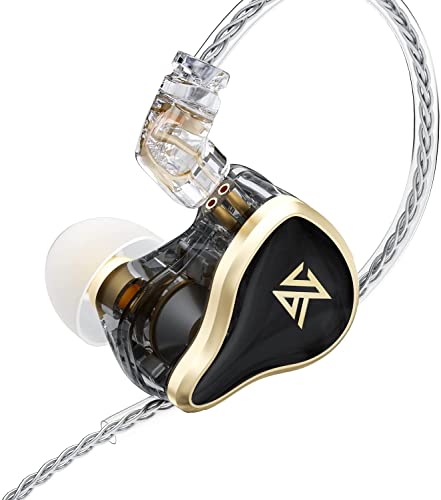
Jerry Harvey Audio Jessie Universal IEM in Ear Monitor Earbuds, Black


A buying checklist keyed to ears, source and setting
Everything in this guide converges on three questions, and answering them in order will cut a long catalogue down to a short list that genuinely fits your life. Start with your ears, because no specification can rescue a shell that does not fit them. Then match the source, because impedance, sensitivity and termination decide whether a well-fitting monitor also behaves electrically. Finish with the listening environment, because isolation and tuning targets only make sense against the noise and the activity the monitor will actually face.
For your ears, record what you already know. If small earbuds have always felt loose and large ones painful, you are working with smaller canals and should shortlist compact shells, narrower nozzles and tip ranges that include extra-small sizes with published outer diameters. If you have always needed the largest tips in every box, do the opposite, and check that the largest supplied tip reaches roughly 14mm or beyond. If your two ears differ, which is common, confirm that tips are sold singly or in mixed packs. If you sing, play a wind instrument or talk for a living, weight seal stability under jaw movement heavily, and favour foam or hybrid tips and a secure over-ear hook. If you wear glasses or hearing protection at work, check the hook’s path behind the ear. And if deep insertion bothers you, filter for shallow-fitting designs with shorter nozzles rather than hoping to adapt, because discomfort does not fade with familiarity as reliably as sellers suggest.
For your source, write down the device or devices the monitor will actually plug into, and check four figures for each candidate model. Impedance between about 16 and 32 ohms suits the widest range of phones, dongles and packs. Sensitivity high enough for easy volume is desirable, but if your main source is an older laptop or a budget player with a reputation for hiss, a moderately sensitive dynamic model will behave better than the most sensitive armature design. Output impedance of the source, where it is published, should sit at or below one eighth of the monitor’s impedance, and where it is not published, prefer the forgiving single-dynamic or mild hybrid designs for use across unknown sockets. Termination is the simplest check: 3.5mm single-ended for phones, dongles and stage packs; a balanced 4.4mm or 2.5mm cable only where your player’s balanced output is the one you intend to use, bought as a native cable rather than adapted.
For your environment, be specific about noise and duration. A quiet home or studio rewards a reference-leaning tuning, a vented or pressure-relieved design for long sessions, and a lighter isolation requirement. A train, an aircraft cabin or an open-plan office rewards a sealed shell, foam tips for maximum attenuation, and a tuning with enough low-frequency lift to stay balanced against engine noise. A stage rewards isolation above all, a forward midrange, a secure fit under movement and sweat, and a cable length and routing that work with a belt pack. A mixed life, which most listeners lead, rewards versatility: a monitor with two tip materials in the box, a tuning that sits between the reference and commuter targets, and perhaps a second cable rather than a second monitor.
Then run the final practical checks that separate a considered purchase from a hopeful one. Confirm the nozzle diameter and that replacement tips in your size are available and priced as ordinary consumables rather than rare parts. Confirm the connector type and that a replacement cable in your termination exists before you need it urgently. Read the published specification for driver configuration, impedance and sensitivity, and prefer the maker who states the measurement references behind those figures. Check the case is rigid, the cleaning tool is included, and the warranty and single-side repair route are written down somewhere you can find again. None of these checks requires specialist knowledge, and together they predict ownership satisfaction more reliably than any single sound impression.
Set a budget class by construction rather than by promise, using the driver section of this guide as the map: simple dynamic designs at the entry level, armature and hybrid complexity in the middle, planar and multi-driver flagships at the top. Within a class, spend first on fit, because a model that seals perfectly will outperform a technically grander model that leaks, and second on the cable and connector ecosystem you will live with daily. Resist paying for driver counts, exotic materials or accessory theatre until the fit, the source match and the tuning target are all right, because those three decide whether you reach for the monitor at all in six months’ time.
Universal-fit in-ear monitors reward a buyer who thinks in systems: a nozzle and a tip making a seal, a driver and a crossover making a balance, a connector and a cable making a serviceable whole, and a specification sheet read with its measurement references attached. Get the seal right, match the electrical figures to the source in your pocket, choose the tuning for the room you actually listen in, and the format’s promise holds — one shareable, repairable, pocketable monitor that brings the mix, the recording or the podcast close and keeps the world at a respectful distance. For the listener who measures twice and buys once, a universal monitor chosen this way is not a compromise against a moulded shell at all, but a small, well-matched instrument that earns its place in a pocket, a gig bag and a daily routine for years.
Related guides
- Best 24 Inch Monitors
- Best 25–35 Inch Monitors With Lowest Display Lag: An Honest Ranking Without Invented Numbers
- Best 1440p 165Hz Monitors: One Native 165Hz Pick, Three 180Hz Upgrades, an Overclock Headline and a 160Hz Ultrawide
- Best Computer Monitors Graphic Designers Can Trust for Print and Screen Work


