Our Top Picks


What's inside
- How wireless HDMI projection from a laptop actually works
- 4K decode is not 4K output: reading the specifications honestly
- What to consider before you choose a kit
- The eight wireless HDMI kits, product by product
- Choosing by scenario: rooms, lessons, travel, and shared work
- Setup habits that make any kit work better
- Check prices on Amazon
- Conclusion: match the link to the room
As an Amazon Associate I earn from qualifying purchases. This post may contain affiliate links at no extra cost to you.
A wireless projection device for a laptop sounds simple: send what is on your screen to a bigger screen without a cable across the floor. In practice, the products that do this job most reliably on Amazon are not single dongles in the style of a streaming stick. They are wireless HDMI kits, with a transmitter that plugs into the source and a receiver that plugs into the TV, monitor, or projector. The laptop stays where you are. The display stays where everyone can see it. The link between them is a dedicated radio connection instead of a long HDMI cable.
That distinction matters because it shapes everything else in this guide. A wireless HDMI kit does not need your content to live in an app, and it does not mirror only one streaming service at a time. It carries the laptop desktop itself: slides, a browser window, a spreadsheet, a video call, a photo library, or a film playing from a TV box. If the source can output it over HDMI, or in one case in this roundup over USB-C, the kit is designed to carry it to the far screen.
This guide covers eight kits that take different approaches to the same problem. Some emphasize maximum range, with listings that describe 328 feet, 360 feet, 400 feet, or even up to 656 feet of transmission distance. Some emphasize compact travel use. One is built around USB-C for a MacBook, iPad, or recent iPhone rather than a conventional HDMI port. One supports a configuration with one transmitter and two receivers. Another describes support for up to eight transmitters, which speaks directly to meeting rooms where several people need to take turns presenting. Reading those differences carefully is more useful than chasing a single headline number.
There is also one honest warning that belongs at the very start, because it affects how you should read every product name in this category. Many of these kits describe 4K decoding. That phrase refers to what the receiver can decode on the input side. It is not the same as 4K output to your display. Several kits in this guide are explicit about the distinction in their own titles: they decode a 4K input and then output video at 1080P at 60Hz. That is still a sharp, smooth picture on most TVs, monitors, and projectors, and it is often the sensible trade for a stable wireless link. But if you go in expecting native 4K resolution on the far screen from a kit whose stated output is 1080P, you will be disappointed for the wrong reason. Throughout this guide, decode and output are kept separate, product by product.
How wireless HDMI projection from a laptop actually works
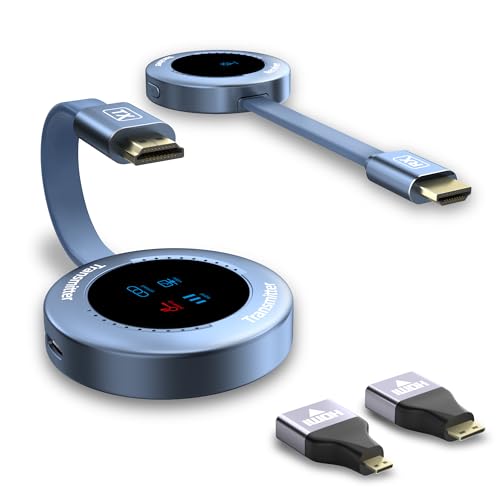
Every conventional kit in this guide follows the same basic architecture. The transmitter, often shortened to TX, connects to the source. On a laptop that is usually the HDMI port, sometimes with a short adapter if your machine only offers USB-C or a mini connector. The receiver, shortened to RX, connects to the HDMI input of the TV, monitor, or projector, and usually draws power from a USB port or a small power adapter. Once both ends are powered and paired, the transmitter compresses the video and audio signal, sends it over its radio link, and the receiver decodes it and feeds it to the display as a normal HDMI signal.
From the display’s point of view, nothing exotic is happening. The TV or projector simply sees an HDMI source. From the laptop’s point of view, the transmitter behaves much like a direct cable connection: the far screen typically appears as an external display, so you can mirror your desktop or extend it, depending on your operating system settings. Mirroring is what most people want for presentations and video, because what you see is what the room sees. Extending is useful when you want notes or controls on the laptop screen and only the finished content on the big screen.
Plug and play is the phrase that appears again and again in these listings, and in this category it has a fairly specific meaning. The transmitter and receiver are paired to each other and establish their own link, rather than asking you to join a network, install a driver, or configure an app before anything appears. That is a genuine advantage in a meeting room, classroom, or hotel, where the local network may be locked down, slow, or simply unknown. It is also why several of these kits stress that no WiFi network is needed for the link itself. The radio connection is point to point between the two halves of the kit.
4K decode is not 4K output: reading the specifications honestly
The single most common misunderstanding in this category is the resolution claim, so it deserves its own section before any individual product is discussed. When a listing says 4K decode and 1080P at 60Hz output, it is describing two different stages of the journey. At the input stage, the receiver can accept and decode a signal that originated as 4K, which means a 4K source does not produce a blank screen or an unsupported-format error. At the output stage, the picture actually delivered to the TV, monitor, or projector is 1080P. The frame rate of 60Hz means that picture refreshes sixty times per second, which keeps motion and cursor movement looking smooth.
For many buyers, that trade is entirely reasonable. A 1080P picture on a typical meeting-room TV or a home projector screen looks clean from normal viewing distances, text in slides remains legible when it is sized sensibly, and a lower output resolution puts less strain on the wireless link, which helps stability over distance. What matters is choosing with your eyes open. If your priority is a native 4K picture on a large, high-end display at close range, a cable or a different class of equipment is the honest answer. If your priority is getting a laptop screen onto a shared display reliably, without running cable, 1080P output from a kit that can decode a 4K input covers a very large share of real rooms.
For readers building a wired fallback or a hybrid room, a wired extender can still have a place alongside a wireless kit, which is why our research also covers best 4k uhd hdr hdmi extenders for runs where a cable path already exists.
What to consider before you choose a kit
Range and the shape of your room
Start by measuring the real path, not the room’s brochure dimensions. How far is the seat where the laptop will sit from the display, and what stands between them? In a single meeting room or living room, that distance is often under thirty feet, and almost any kit in this guide has stated range to spare. In a classroom, lecture space, house of worship, warehouse, or security monitoring setup, the distance can grow quickly, and the longer-range kits earn their place. Remember that the stated figures assume favorable conditions. Choosing a kit whose stated range is several times your actual distance is not waste; it is insurance against walls, furniture, people, and interference.
2.4G, 5G, and 5.8G bands explained
Most kits here are dual-band, combining a 2.4G link with a 5G or 5.8G link, and a few describe dynamic or dual-band operation in their titles. In general terms for this class of product, the lower band tends to travel farther and cope better with obstacles, while the higher band offers more room for video data and tends to suffer less from the congestion of everyday household devices. A dual-band design can use those strengths together rather than forcing one band to do everything. The practical takeaway is not to memorize frequencies but to match the kit to the environment: a crowded apartment building, office floor, or school is a harsher radio environment than a detached house, and dual-band kits are the safer default in crowded airspace.
Latency, video, and gaming
Every wireless link adds some delay, because the signal must be encoded, transmitted, and decoded. For presentations, teaching, photo sharing, and streamed or locally played video, modest latency is largely invisible, and audio and video are kept together by the kit’s design. For desktop work, a small delay between moving a mouse and seeing the cursor move is noticeable at first and quickly becomes normal for most people. For competitive gaming, where fractions of a second decide outcomes, a cable remains the right tool, and no kit in this guide should be bought primarily for that purpose. Casual gaming, turn-based games, and watching someone else play are far more forgiving. One kit in this guide, the Lulaven iShare Pro, describes itself as zero-lag in its listing; as with all such shorthand, read that as a design goal of keeping delay imperceptible for its intended travel and presentation uses, not as a literal suspension of physics.
One presenter or many
A single laptop and a single screen is the simplest pattern, and every kit here handles it. Rooms get more interesting when the pattern grows. A kit that supports multiple receivers lets one source appear on two displays at once, which suits a large room or a monitoring setup. A kit that supports multiple transmitters lets several laptops take turns feeding one display without passing a cable around the table, which is the daily reality of meeting rooms and group work. Those two ideas sound similar and are opposites, so check which direction a given kit expands before you buy. The Lemorele kit below is described as 1TX plus 2RX, one transmitter with two receivers. The kit from the listing that supports up to 8 TX expands in the other direction, toward many presenters.
Source ports: HDMI versus USB-C
Check your laptop’s actual ports before you fall for a kit. Many Windows laptops still offer a full HDMI port, which suits the conventional kits directly. Many current thin laptops, including recent MacBook models, offer USB-C instead, which means either an adapter for a conventional transmitter or a kit designed for USB-C from the start. The Lulaven iShare Pro in this guide is that second kind of product: its listing is built around USB-C for iPhone 15, 16, and 17, iPad, and MacBook. That is a different tool for a different bag, and for Apple-centered travelers it may be the most relevant product in the entire roundup.
Content protection and streaming services
HDCP is the copy-protection system carried over HDMI connections, and it is why a protected stream sometimes refuses to play through a chain of devices that handles unprotected desktop content happily. Most laptop desktop work is unaffected. The risk appears with commercial streaming services and protected discs. Only one listing in this guide makes an explicit HDCP claim: the Lulaven iShare Pro lists HDCP 2.2 and names Netflix and Disney Plus in its title. For the other kits, our research did not treat streaming-service playback as a stated feature, and buyers whose main use is protected streaming should weigh that silence honestly rather than assuming every kit behaves identically.
The eight wireless HDMI kits, product by product
The kits below are presented in a deliberate order that moves between long-range designs, a travel-focused USB-C design, a multi-receiver design, and a multi-transmitter design, so that the contrasts are easy to see. Each entry sticks to what its listing actually states: stated range, stated output, stated bands, and stated configuration. Where a listing does not state a detail, this guide says so by omission rather than filling the gap with a guess.
1. 2026 New Wireless HDMI Transmitter and Receiver with LED display, 360FT stated range
This kit makes range and visibility its headline. Its listing states a transmission distance of 360 feet, or 110 meters, which places it firmly in the long-range group in this roundup. It describes 4K decoding with output at 1080P at 60Hz, which is exactly the decode-versus-output pattern explained above: a 4K source can be accepted, and the picture delivered to the display is full HD at a smooth refresh rate. Sources named in the listing include PC, laptop, and TV box, and destinations include a monitor, which makes it a natural fit for a desk-to-display or room-to-screen setup rather than only a living-room TV.
Two details set it apart from the plainer kits. The first is an LED display on the hardware itself. On a wireless link, a small status readout is more useful than it sounds, because the most common setup question is simply whether the two ends are connected and working. A display on the unit gives feedback at the device, instead of leaving you to guess from a blank screen at the far end of the room. The second detail is its dual-band description of 5.8 plus 2.4G. That pairing combines the higher band’s capacity for video with the lower band’s reach, which suits the long stated range: this is a kit designed to keep a link alive across a large space, not just across a sofa.
Who should consider it? Buyers with a big room, a hall, a classroom, or an office where the laptop cannot sit near the screen, and who value at-a-glance status information during setup. Its plug and play description means the pairing is handled by the kit, so the long range does not come with a networking project attached. As with every long-range claim, treat 360 feet as favorable-condition headroom and expect less through walls, but even a generous discount on that figure leaves a lot of usable distance for real buildings.
2. Wireless HDMI Transmitter and Receiver 4K Kit, 165FT stated range
This kit is the straightforward presentation option in the group. Its listing states 165 feet, or 50 meters, of range and describes the product as full HD 4K wireless presentation equipment and an HDMI adapter for plug and play streaming media. The source list is broad: laptop, PC, and smart phone are all named alongside the dongle-style transmitter, and the destinations are HDTV and projector. That breadth is the point. This is a kit aimed at the common, unglamorous job of getting a screen shared in a room, whether the screen is a television or a projector.
The presentation framing matters when you picture how it will be used. Presentation equipment lives in shared spaces, gets handled by people who did not set it up, and needs to work the first time a guest plugs in. A plug and play kit with a stated 165-foot range covers a meeting room, a classroom, or a small hall with headroom to spare, without the cost or complexity of the longest-range designs. The listing describes the kit as 4K, and following the honest reading used throughout this guide, buyers should confirm the exact output behavior they need rather than assuming the headline word describes the delivered resolution; the title emphasizes the presentation role and the range more than an output figure.
For a home setup, the same simplicity applies to a laptop-to-TV link for video and photos, and readers planning a dedicated viewing room may also want to look at best 1080p home theater projectors to pair a kit like this with a suitable projector. Choose this kit if your room is ordinary-sized, your sources are varied, and you want the presentation-room virtues of simplicity and compatibility over maximum distance or multi-unit expansion.
3. Lulaven iShare Pro 2026 Wireless HDMI Kit, USB-C for iPhone, iPad, and MacBook
The Lulaven iShare Pro is the outlier in this roundup, and for some buyers it will be the most useful product here. Instead of assuming the source has an HDMI port, it is built around USB-C, and its listing names the iPhone 15, 16, and 17, iPad, and MacBook as its sources. That reflects how modern portable devices actually ship: the port they share is USB-C, not HDMI. A transmitter designed for that port removes the adapter chain that a conventional HDMI kit would need with a current MacBook or iPad.
Its stated use case is equally specific: no WiFi needed, for hotel TV and travel. That pairing of claims describes a real and familiar problem. Hotel networks often require sign-in pages, device limits, or per-device fees, and they are a poor foundation for screen sharing. A point-to-point kit that creates its own link sidesteps the hotel network entirely. You connect the receiver to the hotel TV, connect the transmitter to your device, and your photos, work, or entertainment appear on the big screen without negotiating with the building’s internet. The listing also describes zero-lag plug and play operation, which in context means the kit is designed to feel immediate for presentation and viewing, with no setup sequence standing between arrival and a working picture.
The most distinctive claim in its title is HDCP 2.2, with Netflix and Disney Plus named. As explained earlier, HDCP is the protection layer that decides whether commercial streaming content will pass through a device chain. No other listing in this guide makes that claim explicitly, so travelers whose plan is specifically to watch those services on a hotel TV should weigh this kit’s stated positioning seriously. It will not be the right choice for a Windows desktop with only HDMI, or for a very long fixed installation, because that is not what it was designed for. For an Apple-centered travel bag, it is the specialist, and specialists win when their specialty is exactly your problem.
4. Wireless HDMI Transmitter and Receiver 400FT Extender with LDS antenna
If range is the whole question, this kit gives the second-longest answer in the roundup. Its listing states 400 feet, or 120 meters, of transmission distance, describes ultra HD decoding with 4K decode, and highlights an LDS high-power antenna. Antenna design is not decoration on a long-range wireless product; it is a large part of how the stated distance is achieved, so its prominence in the title is a meaningful signal about where the engineering effort went. This is a kit built to push a link across a large building, not merely across a room.
The listing also describes dynamic EQ and dual-band operation at 5.8G plus 2.4G. Equalization in this context refers to the receiver adapting how it handles the incoming signal, which is the kind of processing that helps a link stay stable as conditions change, people move, and the radio environment shifts. Combined with the dual bands, the picture that emerges is of a kit designed for difficult, changeable spaces: venues, large offices, places of worship, event spaces, and similar environments where the distance is long and the conditions are not controlled.
As with the other long-range kit above, apply the honest discount: 400 feet is a favorable-condition figure, and your building will take its share. The reason to choose a kit rated this far, for a space much shorter than that, is margin. A link working well inside its limits is more stable than a link straining at the edge of them. Buyers with a modest living room will not use what this kit offers and can choose something simpler. Buyers who have already watched a lesser link drop in a big space will understand exactly why this product exists. Its plug and play description keeps that long reach from demanding network expertise to set up.
5. Lemorele Wireless HDMI Transmitter and Receiver, 1TX plus 2RX, up to 656ft on 5GHz
The Lemorele kit states the longest reach in this guide and one of the most interesting configurations. Its listing describes a 5GHz link of up to 656 feet, output at 1080P at 60Hz, a deep gray aluminum alloy build, plug and play operation, and a configuration of one transmitter with two receivers. That last detail changes what the product is for. Two receivers fed by one transmitter means one laptop, or one other source, can appear on two displays at the same time. Picture a large room with screens at both ends, a presentation mirrored to a confidence display, or a source shown in two adjoining spaces without a second source device.
The listing names security, streaming, and home theater among its uses, along with PC and TV, and mentions the TuTuPlay app monitor in connection with its monitoring role. The security mention is worth taking seriously as a use case rather than a throwaway word: camera and monitoring feeds are exactly the kind of source that often needs to reach a display in a different room from where the recording equipment sits, and a long stated range with two receiving points fits that pattern well. The aluminum alloy construction also suits semi-permanent installation better than a featherweight travel dongle would; this reads as equipment meant to be placed and left working.
Note the band difference. Where several kits here are dual-band, the Lemorele listing leads with 5GHz. The higher band favors capacity and a cleaner link in suitable conditions, and the up to wording on its 656-foot figure is the manufacturer’s own reminder that the number is a maximum under favorable conditions. In a real building, plan on substantially less, and position receivers with as clear a path as you can manage. Choose this kit if the two-display pattern or the monitoring use case matches your plan; no other kit in this guide states that 1TX plus 2RX configuration.
6. Wireless HDMI Transmitter and Receiver with LED screen, up to 8 TX, 100FT stated range
This kit expands in the opposite direction from the Lemorele, and its listing states the shortest range in the guide, which is precisely why it deserves attention rather than dismissal. It describes 4K ultra HD decoding, an extender range of 100 feet, a 2.4G and 5G dual-band link, an LED screen on the hardware, and support for up to eight transmitters. Eight transmitters feeding a shared display is a meeting-room architecture: several laptops around a table, each able to take the screen in turn, without a cable being passed hand to hand or a single shared presenting machine becoming a bottleneck.
The 100-foot range fits that purpose. A meeting room does not need hundreds of feet; it needs a reliable link across a table and a room, and it needs the handover between presenters to be painless. The LED screen serves the same shared-space logic as the display on the first kit in this guide, giving visible status at the device in a room where the person presenting may not be the person who installed the equipment. Sources named in the listing include laptop, PC, TV box, and projector-side destinations, with streaming video and audio to a monitor among the described uses, so it also works as an ordinary single-laptop kit when the room is not in multi-presenter mode.
Be clear about the trade before choosing it. If your laptop must reach a display in another part of a large building, 100 feet of stated range, before the real-world discount, is the tightest margin here. If your problem is a busy meeting room in a single space, this is the only kit in the roundup whose listing speaks directly to that problem at this scale. For smaller portable screens in similar rooms, readers may also find best 1080p mini projectors relevant when the display itself needs to move from room to room.
7. Wireless HDMI Transmitter and Receiver 328FT Extender with LDS laser antenna
This kit sits in the long-range group with a stated distance of 328 feet, or 100 meters, and its listing is one of the clearest in the guide about the resolution story. It describes 4K decode on the input and video output at 1080P at 60Hz, stated side by side. That transparency makes it a good reference example for the whole category: a 4K source is accepted and decoded, and the picture delivered to the monitor is full HD at a smooth frame rate. Buyers who have absorbed the decode-versus-output distinction will recognize this as the standard pattern, stated plainly.
Its other stated features point at link stability over distance. The listing describes a 5G plus 2.4G dual-band link and an LDS laser antenna. As with the 400-foot kit above, the antenna is part of how a long stated range is pursued, and the dual bands give the link both reach and capacity to draw on. Sources named include PC, projector, and TV box, with audio carried to the monitor alongside video, which reflects a slightly different emphasis: this kit is described as much from the display and projector side as from the laptop side, suiting installations where the projector is the fixed point and various sources come to it.
In practical terms, this is a strong candidate for a fixed installation in a classroom, training room, or venue where the projector or main display is mounted and cabling to it would be disruptive. The plug and play description means presenters do not need to understand the installation to use it. Choose it over the 360-foot and 400-foot kits if its balance of stated range, clear output specification, and projector-oriented source list matches your room; choose one of the longer-rated kits if your path is longer or more obstructed and you want the extra margin.
8. 2026 Upgraded Wireless HDMI Transmitter and Receiver, 165FT, portable design
The final kit returns to the versatile middle of the category. Its listing states 165 feet, or 50 meters, of range, 4K decoding with 1080P output, a portable plug and play design, and a 2.4G and 5G dual-band extender link. Its source list is the broadest in the guide for everyday entertainment and work: desktop, PC, and TV box are named, along with PS5 and PS4 consoles, and its destinations are TV, monitor, and projector. That console mention widens its role from pure laptop projection to a general wireless HDMI link for a mixed household rack.
Portability is its distinguishing word. A portable kit earns its keep by moving: from the living room TV to a bedroom monitor, from home to a friend’s projector night, from a desk to a meeting space. The stated 165-foot range is generous headroom for that kind of use, where real distances are usually a fraction of the rating and the dual bands help in unfamiliar radio environments. The upgraded wording in its name signals a current-generation model in its line, though buyers should base the decision on the stated specifications rather than the label.
On gaming, apply the guidance from earlier in this guide honestly. The listing names current consoles as sources, and for video, casual play, and shared viewing that is a sensible use. For competitive play where latency decides results, a cable remains the better tool regardless of which kit carries the signal. As a single, flexible kit for a household that wants laptop projection today and console or TV box streaming tomorrow, this is the generalist of the group, and generalists are often the right purchase when the use case is still evolving.
Choosing by scenario: rooms, lessons, travel, and shared work
Specifications are easier to use when they are translated into rooms. In a home living room, almost every kit here has stated range to spare, so choose on other grounds: the generalist portable kit or the presentation kit for simple laptop-to-TV work, the USB-C Lulaven if your laptop is a recent MacBook and adapters annoy you, and a long-range kit only if your home has an awkward layout or the display is a projector at the far end of a large space. Keep the receiver’s HDMI input and power within easy reach, because the setup you can access is the setup you will actually adjust.
In a meeting room, the deciding question is how many people present. If one designated laptop drives the room, any kit works, and an LED status display is a quiet luxury that reduces support questions. If the room’s culture is that anyone at the table presents from their own machine, the kit supporting up to eight transmitters addresses the room’s real friction. Pair the display side of such a room thoughtfully as well; the camera and audio you choose for hybrid meetings matter as much as the picture, which is why our research also covers best conference webcams for the other half of the shared-room setup.
In a classroom or training space, range and stability dominate, and the display is often a mounted projector that nobody wants to rewire. The long-range kits, the 328-foot, 360-foot, and 400-foot designs, give the link margin across a room full of people, who are themselves obstacles to a radio signal. A teacher moving between a desk and the front of the room also benefits from the laptop staying untethered. Keep slides large and high-contrast; wireless compression is kind to bold teaching material and less kind to tiny spreadsheet text, whatever kit carries it.
For travel, the calculus inverts. Range barely matters in a hotel room, and size, port compatibility, and independence from unknown networks matter completely. That is the Lulaven iShare Pro’s stated territory, with USB-C sources and no WiFi needed. For monitoring and security viewing, the Lemorele’s two-receiver configuration and long stated range fit a different pattern again: one feed, watched in more than one place. Naming your scenario honestly before you shop is the fastest filter in this entire guide, because each scenario points at a different kit and makes the others easy to set aside.
Setup habits that make any kit work better
Position matters more than most setup guides admit. Give the transmitter and receiver as clear a path as the room allows, keep them away from the inside of metal cabinets, and avoid burying the receiver behind a large television where the set itself blocks the signal. If a link struggles at a distance that should be comfortable, moving a receiver a short distance or raising it can change the result more than any setting. Power both ends properly rather than assuming any available USB port delivers what the hardware wants, and let the pair establish their link before concluding that something is wrong.
Check prices on Amazon
Live listings for the shortlist in this guide are pulled from Amazon below, so prices and availability are always current at the moment you look.


Conclusion: match the link to the room
There is no single best kit in this guide, because the eight products are answers to different questions. For maximum stated range and difficult spaces, the 400-foot extender and the Lemorele’s up to 656-foot design lead, with the Lemorele adding its distinctive one-transmitter, two-receiver pattern. For long range with visible status, the 360-foot kit with its LED display is a considered design, and the 328-foot kit states its 4K decode and 1080P output with welcome clarity for projector installations. For shared meeting rooms, the kit supporting up to eight transmitters solves the handover problem that range figures never mention. For travel with modern Apple devices, the Lulaven iShare Pro is the specialist, with USB-C, no WiFi needed, and an explicit HDCP 2.2 claim. For everyday versatility, the 165-foot presentation kit and the portable upgraded kit cover ordinary rooms without complication.
Whichever you choose, hold on to the two honest principles that run through this guide. First, 4K decode describes the input a kit can accept; the output figure, 1080P at 60Hz on most kits here, describes the picture you will actually see, and that picture is well matched to most shared displays. Second, stated range is headroom measured in favorable conditions, so buy margin for your real room rather than a number that merely covers it. Choose by scenario, set the link up with a clear path, and a laptop screen on a big display stops being a cable problem and becomes what it should have been all along: the simplest thing in the room.
Disclosure: This guide is published by GizmoVerdict for general information. Product details are drawn from manufacturer and retailer listings checked during our research, and specifications can change; confirm current details on the product page before buying. As an Amazon Associate we earn from qualifying purchases made through links on this site, at no additional cost to you. That support helps keep our research independent and free to read.
Related guides
- Best 13 Inch Business Laptops: The Honest 13–14 Inch Ultraportable Shortlist
- Best 15 Inch Lightweight Workstation Laptops
- Best 5 Windows 10 Business Laptops: Professional Machines From the Windows 10 Era, Judged for Buyers Who Still Run It
- Best 32GB RAM Laptops Non Gaming: New Business Picks and an Honest Renewed Guide