Our Top Picks
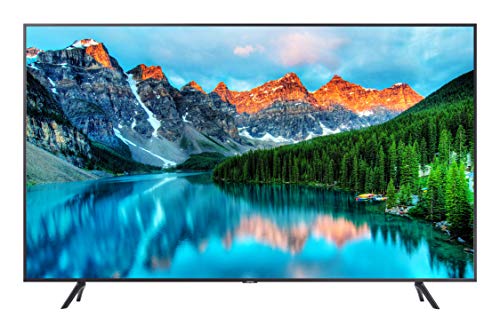
 SAMSUNG Business QE55T 55-inch 4K UHD 3840x2160 LED55-inch48.4 x 2.4 x 27.8 inches42 poundsCheck on Amazon
What's inside
- Commercial TV versus home TV: the differences that actually matter
- Choosing the right size for the space
- The business models in full
- Samsung Pro TV and Business TV models: reading the range
- The QE55T and the LG PK340S: signage-first alternatives
- Signage content that customers actually read
- Installation, power, and day-to-day management
- Which business TV should you choose?
- Menus and price-free promotional content
- Reception and waiting areas
- Retail promotions without clutter
- Offices and internal communication
- Hospitality and controlled viewing
- Check prices on Amazon
- Disclosure
As an Amazon Associate I earn from qualifying purchases. This post may contain affiliate links at no extra cost to you.
A television bought for a business is not simply a home television carried through a different door. A commercial TV or signage display is expected to run for long hours, show menus, promotions, timetables, or company information clearly under shop lighting, accept content from signage software rather than only from a remote control, and keep working under a warranty written for commercial use. Those differences decide whether a screen is a useful business tool or a false economy that needs replacing just as customers have learned to rely on it.
Our research for this guide is based on published product titles, manufacturer documentation themes, and the established distinctions between consumer and commercial display categories. We checked each model against the same business questions. Is it described as commercial or business equipment? Does it offer signage software or a content platform? What operating pattern is it built for, such as 16/7 use? Which connections does it list? And what warranty language, if any, is attached to it? Those questions matter more to a shop, office, or restaurant than the entertainment features that dominate home television marketing.
Business buyers who are still deciding between categories may also want to read best 10 non smart tvs, because some workplaces deliberately choose simpler screens for a single, fixed purpose and need to understand what they gain and give up by doing so.
Commercial TV versus home TV: the differences that actually matter
The first difference is duty cycle. A home television is designed around evening viewing, a few hours at a time, in a dimmer room. A commercial display may be switched on before the first customer arrives and switched off after the last one leaves, every day, including weekends. Models in this guide that state 16/7 operation are describing exactly that pattern: sixteen hours a day, seven days a week. Buying a screen rated for the pattern you actually run is basic asset management, not overspending.
The second difference is software. Business models in this list describe easy digital signage software, a Samsung Business TV App, Samsung VXT, or LG SuperSign CMS. These platforms exist so staff can schedule menus, promotions, opening hours, and notices without treating the screen like a home set with a USB stick improvised at the back. The third difference is control and security. Features such as Playlock, Hotel Mode, power management, and RS-232C control sound dull beside entertainment features, and that is precisely the point. In a public space, a screen should show what the business intends, resist casual interference, and be manageable by the people responsible for it.
Warranty is the fourth difference, and it is the one buyers notice only when something fails. A commercial warranty, such as the 3-year warranty listed for one model in this guide, reflects the environment the manufacturer expects the product to work in. A consumer warranty may treat commercial use very differently. Before buying any screen for a business, read the warranty terms for your region and keep the paperwork with your other equipment records, alongside the mount, the cables, and the name of whoever installed it.
Choosing the right size for the space
- Measure the wall and the viewing distance together. A menu board that cannot be read from the queue is decoration, not signage.
- For counters, reception desks, and small cafes, a 43-inch class screen is often the practical starting point in this list.
- For general shops, meeting rooms, and mid-size dining areas, the 50-inch and 55-inch models here cover the most common business cases.
- For large walls, open-plan offices, and longer viewing distances, the 65-inch models give text and schedules the scale they need.
- Check the mount, the wall structure, and cable routes before ordering, especially above doors, counters, or public walkways.
- Think about light. Windows, spotlights, and glossy surfaces change readability more than a small difference in specification does.
Size decisions should start with content, not with the wall alone. A screen showing a full menu with many lines of text needs either a larger panel or a simpler layout with fewer, bigger items. A screen showing a single promotion, a welcome message, or a timetable summary can work at a smaller size. Photographs and video tolerate distance better than small text does. If customers must read prices, ingredients, or appointment details, design the content at the size it will be shown and check it from the furthest real viewing position in the room, not from directly in front of the display.
The business models in full
Samsung 43-inch BEHX-H Business Pro TV 4K
Samsung 43-inch BEHX-H Business Pro TV 4K belongs in a business shortlist because its listing describes Playlock, the Samsung Business TV App, and Samsung VXT support as listed, in a size suited to counters, small dining rooms, and reception areas. That positioning separates it from a home television even before any detailed comparison begins. For a business buyer, the relevant question is not whether the screen can show entertainment content, because any modern 4K panel can do that. The question is whether it can show your content, on your schedule, for your opening hours, with the connections and control your staff or installer actually needs.
With the 43-inch BEHX-H model, start with deployment. Where will it be mounted, who will update the content, and how often will that content change? A daily menu, a weekly promotion cycle, and a fixed welcome screen are three different workflows, and the signage software matters more as the update frequency rises. Our research notes flag this as the most common planning gap in small business display purchases: the screen is chosen carefully, while the routine of updating it is left vague until the first morning it shows yesterday’s information.
Connections deserve the same practical attention. HDMI and USB, where listed, cover the common routes for media players, computers, and local content, while a built-in tuner, where listed, matters to businesses that also want broadcast content in a waiting area or staff space. Built-in speakers, where listed, are adequate for background audio and spoken content in many settings, though a busy restaurant or a large open space may still justify a separate audio plan. Judge these details against your room rather than against an abstract ideal.
Finally, consider the total installation rather than the panel alone. A commercial screen needs a suitable mount, safe cable management, a power point in the right place, and a plan for cleaning and access. It may also need scheduling so it is not left running overnight without purpose, both for energy use and for panel life. the 43-inch BEHX-H model should be assessed as part of that whole installation, because a well-installed mid-range screen will serve a business better than a larger screen fitted hurriedly in the wrong position.
Samsung 55-Inch BE55T-H Pro TV, Commercial, 4K
Samsung 55-Inch BE55T-H Pro TV, Commercial, 4K belongs in a business shortlist because its listing describes easy digital signage software, HDMI, USB, a tuner, and built-in speakers, with 250 nits listed in its title. That positioning separates it from a home television even before any detailed comparison begins. For a business buyer, the relevant question is not whether the screen can show entertainment content, because any modern 4K panel can do that. The question is whether it can show your content, on your schedule, for your opening hours, with the connections and control your staff or installer actually needs.
With the 55-inch BE55T-H, start with deployment. Where will it be mounted, who will update the content, and how often will that content change? A daily menu, a weekly promotion cycle, and a fixed welcome screen are three different workflows, and the signage software matters more as the update frequency rises. Our research notes flag this as the most common planning gap in small business display purchases: the screen is chosen carefully, while the routine of updating it is left vague until the first morning it shows yesterday’s information.
Connections deserve the same practical attention. HDMI and USB, where listed, cover the common routes for media players, computers, and local content, while a built-in tuner, where listed, matters to businesses that also want broadcast content in a waiting area or staff space. Built-in speakers, where listed, are adequate for background audio and spoken content in many settings, though a busy restaurant or a large open space may still justify a separate audio plan. Judge these details against your room rather than against an abstract ideal.
Finally, consider the total installation rather than the panel alone. A commercial screen needs a suitable mount, safe cable management, a power point in the right place, and a plan for cleaning and access. It may also need scheduling so it is not left running overnight without purpose, both for energy use and for panel life. the 55-inch BE55T-H should be assessed as part of that whole installation, because a well-installed mid-range screen will serve a business better than a larger screen fitted hurriedly in the wrong position.
Samsung 65-Inch BE65T-H Pro TV, Commercial, 4K
Samsung 65-Inch BE65T-H Pro TV, Commercial, 4K belongs in a business shortlist because its listing describes the same Pro TV signage approach at a larger scale for bigger walls, longer viewing distances, and menu boards that must be read at a glance. That positioning separates it from a home television even before any detailed comparison begins. For a business buyer, the relevant question is not whether the screen can show entertainment content, because any modern 4K panel can do that. The question is whether it can show your content, on your schedule, for your opening hours, with the connections and control your staff or installer actually needs.
With the 65-inch BE65T-H, start with deployment. Where will it be mounted, who will update the content, and how often will that content change? A daily menu, a weekly promotion cycle, and a fixed welcome screen are three different workflows, and the signage software matters more as the update frequency rises. Our research notes flag this as the most common planning gap in small business display purchases: the screen is chosen carefully, while the routine of updating it is left vague until the first morning it shows yesterday’s information.
Connections deserve the same practical attention. HDMI and USB, where listed, cover the common routes for media players, computers, and local content, while a built-in tuner, where listed, matters to businesses that also want broadcast content in a waiting area or staff space. Built-in speakers, where listed, are adequate for background audio and spoken content in many settings, though a busy restaurant or a large open space may still justify a separate audio plan. Judge these details against your room rather than against an abstract ideal.
Finally, consider the total installation rather than the panel alone. A commercial screen needs a suitable mount, safe cable management, a power point in the right place, and a plan for cleaning and access. It may also need scheduling so it is not left running overnight without purpose, both for energy use and for panel life. the 65-inch BE65T-H should be assessed as part of that whole installation, because a well-installed mid-range screen will serve a business better than a larger screen fitted hurriedly in the wrong position.
Samsung 43-Inch BE43T-H Pro TV, Commercial, 4K
Samsung 43-Inch BE43T-H Pro TV, Commercial, 4K belongs in a business shortlist because its listing describes a compact commercial format with easy digital signage software, HDMI, USB, tuner, and speakers for smaller business spaces. That positioning separates it from a home television even before any detailed comparison begins. For a business buyer, the relevant question is not whether the screen can show entertainment content, because any modern 4K panel can do that. The question is whether it can show your content, on your schedule, for your opening hours, with the connections and control your staff or installer actually needs.
With the 43-inch BE43T-H, start with deployment. Where will it be mounted, who will update the content, and how often will that content change? A daily menu, a weekly promotion cycle, and a fixed welcome screen are three different workflows, and the signage software matters more as the update frequency rises. Our research notes flag this as the most common planning gap in small business display purchases: the screen is chosen carefully, while the routine of updating it is left vague until the first morning it shows yesterday’s information.
Connections deserve the same practical attention. HDMI and USB, where listed, cover the common routes for media players, computers, and local content, while a built-in tuner, where listed, matters to businesses that also want broadcast content in a waiting area or staff space. Built-in speakers, where listed, are adequate for background audio and spoken content in many settings, though a busy restaurant or a large open space may still justify a separate audio plan. Judge these details against your room rather than against an abstract ideal.
Finally, consider the total installation rather than the panel alone. A commercial screen needs a suitable mount, safe cable management, a power point in the right place, and a plan for cleaning and access. It may also need scheduling so it is not left running overnight without purpose, both for energy use and for panel life. the 43-inch BE43T-H should be assessed as part of that whole installation, because a well-installed mid-range screen will serve a business better than a larger screen fitted hurriedly in the wrong position.
SAMSUNG Business QE55T 55-inch 4K UHD LED Commercial Signage Display
SAMSUNG Business QE55T 55-inch 4K UHD LED Commercial Signage Display belongs in a business shortlist because its listing describes 16/7 operation, a 3-year warranty, and 300 nit brightness as listed, which mark it out as a signage display rather than a conventional television. That positioning separates it from a home television even before any detailed comparison begins. For a business buyer, the relevant question is not whether the screen can show entertainment content, because any modern 4K panel can do that. The question is whether it can show your content, on your schedule, for your opening hours, with the connections and control your staff or installer actually needs.
With the QE55T signage display, start with deployment. Where will it be mounted, who will update the content, and how often will that content change? A daily menu, a weekly promotion cycle, and a fixed welcome screen are three different workflows, and the signage software matters more as the update frequency rises. Our research notes flag this as the most common planning gap in small business display purchases: the screen is chosen carefully, while the routine of updating it is left vague until the first morning it shows yesterday’s information.
Connections deserve the same practical attention. HDMI and USB, where listed, cover the common routes for media players, computers, and local content, while a built-in tuner, where listed, matters to businesses that also want broadcast content in a waiting area or staff space. Built-in speakers, where listed, are adequate for background audio and spoken content in many settings, though a busy restaurant or a large open space may still justify a separate audio plan. Judge these details against your room rather than against an abstract ideal.
Finally, consider the total installation rather than the panel alone. A commercial screen needs a suitable mount, safe cable management, a power point in the right place, and a plan for cleaning and access. It may also need scheduling so it is not left running overnight without purpose, both for energy use and for panel life. the QE55T signage display should be assessed as part of that whole installation, because a well-installed mid-range screen will serve a business better than a larger screen fitted hurriedly in the wrong position.
Samsung 50-Inch BE50T-H Pro TV, Commercial, 4K
Samsung 50-Inch BE50T-H Pro TV, Commercial, 4K belongs in a business shortlist because its listing describes a middle size in the Pro TV range with easy digital signage software, HDMI, USB, TV tuner, and speakers for general business use. That positioning separates it from a home television even before any detailed comparison begins. For a business buyer, the relevant question is not whether the screen can show entertainment content, because any modern 4K panel can do that. The question is whether it can show your content, on your schedule, for your opening hours, with the connections and control your staff or installer actually needs.
With the 50-inch BE50T-H, start with deployment. Where will it be mounted, who will update the content, and how often will that content change? A daily menu, a weekly promotion cycle, and a fixed welcome screen are three different workflows, and the signage software matters more as the update frequency rises. Our research notes flag this as the most common planning gap in small business display purchases: the screen is chosen carefully, while the routine of updating it is left vague until the first morning it shows yesterday’s information.
Connections deserve the same practical attention. HDMI and USB, where listed, cover the common routes for media players, computers, and local content, while a built-in tuner, where listed, matters to businesses that also want broadcast content in a waiting area or staff space. Built-in speakers, where listed, are adequate for background audio and spoken content in many settings, though a busy restaurant or a large open space may still justify a separate audio plan. Judge these details against your room rather than against an abstract ideal.
Finally, consider the total installation rather than the panel alone. A commercial screen needs a suitable mount, safe cable management, a power point in the right place, and a plan for cleaning and access. It may also need scheduling so it is not left running overnight without purpose, both for energy use and for panel life. the 50-inch BE50T-H should be assessed as part of that whole installation, because a well-installed mid-range screen will serve a business better than a larger screen fitted hurriedly in the wrong position.
Samsung 55-inch BEHX-H Business Pro TV 4K
Samsung 55-inch BEHX-H Business Pro TV 4K belongs in a business shortlist because its listing describes Playlock and commercial content features as listed, in a mid-large size that suits many shops, cafes, and office shared spaces. That positioning separates it from a home television even before any detailed comparison begins. For a business buyer, the relevant question is not whether the screen can show entertainment content, because any modern 4K panel can do that. The question is whether it can show your content, on your schedule, for your opening hours, with the connections and control your staff or installer actually needs.
With the 55-inch BEHX-H model, start with deployment. Where will it be mounted, who will update the content, and how often will that content change? A daily menu, a weekly promotion cycle, and a fixed welcome screen are three different workflows, and the signage software matters more as the update frequency rises. Our research notes flag this as the most common planning gap in small business display purchases: the screen is chosen carefully, while the routine of updating it is left vague until the first morning it shows yesterday’s information.
Connections deserve the same practical attention. HDMI and USB, where listed, cover the common routes for media players, computers, and local content, while a built-in tuner, where listed, matters to businesses that also want broadcast content in a waiting area or staff space. Built-in speakers, where listed, are adequate for background audio and spoken content in many settings, though a busy restaurant or a large open space may still justify a separate audio plan. Judge these details against your room rather than against an abstract ideal.
Finally, consider the total installation rather than the panel alone. A commercial screen needs a suitable mount, safe cable management, a power point in the right place, and a plan for cleaning and access. It may also need scheduling so it is not left running overnight without purpose, both for energy use and for panel life. the 55-inch BEHX-H model should be assessed as part of that whole installation, because a well-installed mid-range screen will serve a business better than a larger screen fitted hurriedly in the wrong position.
LG 65-inch PK340S Series 4K UHD Commercial Signage TV
LG 65-inch PK340S Series 4K UHD Commercial Signage TV belongs in a business shortlist because its listing describes an IPS LCD display with webOS, HDR10 Pro, SuperSign CMS, Hotel Mode, power management, HDMI, and RS-232C control as listed. That positioning separates it from a home television even before any detailed comparison begins. For a business buyer, the relevant question is not whether the screen can show entertainment content, because any modern 4K panel can do that. The question is whether it can show your content, on your schedule, for your opening hours, with the connections and control your staff or installer actually needs.
With the LG PK340S, start with deployment. Where will it be mounted, who will update the content, and how often will that content change? A daily menu, a weekly promotion cycle, and a fixed welcome screen are three different workflows, and the signage software matters more as the update frequency rises. Our research notes flag this as the most common planning gap in small business display purchases: the screen is chosen carefully, while the routine of updating it is left vague until the first morning it shows yesterday’s information.
Connections deserve the same practical attention. HDMI and USB, where listed, cover the common routes for media players, computers, and local content, while a built-in tuner, where listed, matters to businesses that also want broadcast content in a waiting area or staff space. Built-in speakers, where listed, are adequate for background audio and spoken content in many settings, though a busy restaurant or a large open space may still justify a separate audio plan. Judge these details against your room rather than against an abstract ideal.
Finally, consider the total installation rather than the panel alone. A commercial screen needs a suitable mount, safe cable management, a power point in the right place, and a plan for cleaning and access. It may also need scheduling so it is not left running overnight without purpose, both for energy use and for panel life. the LG PK340S should be assessed as part of that whole installation, because a well-installed mid-range screen will serve a business better than a larger screen fitted hurriedly in the wrong position.
Samsung Pro TV and Business TV models: reading the range
Most of this shortlist is Samsung equipment, in two broad families as described by their titles. The BE55T-H, BE65T-H, BE43T-H, and BE50T-H models present themselves as Pro TV products with easy digital signage software, 4K resolution, HDMI, USB, tuner, and speakers, with 250 nits listed. The BEHX-H models present a Business Pro TV description with Playlock, commercial content positioning, the Samsung Business TV App, and Samsung VXT on the 43-inch listing. Read those descriptions as workflow statements. They tell you how the manufacturer expects content to reach the screen and how the screen is expected to be managed.
Within the Pro TV family, size is the main decision. The 43-inch model suits compact spaces, the 50-inch model is the generalist, and the 55-inch and 65-inch models serve larger walls and longer distances. There is no honour in buying the largest panel the wall can physically hold if the content would read better on a slightly smaller screen mounted at a better height, and there is no saving in buying a smaller panel that forces staff to shrink menu text until customers stop reading it. Match the size to the content and the distance, in that order.
Offices comparing screens for meeting rooms and shared spaces may also find best 1080p smart tvs useful background, because it clarifies what consumer smart platforms offer and, by contrast, what a commercial signage platform is designed to do differently.
The QE55T and the LG PK340S: signage-first alternatives
The Samsung QE55T is described directly as a commercial signage display, with 4K UHD, HDMI, USB, speakers, a 3-year warranty, 16/7 operation, and 300 nit brightness in its title. That combination is the clearest statement in this guide of signage-first design. If your screen will run all day, every day, showing scheduled content in a lit commercial space, those are the attributes to weigh first, ahead of entertainment features that a public display may never use. The warranty and operating pattern belong in the same conversation as the purchase price in any internal proposal, even though this guide does not quote prices.
The LG PK340S offers a different ecosystem. Its listing describes a 65-inch 4K UHD commercial signage TV with an IPS LCD display, webOS, HDR10 Pro, SuperSign CMS, Hotel Mode, power management, HDMI, and RS-232C. For a business already using LG signage tools, or for a hospitality setting where Hotel Mode is directly relevant, that platform difference can matter more than panel size alone. RS-232C control also signals an installation mindset, where displays are integrated into a managed system rather than operated one remote at a time.
Large-format ambitions should still be grounded in the room. Readers curious about the extreme end of screen sizes can browse best 100 inch tvs for context, but most shops, offices, and restaurants will be better served by a correctly sized commercial model, correctly mounted, than by chasing the biggest possible panel.
Signage content that customers actually read
- Keep one main message per screen wherever possible, and let secondary information support it rather than compete with it.
- Use large, high-contrast text for anything customers must read while standing, queuing, or walking past.
- Schedule content by daypart: breakfast and lunch menus, opening and closing messages, and weekday and weekend promotions rarely belong on the same loop all day.
- Review the loop length. A customer who waits ninety seconds should see the important content without standing through a long rotation.
- Check the screen from customer positions at different times of day, because daylight through a window can change readability completely.
- Assign one named person to own content updates, with a simple checklist, so screens never drift into showing expired offers.
Good signage is an operational habit, not a one-off design project. The businesses that get value from commercial screens are usually the ones that treat content like they treat a window display or a printed noticeboard: reviewed regularly, changed when offers change, and cleaned up when information expires. The software platforms named in this guide exist to make that habit easier, with scheduling and remote or app-based management reducing the need to visit each screen with a cable and a laptop. Build the habit into a weekly routine and the screen earns its wall space.
There is also a secondary use worth planning for. Many business screens double as presentation displays in offices, training spaces, or function rooms, and some buyers compare them with monitor-style setups. Our guide to best 1080p tvs as pc monitor covers that crossover from the computer side, which can help an office decide whether a given room needs a signage display, a presentation screen, or one device that must honestly do both jobs.
Installation, power, and day-to-day management
Plan the installation as a small project. Confirm the wall can carry the mount and screen, route cables so they cannot be pulled or tripped over, keep vents unobstructed, and make sure the screen can be reached safely for cleaning. In food businesses, think about heat, steam, and cleaning routines. In retail, think about security and about sightlines from the till. In offices, think about glare on the panel during video calls and about who controls the screen when a meeting room is booked by different teams across the day.
Power management is part of ownership. Use scheduling features where available so screens switch off outside business hours, both to save energy and to rest the panel. Keep a simple asset record for each screen: model, serial details from your paperwork, install date, mount type, and warranty end date. When a fault occurs, that record turns a stressful morning into a straightforward support conversation. It also helps at replacement time, because you will know exactly what was installed, where, and how long it served.
Which business TV should you choose?
Choose a 43-inch model from this list if the screen serves a counter, a reception point, or a small dining room and the content is simple and close to the viewer. Choose a 50-inch or 55-inch Pro TV or Business Pro TV model if you need the general-purpose business format for a shop floor, cafe, or office shared space. Choose a 65-inch model if the wall, the room, and the viewing distance genuinely call for it, particularly for menu boards and schedules that must be read from across a room.
Choose the QE55T if its signage-display positioning, 16/7 operation, and listed warranty match a demanding daily schedule. Choose the LG PK340S if the SuperSign CMS platform, Hotel Mode, power management, or RS-232C control fits an existing LG or hospitality installation. In every case, buy the commercial product for the commercial job. That principle, more than any single feature, is what separates a screen that serves a business for years from a home television that was asked to do work it was never described as doing.
Menus and price-free promotional content
Restaurants and cafes often make the best use of commercial screens because their content changes naturally through the day. Breakfast items give way to lunch, lunch gives way to evening service, and a scheduled signage platform can follow that rhythm without staff touching the screen between services. Keep the design calm, keep the text large, and resist filling every corner. White space helps reading speed, and reading speed is what a queue rewards.
Reception and waiting areas
In a reception or waiting area, a business screen has a quieter job. It can welcome visitors, explain check-in steps, show opening hours, share company news, and set expectations about waiting times. The tone should match the room: informative, unhurried, and easy to glance at. Built-in speakers, where listed, may be unnecessary here or used only at low level, and a screen that can be scheduled to sleep outside opening hours fits the space better than one left glowing overnight.
Retail promotions without clutter
Retail screens work best when they support a small number of clear offers or stories rather than reproducing the entire shop on a wall. A new range, a seasonal display, a service the shop offers, or directions to another department all make good screen content. Rotate a short loop, align it with the physical display nearby, and change it when the shop changes. A screen showing last month’s promotion quietly teaches customers to ignore it.
Offices and internal communication
Office screens are noticeboards that can change. Meeting room availability, visitor information, company announcements, safety reminders, and training schedules all suit a commercial display in a shared space. The management question is ownership: someone in facilities, operations, or communications should own the content calendar, or the screen will slowly fill with whoever uploaded something most recently. A named owner and a monthly review keep an office screen useful.
Hospitality and controlled viewing
Hospitality settings add control to the list of needs. Guests should see the intended channel or information, settings should not drift, and staff should be able to restore a known state quickly. That is the context in which features such as Hotel Mode and content locking belong. They are not restrictions for their own sake. They are how a business keeps dozens of screens behaving identically without sending a member of staff to each room with a remote.
Check prices on Amazon
Live listings for the shortlist in this guide are pulled from Amazon below, so prices and availability are always current at the moment you look.


Disclosure
This guide is based on published manufacturer documents, listed product specifications, and established distinctions between commercial and consumer display categories, rather than on any claim of personal product trials. Business features, software availability, and warranty terms can vary by region and can change, so confirm the current listing and documentation before purchasing. As an Amazon Associate we earn from qualifying purchases.
FAQ
Which business TV should you choose?
Related guides
- Best 13 Inch Business Laptops: The Honest 13–14 Inch Ultraportable Shortlist
- Best 15 Inch Lightweight Workstation Laptops
- Best 5 Windows 10 Business Laptops: Professional Machines From the Windows 10 Era, Judged for Buyers Who Still Run It
- Best 32GB RAM Laptops Non Gaming: New Business Picks and an Honest Renewed Guide