What's inside
- Key Takeaways
- Quick Picks
- How did we judge “affordable” for a cellular deer camera?
- Where does a cellular deer camera actually earn its money?
- How do the six compare for a season of scouting?
- How should you place a deer camera so the photographs mean something?
- What mistakes do first-season cellular users make?
- Which settings actually matter on a trail camera?
- How do you read a season of photographs like a scout?
- How do you protect a camera that lives alone in the woods?
- What changes in winter?
- What about turkeys, hogs and everything else that walks past?
- How do you choose between the three brands’ ecosystems?
- What does a sensible deployment on a typical lease look like?
- How does the photograph actually get from the tree to your phone?
- Is cellular scouting fair chase? The honest debate
- What should you do in the first week after hanging a cellular camera?
- A short word on memory cards, the cheapest insurance in the fleet
- Final Recommendation
- Frequently Asked Questions
- Related Guides
As an Amazon Associate I earn from qualifying purchases. This post may contain affiliate links at no extra cost to you.
gizmoverdict.com is reader-supported. When you buy through links on our site, we may earn an affiliate commission.
Where to buy: the six cameras below are sold on Amazon under the names shown; because most are twin packs or seasonal bundles, check the listing in front of you for exactly how many cameras, and which batteries or cards, the box contains.
The best affordable deer cameras used to ask a weekly favour: walk to the tree, swap the memory card, walk home, and discover at the kitchen table what the woods had been doing. Cellular trail cameras ended that ritual. The six picks in this guide — from Moultrie, SPYPOINT and Tactacam — photograph deer, hogs, turkeys and the occasional trespasser, then send the evidence to your phone over the mobile network, so the first time you visit the camera in weeks can be to change its batteries. Every pick here is cellular, five of the six listings are twin packs, and “affordable” is doing real work in the title: these are the cameras that put remote scouting within reach of a hunter running two or three properties, not a ranch with an IT department.
Two honest warnings frame everything that follows. First, a cellular camera is a camera plus a phone contract in miniature: each camera needs its own data plan from its own manufacturer, bought per camera, and this guide deliberately quotes no plan prices because they change and are chosen at activation — budget for a modest monthly cost per camera as surely as you budget for batteries. Second, cellular only works where the network does. A camera in a dead valley will store photographs faithfully and send them when it can, but the live-scouting magic depends on signal at the tree, which is why the multi-network cameras below — the ones that choose between carriers automatically — hold such an advantage in real hunting country.
With those terms set, the field divides cleanly. Moultrie’s Edge series leads on app experience and picture quality, with the Edge 3 as the mainstream pick, the Edge 2 as its value sibling and the solar Edge 4 as the fit-and-forget option. SPYPOINT’s Flex cameras compete on network flexibility and a free tier of transmitted photos. Tactacam’s REVEAL X 3.0 brings the strongest photo specification and a fiercely loyal user base. All six will pattern a buck for you; they differ in how much they cost to run, how hard they work to find signal, and how long they can be left alone.
A note on how to read the prices you will meet while shopping: because plans, battery appetites and pack sizes move the real cost so much, this guide ranks by first-year value rather than by the number on any single listing, and it names each camera’s ongoing obligations in its own review. If a rival list ranks these same cameras in a wildly different order, the difference is almost always there — in what the ranking chose to count.
Key Takeaways
- Every camera here is cellular: photos arrive on your phone, and every camera needs its own manufacturer data plan — one plan per camera, chosen at activation.
- Twin packs dominate this list because deer country is big; two cameras watching two funnels teach you more than one camera anywhere.
- The Moultrie Edge 3 is the mainstream benchmark: 40MP photos, a half-second trigger and the most polished app experience here.
- SPYPOINT’s Flex-M includes a free monthly allotment of transmitted photos, the gentlest possible introduction to cellular running costs.
- Multi-network cameras (SPYPOINT Flex line, Tactacam REVEAL) pick the strongest carrier at the tree automatically — a decisive edge in weak-signal country.
- The solar Moultrie Edge 4 is for the camera you cannot visit: an integrated panel and removable lithium pack stretch service intervals to seasons.
Quick Picks
| Pick | Badge | Why it earns its place |
|---|---|---|
| Moultrie Edge 3 Cellular Trail Camera 2-Pack | Best overall | 40MP images, a 0.5-second trigger and Moultrie’s mature app, in a pair ready to watch two properties at once. |
| SPYPOINT Flex-M Twin | Best starter cellular | Automatic multi-network connection and a free photo plan tier make it the lowest-friction way into cellular scouting. |
| Moultrie Edge 2 Cellular 2-Pack | Best Moultrie value | The Edge formula at a friendlier price: 36MP photos and low-glow flash for pressured deer that notice lesser cameras. |
| Tactacam REVEAL X 3.0 | Best photo quality | 4K-class photo capture, 1080p video and multi-carrier auto-connect, backed by a famously responsive app. |
| SPYPOINT Flex G-36 Twin Pack | Best network flexibility | Dual-SIM LTE that hunts for the strongest signal, 36MP photos and 1080p video with sound, in a ready pair. |
| Moultrie Edge 4 Solar Cellular | Best leave-alone camera | An integrated solar panel and removable lithium battery built for the far stand you visit twice a season. |
How did we judge “affordable” for a cellular deer camera?
Not by the box price alone — that is the trap this category sets. A cellular camera’s true cost is the box plus a plan per camera per month plus batteries across a season, and a cheap camera with hungry power draw and an expensive plan can outspend a dearer camera within a year. So affordability here means the whole first year: twin packs scored well because two cameras in one box cut the per-camera hardware cost immediately, cameras with miserly power draw scored well because batteries are a subscription you pay in AA cells, and SPYPOINT’s free photo tier scored well because a camera that transmits its first hundred photos a month free can scout a low-traffic spot for nothing beyond its purchase.
Scouting value came next. Trigger speed decides whether the photograph shows a buck or the empty trail behind him — the Edge 3’s half-second trigger is the benchmark the others are measured against — and detection range decides how wide a funnel one camera can honestly cover. Photo resolution matters less than newcomers think, because transmitted images are compressed versions of what the card holds; the full-resolution original waits on the camera’s card for your next visit, and it is that original, up to 40MP on the Moultries, that you will crop when a buck stands at the far edge of a food plot.
Finally, the app is half the product. A cellular camera is a promise that information will come to you, organised — by camera, by time, ideally sorted by species — and the maturity of Moultrie’s and Tactacam’s apps, with activity charts and buck-tracking features, weighed as heavily as any hardware line. A camera that sends you chaos is a chore wearing a clever disguise.
Where does a cellular deer camera actually earn its money?
On the calendar, not the wall of fame. The photographs everyone shares are the October giants, but the photographs that change seasons are the boring ones: the doe group that started using the creek crossing at first light in August, the bachelor group that abandoned the mineral site the week the acorns dropped, the trespasser’s quad bike that explains why the north stand went quiet. A camera that reports daily, without a human visit to scent up the area, builds that pattern picture quietly — and pattern, not hope, is what stand placement is supposed to be.
It also earns its money in restraint. Every card-swap visit to a conventional camera leaves scent, noise and education for the deer; mature bucks in pressured country learn camera trees the way they learn stand trees. A cellular camera visited twice a season is nearly a rumour to the herd, and hunters who made the switch consistently describe the same surprise: the deer in the photographs are behaving like deer that do not know they are being watched, because mostly, they do not.
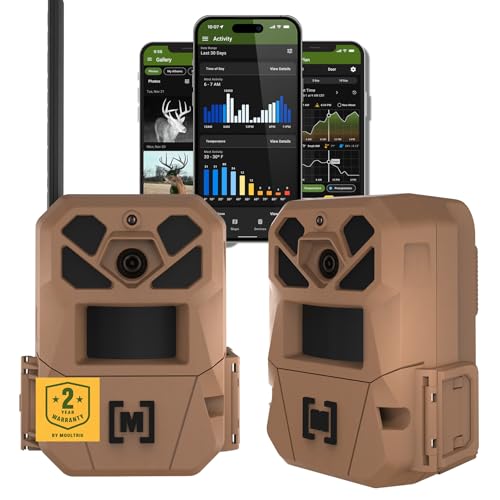
Moultrie Edge 3 Cellular Trail Camera 2-Pack — Best overall
The Edge 3 is where the mainstream of cellular scouting currently lives. Its headline numbers — 40MP photographs, a trigger that fires in about half a second, HD video delivered through the app — are competitive rather than exotic, and that is precisely the point: Moultrie spent the budget on the parts of ownership you touch daily. Setup is a QR code and a few minutes; the camera finds the network, the app finds the camera, and the first transmitted photograph typically arrives while you are still standing at the tree wondering whether it worked.
In the field, the Edge 3’s manners impress. Detection is keen without being hysterical — the squirrel-and-sunbeam false triggers that plague cheap cameras are filtered by a sensor and software combination that seems to understand it works in a forest. The app layers the useful intelligence on top: photos organised by camera, activity patterns by time of day, and the species-sorting features that turn a thousand images into a scouting report. As a twin pack it invites the deployment this guide keeps recommending — two funnels, two properties, one app, one pattern picture.
Costs to keep in view: each camera in the pair needs its own Moultrie plan, so the pair is two subscriptions, and the cameras’ appetites for batteries across a cold season should be budgeted like the consumables they are. Neither fact dents the recommendation. For the hunter buying a first cellular setup today, or standardising a small fleet on one app, the Edge 3 pair is the reference purchase the rest of this list is priced against.
- Format: cellular trail camera, twin pack
- Photos: up to 40MP
- Trigger speed: about 0.5 seconds
- Video: HD via app
- Plan: Moultrie plan per camera, chosen at activation
Strengths
- The most polished app and setup experience in this roundup.
- Fast trigger catches deer mid-crossing rather than departing.
- Twin pack covers two funnels from day one.
Trade-offs
- Two cameras means two plans to keep running.
- Battery appetite across winter needs budgeting.
- Full-resolution originals still live on the card at the tree.
Best for: most hunters building a first cellular setup across a couple of properties.
Not suited for: land with no usable mobile signal at any carrier — no plan fixes a dead valley.

SPYPOINT Flex-M Twin — Best starter cellular
SPYPOINT’s Flex-M attacks the two anxieties that stop hunters trying cellular at all: “what if it picks the wrong network?” and “what will it cost me to run?” The first answer is engineering — the Flex-M connects across multiple networks automatically, choosing the strongest available signal at the tree rather than marrying one carrier at purchase, which in fringe country is the difference between a camera that reports and a camera that stores. GPS in the camera reports its location to the app, a small feature that feels large the first time a camera is moved by weather, cattle or curiosity.
The second answer is the free photo plan: SPYPOINT transmits a monthly allotment of photos — a hundred — at no cost, forever, with paid tiers above it for busier cameras. On a quiet crossing or a mineral site, a hundred photographs a month can be the whole story, which makes the Flex-M the only camera here that can genuinely run at zero monthly cost in the right spot. On a feeder in October it will blow through the allotment by the second weekend, and the paid tiers exist for exactly that; the honest framing is that the free tier is a superb trial and a legitimate long-term answer for low-traffic placements.
As a twin pack with night vision and straightforward app delivery, the Flex-M pair is the gentlest on-ramp in this guide. Its photographs will not out-resolve the Edge 3’s, and heavy users will outgrow the free tier — but a hunter deciding whether cellular scouting suits their land could not ask for a cheaper experiment with a real answer at the end of it.
- Format: cellular trail camera, twin pack
- Network: automatic multi-network LTE
- Plan: free tier transmits 100 photos/month; paid tiers above
- Location: GPS reporting to app
- Night: infrared night vision
Strengths
- Free photo tier makes the running cost zero on quiet spots.
- Multi-network connection thrives in fringe signal.
- GPS location is quietly valuable on big properties.
Trade-offs
- Busy cameras outgrow the free allotment quickly.
- Photo resolution trails the Edge 3 and REVEAL.
- App polish sits a step behind Moultrie’s.
Best for: first-time cellular users and low-traffic crossings on signal-poor land.
Not suited for: a high-traffic feeder site, where its free tier lasts days, not months.

Moultrie Edge 2 Cellular 2-Pack — Best Moultrie value
The Edge 2 is the Edge 3’s formula with the volume turned down one notch, and for pressured deer that notch can be the point. Its flash is low-glow — infrared emitters that produce a faint red shimmer rather than the invisible blackout of no-glow or the obvious blink of older cameras — and low-glow is the field-proven compromise: nearly invisible to deer at working distances, stronger illumination than no-glow manages, at a price the no-glow models rarely match. On public land and small pressured parcels, where a mature buck educates quickly, that flash choice is a hunting decision, not a specification.
Photographs run to 36MP with HD video through the same Moultrie app ecosystem as its bigger sibling, so an Edge 2 pair and an Edge 3 pair coexist in one account without friction — a fleet strategy many hunters adopt deliberately, Edge 3s on the primary properties, Edge 2s extending coverage to the secondary ones. Setup, network behaviour and plan structure mirror the flagship’s, which keeps the learning curve at zero for existing Moultrie owners.
What you give up against the Edge 3 is a little resolution, a little refinement, and nothing structural. What you gain is a lower entry price for the same app, the same plans and the same pattern-building workflow. In a category where the camera is the beginning of the spending rather than the end, that trade is not a compromise — it is often the smartest money in the list.
- Format: cellular trail camera, twin pack
- Photos: up to 36MP
- Flash: low-glow infrared
- Video: HD via app
- Plan: same Moultrie plan structure as the Edge 3
Strengths
- Low-glow flash suits educated, pressured deer.
- Shares the Edge 3’s app and plan ecosystem.
- Friendliest price into the Moultrie system.
Trade-offs
- A step behind the Edge 3 in resolution and refinement.
- Low-glow is faintly visible up close, unlike true no-glow.
- Same per-camera plan costs as the flagship.
Best for: pressured parcels and public land where deer notice careless cameras.
Not suited for: a single-camera buyer who wants Moultrie’s best and will not feel the saving.

Tactacam REVEAL X 3.0 — Best photo quality
Tactacam built its following the stubborn way: cameras that send photographs hunters actually want to look at, through an app that answers quickly, supported by people who seem to hunt. The REVEAL X 3.0 carries that reputation into its third generation with the strongest imaging claim in this six — photo capture in the 4K class alongside 1080p video — and multi-carrier auto-connect that shops the available networks for the strongest signal at setup, matching SPYPOINT’s flexibility trick for trick.
The REVEAL’s field personality is eagerness. Trigger and recovery are brisk, the camera is happy on feeders and scrapes where action repeats, and the app delivers with the immediacy that turns checking cameras into a morning ritual rather than a chore. Tactacam’s plan structure is its own — per camera, chosen at activation, like every rival here — and the company’s following suggests hunters find the exchange fair; few brands in this category inspire the “buy a second one” behaviour the REVEAL generates by its second season.
It is sold singly here rather than as a twin pack, which changes the maths for fleet buyers: two REVEALs cost what they cost, while the Moultrie and SPYPOINT pairs discount the second camera into the box. For the single best camera on your single best property — the scrape line you hunt hardest — that is no argument at all. Put the strongest imager where the season will be decided, and let value picks cover the speculative corners.
- Format: cellular trail camera, single
- Photos: 4K-class capture
- Video: 1080p
- Network: multi-carrier auto-connect
- Plan: Tactacam plan per camera, chosen at activation
Strengths
- Sharpest photo output in this roundup.
- Multi-carrier connection for weak-signal properties.
- App speed and support reputation owners swear by.
Trade-offs
- Sold singly — fleet maths favour the twin packs.
- Its own plan ecosystem, separate from Moultrie or SPYPOINT fleets.
- Premium per-camera price in an “affordable” list.
Best for: the primary stand or scrape line where image quality decides decisions.
Not suited for: equipping four properties at once on a strict budget.

SPYPOINT Flex G-36 Twin Pack — Best network flexibility
If the Flex-M is SPYPOINT’s handshake, the Flex G-36 is its firm grip. The G-36’s dual-SIM LTE radio hunts across carriers for the strongest signal and holds it with a persistence fringe-country hunters will appreciate — this is the camera for the lease at the end of the gravel road, where one carrier shows two bars on the ridge and none in the bottom, and the camera must live in the bottom. GPS tagging rides along, and the cameras record 36MP photographs plus 1080p video with sound, so a gobbling turkey or a grunting buck arrives with its audio attached.
Video with sound is a scouting input hunters underrate until they have it: the grunt-snort-wheeze you hear tells you about a buck the frame only shows standing still, and turkey audio settles arguments about roost locations that photographs argue about for weeks. As a twin pack, the G-36 pair extends that capability across two bottoms, two ridges, two properties — with SPYPOINT’s plan structure applying per camera above the free tier, as with its sibling.
Against the Edge 3 it trades a little app polish and headline resolution for network tenacity and audio. On strong-signal land that trade loses; on the marginal land where cellular cameras usually go to die, it wins outright. Know your signal map before you choose between them — the cameras have already told you which question matters.
- Format: cellular trail camera, twin pack
- Photos: up to 36MP
- Video: 1080p with sound
- Network: dual-SIM LTE, automatic carrier selection
- Location: GPS enabled
Strengths
- Dual-SIM persistence is the best weak-signal story here.
- Video with sound adds a real scouting dimension.
- Twin pack value with GPS on both cameras.
Trade-offs
- App experience trails Moultrie’s polish.
- Free tier is a starter, not a season’s supply, on busy sites.
- Audio tempts over-checking — a discipline problem, admittedly.
Best for: remote leases and fringe-signal properties where connection is the whole game.
Not suited for: strong-signal home ground, where its network talents go unrewarded.

Moultrie Edge 4 Solar Cellular — Best leave-alone camera
Every fleet has one camera that is a genuine expedition to service — across the river, up the far ridge, on the lease you reach twice a season — and that camera is where batteries go to be forgotten. The Edge 4 Solar is built for exactly that posting: an integrated solar panel keeps a removable lithium battery pack topped up, stretching the interval between human visits from weeks to seasons, while the camera itself carries the Edge line’s 40MP imaging and app integration, so the far camera reports with the same quality as the one behind the barn.
Solar on a trail camera is a placement discipline as much as a feature. The panel needs real sky — a canopy gap, a field edge, a south-facing clearing in the northern hemisphere — and a camera buried in deep timber will sip light too slowly to live on it, lithium pack or not. Mounted honestly, though, the Edge 4 changes the economics of remote scouting: no AA budget, no mid-season battery expedition, no dead camera discovered in the first week of the season it was meant to illuminate.
It is sold as a single camera at a flagship price, and it should be: this is a specialist tool for the one position your fleet cannot easily reach, not a fleet standard. Buy it for the far tree, put Edge 2s and 3s where your boots go anyway, and the whole system settles into a rhythm — the near cameras visited on rounds, the far camera simply reporting, month after month, like a correspondent who never asks for leave.
- Format: cellular trail camera with integrated solar
- Photos: up to 40MP
- Power: solar panel plus removable lithium battery pack
- App: Moultrie app, shared with Edge 2 and 3
- Plan: a Moultrie plan is required for this camera
Strengths
- Seasons-long autonomy on honestly sunny placements.
- Full Edge imaging quality on the remotest camera.
- Removable pack allows a manual rescue charge if ever needed.
Trade-offs
- Deep-canopy placements starve the panel.
- Flagship price for a single camera.
- Panel adds a visible signature at the tree.
Best for: the far stand, the remote lease, the camera across the river.
Not suited for: shaded timber interiors where the sun effectively never visits.
How do the six compare for a season of scouting?
| Camera | Pack | Photos | Network talent | Running-cost note |
|---|---|---|---|---|
| Moultrie Edge 3 | 2-pack | 40MP | Carrier per plan | Plan per camera |
| SPYPOINT Flex-M | 2-pack | Standard | Multi-network auto | 100 free photos/month tier |
| Moultrie Edge 2 | 2-pack | 36MP | Carrier per plan | Plan per camera |
| Tactacam REVEAL X 3.0 | Single | 4K-class | Multi-carrier auto | Plan per camera |
| SPYPOINT Flex G-36 | 2-pack | 36MP | Dual-SIM LTE | Free tier, then per camera |
| Moultrie Edge 4 Solar | Single | 40MP | Carrier per plan | Plan per camera; minimal battery cost |
Read the network column before the photo column. A 40MP camera that cannot transmit is a card-swap camera with extra steps, while a modest camera reporting nightly from a weak-signal bottom is worth a wall of megapixels — the season is built from what reaches your phone.
How should you place a deer camera so the photographs mean something?
Height and angle decide more than any setting. Mount the camera around chest to head height on the tree — roughly a metre to a metre and a half — angled slightly downward at the trail or crossing, so the sensor’s detection zone, which fans out below the camera, overlaps the ground where deer actually walk. The classic beginner error is mounting at head height aimed level, which photographs the heads of near deer and the backs of far ones while the sensor watches the empty air above the trail. A stick wedged behind the top of the camera to tilt it down is the oldest trick in this craft because it works.
Direction matters twice over. Face the camera north where you can — in the northern hemisphere a south-facing camera stares into the sun at midday, producing blown-out frames and false triggers from light and shadow play, while a north-facing one works in even light all day. And place it across movement, not along it: a camera looking down a trail photographs one deer’s face approaching and its departure after; a camera set at an angle across the trail catches the whole animal broadside, mid-stride, inside the detection zone for the longest possible moment — which is when trigger speed and burst settings earn their keep.
Clear the stage without redecorating it. Cut the one sapling that waves in front of the lens and the grass tuft the wind will animate all autumn, because each is a hundred false triggers and a card of nothing. Then stop. The hunters who scent-wash, glove up and linger to perfect the set are educating the very deer they came to observe; the cellular camera’s whole advantage is that this visit is nearly the last one the spot receives.
What mistakes do first-season cellular users make?
Checking the app like a slot machine is the gentle one — refreshing at midnight helps no deer pattern emerge, and the data reads better weekly than hourly. The expensive mistakes are structural. Deploying every camera on feeders and food plots teaches you what eats there and nothing about how deer travel, which is the knowledge that fills tags; funnels, crossings and scrape lines are where cameras belong, with one plot camera for inventory. Related is the single-camera fallacy: one camera’s silence gets read as an empty property when it usually means an unwatched one, which is the entire argument for the twin packs dominating this guide.
Signal naivety costs seasons. Owners activate a camera at the kitchen table, where signal is glorious, and mount it in a bottom where it is not — then blame the camera for a month of silence that was really a month of stored photographs waiting for a connection. Test at the tree, watch the first transmission land, and prefer the multi-network cameras in this list wherever the map looks doubtful. Finally, plan neglect: a camera whose plan lapses in October is a sculpture. Set the renewal, note the battery dates, and let the boring administration carry the exciting scouting.
Which settings actually matter on a trail camera?
Four settings decide whether a season’s photographs are evidence or noise. Burst mode — several frames per trigger — tops the list, because the first frame catches a deer entering and the third catches it broadside with its head up; single-shot mode is a false economy that fills a card with rumps. Photo-plus-video, offered across these brands, is worth its battery cost on scrapes and feeders, where ten seconds of movement reveals the limp, the broken tine or the second buck standing just outside the still frame.
Trigger interval — the pause the camera takes between events — is the setting that separates calm properties from chaotic ones. On a feeder, a longer interval stops one raccoon’s dinner from becoming four hundred transmissions and a dead plan allotment; on a trail crossing, the shortest interval you can afford catches the second and third deer in a travelling group, who are often the ones you are actually hunting. Match the interval to the site, not to a global habit.
Sensitivity is the third dial, and the honest advice is to run it one notch below your enthusiasm. High sensitivity in September’s falling leaves and shifting shadows manufactures false triggers that train you to ignore the app; medium sensitivity misses the occasional distant doe and keeps every notification worth opening. Finally, timestamp and moon-phase imprint — a small line of data on each photo — turns a folder of images into a dataset: correlate buck appearances with moon, wind and cold fronts across a season and you are no longer guessing about your own land, you are reading it.
How do you read a season of photographs like a scout?
The amateur reads photographs; the scout reads patterns, and the difference is a notebook or its digital equivalent. Log each target buck’s appearances with time, direction of travel and wind, because direction is the detail memory throws away and the one that decides stands: a buck photographed at a crossing at dawn travelling east is bedding west, and that single inference, repeated across three cameras, is a season plan. The apps from Moultrie and Tactacam automate pieces of this — activity charts by hour are pattern-reading with the arithmetic done for you — but the direction habit remains yours to keep.
Read the absences too. A camera that goes quiet the week a neighbouring property starts baiting, or when the acorns drop in the oak flat two ridges over, is reporting a food shift that relocates the herd; the correct response is moving a camera, not doubting the one that told you. And read the supporting cast: a sudden rise in coyote photographs at a fawning area, a trespasser’s dog working the creek on Sundays, the neighbour’s cattle through the broken fence — the fleet sees the whole ecology of the property, and the hunters who use all of it hunt noticeably better than the ones who only look for antlers.
By season’s end, the archive itself becomes the asset. Year-on-year photographs age-estimate the bucks you passed, prove which funnels produce in which month, and turn next August’s camera placement from ritual into evidence. That compounding value is the deepest argument for the cellular fleet over the card-swap camera it replaced: the photographs arrive organised, dated and backed up in the app, instead of living on a card in a coat pocket until spring.
How do you protect a camera that lives alone in the woods?
Theft and curiosity are line items in real trail-camera budgets. The defences are unglamorous and effective in combination: a steel lock box lag-bolted to the tree defeats the opportunist and the bear in one purchase, a cable lock through the camera’s housing slows the equipped thief, and mounting a second, cheaper camera watching the first — a trick as old as trail cameras — turns a theft into evidence with a transmitted photograph attached. The GPS in the SPYPOINT models adds a recovery thread if a camera walks anyway, and recording serial numbers at home converts a loss into an insurance or police conversation with facts in it.
Animals are the more persistent vandals. Bears treat cameras as interesting-smelling boxes and swat them into new alignments; a lock box or a mount high enough to need your climbing sticks to service doubles as bear policy. Ants colonise warm electronics in southern summers — a fact every Gulf-state hunter learns once — and a camera stored with batteries out and seals clean between seasons avoids the worst of it. None of this is a reason to keep cameras at home; it is the standard fieldcraft of a tool designed to live outdoors among creatures with opinions.
What changes in winter?
Cold rewrites the power budget. Alkaline AAs sag badly below freezing, lithium cells hold their voltage and are worth their premium from November onward, and the Edge 4’s solar-plus-lithium arrangement earns particular respect in open winter country where low sun still reaches a panel on a field edge. Transmission itself costs more power in weak signal — a camera straining to reach a distant tower works harder per photograph — so the fringe-signal camera that cruised through September may want fresh cells by Christmas; the app battery gauges exist to be believed in October rather than mourned in January.
Winter also improves the scouting. Snow records what cameras miss, food sources concentrate movement onto fewer funnels, and the post-season photographs — who survived, which yearlings are next year’s story — are arguably the most valuable of the year. The hunters who leave two cameras running through February own March’s shed-hunting map and next season’s head start, which is why this guide treats battery budgeting as a year-round system rather than a season’s errand.
What about turkeys, hogs and everything else that walks past?
The keyword says deer, but the cameras are democrats. Turkey hunters may be the format’s second-happiest users: a flock’s daily circuit is as patternable as any buck’s, roost areas reveal themselves in fly-down photographs across a week, and the Flex G-36’s video with sound settles which ridge the gobbling comes from before opening morning. For turkeys, mount lower than deer height and favour crossings and dusting areas over feeders where regulations allow them — the same placement grammar, tuned to a shorter, ground-bound bird.
Hogs change the engineering brief. A sounder destroys a feeder area nightly, rooting turns a camera’s clearing into a moonscape, and hogs themselves investigate cameras with their shoulders — mounts go higher, lock boxes stop being optional, and the cameras’ value shifts from patterning to alerting: the transmitted photograph of hogs arriving at a trap or a field is actionable that night, which no card-swap camera could ever offer. Landowners running these six as hog alarms describe them less as cameras than as a night watchman who works for batteries.
Predators, trespassers and the merely curious complete the cast. Coyote and bobcat photographs time-stamp the pressure your deer live under; a neighbour’s dog or a poacher’s lamp, caught and transmitted, has ended more than one boundary dispute without a confrontation. All of which reinforces the guide’s opening claim: the fleet is an information system for a piece of land, and deer are simply its most celebrated subject.
How do you choose between the three brands’ ecosystems?
Because plans, apps and accessories bind per brand, the ecosystem choice outlives any single camera. Moultrie offers the broadest ladder here — Edge 2, 3 and 4 sharing one app and plan family, from value pair to solar flagship — which suits a fleet that will grow in stages and mix price tiers. SPYPOINT’s identity is network flexibility plus the free tier: the brand for doubtful signal and gentle running costs, with the Flex pair covering most needs in two models. Tactacam is the specialist’s single: the strongest imager and a devoted support culture, bought deliberately rather than in bulk.
Mixing brands across one property is possible — the apps sit side by side on the same phone — but each additional ecosystem adds a plan relationship, a battery routine and an interface to remember in the dark at 5 a.m. Most hunters converge on one primary brand and, at most, one guest. Decide by your land’s signal map and your fleet’s likely size two seasons from now, not by this month’s camera alone, and the ecosystem will feel chosen rather than inherited.
What does a sensible deployment on a typical lease look like?
Picture a hundred acres of mixed timber, one food plot, a creek crossing, an oak flat and two neighbours of uncertain friendliness — the standard American lease. The fleet this guide would hang on it: an Edge 3 pair split between the creek crossing and the plot’s entry trail, because those two funnels will produce eighty percent of the season’s intelligence. An Edge 2 on the oak flat’s edge, low-glow and patient, waiting for the acorn drop to move the herd. A Flex G-36 in the bottom where signal is worst and the big bucks’ sanctuary is suspected, chosen purely for its dual-SIM stubbornness. And, if the budget stretches, the Edge 4 Solar on the far boundary — watching the neighbour’s side, the trespasser’s likely route, and the crossing you will hunt exactly once, on the right November morning.
Five cameras, three plans ecosystems avoided — two, in this build — and every acre’s story arriving on one phone. Scale the same logic down and a forty-acre parcel wants the Edge 3 pair and nothing else until the patterns justify a third; scale it up and the pairs multiply before the flagships do. That is the affordable philosophy of this entire list in one paragraph: coverage first, quality concentrated where decisions happen, autonomy where boots cannot go.
How does the photograph actually get from the tree to your phone?
Understanding the pipe explains the quirks. When the camera triggers, it saves the full-resolution file to its card first, then prepares a smaller transmission copy and sends it over the LTE network to the maker’s servers, which push it to your app. Each stage has a failure mode with a recognisable symptom: a camera that photographs but never sends is usually a signal or plan problem; a camera that sends hours late is often batching transmissions to save power, a setting worth finding before you conclude it is broken; a camera whose app shows a buck the card does not hold does not exist — the card is the original, the app is the copy, always.
Transmission settings are therefore battery settings. Sending each photograph immediately is thrilling in the first week and expensive in the fourth; most seasoned users settle into scheduled delivery — a few times a day — for their quiet cameras, keeping instant delivery only on the one or two cameras whose news is actionable tonight, the hog trap and the gate. The cameras in this guide all allow some version of that scheduling, and an hour spent setting it deliberately is the difference between a fleet that runs a season and a fleet that eats batteries like a hobby.
Is cellular scouting fair chase? The honest debate
Hunters argue this in good faith and this guide will not pretend otherwise. The concern: real-time knowledge of a specific animal’s location can cross from scouting into something closer to surveillance hunting, and some jurisdictions have responded with rules — a few restrict cellular camera use during season, or ban transmitting images for hunting advantage within set periods. The counter-view notes that cameras mostly teach patterns across weeks, not positions across minutes, and that the same technology reduces disturbance, wasted sits and wounded, unrecovered game by putting hunters in the right stand first time.
The practical duties for any owner are clear regardless of philosophy. Know your state or province’s current rules on cellular cameras before the season, not after a warden explains them; they change, and they vary. Use the technology for pattern and presence rather than real-time pursuit where your conscience or your regulations draw that line. A tool this useful survives by being used defensibly, and the community that loves these cameras is the community responsible for keeping them welcome.
What should you do in the first week after hanging a cellular camera?
Resist redecorating. The first week’s photographs calibrate everything: check that the detection zone covers the crossing rather than the sapling in front of it, that night images show animals at the distance you planned for, and that transmissions arrive on the schedule you set. Walk the camera’s view once — once — at a deer’s height if you can bear the indignity, and look at what the lens actually sees; the difference between the view from standing height and the view from the photograph is where most placement errors live.
Then leave. Check the app on your chosen rhythm, log the first week’s direction-of-travel notes while the habit is new, and let the camera begin its real work of being forgotten by everything in the woods except you. A cellular camera’s first week is the last week it should feel like a gadget; from the second week onward it is simply how the property reports itself, and the season’s education flows from treating it that way.
A short word on memory cards, the cheapest insurance in the fleet
Every camera here trusts its season to a memory card, and cards fail in proportion to how little they cost. Buy reputable cards sized generously — a season of 40MP originals plus video is not a small archive — format them in the camera they will serve, and retire any card that produces a single corrupted file, because corruption is a habit, not an accident. Keep one spare card in the truck per ecosystem you run; the day a camera reports a card error by app is the day that spare turns a scouting trip back into a scouting trip instead of a shopping trip. It is the least exciting paragraph in this guide and, across a fleet’s lifetime, very possibly the most valuable.
Final Recommendation
Build the fleet by property, not by catalogue. The Moultrie Edge 3 twin pack is the default starting point — the best balance of imaging, app and value for most hunters — with Edge 2 pairs extending coverage onto pressured ground where their low-glow flash earns its keep. Where signal is the question, SPYPOINT answers it: the Flex-M for a gentle, possibly free start, the Flex G-36 pair where weak coverage is a way of life. Put a Tactacam REVEAL X 3.0 on the one spot your season hinges on, and an Edge 4 Solar on the one spot your boots cannot reach. Run the plans without letting them lapse, place the cameras across movement and facing north, and then do the hardest part of modern scouting — leave them alone, and let the pattern come to you, one transmitted photograph at a time, until the woods have told you exactly where to be on the morning it matters.
Frequently Asked Questions
Do cellular trail cameras need a separate plan for each camera?
Yes. Every cellular camera here runs on its own manufacturer’s plan, bought per camera and chosen when you activate it — a twin pack is two cameras and therefore two plans. This guide quotes no plan prices because tiers and pricing change; check the maker’s current tiers before buying, and count the plans, not just the boxes, when you budget a fleet. Many owners pause or downgrade plans outside the season, which is worth checking in each maker’s terms before assuming a twelve-month commitment at full strength.
Will a cellular camera work where my phone barely does?
Sometimes — cameras sip data in small bursts and can succeed on signal too weak for comfortable browsing, and the multi-network models from SPYPOINT and Tactacam improve the odds by choosing the strongest carrier at the tree. In a genuinely dead spot, no camera transmits; it will store photos on its card like a conventional camera until it finds signal or you visit.
How long do the batteries last?
Expect weeks to a few months per set depending on temperature, photo volume and transmission frequency — a busy feeder in January is the hardest life, a quiet crossing in September the easiest. Lithium AA cells outlast alkaline in cold weather, and the Edge 4 Solar sidesteps the question on sunny placements by recharging its pack continuously.
Are the transmitted photos the full-resolution ones?
Generally no: the photo that reaches your phone is a compressed version sized for transmission, while the full-resolution original — up to 40MP on the Moultries — stays on the camera’s memory card. For patterning deer the transmitted image is plenty; when a particular buck deserves a closer look, that original is waiting at your next visit.
Is low-glow flash really invisible to deer?
Low-glow emitters produce a faint red glow that deer can theoretically see at close range but rarely react to at working distances; true no-glow is fully invisible but typically costs more and illuminates less. The Edge 2’s low-glow is the field-proven middle ground, and camera height plus distance from the trail matter more to a buck’s education than the last degree of flash invisibility.
Can I use these cameras for security as well as deer?
Plenty of owners do — a Flex or Edge watching a gate, a barn or a remote cabin entrance sends the same phone alerts for a vehicle or a person as for a buck, and GPS-equipped models report if the camera itself is moved. Just remember the plan and placement logic is identical, and check local rules about photographing beyond your own land. On mixed-use properties that dual duty often justifies the fleet’s cost to the whole household, not just to its hunter.
When is the best time to hang cameras for the season?
Earlier than feels necessary — midsummer for autumn seasons is the seasoned answer. Cameras hung in July photograph velvet bucks on summer patterns, but their real gift is baseline: by the time patterns shift with acorns, pressure and the rut, you know what normal looked like, and a shift you can see is a shift you can hunt. The leave-alone advantage of cellular only compounds with time in the tree, and a camera the herd has forgotten by September is worth two hung in a hurry in October.
Related Guides
For the rest of the camera shelf, see our guide to 4k home security camera systems, our roundup of outdoor security cameras in 4K and our picks for affordable 4k cameras.



[…] camera guidance lives in our roundups of the best 4k underwater cameras, the best 8k video cameras and the best 1080p action […]