Our Top Picks



What's inside
- What Dual-Socket Actually Means
- The Three Generations a Buyer Actually Meets
- Form Factors: E-ATX, SSI EEB, and Cases That Truly Fit
- Memory: The Rules That Decide Whether the Build Works
- PCIe Lanes and Slot Layout
- Storage: SATA, U.2, M.2, and SAS
- Networking: Gigabit, 10GbE, and Add-In Cards
- IPMI and BMC Remote Management
- Power Delivery: Dual EPS Connectors and PSU Sizing
- Workstation Boards Versus Pure Server Boards
- The Board Families Buyers Actually Find
- Buying Used: Inspection That Prevents Expensive Surprises
- Cooling on LGA3647: Narrow and Square ILM
- Everyday Ownership: Noise, Heat, and Power Bills
- Virtualisation Features: VT-d, IOMMU Groups, and Passthrough
- Choosing the Processor Pair: Cores Versus Frequency
- Memory Speed, Ranks, and Derating
- Firmware Settings Worth Changing Deliberately
- A Sensible Build and First-Start Order
- When a Dual Board Refuses to Start
- Check prices on Amazon
- An Honest Closing Framework: Who Still Benefits
As an Amazon Associate I earn from qualifying purchases. This post may contain affiliate links at no extra cost to you.
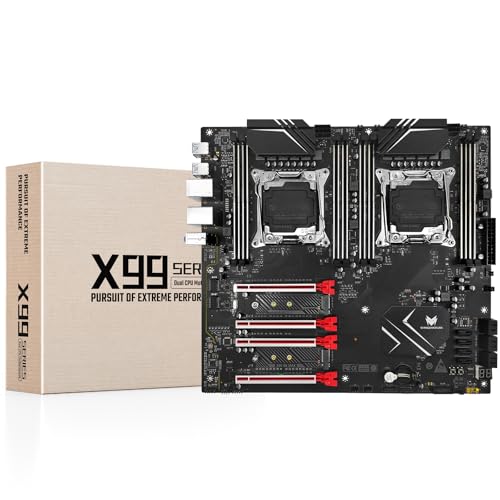
A dual Xeon motherboard is not a bigger version of a desktop board. It is a different kind of platform, built around two processors that share one system, divide the memory between them, and multiply everything a buyer has to plan for: power connectors, cooling hardware, case size, memory population, and even the order in which expansion cards should be installed. Shoppers who approach one with desktop habits usually make their expensive mistakes in the first week, and almost all of those mistakes were visible in the manual before the board was ordered.
A note on how this guide is funded: links on this page may earn us a commission from the retailer, which supports the work of maintaining guides like this one without influencing the platform warnings that follow. Several of the boards discussed here are older, sold mainly through secondary channels, and no commission arrangement changes the inspection advice in the later sections. Our research compared manufacturer spec sheets, board manuals, chipset documentation, and processor specification records across three generations of dual-socket hardware, and the figures below are drawn from that published documentation.
The reward for doing this properly is real. A well-matched dual-socket build offers core counts, memory capacity, and expansion lanes that a single-socket desktop of the same era cannot approach, which is why these boards remain popular for virtualisation hosts, rendering machines, and storage servers in home labs. The penalty for doing it carelessly is equally real: a board that will not fit the case, memory that only half appears, or a second processor that the firmware refuses to recognise. This guide works through the platform in the order a buyer should think about it.
What Dual-Socket Actually Means
Dual-socket means two physical processor packages installed on one motherboard, each in its own socket, each with its own memory slots and its own share of the expansion lanes. The two processors are linked by a high-speed interconnect, called QPI on the older generation and UPI on the newer ones, which lets each processor reach the other’s memory and devices. The board, the chipset, the firmware, and the operating system all have to agree that this arrangement exists, which is why a dual-socket board is a platform purchase rather than a component swap.
Both processors must normally be identical. They should match in model, stepping, and core count, because the firmware initialises them as a pair and mismatched parts are a classic cause of a board that boots with one processor and ignores or rejects the second. Buyers assembling a pair from separate used purchases should match the specification code printed on each heat spreader, not just the model name on a listing, since the same model name can cover more than one stepping across its production life.
NUMA, Explained Plainly
Because each processor owns its own memory, the system is not one uniform pool. It is two pools joined by a link, an arrangement called non-uniform memory access, or NUMA. A processor reaches its own memory quickly and reaches the other processor’s memory a little more slowly, across the interconnect. For many workloads that difference is invisible. For a large database, a set of virtual machines, or a rendering job that spreads threads across both processors, it becomes a real factor in how the work should be assigned.
Modern operating systems and hypervisors understand NUMA and will usually keep a program’s threads and its memory on the same processor without help. The buyer’s part is simpler: populate memory evenly for both processors so that neither side is starved, and understand that a program confined to one processor can only use the memory attached to that processor at full speed. A dual-socket machine with all of its memory installed beside one processor is, in practical terms, a single-socket machine carrying an expensive passenger.
NUMA also explains a result that puzzles many first-time owners. Adding a second processor does not double performance in software that runs a single thread or that cannot spread its work, and it can occasionally make a latency-sensitive task marginally slower if its memory lands on the far side. Dual-socket value appears in parallel work: many virtual machines, many rendering threads, many simultaneous jobs. Buyers whose main workload is a single application with a few threads should read the closing framework of this guide with particular care.
The Three Generations a Buyer Actually Meets
Dual LGA2011-3: Xeon E5-2600 v3 and v4 on C612
The oldest generation still widely traded pairs the LGA2011-3 socket with the C612 chipset and accepts Xeon E5-2600 v3 and v4 processors. These boards are plentiful, comparatively inexpensive as used hardware, and supported by a deep pool of documentation and community knowledge. Each processor offers four memory channels and forty PCIe lanes, and the platform uses DDR4 registered memory. For a home lab that values capacity and cost over raw speed, this generation remains the usual starting point, provided the buyer accepts its age and its power draw.
Two cautions belong to this generation specifically. First, v3 and v4 processors differ in the memory speeds they support and in core counts, and a board may need a firmware update before it recognises a v4 part, which creates a chicken-and-egg problem if no v3 processor is on hand. Second, some early boards were sold in versions with different memory slot counts and slot layouts, so two boards carrying similar names can populate memory differently. The manual for the exact board revision is the only reliable reference.
Dual LGA3647: Xeon Scalable First and Second Generation on C621
The LGA3647 platform moved to the Xeon Scalable family and the C621 chipset, raising memory channels per processor from four to six and PCIe lanes per processor from forty to forty-eight. The socket is physically much larger, the processor is mounted in a carrier frame, and the cooling hardware changed completely, all of which matters when buying parts separately. Processors from the first and second Scalable generations share this socket, and second-generation parts generally brought higher core counts and faster supported memory.
Scalable processors are also segmented in ways the E5 line was not. Different tiers support different maximum memory capacities, different numbers of interconnect links, and different multi-socket configurations. A processor tier intended for single- and dual-socket use is what a dual board needs; parts limited to one socket will not form a pair. Check the processor’s own specification record for its supported scalability and its memory capacity ceiling before assuming any two matching chips will cooperate on a dual board.
Dual LGA4189: Third-Generation Xeon Scalable
LGA4189 carries third-generation Xeon Scalable processors and raises memory channels per processor to eight, with faster DDR4 support and, on many processors, PCIe generation four lanes. Boards for this platform are newer, less common on the used market, and closer in behaviour to current server hardware, including their firmware interfaces and fan control expectations. For buyers who want a dual-socket system with the longest useful life and the best efficiency of the three generations, this is the platform to price first, while recognising that processors and boards both command stronger money than the older lines.
Compatibility discipline matters most here because the socket name alone does not guarantee support. Board manuals list supported processor series explicitly, and some boards distinguish between processor generations that share the platform family. A buyer should confirm the exact processor model against the board’s supported list and confirm the installed firmware version supports it, rather than relying on the socket number printed in a marketplace title.
- LGA2011-3 with C612: four memory channels and forty lanes per processor, DDR4 registered memory.
- LGA3647 with C621: six memory channels and forty-eight lanes per processor, larger socket and carrier frame.
- LGA4189 for third-generation Scalable: eight memory channels per processor and PCIe generation four on many parts.
Form Factors: E-ATX, SSI EEB, and Cases That Truly Fit
Dual-socket boards are large. The common sizes are E-ATX, roughly 12 by 13 inches, and SSI EEB, which shares that footprint but places mounting holes and connector positions according to a server specification. Those two labels are often used loosely in listings, and the looseness causes real trouble: a case that accepts an E-ATX board by dimension may lack the standoff positions an SSI EEB board requires, leaving part of a heavy board unsupported near the memory slots where installation pressure is applied.
Before ordering a case, download the board manual and note the exact dimensions and mounting hole pattern, then compare them with the case manufacturer’s stated motherboard support, hole by hole if a diagram is available. Full-tower and workstation cases from established makers are the usual homes for these boards; compact towers that advertise E-ATX support sometimes mean a narrower variant and place the cable grommets exactly where a dual board’s connectors sit. Drive cages also intrude: a board of this width plus long graphics cards can conflict with front-mounted storage in cases that look spacious in photographs.
Consider working room as well as fit. Installing the second processor, seating sixteen or more memory modules, and routing two thick CPU power cables all require hands and tools around the board. A case that technically contains the board but leaves no clearance above the top edge makes memory changes and cooler work miserable. Buyers comparing boards by their expansion layout rather than their size will find a useful contrast in our guide to best 4 gpu motherboards, where slot spacing rather than socket count drives the shortlist.
Memory: The Rules That Decide Whether the Build Works
ECC, Registered, and Load-Reduced Modules
Dual Xeon boards are built around ECC registered memory, known as RDIMM, which carries an extra register chip that helps the memory controller drive many modules at once. Load-reduced modules, LRDIMM, go further and allow higher capacities per slot on supported platforms. Ordinary unbuffered desktop memory, including desktop ECC unbuffered modules, is generally not supported on these server chipsets, and a box of desktop DDR4 left over from another build will usually produce a board that refuses to start. This single point ends more first builds than any other, so confirm module type before anything else.
Mixing module types is also restricted. Published population guidance for these platforms typically forbids combining RDIMM and LRDIMM in one system, and mixing ranks and speeds forces the whole system to the slowest common setting or prevents startup. The practical approach is to buy a matched set of modules of one type, one capacity, and one speed rating, in the quantity the population table calls for, rather than accumulating bargains across several listings.
Channels Per CPU and the Population Rule
Memory channels belong to individual processors. The E5 v3 and v4 platform gives each processor four channels; early Scalable processors have six; third-generation Scalable processors have eight. A board exposes slots grouped by processor and by channel, and the manual’s population table states the order in which those slots must be filled for one, two, four, or more modules per processor. Filling slots in the wrong order can leave channels unused, halve memory bandwidth, or stop the board from completing its startup sequence.
The rule every buyer must internalise is that a processor’s memory slots only work when that processor is installed. Slots are wired to the memory controller inside their own processor, so a board running a single processor will ignore every module placed in the other processor’s slots. Owners regularly report a board showing half its installed memory, and the cause is almost always this rule rather than a fault. It also means a single-processor start is a legitimate diagnostic step, but the memory must be moved into the working processor’s slots for that check to mean anything.
Balance is the companion rule. For best bandwidth, each processor should carry the same number of modules, spread across the same channels, at the same capacity. An unbalanced arrangement still runs, but the fuller side’s extra capacity is reached across the interconnect more often, and heavily parallel workloads lose the symmetry that makes dual-socket memory fast. When budget forces a staged purchase, buy a balanced set for both processors first and add a second balanced set later, rather than filling one side completely.
Capacity Ceilings
Published capacity ceilings depend on the processor, the module type, and the number of slots on the specific board. With load-reduced modules, high-end boards in these generations advertise totals well beyond what most home labs will ever install, while registered modules give lower but still generous ceilings. The number that matters for a purchase is the ceiling for your processor and module type together, taken from the board manual’s table, not the largest number on the product page, which usually assumes the most expensive module type and the highest-tier processor.
Buyers who plan around memory slots as a headline feature should compare like with like, since slot count interacts with channel count and module capacity in ways a single number hides; our guide to best 6 memory slot motherboards covers the consumer end of that same trade-off. On dual Xeon boards, more slots mainly buy flexibility in module sizes, because capacity can usually be reached with fewer, larger modules if the budget allows them.
PCIe Lanes and Slot Layout
Expansion capacity is a headline reason to buy dual-socket, and the lane arithmetic explains why. An E5 processor provides forty PCIe lanes, so a pair provides eighty before the chipset’s contribution. A Scalable processor provides forty-eight, so a pair provides ninety-six. Those lanes are divided among the board’s slots, storage connectors, and onboard devices according to a fixed wiring design, and the manual’s block diagram shows which slots belong to which processor. That diagram deserves study before purchase, because a slot wired to the second processor is inactive when only one processor is installed.
Slot layout decides what can be combined. A board intended for multi-GPU work spaces its long slots so that dual-slot cards can sit side by side, while a storage-focused board may offer more shorter slots and onboard high-speed connectors instead. Buyers planning several graphics cards plus a fast network card plus an NVMe add-in card should map each device to a specific slot on the diagram, checking both the lane width each slot receives with all slots occupied and the physical spacing between them. Lane sharing is common: filling one slot can reduce a neighbour from sixteen lanes to eight, which is harmless for many cards and significant for a few.
Bifurcation support is the feature that lets one long slot be split into several smaller links, commonly turning a sixteen-lane slot into four four-lane links for a card carrying four NVMe drives. Support varies by board and by firmware version, and the setting usually lives in the firmware’s advanced menus per slot. If a build plan depends on bifurcation, confirm it for the exact slot and board revision in the manual or release notes, because assuming its presence has stranded many buyers with an adapter card that sees only one of its drives.
Storage: SATA, U.2, M.2, and SAS
Onboard SATA counts on dual boards are generous by desktop standards, often eight to fourteen ports, because the server chipsets expose many and board makers route them out. Those ports suit bulk hard drives and SATA solid-state drives for a storage server. Their speeds are limited by the SATA standard itself, so they are not where a buyer should plan to attach the fastest storage, but their quantity makes a large, simple array possible without any additional card.
U.2 connectors and M.2 slots provide the NVMe paths. U.2 appears on workstation-leaning boards as one or two ports wired with four PCIe lanes each, sometimes shared with a slot. M.2 slots on server boards of these generations can be shorter than desktop buyers expect and may support only certain drive lengths, and some are wired for SATA rather than NVMe or share lanes with a U.2 port so that only one of the pair can be used. The manual’s storage table, not the connector count in a listing, settles what can be installed simultaneously.
SAS enters through controller cards or onboard controllers on storage-focused models. A dedicated host bus adapter in a PCIe slot is the common home-lab route to eight or sixteen SAS or SATA drives, with breakout cables fanning each connector to four drives. That card consumes lanes and a slot, generates its own heat, and needs airflow, which connects storage planning back to case and cooling decisions. Buyers whose storage ambitions are modest should note that the onboard SATA count already covers a surprising number of drives before any card is needed.
Networking: Gigabit, 10GbE, and Add-In Cards
Most dual boards provide one or two gigabit Ethernet ports driven by well-supported server controllers. For a virtualisation host serving a household, gigabit can be adequate, but it becomes the bottleneck the moment the machine serves storage to other computers or migrates virtual machines between hosts. Boards with onboard 10GbE, in either copper or SFP+ form, remove that ceiling and save a slot, and they are worth a premium for buyers who know their network will use the speed, including the switch and cabling that speed requires.
Copper 10GbE runs over suitable Ethernet cabling and is simple to connect, while SFP+ ports accept either optical modules with fibre or short direct-attach copper cables, and run cooler. The choice should follow the switch already owned or planned. Where a board offers only gigabit, a PCIe network card is a straightforward upgrade, and older server network cards are plentiful used; confirm the card’s slot width against the lanes available and leave it airflow, since fast network controllers run warm under sustained transfer.
A separate management network port, when present, belongs to the remote management controller discussed next and should not be counted as a data port. Listings sometimes add all rear ports together, so read the port descriptions in the manual to see which ports serve the operating system and which serve management. That distinction also matters for cabling plans, because the management port is most useful when it reaches the network even while the main system is powered down.
IPMI and BMC Remote Management
Server boards from makers such as Supermicro and ASRock Rack include a baseboard management controller, a small independent computer on the board that runs whenever power is connected. Through its web interface, known as IPMI, an owner can power the machine on and off, watch temperatures and fan speeds, read an event log of hardware faults, mount installation media from another computer, and view the console as if sitting in front of the machine, all while the main processors are off or the operating system is unresponsive.
For a home-lab buyer, that capability changes where the machine can live. A host with full remote management can sit in a garage, a cupboard, or a rack in another room, because almost no task requires physical presence. It also changes troubleshooting: a machine that fails to start still reports sensor readings and log entries that point toward the faulty processor, memory slot, or power rail. Buyers comparing workstation boards without management against server boards with it should weigh how often they expect to touch the machine physically.
Management controllers carry responsibilities too. Their firmware needs occasional updates, their default credentials must be changed immediately, and their network port should sit on a trusted part of the home network rather than being exposed beyond it. Older boards may present interfaces built on dated web technology that modern browsers handle awkwardly, and some console features historically depended on plugins. Checking the board’s management documentation before purchase sets realistic expectations about which features will work smoothly today.
Power Delivery: Dual EPS Connectors and PSU Sizing
Two processors need two CPU power feeds. Dual boards provide two 8-pin EPS connectors, one per socket, and both must be connected for the board to run both processors; many boards will not start at all with one feed missing, or will start with a warning and a single processor. This requirement eliminates many desktop power supplies, which offer one EPS cable, and points buyers toward workstation and server-grade units with two, or toward supplies whose modular cables allow a second EPS lead to be fitted.
Sizing should be based on the combined draw of both processors at their rated thermal design power, the graphics or accelerator cards, the drive count, and a margin for startup surges and future additions. Two mid-range Xeons plus one large graphics card can justify a unit in the upper part of the consumer range, and dual high-core-count processors with several cards push beyond it. Published processor specifications state thermal design power per part; adding those figures and the card makers’ recommendations gives a defensible estimate without guessing.
Connector quality matters at these sustained loads. Use the cables supplied with the power supply rather than adapters that split one EPS feed into two, since a splitter asks one cable and one connector to carry both processors’ current. Route the EPS cables so they are not pulled tight across hot components, and confirm their length reaches the board’s connectors in a large case, because on E-ATX and SSI EEB builds the top-edge connector can be a long run from a bottom-mounted supply. Extension cables rated for EPS use exist for exactly this situation and are preferable to straining a short lead.
Workstation Boards Versus Pure Server Boards
Two families share these sockets and serve different rooms. Workstation boards, including the dual WS lines from ASUS and the workstation models from Gigabyte’s MD range and Supermicro’s ranges, add features a desk user expects: more fan headers with desktop-style control, onboard audio, display-friendly rear panels, and startup behaviour tuned for a person sitting in front of the machine. They are the natural choice when the dual Xeon machine is also the daily computer, with monitors and speakers attached directly.
Pure server boards assume a rack, a remote administrator, and no audience. They may offer minimal or no audio, fan control designed around maintaining component temperatures at the cost of noise, and a startup sequence that spends considerable time initialising management hardware, memory, and controllers before any display appears. Their fan profiles can hold speeds high by default because a rack tolerates noise that a bedroom office does not. None of this makes a server board a bad purchase; it makes it a purchase to enter with open eyes and a plan for fan selection and control.
Boot behaviour deserves a specific mention because it startles desktop converts. A dual board with a large memory population performs memory training and hardware checks that can take a minute or more, and it may restart itself once during that process after a hardware change. That is normal platform behaviour described in manuals, not a fault. Buyers who restart their machine many times a day for development work should factor that cadence in, since a dual Xeon workstation rewards being left running and managed remotely rather than rebooted casually. Shoppers used to consumer boards can compare that experience against the boards in our guide to best 10th gen motherboards, where startup is measured in seconds and memory populations are far smaller.
Fan Headers, Fan Noise, and Control
Server boards expose many fan headers but often group their control, and their default curves target datacentre temperatures. Workstation boards generally allow finer per-header control from the firmware. In both cases, the buyer should count headers against the planned fans, including the processor coolers, and check whether headers support the four-pin speed-controlled fans most quiet builds use. A splitter can run two similar fans from one header within its current limit, which the manual states; exceeding that limit risks a header that stops reporting or fails.
Noise in a dual build comes from small fans spinning fast, so the strategy is large fans spinning slowly wherever the case allows, plus processor coolers designed for the socket rather than adapted from another platform. Rack-oriented boards sometimes expect high-static-pressure airflow from the chassis in a front-to-back path; placing such a board in a quiet tower with slow fans can leave its voltage regulators and chipset warmer than intended, which the management sensors will report clearly if the buyer checks them after the first long workload.
The Board Families Buyers Actually Find
Supermicro X10, X11, and X12 Dual Lines
Supermicro’s dual lines map neatly onto the three generations: X10 boards for the E5 v3 and v4 platform, X11 for the first Scalable generations, and X12 for the third. Their manuals are detailed, their management controller is standard across much of the range, and their model numbers encode the board’s features in a system that rewards learning, since slot counts, network types, and storage options all appear in the suffix. Documentation availability is a genuine advantage on the used market, because a board with a complete manual and current firmware posted by its maker is far easier to bring into service than an undocumented equivalent.
ASRock Rack EP2C Series
ASRock Rack’s EP2C series serves the same generations with a reputation for boards that suit home labs, including models that add features enthusiasts ask for and documentation written for individual builders rather than fleet operators. Their dual boards span the E5 platform and the Scalable platforms, and several models have become common recommendations in lab communities, which means memory population examples and firmware experiences for those exact boards are easy to find in published form before committing money.
Gigabyte MD Series and ASUS WS Dual Boards
Gigabyte’s MD series covers server and workstation dual boards across these generations, with some models aimed at rack systems and others at desks, so the family name alone does not tell a buyer which environment a given board expects. ASUS’s dual workstation boards lean furthest toward the desk, with audio, workstation rear panels, and presentation aimed at professional users in studios and engineering offices. Both families reward reading the individual model’s manual for fan control, audio, and management features, since the spread within each family is wider than the spread between families.
Whichever family is chosen, verify three documents exist before buying: the full manual, a memory population or qualified module list, and a firmware download page that is still maintained or at least still available. A board missing any of the three is not automatically a bad board, but its price should reflect the extra detective work its owner will perform, and a first-time dual-socket builder is better served by the best-documented board than by the cheapest undocumented one.
Buying Used: Inspection That Prevents Expensive Surprises
Bent Pins in LGA Sockets
Land grid array sockets carry their pins on the board, thousands of tiny sprung contacts that the processor presses against. Bent or crushed pins are the most common fatal defect in used dual boards, and a board has two sockets to inspect. Ask for clear, angled photographs of both sockets with their protective covers removed, and look for any area where the regular pattern of reflections breaks, which indicates pins lying at a wrong angle. A single bent pin may affect one memory channel or one expansion slot; several bent pins can make a socket unusable, and repair is delicate work that should not be priced into a first build.
Socket covers tell their own story. A used board shipped with both original covers fitted has usually been handled by someone who understood the hardware. A board shipped bare in a box, or with a processor-sized object taped over a socket, deserves suspicion regardless of the listing’s assurances. When the board arrives, inspect both sockets under a bright light and a magnifier before installing anything, and photograph them, so that any dispute about their condition starts from evidence rather than memory.
Firmware and Per-Generation CPU Support
A board can only start with a processor its installed firmware recognises, and dual boards add a wrinkle: the firmware must support both installed processors and their combination. A board carrying an early firmware may accept an E5 v3 but not a v4, or a first-generation Scalable part but not a second-generation one. Updating firmware normally requires a working processor, so a buyer planning to use only the newer part should confirm the board’s current firmware version with the seller, or budget for a cheap supported processor purely as a service tool.
Management controllers can rescue some of these situations, since certain boards allow firmware updates through the management interface without a supported processor installed. That capability varies by maker and model and is documented in the management manual, so it is worth checking for the specific board rather than assuming. Where neither route exists, a mismatched firmware and processor pairing produces a board that appears dead, which is why so many supposedly faulty boards on the used market are actually unsupported pairings being sold onward.
The OEM Pull Trap
The used market is full of dual boards removed from Dell and HP servers and workstations, offered at prices well below the retail boards discussed above. Many are excellent hardware inside their original systems and frustrating purchases outside them. OEM boards frequently use proprietary power connectors or non-standard power pinouts, front-panel connections designed for one specific chassis ribbon, fan headers expecting the original fans’ electrical behaviour, and firmware that looks for the original manufacturer’s hardware. A board that needs its matching power supply, front-panel assembly, and chassis to behave is not a bargain at any headline figure.
Identifying an OEM pull is usually possible from the board’s silkscreened markings, its unusual connector shapes, and the absence of a retail manual. Retail boards from Supermicro, ASRock Rack, Gigabyte, and ASUS publish standard pinouts for power and front-panel connections, which is precisely what makes them buildable in ordinary cases. Front-panel wiring is the everyday example: a retail board documents each pin, while an OEM board may route power switch, lights, and sensors through a single block meant for one chassis. Buyers should also be cautious with boards whose rear panel layout matches no standard shield, since that hints at a matching proprietary chassis as well.
None of this condemns OEM hardware bought as a complete system. A whole retired workstation or server, with its chassis, supply, and board together, can be a sound way into dual Xeon ownership, because every proprietary interface remains connected to the part designed for it. The trap is specifically the bare board bought alone for a custom build, where each undocumented interface becomes a separate research project with its own chance of ending the build.
Cooling on LGA3647: Narrow and Square ILM
The LGA3647 socket introduced a mounting detail that catches buyers out: two independent loading mechanism shapes, known as narrow ILM and square ILM, which differ in the spacing of the cooler mounting points. A cooler built for one shape does not fit the other. Board manuals state which shape each socket uses, and cooler listings state which shape they support, and those two statements must match for both sockets. Because a dual board needs two coolers, a mismatch discovered at build time doubles the cost of the mistake.
The processor itself mounts in a carrier frame that clips to the cooler before the assembly is placed on the socket, a procedure unlike any desktop installation. Torque sequence and even pressure matter, and the manuals describe a specific order for the captive screws. Buyers should read that procedure fully before starting, keep the socket covers until the moment of installation, and never set a carrier down on its contact side. Replacement carriers are inexpensive and worth having on hand, since a cracked clip can stop a build entirely.
Cooler height and memory clearance interact on these platforms because the sockets sit close to their memory slots. Tall tower coolers can overhang the nearest slots and complicate module changes, while low-profile coolers designed for rack chassis may be louder than a desk user wants. The middle ground used by many workstation builds is a socket-specific tower cooler of moderate height, chosen from the board maker’s compatibility notes where available. Third-generation LGA4189 hardware has its own mounting hardware again, so coolers should never be assumed to carry across generations on the strength of a similar socket size.
Everyday Ownership: Noise, Heat, and Power Bills
A dual Xeon system idles at a higher draw than a desktop, because two processors, a server chipset, many memory modules, and a management controller all consume power before any work begins. Figures vary widely by generation and configuration, with older E5 systems at the thirstier end. For a machine that runs continuously as a home server, that idle figure multiplied across a year is a real running cost, and it belongs in the purchase calculation beside the hardware price, especially when the comparison is against a newer single-socket system that idles far lower.
Heat follows power, so a dual system warms its room noticeably under sustained load. That is welcome in a winter office and unwelcome in a summer bedroom, and it argues for placing a continuously loaded machine where its exhaust does not fight the room’s comfort. None of this should surprise a buyer who has read the thermal figures in the processor specifications, but first-time owners are often caught out by how different a dual server platform feels from a desktop of similar headline performance.
Parts availability, by contrast, is a pleasant surprise. Processors, registered memory, coolers, and network cards for the older generations circulate widely, documentation is archived by the makers, and a failed component can usually be replaced individually rather than forcing a platform change. Owners who value repairability and standard parts over efficiency often find that trade acceptable, and it is one reason these platforms persist in labs long after their original service life. Buyers whose priority is instead a simple board with a particular connector layout may find our guide to best 2 hdmi motherboards a reminder of how much simpler consumer platforms keep their rear panels.
Virtualisation Features: VT-d, IOMMU Groups, and Passthrough
For the virtualisation hosts that justify many dual builds, the headline processor feature is directed I/O virtualisation, which lets a hypervisor hand a physical device, such as a network card, a storage controller, or a graphics card, directly to one virtual machine. Both processor generations covered here support the underlying capability on most models, but the board’s firmware must expose the enabling settings, and the practical limit is the IOMMU grouping: devices that share a group cannot be separated between virtual machines. A board whose slots fall into clean, separate groups is far more flexible for passthrough than a board with identical lane counts whose groups are tangled.
Buyers planning passthrough should research the specific board’s grouping reports and firmware options before purchase, because grouping is a property of the board’s wiring and firmware together and cannot be changed afterward. Passing through a storage controller is the most forgiving starting point, since the host simply loses access to the drives attached to it. Passing through a graphics card adds complications around console output and card reset behaviour that vary by card model, and those complications belong to the card rather than the motherboard, which is worth remembering when a build misbehaves.
Choosing the Processor Pair: Cores Versus Frequency
Within each generation, the processor range runs from low-clock parts with many cores to high-clock parts with fewer cores, and the right choice follows the workload’s shape. Virtualisation hosts usually favour core count and memory capacity, since each guest receives a slice. Rendering favours a balance, because some stages of a pipeline remain single-threaded and wait on the fastest core. A pair of very high core count processors also raises the power and cooling totals substantially, so the choice feeds directly into the power supply sizing and cooler selection covered earlier.
Used pricing distorts these decisions in a useful way. The processors that were extremely expensive when new, particularly the top core count models, often become affordable once their generation leaves enterprise service, while the highest-frequency models sometimes hold their value because fewer were sold. Checking several adjacent models rather than fixating on one part number is the practical approach, and matching the pair exactly matters more than squeezing out one extra step of clock speed on a mismatched set.
Memory Speed, Ranks, and Derating
Populating more modules per channel usually lowers the speed at which the memory runs, a behaviour documented in each platform’s population tables. A lightly populated system may run its registered modules at their full rated speed, while a fully populated system steps down one or two speed grades. That trade is normally worth making, because capacity and channel balance influence real workloads more than the final increment of memory clock, but buyers should not be surprised when a fully loaded board reports a lower memory speed than the modules’ labels suggest.
Module rank plays into the same tables. Single-rank, dual-rank, and quad-rank modules present different electrical loads to the controller, and the permitted combinations differ by generation. The qualified module lists published by board makers exist precisely because these interactions are hard to predict from first principles, and choosing modules that appear on the list for the exact board removes an entire category of uncertainty from a build that already contains enough variables.
Firmware Settings Worth Changing Deliberately
A dual board’s firmware arrives configured for a generic server deployment, and several settings deserve a deliberate look before the operating system is installed. Power management options decide whether the processors may use their deepest idle states, which affects both idle consumption and the responsiveness of lightly loaded virtual machines. Fan control settings decide whether the board or an attached controller governs fan speeds. Boot device order and network boot options decide how the machine behaves after a power interruption, and an unattended host should be set to return to its previous state and start without waiting for a keypress.
Error logging settings also matter more on this platform than on a desktop. The firmware and the management controller can record corrected memory errors against a specific module and slot, which turns an intermittent instability into a named part that can be replaced. Leaving those logs enabled, and reviewing them after the first week of load and then periodically, is one of the quiet advantages of ECC platforms, provided the owner knows the logs exist and where the management interface presents them.
A Sensible Build and First-Start Order
Assemble a dual build in stages rather than completing it in one pass. Begin with the board on a bench or in the open case with one processor, one matched set of memory in that processor’s slots, one drive, and no expansion cards beyond what a display requires. Start it, enter the firmware, confirm the reported processor and memory figures match the installed parts, and update the firmware at this simple stage if an update is planned. Only then add the second processor and its memory set, and repeat the check, because a fault introduced by the second socket is far easier to isolate while the first configuration is known to work.
Add expansion cards one at a time after both processors and the full memory population report correctly, and leave the machine running a memory-checking utility and then a sustained workload before trusting it with real data. Dual systems reward this patience disproportionately, because the number of interacting parts is roughly double a desktop’s, and a fault found at the bench stage costs minutes while the same fault found after the machine is racked, cabled, and loaded with virtual machines costs an evening.
When a Dual Board Refuses to Start
A dual board that shows no display is not necessarily a failed board, and the management controller is the first diagnostic tool when one is fitted, since its sensors and event log respond even when the main system does not start. Without management, work through the platform-specific causes in order: both EPS power feeds connected, memory seated in slots belonging to an installed processor, both processors matched and supported by the installed firmware, socket pins undamaged, and coolers mounted with even pressure so the processor’s contacts meet the socket’s pins across the whole package.
Strip the build back to the staged minimum described above before concluding that hardware has failed, and change one variable at a time. Swapping the processors between sockets, moving a known set of modules to the other processor’s slots, and removing every expansion card are slow steps, but each one divides the suspect set in half. Boards returned as faulty very often start immediately in this minimal configuration, which is why experienced builders treat a silent dual board as an untested hypothesis rather than a verdict.
Check prices on Amazon
Live listings for the shortlist in this guide are pulled from Amazon below, so prices and availability are always current at the moment you look.


An Honest Closing Framework: Who Still Benefits
Dual Xeon still makes clear sense for a virtualisation host. Many virtual machines, each with its own memory allocation, use exactly what the platform offers: core counts in the dozens, memory capacity far beyond desktop limits, lanes for fast storage and networking, and remote management that lets the host live anywhere. A home lab running a hypervisor with a dozen guests will use a dual board’s resources in a balanced way that few other workloads match, and the older generations deliver that experience at used prices that new hardware cannot approach.
Rendering and other fully parallel batch work form the second strong case. A render that divides into tiles or frames across every available thread scales well across two processors and their combined memory channels, and long jobs benefit from ECC memory quietly correcting the small errors that long computations invite. Storage servers form the third case, where the attraction is less the processors than the platform around them: many drive connections, lanes for controller and network cards, and management features, with the second socket sometimes left as a future option rather than an immediate need.
The honest counterweight is that a modern single-socket platform is the better buy for most other purposes. A current desktop or single-socket workstation processor offers far stronger performance per thread, much lower idle power, faster storage connections as standard, and a warranty, in a board that fits ordinary cases and starts in seconds. For gaming, for general office work, for software that leans on a few fast threads, and for anyone sensitive to noise and running costs, the newer single-socket machine wins on almost every measure that matters day to day, and the dual board’s extra cores sit idle.
Decide by naming the workload first and the platform second. If the workload is many parallel jobs, many virtual machines, or many drives, and if the buyer accepts used-market inspection, higher idle power, and slower startup as the price of capacity, a dual Xeon board remains a rational and satisfying purchase. If the workload cannot be named that precisely, that uncertainty is itself the answer, because dual-socket value only appears when a specific parallel demand is waiting for it on the day the machine is switched on.
Two sockets reward the buyer who counted everything twice, and somewhere in a quiet rack tonight an old dual board is still earning its electricity one virtual machine at a time.