What's inside
- Key Takeaways
- Quick Picks
- How Did We Order Six Chargers From One Maker Fairly?
- Reading the Staircase: Which Wattage Tier Serves Which Desk?
- Why Does a Phone Ignore Most of a 100W Brick’s Power?
- How Should a Household Divide Bricks Between Rooms and Bags?
- What Mistakes Do Single-Brand Buyers Still Manage to Make?
- How Does Travel Change the Calculation Entirely?
- What Role Does the Cable Play in a Brick’s Real Speed?
- How Long Does a Wall Brick Remain the Right Brick?
- When Does a Second Brick Beat a Bigger Brick?
- Final Recommendation
- Frequently Asked Questions
- Related Guides
As an Amazon Associate I earn from qualifying purchases. This post may contain affiliate links at no extra cost to you.
gizmoverdict.com is reader-supported. When you buy through links on our site, we may earn an affiliate commission.
Where to buy: Every pick in this guide is an Anker wall charger sold through Amazon — six bricks from one maker, spanning 20W to 100W. Nothing here is a power bank and nothing is a bare cable; where a cable is bundled with a charger, the listing says so and the charger remains the pick. Because all six carry the same brand, the deciding questions are purely architectural: how many watts, how many ports, whether the prongs fold, and whether a screen earns its place on the front.
The search for the best Anker wall chargers is really a search within one catalogue, and that constraint is a gift. Brand-level questions — build quality, safety engineering, warranty handling — are held constant across all six picks, so the comparison can concentrate entirely on fit. Anker’s wall range is built like a staircase: a 20W single-port brick at the bottom for one phone, a pair of compact Nano models in the middle for travel and pairs of devices, a 65W and 67W three-port tier for phone-plus-laptop households, and a 100W flagship with a smart display at the top. Every step exists because a real charging pattern demanded it.
Wattage needs translating before the staircase makes sense. A modern phone fast-charges in the 20W to 30W neighbourhood; giving it a 100W brick does not make it charge at 100W, because the phone’s own circuitry sets the ceiling. A thin laptop, by contrast, genuinely drinks 45W to 65W while working, and a large laptop under load can want the full output of the biggest brick here. The wattage question is therefore never ‘how fast is the charger’ in the abstract — it is ‘what is the hungriest device this brick must feed, and what else must it feed at the same time’. Multi-port bricks divide their headline figure among connected devices, so a 67W three-port charger feeding a laptop and a phone is really two smaller chargers sharing one budget.
GaN is the second staircase variable. Four of the six titles name GaN — gallium nitride — construction, and its practical meaning is size: a GaN brick delivers its wattage from a body notably smaller and cooler-running than the silicon designs it replaced. The two non-GaN picks are the smallest-wattage units, where the size penalty of older technology barely matters. Folding prongs, named in three titles, are the third variable, and the one travellers feel most: a brick with prongs folded flat stops snagging bag linings and stops bending against other luggage.
The fourth variable is new to this category: the screen. The 100W flagship carries a smart display with touch control, per its title — a front panel that reports what the charger is doing. Whether that is information or ornament depends on the desk it lands on, and the detailed section for that pick treats the question seriously rather than dismissing it, because a display that shows per-port draw settles arguments that multi-port owners otherwise settle by guesswork.
Key Takeaways
- All six picks are Anker wall bricks; the range is a staircase from a 20W single-port charger to a 100W three-port flagship with a smart display.
- Phones cap out far below the big bricks’ wattage — buy wattage for the hungriest device, usually a laptop, not for the phone.
- Multi-port totals are shared: the 65W, 67W and 100W three-port models divide their headline figure among whatever is plugged in.
- GaN construction is named in four titles and is what keeps the 67W and 100W bricks compact; folding prongs are named in three.
- Two picks bundle cables per their titles — the 20W 2-pack with two cables, and the 100W flagship with a cable included.
- The 47W Nano is the two-port middle step: two devices, travel size, without stepping up to the laptop-class bricks.
Quick Picks
| Pick | Badge | Why it is here |
|---|---|---|
| Anker 65W Max 3-Port USB C Charger Block | Three-port laptop tier | 65W across three ports in a compact foldable body, with a compatibility list that leads with MacBook Pro and Air. |
| Anker 20W USB C Charger Block (2-Pack with 2 Cables) | Paired phone basics | Two 20W bricks and two cables in one box — the bedside-and-desk answer for a single-phone household, bought once. |
| Anker 100W Max USB C Charger with Smart Display | Flagship with display | 100W, three ports, GaN, touch control and a smart display, with a cable included — the desk’s command brick. |
| Anker 67W GaN Wall Charger, 3-Port | Compact three-port GaN | 67W of GaN three-port charging in a compact body, its title listing everything from MacBook Pro to Apple Watch. |
| Anker Nano 30W Foldable USB C GaN Charger | Travel single-port | The Nano formula at 30W: one port, GaN, folding prongs, sized for a pocket or a wash bag. |
| Anker Nano 47W Max 2-Port GaN Fast Charger | Two-port travel step | 47W across two ports in a foldable Nano body — phone and tablet, or two phones, from one socket abroad. |
How Did We Order Six Chargers From One Maker Fairly?
A single-brand guide lives or dies on its ordering logic, because there is no brand comparison to hide behind. The logic used here is the staircase itself: each pick was placed by the charging pattern it serves, and judged against the pattern rather than against the flagship. The 20W 2-pack is not a failed 100W charger; it is a complete answer to a one-phone household, sold as a pair precisely because that household has two charging places. The 30W Nano is not an underpowered brick; it is the correct size for a a trip where the hungriest device is a phone.
Stated facts drove every placement. Wattage and port count come from the titles, as do folding prongs, GaN construction, bundled cables and the flagship’s display. Where a title leaves a question open — the exact per-port split of a three-port brick under mixed load, for instance — the spec lists record the silence and point to Anker’s documentation, because Anker publishes distribution tables and a guide like this should not paraphrase them from memory. Compatibility lists in the titles were read as sizing statements: a brick whose title leads with MacBook models is declaring its intended tenant, and a brick whose title leads with iPhone models is declaring a different one.
Two category boundaries were held. Power banks were excluded even though Anker sells excellent ones under similar names, because a battery is a different purchase with a different failure mode; the flagship’s own title even notes ‘Non-Battery’ to mark the same boundary. Bare cables were excluded for the mirror reason. What remains is the wall range, whole: six bricks that between them cover a single phone at a bedside and a three-device desk at full stretch.

Anker 65W Max 3-Port USB C Charger Block — Three-port laptop tier
This 65W three-port block is the point on the staircase where a wall charger becomes a desk system. Its title leads the compatibility list with MacBook Pro and Air, then iPad Pro, Galaxy models, Dell XPS 13 and iPhones — a declaration that the intended tenant is a laptop with companions, not a phone alone. Sixty-five watts is the classic thin-laptop figure: enough to charge a working ultraportable at full pace from the first port, with the remaining ports keeping a phone and earbuds or a tablet fed from what the laptop leaves behind. The body is described as compact and foldable, which matters for a brick that will commute between a desk socket and a bag.
The honest arithmetic of any three-port 65W brick is division. Connect the laptop alone and it can take the lion’s share; connect a fast-charging phone beside it and the budget splits, and the laptop’s pace eases accordingly. That is not a flaw in this unit — it is the physics of every multi-port charger in this guide — but it shapes the right use: this is the brick for a one-laptop life, where the laptop is the priority tenant and everything else is a lodger. Anker’s title does not publish the exact split table, so the spec list records that as a documentation lookup; the pattern of use, though, is clear from the wattage and the port count alone.
Against its near-twin in this guide, the 67W GaN model, this block’s distinctions are subtle: a headline 2W lower, a compatibility list that names Dell’s XPS 13 explicitly, and a title that does not name GaN even though the size class is similar. Shoppers choosing between them are choosing at the margins — a documentation check on the split tables and the exact dimensions is the rational tiebreak, and either brick will serve a one-laptop desk well for years.
- Maximum output: 65W, shared across ports
- Ports: 3 (USB C per listing title)
- Form: compact, foldable prongs
- Stated compatibility: MacBook Pro/Air, iPad Pro, Galaxy S20, Dell XPS 13, Note 20/10+, iPhone and more
- Per-port split under mixed load: Not stated in the listing title — verify with Anker documentation
- GaN construction: Not stated in the listing title — verify with Anker documentation
Strengths
- 65W is the full-pace figure for thin laptops, with two ports left over for the phone-and-accessory tier.
- Foldable, compact form suits a brick that travels between desk and bag daily.
- The compatibility list names specific laptop models, which makes fit-checking unusually direct.
Trade-offs
- Three devices at once divide 65W three ways; a large laptop under load will feel the lodgers.
- The split table lives in the documentation, not the title.
- No bundled cable is mentioned, so the laptop’s USB-C cable must come from the drawer.
Best for: a buyer seeking one foldable brick that charges a thin laptop at full pace while a phone and earbuds share the remainder.
Not suited for: a two-laptop household, or a desk where a large laptop and a fast-charging tablet must both run at full speed simultaneously.

Anker 20W USB C Charger Block (2-Pack with 2 Cables) — Paired phone basics
The humblest pick in this guide may be the most honestly packaged. Two 20W USB-C bricks and two cables in a single box answer the actual shape of a one-phone household’s problem, which is rarely speed and almost always geography: the phone charges at the bedside and at the desk, and a single brick forces a nightly migration that ends, eventually, in a lost brick and a phone charging from a laptop port. A matched pair ends the migration. Each charging place gets its own brick and its own cable, permanently, and the problem the purchase was solving stays solved.
Twenty watts deserves a defence, because the staircase above it can make it look meagre. For a phone, 20W sits right at the fast-charging threshold that defined the USB-C phone era: it delivers the rapid first half of a charge — the part that matters when a phone is plugged in during breakfast — at a pace a 5W legacy brick cannot approach. What it does not do is feed a laptop meaningfully or split between devices, having exactly one port and no ambition beyond it. The title’s compatibility list, iPhones across many generations plus iPad Pro, reads as a phone-first declaration with tablet trickle-charging as a bonus.
The bundled cables complete the logic. A 2-pack of bricks without cables would still leave the household hunting the drawer for a second USB-C cable; Anker includes two, so both stations are complete on arrival. In a guide full of sophisticated GaN engineering, this pick’s virtue is administrative: it is the only one that solves a two-room problem in a single purchase, at the bottom of the price staircase, with nothing left to buy.
- Output: 20W per brick
- Ports: 1 USB-C per brick
- Quantity: 2-pack of chargers with 2 cables included
- Stated compatibility: iPhone generations, iPad Pro and more
- Folding prongs: Not stated in the listing title — verify with Anker documentation
- GaN construction: Not stated in the listing title — verify with Anker documentation
Strengths
- Two complete charging stations in one box — the only pick that solves the bedside-and-desk problem outright.
- 20W is genuine phone fast-charging pace, not legacy trickle speed.
- Cables included, so nothing else needs buying or hunting.
Trade-offs
- One port per brick: a second device means a wait or the other room’s brick.
- Laptops are beyond its purpose; it will maintain a sleeping one at best.
- No folding prongs are claimed, so the bricks are less bag-friendly than the Nano models.
Best for: a buyer seeking a matched pair of phone chargers with cables for two fixed charging places, bought once and never thought about again.
Not suited for: laptop charging, multi-device desks, or travel kits where folding prongs and pocket size matter.
Anker 100W Max USB C Charger with Smart Display — Flagship with display
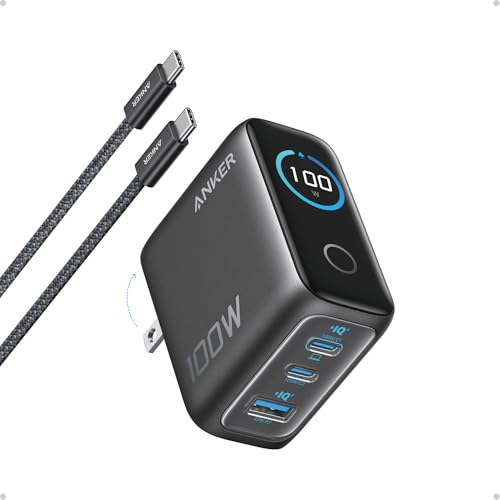
The flagship of this staircase is a 100W three-port GaN brick, and its title spends as many words on its interface as on its power: a smart display with touch control, described as ultra-compact, with a cable included and an explicit ‘Non-Battery’ note clarifying that this is a wall charger, not one of Anker’s power banks in disguise. One hundred watts is the largest budget in this guide, enough for a big laptop working hard with a phone fast-charging beside it, or for a thin laptop, a tablet and a phone sharing without any of them feeling rationed.
The display is the feature that needs arguing rather than listing, so here is the argument. Multi-port charging has always been opaque: a brick divides its budget by rules printed in a manual nobody keeps, and the only evidence of the division is a phone charging slower than expected. A display that reports output turns that opacity into information. The laptop drawing less than expected because the tablet woke up hungry is a visible fact, not a suspicion; a cable underperforming shows up as a number, not a feeling. On a desk where one brick serves everything, that visibility is a diagnostic instrument. On a bedside table serving one phone, it would be jewellery. The flagship knows its room: it is a desk instrument, priced and featured accordingly.
Touch control on a charger is the more novel claim, and the title states it without elaboration; the documentation carries the details of what the control adjusts. What can be said from the title is that Anker considers the display interactive rather than a passive meter, which fits the instrument reading of the product. Add the included cable — a flagship touch the mid-tier bricks omit — and the package is complete in a way the rest of the staircase is not: brick, cable and information, in one box.
- Maximum output: 100W, shared across ports
- Ports: 3 USB-C
- Technology: GaN, ultra-compact per listing title
- Interface: smart display with touch control
- Bundled: cable included; wall charger only (non-battery)
- Per-port split under mixed load: Not stated in the listing title — verify with Anker documentation
Strengths
- The largest budget in the guide: a hard-working large laptop plus a fast-charging phone, simultaneously.
- The display makes multi-port division visible, turning slow-charge mysteries into readable facts.
- Cable included — the only laptop-tier pick here that arrives complete.
Trade-offs
- The display and touch control are desk luxuries a bedside or travel role would never use.
- Three ports still cap the device census; it is a powerful brick, not a charging station.
- Flagship tier means flagship pricing within the Anker wall range.
Best for: a buyer seeking a single desk brick for a large laptop and two companions, with the charger’s own display reporting how the 100W is being shared.
Not suited for: travel kits, where the Nano models’ size wins, or single-phone charging places served completely by the 20W pair.

Anker 67W GaN Wall Charger, 3-Port — Compact three-port GaN
If the 65W block is the staircase’s laptop step, the 67W GaN charger is the same step with the engineering made explicit: the title names GaN directly, calls the body compact, and lists a compatibility sweep that runs from MacBook Pro and Air through Pixelbook, iPad Pro, iPhones, Galaxy models, Note 20, Pixel phones and even Apple Watch. Sixty-seven watts across three ports is, in practice, the sweet spot of the whole Anker wall range for a one-laptop household — enough for the laptop’s full pace when it charges alone, enough for a graceful division when the phone joins it.
GaN is doing real work in this pick. The size difference between a GaN brick and an older silicon brick at this wattage is the difference between a charger that disappears into a desk setup and one that dominates a power strip, crowding the neighbouring sockets. On a crowded strip, a compact brick is not an aesthetic preference; it is the difference between the strip’s other sockets remaining usable or being swallowed by the charger’s shoulders. Travellers feel the same advantage in a bag, where the 67W’s volume buys back space that the laptop itself already claimed.
The Apple Watch mention in the compatibility list is a small tell about the intended pattern: this brick expects to serve a whole personal ecosystem — laptop, phone, watch — from one socket, at home or in a hotel. Three ports, three devices, one wall point. The per-port split under that triple load is, as with its siblings, a documentation figure rather than a title figure, and it is recorded that way below; the wattage and the port count together already describe the pattern honestly.
- Maximum output: 67W, shared across ports
- Ports: 3
- Technology: GaN wall charger, compact
- Stated compatibility: MacBook Pro/Air, Pixelbook, iPad Pro, iPhone, Galaxy, Note20, Pixel, Apple Watch
- Per-port split under mixed load: Not stated in the listing title — verify with Anker documentation
- Folding prongs: Not stated in the listing title — verify with Anker documentation
Strengths
- GaN compactness keeps a laptop-class brick from swallowing neighbouring sockets on a strip.
- 67W is the one-laptop household’s sweet spot — full laptop pace alone, graceful sharing in company.
- The broadest compatibility sweep in the guide, watch included, describing a whole-ecosystem role.
Trade-offs
- Triple-loaded, the laptop’s share falls well below 67W; heavy laptop users should look at the 100W flagship.
- No cable is mentioned in the title.
- The split table and prong details require a documentation check.
Best for: a buyer seeking a compact GaN brick that runs a laptop, a phone and a watch from one socket at a desk or in a hotel.
Not suited for: a large laptop that must hold full charging pace while two other devices charge at the same time.

Anker Nano 30W Foldable USB C GaN Charger — Travel single-port
The Nano line is Anker’s answer to a specific insult: the bulky brick in the wash bag. This 30W Nano folds its prongs flat, builds on GaN to keep the body small, and offers exactly one USB-C port with no apologies. Thirty watts is a considered figure for a single-port travel brick — it covers the fast-charging appetite of the phones in its compatibility list, iPhones and Galaxy models across generations, plus iPad trickle-to-respectable charging and, in a pinch, the maintenance of a sleeping ultraportable. It is the brick that lives in the bag permanently, so the good charger at home is never kidnapped by a trip.
Single-port discipline is this pick’s hidden virtue. A travel charger with one port forces a rotation — phone first, then tablet or earbuds — and rotations at travel pace are painless because travel charging is mostly overnight charging. What the Nano buys with its restraint is the smallest complete package in this guide: brick, folded prongs, pocketable volume. The title’s own phrasing, portable and foldable, is the whole review in two words; everything else about the product is execution of that promise.
Its stated compatibility reaches toward MagSafe-compatible accessories as well, a reminder that a USB-C brick this size often ends up feeding a magnetic charging cable at a hotel bedside. Judged as a phone traveller’s brick it is complete. Judged as a desk system it is obviously not one, and the guide does not pretend otherwise: the staircase exists so that each step can be the right size for its own pattern, and this step is sized for a pocket.
- Output: 30W
- Ports: 1 USB-C
- Technology: GaN charger
- Form: portable and foldable prongs
- Stated compatibility: iPhone and Galaxy generations, iPad, MagSafe-compatible accessories
- Bundled cable: Not stated in the listing title — verify with Anker documentation
Strengths
- The smallest complete package in the guide — GaN body, folding prongs, pocketable.
- 30W covers phone fast-charging fully, with headroom the 20W tier lacks.
- A permanent bag resident that protects the home setup from travel kidnapping.
Trade-offs
- One port means devices queue; two travel companions share by rotation only.
- Working laptops are outside its design; it maintains a sleeping one slowly at best.
- No cable is stated as included.
Best for: a buyer seeking a fold-flat travel brick for a phone, sized to live permanently in a bag and forgotten until the hotel room.
Not suited for: laptop-first travel, or any role where two devices must charge at the same moment.
Anker Nano 47W Max 2-Port GaN Fast Charger — Two-port travel step
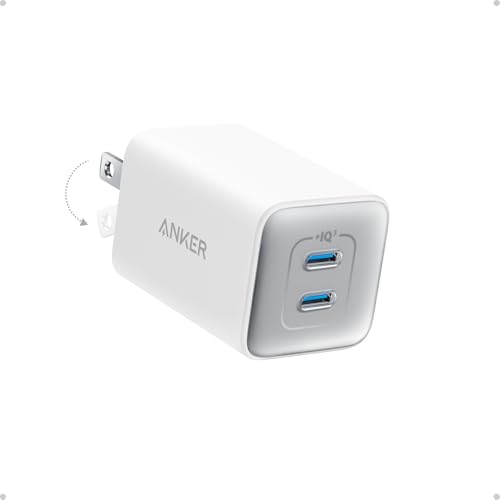
The 47W Nano exists for the a travel pattern where the rotation stopped being painless: two devices that both need real charge overnight — a phone and a tablet, or two phones on a shared trip — and one hotel socket within reach of the bed. Two ports, 47W of GaN output, folding prongs and the Nano line’s compact foldable body: the formula takes the 30W model’s travel discipline and removes its one compromise. Two phones fast-charging together divide the budget gracefully; a phone and a tablet both wake full; nobody’s device spends the night at 40% because it lost the rotation.
Forty-seven is an interesting wattage, chosen rather than round. It describes a brick designed around pairs of phone-class devices rather than around a laptop: enough for two simultaneous fast charges with room to spare, not so much that the body grows into the laptop tier’s bulk. A thin laptop can sip from it overnight — the compatibility list includes the usual phone generations and MagSafe accessories rather than leading with laptops, which tells the same story. This is the two-phone household’s travel brick and the solo traveller’s phone-plus-tablet brick, and within those patterns it is arguably the best-proportioned pick in the entire guide.
Against the 30W Nano, the choice is purely census: one device at a time, or two. Against the 65W and 67W three-port bricks, the choice is size and intent: the 47W stays pocketable and travel-first, while the bigger bricks trade pocket space for a laptop’s full pace. The staircase metaphor earns its keep here — three adjacent steps, three distinct patterns, no step pretending to be another.
- Maximum output: 47W, shared across ports
- Ports: 2 USB-C
- Technology: GaN fast charger
- Form: compact, foldable prongs
- Stated compatibility: iPhone generations, Galaxy, Pixel, MagSafe-compatible accessories
- Per-port split with both ports loaded: Not stated in the listing title — verify with Anker documentation
Strengths
- Two genuine fast charges at once, in a body that still folds flat for a bag.
- Wattage proportioned exactly to phone-and-tablet pairs rather than inflated toward laptop bulk.
- GaN construction keeps the two-port body in the Nano size class.
Trade-offs
- A working laptop will charge slowly; this is a phone-pair brick with laptop sipping as a bonus.
- Two ports is still a cap — a third device queues.
- The split under dual load is a documentation figure, not a title figure.
Best for: a buyer seeking a foldable travel brick that fast-charges two phones, or a phone and a tablet, from one socket overnight.
Not suited for: a laptop-led desk setup, where the 65W, 67W and 100W three-port bricks are the correct steps.
Reading the Staircase: Which Wattage Tier Serves Which Desk?
| Pick | Max output | Ports | GaN stated | Folding prongs stated | Cable included |
|---|---|---|---|---|---|
| Anker 65W 3-Port Block | 65W | 3 | Not stated in title | Yes | Not stated in title |
| Anker 20W Block 2-Pack | 20W each | 1 each | Not stated in title | Not stated in title | Yes — 2 cables |
| Anker 100W Smart Display | 100W | 3 | Yes | Not stated in title | Yes |
| Anker 67W GaN Charger | 67W | 3 | Yes | Not stated in title | Not stated in title |
| Anker Nano 30W | 30W | 1 | Yes | Yes | Not stated in title |
| Anker Nano 47W | 47W | 2 | Yes | Yes | Not stated in title |
The table makes the staircase visible as a set of trades rather than a ranking. Wattage climbs left to right in the reader’s mind, but the columns that decide daily satisfaction are the quieter ones: ports for census, folding prongs for travel, a cable in the box for completeness. Notice how rarely one row wins every column. The flagship takes wattage and the cable, the 20W pair takes completeness-per-room, the Nanos take portability, and the two mid-tier three-ports split the difference by emphasis — one naming its laptop targets, the other naming its GaN.
Notice, too, the honesty pattern in the ‘not stated’ cells. They are not defects in the products; they are limits of title-level disclosure, recorded here so that a buyer comparing the 65W and 67W blocks knows the tiebreak lives in the documentation — split tables, dimensions, prong details — rather than in anything a listing headline can settle. A guide that invented those figures would read more completely and deserve less trust.
Why Does a Phone Ignore Most of a 100W Brick’s Power?
Charging is a negotiation, and the phone holds the pen. A phone’s charging circuitry accepts current at rates that vary with its battery’s state — fast when the battery is low, tapering as it fills, cautious when warm — and the brick’s role is to be able to supply whatever is asked, up to its ceiling. A 20W brick and a 100W brick therefore charge the same phone at nearly the same speed, because the phone asks both for the same thing. The 100W brick’s extra capacity is not speed in reserve for the phone; it is capacity for the phone’s companions — the laptop and tablet plugged in beside it.
This is why the staircase is shaped by device census rather than by any single device’s appetite. One phone needs 20W to 30W of brick. A phone and a tablet need the 47W step. A phone, a tablet and a working laptop need 65W and up, with the flagship’s 100W reserved for the desk where the laptop is large or the tablet is also working hard. Once the negotiation is internalised, the question stops being which brick is fastest and becomes which brick matches the hungriest simultaneous combination — a far more useful question, and the one every verdict in this guide was written to answer.
Heat is the negotiation’s silent third party. A phone that grows warm charges more slowly by design, protecting its battery; a brick crammed against bedding or buried in a bag’s pocket will also warm up and may ease off. GaN construction, named in four of these titles, shrinks the brick’s own heat contribution, but placement still matters: a charger given air charges at its stated pace, and a charger smothered in a duvet negotiates everything downward.
How Should a Household Divide Bricks Between Rooms and Bags?
The pattern that works is fixed stations plus one traveller. Fixed stations — the 20W pair’s two posts, a three-port brick at the desk — are bought for rooms and never move; their permanence is what ends the nightly brick migration. The traveller, a Nano, is bought for the bag and never unpacked into a room; its absence from the house is the point. Households that try to make one excellent brick serve both roles discover that the brick is always in the other place, and the compromise satisfies neither pattern.
Within the fixed stations, match the brick to the room’s hungriest hour. The desk’s hour is the working afternoon: laptop at full draw, phone topping up, watch or earbuds sipping — a 65W to 100W three-port pattern. The bedside’s hour is the night: one phone, occasionally earbuds, no urgency at all — the 20W pattern, duplicated by the pair into the second room that needs it. The kitchen counter, if it charges anything, usually inherits the desk’s retired brick in due course, which is another argument for buying the desk brick well: it has a second career ahead of it.
Cables deserve the same fixed-station discipline. A brick without its own cable invites cable migration, which is brick migration in miniature. The two picks that bundle cables model the right idea; for the others, dedicate a cable to each brick at setup and let the drawer keep its spares. Label the bag’s cable while you are at it. None of this is sophisticated, and all of it is the difference between a charging system and a pile of chargers.
What Mistakes Do Single-Brand Buyers Still Manage to Make?
The first is flagship gravity: buying the 100W display brick for a bedside phone because it is the best one, then never using its ports, its wattage or its screen. The staircase’s lower steps are not lesser products; they are correctly sized ones, and an oversized brick at a bedside is money converted into unused ceiling. The second mistake is the mirror image — buying the charming little Nano as a desk brick and spending a year watching a laptop sip. Both errors come from shopping the product instead of the pattern.
Third is ignoring the split. A three-port brick’s headline wattage is a shared budget, and planning a laptop’s full pace around the headline alone means meeting the division at the worst moment — mid-afternoon, battery low, phone plugged in. The split tables live in Anker’s documentation for every multi-port pick here; five minutes with them before purchase prevents the discovery. Fourth is treating the cable as an afterthought: a 100W brick feeding a laptop through a cable rated for phone charging delivers phone pace, and the brick gets the blame. The cable is part of the charger’s real specification, and the flagship’s included cable is a quiet acknowledgement of exactly that.
How Does Travel Change the Calculation Entirely?
Travel rewrites every assumption the desk takes for granted. Sockets are scarce and oddly placed — behind the hotel bed, inside the airport column, nowhere near the café table — so a traveller’s brick competes on different virtues: prongs that fold so the brick packs flat and harmless, a body small enough to vanish into a wash bag, and ports enough for the devices that actually travelled. Wattage, the desk’s first question, drops to third place, because travel charging happens overnight, when even a modest brick has eight hours to do its work. That is why the staircase’s two Nano steps exist and why they are not simply weaker versions of the desk bricks: they are optimised for a different day.
The traveller’s census is also more honest than the desk’s. Nobody travels with six devices; two or three make the trip, and the brick should match that census rather than the home one. A phone alone takes the 30W Nano. A phone plus a tablet, or a couple’s two phones, takes the 47W. The laptop traveller faces the real fork: carry the laptop’s own brick and a Nano for the rest, or carry one three-port 65W or 67W brick for everything and accept the shared budget. The second pattern is lighter and simpler, and it is the pattern the mid-tier three-ports were born for — one brick in the bag, every device fed, the laptop’s own charger left at home as the fixed desk station.
A final travel habit separates veterans from the rest: photograph the hotel room’s socket locations on arrival, metaphorically speaking — in practice, simply noting which socket the brick claimed on the first night prevents the last-morning search behind furniture that has ended more than one trip in a left-behind charger.
One travel detail in the titles deserves underlining: folding prongs are stated for the 65W block and both Nanos, and not stated for the 67W or the flagship. A traveller choosing between the 65W and 67W should treat that stated difference as a genuine decision input rather than a coin flip, and check the documentation for the 67W’s prong arrangement before packing it. Small facts, plainly recorded, are what pre-purchase research is for.
What Role Does the Cable Play in a Brick’s Real Speed?
Every figure in this guide describes a brick, but no brick charges anything alone: the cable is the second half of the circuit, and it carries its own rating. A cable built for modest charging will cap a flagship brick at modest pace without announcing itself, and the resulting slowness gets blamed on the brick, the phone and the socket in turn before anyone suspects the metre of wire in between. The two picks that bundle cables — the 20W pair and the 100W flagship — eliminate that variable inside their own boxes, which is part of why both feel complete in a way their siblings do not.
For the unbundled picks, the discipline is simple: dedicate to each brick a cable rated for the brick’s purpose, and keep it with the brick. The laptop’s port deserves the laptop-class cable that came with the laptop or its equal; the phone’s cable can be the lighter everyday sort. Length matters at desks, where a short cable keeps the phone beside the brick instead of sliding off the edge, and matters differently in bags, where one medium cable that reaches a badly placed hotel socket is worth two short ones. None of this is exotic, yet cable mismatch is the most common cause of ‘my fast charger is slow’ in the entire category — a diagnosis that costs nothing to check and everything to ignore.
How Long Does a Wall Brick Remain the Right Brick?
A wall charger has no battery to wear out and no software to abandon it, so its working life is set by two slower clocks: the drift of the devices around it, and the physical wear of its ports and prongs. Device drift is the staircase’s reason for existing in tiers — the phone-only brick of five years ago is today’s spare, demoted not because it failed but because a laptop joined the household. Bought at the right tier, a brick’s demotion path is gentle: desk to bedside, bedside to guest room, guest room to the travel bag’s backup, each step still useful. Bought at the wrong tier — the Nano asked to run a desk — it has no demotion path at all, only a replacement.
Physical wear rewards the fixed-station discipline described earlier. A brick that lives in one socket, with its cable left connected, experiences a fraction of the insertion cycles of a brick plugged and unplugged daily, and its prongs stay straight because nothing levers against them in a bag. The folding-prong models are built for the mobile life and accept its wear as their design condition. Either way, the expected horizon is years — long enough that the modest price differences between adjacent staircase steps matter far less than buying the step whose pattern matches, because the cost of a wrong step is not the brick’s price but the second purchase that corrects it.
When Does a Second Brick Beat a Bigger Brick?
There is a fork in every charging setup’s growth: when the current brick stops covering the household, is the answer a larger brick or another one? The staircase tempts buyers upward by default, but geography often argues sideways. A desk brick straining under a laptop and two phones is not necessarily underpowered — it may simply be in the wrong room for the third device, which charges just as happily from a 20W post at the bedside. Two modest bricks in two rooms outperform one flagship in the wrong room every night of the year, because charging is a where problem before it is a how-fast problem.
The 20W 2-pack is this philosophy in a box, and its presence in the guide is a deliberate counterweight to flagship gravity. Consider the household that buys the 100W display brick for a phone and a laptop: the purchase is defensible. Consider the same household a year later, when the phone’s charging place has split between desk and bedside and the laptop has claimed the flagship permanently — the household now needs a second brick anyway, and the modest pair would have covered both posts from the start for a fraction of the flagship’s tier. None of this argues against the flagship for a genuinely hungry desk; it argues for counting rooms before counting watts.
The sideways move also buys resilience. A household with two or three bricks distributed across rooms barely notices when one is borrowed, lost or left in a hotel; a household built on a single magnificent brick feels its absence everywhere at once. Redundancy is unglamorous and, in a category this inexpensive at the lower steps, cheap. The staircase’s real lesson is that it can be climbed in parallel — a Nano in the bag, a pair at the posts, a three-port at the desk — and that the fully built pattern costs less, in money and in nightly friction, than any single heroic brick asked to be everywhere.
Final Recommendation
Climb only as high on the staircase as the hungriest simultaneous combination demands. One phone in two rooms takes the 20W pair and stops thinking. A travelling phone takes the 30W Nano; a travelling pair of devices takes the 47W. A one-laptop desk takes the 65W block or the 67W GaN, divided by taste for named laptops versus named technology, and a large-laptop desk that wants to watch its power being shared takes the 100W flagship and its display. Six bricks, one maker, no wrong answers — only sizes, and the right size is the one the pattern asked for all along.
Frequently Asked Questions
Will the 100W charger charge a phone faster than the 20W charger?
Barely, if at all. The phone sets the pace its battery accepts, and both bricks can supply what a phone asks for. The 100W brick’s advantage appears when other devices join: its budget keeps a laptop and a tablet fed at the same time, where the 20W brick has neither the ports nor the capacity to participate.
What does GaN actually change for the user?
Size and heat at a given wattage. Four of these titles name GaN construction, and its visible effect is that the 67W and 100W bricks are compact enough for crowded strips and travel bags, where older-technology bricks of the same wattage would be bulky. It does not change what a connected phone accepts; it changes the brick’s body, not the negotiation.
How many ports does a one-laptop household need?
Three is the comfortable figure: laptop, phone, and one rotating seat for a tablet, watch or earbuds. That is why the staircase has two three-port models in the 65W–67W tier and the 100W flagship above them. A household without a laptop can drop to the 47W two-port step; a household with two laptops should be looking at a desktop station rather than any single wall brick.
Are any of these picks power banks?
No. All six are wall chargers that must be plugged into a socket to work; none stores energy. The flagship’s title even states ‘Non-Battery’ to mark the distinction, since its size might suggest otherwise. Anker sells power banks under other listings, and they are deliberately outside this guide’s boundary.
Do the multi-port chargers split their wattage evenly?
Not necessarily evenly — multi-port bricks divide their budget by internal rules that favour the hungriest or the first-connected ports, and the exact tables are published in Anker’s documentation rather than in the listing titles. The planning rule is safe regardless: assume the headline figure is a shared total, and check the documented split when a laptop’s full pace must be guaranteed alongside other devices.
What happens to these bricks when a phone with a newer fast-charge standard arrives?
The brick keeps doing exactly what it always did: supplying up to its ceiling whatever the phone requests. Newer phones may ask for more than an older brick’s ceiling, in which case they charge at the brick’s pace rather than their own maximum — a graceful degradation, not an incompatibility. That is the practical argument for buying one staircase step above today’s hungriest combination when the price gap is small: the headroom is insurance against the next phone’s appetite, bought once.
Should a spare brick live in the car or the office drawer?
Both locations reward the same kind of brick: a Nano-class model small enough to be forgotten until needed. The office drawer is the stronger case, because a forgotten charger at work is a same-day problem with a same-day fix, and the 30W Nano covers a phone’s needs completely. The car’s glovebox is a weaker case — heat in a parked car is unkind to electronics left there for months — so a car spare should be the brick that travels in the bag and merely visits the car, rather than a permanent resident of the glovebox.
Why do two bricks in this guide sit so close together at 65W and 67W?
Because Anker’s range is a staircase with shallow steps, and the two models emphasise different facts: the 65W block names folding prongs and specific laptop models including the Dell XPS 13, while the 67W names GaN construction and the broadest compatibility sweep in the guide, watch included. In daily service they are near-equivalents for a one-laptop desk. The rational tiebreak is a documentation check of the two split tables and dimensions, plus whichever stated detail — prongs, GaN, a named laptop — matches the desk in question.
Is the smart display on the 100W model genuinely useful?
On the right desk, yes. The display reports what a multi-port brick is doing with its shared budget — information that otherwise has to be inferred from a phone charging slower than expected. For a single-brick desk serving a laptop, a tablet and a phone, that visibility turns charging from a suspicion into a reading. For a bedside or a travel bag, the same display would be decoration, which is why the guide places the flagship at the desk and the Nanos in the bag rather than ranking the display as a universal good.
Can one of these bricks charge a laptop and a phone at full speed together?
It depends on the laptop’s appetite and the brick’s tier. A thin laptop drawing in the 45W class plus a fast-charging phone fits inside the 100W flagship’s budget with room to spare, and mostly inside the 65W and 67W bricks’ budgets when the laptop is not at peak draw. A large laptop working at full stretch can consume a mid-tier brick’s entire budget alone. The split tables in Anker’s documentation give the exact per-port figures for each model; the safe planning rule is to size the brick for the combination, not for the single hungriest device.
Which pick suits a power strip with tightly spaced sockets?
The GaN models, particularly the compact 67W, because GaN construction keeps the body narrow enough to leave neighbouring sockets usable. The Nano models are smaller still for travel strips. A brick’s width matters as much as its wattage on a crowded strip, and it is the specification most often discovered after purchase rather than before.
Related Guides
When one brick per socket stops being enough, our multi device chargers guide covers the desktop stations that feed a whole household from one box. For charging away from walls entirely, see our MagSafe chargers for iPhone 13 Pro roundup and our solar panel chargers for backpacking guide.


