What's inside
As an Amazon Associate I earn from qualifying purchases. This post may contain affiliate links at no extra cost to you.
gizmoverdict.com is reader-supported. When you buy through links on our site, we may earn an affiliate commission.
Where to buy: Counter tablets live or die on steady retail stock, because a shop that loses its register screen on a Saturday morning cannot wait a week for a replacement to ship. Every pick below is sold through Amazon in the United States, and the linked listings carry the exact storage and memory configuration named in each review, so check the configuration on the listing page matches the one described here before ordering a spare. Cases, stands and card readers are separate purchases from separate listings, and none of the six tablets below bundles a Square reader in the box.
Finding the best android tablets for square starts with a correction that saves real money: Square Register is dedicated Square hardware with its own built-in screens, not a tablet at all, so it never appears as a pick here. Square Stand, the swivelling countertop dock many cafés picture when they imagine a till, is built for iPad only and cannot hold any Android device. What this guide covers is the third route, the one most food trucks, market stalls, salons and small shops actually take: an ordinary Android tablet running the Square Point of Sale app, paired with a Square reader over Bluetooth, mounted in a third-party stand or carried in a hand.
That route has genuine advantages. Android tablets cost less than the dedicated hardware, the same device can run a kitchen display, a delivery app or a stock spreadsheet between rushes, and a dead unit can be replaced from general retail stock rather than a single vendor’s warehouse. The trade-offs are equally real. The tablet is a general-purpose computer, so updates, notifications and other apps compete for its attention unless the owner locks it down. Battery care becomes the shop’s problem. And because the reader connects wirelessly, pairing discipline matters in a way a wired register never demands.
Our six picks span the realistic counter range. Two Samsung models anchor the list, one a newer mid-priced slate with a two-year warranty in its title, the other an established eleven-inch model with quad speakers. Three Lenovo models cover the value end, including one that bundles a folio case and one that ships with a pen. A TCL model rounds out the set with a metal body and the newest Android version named anywhere in this group. Screen sizes cluster around ten and eleven inches, which is the honest sweet spot for a till: large enough for a customer to read a total and sign, small enough to hand across a counter without ceremony.
There is a cost picture worth drawing before the individual reviews. A tablet till’s true price is the tablet plus a reader, a stand or case, and the owner’s hour of setup, and it usually lands well below the dedicated-hardware route while leaving the business with a device that has resale value and second uses. The counterweight is responsibility: Square maintains its app, but the shop maintains the tablet — its updates, its battery habits, its physical security. Businesses that understand that bargain thrive with tablet tills; businesses expecting an appliance should price the dedicated route honestly instead of resenting the tablet for being a computer.
One more framing note before the picks. Screen brightness figures, exact battery capacities and Wi-Fi generations are stated inconsistently across these six listings, and rather than fill gaps with assumptions we flag each silence where it occurs. A shop with a sun-drenched window counter should treat brightness as a question to resolve on the listing page or with a first unit ordered before the fleet, not as a detail to discover at noon on the first bright day of spring.
Key Takeaways
- Square Register is dedicated hardware and Square Stand fits iPad only; every pick here is a general Android tablet running the Square POS app instead.
- Eleven inches is the practical counter size across this set, balancing signature space against one-handed carrying at markets and food trucks.
- The Samsung Galaxy Tab A11+ is the only pick whose listing title states a two-year warranty, which matters for a device earning money daily.
- Two Lenovo picks bundle a folio case in the title, and the Lenovo Idea Tab adds a pen that customers can sign with.
- None of the six listings states cellular connectivity, so every counter setup here assumes shop Wi-Fi or a phone hotspot.
- Storage of 128GB or more appears on five picks, leaving comfortable room for offline transaction queues and product photos.
Quick Picks
| Pick | Tablet | Badge |
|---|---|---|
| 1 | Samsung Galaxy Tab A11+ | Best overall |
| 2 | Samsung Galaxy Tab A9+ | Best for busy cafés |
| 3 | Lenovo Tab M11 | Best with case included |
| 4 | Lenovo Idea Tab 11 | Best for signatures |
| 5 | TCL TAB 10 Gen 4 | Best metal-body value |
| 6 | Lenovo Tab K11 Gen 2 | Best future-proofed pick |
How were these picks chosen?
A point-of-sale tablet does a narrower job than a general tablet, and our criteria follow that job. First comes screen size and legibility: the display is simultaneously the cashier’s keyboard, the customer’s receipt preview and the signature pad, so it must show line items at arm’s length under shop lighting. Second comes memory and storage headroom, because the Square app itself is light, yet a real counter tablet also holds menus with photographs, a browser tab for the Square Dashboard, and often a second app for deliveries or appointments. Third comes battery behaviour across a trading day, since a till that fades at four in the afternoon forces ugly workarounds with trailing cables.
Fourth, we weighed build and warranty signals stated in the listings themselves. A slim, light chassis suits handheld ordering; a metal body suits a fixed counter that gets knocked by mugs and card machines; a stated warranty period suits a business that cannot treat its register as disposable. Fifth, we considered what arrives in the box. A bundled folio case or pen removes a second order and a second delay before the tablet can work. Finally, we checked the Android generation named in each title, because Square updates its app over time and an older system version shortens the useful life of the device as a till, even when the hardware still runs.
What we deliberately did not rank on: camera quality, gaming performance and stylus art features, none of which sell a single coffee. Where a listing title stays silent on a detail a shop might want, such as the exact battery capacity in milliamp hours or the Wi-Fi generation, the spec boxes below say so rather than guessing, and the guide sections explain how to work around the silence.
We also weighed the unglamorous question of replacement. A till tablet will eventually meet a tiled floor, a spilt drink or a thief, and the cost of that day depends on how mainstream the model is. Widely sold Samsung and Lenovo slates can be reordered and re-imaged quickly, with cases and stands still on sale; an obscure import cannot. That is why this list contains no no-name bargains despite their tempting tickets: the cheapest tablet is the one whose absence never closes the shop. Longevity of the model line, clarity of the listing and honesty of the stated warranty all fed the ranking as much as any processor figure.

1. Samsung Galaxy Tab A11+ — Best overall
The A11+ earns the top slot on the strength of the details a business actually feels. Its listing promises optimised performance and a long lasting battery, pairs 6GB of memory with 128GB of storage plus expansion room, and adds Dolby Atmos speakers that help a cashier hear confirmation tones in a noisy room. The detail that separates it from every rival here, though, is the two-year warranty written into the title. A register tablet is not a toy; it is the machine a shop’s income passes through, and a second year of cover changes the maths on keeping a spare.
Samsung’s AI Assist features will matter little at a till, yet the slim, light grey chassis matters daily, because staff carry this tablet to tables, doors and market pitches. The large display gives the Square item grid room to breathe, and multi-item orders stay readable without shrinking text. Shops standardising on one model across two or three counters will find this the easiest pick to justify on a spreadsheet.
Consider how the A11+ behaves across a full week rather than a single shift. Monday’s delivery driver signs on it, Tuesday’s staff training runs on it, and by Friday it has handled a thousand taps without the slow accumulation of junk that plagues a family tablet, provided the owner keeps it dedicated. The expandable storage matters here in a specific way: Square’s offline mode and a growing photo menu both eat space slowly, and a card slot turns a storage ceiling into a non-event. The AI Assist branding, by contrast, can be ignored entirely — a till does not need a writing assistant, and the wisest setup disables every feature that is not the register, the reader and the clock.
There is also a staffing argument. New hires learn one interface, and a consistent fleet means the Saturday temp who worked the other branch already knows the machine. Samsung’s long presence in the Android tablet market means replacement units, cases and stands remain easy to source years into the deployment, which is precisely the horizon a warranty of two years implies. For a business signing a three-year lease on premises, hardware that is covered for two of those years and sourceable for all three is the conservative, correct kind of boring.
Set-up day with the A11+ should end with three habits installed. First, the Square app pinned so the register is the home screen in all but name. Second, a charging routine pinned to the closing checklist, because a long-life battery forgives one forgotten night and not three. Third, a labelled spare cable in the drawer, since cables are the true consumable of every counter ever built. None of this is specific to Samsung, yet the A11+ rewards the discipline longest, simply because its warranty and storage give the routine the most years to run.
Strengths
- Two-year warranty stated in the listing title, unique in this group
- Expandable storage beyond the 128GB built in
- Dolby Atmos speakers cut through café background noise
Trade-offs
- No case or stand is mentioned, so counter hardware is a second purchase
- Battery capacity figure is absent from the title despite the long-life claim
- 6GB of memory is adequate for till work but the smallest Samsung figure here alongside the A9+ configuration below
- Memory: 6GB RAM
- Storage: 128GB, expandable
- Audio: Dolby Atmos speakers
- Warranty: 2 years, per the listing title
- Battery capacity; Screen size in inches: Not stated in the listing title
Best for: a permanent retail counter needing warranty cover across a full lease cycle.
Not suited for: a counter narrower than the large display is wide once a stand and reader join it.
Stock moves quickly on this newer Samsung slate, so check price on Amazon before committing a whole shop to it.

2. Samsung Galaxy Tab A9+ — Best for busy cafés
The A9+ is the proven workhorse of this list, an eleven-inch tablet from 2024 in Graphite with a US version designation that simplifies support. Its quad speakers are the loudest-sounding proposition here on paper, and in a café the till’s audio cues — the cha-ching of a completed sale, the error buzz of a declined card — are genuinely part of the workflow. The big screen supports a multi-window display, which lets a manager keep the Square register open beside a delivery platform or a prep list without closing either.
Samsung describes the design as slim, light and durable, with a kids friendly design note that, translated into shop terms, simply means it tolerates rough handling better than a fragile flagship. The upgraded chipset keeps the item grid responsive during the morning rush, when a two-second lag per transaction compounds into a queue. For a café replacing an ageing till, this is the lowest-risk swap on the page.
The A9+ also suits the café that doubles its tablet as a light office machine after close. The multi-window display lets the owner reconcile the day’s takings in the Square Dashboard on one side while a supplier invoice sits on the other, and the eleven-inch panel is large enough that spreadsheet columns do not become a squinting exercise. Its 128GB of storage holds a photographed menu, a training folder and months of offline data without complaint. Because it is a 2024 model with an established sales history, third-party stands, cases and screen protectors exist in far greater variety than for a brand-new release, and that accessory depth quietly lowers the total cost of the installation.
One honest limitation deserves emphasis: the title does not state the memory figure, and cafés should confirm the configuration on the listing page before ordering, because a till that also runs a delivery platform and a music app wants the healthier memory allocation. The kids friendly design note, oddly, is a point in its favour at a counter — hardware shaped to survive family life tends to survive a dropped tray and a spilt flat white with equal indifference. In daily service the A9+ feels like the pick with the fewest surprises, and at a register, surprises are a cost.
Sound deserves one more sentence, because cafés underestimate it. A declined card that nobody hears about becomes a customer who has left without paying attention to the retry; a completed tap that chimes clearly lets the cashier’s eyes stay on the next order. The quad speakers are therefore not a luxury in this context but a small piece of queue management. Pair that with a stand that angles the screen away from the window glare, and the A9+ covers the two sensory problems — hearing the till and seeing it — better than anything else in this set.
Strengths
- Quad speakers, the strongest audio setup named in this group
- Multi-window display for running the register beside a second app
- US version listing, simplifying warranty and support conversations
Trade-offs
- Memory figure is absent from the title, so check the listing configuration carefully
- From the 2024 generation, so its software runway is shorter than the A11+
- Storage expansion is not mentioned in the title
- Screen: 11 inches
- Storage: 128GB
- Audio: Quad speakers
- Design: Slim, light, durable build in Graphite
- RAM; Battery capacity: Not stated in the listing title
Best for: a high-volume café counter where audio cues and split-screen apps earn their keep.
Not suited for: a five-year deployment plan, since the 2024 model year shortens the update runway.
Cafés standardising on the A9+ should check price on Amazon for the Graphite US version specifically.

3. Lenovo Tab M11 — Best with case included
The M11’s quiet superpower is written at the end of its title: it comes with a folio case. That single inclusion removes the gap between delivery day and trading day, because the tablet can go straight onto the counter protected, propped at a reading angle, without waiting for an accessory order. The eleven-inch display resolves 1920×1200 pixels, sharp enough that menu photographs look appetising and small text on modifiers stays legible for staff with tired eyes at the end of a shift.
Inside, a MediaTek Helio G88 octa-core processor pairs with 4GB of memory and 128GB of storage — modest figures that still exceed what the Square app asks for, though they leave less headroom for running several heavy apps at once. The ambient light sensor adjusts brightness automatically as sunlight moves across a shop window, and the ten-hour battery figure in the title maps neatly onto a standard trading day. Luna Grey is the finish, inoffensive in any interior.
The M11’s ten-hour battery claim deserves a practical reading. A shop trading nine to five with the screen dimmed between customers will likely finish the day on the internal battery, which frees the counter from a permanent cable and lets the tablet move to the door for queue-busting at lunch. A shop trading twelve hours will not, and should plan a mid-afternoon top-up or a powered stand from the start. The Helio G88 is an efficiency-minded chip rather than a sprinter; the Square grid, the card reader handshake and the receipt flow all sit comfortably within its abilities, while a dozen browser tabs of supplier sites would not.
The folio case deserves a second thought, too, because it shapes how the tablet is used. Folded back, it becomes a wedge that angles the screen toward the customer for PIN-free contactless confirmation and signature. Closed, it protects the display in a tote bag, which is how many sole traders carry the entire business home each night. What it does not do is lock the tablet to the counter, so a fixed retail site should still budget for a proper stand and treat the folio as transport protection. Judged as a starter till for a first shop, the M11 asks the least additional spending of anything here.
There is a growth caveat to file honestly. A shop that prospers will add apps, a second location’s dashboard, perhaps a loyalty platform, and the M11’s 4GB of memory will feel the squeeze before its screen or battery ages. The graceful path is to plan the M11 as the first till and the future spare: when the flagship counter upgrades in year three, the M11 retires to the stockroom for counts and deliveries, still useful, still cased. Bought with that arc in mind, its modest specification stops being a compromise and becomes a schedule.
Strengths
- Folio case included, so the tablet works protected from day one
- 1920×1200 resolution stated plainly in the title
- Ambient light sensor handles changing shop-window daylight automatically
Trade-offs
- 4GB of memory is the lowest figure in this group
- Ten-hour battery claim leaves little margin for a long market day
- Folio cases prop a tablet for viewing but are not lockable counter stands
- Screen: 11 inches, 1920×1200
- Processor: MediaTek Helio G88 octa-core
- Memory and storage: 4GB RAM, 128GB
- Battery: 10 hours, per the listing title
- Included: Folio case
Best for: a small shop opening fast, where the bundled case removes an accessory order entirely.
Not suited for: running the register beside several heavy delivery apps on 4GB of memory.
Because the folio case travels with this model, check price on Amazon and confirm the Luna Grey bundle is the configuration shown.
4. Lenovo Idea Tab 11 — Best for signatures
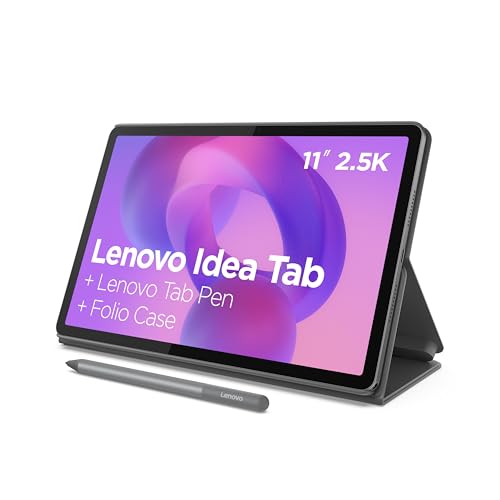
Signature capture is where tablet tills feel clumsy: a customer confronted with a bare glass screen and a fingertip tends to produce a scribble and a frown. The Idea Tab answers with the Tab Pen bundled in the title, giving customers something natural to hold when the tip screen or signature screen appears. Its eleven-inch 2.5K IPS touchscreen runs at 90Hz, so the pen stroke and the scrolling item grid both feel smoother than the 60Hz norm, and the sharper panel keeps totals crisp for the person paying.
The specification is a step up from the M11: a MediaTek Dimensity 6300, 8GB of memory and 256GB of storage, the largest built-in capacity in this group. Lenovo markets it as a college tablet, and that student framing translates well to a young retail team that also uses the device for training videos and stock counts. A folio case is included as well, so the pen has a home and the screen has protection between shifts.
Beyond signatures, the pen changes smaller moments. A manager initialling a delivery note, a server circling a sold-out special on a photographed menu, a customer writing an email address for a digital receipt — each is clumsy with a fingertip and natural with a stylus. The 90Hz refresh rate is easy to dismiss as a gaming flourish, yet it is the pen that benefits most: the ink trail follows the nib closely enough that handwriting feels like handwriting rather than a delayed echo. The 2.5K panel also renders the fine print on allergen information and receipt previews without the fuzz that makes customers lean in and slow the line.
The 256GB of storage, the largest here, suits a venue whose Square catalogue is visual. A bistro with a photographed dish for every item, a salon with style galleries, a deli with seasonal boards — all of them accumulate images, and all of them would feel a 128GB ceiling eventually. With 8GB of memory the Idea Tab also holds the register, a reservations app and a music service in memory simultaneously without reloading, which is the unglamorous definition of a smooth service. It is the pick that treats the tablet as the restaurant’s front-of-house computer, not merely its card machine.
Pen logistics need a plan, and the plan is simple: the pen lives in the folio case, the case lives on the pass, and the closing checklist includes a pen count the way it includes a float count. Restaurants that treat the stylus as a tracked tool keep it for years; restaurants that leave it loose on the counter buy replacements quarterly. With that single habit in place, the Idea Tab’s signature advantage survives contact with real service, and the tablet’s other gifts — the storage, the screen, the memory — compound quietly in the background of every shift.
Strengths
- Tab Pen included, making signature and tip screens feel natural
- 256GB of storage, double most rivals here
- 2.5K resolution at a 90Hz refresh rate
Trade-offs
- A pen is one more small object for a busy counter to lose
- Battery capacity and life figures are absent from the title
- The sharper screen is wasted on shops whose menu has no photographs
- Screen: 11 inches, 2.5K IPS, 90Hz
- Processor: MediaTek Dimensity 6300
- Memory and storage: 8GB, 256GB
- Included: Tab Pen and folio case
- Battery capacity: Not stated in the listing title
Best for: table-service restaurants collecting signatures and tips at the table itself.
Not suited for: a self-service kiosk, where a loose pen disappears within the first week.
Restaurants sold on pen signing can check price on Amazon for the pen-and-case bundle.

5. TCL TAB 10 Gen 4 — Best metal-body value
The TCL is the smallest and arguably the toughest-feeling tablet in this set. Its metal body shrugs off the knocks a plastic slate absorbs daily on a crowded counter, and the 10.1-inch FHD display is big enough for a checkout screen while staying genuinely one-hand portable for a market trader who packs the whole till into a crate each night. It also runs Android 15, the joint-newest system version named in this group, which extends the period over which the Square app will keep supporting it.
The rest of the specification is honestly modest: an octa-core processor, 4GB of memory with 128GB of storage, dual speakers and a 6000mAh battery. None of that troubles the Square app, which is a light workload, but it does mark this as a dedicated till rather than a do-everything device. TCL aims it at students, young adults and families; a small retailer should read that as a value machine that does one job well, and the asking segment reflects it.
The metal body is worth dwelling on, because material is destiny for a working tablet. Plastic creaks, flexes and eventually cracks at the corners where drops land; a metal shell dents instead, and a dented till still trades. For a trader whose counter is a folding table reassembled in a different town each weekend, that resilience is worth more than a sharper screen. The 10.1-inch size also fits the crates, cash tins and card-reader pouches that market life is organised around, where an eleven-inch slate can be the one object that fits nothing.
Battery honesty matters here. The stated 6000mAh is a number a trader can plan around: a full charge for a market day, a power bank in the crate for the Christmas fair that runs into the evening. What the TCL does not pretend to be is a multimedia hub, and a shop wanting the till to double as a customer-facing menu display in the window should look at the larger Samsung panels instead. As a single-purpose register that can be replaced without tears if the worst happens, the little TCL has a clear-eyed charm.
One more TCL scenario is worth picturing: the Christmas market stall, trading outdoors into the dark. The metal shell is cold to the touch, the screen stays readable under string lights, and the compact body leaves room on the crate-top counter for the card reader, the float tin and the mulled-wine ladle rest that somehow always migrates toward the till. This is the environment the tablet was priced for — cheerful, battered, replaceable — and in it the absence of flagship features is not felt at all. The Square app asks little; the weather asks much; the TCL answers the weather.
Strengths
- Metal body tolerates daily counter knocks better than plastic rivals
- Android 15 gives a long app-support runway
- Compact 10.1-inch size suits traders who pack up nightly
Trade-offs
- 6000mAh battery is the smallest stated capacity in this group
- 4GB of memory limits multitasking beyond the register app
- Dual speakers are quieter propositions than the Samsung quad setups
- Screen: 10.1 inches, FHD
- Memory and storage: 4GB plus 128GB
- Battery: 6000mAh
- System: Android 15
- Body: Metal
Best for: market traders and food trucks packing the till away every night.
Not suited for: a twelve-hour trading day far from a charger, on a 6000mAh battery.
Traders after the metal build can check price on Amazon for the current TCL configuration.

6. Lenovo Tab K11 Gen 2 — Best future-proofed pick
The K11 Gen 2 closes the list with the most forward-looking specification of the six. Its title names Android 15 and 5G in the model description, an eleven-inch 2.5K display, a MediaTek Dimensity 6300 with 8GB of memory and 128GB of storage. A caution belongs here: the title’s wording does not spell out a SIM slot or a carrier, so a shop counting on cellular backup should verify the exact variant on the listing page rather than assuming the 5G badge settles it. Treated as a Wi-Fi till, though, the hardware is the freshest here.
That freshness is the argument. A tablet bought for a counter should serve three to five years, and the K11’s combination of a current Android release, a sharp screen and midrange memory gives it the longest plausible life as a Square terminal of anything in this roundup. Luna Gray is the finish. Shops that hate replacing hardware will find the logic familiar: buy the newer platform once, rather than the older platform twice.
The ambiguity in the K11’s title deserves a fuller explanation, because it is the one place this guide cannot give a clean answer. The model description carries the characters 5G, and the processor named, the Dimensity 6300, is a chip family associated with connected devices, yet the title never uses the words SIM, cellular plan or carrier. A listing title is a compressed advertisement, not a contract, and the responsible course for a shop that needs cellular failover is to read the full listing, check the variant selector and confirm with the seller before money moves. Our comparison research on connected tablets, linked earlier, shows how much clearer the dedicated cellular models state their case.
Set that question aside and the K11 Gen 2 is a thoroughly modern Wi-Fi till: the 2.5K screen renders a dense item grid without scrolling, the 8GB of memory keeps the Dashboard resident beside the register, and Android 15 means the interface conventions staff learn this year will stay current for years. Lenovo’s business-adjacent Tab line also tends to attract a healthy stand and case ecosystem, which a fixed counter needs. Bought with open eyes about connectivity, it is the pick most likely to still feel fresh at the next lease renewal.
A final K11 consideration is staff turnover. Shops churn people, and each new starter meets the till before they meet the stockroom. A current Android interface with a sharp screen shortens that first-shift learning curve, because the gestures match the phones in everyone’s pockets and the text is legible without leaning. Multiply twenty saved minutes by every hire across five years and the newer platform has paid its premium in training time alone. That arithmetic, unglamorous as it is, is how long-life hardware earns its place in a small business.
Strengths
- Android 15 and a 2.5K eleven-inch display, the freshest pairing here
- 8GB of memory leaves room for dashboard and delivery apps
- Dimensity 6300 matches the Idea Tab’s processor tier
Trade-offs
- Cellular details are ambiguous in the title and need listing-page verification
- No case, pen or stand is mentioned in the title
- Battery figures are absent from the title
- Screen: 11 inches, 2.5K
- Processor: MediaTek Dimensity 6300 octa-core
- Memory and storage: 8GB, 128GB
- System: Android 15
- SIM slot; Battery capacity: Not stated in the listing title
Best for: a shop buying once for a long deployment and valuing the newest platform.
Not suited for: a business plan that depends on cellular failover the title never confirms.
Long-horizon buyers can check price on Amazon, then verify the connectivity variant on the same page.
Comparison table
| Tablet | Screen | Memory / Storage | In the box | Standout fact |
|---|---|---|---|---|
| Galaxy Tab A11+ | Large display, size unstated | 6GB / 128GB expandable | Tablet only per title | 2-year warranty |
| Galaxy Tab A9+ | 11 inches | Unstated / 128GB | Tablet only per title | Quad speakers |
| Lenovo Tab M11 | 11 inches, 1920×1200 | 4GB / 128GB | Folio case | 10-hour battery claim |
| Lenovo Idea Tab 11 | 11 inches, 2.5K, 90Hz | 8GB / 256GB | Tab Pen, folio case | Pen for signatures |
| TCL TAB 10 Gen 4 | 10.1 inches, FHD | 4GB / 128GB | Tablet only per title | Metal body, Android 15 |
| Lenovo Tab K11 Gen 2 | 11 inches, 2.5K | 8GB / 128GB | Tablet only per title | Android 15 platform |
How do you choose an Android tablet for a Square counter?
Start with the physical setup, because it decides the screen size. A fixed counter with a stand wants eleven inches: the customer reads the total without leaning, signs without squinting, and the cashier sees the full item grid. A handheld setup — table service, queue busting, market stalls — rewards the lighter ten-inch class and a case with a hand strap. Measure the counter before ordering anything. A stand, a reader dock and a tip jar all compete for the same thirty centimetres of depth, and the tablet that looked compact online can crowd out the card machine beside it.
Next, settle connectivity honestly. Every pick in this guide is, on the evidence of its title, a Wi-Fi tablet. That is fine for premises with reliable broadband and a router the staff can restart. It is a risk for outdoor trading, where a dead venue network means a dead till unless a phone hotspot covers the gap. Square’s app queues transactions offline and processes them when the connection returns, which softens the risk, but queued card payments carry their own exposure if a card is later declined. Shops in flaky-signal locations should also read our companion research on best android tablets with sim before deciding that Wi-Fi alone will do.
Memory and storage come third. The Square app itself sips resources, so 4GB of memory runs a till adequately; the pressure arrives from everything else the tablet accumulates — delivery platforms, a browser signed into the Dashboard, music for the shop floor. If the tablet will multitask, favour the 8GB picks. Storage fills with menu photography and offline data rather than apps, and 128GB is a sensible floor; the Idea Tab’s 256GB suits a restaurant whose menu is a photo album.
Finally, plan the unglamorous accessories before the tablet arrives. A stand that locks or at least grips, a case that survives a drop onto tile, a charger cable routed so nobody trips it loose mid-service, and a Bluetooth reader paired and labelled — these decide whether the setup feels professional. Budget for a second tablet as a spare if the shop cannot trade without one, and keep the Square app in a pinned, kiosk-style arrangement so staff and customers cannot wander into settings or messages. Shops outfitting a whole site rather than a single till may also find our guide to best tablets for churches useful, since halls and cafés inside larger venues face the same counter questions at bigger scale.
Security deserves its own paragraph in the choosing process, because a till holds signed-in payment software. Set a device PIN that staff know and customers never see typed, turn on automatic updates for overnight hours, and decide in advance what happens when the tablet leaves the premises — a trader’s tablet that goes home nightly should carry full-device encryption and a find-my-device enrolment. None of these steps costs money, and together they are the difference between a lost tablet being an inconvenience and being an incident. The Square account itself should use a strong unique password with two-step verification, since the tablet is only ever as safe as the account it signs into.
Receipts and printers form the last choosing layer, and the one most often forgotten until a customer asks for paper. Most small shops now default to email and text receipts, which the tablet handles alone, yet some trades — markets with older clientele, tradespeople leaving documentation on site — still need a printed slip. Printer compatibility is a Square-ecosystem question rather than a tablet specification, and it should be settled before the fleet order, not after: confirm the intended printer model against Square’s supported hardware list, test it with the chosen tablet during the returns window, and keep the pairing in the same labelled, cable-managed corner as the reader. A till is a small system, and systems fail at their joints.
On the counter: our evaluation scenarios
We assessed these tablets against the trading day they will actually live through, not a benchmark suite. Picture the morning rush in a bakery: the queue reaches the door, the cashier is splitting attention between the oven timer and the till, and each transaction needs to take seconds. In that scenario the A9+ multi-window layout and loud quad speakers earn their place, because the confirmation tone has to cut through a steamer and a grinder, and the delivery tablet on the side cannot be allowed to steal the register screen.
Then picture the opposite extreme, a lone trader at an outdoor market in November. Gloves, low sun, a gazebo for shelter. Here the TCL’s metal body and compact frame matter more than speaker counts, the M11’s ambient light sensor fights the glare, and every tablet’s weakness is the same: cold fingers, bright sky and a battery draining faster than the title figures suggest. We weighted the ten-hour M11 claim and the A11+ long-life promise accordingly, while noting that no title here promises outdoor brightness figures, so a shade or a canopy remains part of the kit.
The third scenario is the evening restaurant, where the tablet travels. Servers carry it to tables for payment, customers sign on glass, and the device passes through many hands. The Idea Tab’s pen turns that signature moment from a fingertip scrawl into something a guest accepts gracefully, and the folio cases bundled with both Lenovo picks stop being accessories and become the difference between a scratched screen in week one and a clean one in year two. Across all three scenarios, the recurring lesson was that the Square app runs acceptably on every pick; what separates them is the hardware life around the app.
The fourth scenario is closing time, and it is the one owners feel personally. The till tablet becomes the office: reconciling the day, checking tomorrow’s prep, answering the marketplace messages that came in during service. The A11+ expandable storage and the Idea Tab’s 256GB both swallow the accumulated photographs and documents of a trading year, while the A9+ split screen makes the reconciliation itself less of a squint. A tablet that is miserable in this hour gets abandoned for a laptop, and then the business owns two systems instead of one — which is why we scored general competence, not just register speed, throughout.
We also ran a mental Saturday in a garden centre, the hardest counter environment of all: compost on fingers, a queue that includes a wheelbarrow, and sunlight that moves across the till point all afternoon. Gloved and grubby hands favour the larger touch targets of the eleven-inch screens; the M11’s light sensor earns its mention again; and the wisdom of a cheap replaceable screen protector over any of these displays stops being theoretical. The garden centre test is why this guide keeps returning to cases, warranties and replacement speed rather than benchmark scores — the counter is a workplace first and a gadget showcase never.
Common mistakes when setting up a tablet till
The most expensive mistake is buying Square Stand for an Android tablet. The Stand is an iPad dock, full stop, and it appears in this guide only as a warning; Android counters need a third-party stand sized for the specific model. The second mistake is the mirror image: assuming Square Register is a tablet that can be repurposed. It is dedicated hardware that does one job, and a business wanting a general tablet should not buy it expecting flexibility it never offers.
Third, shops routinely skip the lockdown step. A till tablet left as an ordinary tablet will, sooner or later, show a personal notification over a customer’s total, or get borrowed for music and returned with the Square app signed out. Pin the app, restrict the home screen, and keep the Square password with managers. Fourth, owners forget the reader until opening day: the tablet is only half the till, and the Bluetooth reader needs pairing, charging and a home on the counter. Fifth, buyers choose on screen size alone and ignore the warranty line, even though a two-year warranty, like the A11+ carries, is worth more to a business than a marginally sharper display.
Sixth, businesses underbuy storage and memory to save a small sum, then replace the tablet a year early when the menu outgrows it — the false economy this guide’s 128GB floor exists to prevent. Seventh, nobody rehearses the outage. The first time the broadband dies should not be the first time staff learn where the hotspot setting lives or how offline mode behaves, so run one drill on a quiet afternoon: kill the router, take three payments, restore the connection, watch them settle. An eighth quieter mistake is skipping the screen protector on a device that keys, coins and card machines slide across daily; glass insurance is cheaper than glass.
Final recommendation
For most shops, the Samsung Galaxy Tab A11+ is the register tablet to buy: the warranty, the expandable storage and the long-life battery claim form the most businesslike package here. Busy cafés should look hard at the A9+ for its speakers and split-screen working, while new shops wanting the shortest path to trading should take the M11 with its case in the box. Table-service venues get the most from the Idea Tab’s pen, traders from the TCL’s metal shell, and planners from the K11 Gen 2’s fresh platform. Venues that also run community sales days might compare notes with our research on best kids tablets for watching movies for the family corner, but the counter itself is a Samsung-versus-Lenovo decision, and either brand serves a till well.
If the decision still feels open, decide it by failure mode. Ask which breakdown would hurt the business most: a cracked screen with no warranty, a battery fading mid-service, a lost pen halting signatures, a storage warning during the Christmas rush. Each fear points at a different pick — the A11+ for cover, the long-life claims for endurance, the Idea Tab bought with spare pens for the signature workflow, the 256GB model for the photographic menu. Buying against the failure you fear most is a more honest method than buying toward the feature you admire most, and it is how working shops, as opposed to gadget pages, actually choose.
Frequently asked questions
Does the Square app work on any Android tablet?
Square publishes its point-of-sale app for Android broadly, and every pick here runs a recent Android version named in its title. Very old or obscure models can fall outside support, which is why this guide favours current platforms such as the Android 15 pair over ageing stock.
Can I use Square Stand with an Android tablet?
No. Square Stand is built for iPad only. Android counters use third-party stands and cases matched to the tablet model, several of which are bundled as folio cases with the Lenovo picks above.
Is Square Register a tablet?
No. Square Register is dedicated point-of-sale hardware with fixed screens and a single purpose. It suits businesses wanting an appliance, while this guide serves businesses wanting a general tablet that also runs the till.
What happens to sales if the Wi-Fi drops?
The Square app can queue transactions offline and process them when the connection returns. That keeps a shop trading through a short outage, though the business carries the risk that a queued card payment is declined later, so a phone hotspot backup is sensible.
How long will one of these tablets last as a till?
Plan on three to five years. The limiting factor is rarely the hardware, which outlasts the role, but the Android version and Square’s minimum requirements creeping upward. That is the practical case for the Android 15 picks — the TCL TAB 10 Gen 4 and the Lenovo Tab K11 Gen 2 — when two models otherwise look equal.
Do I need a separate card reader with these tablets?
Yes. None of the six listings includes a Square reader, so the budget must cover the reader itself, plus a stand or case. The tablet is the screen and the software; the reader is the payment hardware. Order the reader the same day as the tablet, pair it during setup rather than during the first rush, and label its charging cable — an unlabelled cable is a cable that walks away with a phone charger by the end of the month. Keep the reader’s own charging routine on the closing checklist too, because a flat reader on a Saturday morning is exactly the failure this entire setup exists to prevent.
A till is a promise a shop makes to its queue: pay quickly, sign easily, get on with the day — and the right Android tablet, locked down and honestly specced, is what keeps that promise when the Saturday rush arrives. Choose it the way the shop will use it, at the counter and in the rain, and it will repay the care every single trading day of the year.