What's inside
- Key Takeaways
- Quick Picks
- How were these laptops chosen for DJ and production work?
- What the extra power actually buys inside a production session
- Latency, buffers, and the audio path nobody photographs
- Comparison table: stage and studio priorities
- How should a DJ-producer choose between these machines?
- Soundcheck thinking: how we evaluated these machines as instruments
- The booth environment: heat, darkness, and other honest enemies
- Common mistakes DJs and producers make buying a laptop
- Touring logistics: cases, spares, and the geography of a gig bag
- Final recommendation
- The second career of a DJ laptop: streaming, teaching, and content
- Building the rest of the rig around the laptop
- Frequently asked questions
As an Amazon Associate I earn from qualifying purchases. This post may contain affiliate links at no extra cost to you.
gizmoverdict.com is reader-supported. When you buy through links on our site, we may earn an affiliate commission.
Where to buy: High-performance laptops on Amazon rotate through model-year refreshes quickly, and a familiar nameplate can conceal two very different graphics cards, so match the full listing title — processor, GPU, memory, storage — against the picks below before paying. DJ and production buyers should also confirm the operating system edition in the title, since plugin and driver ecosystems care about it more than most shoppers expect.
The hunt for the best laptops for music production djing leads to a machine that must survive two contradictory lives. In the studio it is a production engine: a digital audio workstation open with forty tracks, virtual instruments stacked like a horn section, and a bounce rendering while the next idea is already being played in. On stage it becomes a performance instrument with no tolerance for drama — the laptop running Serato or rekordbox in a hot booth, connected to a controller, watched by a dancefloor that will notice a two-second audio dropout the way a congregation notices a fire alarm. The six machines below are performance laptops framed honestly for that double duty: processing headroom for dense projects, graphics muscle that doubles as visual and video capacity, cooling that holds up under stage heat, and weights a gig bag can forgive.
Three ideas organise the shortlist. Headroom comes first, because audio work punishes a machine at the exact moment of performance: a buffer underrun in the studio costs a take, while the same stutter on stage costs the room. Memory and fast storage follow, since sample libraries and project archives are the heaviest luggage in modern production. Portability closes the triangle — every gram here is weighed against the controller, interface, headphones, and cables already living in the bag. One boundary is stated now and repeated later: DJ controllers and audio interfaces are separate instruments, and no pick below claims bundled DJ software in its listing title, so none is promised here.
Key Takeaways
- Apple’s MacBook Pro 14 with M5 is the traditional production stronghold, with a Liquid Retina XDR display and 1TB of storage.
- Three ASUS ROG models and a Razer Blade bring RTX graphics that serve visuals, video, and gaming off-hours alike.
- 32GB configurations appear on the Zephyrus G14 and Razer Blade 14, the headroom tier for large sample libraries.
- OLED displays feature on the Zephyrus pair and the Blade, keeping booth-side waveforms crisp in dark venues.
- Every pick is a performance laptop first; none includes DJ software per its listing title.
- Wi-Fi 7 appears on the Strix G16 and Zephyrus G16 for venue networks and fast cloud project sync.
Quick Picks
| Pick | Model | Badge |
|---|---|---|
| 1 | Apple MacBook Pro 14 M5 | Best overall for production-first DJs |
| 2 | ASUS ROG Zephyrus G14 | Best power-to-weight for touring |
| 3 | Razer Blade 14 | Best slim stage machine |
| 4 | ASUS ROG Strix G16 | Best big-screen booth presence |
| 5 | ASUS ROG Zephyrus G16 | Best display for long sets |
| 6 | ASUS TUF Gaming A14 | Best value performance route |
How were these laptops chosen for DJ and production work?
Selection started with sustained performance, the quality that separates a production laptop from a fast-looking one. A DAW session with layered virtual instruments, a live set with stems and effects, and a video render for the release campaign all hold a processor at high load for minutes or hours, so each pick carries a current performance-class chip and a chassis designed to cool it. Memory set the second filter: 16GB is the working floor for serious projects, and the 32GB models earn their places for sample-heavy production. Storage speed and capacity formed the third, because a 1TB or 2TB internal drive holds the active library without an external disk dangling from the booth setup.
Displays were read for stage practicality as much as beauty. OLED panels with high refresh rates keep waveforms and library text sharp in dark rooms, and 14-inch formats dominate the touring end of the list because a booth shelf and a carry-on both impose hard geometry. Connectivity was assessed around the controller-and-interface reality: modern USB ecosystems, fast wireless for syncing projects between studio and stage machines, and operating systems matched to the buyer’s software world. The Mac-versus-Windows question is treated here as an ecosystem decision rather than a contest, since both platforms run the major DJ and production applications. Producers comparing adjacent creative hardware may also find our survey of best laptops for photo editing 16gb ram useful, because release artwork and session photography increasingly live on the same machine.

1. Apple MacBook Pro 14 M5 — Best overall for production-first DJs
The MacBook Pro has been the default silhouette in studios and booths for so long that its presence needs no argument, and the M5 generation continues the arrangement: a 10-core CPU and 10-core GPU Apple M5 chip, 16GB of unified memory, and 1TB of SSD storage inside a 14.2-inch Liquid Retina XDR enclosure finished in Space Black. For production, the appeal is integration — the operating system, the silicon, and the major audio applications have been tuned against each other for years, and Core Audio’s low-latency behaviour is the quiet reason so many performers trust this platform live. The XDR display’s brightness and contrast serve the second job of the modern producer-DJ: artwork review, video edits, and the endless visual admin of a release.
Live work exposes a laptop’s manners, and the Pro’s manners are famously calm. The unified memory architecture keeps large sessions responsive, the internal storage is fast enough that sample libraries load without the audience watching a spinner, and the chassis presents professionally in a label meeting the morning after the gig. Sixteen gigabytes is the configuration stated in this listing, and it deserves a direct note: producers running enormous orchestral templates or dozens of hungry virtual instruments should treat 16GB as a working configuration rather than a ceiling configuration, and plan session discipline — freezing tracks, committing parts — as part of the craft.
The Windows picks below counter with stronger graphics cards and, in two cases, double the memory, and a producer whose world includes gaming visuals or Windows-only tools will feel that pull honestly. The MacBook Pro’s counter-argument is the ecosystem’s total cost of surprises: drivers that behave, a performance profile that stays consistent on battery or mains, and a resale market that forgives an upgrade cycle. For the production-first DJ whose stage setup is an extension of the studio, this remains the reference machine against which the other five are measured.
Strengths
- M5 platform with unified memory suits dense DAW sessions and live reliability.
- Liquid Retina XDR display covers artwork and video duties beyond audio.
- 1TB SSD holds the active sample library and project archive internally.
Trade-offs
- 16GB memory is the stated configuration; huge templates demand session discipline.
- macOS excludes Windows-only plugins and performance tools.
- No discrete RTX graphics for gaming-visual workloads.
Specification snapshot
- Processor: Apple M5, 10-core CPU and 10-core GPU
- Display: 14.2-inch Liquid Retina XDR
- Memory / storage: 16GB unified / 1TB SSD
- Finish: Space Black
- DJ software included: Not stated in the listing title
Best for: producer-DJs anchored in the Apple ecosystem with studio-first workflows. Not suited for: a live rig built around Windows-only plugins and RTX-driven visuals.
The ecosystem argument is decisive for many working producers, so check price on Amazon and verify the 1TB configuration before the model year turns over.
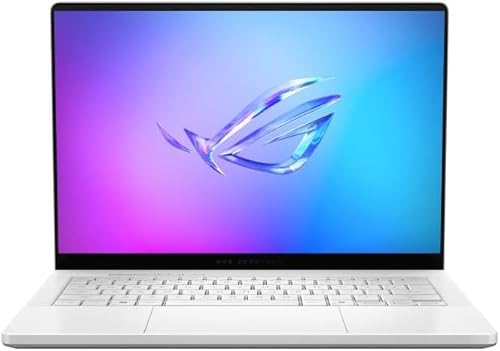
2. ASUS ROG Zephyrus G14 — Best power-to-weight for touring
The Zephyrus G14 answers the touring question directly: how much performance can live in a 14-inch chassis before the gig bag files a complaint? Its specification is the most muscular per inch in this group — an AMD Ryzen AI 9 HX 370, an RTX 5080 graphics card, 32GB of memory, and a 2TB SSD, behind a 14-inch 3K OLED display refreshing at 120Hz. That combination is a production studio, a visuals machine, and a gaming rig compressed into the footprint a DJ actually carries, finished in Platinum White that stands out in a booth full of black equipment.
Production headroom is the headline. Thirty-two gigabytes of memory lets sample libraries and plugin chains sprawl; two terabytes swallows years of projects, stems, and recorded sets; the RTX 5080 turns the same laptop toward real-time visuals and fast video exports between shows. The OLED panel’s contrast keeps library browsing and waveform detail legible under club lighting, where a dim screen becomes a genuine performance risk. Copilot+ branding signals the AI-accelerated Windows tier, relevant where stem-separation and noise tools lean on local acceleration.
Thermals are the question every compact powerhouse must answer nightly, and the G14’s gaming lineage means its cooling was designed for sustained loads rather than office bursts — a set lasting four hours at high CPU is a gaming session’s twin. The honest cautions are class-typical: fans will be audible in a quiet studio during tracking, so microphone placement and machine placement deserve thought, and the RTX-tier specification prices this as a flagship rather than a bargain. For the touring producer who refuses to choose between the studio machine and the stage machine, the G14 is the consolidation candidate.
Strengths
- RTX 5080 with 32GB memory and 2TB SSD leads the group’s raw specification.
- 3K OLED 120Hz display stays legible and fluid in dark venues.
- 14-inch format preserves gig-bag portability despite flagship power.
Trade-offs
- Fan noise under load requires placement care during studio recording.
- Flagship specification carries the group’s premium positioning.
- Windows platform means macOS-only production tools are excluded.
Specification snapshot
- Processor: AMD Ryzen AI 9 HX 370
- Graphics: NVIDIA RTX 5080
- Display: 14-inch 3K OLED, 120Hz
- Memory / storage: 32GB / 2TB SSD
- DJ software included: Not stated in the listing title
Best for: touring producer-DJs consolidating studio and stage onto one machine. Not suited for: silent-room recording with the laptop beside an open microphone.
One machine for the tour, the studio, and the visuals — see the Zephyrus G14 listing to confirm the RTX 5080 build is the unit shipping.

3. Razer Blade 14 — Best slim stage machine
Razer’s Blade 14 is the performance laptop for performers who judge a machine by how it disappears into the setup. The 2025 model pairs an AMD Ryzen AI 9 365 with an RTX 5070, 32GB of DDR5 memory, and a 1TB drive, behind a 3K OLED display at 120Hz, in a black chassis the listing itself describes as thin and lightweight. Chroma RGB lighting, often dismissed as gaming decoration, has a practical booth reading: per-key colour can mark cue functions and software states in a dark environment where white backlighting tells the performer nothing.
The production case mirrors the G14’s logic with a slightly different balance. Thirty-two gigabytes of memory is the touring-producer tier, the RTX 5070 covers visuals and accelerated exports with room to spare, and the OLED panel keeps dense library text readable at arm’s length across a controller. Where the Blade differentiates is industrial design: Razer’s aluminium unibody has long been the Windows answer to Apple’s fit and finish, and a performer whose brand includes a visual aesthetic — streamed sets, photographed booths — will feel that difference in every piece of content the laptop appears in.
Considerations are the familiar flagship ones. A slim chassis concentrates its cooling challenge, so the Blade should be given air on stage — a stand that lifts it above the booth surface serves thermals and sightlines simultaneously. One terabyte is ample for the active library while the deep archive lives elsewhere. Against the Zephyrus G14, the Blade trades the RTX 5080 and 2TB drive for design polish and the Razer ecosystem; against the MacBook Pro, it trades platform integration for graphics power and memory. Performers choose between those trades with their software list open, and either answer can be the right one.
Strengths
- 32GB DDR5 and RTX 5070 deliver production and visuals headroom together.
- 3K OLED 120Hz panel suits dark-booth library and waveform work.
- Slim aluminium design photographs and presents like premium stage gear.
Trade-offs
- 1TB storage holds the active library rather than a career archive.
- Slim chassis needs airflow space during long high-load sets.
- Chroma styling may read as gaming-first in conservative corporate gigs.
Specification snapshot
- Processor: AMD Ryzen AI 9 365
- Graphics: NVIDIA RTX 5070
- Display: 3K OLED, 120Hz
- Memory / storage: 32GB DDR5 / 1TB
- Lighting: Chroma RGB, per the listing title
Best for: performers blending production power with a polished streamed-set image. Not suited for: a silent tracking room where the laptop sits within microphone range.
Style and substance in one slim slab — check the Blade 14 on Amazon for the current 2025 configuration.

4. ASUS ROG Strix G16 — Best big-screen booth presence
The Strix G16 is the extrovert of the group: a 16-inch FHD+ display at 165Hz with a 3ms response, an Intel Core i7 14650HX, an RTX 5060, 16GB of DDR5, and a 1TB Gen 4 SSD. Where the 14-inch picks optimise for the bag, the Strix optimises for the moment the lid opens — a big, fast screen that a performer can read at a glance mid-transition, with the chassis presence of a machine built for sustained gaming loads and therefore for sustained anything. Wi-Fi 7 handles venue networks and rapid set uploads, and Windows 11 Home covers the mainstream DJ and production software world.
Production duties split the Strix’s personality. The HX-class processor is a desktop-leaning chip that chews through plugin chains and exports, while 16GB of memory marks the configuration as a strong live-and-mid-size-project machine rather than the group’s sample-library champion. The RTX 5060 keeps visuals and video work comfortably in scope. In the booth, that big panel earns its keep: two decks, effects, and library visible without the squint-and-scroll that smaller screens impose during the busiest passages of a set.
The bill arrives in weight and appetite. A 16-inch gaming chassis is the heaviest carry in this round-up, and its power draw expects a mains connection at the venue rather than a battery-powered fantasy. DJs with a fixed residency, a vehicle, or a booth that stays assembled will absorb those costs without noticing; fly-date performers counting grams will look at the G14 first. The Strix is best understood as the stage-and-studio anchor for performers whose travel is measured in load-ins, not airport sprints — and in that role its screen and cooling headroom are genuinely luxurious.
Strengths
- 16-inch 165Hz panel gives the clearest at-a-glance booth readability here.
- HX-class Intel processor sustains heavy plugin and export loads.
- Wi-Fi 7 and Gen 4 SSD keep transfers and loads brisk.
Trade-offs
- 16GB memory trails the 32GB production tier in this group.
- Large gaming chassis is the group’s heaviest travel commitment.
- Windows 11 Home rather than Pro edition.
Specification snapshot
- Processor: Intel Core i7 14650HX
- Graphics: NVIDIA RTX 5060
- Display: 16-inch FHD+ 16:10, 165Hz
- Memory / storage: 16GB DDR5 / 1TB Gen 4 SSD
- DJ software included: Not stated in the listing title
Best for: resident DJs and studio anchors with a fixed booth or vehicle-based travel. Not suited for: fly-date sets where the whole rig must fit a strict cabin-bag allowance.
Residency rigs deserve a screen this commanding — view the Strix G16 on Amazon and check the RTX 5060 build details.

5. ASUS ROG Zephyrus G16 — Best display for long sets
If the Strix is presence, the Zephyrus G16 is endurance with elegance: a 16-inch 2.5K OLED display refreshing at 240Hz, an Intel Ultra 9 285H, an RTX 5070 at full TGP per the listing’s phrasing, 16GB of LPDDR5X memory, and a 1TB PCIe 4.0 SSD, in a chassis the title itself calls bag-ready. That display specification is the finest in this round-up for long-set comfort — OLED contrast for dark rooms, 240Hz motion for butter-smooth waveform scrolling, and 16 inches of room for decks, library, and effects to coexist without tab-hopping.
The production profile balances toward speed and screen rather than maximum memory. Sixteen gigabytes of LPDDR5X handles live performance and mid-weight production confidently; the Ultra 9 processor and RTX 5070 accelerate exports, stems work, and visuals. Wi-Fi 7 keeps the machine current for venue networks and cloud collaboration with remix partners. ASUS positions the G16 as an all-around machine for study, gaming, and business in its title, and that breadth translates honestly to the DJ context: this is the laptop that also handles the daytime — emails, artwork, accounting — without feeling like a tank requisitioned for the night.
Against its Zephyrus sibling, the G16 trades the G14’s 32GB and 2TB abundance for the larger, faster display; against the Strix, it trades raw HX muscle for OLED refinement and portability. The decision is genuinely about which hours dominate: production marathons favour memory, performance marathons favour this screen. Long-set performers — open-to-close DJs, wedding and corporate players running five-hour programmes — will feel the display investment in their eyes by hour four, which is exactly when mistakes happen and exactly when a great panel pays its rent.
Strengths
- 16-inch 2.5K OLED at 240Hz is the group’s finest long-set display.
- Ultra 9 285H with RTX 5070 covers production and visuals capably.
- Bag-ready positioning keeps a 16-inch machine realistically portable.
Trade-offs
- 16GB memory sits below the 32GB sample-heavy production tier.
- OLED care habits apply during static-screen studio use.
- 1TB storage assumes the deep archive lives on external or cloud drives.
Specification snapshot
- Processor: Intel Ultra 9 285H
- Graphics: RTX 5070 (TGP configuration as titled)
- Display: 16-inch 2.5K OLED, 240Hz
- Memory / storage: 16GB LPDDR5X / 1TB PCIe 4.0 SSD
- Wireless: Wi-Fi 7
Best for: long-set performers reading waveforms for hours in dark venues. Not suited for: sample-library production built around dozens of simultaneous large instruments on 16GB.
Marathon sets deserve marathon-grade screens — check the Zephyrus G16 listing for the OLED configuration’s availability.

6. ASUS TUF Gaming A14 — Best value performance route
The TUF A14 closes the list with the group’s most pragmatic proposition: a 14-inch WQXGA display at 165Hz, an AMD Ryzen AI 9 HX 370, an RTX 4060, 16GB of LPDDR5X memory, and a 1TB PCIe Gen 4 SSD, wrapped in ASUS’s durability-branded TUF line and sold at the accessible end of this performance class. Nothing in that specification embarrasses a DJ or a producer. The processor is the same family that powers the flagship G14, the screen is fast and sharp, and the RTX 4060 covers visuals, streaming, and accelerated exports for the working performer who is not rendering cinema on the side.
TUF’s brand promise — military-flavoured durability — translates into a sensible gig argument even without quoting test standards the title does not state: this line is built and marketed for rougher handling than the premium thin machines, and life in and out of gig bags is rough handling by definition. Wi-Fi 6E, rather than Wi-Fi 7, is the visible specification step down, and Windows 11 (edition unstated beyond the title’s plain wording) runs the mainstream performance software world. Copilot+ PC branding places it in the current AI-accelerated tier for the stem and cleanup tools that increasingly lean on local processing.
The A14’s role in a career is often the smart one: the machine bought with real money by a working DJ whose fees are still growing, powerful enough for tonight’s set and this month’s productions, priced so the rest of the rig — controller, interface, headphones, music — gets funded too. Its 16GB memory and RTX 4060 set ceilings that heavy producers will eventually meet, and meeting them in year three, with revenue behind the upgrade, is a better plan than overbuying in year one. As the entry point to this performance class, the TUF A14 is the pick that respects the whole budget.
Strengths
- Ryzen AI 9 HX 370 matches the flagship G14’s processor family.
- 165Hz WQXGA display keeps booth reading fast and sharp.
- TUF durability positioning suits life in gig bags.
Trade-offs
- RTX 4060 sits a tier below the group’s visuals-heavy picks.
- Wi-Fi 6E rather than the Wi-Fi 7 of the Strix and Zephyrus G16.
- 16GB memory caps the largest simultaneous sample-library sessions.
Specification snapshot
- Processor: AMD Ryzen AI 9 HX 370
- Graphics: NVIDIA RTX 4060
- Display: 14-inch WQXGA 16:10, 165Hz
- Memory / storage: 16GB LPDDR5X / 1TB PCIe Gen 4 SSD
- Wireless: Wi-Fi 6E
Best for: working DJs funding a complete rig, not just a flagship laptop. Not suited for: maximum-tier visuals rendering alongside the largest production sessions.
Smart money for a growing rig starts here — see the TUF A14 on Amazon to weigh it against tonight’s controller budget.
What the extra power actually buys inside a production session
Performance specifications become honest when they are translated into session behaviour. A modern production session taxes a laptop in layers: the DAW’s mixer and timeline are light; the virtual instruments are the appetite; the effects chains on buses are the compounding interest; and the mastering chain on the stereo output is the final exam every bounce must pass in real time during playback. The 32GB machines — Zephyrus G14 and Razer Blade 14 — let a producer keep large sampled instruments loaded simultaneously, which changes the creative process itself: arrangements can be auditioned whole rather than committed in pieces, and happy accidents survive because nothing had to be frozen to make room. The 16GB machines remain entirely professional instruments, but their owners develop the freezing-and-committing discipline earlier, which some producers honestly prefer for the decisiveness it forces.
Graphics power has a production meaning beyond gaming that deserves plain statement. Video is now a native layer of music releases — visualisers, live-streamed sets, lyric videos, social cuts — and the RTX cards in the Windows picks accelerate the editing and export of that material on the same machine that made the track. GPU-accelerated audio tools are a growing second use, with some noise-reduction and separation processes leaning on the graphics hardware. The MacBook Pro counters with its unified architecture, where the M5’s integrated GPU shares the memory pool and handles video work with an efficiency that discrete-card comparisons undersell. Either way, the era of the audio-only laptop is over; the machine that records the song will also cut its video, and buying graphics headroom is buying release-schedule insurance.
Exports and bounces are where processor class sends its invoice or its dividend. A long mix bouncing with oversampled mastering plugins, a stems package for a remix competition, a live set being rendered for a radio mix — these are minutes-scale tasks that recur weekly, and the HX and Ultra 9 class chips in the Strix and Zephyrus G16, the Ryzen AI 9 pair in the G14 and TUF, and Apple’s M5 all treat them as routine. The working rule is unglamorous: buy the processor for the bounce you run every week, the memory for the session you open every day, and the screen for the set you play every weekend. The six picks distribute those three currencies differently, and the right portfolio is the one matching your own calendar.
Latency, buffers, and the audio path nobody photographs
Ask a guitarist what matters in a live laptop and they will talk about tone; ask a DJ and the honest answer is latency — the delay between an action and its sound. A controller jog wheel nudged a fraction late, a cue button that answers after the moment has passed, a vocal sample that lands behind the beat: these are the sensations that make a powerful machine feel broken. Latency is governed less by raw processor speed than by the whole audio path — the operating system’s audio architecture, the interface and its drivers, the buffer size the software is asked to run, and the headroom left after effects and stems take their share. That is why this guide keeps returning to headroom as the central specification: a machine loafing at half capacity can run a small buffer serenely, while a machine at its ceiling must choose between a larger, laggier buffer and the crackle of a buffer underrun.
The practical setup ritual follows from that physics. Performers should tune their performance software on the exact machine, at home, at gig volume, with the full effects chain engaged — not with a demo project on a quiet afternoon. Buffer settings that survive that rehearsal are the settings that travel. Background discipline matters as much: cloud sync, operating-system updates, and antivirus scans should be scheduled away from performance hours, because a machine that decides to index its drive during a headline set has failed at manners, not mathematics. The Windows picks here span Home and Pro editions and the MacBook Pro offers Apple’s tightly integrated audio stack; both worlds reward the same professionalism, and both punish the performer who treats a stage laptop like a general-purpose family computer. DJs who also manage their own bookings, contracts, and release paperwork will recognise the crossover with the confidentiality-minded setups in best laptops and 2 1s for lawyers — different profession, same lesson that a work machine earns trust through discipline around the hardware, not hardware alone.
Storage speed hides inside the latency story too. Modern performance workflows load stems, loops, and samples on demand, and the fast internal drives across this list — Gen 4 SSDs, Apple’s integrated storage, the G14’s 2TB capacity — keep those loads from becoming audible pauses. An external drive dangling from a USB hub in a vibrating booth is a failure mode with a cable, which is why internal capacity earned its weight in the selection. Buy the drive size that keeps the working library inside the machine, and let external storage do the job it is good at: backups, archives, and the safety net nobody hears until the night it saves the show.
Comparison table: stage and studio priorities
| Model | Screen | Memory | Storage | Graphics |
|---|---|---|---|---|
| Apple MacBook Pro 14 M5 | 14.2-inch Liquid Retina XDR | 16GB | 1TB SSD | M5 10-core GPU |
| ASUS ROG Zephyrus G14 | 14-inch 3K OLED 120Hz | 32GB | 2TB SSD | RTX 5080 |
| Razer Blade 14 | 3K OLED 120Hz | 32GB | 1TB | RTX 5070 |
| ASUS ROG Strix G16 | 16-inch FHD+ 165Hz | 16GB | 1TB Gen 4 SSD | RTX 5060 |
| ASUS ROG Zephyrus G16 | 16-inch 2.5K OLED 240Hz | 16GB | 1TB PCIe 4.0 SSD | RTX 5070 |
| ASUS TUF Gaming A14 | 14-inch WQXGA 165Hz | 16GB | 1TB Gen 4 SSD | RTX 4060 |
How should a DJ-producer choose between these machines?
Let the software list vote first. A performer committed to a macOS-centred studio has one answer here, and it is a good one; a performer whose plugins, visuals tools, or performance applications are Windows-based should strike the MacBook Pro without regret and argue among the five remaining on merit. Platform loyalty debates waste the hours that should go into the real questions: how large are your sessions, how heavy is your bag, and how long are your sets?
Session size decides memory. Live performance alone — decks, effects, a library — runs comfortably on 16GB in modern software. Production with layered virtual instruments and sample libraries is where 32GB stops being luxury and becomes workflow, because the alternative is freezing and committing tracks as a daily ritual. Storage follows the library: a terabyte holds an active collection and current projects; the G14’s two terabytes hold a career’s working archive, which matters to performers who record every set. Screen size is a venue question disguised as a specification: booth shelves, airline trays, and residency desks each impose their own geometry, and the 14-versus-16 decision should be made with a tape measure of your actual spaces, not with a showroom impression.
Finally, budget the rig as a system. The laptop is the brain, but the audience hears the controller, the interface, and the headphones; a flagship laptop starving the rest of the chain is worse than the TUF A14 inside a complete, balanced rig. DJs building the wider creative workstation can borrow the desk logic from best laptops for digital marketing and pr, where docking and presentation polish receive the same unsentimental treatment.
One more test belongs in every performer’s process: the borrowed-booth drill. Set the new machine up on an unfamiliar table, with house power and house lighting, and run twenty minutes of the set from cold. The drill exposes the missing adapter, the too-short cable, the screen angle that fights the booth shelf — every small betrayal that a home studio’s familiar geometry conceals. Professionals rehearse the room as faithfully as the music, and a laptop that passes the drill in three different venues has effectively been certified by the only authority the audience recognises: a night where nothing went wrong.
Soundcheck thinking: how we evaluated these machines as instruments
Our evaluation treats the laptop the way a sound engineer treats a new mixer — by the failures it must never produce. We imagine the worst ten seconds of a performer’s year: the headline set, the room full, the software asked to load a new track, apply effects, and record the set simultaneously while the booth temperature climbs. Machines earn trust by the headroom they hold in reserve for that moment, which is why this guide weighs memory ceilings and cooling design more heavily than burst benchmarks. A laptop that is merely fast enough on a cool desk in March is a liability in an August festival booth.
The studio half of the test inverts the values. Silence matters, because the same machine sits near microphones; screen quality matters, because arrangement timelines are read for hours; and the graphics card stops being a gaming statistic and becomes export speed for the video content every release now requires. Across both halves, one habit separates professionals from gamblers: the backup ritual. Every pick here should be paired with a mirrored library on external storage and a rehearsed fallback — a second machine, a USB of essentials, a set that can survive the laptop’s worst night. Hardware this capable deserves a professional process around it, and the performers who build that process stop fearing the technology and start using it.
The booth environment: heat, darkness, and other honest enemies
Specification sheets are written in climate-controlled optimism, but DJ booths are not. A booth concentrates body heat, lighting rigs, and other equipment into a small volume, and a laptop performing there breathes warm air for hours. Cooling design — the gaming inheritance of the five Windows picks — stops being a gaming trait in that environment and becomes the core reliability feature. Placement is the performer’s contribution: a stand that lifts the machine, vents kept clear of set lists and drink coasters, and a booth layout that never parks a fog machine’s output or a lighting fixture’s exhaust across the laptop’s intake. The MacBook Pro’s efficient platform generates less heat to begin with, one of the quieter reasons for its stage ubiquity, while the HX-powered Strix should be granted the most generous airflow of the six as the price of its muscle.
Darkness is the second environmental fact. Library text, cue markers, and waveform detail must be readable at a glance without the screen becoming a lantern that blinds the performer to the room. OLED panels excel here, rendering deep blacks that keep the display present but not glaring, and the high-refresh screens on the Zephyrus pair, Blade, Strix, and TUF keep scrolling libraries smooth during fast searches. Keyboard backlighting, RGB on the Blade included, serves the same glanceability for controls. Performers should build their software’s colour scheme around the venue reality — high-contrast waveforms, large library fonts for request moments — because the finest panel cannot rescue an interface theme designed for a bright office.
The third enemy is logistics: power, cables, and time. A performance laptop should arrive at the venue with its own charger, a spare cable for the interface, and enough battery to survive the soundcheck shuffle between outlets. Fast, standardised connections matter when the setup window is twenty minutes and the previous act is still clearing the booth. Every machine here supports the modern USB-C-centred cable world to varying degrees stated in their listings, and the performer’s job is to standardise their own bag around the chosen machine — labelled cables, a small hub that is always packed, adapters bought in pairs. Reliability on stage is rarely a miracle of hardware; it is the compound interest of a hundred small preparations, and the laptop is simply the largest of them.
Common mistakes DJs and producers make buying a laptop
Buying for the studio and forgetting the booth is the founding error: a magnificent 16-inch production anchor that cannot fit the venue’s shelf, or a featherweight that throttles during the headline set. The second mistake is pricing the laptop alone and starving the interface and controller budget, when the audience hears the whole chain. Third, performers assume DJ software or production suites are bundled because a listing photographs the machine running them; none of these titles claims bundled DJ software, and licences belong in the budget as their own line.
Fourth comes library blindness — discovering that the sample collection and recorded sets outgrew the internal drive two tours from now, when the fix involves either an external disk in the booth or a painful migration. Fifth, buyers ignore the thermal reality of their venues, placing a performance laptop on a closed, carpeted booth shelf and acting surprised by August. Sixth, and most quietly, producers skip the rehearsal: the new machine goes straight to a paid set without a full practice run at home, drivers and updates untested under load. Every one of these mistakes is cheap to avoid and expensive to learn in front of an audience.
Upgrade timing deserves the same unsentimental treatment as the specifications. Performance laptops hold their relevance for live work longer than for production, because DJ software’s demands grow gently while production plugins feast on every new processor generation. A sensible pattern is to cascade: the new flagship takes over production, the previous machine becomes the dedicated stage laptop with a frozen, proven software environment, and the oldest unit retires to backup duty carrying a mirrored library. That cascade converts a single purchase into a three-machine reliability system across two buying cycles, and it explains why resale value and platform stability — the MacBook Pro’s traditional strengths, the ROG line’s growing ecosystem — belong in a working performer’s arithmetic alongside the headline specifications.
Touring logistics: cases, spares, and the geography of a gig bag
Professional touring turns a laptop from a product into cargo, and cargo obeys different rules. The bag is the first specification: a padded compartment sized to the machine, a separate bay for the interface and controller so metal never grinds against the lid, and cable management that lets a performer set up in the dark by touch. The 14-inch picks — MacBook Pro, Zephyrus G14, Blade 14, TUF A14 — share a footprint class that standard gig bags are built around, while the 16-inch Strix and Zephyrus G16 demand a bag chosen for them specifically. Weight compounds across a travel day in a way showroom handling never reveals: the difference between the slim picks and the Strix is the difference between a bag that is carried and a bag that is endured.
Spares philosophy separates touring professionals from hopefuls. The charger is a single point of failure and the cheapest one to duplicate; a second charger living permanently in the gig bag ends the classic disaster of the charger left in yesterday’s hotel. Cables duplicate the same way. The library’s backup, discussed earlier, is the third leg, and the fourth is knowledge: serial numbers photographed, warranty details in the same cloud folder as the project files, and a local repair contact for the cities played most often. None of the six listings can sell a performer that discipline, but the machines differ in how gracefully they accept it — standard ports, current wireless, and mainstream platforms all widen the network of places where help, parts, and loaner equipment can be found at short notice.
Insurance and value complete the logistics picture, and here the premium picks argue for themselves in an unexpected dialect: the MacBook Pro and Blade hold resale and replacement ecosystems that make a loss recoverable in days, while the TUF’s lower price makes its loss survivable without paperwork heroics. A touring act should decide in advance which dialect it speaks — insure the flagship properly, or price the workhorse so its replacement is a shrug — and then stop revisiting the decision at every purchase. The laptop is a tool of the trade, and trades run best when the tool policy is boring, written down, and settled before the tour bus leaves.
Final recommendation
Production-first performers inside Apple’s world should take the MacBook Pro 14 M5 and build the rig around its calm reliability. Windows-based touring producers get the most complete single machine in the Zephyrus G14 — 32GB, 2TB, RTX 5080, OLED — while the Razer Blade 14 serves performers who weigh design alongside power. Resident and big-screen DJs split between the Strix G16’s presence and the Zephyrus G16’s superior display, and working DJs funding a whole rig should start with the TUF A14’s honest value. Whichever name wins, rehearse the full set on it before the first paid night; the dancefloor is a wonderful audience and a merciless reviewer.
The second career of a DJ laptop: streaming, teaching, and content
Few working DJs now earn from the booth alone. The same laptop that plays Saturday night streams a Tuesday production session, records a sample pack for sale, teaches a video course, and edits the clips that keep the booking diary full. That second career reshapes the buying logic in ways a pure performance guide would miss. Streaming rewards the graphics cards in this list twice over — hardware encoding for the broadcast and the game or visuals being captured — which flatters the Zephyrus and Blade machines. It rewards screen quality too, since the performer reads chat, decks, and production software across one panel for hours. And it rewards the MacBook Pro’s camera-and-microphone ecosystem reputation among creators who record themselves daily, even though the serious streamers in any camp eventually add external cameras and interfaces.
Teaching and sample work pull in the opposite direction — toward silence, stability, and storage. A recorded tutorial captures fan noise faithfully, so the efficient platforms and the ability to run production loads at partial throttle become content-quality features. Sample packs and project files accumulate into a sellable archive whose value grows with the internal drive that holds it, strengthening the G14’s 2TB argument for producer-creators. The through-line is that a DJ laptop in this decade is a small media company in a clamshell, and its specification should be read against the whole business: the set, the stream, the store, and the studio. Performers early in that expansion should buy the machine that covers the two revenue streams they actually have, with memory headroom for the third they are building; performers already running all four will recognise themselves in the flagship tier and should buy it without apology, because their laptop is not an expense category — it is the premises.
Building the rest of the rig around the laptop
A laptop purchase made in isolation produces a familiar tragedy: a flagship machine connected to a bargain interface, monitored through tired headphones, carrying a library with no backup. The rig deserves planning as one organism. The audio interface is the laptop’s voice, and its driver quality decides whether the machine’s headroom translates into clean, low-latency sound; performers should choose interfaces with a reputation for stable drivers on their chosen platform, and keep firmware and drivers frozen during tour stretches rather than updated on show days. The controller is the hands, and its mapping should be rehearsed until the performer can run the set’s critical moves without looking down — a discipline that also reveals whether the laptop’s screen placement and size genuinely work in the booth geometry.
Headphones are the ears and the insurance policy: cueing in a loud room demands isolation and volume headroom that fashion headphones rarely provide, and a spare pair in the bag has saved more sets than any processor upgrade. Storage completes the organism — the library mirrored to an external drive that travels separately from the laptop, a cloud copy for the truly irreplaceable project files, and a USB stick with the night’s essential set that can play on house equipment if everything else fails. Power protection travels too: a compact surge strip between venue power and the rig is cheap insurance against the electrical surprises of older buildings and festival generators.
None of this diminishes the laptop’s centrality; it clarifies the budget conversation that the Quick Picks began. The TUF A14 exists so the interface need not be the cheapest one. The Zephyrus G14 exists for the performer whose rig is already complete and whose laptop was the remaining ceiling. The MacBook Pro exists for the studio whose whole organism already speaks Apple’s language. Buy the organism, rehearse the organism, and the individual specifications in this guide will take care of themselves — which is, in the end, what every performer actually wants from the equipment: to forget it entirely while the room is moving.
Frequently asked questions
Is 16GB of memory enough for DJ software and production?
For live DJ performance and moderate production sessions, yes — modern performance software is efficient. Large sample libraries and dense plugin chains are the workload that justifies the 32GB Zephyrus G14 and Razer Blade 14.
Do any of these laptops include Serato or rekordbox?
No bundled DJ software is claimed in any listing title here, so licences and subscriptions should be budgeted separately. Controllers and interfaces are likewise separate purchases that complete the rig.
Mac or Windows for a working DJ?
Both platforms run the major DJ and production applications. Choose by your existing plugin library, your studio collaborators’ platform, and the rest of your rig — the ecosystem you already own is the strongest argument.
Why do gaming laptops dominate a music list?
Sustained processor performance, serious cooling, fast screens, and strong graphics are exactly what production and live work demand. These models are framed here as performance machines; their gaming branding is incidental to the audio case.
What else should the budget include besides the laptop?
A controller, an audio interface, headphones, backup storage for the library, and software licences. The laptop is the centre of the rig, not the whole rig, and the TUF A14 exists in this list partly to leave room for the rest.
How should a DJ prepare a new laptop before its first paid set?
Install and license every application at home, load the full library, tune buffer settings under a rehearsal set at performance volume, disable automatic updates during show hours, and run one complete practice set with recording engaged. A machine that has survived a full rehearsal has earned its debut; a machine that goes straight from the delivery box to the booth is a gamble dressed as a schedule.
Keep the performance machine boring between shows: updates on a weekday, new plugins auditioned in the studio first, and a change log in the same folder as the set lists. The performers with the fewest stage disasters are rarely the ones with the fastest laptops; they are the ones whose laptops change the least between soundcheck and showtime.
Treat the first month as a probation the machine must pass in public: small rooms before big ones, rehearsal recordings reviewed, thermal behaviour noted. Trust, in performance gear, is not bought — it is accumulated set by set.
Document the winning configuration — buffer size, driver versions, power plan — in a note taped inside the gig bag’s lid. Memory fades between tours; the note remembers what the rehearsals proved, and a substitute performer or a borrowed pair of hands can rebuild the setup from it in minutes.
The crowd will never know which processor carried the night, and that is the point — choose the machine whose headroom lets the music be the only thing anyone remembers.


