What's inside
- Key Takeaways
- Quick Picks
- How did we choose cards for a two-speed camera?
- How should the two slots be assigned in practice?
- How does each shortlisted card suit the X-Pro2, pick by pick?
- Where do the six X-Pro2 picks differ in the comparison table?
- How should X-Pro2 cards be formatted, offloaded and rotated?
- What is the real difference between V60 and V90 in this camera?
- How does the X-Pro2’s shooting character shape card choice?
- Why does the reader belong in the same conversation as the card?
- Which buying errors catch X-Pro2 users out most often?
- How long should a UHS-II card serve before it is rotated out?
- Final Recommendation
- Frequently Asked Questions
- Related Guides
As an Amazon Associate I earn from qualifying purchases. This post may contain affiliate links at no extra cost to you.
gizmoverdict.com is reader-supported. When you buy through links on our site, we may earn an affiliate commission.
Where to buy: All six cards below are linked from the Quick Picks table and from each detailed review, so you can check price on Amazon once you have decided how your two slots will be assigned. Every pick is a 128GB UHS-II card, and several share the Lexar name, so match the full listing title and capacity against the review heading before ordering.
The best sd cards for x pro2 begin with the most interesting slot arrangement Fujifilm ever shipped in this line: slot 1 speaks UHS-II, slot 2 speaks UHS-I, and the camera treats them very differently. A UHS-II card in slot 1 runs at full UHS-II pace, clearing the X-Pro2’s raw bursts with an urgency the earlier X-Pro1 never knew. The same card in slot 2 is throttled to UHS-I speed, its second row of contacts ignored. That asymmetry is the whole strategy of this guide. The fast card belongs in slot 1; slot 2 is for overflow, for JPEG separation, or for a backup copy written at whatever pace the slower bus allows.
All six picks are therefore UHS-II cards, bought for slot 1 first. Their titles state read speeds from 250MB/s to 300MB/s and video classes of V60 or V90, figures far beyond the X-Pro2’s 1080p video and generous even beside its 24-megapixel raw bursts. The excess is not pointless. UHS-II pace shortens the two waits a working photographer actually feels: the buffer clearing during a burst sequence, and the offload of a full card through a UHS-II reader at the end of the day. Where a title omits a figure — one pick states no read speed, another states no class — the spec box records the gap and points to the maker’s documentation rather than borrowing a sibling’s numbers.
One discipline runs through every review below: a figure belongs to the exact listing that prints it. Three of these cards are Lexar products with overlapping names and different credentials, and the differences between them are the substance of the shortlist. Read the titles as contracts and the ranking largely writes itself.
Key Takeaways
- Slot 1 of the X-Pro2 is UHS-II and slot 2 is UHS-I, so a UHS-II card only earns its premium in slot 1; in slot 2 it runs at UHS-I speed.
- All six picks are 128GB UHS-II cards, dividing into V90 flagships and V60 cards whose guarantees already exceed this camera’s demands.
- The Kingston Canvas React Plus is the only title here stating a write figure: 280MB/s read and 100MB/s write, printed as 280R/100W.
- Lexar’s 2000x card pairs the joint-fastest read figure, 300MB/s, with a V90 class; SanDisk’s Extreme PRO matches the 300MB/s read but prints no class.
- ProGrade’s V60 Gold states its class and nothing else, leaving its read speed to documentation.
- Uniform 128GB capacities across the shortlist keep backup pairs frame-for-frame identical, which simplifies offloading, cataloguing and rotation across a long assignment season.
- For backup-mode shooting, remember the copy in slot 2 is written at UHS-I pace regardless of the card fitted there.
- Budget for a UHS-II reader alongside the first card, or the read figures in these titles will remain theoretical at your desk, however faithfully the cards themselves perform inside the camera on every assignment.
- Label every card with its purchase month and its slot role; a two-slot camera rewards an organised case and punishes a mysterious one, especially in the dark, under time pressure, with an assignment unfolding in front of the lens and no second chance to get the media decision right on the day itself.
Quick Picks
| Pick | Badge | Why it earns its place |
|---|---|---|
| Lexar 128GB 2000x SD Memory Card, 300MB/s Read, 8K, V90, U3, UHS-II | V90 flagship | The fullest title in the set: 300MB/s read, V90 and U3, aimed at slot 1 without compromise. |
| Lexar 128GB SILVER PRO SD Memory Card, 280MB/s Read, 4K, V60, U3, UHS-II | V60 all-rounder | 280MB/s read with V60 and U3 classes, the balanced slot 1 card for mixed stills work. |
| Kingston Canvas React Plus V60 SD 128GB SDXC UHS-II 280R/100W U3 V60 for Full HD/4K | Stated write figure | The only listing printing both sides of the ledger: 280MB/s read and 100MB/s write. |
| ProGrade Digital SDXC UHS-II V60 Gold Memory Card (128GB) | Class-only specialist | A V60 guarantee from a card maker built for photographers, with read speed left unstated. |
| SANDISK 128GB Extreme PRO SD Memory Card, Up to 300MB/s Read Speeds, UHS-II | Read-speed headline | A 300MB/s read claim from SanDisk’s flagship line, with no class printed beside it. |
| Lexar 128GB Professional 1667x SD Card, UHS-II, C10, U3, V60, Full HD, 4K, Up To 250MB/s Read | Established workhorse | The 1667x generation: complete classes and a 250MB/s read figure from Lexar’s Professional range. |
How did we choose cards for a two-speed camera?
The first decision was to shortlist UHS-II cards only, because slot 1 can use them and the X-Pro2’s identity as a fast, working rangefinder-style body deserves media that keeps up. A UHS-I card in slot 1 would work perfectly well and would still be the bottleneck in every burst; readers who already own good UHS-I cards lose nothing by using them in slot 2, which is precisely what that slot is for. New money, though, should buy the interface the main slot speaks.
The second decision was to read classes against this camera rather than against the market’s ceiling. The X-Pro2 records 1080p video, so even V60 certifies a sustained floor far above the camera’s movie demands, and V90 is headroom stacked on headroom. For stills, what matters is how the card behaves behind a buffer full of 24-megapixel raw files, where the UHS-II bus and the card’s write behaviour share the work. That is why the Kingston’s stated write figure earns it particular attention: it is the one number in these six titles that speaks directly to the burst experience.
The third decision was capacity uniformity. Every pick is 128GB, because at UHS-II prices the smaller sizes make little sense for a professional body, and because a uniform capacity simplifies the two-slot choreography: identical cards can rotate between slots, spares match, and a backup pair holds the same count of frames on both sides. The reviews therefore compete on credentials and character, not on size.
A fourth, quieter filter deserves recording: every card here comes from a maker with a professional media programme behind it, the kind that publishes documentation, honours warranties through identifiable channels, and keeps a model in production long enough for a working kit to standardise on it. Anonymous media can be excellent and can be counterfeit-adjacent rubbish, and a two-slot professional body is the wrong place to run that experiment. The shortlist’s conservatism about brands is deliberate, and it is the same conservatism the camera’s original buyers applied to the body itself.
How should the two slots be assigned in practice?
The camera offers the usual menu of relationships between its slots: sequential overflow, where slot 2 takes over when slot 1 fills; backup, where every frame is written to both; and split recording, where raw and JPEG, or stills and video, go to different cards. Each relationship makes a different demand. Overflow asks only that slot 2 exist. Backup asks slot 2 to accept a second copy of everything at UHS-I pace, which can temper the burst rhythm the fast slot 1 card was bought to create. Split recording asks the photographer to think in two archives at once, with video or JPEGs living on the slower card.
For most X-Pro2 work, the honest default is a fast card in slot 1 and a good card — UHS-II from this list, or a trusted UHS-I card already owned — in slot 2, running overflow for stills-led days. Switch to backup for the assignments that cannot be repeated, accepting the slower write rhythm as the price of an instant second copy. The mistake is to fit a flagship UHS-II card in slot 2 and imagine the backup is being written at flagship speed; the slot, not the card, sets that pace, and the camera’s manual is blunt about it once you look.
Rotation discipline completes the arrangement. When two cards live in one camera, label them by slot and by purchase order, and offload them as a pair, because a backup card forgotten in slot 2 for a month becomes an archive nobody catalogued. Format both cards in the camera when a new assignment begins, after the previous pair of copies is verified elsewhere. Two slots double the resilience only when the routine treats them as one system; treated as two independent hiding places, they double the confusion instead.
Split recording deserves a kind word before we leave the slots, because it suits one X-Pro2 tribe particularly well: the photographer who delivers JPEGs quickly and archives raw files slowly. Fujifilm’s JPEG output is famously finished straight from the camera, so sending JPEGs to slot 2 and raw files to slot 1 creates a natural fast lane and slow lane in a single body — the slot 2 card can be handed over, copied to a phone, or delivered at the venue, while the raw archive waits for the studio. In that workflow the second slot’s UHS-I pace stops mattering entirely, because the files it carries are small and the card’s job is transport, not throughput.
How does each shortlisted card suit the X-Pro2, pick by pick?

Lexar 128GB 2000x SD Memory Card, 300MB/s Read, 8K, V90, U3, UHS-II — V90 flagship
The 2000x is the card this shortlist would hand to slot 1 without a second thought, because its title leaves nothing important unsaid: 300MB/s read, V90, U3, UHS-II, 128GB. V90 certifies a 90MB/s sustained write floor, the highest video class in the SD system, which for the X-Pro2 means the card’s worst sustained moment still dwarfs the camera’s 1080p demands and keeps burst backlogs draining at the bus’s pace rather than the card’s. The 8K label is pure surplus for this body, yet surplus in a certified floor is the definition of margin.
The read figure earns its keep after the shoot. A UHS-II reader paired with a 300MB/s card turns a full 128GB offload into a short, supervised task instead of an unattended one, and working photographers feel that difference in their evenings. There is a caveat that applies to every UHS-II card here and deserves stating beside the flagship: the reader must be UHS-II as well, or the second row of contacts has nothing to talk to and the offload falls back to UHS-I pace, quietly erasing the advantage the card was bought for.
Who should pay the V90 premium when V60 already exceeds the camera? The photographer whose X-Pro2 shares a bag with a newer, hungrier body, because this card will serve both at full speed; the burst-heavy shooter who wants the buffer’s behaviour governed by the bus alone; and the professional who treats media as the cheapest insurance in the kit. For a stills-led X-Pro2 used on its own, the premium is real but optional, and the V60 cards below exist to make that choice honestly available.
One practical note on pairing: a 2000x in slot 1 and a lesser card in slot 2 is the configuration most professionals settle into, because backup mode writes the second copy at slot 2’s pace regardless, and overflow mode rarely reaches the second card at all. Spending flagship money twice buys symmetry, not speed. Spend it once, here, and let the savings fund the reader that makes this card’s read figure real at your desk.
- Capacity: 128GB
- Interface: UHS-II
- Read speed: 300MB/s, as stated in the listing title
- Speed classes: V90 and U3, as stated in the listing title
- Write speed beyond the V90 floor: Not stated in the listing title — verify with Lexar documentation
Strengths
- Highest certified floor in the set, with V90 and U3 both printed in the title.
- Joint-fastest stated read speed, fully exploiting a UHS-II reader at offload.
- Credentials transfer intact to any newer UHS-II body in the same bag.
Trade-offs
- V90 headroom far exceeds anything the X-Pro2 itself can demand.
- Needs a UHS-II reader before the read advantage can be collected.
- Flagship tier pricing buys margin that stills-led owners may never feel.
Best for: a working photographer seeking the strongest certified slot 1 card for bursts today and faster bodies tomorrow. Not suited for: a deliberate, single-body X-Pro2 shooter whose pace never troubles a V60 floor.

Lexar 128GB SILVER PRO SD Memory Card, 280MB/s Read, 4K, V60, U3, UHS-II — V60 all-rounder
The SILVER PRO is the balanced answer to the flagship’s excess: 280MB/s read, V60 and U3 classes, UHS-II interface, 128GB. The V60 floor, a guaranteed 60MB/s sustained write, remains several times the X-Pro2’s video requirement and ample behind its raw bursts, while the read figure sits close enough to the flagship’s 300MB/s that offload evenings feel much the same. In slot 1, this card gives the camera everything the camera can actually use, and the money saved against V90 can fund the second card that slot 2 deserves.
That pairing logic is this pick’s real argument. An X-Pro2 kit built on two SILVER PROs — one per slot, or one fitted and one spare — covers backup mode, overflow and rotation with matched capacities and known credentials, for a total outlay in the region of one flagship plus a lesser card. Matched pairs simplify everything downstream: same behaviour in either slot, same frame counts, no mental footnote about which card is the slow one. Photographers who think in systems rather than in single purchases will find this the most coherent buy in the guide.
The 4K label, like the flagship’s 8K, overshoots a 1080p camera, and the review treats it as margin rather than as a feature. What is not margin is the completeness of the title itself: read speed and both classes printed together is the fullest evidence a listing can offer short of a stated write figure, and only the Kingston in this set adds that. On evidence per word of title, the SILVER PRO is exemplary.
It is also the card most likely to be bought twice in this guide, and that repetition is a feature. Two identical cards remove a whole category of small errors: no wondering which card is faster, no mismatched frame counts between slots, no spare that behaves differently from the main card on the one day it is promoted. Standardisation is an unglamorous virtue, and in media, unglamorous virtues are the ones still standing at the end of a long assignment.
- Capacity: 128GB
- Interface: UHS-II
- Read speed: 280MB/s, as stated in the listing title
- Speed classes: V60 and U3, as stated in the listing title
- Write speed beyond the V60 floor: Not stated in the listing title — verify with Lexar documentation
Strengths
- Complete printed credentials: strong read figure plus V60 and U3 classes.
- V60 floor already exceeds the X-Pro2’s video and burst demands with room to spare.
- Price positioning makes a matched two-card kit realistic.
Trade-offs
- Read figure trails the flagship pair by a small margin on paper.
- Sustained write beyond the class floor is a documentation question.
- Shares a crowded Lexar naming scheme; the full title must be matched at purchase.
Best for: a system-minded X-Pro2 owner seeking a matched pair of fully credentialed cards for both slots. Not suited for: a specification maximalist who wants the highest certified floor regardless of the camera’s ceiling.

Kingston Canvas React Plus V60 SD 128GB SDXC UHS-II 280R/100W U3 V60 for Full HD/4K — Stated write figure
Kingston’s title contains the rarest sentence in this guide: a write speed. The 280R/100W notation promises up to 280MB/s reading and 100MB/s writing, and that second figure speaks directly to the experience X-Pro2 owners actually buy UHS-II for — the buffer emptying after a burst, the camera feeling ready again. Read figures describe the desk; write figures describe the shoot. On the evidence of titles alone, this is the only card whose shooting pace can be discussed in numbers rather than inferred from a class floor.
The classes agree with the story: U3 and V60 are printed alongside, so the card offers both a certified 60MB/s sustained floor and a stated 100MB/s write ceiling. The gap between floor and ceiling is where real shooting lives, and having both ends of the range published is a small model of how every listing in this category ought to read. For the X-Pro2, whose bursts are the main event and whose video is modest, this combination is arguably the most relevant specification set of the six, flagship V90 included.
Context matters before crowning it. A stated write ceiling is still a ceiling, reached under test conditions, and the V60 floor remains the figure to trust for sustained work. The card also sits in Kingston’s React Plus family across several formats, so the SDXC full-size variant named here must be matched exactly at the listing. With those cautions recorded, this is the pick for the photographer who reads specifications the way this guide does: floors for guarantees, ceilings for expectations, and both in print before money moves.
Shooters coming from Kingston’s microSD ecosystem in drones or action cameras will recognise the React Plus name, and that familiarity is earned rather than accidental: the line is Kingston’s answer to sustained-write work across formats. In this full-size SDXC form it is the most completely argued listing of the six, and in slot 1 of an X-Pro2 it is the card whose behaviour can be predicted most closely from its own paperwork — a quality that professionals, who plan around their media, value beyond any single number.
- Capacity: 128GB
- Interface: UHS-II, SDXC format
- Read speed: 280MB/s, as stated in the listing title (280R)
- Write speed: 100MB/s, as stated in the listing title (100W)
- Speed classes: U3 and V60, as stated in the listing title
Strengths
- Only title in the set stating a write figure alongside its read figure.
- Certified V60 floor and stated write ceiling bracket the real performance range.
- Specification profile maps directly onto the X-Pro2’s burst-led workload.
Trade-offs
- The 100MB/s write is a ceiling under test conditions, not a sustained promise.
- React Plus naming spans other formats; the full-size SDXC variant must be confirmed.
- V90 rivals offer a higher certified floor for sustained video in faster cameras.
Best for: a burst-led X-Pro2 photographer seeking a stated write figure to judge slot 1 performance by. Not suited for: a buyer seeking the absolute highest certified class for a future 8K-capable body.

ProGrade Digital SDXC UHS-II V60 Gold Memory Card (128GB) — Class-only specialist
ProGrade Digital was founded by memory executives to sell cards to working photographers, and its listing style shows a certain confidence: a format, an interface, a V60 class, a Gold tier name, a capacity — and no read speed at all. The V60 certification is the substance, guaranteeing the same 60MB/s sustained floor as the other V60 picks, which the X-Pro2 cannot trouble. Everything else a specification-led buyer wants, starting with the read figure that decides offload time, waits in ProGrade’s documentation.
That makes this the shortlist’s trust exercise, and the trust is not baseless. ProGrade’s reputation in professional circles rests on conservative ratings and on cards that behave as their classes promise, and many working photographers buy the line precisely because its numbers, where published, tend to be honest. But a guide that scores titles must score this one as it stands: a certified floor, a respected name, and a homework assignment. Readers who complete the assignment may find read figures fully competitive with the Lexar pair; the review simply cannot spend what it has not seen.
Within an X-Pro2 kit, the natural role for this card is slot 1 for a stills-led professional whose offloads happen through whatever reader the studio already owns, and whose buying loyalty follows the maker’s professional focus. It is also a credible slot 2 card in a backup pair for an owner standardising on ProGrade across bodies, with the standing reminder that slot 2 will run it at UHS-I pace whatever its credentials. Buy it for the floor and the maker, in that order, and verify the rest before the first assignment does.
Studios standardised on ProGrade across several bodies will find a workflow argument here that transcends this one title: one maker’s media, one set of behaviours, one documentation source, one warranty channel. Mixed fleets work, but they tax memory and attention, and attention is the scarcest resource on an assignment. For the X-Pro2 owner already inside that ecosystem, this card’s silent read figure is a known quantity looked up once and remembered, and the calculus of this review reverses itself accordingly.
- Capacity: 128GB
- Interface: UHS-II, SDXC format
- Speed class: V60, as stated in the listing title
- Read speed: Not stated in the listing title — verify with ProGrade Digital documentation
- Write speed beyond the V60 floor: Not stated in the listing title — verify with ProGrade Digital documentation
Strengths
- Certified V60 floor from a maker focused exclusively on photographer-grade media.
- Gold tier positioning within a professionally regarded range.
- Class guarantee covers every mode the X-Pro2 offers without strain.
Trade-offs
- No read speed in the title, leaving offload pace entirely undocumented here.
- Rivals print fuller credentials at the listing page itself.
- Documentation check is effectively compulsory before a considered purchase.
Best for: a professional seeking a V60 card from a photographer-focused maker, with documentation checked before purchase. Not suited for: a buyer deciding tonight on stated read speed, where this title offers none.
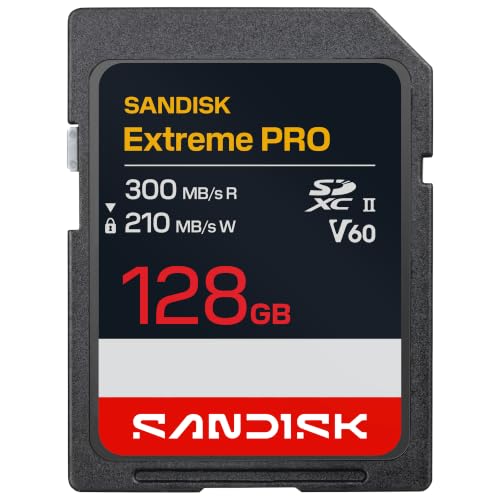
SANDISK 128GB Extreme PRO SD Memory Card, Up to 300MB/s Read Speeds, UHS-II — Read-speed headline
SanDisk’s entry leads with the joint-fastest read claim in the set — up to 300MB/s — and then stops talking. No video class, no UHS class beyond the interface itself, appears in the title. The Extreme PRO name in UHS-II form is SanDisk’s flagship offering and carries strong expectations, but expectations are not certification, and the contrast inside this very shortlist is instructive: the Lexar 2000x prints the same 300MB/s read figure and adds V90 and U3 beside it. A reader comparing titles learns more from the Lexar’s page than from this one, through no fault of the card inside the packet.
Where this pick stands tallest is the offload. If the documented figures behind the listing confirm the class performance the line is known for, a 300MB/s read through a UHS-II reader makes this the equal of the flagship at the desk, and SanDisk’s distribution makes it the easiest card here to replace, match or warranty in most parts of the world. For a travelling professional, that ecosystem is a genuine feature: a card that can be sourced identically in another city is worth more than a marginally better card that cannot.
The recommendation therefore splits by buying style. Specification-first readers should take the Lexar 2000x, whose title finishes the argument. Ecosystem-first readers, or those who verify the SanDisk’s classes in documentation and find them equal, can choose this card with a clear conscience and enjoy the same headline read pace. What neither reader should do is assume the class from the read figure; the two numbers describe different journeys, and only one of them is printed here.
There is a final, pragmatic scenario where this SanDisk is simply the right answer: the mid-trip replacement. Cards get lost, left in readers in other cities, and occasionally fail far from home, and the card that can be bought identically in almost any camera shop on earth has a value that specification tables do not capture. A travelling X-Pro2 kit built on this listing can be repaired mid-journey in a way that kits built on rarer listings cannot, and for photographers whose work happens far from their desk, that repairability is a performance figure of its own.
- Capacity: 128GB
- Interface: UHS-II
- Read speed: up to 300MB/s, as stated in the listing title
- Video speed class: Not stated in the listing title — verify with SanDisk documentation
- Write speed: Not stated in the listing title — verify with SanDisk documentation
Strengths
- Joint-fastest stated read figure, promising the quickest offloads through a UHS-II reader.
- Flagship Extreme PRO line with unmatched global availability for replacements.
- UHS-II interface fully exploits slot 1 of the X-Pro2.
Trade-offs
- No speed class is printed, so sustained performance rests on documentation.
- The Lexar flagship prints the same read figure plus V90 and U3 classes.
- Burst and video assurance must be established before an important assignment.
Best for: a travelling professional seeking flagship read pace and easy worldwide replacement for slot 1. Not suited for: a specification-first purchase where the video class must be visible on the listing itself.

Lexar 128GB Professional 1667x SD Card, UHS-II, C10, U3, V60, Full HD, 4K, Up To 250MB/s Read — Established workhorse
The 1667x is the elder generation in this shortlist, and its title is a small history of the category: a speed rating in the old “x” notation, a full spread of classes — C10, U3, V60 — and a read figure of up to 250MB/s that trails the newer cards by a step. None of that dates it out of contention. The V60 floor matches the SILVER PRO and the Kingston, the read figure remains fast in absolute terms, and a mature product line brings the quiet advantage of a long, known track record in working cameras.
For the X-Pro2 specifically, the arithmetic is kind to this card. The camera cannot spend V90, cannot record the 4K the title advertises, and clears its bursts through a bus that a V60 card feeds comfortably. The 250MB/s read figure lengthens a full-card offload modestly against the 280MB/s and 300MB/s cards, measured in minutes across a year of shoots rather than in ruined evenings. An owner choosing between this and the SILVER PRO is choosing between a proven elder at a likely gentler price and a newer card with a stronger headline, and either choice defends itself.
The 1667x also makes a thoughtful slot 2 card in a mixed kit: fit the flagship or the Kingston in slot 1, let this complete-credential card handle overflow or the backup copy at UHS-I pace, and the pair covers both speed and resilience without paying flagship money twice. Its full class set means that if it is ever promoted to slot 1 — a spare becoming the main card mid-trip — nothing about the camera’s behaviour needs rethinking. Versatility of that kind is a workhorse’s real specification.
Age deserves one more defence. A card design that has been in production and in professional bags for years has survived the only testing programme that cannot be simulated: time, in thousands of cameras, through millions of format cycles. Newer cards promise higher figures, and their promises are printed as clearly as this one’s; but where the figures are equal in the ways this camera can feel — the same V60 floor, a read difference measured in minutes per year — the elder card’s record is a rational thing to buy, and often the calmest purchase in the whole shortlist.
- Capacity: 128GB
- Interface: UHS-II
- Read speed: up to 250MB/s, as stated in the listing title
- Speed classes: C10, U3 and V60, as stated in the listing title
- Write speed beyond the V60 floor: Not stated in the listing title — verify with Lexar documentation
Strengths
- Complete class set printed in the title, matching the newer V60 picks.
- Long-established Professional line with a known record in working cameras.
- Equally credible in slot 1 or as the credentialed partner in slot 2.
Trade-offs
- Read figure trails the 280MB/s and 300MB/s cards in this set.
- Older generation positioning within Lexar’s own range.
- Three Lexar picks in one shortlist demand careful title matching at purchase.
Best for: a value-aware X-Pro2 owner seeking complete printed classes and a proven line for either slot. Not suited for: an offload sprinter who wants the fastest stated read figure in the set.
Where do the six X-Pro2 picks differ in the comparison table?
| Card | Read speed in title | Write figure in title | Classes in title |
|---|---|---|---|
| Lexar 2000x | 300MB/s | Not stated | V90, U3 |
| Lexar SILVER PRO | 280MB/s | Not stated | V60, U3 |
| Kingston Canvas React Plus | 280MB/s | 100MB/s | V60, U3 |
| ProGrade V60 Gold | Not stated | Not stated | V60 |
| SanDisk Extreme PRO | Up to 300MB/s | Not stated | None stated |
| Lexar Professional 1667x | Up to 250MB/s | Not stated | V60, U3, C10 |
The table sorts the shortlist into three temperaments. The credential-complete cards — the 2000x, the SILVER PRO, the Kingston and the 1667x — print enough to be judged at the page. The ProGrade prints its floor and trusts its name for the rest. The SanDisk prints its ceiling and trusts its name for the floor. Inside an X-Pro2, all six will record everything the camera produces; they differ in how fast the buffer breathes, how quickly the evening offload ends, and how much of the decision the listing itself was willing to finish for you.
How should X-Pro2 cards be formatted, offloaded and rotated?
Format both slots’ cards in the camera, as a pair, at the start of an assignment, and only after the previous assignment’s files exist in two places beyond the camera. The X-Pro2 writes its own structure to each card, and a pair formatted together begins life synchronised, which matters when the camera is numbering files across two archives. Resist formatting one card mid-assignment to make room; a half-formatted pair is how backup copies quietly stop matching the main card’s contents.
Offload through a UHS-II reader, or accept that a UHS-I reader taxes every card in this guide down to the older bus’s pace. The tax is not a failure — the files arrive intact — but it converts the read figures in the titles into fiction for that evening. Studios that offload from both slots nightly should treat the reader as part of the card purchase, because a 300MB/s card behind a slow reader is a 100MB/s workflow wearing a flagship’s price tag.
Rotation between slots deserves one firm rule: a card promoted from slot 2 to slot 1 gets formatted in the camera first, and a card demoted the other way gets the same courtesy. The camera’s file numbering and folder expectations follow the card, and clean starts prevent the small corruptions of expectation that show up as missing frames in a catalogue months later. Label the physical cards, because two identical 128GB cards in one body will otherwise trade identities in the dark of a camera bag.
What is the real difference between V60 and V90 in this camera?
The classes certify floors: V60 promises that sustained writing will not fall below 60MB/s, V90 raises that promise to 90MB/s. Between those floors sits the X-Pro2’s entire workload. Its video never approaches either figure. Its raw bursts, buffered by the camera, present the card with a draining task rather than a continuous one, and the bus in slot 1 moves data faster than either class requires the card to accept it. In strict terms, then, the X-Pro2 cannot distinguish V60 from V90 across most of a shooting day, and any guide claiming otherwise for this body is selling weather for a climate the camera does not have.
Where the distinction can surface is at the extremes of behaviour: the longest burst sequences, shot back to back, on a hot day, with the card nearly full and the camera writing a backup copy to slot 2 at the same time. Under that compound load, a higher certified floor is one less variable, and professionals who work at those extremes buy V90 the way they buy weather sealing — not for the average day, but for the day the average ends. The honest framing is insurance, priced per card, against a compound worst case that many owners will never assemble.
There is also the matter of the next camera. SD cards outlive bodies in most bags, and a V90 card bought for the X-Pro2 becomes the natural media for a future body whose video modes genuinely require it. Photographers who replace cameras more often than cards can rationally buy the higher class as a forward investment. Photographers whose X-Pro2 is a settled, long-term companion should let V60’s adequacy stand and spend the difference on the second card, the reader, or the backup drive — the unglamorous purchases that protect photographs rather than accelerate them.
How does the X-Pro2’s shooting character shape card choice?
This is a rangefinder-style camera bought by photographers who work close and quietly: street scenes, reportage, weddings shot from inside the moment rather than across the room. That character produces a distinctive card workload. Bursts are short and decisive rather than sprayed; single frames matter; the camera is carried all day and shot in hundreds of small encounters rather than in a few enormous ones. For that rhythm, the card’s job is mostly to be invisible — to never make the camera pause at a threshold moment, never to be the reason a frame waited. Every card in this shortlist, honestly assessed, achieves invisibility for this style of work.
The hybrid finder adds a wrinkle. Photographers working through the optical finder shoot blind to review, trusting the camera, and often fire more frames than they would with an electronic preview, because the cost of an extra frame feels like nothing until the buffer speaks. Optical-finder shooters therefore meet the card’s write behaviour more often than they expect, and the stated write figure on the Kingston, or the V90 floor on the Lexar flagship, speaks to them in particular. Electronic-finder shooters, reviewing as they go, naturally ration their bursts and will feel any of the V60 cards as entirely sufficient.
Video on the X-Pro2 is a secondary practice for most owners — capable 1080p, rarely the reason the camera was bought — and that, too, shapes the sensible purchase. A camera whose video is occasional does not need its media chosen by video’s worst case. It needs media chosen by the stills rhythm, with a certified floor that covers the occasional long take as a by-product. That is precisely the profile of the V60 picks, and it is why this guide can recommend them without a whisper of apology to a camera that wears its professional badge honestly.
Why does the reader belong in the same conversation as the card?
UHS-II is a chain, and a chain is audited at its weakest link. Camera slot, card contacts, reader interface, cable, computer port: the stated 300MB/s read figures assume every link is current. The link most often stale is the reader, because readers are bought rarely, bundled cheaply, and kept for a decade. An owner who upgrades cards for an X-Pro2 while keeping a reader from the UHS-I era has improved the middle of the chain and left its end untouched, and will conclude, wrongly, that the cards’ figures were exaggerated. They were not; they were simply never collected.
The economics argue for treating reader and first card as one purchase. A current UHS-II reader costs a fraction of a flagship card and unlocks the value of every UHS-II card bought afterward, for this camera and the next. It also changes behaviour, which is the deeper point: offloads that take minutes get done nightly, in the hotel, in the studio between sessions; offloads that take the length of a film get postponed, and postponed offloads are the raw material of every lost-archive story this guide has ever heard. Speed at the desk is not vanity. It is the difference between a backup routine that exists on paper and one that exists in practice.
Portability completes the argument for travelling X-Pro2 owners. A compact UHS-II reader in the bag weighs almost nothing and converts any laptop into a full-speed offload station, which matters on the trips where this camera is most itself: long, observational, far from the studio. Buy the reader with the first card, label both, and the two-slot system inside the camera gains its third, external partner — the place where the day’s work becomes safe.
Which buying errors catch X-Pro2 users out most often?
The signature mistake is fitting a UHS-II flagship in slot 2 and believing the backup copy is being written at UHS-II speed. Slot 2 is a UHS-I slot; the card’s second row of contacts has nothing to connect to, and the copy proceeds at the slower bus’s pace whatever the card cost. The second mistake is the mirror image: dismissing UHS-II entirely because the camera is from 2016, and missing that slot 1 was one of the first genuinely fast slots Fujifilm shipped, fully capable of rewarding these cards in burst work.
The third mistake is comparing read figures as if they were write figures, ranking the SanDisk above the Kingston because 300 beats 280, when the Kingston is the only card here stating the number that governs shooting. The fourth is buying a single card for a two-slot camera and leaving the second slot empty through the assignments that mattered, having purchased resilience and then declined to use it. The fifth is subtler: mixing capacities and generations without labels, until the photographer no longer knows which card holds the backup, which holds the overflow, and which was retired last year for an error nobody wrote down.
How long should a UHS-II card serve before it is rotated out?
Professional media is usually retired by policy rather than by failure, and the policy is worth copying at any level: a card that has served through a defined season of heavy assignments steps down to slot 2 duty, then to spare duty, then out of the bag entirely, while its replacement takes over slot 1. The card rarely announces its decline in advance, so the calendar substitutes for the warning. Photographers who shoot weddings or editorial work for a living often rotate media annually; X-Pro2 owners shooting personal projects can stretch that rhythm considerably, provided any behavioural oddity — a slow format, a file that stumbles in review, a mount that needs a second attempt — triggers immediate demotion regardless of the card’s age.
Demotion needs a paper trail, even if the paper is a marker line on the card’s label. Write the purchase month on every card when it arrives, and the kit’s ages become visible at a glance in the case. Two cards bought together will fade together, and seeing that fact printed in your own handwriting is worth more than remembering it approximately. The X-Pro2’s two slots make rotation graceful: last year’s slot 1 card becomes this year’s backup card, still fast, still trusted, simply no longer the first line. Managed that way, a small fleet of the cards in this guide can serve the camera for its whole working life, with no single card ever asked to be immortal.
Final Recommendation
For slot 1, the evidence points two ways and both are right. The Lexar 2000x is the ceiling pick, its V90 floor and 300MB/s read printed in full; the Kingston Canvas React Plus is the thinking pick, the only card stating its write figure, with a V60 floor that already covers this camera. The SILVER PRO is the kit pick, priced and credentialed for matched pairs. Fill slot 2 with the 1667x or a second SILVER PRO, run backup mode when the work cannot be repeated, and the X-Pro2’s two-speed design stops being a curiosity and becomes what Fujifilm intended: a fast camera with a safety net, each slot holding a card chosen for the job that slot actually does.
Whichever pairing you build, give the finished kit one honest rehearsal before real work depends on it: fill slot 1 with a long burst sequence, let backup mode write its copies, offload both cards through the reader you travel with, and confirm that frame counts match and files open cleanly. That twenty-minute exercise validates the camera, both cards and the reader as one system, and it converts a pile of purchases into a workflow you can trust in the dark, in the rain, at the moment the X-Pro2 was designed for — the moment that does not come twice.
Frequently Asked Questions
Does a UHS-II card run at full speed in both X-Pro2 slots?
No. Slot 1 is a UHS-II slot and uses the card’s second row of contacts; slot 2 is UHS-I only, so the same card runs at UHS-I speed there. This is a property of the camera, not a fault in the card, and it is why this guide assigns the fastest card to slot 1 and treats slot 2 as overflow or backup territory.
Is V90 worth paying for when the X-Pro2 records 1080p video?
For video alone in this camera, no: V60 already certifies a floor several times beyond the X-Pro2’s movie demands. V90 earns its premium through burst headroom, through faster-feeling buffer recovery, and through service in a newer UHS-II body later. Buy it for the whole bag’s future, not for this camera’s video mode.
Which card here is best for burst shooting?
The Kingston Canvas React Plus makes the strongest title-based case, because it is the only listing stating a write figure — 100MB/s — alongside its V60 floor. The Lexar 2000x counters with the highest certified floor, V90. Both belong in slot 1; the choice between a stated write ceiling and a higher certified floor is the genuine judgement call of this shortlist.
Can I use my existing UHS-I cards in the X-Pro2?
Yes, in either slot. In slot 1 a UHS-I card simply becomes the pace-setter for bursts; in slot 2 it loses nothing, because that slot is UHS-I regardless of the card fitted. Many owners run exactly this arrangement, with a new UHS-II card in slot 1 and a trusted UHS-I card handling overflow or backup in slot 2.
Why do all six picks have the same 128GB capacity?
Because the pool for this guide is uniform at 128GB, and because the size suits the camera: large enough for a full assignment of raw files, matched across both slots so a backup pair holds identical frame counts. Photographers needing smaller, cheaper rotation cards for slot 2 can use UHS-I media they already own without penalty in that slot.
How should cards be assigned when one is older than the other?
Give the newer, stronger card slot 1 and let the elder serve in slot 2, where the bus limits every card equally and experience counts for more than pace. Rotate the elder out of the bag entirely once it shows any behavioural oddity, and promote a fresh card into slot 1 at the next purchase rather than the next emergency. Age order, written on the labels, turns this choreography into a glance instead of a memory test.
Do I need a special reader for these cards?
To collect the stated read speeds, yes: a UHS-II reader. A UHS-I reader will still read every card here, at UHS-I pace, which turns a 300MB/s offload into a much longer one. The reader is part of the UHS-II investment, and buying flagship cards while keeping an elderly reader is the most common false economy in this category.
Should both slots hold identical cards?
Identical cards are the simplest arrangement to manage — matched capacities, matched behaviour, no ambiguity about which card is which — and the SILVER PRO’s positioning makes that arrangement affordable in this shortlist. It is not compulsory, though: a flagship in slot 1 with a credentialed V60 card in slot 2 is a rational pairing, since slot 2 never runs faster than UHS-I in any case. What matters is that both cards are known, labelled and formatted as a pair.
Related Guides
Photographers refining the rest of a Fujifilm workflow may also find value in our guides to dual-slot backup strategies, UHS-II readers worth owning and video speed classes explained.


