What's inside
- Key Takeaways
- Quick Picks
- How were these machines chosen for music copying?
- Comparison table
- How should a musician choose for score copying?
- How we tested these machines against a music season
- Common mistakes in buying a printer for sheet music
- Page turns, tape and the physical life of a copied part
- Enlarging music for real eyes
- The ensemble library: copies of copies
- Rehearsal-room practicalities
- Costs across a concert season
- What conductors actually copy, week to week
- Teaching studios: the small end of the same craft
- Reduction, study scores and the desk copy
- A note on darkness, contrast and old paper
- The first folder run: a rehearsal for the machine
- Keeping spare parts — of the paper kind
- Final recommendation
- Frequently asked questions
As an Amazon Associate I earn from qualifying purchases. This post may contain affiliate links at no extra cost to you.
gizmoverdict.com is reader-supported. When you buy through links on our site, we may earn an affiliate commission.
Where to buy: Machines for music desks are usually bought through Amazon by band directors, choir leaders and private teachers because the purchase sits between office equipment and music supplies, and no single local shop stocks both the printer and the 11 x 17 paper it exists to handle. Order the paper in the same basket as the machine, in both ledger and letter sizes, because the first rehearsal after delivery will ask for each.
The best printers for copying sheet music are defined by one dimension: eleven by seventeen inches. A conductor’s score, an orchestral part folded into a folder, a choir octavo enlarged so an aging section can read it — music lives at ledger size in a way office documents never do, and a machine that cannot print, and just as importantly scan, at that size forces compromises every rehearsal. All six machines here are wide-format all-in-ones, but their titles promise different halves of the job. The two Brothers state 11 x 17 capability outright; the HP states an up-to-11 x 17 document feeder with duplex scanning; the three Epsons describe wide-format print, scan and copy with varying detail. Where a title does not state the scanner’s size, this guide says so plainly, because a wide printer with a letter-size glass is a trap for exactly the reader this article serves. The work in view is specific: bound scores copied for study, parts produced for a section, choir folders assembled for a season.
Key Takeaways
- The Brother INKvestment 6960 and 6560 state 11 x 17 capability in their titles, the clearest size promise in this group.
- The HP OfficeJet Pro 9730 states an up-to-11 x 17 feeder with duplex print and scan, the strongest stated scanning claim here.
- The Epson WorkForce Pro WF-7840 pairs wide-format work with up to 25 ppm, a 50-sheet feeder and 500-sheet capacity.
- The WF-7820 matches the 25 ppm and 50-sheet feeder figures without stating the larger paper capacity.
- The WF-7720 adds Wi-Fi Direct and Ethernet to wide-format copy, scan and fax, with Dash Replenishment readiness.
- Scan-glass size is stated in none of these titles, so verifying it is the essential pre-purchase check for bound-score copying.
Quick Picks
| Pick | Label | Why it is here |
|---|---|---|
| Brother INKvestment 6960 | Best stated ledger promise | 11 x 17 capability with a 3.5-inch touchscreen |
| Brother INKvestment 6560 | Best ledger value | The same 11 x 17 claim with a 2.7-inch touchscreen |
| HP OfficeJet Pro 9730 | Best ledger scanning claim | Up-to-11 x 17 feeder and duplex print and scan |
| Epson WorkForce Pro WF-7840 | Best for choir folders at volume | 25 ppm, 50-sheet feeder and 500-sheet capacity |
| Epson WorkForce Pro WF-7820 | Best mid-volume wide Epson | 25 ppm and a 50-sheet feeder in a small-office frame |
| Epson WorkForce WF-7720 | Best connected veteran | Wide format with Wi-Fi Direct and Ethernet |
How were these machines chosen for music copying?
Music copying has three distinct jobs, and the selection weighed each. The first is the bound score: a conductor studying a work, a teacher copying a licensed exercise book for a studio, an accompanist reducing a full score’s bulk into a working copy. Bound originals cannot go through a feeder — they sit on the glass, spread open, one spread at a time — so the scanner’s glass size governs this job entirely, and it is the specification these titles are most silent about. The second job is loose parts and scores at ledger size, where a feeder earns its keep and where the HP’s stated up-to-11 x 17 feeder stands out as the only explicit promise of its kind in the group. The third job is volume reproduction for ensembles: thirty choir folders, a band set of parts, the same anthem copied for three services. There, speed and paper capacity speak, and the Epson pair’s stated 25 ppm and the WF-7840’s 500 sheets become the relevant numbers.
Print size, by contrast, is the easy part: every machine here is a wide-format model, and the Brothers and the HP say 11 x 17 in so many words. Duplex matters to music more than to office paper, because a part printed on both sides sits flatter in a folder and turns pages half as often — though every musician knows the counter-argument, that single-sided pages turn faster and tape into fold-outs, which is why this guide treats duplex as a tool rather than a virtue. Color is nearly irrelevant to notation itself, yet all six are color machines, useful for the highlighted cues, colored section markers and programme printing that surround the music. Readers whose copying is documents rather than scores should read best printers for copying instead, where speed and duplex feeders are judged without the ledger dimension dominating everything.
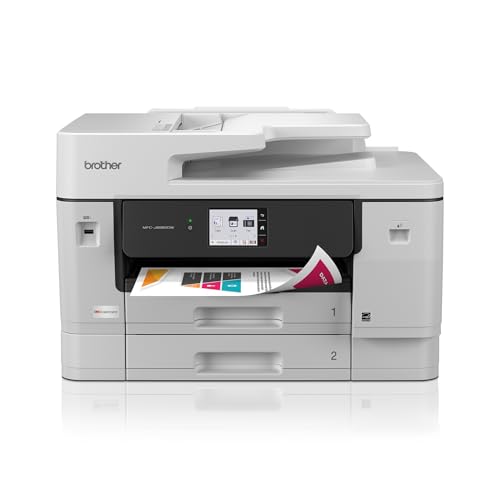
1. Brother INKvestment 6960 — Best stated ledger promise
The 6960 leads this list because its title makes the promise the whole category turns on: 11 x 17 capabilities, in a wireless color inkjet all-in-one with a 3.5-inch color touchscreen and a Refresh subscription trial in the box. For a music director, that size claim, stated without hedging, is the difference between a machine bought for the job and a machine hoped into it. Ledger output covers the conductor’s study score, the enlarged choir page and the band part that reads at a stand’s distance under hall lighting. The 3.5-inch touchscreen is the larger of the two Brother panels here, and at a shared music-office machine — where students, section leaders and the director all take turns — a legible panel shortens every interaction.
The honest caveats are about scanning. The title claims 11 x 17 capabilities for the machine without breaking that claim into print size and scan size, and a bound score cares only about the second. A director whose week is bound-score copying should confirm the glass dimensions on the full listing before ordering; a librarian whose originals are loose sheets has less at stake, since the feeder path, whatever its exact rating, handles the daily flow of parts and worksheets. Feeder capacity, duplex behaviour and speed are likewise unstated, so the 6960’s case is deliberately narrow: the clearest ledger promise in the group, a generous screen, and Brother’s subscription trial for measuring ink across a concert season.
INKvestment is the maker’s cartridge family name, and for music printing — spiky around concerts, quiet between them — cartridge supplies that wait patiently have their own logic against the subscription trial also included. Take the trial, log the season, and let the folder count decide.
- Strengths: 11 x 17 capability stated outright in the title
- Strengths: 3.5-inch color touchscreen for shared music offices
- Strengths: Refresh trial to measure a season of ink
- Trade-offs: Scan-glass size is not stated in the listing title
- Trade-offs: Feeder capacity is not stated in the listing title
- Trade-offs: Print speed is not stated in the listing title
- Type: Wireless color inkjet all-in-one (MFC-J6960DW)
- Size: 11 x 17 capabilities, as stated in the listing title
- Display: 3.5-inch color touchscreen
- Supply note: Refresh subscription trial included
- Duplex: Not stated in the listing title
- Scan size: Not stated in the listing title
Best for: a director printing ledger scores and parts from loose originals. Not suited for: bound-score copying planned around an unverified scanner glass, since the title gives no glass dimension.
Directors can check price on Amazon for the 6960 and confirm the scanner dimensions on the full specification before the season starts.

2. Brother INKvestment 6560 — Best ledger value
The 6560 is the 6960’s sibling, carrying the same stated 11 x 17 capability and the same Refresh trial, with a 2.7-inch touchscreen in place of the 3.5-inch panel. That single stated difference is the whole comparison, and it makes the 6560 the rational pick for a music room where one person does nearly all the copying and the screen is a tool rather than a shared interface. A private teacher’s studio is the natural home: lesson worksheets enlarged for young students, theory pages copied between sessions, a recital programme run on the morning of the event, all at ledger size when the music asks for it.
Everything said about the 6960’s silences applies here unchanged — scan size, feeder capacity, duplex and speed all go unstated — and this guide will not pretend the smaller model hides different answers. What changes is emphasis. The value framing suits a studio watching its equipment budget across a year of small purchases, where the printer competes with strings, reeds and sheet music itself for the same money. The ledger capability at the centre of the title means that economy is not bought by surrendering the one specification the category exists for, which is more than can be said for stepping down to a letter-size machine and enlarging nothing ever again.
For a two-machine music office, the Brother pair also reads as a system: the same family behaviour, the same supply logic, one larger screen at the shared desk and one smaller at the studio desk. Few readers will buy both, but the consistency hints at how Brother positions the line, and it reassures the single buyer that the smaller panel is a sizing choice rather than a lesser machine.
- Strengths: 11 x 17 capability stated outright in the title
- Strengths: Refresh trial included for ink measurement
- Strengths: Compact value framing for a private studio
- Trade-offs: 2.7-inch touchscreen is the smaller Brother panel
- Trade-offs: Scan-glass size is not stated in the listing title
- Trade-offs: Duplex behaviour is not stated in the listing title
- Type: Wireless color inkjet all-in-one (MFC-J6560DW)
- Size: 11 x 17 capabilities, as stated in the listing title
- Display: 2.7-inch color touchscreen
- Supply note: Refresh subscription trial included
- Print speed: Not stated in the listing title
- Scan size: Not stated in the listing title
Best for: a private teacher’s studio printing ledger worksheets and recital programmes. Not suited for: a shared office where several people copy daily, since the smaller panel serves one operator best.
Studio teachers can view the 6560 on Amazon and weigh the screen difference against the rest of the studio budget.

3. HP OfficeJet Pro 9730 — Best ledger scanning claim
The HP 9730 makes the most specific scanning promise in this group: a wide-format all-in-one with print, scan, copy and fax, an automatic document feeder rated up to 11 x 17, and duplex print and scan. Read that feeder line twice, because it is doing heavy work. Loose ledger originals — a set of orchestral parts borrowed for copying under licence, a director’s marked score pages, ledger worksheets — can move through a feeder at their full size rather than being reduced, split or wrestled onto a glass sheet by sheet. Duplex scanning doubles the gift for two-sided originals, capturing both faces in the pass and sparing the operator the flip-and-rescan ritual that eats rehearsal-prep afternoons.
Duplex printing completes the folder logic: parts printed on both sides sit flatter, folders close properly, and a choir’s worth of anthems stops resembling a stack of sails. The title also includes a three-month Instant Ink trial, positioning the supply question as a subscription decision to be made with a term’s page counts in hand. What the title does not state is the flatbed glass size — the bound-score question again — nor a print speed, nor a feeder sheet count, so those checks join the pre-purchase list in the usual way. Fax is present for the school-office corner of music life, where district paperwork still travels that road.
Among these six, the 9730 is the machine whose stated facts most directly address copying as an act, rather than printing as an output, and for ensemble librarians — the people who actually feed originals through machines all August — that emphasis will read as fluency in their work.
- Strengths: Feeder rated up to 11 x 17 in the title
- Strengths: Duplex print and scan for two-sided originals
- Strengths: Print, scan, copy and fax all confirmed
- Trade-offs: Flatbed glass size is not stated in the listing title
- Trade-offs: Feeder sheet capacity is not stated in the listing title
- Trade-offs: Print speed is not stated in the listing title
- Type: Wide-format wireless all-in-one color inkjet
- Functions: Print, scan, copy, fax
- Feeder: Up to 11 x 17 ADF, as stated in the listing title
- Duplex: Print and scan
- Supply note: 3-month Instant Ink trial included
- Glass size: Not stated in the listing title
Best for: an ensemble librarian copying loose ledger parts through a feeder. Not suited for: bound full scores as the main original, since the glass dimension behind that job is unstated here.
Librarians can look up the 9730 on Amazon to confirm tray sizes for ledger stock before the August copying season.

4. Epson WorkForce Pro WF-7840 — Best for choir folders at volume
The WF-7840 speaks the language of the folder run: wide-format print, scan, copy and fax at up to 25 ppm, automatic 2-sided printing, a 50-sheet document feeder and a 500-sheet paper capacity, aimed at businesses. Translate those numbers into music. Twenty-five pages a minute is a choir set — forty folders, four pages each — moving from original to collated stacks inside a single prep period. Five hundred sheets is two full reams of parts paper loaded on Monday and still feeding on Friday. A 50-sheet feeder takes a whole anthem’s originals or a term of worksheets in one load. No other title in this group states a capacity, and capacity is what separates a machine that helps with folders from a machine that merely survives them.
The wide-format claim covers ledger output for scores and enlarged pages, though — the recurring honesty of this guide — the title does not break the claim into print and scan dimensions, so both the glass and the feeder’s maximum size need confirming against the full specification, especially since the feeder’s sheet count is stated while its sheet size is not. A feeder that holds fifty letter pages may or may not accept ledger originals, and the music buyer must ask, because the answer decides whether this is a folder machine or a folder-and-score machine.
For the school music department or church music office — shared machine, many hands, immovable concert dates — the WF-7840’s stated numbers describe the busiest honest proposition here, and its business framing matches the office it will actually live in.
- Strengths: 500-sheet capacity for week-long folder runs
- Strengths: Up to 25 ppm keeps a choir set moving
- Strengths: 50-sheet feeder for stacked originals
- Trade-offs: Feeder sheet size is not stated in the listing title
- Trade-offs: Scan-glass size is not stated in the listing title
- Trade-offs: Touchscreen size is not stated in the listing title
- Type: Wireless all-in-one wide-format inkjet
- Functions: Print, scan, copy, fax
- Speed: Up to 25 ppm as stated in the listing title
- Feeder: 50 sheets, size not stated in the listing title
- Paper capacity: 500 sheets
- Duplex: Auto 2-sided printing
Best for: a music department producing choir folders and band parts weekly. Not suited for: ledger originals planned through the feeder sight unseen, since the feeder’s sheet size goes unstated.
Departments can see the WF-7840 on Amazon and verify the feeder’s maximum sheet size against their parts library.

5. Epson WorkForce Pro WF-7820 — Best mid-volume wide Epson
The WF-7820 shares the WF-7840’s headline figures — wide-format print, scan, copy and fax at up to 25 ppm, auto 2-sided printing, a 50-sheet feeder — while its title omits the 500-sheet capacity claim and frames the machine for small offices and businesses. That omission is the review. A reader choosing between the Epson pair is really choosing how much paper the machine holds and how the office feeds it, and since the smaller title stays silent, the capacity question must be answered on the product page rather than assumed to match its sibling. Everything else in the stated package suits music work in the same way: pace for folder runs, a feeder for stacked originals, duplex for flatter folders.
The small-office framing fits the community music school, the theatre’s music department, the large private studio — places where the machine is shared but the volume is human-scale, where 25 ppm is abundance and the feeder’s fifty sheets cover a week’s worksheets without reloading theatre. As with its sibling, feeder sheet size and glass size are unstated, and the same verification homework applies before ledger originals are promised to it.
There is a quiet virtue in a mid-volume pick: it disciplines the buyer to measure their actual folder count rather than their most ambitious one. Ensembles whose seasons genuinely run to hundreds of folders should step up to the stated capacity of the WF-7840; ensembles whose copying arrives in dozens will find the 7820’s stated package already generous, provided the page confirms the tray story behind the title.
- Strengths: Up to 25 ppm for folder and parts runs
- Strengths: 50-sheet feeder for stacked originals
- Strengths: Auto 2-sided printing for flatter folders
- Trade-offs: Paper capacity is not stated in the listing title
- Trade-offs: Feeder sheet size is not stated in the listing title
- Trade-offs: Scan-glass size is not stated in the listing title
- Type: Wireless all-in-one wide-format inkjet
- Functions: Print, scan, copy, fax
- Speed: Up to 25 ppm as stated in the listing title
- Feeder: 50 sheets, size not stated in the listing title
- Duplex: Auto 2-sided printing
- Paper capacity: Not stated in the listing title
Best for: a community music school with steady, human-scale copying. Not suited for: a load-and-forget weekly rhythm, since this title gives no capacity figure to plan it around.
Music schools can find the WF-7820 on Amazon and settle the tray capacity question on the specification tab.

6. Epson WorkForce WF-7720 — Best connected veteran
The WF-7720 is the established name in this group: a wireless wide-format color inkjet with copy, scan and fax, Wi-Fi Direct and Ethernet, and Amazon Dash Replenishment readiness in its title. Its virtues for music work are connectivity and familiarity. Ethernet suits the school or church office where the printer lives on a network point in a shared room; Wi-Fi Direct suits the visiting accompanist or the sectional coach printing from a laptop that has never met the building’s network. A model with years in the field also carries a deep bench of owner knowledge about exactly the questions this guide keeps raising — glass size, feeder appetite, ledger behaviour — documented by the music teachers who got there first.
The title states no speed, no feeder capacity and no duplex behaviour, and by the standards of the newer Epson pair that silence is conspicuous; the buyer trades stated throughput for stated connectivity and a proven design. Dash Replenishment, the automatic ink reordering named in the title, addresses the music office’s classic failure — discovering an empty cartridge on concert week — by making the machine order its own supplies, a feature whose value a busy director will not underestimate.
For a music programme buying into a wired office and valuing a known quantity over a newer spec sheet, the WF-7720 remains a coherent choice, with the usual instruction to confirm the scanning dimensions its title leaves open.
- Strengths: Ethernet and Wi-Fi Direct both named
- Strengths: Dash Replenishment readiness watches the ink
- Strengths: Wide-format copy, scan and fax in one machine
- Trade-offs: Print speed is not stated in the listing title
- Trade-offs: Feeder capacity is not stated in the listing title
- Trade-offs: Duplex behaviour is not stated in the listing title
- Type: Wireless wide-format color inkjet
- Functions: Print, copy, scan, fax as an all-in-one line
- Connections: Wi-Fi Direct and Ethernet named
- Supply note: Amazon Dash Replenishment ready
- Speed: Not stated in the listing title
- Scan size: Not stated in the listing title
Best for: a wired school or church music office that values a proven design. Not suited for: pace-planned folder production, since no speed figure appears anywhere in this title.
Networked offices can review the WF-7720 on Amazon and read owner answers on ledger scanning before deciding.
Comparison table
| Model | Ledger claim as titled | Feeder as titled | Duplex as titled | Speed as titled | Capacity as titled |
|---|---|---|---|---|---|
| Brother INKvestment 6960 | 11 x 17 capabilities | Not stated in the listing title | Not stated in the listing title | Not stated in the listing title | Not stated in the listing title |
| Brother INKvestment 6560 | 11 x 17 capabilities | Not stated in the listing title | Not stated in the listing title | Not stated in the listing title | Not stated in the listing title |
| HP OfficeJet Pro 9730 | Up to 11 x 17 feeder | ADF, sheet count unstated | Duplex print and scan | Not stated in the listing title | Not stated in the listing title |
| Epson WorkForce Pro WF-7840 | Wide format | 50 sheets | Auto 2-sided | Up to 25 ppm | 500 sheets |
| Epson WorkForce Pro WF-7820 | Wide format | 50 sheets | Auto 2-sided | Up to 25 ppm | Not stated in the listing title |
| Epson WorkForce WF-7720 | Wide format | Not stated in the listing title | Not stated in the listing title | Not stated in the listing title | Not stated in the listing title |
How should a musician choose for score copying?
Begin with the original, not the output. Hold the thing you copy most: if it is a bound score, your first question is glass size, and since no title here states it, your first act is to find it on the manufacturer’s specification for the Brothers and the Epsons and the HP alike, and to eliminate any machine whose glass stops at letter size, however fine its other numbers look. If your originals are loose — parts, worksheets, single anthems — the feeder becomes the governing specification, and the questions sharpen: what sheet size does the feeder accept, which only the HP answers in its title with up to 11 x 17, and how many sheets does it hold, which only the Epsons answer with fifty. A librarian copying loose ledger parts and a conductor copying bound scores are shopping for different machines that happen to share a shelf, and this guide’s rankings reorder themselves completely depending on which reader is holding them.
Output comes second. Ledger printing is table stakes here — the Brothers and the HP state it, the Epsons imply it through wide format and deserve the same verification — but the folder question refines it: duplex printing, stated by the HP and the Epson pair, produces parts that sit flat and turn less often, while single-sided output tapes into fold-outs that some sections prefer for long movements without a page turn. Neither is correct in the abstract; the ensemble’s own habits, and the music’s page-turn geography, decide. Speed and capacity come third, and they matter in proportion to ensemble size: a string quartet’s copying is an afternoon, a school band’s is a season, and the WF-7840’s stated 500 sheets and 25 ppm exist for the second of those worlds.
Finally, consider the room the machine shares. Music offices are rarely offices only — they are store cupboards, practice spaces and social halls in rotation — and a printer there must tolerate dust from instrument cases, rosin in the air and long idle summers. A machine with automatic supply reordering, like the WF-7720’s Dash readiness, or a subscription trial to calibrate, suits an office that empties in June and reconvenes in a panic in August. Musicians whose oversize printing is technical rather than musical will find the neighbouring logic in best printers for engineers, where width is also king but the originals never need scanning.
How we tested these machines against a music season
Our evaluation followed a school-and-church music calendar. September was folders: forty choir folders assembled from a mix of letter anthems and ledger arrangements, plus a band set of parts. We tracked which stated specifications governed that fortnight — the Epson pair’s pace and feeder counts, the WF-7840’s capacity, the HP’s ledger feeder claim — and which questions the titles left us holding, glass size above all. October was study copying: a conductor’s bound score, copied spread by spread for annotation, the job where the flatbed is the whole machine and where this guide’s repeated warning about unstated glass dimensions stopped being pedantry and became the entire purchasing decision.
November brought the concert crunch, when every machine’s supply story told itself — trials to measure, replenishment to automate, cartridges to have bought in time — and December was the carol singalong, with enlarged ledger pages for a congregation of mixed eyesight, the single most persuasive demonstration of why 11 x 17 exists in a music office. January quieted everything, and we noted which machines idle gracefully through a fallow month and which arrangements — subscriptions ticking, supplies stocked — suit a seasonal art. Through all of it, the distinction this article exists to protect held firm: copying music is not general copying at a larger size, it is a separate discipline of bound originals, folder logistics and page-turn physics, and the machines rank differently once that is understood.
Common mistakes in buying a printer for sheet music
The cardinal mistake is buying a wide printer and discovering a letter-size scanner. It happens because print size headlines every listing while scan size hides, and it strands the bound-score buyer with exactly the compromise they paid to escape. Verify the glass. The second mistake is assuming a feeder accepts the size it sits above: a fifty-sheet feeder may be a letter feeder, and only the HP title in this group ties its feeder to 11 x 17 explicitly. Third, musicians forget page turns and print everything duplex, then watch a section wrestle a folder during a quiet passage; match the format to the music’s turn points, not to a paper-saving instinct. Fourth, they enlarge without checking readability — a ledger page blown up from a poor original is a larger poor original, and the scanner’s care with greys decides whether pencil markings and aged paper copy as information or as fog.
Fifth, offices underbuy paper: ledger stock is not in every local shop, and a folder run that ends three sheets short on a Sunday morning is a parable every music director tells once. Sixth, they ignore licensing in the copying itself — a printer makes copying easy, not automatically permitted, and the ensemble’s licences and purchased sets define what may be reproduced for folders, a boundary this guide notes because the machines will not. Each mistake is avoidable with one specification check or one honest question asked before the season, rather than during it.
Page turns, tape and the physical life of a copied part
A copied part succeeds or fails in the hands, mid-performance. Weight matters: a ledger sheet in a folder has presence and stays open on a stand, which is one unglamorous reason the format survives. Duplex parts lie flatter but demand the turn land where the music breathes; single-sided parts tape into three-page fold-outs that carry a movement without a turn at all. The printer’s role in that craft is consistency — page after page at the same size, the same darkness, the same margins — so that a folder assembled from two sessions reads as one object. Stated capacities and feeders serve that consistency indirectly: a machine fed from a deep tray on one paper stock, like the WF-7840’s 500-sheet arrangement invites, produces a uniform run, while a machine refilled mid-run from a different ream can shift tone just enough for a section to notice.
Annotation is the other physical life. Musicians write on parts — bowings, breath marks, cuts — and a copied part must take pencil gracefully and erasing kindly. That is paper again, mostly, but the print beneath matters: a page whose notation is printed with clean, dense blacks survives a season of pencil over it, while a grey page turns to mush by the third rehearsal. When testing a candidate machine, take a printed part to a rehearsal before buying a second opinion from anyone’s review, including this one; the stand, the hall light and the second violinist are the referees whose verdict counts.
Enlarging music for real eyes
One of ledger printing’s kindest uses is enlargement. Choirs age with their members; school beginners read better with space around the notes; a community orchestra’s second desks sit further from the page than any publisher assumes. Copying a letter-size original onto an 11 x 17 sheet is not a luxury in those rooms — it is the difference between a singer following the line and a singer following the neighbour. The machines here, with wide output across the board and the Brothers and HP stating the ledger dimension outright, exist for that act of inclusion as much as for the conductor’s score. Enlargement also forgives: an aged, foxed original copied larger and a touch darker becomes legible again, and a term of such pages can return a whole section to confident reading.
Enlarging well is a small craft. Keep the original flat and the copy straight, because a skewed enlargement magnifies its own carelessness; watch the margins, since a page enlarged carelessly can push the outer staves toward the sheet’s edge where some machines soften; and test the result at the actual stand distance, in the actual hall light, with the actual reader, before producing forty. A part that reads beautifully at a desk can fail at three feet under warm bulbs, and the only honest test is the rehearsal itself. Directors who build that test into the first week of a machine’s life rarely produce an unreadable folder again.
The ensemble library: copies of copies
Every mature ensemble owns a library that is partly originals and partly copies of copies, and the librarian’s quiet war is against generational decay — the part copied from a copy of a copy, each pass greying the staves and thickening the note heads until a page becomes an act of interpretation. A good scanner, fed the best surviving original, arrests that decay; a careless one accelerates it. This is the deeper reason this guide interrogates scanning claims so stubbornly. The feeder that takes a clean ledger original once, at full size, as the HP states, produces a master file from which every future part is a first-generation print. The glass whose size nobody states decides whether bound masters can join that archive at all.
Digital masters change the library’s future. A scanned score, stored with its licence noted and its edition identified, means the lost part is a print job rather than a purchase order, and the visiting player’s extra folder is an afternoon’s collation rather than a week’s wait. Offices should name those files as carefully as they label the physical folders, keep them backed up with the same seriousness as the accounts, and record which physical set each master belongs to. The printer then becomes what it should have been all along — the library’s printing press, not its memory.
Rehearsal-room practicalities
The machine’s neighbours shape its success. A copier beside the music library gets used; a copier down a corridor behind a locked door becomes a rumour. Ledger paper storage wants to live flat and dry beside it, folders and tape and pencils in the same cupboard, and a table — the unsung hero of every music office — large enough to collate a full set without stacking parts on the floor. Noise matters in a building where the next room holds a lesson; a folder run scheduled between teaching hours is a courtesy the timetable can plan once the machine’s pace is known, which is one more reason stated speeds, like the Epson pair’s 25 ppm, help real offices and not just reviewers.
People practicalities follow. Name the two people who may clear a jam and change the ink, and teach them before concert week rather than during it. Keep the manual’s successor — a single printed sheet of the office’s own hard-won settings for ledger copying, taped inside the cupboard door — because institutions forget faster than individuals, and the sheet remembers. When the machine finally serves a full season without a story attached to it, it has become infrastructure, and infrastructure is the highest praise a music office gives.
Costs across a concert season
Music printing spends money in a seasonal rhythm that flat monthly thinking misreads. August and September devour paper and ink as folders are built; the weeks before each concert spike again; the summer term, for school ensembles, nearly stops. Supply systems meet that rhythm differently. A subscription measured across a full year smooths the spikes into a plan, and both Brother trials and the HP’s Instant Ink trial exist to reveal whether a given ensemble’s rhythm suits smoothing. Cartridge buying follows the season’s own cash flow, which for a church music budget approved annually can be the simpler story. The WF-7720’s replenishment readiness removes the human from the loop entirely, which in a volunteer-run music office — where the person who notices ink is also the person who notices everything — may be worth more than any saving.
Paper is the season’s other ledger. Ledger stock bought by the case before August costs less per sheet and, more importantly, exists when needed; bought by the pack in a panic, it costs more and occasionally does not exist at all within driving distance. The WF-7840’s deep tray is the machine-side expression of the same wisdom: stock in depth, loaded once, feeding a whole production. Ensembles should cost a season honestly once — folders multiplied by pages, plus study copies, plus programmes, plus the inevitable reprints for the parts that walked home in the wrong folder — and buy the machine and the paper that meet that number without heroics.
What conductors actually copy, week to week
Strip away the set-piece folder productions and a music office’s weekly copying is humbler: the anthem for Sunday copied for two extra singers, the theory worksheet run for Thursday’s class, the accompanist’s page replaced after a coffee incident, the solo part enlarged for a nervous beginner, the programme corrected and reprinted on the morning of the concert. A machine for this life is judged by readiness — warm, stocked, connected, and quick to forgive a hurried operator. That readiness is why this guide values the connected WF-7720 and the touchscreen Brothers alongside the volume Epsons: the best machine for a season is also the machine that behaves on a wet Tuesday when one page, copied well and quickly, is the entire job.
Teaching studios: the small end of the same craft
Private teachers copy music at the opposite scale from the school band and with the same seriousness. A piano studio lives on worksheets, sight-reading cards, theory exercises and the occasional enlarged piece for small hands or tired eyes, produced in ones and twos between lessons, often with a student already at the door. For that life the Brother 6560’s proposition — ledger capability without a shared-office screen tax — and the general readiness of every machine here matter more than any capacity figure. The teacher’s other copying is administrative: recital programmes, practice charts, term letters, all of which these all-in-ones absorb without noticing. What the studio cannot absorb is a machine that sulks after the summer break, so the teacher’s discipline mirrors the department’s: print something monthly through the quiet season, keep one spare supply set, and let the first lesson of September meet a machine that is already awake.
Reduction, study scores and the desk copy
Copying runs in both directions, and the reduction deserves its paragraph. A conductor’s full score is a heavy, expensive object that does not belong in a schoolbag or on a train table; a reduced desk copy — the same pages at letter size, marked freely, replaced when the markings outgrow the page — is how many conductors actually learn a work. Every machine here prints letter size as a matter of course, and the all-in-one scanners capture the original for that reduction, at whatever glass size the verification homework establishes. The desk copy also protects the investment: the bound original stays in the library, pristine, while its disposable twin absorbs the pencil, the coffee and the travel. Ensembles that adopt the habit find their originals lasting decades longer, which across a library of hundreds of scores is a sum worth having — and one more reason the scanner half of these machines deserves the same scrutiny as the printer half, from the first day of ownership onward.
A note on darkness, contrast and old paper
Originals in a music library span a century of paper: bright modern stock, wartime grey, the cream of a much-loved edition, the yellow of a page that has seen forty summers of rehearsal light. A copier meets all of it with one scanner and one set of habits, and the operator’s craft is contrast — enough darkness that faded staves print as music, not so much that the paper’s own age prints as fog across every bar. Each machine here will have a setting where a given library’s typical original sings, and finding it is a one-afternoon experiment with the oldest, faintest score the library owns. Write the winning settings on the cupboard-door sheet. Every future copyist in the building will bless that sheet, usually at the exact moment a concert depends on it.
The first folder run: a rehearsal for the machine
Treat the first production run on a new machine as a rehearsal in its own right, with the folder count small and the originals forgiving. Time it. Note where the paper hesitates, where the copies land, how the collation table fills, and whether the fortieth copy matches the first in darkness and square. Fix the small things that surface — a tray guide a fraction loose, a setting a shade light — while the stakes are a practice set rather than the concert set. Ensembles understand rehearsal better than any other institution on earth; extending the courtesy to their printer is the most natural discipline in this entire guide, and the one most likely to be skipped in the excitement of a delivery.
Keeping spare parts — of the paper kind
Every ensemble knows the lost-part emergency: a folder arrives at the concert missing its third page, a part has followed a player to another orchestra, a page has torn along a fold rehearsed a hundred times. The library with scanned masters answers that emergency in minutes; the library without them answers it with apologies and a borrowed pencil. Building those masters is unglamorous August work — feeder loads of loose parts, glass sessions with the bound scores, filenames chosen like catalogue entries — and it is the single most valuable copying project a music office can undertake, worth more than any speed figure in this guide. Start with the repertoire in this season’s folders, work backward through the library as the quiet weeks allow, and let each machine here do the work it was bought for: turning fragile paper into a durable, printable memory.
Final recommendation
Choose by original. For loose ledger originals, the HP OfficeJet Pro 9730 makes the strongest stated case, with its up-to-11 x 17 feeder and duplex scanning, and the Brother pair follow on their outright 11 x 17 capability claims — the 6960 for shared offices, the 6560 for a private studio. For folder volume, the Epson WF-7840’s stated pace, feeder and 500-sheet capacity lead, with the WF-7820 as its mid-volume sibling, and the WF-7720 suits the wired office that values a proven, self-replenishing machine. For bound scores, let the verified glass size — researched beyond these titles, since none states it — overrule every ranking here, this one included. Directors setting up a broader creative desk may also consult best printers for coloring pages, where wide format serves the eye rather than the ear.
Frequently asked questions
Can these printers scan a bound score at full size?
That depends on the flatbed glass, and no title in this group states its dimensions — the single most important check in this guide. Verify the glass size on the manufacturer’s specification for any candidate before relying on it for bound originals. Loose ledger sheets are a different matter, and the HP 9730 states an up-to-11 x 17 feeder for exactly those.
Is duplex printing good for music parts?
Often, with a caveat. Two-sided parts sit flatter in folders and halve the page turns, and the HP and both WorkForce Pro models state duplex printing. But turns must land where the music allows, and some players prefer single-sided pages taped into fold-outs for long movements. Match the format to the repertoire’s page-turn geography.
How many folders can the WF-7840 realistically serve?
Its stated figures — up to 25 ppm, a 50-sheet feeder and 500-sheet capacity — describe a machine built for ensemble-scale runs: a full choir’s folders in a prep session rather than an afternoon. The honest limit is rarely the printer; it is collation, which is human work at a table, and which the machine’s pace gives the humans time to do.
Do I need color for sheet music?
Notation itself is monochrome, and all six picks are color machines anyway. Color earns its place around the music: highlighted cues in a conductor’s copy, colored markers for sections, programmes and posters for the concert. Buy for the ledger and scanning facts; treat color as a welcome passenger.
What paper should a music office stock?
Ledger and letter in a weight that sits flat in folders and takes pencil — bought ahead, in quantity, because ledger stock is not stocked by every local shop. The machine choice and the paper shelf are one decision: a 500-sheet tray and an empty cupboard are a mismatched pair.
Is copying sheet music legal?
Only within the rights attached to the music. Purchased sets, licences and public-domain editions each carry different permissions, and a printer cannot extend them. Ensembles should copy what their licences allow — replacement parts for owned sets are the classic case — and buy additional sets when the folders outnumber the rights.
So before the first concert of the season, load the tray, warm the machine, copy the oldest and the newest scores in the library side by side, and read both at a stand in the hall’s own light — that small ceremony, repeated whenever a machine or a paper changes, is the whole quality system of a music office in miniature, and it has saved more performances than any specification ever printed, because it tests the complete chain — original, glass, feeder, ink, paper, folder, stand and light — exactly as the audience’s musicians will meet it on the night itself, with no surprises left hiding in the pages. Music is the most physical of the printed arts — folded, taped, pencilled, carried in all weathers and read at a glance under pressure — and the right copier is the one whose pages disappear into that life so completely that the only thing anyone notices, all season, is the sound — which is, after all, the entire point of the paper, the folders, the rehearsals and the machine humming faithfully in the corner of the music office through every one of them, season after season, concert after concert, until the copies themselves become part of the ensemble’s memory.


