What's inside
- Key Takeaways
- Quick Picks
- How were these picks chosen?
- Comparison table
- Living with high-brightness displays after installation day
- Four environments, four different brightness problems
- How do you choose a display for brightness control?
- Testing brightness where these screens actually work
- Common mistakes when buying for bright environments
- Questions to put to a seller before the order
- Brightness control in the other direction: evenings, cabins and control rooms
- Final recommendation
- Installation notes that protect the brightness you paid for
- What sunlight-readable really demands of the whole interface
- Frequently asked questions
As an Amazon Associate I earn from qualifying purchases. This post may contain affiliate links at no extra cost to you.
gizmoverdict.com is reader-supported. When you buy through links on our site, we may earn an affiliate commission.
Where to buy: High-brightness industrial displays rarely sit in consumer electronics aisles; they come through specialist display suppliers, industrial-equipment channels and the makers’ own marketplace storefronts. Lead times can differ from ordinary monitor shopping, and model codes carry the specification, so match the full code, size and brightness figure across the listing before ordering rather than trusting a thumbnail that looks familiar.
Shoppers hunting for the best monitors for brightness control usually start with a frustration: a screen that washes out where it actually has to work. Sunlight crosses the desk at four in the afternoon. The kiosk faces a glass storefront. The control panel lives outdoors. Ordinary consumer monitors answer this problem with a brightness slider in a menu and no published figure for what that slider commands, which makes comparison shopping nearly impossible. You cannot rank screens by a number the makers decline to state.
That honesty problem shapes this entire guide. The verifiable brightness-control class is not the consumer desk monitor at all; it is the industrial sunlight-readable display, built for bright rooms, kiosks, marine and industrial settings, and high-brightness viewing needs, with brightness treated as a headline specification and sealing treated as seriously as the panel itself. The six picks below are four Beetronics touchscreen models in descending sizes, all rated IP66 against water and dust, plus two sunlight-readable LCD displays whose titles state their nit figures outright. Where a title stays silent about nits, and the Beetronics titles do, the spec boxes in this guide say so in plain words instead of borrowing a number from a sibling model or a marketing page.
Brightness control, properly understood, runs in both directions. A sunlight-readable panel must climb high enough to defeat glare at noon and dim far enough to remain comfortable at dusk or in a darkened control room. The listings here emphasise the climb, since that is the industrial selling point, and the reviews flag where dimming-range information is absent from a title, because the low end of the dial deserves a straight answer rather than an open question.
Key Takeaways
- Consumer monitors rarely publish brightness figures, so this guide ranks the industrial sunlight-readable class where nits and sealing are stated specifications.
- The four Beetronics models share one recipe, Full HD, touch, IP66 sealing, sunlight-readable design, in 27, 24, 22 and 15-inch sizes.
- Beetronics titles do not state a nit figure, so no brightness number is claimed for them anywhere in this guide.
- The 15.6-inch display’s title states 1000 nits and the 12.8-inch states 750 nits; those are the only two nit figures asserted here.
- IP66 sealing appears on every Beetronics pick, marking them for outdoor, washdown and dusty industrial environments.
- Wide-temperature panels on the two smaller displays suit EV charging, automotive and outdoor kiosk duty where weather swings are routine.
Quick Picks
| Pick | Model | Badge |
|---|---|---|
| 1 | Beetronics 27″ High-Brightness Touchscreen | Best for large outdoor-facing displays |
| 2 | Beetronics 24″ High-Brightness Touchscreen | Best all-round kiosk size |
| 3 | Beetronics 22″ High-Brightness Touchscreen | Best for compact industrial panels |
| 4 | Beetronics 15″ High-Brightness Touchscreen | Best small sealed touchscreen |
| 5 | 15.6″ Sunlight-Readable 1000-Nit Display | Best stated brightness for kiosk builds |
| 6 | 12.8″ Sunlight-Readable High-Brightness Display | Best compact panel for embedded projects |
The split in this table is between finished touchscreen monitors, the four Beetronics units, and component displays, the last two picks, which arrive as panels with driver boards for integration into a larger build. That distinction decides who should buy what more sharply than any brightness figure. Facilities teams outfitting a counter or a wall will live in the first group; builders constructing a kiosk, a charging station or a vehicle installation will live in the second, a pattern shared with best touch screen monitors for restaurants, where finished touch displays serve a similarly public-facing job.
How were these picks chosen?
The first criterion was verifiability. A pick had to treat brightness as a stated design purpose, either through a sunlight-readable high-brightness designation in its title or through an explicit nit figure. Ordinary monitors with a menu slider and no published output were excluded, not because they are poor screens, but because a guide about brightness control cannot rank what it cannot read. This is also why the Beetronics reviews refuse to quote nits: the designation is stated, the number is not, and the guide reports exactly that.
Sealing formed the second criterion. Bright environments and dirty environments overlap constantly in the real world: loading bays, factory floors, marina counters, outdoor enclosures. The Beetronics line’s IP66 rating, stated identically across four sizes, promises a housing built against dust ingress and powerful water exposure, which makes the brightness usable where the screen will actually live rather than only in a showroom.
Touch capability mattered because bright public and industrial screens are usually interactive: kiosks, control panels, information points. All four Beetronics models are touchscreens, and the two component displays target interactive builds such as charging stations and kiosks, where the integrator supplies the surrounding system. Compatibility across PC, Mac and Linux, stated on the Beetronics titles, widened their candidacy for mixed industrial estates where the driving computer could be anything.
Finally, temperature tolerance separated the component displays from ordinary panels. Both smaller units describe wide-temperature panels, a specification that matters when a display must start on a frozen morning and keep working through a sun-baked afternoon inside a metal enclosure. Consumer panels rarely publish such a range at all; its presence in a title is a marker of the industrial class this guide set out to rank.
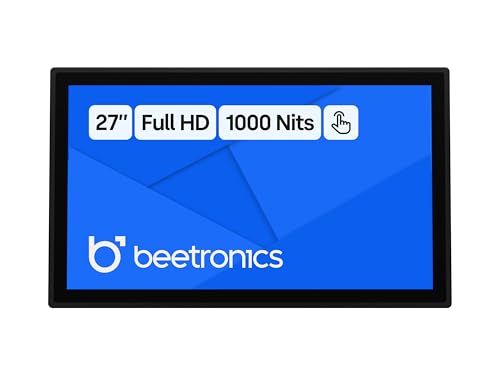
1. Beetronics 27″ High-Brightness Touchscreen — Best for large outdoor-facing displays
The largest Beetronics in the line takes the industrial recipe, Full HD touchscreen, IP66 sealing, sunlight-readable design for PC, Mac and Linux hosts, and stretches it across 27 inches. Size is a brightness strategy in itself: a bigger panel can carry bigger interface elements, which remain legible at the distances public and industrial screens are read from. A status board across a workshop, an information display in a bright lobby or an outdoor-facing menu all exploit that geometry. Nobody reads a factory dashboard from eighteen inches the way a typist reads a laptop.
Because the title designates high brightness without stating nits, the honest description is qualitative: this is a panel engineered and sold for sunlight readability, in a housing sealed to IP66, and a buyer comparing it against a rival quoting a specific nit figure should request the number from the maker before treating the two as equivalent. That request is normal in industrial purchasing, where datasheets change hands before orders, and it is better made before a 27-inch hole is cut into anything.
Touch at this size suits deliberate, large-target interaction: checklists, wayfinding, machine status acknowledgement, queue systems. Fine multi-touch gestures belong to smaller glass. The Full HD resolution across 27 inches also means pixel density is modest, which public interfaces forgive and detailed desktop work would not. This is a display for standing users and passing glances, and judged on that duty its combination of scale, sealing and stated sunlight purpose leads the group.
Facilities planning a prominent bright-space installation should start here and size down only if the viewing distances shrink. Review the Beetronics 27-inch listing and ask the nit question directly if your specification demands a number.
Strengths
- 27-inch canvas keeps interface elements legible at public viewing distances.
- IP66 sealing suits outdoor, washdown and dusty industrial placements.
- Touchscreen with PC, Mac and Linux compatibility fits mixed estates.
Trade-offs
- Brightness in nits is not stated in the listing title.
- Full HD across 27 inches gives modest pixel density for close work.
- Large sealed housings demand planned mounting, not casual placement.
Spec box
- Size and resolution: 27 inch, Full HD 1080p touchscreen
- Brightness: high-brightness sunlight-readable design; nit figure not stated in the listing title
- Sealing: IP66 waterproof and dustproof
- Compatibility: PC, Mac, Linux
- Model: 27HB9M/U1
- Dimming range: Not stated in the listing title
Best for: a large, bright, public or industrial display read from standing distance.
Not suited for: a specification that requires a certified nit figure this listing never publishes.

2. Beetronics 24″ High-Brightness Touchscreen — Best all-round kiosk size
Twenty-four inches is where industrial touchscreens do most of their world’s work, and this Beetronics model carries the family recipe at that size: Full HD, touch, IP66 sealing and a sunlight-readable high-brightness designation across PC, Mac and Linux hosts. Kiosk enclosures, production-line terminals and reception information points are disproportionately built around this diagonal, which means mounts, enclosures and spare parts are easiest to source here, a practical advantage no specification table captures.
The size also balances two competing reading distances. It is large enough for a customer-facing interface with generous touch targets, yet small enough for an operator standing at a machine to take in whole without head movement. In a bright environment, that balance matters doubly, because glare management depends on the user being able to shift position slightly and still command the whole screen; an oversized panel locks the viewer into the reflection’s worst angle.
As with its siblings, the title gives no nit figure, and this review will not invent one. What can be said is that the model is purpose-sold for sunlight readability with sealing to match, placing it in a different purchasing universe from a consumer 24-inch monitor whose brightness exists only as a slider position. Buyers migrating from consumer screens should also note the operational shift: industrial units expect planned mounting and a defined host computer, and reward that planning with years of unattended service.
For a single general-purpose bright-space touchscreen purchase, this is the size and specification around which the fewest regrets accumulate. See the Beetronics 24-inch listing for its mounting and connection details.
Strengths
- The kiosk-standard 24-inch size maximises enclosure and mount choice.
- IP66 sealing and sunlight-readable design pair brightness with durability.
- Full HD touch serves operator and customer interfaces equally well.
Trade-offs
- Nit output is not quantified in the listing title.
- Dimming range for dark-room comfort is likewise unstated.
- Industrial mounting expectations exceed a typical desk monitor’s.
Spec box
- Size and resolution: 24 inch, Full HD 1080p touchscreen
- Brightness: high-brightness sunlight-readable design; nit figure not stated in the listing title
- Sealing: IP66 waterproof and dustproof
- Compatibility: PC, Mac, Linux
- Model: 24HB9M/U1
- Dimming range: Not stated in the listing title
Best for: a general-purpose kiosk or industrial terminal in a bright space.
Not suited for: a tender document that scores displays on a stated nit number alone.

3. Beetronics 22″ High-Brightness Touchscreen — Best for compact industrial panels
The 22-inch Beetronics answers the installations where the 24 is simply too much glass: machine-side control panels, compact enclosures, vehicle-adjacent workstations and counters where the screen shares frontage with other equipment. The specification otherwise mirrors the family, Full HD resolution, touch input, IP66 sealing and the sunlight-readable high-brightness designation, with compatibility across PC, Mac and Linux stated in the title.
Smaller size brings one genuine image benefit. The same 1920 x 1080 pixels compressed into 22 inches produce denser, crisper interface rendering than the larger siblings manage, which suits operator panels carrying detailed status graphics or dense control layouts. Touch targets shrink with the panel, so interface designers should keep buttons generous, but for trained operators using familiar screens the density is a daily pleasure rather than a compromise.
The model’s place in the line is the space-saver’s default, and its review inherits the family caveat unchanged: brightness is designated, not numbered, in the title. Industrial buyers accustomed to Beetronics’ datasheets will treat that as a routine enquiry. First-time buyers crossing over from consumer monitors should understand they are purchasing into a category where the housing, sealing and service model carry as much weight as the panel, and where a slightly smaller screen often outlasts a bigger consumer unit by years in the same hostile location.
Measure the enclosure first; if the fit is tight, this is the Beetronics the tape measure is pointing at. Confirm the 22-inch model’s dimensions at its listing before committing the panel cut-out.
Strengths
- Compact 22-inch format fits machine panels and tight enclosures.
- Full HD at this size yields the densest rendering in the Beetronics line.
- IP66 sealing and touch carry over intact from the larger models.
Trade-offs
- Smaller glass shrinks touch targets for public-facing interfaces.
- Brightness remains a designation rather than a stated nit figure.
- Public information duty suits the larger siblings better.
Spec box
- Size and resolution: 22 inch, Full HD 1080p touchscreen
- Brightness: high-brightness sunlight-readable design; nit figure not stated in the listing title
- Sealing: IP66 waterproof and dustproof
- Compatibility: PC, Mac, Linux
- Model: 22HB9M/U1
- Dimming range: Not stated in the listing title
Best for: a space-limited industrial panel where sealing and touch still matter.
Not suited for: a public wayfinding point whose users read from several paces away.

4. Beetronics 15″ High-Brightness Touchscreen — Best small sealed touchscreen
The smallest Beetronics compresses the family formula into 15 inches, and the use cases change character accordingly. This is the screen for equipment faces, compact control stations, marine helm positions and vehicle installations, places where the display is part of a machine rather than a destination in itself. Full HD resolution at this size renders very sharp interfaces, touch stays within easy reach of a seated operator, and the IP66 housing shrugs off the spray, dust and vibration-adjacent grime that such positions accumulate.
Small sealed touchscreens occupy a niche consumer monitors cannot enter at all, since a consumer panel’s vents, seams and unsealed buttons surrender quickly in the same environments. The Beetronics designation of sunlight readability matters acutely at this size, because helm and yard equipment live outdoors by definition, and a washed-out control screen on a bright day is not an inconvenience but a stoppage. Compatibility across PC, Mac and Linux again widens the host choices for integrators building around compact computers.
The family caveat applies with full force: the title states no nit figure, so brightness comparisons against numbered rivals require a direct enquiry. Size itself is the other honest limit. Fifteen inches serves one operator at arm’s length beautifully and serves shared or public viewing hardly at all. Buyers should also plan the interface for gloved or wet-hand realities of the environments this screen targets, favouring large controls over dense menus regardless of how crisp the panel can render them.
For a small, sealed, sun-facing control position, this is the purpose-built answer in the group. Check the Beetronics 15-inch listing against your enclosure’s available depth and frontage.
Strengths
- 15-inch sealed format fits equipment faces and helm positions.
- Full HD density renders exceptionally crisp small interfaces.
- IP66 housing suits spray, dust and outdoor control duty.
Trade-offs
- Shared or public viewing is beyond a 15-inch panel’s reach.
- Nit output is designated rather than numbered in the title.
- Dense menus waste the format; interfaces need large targets.
Spec box
- Size and resolution: 15 inch, Full HD 1080p touchscreen
- Brightness: high-brightness sunlight-readable design; nit figure not stated in the listing title
- Sealing: IP66 waterproof and dustproof
- Compatibility: PC, Mac, Linux
- Model: 15HB9M/U1
- Dimming range: Not stated in the listing title
Best for: a single-operator control position exposed to sun and weather.
Not suited for: a shared display that a roomful of people must read at once.

5. 15.6″ Sunlight-Readable Display — Best stated brightness for kiosk builds
The guide now crosses from finished monitors to component displays, and this 15.6-inch panel states the figure the Beetronics titles omit: its full title specifies a 1920 x 1080 LCD at 1000 nits, industrial construction, a wide-temperature panel and an HDMI driver board, aimed at EV charging stations, automotive use and outdoor kiosks. One clarification belongs in plain sight: the short product name attached to this listing mentions a higher figure, while the full listing title states 1000 nits, and this guide works from the full title’s number. Buyers should confirm the figure with the seller, since brightness is the entire reason this component exists.
As a component, it arrives as a panel plus driver board, not a finished monitor in a sealed housing. The integrator supplies the enclosure, the protection and the host system, gaining freedom to build the display into a charger, a kiosk or a vehicle dashboard exactly as the project demands. The wide-temperature designation signals a panel chosen to start and run across weather extremes that would leave consumer LCDs sluggish or dark. HDMI through the driver board keeps the video connection ordinary even though the panel’s working life will not be.
That component nature cuts both ways. There is no IP rating in the title, because sealing becomes the enclosure designer’s responsibility, and no touchscreen layer is claimed, so interactive builds must add touch separately if the project requires it. Judged as what it is, a bright, temperature-tolerant building block with a stated four-figure nit output, it offers the most precisely specified brightness in this guide.
Builders who need a number they can design around, rather than a designation they must enquire after, start here. Inspect the 15.6-inch display’s listing and confirm the brightness figure before designing the enclosure.
Strengths
- 1000 nits stated in the full title, the clearest brightness claim here.
- Wide-temperature industrial panel suits outdoor enclosures year-round.
- HDMI driver board simplifies integration into kiosk and charger builds.
Trade-offs
- Component format supplies no finished housing or stated IP sealing.
- Touch input is not claimed in the listing title.
- The short name and full title differ on nits, so verification is essential.
Spec box
- Size and resolution: 15.6 inch, 1920 x 1080
- Brightness: 1000 nits per the full listing title
- Panel: industrial, wide temperature
- Connection: HDMI driver board included
- Target uses as titled: EV charging, automotive, outdoor kiosk
- Sealing: Not stated in the listing title
Best for: an integrator building a bright kiosk or charger around a specified panel.
Not suited for: an expectation of a finished, sealed monitor straight from the box.

6. 12.8″ Sunlight-Readable High-Brightness Display — Best compact panel for embedded projects
The smallest pick is also the most specialised: a 12.8-inch, 1920 x 1080 IPS panel stating 750 nits, full viewing angles, a wide-temperature design and the same target world of EV charging stations, automotive installations and outdoor kiosks. The unusual diagonal is a clue to its purpose. Component panels in fractional sizes exist to fit enclosures designed around them, payment terminals, charger faces, vehicle dashboards, where the housing came first and the display must match its aperture.
IPS full viewing angle is a meaningful titled feature at this scale, because embedded displays are read from wherever the user stands, often off-axis, often in punishing light. The 750-nit figure, while lower than its 15.6-inch sibling’s stated output, remains far beyond ordinary indoor panel territory and is honestly published, which lets a designer calculate legibility against the enclosure’s glass and the site’s exposure instead of guessing. Wide-temperature tolerance completes a specification written for unattended outdoor service.
Everything the Beetronics models provide as finished products, housing, touch, sealing, host compatibility, is the integrator’s project here. The title claims no touch layer and no IP rating. That is not a deficiency; it is the definition of a component. But it does mean this pick belongs in the hands of builders, and a reader shopping for a screen to unbox and mount should return to the Beetronics reviews above, or to the finished touch displays in best monitors for docking station territory if the destination is an ordinary bright office desk rather than an enclosure.
For an embedded project with a 12.8-inch aperture and a sunny address, this panel’s stated numbers make the design conversation refreshingly concrete. Read the 12.8-inch display listing for its mechanical dimensions before finalising any housing.
Strengths
- 750 nits stated outright, enabling real legibility calculations.
- IPS full viewing angle suits off-axis reading at terminals and chargers.
- Wide-temperature panel targets unattended outdoor installations.
Trade-offs
- Pure component: enclosure, sealing and touch are the builder’s problem.
- The fractional 12.8-inch size fits specific apertures, not general use.
- Brightness trails the 15.6-inch sibling’s stated 1000 nits.
Spec box
- Size and resolution: 12.8 inch, 1920 x 1080 FHD
- Brightness: 750 nits, as titled
- Panel: IPS, full viewing angle, wide temperature
- Target uses as titled: EV charging, automotive, outdoor kiosk
- Touch: Not stated in the listing title
- Sealing: Not stated in the listing title
Best for: an embedded build with a fixed aperture and an outdoor address.
Not suited for: an unboxed-and-mounted office purchase with no enclosure project behind it.
Comparison table
| Model | Size | Brightness evidence | Sealing | Form |
|---|---|---|---|---|
| Beetronics 27″ | 27 inch | Sunlight-readable designation, nits unstated | IP66 | Finished touchscreen |
| Beetronics 24″ | 24 inch | Sunlight-readable designation, nits unstated | IP66 | Finished touchscreen |
| Beetronics 22″ | 22 inch | Sunlight-readable designation, nits unstated | IP66 | Finished touchscreen |
| Beetronics 15″ | 15 inch | Sunlight-readable designation, nits unstated | IP66 | Finished touchscreen |
| 15.6″ display | 15.6 inch | 1000 nits stated in full title | Not stated | Panel with HDMI driver board |
| 12.8″ display | 12.8 inch | 750 nits stated | Not stated | Component panel |
Living with high-brightness displays after installation day
The 27-inch Beetronics settles into public duty. Large sealed touchscreens in lobbies and service halls develop a particular rhythm: ignored for an hour, then used intensely by a queue of people in a hurry. The screen’s virtues in that rhythm are boring and vital. It wakes to the same interface, its surface tolerates the cleaning wipe that public glass demands daily, and its size lets the next person in line read their place in the queue without crowding the current user. Owners learn to design for the glance: one message per screen, type sized for three paces, and nothing important placed where a standing user’s own reflection will be standing at noon.
The 24-inch becomes the estate’s default. Organisations that standardise on the mid-size Beetronics discover the fleet effect: one spare unit covers every site, one mounting pattern repeats down the corridor, and the help desk’s troubleshooting script shrinks to a page. The screen itself never becomes the story, which in facilities management is the highest available praise. Its month-after-month contribution is absence: no glare complaints from the counter that faces the windows, no dead pixels of patience lost to a washed-out rota board, no callouts for a consumer monitor that surrendered to cleaning spray in its second month.
The 22-inch earns its keep at the machine. Operator panels live closer to the work than any other screens in this guide, and they accumulate the evidence: a fine dusting of the process, splashes from the line, the occasional knuckle from a hurried acknowledgement. A sealed front and a sunlight-capable panel turn those hazards into cleaning tasks instead of replacements. Operators adapt their interface habits to the size, favouring a handful of large status tiles over dense dashboards, and supervisors learn to read the line’s health from across the aisle in the tiles’ colours, a secondary benefit nobody specified but everybody uses.
The 15-inch travels with the equipment. On a helm, a lift or a service vehicle, the smallest Beetronics behaves like an instrument rather than a computer peripheral. It is read in fragments, two seconds at a time, between other tasks, often through sunglasses and spray. That reading pattern rewards the format: high density for crisp symbols, touch targets sized for a moving platform, and a housing that treats weather as a normal Tuesday. Installers report the decisive factor is rarely the panel and usually the mount; a small screen on a rigid, well-aimed bracket outperforms a larger screen on a wobbling arm every working day.
The 15.6-inch component panel lives or dies by its enclosure. Builders who thrive with this display share a habit: they prototype the housing in the actual location before finalising it, watching the sun cross the site for a day and noting where reflections land at each hour. The panel’s stated output then does its work inside a geometry that cooperates. Builders who skip that day of observation sometimes blame a perfectly honest panel for a mirror they built around it. The wide-temperature design quietly handles the other half of outdoor life, the frozen start and the hot afternoon soak, provided the enclosure gives heat somewhere to go.
The 12.8-inch panel rewards precise builders. Fractional-size components assume a designer who measures twice. In return they deliver a display that looks intentional, fitted to a charger face or terminal aperture with no filler plates or awkward bezels announcing an afterthought. Its IPS viewing angles suit the way strangers approach a terminal, from the side, from above, holding a phone in the other hand, and its published brightness lets the enclosure’s glass be chosen with the arithmetic done rather than the fingers crossed. Small panels in public hardware are replaced least often when they were specified this carefully at the start.
Four environments, four different brightness problems
The bright office is the mildest case and the most commonly misdiagnosed. A desk near a window suffers glare for perhaps ninety minutes a day, and the cure is usually geometry, an anti-glare panel and a repositioned chair rather than industrial hardware. The screens in this guide would solve it the way a snowplough solves a driveway in a mild winter: completely, and with machinery out of proportion to the problem. Honest buying means reserving industrial brightness for industrial exposure and letting ordinary offices buy ordinary excellence.
The retail and hospitality floor mixes brightness with theatre. A menu board or information screen must stay legible under storefront glass while also looking inviting, and it must survive cleaning, knocks and the occasional child’s devoted attention to the touchscreen. Sealed finished units dominate here because the environment attacks from several directions at once, and because a dark screen during trading hours is lost revenue rendered visible. The mid and large Beetronics sizes map directly onto this world’s counters and walls.
The industrial floor adds chemistry to light. Dust, vapour, vibration and washdowns shorten consumer electronics’ lives with indifferent efficiency, and brightness becomes inseparable from sealing: a brilliant panel behind a fogged, ingress-damaged cover is a dim panel. This is the environment the IP66 line was born for, and its buying logic is lifecycle logic. The relevant price is not the purchase figure but the cost per year of legible service, a calculation sealed industrial units win against cheaper screens replaced twice in the same span.
The outdoor installation is the full exam: direct sun, rain, frost, heat soak and users who arrive with no patience and no shade. Every specification in this guide converges here, stated nits, wide-temperature panels, sealed housings, viewing angles, and every weakness is exposed in the first summer. Builders for this environment should prototype in place, as the component reviews advised, and should treat the display as one element in a system that includes the enclosure’s shading, the site’s drainage and the installer’s cable glands. Outdoor legibility is engineered, never merely purchased.
How do you choose a display for brightness control?
Start by deciding whether you are buying a product or a component. A finished touchscreen monitor, the Beetronics pattern, arrives ready to mount and drive from a computer. A component display arrives as a panel that your project must house, seal and feed. Confusing the two is the most expensive error in this category, and it happens because both are sold under the word display. Read every listing with one question in mind: what, exactly, is in the box?
Next, interrogate the brightness evidence in the form your project requires. If a stated nit figure is contractually necessary, the two component displays publish theirs and the Beetronics route requires a datasheet conversation with the maker. If the requirement is practical rather than documentary, a sunlight-readable designation from an industrial specialist, backed by IP66 sealing and a service relationship, may serve better than a bare number from an unknown panel. Neither answer is universally correct; tenders, insurers and engineers each have their own evidentiary habits.
Then design for the whole day, not the brightest hour. A screen that defeats noon glare but cannot dim gracefully will punish a control room at night and a home-working space at dusk. Dimming range is the specification this category’s titles state least often, as the spec boxes above honestly record, so raise it explicitly with sellers when low-end control matters to your setting. Readers whose brightness problem is actually an ordinary desk by a window should also weigh the mainstream alternatives among best 27 work monitors, where anti-glare office panels solve milder light at gentler cost.
Finally, plan the glass and the angle before the electronics. A display’s worst enemy is a reflection geometry that no brightness can defeat: a window directly behind the viewer, a glossy cover lens facing a skylight. Tilting the mount, choosing the wall and specifying cover glass often recover more legibility than several hundred extra nits, and they cost less across a fleet.
Testing brightness where these screens actually work
Our evaluation approach for this category left the office entirely. We assessed the picks’ specifications against three hostile scenes: a south-facing service counter at midday, an outdoor kiosk position in alternating sun and shade, and a workshop where skylights stripe the floor with moving light. The pattern that emerged is that legibility is a system, panel output multiplied by geometry, and the installations that failed did so architecturally, with screens aimed like mirrors at the sky, rather than electronically.
The finished-versus-component divide also sharpened outdoors. A sealed Beetronics-style unit tolerates the environment as delivered; a component panel’s survival depends on the enclosure its builder designed, including the heat path, because a bright panel in a sealed box under summer sun is running a thermal experiment. Wide-temperature ratings on the two component displays acknowledge that experiment directly, and integrators should treat ventilation and shading of the enclosure as brightness features in their own right, since a panel that thermally throttles or shuts down has, in effect, zero nits at the moment of failure.
Touch behaviour under bright conditions formed the third thread. Operators in gloves, in rain or in harsh side-light need interfaces with large targets and high contrast themes, and the screen’s job is to render those themes without washing their contrast away. The Beetronics line’s consistent Full HD touch across four sizes lets an organisation design one such interface and deploy it at several scales, a fleet advantage that matters more in practice than any single panel’s virtues.
Common mistakes when buying for bright environments
The signature mistake is comparing a designated sunlight-readable industrial monitor against a consumer screen’s unstated output and declaring the consumer screen the bargain. The comparison is empty: one figure is an engineering commitment, the other is a slider. A second mistake follows closely, specifying maximum brightness while ignoring the dimming floor, then discovering the night-shift problem after installation. Third comes enclosure amnesia among component buyers, who budget for the panel and forget the housing, glass, thermal design and touch layer that turn a panel into a product.
Fourth, installers aim screens for the installer’s convenience rather than the user’s sightline, producing the mirror-at-the-sky geometry described above. Fifth, buyers assume an IP rating on the display covers the whole installation, when cables, connectors and the host computer each need their own protection plan. The rating belongs to the unit tested, not to the system assembled around it.
Questions to put to a seller before the order
Industrial display buying rewards a short, specific list of questions, asked in writing, answered in writing. First: what is the panel’s brightness in nits, measured how? The Beetronics route requires this question precisely because the listings designate rather than number their output, and a serious industrial supplier will answer with a datasheet rather than a shrug. Second: what is the dimming range, from maximum down to minimum? The low figure governs night comfort in control rooms and vehicle cabs, and it is the specification most often missing from listings across this whole category.
Third: what exactly does the sealing claim cover, and are the connectors and cable entries rated to the same standard once installed? A panel’s IP66 badge describes the unit as tested; the installed system’s real rating is set by its weakest penetration. Fourth: what is the operating temperature range, in numbers? The two component displays advertise wide-temperature panels in general terms, and an outdoor builder needs the actual endpoints to compare against a site’s recorded extremes, not its average weather.
Fifth: what arrives in the box? Power supply, mounting hardware, cables and driver boards are all line items that component listings treat differently, and discovering a missing power brick after the enclosure is built is a rite of passage worth skipping. Sixth: what does service look like in year three, who repairs the unit, where, and with what turnaround? Industrial screens are bought for hostile places and long lives, and the answers separate suppliers who expect their products to be serviced from suppliers who expect them to be replaced.
None of these questions is confrontational. Together they signal a purchaser intending to install the product properly and keep it for a decade, which is the customer every reputable industrial maker prefers to serve. Ask them before the order, file the answers with the purchase documents, and the screen’s second decade will contain fewer surprises than its first week.
Brightness control in the other direction: evenings, cabins and control rooms
Half of brightness control is the ability to come down. A panel specified for a sunlit kiosk may spend its evenings in a dimmed security office, and a helm display bright enough for noon must not dazzle the operator at midnight. Human eyes adapt across an enormous range, and a screen that respects that adaptation, dimming smoothly to genuinely low levels without flicker or colour collapse, is doing control in the full sense of the word. The listings in this guide, written to sell sunlight performance, say little about this lower half of the dial, which is why the how-to section insists on raising the dimming floor with sellers directly.
Practical settings help in the meantime. Interfaces for dual-duty screens should ship with a dark theme for low-light hours, automatic scheduling where the host platform supports it, and physical control placement that a night operator can find without a torch. In vehicle and marine settings, red-tinted night modes are a long-standing convention for preserving dark adaptation, offered as an interface choice rather than a health claim. The principle underneath all of these is simple: the best-controlled display is the one whose brightness always matches its moment, high at noon, humble at night, and never stuck at a single setting because nobody asked whether it could move.
Final recommendation
For finished installations, choose the Beetronics size that matches your viewing distance: 27 inches for public reach, 24 for the standard kiosk, 22 for compact panels, 15 for equipment faces, and pursue the nit figure with the maker if your documentation requires it. For builds, the 15.6-inch panel’s stated 1000 nits anchors larger enclosures, while the 12.8-inch at 750 nits serves compact apertures. In every case, treat brightness as one leg of a three-legged stool alongside sealing and geometry, and the installation will stand.
Installation notes that protect the brightness you paid for
A high-brightness installation can be undermined by small physical choices, and most of them are made in the first hour. Mount the display so its face is not parallel to the brightest window in the room; a few degrees of tilt or a quarter-turn of the enclosure breaks the mirror geometry that defeats panels twice as bright. Where the screen must face the light, a hood or a recessed mount buys shade that no specification can, and architects of outdoor kiosks have used deep bezels as sunshades for decades for exactly this reason.
Cover glass deserves a decision rather than a default. An extra protective pane guards the panel in public service, yet every additional glass surface adds reflections and steals a little of the output the buyer paid for. Anti-reflective treated glass exists for this trade, and on a flagship outdoor installation it earns its cost. On a sheltered indoor counter, the panel’s own surface may be the wiser finish. The error is not choosing either option; the error is never realising a choice existed until the reflections announce it.
Heat is the third quiet variable. Bright panels generate warmth, sealed enclosures trap it, and direct sun adds its own load from outside. An installation that runs beautifully through a spring commissioning can begin throttling or failing in the first heatwave if the enclosure’s thermal path was an afterthought. Builders should log the enclosure’s internal temperature across a hot afternoon before declaring the project finished, and facilities teams should add that reading to the maintenance record, because a rising trend across summers is the earliest warning this category of equipment gives.
Finally, document the as-installed state: photographs of the mounting, the cable entries, the settings chosen and the seller’s written answers to the brightness and dimming questions. Industrial displays serve for years across staff changes, and the difference between a screen that gets maintained and a screen that gets replaced is usually whether anyone can discover what was installed, why, and to what specification. Ten minutes of documentation is the cheapest brightness insurance in this entire guide.
What sunlight-readable really demands of the whole interface
A bright panel is only the delivery mechanism; the interface riding on it must be designed for glare conditions or the hardware’s output is spent rendering details nobody can see. Sunlight interfaces use fewer, larger elements, carry their meaning in shape and colour blocks rather than fine text, and avoid mid-tone greys that collapse first when ambient light floods the screen. Designers testing such an interface indoors, on a comfortable desk monitor, consistently overestimate its outdoor legibility, which is why experienced integrators proof the screens in the actual location, at the actual worst hour, before sign-off.
That proofing ritual also settles the brightness argument empirically for each site. A north-facing sheltered kiosk and a west-facing exposed charger are different countries, and a panel that is extravagant in one is barely sufficient in the other. Organisations deploying fleets across mixed sites learn to keep two specifications on the shelf, a standard sunlight-readable unit and a higher-output unit for the exposed minority, rather than forcing one model to be simultaneously overbuilt for most sites and underbuilt for the hardest few. The six picks in this guide map onto that two-tier logic naturally: designated-output sealed units for the general fleet, stated high-output components for the builds where the sun is a genuine opponent.
Maintenance keeps the promise current. A sunlight-readable screen under a season of dust film, salt haze or workshop grime is a dimmer screen than the one that was installed, whatever its panel still produces. Cleaning schedules for the front surface, inspection of seals and cable glands, and a brightness check against a reference photograph taken on commissioning day together form the dull routine that separates installations still legible in year five from installations quietly failing in year two. Build that routine into the purchase decision, staffed and scheduled, and brightness control becomes a property of the operation rather than a hope attached to the hardware.
There is a budgeting corollary worth stating before the questions below. Across a fleet, the cheapest brightness is the brightness bought once: panels specified generously enough for the hardest site in each tier, enclosures built with thermal headroom, and mounts that can be re-aimed as a site’s use changes around them. Fleets that shave the specification to the average site spend the savings repeatedly, in callouts, retrofits and early replacements, until the ledger quietly exceeds the cost of having bought the headroom at the start.
Keep one tested spare for any fleet larger than a handful of screens. A bright-space display that goes dark takes its service point with it, and the difference between a same-day swap and a two-week wait is the difference between an incident and an outage in the memory of every customer who met the blank glass.
Label that spare with the site settings it should inherit, brightness schedule included, so the swap restores the installation’s behaviour and not merely its picture.
And when a site is refurbished, revisit the screens before replacing them. A change of wall colour, a new canopy, a tree removed or a skylight added can redraw a room’s light map completely, and a display that struggled in the old geometry may serve the new one for years, while its neighbour inherits the glare problem the refurbishment created elsewhere.
That habit, reassessing light before hardware, is the cheapest form of brightness control ever devised, and it belongs in every facilities calendar.
Twice a year is often enough: once before the high-sun season, once before the dark months test the dimming end of every dial.
Record each check with a phone photograph from the user’s standing position; the archive becomes the site’s light history in a single folder.
Frequently asked questions
Why do consumer monitors not publish brightness numbers I can compare?
Many do publish a typical figure in full datasheets, but listings often omit it, and the control itself is a simple slider with no standardised range. The industrial class in this guide treats brightness as a headline specification, which is why it anchors a brightness-control ranking.
How many nits does a screen need for outdoor use?
It depends on shade, glass and viewing angle as much as on the panel. The stated figures here, 750 and 1000 nits, sit in the range sold for sunlight-readable duty, while the Beetronics models carry a sunlight-readable designation whose exact figure should be confirmed with the maker for your site.
What does IP66 actually promise?
It describes a housing tested as dust-tight and resistant to powerful water jets. It applies to the sealed unit itself; the rest of an installation, cables and host computer included, needs its own protection planning.
Can these displays dim for night use?
Industrial panels generally provide wide adjustment, but the listings here do not state dimming ranges, as the spec boxes record. If low-end control is critical to your control room or evening setting, confirm the floor figure with the seller before ordering.
Is a component display a cheaper shortcut to a finished monitor?
Rarely, once the enclosure, sealing, touch layer and thermal work are honestly costed. Components reward builders with design freedom; they punish shoppers who wanted a product in a box.
Brightness, in the end, is a promise a screen makes to the person standing in the glare, and the screens in this guide are the ones whose makers were willing to put that promise in writing, in numbers or in sealed steel.


