What's inside
As an Amazon Associate I earn from qualifying purchases. This post may contain affiliate links at no extra cost to you.
gizmoverdict.com is reader-supported. When you buy through links on our site, we may earn an affiliate commission.
Where to Buy
All six cameras below carry verified Amazon listings, and church buyers should read them with a different checklist than a studio would. Confirm which outputs are actually on the model in the listing — HDMI, SDI, USB and network streaming are a menu, not a guarantee — and note whether a remote control, a wall mount and the right cables are in the box or on the accessories page. A PTZ camera is one line item in a working system that also includes a way to control it, a way to get its picture into your streaming computer or switcher, and audio from the platform, which no camera in this guide pretends to provide.
Because these cameras are usually bought with donated or budgeted funds, the returns window matters: order early enough to test the exact camera in your own sanctuary, on your own lighting, before the window closes. A camera that flatters a showroom may struggle with a stained-glass backlight that only your building owns.
The best 4k church video cameras share a job description unlike any other in this roundup series: they must be operated by a volunteer who learned the system last month, from the back of a room, during a service that cannot pause for a technical difficulty — and their footage must make a housebound member of the congregation feel present rather than pitied. That is why every serious pick here is a PTZ camera: pan, tilt and zoom under remote control, with presets that return to the pulpit, the lectern, the choir and the wide shot at the touch of a numbered button.
The alphabet on the listings — NDI, SDI, HDMI, USB — is simply four ways of carrying the same picture to the people who need it, and this guide translates each into volunteer language as it goes. HDMI is the television cable your switcher probably already speaks. SDI is the broadcast industry’s locking coaxial cable, happier over long runs. USB is the webcam door into a laptop running your streaming software. NDI sends the picture over the church’s ordinary network cable, which is why it keeps headlining these cameras: one network lead can carry picture, control and even power.
Zoom is the second translation. A 12x lens serves a small chapel where the camera sits fifteen metres from the preacher; 20x is the versatile middle for most sanctuaries; 30x earns its price in long naves and balconies where the camera cannot move closer. Each review below names the room its camera fits, because in church video the room is half the specification.
A final framing thought before the reviews: none of these cameras will make a service meaningful, and all of them can make a meaningful service reachable. The technology’s job is disappearance — the right framing at the right moment, changed by hands the online congregation never thinks about. Judge every pick below by that standard of quiet competence, and the specifications will fall into their proper, supporting place.
Key Takeaways
- Every pick is a PTZ camera with presets, because a volunteer running a live service needs numbered buttons, not a joystick apprenticeship.
- FoMaKo’s two 20x models lead on connectivity: NDI HX3 networking plus HDMI and USB mean one camera can serve the switcher, the network and a laptop at once.
- Prisual’s 30x model is the long-room specialist — the pick for deep naves and rear balconies where 20x runs out of preacher.
- AVKANS’ 12x is the small-chapel answer: shorter zoom, SDI and NDI onboard, and a price that respects a small budget.
- AI auto-tracking genuinely helps a one-person media team, but presets remain the foundation — tracking follows the preacher, presets frame the service.
- Budget the whole chain, not the camera: mount, control, cabling and the streaming computer decide whether Sunday works.
- Write the run sheet and the preset card in the same week the camera is installed; documentation is part of the purchase, not an afterthought.
Quick Picks
| Pick | Badge | Why it is here |
|---|---|---|
| FoMaKo 4K PTZ Camera, NDI HX3, 20x (Gen 3) | Best overall for most churches | Gen 3 AI tracking, NDI HX3, HDMI, USB 3.0 and network output — every door into your system open at once. |
| FoMaKo 4K 20x PTZ Camera, NDI 6 & HX3 | Best for growing media teams | A second FoMaKo flavour with NDI 6 support for churches standardising on network video. |
| Prisual NDI HX3 PTZ Camera, 30x | Best for long sanctuaries | 30x zoom, SDI, HDMI, USB and PoE — built for the rear wall of a deep room. |
| Tenveo NDI PTZ Camera, 20x, PoE | Best value 20x with tracking | Humanoid and face tracking, HDMI, USB 3.0 and PoE network streaming at a friendlier price. |
| AVKANS 4K PTZ Camera, NDI, 12x, SDI | Best for small chapels | 12x zoom honestly matched to short rooms, with SDI and NDI for a proper little system. |
| Prisual AI Auto-Tracking PTZ Camera, 20x | Best broadcast-style all-rounder | 20x zoom with 3G-SDI, HDMI, USB 3.0 and PoE — the traditional connections done completely. |
How We Chose These Picks
The first filter was 4K capture with a real optical zoom — no digital-zoom headliners — because a sanctuary camera lives at the long end of its lens for most of every service. The second was output completeness: a pick needed at least two professional ways out (some combination of HDMI, SDI, USB and network streaming), because churches inherit their switchers and computers from donations, predecessors and budgets, and a camera that only speaks one language eventually meets the device it cannot talk to.
Volunteer operability was scored as a hardware feature, because in this category it is one. Presets had to be plentiful and recallable simply; remote control had to be standard; auto-tracking, where offered, was judged on whether it could be trusted with a preacher who walks — and switched off gracefully for the choir piece where the framing should stay put. PoE support scored highly because a single network cable carrying power, picture and control transforms what a small church can install without an electrician.
Finally, the field was deliberately spread across room sizes and budgets: a 12x for chapels, 20x models as the versatile centre, and a 30x for the long rooms, so that the guide’s recommendation can be a match rather than a compromise. Churches measuring their sanctuary honestly will find their camera below; churches guessing should measure first — the guide’s buying section shows how, with a phone and a hymn book.
Low-light behaviour received its own pass in the selection, because sanctuaries are theatrical spaces: candlelit carol services, dimmed rooms for a film, a single spot on a reader. All six picks use sensors and lenses in the class that handles ordinary service lighting well; the reviews note where a very dark room will push a value model harder than a flagship, so a church whose signature services are candlelit should weight that note accordingly.

FoMaKo 4K PTZ Camera, NDI AI Auto-Tracking (Gen 3), 20x — Best overall for most churches
Start with the connections, because this third-generation FoMaKo opens every door a church system might have: NDI HX3 over the network, HDMI for the switcher, USB 3.0 for the streaming laptop, and LAN streaming for everything else — simultaneously, which matters more than it first sounds. The same camera can feed the livestream, a foyer screen and a recording laptop at once, and a growing media team never has to re-cable the sanctuary to add the next destination.
NDI HX3 deserves its translation for the volunteer at the back. NDI carries the camera’s picture across ordinary network cable in a form your streaming software (the common church tools all speak it) can pick up by name from a list. No capture card, no long HDMI run sagging across the floor — one network lead, and the camera appears in the software like a guest joining a call. For churches whose ‘video team’ is one person and a laptop, that simplicity is the difference between streaming and intending to stream.
White balance is the unglamorous setting that will decide whether your stream looks like your sanctuary. Mixed light — tungsten pendants, daylight through stained glass, LED platform spots — confuses automatic systems into faces the colour of pumpkins or ghosts. Set the FoMaKo’s white balance manually during a rehearsal under service lighting, lock it, and write the value on the run sheet; that ten-minute act is the cheapest production upgrade available to any church in this guide.
A joystick controller is this camera’s best accessory and deserves budget priority over almost anything else: presets become muscle memory under a volunteer’s thumb, and smooth manual moves for the unscripted moments — a child’s unscheduled contribution to the service — stop looking like accidents. The camera supports the control ecosystem; the church just has to admit the operator deserves tools.
The AI auto-tracking in this generation follows a speaker smoothly enough to trust during a sermon, and the mature way to use it is as a second operator rather than a replacement: tracking minds the preacher’s walk while the volunteer minds the service — cutting to the wide shot for the hymn, the lectern for the reading, the baptistry at the moment that matters. Presets remain one button away when tracking should politely stop, as it should whenever the whole room is the subject.
Twenty times zoom is the sanctuary sweet spot this guide keeps returning to: from a rear-wall mount in a typical church it frames a preacher at a natural, respectful size — head and shoulders with the pulpit’s context — without the digital strain that betrays itself on the stream. Smaller rooms will simply use less of the lens, which is the correct direction for a compromise to lean.
For most churches buying one camera to build around, this is the recommendation: current-generation tracking, every output a growing system could ask for, and a zoom matched to the median sanctuary rather than to a catalogue’s extremes.
After the first month, the Gen 3’s owners typically report the same discovery: the congregation online stops commenting on the video entirely, because it has stopped being noticeable. In church media that silence is the five-star review — the technology has become transparent, and the service is what people see.
One sentence for the finance-minded: this is the camera whose capabilities a church is least likely to outgrow within the decade, and in a budget meeting that sentence is worth more than any specification.
- Zoom: 20x optical zoom
- Outputs: HDMI, USB 3.0, LAN streaming
- Network video: NDI HX3 certified
- Tracking: AI auto-tracking (Gen 3)
- Power: PoE-capable network installation (see listing)
- Control: Remote control with presets
Strengths
- Every output a church system might need, at once
- NDI HX3 removes capture cards and long video runs
- Tracking a volunteer can genuinely lean on
Trade-offs
- Premium within this guide
- NDI quality depends on a healthy church network
- Tracking still needs a human for the service’s shape
Best for: Most churches building or rebuilding a livestream around one main camera and a small team.
Not suited for: Tiny chapels whose camera will sit ten metres from the pulpit — the 12x below fits better.

FoMaKo 4K 20x PTZ Camera with NDI 6 & NDI HX3 — Best for growing media teams
Two FoMaKo 20x cameras in one guide needs explaining, and the explanation is a roadmap: this model speaks NDI 6 alongside HX3, positioning it for churches standardising their whole video life on the network — multiple cameras, a streaming PC, perhaps a separate recording machine — and wanting the newest version of the language those devices share. If your church’s five-year plan has three cameras in it, this is the dialect to start speaking now.
In every other respect the recipe is the proven one: 4K capture, a 20x optical zoom for the standard sanctuary throw, AI auto-tracking for the sermon, and HDMI standing by for the switcher or the confidence monitor that predates the network era. Churches rarely replace everything at once; a camera fluent in both the old connection and the new protocol is how a system migrates without a flag day.
Multi-camera futures also argue for boring consistency: identical cameras produce identical colour, which spares the volunteer a weekly matching exercise between angles. A church that begins with this FoMaKo can add its twin next year and cut between them invisibly — a production virtue that mixed fleets spend real money failing to achieve.
Churches running hybrid services — a congregation in the room and a class or group joining by video call — will find this model’s network fluency quietly doubles its job: the same feed serves the stream and the call without a splitter or a second camera, and the midweek Bible study inherits Sunday’s production values for free.
The tracking behaviour suits the way sermons actually move. Preachers walk a platform’s width, step down to the congregation for the children’s talk, return for the closing prayer — a well-tuned tracking camera holds a calm frame through all of it, reframing with the unhurried confidence that congregations read as professionalism even if they never learn the word for it.
Where this model asks for judgement is the network beneath it. NDI’s convenience is real and so is its appetite: a streaming PC, two or three cameras and the church office’s traffic sharing one elderly router is a recipe for the one dropped frame everybody remembers. Budget a decent switch and a wired path for the streaming computer, and the protocol repays you every Sunday.
Choose this FoMaKo over the Gen 3 above when the words ‘second camera next year’ are already being said in your media meetings; choose the Gen 3 when one excellent camera, maximally connected, is the whole plan. Both are defensible readings of the same excellent platform, aimed at different futures.
Keep the firmware and the streaming software updated in the same weekday habit; NDI is a living protocol and matched versions are the difference between a camera that appears in the source list and a forum thread. Ten minutes monthly, on the same visit that checks the presets, keeps the whole chain in step.
And for the team-minded: a second unit of this same model is the easiest ‘yes’ a media leader will ever request, because everyone already knows how it behaves.
- Zoom: 20x optical zoom
- Network video: NDI 6 and NDI HX3
- Outputs: HDMI plus network streaming
- Tracking: AI auto-tracking for speakers
- Use case: Church worship, education, conferences
- Power: Network installation options (see listing)
Strengths
- Newest NDI dialect for multi-camera futures
- HDMI keeps legacy switchers in the family
- Tracking tuned for sermon movement
Trade-offs
- Value only realised by teams who will use NDI
- Demands a competent church network
- Overlaps its Gen 3 sibling — buy with a plan
Best for: Churches with a multi-camera roadmap and a streaming PC at the centre of it.
Not suited for: Single-laptop churches who would never touch the network features.

Prisual NDI HX3 PTZ Camera, 30x Optical Zoom — Best for long sanctuaries
Some rooms defeat 20x, and they know who they are: the long stone nave where the only mount is the rear gallery, the auditorium whose balcony puts the camera forty metres from the platform, the historic building where nothing may be fixed to the pillars. This Prisual’s 30x optical zoom exists for those rooms — the extra reach that turns a distant figure into a framed preacher without moving the camera an inch closer.
The connection set is the broadcast traditionalist’s complete hand: 3G-SDI for the long, locking cable run to the production corner, HDMI for local monitors, USB 3.0 for the streaming computer, LAN with NDI HX3 for the network route, and PoE so one cable can power the camera at the end of that long room. A fifth-generation design from a house that builds for churches and conferences, it assumes the building is old and the throw is long and equips for both.
In a long room the operator’s monitor matters as much as the lens: at 30x, framing decisions are made on details a small preview hides. Give this Prisual’s operator the largest monitor the corner allows, and the expensive reach becomes usable rather than theoretical — a systems truth that applies to every camera here but bites hardest at maximum zoom.
The 30x lens also rescues a subtle shot: the reader’s face at the lectern, framed from the gallery without a second camera, gives the stream a human closeness that wide sanctuary shots cannot. Long-room churches discover their services feel more intimate, not merely more visible, once the lens can go and fetch those faces.
AI auto-tracking at 30x is a sterner test than at wider zooms — small errors magnify — and the sensible deployment in a long room is tracking with restraint: let the camera hold the preacher’s platform movements, keep the zoom a notch wider than vanity suggests, and use presets for the choir and the wide establishing shots where a human’s judgement about the whole room beats any algorithm’s.
SDI deserves its volunteer translation, since this camera will often be a small team’s first encounter with it: SDI is the professional’s coaxial cable, it locks into its sockets so a vacuum cleaner cannot unplug the service, and it carries a camera’s picture happily across distances where HDMI gives up. If your production corner is a long way from the camera — in a 30x church, it is by definition — SDI is not an extravagance but the correct wire.
The premium over the 20x picks buys reach and little else, which is exactly the right shape for a specialty tool. Measure your room before admiring this camera; if the throw is genuinely long, nothing cheaper in the guide will do its job, and if it is not, the money belongs in audio.
Heritage buildings add one more duty: agree the mount and the cable route with whoever guards the fabric of the building before ordering. A camera this capable deserves an installation its wardens approved in writing — and in listed buildings, that conversation, not the technology, is the project’s critical path.
For the long-room church there is no consolation-prize alternative in this guide — if the tape measure says thirty metres, this camera is not the extravagant option but the only honest one.
- Zoom: 30x optical zoom
- Outputs: 3G-SDI, HDMI, USB 3.0, LAN
- Network video: NDI HX3
- Power: PoE
- Tracking: AI auto-tracking (5th generation platform)
- Control: Presets via remote/controller
Strengths
- Reach for rear galleries and deep naves
- SDI for long, locking cable runs
- Full output set including PoE convenience
Trade-offs
- Costs more for reach short rooms cannot use
- 30x magnifies tracking and shake errors
- Historic buildings may still restrict mounting
Best for: Long sanctuaries, auditorium churches and balcony-mounted cameras with a distant platform.
Not suited for: Ordinary rooms under twenty metres of throw.

Tenveo NDI PTZ Camera, 20x, AI Humanoid & Face Tracking — Best value 20x with tracking
Tenveo builds for the education and conference world as much as for churches, and that heritage shows in this camera’s priorities: a 20x zoom, tracking that follows a human figure or a face, and the trio of HDMI, USB 3.0 and PoE network output that lets one camera serve a sanctuary on Sunday and a midweek meeting room without an argument. For a church whose building works all week, that versatility is not a bonus feature but the budget’s best friend.
The tracking vocabulary is worth translating. Humanoid tracking follows a body — the preacher’s walk, the teacher’s path across the front — while face tracking holds the speaker’s head in frame for the closer, more intimate shot a streamed sermon often wants. A one-person media team can start the service on a wide preset, engage tracking for the message, and return to presets for the music, which is a complete and respectable production grammar from a single chair.
Midweek use deserves planning rather than discovery: the same Tenveo that streams Sunday can record the Tuesday lecture series and the Thursday choir rehearsal for absent members, each with its own presets. A camera earning its keep five days a week is an easier budget conversation than one that works ninety minutes — and finance committees, in every denomination, respond to arithmetic.
Face tracking has a pastoral edge worth naming: for a streamed funeral or a wedding blessing, holding the speaker’s face gently in frame spares the online mourner the distraction of a wandering shot. Technology that behaves tenderly at those moments earns its place in a building dedicated to them.
PoE keeps the installation within a small church’s skills: one network cable to the camera carries power and picture, the streaming software finds the camera on the network, and the HDMI output stands ready for the day a hardware switcher joins the team. Nothing in the chain requires an integrator’s invoice, which for many congregations is the difference between a system and a wish.
The compromises are the value tier’s usual ones: fit, finish and the last degree of tracking polish sit a step behind the FoMaKo flagships, and low-light performance in a dim, candlelit service will show the sensor working harder. In a normally lit sanctuary — the condition most churches actually stream in — the gap narrows to the point where the savings can fund the microphone upgrade the stream’s audio has been begging for.
That last trade is why this camera earns its badge. Church video budgets are finite and congregations hear audio quality more than they see tracking polish; a camera this capable at this tier lets a wise media leader fund both senses instead of perfecting one.
For churches lending their hall to community groups, the Tenveo’s conference manners — quick presets for a speaker at a lectern, a panel at a table — turn the media system into a hiring asset. More than one congregation has watched the camera pay its instalments in hall bookings.
The Tenveo’s quiet triumph is that nobody in the congregation will ever ask about it; the stream simply looks like the room feels, week after week, which is the whole assignment.
- Zoom: 20x optical zoom
- Tracking: AI humanoid and face auto-tracking
- Outputs: HDMI, USB 3.0, LAN (PoE)
- Network video: NDI streaming support
- Power: PoE — one-cable installation
- Heritage: Conference and education PTZ design
Strengths
- Full tracking and outputs at a value price
- One-cable PoE installation
- Doubles as a weekday meeting-room camera
Trade-offs
- Tracking polish a step behind the flagships
- Dim, atmospheric services challenge the sensor
- Fewer generations of church-specific refinement
Best for: Budget-conscious churches and multi-use buildings wanting tracking without flagship money.
Not suited for: Perfectionist productions in very low light.
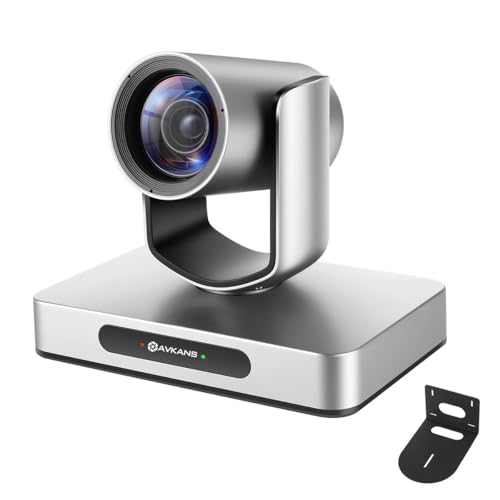
AVKANS 4K PTZ Camera, NDI, 12x, SDI — Best for small chapels
A 12x zoom reads as the modest option until you measure the rooms it serves. In a chapel or small church where the camera mounts ten to eighteen metres from the platform, 12x frames a preacher at exactly the size the stream wants — and a lens never stretched to its limit is a lens working comfortably, with steadier tracking and a wider, more forgiving view for the volunteer. Buying zoom you cannot use is not caution; it is waste wearing a bigger number.
AVKANS equips the small room properly rather than cheaply: 4K capture, NDI network streaming for the laptop-based team, and SDI alongside HDMI for the church whose production corner sits a cable-run away. That SDI socket is the tell of a manufacturer that understands small churches are not small studios — their distances are shorter but their buildings are just as awkward, and a locking professional connector solves real problems in a vestry cupboard.
Small chapels often stream from a laptop balanced in the sound corner, and the AVKANS’ USB route respects that reality completely: plug in, appear in the software, stream. The SDI socket then waits patiently for the year the chapel’s team graduates to a switcher — growth accommodated without a camera change, which is thoughtful design at a modest price.
Battery-free, mains-powered permanence suits the chapel pattern perfectly: the AVKANS sits above the door for years, wakes with the building, and asks for nothing between services except an occasional lens cloth. Equipment that respects a small church’s scarcest resource — volunteer hours — is equipment that will still be working at the tenth anniversary of its install.
AI auto-tracking tuned for a platform-sized stage completes the one-volunteer picture: the camera minds the preacher while the operator — who may also be the sound engineer and the slides person — minds everything else. Small churches run on such triple-duty saints, and equipment that respects their workload is a form of pastoral care disguised as engineering.
The limits are stated by the zoom itself. A growing congregation that moves to a larger building will outgrow 12x; a camera asked to cover a wide platform’s extremes from a centre mount will feel the edges. Both are tomorrow’s problems, honestly priced today, and the camera’s second life in a meeting room or youth hall softens even those.
For the chapel that streams to a dozen housebound members and a diaspora of grandchildren, this is the proportionate, respectful purchase — professional where it counts, modest where it should be, and priced like it understands whose money it is spending.
The AVKANS also suits the increasingly common pattern of the shared minister: one preacher, three small chapels, each with the same modest camera and the same run sheet, so the volunteer in any building faces a familiar desk. Standardising small is a strategy, and this is its natural standard.
Small churches should hear this plainly: a modest camera, well placed and lovingly run, honours a service more than a flagship neglected — and this is a very good modest camera.
- Zoom: 12x optical zoom
- Outputs: HDMI, SDI, USB/network streaming
- Network video: NDI support
- Tracking: AI auto-tracking
- Fit: Short-to-medium sanctuary throws
- Power: Standard PTZ power/network options (see listing)
Strengths
- Zoom honestly matched to small rooms
- SDI and NDI at a chapel-friendly price
- Tracking that respects the one-volunteer team
Trade-offs
- A growing church will outgrow 12x reach
- Less headroom for tight close-ups from the back
- Smaller brand ecosystem than the leaders
Best for: Chapels and small churches with short throws and small, devoted media teams.
Not suited for: Rooms longer than about twenty metres to the platform.
Prisual AI Auto-Tracking PTZ Camera, 20x (Broadcast Ready) — Best broadcast-style all-rounder
This Prisual is the traditionalist’s complete answer: a 20x zoom, AI auto-tracking, and the full broadcast connection set — 3G-SDI, HDMI, USB 3.0 and LAN — powered over PoE, in a fifth-generation design that describes itself as broadcast ready and, for once, has the sockets to back the phrase. Churches whose production corner grew up around a hardware switcher will find every cable they already own has somewhere to go.
The multi-output simultaneity is the working virtue. SDI feeds the switcher across the room, HDMI feeds the operator’s monitor, USB offers the streaming computer a direct door, and the network stream can carry a copy to a cry room or a recording machine — one camera, four congregations of screens, no splitter gymnastics. Multi-site churches and churches recording for television-adjacent outlets build exactly on this kind of flexibility.
Recording an ISO copy — the camera’s own clean feed, separate from the streamed programme — is where this Prisual’s multiple outputs pay an archival dividend. Funerals, weddings and baptisms can be re-edited afterwards from the untouched camera feed rather than from the compressed stream, and families treasure those recordings for decades.
For churches recording services for local television or community channels, this Prisual’s SDI pedigree and clean 4K feed meet technical delivery requirements that app-first cameras cannot sign. It is the pick whose paperwork matches its picture, which in broadcast dealings is not a small thing.
Tracking on this platform has the settled character of a design in its fifth generation: it follows the speaker without the nervous micro-corrections that make streamed sermons seasick viewing, and it yields to presets without sulking. Volunteers trust equipment that behaves predictably at 10:58 on a Sunday morning, and predictability is this camera’s deepest specification.
Against the FoMaKo pair, the Prisual trades a little of the newest network dialect for the most complete traditional wiring — a fair exchange that should be decided by your production corner’s actual sockets rather than by fashion. Count the inputs your switcher offers and the cables already run through your walls; the right camera is the one that meets your building where it stands.
As the guide’s closer it makes the field’s point: at 20x, with tracking and every output, two excellent manufacturers now compete closely enough that churches win either way — the decision is about dialect and detail, not about quality’s presence or absence.
Wedding parties occasionally ask whether the sanctuary camera can film their day; a broadcast-ready Prisual with an ISO recording makes that answer a gracious yes rather than a scramble for a videographer — one more quiet way a well-chosen camera serves the congregation that paid for it.
If your production corner already speaks SDI fluently, this Prisual will feel less like a purchase and more like a colleague arriving with references.
- Zoom: 20x optical zoom
- Outputs: 3G-SDI, HDMI, USB 3.0, LAN
- Power: PoE
- Tracking: AI auto-tracking (5th generation)
- Positioning: Broadcast-ready church and events camera
- Control: Presets via remote/controller
Strengths
- Most complete traditional output set here
- Settled, predictable tracking behaviour
- Simultaneous feeds for switcher, monitor and stream
Trade-offs
- Newest NDI dialect sits with the FoMaKo rival
- Premium pricing for the full socket set
- More camera than a laptop-only team will use
Best for: Churches with hardware switchers, multi-screen setups or broadcast ambitions.
Not suited for: Minimal laptop-only setups paying for sockets they will never plug.
Comparison Table
Translate the outputs column into your own production corner: the right camera is the one whose sockets match the cables your building already runs.
| Pick | Zoom | Outputs | Network video | Tracking | Room fit |
|---|---|---|---|---|---|
| FoMaKo Gen 3 | 20x | HDMI, USB 3.0, LAN | NDI HX3 | AI (Gen 3) | Most sanctuaries |
| FoMaKo NDI 6 | 20x | HDMI, LAN | NDI 6 + HX3 | AI | Growing multi-cam teams |
| Prisual 30x | 30x | SDI, HDMI, USB, LAN | NDI HX3 | AI | Long naves, balconies |
| Tenveo 20x | 20x | USB 3.0, HDMI, LAN | NDI | Humanoid + face | Value, multi-use halls |
| AVKANS 12x | 12x | HDMI, SDI, network | NDI | AI | Chapels, short rooms |
| Prisual 20x | 20x | SDI, HDMI, USB 3.0, LAN | Network streaming | AI (5th gen) | Broadcast-style setups |
The Four Cables, Translated for the Volunteer at the Back
HDMI is the cable behind your television: simple, cheap, and happiest under about fifteen metres before the picture needs help. SDI is the broadcast world’s coaxial cable with locking collars; it shrugs at fifty-metre runs and at being stepped on by the flower guild. USB turns the camera into the world’s best webcam for a laptop running your streaming software, provided the laptop sits within a short cable’s reach. NDI abolishes the dedicated cable entirely, sending picture, control and — with PoE — power down the network lead the building may already have in its walls.
No dialect is ‘best’ in the abstract. The best one is the one that reaches from your camera position to your production corner through your building’s actual walls, at your team’s actual skill level. Every pick in this guide speaks at least two dialects precisely because churches inherit mixed realities, and a camera that can change its mind about cabling is a camera that survives the next building project.
Presets are the liturgy of camera operation
A well-run church camera has a small liturgy of its own: preset one, the wide shot that opens the stream; two, the pulpit; three, the lectern; four, the choir or worship team; five, the font or baptistry; six, the close sermon frame. Programmed in a quiet hour on a weekday, named clearly, and written on a card taped beside the controller, those six buttons let a brand-new volunteer run a dignified service on their first Sunday. Auto-tracking is a wonderful seventh member of the team; it is not a substitute for the six, because a service is a shape, not a single speaker.
A second camera changes less than you think — and more
Churches often assume camera two is where production begins, but the honest sequence is duller: camera one with good presets, clean desk audio and a rehearsed volunteer outperforms two cameras run on hope. When the second camera does arrive — a side angle for the worship team, a baptistry view, a reverse shot of the congregation at the peace — it multiplies a system that already works rather than rescuing one that does not. Every pick in this guide was chosen to be a credible camera one and a graceful camera two, because most churches will ask it to be both across its life.
Training the next volunteer is a feature you build yourself
Every camera in this guide will outlive its first operator, so the system’s real interface is the folder you leave behind: the run sheet, the preset card, the labelled cables, the one paragraph that says which switch to flip when the picture vanishes. Churches that write that folder keep their streams through every rota change; churches that keep it in one person’s head discover, some flu-season Sunday, exactly where their documentation lived. Buy the camera for its picture — and budget the hour for the folder as part of the same purchase.
How Do You Choose a Church Camera That a Volunteer Can Actually Run?
Measure the room before admiring the zoom
Stand where the camera must mount — usually the rear wall or the balcony front — and pace or laser the distance to the pulpit. Under roughly fifteen metres, a 12x lens frames a preacher beautifully. Fifteen to thirty metres is 20x country, where most churches live. Beyond thirty, or from a high rear gallery, the 30x Prisual stops being an upgrade and becomes the requirement. A phone photograph from the mount position, zoomed to the framing you want, gives a rough field check: if the phone’s digital struggle looks hopeless, respect what it is telling you about distance.
Which output should your system be built around?
Inventory the production corner honestly. A laptop running streaming software argues for USB simplicity or NDI elegance. A hardware switcher argues for HDMI at short range or SDI at long range. A building already wired with network points argues for NDI and PoE above all, because the infrastructure is half installed. Let the building and the existing kit cast the deciding vote; the cameras above were chosen so that every honest answer has a pick waiting.
Can one volunteer run this on Sunday?
Ask the question literally, with your actual volunteer in mind — who may also be advancing slides. The answer favours presets within thumb’s reach, tracking that can be engaged for the sermon and released for the music, and a one-page run sheet written in the church’s own words. Every camera here can be run that way; the differences are in how gracefully each forgives a missed cue, and the reviews above score exactly that forgiveness.
Where does the audio come from?
Not from the camera — and this is the most valuable sentence in the guide for a new media team. Streamed worship lives or dies on sound: the congregation forgives a soft picture and abandons a muffled one. Feed the stream from the sound desk’s mix, budget a proper interface before a second camera, and let every pick here do the one job it was hired for. A church that fixes audio first and video second will be thanked in that order by the people watching from home.
What should the first month of ownership look like?
Week one: install, focus on presets, and stream a rehearsal to an unlisted link watched by three honest friends. Week two: the first real service, with the run sheet written and a second person watching only for problems. Week three: fix the two things that annoyed you — there will be exactly two, and one will be audio. Week four: write down what you fixed, because the volunteer who replaces you in two years deserves your month of learning in a folder, not in your memory. Every camera in this guide supports that month; the churches that complete it keep their volunteers, which is the metric underneath all the others.
Common Mistakes
Buying zoom for a room you did not measure
A 30x lens in a fifteen-metre chapel wastes money and narrows the wide shot the service needs; a 12x at the back of a forty-metre nave guarantees a season of apologetic streams. The tape measure is the first piece of video equipment a church should buy.
Running the stream on the congregation’s Wi-Fi
NDI cameras and streaming computers belong on wired network connections, on a switch that is not also serving two hundred phones hunting for the hymn words. One dedicated cable run for the production corner prevents the buffering icon from becoming a member of the worship team.
Letting auto-tracking direct the whole service
Tracking follows a person; a service is people, plural, in a shape. Music, readings, sacraments and silence all need frames an algorithm would not choose. Use tracking for the sermon, presets for the liturgy, and a human for the judgement between them.
Mounting the camera where the view is blocked by the congregation standing
A rear-wall camera at standing-head height films the backs of heads through every hymn. Mount high enough to see over a standing congregation to the platform — or accept a side position — and test the view during an actual service before declaring the install finished.
Spending the whole budget on the camera
Mounts, a controller or joystick for the operator, cabling, a streaming computer that can keep up and the audio interface are not accessories; they are the rest of the system. A mid-tier camera in a complete chain outperforms a flagship plugged into compromises, every single Sunday.
Judging the camera by the empty-building test
A sanctuary at noon on Tuesday is a different country from the same room full of people at 10:30 on Sunday — different light, different heights in the frame, different everything. Evaluate the test stream from a real service, with the congregation standing for the first hymn, before concluding anything about the install.
Final Recommendation
For the majority of churches, the FoMaKo Gen 3 is the camera to build around: 20x reach for the standard sanctuary, every output a growing system could want, NDI to free the laptop from capture cards, and tracking a lone volunteer can lean on during the sermon. Its NDI 6 sibling serves the team already planning cameras two and three; the Prisual 30x serves the long room nobody else here can reach; Tenveo brings tracking to budgets that must also fund microphones; AVKANS respects the chapel; and the second Prisual satisfies the broadcast traditionalists down to the last locking connector.
Measure the room, count the sockets in your production corner, and write the six presets on a card — those three unglamorous acts will do more for your stream than any single specification in this guide.
Do them, and next Sunday the member watching from a hospital bed will see the preacher’s face clearly, hear every word from the desk’s clean mix, and feel — for the length of one service — like the distance between them and their congregation has quietly closed.
Frequently Asked Questions
What do NDI, SDI, HDMI and USB actually mean for our church?
They are four routes for the same picture. HDMI is the familiar TV cable, fine over short runs. SDI is the professional locking cable that travels far without complaint. USB makes the camera appear as a webcam to a laptop. NDI sends the picture over the church network, so streaming software can find the camera by name with no capture card. Most churches end up using two routes at once — which is why every pick here offers several.
How much zoom does our sanctuary need?
Measure from the camera mount to the pulpit. Around fifteen metres or less suits 12x; the broad middle of fifteen to thirty metres suits 20x; beyond thirty metres, or from a high rear gallery, choose 30x. When in doubt between two sizes, take the larger only if the wide establishing shot still fits your room — a camera that cannot frame the whole platform has traded one problem for another.
Can one person really run the camera and the stream?
Yes, with the system designed for it: presets for the service’s fixed points, auto-tracking engaged for the sermon, and a run sheet on the desk. Thousands of small churches do exactly this every week. What one person cannot do is improvise — so the weekday hour spent programming presets is the investment that makes Sunday calm.
Do we need a special computer for NDI?
A reasonably modern streaming computer on a wired network connection handles NDI comfortably; the common failures come from Wi-Fi links and elderly routers, not from the protocol. Put the computer and cameras on a decent switch, keep the congregation’s phones on their own Wi-Fi, and NDI behaves like the professional tool it is.
Should the camera provide the stream’s audio?
No. Camera microphones hear the room’s echo and the nearest cough in high fidelity. Take audio from the sound desk — a clean mix of the platform microphones — through a simple interface into the streaming computer. It is the cheapest transformation in all of church streaming, and the one your online congregation will thank you for first.
Is 4K necessary, or would 1080p do?
Most streams leave the church at 1080p or below, but a 4K sensor earns its place anyway: it gives the operator digital headroom to tighten a frame, holds detail when the platform lighting is uneven, and keeps the recording archive useful for edited highlights long after the live bitrate is forgotten. Buy 4K for the archive and the flexibility; stream at whatever your congregation’s connections honestly support.
Where should we mount the camera?
Centred on the room’s axis if the building allows it, high enough to see over a standing congregation, and far enough back that the widest frame holds the whole platform. Side mounts suit rooms whose centre is blocked by a chandelier or a structural quirk; a slight angle is a small price against a camera that films heads. Whatever the position, test it during a real service before the fixings become permanent decisions.
What else should we budget for besides the camera?
A secure mount rated for the camera’s weight, a controller or the remote discipline to use presets well, cabling appropriate to your chosen output, a streaming computer that can hold a steady encode, and an audio interface from the sound desk. Together these commonly approach the camera’s own cost — which is not a warning against buying, but the honest shape of a system that works every Sunday.
Related Guides
Continue with our guides to church livestream audio, streaming software for small teams, and sanctuary lighting for video: Church livestream audio setup guide Best streaming software for small churches How to light a sanctuary for video
Related guides
- Best Affordable Android Tablets: Five True Android Slates and One Fire OS Specialist, Clearly Labelled
- Best Airbnb Security Cameras: Compliant Outdoor Cameras and Noise Sensors for Hosts
- Best 400 FPS High Speed Cameras: The Honest Truth About Burst Slow Motion
- Best Kids Smartwatches for Texting and Calling: Six Watch-Phones Under Parent Control



[…] installation practice, camera placement by housing type, and realistic recorder storage planning: How to install a PoE camera system Dome vs bullet vs turret cameras explained How much NVR storage do you […]