What's inside
- Key Takeaways
- Quick Picks
- How were these picks chosen?
- Comparison table
- How do you choose an inventory tablet?
- In the aisles: how we evaluated these scanners
- Common mistakes in warehouse tablet buying
- Rolling out a scanning fleet without stopping the warehouse
- Labels, symbologies and the unglamorous details
- Final recommendation
- Cold stores, yards and other hostile corners
- Data discipline: counts are only as good as the record
- Accessories that stop being optional
- How scanning speed compounds across a year
- Seasonal peaks and borrowing capacity
- What goods-in, picking and dispatch each ask of the same tablet
- Returns, repairs and the reverse flow
- Counting accuracy and the human side of the scan
- Multi-site operations and keeping one standard
- End of life: replacing a scanning fleet
- A word on small operations and single-tablet buying
- Voice picking, wearables and where tablets fit the roadmap
- Signing for the fleet: accountability at the dock door
- Frequently asked questions
As an Amazon Associate I earn from qualifying purchases. This post may contain affiliate links at no extra cost to you.
gizmoverdict.com is reader-supported. When you buy through links on our site, we may earn an affiliate commission.
Where to buy: Industrial scanning tablets are stocked by warehouse-equipment suppliers, barcode-specialist retailers and broad online marketplaces, frequently in several memory configurations under a single product page. Verify the scan engine named in the variant you select, the included accessories and the protection plan terms before ordering, since two listings with near-identical photographs can hide different imagers.
Inventory work exposes the gap between a tablet that can scan and a tablet built for scanning. A consumer slate reads a barcode through its camera, eventually, at the right angle, in good light, one item at a time. A warehouse at receiving speed does not work like that. The best tablets for inventory management carry a proper scan engine — a dedicated imager from Zebra or Honeywell, in every pick below — mounted in a rugged body that survives the drop from a pallet edge, and they turn the motion of aim, beep, next into something a picker can repeat four hundred times before lunch without thinking about the tool. That engine is the dividing line of this entire class, and it is why these six machines exist separately from the general rugged tablets elsewhere in this cluster.
One boundary must be drawn before any pick is praised: no tablet here ships with warehouse software. The WMS or inventory application, the ERP connection, the user accounts and the label-printing setup all belong to your operation and are licensed separately. These tablets are the handheld endpoint of that system — the part that walks the aisles — and they were judged as endpoints: scan engine first, then ruggedness, battery across a shift, connectivity back to the network, and the screen’s usefulness for the pick lists and counts the software will show. Trigger handles, charging cradles and vehicle mounts are separate accessories wherever a listing title does not name them, and several titles below are silent on exactly those points.
Key Takeaways
- Every pick carries an integrated scan engine, with Zebra SE4710 and Honeywell imagers named across the list.
- Android and Windows both appear; the right choice follows your WMS client, not fashion.
- Screen sizes run from 8 inches for one-handed aisle work to 10.1 inches for count-heavy tasks.
- Battery figures are stated on several picks, up to 10000mAh, and cradles remain separate purchases.
- No pick includes warehouse or inventory software; each pairs with your existing WMS or ERP application.
- The Chainway P100 trades a stated screen size for the group’s joint-largest battery and NFC.
Quick Picks
| Pick | Product | Badge |
|---|---|---|
| 1 | ONERugged T86X with Zebra SE4710 Scanner | Best all-round aisle scanner |
| 2 | Arrvel I87J with Zebra SE4710 Scanner | Best Windows option for ERP floors |
| 3 | MUNBYN IRT06 with Zebra SE4710 Scanner | Best compact Windows scanner |
| 4 | Chainway P100 with Honeywell Scanner | Best battery for long count days |
| 5 | FARSET P10 with Zebra SE4710 Scanner | Best big-screen inventory tablet |
| 6 | MUNBYN ILT01 Pro with Zebra SE4710 Scanner | Best protected value scanner |
How were these picks chosen?
The first filter was absolute: an integrated scan engine named in the listing title, from a recognised imager maker. Camera-only tablets were excluded however rugged their shells, because the class exists to scan at pace. The second filter spread the survivors across the real decision axes of a warehouse. Operating system splits the list — Android units for the many WMS clients built on it, Windows units where the ERP’s handheld client or the IT department’s policy demands Windows. Screen size splits it again, between 8-inch devices a picker carries in one hand for a full shift and the 10.1-inch FARSET for cycle counts and goods-in desks where two hands and a larger grid help.
Stated figures were kept in their makers’ words. IP ratings appear on some titles and not others; battery capacities are printed for the Chainway, the FARSET and the second MUNBYN but not for the first three picks, and those spec boxes say so rather than estimating. Where a short product name in a catalogue mentions one scan engine and the full listing title names a compatible Honeywell engine instead, the review follows the full title, because the title is the document of record for what ships. Operations running mixed fleets may also want the broader context in our guide to best tablets for field service, where two of these same brands appear in their Windows service builds.

Pick 1: ONERugged T86X with Zebra SE4710 Scanner — Best all-round aisle scanner
The T86X is the template this class is measured against: an 8-inch Android 14 tablet built around Zebra’s SE4710 scan engine, with an MT6789 octa-core processor, 8GB of memory, 128GB of storage, IP67 sealing, a stated 700-nit screen, 4G LTE and GPS. The SE4710 is the headline for a reason. It is a known quantity in warehousing, an imager that reads the battered, shrink-wrapped, badly printed labels that receiving actually produces, and its presence moves the buying question from whether the tablet scans well to everything else about the tablet. The 700-nit figure supports the yard and the loading bay as well as the aisle, and the 8-inch body keeps the unit a one-handed carry across a shift.
Its gaps are the honest kind. Battery capacity is not stated in the title, so shift endurance must be confirmed with the seller or tested in a pilot before a fleet commitment. No trigger handle is named among the inclusions, so high-volume picking ergonomics depend on an accessory purchase. Android 14 with support questions unanswered in the title means your IT team should confirm the maker’s update posture if the deployment is expected to run for years. None of that dents the central case: named engine, current software, outdoor-capable screen and full connectivity in the size pickers prefer. If a warehouse buys one model from this page to standardise on, the argument starts here.
- Strengths: Zebra SE4710 scan engine named in the listing.
- Strengths: 700-nit screen suits bays and yards as well as aisles.
- Strengths: Android 14 with 4G LTE and GPS connectivity.
- Trade-offs: Battery capacity is not stated in the listing title.
- Trade-offs: No trigger handle is named among the inclusions.
- Trade-offs: Maker’s software-update posture is not stated in the title.
- Display: 8 inches, 700 nits stated
- Scan engine: Zebra SE4710
- Memory and storage: 8GB, 128GB
- Water resistance: IP67
- Battery: Not stated in the listing title
Best for: a general warehouse standardising on one Android scanner for receiving and picking. Not suited for: a hands-free scanning station, since no trigger handle or fixed-mount kit is named in the listing. Operations leads can check price on Amazon for the T86X configuration described here.

Pick 2: Arrvel I87J with Zebra SE4710 Scanner — Best Windows option for ERP floors
The Arrvel I87J answers the warehouse whose handheld world runs on Windows. Its full listing title specifies Windows 11 Pro with a Honeywell N4680 scan engine reading 1D and 2D codes including QR, in an 8-inch IP65 body with 8GB of memory and 128GB of storage, aimed squarely at ERP and WMS work across warehouse and retail. Read that engine detail carefully, because catalogue shorthand for this model sometimes names a different imager; the full title is the document to trust, and the N4680 it names is a capable modern engine in its own right, so the discrepancy costs the buyer nothing in performance — it simply rewards reading the whole listing before ordering a fleet.
Windows in the warehouse is a deliberate trade. The device joins the same management and policy world as the office estate, runs the ERP clients that were written for it, and asks more of its hardware than an Android equivalent, which makes the 8GB memory figure a working minimum rather than headroom. IP65 sealing trails the IP67 picks by a step — fine against dust and spray in a distribution hall, less armoured against a yard soaking. Battery capacity goes unstated. For the operation whose software decision was made years ago at ERP level, those are acceptable terms, and this is the pick that honours them with the least fuss.
- Strengths: Windows 11 Pro for ERP and WMS clients built on it.
- Strengths: Honeywell N4680 engine named in the full listing title.
- Strengths: 1D, 2D and QR reading for mixed label estates.
- Trade-offs: IP65 sealing sits a step below the IP67 picks.
- Trade-offs: Battery capacity is not stated in the listing title.
- Trade-offs: 8GB memory is a working minimum under Windows.
- Display: 8 inches
- Scan engine: Honeywell N4680 (per full listing title)
- Memory and storage: 8GB, 128GB
- Water resistance: IP65
- Operating system: Windows 11 Pro
Best for: an ERP-driven warehouse whose handheld client dictates Windows. Not suited for: outdoor yard work in sustained rain, where the IP65 rating is the thinnest cover in this group. Warehouse managers on Windows estates can see the I87J listing on Amazon and confirm the engine named in the variant.

Pick 3: MUNBYN IRT06 with Zebra SE4710 Scanner — Best compact Windows scanner
MUNBYN’s IRT06 is the second Windows route in the list, an 8-inch Windows 11 Pro tablet whose title says it works with the Honeywell N4680 scan engine for 1D and 2D inventory scanning, with 8GB of memory and 128GB of storage for ERP and WMS environments. The pattern across picks two and three is worth noticing: the catalogue names attached to these models invoke one engine family while the full titles describe compatibility with Honeywell imagers, and the working lesson is identical — the engine that matters is the one the full listing commits to, and both named Honeywell engines are serious warehouse hardware. Between the two Windows picks, the choice turns on the details your own pilot surfaces: ergonomics, accessory range and the seller relationship.
The IRT06’s title is the tersest here, stating neither an IP rating nor a battery capacity, and the review records those silences plainly rather than borrowing figures from its sibling MUNBYN at pick six. That restraint cuts both ways for the buyer: less is promised, so more must be verified in a trial unit before a fleet order. What is promised is coherent — a compact Windows scanner for the inventory endpoint role, from a maker with a visible presence in this niche and a two-year protection offer on its sibling model that suggests an established support operation. Warehouses already talking to MUNBYN about the ILT01 Pro will find this the natural Windows counterpart in the same conversation.
- Strengths: Windows 11 Pro in a compact 8-inch scanning body.
- Strengths: Works with the Honeywell N4680 engine per the listing title.
- Strengths: 1D and 2D inventory scanning for ERP and WMS endpoints.
- Trade-offs: IP rating is not stated in the listing title.
- Trade-offs: Battery capacity is not stated in the listing title.
- Trade-offs: The title’s brevity leaves ergonomics to a pilot unit.
- Display: 8 inches
- Scan engine: Honeywell N4680 compatibility stated
- Memory and storage: 8GB, 128GB
- Water resistance: Not stated in the listing title
- Operating system: Windows 11 Pro
Best for: a Windows-estate warehouse standardising on a compact scanner from an established niche maker. Not suited for: a fleet purchase made without a pilot, since sealing and battery go unstated in the title. Buyers comparing the two Windows routes can review the IRT06 on Amazon alongside their shortlist.

Pick 4: Chainway P100 with Honeywell Scanner — Best battery for long count days
Chainway is a name warehouse professionals already know from dedicated handhelds, and the P100 brings that lineage to a tablet form: a wireless Android scanner reading 2D, 1D and QR codes through a Honeywell-family imager, running Android 14 with stated support toward version 18, and carrying Wi-Fi, Bluetooth, GPS and NFC around a 10000mAh battery the title calls all-day. The software-support horizon deserves emphasis, because inventory hardware is bought for years and an Android version path stated in the listing is rarer than it should be in this class. NFC adds the tap-based interactions — badge checks, tag reads, quick pairing — that pure barcode devices handle awkwardly.
The title leaves the screen size unstated, an unusual omission that the spec box records honestly; a buyer for whom display dimensions drive the decision should confirm them with the seller before ordering. Memory and storage figures are likewise absent from the title. Those gaps make the P100 a pilot-first purchase, but the pilot has strong material to work with: a specialist maker’s scanning heritage, the group’s joint-largest stated battery, and the clearest software-longevity signal on the page. For the annual stocktake that runs from dawn to dark and the distribution centre whose shifts genuinely stretch, endurance plus engine credibility is a persuasive pairing.
- Strengths: 10000mAh battery described as all-day in the listing.
- Strengths: Android 14 with support stated toward version 18.
- Strengths: NFC alongside Wi-Fi, Bluetooth and GPS.
- Trade-offs: Screen size is not stated in the listing title.
- Trade-offs: Memory and storage are not stated in the listing title.
- Trade-offs: Specific imager model is not named beyond the maker family.
- Display: Not stated in the listing title
- Scan engine: Honeywell-family 2D/1D/QR reader
- Battery: 10000mAh
- Operating system: Android 14, support to 18+ stated
- Connectivity: Wi-Fi, Bluetooth, GPS, NFC
Best for: long count days and stocktakes where the stated 10000mAh battery carries the shift. Not suited for: selection made on screen dimensions from the page alone, since the title omits the display size entirely. Stocktake planners can look up the P100 on Amazon and put its missing figures to the seller.

Pick 5: FARSET P10 with Zebra SE4710 Scanner — Best big-screen inventory tablet
The FARSET P10 scales the formula up: a 10.1-inch Android 14 industrial tablet with a 1D, 2D and QR barcode scanner, 8GB of memory, 128GB of storage, Wi-Fi 6, 5G LTE, GPS, a 10000mAh battery and IP67 sealing. The larger screen changes the work it suits. Cycle counts against a long grid, goods-in checks against a delivery note, and exception handling with a supervisor looking over a shoulder all breathe easier on ten inches, and the connectivity set — current Wi-Fi plus cellular — keeps the big unit live from the yard to the far racking. The battery matches the Chainway’s figure, which matters more on a large screen, since the display is the load.
Size is also the trade. A 10.1-inch tablet is a two-handed or cradle-carried tool for most pickers, and a full shift of one-handed aisle work will argue for the 8-inch picks instead. The listing names the scanner’s capabilities without naming its engine model in the title’s own words — catalogue shorthand associates the model with the SE4710 family, and as with picks two and three, the full title is the document to verify at order time. Brightness goes unstated. None of that prevents the P10 from owning its niche: the count desk, the receiving bench and the supervisor’s round, where screen area is worth more than pocketability.
- Strengths: 10.1-inch screen for counts, grids and goods-in checks.
- Strengths: Wi-Fi 6 plus 5G LTE, the strongest connectivity set here.
- Strengths: 10000mAh battery with IP67 sealing.
- Trade-offs: Two-handed size for most one-handed picking work.
- Trade-offs: Engine model is not named in the full listing title.
- Trade-offs: Brightness in nits is not stated in the listing title.
- Display: 10.1 inches
- Scanner: 1D/2D/QR barcode scanner
- Memory and storage: 8GB, 128GB
- Battery: 10000mAh
- Water resistance: IP67
Best for: receiving benches and cycle-count teams who work from larger on-screen grids. Not suited for: one-handed picking across a full shift, where the 10.1-inch body becomes the burden. Receiving supervisors can find the FARSET P10 on Amazon and weigh it against their bench setup.
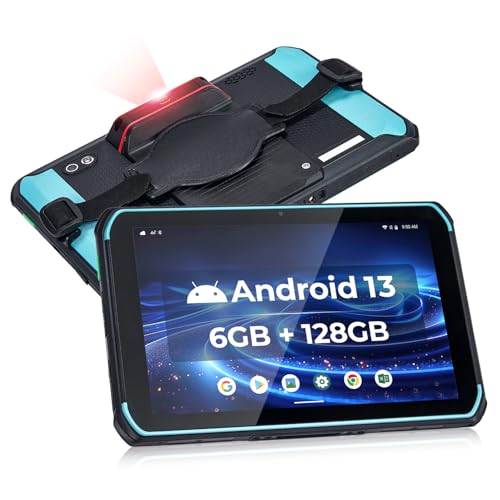
Pick 6: MUNBYN ILT01 Pro with Zebra SE4710 Scanner — Best protected value scanner
The second MUNBYN closes the list with a value argument wrapped in a protection promise: an 8-inch Android 13 tablet that works with the Honeywell N6703 scan engine, with 6GB of memory, 128GB of storage, a 9000mAh battery and a stated two-year protection plan, aimed at logistics and warehouse inventory work. The N6703 named in the full title is a slim, capable imager, and the battery figure — printed where several rivals print nothing — supports a full shift’s scanning with something in reserve. The two-year protection deserves its weight in the decision, because in this class the ownership experience after a failure separates the serious sellers from the rest.
The compromises are generational rather than structural. Android 13 trails the Android 14 picks, and 6GB of memory is the leanest figure here, adequate for a focused WMS client and less comfortable for multitasking supervisors. No IP rating is stated in the title, so the sealing story needs the seller’s confirmation. Judged as the endpoint it is — one warehouse application, scanned all day, protected for two years — the ILT01 Pro makes the most with the least, and for a small operation equipping its first real scanning fleet, that arithmetic often beats a flagship’s.
- Strengths: 9000mAh battery stated in the listing.
- Strengths: Two-year protection included in the offer.
- Strengths: Works with the Honeywell N6703 engine per the title.
- Trade-offs: Android 13, a generation behind the newest picks.
- Trade-offs: 6GB memory is the leanest figure in this guide.
- Trade-offs: IP rating is not stated in the listing title.
- Display: 8 inches
- Scan engine: Honeywell N6703 compatibility stated
- Memory and storage: 6GB, 128GB
- Battery: 9000mAh
- Operating system: Android 13
Best for: a small warehouse equipping its first dedicated scanning fleet under a protection plan. Not suited for: heavy multitasking at the supervisor’s desk, where 6GB of memory and Android 13 show their age soonest. First-fleet buyers can review the ILT01 Pro listing on Amazon for the protection terms in full.
Comparison table
| Pick | Display | Engine per full title | System | Battery | Standout fact |
|---|---|---|---|---|---|
| ONERugged T86X | 8″, 700 nits | Zebra SE4710 | Android 14 | Not stated in the listing title | IP67, 4G LTE |
| Arrvel I87J | 8″ | Honeywell N4680 | Windows 11 Pro | Not stated in the listing title | IP65, ERP/WMS focus |
| MUNBYN IRT06 | 8″ | Honeywell N4680 | Windows 11 Pro | Not stated in the listing title | Compact Windows scanner |
| Chainway P100 | Not stated in the listing title | Honeywell-family reader | Android 14 to 18+ | 10000mAh | NFC included |
| FARSET P10 | 10.1″ | 1D/2D/QR scanner | Android 14 | 10000mAh | Wi-Fi 6 and 5G LTE |
| MUNBYN ILT01 Pro | 8″ | Honeywell N6703 | Android 13 | 9000mAh | 2-year protection |
How do you choose an inventory tablet?
Choose the engine before the tablet. Bring your operation’s hardest labels to the decision — the faded carton print, the small parts label, the shrink-wrapped pallet tag, the damaged code at receiving — and let candidate devices read them at working distance, at speed, in your lighting. An engine that handles your worst label handles your year; one that only handles clean samples will tax every shift. Next, follow the software. Your WMS or inventory platform’s handheld client dictates the operating system, and that decision, made correctly, is not a preference but a compatibility fact. Android dominates modern warehouse clients; Windows persists where ERP estates demand it, and both appear in this guide for exactly that reason.
Then size the device to the task’s hands. Picking and put-away reward the 8-inch one-handed carry; counting, receiving and exception work reward the larger screen. Battery strategy follows shift shape: a stated 9000–10000mAh pack covers most single shifts, while multi-shift operations should plan cradles and rotation rather than heroic capacity, and cradles are accessories to budget, not inclusions to assume. Connectivity gets a site survey, not a hope — walk the racking with a signal tool, find the dead corners behind the freezer units, and let that map decide whether cellular backup earns its plan cost. Finally, pilot with real labels, real gloves and a real pick run before any fleet order; this class rewards the trial more than most because the differences live in the hand, not on the page. Teams whose scanning extends outdoors can cross-check brightness expectations against our best tablets for marine navigation guide, where sunlight legibility is the whole argument.
In the aisles: how we evaluated these scanners
Our evaluation scenarios were built from a distribution centre’s least forgiving hours. The first was the receiving surge: a mixed pallet of cartons, some labels pristine, some scuffed, one torn across the bars, worked against the clock. Integrated engines earned their existence there, reading at angles and distances a camera treats as a negotiation. The second scenario was the long pick run — a hundred locations across high and low racking, with the device in one hand and a carton in the other — where the 8-inch bodies disappeared into the work and the 10.1-inch FARSET announced its weight honestly by the fortieth stop. The third was the cycle count in the freezer aisle, gloves on, breath fogging, where trigger discipline and screen targets sized for gloved fingers mattered more than any processor.
We also staged the failures. A label behind reflective wrap. A code printed too small by a supplier’s ageing printer. A Wi-Fi shadow behind the racking where the WMS session had to survive a roam or queue gracefully. Battery behaviour was tracked across a simulated double shift with cradle breaks only at meal times, the pattern that separates a stated capacity from a working one. The Windows pair were put through the office-side motions too — policy enrolment, the ERP client, a remote session — because their buyers judge them partly as IT estate. Across every scenario the same hierarchy held: engine credibility first, then the body’s willingness to be carried, then everything else the brochure prefers to discuss.
Common mistakes in warehouse tablet buying
The costliest mistake is buying camera-scanning tablets for engine work, saving money per unit and spending it daily in seconds per scan, multiplied by every picker, every shift, every year. The second is assuming the software is included or trivial: the WMS licence, the handheld client configuration and the label-printing setup are a project, and the tablets are its last mile, not its totality. Third, fleets get ordered without cradles, so devices charge in a tangle on a bench, batteries age unevenly, and the morning starts with a lottery. Fourth, buyers skip the label test and discover at go-live that the chosen engine dislikes the one label format the biggest supplier uses.
Fifth, the accessory conversation happens late — trigger handles, hand straps, vehicle mounts and spare batteries surfacing as unbudgeted extras after the fleet order consumed the funds. Sixth, screen size gets standardised by decree across jobs with different hands, leaving pickers carrying a count-desk tablet through the aisles. Seventh, nobody owns the update policy, so Android versions drift across the fleet until the WMS client drops the oldest unit mid-season. Each of these is a process failure wearing a hardware costume, and each is cheaper to prevent in the buying month than to cure in the operating year.
Rolling out a scanning fleet without stopping the warehouse
Warehouses cannot pause for an IT project, so the rollout pattern that works is a quiet one. Start with one aisle or one function — receiving is the forgiving choice, because its work is batched and supervised — and run the new tablets beside the old method for a full week, reconciling counts nightly so trust in the new record is earned with evidence. Train by task rather than by device: the ninety minutes that teach receiving on the actual unit, with the actual labels and the actual exceptions, outperform any classroom session. Name a floor champion per shift, the person whose tablet knowledge the crew borrows, and give that person the maker’s support channel and the spare unit.
Expand by function once receiving holds, and keep the paper fallback alive until the second function reconciles cleanly for a fortnight. Log every scanning failure with its label photographed; that log becomes the evidence base for supplier conversations and for the next purchase round. Review battery and cradle placement after the first month, because the charging geography a planner imagines and the one a night shift adopts are rarely the same, and the fleet’s daily reliability is decided at those sockets more than at any specification review. Done this way, the transition reads in the operation’s memory as a non-event — which, in a building measured on throughput, is the highest praise a technology project can earn.
Labels, symbologies and the unglamorous details
Barcode quality decides scanning speed as surely as engine quality, and an operation buying its first real fleet should audit its labels in the same month. Print contrast fades as printer heads age; a code that a new engine reads today may defeat every engine by next quarter if the label printer is dying quietly. Ribbon and label stock mismatches smudge in cold stores. Supplier labels arrive in symbologies your system must be configured to accept, and the configuration conversation belongs with your WMS provider before go-live, not with the tablet seller after it. Even placement matters: a label wrapped around a carton corner taxes any imager, and standardising placement on your own outbound cartons is free speed.
These details explain why two warehouses running the identical tablet report different scanning experiences, and why the pilot discipline repeated throughout this guide specifies your labels rather than sample ones. The engine makers named here — Zebra and Honeywell — built their reputations on forgiving exactly this real-world label estate, which is the deepest reason their presence in a listing title carries weight. Hardware forgiveness, however, is a cushion rather than a strategy; the operations that scan fastest treat label quality as their own responsibility and let the engine’s tolerance cover the suppliers they cannot control.
Final recommendation
The ONERugged T86X is the standard-bearer: a named Zebra engine, a bright screen, current Android and full connectivity in the size pickers carry best, and it is the model most warehouses should pilot first. Windows estates split between the Arrvel I87J and the MUNBYN IRT06, a decision a week’s trial settles better than any comparison table. The Chainway P100 serves the longest count days, the FARSET P10 owns the bench and the count desk, and the ILT01 Pro equips a first fleet under a protection plan at the gentlest commitment. Underneath every route sits the same truth this guide opened with: the engine is the product, the software is yours to bring, and the tablet is where those two facts meet the aisle. Sites equipping a mixed estate may also find our best mobile tablets for construction roundup relevant for the outdoor yards where inventory work and site work blur into one another.
Cold stores, yards and other hostile corners
Warehouses are not one environment, and the corners decide fleets. A cold store condenses moisture on a warm tablet carried in from the ambient hall, fogs screens, stiffens fingers inside gloves and shortens battery output, all in the same ten minutes. Devices working freezer aisles need gloved-input discipline, screens that stay legible through a wipe, and a rotation pattern that lets units warm and charge between excursions rather than living in the cold. The yard inverts the problem: summer sun on black racking defeats dim screens and overheats sealed bodies, which is where the T86X’s stated 700-nit panel earns its specification. Loading bays add diesel dust, rain at the open door and the drop onto concrete that every rugged claim eventually meets. A buyer mapping a fleet should assign devices by zone honesty — the toughest, brightest units to the yard and bay, the lighter ones to the ambient aisles — rather than demanding one model survive every corner identically, because the corners themselves do not agree on what survival means.
Data discipline: counts are only as good as the record
A scanning fleet changes an operation’s relationship with its own numbers, and the change needs governing. When every movement is scanned at the point of work, the stock record stops being an estimate maintained by memory and becomes a live claim that other departments will trust — planners will order against it, sales will promise against it, finance will value against it. That trust is earned by exception handling: the discipline for the unscannable label, the damaged carton, the item whose code disagrees with its contents. Tablets make the honest path fast, but the procedure for the dishonest moments belongs to management, and operations that write it down before go-live keep their new accuracy, while operations that improvise exceptions watch the old drift return wearing modern hardware. The device, in other words, is the easy half of inventory truth; the procedure is the half that lasts.
Accessories that stop being optional
Three accessories graduate from optional to inevitable in most deployments, and budgeting them with the fleet order saves the second purchase round. Multi-slot charging cradles organise the morning: units docked, charged and accounted for at a glance, with a missing tablet visible as an empty slot rather than discovered at a pick face. Trigger handles transform high-volume picking economics, because the pistol grip aligns the imager naturally hundreds of times a shift and spares the wrist the tablet-only angle. Hand straps and shoulder slings carry the middle ground for count work. Add screen protectors in bulk, a labelled spare per fleet, and cases matched to the drop profile of each zone, and the accessory line lands where experienced operations expect it — a significant fraction of the hardware line, repaid in uptime. None of the six listings in this guide bundles that kit by title, which is precisely why this section exists: the tablet price is the beginning of the deployment figure, and the warehouses that accept that early are the ones whose go-lives stay boring.
How scanning speed compounds across a year
The arithmetic of the aisle is worth doing once, slowly. Suppose a picker scans three hundred codes on a shift. A camera-based read that averages even two extra seconds per code — the refocus, the re-angle, the second attempt on the worn label — consumes ten minutes of that shift in pure friction. Across a small team, across five shifts, across a working year, those minutes become whole working weeks spent negotiating with labels, and they arrive attached to a subtler cost: the picker who fights the tool stops trusting it, starts batching scans from memory at the carton, and quietly reintroduces the errors the system was bought to eliminate. A dedicated engine’s advantage is therefore not really speed; it is the preservation of the scanning habit itself. That is why this guide treats the engine as the product and everything else as the product’s clothing, and why a cheaper tablet with a real imager will outperform a premium tablet with a camera in every warehouse metric that survives contact with December.
Seasonal peaks and borrowing capacity
Inventory fleets are sized by their worst month, not their average one, and the peak season exposes every shortcut in the original purchase. Volume doubles, temporary staff arrive, and the tablets are suddenly worked by people who did not attend the training and will not read the manual. Fleets that survive peaks share three traits: devices simple enough that a ten-minute induction genuinely suffices, a charging and sign-out routine robust enough to run on a whiteboard when the supervisor is busy, and a reserve of units — even older ones — that can be pressed into count duty while the primary fleet picks. The value picks in this guide, notably the protected MUNBYN ILT01 Pro, make sense in that reserve role as well as the primary one. Planning the peak in the buying month, rather than discovering it in the peak month, is the least technical and most valuable advice in this entire guide.
What goods-in, picking and dispatch each ask of the same tablet
Different warehouse functions stress different parts of the same device, and a fleet shared across functions should be specified for the overlap honestly. Goods-in is a reading task: delivery notes on screen, labels scanned at the bench, discrepancies photographed — screen area and camera serve it, which is the FARSET’s home ground. Picking is a carrying task, where weight, grip and trigger ergonomics dominate and the 8-inch Android units hold the advantage. Dispatch is a verification task, fast scans against an order with the cost of error at its highest, because a mistake discovered by the customer costs more than one caught at the bench. A small operation running one model across all three should weight picking, since it consumes the most hours; a larger one should let each function argue for its own device class and accept a mixed fleet with shared management. Either way, naming the functions before naming the models keeps the purchase pointed at the work.
Returns, repairs and the reverse flow
Modern warehouses move goods backwards as faithfully as forwards, and the returns bench makes its own demands of a scanning tablet. Returned items arrive with labels from every era of the operation’s printing history, customer-applied tape over the original code, and condition notes that need photographing against the record. A tablet with a credible engine and a decent camera collapses that inspection into one device at one bench, and the record it creates — scan, grade, photograph, route to restock or quarantine — is the difference between returns as a controlled process and returns as a growing pile near a door. Fleets that equip the returns bench with the oldest hand-me-down unit reliably discover that the function with the messiest labels received the weakest reader, an inversion worth avoiding deliberately when the fleet is assigned its zones.
Counting accuracy and the human side of the scan
Technology settles the reading of codes; people settle everything around the reading. A cycle count is accurate when the counter scans the location as faithfully as the item, recounts the discrepancy instead of accepting it, and treats the tablet’s prompt as the start of a question rather than an instruction to agree. Training that distinction takes an afternoon and protects the entire investment, because the most expensive inventory errors in a scanned warehouse are no longer misreads — the engine prevents those — but mis-locations and waved-through discrepancies that the data then certifies with false confidence. Supervisors reviewing count variances should ask which kind they are looking at before blaming hardware. The tablets in this guide will read what they are shown; the operation’s culture decides what they are shown, and that is as it should be, since it keeps the responsibility for the stock record where it has always belonged — with the people who sign for it.
Multi-site operations and keeping one standard
Organisations running several warehouses face a temptation the single-site buyer never meets: each site speccing its own favourite until the company owns four tablet fleets, four accessory sets and four support conversations for one WMS. The standardisation argument is not about tidiness; it is about transferability. A picker who can walk into a sister site during its peak and pick up a familiar device is worth more than any single site’s marginal preference, and a support team that knows one model’s failure modes answers the phone faster than one juggling four. Where sites genuinely differ — a cold store here, a yard operation there — standardise the platform and the management, and let the model vary by zone within that frame. The six picks in this guide were deliberately spread across makers and systems to serve single-site decisions; a multi-site buyer should read them as a menu from which to choose one platform deeply, not a shopping list to buy shallowly across all six.
End of life: replacing a scanning fleet
Every fleet in this guide will one day be replaced, and the replacement goes better when the exit is planned with the entrance. Batteries tire first, then the WMS client’s minimum Android or Windows version quietly overtakes the oldest units, then accessory lines end. A sensible operation staggers purchases so the fleet never shares one birthday, keeps the asset register honest about which units run which software version, and treats the trade-in or resale conversation as part of the next procurement rather than an afterthought. Data hygiene closes the loop: units leaving the business get wiped under supervision, because a warehouse tablet carries supplier pricing, customer addresses and network credentials in its history. None of this is visible in a product listing, and all of it decides whether the fleet’s final year feels like a managed transition or a slow emergency — the same choice, at the far end, that the pilot unit and the cradle budget represented at the beginning.
A word on small operations and single-tablet buying
Not every reader of this guide runs a distribution centre. A stockroom behind a busy shop, a parts counter at a dealership, a charity warehouse sorting donations — these operations buy one or two tablets, and their decision inverts several fleet assumptions. With no IT department, the maker’s support and protection terms matter more, which flatters the MUNBYN ILT01 Pro’s stated two-year cover. With no spares shelf, reliability and a painless return route outrank a marginal scanning advantage. With no WMS at all, the tablet pairs with a far simpler inventory application, and the buying question becomes whether the chosen software supports the device’s integrated scanner rather than only its camera — a check worth making with the software provider before the hardware order, because an unsupported imager reduces a purpose-built scanner to an expensive camera tablet. Small operations also gain disproportionately from the count discipline a real scanner imposes: when one person is the entire warehouse team, the device that makes the honest scan the easy scan quietly becomes the stock system, the audit trail and the memory of the business, all in a single 8-inch frame.
Voice picking, wearables and where tablets fit the roadmap
Larger operations will meet two neighbouring technologies while planning a tablet fleet, and a sentence on each keeps the purchase in proportion. Voice-directed picking moves the instruction channel to a headset and frees both hands, excelling at high-volume case picking while offering no screen for the exceptions, photographs and counts that fill the rest of the warehouse day. Wearable ring scanners pair with a wrist or tablet screen to split the difference. Neither replaces the devices in this guide so much as it reassigns them: the tablet becomes the exception handler, the count tool and the supervisor’s window, roles where its screen is the point. A buyer hearing a roadmap pitch should therefore ask not whether tablets survive the future — screens for exceptions survive every roadmap — but which of the six roles in their own building will still need glass in three years, and buy depth for those roles rather than breadth across all of them.
Signing for the fleet: accountability at the dock door
The last unglamorous system a scanning fleet needs is a sign-out habit. Tablets walk — into vans, into cages, occasionally into the wider world — and a fleet without an ownership trail discovers its losses at the stocktake it bought the tablets to improve. The routine can stay light: a numbered cradle slot per numbered device, a name against the number at shift start, and a supervisor’s glance at the empty slots before the doors close. Devices that support it can report their own location on the site network, which settles the commonest case, the unit left on a pallet in the far aisle, in minutes rather than at the next audit. Build the habit while the fleet is new and small enough for habits to form, because retrofitting accountability onto forty devices and three shifts is a project, while starting it with six devices and one whiteboard is a decision. The stock record’s integrity, which this whole guide has chased, turns out to apply to the scanners themselves — and an operation that can account for its tablets has usually built exactly the culture that keeps the rest of its counts honest too. The same register that tracks the devices should track their batteries and handles, since accessories drift faster than tablets and a fleet audit that finds six tablets, four handles and two working cradles has located tomorrow’s picking problem while it is still cheap. Review the register at the same meeting that reviews count accuracy, and the hardware conversation and the data conversation reinforce each other instead of competing for the agenda — a small administrative marriage that experienced warehouse managers arrange instinctively and new ones discover the value of exactly once, the hard way. Keep the register boringly current rather than heroically reconstructed: a name and a slot updated in the moment beats a quarterly archaeology project, and the discipline costs less than a minute a shift, which is the cheapest insurance any fleet in this guide will ever be offered against the slow leak of equipment into the building’s forgotten corners. Photograph the cradle bank at the end of the first week and pin the picture beside it; a full row of docked, lit tablets becomes the standard the night shift tidies toward without a word being said, and standards that can be seen are the ones that survive staff changes. The photograph costs nothing, takes ten seconds, and quietly does the work of a policy document nobody would have read. Supervisors inherit the habit simply by walking past it daily, which is how the best warehouse standards have always propagated. New starters absorb the expectation before anyone explains it, and the fleet stays findable, charged and ready for the count that eventually tests every claim the operation makes about itself.
Frequently asked questions
Why does the scan engine matter more than the processor?
Because scanning is the job. A dedicated Zebra or Honeywell imager reads worn, wrapped and badly lit labels at working speed all shift, while a camera negotiates with each one. Processor differences barely register beside that gap.
Do these tablets come with inventory software?
No. Every pick is a hardware endpoint. Your WMS, ERP or inventory application, its licences and its configuration come from your own software arrangements, and the tablet must be chosen to run the client that software provides.
Android or Windows for a warehouse?
Whichever your WMS handheld client requires. Most modern warehouse platforms lead with Android; estates standardised on Windows ERP clients should take the Windows picks and accept their trade-offs knowingly.
Are trigger handles and cradles included?
Only where a listing title says so, and the titles in this guide generally do not. Budget handles, cradles and mounts as separate accessories, and confirm the exact inclusions on the product page before ordering.
How long will a scanning tablet last on shift?
The stated capacities here run to 9000–10000mAh on the picks that publish figures, which covers most single shifts of intermittent scanning. Multi-shift operations should rotate units through cradles rather than rely on any single battery.
Buy the engine your worst label demands, charge the fleet like you mean it, and let the counts reconcile for a month — after that, the clipboard on the warehouse wall stops looking like a tool and starts looking like what it always was: a delay between the shelf and the truth.
Related guides
- Best 3D Art Tablets
- Best Canon Point and Shoot Digital Cameras: PowerShot Picks From Pocket Compacts to Travel Zooms
- Best Balancing Stabilizers for Mirrorless Cameras: Payload, Balancing and Native Vertical Shooting
- Best Basic Phones Camera Buyers Can Trust: Flip Phones and Simple Handsets That Still Take a Photograph


