What's inside
- Key Takeaways
- Quick Picks
- How Did We Choose Bars for Consoles Rather Than Cinemas?
- How Does Console Audio Actually Reach the Bar?
- Which Bar Fits Your Console Setup?
- How Do the Six Compare for a Console?
- How Do Directional Cues Survive in a Single Bar?
- How Do You Set Up a Console Bar for the Lowest Practical Latency?
- What If Two Consoles and a PC Share One Screen?
- What Mistakes Do Console Players Make When Buying a Bar?
- Final Recommendation
- Frequently Asked Questions
- Related Guides
As an Amazon Associate I earn from qualifying purchases. This post may contain affiliate links at no extra cost to you.
gizmoverdict.com is reader-supported. When you buy through links on our site, we may earn an affiliate commission.
Where to buy: Every bar here is linked twice to its Amazon listing — once in the Quick Picks table, once in its own review. A discipline note that matters in this category: this guide only claims eARC, a game mode or low-latency behaviour for a pick where the evidence supports it, and marks the rest as not stated — because gaming features are the most casually exaggerated claims in soundbar marketing.
The search for the best soundbars for console gaming begins with a familiar scene: a modern console feeding a television whose speakers flatten everything the game worked to build. Engines lose their depth, footsteps lose their direction, and the dialogue in cutscenes competes with the score on equal, miserable terms. A soundbar is the natural fix — one unit under the screen, no speaker wire around the room — but console gaming makes demands that film viewing does not, and a bar chosen on film criteria alone can disappoint a player in ways that take weeks to diagnose.
The first demand is connection sense. A console’s audio reaches the bar either through the television — the console plugs into the set, the set passes sound to the bar — or, on some setups, with the bar in the middle. Each route has consequences for which formats survive and how much delay creeps in, and the television’s own settings matter as much as the bar’s specification. The second demand is honesty about latency: any processing a bar applies takes time, and in fast games time is aim. The third is the sound itself — directional information a player can use, bass that gives weight without smothering the midrange where cues live, and dialogue that stays clear when the game gets loud.
None of this requires the player to become an audio engineer. It requires one evening of deliberate setup — the chain understood, the television’s menus visited once, the bar’s modes sorted into a lean preset and a rich one — after which the system disappears into the hobby it serves. The picks below were chosen to reward that evening rather than to demand it weekly, and the reviews note, for each bar, exactly which parts of the chain its title lets us verify and which parts remain for the maker’s documentation to confirm.
The six picks divide by scale and intent. Samsung’s Q600F is the full home-theatre entry, a 3.1.2 system with wireless subwoofer and the only title in this pool that supports a game-mode discussion. Creative’s Stage Pro and the ULTIMEA system bring Dolby processing and subwoofers in more compact forms. BESTISAN, LARKSOUND and Saiyin serve the other end of console life: the bedroom television, the monitor desk, the small room where the console actually lives for millions of players, and where a right-sized bar beats an oversized one on every measure except brochure drama.
Key Takeaways
- Only the Samsung HW-Q600F’s evidence supports a game-mode claim in this pool; for the other five, game features are marked not stated rather than assumed.
- Connection route decides gaming sound more than brand: know whether the console’s audio passes through the television before choosing.
- Latency is a chain — console, television processing, bar processing — and the bar is only one link; television game modes matter as much.
- Three picks are full systems with subwoofers; three are compact bars for bedrooms, desks and small rooms.
- Directional clarity in the midrange is a gameplay advantage, not a luxury; bass weight must not bury it.
- HDMI ARC appears in the Creative Stage Pro’s own title; other connection specifics are verified per pick in the spec boxes.
Quick Picks
| Pick | Badge | Why it is here |
|---|---|---|
| Creative Stage Pro 2.1 Soundbar | Best Compact Console Bar | Dolby Audio and HDMI ARC in the title, in a 2.1 form sized for the televisions and desks consoles actually use. |
| ULTIMEA 2.1 Sound Bar System | Best Atmos-on-a-Budget System | A Dolby Atmos system with wireless subwoofer, bringing height-branded processing to a compact setup. |
| Samsung Q-Series HW-Q600F 3.1.2ch | Best Full Gaming System | The pool’s most complete layout — centre channel, height channels, wireless subwoofer — and its only game-mode pick. |
| BESTISAN Sound Bar 50 Watts | Best All-Rounder for TV and PC | A 50-watt bar whose title names TV, PC, gaming and monitor use, with Bluetooth 5.0 for the desk’s other devices. |
| LARKSOUND Small Sound Bar 16 Inch | Best for Small Rooms | A 16-inch mini bar for the bedroom television or monitor where a full system cannot fit. |
| Saiyin 11.7-inch Sound Bar | Best Mini Bar | The smallest pick in the guide, an 11.7-inch bar pitched as small size with big power for tight setups. |
How Did We Choose Bars for Consoles Rather Than Cinemas?
The first filter was the console’s reality rather than the cinema’s. A gaming bar must handle a signal chain that starts in the console and usually passes through a television, so connection evidence — what each title actually states about its inputs — was weighed more heavily than raw channel counts. The Creative Stage Pro states HDMI ARC in its title; the Samsung’s Q-series architecture implies the full home-theatre route; the compact bars state their multi-device intent. Where titles were silent, the spec boxes say so, and the reviews reason from role and scale instead of inventing ports.
The second filter was feature honesty, and it eliminated more marketing than any other test. Game modes, eARC and low-latency claims were credited only where supported; the addendum evidence for this pool supports a game-mode discussion for the Samsung HW-Q600F, and for no other pick here. That restraint will look conservative beside other guides. It is instead the difference between a guide and a brochure: a player who buys a bar for a latency feature it does not have discovers the fact at the worst possible moment, mid-game, weeks after the return window’s easiest days.
Scale formed the third filter. Console gaming happens in living rooms, but it happens at least as much in bedrooms, student rooms, dens and at desks, and a guide recommending only full systems would fail the majority of its readers. The six therefore run from a 3.1.2 home-theatre system down to an 11.7-inch mini bar, each reviewed against the room it is actually for, because a compact bar in a small room outperforms — in clarity, in comfort, in neighbour relations — a large system throttled to a whisper in the same space.
A note on evidence standards for readers comparing guides: when another source credits every bar in a category with eARC, game modes and negligible latency, it is describing the category’s marketing, not its merchandise. The titles and documentation are public; the claims can be checked. This guide’s restraint is offered as a usable habit — carry it to every audio purchase, and the category becomes much easier to shop.
How Does Console Audio Actually Reach the Bar?
In most homes, through the television. The console connects to the set by HDMI; the set’s audio output — ARC or eARC where available, optical otherwise — feeds the bar. This route makes the television the chain’s traffic controller, and its settings decide what arrives: many sets downmix or delay audio unless their output is set to pass the signal through plainly, and every set’s game mode, which players enable for picture latency, has an audio counterpart that deserves the same attention. A bar can only reproduce what the television hands it, in the condition the television hands it over.
Latency deserves its own paragraph because it is the category’s most misunderstood number. The delay a player feels is the sum of the console’s processing, the television’s picture and audio handling, and the bar’s own processing. A bar’s contribution is usually the smallest of the three, and it shrinks further when virtual surround and other processing are switched off for competitive play. The practical discipline is simple: for fast, timing-critical games, run the bar in its most direct sound mode; for cinematic single-player games, enable the processing and enjoy the width. One bar serves both, but not in the same settings.
Headphone nights are the third route, and a good console bar coexists with them gracefully. When the household sleeps, the console’s controller jack or the television’s headphone output takes over, and the bar should wake and sleep with the television without fuss when play resumes at full volume. That daily choreography — bar by day, headphones by night, no menu archaeology in between — is worth testing in the first week, because it is the rhythm the setup will repeat for years.
There is a generational point hiding in that rhythm. Consoles now live as long as televisions do, and a bar bought for this machine will serve its successor through the same ARC or optical door, because those connections change slowly and consoles keep speaking them. Buy the bar for the room and the chain rather than for the current console’s badge, and the purchase outlives the hardware cycle that prompted it — the surest sign of money well spent in gaming, where everything else is replaced on a schedule.
The same longevity logic applies to the television settings this section describes. Passthrough and game-mode configurations survive console swaps; they are properties of the screen’s inputs. Set them once, carefully, and note them somewhere, and the household will re-derive them in minutes after any future equipment change, instead of rediscovering over a weekend why the new machine sounds worse than the old one did.
Which Bar Fits Your Console Setup?
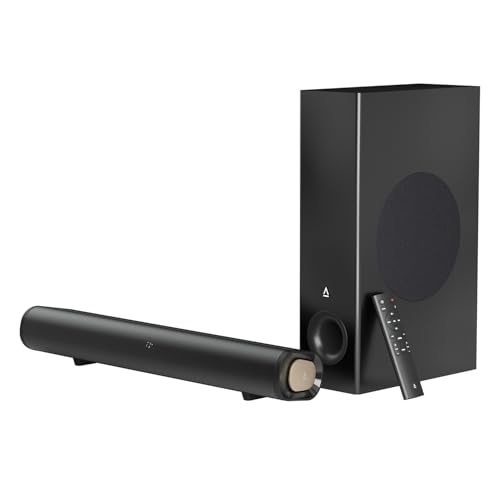
Creative Stage Pro 2.1 Soundbar — Best Compact Console Bar
Creative’s Stage line was built for the space where consoles and computers share a screen, and the Stage Pro’s title states its credentials in the order a console owner checks them: 2.1 channels, Dolby Audio, and HDMI ARC. The ARC point is the practical heart of the pick. A console feeding a television, with the bar on the set’s ARC socket, is the cleanest chain in this guide — one remote for volume, the television passing the console’s sound to a bar designed to receive it — and the Stage Pro is the compact bar here that names that connection in its own title rather than leaving it to be discovered.
There is a further, quieter suitability to note: consoles idle at menus, pause screens and dashboards for a surprising share of their powered hours, and a bar that behaves well at those moments — waking cleanly, holding its input, not hunting or clicking between formats — earns its keep daily. The Stage Pro’s television-first connection design is built for exactly that domestic rhythm, where the console, the broadcast tuner and the streaming app all arrive through the same ARC door.
The 2.1 layout suits the rooms consoles actually inhabit. A separate subwoofer gives game worlds their low foundation — engines, weather, the thud of a landing — while the bar’s stereo pair carries the directional midrange where gameplay information lives. Creative’s desktop-and-television heritage shows in the concept: this is a bar sized and voiced for near-to-medium distances, not a shrunken cinema system, and at a desk-fed monitor or a bedroom television that voicing is exactly right. Dolby Audio processing broadens film and streaming duty when the console doubles as the room’s media player, as consoles now routinely do.
Its boundaries are the honest ones of its class. There is no game-mode claim in the title, so competitive players should use the direct-settings discipline this guide describes and judge latency by the whole chain rather than by a badge. Within those boundaries, the Stage Pro is the most console-literate compact pick in the pool: the bar whose stated connections match the way a console setup is actually wired.
- Channels: 2.1, per the listing title
- Processing: Dolby Audio, as titled
- Connection named in the title: HDMI ARC
- Maker: Creative, in its Stage line for TV and desktop
- Game mode or eARC: Not stated in the listing title — verify with Creative documentation
Strengths
- HDMI ARC stated outright, matching the standard console chain
- Subwoofer-backed 2.1 layout suits bedroom and desk setups
- Dolby Audio covers the console’s streaming second job
Trade-offs
- No centre channel for dialogue-heavy cutscenes
- No game-mode claim in the title
- Scale is compact-room scale, not main-living-room scale
Best for: a console on a bedroom television or a shared monitor, wired through ARC. Not suited for: a large living room chasing full home-theatre immersion.

ULTIMEA 2.1 Sound Bar System — Best Atmos-on-a-Budget System
The ULTIMEA system makes the boldest format claim among the compact picks: a 2.1 sound bar system with Dolby Atmos and a wireless subwoofer. Atmos from a 2.1 layout is necessarily a rendering exercise — the bar processes height information into its stereo-and-subwoofer presentation rather than firing it from dedicated height drivers — and this guide states that plainly so the pick can be judged on what it genuinely offers: a compact system that accepts Atmos soundtracks, renders them with spatial processing, and underpins them with a wireless subwoofer that can live where the room allows rather than where a cable dictates.
That combination suits a particular console room well: the smaller living room or large bedroom where a full 3.1.2 system is physically implausible, but where games and films mixed for Atmos are the main diet. Modern consoles lean into spatial audio, and a bar that accepts and renders those mixes gives the player the intended sense of a world extending beyond the screen’s edges, in a footprint the room can absorb. The wireless subwoofer’s placement freedom is the system’s second gift — beside the sofa, it localises the bass near the player, which at gaming distances is where it feels most integrated.
Set the expectation the title cannot set for you: rendered height is an impression, not a location, and competitive players should still prefer the bar’s most direct mode when timing matters. As an immersive single-player and film system for a compact room, though, the ULTIMEA brings the Atmos conversation to a scale and simplicity the Samsung flagship cannot match for size — and for many console rooms, size is the deciding fact.
Films deserve their sentence in this pick’s favour, too. A compact room’s movie nights are usually watched from one sofa at close range, and a system that renders Atmos mixes with width and gives effects a subwoofer’s foundation covers that duty with room to spare. The ULTIMEA is not the guide’s gaming specialist; it is the compact room’s immersion specialist, and games are simply where that immersion is used most.
- Channels: 2.1 system, per the listing title
- Format: Dolby Atmos, rendered through the bar’s processing, as titled
- Subwoofer: wireless unit included
- Maker: ULTIMEA
- Game mode or eARC: Not stated in the listing title — verify with ULTIMEA documentation
Strengths
- Atmos soundtracks accepted and rendered in a compact system
- Wireless subwoofer places bass near the seating
- Small footprint suits rooms a full system cannot enter
Trade-offs
- Height is processed impression, not dedicated drivers
- No centre channel for dialogue separation
- No game-mode claim in the title
Best for: immersive single-player gaming and films in a compact living room. Not suited for: competitive play where the leanest processing chain is the priority.

Samsung Q-Series HW-Q600F 3.1.2ch — Best Full Gaming System
The HW-Q600F is the heavyweight of this pool and the only pick whose evidence supports discussing a game mode — Samsung’s Q-series gaming provision is part of this model’s documented proposition, and in a guide that refuses to credit features without support, that distinction is the headline. Around it sits the most complete architecture here: 3.1.2 channels with a dedicated centre driver for cutscene dialogue, height channels for the Dolby Atmos and DTS Virtual:X rendering the title names, and a wireless subwoofer for the low end. This is a home-theatre system that games superbly, rather than a gaming accessory that also plays films.
The centre channel earns its place in gaming more than film guides usually admit. Modern games carry hours of dialogue, often mixed under music and ambience during play rather than in clean cutscenes, and a dedicated centre driver keeps those voices forward while the stereo pair handles the world’s width. The height channels give Atmos-mixed games their vertical dimension — weather, aircraft, architecture — and the subwoofer supplies the physical register that makes large spaces in games feel large. For the console that anchors a main living room, this is the complete sentence.
Its costs are the format’s costs: the most furniture commitment in the guide, a subwoofer to house, and a system whose talents are throttled in a tiny room. Competitive players will still manage processing deliberately — game mode engaged, extra effects judged by ear — because even the best-equipped bar is one link in the latency chain. But for the living-room console, the Q600F is the pick against which the others are compromises, chosen knowingly for size or simplicity rather than for sound.
Ownership of a system this complete carries one more responsibility: calibration patience. With centre, height and subwoofer all in play, the first evening’s settings are a draft, not a verdict. Live with the dialogue level, the subwoofer level and the height effect through a week of different games, adjusting one variable at a time, and the Q600F settles into the kind of balance that makes owners stop thinking about audio entirely — the highest state a gaming system can reach.
- Channels: 3.1.2, per the listing title
- Formats: Dolby Atmos and DTS Virtual:X, as titled
- Gaming: Game Mode is part of this model’s documented proposition — the only such claim this guide makes in this pool
- Subwoofer: wireless unit included
- eARC specifics: verify against Samsung documentation for your television pairing
Strengths
- Most complete layout here: centre, height and subwoofer
- The pool’s only evidence-backed game-mode pick
- Cutscene dialogue anchored by a real centre channel
Trade-offs
- Largest physical commitment in the guide
- Over-scaled for bedrooms and desks
- Processing still needs deliberate management for competitive play
Best for: a console anchoring the main living room’s television. Not suited for: a desk or bedroom setup where its scale cannot breathe.

BESTISAN Sound Bar 50 Watts — Best All-Rounder for TV and PC
BESTISAN’s title reads like a description of a modern console’s living arrangements: sound bars for TV, PC, gaming, monitor — the four screens a console and its owner rotate between — with 50 watts of output and Bluetooth 5.0 heading the connection list. That breadth is the pick’s identity. This is the bar for the setup that is not a shrine: the television that is also a monitor, the console that shares a desk with a work laptop, the room where a phone’s music and a game’s soundtrack take turns through the same speaker.
In that habitat, versatility outranks specialisation. A bar that moves between the television’s game nights and the desk’s workdays earns its place twice, and Bluetooth covers the phone-shaped gaps in between without a cable swap. The sound brief follows the same all-round logic — a clear, full presentation for games and video at the modest distances of bedrooms and desks, from a maker whose soundbar line is built entirely around this value-conscious, multi-role brief. Players chasing directional precision for competitive shooters should look at the Samsung; players whose console shares a room with the rest of life should look here.
The homework for this pick is the connection list: the title names Bluetooth 5.0 and begins an HDMI claim where the pool text truncates, so confirm the full wired input list against the maker’s documentation and match it to your television’s outputs before ordering. With that single verification done, the BESTISAN is the guide’s most adaptable bar — the one that fits the console setups that do not appear in advertisements.
Durability of role is this pick’s long game. Consoles change, desks change, rooms change, and a bar whose brief is simply to make whatever screen it sits under sound properly survives every rearrangement. The BESTISAN bought for a student television may end its years under a kitchen screen or a spare-room monitor, still doing the same honest job — a career the specialised picks, for all their virtues, are less built to have.
- Output: 50 watts, per the listing title
- Intended uses named in the title: TV, PC, gaming and monitor
- Wireless: Bluetooth 5.0, as titled
- Maker: BESTISAN
- Full wired input list and any game mode: Not stated in the listing title — verify with BESTISAN documentation
Strengths
- Designed for the TV-and-PC rotation real consoles live in
- Bluetooth 5.0 covers phones and laptops without cable swaps
- One bar serves the whole room’s screens
Trade-offs
- All-round brief trades away gaming specialisation
- Wired inputs need verification beyond the title
- No subwoofer in this design for deep effects
Best for: a console sharing a room with a work desk and a television. Not suited for: a dedicated gaming room built for competitive precision.

LARKSOUND Small Sound Bar 16 Inch — Best for Small Rooms
Sixteen inches is the whole idea. The LARKSOUND’s title calls it a small sound bar for TV, PC and gaming — a mini television speaker — and that span fits the places full bars cannot: under a bedroom monitor, beneath a small television on a chest of drawers, on the desk of a student room where the console shares space with textbooks. In those rooms the alternative to a mini bar is not a bigger bar; it is the television’s own speakers, and against that comparison a well-aimed 16-inch bar is transformative.
The transformation is mostly about direction and clarity. Television and monitor speakers fire down, back or sideways from drivers built to a price; the LARKSOUND fires forward, at the player, with drivers dedicated to the job. Game dialogue becomes intelligible at low volume — the small-room virtue that matters most at night — and stereo effects gain enough separation to carry basic directional information. Bass is necessarily modest, and the bar should be bought in that knowledge: it trades the low register for a footprint that fits, which in a small room at sensible volumes is the right trade, since a subwoofer in a bedsit is a neighbour dispute with a power cable.
Consider this pick the small room’s honest answer, and judge it by its room. In a bedsit, a caravan, a child’s bedroom or a guest room with a console, it delivers the essential upgrade — clear, forward, present sound — without rearranging the furniture or the household’s peace. The connection specifics sit beyond the title, as with most of this pool, so verify them against LARKSOUND’s documentation for your screen before ordering.
A word for the parents and partners reading over a player’s shoulder: the mini bar is the peace treaty of console audio. It gives the player sound with direction and clarity at volumes a room can contain, ending the two bad equilibria of small-room gaming — the television speakers nobody can hear properly, and the big system everybody can hear entirely. Sixteen inches of bar can be a household policy as much as a purchase.
- Width: 16-inch mini bar, per the listing title
- Intended uses named in the title: TV, PC and gaming
- Role: small television speaker replacement
- Maker: LARKSOUND
- Connection list and any game mode: Not stated in the listing title — verify with LARKSOUND documentation
Strengths
- Fits the small screens and surfaces big bars cannot
- Forward-firing clarity transforms low-volume night play
- No subwoofer to disturb a small household
Trade-offs
- Bass depth is limited by the mini format
- Sound scale suits small rooms only
- Connections need verification beyond the title
Best for: a bedroom console on a small television or monitor. Not suited for: a living room expecting cinematic scale and bass.
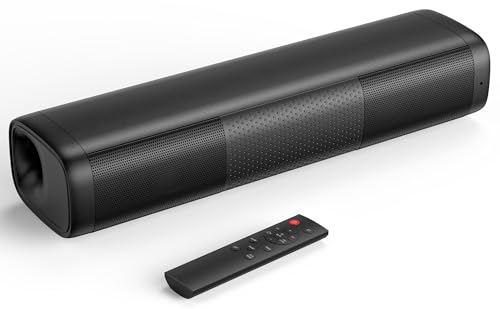
Saiyin 11.7-inch Sound Bar — Best Mini Bar
The Saiyin takes the mini idea to its limit: 11.7 inches of bar, titled as a home theater system in miniature — small size and big power, in the maker’s own phrase. Treat that phrase as a claim about proportion rather than physics. An 11.7-inch bar will not fill a living room, and this guide will not pretend otherwise; what it can do, and what its size uniquely enables, is bring real forward-firing sound to the tightest console installations in this guide — the monitor on a narrow desk, the small television in a kitchen or workshop, the travel setup in a caravan or a rented room where the console goes where the player goes.
Portability of installation is the underrated virtue here. A bar this small relocates in a minute, needs no stand planning, and pairs with screens that would look absurd under a full-width bar. For the player whose console life happens in more than one place — term-time room and family home, house and caravan — a mini bar that travels with the setup delivers consistent sound in both, which no fixed installation can. Game audio at these sizes is about clarity and presence: dialogue forward, effects placed as well as a short stereo span allows, at volumes a small space appreciates.
There is a final, practical charm to hardware at this scale: it is the easiest audio in the guide to buy correctly. The room forgives it, the screen forgives it, the household forgives it, and the player’s only real task is the connection check this guide keeps repeating. In a category addicted to escalation, a product whose entire demand is one verified cable deserves its moment of respect.
Buy it as the specialist it is. The Saiyin is the answer when the tape measure, not the catalogue, is making the decisions — and in that situation it is not a compromise but the only correct shape of product. Verify its connections against the maker’s documentation for your screen, as its title is silent on the list, and let it do the small job at full quality rather than asking a big job of it.
The Saiyin also answers a question the other picks cannot: what does the setup sound like at the holiday house, the site cabin, the temporary room? Players who carry a console between addresses usually accept whatever speakers await them, and a bar that travels in the same bag standardises the one variable that most changes how a game feels. Consistency across addresses is a luxury this guide did not expect to recommend at 11.7 inches, but there it is.
- Width: 11.7-inch bar, per the listing title
- Pitch in the title: home theater system, small size and big power
- Role: the tightest installations in this guide
- Maker: Saiyin
- Connection list and any game mode: Not stated in the listing title — verify with Saiyin documentation
Strengths
- Smallest footprint here; fits where nothing else in the guide can
- Relocates between rooms and setups in moments
- Clear, forward sound for small screens at close range
Trade-offs
- Short stereo span limits directional width
- Bass and scale are mini-format by definition
- Connections need verification beyond the title
Best for: the tightest desk, caravan or rented-room console setups. Not suited for: any room where a full-width bar could fit and be fed properly.
How Do the Six Compare for a Console?
| Pick | Layout | Game-mode evidence | Defining trait |
|---|---|---|---|
| Creative Stage Pro | 2.1 with subwoofer | Not stated | HDMI ARC named in its title |
| ULTIMEA System | 2.1 with wireless subwoofer | Not stated | Atmos rendering in a compact system |
| Samsung HW-Q600F | 3.1.2 with wireless subwoofer | Supported for this model | The full living-room gaming system |
| BESTISAN 50W | Single bar | Not stated | TV, PC, gaming and monitor versatility |
| LARKSOUND 16 Inch | Mini bar | Not stated | Small-room and small-screen fit |
| Saiyin 11.7-inch | Mini bar | Not stated | The tightest installations |
The middle column is this guide’s conscience, printed in a table so it cannot be missed: one supported claim, five honest silences. A bar with no stated game mode is not a bad gaming bar — most of the latency chain lives in the television — but it should be bought for its sound and its fit, with gaming features verified rather than presumed.
How Do Directional Cues Survive in a Single Bar?
Imperfectly, honestly, and usefully — in that order. A bar’s left and right drivers sit perhaps a metre apart, so the stereo field it draws is a compressed map of the game’s world rather than a life-size one. Within that map, though, relative direction survives: a sound mixed to the left arrives from the left portion of the bar, movement pans visibly across the soundstage, and distance is carried by level and reverberation the mix already contains. Players consistently underestimate how much of their spatial awareness comes from those relative cues rather than from true surround, which is why a good bar improves game awareness far beyond what its channel count suggests.
The player’s half of the bargain is position. Directional information assumes a listener centred on the bar at a consistent distance; the player slumped at the sofa’s end, or the desk chair rolled a metre to one side, hears a map rotated toward the nearer end. Centre the seat for the sessions where awareness matters, keep the bar’s front unobstructed, and resist burying one end of the bar behind a monitor arm or a stack of game cases — an obstruction that would be cosmetic for film is informational for play. The compact bars concentrate this logic: at desk distance their short span is close to the ears, and their maps, though small, are read at point-blank range.
Height and rear information are the map’s acknowledged blank spaces for every pick except the Samsung’s rendered version, and even there they are impressions. Games mixed with rear activity will fold those cues into the front presentation, where they register as ambience rather than position. Players for whom true rear information is decisive are asking for a surround system, and this guide will not pretend a bar is one — it will only insist that the front map, honestly drawn, is worth far more than its reputation among surround owners suggests.
One processing family genuinely helps the front map and deserves its exemption from this guide’s general suspicion of modes: dialogue emphasis in games with dense voice work, and night compression in shared houses. Both alter the mix’s balance rather than its geometry, both are audible immediately, and both can be judged in a single scene. The rule is not to avoid processing; it is to adopt processing whose effect you can describe in one sentence after hearing it once.
How Do You Set Up a Console Bar for the Lowest Practical Latency?
Work the chain from the console outward. In the console’s own settings, choose the audio format your chain passes most directly — where a television is in the middle, the set’s passthrough or PCM options usually travel fastest and cleanest, and the console’s format menu deserves the same care as its display menu. In the television, enable its game mode for the console’s input, set the audio output to pass through rather than process, and disable the set’s own sound enhancements, which add their own delay and opinions. Then, in the bar, select the most direct sound mode for competitive sessions: virtual surround and spatial processing off, dialogue modes off, the signal left as the game mixed it.
Reserve the processed modes for the games they flatter. Cinematic single-player titles, racing games and open-world exploration all gain from width and spatial rendering, and their timing tolerances forgive the processing entirely. The discipline is per-game, not per-bar: two presets of your own habits, one lean and one rich, switched as the session’s genre dictates. Players who set this once and forget it will find the bar feels mysteriously better in some games than others; players who switch deliberately get both bars they paid for.
Finish with the physical checks. The bar centred under the screen, the subwoofer — where the system has one — placed so its level can start low and rise to taste, and one full evening of mixed play before any verdict. Latency, in particular, should be judged in a familiar game where your hands already know the timing, because unfamiliar games make every setup feel laggy and familiar ones tell the truth.
Volume calibration belongs in the same setup session, because gaming volume has a failure mode films do not: the menu-to-gameplay jump. Set the bar’s level inside actual gameplay, then visit the game’s menus and a cutscene before deciding, since a level that flatters action can make menu music oppressive and dialogue recessed. Most games offer their own audio sliders — master, effects, dialogue, music — and an hour spent balancing those against the bar’s single volume is the cheapest sound upgrade in this entire guide. The bar reproduces the mix; the mix is yours to govern.
That balancing session has a social version worth scheduling: if the setup serves a household, balance it with the household’s other listeners present, in a game everyone knows. Volume agreements reached alone at midnight rarely survive contact with a Saturday afternoon, and a bar whose levels were negotiated once tends to stay negotiated.
While you are in those game menus, note the audio output setting the game itself assumes — headphones, television, home theatre — because several titles reshape their mix around that choice, widening or narrowing effects and repositioning dialogue. Matching the game’s assumption to the bar you actually own is a two-minute setting that players routinely leave wrong for entire playthroughs.
The same two minutes, spent in the console’s system-level audio menu rather than the game’s, pays the dividend across every title in the library at once — the closest thing gaming audio has to a free upgrade.
Keep a note of the settings you settle on — console, television and bar — somewhere the household can find. Equipment gets unplugged, menus get reset by updates, and the note turns a future hour of rediscovery into a future five minutes of restoration.
Photograph the three menus, if a note feels old-fashioned; the camera roll is the modern household’s service manual.
Do the same favour for the subwoofer, where a system has one. Game effects are mixed hotter than film effects in many titles, and a subwoofer level borrowed from film night will boom through menus and lobbies. Set it in the loudest game you own, at the seat you play from, and then leave it alone for a week; subwoofer levels adjusted daily are never adjusted correctly.
What If Two Consoles and a PC Share One Screen?
Then the television is the switchboard and the bar is its single output, which is the strongest argument for the ARC-centred setups in this guide. Every source plugged into the set — both consoles, the PC, the streaming stick — inherits the bar automatically, with the television’s input selection acting as the only switch the household ever touches. The discipline required is per-input settings: game mode and audio passthrough configured on each HDMI input the consoles use, since televisions commonly store those settings per socket and a console moved to a new input can silently lose its configuration.
The desk variant of the same problem is the BESTISAN’s home ground, where the PC and console share a monitor and the bar must accept both without a cable ritual. However the inputs are arranged, the principle to protect is identical: switching sources should never require re-plumbing the audio. The moment a setup demands a cable swap to hear a different machine, that machine starts being played less, and the bar has failed at the household level regardless of its sound. Verify the input arrangement for your exact combination in the makers’ documentation before purchase, and design for the laziest version of your own routine.
Children and guests are the stress test of any shared setup, and they argue for the same laziness. A system a visiting grandparent can operate — television on, console on, sound simply present — is a system designed correctly, whatever its channel count. If your arrangement needs a laminated card, simplify the arrangement before the visit, not during it.
What Mistakes Do Console Players Make When Buying a Bar?
The first is buying a latency badge instead of a sound. Game-mode and low-latency claims are the category’s most inflated currency; this guide credits one in six picks, and the honest majority of gaming satisfaction comes from clarity, fit and a correctly configured television. The second mistake is the mirror image: ignoring the television’s audio settings entirely, then blaming the bar for delay and downmixing that the set imposed. The chain is only as honest as its middle link. Third is scale error in both directions — a 3.1.2 system suffocated in a bedsit, or a mini bar asked to fill a family living room — each guaranteeing disappointment that has nothing to do with the bar’s quality.
Fourth, players forget the console’s second job. The machine is also the room’s streaming box and Blu-ray player, and a bar chosen only for game night will serve film night too; the Dolby provisions in the Creative and ULTIMEA titles exist for exactly that rotation. Fifth is neglecting the night session: a setup auditioned only at full volume may be unusable at the volume a sleeping household permits, and the compact picks exist precisely because so much console life is lived quietly. Judge a bar at midnight before you judge it at noon.
Sixth is the orphaned subwoofer: choosing a system whose subwoofer has no viable home in the room, then living with it parked in a walkway or muffled inside a cabinet. Walk the room before ordering and name the subwoofer’s exact spot, socket included. If no spot survives scrutiny, the honest purchase is one of the subwoofer-free bars, and this guide contains three good ones — a sentence more shopping guides should be willing to print.
Final Recommendation
Match the bar to the room the console actually lives in, and this guide resolves quickly. The main living room belongs to the Samsung HW-Q600F — the complete layout, the anchored dialogue, and the pool’s one evidence-backed game mode. The bedroom or shared-monitor setup belongs to the Creative Stage Pro, whose stated HDMI ARC fits the console chain exactly, or to the ULTIMEA where Atmos-mixed games dominate a compact room. The rotating TV-and-desk life suits the BESTISAN, the small room the LARKSOUND, and the tightest spaces the Saiyin. Configure the television’s passthrough before you blame any of them, run the lean settings for competitive play — and the console will finally sound like the machine it is.
One last encouragement for the hesitant: the distance between a console on television speakers and a console on any pick in this guide is the largest single-step improvement available in gaming audio, larger than any step between the picks themselves. Choose the one that fits the room, wire it through the television properly, and start playing — the analysis has done its work when the controller is back in your hands.
Frequently Asked Questions
Does a soundbar add lag to console gaming?
A bar can add a small amount of processing delay, but it is usually the smallest link in a chain that includes the console and the television. The television’s settings — game mode on, audio passthrough selected, its own enhancements off — govern most of what a player feels. In the bar itself, the most direct sound mode minimises its contribution; reserve spatial processing for games whose timing forgives it.
What is a game mode on a soundbar, and which pick has one?
A soundbar game mode typically trims processing to reduce delay and may adjust the sound balance toward effects and directional cues. In this pool, the Samsung HW-Q600F is the pick whose evidence supports a game-mode claim, and this guide makes that claim for no other bar here. For the other five, the spec boxes record the silence, and the makers’ documentation is the place to verify before buying on that basis.
Is eARC necessary for console gaming sound?
Not for most setups. eARC’s higher bandwidth matters for uncompressed multichannel formats routed through the television; the compressed formats consoles and streaming services commonly use travel over ARC, and optical carries a great deal besides. What matters more is that the television passes the console’s signal to the bar without downmixing or delaying it — a settings question, not a socket question, in most rooms.
Can a compact bar really serve a console well?
In the rooms compact bars are built for, yes — often better than a large system can. A bedroom or desk setup listens at close range and modest volume, where a right-sized bar’s clarity and direction are fully effective and a big system’s headroom is unusable. The Creative Stage Pro and the mini bars in this guide exist because most console hours are logged in exactly those rooms.
Where should the subwoofer go in a gaming setup?
Near the front of the room to start, along the wall the screen sits on, then adjusted by ear from the player’s seat. Gaming bass should feel attached to the picture: engines and impacts located with the action, not booming from a corner behind the player. Start with the level low — at gaming distances a little subwoofer goes a long way — and raise it until effects gain body without the midrange cues thinning.
Should I connect the console to the bar or to the television?
Through the television is the arrangement most of these bars are designed around, and it keeps one remote and one input logic for everything the screen shows. A direct console-to-bar route can suit specific setups where a bar provides the right inputs — a fact to verify in the maker’s documentation for the exact model rather than to assume. Either way, set the television’s audio output deliberately afterwards; that menu decides what the bar receives.
Do I need a special HDMI cable for the bar?
For the ARC connections most of these setups use, a sound, modern HDMI cable of the right length suffices; exotic cables do not change the sound. Where a television and bar both support eARC and you intend to route the highest-bandwidth formats through them, a cable rated for that duty is the prudent choice — the maker’s documentation for your exact pairing states the requirement. Length discipline matters more than pedigree: buy the shortest cable that reaches without tension.
And if the bar and television disagree about waking and sleeping — the bar silent when the console starts, or awake when the room is dark — the fault is almost always a control setting on one side rather than a defect in either. Solve it in the first week, in the television’s device-control menu and the bar’s power settings, because a gaming setup touched by two remotes and a shrug will be touched that way for years.
Related Guides
For film-first rooms on a budget, work through soundbar systems in the budget segment; for a console at a desk, compare soundbars built for PC setups; and for the music-led living room, step up to high-fidelity soundbars.


