What's inside
- Key Takeaways
- Quick Picks
- How Did We Choose These Printers for Artists?
- What Can a Laser Printer Honestly Do for an Artist?
- How Do You Proof on a Laser Without Lying to Yourself?
- How Do the Six Artist Picks Compare Side by Side?
- How Do Editions and Studio Paperwork Get the Most From a Laser?
- How Do You Run a Two-Engine Studio Without Waste?
- What Mistakes Do Artists Make When Buying a Studio Printer?
- Which Engine Matters Most for the Kind of Artist You Are?
- Final Recommendation
- Frequently Asked Questions
- Related Guides
As an Amazon Associate I earn from qualifying purchases. This post may contain affiliate links at no extra cost to you.
gizmoverdict.com is reader-supported. When you buy through links on our site, we may earn an affiliate commission.
Where to buy: Each machine below links to its Amazon listing, where the exact model in the cart can be confirmed — colour printer families are sold in print-only and all-in-one variants whose names sit a single letter apart. Check price on Amazon from the headings or the Quick Picks table; this guide prints no prices.
Begin with the truth this whole guide is organised around: exhibition art prints live on inkjet. The photograph or painting reproduction that hangs in a gallery, sells at a fair or enters a portfolio review is made by laying liquid pigment onto coated paper in droplets fine enough to hold a continuous gradient, and no laser engine in this guide — or anywhere — does that work. So the best laser printers for artists are not rivals to the inkjet; they are the studio’s other half, and this guide includes exactly one inkjet, labelled as an inkjet in every mention, as the art-print route itself. The five lasers earn their places on the work that surrounds the artwork: proofs, editions of graphic and text-driven work, studio documents, posters and the colour-accurate-enough drafts an artist checks before committing expensive ink and paper to the final piece.
That division of labour is not a consolation prize. Laser output has properties inkjet cannot match — perfectly dry, smudge-proof pages the moment they emerge, crisp text and flat graphic colour that never cockles the sheet, and a cost structure that makes a forty-page proofing run a shrug rather than a budget meeting. Artists who print zines, graphic editions, exhibition labels, certificates, invoices and the endless paper of a working studio already know which jobs belong to which engine. This guide simply makes the division explicit, then judges the five lasers on graphic work, proofing and editions — the ground where laser output is not a compromise but the point — with every media and duplex claim chained to the listing title that states it.
Key Takeaways
- One pick is an inkjet and is labelled as such throughout: the Epson Expression Photo HD XP-15000, a wide-format machine printing to 13 x 19 inches with six-colour output, is the exhibition-print route.
- The five lasers are colour machines judged for graphic work, proofing and editions — the studio jobs where dry, crisp, inexpensive pages beat photographic gradients.
- Duplex is stated in only two laser titles — the Brother at 19 ppm and the HP 3201dw — and is claimed for no other pick, however the model family is arranged elsewhere.
- Two Xerox picks state 26 ppm and wireless; the C245 adds scan and copy as a 3-in-1, while the C240 is print only, and neither title states a paper size.
- Paper-size and media claims appear only where a title states them; where a title is silent, the spec boxes say so, and the documentation is the authority.
Quick Picks
| Pick | Badge | Why it earns its place |
|---|---|---|
| Epson Expression Photo HD XP-15000 (inkjet, wide-format) | The inkjet art-print route | Six-colour wide-format inkjet printing to 13 x 19 inches — the exhibition and portfolio machine of this guide. |
| HP Color LaserJet Pro CP5225n (tabloid) | Large-format office laser | A single-function colour laser from HP’s professional line, positioned for office-scale colour documents. |
| Brother Color Laser (19 PPM, duplex) | Duplex proofing engine | Wireless colour laser with stated duplex and a 250-sheet tray for proof runs and studio documents. |
| Xerox C240 | Compact 26 ppm colour | Print-only wireless colour at a stated 26 ppm in a compact body for hybrid and small studios. |
| HP Color LaserJet Pro 3201dw | Duplex colour for the home studio | Wireless colour laser with duplex stated, aimed at home-office colour documents. |
| Xerox C245 | Colour all-in-one at 26 ppm | Adds scan and copy to the C240’s pace — print, scan and copy in one compact wireless machine. |
How Did We Choose These Printers for Artists?
The selection began with the premise and refused to blur it. One slot was reserved for the machine that actually makes art prints, and it went to a wide-format inkjet whose title states its format and colour system outright. The remaining five slots were then filled with colour lasers — colour being non-negotiable for graphic work — and judged on the studio’s laser-appropriate work: proofing an image before the expensive print, producing editions where flat colour and text are the content, printing the studio’s documents at a quality that flatters the practice, and turning out posters and labels that hang beside the work. Machines were read strictly by their titles, and this guide applies the standing rule for silent titles without exception: a title that does not state duplex does not get duplex, and a title that does not state a paper size does not get one, whatever the same model may do in another listing or another region.
Speed was credited only where stated, which produced an honest spread: the Xerox pair and the Brother publish ppm figures, the HP pair do not, and the sections say so rather than estimating. Functions were credited the same way — the C245’s scan and copy because its title says 3 in 1, the CP5225n’s print-only status because its title insists on it twice. The result is a guide that can be argued with on taste but not on evidence: every factual claim below can be traced to a title quoted in the sources file, and every gap is labelled a gap. For artists, whose purchasing mistakes are measured in wasted paper and ink, that evidentiary discipline is worth more than another few pages of enthusiasm.
One more filter deserves naming: none of these lasers is presented as a photographic printer. Their colour is office colour — capable, flat, dependable — and the guide judges it for graphics, proofs and text, where those virtues are the requirement. An artist whose work is photographic through and through should buy the inkjet pick and treat the lasers as optional studio infrastructure; an artist whose work is graphic, typographic or mixed will find the lasers doing daily duty the inkjet is too precious to spend on.
What Can a Laser Printer Honestly Do for an Artist?
Proofing is the first honest job. Before a wide-format print consumes a large sheet and its share of six inks, a laser proof at reading size answers the composition questions — balance, cropping, the weight of a dark area, whether the text sits comfortably — at a cost per page that encourages printing five variants instead of agonising over one. The proof lies about colour subtly and about gradients obviously, and a wise artist learns its accent: the laser proof is a sketch of the print, not a promise. Editions are the second job, and here the laser stops approximating and starts authoring. Zines, graphic prints built from flat colour and line, text pieces, certificates and edition documentation are native laser territory, because toner sits on the sheet dry, sharp and unfaded by handling, and a run of fifty comes out uniform in a way that flatters an edition’s claim to be one work in fifty copies.
The third job is the studio itself: invoices that look like the practice is serious, exhibition labels and wall text, shipping documents, portfolio sleeves’ title cards, the price list at the fair booth. Artists sell trust alongside objects, and the paper a studio emits is part of the object. A colour laser in the corner produces that paper at a standard that never embarrasses the work on the walls. What the laser must never be asked to do is the gallery print itself — and an artist who understands that boundary gets two excellent tools instead of one disappointed purchase. The boundary’s other side is mapped in our survey of the best printers for watercolor work, where inkjet’s relationship with art paper is the whole subject.

Epson Expression Photo HD XP-15000 (inkjet, wide-format) — The inkjet art-print route
This is the inkjet. It is labelled an inkjet in its title, in this heading’s parenthesis and in every reference this guide makes to it, because in an article about laser printers its presence needs no disguise and deserves none: the Epson Expression Photo HD XP-15000 is the machine here that makes art prints. Its title states the credentials plainly — wireless wide-format inkjet printing, a six-colour system, output up to 13 x 19 inches, automatic two-sided printing, a stated speed of up to 9.2 ppm, and a positioning for photographers and home studios. Six colours rather than four is the detail that separates a photo inkjet from an office inkjet: the expanded colour set exists to hold the gradients and the subtle tones that photographic and painted work lives in, the exact territory where this guide has already conceded lasers cannot follow.
The 13 x 19 format is the other half of its claim. That sheet carries a full-bleed-feeling 12 x 18 image with a border, a serious portfolio page, or a saleable print at a size collectors actually frame — the threshold where a home studio starts producing exhibition-shaped objects rather than proofs of them. The stated 9.2 ppm should be read as an inkjet’s courtesy figure rather than a working pace; art printing is done one attended sheet at a time, and the number’s honest use is to say the machine is not fast, which no art printer is. Automatic two-sided printing, unusual in this class, serves the portfolio and book side of a practice — maquettes, book dummies and double-sided portfolio leaves. Buy this machine for the prints themselves, keep its expensive appetite for ink and coated paper fed deliberately, and let the lasers below carry every job that does not deserve it.
- Print technology: Inkjet — wide-format, six-colour photo printing (as titled)
- Maximum size: 13 x 19 inches (as titled)
- Duplex: Auto 2-sided printing (as titled)
- Speed: Up to 9.2 ppm (as titled)
- Connection: Wireless (as titled)
Strengths
- Six-colour inkjet output holds the gradients and tones that define photographic and painted work.
- The 13 x 19 format crosses the line from proof to presentable, frameable print.
- Automatic two-sided printing serves portfolio books and studio dummies, a rare gift in this class.
Trade-offs
- It is not a laser — running it as a general office printer spends photo ink on documents a laser prints dryly and cheaply.
- Art printing is attended, sheet-at-a-time work; the stated pace is an inkjet’s, not an office engine’s.
- Its quality depends on matched inks and coated papers, a consumable discipline the lasers below never demand.
Best for: the artist’s actual prints — portfolio, exhibition and sale pieces up to 13 x 19 inches. Check price on Amazon, and budget the ink set and a first pack of proper photo paper into the same order.
Not suited for: bulk document duty and edition runs of text work — photo inkjet consumables spent on invoices are the studio budget leaking, and the lasers below exist to catch exactly that work.
HP Color LaserJet Pro CP5225n (tabloid) — Large-format office laser
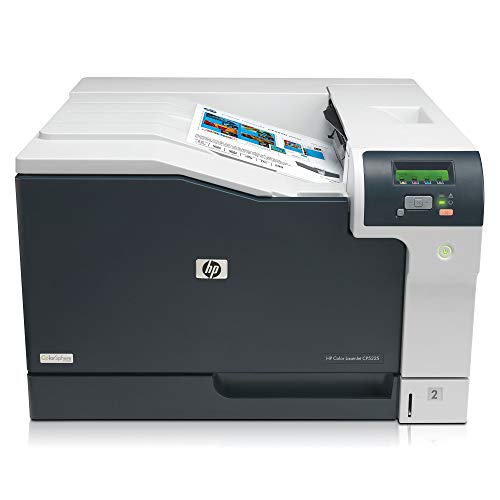
The CP5225n arrives with the most office-bound title in this guide, and its section must be the guide’s most disciplined. The pool that verified this listing files it under the tabloid class — the large-format end of HP’s colour LaserJet Professional line — but the listing title itself states a narrower set of facts: colour laser printer, printer for office, colour documents, printer only, single function, ideal for office use. No paper size is stated in that title, no speed, no duplex, no wireless. So this guide credits the machine with exactly what its title claims — a single-function colour laser from a professional line, built for colour documents at office scale — and sends every format question to HP’s documentation, where the answer lives. That restraint is not a weakness of the pick; it is the pick’s lesson, printed in full.
What can be said on the title’s evidence still matters to a studio. A single-function machine has one job and no scanner lid negotiating for desk space or budget, and HP’s Professional colour line is built for shared office duty — the environment where a printer’s output must look composed in front of clients, which in a studio translates to open-studio days, gallery paperwork and the large composed documents of a practice that presents itself well. Artists whose laser work is large-format in ambition should treat the documentation check as the purchase: confirm the maximum paper size and the media weights the trays accept, in the maker’s own specification, before this machine is assigned any oversize duty. If those answers match the studio’s formats, the CP5225n is the guide’s large-canvas laser; if they do not, the title never promised otherwise, and the artist was told so here first.
- Print technology: Colour laser (as titled)
- Functions: Printer only, single function (as titled)
- Positioning: Professional line, for office colour documents (as titled)
- Maximum paper size: Not stated in the listing title — verify with the maker’s documentation
- Duplex and wireless: Not stated in the listing title — verify with the maker’s documentation
Strengths
- A professional-line, single-function colour laser concentrates the whole budget on the print engine.
- Office-document positioning suits the studio’s client-facing paperwork and large composed pages.
- No multifunction hardware means a simpler machine with fewer mechanisms to maintain.
Trade-offs
- The title states no paper size, so any large-format plan rests entirely on the documentation check.
- No scan or copy is offered — the studio’s paper intake needs another machine.
- No speed or duplex claim appears in the title, leaving pace and two-sided work unverified from the listing.
Best for: a studio whose laser work is large, composed colour documents, verified against HP’s documentation before purchase. Check price on Amazon only after that verification, since the format answer is the purchase.
Not suited for: two-sided printing as a titled certainty — the listing states no duplex, so booklets and double-sided editions cannot be assigned to it on the title’s evidence.

Brother Color Laser (19 PPM, duplex) — Duplex proofing engine
Brother’s colour laser, sold under the HL-L3220CDW model string in its title, is the most completely specified proofing machine in this guide. Read the title as a checklist and every box a studio cares about is ticked in the maker’s own words: wireless printing, a stated 19 ppm output, a duplex feature, mobile device compatibility, and a 250-sheet paper tray, all framed for professional home office printing. The tray deserves first mention, because proofing is a volume habit disguised as a quality habit — the artist who prints five variants of a composition loads the tray once and thinks about pictures, while the artist feeding sheets thinks about the tray. Two hundred and fifty sheets is the difference between a proofing session and a proofing chore.
Duplex, stated outright, is the second gift: book dummies, zine signatures and two-sided portfolio drafts come off this machine in one pass, folded and assessed as objects rather than imagined from single sheets. Nineteen pages per minute will not win a race against the Xerox pair’s stated pace, but proofing is not a race — it is a loop of print, look, adjust, reprint, and the loop’s speed is set by the looking. Wireless and mobile compatibility place the machine where the studio’s work actually happens, including the phone that holds reference photographs and the tablet that holds the layout. For the graphic artist or the photographer who proofs seriously, this is the guide’s most natural laser: every claim stated, every feature aimed at the iterate-until-right rhythm of studio work.
- Print technology: Colour laser (as titled)
- Speed: 19 ppm (as titled)
- Duplex: Duplex feature stated in the title
- Paper tray: 250-sheet paper tray (as titled)
- Connection: Wireless printing, mobile device compatible (as titled)
Strengths
- A 250-sheet tray sustains long proofing sessions without feeding interruptions.
- Stated duplex makes zine signatures and book dummies a one-pass job.
- Every key claim — speed, duplex, tray, wireless — is published in the title itself.
Trade-offs
- At 19 ppm it is the slowest stated pace among the lasers here, a proofing rhythm rather than a production one.
- Print-only: the title claims no scan or copy for the studio’s intake work.
- Its colour is office colour — proofs guide the inkjet’s decisions but cannot replace its gradients.
Best for: an artist who proofs iteratively and prints dummies, zines and studio documents in tray-sized sessions. Check price on Amazon, and note the model string in the title when ordering toner, since Brother’s colour line spans several near-named models.
Not suited for: exhibition prints — office colour laser output flattens the gradients photographic work lives in, and that job belongs to the inkjet pick by this guide’s founding premise.

Xerox C240 — Compact 26 ppm colour
The Xerox C240’s title is a study in compact confidence: wireless colour laser, print only, a stated 26 ppm, easy wireless setup, positioned for hybrid and small business use, and identified as the replacement for the C230 model. That last detail is a quiet mark of a maintained product line — a maker iterating a small colour laser rather than abandoning it — and it matters to a studio buying for years, because a replaced model with a successor is a machine whose consumables and support have a future. The 26 ppm pace is the fastest stated among the compact lasers here, shared with its all-in-one sibling, and it changes the feel of studio printing: proofs and documents arrive at a rhythm that keeps up with the work rather than pacing it.
The discipline section: this title states no duplex and no paper size, and this guide claims neither for the C240. The standing rule exists for exactly this situation — a compact colour laser from a major maker tempts every reader to assume the features its class usually carries, and the title’s silence is not an invitation to assume. A studio whose laser work is single-sided — posters, labels, documents, proof singles — loses nothing by that silence and gains the guide’s fastest compact pace. A studio built on two-sided dummies should buy the Brother’s stated duplex instead, or settle the C240’s specification in Xerox’s documentation before ordering. Print-only is the other stated boundary: no scanner shares this compact body, which keeps it small, simple and aimed at output alone. For the hybrid worker whose studio is also an office and whose office is also a spare room, that compact, quick, wireless profile is a precise fit.
- Print technology: Colour laser, print only (as titled)
- Speed: 26 ppm (as titled)
- Connection: Wireless, easy wireless setup (as titled)
- Lineage: Replaces the C230 model (as titled)
- Duplex and paper size: Not stated in the listing title — verify with the maker’s documentation
Strengths
- The joint-fastest stated pace here, 26 ppm, in a compact body for small studios.
- Wireless setup is the title’s own emphasis, suiting rooms that rearrange often.
- A named predecessor signals a maintained line with a consumables future.
Trade-offs
- No duplex is stated, so two-sided editions cannot be planned on the title’s word.
- Print-only, with no scan or copy for studio intake and documentation.
- Paper sizes go unstated in the title, leaving format plans to the documentation.
Best for: a compact or hybrid studio printing single-sided colour work — posters, labels, documents and proof singles — at pace. Check price on Amazon, and settle the duplex question in the documentation if two-sided work is anywhere in the studio’s future.
Not suited for: booklet and dummy production as a titled capability — the listing states no duplex feature, so a two-sided edition cannot be promised from this machine on the listing’s evidence.

HP Color LaserJet Pro 3201dw — Duplex colour for the home studio
The HP 3201dw’s title reads like a checklist recited quickly: colour LaserJet Pro, wireless, duplex, home office positioning, colour documents, mobile compatibility, printer only, single function, ideal home office use. Amid that recitation, the word that earns its place in an artists’ guide is duplex — stated outright, one of only two lasers here that can claim it from the title. Two-sided colour in a home studio means the exhibition booklet, the price list with the statement on its reverse, the double-sided instruction card that ships with a sold piece, all produced in a single pass at the desk where the work is packed. A home studio is a business run from a room that also holds a sofa, and a compact single-function machine that prints its documents two-sided without negotiation fits that economy of space and attention.
The title publishes no speed figure, and this section invents none; the machine’s pace is a documentation question, and for home-studio volumes — booklets in dozens, documents in handfuls — pace is rarely the binding constraint anyway. Mobile compatibility is stated, which in a home studio means the phone’s reference shots and the laptop’s layouts reach the printer without a cable ceremony. Single function is stated twice over, so the studio’s scanning must live elsewhere — on the Xerox C245 if the guide’s own shelf is the supplier, or on whatever the studio already owns. Judged strictly on its title, the 3201dw is the duplex-owning home-studio laser: less specified than the Brother, which adds a tray count and a pace figure, but carrying the same essential two-sided promise in HP’s line, for studios already invested in that ecosystem’s toner shelf.
- Print technology: Colour laser (as titled)
- Duplex: Stated in the title
- Connection: Wireless, mobile compatibility (as titled)
- Functions: Printer only, single function (as titled)
- Speed: Not stated in the listing title — verify with the maker’s documentation
Strengths
- Stated duplex brings two-sided booklets and cards to the home studio desk.
- Wireless plus mobile compatibility suits a room where devices outnumber cables.
- Single-function simplicity keeps the footprint and the mechanism count small.
Trade-offs
- No speed figure in the title, so pace planning waits on the documentation.
- No scan or copy — paper intake belongs to another machine by design.
- Tray capacity is unstated in the title, leaving long-run stamina an open question.
Best for: a home studio printing two-sided colour documents, booklets and packing inserts at modest volume. Check price on Amazon, and confirm tray capacity in the documentation against your longest regular run.
Not suited for: a studio with no other scanner — this title describes a printer only, and the intake of signed forms and source material has no home on it.

Xerox C245 — Colour all-in-one at 26 ppm
The C245 takes the C240’s compact colour formula and adds the studio’s other half: its title states 3 in 1 — print, scan and copy — at the same stated 26 ppm, with wireless setup, in a compact body positioned for hybrid offices and small businesses, succeeding the C235. For an artist, the scan function is not office furniture; it is an intake for work. Sketches, textures, collages, found material and the physical world’s surfaces enter the digital workflow through a scanner, and a compact all-in-one at the studio desk shortens the distance between a drawing and its digital life to the width of the room. Copying serves the edition side — a master printed once and reproduced for a zine run’s simpler pages, a form duplicated without a computer waking.
The same title discipline applied to its sibling applies here, doubled: the C245’s title states no duplex, and none is claimed for it in this guide, however the purchase is configured elsewhere. Its stated facts are pace, functions, wireless and lineage, and on those facts it is the most versatile compact machine in the guide — the only laser here that can take a sketch in and send a print out. The Amazon Exclusive note in the title is worth a line for purchasers: channel-exclusive models are ordinary machines sold through one retailer, and the practical consequence is simply that the listing in front of you is the canonical place to buy it. A small studio equipping from zero, with no scanner and no printer, gets more of a working practice from this one compact box than from any other single pick in the guide — provided its work is single-sided, or its duplex questions are settled in the documentation before the order.
- Print technology: Colour laser, 3 in 1 (as titled)
- Functions: Print, scan and copy (as titled)
- Speed: 26 ppm (as titled)
- Connection: Wireless setup (as titled)
- Duplex: Not stated in the listing title — verify with the maker’s documentation
Strengths
- Scan and copy turn the printer into the studio’s intake for sketches, textures and source material.
- The stated 26 ppm pace matches the fastest compact lasers in this guide.
- One compact wireless box equips a starting studio with print, scan and copy at once.
Trade-offs
- Duplex is not stated in the title, so two-sided work rests on documentation, not the listing.
- Its scanner serves studio intake, not archival reproduction — the inkjet’s prints remain the quality ceiling.
- Paper sizes are unstated in the title, as with its sibling.
Best for: a small or starting studio that needs colour printing plus a scanner for artwork intake in one compact machine. Check price on Amazon, and run the duplex and paper-size checks in Xerox’s documentation before assigning it edition work.
Not suited for: two-sided edition printing as a listed capability — the title makes no duplex claim, so a booklet edition cannot be scheduled on this machine from the listing’s own words.
How Do You Proof on a Laser Without Lying to Yourself?
A laser proof is a witness with a known accent, and the skill is learning the accent rather than discarding the witness. Toner colour sits differently from ink colour: laser output tends toward the crisp and the saturated in flat areas, and toward banding or flattening in the long gradients where inkjet is eloquent. So proof composition, layout, value structure and text on the laser — the decisions that survive translation — and reserve colour-critical judgement for test strips on the inkjet itself, printed small on the actual paper. A working rhythm emerges: the laser produces five compositional variants in an afternoon for the cost of one inkjet sheet, the artist chooses with confidence, and the inkjet’s expensive certainty is spent once, on the chosen frame, at full size.
Keep the proofs. A dated sequence of laser proofs pinned along a studio wall is a record of decisions that the finished print alone cannot tell, and more than one artist has returned to a rejected proof months later and found the better picture waiting in it. The laser’s cheapness is what makes that archive possible — nobody pins up a wall of full-price inkjet tests. Treat the two engines as a pipeline rather than a rivalry, and the studio gets the laser’s abundance and the inkjet’s fidelity without paying fidelity prices for abundance. Artists building the full studio shelf can compare the phone-to-print end of the pipeline in our own cluster’s best picture printers for your phone guide, where small dye-sublimation prints serve as the pocket-sized proofing tier.
How Do the Six Artist Picks Compare Side by Side?
| Pick | Technology as titled | Speed as titled | Duplex as titled | Functions as titled |
|---|---|---|---|---|
| Epson XP-15000 | Inkjet, six-colour, wide-format | Up to 9.2 ppm | Auto 2-sided | |
| HP CP5225n | Colour laser | Not stated | Not stated | Print only |
| Brother HL-L3220CDW | Colour laser | 19 ppm | Yes | Print only |
| Xerox C240 | Colour laser | 26 ppm | Not stated | Print only |
| HP 3201dw | Colour laser | Not stated | Yes | Print only |
| Xerox C245 | Colour laser | 26 ppm | Not stated | Print, scan, copy |
The table’s first row is the guide’s premise in miniature: the inkjet stands apart in technology and purpose, and the five lasers divide the remaining work by stated pace, stated duplex and the C245’s extra functions. Notice how much of the table is honestly blank — speed and duplex appear only where titles publish them — and let that pattern teach the shopping habit this guide exists to teach: the specification you cannot find in a title is a question for documentation, never a gap for optimism to fill. The wider art-printing field, including larger inkjets, is surveyed in the best printers for fine art photography roundup.
How Do Editions and Studio Paperwork Get the Most From a Laser?
An edition is a promise that fifty objects are one work, and a laser keeps that promise mechanically: toner output does not drift as a cartridge of ink depletes across a long inkjet run, the fiftieth sheet matches the first in density and edge, and the whole run can be printed in one attended session, inspected as a stack and numbered by hand. Graphic editions — flat colour, line, typography — are where this uniformity becomes an aesthetic rather than a convenience, because the work’s language is the laser’s language. Design for the engine and the results stop looking like reproductions of something else: bold shapes, deliberate flat colour, text set with the crispness toner gives letterforms, and paper chosen smooth and bright so the fusing sits cleanly. The artists whose laser editions command respect are the ones who stopped apologising for the medium in the work itself.
The paperwork around the edition deserves the same design attention, because collectors read it as part of the object. A certificate printed on the studio’s laser, on the same smooth stock every time, with the edition number, the title, the date and the signature line composed rather than improvised, tells a collector the practice is run by someone who finishes things. Care instructions, provenance records for sold work, and the invoice that accompanies a piece all pass through the same machine, and their consistency across years becomes a quiet signature of the studio. Settle the templates once — certificate, invoice, label, price list — keep them in one folder, and the laser turns the administration of art from a fair-eve panic into a print job. That steadiness is worth more to a practice’s reputation than any single specification in this guide.
How Do You Run a Two-Engine Studio Without Waste?
The two-engine studio fails in predictable places, and they are all habits rather than hardware. The first is cross-feeding: documents drifting to the inkjet because it is nearer, art tests drifting to the laser because it is faster, until both machines are doing the work the other does better and the ink bill reads like a ransom note. A simple routing rule, posted where the printing happens — inkjet for artwork, laser for everything else, proofs explicitly assigned to the laser — holds the line better than any software setting. The second failure is consumable surprise: the inkjet’s six colours deplete unevenly, the laser’s toner ends mid-edition, and both emergencies were visible weeks ahead to anyone tracking the shelf. Keep the spare set for the machine whose work cannot wait — usually the laser during an edition run, the inkjet before a fair — and reorder when the spare is opened.
The third failure is paper confusion, the two engines’ diets stored in one ambiguous pile. Label the shelves as firmly as the routing rule: coated and art papers by the inkjet, smooth laser stock by the lasers, and nothing unlabelled anywhere, because a sheet of inkjet-coated paper through a laser’s fuser is an expensive education delivered in one page. The fourth is neglecting the proof archive the laser makes possible — the dated variants that record how a piece became itself. Studios that keep the archive find it working for them at open studios and in grant applications, where the evidence of process is half the story. None of these habits costs money. All of them are the difference between owning two printers and running a print studio, which is the ambition this guide’s six machines, properly divided, are actually selling.
What Mistakes Do Artists Make When Buying a Studio Printer?
The first mistake is asking one machine to be both engines. An artist who buys a colour laser expecting gallery prints will be disappointed by its gradients no matter how good the laser is, and an artist who runs a photo inkjet as the studio’s document printer will be disappointed by its consumable bills no matter how fine its prints are. The technologies are complements wearing similar plastic, and the disappointment is always a job assigned to the wrong one. The second mistake is assuming specifications from family resemblance. This guide’s table contains two machines from one maker, a letter apart in name, one stating duplex nowhere and the other gaining scan and copy — a standing lesson that the title in front of you, not the brand’s reputation or the sibling’s brochure, is the contract you are buying.
The third mistake is proofing only on screen and printing the final piece cold. Screens glow, paper reflects, and the composition that balanced beautifully in light can sag in print; the laser proof exists to catch that sag for pennies, and skipping it to save pennies spends pounds at the inkjet. The fourth mistake is feeding the laser the wrong paper and blaming its colour: heavy, textured art stocks belong to the inkjet’s world, and a laser asked to fuse toner onto them produces the flaking and patchiness it was always going to produce. Lasers want smooth, laser-rated stock, and on that stock their flat colour and text are genuinely handsome. The fifth mistake is neglecting the edition paperwork — certificates, provenance notes, care instructions — until the fair, when the studio’s documents get produced in a panic on whatever machine is nearest. The lasers in this guide exist so that the paperwork of art is as considered as the art; an edition whose certificate looks improvised has told the collector something the artist never intended.
Which Engine Matters Most for the Kind of Artist You Are?
The photographer’s studio is the easiest to equip from this guide: the inkjet is the practice, and the laser is staff. Buy the Epson first, feed it properly, and add the Brother when the proofing habit forms — which it will, the first time a full-size print emerges with a composition flaw that a two-minute laser proof would have caught at reading size. The graphic artist and the printmaker of text-and-shape work invert the priority: the laser is a production engine, not a proofing accessory, and the choice between the stated-duplex Brother for editions and dummies and the faster Xerox pair for single-sided volume is the practice’s central equipment decision, with the inkjet arriving later for the occasional continuous-tone piece or not arriving at all.
The mixed-media and collage artist lives in the C245’s section: source material flows in through a scanner, compositions are tested on the laser, elements are printed, cut, layered and sometimes scanned again, and the final piece may be physical, digital or both. For that practice the all-in-one’s loop — in through the scanner, out through the printer, in the same arm’s reach — is worth more than any single specification, and the inkjet joins when the work starts being sold as prints. The illustrator selling editions of line work sits between the graphic artist and the photographer: line is laser-native and editions are laser-uniform, while the colour-wash pieces belong to the inkjet, so both engines earn their shelf from the first year. Read your own last month of work before reading any catalogue; the ratio of flat graphic pages to continuous-tone images in it is the truest buying guide in this entire article, and it is one only the artist can write.
Teachers and workshop leaders form one more constituency worth naming, because their printing is neither proofing nor editioning but distribution: handouts, exercise sheets, reference images and take-home instructions, printed in class-sized runs where a jammed or exhausted machine cancels a lesson’s last ten minutes. For that work the stated tray capacities and paces in this guide are the operative facts, duplex is the budget’s best friend, and the inkjet stays home — a workshop handout’s job is to be legible, identical and in every hand at once, which is the laser’s oldest profession. Studios that teach should weight the Brother’s tray and the Xerox pair’s pace accordingly, and forgive those machines their office colour in a context where colour was never the lesson.
Print sellers at fairs and markets print a fourth kind of work: the booth itself. Price cards, a banner-weight sign, the story-of-the-piece cards that lean against the frames, replacement labels for the pieces that sold in the first hour — all of it produced the night before or, with a compact laser in the car, at the booth between customers. Portability is not stated in any title here, so this guide promises no machine a travelling life; but the compact Xerox pair’s size class is the closest the shelf comes, and a seller whose booth printing matters should weigh dimensions and weight in the documentation alongside the stated facts, rather than discovering them in the car park.
One constituency cuts across all the others: the artist who prints for other artists. Print-for-hire studios, university print rooms and the friend with the good setup all discover that a mixed fleet — an inkjet for clients’ art, a duplex laser for their proofs and paperwork, a scanner for their source material — is a small business disguised as a favour. The machines in this guide, bought as the pipeline this article recommends, are precisely that fleet at its smallest viable scale, and more than one working print studio began as exactly this shelf of equipment and a reputation for knowing which engine a job belonged to.
That reputation, in the end, is the through-line of every profile above. Photographer, printmaker, teacher, seller or studio-for-hire — the practices differ, the work differs, and the same small discipline serves them all: match the job to the engine that was built for it, prove it in the titles before the purchase, and let the documentation answer what the titles leave open.
Studios that internalise that discipline stop shopping for printers altogether, in the anxious sense; they shop for capabilities, verify them, and get back to the work the machines were bought to serve.
Keep this guide’s table on the studio wall if it helps the habit stick; it is drawn to be argued with in pencil, and the corrections a working studio writes on it are the beginning of its own documentation.
That is the right spirit for the whole shelf: instruments in service of work that existed before them and will outlast them, chosen carefully once so they can be forgotten daily, in the way good tools ask to be.
Final Recommendation
Buy the pipeline, not a machine. The Epson XP-15000 — inkjet, always labelled inkjet here — makes the prints: six colours, 13 x 19 inches, the portfolio and the gallery wall. Around it, choose the laser by the studio’s daily paper. The Brother is the proofing engine, with stated duplex, a 250-sheet tray and a pace suited to iteration. The Xerox C245 is the starting studio’s one box, adding scan and copy to 26 ppm colour. The Xerox C240 serves the single-sided compact desk at the same pace, the HP 3201dw brings stated duplex to the home studio, and the CP5225n takes the large composed documents once its format is verified in HP’s documentation. Keep the boundary bright — inkjet for the artwork, laser for everything the artwork needs around it — and a studio so equipped will find, some ordinary Tuesday, that the prints are better for the proofs, the editions are sharper for the engine that suits them, and the whole practice reads, on paper, exactly as seriously as it paints.
Frequently Asked Questions
Why is an inkjet printer in a guide to laser printers for artists?
Because honesty required it. Exhibition and portfolio art prints are inkjet work — six-colour liquid pigment on coated paper is how continuous-tone art is printed — and a guide that pretended a laser could take that role would mislead every artist who trusted it. The Epson is included, labelled as an inkjet in every mention, as the art-print route; the five lasers are judged on the graphic, proofing and edition work where laser output is genuinely the right tool.
Can a colour laser print photographs well enough for a portfolio?
For a working proof or a layout dummy, yes — the laser shows composition, cropping and value structure clearly. For the portfolio itself, no: office colour lasers flatten gradients and narrow the tonal range that photographic work lives in, and a portfolio is judged exactly on those qualities. Proof on the laser, print the portfolio on the inkjet, and let each machine’s work be judged by the standard it can meet.
Which laser here is best for zines and small editions?
The Brother, on its title’s evidence: stated duplex for signatures, a 250-sheet tray for runs, and wireless placement at the studio desk. Its 19 ppm is a considered pace rather than a production one, which suits edition work where each sheet gets inspected. The HP 3201dw is the alternative where stated duplex in HP’s line matters more than the tray figure.
Do the Xerox models print two-sided?
Their titles do not say, and this guide does not claim it for them. Neither the C240 nor the C245 title states a duplex feature, so two-sided work cannot be assigned to either on the listing’s evidence. If duplex matters to your studio, either settle it in Xerox’s documentation before ordering or choose one of the two picks whose titles state duplex outright.
Is the HP CP5225n really a tabloid printer?
The verified pool for this guide files it in the tabloid class, and HP’s Professional line is where its large-format colour machines live — but the listing title itself states no paper size, and this guide’s rule is that titles are the contract. Treat the format as a documentation question: HP’s own specification for the exact model settles the maximum paper size and media weights, and that answer, not the category label, should carry the purchase. If the documented format matches your large work, the pick stands; the title simply never promised it in so many words.
What paper should the lasers in this guide be fed?
Smooth, laser-rated stock in the weights the documentation approves. Toner fuses under heat and pressure, and heavily textured or coated art papers — the inkjet’s natural diet — can flake, patch or shed coating inside a laser’s path. Keep the beautiful papers for the Epson, feed the lasers the stock they were built for, and each engine will show its best work.
Related Guides
The studio shelf extends in several directions from here. Larger dedicated art machines are compared in the best 13 x 19 professional printers survey, combination print-and-scan setups for artists appear in the best printers and scanners for artists roundup, and the budget end of the art-printing world is mapped in the best affordable art printers guide.


