What's inside
- Key Takeaways
- Quick Picks
- How Did We Choose Portable Routers for Transatlantic Travel?
- What Does a Travel Router Do That a Phone Hotspot Cannot?
- What Should a US–Europe Traveller Check Before Departure?
- What Does a Trip Actually Feel Like With One in the Bag?
- How Do the Six Travellers Compare?
- How Do You Set Up a Travel Router in a Hotel Room?
- What Mistakes Do Travellers Make With Portable Routers?
- Final Recommendation
- Frequently Asked Questions
- Related Guides
As an Amazon Associate I earn from qualifying purchases. This post may contain affiliate links at no extra cost to you.
gizmoverdict.com is reader-supported. When you buy through links on our site, we may earn an affiliate commission.
Where to buy: The six travel routers below link to their Amazon listings from the Quick Picks table and from each detailed review. Travel gear is frequently sold in regional bundles with different plugs and power supplies, so read the listing’s contents carefully — especially for the first pick, whose title states that its power supply is not included.
The best portable routers for US and Europe solve a problem that begins the moment a traveller crosses the Atlantic: the hotel room, the rented apartment and the conference centre all offer internet, and none of them offer it in a form a cautious traveller should use raw. A portable router stands between the venue’s network and the traveller’s devices. It joins the room’s Wi-Fi or Ethernet once, presents a single familiar private network to the phone, laptop, tablet and e-reader that travel with their owner, and — in the stronger picks — wraps the whole arrangement in a VPN tunnel so the venue sees one encrypted stream instead of a family’s worth of browsing.
The transatlantic part of the brief has its own physics and paperwork, and this guide will be precise about both. Europe and the US use different wall plugs, so every traveller needs plug adapters regardless of what any router promises; the separate question is voltage, and here honesty is required: not one listing title in this pool states its power supply’s voltage range, so no pick below will be credited with dual-voltage 100–240V support on the title’s evidence. Most modern travel-router power bricks are dual-voltage in practice, but “most” and “in practice” are not specifications — the spec boxes flag the check, and the traveller should confirm the rating printed for the exact unit, or plan to power the router from a USB source they already trust on both continents. Radio rules also differ subtly between the regions — channel availability in the 5GHz band is not identical — and routers sold for travel generally handle this through regional settings; the practical advice is to buy the unit, set its region honestly, and let it obey the local rules wherever it wakes up.
Within those boundaries, the six picks divide by ambition. Two GL.iNet models bring the line’s VPN-and-OpenWrt travel philosophy at Wi-Fi 7 and Wi-Fi 6 levels. Two TP-Link units cover the ultra-simple, ultra-cheap end where a router is nearly a cable accessory. Ubiquiti’s UniFi entry is an ultra-thin design curiosity with a power-supply caveat stated in its own title. And the NewQ Filehub folds media storage into the travel-router idea for people whose trips generate photographs faster than hotel Wi-Fi can upload them. Each review judges its pick as luggage: weight of features against weight in the bag.
Key Takeaways
- A travel router joins a venue’s network once and re-shares it privately to all your devices, with one sign-in instead of six.
- US and European plugs differ, so adapters are needed regardless; voltage range is not stated in any listing title here — verify it.
- The UniFi Travel Router’s title states its power supply is not included; budget and pack a power source for it.
- VPN support, stated openly by one GL.iNet pick, is the feature that turns hotel Wi-Fi into a network worth trusting.
- Regional radio rules differ in the 5GHz band; set the router’s region honestly in each continent.
- The cheapest picks repeat a room’s network adequately; the ambitious picks add tunnelling, storage or multi-gigabit ports.
Quick Picks
| Pick | Badge | Why it earns its place |
|---|---|---|
| Ubiquiti UniFi Travel Router | Ultra-thin UniFi option | An ultra-thin travel router in the UniFi family — with a power supply the buyer must provide, per its title. |
| TP-Link WiFi Travel Router | Simple Wi-Fi 5 traveller | A Wi-Fi 5 travel router from TP-Link for the basic one-network-per-room job. |
| TP-Link TL-WR802N | Nano-budget classic | An N300 portable nano router that has travelled in more laptop bags than almost anything in its class. |
| GL.iNet GL-BE3600 Slate 7 | Wi-Fi 7 flagship traveller | A Wi-Fi 7 travel router with touchscreen and 2.5G port, the most ambitious specification in the pool. |
| GL.iNet GL-AXT1800 Slate AX | VPN-stated pocket router | A pocket-sized Wi-Fi 6 travel router whose title states VPN outright. |
| NewQ Filehub AC750 | Storage-carrying traveller | An AC750 travel router that doubles as a portable hard-drive and SD-card hub for media on the move. |
How Did We Choose Portable Routers for Transatlantic Travel?
The first test was the border crossing itself. A pick had to make sense on both sides of the Atlantic: pocketable, tolerant of hotel networks with captive portals, and honest about its power arrangements. That last criterion did real work in this pool. Where a title discloses a missing power supply, the review repeats the disclosure at full size; where titles are silent about voltage, the reviews refuse to award dual-voltage support by assumption, because the traveller who discovers a single-voltage brick in a Lisbon apartment discovers it at the worst possible moment.
The second test was the travel day itself. A portable router earns its luggage space in specific scenes: the hotel login page that must be completed once rather than per device, the apartment Ethernet socket that becomes the family’s network, the café connection repeated privately to a table of devices, the games handheld or streaming stick that cannot navigate a captive portal at all and simply joins the router’s network like it would at home. Picks were judged on how completely they cover those scenes, and on whether their administration can be driven from a phone by a tired person in a corridor.
Third came the trust layer. Hotel and conference networks are shared with strangers by definition, and the picks that can tunnel the traveller’s traffic — with VPN support stated, where it is stated — were credited for addressing the risk directly. Picks without stated VPN support were not condemned; they were described accurately, as repeaters of convenience whose privacy contribution is the private network name and password, not encryption of the path beyond the room. The reader crossing the Atlantic for work involving anything sensitive should weight that distinction as heavily as this guide does.
What Does a Travel Router Do That a Phone Hotspot Cannot?
The captive portal is the first answer. Hotel networks typically demand a browser sign-in per device, with room number and surname, on a timer that expires at the least convenient moment. A travel router signs in once, as a single client of the venue, and then serves the traveller’s whole kit behind that one session — including the devices, like streaming sticks, e-readers and handheld consoles, that have no practical way to complete a portal sign-in themselves. Travellers who have wrestled a hotel network through a television’s interface will recognise this as the difference between a holiday and a helpdesk shift.
The second answer is consistency. The router broadcasts the same network name with the same password in every city, so the family’s devices join automatically in a Reykjavik guesthouse exactly as they did in a Chicago hotel, with no new passwords exchanged and no settings archaeology at midnight. Devices also find each other — the laptop sees the tablet, the phone casts to the stick — on a private little network that travels with its owners, rather than on a venue network where client isolation, if the venue bothered, blocks such things or, worse, where its absence exposes them.
The third answer is the tunnel, on the picks that offer it. A phone hotspot shares a connection; a VPN-capable travel router shares a protected connection, encrypting the path from the room to the VPN’s exit and demoting the venue’s network to a dumb pipe. For the working traveller — the one whose laptop holds client documents and whose employer’s policies have opinions — that is the feature that converts a travel router from a convenience into compliance equipment. The hotspot remains the right tool for an afternoon; the router is the tool for a working life spent in other people’s networks.
What Should a US–Europe Traveller Check Before Departure?
Power, in three parts. Part one is the plug: US blades fit nothing in Europe, and European round pins fit nothing in the US, so the adapter set is non-negotiable luggage for every pick in this guide. Part two is the voltage printed on the router’s power supply — the check this guide keeps assigning, because no title here states it. A supply marked for the full 100–240V range travels with only the plug adapter; a single-voltage supply must stay home, and the router powered another way or left behind. Part three is the exception that proves the rule: the UniFi pick’s title states its power supply is not included at all, so its traveller must plan the power source itself — its specification, its cable, its voltage range — as part of the purchase, and confirm the details in Ubiquiti’s documentation before the trip rather than at the destination.
Settings deserve the same pre-flight care. Set the router up at home, on the home network, until joining it and administering it are reflexes; a corridor in a foreign hotel at midnight is the worst classroom ever devised. Confirm the VPN subscription, where used, is active and its credentials are loaded. Download the router’s app and any documentation for offline reading. And set the device’s region correctly on arrival in each continent — 5GHz channel rules differ between the US and Europe, and a router set honestly to its location will choose legal channels and behave better with local networks than one left lying about where it is.
Finally, pack the small cable that unlocks the best rooms. Many hotels and apartments still offer a wired Ethernet socket whose connection is faster, steadier and free of portal drama compared with the venue’s wireless. A short Ethernet cable weighs almost nothing and lets any pick in this guide with a WAN port — which is to say, the router doing its original job — turn that socket into the traveller’s private network in under a minute. It is the cheapest performance upgrade in travel networking, and the most commonly forgotten.

Ubiquiti UniFi Travel Router — Ultra-thin UniFi option
The UniFi Travel Router — model UTR in Ubiquiti’s shorthand — is the design statement of this pool: an ultra-thin travel router, per its title, from the company whose access points dot the ceilings of half the world’s offices. Its appeal to the UniFi-committed traveller is obvious enough: a pocketable extension of a familiar ecosystem, in a form factor that slides into a laptop sleeve and disappears. A router this thin is making an argument that travel networking should be an accessory, not a project.
But this pick carries the guide’s most important consumer warning, and it is printed in the product’s own title: the power supply is not included. That single parenthesis changes the purchase from a router into a router plus a decision. The traveller must supply a compatible power source — with the correct specification and connector, confirmed in Ubiquiti’s documentation, since the title does not state them — and for the transatlantic brief, that source’s own voltage range becomes the traveller’s homework too. There is a defensible logic to the omission: frequent travellers already carry capable USB power gear, and a router that drinks from the same brick as the laptop saves duplicated weight. But the logic only works for the traveller who notices the parenthesis before checkout, which is why this review repeats it in the spec box, the strengths and the trade-offs alike.
Beyond the power question, the title is nearly silent: no Wi-Fi generation, no port list, no VPN claim. The UniFi name implies a management ecosystem the documentation will describe, and this guide will not decorate the review with specifications the listing does not publish. The honest summary is that the UTR is a pick for buyers already inside Ubiquiti’s world, who will read its documentation as a matter of course and who value the ultra-thin form enough to assemble its power arrangements themselves.
For everyone else, it stands in this guide as the cautionary shape of travel gear: the specification that matters most may be the one written as an absence. Read every title in this pool the way this one demands to be read, and no trip will be ambushed by a missing brick.
There is, to be fair, a traveller for whom the missing brick is a feature in disguise. The one-bag minimalist who already carries a high-quality multi-port USB charger — chosen, dual-voltage, with cables for everything — gains nothing from a fifth bundled supply and may actively prefer a router that simply joins the existing power system. For that traveller the UTR’s design is coherent, even elegant. The warning in this review is not that the arrangement is wrong, but that it must be chosen rather than discovered, and the title’s parenthesis is exactly where the choosing happens.
- Type: travel router, ultra-thin, UniFi family
- Power supply: NOT included, stated in the listing title — the buyer must provide a compatible source; specification not stated in the listing title — verify with Ubiquiti documentation
- Wi-Fi generation, port layout, input voltage range and VPN support: Not stated in the listing title — verify with Ubiquiti documentation, and check the voltage range of any power supply you pair with it
Strengths
- Ultra-thin form disappears into a laptop sleeve or document wallet.
- UniFi ecosystem familiarity for travellers already running Ubiquiti at home or work.
- Powering from the traveller’s existing USB gear can save duplicated adapters.
Trade-offs
- Power supply not included — an extra purchase and a compatibility check are mandatory.
- The title publishes almost no specifications; documentation research is unavoidable.
- Transatlantic voltage suitability depends entirely on the power source the buyer supplies.
Best for: a UniFi-committed traveller who already carries suitable USB power gear and values the slimmest possible router. Not suited for: a first-time travel-router buyer expecting a complete kit in the box, where the GL.iNet and TP-Link picks arrive ready to plug in.

TP-Link WiFi Travel Router — Simple Wi-Fi 5 traveller
TP-Link’s plainly named WiFi Travel Router — its title adds only “(WiFi 5)” — represents the category’s modest mainstream: a small router for the traveller whose requirements end at the classic job. Take the room’s connection, wired or wireless; give the family’s devices one private network with a familiar name; pack up in the morning. No touchscreen, no storage tricks, no ecosystem ambitions. For a great many trips, that job description is complete, and the virtue of this pick is that it neither charges for nor complicates anything beyond it.
Wi-Fi 5 is the specification to weigh honestly. It is a generation behind the pool’s Wi-Fi 6 and 7 picks, and in a flagship phone’s hands the difference is measurable — but the travel router’s ceiling is rarely its own radio. The venue’s network, throttled per guest and shared with a corridor of strangers, sets the real pace of hotel internet, and a Wi-Fi 5 router repeating it loses little that the venue had to give. Where the generation gap does show is local: moving files between the traveller’s own devices, or serving several bandwidth-hungry gadgets in an apartment with genuinely fast wired internet. Travellers whose trips involve that local work should read the GL.iNet reviews below with care.
The title’s silence on power and voltage follows the pool’s pattern and earns the same spec-box flag: confirm the supplied adapter’s voltage range in TP-Link’s documentation before assuming it crosses the Atlantic happily, and remember that plug adapters are the traveller’s own responsibility in both directions. TP-Link’s administration, at least, will hold no surprises for readers who have configured a home router, and the company’s documentation trail for its travel line is long and well-trodden.
As luggage, this pick asks the least: little money, little space, little thought after the first setup. Travellers buy it the way they buy a spare cable — not as a centrepiece, but as the small thing whose absence would be felt every evening of the trip.
Its natural trip is easy to picture, and picturing it is the fairest test of any pick in this guide. A couple touring by rail, a family in a rented flat for a fortnight, a student in a semester’s exchange housing: in each case the network problem is a single room or a small flat, the devices are phones and laptops and one tablet for the train, and the evening’s ambition is a film and a call home. The TP-Link covers that trip completely, and the money not spent on flagship radios buys several of the dinners the trip will actually be remembered by. Travel gear should be judged against the journey, and for this journey the modest pick is not the compromise — it is the fit.
- Type: travel router
- Standard: Wi-Fi 5, per the listing title
- Port layout, operating modes, power supply voltage range and VPN support: Not stated in the listing title — verify with TP-Link documentation before transatlantic use
Strengths
- Covers the classic travel-router job without complication or ceremony.
- Wi-Fi 5 is rarely the bottleneck behind a hotel’s throttled guest network.
- Mainstream TP-Link administration and documentation keep setup familiar.
Trade-offs
- A generation behind for local device-to-device speed between the traveller’s own kit.
- Voltage and mode details require the documentation check before a long trip.
- No stated VPN support for travellers who need a tunnel as standard.
Best for: a leisure traveller who wants one private network per room with minimal fuss and cost. Not suited for: work travel carrying an employer’s data, where stated VPN support — the Slate AX below — is the safer specification.

TP-Link TL-WR802N — Nano-budget classic
The TL-WR802N is the pool’s elder and its minimalist extreme: an N300 wireless portable nano travel router, in the title’s own stack of adjectives, from an era when travel routers were measured by how completely they could vanish into a cable pouch. N300 places its wireless in the 2.4GHz-only, Wi-Fi 4 generation — a specification that reads as a relic beside the Slate 7 below, and yet the little box keeps selling, because the job it does has not changed and the price at which it does it has no rival in this guide.
Its honest role in 2026-era travel is the simple repeat-and-privatise job at the gentlest possible commitment. A single traveller with a phone and a laptop, in hotels whose networks are themselves slow, will find the WR802N’s ceiling above the venue’s floor in most rooms. Its multi-mode heritage — router, repeater, client and access-point personalities across TP-Link’s nano line — gives it a flexibility that belies the price, though the exact mode list for the current unit belongs to the documentation check, as does the power arrangement: units of this class are typically USB-powered, which, if confirmed for the unit ordered, is a quiet transatlantic virtue, since a USB power source the traveller already trusts sidesteps the voltage question entirely.
The limits must be stated as plainly as the price. A 2.4GHz-only radio has no answer to a crowded apartment building’s evening spectrum, no fast lane for local transfers, and no place in a working traveller’s compliance story — VPN support is not stated in the title, and a buyer needing a tunnel should not go hunting for one in a nano router’s documentation when the Slate AX states it outright. This is a leisure accessory and a backup’s backup: the router thrown in the bag because it weighs nothing, against the trip where the main plan fails.
Judged as that, it remains oddly lovable — the pick most likely in this guide to be found, years from now, still working in the bottom of a suitcase, in whichever continent the suitcase happens to be.
Its longevity carries one obligation the buyer should accept knowingly: a design of this age has been through many production revisions, and the unit delivered may differ in details from the unit in an old review — port arrangements, power particulars, the exact mode list. That is the practical reason this guide sends even this simplest of purchases to the documentation for its specific checks. The nano’s fans tend to shrug at this; they have always bought the little box for its price and its size and been pleased by everything else as a bonus. New buyers should adopt the same order of priorities and they will be pleased too.
- Type: portable nano travel router
- Standard: N300 — 2.4GHz Wi-Fi 4 class, per the listing title
- Operating modes, power arrangement, input voltage range and VPN support: Not stated in the listing title — verify with TP-Link documentation
Strengths
- The smallest and cheapest complete answer to the one-network-per-room job.
- A long production life means deep documentation and universal familiarity.
- Light enough to travel as a spare even when it is not the main plan.
Trade-offs
- 2.4GHz-only Wi-Fi 4 is the pool’s slowest and most congestion-prone radio.
- No stated VPN support; unsuitable as a working traveller’s trust layer.
- Power and mode details need confirming, as its line has spanned many revisions.
Best for: a light leisure traveller or a spare-in-the-bag backup at the lowest possible cost and weight. Not suited for: a traveller streaming, transferring large files locally, or needing a VPN, where the pool’s modern picks are built for exactly that.

GL.iNet GL-BE3600 Slate 7 — Wi-Fi 7 flagship traveller
The Slate 7 is what happens when a travel-router specialist decides the category deserves a flagship. GL.iNet’s title lists the ambition plainly: Wi-Fi 7, a touchscreen, a 2.5G port, in the Slate line that has defined serious travel routing for years. The touchscreen is the detail that reveals the design’s intent — a travel router with its own little display is meant to be operated standing in a hotel corridor, joining the venue’s network and showing its status without a laptop ever leaving the bag. It is the category’s answer to the midnight-classroom problem this guide keeps mentioning: the less apparatus a setup needs, the more likely it happens correctly when its owner is tired.
Underneath the display sits the GL.iNet formula at its newest generation: OpenWrt-based firmware with the company’s travel tooling on top, multi-mode operation for wired and wireless upstreams, and VPN capability woven through the line’s identity — though the disciplined reader will note the title itself does not print the letters VPN, and the spec box flags tunnel specifics for the documentation, where GL.iNet’s published material for this model will state them properly. The 2.5G port, meanwhile, future-proofs the wired side for the apartments and offices whose internet has outgrown gigabit, and gives local transfers between the traveller’s devices a speed the venue’s network will never see.
The transatlantic checks apply to flagships too. The title states no voltage range, so the power supply’s rating joins the pre-flight checklist; GL.iNet’s global traveller customer base makes a happy answer likely, but likely is not printed, and this guide does not print it either. What can be said is that a company selling travel routers into both continents understands the assignment — and that the traveller should still verify, because the one unit in a production run that differs is always the one in your bag.
For the traveller whose trips are working trips — client data on the laptop, calls from rented apartments, a home network to reach back into — the Slate 7 is the pool’s most complete instrument, bought once and carried for years. Its price and capability are wasted on a beach holiday, and this guide will not pretend otherwise; but for the road-warrior brief inside this keyword, it is the standard the others are measured against.
The touchscreen deserves one more sentence of practical appreciation, because its value compounds across a trip. Status that would otherwise require opening a laptop and logging in — which network the router joined, whether the tunnel is up, how the upstream is performing — is simply visible at a glance on the device itself, in the morning, with coffee in the other hand. Frequent travellers accumulate dozens of these micro-checks per trip, and a router that answers them on its own face respects the scarcest resource in travel, which is not bandwidth but attention. That, as much as the Wi-Fi 7 radio, is what the flagship premium is buying.
- Type: travel router, Slate line flagship
- Standard: Wi-Fi 7, per the listing title
- Display: touchscreen stated in the listing title
- Ports: 2.5G port stated in the listing title; full layout in GL.iNet documentation
- VPN specifics and power supply voltage range: Not stated in the listing title — verify with GL.iNet documentation
Strengths
- Wi-Fi 7 and a 2.5G port give the travel category’s most current platform.
- The touchscreen makes venue sign-in and status checks a no-laptop operation.
- GL.iNet’s OpenWrt-based travel tooling is the segment’s deepest.
Trade-offs
- Flagship capability is wasted spending for simple leisure trips.
- Voltage range still requires the documentation check before the Atlantic crossing.
- The richest feature set in the pool asks the most learning of its owner.
Best for: a frequent working traveller who wants the current generation’s complete travel-routing instrument. Not suited for: an occasional holiday requiring only one private network in a hotel room, where the TP-Link picks do the job for a fraction.
GL.iNet GL-AXT1800 Slate AX — VPN-stated pocket router
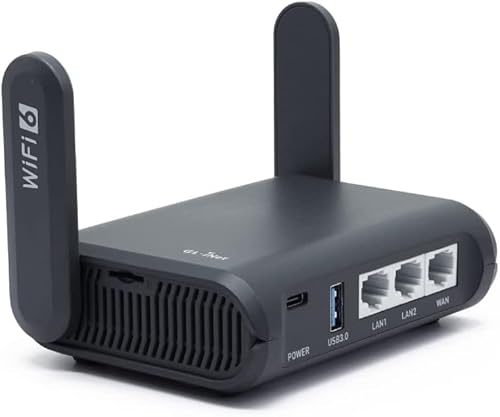
The Slate AX is the pick whose title does this guide the courtesy of saying the important word: a pocket-sized Wi-Fi 6 travel router with VPN, stated outright. In a pool where most protective claims must be excavated from documentation, that plain statement is worth dwelling on. The traveller whose brief is trust — hotel networks in two continents, work traffic on the laptop, a home or office network to tunnel back to — can shortlist this router from its title alone, and spend the documentation visit confirming performance rather than existence.
Pocket-sized is the other operative phrase, and it is honestly earned: the Slate AX belongs to the generation of GL.iNet designs built to fold flat and vanish into a tech pouch, antennas and all, while still presenting proper Ethernet ports when the room offers a socket. Wi-Fi 6 places its radio a full generation ahead of the TP-Link travellers and one behind its Slate 7 sibling — the pool’s neatest illustration that the right question is not which is best but which journey each is for. For the traveller whose venues are hotels and conferences, Wi-Fi 6 behind a venue’s throttled guest network loses nothing to Wi-Fi 7 that the venue was ever going to provide.
The GL.iNet ownership pattern applies in full: OpenWrt roots, a friendly interface over them, multi-mode upstream handling for the captive-portal world, and a community of travelling users whose collective documentation covers most airports’ worth of edge cases. The transatlantic paperwork is the pool’s standard homework — voltage range unstated in the title, plug adapters the traveller’s own affair — and the spec box records it without drama.
If the Slate 7 is the flagship, the Slate AX is the professional’s default: the router a consultant, journalist or remote worker buys when the tunnel is the point and the bag is small. In this guide’s judgement it is the most precisely matched pick to the keyword’s working-traveller heart, and the one whose title tells you so before you click.
One working pattern deserves describing, because it is how this router actually gets used by the people who swear by it. The Slate AX lives permanently in the laptop bag, pre-configured, with the tunnel set to connect automatically. In each new room the routine is under two minutes: power, join, portal, done — and from that moment the laptop behaves as though it were plugged in at home or at the office, with the home network’s resources reachable through the tunnel and the venue’s other guests reduced to an encrypted blur. Multiply that routine by forty rooms a year and the router has repaid its price in a currency frequent travellers understand precisely: evenings that did not have to be spent on IT.
- Type: pocket-sized travel router, Slate line
- Standard: Wi-Fi 6, per the listing title
- VPN: stated in the listing title; protocols and throughput to confirm in GL.iNet documentation
- Power supply voltage range and port layout: Not stated in the listing title — verify with GL.iNet documentation
Strengths
- VPN support is stated in the title — the trust feature, confirmed at a glance.
- Genuinely pocket-sized while keeping proper ports for wired rooms.
- GL.iNet’s travel tooling and community cover the captive-portal world’s edge cases.
Trade-offs
- Wi-Fi 6 rather than 7, for travellers standardising on the newest generation.
- Tunnel throughput figures require the documentation visit.
- Voltage confirmation remains the buyer’s pre-flight duty, as across this pool.
Best for: a working traveller whose laptop carries employer’s or clients’ data through hotels on both continents. Not suited for: a traveller wanting the newest Wi-Fi 7 platform and touchscreen operation, where the Slate 7 above is the deliberate step up.
NewQ Filehub AC750 — Storage-carrying traveller
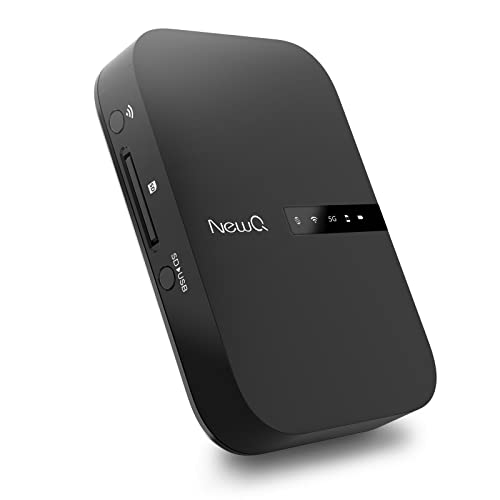
The NewQ Filehub is the pool’s lateral thinker: an AC750 travel router whose title continues past the networking into “Portable Hard Drive SD Card Reader & Mini WiFi Range Extender” territory. That continuation is its whole thesis. A certain kind of trip — the photographer’s, the field researcher’s, the family chronicler’s — generates media faster than venue Wi-Fi can responsibly upload it, and the Filehub’s answer is to carry the archive with the network: plug in a drive or a camera card, and the router becomes the trip’s little media server and backup point, sharing files to the traveller’s own devices over its private network.
That dual identity reframes its networking specification. AC750 is an older, dual-band Wi-Fi 5 class — modest beside the pool’s Wi-Fi 6 and 7 picks, and this guide will not dress it up. But the Filehub’s buyer is not purchasing radio generations; they are purchasing the evening ritual of cards emptied, files duplicated and the day’s work visible on the room’s television, all without a laptop as intermediary. In a rented apartment in Porto or a motel in Ohio, that ritual is the product, and the router half needs only to be adequate — which, behind venue networks, AC750 generally is.
The cautions follow from the same duality. A device doing two jobs invites the buyer to verify both: the exact storage and card formats supported, the file-sharing arrangement, and the networking modes all belong to the documentation visit, because the title’s enthusiasm outruns its precision. VPN support is not stated, and the privacy story here is the private local network rather than a tunnel — a working traveller with compliance duties should look to the Slate picks. Power and voltage details follow the pool’s universal flag.
As the closing pick, the Filehub earns its place by reminding the category what travel actually consists of: not benchmarks, but evenings in rooms, with the day’s material to sort. For the media-heavy traveller it may be the only pick in this guide that solves the whole evening.
The Filehub also quietly serves a second constituency: families. A drive loaded with films, attached to the Filehub in a rented house or a long rail journey’s hotel, becomes the household’s private streaming shelf — every tablet in the family watching from the same library over the router’s local network, with no dependence on the venue’s bandwidth and no per-device portal battles. Parents who have managed entertainment across a wet week in a gîte will recognise that as a headline feature wearing a storage costume. It is the least businesslike pick in the guide and, for the right trip, the most loved.
- Type: travel router with media-hub functions
- Standard: AC750 — dual-band Wi-Fi 5 class, per the listing title
- Storage: portable hard-drive and SD-card reader functions stated in the listing title; supported formats to confirm in NewQ documentation
- VPN support and power supply voltage range: Not stated in the listing title — verify with NewQ documentation
Strengths
- Card and drive sharing turns the router into the trip’s backup and media point.
- Solves the photographer’s evening ritual without a laptop intermediary.
- AC750 networking is adequate behind most venue connections it will meet.
Trade-offs
- Wi-Fi 5 class networking in a pool that reaches Wi-Fi 7.
- Two jobs mean two sets of details to verify before relying on either.
- No stated VPN support for travellers whose work requires a tunnel.
Best for: a photographer or media-heavy traveller whose trips generate cards and drives full of files nightly. Not suited for: travel prioritising the fastest, most secure network connection, where the Slate picks serve that brief directly.
What Does a Trip Actually Feel Like With One in the Bag?
Picture the working week this keyword describes. Monday opens in a US airport hotel: the router takes the room’s Ethernet, the laptop and phone join the familiar network before the kettle boils, and the morning’s calls run through the tunnel as if the office were next door rather than an ocean away from Friday’s destination. Wednesday is a train and a smaller European city, where the rented apartment’s Wi-Fi turns out to be a consumer router of mysterious provenance in the hallway; the travel router repeats it privately, the region setting changes with the continent, and the plug adapter — packed at home, checked against the supply’s printed voltage range — does its unglamorous work in the wall.
Friday is the conference centre, the hardest room in travel networking: hundreds of strangers, a portal with opinions, and a per-device limit that the router politely collapses into a single client. The traveller’s presentation laptop, backup tablet and phone all ride behind that one session. Nothing in the week required heroics; that is the point. Each evening’s setup took minutes because the decisions — network name, tunnel, region, power — were made once, at home or at the first hotel, and then simply repeated by a device that treats every room as the same room.
The leisure version of the same week is quieter but recognisably the same shape: children whose tablets join without a password ceremony in each new place, a streaming stick that works in a gîte exactly as it does in the living room, photographs draining from cards into the Filehub while dinner cooks. Travel routers are sometimes reviewed as if their users were network engineers on tour. In truth their users are tired people in unfamiliar rooms, and the best picks in this guide are the ones that respect the tiredness.
How Do the Six Travellers Compare?
| Pick | Standard | Distinguishing feature | Power note |
|---|---|---|---|
| Ubiquiti UniFi UTR | Not stated in title | Ultra-thin UniFi design | Supply NOT included — buyer provides |
| TP-Link WiFi Travel Router | Wi-Fi 5 | Simple mainstream traveller | Voltage not stated in title |
| TP-Link TL-WR802N | N300 (Wi-Fi 4) | Nano size, lowest cost | Arrangement to verify in documentation |
| GL.iNet Slate 7 | Wi-Fi 7 | Touchscreen, 2.5G port | Voltage not stated in title |
| GL.iNet Slate AX | Wi-Fi 6 | VPN stated in title, pocket size | Voltage not stated in title |
| NewQ Filehub AC750 | Wi-Fi 5 class | Drive and SD-card hub | Voltage not stated in title |
The power column is the table’s quiet lesson: transatlantic readiness is a verification, not an assumption, for every row. The traveller who does that homework once — supply ratings checked, adapters packed, the UniFi’s missing brick deliberately replaced — crosses the ocean with a network that simply works in both directions, which is all this category has ever promised.
How Do You Set Up a Travel Router in a Hotel Room?
Arrive with the homework done: the router configured at home, its network name and password set to the ones your devices already know, its admin credentials changed from the defaults, and its app installed on your phone. In the room, power the router, join its network from the phone, and open its administration. Choose the upstream — the room’s Ethernet if the socket exists and your cable made the trip, otherwise the venue’s Wi-Fi — and complete the venue’s captive-portal sign-in through the router when prompted, exactly once, as the router’s single client.
Then verify in the order your trip depends on. The work laptop first: does it join automatically, does the tunnel connect if you use one, does the employer’s world load? The entertainment devices second: the stick or handheld that could never face the portal should now simply be online. Walk the phone to the bathroom and the desk — a travel router’s position in the room is flexible in a way a home router’s never is, and moving it two metres from behind the television to the open shelf is the only optimisation most rooms will ever need.
On departure, the ritual reverses in thirty seconds: unplug, coil, pouch. The network you built leaves with you, which is the entire idea — and the next room, in the next country, gets the same network with the same name, as if the trip were one long stay in a house that happens to move.
Between trips, give the router the same courtesy you give the rest of the travel kit: update its firmware at home, where the connection is trusted and time is not borrowed; check that the VPN credentials have not expired; confirm the power supply and adapters are still in the pouch — especially the supplied brick for the picks that include one, and the chosen substitute for the UniFi pick that does not. Travel routers fail their owners almost exclusively through this between-trip neglect, not through any drama in the field, and ten minutes at the kitchen table is the whole insurance premium.
What Mistakes Do Travellers Make With Portable Routers?
The classic is the unopened box in the suitcase: a router bought for the trip, first configured in the corridor at midnight, its defaults unknown and its app undownloaded, on a phone at nine percent. Every scene in this guide’s setup section exists to prevent that evening. Second is the power ambush — arriving in the other continent with a supply whose voltage was never checked, or, in the UniFi pick’s case, with no supply at all because the parenthesis in the title went unread. Third is leaving the router’s region set to the wrong continent, then blaming the venue for the strange channel behaviour that follows.
The quieter mistakes are about trust. Joining the venue’s raw network “just for a minute” from the work laptop undoes the tunnel’s whole purpose; consistency is the security model. Forgetting that the router itself needs its firmware updated between trips lets a year of fixes sit unapplied. And packing the router but not the short Ethernet cable forfeits the best connection in half the rooms the trip will offer, for the weight of a shoelace.
Final Recommendation
For the working traveller crossing between the US and Europe, the Slate AX is this guide’s centre of gravity: pocket-sized, Wi-Fi 6, and VPN stated in its own title — with the Slate 7 as the step up for those who want Wi-Fi 7, the touchscreen and the 2.5G port for the years ahead. Leisure travellers are honestly served by the TP-Link pair, the plain Wi-Fi 5 model for ordinary trips and the nano WR802N when cost and weight outrank everything. The Filehub owns the media-heavy niche outright. And the UniFi UTR suits the traveller already living in Ubiquiti’s world — provided its missing power supply is planned for, in writing, before the trip. Whichever crosses the Atlantic in your bag, do the voltage homework at home: the ocean is wide, the plugs are different, and a prepared traveller’s network should notice neither fact.
And if this guide’s repeated documentation checks have felt like pedantry, consider that they are the trip’s cheapest insurance in written form. Every ambush described in these pages — the missing power supply, the unchecked voltage, the unconfirmed mode — is a real evening that happened to a real traveller who bought on a title’s promise. The picks above are all capable of serving two continents faithfully; the traveller’s part is simply to verify, once, the few facts their titles leave open, and then to travel as if networks were never a problem at all — which, properly prepared, they are not.
Frequently Asked Questions
Will these routers work in both the US and Europe?
The networking will — Wi-Fi is a global standard and these are travel products sold into both markets. The two checks are power and radio settings: confirm the power supply’s voltage range covers both continents (no title in this pool states it), pack plug adapters for the different sockets, and set the router’s region correctly in each continent so it uses locally permitted channels.
Why does the UniFi Travel Router need special attention?
Because its listing title states the power supply is not included. You must provide a compatible power source yourself — with the right specification, confirmed in Ubiquiti’s documentation — and for transatlantic travel, that source’s voltage range becomes part of your planning. It is a reasonable design for travellers with good USB power gear, and a trip-ruining surprise for any traveller missing the note.
Can a travel router get past a hotel captive portal?
Yes — that is one of its defining tricks. The router joins the hotel network as one client and completes the portal sign-in once; every device behind it then connects through that session without facing the portal itself, including devices like streaming sticks that cannot complete portal sign-ins at all.
Do I need a VPN subscription with a travel router?
Only if you want the tunnel — and for work travel, you generally should. The router’s VPN client needs a service to connect to, which is a separate subscription. Leisure travellers who skip it still gain the private network and one-time portal sign-in; they simply travel without encryption beyond the room.
Is a travel router better than using my phone’s hotspot?
For a quick connection for one device, the hotspot is fine. The router wins on everything structural: one portal sign-in for all devices, a consistent network name in every city, support for devices that cannot join venue networks directly, wired-room connections, and VPN tunnelling for the whole kit at once — without draining the phone that is also your map, ticket and camera.
Can I power a travel router from a power bank?
On models designed for USB power, generally yes — and it is a useful trick in rooms where the only socket is across the room from the only good signal position, since the router can sit untethered where the venue’s network is strongest. Confirm the model’s power arrangement in its documentation before relying on this; the picks in this pool vary, and the UniFi model in particular must be matched with a supply of the correct specification, since none is included.
What if the hotel only has Wi-Fi and it is weak in my room?
Place the travel router where the venue’s signal is least bad — near the door or the window line toward the corridor access point — and let it re-broadcast from there at full local strength. A travel router cannot invent signal, but repositioning the receiving point a few metres often converts an unusable corner into a workable room, which is the portable version of this site’s oldest advice: geometry first.
Related Guides
Continue with our guides to the best travel routers for frequent flyers, the best VPN routers for whole-home protection and the best portable Wi-Fi hotspots for road trips.


